Backtest Reality Check

A backtest is a promise. This tool keeps score against it.

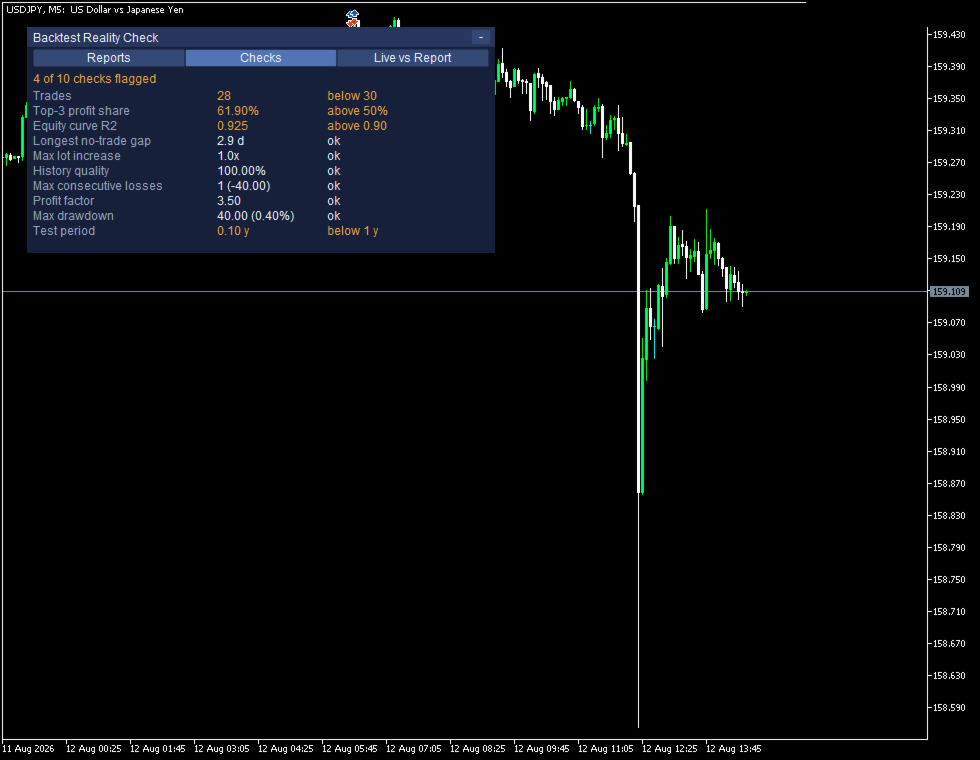
Load the Strategy Tester report of an EA and Backtest Reality Check takes it apart: how many trades it really rests on, how much of the winnings came from the three biggest ones, how straight the balance curve is, how long the quiet stretches are, whether the lot size grows inside a run of losses, and how much history the whole thing stands on.

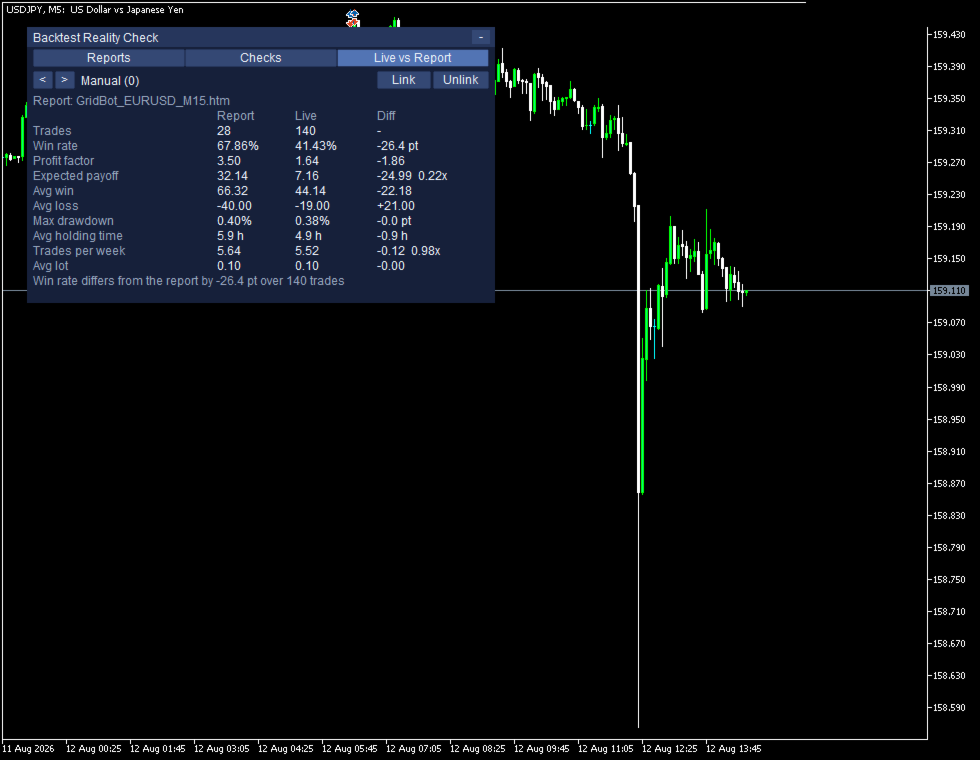
Then link that report to an EA running on your account. The same figures are measured again from your own closed trades and put next to the report, so you can watch where live has drifted away from the test.

It never places, modifies or closes an order. It does not give advice, it does not send signals, and it does not tell you what to trade. It reads, it counts, and it shows you both columns.

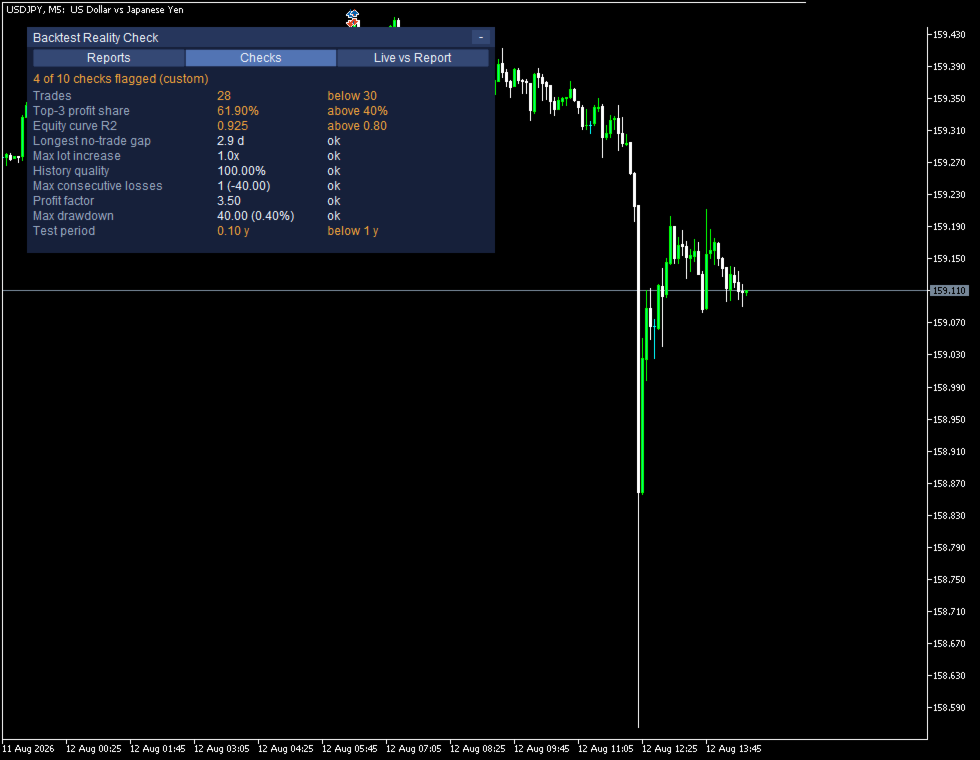
WHAT IT MEASURES - TEN CHECKS
- Trades: how many the result rests on
- Top-3 share of the winnings: how much came from the three biggest trades
- Equity curve R2: how closely the balance curve fits a straight line
- Longest no-trade gap: the quietest stretch, against the length of the test
- Max lot increase: whether the lot grows inside a run of losses
- History quality: how complete the price data behind the test was
- Max consecutive losses, PF, max drawdown, test period

On screen the rows keep the names MetaTrader uses in its own report, so you can hold the two side by side. Each one shows the measured value and, when it crosses a line, why it was flagged: "The 3 biggest winners are more than 50% of all the winnings", "Fewer than 30 trades: too few to draw a statistical conclusion". The thresholds are yours to change, and the panel marks them as custom when you do.

These are measurements, not a verdict. The tool does not say an EA is good or bad, and it cannot tell you why a number looks the way it does - overfitting, a changed market, a different broker and plain luck all leave similar marks.

THEN IT KEEPS SCORE
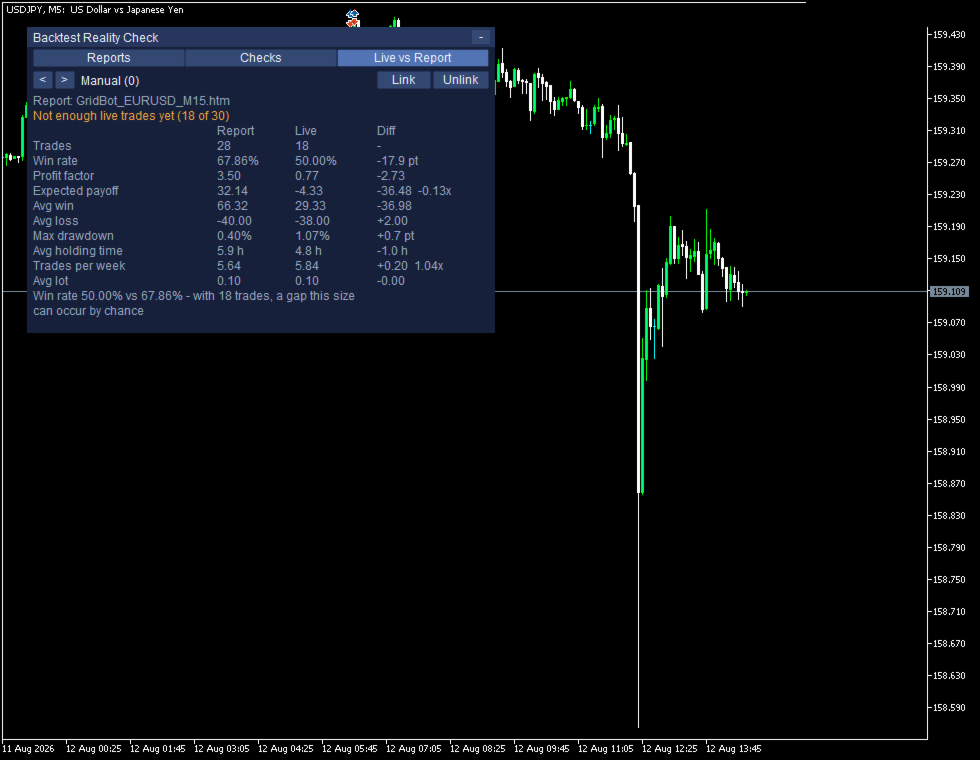
- Trades, win rate, PF, expected payoff, average win and loss, max drawdown, average holding time, trades per week, average lot
- Report and Live side by side, with the difference in the third column
- EAs are found on their own from the magic numbers in your account history, manual trading included
- Link a report to an EA once. The pairing is remembered per account

BELOW THIRTY TRADES IT SAYS SO
A gap between two small samples is not a finding. Under thirty live trades the panel says "Not enough live trades yet (18 of 30)" and greys the difference column out. Even above it, a win rate gap comes with the arithmetic: "Win rate 44.29% vs 42.71% - with 140 trades, a gap this size can occur by chance."

Being able to say "not yet" is the point. A tool that always has an answer is not measuring anything.

HOW TO SAVE THE REPORT

Run the backtest, right-click the report, Save as Report. The dialog offers HTML and XML and picks neither by default - CHOOSE HTML. The XML option is really an .xlsx file and cannot be read here; if you save one by mistake the panel names the file and tells you to save it again as HTML.

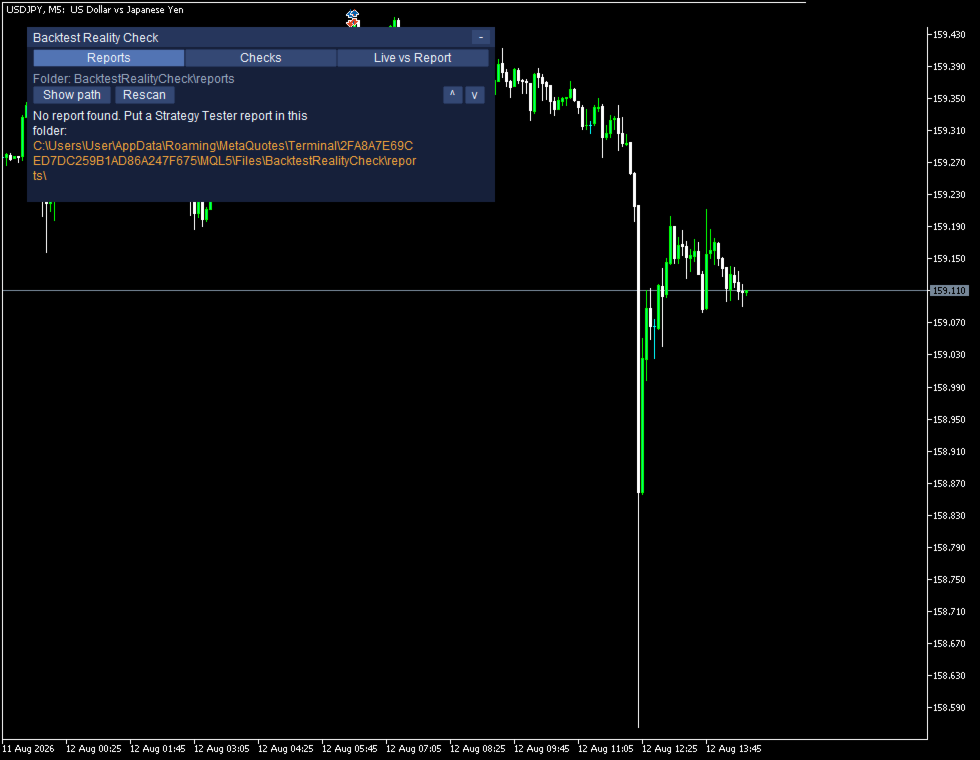
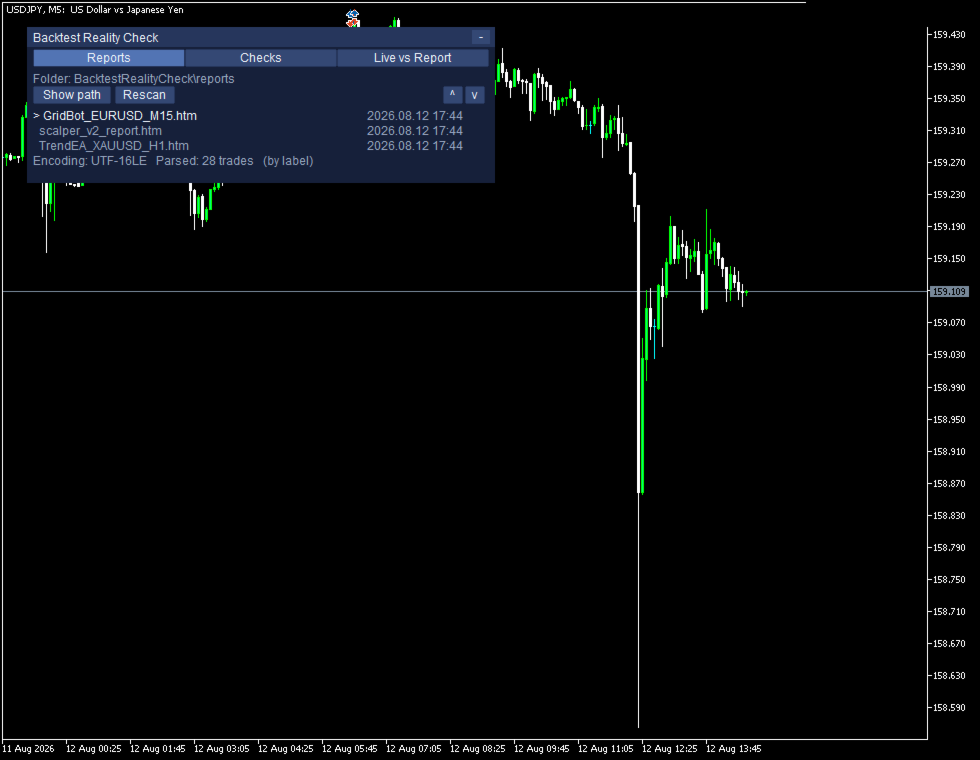
Put the file in MQL5\Files\BacktestRealityCheck\reports. The folder is created for you on the first run, the full path is printed on the panel when the folder is empty, and Show path writes it to the Experts log so you can copy it from there.

WHAT IT READS, AND WHAT IT DOES NOT
- A Strategy Tester report holds the expert, the symbol, the period, the inputs, the company, the currency, the deposit and the leverage. It carries no account number and no name.
- The file is read on your own computer. There is no internet connection of any kind and nothing is sent anywhere.
- The figures come from the deal list, not from the labels, so a report saved on a terminal in any language gives the same numbers. Checked against the same test saved in three languages.

WHAT IT CANNOT DO
- MT5 Strategy Tester reports in HTML only. MT4 reports are not read, and neither is the XML/.xlsx option. Both are refused with their own reason on screen rather than failing quietly.
- It needs a report. Without one the second half has nothing to compare against.
- It cannot say why live differs from the test.
- It cannot see trades that are no longer in your terminal history.
- Netting accounts: the platform merges positions per symbol there, so per-EA figures may be merged as well. This tool is built for hedging accounts.
- Two EAs sharing one magic number appear as one.
- Very large reports are cut off with a reason rather than freezing the terminal.
- It occupies one chart and refuses to start on a second one.
- Average holding time is measured with weekends removed, the same way the report does it. On instruments that trade at weekends this reads shorter than wall-clock time.

Everything works with Algo Trading switched off, because nothing here touches an order.

TRYING IT

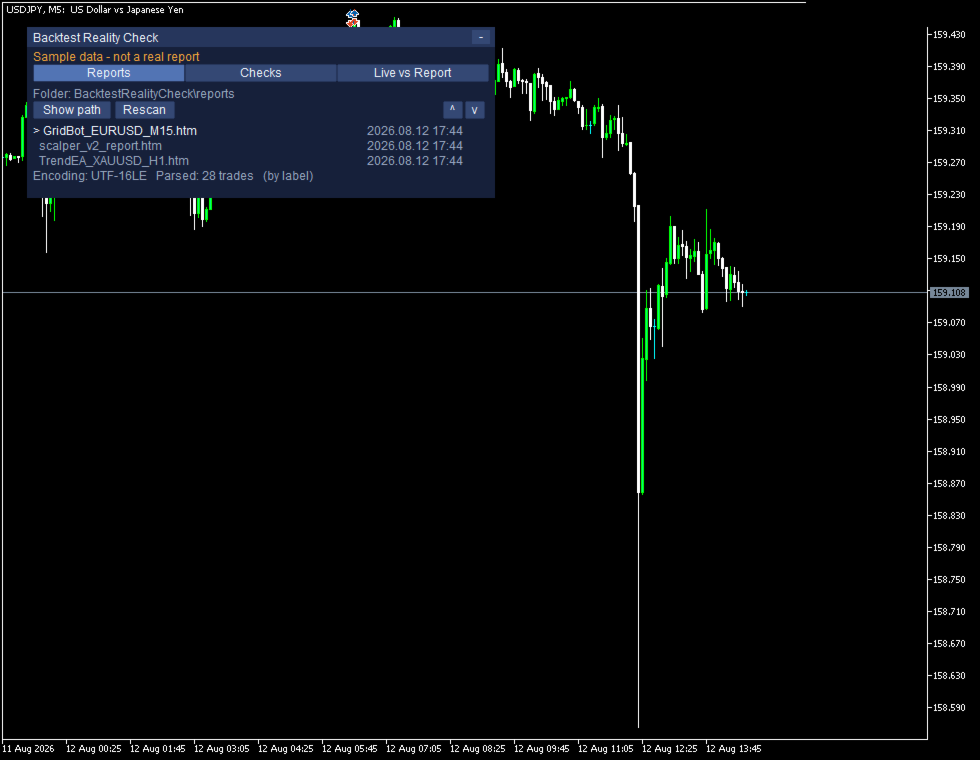
The free demo runs in the Strategy Tester and comes with a built-in sample, so all three screens are filled in from the first second: the report list, the ten checks with four of them flagged, and the comparison. It shows "Sample data - not a real report" the whole time. Point it at your own reports on a chart when you want your own numbers.

INPUTS

Folder: InpReportFolder, InpUseCommonFolder, InpRescanSeconds
Thresholds: InpMinTradesForStats, InpFlagTopTradeShare, InpFlagEquityR2, InpFlagMinTrades
Live figures: InpIncludeSwapCommission, InpHistoryDays
Panel: InpPanelX, InpPanelY, InpFontSize
Tester: InpShowTesterSelfDemo

REQUIREMENTS

MetaTrader 5 and a hedging account. One free chart. No DLL, no external server, no internet connection, no additional files. This tool does not predict prices, does not tell you what to trade, and makes no claim about your results.
作者のその他のプロダクト
Drawdown Limit Guard は、設定した損失額に達したかどうかを監視し、達した時点でポジションを決済するツールです。 売買の判断はしません。日次の損失と累計の損失を監視し、上限に近づいたら警告を出し、上限に達したら決済する。動作はこれだけです。 日次の損失上限と累計の損失上限を設定します。どちらか一方だけでも、両方でもかまいません。上限に達すると、それ以降に発生したポジションを決済し、待機注文を削除します。上限に達した時点ですでに保有していたポジションについては、該当するオプションをオンにした場合にのみ決済します。 先にお伝えしておきたいこと 本ツールは、新規の注文が発注されること自体を止めることはできません。MetaTrader 5 には新規取引を停止させる機能がなく、MQL5 Market では DLL の使用が禁止されているためです。 そのため、上限に達したあとに注文が発注された場合は、発注された直後に決済する方式を採っています(動作確認では約0.25秒)。この注文には、スプレッドと、約定から決済までの値動きの分の損失が発生します。 商品説明としては

Trade Pause Scheduler は、指定した時間帯だけ自動売買を止めておくためのツールです。 経済指標の発表前後や週明けの窓開けなど、取引を避けたい時間帯をあらかじめ登録しておきます。その時間帯に入ると、新しく出された待機注文を取り消し、新しく持ったポジションを決済します。時間帯が終われば元の状態に戻ります。 このツール自体が売買することはありません。エントリーの判断もしませんし、売買シグナルも出しません。 時間帯の指定方法 経済指標で指定する 重要度(高のみ/高と中/すべて)と対象の国を選び、発表の何分前から何分後までを停止するかを指定します。該当する指標は、MetaTrader 5 に内蔵されている経済指標カレンダーから自動的に取得します。 曜日と時刻で指定する 最大3枠まで登録できます。書式は次のとおりです。   Mon-Fri 06:00-08:00 平日の6時から8時   Mon,Wed,Fri 09:30-10:15 月・水・金の9時30分から10時15分   All 12:00-12:30 毎日12時から12時30分   Fri 23:00-0
Risk Lock Trade Panel は、MetaTrader 5 で手動売買をするための発注パネルです。方向とエントリーを決めるのはあなたで、パネルは計算をして、損切りを付けた注文を出し、その後のポジション管理まで同じ画面で行います。 自分から売買することはありません。助言もしませんし、シグナルも配信しません。 リスクからロットを決める リスクは残高または有効証拠金に対する割合で指定できます。口座通貨での金額指定も可能です。損切り幅はポイントで入力するか、「Show line」を押してチャート上の損切りラインをドラッグしてください。ドラッグしている間、損切り幅とロット、想定される損失額が動かすたびに計算し直されます。 損切りを近くに置けばロットは大きくなり、遠くに置けば小さくなります。それでも損失額は指定したままです。チャートのどこに損切りを置くかを決めれば、ロットはそれに従って決まる。これがこのパネルの考え方です。 リスクリワードのプリセットを選ぶと、損切り幅の倍数で利確が置かれます。1対1、1対1.5、1対2、なしの4つです。選んだものが損切りと一緒に注文へ付きま
多くのリスク管理ツールは口座全体を見ています。口座が上限に達すると、何も問題を起こしていなかったEAまで含めて、すべてが止まります。 EA Circuit Breaker はEAを1本ずつ扱います。あるEAが、あなたが引いた線を越えたとき、そのEAだけが処理され、口座の残りはそのまま動き続けます。 自分から売買することはありません。助言もしませんし、サインも出しません。 ヘッジング口座向けの道具です ある取引がどのEAのものかを見分けられるのは、プラットフォームがそれぞれを別のポジションとして保っている間だけで、ヘッジング口座がまさにそれにあたります。ネッティング口座では銘柄ごとに1つのポジションへまとめられ、マジック番号は何も指し示さなくなるため、どんなツールを使っても分けることはできません。本ツールは起動時に口座の種別を読み、ネッティング口座では表示のみに切り替えて、その旨を画面に出します。決済済みの取引はマジック番号で分けられたままです。 設定は要りません 起動すると、表はもう埋まっています。保有中のポジションと直近30日の履歴を読み、見つかったマジック番号を集めて、
Most trade managers work on the orders they placed themselves, or on the symbol of the chart they sit on. This one works on the account. Trade Control Center puts every open position and every pending order on your account into one list - whoever opened them. Trades you placed by hand, from your phone, from another terminal, or from any EA all appear in the same table, across every symbol, and you can act on them from there. It does not open trades on its own, it does not give advice, and it d
フィルタ:
レビューなし
レビューに返信