Trade Manager DaneTrades

4.33

Trade Manager は、リスクを自動的に計算しながら、取引を迅速に開始および終了するのに役立ちます。 過剰取引、復讐取引、感情的な取引を防止する機能が含まれています。 取引は自動的に管理され、アカウントのパフォーマンス指標はグラフで視覚化できます。 これらの機能により、このパネルはすべてのマニュアル トレーダーにとって理想的なものとなり、MetaTrader 5 プラットフォームの強化に役立ちます。多言語サポート。

MT4バージョン | ユーザーガイド + デモ

Trade Manager はストラテジー テスターでは機能しません。 デモについてはユーザーガイドをご覧ください。

危機管理

  • % または $ に基づくリスクの自動調整
  • 固定ロットサイズを使用するか、ボリュームとピップに基づいた自動ロットサイズ計算を使用するオプション
  • RR、Pips、または価格を使用した損益分岐点ストップロス設定トレーリングストップロス設定
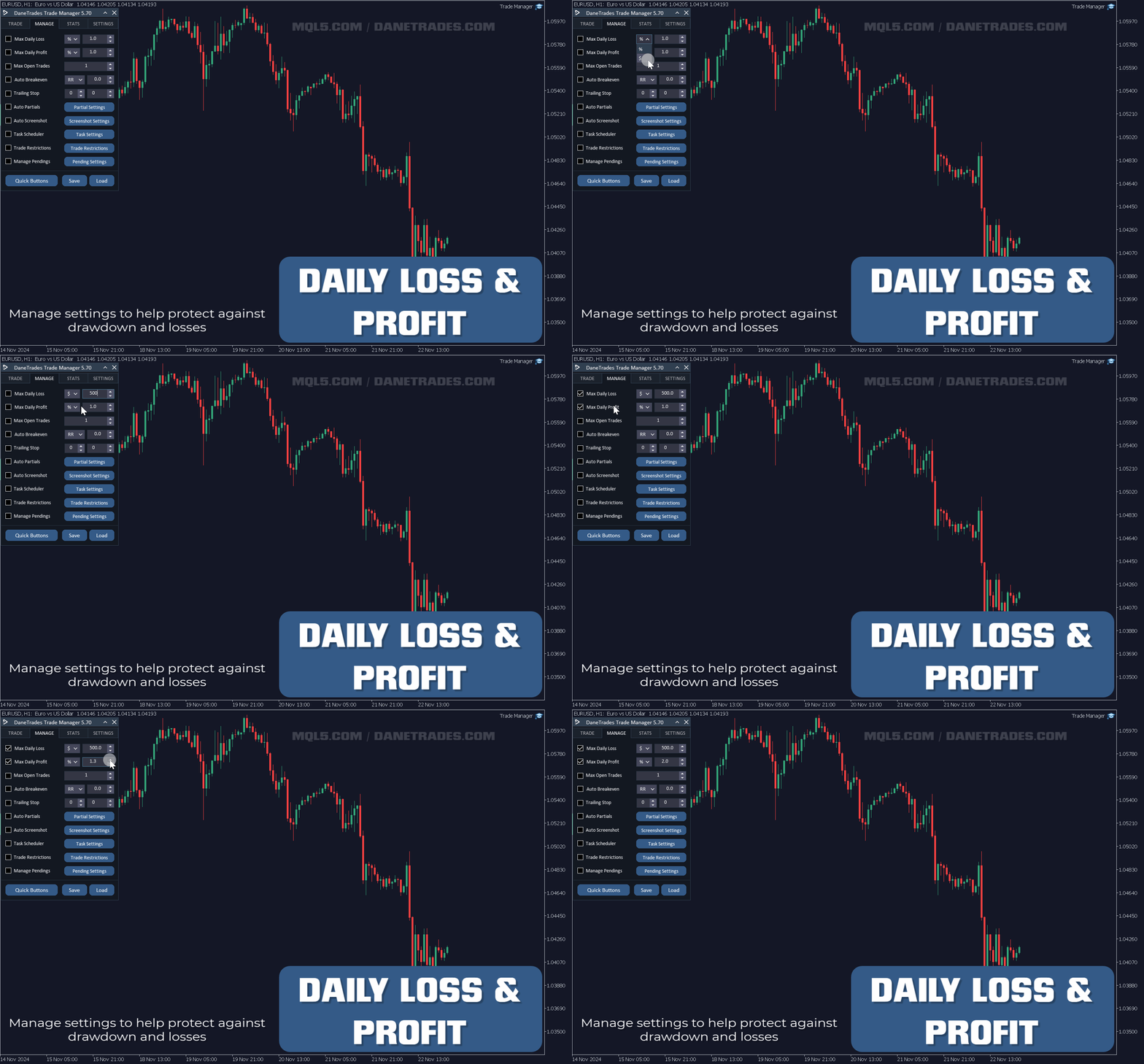
  • 目標に達したときにすべての取引を自動的に終了するための 1 日あたりの最大損失 (%)。 過度のドローダウンからアカウントを保護し、オーバートレードを防ぎます
  • 1日の最大損失をドル単位で設定し、目標に達したときにすべての取引を自動的に終了します。 過度のドローダウンからアカウントを保護し、オーバートレードを防ぎます
  • ボタン 1 つですべての取引を損益分岐点に設定
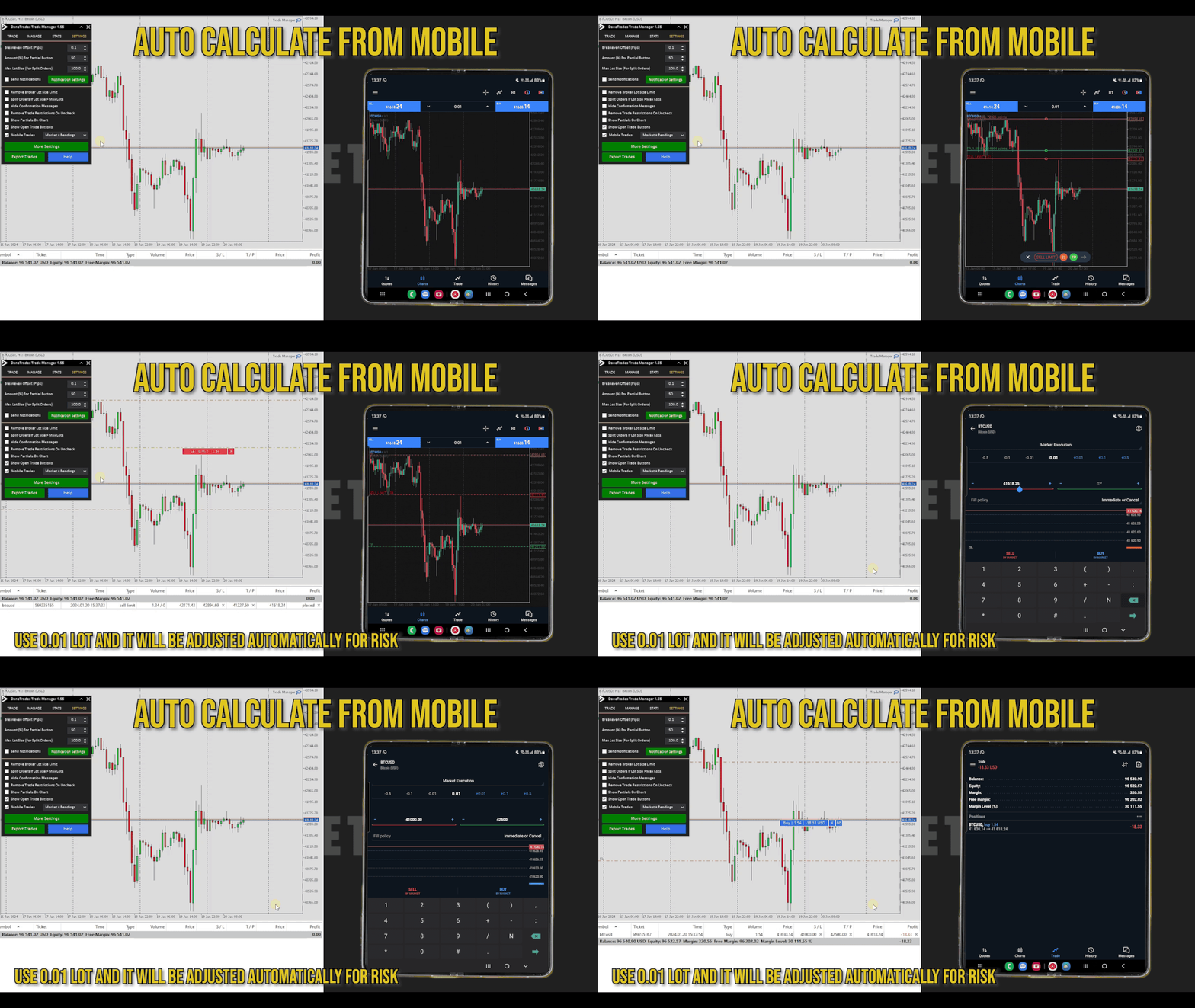
  • 携帯電話/電話から送信された取引のリスクを自動的に計算します
  • OCOは設定で利用可能

取引とポジションの管理

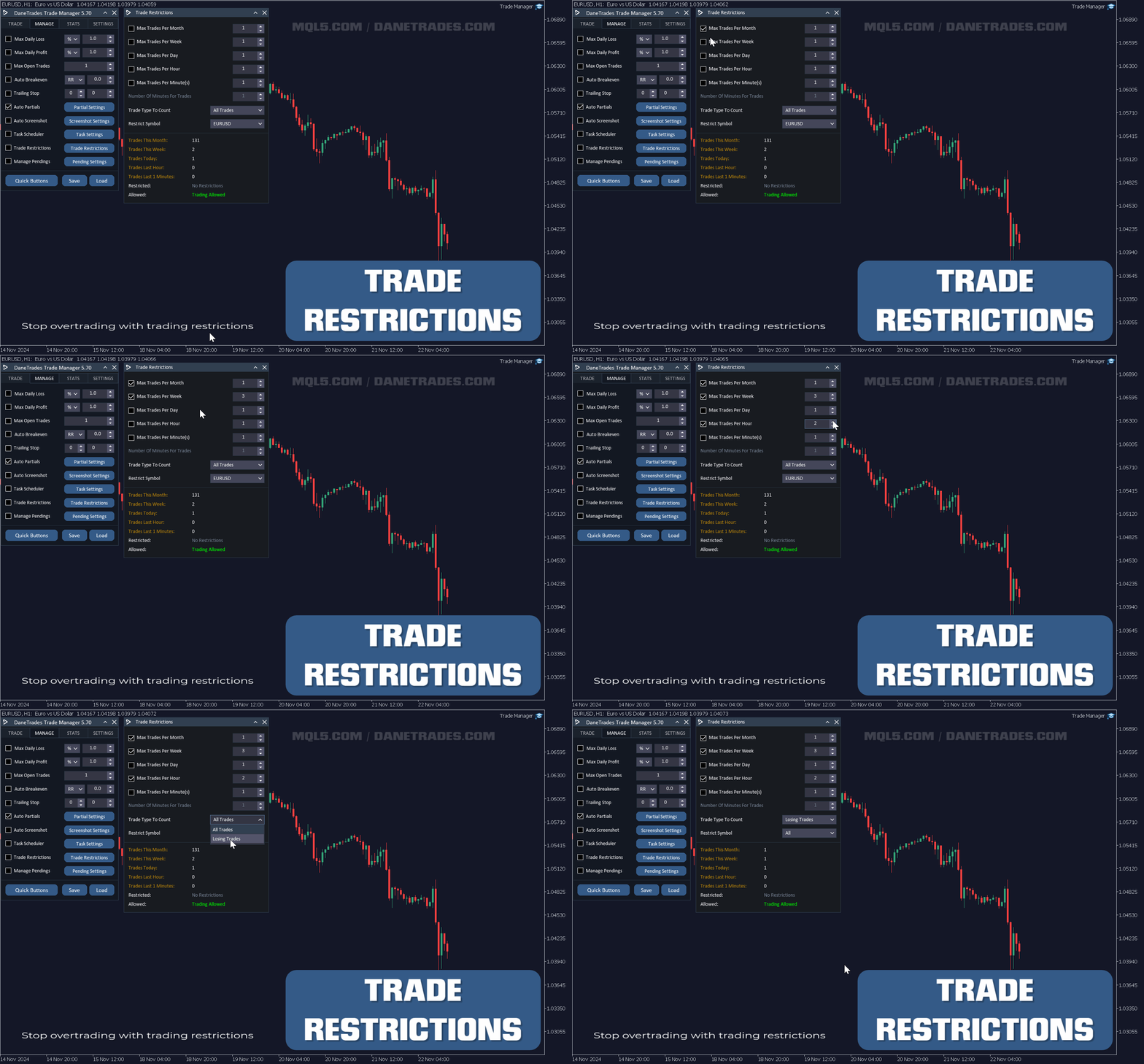
  • 月、週、日、時間、または分ごとの最大取引を設定して、過剰取引を停止し、リベンジ取引を行います。
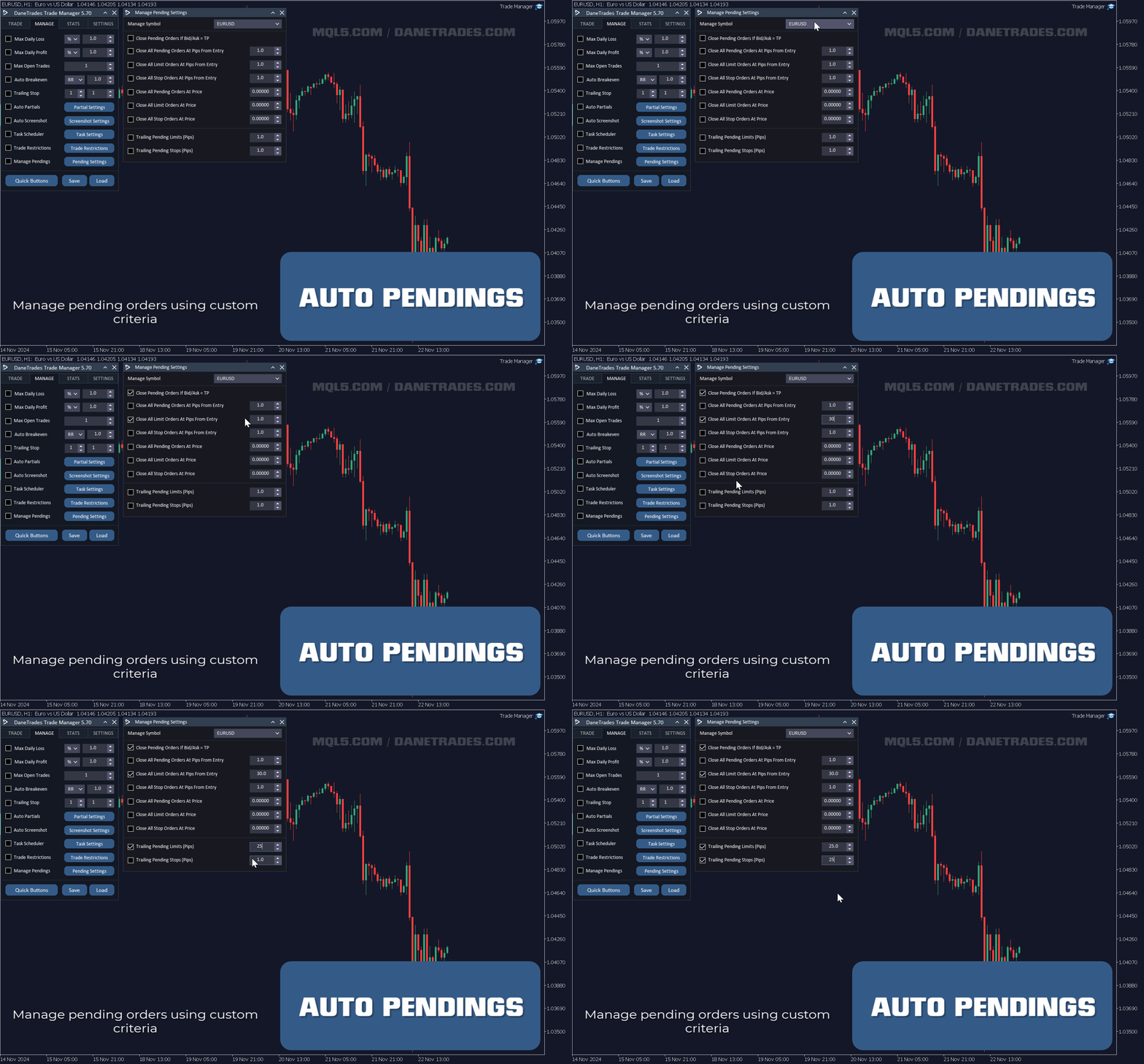
  • 高度な未決注文管理。 未決注文をいつクローズするかに関するルールを調整する
  • 後続の未決注文
  • 成行注文と未決注文の両方をサポート
  • ポジションを確保し、過剰取引を停止するための $ 単位の 1 日の最大利益目標
  • ポジションを確保するための 1 日の最大利益目標 (%)
  • リスクとエクスポージャを制限するためのオープントレードを最大化します。
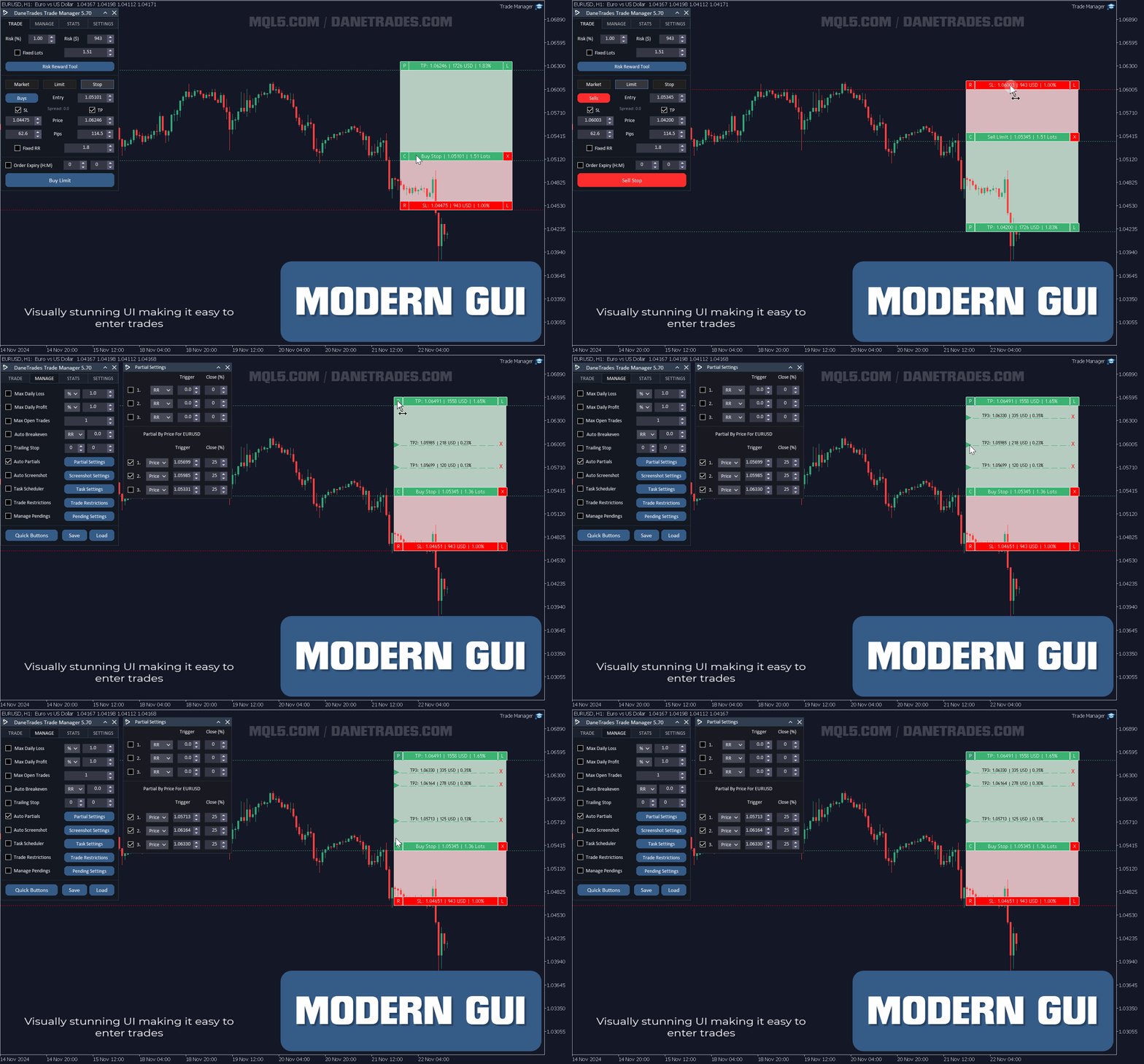
  • RR、Pips、またはPriceを使用してパーシャルを自動的に取得します
  • 1:2、1:3、1:4 などの固定 RR ターゲットを使用してエントリーし、ポジションの計算された利益を確認します
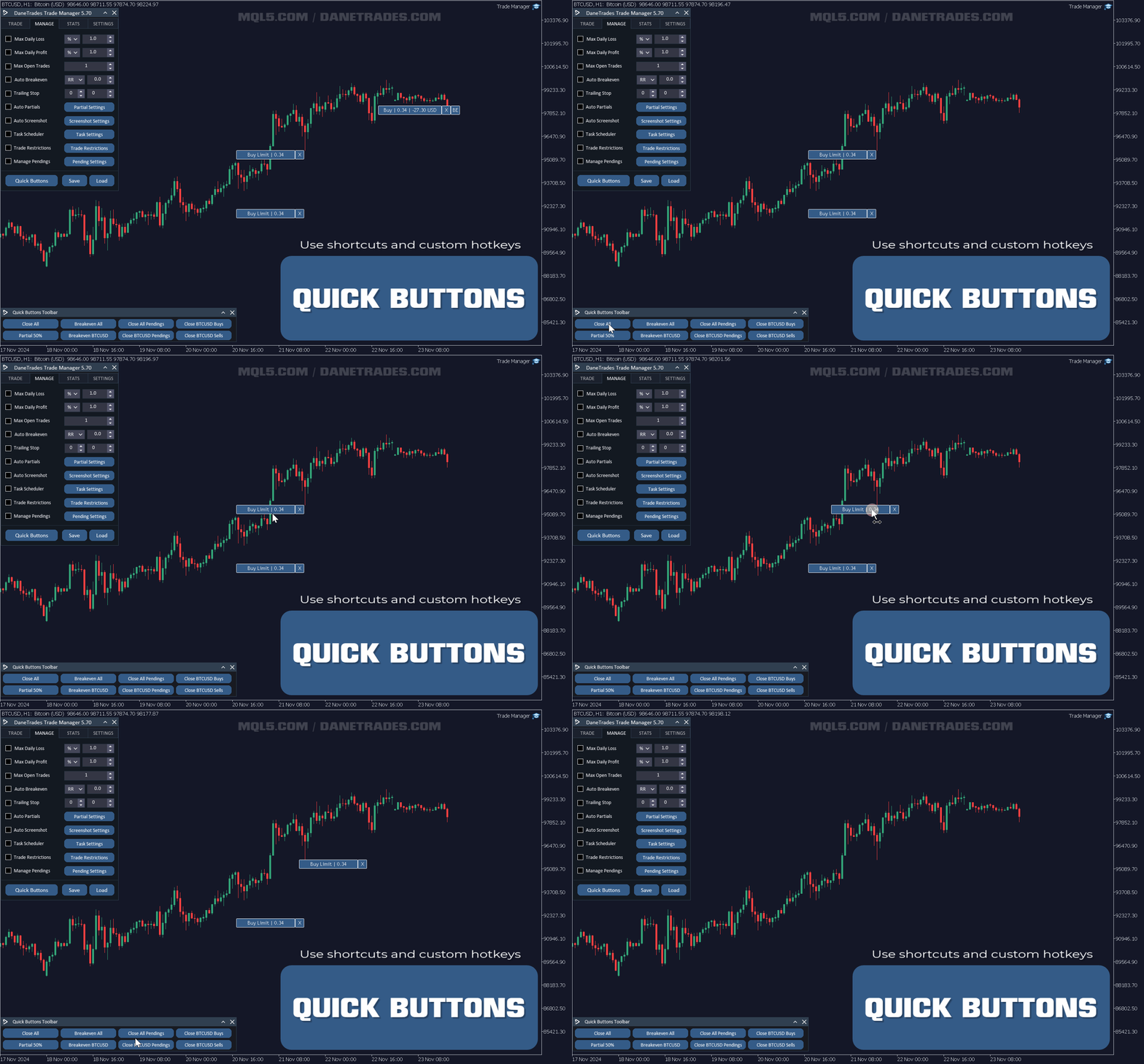
  • ボタン 1 つですべての保留中の注文を閉じる

グラフィカルパネルの機能

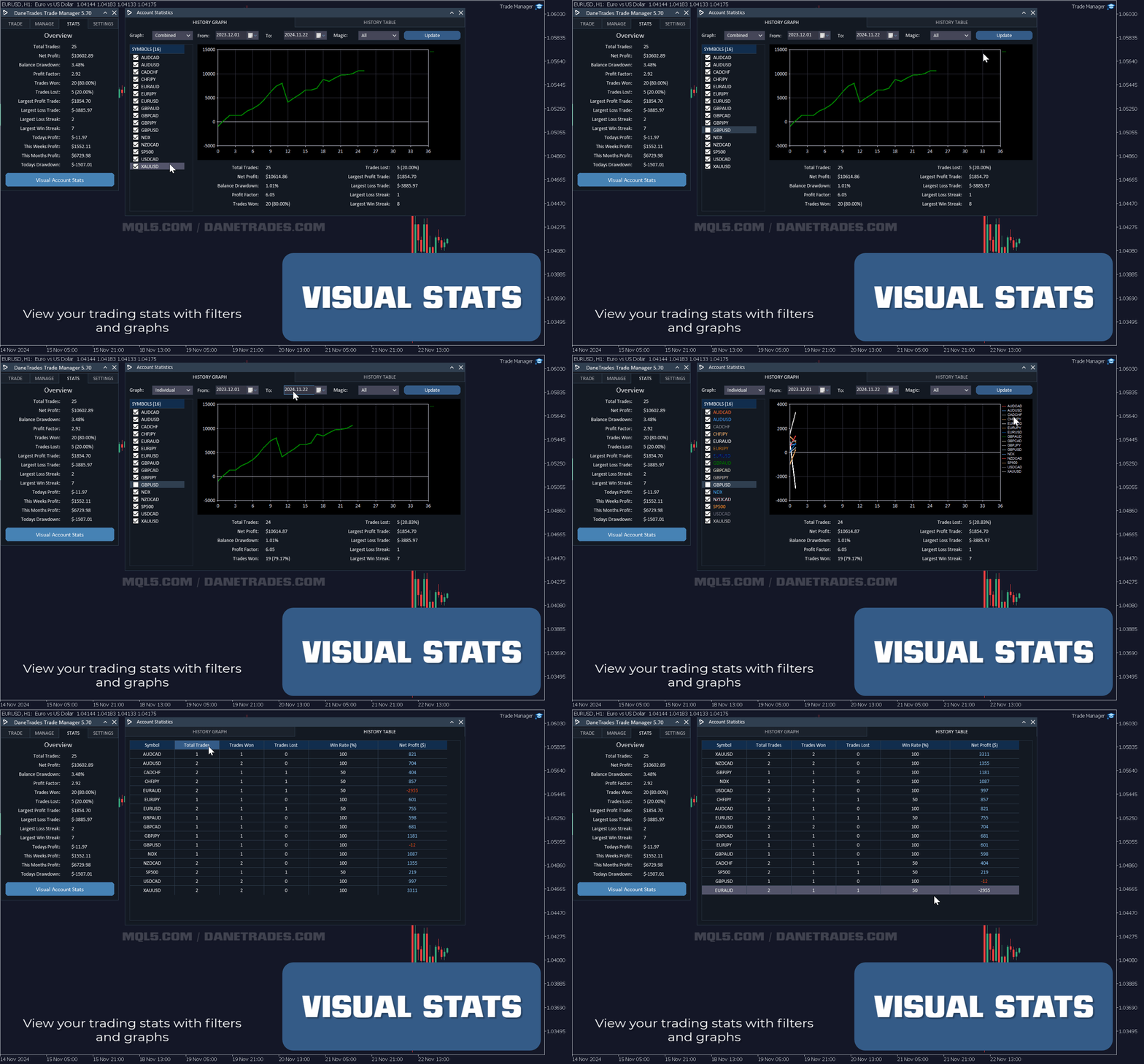
  • アカウントのパフォーマンスと勝率、損失率、合計取引などの統計を確認します。
  • 取引パフォーマンスを視覚化し、シンボルや日付範囲などのフィルターを使用して統計のグラフを取得します。
  • 管理設定の設定ファイルのテンプレートを 3 つまで保存できます。
  • 設定ファイルをロードして、最も好みの設定をすぐに使用します。
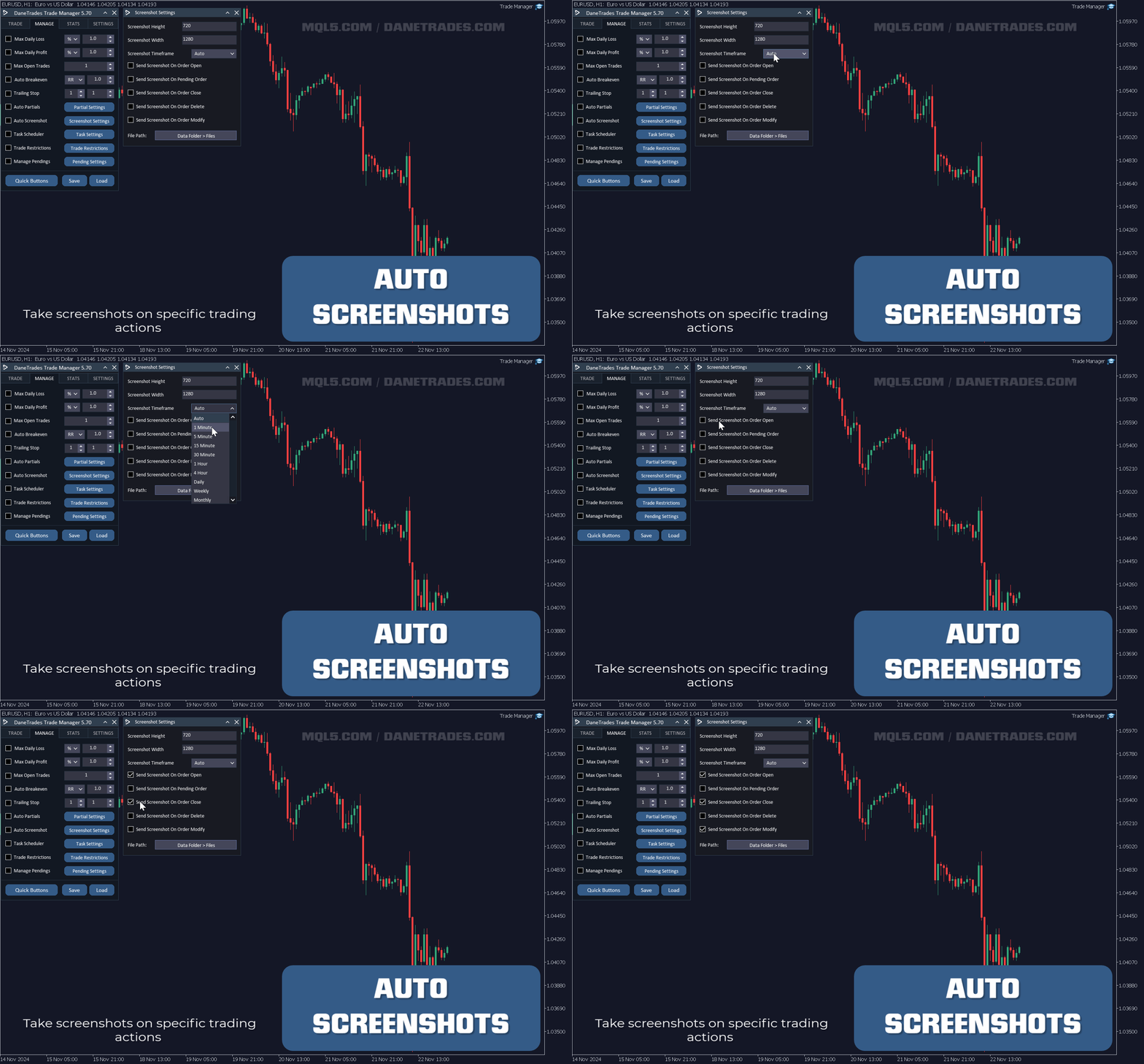
  • 自動スクリーンショット。 スクリーンショットの時間枠とサイズをカスタマイズします。
  • 注文保留、削除、オープン、クローズ、期限切れ、TP または SL のヒット時の自動スクリーンショット。
  • ボタン 1 つですべての取引をスプレッドシートにエクスポートします。
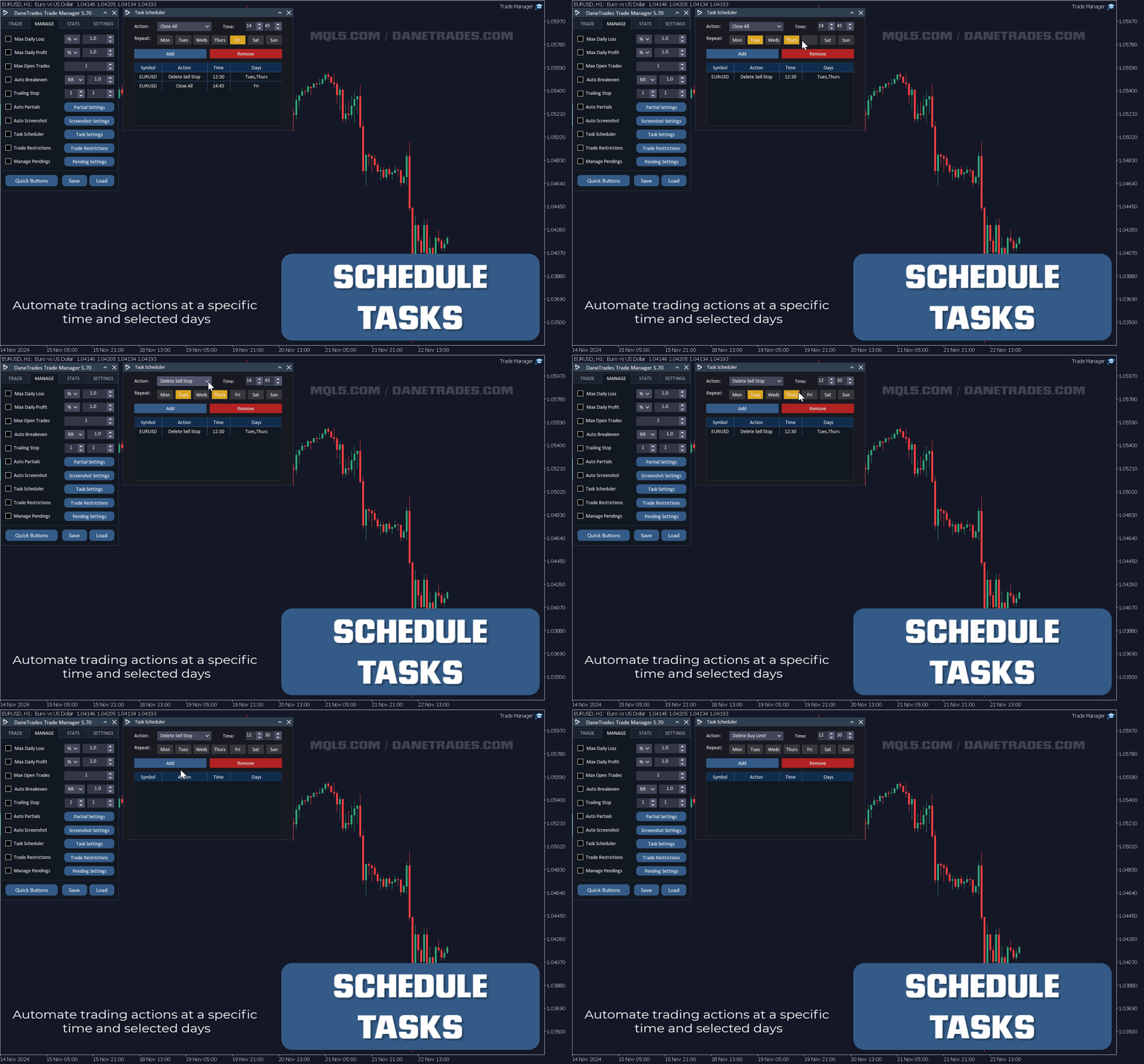
  • タスク スケジューラを使用すると、特定の日と時間にアクションを実行できます。
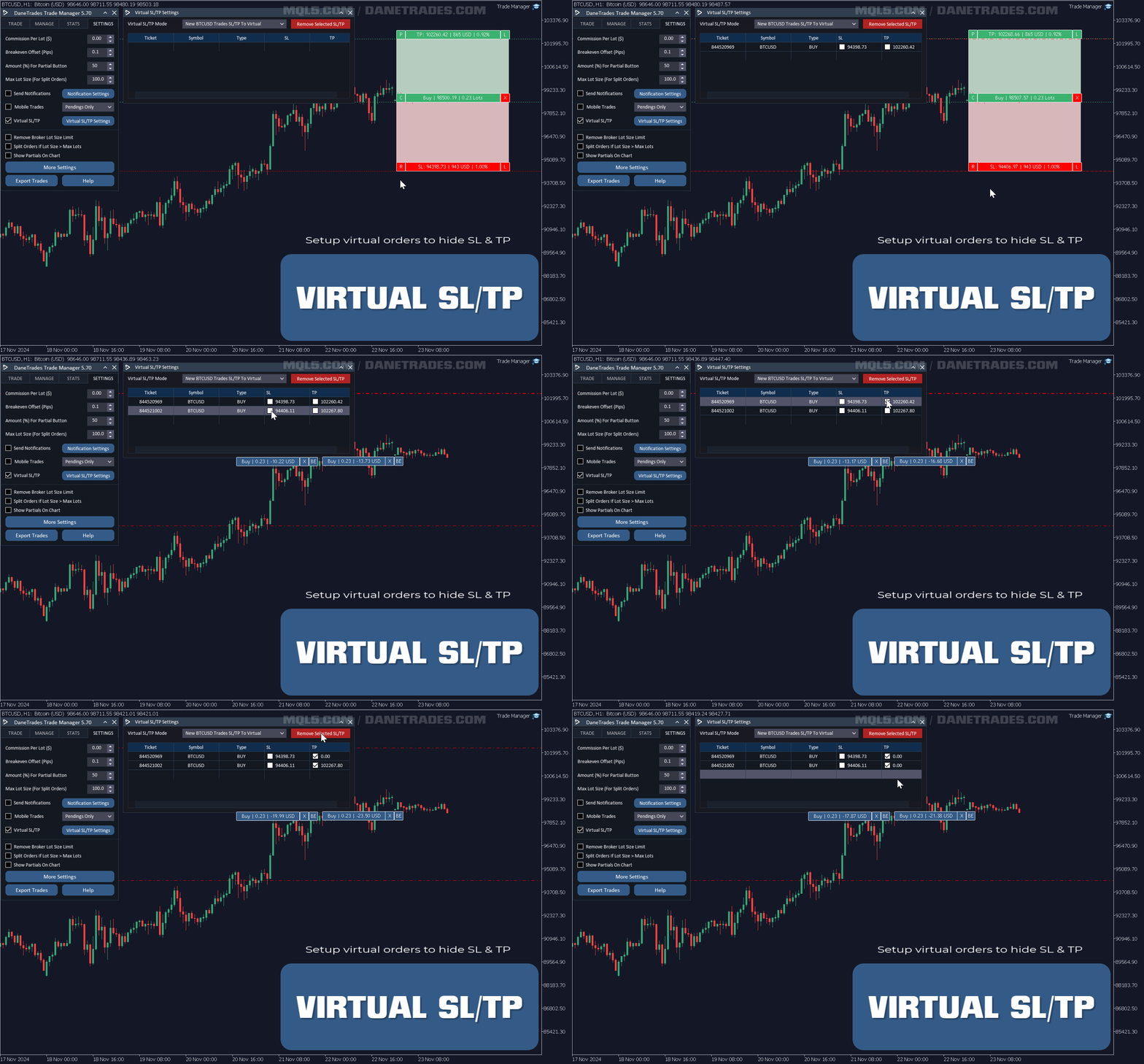
  • 仮想ストップロスおよびテイクプロフィットマネージャー
  • 同じシンボルのストップロスとテイクプロフィットレベルを一括編集

通知を送信する

  • アラート、プッシュ通知、電子メール通知から選択します
  • 注文が SL または TP に達した場合に通知する
  • 注文が損益分岐点になった場合に通知する
  • 部分的に取得された場合に通知する
  • 1 日あたりの最大損失額に達した場合に通知する
  • 1 日の最大利益に達した場合に通知する
  • 取引が制限された場合に通知する
  • 取引が許可された場合に通知する

取引ホットキーとショートカット

  • パネルの主要機能の完全にカスタマイズ可能なホットキーとショートカット

何か問題がございましたら、メッセージをください。いつでも喜んでお手伝いさせていただきます。


#タグ: プロップファーム、トレーディングパネル、トレードマネージャー、注文管理、トレーリングストップ、ブレークイーブン、パーシャルクローズ、マニュアルトレーディング、トレーディングアシスタント、トレードアシスタント、リスク管理、オーバートレーディング、ポジション管理、最大損失、履歴統計、仮想tp、 バーチャルSL、隠れストップロス、隠れテイクプロフィット、バルクSL、バルクTP、モバイルトレード
レビュー 34
Silver Rondo
43
Silver Rondo 2025.11.09 13:20 
 

Best trade manager out there!

zsuga01
19
zsuga01 2024.11.28 21:15 
 

Amazing

m.eo
15
m.eo 2024.10.16 17:09 
 

Great tool, better than trade assistant imho. Dane is very responsive & is all ears to any suggestions on improving the tool which is fantastic. I will be using Danes Trade Manager for the foreseeable future. Cheers Dane

おすすめのプロダクト
This tool will perform Trailing stop loss and Break even management for orders. Helps you limit or reduce the time spend watching orders on the screen, especially when you need to go to sleep. Just add this EA to 1 chart, you can manage all pairs. You can filter orders by comment, magic number, symbol and order ticket number. When Breakeven it can add shift/offset pips (to cover the commission...). You can try in strategy tester before purchase. The EA will add Buy and Sell alternately, so you
Symbol Manager or Grid Manager, designed to group orders into one position (by Symbol or by Magic Number). This utility will be useful to multi-currency traders (many EAs), who can have multiple orders on several pairs. You will be able to see the total number of lots, the total profit, and set virtual stop loss and virtual take profit. To set a real TP (or SL), you must first set the virtual value, and then enter the command in this cell: "set". If you want to set real TP/SL for all orders at
Nebula Trading Manager
Sina Mohammadamin Shahriari Moghadam
This expert advisor named   TradeManager   provides a manual trading management panel in MetaTrader 5 that allows precise control over open positions. It is designed for traders who want dynamic management of Stop Loss (SL), Take Profit (TP), Break Even (BE), and Partial Close functionality. Key Features: Dynamic Trade Management : Manually set or drag-and-drop SL, TP, and BE levels. Supports partial closing at different profit levels (1:1, 1:1.5, 1:2). Automated Drawing : Automatically draw
TP SL Bot is a utility that automatically sets Stop Loss and Take Profit for newly opened orders in several ways. There is also a function for calculating the volume that you need to open the trade to get the desired amount with the specified Stop Loss / Take Profit size. There are several options for calculating the size and setting parameters: 1. Setting based on the amount specified by the user as a percentage of the current deposit balance. 2. Setting as the amount entered by the user. 3. Se
GGP Trade Copier  EA is an automatic trading bot that can help traders automatically replicate the trading strategies and operations from one trading terminal to others by experiencing exceptionally fast trade copying system. Its easy-to-use setup allows you to copy trades between multiple MetaTrader terminals on the same Windows computer or Windows VPS with lightning-fast copying speeds of under 0.5 seconds. The software supports multiple trading varieties, including Forex, commodities, stocks
SLTPSetter
Raphael Djangmah Osro Agbo
SLTPSetter - StopLoss Take Profit Setter HOW DOES IT WORK? Risk and account management is a very critical aspect of trading. Before entering a position, you must be fully aware how much you will be willing to loss both in percentage and value. This is where SLTPSetter gets you covered.  All you need to do is attach the indicator on the chart and PRESS BUY OR SELL automatically, all parameters needed for placing the trades will be provided at the top left corner of the screen. Feel free to adjust
Expert TP SL v04 - Professional Trading Assistant with AI Motivation System Advanced manual trading tool with automatic risk management, overtrading protection, and intelligent psychological support for disciplined trading. PRODUCT OVERVIEW Expert TP SL v04 is a comprehensive trading assistant designed for manual traders who want to maintain emotional discipline while automating risk calculations. This isn't just another order placement tool - it's a complete trading psychology system that pr
One Click Trading – Auto TP SL Developer TraderLinkz Version 1.00 Category Utility What it does Adds missing TP and SL to your manual trades and pending orders Sets them once per ticket Lets you move TP and SL afterward Works on hedging and netting accounts Scans on every tick and reacts on trade events Why you want it You place faster entries You get consistent risk and exit targets You reduce fat finger errors You keep full manual control Quick start Attach the EA to any chart Keep TP and SL e
FREE
FREE FREE FREE Trade Assistant MT5 – Professional Trading & Risk Management Panel Trade Assistant MT5 is an advanced trading panel designed to help traders execute orders faster, safer, and more professionally . It simplifies manual trading by combining smart order management , precise risk control , and one-click execution , making it ideal for both beginners and advanced traders. This tool does not trade automatically . Instead, it empowers you with full control while applying professional-gra
FREE
King ElChart Manual Trade Panel
Mohammed Maher Al-sayed Mohammed Ahmed Saleh
King Chart – Manual Trading Panel for MetaTrader 5 Overview King Chart is a simple yet powerful manual trading panel built for traders who want speed, precision, and clarity. It enables quick order execution, clear lot control, and real-time account monitoring — all directly on your MT5 chart. Main Features Multi-Lot Trade Execution 3 Buy and 3 Sell buttons for instant execution Each button is tied to a custom lot size field Designed for flexible scaling in or out of trades Position Management
BreakEvan Utility  Is a simple tool in a panel with this utilities: This utility will draw a Golden Line in the chart applied showing the breakeven price, considering all the positions opened for that specific symbol. Also the information panel shows: Balance Breakeven Price for that chart Force Breakeven (for that symbol) as ON/OFF Force Breakeven Global (takes into account all trades opened) as ON/OFF Total Lots opened for Symbol Total Lots opened Global And two buttons: Force Breakeven: Whe
This EA is there to take your trade closing stress away. Quickly close as many trades as you have opened at the click of a button, INCLUDING PENDING ORDERS. This works on the MT5 platform whether it be currencies, Indices, stocks or Deriv synthetic indices. I have saved it under utilities as it is a utility, however, to install this, you have to save the file in you "EA" folder. That is; Go to "File", then "Open Data Folder", "MQL5" and then "Experts". Paste this file there. Restart MT5 and you'
'Quick Close Panel' is an easy to use interface for managing orders. It has a button for closing all winning trades on the current chart, a button for closing all losing trades and another button for closing   all running trades (Losing and Winning)   on the current chart. It is very responsive and quick to execute operations due to the effective time complexity of the algorithm used in the  program.  Vist this link to download demo:  https://www.mql5.com/en/market/product/62901?source=Site+Mark
Equity monitor This is a simple means change informer. I wrote it for myself, maybe someone will need it... 1. Displays the change in funds for the day. Every day, when the terminal is first launched, it remembers the current funds and monitors changes throughout the day. 2. The first day of the month, well remembers the money and, within months, to monitor changes. 3. Well, it displays the profit of the open position. To work, you need to create 4 global variables: gvarEqityDay , gvarEq
FREE
MultiTimeframe Info Feed (MIF) Indicator Description: MultiTimeframe Info Feed (MIF) is a smart MQL5 indicator that displays a dynamic, real-time info panel directly on your chart, offering powerful insight into current market conditions. Key features include: Real-time display of Open, High, Low, Close, and live Tick price Tick Rate (ticks per second) for assessing market activity Auto-calculated Entry Price on new candle formation Signal direction detection (BUY / SELL) Price action pattern re
FREE
Trading Utility for Forex Currency Pairs Only not for Gold  Functions Auto Lot Calculation based on Risk Auto stoploss  Auto TakeProfit Breakeven Auto Close Half % Close in percentage with respect to the PIPs Pending Orders BuyLimit Sell Limit with distances BuyStop Sell Stop    with distances Trading Informations Risk in percentage For Multiple trades Combine Takeprofit and Combine Stoplosses
Total trade manager allows you to manage your trade to maximise your profits and minimise your losses. This is an essential for traders that are looking for consistency within their trading.  The features: Partial Stop Loss: This feature allows you to close a partial percentage of your trade once it goes into negative. So if your stop loss is 20 pips, you could close 75% of your trade at 10 pips and let the remainder of the position to continue running. Auto Stop Loss: This means that once you p
Automatic Trade Calculation Panel   One-Klick-Trading Automatic calculation of Lot sice Atuomatic calulation of Stop-Loss and TakeProfit Up to 3 partial closings Trailingstop (Stop-Loss moves automatically)   The lot size is calculated by the previously determined risk (e.g. 1.0% of the account size) and the distance of the Stop Loss from the entry point. The distance from the Stop Loss to the entry point results from the ATR indicator multiplied by a freely selectable factor. The Stop Loss and
Overview Mirror Signals Service EA (Text only)   is a powerful monitoring Expert Advisor that automatically sends   real-time Telegram notifications   for all important trade events on your MetaTrader 5 account. It is engineered specifically for   signal providers ,   trade-copier operators ,   auditors ,   educators , and   professional trading services   that require immediate, detailed, and reliable reporting. Everything from   entries, exits, SL/TP changes, comment changes, trailing sto
MANAGING YOUR FOREX TRADING LIKE A PROFESSIONAL WITH   POSITION SIZE   CALCULATOR Position Size Calculator – an MT5 indicator, is a user-friendly tool that allows you to determine your required forex trading size for each trade based on how much you want to risk and available capital in your forex trading account. Load the calculator onto your chart and simply draglines to show your stop loss and take profit level. The calculator will automatically calculate the trade size instantly. This indica
Trader SWORD
Tiofelo Da Olga Gilbert Teles
Trader [SWORD] is a panel EA designed to help the trader [scalper]. From the dashboard, the trader can: set the order volume, stop loss and take profit values [in points]; open a market order with its respective stop loss and take profit values. close all [win only, loss only or win and loss] positions opened through the EA.  On the panel we have:   the buttons to open new market orders [buy and sell];   the buttons to set the order volume [increasing and decreasing de volume order]; the buttons
アンチグリッドポジションプロテクターは、 ドローダウン回復を期待して負けポジションを増やしたり、意図しないときにヘッジしようとしたりする誘惑からあなたを守るために設計されたユーティリティツールです。 ------------------------入力---------------------------- ---- 損失ポジションのヘッジを許可しますか? - これは true/false 入力 (ダブルクリックして値を切り替える) で、 既存の 負け ポジション (同じシンボル上)で 反対方向 の取引 (未決注文または成行執行のいずれか) を開始することを許可または禁止します。 「損失」ポジションを特定する方法 - 2 つのオプション ( ストップロス と 損益 )。 「ストップロス」を選択すると、実行中のポジションのストップロスが損失領域にある場合、ストップロスが損益分岐点レベルを超えていない限り、このツールでは新しい取引を行うことができません。同様に、「PnL」を選択すると、変動ポジションが利益(> $0)でない限り、ツールは同じシンボルで新しい取引を開始することを許可しませ
Imagine flying a real aircraft without ever stepping into a flight simulator. That's what trading is like. You have to simulate your strategy before you can take it to a live market. It is good if you can simulate things speedily before even stepping into any live market, or before coming up with an automated system.  People don't have all day to stare at a higher timeframe chart until the entry signal finally arrives. That's why I built this so that you can simulate your strategy with speed. Th
FREE
SmartRAL
Jemy Yeferson Dimu Ludji
SmartRAL (Smart Risk Auto-Lot EA) SmartRAL: The Ultimate Risk & Lot Management Expert Advisor (EA) SmartRAL is an essential tool for traders who demand precise risk management and automated position sizing in MetaTrader 5. Stop guessing your lot size and let the algorithm handle the calculations. This EA allows you to trade with confidence by guaranteeing your risk exposure on every single trade, while offering absolute flexibility in setting your Stop Loss (SL). Key Features & Benefits Guarante
Professional automated trade management utility that instantly sets Take Profit and Stop Loss on all your trades, with advanced Breakeven and Trailing Stop features. Perfect for scalpers and day traders who want hands-free risk management. Key Features: Instant TP/SL placement on all trades (manual or automated) Smart Breakeven system - locks profits automatically Advanced Trailing Stop - follows winning trades dynamically Fully customizable - adjust all parameters to your strategy
EasyTradePad – MetaTrader 5用取引パネル EasyTradePadは 、手動および半自動取引のためのツールです。パネルでは、注文とポジションを迅速に管理できるほか、リスク管理の計算もワンクリックで行えます。 パネルの機能: 事前に定義されたリスク(%または預金通貨)で取引を開始および終了します SLとTPをポイント、パーセンテージ、または金額で設定します リスクと報酬の比率を自動計算 損切りを損益分岐点に移動する 部分的なポジションのクローズ トレーリングストップ(ポイントまたはローソク足の影による) ポジションの平均化とピラミッディング アクティブな取引のパラメータを変更する [   デモ ] [   説明 ] 追加機能: ピラミッド化 価格がテイクプロフィットに近づくにつれて、段階的に取引を追加します。新規取引ごとのリスクを軽減できます。追加する取引数は簡単に設定できます。 平均化 チャート上のカスタムレベルで追加注文を出すことができます。ポジションは平均エントリー価格で決済されます。 損益分岐点移転 価格が指定された利益幅に達した後、ストップロ
Данная панель предназначена для удобного совершения сделок в платформе Metatrader. Она позволяет с легкостью открывать позиции, устанавливать стоп лосс и тэйк профит, использовать трейлинг стоп и тд.. Входные параметры : Magic - уникальный номер эксперта Lot step - шаг изменения лота Custom - произвольная сумма для высчитывания риска Risk Value  - тип поиска значения риска (в %) Функции панели : Открытие sell и buy позиций Возможность установки profit / loss для позиции, в том числе и графичес
EA 自動テイクプロフィット、自動買い/売り、ボリューム マネージャー、サイドウェイ トレード、トレーリング オープン ポイント 1 – 自動買い/売りオープン EA は、設定 (利益、ストップロス、ボリューム) に従って、買いまたは売りを自動的にオープンします。 ボリューム管理: 注文の総数と固定サイズ 2 – 自動テイクプロフィット: 設定に従って最小利益でテイクプロフィット、最小および最大利益に従ってテイクプロフィット ボタン 3 – 注文処理: EA で設定されたピップ数に従って、ポジションのストップロスには 3 つのレベルがあります 4 – サイドウェイ トレード: サイドウェイ ピーク領域で売り注文をオープン – サイドウェイ ボトム領域で買いをオープン、サイドウェイ ピークとボトムの値は EA で設定されています。 5 – トレーリング オープン ポジション: 1 つの価格ポイントを追跡し、価格がそのポイントに達すると売りをオープンし、EA の設定に従ってピップ数を減らします。価格が買いウォッチ ポイントに達し、価格が設定のピップ数に回復すると買いをオープンします。
Profit or Loss Pad
Vladislav Andruschenko
4.27 (11)
利益追跡機能で総利益/損失に達したときにMetaTrader5のポジションをクローズします。   CloseIfProfitorLoss with Trailing 仮想停止(個別注文)を 有効にできます。 買いポジションと売りポジションを別々に 計算して閉じる(別々の買い売り)、 すべてのシンボルまたは現在のシンボルのみを 閉じて計算する(すべてのシンボル)、 利益のためにトレーリングを有効にする( トレーリング 利益) ポジションは、預金通貨、ポイント、%、およびドローダウンの 値に基づいてクローズされます。 このアプリケーションは、他のEAと一緒に、または手動取引と組み合わせて、任意のアカウントで使用するように設計されています。 MT4のバージョン 完全な説明   +DEMO +PDF 購入する方法 インストールする方法     ログファイルの取得方法     テストと最適化の方法     Expforex のすべての製品 一部またはすべてのペアの貿易収支の合計が設定で指定された値以上になるとすぐに、すべてのポジションがクローズされ、注文が削除されます。 このバージョンは
More stable MetaTrader 4 version is available here:  Lot Calculator Tool . This tool helps you to automatically calculate and manage risk, conveniently place orders visually, schedule orders, trail stops, move them to break-even and more. Features Place market or pending orders using draggable lines Schedule orders Calculate and limit risk using various methods See current spread See time till next candle Set custom order comments Trail stops Move stops to break-even See order profit/loss in p
このプロダクトを購入した人は以下も購入しています
Trade Manager EAへようこそ。これは、取引をより直感的、正確、そして効率的にするために設計された究極の リスク管理ツール です。これは単なるオーダー実行ツールではなく、包括的な取引計画、ポジション管理、リスク管理のためのソリューションです。初心者から上級者、迅速な実行を必要とするスキャルパーまで、Trade Manager EAはあらゆるニーズに対応し、為替、指数、商品、暗号通貨などさまざまな市場で柔軟に対応します。 Trade Manager EAを使用すると、複雑な計算が過去のものになります。市場を分析し、エントリーポイント、ストップロス、テイクプロフィットのレベルをチャート上のラインでマークし、リスクを設定するだけで、Trade Managerが最適なポジションサイズを即座に計算し、SLとTPをピップ、ポイント、口座通貨でリアルタイムに表示します。すべての取引が簡単かつ効果的に管理されます。 主な機能: ポジションサイズ計算機 :定義されたリスクに基づいて取引サイズを瞬時に決定します。 簡単な取引計画 :エントリー、ストップロス、テイクプロフィットを設定するためのド
TradePanel MT5
Alfiya Fazylova
4.86 (148)
Trade Panel は、多機能の取引アシスタントです。このアプリケーションには手動取引用の 50 を超える取引機能が含まれており、ほとんどの取引操作を自動化できます。 注意、アプリケーションはストラテジー テスターでは動作しません。購入する前に、デモアカウントでデモ版をテストできます。デモ版 ここ 。 完全な手順 こちら 。 取引。 ワンクリックで取引操作を実行できます: 自動リスク計算を使用して未決の注文とポジションをオープンします。 ワンクリックで複数の注文とポジションをオープンします。 注文グリッドを開きます。 未決の注文とポジションをグループごとにクローズします。 ポジション反転 (買いを閉じて売りを開く、または売りを閉じて買いを開く)。 ポジションをロックします(買いポジションと売りポジションの量を均等にする追加のポジションをオープンします)。 ワンクリックですべてのポジションを部分的にクローズします。 すべてのポジションのテイクプロフィットとストップロスを同じ価格レベルに設定します。 すべてのポジションのストップロスをポジションの損益分岐点レベルに設定します。 注文とポ
ベータリリース Telegram to MT5 Signal Trader はまもなく正式なアルファ版をリリースします。いくつかの機能はまだ開発中で、小さな不具合に遭遇する可能性があります。問題が発生した場合はぜひご報告ください。皆さまのフィードバックがソフトウェア改善に役立ちます。 価格は20件の販売後に上がります。残り $90 のコピー: 2/20 。 Telegram to MT5 Signal Trader は、 Telegram のチャンネルやグループからの取引シグナルを自動的に MetaTrader 5 にコピーする強力なツールです。 パブリックおよびプライベートの両方のチャネルに対応し、複数のシグナル提供元を複数のMT5口座に接続可能です。ソフトウェアは高速で安定し、すべての取引を細かく制御できます。 インターフェースは直感的で、ダッシュボードとチャートは見やすく設計されており、リアルタイムで動作状況をモニターできます。 必要環境 MQL の制限により、EA は Telegram と通信するためのデスクトップアプリが必要です。 インストーラーは公式の インストールガイ
Lazy Trader is your personal risk management assistant that independently finds the best market entries, manages positions, and helps you extract maximum profit from every trading idea! It monitors charts from M1 to W1 , finds optimal entry points based on your parameters, and manages trades without your involvement: - Got an idea on the daily chart? No need to wait for lower timeframes to form a signal — Lazy Trader will check everything and open all necessary positions while you live your lif
Ultimate Extractor - Professional Trading Analytics for MT5 *****this is the local HTML version of Ultimate Extractor. Check out Ultimate Extractor Cloud on mql5 for the Cloud version****** Ultimate Extractor transforms your MetaTrader 5 trading history into actionable insights with comprehensive analytics, interactive charts, and real-time performance tracking. What It Does Automatically analyzes your MT5 trading history across all Expert Advisors and generates detailed HTML reports with inte
あなたがメンバーである任意のチャネルから(プライベートおよび制限されたものを含む)シグナルを直接あなたのMT5にコピーします。  このツールは、トレードを管理し監視するために必要な多くの機能を提供しながら、ユーザーを考慮して設計されています。 この製品は使いやすく、視覚的に魅力的なグラフィカルインターフェースで提供されています。設定をカスタマイズして、数分で製品を使用を開始できます! ユーザーガイド + デモ  | MT4版 | Discord版 デモを試してみたい場合は、ユーザーガイドにアクセスしてください。 Telegram To MT5 受信機は、ストラテジーテスターで動作しません! Telegram To MT5の特徴 複数のチャネルから一度にシグナルをコピー プライベートおよび制限されたチャネルからシグナルをコピー BotトークンまたはChat IDは必要ありません   (必要に応じて使用することができます) リスク%または固定ロットを使用して取引 特定のシンボルを除外 すべてのシグナルをコピーするか、コピーするシグナルをカスタマイズするかを選択 すべてのシグナルを認
YuClusters
Yury Kulikov
4.93 (43)
Attention: You can view the program operation in the free version  YuClusters DEMO .  YuClusters is a professional market analysis system. The trader has unique opportunities to analyze the flow of orders, trade volumes, price movements using various charts, profiles, indicators, and graphical objects. YuClusters operates on data based on Time&Sales or ticks information, depending on what is available in the quotes of a financial instrument. YuClusters allows you to build graphs by combining da
The product will copy all telegram signal to MT5 ( which you are member) , also it can work as remote copier.  Easy to set up, copy order instant, can work with almost signal formats, image signal,  s upport to translate other language to English Work with all type of channel or group, even channel have "Restrict Saving Content", work with  multi channel, multi MT5 Work as remote copier: with signal have ticket number, it will copy exactly via ticket number. Support to backtest signal. How to s
EASY Insight AIO – スマートで手間いらずな取引のオールインワンソリューション 概要 数秒で市場全体——FX、ゴールド、暗号資産、指数、さらには株式まで——を、手作業のチャート確認や複雑なセットアップ・インジケーター導入なしにスキャンできたらどうでしょうか? EASY Insight AIO はAIトレードのための究極のプラグ&プレイ型エクスポートツールです。市場全体のスナップショットを、クリーンなCSVファイルで一括出力。ChatGPT、Claude、Gemini、Perplexityなど、さまざまなAIプラットフォームで即座に解析できます。 ウィンドウの切り替えやグラフのごちゃごちゃしたオーバーレイはもう不要。自動エクスポートされる純粋で構造化されたインサイトだけで、無駄なチャート監視に悩まされず、スマートなデータ主導の判断に集中できます。 なぜEASY Insight AIOなのか? 本当のオールインワン • セットアップ不要、インジケーターのインストール不要、チャートへのオーバーレイ不要。インストールして起動し、エクスポートするだけです。 マルチアセット対
Everything for chart Technical Analysis indicator MT5 in one tool Draw your supply demand zone with rectangle and support resistance with trendline and get alerts to mobile phone or email alert -  Risk reward indicator mt5 Video tutorials, manuals, DEMO download   here .   Find contacts on my   profile . 1.   Extended rectangles and trendlines Object will be extended to the right edge of the chart when price will draw new candles on chart. This is rectangle extender or trendline extender. 2. Pri
Mt5 To InterativeBrokers Copier allows you to copy deals from MT5 account to Interactive Brokers. With this, you can run your EA strategy on a MT5 Demo/Real Account, then copy all the deals to Interactive Brokers account real time. Features: 1. Copy or Invert-Copy deals Realtime from MT5 to IB Account. 2. Synchronizing positions of both accounts periodicaly, in case any missing copying. 3. You can choose only Buy position or Sell position. Symbols Setup: General Format:  {MT Symbol} -> {IB S
Comprehensive on chart trade panel with the unique ability to be controllable from mobile as well. Plus has a library of downloadable configuration, e.g. exit rules, extra panel buttons, pending order setup and more. Please see our product video. Works with all symbols not just currency pairs. Features On chart panel plus controllable from free app for Windows, iPhone and Android Built-in script engine with library of downloadable configuration, e.g. add 'Close All Trades in Profit' button, exit
Trade Manager DashPlus
Henry Lyubomir Wallace
5 (12)
DashPlus は、MetaTrader 5プラットフォーム上での取引効率と効果を向上させるために設計された高度なトレード管理ツールです。リスク計算、注文管理、高度なグリッドシステム、チャートベースのツール、パフォーマンス分析など、包括的な機能を提供します。 主な機能 1. リカバリーグリッド 逆境の市場環境下で取引を管理するための平均化および柔軟なグリッドシステムを実装します。 取引回復のための戦略的なエントリーおよびエグジットポイントを可能にします。 2. スタックグリッド 強い市場の動きの中でポジションを追加することで、有利な取引での潜在的なリターンを最大化するように設計されています。 トレンド市場で利益を得られるよう、勝ち取引を拡大します。 3. 損益(P&L)ライン チャート上に直接、潜在的な利益と損失のシナリオを視覚的に表示します。 設定を調整し、P&Lラインをドラッグして、実行前にさまざまな取引結果を評価します。 4. バスケットモード 同じシンボルでの複数ポジションの管理を簡素化し、それらを単一の集約ポジションにまとめます。 平均価格に基づいて、ストップロスやテイクプ
Crypto Charting for MT5 – MetaTrader 5 向け暗号資産チャートツール 概要 Crypto Charting for MT5 は、WebSocket を介して暗号資産の OHLC チャートデータをリアルタイムで提供します。複数の取引所に対応し、MT5 上で履歴データの自動更新が可能です。 機能 WebSocket によるリアルタイムデータ 自動履歴データ更新 接続障害時のスケジュール更新 全ての MT5 時間足に対応 OHLCV データ構成 ストラテジーテスターに対応 自動再接続機能付き 対応取引所 Binance、Bybit、OKX、KuCoin、MEXC、Gate.io、Bitget、XT.com 補足情報 ティックデータおよび板情報には、別製品の Crypto Ticks をご覧ください。 注意事項 DLL を使用していません。VPS に適しています。 Strategy Tester では WebRequest 機能は動作しません。 デモをご希望の場合は、MQL5 のプライベートメッセージでご連絡ください。 Full Documentati
Unlimited Trade Copier Pro MT5 is a tool to copy trade remotely to multiple MT4, MT5 and cTrader accounts at different computers/locations over internet. This is an ideal solution for you if you are a signal provider and want to copy your trades to other receivers globally on your own rules. One provider can copy trades to multiple receivers and one receiver can get trade from multiple providers as well. The provider can even set the subscription expiry for each receiver, so that receiver will n
HYT (Help Your Trading) は、主に次の 2 つのテクニックを使用して、損失ポジション を平均化 できるように設計されたツールです。 標準平均化。 トレンドの方向に沿ってポジションをオープンすることでヘッジします。 このツールを使用すると、買いと売りの両方において、異なる方向に開かれた複数のポジションを管理できます。 HYT は、次のポジションのサイズ、注文価格、平均化の方向、指定された利益確定レベルでのポジションのクローズを自動的に計算します。 また、希望する利益確定レベルと初期ロットを指定して、「購入」ボタンと「販売」ボタンを使用してポジションを開くオプションも提供します。 使用を開始する には、ツールをチャートにドラッグし、利益確定レベルを設定して、「平均化を開始」ボタンをクリックするだけです。 初期ポジションが大きすぎない ことを確認し、平均を下げるときにツールによってポジション サイズが拡大されるため、追加費用が発生することを覚悟してください。 HYTは 自動取引 も可能です。自動取引を有効にすると、ツールは指定されたパラメータに従ってポジションを開閉しま
Trade Assistant 38 in 1
Makarii Gubaydullin
4.91 (22)
多機能ツール:ロット計算、グリッド注文、R/R比率、トレードマネージャー、サプライ&デマンドゾーン、プライスアクションなど デモ版   |   ユーザーマニュアル トレードアシスタント   はストラテジーテスターでは動作しません :   こちらからデモ版をダウンロード  して ユーティリティ をテストできます。 ご質問、改善のご提案、バグ発見の場合は ご連絡ください MT4版が必要な場合は こちら から入手できます トレード   プロセス を簡素化、高速化、自動化。   ダッシュボード で標準端末の機能を拡張。 トレードパネルは  あらゆる取引商品で動作:外国為替、株式、インデックス、暗号通貨など。 1. 新規トレードの実行 :ロット / リスク / R/R計算 :手動トレードのためのリスク管理 ロット計算機(リスクサイズに基づく取引量計算) リスク計算機(ロットサイズに基づくリスク額) リスクリワード   比率 グリッド注文:  + 動的間隔オプション、スプリットロットオプション 注文のアクティベーショントリガー、+ バイストップリミット / セルストップリミット 仮想SL、仮想
Advanced trading tool: One click smart orders that execute under your conditions Developed by trader for trading community:  position size calculator (lot size), open position after price action, strategy builder, set and forget trading, mobile notifications Risk Management -  Risk percentage position size calculator, gain percentage, target risk reward ratio, spread and commissions are included in calculations 7 Advanced order types  - Set and forget trading with price action automation (OCO,
The product will copy all  Discord  signal   to MT5   ( which you are member  ) , also it can work as remote copier.  Easy to set up. Work with almost signal formats, support to translate other language to English Work with multi channel, multi MT5. Work with Image signal. Copy order instant, auto detect symbol. Work as remote copier: with signal have ticket number, it will copy exactly via ticket number. How to setup and guide: Let read all details about setup and download Discord To MetaTrader
Custom Alerts AIO:マルチマーケット監視を一括で実現 — 設定不要ですぐに使えるインテリジェントツール 概要 Custom Alerts AIO は、追加のインジケーター設定が不要で、インストール後すぐに利用できる高機能マーケットスキャナーです。FX Power、FX Volume、FX Dynamic、FX Levels、IX Power を内部にすべて統合し、主要なすべての資産クラス(為替、金属、指数、暗号資産)を一括監視できます。MetaTrader の仕様により、株式は個別のシンボルとして追加可能ですが、一般的には利用頻度は低めです。 1. なぜ Custom Alerts AIO を選ぶべきか 追加ライセンス不要 • 必要なすべての Stein Investments インジケーターが内蔵されており、すぐに使用可能です。 • チャートに表示されるグラフィックは省略されており、アラート生成に特化した構成です。 市場を広範囲にカバー • 為替、金属、暗号資産、株価指数に対応(株式は手動追加可能)。 • シンボル名を入力する必要はなく、プロパティで資産クラス
Professional Footprint Chart EA - Complete Order Flow Trading Suite DEMO USERS - PLEASE SELECT EVERY TICK WHEN TESTING  See What Market Makers See! The most comprehensive order flow analysis tool for MetaTrader 5. Get institutional-grade volume analysis, real-time DOM, Time & Sales, and intelligent trade signals - all in one powerful EA. 6 Professional Panels - Complete order flow analysis suite Real-Time Tick Data - Live bid/ask volume at every price level Automatic Imbalance Detection - Spot
THIS EA IS A SEMI-AUTO EA, IT NEEDS USER INPUT. Manual & Test Version Please DON'T BUY this product before TESTING  and watching my video about it. The price of the ManHedger will increase to 250$ after 20 copies sold. Contact me for user support or bug reports or if you want the MT4 version! MT4 Version  I do not guarantee any profits or financial success using this EA. With this Expert Advisor, you can: Implement your own Zone Recovery strategy to capitalize on trending markets. Create Grid
Strategy Builder offers an incredible amount of functionality. It combines a trade panel with configurable automation (covert indicators into an EA), real-time statistics (profit & draw down) plus automatic optimization of SL, TP/exit, trading hours, indicator inputs. Multiple indicators can be combined into an single alert/trade signal and can include custom indicators, even if just have ex4 file or purchased from Market. The system is easily configured via a CONFIG button and associated pop-u
MetaTrader 5用Crypto Ticks – 暗号通貨のリアルタイムティックデータと板情報の統合 概要 Crypto Ticksは、主要な仮想通貨取引所からのリアルタイムティックデータとオーダーブック(板情報)をMetaTrader 5に直接ストリーミングします。スキャルピング、アルゴリズム戦略、ストラテジーテストを必要とするトレーダー向けに設計されています。 対応取引所 Binance:現物(アクティブなチャートに板情報)と先物(複数シンボル対応) KuCoin:現物と先物(チャート板サポート) Bybit:先物およびインバース先物 XT.com:現物と先物 主な機能 WebSocketによるリアルタイムティックデータ Binanceのデータストリーム対応:@trade, @ticker, @bookTicker, @aggTrade 取引所APIを使用したOHLCV履歴の完全更新 オーダーブックの可視化(最良の買値/売値と深さ) 自動再接続で安定性を確保 キャンドル精度向上のためのデータ置換 MT5再起動時に履歴を自動更新 ティックベースのデータを使ったStrategy
Patrex pro
Chioma Obunadike
5 (1)
Patrex Pro: Maximize Your Trading Potential Patrex Pro is an advanced trading bot designed to help traders optimize their trading strategies and maximize their potential returns. With its cutting-edge technology and user-friendly interface, Patrex Pro is the ultimate tool for traders seeking to elevate their trading game. Get MT4 Version Key Features: 1. Position Hedging: Patrex Pro allows users to hedge their positions based on their individual risk tolerance and market analysis. 2. Advanced R
Click and Go Trade Manager: The Ultimate MT5 Execution Suite Precision Execution. Professional Performance Tracking. Total Control. In the world of   Smart Money Concepts (SMC) , ICT, and high-frequency scalping,   precision is your only edge.   Most traders lose not because their analysis is wrong, but because their execution is slow and their psychology is undisciplined. The Hard Truth:   If you are still manually calculating lot sizes or dragging lines while the price moves against you,   you
MT5 用 Dynamic Fibonacci Grid Dashboard の最新バージョンを紹介します。 数多くの新機能を搭載したこの新しいダッシュボードは、トレード体験を一新し、市場や価格アクションをまったく新しい視点から見ることができます。複数のタイムフレームと複数のシンボルを同時に分析することで、新たな可能性を発見できます。手動トレードやポジション管理のための使いやすいインターフェース、そしてあらかじめ設定された自動売買戦略を適用するための拡張機能を備えています。さらに、DFGはストラテジーテスター内でトレーディングシミュレーターとして完全に機能し、過去データを使用してさまざまな市場環境を再現できます。ビジュアルモードで手動トレードを練習したり、高速モードで自動売買戦略をテストしたりすることが可能です。 主な特徴 • Dynamic Fibonacci Bands の概念に基づく、複数タイムフレームおよび複数シンボルの高度なテクニカル分析。 リアルタイム市場監視ダッシュボードにより、これまでにない効率性を体験できます。M1、M5、M15、H1 のチャートから得られる複雑な
Remote Trade Copier is an advanced tool designed for efficiently copying trades between accounts in both local and remote modes. It allows for lightning-fast order replication from a master account to a slave account. In local mode, trades are copied instantly, while in remote mode, the copying process takes less than 1 second. MT4 Version (Only Local) MT5 Version (Only Local) MT4 Full Version (Local & Remote) Local mode refers to both MetaTrader platforms being installed on the same system,
This is exactly what the name says. Visual strategy builder . One of a kind. Turn your trading strategies and ideas into Expert Advisors without writing single line of code. Generate mql source code files with a few clicks and get your fully functional Expert Advisors, which are ready for live execution, strategy tester and cloud optimization. There are very few options for those who have no programming skills and can not create their trading solutions in the MQL language. Now, with Bots Builde
Mentfx Mmanage mt5
Anton Jere Calmes
4.25 (8)
The added video will showcase all functionality, effectiveness, and uses of the trade manager. Drag and Drop Trade Manager. Draw your entry and have the tool calculate the rest. Advanced targeting and close portions of a trade directly available in tool (manage trades while you sleep). Market order or limit order on either side with factored spread. Just draw the entry, the tool does the rest. Hotkey setup to make it simple. Draw where you want to enter, and the stop loss, the tool calculates al
作者のその他のプロダクト
あなたがメンバーである任意のチャネルから(プライベートおよび制限されたものを含む)シグナルを直接あなたのMT5にコピーします。  このツールは、トレードを管理し監視するために必要な多くの機能を提供しながら、ユーザーを考慮して設計されています。 この製品は使いやすく、視覚的に魅力的なグラフィカルインターフェースで提供されています。設定をカスタマイズして、数分で製品を使用を開始できます! ユーザーガイド + デモ  | MT4版 | Discord版 デモを試してみたい場合は、ユーザーガイドにアクセスしてください。 Telegram To MT5 受信機は、ストラテジーテスターで動作しません! Telegram To MT5の特徴 複数のチャネルから一度にシグナルをコピー プライベートおよび制限されたチャネルからシグナルをコピー BotトークンまたはChat IDは必要ありません   (必要に応じて使用することができます) リスク%または固定ロットを使用して取引 特定のシンボルを除外 すべてのシグナルをコピーするか、コピーするシグナルをカスタマイズするかを選択 すべてのシグナルを認
あなたがメンバーである任意のチャンネルからシグナルをコピーします(   ボットトークンや管理者権限は必要ありません  MT4に直接送信します。 ユーザーを考慮して設計され、必要な多くの機能を提供します この製品は使いやすく、ビジュアルに魅力的なグラフィカルインターフェースで提供されています。設定をカスタマイズして、数分で製品を使用開始できます! ユーザーガイド + デモ  | MT5バージョン | テレグラムバージョン デモを試したい場合は、ユーザーガイドに移動してください。 ディスコードからMT4への送信はストラテジーテスターで動作しません。 ディスコード   からMT4への特徴 メンバーである任意のチャンネルからコピーします。ボットトークンやチャットIDは必要ありません リスク%または固定ロットを使用して取引します 特定のシンボルを除外します すべてのシグナルをコピーするか、コピーするシグナルをカスタマイズします すべてのシグナルを認識するための単語やフレーズを設定します(デフォルトは99%のシグナルプロバイダーで動作するはずです) 希望するときにのみシグナルをコピーするため
Trade Manager は、リスクを自動的に計算しながら、取引を迅速に開始および終了するのに役立ちます。 過剰取引、復讐取引、感情的な取引を防止する機能が含まれています。 取引は自動的に管理され、アカウントのパフォーマンス指標はグラフで視覚化できます。 これらの機能により、このパネルはすべてのマニュアル トレーダーにとって理想的なものとなり、MetaTrader 4 プラットフォームの強化に役立ちます。多言語サポート。 MT5バージョン  |  ユーザーガイド + デモ Trade Manager はストラテジー テスターでは機能しません。 デモについてはユーザーガイドをご覧ください。 危機管理 % または $ に基づくリスクの自動調整 固定ロットサイズを使用するか、ボリュームとピップに基づいた自動ロットサイズ計算を使用するオプション RR、Pips、または価格を使用した損益分岐点ストップロス設定 トレーリングストップロス設定 目標に達したときにすべての取引を自動的に終了するための 1 日あたりの最大損失 (%)。 過度のドローダウンからアカウントを保護し、オーバートレードを防ぎま
MT5からTelegramに完全にカスタマイズ可能なシグナルを送信して、シグナルプロバイダーになりましょう!この製品は、使いやすく視覚的に魅力的なグラフィカルインターフェースで提供されています。設定をカスタマイズして、数分で製品を使用開始できます! ユーザーガイド + デモ  | MT4バージョン  | Discordバージョン デモを試したい場合は、ユーザーガイドをご覧ください。 MT5からTelegramへの送信者は、ストラテジーテスターでは動作しません。 MT5からTelegramへの機能 多数のオプションを使用して、シグナルを完全にカスタマイズします シグナルの前後に独自のカスタムメッセージを追加します。これには、タグ、リンク、チャンネルなどが含まれます シグナル内の絵文字を追加、削除、カスタマイズします。また、すべて削除することもできます。 シンボルまたはマジックナンバーで送信する取引をフィルタリングします 特定のシンボルの送信を除外します 特定のマジックナンバーの送信を除外します シグナルと一緒に送信する取引の詳細をカスタマイズします シグナルと一緒にスクリーンショット
あなたがメンバーである任意のチャンネル(プライベートおよび制限されたチャンネルを含む)からのシグナルを、直接あなたのMT4にコピーします。 このツールは、ユーザーを念頭に置いて設計されており、取引を管理および監視するために必要な多くの機能を提供しています。 この製品は、使いやすく視覚的に魅力的なグラフィカルインターフェースで提供されています。設定をカスタマイズして、数分で製品を使用開始できます! ユーザーガイド + デモ  | MT5版 | Discord版 デモを試したい場合は、ユーザーガイドを参照してください。 Telegram To MT5レシーバーは、ストラテジーテスターでは機能しません! Telegram To MT4の特長 一度に複数のチャンネルからシグナルをコピー プライベートおよび制限されたチャンネルからシグナルをコピー BotトークンやチャットIDは不要です(必要な場合は引き続き使用できます) リスク%または固定ロットを使用して取引 特定のシンボルを除外 すべてのシグナルをコピーするか、コピーするシグナルをカスタマイズするかを選択 すべてのシグナルを認識するため
MT5からDiscordに完全にカスタマイズ可能なシグナルを送信して、シグナルプロバイダーになりましょう! この製品は、使いやすく視覚的に魅力的なグラフィカルインターフェースで提供されています。設定をカスタマイズして、数分で製品を使用開始できます! ユーザーガイド+デモ  | MT4バージョン |  Telegramバージョン デモを試してみたい場合は、ユーザーガイドを参照してください。 MT5からDiscordへの送信者は、戦略テスターで機能しません。 MT5からDiscordへの機能 さまざまなオプションでシグナルを完全にカスタマイズします シグナルの前後に独自のカスタムメッセージを追加します。これには、タグ、リンク、チャンネルなどが含まれます シグナルで絵文字を追加、削除、カスタマイズします。また、すべて削除することもできます シンボルまたはマジックナンバーによって送信する取引をフィルタリングします 特定のシンボルの送信を除外します 特定のマジックナンバーの送信を除外します シグナルと一緒に送信する取引の詳細をカスタマイズします シグナルと一緒にスクリーンショットを送信しま
MT5 To Notion
Levi Dane Benjamin
5 (3)
このプログラムを使用すると、非常に使いやすいユーザーインターフェースを使用して、MetaTraderアカウントからすべての取引を直接Notionにエクスポートできます。 MT4バージョン  |  ユーザーガイド + デモ 開始するには、ユーザーガイドを使用してNotionテンプレートをダウンロードしてください。 デモをご希望の場合は、ユーザーガイドにアクセスしてください。ストラテジーテスターでは機能しません! 主な機能 取引アカウントからすべての取引をNotionにエクスポート 実行中の取引および保留中の注文をNotionにエクスポートし、更新 テンプレートを作成する 前日からの取引をエクスポート 前週からの取引をエクスポート 前月からの取引をエクスポート カスタム時間範囲からの取引をエクスポート 新しいクローズされた取引をすべて自動的にNotionに送信 エクスポートに含めるフィールドを選択します。注文タイプ、ボリューム、オープン時間、クローズ時間など 開始方法 上記のユーザーガイドに移動するか、EAを起動して「接続ヘルプを取得」をクリックします 接続後、「開始:すべての取引をエク
This powerful tool ensures you never miss important trading signals by providing instant Alerts whenever specific indicators generate signals. With its sleek and user-friendly interface, you can effortlessly stay on top of market opportunities. Once an alert is received, you have the flexibility to decide your next move, putting you in full control of your trading decisions. Does not work in the Strategy Tester! Indicator Alert Features Automatically get alerted when a chosen indicator produce
FREE
Copy trades locally between MetaTrader terminals with a simple interface and professional risk controls. Use it to mirror trades across accounts, brokers, and platforms in any MT4/MT5 combination. Designed for reliability : supports trade updates such as breakeven, trailing stop, partial closes, and more. User Guide + Demo | MT4 Version Important notes Local Trade Copier MT5 does not work in the Strategy Tester. For a demo, please use the User Guide + Demo link above. To copy to MT4, you will n
MT4 To Notion
Levi Dane Benjamin
5 (2)
このプログラムでは、非常に使いやすいユーザーインターフェースを使用して、MetaTraderアカウントからすべての取引を直接Notionにエクスポートできます。  MT5 バージョン  |  ユーザーガイド + デモ 始めるには、ユーザーガイドをご利用いただき、Notionのテンプレートをダウンロードしてください。 デモが必要な場合は、ユーザーガイドをご覧ください。ストラテジーテスターでは機能しません! 主な特長 取引口座からすべての取引をNotionにエクスポート 最終日からの取引をエクスポートする 最終週からの取引をエクスポートする 最終月からの取引をエクスポートする カスタム時間範囲からの取引をエクスポートする すべての新しい閉じられた取引を自動的にNotionに送信する 注文タイプ、ボリューム、オープン時間、クローズ時間などのエクスポートに含めるフィールドを選択する 始め方 上記のユーザーガイドに移動するか、EAを起動して「接続ヘルプを取得」をクリックしてください。 接続したら、「開始:すべてをエクスポート」をクリックして、履歴からすべての現在の取引をNotionに送信します
MT4からTelegramに完全にカスタマイズ可能なシグナルを送信し、シグナルプロバイダーになりましょう!この製品は使いやすく、視覚的に魅力的なグラフィカルインターフェースで提供されています。設定をカスタマイズして、数分で製品を使用開始できます! ユーザーガイド + デモ  | MT5バージョン  | ディスコードバージョン デモを試したい場合は、ユーザーガイドをご覧ください。 MT4からTelegram送信者は戦略テスターでは機能しません。 MT4から   Telegramの機能 多くのオプションで完全にカスタマイズ可能なシグナルを好みに合わせて設定 シグナルの前後に独自のカスタムメッセージを追加します。これには、タグ、リンク、チャネルなどが含まれます。 シグナルに絵文字を追加、削除、カスタマイズします。または、すべて削除することもできます。 シンボルまたはマジックナンバーで送信する取引をフィルタリングします 特定のシンボルの送信を除外します 特定のマジックナンバーの送信を除外します シグナルと共に送信する取引の詳細をカスタマイズします シグナルと共にスクリーンショットを送信し
MT4からDiscordに完全にカスタマイズ可能なシグナルを送信して、シグナルプロバイダーになりましょう!この製品は、使いやすく、視覚的に魅力的なグラフィカルインターフェースで提供されています。設定をカスタマイズして、数分で製品を使用を開始しましょう! ユーザーガイド+デモ  | MT5バージョン  | テレグラムバージョン デモをお試しいただける場合は、ユーザーガイドをご覧ください。 MT4からDiscordへの送信者は、ストラテジーテスターで動作しません。 MT4からDiscordへの機能 さまざまなオプションを使用して、シグナルを完全にカスタマイズします シグナルの前後に独自のカスタムメッセージを追加します。これには、タグ、リンク、チャンネルなどが含まれます シグナルで絵文字を追加、削除、カスタマイズします。または、すべて削除することもできます シンボルまたはマジックナンバーで送信する取引をフィルタリングします 特定のシンボルの送信を除外します 特定のマジックナンバーの送信を除外します シグナルと一緒に送信する取引の詳細をカスタマイズします シグナルと一緒にスクリーンショッ
Copy trades locally between MetaTrader terminals with a simple interface and strong risk controls. Mirror trades across accounts, brokers, and platforms in any MT4/MT5 combination. Designed for reliability : supports trade updates such as breakeven, trailing stop, partial closes, and more. User Guide + Demo | MT5 Version Important notes Local Trade Copier MT4 does not work in the Strategy Tester. For a demo, please use the User Guide + Demo link above. To copy to MT5, you will need to purchase
Botトークンや管理者権限の必要なしに、メンバーであるすべてのチャンネルからシグナルをコピーして、MT5に直接送信します。 多くの機能を提供しながら、ユーザーを考慮して設計されています この製品は、使いやすい視覚的に魅力的なグラフィカルインターフェースで提供されています。設定をカスタマイズして、数分で製品を使用開始できます! ユーザーガイド + デモ  | MT4バージョン | Telegramバージョン デモを試してみたい場合は、ユーザーガイドを参照してください。 DiscordからMT5への変換は、ストラテジーテスターで動作しません。 DiscordからMT5への変換の特長 メンバーである任意のチャンネルからコピーします。BotトークンやチャットIDは不要です リスク%または固定ロットを使用して取引 特定のシンボルを除外 すべてのシグナルをコピーするか、コピーするシグナルをカスタマイズします すべてのシグナルを認識するための単語やフレーズを設定します(デフォルトは99%のシグナルプロバイダーに適用されます) コピーするタイミングと日時の設定をカスタマイズします 一度に開くト
Revert Edge
Levi Dane Benjamin
2.8 (10)
Revert Edge は、7 年以上のライブ取引経験に基づいて慎重に作成されたアルゴリズムです。その主な焦点は、長期的パフォーマンスを重視し、持続不可能な短期的な利益ではなく、ゆっくりとした着実なアカウントの成長です。 EA は、AUDCAD、AUDNZD、AUDUSD、EURUSD、EURAUD などの複数の通貨を取引するために開発されています。 平均回帰戦略を使用し、EA が利用する何らかの反応に敏感な価格レベルを活用します。 私は、設定ファイルを必要とせずにすぐに機能するように EA を設計しました。私は個人的に、規制ブローカーの Darwinex と IC Markets で取引するためにこれを使用しています。 ライブ シグナル EA Setup & Set Files 透明性 私はプロップ ファームに頼らないため、自分のライブ アカウント資金を増やす方法としてのみ、機能するシステムを販売しています。EA のパフォーマンスはわかっていますし、この EA を削除できる有機的な成長を待つことも喜んでいます。 しかし、興味があるかどうかにかかわらず、私はこれを販売しています。私の
Trend Alpha
Levi Dane Benjamin
5 (1)
Trend Alpha is an automated Expert Advisor from the DaneTrades EA portfolio. It is built around a rules-based trend-following breakout approach using price action, with additional price-action filters designed to help qualify setups. The EA is multi-currency and commonly used on trend-driven instruments such as JPY pairs, NAS100, SP500, XAUUSD, and BTCUSD. It is designed for minimal configuration and a straightforward setup process. Trend Alpha can be used alongside other systems that trade dif
Trend Apex
Levi Dane Benjamin
Trend Apex is an automated, trend-following Expert Advisor from the DaneTrades portfolio. It is designed for traders who want a clear rules-based approach, structured risk controls, and minimal day-to-day interaction. The system focuses on trend conditions using MACD with additional price-action filters to help qualify entries and manage exits. Instruments it is commonly used on include major JPY pairs, NAS100, SP500, US30, and XAUUSD. Important notes Trading involves risk and results vary by br
フィルタ:
Silver Rondo
43
Silver Rondo 2025.11.09 13:20 
 

Best trade manager out there!

neuktdg
87
neuktdg 2025.05.19 16:57 
 

Same like the last commets... Its imposible to use... It doesn't flow, you have to keep entering parameters, it doesn't charge properly... impossible to operate like this. I've requested a refund, and I hope they take responsibility until they fix the product's malfunction.

"Unfortunately you have to contact the service desk (to refund payment). Mql5 doesn't give us sellers any control or authorisation which is very annoying

15:33

I am releasing quite a big update which should resolve some compatibility bugs. However this won't be ready for at least a week"

Admitting the problems privately, "incompatibilitie... BIG UPDATE needed", but no one taking responsibility for users' money. Very nice.

Levi Dane Benjamin
17491
開発者からの返信 Levi Dane Benjamin 2025.05.19 18:05
Thanks for your feedback. There is no malfunction that you speak of and the tool works fine as testified by many people. If you are having issues please send me a video or screenshot of the issue. I would appreciate this rather than a negative review giving others the wrong impression
Jasvir Singh
267
Jasvir Singh 2025.05.04 13:24 
 

I bought Trade manager on 4/09/2025 and realized that it's slowing down my MT5. Then I tested on 32 different pairs. I use a few indicators on my chart. I think it is conflicting with my indicators. I reached out to the developer, explained my situation and requested a refund. Instead take a look at my issue. The developer sent me a screenshot of General Provisions and Conditions of Use service Market and I was told to read line 14. Here is line 14. " Products purchased through the Market service can not returned" * If you use Indicators like me, this product may not work properly.

Simon Peter Ward
511
Simon Peter Ward 2025.03.24 18:32 
 

Don't bother with this unless you have a fast VPS or Windows machine, i bought it and was excited to use it, but when i loaded it up, it was too heavy to run so i cant use it at all.. waste of money, Author says no refunds!!

junior garcia
23
junior garcia 2024.12.20 13:22 
 

ユーザーは評価に対して何もコメントを残しませんでした

Levi Dane Benjamin
17491
開発者からの返信 Levi Dane Benjamin 2024.12.20 13:29
Hi, are you having an issue? If so please dm me. Otherwise thanks for the positive review
zsuga01
19
zsuga01 2024.11.28 21:15 
 

Amazing

Levi Dane Benjamin
17491
開発者からの返信 Levi Dane Benjamin 2024.11.28 21:54
Thank you for the support
AK Land
23
AK Land 2024.10.21 06:57 
 

Overall, I find Dane Trade Manager to be a very useful tool that offers significant assistance to traders. However, I have a few suggestions for improvements. The main issue I encountered is that order execution is not immediate—it can take up to 10 seconds, during which MetaTrader freezes, and you're unable to perform any actions until the order is processed. Another problem is with the screenshot feature. I couldn't find an option to choose where screenshots are saved, making it difficult to benefit from this functionality. Lastly, there's an issue with locking the risk-to-reward ratio. Even if I save the settings, I have to lock the ratio each time I open a new financial instrument, which becomes repetitive and inconvenient.

m.eo
15
m.eo 2024.10.16 17:09 
 

Great tool, better than trade assistant imho. Dane is very responsive & is all ears to any suggestions on improving the tool which is fantastic. I will be using Danes Trade Manager for the foreseeable future. Cheers Dane

INZU PK
43
INZU PK 2024.08.06 19:21 
 

Nice tool that every trader must have, especially day traders and scalpers. could you please post a video about how to install it on multiple MT5s from different brokers in the same laptop,

Levi Dane Benjamin
17491
開発者からの返信 Levi Dane Benjamin 2024.08.06 20:28
Hi, we really appreciate your review. You can install it on all 3. In your other terminals, make sure your logged into your MT5 account
Go to tools > MQL5 Market > browse to the tool > install
Mmdwh Ahmd Slyman Ahmd Mhmd
397
Mmdwh Ahmd Slyman Ahmd Mhmd 2024.06.15 21:41 
 

ユーザーは評価に対して何もコメントを残しませんでした

Anton Hassan
42
Anton Hassan 2024.06.04 14:10 
 

I have used the Trade Manager for 3 months (on subscription basis). Now, I cannot trade without it, so I purchased it.

oela
19
oela 2024.05.24 18:26 
 

ユーザーは評価に対して何もコメントを残しませんでした

Levi Dane Benjamin
17491
開発者からの返信 Levi Dane Benjamin 2024.05.25 09:37
Hi, what do you mean you cannot use it on your live account? There are no account restrictions Did you download/install the paid version?
Blakouu
59
Blakouu 2024.04.18 20:07 
 

Many lag, Not ajusting the risk with the rr tools, many bugs, close trade on different account even the trade manager is not on my chart, many to improve

Levi Dane Benjamin
17491
開発者からの返信 Levi Dane Benjamin 2024.04.19 14:19
Hi, I've not seen the errors you've described and I have not heard from you before about any issues. Can you message me and show me the issues you experience please. I am happy to resolve if there are issues
Steunis
159
Steunis 2024.04.16 04:37 
 

Excellent product, works well. For years I have been using and still use a different Trade Manager FX Synergy which is great for managing multiple accounts all under one banner but it only works currently with MT4. Trade manager from Dane works very well so far and he responds quickly. Give it a go, I am pleased I did.

Bigcheese2014
29
Bigcheese2014 2024.03.20 21:53 
 

The interface sometimes gets laggy. After resizing strange boxes appear outside and around the interface. Save buttons don't work. Doesn't relaunch with the set settings even though have saved it in a slot and checked that it should. Instead i use the metatrader save template feature. Also the risk tool should stick to the actual trade lines not move around so you could see what is your rr after changing the tp for example. Overall not impressed. But at least risk calculation works which is why we need this tool. So will keep using it for now to see how it goes.

Levi Dane Benjamin
17491
開発者からの返信 Levi Dane Benjamin 2024.03.20 21:58
Hi, Thanks for the feedback. When resizing its better to load the EA from scratch with the settings you want instead of changing the parameters while its running. This can cause unwanted behaviour. Loading from a chart template can also cause unwanted behaviour. The RR tools is not meant for your trades you are in. It is purely for entering new trades this is why it follows price. If you follow what I have said your issues should disappear
Artfuldodger
19
Artfuldodger 2024.02.11 10:45 
 

This is a really great tool for making a challenging platform much easier to use. Dane is amazingly responsive on Discord and constantly updating based on feedback.

Levi Dane Benjamin
17491
開発者からの返信 Levi Dane Benjamin 2024.02.11 14:31
Thank you I'm glad you like the product
tamaui
29
tamaui 2024.02.09 18:28 
 

ユーザーは評価に対して何もコメントを残しませんでした

Levi Dane Benjamin
17491
開発者からの返信 Levi Dane Benjamin 2024.02.09 18:30
Thank you for the feedback. I'm glad you're happy!
alexvan247
37
alexvan247 2024.01.08 11:19 
 

Great tool and support. Asked a question on a Sunday and had a very quick response and was able to help on an unrelated matter for MT5. Thank you

Orlando Zapata
68
Orlando Zapata 2023.12.22 23:36 
 

I wanted to share how this trade manager has been a game-changer, especially when it comes to keeping my trading risks in check. First off, the customization options are a lifesaver. I can set how much I'm willing to risk on each trade, making sure I stay within my comfort zone. This alone has helped me stick to a smart, disciplined strategy. The real-time risk analysis is like having a safety net. It shows me the potential risks before I make a move, so I can adjust and make smarter decisions. It's like having a second pair of eyes on my trades! The automation feature is gold for risk management. It takes care of executing my trades according to my risk limits, so I'm not relying on my emotions in the heat of the moment. And the best part? The tool's performance stats help me learn from my past trades, so I can keep getting better at managing risks over time. If you want to keep your trading safe and simple this is the way to go. It's made a big difference for me! ⭐️⭐️⭐️⭐️⭐️

Samuel Pointner
43
Samuel Pointner 2023.12.22 08:15 
 

Absolutely the top-notch trade management tool! Plus, the developer is fantastic and genuinely committed to delivering a high-quality product.

Levi Dane Benjamin
17491
開発者からの返信 Levi Dane Benjamin 2023.12.22 08:52
I'm glad you're happy!
12
レビューに返信