Backtest Reality Check
- 유틸리티
- 버전: 1.0
- 활성화: 10

Backtest Reality Check는 MetaTrader 5용 유틸리티입니다. 전략 테스터 리포트를 읽어 측정하고, 같은 EA가 계좌에서 실제로 체결한 거래도 같은 함수로 측정해 그 옆에 나란히 보여 줍니다. 한 번 계산하고 끝나는 것이 아니라 실거래를 계속 따라가며 대조한다는 점, 그리고 판단할 데이터가 모자랄 때는 답을 내지 않는다는 점, 이 두 가지가 이 도구의 전부입니다.
■ 한눈에 보기
- 리포트 쪽 수치와 실거래 쪽 수치를 같은 측정 함수로 산출해 한 화면에 나란히 놓습니다. 측정 방식이 달라서 생긴 차이일 가능성은 원천적으로 배제됩니다.
- 실거래가 30건에 못 미치는 동안에는 차이를 화면에 그대로 표시하되, 아직 차이라고 부르지 않습니다.
- 매매하지 않습니다. 주문을 내지도, 변경하지도, 청산하지도 않습니다.
- 어느 EA를 비교할지는 계좌의 거래 내역에 남아 있는 매직넘버를 집계해 도구가 알아서 판단하므로, 따로 지정할 설정이 없습니다.
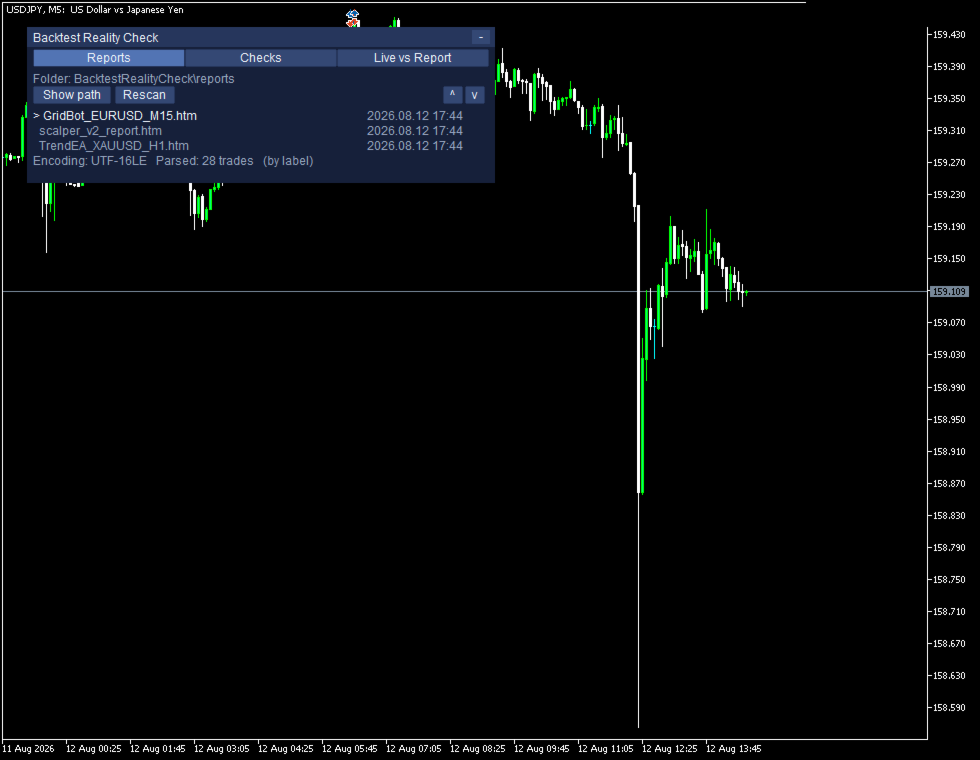
- 리포트는 HTML로 저장하시면 되고, 그다음은 목록에서 파일을 선택하기만 하면 됩니다.
- 리포트 파일은 사용하시는 PC 안에서만 읽습니다. 외부로 나가는 통신은 전혀 없습니다.
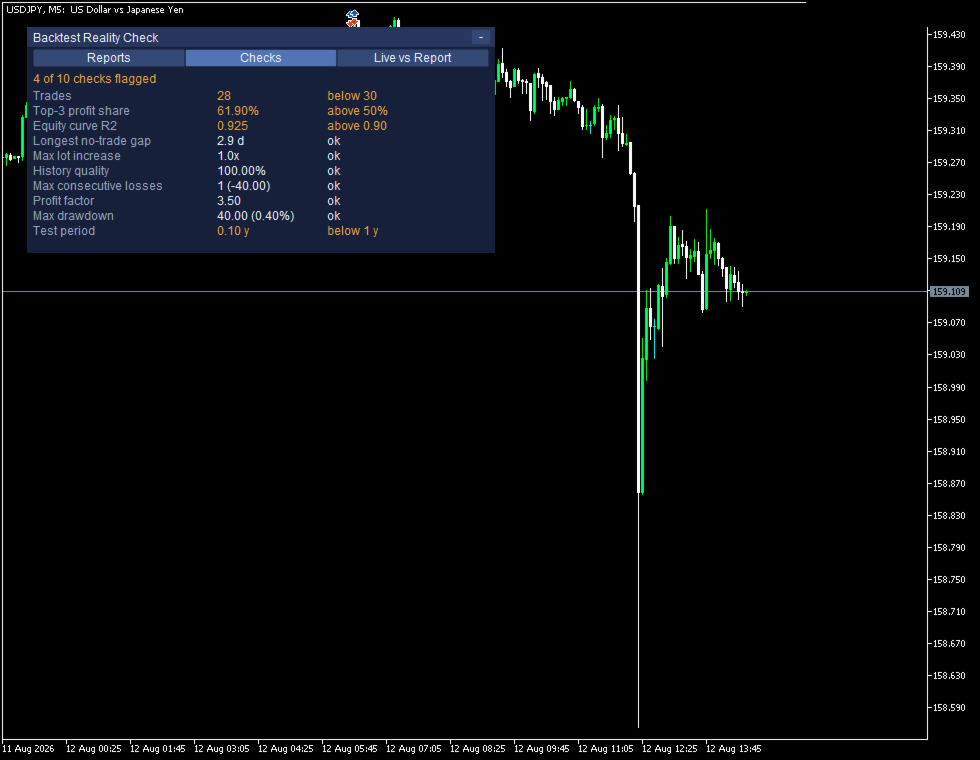
■ 플래그의 의미(기준값을 넘었다는 뜻)
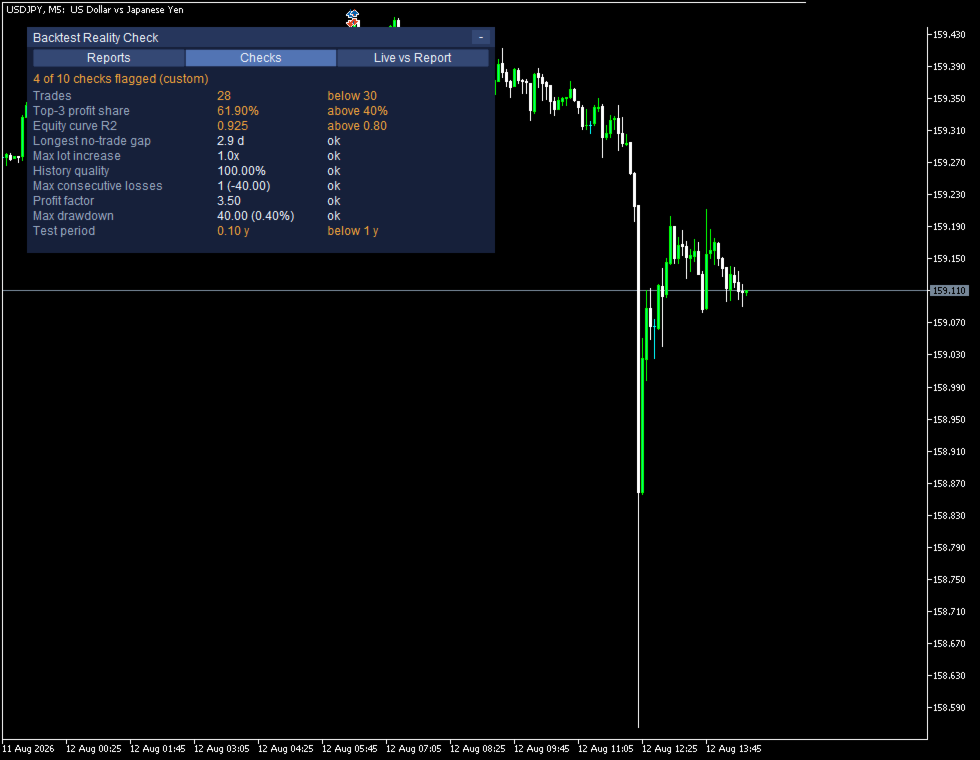
기준값이 설정된 항목에서 플래그는 해당 행 오른쪽에 적힌 기준값을 넘었다는 뜻일 뿐입니다. 이 도구는 EA가 좋다고도 나쁘다고도 말하지 않으며, 수치가 왜 그렇게 보이는지 그 원인까지는 알 수 없습니다. 테스트 구간에만 들어맞은 설정이든 시세의 변화든 브로커의 차이든 그저 운이든, 밖에서 보면 서로 비슷한 흔적을 남기기 때문입니다.
■ 리포트와 실거래 대조
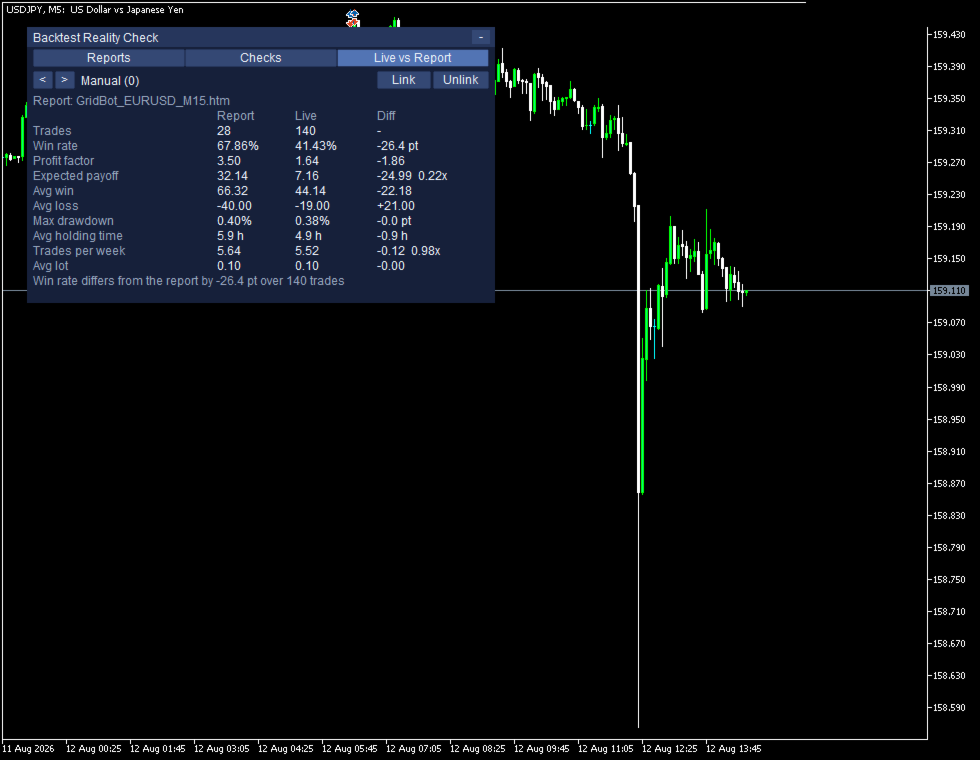
대조 결과는 차트 위 패널의 Live vs Report 탭에 다음과 같이 표시됩니다.
Manual (0) Link Unlink
Report: GridBot_EURUSD_M15.htm
Report Live Diff
Trades 28 140 -
Win rate 67.86% 41.43% -26.4 pt
Profit factor 3.50 1.64 -1.86
Expected payoff 32.14 7.16 -24.99 0.22x
Avg win 66.32 44.14 -22.18
Avg loss -40.00 -19.00 +21.00
Max drawdown 0.40% 0.38% -0.0 pt
Avg holding time 5.9 h 4.9 h -0.9 h
Trades per week 5.64 5.52 -0.12 0.98x
Avg lot 0.10 0.10 -0.00
Win rate differs from the report by -26.4 pt over 140 trades
실거래 쪽 체결도 리포트를 읽을 때와 동일한 구조체로 만든 뒤, 같은 측정 함수로 그대로 처리합니다. 같은 식을 두 번 적어 둔 것이 아니므로, 양쪽 숫자가 어긋나려면 두 쪽이 공유하는 함수 자체를 변경하는 수밖에 없습니다.
Trades 행만 차이를 산출하지 않습니다. 몇 달치 백테스트와 몇 주치 실거래는 건수가 같을 리 없어, 두 값의 차이를 내는 것 자체가 의미가 없기 때문입니다. 비율끼리의 차이는 퍼센트가 아니라 포인트로 표시합니다. 퍼센트의 차이를 다시 퍼센트로 적으면 다른 뜻이 되기 때문입니다.
비교 대상 EA는 거래 내역에 남아 있는 매직넘버를 집계해 자동으로 인식하고, 그 단위로 행을 만듭니다. 따로 지정할 설정은 없습니다. 매직넘버가 붙지 않은 거래는 Manual (0) 한 행으로 묶이며, 사람이 낸 주문과 매직넘버를 설정하지 않은 EA는 겉으로는 구분할 수 없습니다.
■ 표본이 부족할 때(판단 보류)
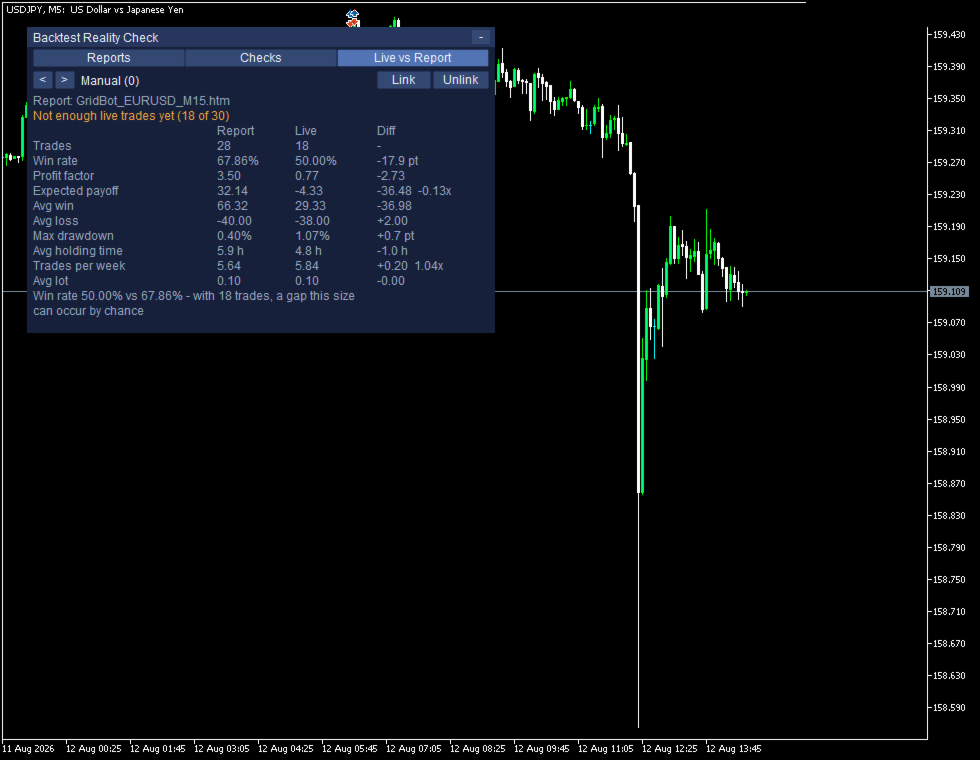
실거래 건수가 모자란 동안에는 같은 탭이 다음과 같이 표시됩니다.
Not enough live trades yet (18 of 30)
Win rate 50.00% vs 67.86% - with 18 trades, a gap this size can occur by chance
실거래가 30건에 못 미치는 동안 Report·Live·Diff 세 열이 모두 회색으로 바뀌지만, 숫자를 가리지는 않습니다. 차이는 그대로 표시하고, 다만 그것을 차이라고 부르지 않습니다. Win rate의 차이는 기준값을 넘었는지가 아니라, 우연히 생길 수 있는 범위 안에 드는지로 판단합니다. 리포트 쪽 비율과 실거래 건수로 표준오차를 산출한 다음, 그 1.96배 이내에 들어오는 차이는 우연히 생길 수 있는 것으로 봅니다. 두 화면 모두 같은 리포트를 기준으로 측정하기 때문에, 이 범위의 폭을 좌우하는 것은 실거래 건수뿐입니다. 건수가 적을 때는 범위가 차이보다 넓어 우연일 수 있다는 문장이 함께 표시되고, 건수가 많을 때는 범위가 차이보다 좁아 그런 표현 없이 차이만 서술됩니다. 아직 말할 수 없다고 말할 수 있다는 것이 이 도구의 핵심입니다. 언제나 답을 내는 도구는 사실 아무것도 측정하지 않는 도구입니다.
■ 리포트 저장과 폴더
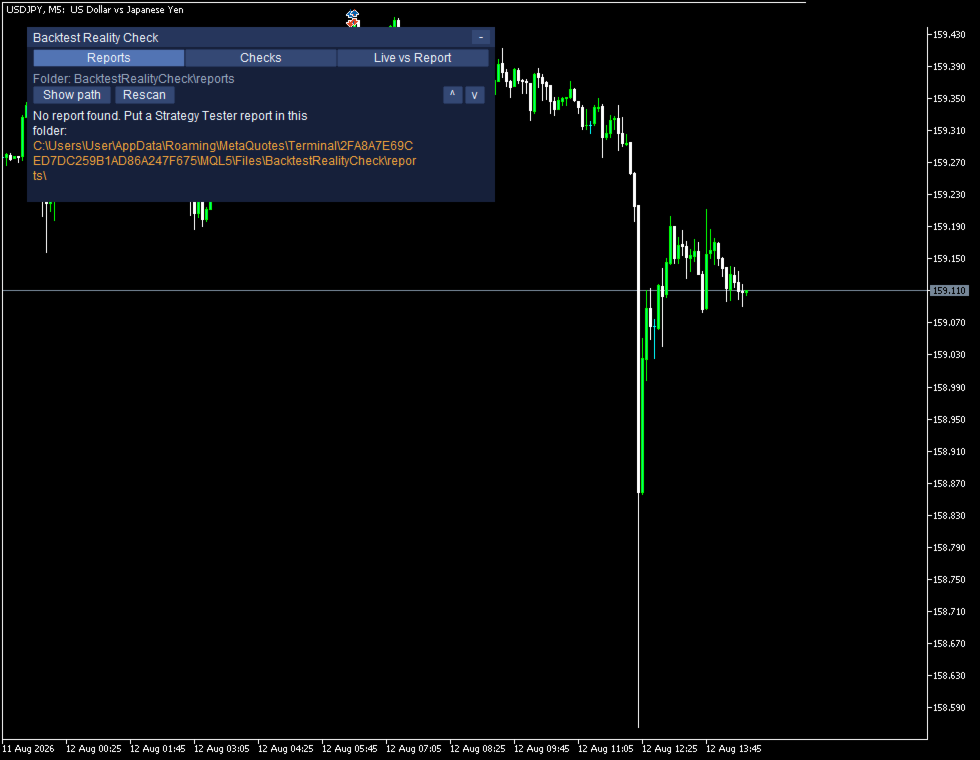
전략 테스터의 리포트는 HTML로 저장해 주시면 됩니다. 저장 형식은 두 가지인데 어느 쪽도 기본값이 아니고, 여기서 XML을 선택하면 실제 내용은 스프레드시트 형식이라 이 버전에서는 읽지 못합니다. 이 한 가지만 어긋나도 도구가 아예 동작하지 않으므로, 기능 설명보다 먼저 적어 둡니다. 읽지 못하는 파일도 아무 표시 없이 건너뛰지 않고, 해당 파일 이름을 패널에 그대로 표시하므로 다시 저장하셔야 한다는 사실을 그 자리에서 알 수 있습니다. 저장 위치는 MQL5\Files\BacktestRealityCheck\reports이며, 이 폴더는 도구를 차트에 적용하는 순간 자동으로 만들어집니다. 폴더가 비어 있으면 파일을 두어야 할 절대 경로를 패널에 표시해 줍니다.
■ 읽는 범위와 외부 통신
수치는 리포트의 거래 내역에서 직접 집계하므로, 어느 언어의 터미널에서 저장한 리포트든 같은 값이 산출됩니다. 같은 백테스트를 터미널 표시 언어만 바꿔 두 번 저장한 다음 두 파일을 차례로 불러와 보시면 직접 확인하실 수 있습니다. 파일은 사용하시는 PC 안에서만 읽습니다. 외부와 주고받는 통신은 한 번도 발생하지 않으며, 어떤 데이터도 어디로도 보내지 않습니다.
■ 하지 않는 일
- 계좌에 어떤 주문도 내지 않습니다. 신규 진입도, 청산도, 손절가 변경도 하지 않고, EA를 실행하거나 정지시키지도 않습니다.
- 네팅 계좌에서는 EA별 수치를 따로 보여 드리지 못할 수 있습니다. 헤징 계좌를 기준으로 개발했는데, 네팅 계좌에서는 포지션이 합산되기 때문입니다.
■ 무료 데모
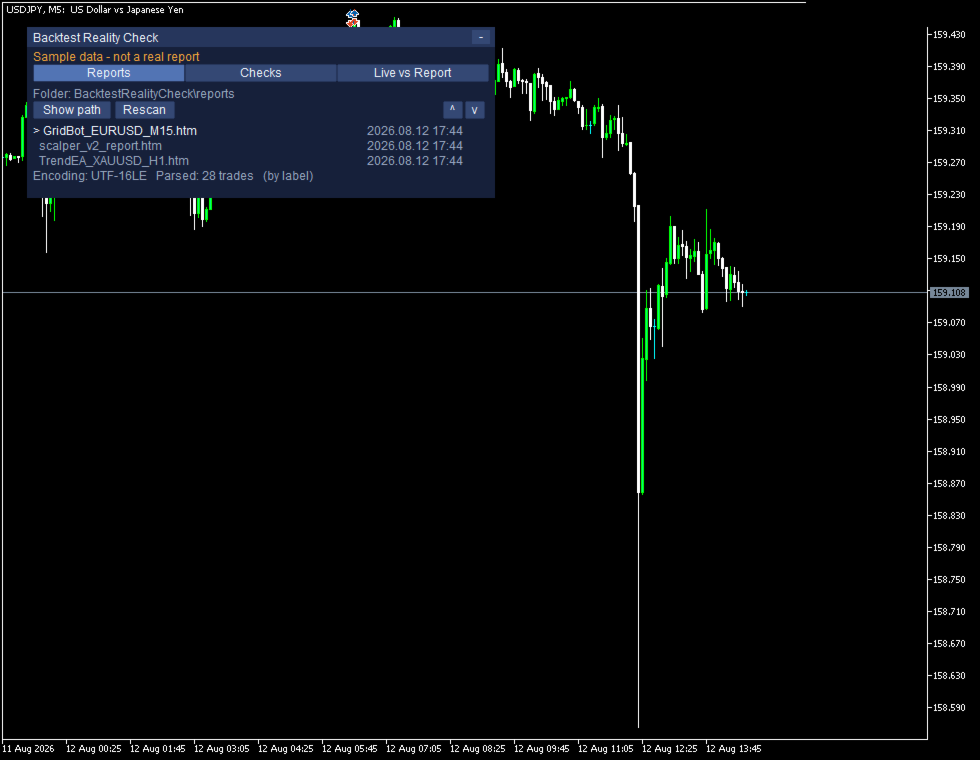
데모는 전략 테스터 안에서 동작하며, 화면에는 다음 한 줄이 계속 표시됩니다.
Sample data - not a real report
샘플 데이터가 내장되어 있어 실행하자마자 값이 채워진 화면을 볼 수 있고, 이 줄은 처음부터 끝까지 사라지지 않으며 터미널 저널에도 같은 줄이 기록됩니다. 실제 차트에서는 이 줄이 표시되지 않습니다.
■ 파라미터와 동작 환경
입력 대화상자에 나타나는 파라미터는 다음이 전부입니다.
InpReportFolder InpUseCommonFolder InpRescanSeconds InpMinTradesForStats
InpFlagTopTradeShare InpFlagEquityR2 InpFlagMinTrades InpIncludeSwapCommission
InpHistoryDays InpPanelX InpPanelY InpFontSize InpShowTesterSelfDemo
이름을 하나도 빠짐없이 그대로 적어 두었고, 전부 기본값 그대로 사용하셔도 동작합니다. MetaTrader 5용 유틸리티이며, EA 형식이므로 빈 차트 하나에 적용하시면 됩니다. 계좌는 헤징 계좌를 기준으로 합니다. 출시 전 자동 검사에서 매매 관련 API 호출 0건, DLL 0건, 외부 통신 0건을 확인했습니다. 화면도 파라미터 이름도 그대로 공개해 두었으므로, 숫자가 어떻게 만들어졌는지는 개발자에게 따로 물어보지 않아도 직접 확인하실 수 있습니다. 이 도구는 이미 청산된 거래를 읽어 집계할 뿐, 앞으로 일어날 일에 대해서는 아무것도 말하지 않으며, 어떤 성과도 약속하지 않습니다. 거래에는 손실 위험이 따르므로, 먼저 데모 계좌에서 시험해 보시기 바랍니다.