EA Circuit Breaker

多くのリスク管理ツールは口座全体を見ています。口座が上限に達すると、何も問題を起こしていなかったEAまで含めて、すべてが止まります。

EA Circuit Breaker はEAを1本ずつ扱います。あるEAが、あなたが引いた線を越えたとき、そのEAだけが処理され、口座の残りはそのまま動き続けます。

自分から売買することはありません。助言もしませんし、サインも出しません。

ヘッジング口座向けの道具です

ある取引がどのEAのものかを見分けられるのは、プラットフォームがそれぞれを別のポジションとして保っている間だけで、ヘッジング口座がまさにそれにあたります。ネッティング口座では銘柄ごとに1つのポジションへまとめられ、マジック番号は何も指し示さなくなるため、どんなツールを使っても分けることはできません。本ツールは起動時に口座の種別を読み、ネッティング口座では表示のみに切り替えて、その旨を画面に出します。決済済みの取引はマジック番号で分けられたままです。

設定は要りません

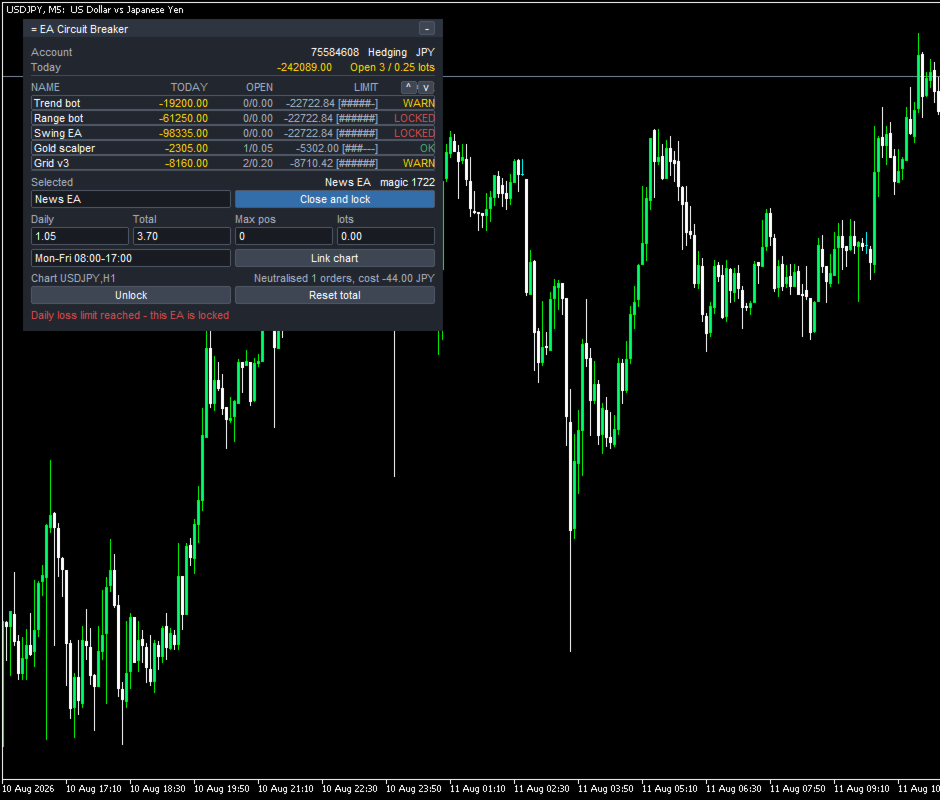
起動すると、表はもう埋まっています。保有中のポジションと直近30日の履歴を読み、見つかったマジック番号を集めて、EAごとに1行を作ります。行の名前にはそのEAの注文コメントを使います。名前は変更できます。新しいEAは、取引した時点で行に現れます。

各行に表示されるもの
- 今日の損益、保有ポジション数、合計ロット、累計損益
- 手数料とスワップを含みます。除外していません
- 設定した上限と、その何割を使ったか
- 上限の80パーセントで黄色、到達で赤

EAごとに設定できる上限
- 日次の損失上限。残高または有効証拠金に対する割合か、金額で指定します
- 累計の損失上限。起点の日付は自分でリセットできます
- 最大保有ポジション数
- 最大合計ロット
- 稼働時間帯。Mon-Fri 08:00-17:00 の形で書きます

すべてのEAには既定の上限が最初から入るので、1分目から全部が見張られます。setファイルはありません。ブローカーごとの設定も要りません。

EAが線を越えたときに起きること

EAごとに、3つの対応から選びます。

1. 知らせる(既定)。その行が赤くなり、理由が表示されます。アラート、端末への通知、音は任意です。取引には一切介入しません。買ったままの状態では、これが動作します。

2. 決済してロックする。そのEAの保有を決済し、待機注文を取り消します。ロック中は、そのEAが建て直したものも決済します。EAは止められたことを知らないので建て続けます。そのたびにスプレッド分の費用がかかります。パネルは打ち消した回数と累計の費用を表示します。口座のほかの部分には触れません。

3. チャートを閉じる。そのEAが動いているチャートを閉じます。EAは端末から降ります。先にテンプレートを保存するので、元に戻せます。

決済にはアルゴリズム取引が有効である必要があります。チャートを閉じる操作は取引ではないので、3番はアルゴリズム取引が無効でも動きます。

日次の上限と稼働時間帯によるロックは、指定した時刻に自動で解除されます。累計の損失上限によるロックは、自分で解除するまで続きます。解除は2段階の確認つきです。

できないこと
- ほかのEAを無効にすることはできません。MQL5にその手段が無く、MarketはDLLを許可していないためです。できるのは、そのEAが建てたものを決済し続けることか、そのEAのチャートを閉じることの2つです。
- 2番の方式では、EAが建て直すたびにスプレッド分の費用がかかります。上に書いたとおりです。
- ネッティング口座では、上に書いた理由により、EAごとの対応は使えません。
- マジック番号が同じEAが2本あると、1行にまとまります。MetaTraderに区別する手段がありません。
- 手動の取引は表示しますが、対象にはしません。
- チャートを1枚使います。2枚目では起動しません。2つが同じEAを取り合わないようにするためです。

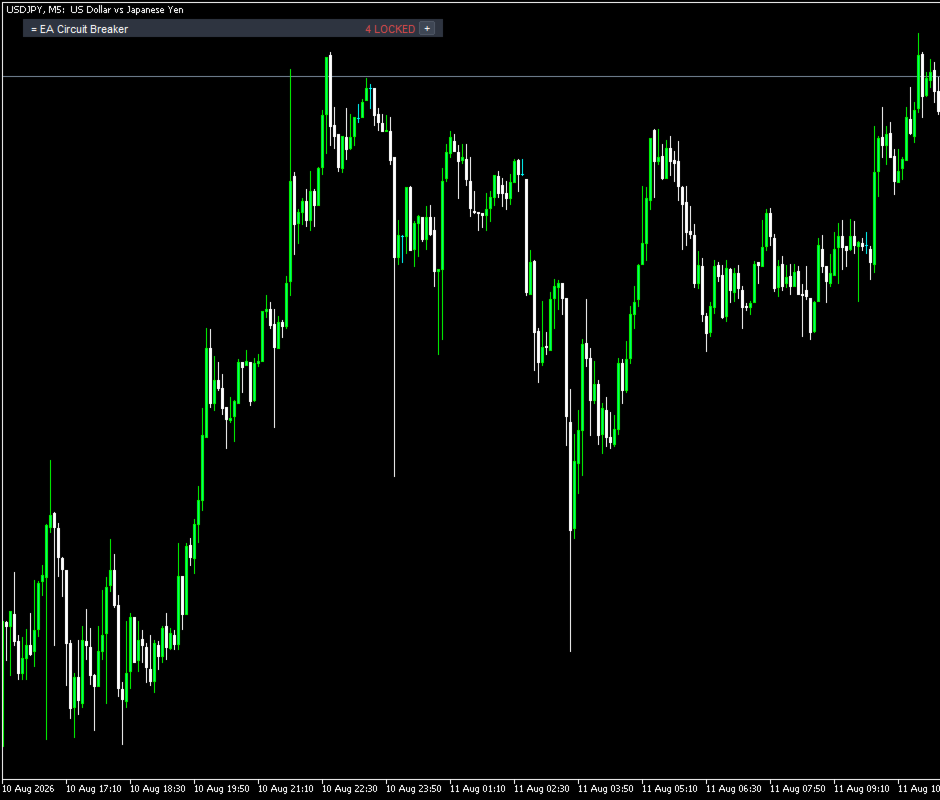
名前、上限、選んだ対応、チャートの紐づけ、ロックの状態、累計の起点日は、口座番号ごとに保存されます。時間足を切り替えても、端末を再起動しても残ります。畳んだ状態でも、いくつのEAがロックされ、いくつが上限に近いかは表示されます。

試し方

無料デモはストラテジーテスターで動きます。テスターはEAが1本、チャートが1枚なので、このツールの目的である複数のEAを分けることは、そのままでは起きません。デモを意味のあるものにするため、テスターのときに限り、本ツールが異なるマジック番号で小さな練習用の取引を出して表に行を作ります。実口座では1回も発注しません。動作中は Tester self-test と表示します。InpTesterDemo で切れます。

テスターでは、パネル、表、数字、設定、そして小さい上限を入れたときにEAが OK から WARN、LOCKED へ変わる様子を見られます。見られないのは、1本のEAが止まって他が動き続けるところです。EAを2〜3本動かしたデモ口座でお試しください。

入力パラメータ

検出: InpHistoryDays, InpIncludeManual
既定の上限: InpLimitBase, InpLimitUnit, InpDefaultDailyLimit, InpDefaultTotalLimit, InpDefaultMaxPos, InpDefaultMaxLots, InpIncludeFloating, InpWarnPercent, InpDayResetHour
対応: InpDefaultAction, InpConfirmActions, InpSaveTemplate, InpMaxCloseRetries
アラート: InpAlertPopup, InpAlertPush, InpAlertSound
パネル: InpPanelX, InpPanelY, InpPanelWidth, InpFont, InpFontSize, InpColorBg, InpColorHeader, InpColorText, InpColorOk, InpColorWarn, InpColorLock
テスター: InpTesterDemo, InpMagicSelf

動作環境

MetaTrader 5 とヘッジング口座、空いているチャート1枚。決済にはアルゴリズム取引を有効にする必要があります。DLL、外部サーバー、インターネット接続、追加ファイルはいずれも使いません。

本ツールは相場を予測しません。何を取引すべきかも示しません。成果について何も主張しません。設定された上限を適用します。
おすすめのプロダクト
BulkOp Trade Manager
Ahmed Jumaa Saif Ali Almheiri
BulkOp Trade Manager Trade faster. Manage smarter. Close with confidence. BulkOp Trade Manager is a powerful MT5 utility EA built for traders who need speed, control, and clean execution directly from the chart. It is designed for active manual traders, scalpers, gold traders, and anyone who wants to manage multiple positions with less delay and fewer clicks. Why BulkOp? Ultra-fast Buy and Sell execution One-click Bulk Close Profit One-click Bulk Close Loss Keyboard trading control Bulk order e
Bober Real MT5
Arnold Bobrinskii
4.88 (16)
Bober Real MT5 is a fully automatic Forex trading Expert Advisor. This robot was made in 2014 year and did a lot of profitbale trades during this period. So far over 7000% growth on my personal account. There was many updates but 2019 update is the best one. The robot can run on any instrument, but the results are better with EURGBP, GBPUSD, on the M5 timeframe. Robot doesn't show good results in tester or live account if you run incorrect sets. Set files for Live accounts availible only for cu
| Fully-automated Smart Money Concept (ICT) inspired trading solution with multi-strategy capabilities | Built by a grid trader >> for grid traders.  This is MT5 version, click  here  for  Blue CARA MT4  (settings and logics are same in both versions)     Real monitoring signal  -->  Cara Gold Intro Blue CARA EA   ('CARA') - short for  C omprehensive  A lgorithmic   R esponsive   A dvisor is a next-gen  multi-currency    multi-timeframe  EA base on the widely known (and perhaps the most popul
Talents ATR Scalper Utility (MT5) The Talents ATR Scalper Utility is a professional-grade trade execution and management tool built for MetaTrader 5. Inspired by the Biblical Parable of the Talents , this utility is designed to help traders multiply their potential with precision risk control, one-click simplicity, and advanced automation. Whether you’re scalping forex, gold, or indices, this tool delivers speed, consistency, and confidence. Key Features One-Click Trade Preview Click below price
G.X.L (GALAXY ELEGANCE) Product Overview G.X.L is an automated trading robot for MetaTrader 5 that operates based on price action analysis. The system processes real-time market data to identify trading opportunities. It provides information and recommendations aligned with user-defined trading preferences. Core Functionality The robot analyzes price movements without relying on traditional lagging indicators. It focuses on current market structure, including swing points and fractals, to determ
Echo Simulator Trader is a powerful hybrid simulation-to-live EA that runs thousands of pure price-action simulated trades in parallel with your live account. It opens simulated LONG and SHORT positions at regular intervals on multiple pairs, meticulously tracks their performance using your exact risk rules, and only activates real trading once simulated strategies pass your custom performance filters (Net Profit, Profit Factor, Win Rate, Drawdown, etc.). Built for complete control and proof-of
Manus Pro
Itumeleng Mohlouwa Kgotso Tladi
MANUS PRO EA The Trading Revolution You've Been Waiting For Are you TIRED of watching other traders make consistent profits while your account bleeds red?   The financial markets don't wait for anyone – and neither should you. MANUS PRO isn't just another Expert Advisor... it's your   TICKET TO FINANCIAL FREEDOM . Why MANUS PRO is Different (And Why Everyone's Talking About It) FOR BEGINNERS: Your Trading Mentor That Never Sleeps Zero Learning Curve   – Install, activate, and watch it wo
ProTrade EA
Jim Ariel Camarce Ignao
Key Features   Automated Candle Pattern Recognition 10 Professional Patterns : Detects Bullish/Bearish Engulfing, Hammer/Shooting Star, Morning/Evening Star, Piercing/Dark Cloud, and 6 additional professional candlestick patterns Smart Filtering : Combine multiple patterns with configurable confirmation logic Volume Confirmation : Optional volume filter to validate pattern strength Multi-Timeframe Analysis : Separate execution and bias timeframes for better timing   Trading Dashboard Int
RSI Grid MT5
Joseph Anthony Aya-ay Yutig
他のEAを無料で入手!!!他のEAを無料で入手!!!他のEAを無料で入手!!!他のEAを無料で入手!!!他のEAを無料で入手!!! RSIグリッドはRSIの買われ過ぎと売られ過ぎの条件に基づいており、取引が市場の負け側にあるときにグリッドを開きます。 RSIはテクニカルトレーダーに強気と弱気の価格の勢いに関するシグナルを提供し、多くの場合、資産の価格のグラフの下にプロットされます。資産は通常、RSIが70%を超えると買われ過ぎと見なされ、30%を下回ると売られ過ぎと見なされます。 パラメーター: タイムフィルター 月曜日 火曜日 水曜日 木曜日 金曜日 土曜日 日曜日 始まる時間 終了時間 RSI設定 RSI期間 買われ過ぎ 売られ過ぎ 時間枠 資金管理 Autolot 最大ロット 利益を得る グリッドサイズ 乗数 トレーリングオプション トレーリングストップ トレーリングステップ トレイルオフセット ファイルを設定する v1.8GBPUSDセット1 https://youtu.be/a7PfCr1jYXQ htt
Equity Protect Pro: 安心取引のための総合的な口座保護エキスパート 口座保護、資産保護、ポートフォリオ保護、マルチ戦略保護、利益保護、利益確定、取引セキュリティ、リスク管理プログラム、自動リスク管理、自動決済、条件付き決済、スケジュール決済、動的決済、トレーリングストップロス、ワンクリッククローズ、ワンクリック決済、ワンクリック復元などの機能をお探しなら、Equity Protect Pro が最適なプログラムです。 設定は簡単で、事前設定された条件に達すると、すべてのチャートを閉じることができ、シグナルサブスクリプションのキャンセルもサポートします(これは、すべての取引プログラムも停止することを意味します)。この時点で、新しい注文は生成されなくなり、最終的にすべての注文が閉じられ、予期せぬ損失を効果的に防止し、安心して取引できるようになります。 Equity Protect Pro (Technical Manual) Equity Protect Pro Demo Version for yo u to test   Equity Protect Pro MT4
Crash5 EA ,I s a automatic robot that has the level of professional decision when to take a trade without any emotion. The bot will help in your scalping decision making with its own TP (take profit) and SL (stop loss) with the trail stop when in profit. This is a trend based spike catching ,looking on whats happening in real time charts no repainting of any signals. The robot helps in making decisions on the candle stick pattern opened and closed lat price with the help of RSI ,MACD and the EMA
Mango Scalper
Mahmoud M A Alkhatib
Mango Scalper  is a fully automated scalping robot that uses a very Good and Smart breakout strategy, advanced money management and probabilistic analysis. Most effective in the price consolidation stages that occupy the bulk of the market time. Proven itself on real accounts with an excellent risk-to-reward ratio. Does not need forced optimization, which is the main factor of its reliability and guarantee of stable profit in the future. S uitable for both beginners and experienced traders.  
Apex Reversal — M1 Precision Reversal Scalper Apex Reversal is a precision intraday scalper that trades reversals at Double Top and Double Bottom turning points on the 1-minute chart. Instead of chasing momentum, it waits for price to fail twice at the same level, confirms the rejection candle, and enters with a tight, structure-based stop and a fixed 2:1 reward target. Every trade is filtered by an event-based BOS / CHoCH market-structure engine on a higher timeframe, so the robot only takes re
Virtual Bot MT5
Szymon Palczynski
5 (1)
A real girder with "blood and bones". Virtual Bot  will open virtual trades, using them to monitor the market to determine the entry point(according to the inputs parameters), at which point Virtual Bot  will start opening real trades.    It is recommended to test this Expert on demo account or cent account.  Input Parameters input group           "..........Choice..........." ;         input start_enum      start= 2 ; //Start input uchar            starting_real_orders= 4 ; //Start opening rea
BTC M1 Scalper Pro is an automated trading solution engineered specifically for Bitcoin (BTCUSD / BTCUSDT) on the 1-Minute (M1) timeframe. The Expert Advisor uses an advanced ATR Volatility Breakout algorithm to capture high-velocity micro-trends. It systematically filters out market noise and wide spread conditions, executing trades with rapid precision and strict risk management. Engineered for Bitcoin M1: Optimized for the unique volatility and tick movement of BTCUSD. ATR Volatility Breakout
Easy Trade Executor は、MT5向けの高速なポジションサイズ計算、注文執行、およびトレード管理ツールです。 Open Price、Stop Loss、Take Profit レベルをチャート上に直接配置し、自動的にポジションサイズを計算して、数回のクリックだけでリスクを管理しながら取引を開始できます。 なぜ Easy Trade Executor を選ぶのか? Easy Trade Executor は、単にリスク計算を行うだけでなく、チャート上で迅速かつ効率的に取引を管理したいトレーダーのために開発されました。 このツールは、ポジションサイズ計算、注文執行、トレード管理を1つのワークフローに統合し、手動計算やターミナルの複数ウィンドウを頻繁に切り替えることなく、トレードそのものに集中できるようにします。 Easy Trade Executor の主な機能: リスクに基づく自動ポジションサイズ計算; チャート上から直接 Market Order と Pending Order を発注; 自動的なポジション管理のための Trailing Stop; ワンクリックでの決
This indicator was specifically designed for developers, quantitative traders, and mentors looking for total control over live price action, whether for educational purposes, testing strategies, or validating indicators without waiting for real market movements. The PCT Price Simulator generates a fully automated, customized offline chart ( _OTC ), allowing you to manipulate candle directions, test setup reactions, and validate trading strategies in seconds. Technical Highlights Total Independen
Demo version T Position Size Calculator   doesn't work in the strategy tester. The Strategy Tester does not support the processing of ChartEvent. It does not support most of the panel's functionality. Contact me for any questions or ideas for improvement or in case of a bug found. Control and manage your trading like a professional trader with T Position Size Calculator. T Position Size Calculator – an MT5 Expert Adviser, is a user-friendly custom tools (Dialog Panel and Three Lines, Order Line
ProTrader Auto Layer Smart Risk EA   MT5 Automated Trading | Smart Grid Strategy | Professional Risk Control   Auto-Layering . Smart Risk Control . Elite Automation for Serious Traders. IMPORTANT: This EA thrives on live market conditions , which means real trading results may differ from backtests. If using the strategy tester , kindly DM for detailed instructions. Launch Promo: Special Early Access Price – Limited Time Only! Price increases soon as we build user reviews & social proof! Abou
Introducing Neural Bitcoin Impulse - an innovative trading bot created using neural network training technology on voluminous market data sets. The built-in mathematical model of artificial intelligence searches for the potential impulse of each next market bar and uses the resulting patterns of divergence and convergence between the predictive indicators and the price to form high-precision reversal points for opening trading positions. The trading robot is based on the Neural Bar Impulse ind
Momentum Navigator
Itumeleng Mohlouwa Kgotso Tladi
Introducing the Momentum Navigator EA Your Path to Wealth and Smart Trading! Take charge of your financial future with Momentum Navigator EA , the ultimate expert advisor for MetaTrader 5. Designed to revolutionize your trading experience, this cutting-edge trading robot empowers you to navigate market trends with precision, efficiency, and confidence. Whether you're new to trading or an experienced professional, Momentum Navigator EA is your perfect partner in reaching financial success. Why
OverSeer:Your Thoughtful Trading Ally OverSeer isn’t just another Expert Advisor—it’s a carefully crafted companion for traders looking to navigate the complex world of index trading with a steady, conservative approach. Built through years of experimentation and learning, OverSeer helps you gain exposure to global markets while keeping your strategies grounded in realism. Why Choose OverSeer? OverSeer bridges thoughtful trading strategies and practical decision-making. Instead of trying to pr
EAの戦略はスウィングトレードに基づいており、iPumpインジケーターによって計算された鋭いインパルスの後のエントリーがあります。 前述のように、EAには自動サポートで手動取引を開始する機能があります。 -下降トレンドの場合↓価格が修正された後に取引を開始し、資産が買われ過ぎゾーンに入り、トレンドに沿って販売します。 -上昇トレンド↑の場合、価格が修正的に下落した後に取引を開始し、資産が売られ過ぎゾーンに分類され、トレンドに沿って購入します。 選択した資産で取引する場合、アドバイザーはトレンドを考慮し、現在のトレンドに従ってのみ取引を開始します。不採算の取引は、停止と平均化の両方を使用して閉じることができます。2番目のオプションは確かにより収益性が高く、リスクも高くなります。 利点 さまざまなTFのレベルを分析するための組み込みレベルインジケーター チャート上で手動で平均化のレベルを選択する機能 多くのピラミッド型注文を開くことによって利益を増やす能力(注文数は自分で制御できます) iPumpインジケーターのリバースシグナルに基づいて、TPを%で設定するためのより多くの基準 「ハン
Bear vs Bull EA Is a automated adviser for daily operation of the FOREX currency market in a volatile and calm market. Suitable for both experienced traders and beginners. It works with any brokers, including American brokers, requiring FIFO to close primarily previously opened transactions. *In order to enable the panel, it is necessary to set the parameter DRAW_INFORMATION = true in the settings; - Recommendations Before using on real money, test the adviser with minimal risk on a cent tradi
概要 Quantum Einstein XAUは、MetaTrader 5でゴールド(XAUUSD)を取引するために特別に設計された完全自動のエキスパートアドバイザーです。トレンド検証済みのデュアルバスケットSmart DCA(ドルコスト平均法)戦略を採用し、インテリジェントな利益確定メカニズム、組み込みリスク管理、およびブローカーの過剰活動からの保護機能を備えています。 このEAは2つの独立したバスケット——BUYとSELL——を同時に運用し、それぞれ最大15のDCAレベルまでスケーリングできます。各レベルではロットサイズとグリッド距離を完全にカスタマイズ可能です。5分足のQuantum Trend FilterはEMAとADXを使用してすべてのエントリーを検証し、支配的なトレンドに対して新規ポジションをブロックすることで、シグナル品質を向上させ、ドローダウンを軽減します。 主な機能 デュアルバスケットSmart DCAシステム 独立したBUYおよびSELLバスケット、それぞれ最大15DCAレベル レベルごとにカスタマイズ可能なロットサイズとグリッド距離 価格による自動レベル割り当て
Viking Alpha DAX Ivar Edition
Valdeci Carlos Dos Passos Albuquerque
Viking Alpha DAX — Germany 40 Expert Advisor for MetaTrader 5 LAUNCH PROMO Only 10 copies at launch price. Price increases with each sale. Launch price: $297 Next price: $497 Final price: $997 Live Performance: FX Blue — Vikingtradingbots What Makes Viking Alpha DAX Different Most DAX robots fail for one simple reason: they treat the Germany 40 like a forex pair. It isn't. The DAX has a heartbeat — a specific rhythm tied to the Frankfurt Stock Exchange opening, the European session structure, an
Spread Analysis Utility MT5
AL MOOSAWI ABDULLAH JAFFER BAQER
• Please test the product in the Strategy Tester before purchasing to understand how it works. • If you face any issues, contact me via private message—I’m always available to help. • After purchase, send me a screenshot of your order to receive a   FREE EA   as a gift. Spread Analysis Utility MT5 – Monitor & Analyze Broker Spreads in Real Time! Do you want to track your broker's spread fluctuations with precision? Spread Analysis Utility MT5 gives you real-time insights into the spread behavio
FxS Zone Recovery EA
Churchill Sipho Mashinini
Overview FxS Zone Recovery EA for MT5 is an Expert Advisor that automates trading using a configurable Zone Recovery strategy. The Expert Advisor provides multiple market entry methods, configurable recovery parameters, trading session filters, and risk management features, allowing traders to adapt the strategy to different market conditions. Zone Recovery Strategy The Expert Advisor uses a Zone Recovery approach to manage open positions through configurable recovery levels and position sizing.
Trifecta Confluence Trifecta Confluence — Trade Only When the Market Truly Agrees Most Expert Advisors fire on a single signal — one moving average cross, one oscillator spike, one candle pattern — and get chopped apart the moment the market goes quiet or erratic. Trifecta Confluence was built on a different premise: a trade is only worth taking when three independent, mathematically distinct dimensions of price behavior all point the same direction at the same time. The Three-Engine Core Every
Morning Range Breakout (Free Version) Morning Range Breakout (Free Version) is a straightforward trading advisor that implements a breakout strategy based on the morning range. It identifies the high and low within a specified time interval (e.g., 08:00–10:00 UTC) and opens a trade on a breakout upward or downward. The free version includes core functionality without restrictions. All parameters and messages are in English, per MQL5 Market requirements. Key Features Detects morning range based
このプロダクトを購入した人は以下も購入しています
Trade Assistant MT5
Evgeniy Kravchenko
4.41 (215)
取引 ごとのリスクの 計算、新規注文 の 簡単 な 設置、部分的 な 決済機能 を 持 つ 注文管理、 7 種類 のトレーリングストップなど 、便利 な 機能 を 備 えています 。 追加の資料と説明書 インストール手順   -   アプリケーションの手順   -   デモアカウント用アプリケーションの試用版 ライン機能 チャート上にオープニングライン、ストップロス、テイクプロフィットを表示します。この機能により、新規注文を簡単に設定することができ、注文を出す前にその特徴を確認することができます。   リスク計算 リスク計算機能は、設定されたリスクとストップロス注文のサイズを考慮して、新規注文のボリュームを計算します。ストップロスの大きさを自由に設定できると同時に、設定したリスクを守ることができます。 Lot calc ボタン - リスク 計算 を 有効 / 無効 にします 。 Risk フィールドでは 、必要 なリスクの 値 を 0 から 100 までのパーセンテージまたは 預金通貨 で 設定 します 。 設定」 タブで 、 リスク 計算 の 種類 を 選択 します :「 $ 通
Trade Manager EAへようこそ。これは、取引をより直感的、正確、そして効率的にするために設計された究極の リスク管理ツール です。これは単なるオーダー実行ツールではなく、包括的な取引計画、ポジション管理、リスク管理のためのソリューションです。初心者から上級者、迅速な実行を必要とするスキャルパーまで、Trade Manager EAはあらゆるニーズに対応し、為替、指数、商品、暗号通貨などさまざまな市場で柔軟に対応します。 Trade Manager EAを使用すると、複雑な計算が過去のものになります。市場を分析し、エントリーポイント、ストップロス、テイクプロフィットのレベルをチャート上のラインでマークし、リスクを設定するだけで、Trade Managerが最適なポジションサイズを即座に計算し、SLとTPをピップ、ポイント、口座通貨でリアルタイムに表示します。すべての取引が簡単かつ効果的に管理されます。 主な機能: ポジションサイズ計算機 :定義されたリスクに基づいて取引サイズを瞬時に決定します。 簡単な取引計画 :エントリー、ストップロス、テイクプロフィットを設定するためのド
================================================================================ POC BREAKOUT - V20.72. Full Professional Grade Toolkit ================================================================================ POC Breakout is a full MetaTrader 5 trading dashboard for discretionary traders who want breakout signals, Point of Control (POC) context, volume profiles, order flow, market structure, news, alerts, and advanced trade planning in one professional workspace. Attached directly to you
TradePanel MT5
Alfiya Fazylova
4.88 (166)
Trade Panelは多機能なトレーディングアシスタントです。アプリには手動取引用の50以上のトレーディング機能が搭載されており、ほとんどの取引作業を自動化することができます。 購入前に、デモアカウントでアプリのデモ版をテストすることができます。デモアカウント用のアプリの試用版をダウンロードするには、次のリンクをご利用ください: https://www.mql5.com/en/blogs/post/750865 。 完全な手順 こちら 。 取引。 ワンクリックで取引操作を行うことができます: リスクを自動計算して指値注文やポジションを開く。 複数の注文やポジションをワンクリックで開く。 注文のグリッドを開く。 保留中の注文やポジションをグループごとに閉じる。 ポジションの方向を反転(Buyを閉じてSellを開く、またはSellを閉じてBuyを開く)。 ポジションをブロックする(不足している量のポジションを開くことでBuyとSellのポジション量を等しくする)。 すべてのポジションを部分的にワンクリックで閉じる。 すべてのポジションの利食い(Take Profit)および損切り(Sto
ベータリリース Telegram to MT5 Signal Trader はまもなく正式なアルファ版をリリースします。いくつかの機能はまだ開発中で、小さな不具合に遭遇する可能性があります。問題が発生した場合はぜひご報告ください。皆さまのフィードバックがソフトウェア改善に役立ちます。 Telegram to MT5 Signal Trader は、 Telegram のチャンネルやグループからの取引シグナルを自動的に MetaTrader 5 にコピーする強力なツールです。 パブリックおよびプライベートの両方のチャネルに対応し、複数のシグナル提供元を複数のMT5口座に接続可能です。ソフトウェアは高速で安定し、すべての取引を細かく制御できます。 インターフェースは直感的で、ダッシュボードとチャートは見やすく設計されており、リアルタイムで動作状況をモニターできます。 必要環境 MQL の制限により、EA は Telegram と通信するためのデスクトップアプリが必要です。 インストーラーは公式の インストールガイド にあります。 主な機能 マルチプロバイダー: 複数の Telegram
Farmed Hedge Yield Farming | All Markets (Manual - Hybrid - Semi/Automated EA) MULTI-ASSET SUPPORT Trade any asset available on your broker - Forex: Major, Minor, Exotic pairs - Crypto: BTC, ETH, XRP, SOL, BNB - Stocks: Apple, Tesla, Amazon, Google, etc. - Commodities: Gold, Silver, Oil, Gas - Indices: US30, NAS100, SPX500, DAX40 - Any CFD your broker offers VERIFIED TRADING RESULTS - Farmed Hedge Yield Axi Copy:  https://www.mql5.com/en/signals/2356376 - Farmed Hedge Yield Exn Copy:   https:/
Exp COPYLOT CLIENT for MT5
Vladislav Andruschenko
3.97 (35)
MetaTrader 5 用のプロフェッショナル取引コピー機 MetaTrader 向けの高速・高性能・信頼性の高い 取引コピー機 です。 COPYLOT は、MT4 と MT5 のターミナル間で Forex 取引をコピーでき、 Hedge 口座と Netting 口座の両方に対応しています。 COPYLOT MT5 版の対応構成: - MT5 Hedge → MT5 Hedge - MT5 Hedge → MT5 Netting - MT5 Netting → MT5 Hedge - MT5 Netting → MT5 Netting - MT4 → MT5 Hedge - MT4 → MT5 Netting MT4 版 完全な説明 + DEMO + PDF 購入方法 インストール方法 ログファイルの取得方法 テストと最適化の方法 Expforex のすべての製品 MT4 ターミナルへのコピーも可能です(MT4 → MT4、MT5 → MT4): COPYLOT CLIENT for MT4 COPYLOT は、2台、3台、さらには10台のターミナル間で同時に動作できる、プロフェッ
Anchor: The EA Manager Your EAs manage their own trades. Anchor manages the account around them. Anchor gives you one place to control your EAs, manage risk and decide when trading is allowed. Any EA, any vendor, any broker or symbol. No source-code changes required. The Problem Most EAs only know what they are doing. They cannot see when another EA is already trading, when several EAs open and are stacking risk or when the account has reached your loss limit. Even using just one EA, it may not
Telegram to MT5 Multi-Channel Copier は、Telegram チャンネルのトレードシグナルを MetaTrader 5 に自動的に直接コピーします。ボットも、ブラウザ拡張機能も、手動コピーも不要。Telegram でシグナルを受信すると、EA が数秒でターミナル上でトレードをオープンします。 本製品は 2 つのコンポーネントで構成されています:Telegram チャンネルを監視する Windows アプリケーションと、MT5 ターミナルでシグナルを実行するこの Expert Advisor です。MT4 版も利用可能です。 セットアップガイドとアプリケーションのダウンロード: https://www.mql5.com/en/blogs/post/768988 動作原理 Windows アプリケーションは、ボットではなくあなた自身の API 認証情報を使用して Telegram に接続します。つまり、プライベートおよび VIP チャンネルを含む、購読しているあらゆるチャンネル、グループ、トピックを読み取ることができます。シグナルを検出すると、それを解析し
Footprint Chart Pro — Professional OrderFlow EA for MetaTrader 5 Version 6.34 | Professional tool for real traders | Institutional-Grade Visualization DEMO USERS - PLEASE SELECT EVERY TICK / REAL TICK WHEN TESTING AND YOU HAVE DOWNLOADED HISTORICAL DATA. IF YOU SEE A WAITING SCREEN AND IT IS NOT DOWNLOADING, IT MEANS YOU HAVE LOW HISTORICAL DATA. TRY 1 MIN AND 5 MIN FIRST ON 1 DAY DATA. ONE DAY DATA SHOULD BE THE NEWEST AND MOST CURRENT DATE. PLEASE WAIT UNTIL THE MARKET HAS ROLLED OVER PERIOD.
Premium Trade Manager - コーチ内蔵型トレードパネル Premium Trade Manager は、AIトレーディングコーチをあなたのチャートの中に置き、その下に完全な執行エンジンを備えたツールです。いつも通りにトレードをセットアップし、あなた専任のAIトレーディングコーチ Max にそのセットアップをそのまま読み取らせて、発注前に率直な見解を伝えてもらいましょう。ストップの幅が規律あるアプローチに合っているか、リスクサイズは適切か、高影響のニュースイベントが数分後に迫っていないか、プロップファームの制限に近づいていないか。その下には、クリックの後をすべて処理するエンジンが備わっています。ワンクリックのリスクサイズ計算による発注、チャート上でドラッグして組み立て、発注後も動かせるプラン、最大4段階の分割利確、7種類のトレール方式、リアルタイムのプロップファームコンプライアンス、ニュースガード、そしてコストを自ら採点するスプレッド機能。判断はあなたが下す。Max がもう一度確認する。後のことはすべてパネルが担う。 購入前に実際に触れて試せます。 ブラウザ上でライブ
Power Candles Strategy Scanner - 自動最適化型マルチシンボル設定ファインダー パワーキャンドル・ストラテジー・スキャナーは 、パワーキャンドル・インジケーターを駆動するのと全く同じ自己最適化エンジンを、マーケットウォッチに登録されているすべての銘柄に対して並行して実行します。1つのパネルで、現在統計的に取引可能な銘柄、各銘柄で勝率の高い戦略、最適なストップロス/テイクプロフィットの組み合わせが表示され、新たなシグナルが発生した瞬間に通知が届きます。 このツールは、Stein Investmentsのエコシステムの一部です。  18種類以上のツールをすべて閲覧し、AIを活用したセットアップの推奨を受け取り、  https://stein.investments でコミュニティに参加しましょう 市場動向を網羅。銘柄ごとに3,000件以上の自動最適化。2種類のアラート。ワンクリックでチャートを切り替えて即座にアクション。 なぜこれが必要なのか 多くのマルチ銘柄スキャナーは、 価格の動き (ボラティリティ、変動率、銘柄ごとのRSI)を表示するだけです。それ
Adam FTMO MT5
Vyacheslav Izvarin
5 (2)
ADAM EA Special Version for FTMO Please use ShowInfo= false for backtesting ! Our 1st EA created using ChatGPT technology Trade only GOOD and checked PROP FIRMS  Default parameters for Challenge $100,000 Tested on EURUSD and GBPUSD only  Use 15MIN Time Frame Close all deals and Auto-trading  before Weekend at 12:00 GMT+3  Friday For Prop Firms MUST use special Protector  https://www.mql5.com/en/market/product/94362 --------------------------------------------------------------------------------
YuClusters
Yury Kulikov
4.93 (43)
Attention: You can view the program operation in the free version  YuClusters DEMO .  YuClusters is a professional market analysis system. The trader has unique opportunities to analyze the flow of orders, trade volumes, price movements using various charts, profiles, indicators, and graphical objects. YuClusters operates on data based on Time&Sales or ticks information, depending on what is available in the quotes of a financial instrument. YuClusters allows you to build graphs by combining da
EA Auditor
Stephen J Martret
5 (4)
EA Auditor is an independent analysis tool for traders evaluating Expert Advisors and trading signals on MetaTrader 5. It audits backtest reports, reviews posted developer signals, and cross-verifies the two against each other to help traders assess strategies before committing capital. The MQL5 market offers a wide range of Expert Advisors from many developers, with varying approaches, quality, and transparency. EA Auditor provides a consistent, data-driven framework for reviewing them, answer
The product will copy all telegram signal to MT5 ( which you are member) , also it can work as remote copier.  Easy to set up, copy order instant, can work with almost signal formats, image signal,  s upport to translate other language to English Work with all type of channel or group, even channel have "Restrict Saving Content", work with  multi channel, multi MT5 Work as remote copier: with signal have ticket number, it will copy exactly via ticket number. Support to backtest signal. How to s
Timeless Charts
Samuel Manoel De Souza
5 (7)
Timeless Charts is an all-in-one trading utility for professional traders. It combines custom chart types such as Seconds Charts and Renko with advanced order flow analysis using Footprints , Clusters , Volume Profiles , VWAP studies, and anchored analysis tools for deeper market insight. Trading and position management are handled directly from the chart through an integrated trade management panel , while Market Replay and Virtual Accounts provide environments for practicing trading skills and
MetaTrader 5 用トレーディングパネル — チャートとキーボードから行うプロフェッショナルなワンクリック取引 アクティブトレーダーのために設計された高機能 Trading Panel。標準の MetaTrader 操作よりも、はるかに速く、直感的に、そして効率的に取引を実行できます。 本パネルは、ポジション管理、未決注文管理、利益コントロール、執行スピードをひとつのプロフェッショナルなワークスペースに集約した実践的なソリューションです。 これは単なる補助ツールではありません。MetaTrader 5 のための本格的な trading cockpit です。チャートから直接操作し、キーボードで素早くコマンドを実行し、自動計算や視覚的なガイドを活用することで、手動トレードをより速く、より明確に、より快適にします。 このパネルを使えば、チャート上からワンクリックで注文を実行でき、標準の MetaTrader コントロールと比べて最大 30 倍速く取引操作を行うことができます。 新しいプレミアム版が利用可能です: VirtualTradePad PRO SE で取引ワークフローを強
高度なTelegram Bridge EAでトレードシグナルを向上させましょう プロフェッショナルで視覚的に魅力的なリアルタイムのトレード更新で、あなたのオーディエンスを魅了する時が来ました。 デモを見て試用版を入手するには私に連絡してください 私たちは、顧客とプロバイダーに独自の体験を生み出すユーザーフレンドリーな機能に大幅に投資しました。  SIGNAL BRIDGEは、他のEAが苦労するMetatraderロジックをも回避して、すべてのビジネスケースに対して100%コピー対応シグナルを配信できます! 私たちのTelegram Bridge EAは、自動シグナル、チャートスナップショット、詳細なパフォーマンスレポートをTelegramグループに直接配信します。あなたは指一本動かす必要はありません。 機能入力の詳細説明マニュアルはこちら! をご覧ください 主な機能と利点 包括的なトレードデータ 各メッセージに表示する内容を決定します:ピップス、エントリー価格、SL、TP、ロット、さらにはリスクとRRまで。フォロワーに完全な透明性を提供します。 新規注文の送信、SL/TPの更新、
Quant AI Agents are independent trading Expert Advisors. Instead of trading using a fixed strategy like other conventional EAs, Quant AI Agents   is a   multi-agent AI trading framework   that turns natural-language strategy prompts into live.  WANT THE SAME RESULTS AS MY LIVE SIGNAL?   Use the exact same brokers I do:   IC MARKETS , IC TRADING   .  Unlike the centralized stock market, Forex has no single, unified price feed.  Every broker sources liquidity from different providers, creating un
VirtualTradePad PRO SE MT5 — MetaTrader 5向けプロフェッショナル取引コントロールセンター VirtualTradePad PRO SE は、 MetaTrader 5 向けのプレミアムなチャートベースの取引パネルであり、トレード管理ワークスペースです。より速い執行、明確なポジション管理、構造化されたトレード管理、視覚的なレベル計画、そしてチャート上で完結するプロフェッショナルなワークフローを求めるトレーダー向けに設計されています。 これは単なる BUY / SELL パネルではありません。PRO SE は、手動取引、予約注文、ポジション管理、部分決済、バスケット損益管理、平均化レベル、ATMルール、シグナル監視、リアルタイム市場情報、ストラテジーテスター (Strategy Tester) ワークフロー、VPS向け運用を、1つの連携されたインターフェースに統合します。 MT4版 | 完全な説明とスクリーンショット | 購入方法 | インストール方法 | ログファイルの取得方法 | テストと最適化の方法 | Expforex のすべての製品 PRO
Trade Manager は、リスクを自動的に計算しながら、取引を迅速に開始および終了するのに役立ちます。 過剰取引、復讐取引、感情的な取引を防止する機能が含まれています。 取引は自動的に管理され、アカウントのパフォーマンス指標はグラフで視覚化できます。 これらの機能により、このパネルはすべてのマニュアル トレーダーにとって理想的なものとなり、MetaTrader 5 プラットフォームの強化に役立ちます。多言語サポート。 MT4バージョン  |  ユーザーガイド + デモ Trade Manager はストラテジー テスターでは機能しません。 デモについてはユーザーガイドをご覧ください。 危機管理 % または $ に基づくリスクの自動調整 固定ロットサイズを使用するか、ボリュームとピップに基づいた自動ロットサイズ計算を使用するオプション RR、Pips、または価格を使用した損益分岐点ストップロス設定トレーリングストップロス設定 目標に達したときにすべての取引を自動的に終了するための 1 日あたりの最大損失 (%)。 過度のドローダウンからアカウントを保護し、オーバートレードを防ぎます
KT Equity Protector MT5
KEENBASE SOFTWARE SOLUTIONS
3.6 (5)
すべての MetaTrader トレーダーが稼働させておくべきなのに、多くの人がまだ使っていないEA。 多くの口座が破綻するのは、戦略そのものが間違っていたからではありません。悪い瞬間に、損失を放置して拡大させたり、さらにポジションを増やしたり、週末までポジションを持ち越したり、せっかくの一週間の利益を市場に返してしまったり、たった一度のクリックミスでプロップファームの1日損失制限を忘れてしまうからです。 KT Equity Protector は、そうした事態を防ぐための自動アカウント保護EAです。 1つのチャートにインストールするだけです。ガイド付きのわかりやすいウィザードで、日次損失、最大ドローダウン、利益目標、エクイティ・トレーリングストップ、週末前の決済など、あなたのルールを一度だけ設定します。その瞬間から、このEAはMetaTrader口座全体をリアルタイムで監視します。すべてのポジション。すべての銘柄。すべてのティック。設定したラインを超えた瞬間、EAはあなたが選んだアクションを実行します。アラート、損失中の取引の決済、利益中の取引の決済、全取引の決済、または全取引を決済
Trader Evolution
Siarhei Vashchylka
5 (7)
" Trader Evolution " - A utility designed for traders who use wave and technical analysis in their work. One tab of the utility is capable of money management and opening orders, and the other can help in making Elliott wave and technical analysis. Manual (Be sure to read before purchasing) | Version for MT4 Advantages 1. Trading in a few clicks. Immediate and pending orders are available in the panel 2. Money management. The program automatically selects the appropriate lot size 3. Simplifies
Features   With MT5 to Interactive Brokers(IB) Trader, you can: 1. Load chart data from IB to MT5, and Analyze with all standard or customer Indicators. 2. Place Orders to IB Account Directly in MT5. 3. Make your Own EAs upon IB Securities by only making minus changes of the trading function. Usage 1) Installation Copy the "Mt5ToIBTraderEn.ex4" and sample files to [MT5 Data Folder]->MQL5->Experts.  2)  MT5 Settings Add the IP Address to the MT5 Allowed URLs in 'Tools->Options->Expert Adviso
MT5 to Telegram Signal Provider は、Telegramのチャット、チャンネル、またはグループに 指定された シグナルを送信することができる、完全にカスタマイズ可能な簡単なユーティリティです。これにより、あなたのアカウントは シグナルプロバイダー になります。 競合する製品とは異なり、DLLのインポートは使用していません。 [ デモ ] [ マニュアル ] [ MT4版 ] [ Discord版 ] [ Telegramチャンネル ]  New: [ Telegram To MT5 ] セットアップ ステップバイステップの ユーザーガイド が利用可能です。 Telegram APIの知識は必要ありません。必要な全ては開発者から提供されます。 主な特長 購読者に送信する注文の詳細をカスタマイズする機能 例えば、Bronze、Silver、Goldといった階層型のサブスクリプションモデルを作成できます。Goldサブスクリプションでは、すべてのシグナルが提供されます。 id、シンボル、またはコメントによって注文をフィルターできます 注文が実行されたチャート
Patrex pro
Chioma Obunadike
5 (2)
Patrex Pro: Maximize Your Trading Potential Patrex Pro is an advanced trading bot designed to help traders optimize their trading strategies and maximize their potential returns. With its cutting-edge technology and user-friendly interface, Patrex Pro is the ultimate tool for traders seeking to elevate their trading game. Get MT4 Version Key Features: 1. Position Hedging: Patrex Pro allows users to hedge their positions based on their individual risk tolerance and market analysis. 2. Advanced R
EASY Insight AIO – スマートで手間いらずな取引のオールインワンソリューション 概要 数秒で市場全体——FX、ゴールド、暗号資産、指数、さらには株式まで——を、手作業のチャート確認や複雑なセットアップ・インジケーター導入なしにスキャンできたらどうでしょうか? EASY Insight AIO はAIトレードのための究極のプラグ&プレイ型エクスポートツールです。市場全体のスナップショットを、クリーンなCSVファイルで一括出力。ChatGPT、Claude、Gemini、Perplexityなど、さまざまなAIプラットフォームで即座に解析できます。 ウィンドウの切り替えやグラフのごちゃごちゃしたオーバーレイはもう不要。自動エクスポートされる純粋で構造化されたインサイトだけで、無駄なチャート監視に悩まされず、スマートなデータ主導の判断に集中できます。 なぜEASY Insight AIOなのか? 本当のオールインワン • セットアップ不要、インジケーターのインストール不要、チャートへのオーバーレイ不要。インストールして起動し、エクスポートするだけです。 マルチアセット対
FUTURES ORDERFLOW FOOTPRINT CHART Professional OrderFlow EA for MetaTrader 5 Version 1.01| Professional tool for real traders | Institutional-Grade Visualization STRATEGY TESTER USERS - PLEASE SELECT EVERY REAL TICK WHEN TESTING AND YOU HAVE DOWNLOADED HISTORICAL DATA. IF YOU SEE A WAITING SCREEN AND IT IS NOT DOWNLOADING, IT MEANS YOU HAVE LOW HISTORICAL DATA. TRY 1 MIN AND 5 MIN FIRST ON 1 DAY DATA. ONE DAY DATA SHOULD BE THE NEWEST AND MOST CURRENT DATE. PLEASE WAIT UNTIL THE MARKET HAS ROL
作者のその他のプロダクト
Drawdown Limit Guard は、設定した損失額に達したかどうかを監視し、達した時点でポジションを決済するツールです。 売買の判断はしません。日次の損失と累計の損失を監視し、上限に近づいたら警告を出し、上限に達したら決済する。動作はこれだけです。 日次の損失上限と累計の損失上限を設定します。どちらか一方だけでも、両方でもかまいません。上限に達すると、それ以降に発生したポジションを決済し、待機注文を削除します。上限に達した時点ですでに保有していたポジションについては、該当するオプションをオンにした場合にのみ決済します。 先にお伝えしておきたいこと 本ツールは、新規の注文が発注されること自体を止めることはできません。MetaTrader 5 には新規取引を停止させる機能がなく、MQL5 Market では DLL の使用が禁止されているためです。 そのため、上限に達したあとに注文が発注された場合は、発注された直後に決済する方式を採っています(動作確認では約0.25秒)。この注文には、スプレッドと、約定から決済までの値動きの分の損失が発生します。 商品説明としては
Trade Pause Scheduler は、指定した時間帯だけ自動売買を止めておくためのツールです。 経済指標の発表前後や週明けの窓開けなど、取引を避けたい時間帯をあらかじめ登録しておきます。その時間帯に入ると、新しく出された待機注文を取り消し、新しく持ったポジションを決済します。時間帯が終われば元の状態に戻ります。 このツール自体が売買することはありません。エントリーの判断もしませんし、売買シグナルも出しません。 時間帯の指定方法 経済指標で指定する 重要度(高のみ/高と中/すべて)と対象の国を選び、発表の何分前から何分後までを停止するかを指定します。該当する指標は、MetaTrader 5 に内蔵されている経済指標カレンダーから自動的に取得します。 曜日と時刻で指定する 最大3枠まで登録できます。書式は次のとおりです。   Mon-Fri 06:00-08:00 平日の6時から8時   Mon,Wed,Fri 09:30-10:15 月・水・金の9時30分から10時15分   All 12:00-12:30 毎日12時から12時30分   Fri 23:00-0
Risk Lock Trade Panel は、MetaTrader 5 で手動売買をするための発注パネルです。方向とエントリーを決めるのはあなたで、パネルは計算をして、損切りを付けた注文を出し、その後のポジション管理まで同じ画面で行います。 自分から売買することはありません。助言もしませんし、シグナルも配信しません。 リスクからロットを決める リスクは残高または有効証拠金に対する割合で指定できます。口座通貨での金額指定も可能です。損切り幅はポイントで入力するか、「Show line」を押してチャート上の損切りラインをドラッグしてください。ドラッグしている間、損切り幅とロット、想定される損失額が動かすたびに計算し直されます。 損切りを近くに置けばロットは大きくなり、遠くに置けば小さくなります。それでも損失額は指定したままです。チャートのどこに損切りを置くかを決めれば、ロットはそれに従って決まる。これがこのパネルの考え方です。 リスクリワードのプリセットを選ぶと、損切り幅の倍数で利確が置かれます。1対1、1対1.5、1対2、なしの4つです。選んだものが損切りと一緒に注文へ付きま
Most trade managers work on the orders they placed themselves, or on the symbol of the chart they sit on. This one works on the account. Trade Control Center puts every open position and every pending order on your account into one list - whoever opened them. Trades you placed by hand, from your phone, from another terminal, or from any EA all appear in the same table, across every symbol, and you can act on them from there. It does not open trades on its own, it does not give advice, and it d
フィルタ:
レビューなし
レビューに返信