Backtest Reality Check

A backtest is a promise. This tool keeps score against it.

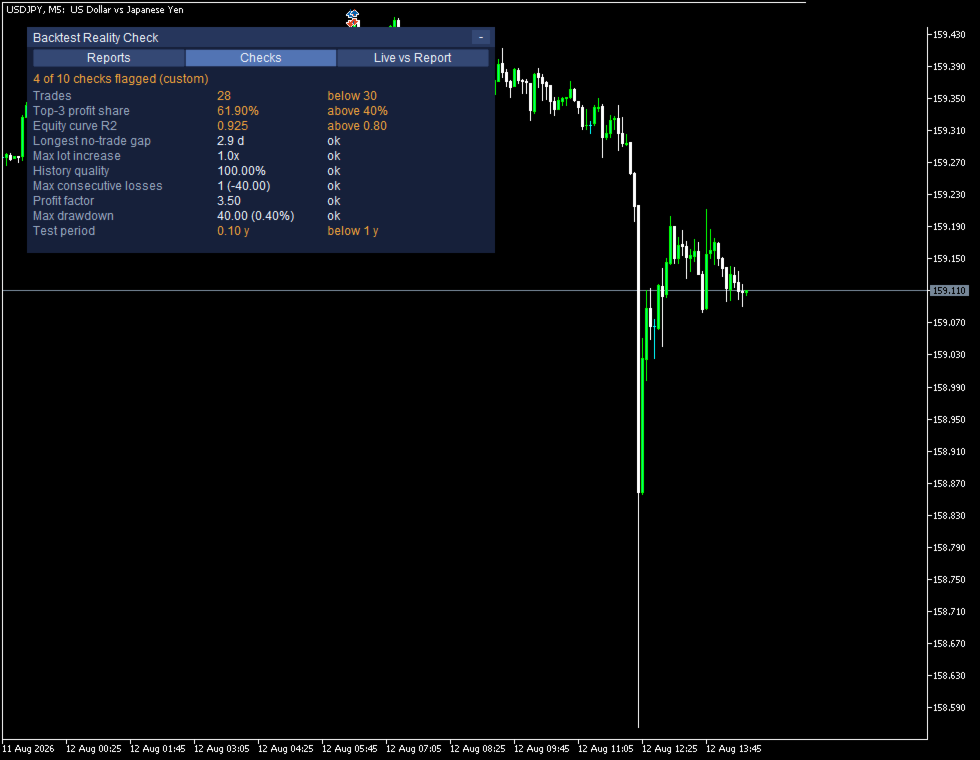
Load the Strategy Tester report of an EA and Backtest Reality Check takes it apart: how many trades it really rests on, how much of the winnings came from the three biggest ones, how straight the balance curve is, how long the quiet stretches are, whether the lot size grows inside a run of losses, and how much history the whole thing stands on.

Then link that report to an EA running on your account. The same figures are measured again from your own closed trades and put next to the report, so you can watch where live has drifted away from the test.

It never places, modifies or closes an order. It does not give advice, it does not send signals, and it does not tell you what to trade. It reads, it counts, and it shows you both columns.

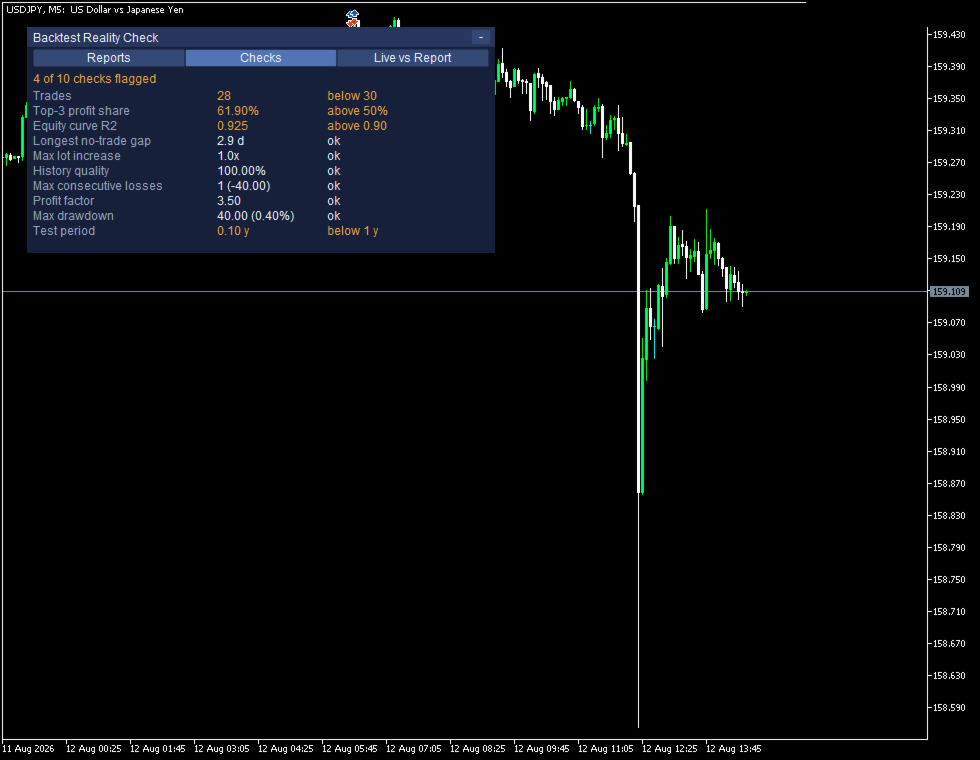
WHAT IT MEASURES - TEN CHECKS
- Trades: how many the result rests on
- Top-3 share of the winnings: how much came from the three biggest trades
- Equity curve R2: how closely the balance curve fits a straight line
- Longest no-trade gap: the quietest stretch, against the length of the test
- Max lot increase: whether the lot grows inside a run of losses
- History quality: how complete the price data behind the test was
- Max consecutive losses, PF, max drawdown, test period

On screen the rows keep the names MetaTrader uses in its own report, so you can hold the two side by side. Each one shows the measured value and, when it crosses a line, why it was flagged: "The 3 biggest winners are more than 50% of all the winnings", "Fewer than 30 trades: too few to draw a statistical conclusion". The thresholds are yours to change, and the panel marks them as custom when you do.

These are measurements, not a verdict. The tool does not say an EA is good or bad, and it cannot tell you why a number looks the way it does - overfitting, a changed market, a different broker and plain luck all leave similar marks.

THEN IT KEEPS SCORE
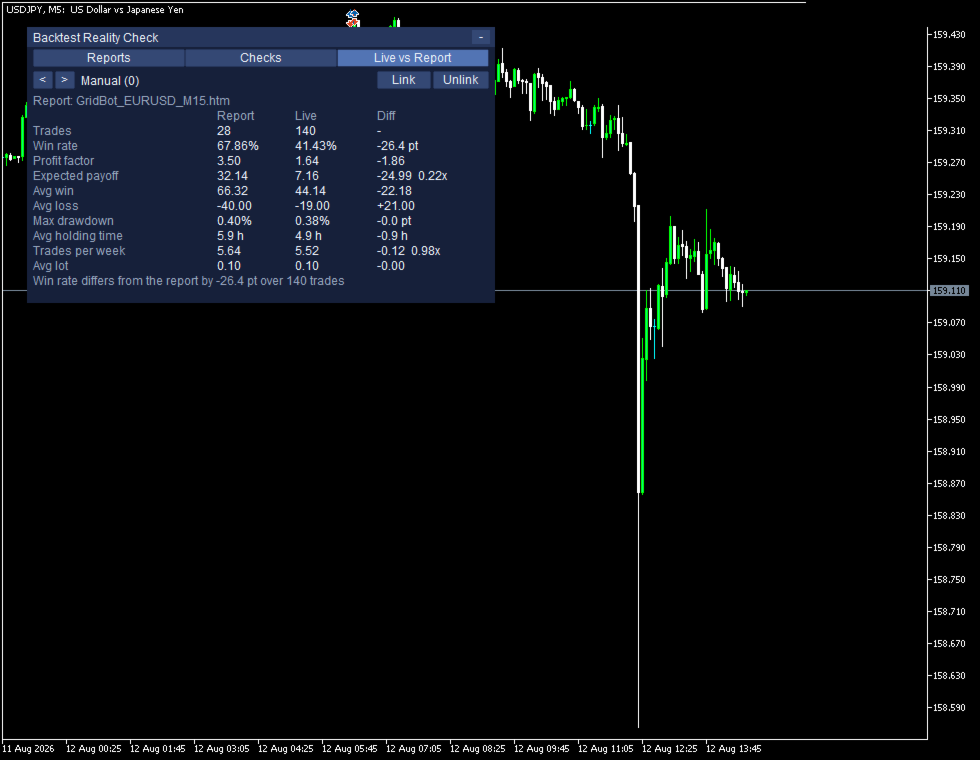
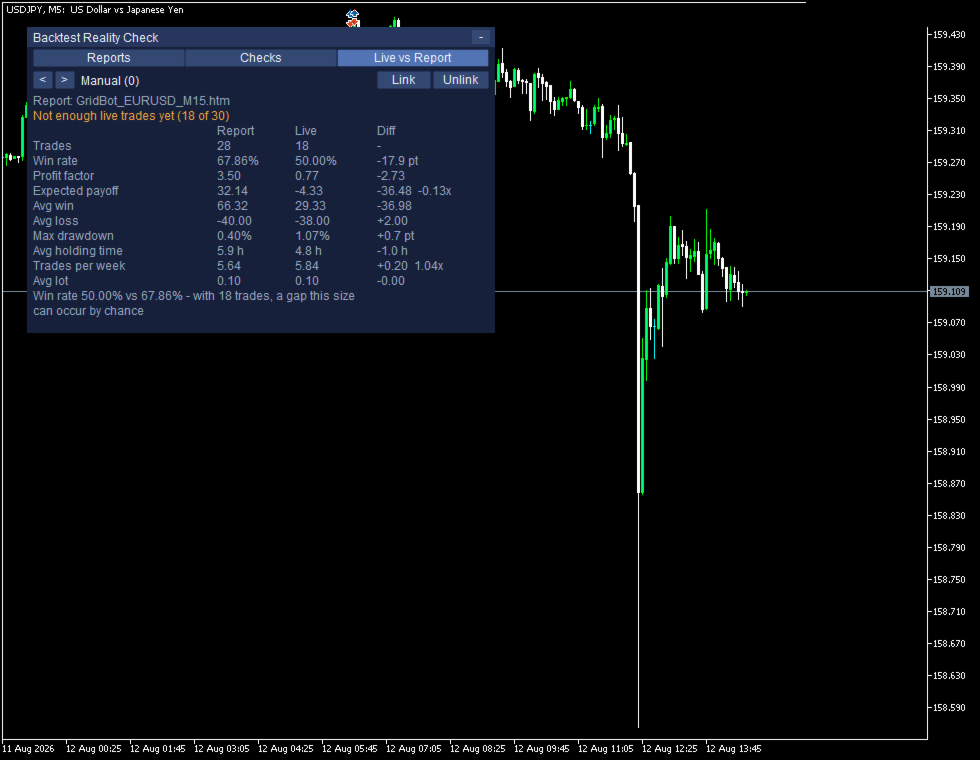
- Trades, win rate, PF, expected payoff, average win and loss, max drawdown, average holding time, trades per week, average lot
- Report and Live side by side, with the difference in the third column
- EAs are found on their own from the magic numbers in your account history, manual trading included
- Link a report to an EA once. The pairing is remembered per account

BELOW THIRTY TRADES IT SAYS SO
A gap between two small samples is not a finding. Under thirty live trades the panel says "Not enough live trades yet (18 of 30)" and greys the difference column out. Even above it, a win rate gap comes with the arithmetic: "Win rate 44.29% vs 42.71% - with 140 trades, a gap this size can occur by chance."

Being able to say "not yet" is the point. A tool that always has an answer is not measuring anything.

HOW TO SAVE THE REPORT

Run the backtest, right-click the report, Save as Report. The dialog offers HTML and XML and picks neither by default - CHOOSE HTML. The XML option is really an .xlsx file and cannot be read here; if you save one by mistake the panel names the file and tells you to save it again as HTML.

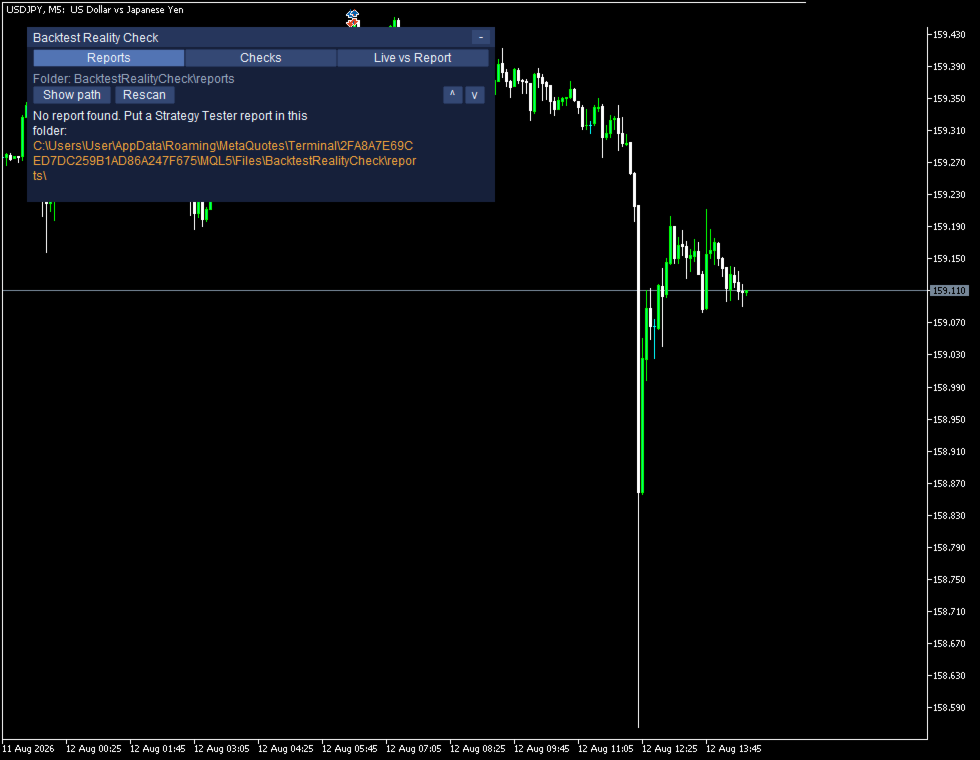
Put the file in MQL5\Files\BacktestRealityCheck\reports. The folder is created for you on the first run, the full path is printed on the panel when the folder is empty, and Show path writes it to the Experts log so you can copy it from there.

WHAT IT READS, AND WHAT IT DOES NOT
- A Strategy Tester report holds the expert, the symbol, the period, the inputs, the company, the currency, the deposit and the leverage. It carries no account number and no name.
- The file is read on your own computer. There is no internet connection of any kind and nothing is sent anywhere.
- The figures come from the deal list, not from the labels, so a report saved on a terminal in any language gives the same numbers. Checked against the same test saved in three languages.

WHAT IT CANNOT DO
- MT5 Strategy Tester reports in HTML only. MT4 reports are not read, and neither is the XML/.xlsx option. Both are refused with their own reason on screen rather than failing quietly.
- It needs a report. Without one the second half has nothing to compare against.
- It cannot say why live differs from the test.
- It cannot see trades that are no longer in your terminal history.
- Netting accounts: the platform merges positions per symbol there, so per-EA figures may be merged as well. This tool is built for hedging accounts.
- Two EAs sharing one magic number appear as one.
- Very large reports are cut off with a reason rather than freezing the terminal.
- It occupies one chart and refuses to start on a second one.
- Average holding time is measured with weekends removed, the same way the report does it. On instruments that trade at weekends this reads shorter than wall-clock time.

Everything works with Algo Trading switched off, because nothing here touches an order.

TRYING IT

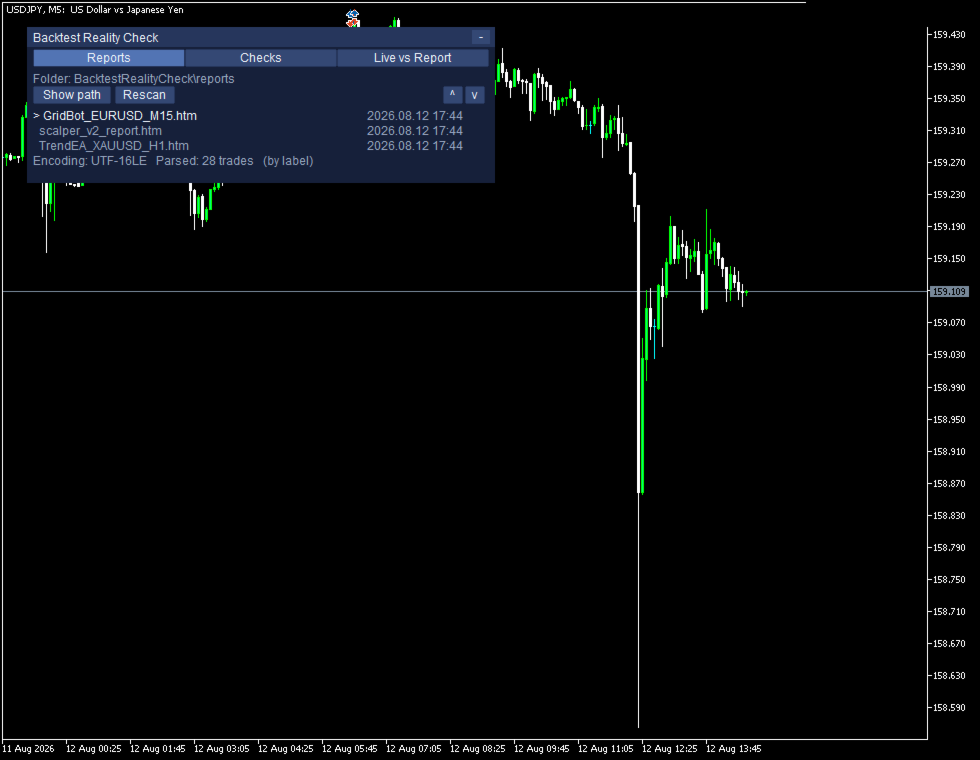
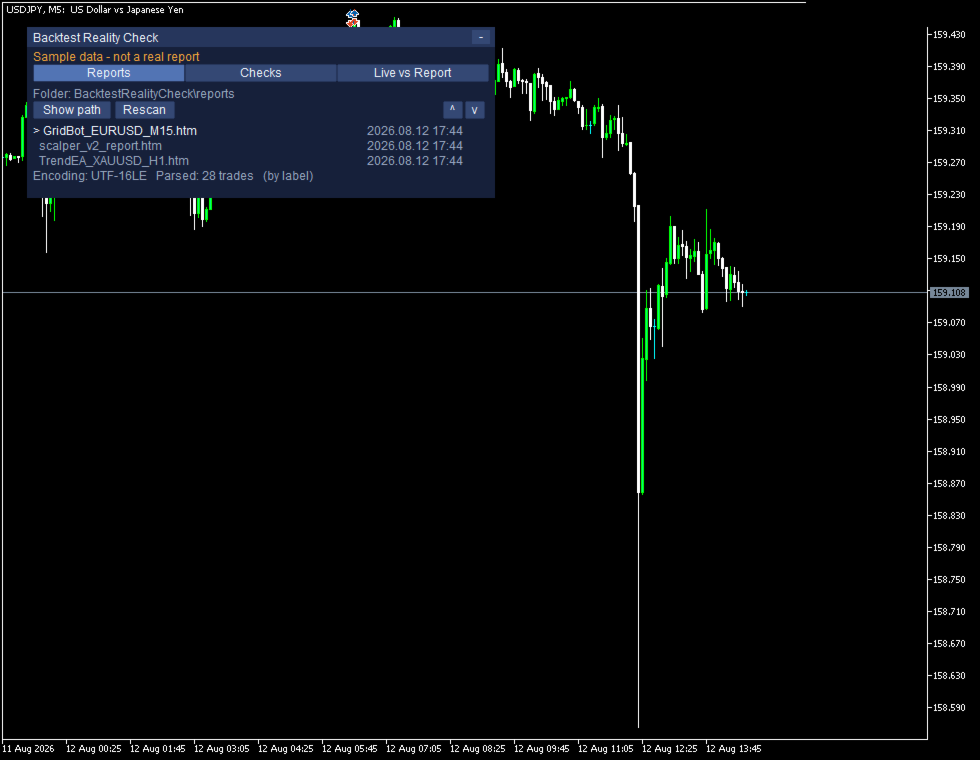
The free demo runs in the Strategy Tester and comes with a built-in sample, so all three screens are filled in from the first second: the report list, the ten checks with four of them flagged, and the comparison. It shows "Sample data - not a real report" the whole time. Point it at your own reports on a chart when you want your own numbers.

INPUTS

Folder: InpReportFolder, InpUseCommonFolder, InpRescanSeconds
Thresholds: InpMinTradesForStats, InpFlagTopTradeShare, InpFlagEquityR2, InpFlagMinTrades
Live figures: InpIncludeSwapCommission, InpHistoryDays
Panel: InpPanelX, InpPanelY, InpFontSize
Tester: InpShowTesterSelfDemo

REQUIREMENTS

MetaTrader 5 and a hedging account. One free chart. No DLL, no external server, no internet connection, no additional files. This tool does not predict prices, does not tell you what to trade, and makes no claim about your results.
作者的更多信息
Drawdown Limit Guard 用于监控亏损是否达到您设定的金额,并在达到时平掉仓位。 本工具不做交易判断。它监控当日亏损与累计亏损,接近上限时发出警告,达到上限时执行平仓。动作仅此而已。 您可以设定当日亏损上限与累计亏损上限,只用其中一项或两项都用均可。达到上限后,此后产生的仓位会被平掉,此后产生的挂单会被删除。至于达到上限时已经持有的仓位,只有在您开启相应选项时才会被平掉。 先说最重要的一点 本工具无法阻止新订单被下达这一行为本身。MetaTrader 5 没有停止新交易的功能,而 MQL5 Market 禁止使用 DLL。 因此,在达到上限之后下达的订单,本工具会在成交后立即平掉(实测约 0.25 秒)。该笔订单会产生相当于点差、以及成交到平仓之间价格波动的亏损。 作为商品说明,这一点写出来并不占便宜,但让人误解的后果更严重,所以放在前面说明。 常见的使用方式 ・监控自己设定的规则,例如「一天的亏损不超过余额的 5%」。 ・监控资金提供计划所规定的当日亏损与累计亏损金额。 本工具按您输入的数值显示,并严格按该数值动作。能否满足某项具体规则,取决

Trade Pause Scheduler 是一款在您指定的时间段内暂停交易的工具。 您可以预先登记不希望交易的时间段,例如经济数据公布前后、周一开盘等。进入该时间段后,工具会取消新下达的挂单,并平掉新建立的仓位。时间段结束后,一切恢复原状。 工具本身不进行交易。它不判断入场时机,也不发出交易信号。 时间段的设定方式 按经济数据设定 选择重要程度(仅高/高与中/全部)和目标国家,再指定在数据公布前多少分钟开始、公布后多少分钟结束。相应的数据会自动从 MetaTrader 5 内置的财经日历中获取。 按星期与时刻设定 最多可登记三组。格式如下:   Mon-Fri 06:00-08:00 周一至周五 6:00 至 8:00   Mon,Wed,Fri 09:30-10:15 周一、周三、周五 9:30 至 10:15   All 12:00-12:30 每天 12:00 至 12:30   Fri 23:00-01:00 周五 23:00 至周六 1:00(跨零点的时间段) 启动时会在日志中输出对输入内容的解析结果。即使格式正确,若设定与您的本意不符,也能在此时发现。
Risk Lock Trade Panel 是一款用于 MetaTrader 5 手动交易的下单面板。方向和入场时机由你来定,面板负责计算手数、把止损一并附在订单上发出去,之后的持仓管理也在同一个窗口里完成。 它不会自己开仓,不提供任何建议,也不发送信号。 手数由你的风险算出来 风险可以按余额或净值的百分比设置,也可以直接填账户货币的固定金额。止损距离用点数输入,或者按下「Show line」,直接在图表上拖动止损线。拖动的过程中,止损距离、手数和风险金额每移动一次就重新算一次。 止损放得近,手数就变大;放得远,手数就变小。而风险金额始终是你设定的那个数。这就是这块面板的思路:你决定止损该放在图表的哪个位置,手数跟着这个决定走。 盈亏比预设会按止损距离的倍数放置止盈,可选一比一、一比一点五、一比二,或者不设。选好之后,它会和止损一起写进订单。 手数会按品种规格取整:手数步长、最小和最大手数都从经纪商那里读取,而一手在你这个止损距离上的亏损金额,交给 MetaTrader 自己去算。所以货币对、黄金、股指以及其他差价合约都能用同一块面板处理。取整之后,面板会再检查一次结果,如
大多数风险管理工具是按整个账户来看的:账户一旦触及上限,全部都会停下,连那些本来没出问题的EA也一起停了。 EA Circuit Breaker 是一个一个EA地处理。当某一个EA越过你为它划的那条线时,只处理这一个,账户里其余的照常运行。 它不会自己下单,不提供建议,也不发送信号。 为对冲账户设计 只有在平台把每笔交易保留为各自独立的持仓时,才能分辨出哪一笔属于哪个EA,而对冲账户正是如此。在净额结算账户上,同一品种会被合并成一个持仓,魔术号也就不再指向任何东西,任何工具在那里都无法区分。本工具启动时会读取账户类型,在净额结算账户上只做观察,并把原因显示出来。已平仓的交易仍然按魔术号区分。 不需要做任何设置 启动后表格就已经填好了。它读取你的持仓和最近30天的历史,把找到的魔术号收集起来,为每个EA建一行。行名取自该EA的订单注释,你可以改名。新的EA一旦交易就会出现。 每一行显示什么 - 今日盈亏、持仓数量、总手数、累计盈亏 - 已包含手续费和库存费,没有把它们排除在外 - 你设定的上限,以及已经用掉了多少 - 达到上限的 80% 变黄,触及上限变红 可以为每个EA
Most trade managers work on the orders they placed themselves, or on the symbol of the chart they sit on. This one works on the account. Trade Control Center puts every open position and every pending order on your account into one list - whoever opened them. Trades you placed by hand, from your phone, from another terminal, or from any EA all appear in the same table, across every symbol, and you can act on them from there. It does not open trades on its own, it does not give advice, and it d
筛选:
无评论
回复评论