

MQL5取引ツール(第16回):改良版スーパーサンプリング・アンチエイリアシング(SSAA)と高解像度レンダリング
 133
133
 0
0

はじめに
第15回では、MetaQuotes Language 5 (MQL5)を使用して、ぼかし効果、シャドウ描画、滑らかなマウスホイールスクロールを統合したキャンバスダッシュボードを開発しました。このダッシュボードでは、インタラクティブな市場監視を目的として、視覚的なパネル表示やカスタマイズ可能なテーマ機能を実装しました。第16回では、anti-aliasingアンチエイリアシング技術と高解像度レンダリングを導入し、スーパーサンプリングを活用することで、より滑らかなグラフィックス、境界線、UI要素を実現します。今回の機能強化では、統計パネルおよびテキストパネル向けの高解像度キャンバス、角丸形状を正確に描画するための描画関数、さらに視覚品質を向上させる洗練されたインタラクション機能を追加します。本記事では以下のトピックを扱います。
記事を読み終える頃には、より鮮明でプロフェッショナルな市場可視化を実現する、高度化されたMQL5ダッシュボードを構築できるようになります。それでは始めましょう。
アンチエイリアシングと高解像度レンダリング技術の理解
アンチエイリアシングおよび高解像度レンダリングの仕組みは、デジタルグラフィックスにおける視覚的なアーティファクト、特に連続的な形状を離散的なピクセルグリッド上へ表現する際に発生するギザギザした境界や「エイリアシング」問題に対応します。エイリアシングは、線、曲線、境界線などに階段状のパターンとして現れ、取引ダッシュボードのような表示において、視認性やプロフェッショナルな印象を低下させます。この問題を軽減するために、スーパーサンプリングなどの技術では、通常は最終表示サイズの数倍となる高解像度でシーンを描画し、その後ピクセル値を平均化してダウンサンプリングします。これにより、色の混合によってエッジが滑らかになり、より自然な外観を実現できます。以下に、スーパーサンプリング処理の例を示します。

一方、高解像度レンダリングは、アンチエイリアシングを補完する技術です。これは、最終出力サイズを大きくすることなく、縮小前に大きなキャンバス上で細部まで描画することで、全体的な画質を向上させます。これはMQL5アプリケーションにおいて特に重要です。なぜなら、グラフや統計情報などの市場データを正確に可視化することで、歪みを最小限に抑え、ユーザーの理解や意思決定を支援できるためです。たとえば、バイキュービック補間は高度なリサンプリング手法の一つであり、周囲のピクセルを重み付け平均することで新しいピクセル値を計算します。これにより、拡大・縮小処理中の滑らかさを維持し、より優れたアンチエイリアシング結果に貢献します。
今回の実装では、統計パネルおよびテキストパネルに対して4倍のスーパーサンプリング倍率を適用します。高解像度キャンバス上で、円弧、四辺形、角丸三角形などを数学的な描画関数によって生成し、正確なUI要素を描画します。その後、ピクセル平均化によるダウンサンプリングをおこなうことで、アンチエイリアス処理された境界線、矢印、図形を生成します。また、特にスクロールバー要素や統計ヘッダーボックスについては、効率的なパフォーマンスを維持しながら高品質な描画を実現します。以下に、目標を視覚的に示した図を掲載します。

MQL5での実装
MQL5でプログラムを強化するには、高解像度レンダリングとスーパーサンプリング機能のために、新しい定義、グローバル変数、および入力を追加して、以下のように新しい機能強化を制御します。
//+------------------------------------------------------------------+
//|                                       Canvas Dashboard PART4.mq5 |
//|                           Copyright 2026, Allan Munene Mutiiria. |
//|                                   https://t.me/Forex_Algo_Trader |
//+------------------------------------------------------------------+
#property copyright "Copyright 2026, Allan Munene Mutiiria."
#property link "https://t.me/Forex_Algo_Trader"
#property version "1.00"
#property strict

// Added two new canvas objects for high-resolution rendering
//+------------------------------------------------------------------+
//| Canvas objects                                                   |
//+------------------------------------------------------------------+
CCanvas canvasGraph;                    //--- Declare graph canvas object
CCanvas canvasStats;                    //--- Declare stats canvas object
CCanvas canvasStatsHighRes;             //--- Declare stats high-res canvas object
CCanvas canvasHeader;                   //--- Declare header canvas object
CCanvas canvasText;                     //--- Declare text canvas object
CCanvas canvasTextHighRes;              //--- Declare text high-res canvas object

// Added names for the new high-resolution canvases
//+------------------------------------------------------------------+
//| Canvas names                                                     |
//+------------------------------------------------------------------+
string canvasGraphName = "GraphCanvas"; //--- Set graph canvas name
string canvasStatsName = "StatsCanvas"; //--- Set stats canvas name
string canvasStatsHighResName = "StatsCanvasHighRes"; //--- Set stats high-res name
string canvasHeaderName = "HeaderCanvas"; //--- Set header canvas name
string canvasTextName = "TextCanvas";   //--- Set text canvas name
string canvasTextHighResName = "TextCanvasHighRes"; //--- Set text high-res name

// New group
sinput group "=== TEXT PANEL SETTINGS ==="
input int TriangleRoundRadius         = 1;                              // Triangle Round Radius
input double TriangleBaseWidthPercent = 65.0;                           // Triangle Base Width Percent (of button size)
input double TriangleHeightPercent    = 70.0;                           // Triangle Height Percent (of base width)
input bool ShowUpDownButtons          = false;                          // Show Up/Down Buttons
input int TextFontSize = 17;                                            // Text Font Size

// Added a new global variable for supersampling factor
const int smoothness_factor = 10;  // Higher = smoother drag (e.g., 20 for more)
const int supersamplingFactor = 4;      // Supersampling for smooth rounds
まず、キャンバスオブジェクトを拡張し、スーパーサンプリングレンダリングをサポートするために、既存のcanvasGraph、canvasStats、canvasHeader、canvasTextに加えて、統計パネル用およびテキストパネル用の高解像度キャンバスとしてcanvasStatsHighResとcanvasTextHighResを宣言します。次に、これらの新しい高解像度キャンバスに対応する名前も定義します。具体的には、プログラム内での識別および生成処理に使用するため、canvasStatsHighResNameには"StatsCanvasHighRes"、canvasTextHighResNameには"TextCanvasHighRes"を設定します。変更箇所を明確にするため、該当部分をハイライトしています。
新しい入力グループ「=== TEXT PANEL SETTINGS ===」では、ユーザーが設定可能なパラメータを追加します。ここでは、矢印の角の丸みを制御するTriangleRoundRadius、ボタンサイズに対する矢印の比率を調整するTriangleBaseWidthPercentおよびTriangleHeightPercent、スクロールボタンの表示・非表示を切り替えるShowUpDownButtons、そしてテキスト表示サイズを設定するTextFontSizeを導入します。特にスクロールバーについては、2026年時点で最新リリースであるWindows 11の新しいバージョンに合わせて更新することを目的としています。最後に、2つの定数を定義します。smoothness_factorは10に初期化し、スクロール操作をより滑らかにするために使用します。また、supersamplingFactorには4を設定し、ダウンサンプリング前にピクセルサイズを4倍に拡大することで、高解像度レンダリングによるアンチエイリアシングを有効化します。
この処理は、すべてを4倍の大きさで描いてから、ぎゅっと縮めて滑らかに見せるイメージです。これはアンチエイリアシングにおいて重要な役割を果たします。4倍の解像度で描画することで、縮小時にピクセルを平均化でき、曲線、境界線、テキストに発生するギザギザしたエッジを低減できます。この方法により、全体的なグラフィックス品質は向上しますが、その分コンピューターの処理負荷は増加します。そのため、使用時にはパフォーマンスとのバランスを考慮する必要があります。次に、OnInitイベントハンドラー内で、通常のキャンバスと合わせて、これらの高解像度キャンバスを以下のように作成します。
if (EnableStatsPanel) {                                   //--- Check stats panel enabled
   int statsX = currentCanvasX + currentWidth + PanelGap; //--- Compute stats X
   if (!canvasStats.CreateBitmapLabel(0, 0, canvasStatsName, statsX, currentCanvasY + header_height + gap_y, currentWidth / 2, currentHeight, COLOR_FORMAT_ARGB_NORMALIZE)) { //--- Create stats canvas
      Print("Failed to create Stats Canvas");             //--- Log creation failure
   }
   if (!canvasStatsHighRes.Create(canvasStatsHighResName, (currentWidth / 2) * supersamplingFactor, currentHeight * supersamplingFactor, COLOR_FORMAT_ARGB_NORMALIZE)) { //--- Create stats high-res
      Print("Failed to create Stats High-Res Canvas");    //--- Log creation failure
   }
   statsCreated = true;                                   //--- Set stats created flag
}

if (EnableTextPanel) {                                    //--- Check text panel enabled
   int textY = currentCanvasY + header_height + gap_y + currentHeight + PanelGap; //--- Compute text Y
   int text_width = inner_header_width;                   //--- Set text width
   int text_height = TextPanelHeight;                     //--- Set text height
   if (!canvasText.CreateBitmapLabel(0, 0, canvasTextName, currentCanvasX, textY, text_width, text_height, COLOR_FORMAT_ARGB_NORMALIZE)) { //--- Create text canvas
      Print("Failed to create Text Canvas");              //--- Log creation failure
   }
   if (!canvasTextHighRes.Create(canvasTextHighResName, text_width * supersamplingFactor, text_height * supersamplingFactor, COLOR_FORMAT_ARGB_NORMALIZE)) { //--- Create text high-res
      Print("Failed to create Text High-Res Canvas");     //--- Log creation failure
   }
   textCreated = true;                                    //--- Set text created flag
}
OnInitイベントハンドラでは、まずEnableStatsPanel入力パラメータを確認し、統計パネルが有効になっている場合に統計キャンバスを初期化します。最初に、現在のキャンバスのX座標にキャンバス幅とパネル間隔を加算して、統計キャンバスのX座標を計算します。続いて、canvasStatsオブジェクトのCreateBitmapLabelメソッドを使用して標準の統計キャンバスを作成します。このとき、チャートID、サブウィンドウ、キャンバス名、表示位置、サイズ、およびCOLOR_FORMAT_ARGB_NORMALIZEを指定します。キャンバスの作成に失敗した場合は、前バージョンと同様にログへエラーメッセージを出力します。次に、canvasStatsHighResオブジェクトのCreateメソッドを使用して高解像度の統計キャンバスを作成します。ここでは、高解像度キャンバス名に加え、幅と高さをsupersamplingFactor倍に拡大したサイズと、同じカラーフォーマットを指定します。こちらも作成に失敗した場合はログへ記録し、最後にstatsCreatedフラグをtrueへ設定します。
同様に、EnableTextPanelによってテキストパネルが有効な場合は、テキストキャンバスの初期化をおこないます。まず、現在のキャンバスのY座標にヘッダー高さ、各種余白、現在のキャンバス高さ、およびパネル間隔を加算してテキストキャンバスのY座標を計算します。その後、テキストパネルの幅をヘッダー内部の幅に合わせ、高さをTextPanelHeightに設定します。標準のテキストキャンバスは、canvasTextオブジェクトのCreateBitmapLabelメソッドを使用して作成し、必要な各種パラメータを指定するとともに、作成に失敗した場合はログへ記録します。続いて、canvasTextHighResオブジェクトのCreateメソッドを使用して高解像度テキストキャンバスを作成します。この際、幅と高さはsupersamplingFactorに基づいて拡大したサイズを指定し、エラーが発生した場合はログへ出力します。最後にtextCreatedフラグをtrueへ設定します。新たに高解像度キャンバスを追加したため、不要になった際には通常のキャンバスと同様に適切に破棄する必要があります。たとえば、初期化解除(OnDeinit)では、以下のようなロジックを使用して各キャンバスを解放します。
//+------------------------------------------------------------------+
//| Deinitialize expert                                              |
//+------------------------------------------------------------------+
void OnDeinit(const int reason) {           // Deinitialize expert advisor
   canvasHeader.Destroy();                  //--- Destroy header canvas
   if (graphCreated) canvasGraph.Destroy(); //--- Destroy graph if created
   if (statsCreated) {
      canvasStats.Destroy();                //--- Destroy stats if created
      canvasStatsHighRes.Destroy();         //--- Destroy stats high-res
   }
   if (textCreated) {
      canvasText.Destroy();                 //--- Destroy text if created
      canvasTextHighRes.Destroy();          //--- Destroy text high-res
   }
   ChartRedraw();                           //--- Redraw chart
}
高解像度キャンバスが不要になった場合は、それらを破棄するだけです。同様の処理は、ToggleMinimize関数およびCloseDashboard関数でも同じ形式で実装します。次に、統計ヘッダー用の角丸矩形と、スクロールバーボタン用の角丸三角形を描画するロジックを実装します。今回は従来の静的な図形を使用せず、独自のカスタム図形として描画するため、それぞれ専用の描画関数を作成します。以下のロジックを使用します。
//+------------------------------------------------------------------+
//| Draw rectangle corner arc with exact boundaries                  |
//+------------------------------------------------------------------+
void DrawRectCornerArcPrecise(CCanvas &cvs, int centerX, int centerY, int radius, int thickness, uint borderARGB,
                              double startAngle, double endAngle) {
   int halfThickness = thickness / 2;
   double outerRadius = (double)radius + halfThickness;
   double innerRadius = (double)radius - halfThickness;
   if(innerRadius < 0) innerRadius = 0;

   int pixelRange = (int)(outerRadius + 2);

   for(int deltaY = -pixelRange; deltaY <= pixelRange; deltaY++) {
      for(int deltaX = -pixelRange; deltaX <= pixelRange; deltaX++) {
         double distance = MathSqrt(deltaX * deltaX + deltaY * deltaY);
         if(distance < innerRadius || distance > outerRadius) continue;

         double angle = MathArctan2((double)deltaY, (double)deltaX);

         if(IsAngleBetween(angle, startAngle, endAngle))
            cvs.PixelSet(centerX + deltaX, centerY + deltaY, borderARGB);
      }
   }
}

//+------------------------------------------------------------------+
//| Fill quadrilateral                                               |
//+------------------------------------------------------------------+
void FillQuadrilateral(CCanvas &cvs, double &verticesX[], double &verticesY[], uint fillColor) {
   double minY = verticesY[0], maxY = verticesY[0];
   for(int i = 1; i < 4; i++) {
      if(verticesY[i] < minY) minY = verticesY[i];
      if(verticesY[i] > maxY) maxY = verticesY[i];
   }

   int yStart = (int)MathCeil(minY);
   int yEnd = (int)MathFloor(maxY);

   for(int y = yStart; y <= yEnd; y++) {
      double scanlineY = (double)y + 0.5;
      double xIntersections[8];
      int intersectionCount = 0;

      for(int i = 0; i < 4; i++) {
         int nextIndex = (i + 1) % 4;
         double x0 = verticesX[i], y0 = verticesY[i];
         double x1 = verticesX[nextIndex], y1 = verticesY[nextIndex];

         double edgeMinY = (y0 < y1) ? y0 : y1;
         double edgeMaxY = (y0 > y1) ? y0 : y1;

         if(scanlineY < edgeMinY || scanlineY > edgeMaxY) continue;
         if(MathAbs(y1 - y0) < 1e-12) continue;

         double interpolationFactor = (scanlineY - y0) / (y1 - y0);
         if(interpolationFactor < 0.0 || interpolationFactor > 1.0) continue;

         xIntersections[intersectionCount++] = x0 + interpolationFactor * (x1 - x0);
      }

      for(int a = 0; a < intersectionCount - 1; a++)
         for(int b = a + 1; b < intersectionCount; b++)
            if(xIntersections[a] > xIntersections[b]) {
               double temp = xIntersections[a];
               xIntersections[a] = xIntersections[b];
               xIntersections[b] = temp;
            }

      for(int pairIndex = 0; pairIndex + 1 < intersectionCount; pairIndex += 2) {
         int xLeft = (int)MathCeil(xIntersections[pairIndex]);
         int xRight = (int)MathFloor(xIntersections[pairIndex + 1]);
         for(int x = xLeft; x <= xRight; x++)
            cvs.PixelSet(x, y, fillColor);
      }
   }
}

//+------------------------------------------------------------------+
//| Normalize angle                                                  |
//+------------------------------------------------------------------+
double NormalizeAngle(double angle) {
   double twoPi = 2.0 * M_PI;
   angle = MathMod(angle, twoPi);
   if(angle < 0) angle += twoPi;
   return angle;
}

//+------------------------------------------------------------------+
//| Is angle between                                                 |
//+------------------------------------------------------------------+
bool IsAngleBetween(double angle, double startAngle, double endAngle) {
   angle = NormalizeAngle(angle);
   startAngle = NormalizeAngle(startAngle);
   endAngle = NormalizeAngle(endAngle);

   double span = NormalizeAngle(endAngle - startAngle);
   double relativeAngle = NormalizeAngle(angle - startAngle);

   return relativeAngle <= span;
}
ここでは、高解像度キャンバス上で角丸矩形の枠線を高精度に描画するため、DrawRectCornerArcPrecise関数を実装します。この関数では、線幅の半分を基準として内側半径と外側半径を計算し、円弧の中心周辺にあるピクセル範囲を走査します。各ピクセルについて、中心からの距離と角度を判定し、開始角度と終了角度で定義される円弧領域内に含まれる場合のみ描画します。これにより、滑らかで正確な角丸の枠線を描画できます。続いて、任意の四辺形を塗りつぶすためのFillQuadrilateral関数を実装します。この関数では、スキャンラインアルゴリズムを採用しています。まず、四辺形の頂点から最小および最大のY座標を求めます。次に、各スキャンラインについて辺との交点を計算し、それらをソートした後、交点のペアごとに水平線を塗りつぶします。これにより、隙間のない完全な四辺形の塗りつぶしを実現します。
次に、角度を0から2πの範囲へ正規化するNormalizeAngle関数を定義します。この関数では、剰余演算を用いて角度を正規化し、負の値になった場合は補正します。この正規化により、円弧などの円形ジオメトリにおいて一貫した角度比較が可能になります。さらに、指定した角度が開始角度と終了角度の間に存在するかを判定するIsAngleBetween関数を追加します。この関数では、すべての入力角度を正規化した後、角度範囲を計算し、対象となる角度の相対位置を判定します。時計回り・反時計回りの両方向に対応しているため、柔軟な円弧描画を実現できます。これらの関数を利用することで、以下のように角丸矩形を描画できます。
//+------------------------------------------------------------------+
//| Fill rounded rectangle                                           |
//+------------------------------------------------------------------+
void FillRoundedRectangle(CCanvas &cvs, int x, int y, int w, int h, int radius, uint argb_color) { // Render rounded fill
   if (radius <= 0) {                                                           //--- Check zero radius
      cvs.FillRectangle(x, y, x + w - 1, y + h - 1, argb_color);                //--- Fill rectangle
      return;                                                                   //--- Exit function
   }
   radius = MathMin(radius, MathMin(w / 2, h / 2));                             //--- Adjust radius

   cvs.Arc(x + radius, y + radius, radius, radius, DegreesToRadians(180), DegreesToRadians(90), argb_color); //--- Draw top-left arc
   cvs.Arc(x + w - radius - 1, y + radius, radius, radius, DegreesToRadians(270), DegreesToRadians(90), argb_color); //--- Draw top-right arc
   cvs.Arc(x + w - radius - 1, y + h - radius - 1, radius, radius, DegreesToRadians(0), DegreesToRadians(90), argb_color); //--- Draw bottom-right arc
   cvs.Arc(x + radius, y + h - radius - 1, radius, radius, DegreesToRadians(90), DegreesToRadians(90), argb_color); //--- Draw bottom-left arc

   cvs.FillCircle(x + radius, y + radius, radius, argb_color);                  //--- Fill top-left circle
   cvs.FillCircle(x + w - radius - 1, y + radius, radius, argb_color);          //--- Fill top-right circle
   cvs.FillCircle(x + w - radius - 1, y + h - radius - 1, radius, argb_color);  //--- Fill bottom-right circle
   cvs.FillCircle(x + radius, y + h - radius - 1, radius, argb_color); //--- Fill bottom-left circle

   cvs.FillRectangle(x + radius, y, x + w - radius - 1, y + h - 1, argb_color); //--- Fill horizontal body

   cvs.FillRectangle(x, y + radius, x + w - 1, y + h - radius - 1, argb_color); //--- Fill vertical body
}

//+------------------------------------------------------------------+
//| Draw rounded rectangle border                                    |
//+------------------------------------------------------------------+
void DrawRoundedRectangleBorderHiRes(CCanvas &cvs, int positionX, int positionY, int width, int height, int radius, uint borderColorARGB, int thickness) {
   int scaledThickness = thickness;

   DrawRectStraightEdge(cvs, positionX + radius, positionY, positionX + width - radius, positionY, scaledThickness, borderColorARGB);
   DrawRectStraightEdge(cvs, positionX + width - radius, positionY + height - 1, positionX + radius, positionY + height - 1, scaledThickness, borderColorARGB);
   DrawRectStraightEdge(cvs, positionX, positionY + height - radius, positionX, positionY + radius, scaledThickness, borderColorARGB);
   DrawRectStraightEdge(cvs, positionX + width - 1, positionY + radius, positionX + width - 1, positionY + height - radius, scaledThickness, borderColorARGB);

   DrawRectCornerArcPrecise(cvs, positionX + radius, positionY + radius, radius, scaledThickness, borderColorARGB,
                            M_PI, M_PI * 1.5);
   DrawRectCornerArcPrecise(cvs, positionX + width - radius, positionY + radius, radius, scaledThickness, borderColorARGB,
                            M_PI * 1.5, M_PI * 2.0);
   DrawRectCornerArcPrecise(cvs, positionX + radius, positionY + height - radius, radius, scaledThickness, borderColorARGB,
                            M_PI * 0.5, M_PI);
   DrawRectCornerArcPrecise(cvs, positionX + width - radius, positionY + height - radius, radius, scaledThickness, borderColorARGB,
                            0.0, M_PI * 0.5);
}

//+------------------------------------------------------------------+
//| Draw straight edge for rectangle border                          |
//+------------------------------------------------------------------+
void DrawRectStraightEdge(CCanvas &cvs, double startX, double startY, double endX, double endY, int thickness, uint borderARGB) {
   double deltaX = endX - startX;
   double deltaY = endY - startY;
   double edgeLength = MathSqrt(deltaX*deltaX + deltaY*deltaY);
   if(edgeLength < 1e-6) return;

   double perpendicularX = -deltaY / edgeLength;
   double perpendicularY = deltaX / edgeLength;

   double edgeDirectionX = deltaX / edgeLength;
   double edgeDirectionY = deltaY / edgeLength;

   double halfThickness = (double)thickness / 2.0;

   double extensionLength = 1.5;
   double extendedStartX = startX - edgeDirectionX * extensionLength;
   double extendedStartY = startY - edgeDirectionY * extensionLength;
   double extendedEndX = endX + edgeDirectionX * extensionLength;
   double extendedEndY = endY + edgeDirectionY * extensionLength;

   double verticesX[4], verticesY[4];
   verticesX[0] = extendedStartX - perpendicularX * halfThickness;  verticesY[0] = extendedStartY - perpendicularY * halfThickness;
   verticesX[1] = extendedStartX + perpendicularX * halfThickness;  verticesY[1] = extendedStartY + perpendicularY * halfThickness;
   verticesX[2] = extendedEndX + perpendicularX * halfThickness;  verticesY[2] = extendedEndY + perpendicularY * halfThickness;
   verticesX[3] = extendedEndX - perpendicularX * halfThickness;  verticesY[3] = extendedEndY - perpendicularY * halfThickness;

   FillQuadrilateral(cvs, verticesX, verticesY, borderARGB);
}
角丸矩形を描画するために、まずFillRoundedRectangle関数を実装し、キャンバス上へ塗りつぶされた角丸矩形を描画します。この関数では、角丸半径が0の場合は通常の矩形を塗りつぶします。それ以外の場合は、半径が矩形の幅または高さの半分を超えないよう調整します。続いて、度数法からラジアンへ変換した角度を用いて、Arcメソッドで各コーナーの4分の1円弧を描画します。さらに、各コーナーに完全な円を塗りつぶして隙間をなくし、その後、中央部分の水平・垂直領域を塗りつぶすことで、角丸部分と本体を継ぎ目なく接続します。
次に、高解像度で角丸矩形の枠線を描画するため、DrawRoundedRectangleBorderHiRes関数を実装します。この関数では、線幅を高解像度に合わせてスケーリングした後、DrawRectStraightEdgeを使用して4辺の直線部分を描画します。さらに、各コーナーについてDrawRectCornerArcPreciseを呼び出し、それぞれに対応する開始角度と終了角度(例えば左上はM_PIからM_PI * 1.5)を指定することで、重なりのない正確なアンチエイリアス付きの角丸枠線を描画します。
最後に、DrawRectStraightEdge関数では、直線部分の描画処理をおこないます。この関数では、まず線分の差分ベクトルを計算し、その方向ベクトルと垂直ベクトルを正規化します。続いて、枠線幅を表す半分の線幅を計算し、角部で滑らかに接続できるよう、線分を両端方向へわずかに延長します。その後、線分に沿った四辺形ストリップを構成する4つの頂点を求め、それらをFillQuadrilateralへ渡して塗りつぶします。このベクトルベースの描画方式により、高品質で連続性のある直線の枠線を実現できます。これらの関数を組み合わせることで、目的とする角丸矩形を描画できます。次は、角丸三角形を描画するロジックを実装します。その前に、まずいくつかのヘルパー関数を定義します。
//+------------------------------------------------------------------+
//| Precompute triangle geometry                                     |
//+------------------------------------------------------------------+
void PrecomputeTriangleGeometry(double &sharpX[], double &sharpY[], int radius, double &arcCentersX[], double &arcCentersY[], double &tangentX[][2], double &tangentY[][2], double &startAngles[], double &endAngles[]) {
   for(int cornerIndex = 0; cornerIndex < 3; cornerIndex++) {
      int previousIndex = (cornerIndex + 2) % 3;
      int nextIndex = (cornerIndex + 1) % 3;

      double edgeA_X = sharpX[cornerIndex] - sharpX[previousIndex], edgeA_Y = sharpY[cornerIndex] - sharpY[previousIndex];
      double edgeA_Length = MathSqrt(edgeA_X*edgeA_X + edgeA_Y*edgeA_Y);
      edgeA_X /= edgeA_Length; edgeA_Y /= edgeA_Length;

      double edgeB_X = sharpX[nextIndex] - sharpX[cornerIndex], edgeB_Y = sharpY[nextIndex] - sharpY[cornerIndex];
      double edgeB_Length = MathSqrt(edgeB_X*edgeB_X + edgeB_Y*edgeB_Y);
      edgeB_X /= edgeB_Length; edgeB_Y /= edgeB_Length;

      double normalA_X = edgeA_Y, normalA_Y = -edgeA_X;
      double normalB_X = edgeB_Y, normalB_Y = -edgeB_X;

      double bisectorX = normalA_X + normalB_X, bisectorY = normalA_Y + normalB_Y;
      double bisectorLength = MathSqrt(bisectorX*bisectorX + bisectorY*bisectorY);
      if(bisectorLength < 1e-12) { bisectorX = normalA_X; bisectorY = normalA_Y; bisectorLength = MathSqrt(bisectorX*bisectorX + bisectorY*bisectorY); }
      bisectorX /= bisectorLength; bisectorY /= bisectorLength;

      double cosInteriorAngle = (-edgeA_X)*edgeB_X + (-edgeA_Y)*edgeB_Y;
      if(cosInteriorAngle > 1.0) cosInteriorAngle = 1.0;
      if(cosInteriorAngle < -1.0) cosInteriorAngle = -1.0;
      double halfAngle = MathArccos(cosInteriorAngle) / 2.0;
      double sinHalfAngle = MathSin(halfAngle);
      if(sinHalfAngle < 1e-12) sinHalfAngle = 1e-12;

      double distanceToCenter = radius / sinHalfAngle;
      arcCentersX[cornerIndex] = sharpX[cornerIndex] + bisectorX * distanceToCenter;
      arcCentersY[cornerIndex] = sharpY[cornerIndex] + bisectorY * distanceToCenter;

      double deltaX_A = sharpX[cornerIndex] - sharpX[previousIndex], deltaY_A = sharpY[cornerIndex] - sharpY[previousIndex];
      double lengthSquared_A = deltaX_A*deltaX_A + deltaY_A*deltaY_A;
      double interpolationFactor_A = ((arcCentersX[cornerIndex] - sharpX[previousIndex])*deltaX_A + (arcCentersY[cornerIndex] - sharpY[previousIndex])*deltaY_A) / lengthSquared_A;
      tangentX[cornerIndex][1] = sharpX[previousIndex] + interpolationFactor_A * deltaX_A;
      tangentY[cornerIndex][1] = sharpY[previousIndex] + interpolationFactor_A * deltaY_A;

      double deltaX_B = sharpX[nextIndex] - sharpX[cornerIndex], deltaY_B = sharpY[nextIndex] - sharpY[cornerIndex];
      double lengthSquared_B = deltaX_B*deltaX_B + deltaY_B*deltaY_B;
      double interpolationFactor_B = ((arcCentersX[cornerIndex] - sharpX[cornerIndex])*deltaX_B + (arcCentersY[cornerIndex] - sharpY[cornerIndex])*deltaY_B) / lengthSquared_B;
      tangentX[cornerIndex][0] = sharpX[cornerIndex] + interpolationFactor_B * deltaX_B;
      tangentY[cornerIndex][0] = sharpY[cornerIndex] + interpolationFactor_B * deltaY_B;

      startAngles[cornerIndex] = MathArctan2(tangentY[cornerIndex][1] - arcCentersY[cornerIndex], tangentX[cornerIndex][1] - arcCentersX[cornerIndex]);
      endAngles[cornerIndex] = MathArctan2(tangentY[cornerIndex][0] - arcCentersY[cornerIndex], tangentX[cornerIndex][0] - arcCentersX[cornerIndex]);
   }
}

//+------------------------------------------------------------------+
//| Angle in arc sweep for triangle                                  |
//+------------------------------------------------------------------+
bool TriangleAngleInArcSweep(double startAngle, double endAngle, double angle) {
   double twoPi = 2.0 * M_PI;
   double startAngleMod = MathMod(startAngle + twoPi, twoPi);
   double endAngleMod = MathMod(endAngle + twoPi, twoPi);
   angle = MathMod(angle + twoPi, twoPi);

   double ccwSpan = MathMod(endAngleMod - startAngleMod + twoPi, twoPi);

   if(ccwSpan <= M_PI) {
      double relativeAngle = MathMod(angle - startAngleMod + twoPi, twoPi);
      return(relativeAngle <= ccwSpan + 1e-6);
   } else {
      double cwSpan = twoPi - ccwSpan;
      double relativeAngle = MathMod(angle - endAngleMod + twoPi, twoPi);
      return(relativeAngle <= cwSpan + 1e-6);
   }
}
ここでは、角丸三角形の描画に必要な幾何情報を事前計算するためのPrecomputeTriangleGeometry関数を定義します。この関数は、後ほどカスタム矢印アイコンとして使用する角丸三角形の描画に利用されます。関数では、cornerIndexを0から2まで変化させながら、三角形の各頂点を順番に処理します。各頂点について、巡回参照ができるよう前後の頂点インデックスを剰余演算によって求め、鋭角頂点であるsharpXおよびsharpYから隣接する頂点へ向かう辺ベクトルを計算し、正規化します。続いて、それらのベクトルを90度回転させることで外向き法線ベクトルを求めます。さらに、2本の法線ベクトルを加算して角の二等分線を構成し、長さがほぼ0となる場合を考慮しながら正規化します。その後、辺ベクトルを反転したもの同士の内積から内角の余弦値を求め、値を-1から1の範囲へ制限したうえで半角を算出し、正弦値が0にならないよう処理します。
次に、角丸半径をこの正弦値で除算し、その距離だけ二等分線方向へ移動した位置を円弧の中心として設定します。その後、円弧中心から各辺へ射影し、接点をtangentXおよびtangentYへ保存します。さらに、MathArctan2を使用して各コーナーの円弧に対応する開始角度と終了角度を計算します。
この事前計算は、高精度なアンチエイリアス付き角丸三角形を描画するうえで非常に重要です。鋭い三角形の頂点を滑らかな曲線へ置き換えるために、円弧中心(arcCentersX、arcCentersY)、接点、開始角度・終了角度(startAngles、endAngles)をあらかじめ求めておくことで、ピクセル単位のアーティファクトを抑えたベクトルベースの塗りつぶしが可能になります。その結果、ピクセル走査時に正確な境界判定をおこなえるため、スクロールバーの矢印などのUI要素をより滑らかで高品質に描画できます。
続いて、指定した角度が開始角度と終了角度で定義される円弧内に含まれるかを判定するTriangleAngleInArcSweep関数を実装します。まず、MathModを使用してすべての角度を0から2πの範囲へ正規化し、必要に応じて2πを加算して正の角度へ変換します。次に、反時計回り方向の角度範囲を計算します。その範囲がπ以下であれば、開始角度から対象角度までの相対角度を判定します。一方、πを超える場合は時計回り方向の範囲を使用し、終了角度からの相対角度を判定します。また、浮動小数点演算の誤差を考慮して小さなイプシロン値を加えることで、円弧の両方向に対応した安定した判定を実現しています。この処理は、角丸三角形の描画におけるスキャンライン塗りつぶしやピクセル単位の判定で重要な役割を果たします。ここで、スキャンラインアルゴリズムとは何か疑問に思われるかもしれませんので、簡単に説明します。
このアルゴリズムは、画像を1ピクセルずつ処理するのではなく、左から右へ向かって1本ずつ水平ライン(スキャンライン)を走査しながら描画します。各スキャンライン上でポリゴンとの交点をすべて求め、その交点のペア間を塗りつぶすことで、多角形全体を効率よく描画します。紙の上に図形を描く場面を想像すると分かりやすいでしょう。ペンを使って左端から右方向へ一直線に線を引いていくと、図形の境界に到達した時点で塗りつぶしを開始し、次の境界で終了します。スキャンラインアルゴリズムも同じ考え方で動作します。以下の図では、この動作を視覚的に示しています。赤い点はポリゴンの頂点、青い点はスキャンラインとポリゴンとの交点を表しています。

以上で仕組みを理解できたところで、次は矢印の描画に使用する角丸三角形を実装するための各種関数を定義していきます。
//+------------------------------------------------------------------+
//| Fill rounded triangle                                            |
//+------------------------------------------------------------------+
void FillRoundedTriangle(CCanvas &cvs, double &sharpX[], double &sharpY[], int radius, uint fillColor, double &arcCentersX[], double &arcCentersY[], double &tangentX[][2], double &tangentY[][2], double &startAngles[], double &endAngles[]) {
   double minY = sharpY[0], maxY = sharpY[0];
   for(int i = 1; i < 3; i++) {
      if(sharpY[i] < minY) minY = sharpY[i];
      if(sharpY[i] > maxY) maxY = sharpY[i];
   }

   int yStart = (int)MathCeil(minY);
   int yEnd = (int)MathFloor(maxY);

   for(int y = yStart; y <= yEnd; y++) {
      double scanlineY = (double)y + 0.5;

      double xIntersections[12];
      int intersectionCount = 0;

      for(int edgeIndex = 0; edgeIndex < 3; edgeIndex++) {
         int nextIndex = (edgeIndex + 1) % 3;
         double startX = tangentX[edgeIndex][0], startY = tangentY[edgeIndex][0];
         double endX = tangentX[nextIndex][1], endY = tangentY[nextIndex][1];

         double edgeMinY = (startY < endY) ? startY : endY;
         double edgeMaxY = (startY > endY) ? startY : endY;

         if(scanlineY < edgeMinY || scanlineY > edgeMaxY) continue;
         if(MathAbs(endY - startY) < 1e-12) continue;

         double interpolationFactor = (scanlineY - startY) / (endY - startY);
         if(interpolationFactor < 0.0 || interpolationFactor > 1.0) continue;

         xIntersections[intersectionCount++] = startX + interpolationFactor * (endX - startX);
      }

      for(int cornerIndex = 0; cornerIndex < 3; cornerIndex++) {
         double centerX = arcCentersX[cornerIndex], centerY = arcCentersY[cornerIndex];
         double deltaY = scanlineY - centerY;

         if(MathAbs(deltaY) > radius) continue;

         double deltaX = MathSqrt(radius*radius - deltaY*deltaY);

         double candidates[2];
         candidates[0] = centerX - deltaX;
         candidates[1] = centerX + deltaX;

         for(int candidateIndex = 0; candidateIndex < 2; candidateIndex++) {
            double angle = MathArctan2(scanlineY - centerY, candidates[candidateIndex] - centerX);
            if(TriangleAngleInArcSweep(startAngles[cornerIndex], endAngles[cornerIndex], angle))
               xIntersections[intersectionCount++] = candidates[candidateIndex];
         }
      }

      for(int a = 0; a < intersectionCount - 1; a++)
         for(int b = a + 1; b < intersectionCount; b++)
            if(xIntersections[a] > xIntersections[b]) {
               double temp = xIntersections[a];
               xIntersections[a] = xIntersections[b];
               xIntersections[b] = temp;
            }

      for(int pairIndex = 0; pairIndex + 1 < intersectionCount; pairIndex += 2) {
         int xLeft = (int)MathCeil(xIntersections[pairIndex]);
         int xRight = (int)MathFloor(xIntersections[pairIndex + 1]);
         for(int x = xLeft; x <= xRight; x++)
            cvs.PixelSet(x, y, fillColor);
      }
   }
}

//+------------------------------------------------------------------+
//| Draw rounded triangle arrow                                      |
//+------------------------------------------------------------------+
void DrawRoundedTriangleArrow(CCanvas &cvs, int baseX, int baseY, int tri_base_width, int tri_height, bool isUp, uint fillColor) {
   int radius = TriangleRoundRadius * supersamplingFactor;

   double sharpX[3], sharpY[3];

   if (isUp) {
      sharpX[0] = baseX;
      sharpY[0] = baseY;
      sharpX[1] = baseX - tri_base_width / 2.0;
      sharpY[1] = baseY + tri_height;
      sharpX[2] = baseX + tri_base_width / 2.0;
      sharpY[2] = baseY + tri_height;
   } else {
      sharpX[0] = baseX;
      sharpY[0] = baseY + tri_height;
      sharpX[1] = baseX + tri_base_width / 2.0;  // Swapped for consistent winding
      sharpY[1] = baseY;
      sharpX[2] = baseX - tri_base_width / 2.0;
      sharpY[2] = baseY;
   }

   double arcCentersX[3], arcCentersY[3];
   double tangentX[3][2], tangentY[3][2];
   double startAngles[3], endAngles[3];

   PrecomputeTriangleGeometry(sharpX, sharpY, radius, arcCentersX, arcCentersY, tangentX, tangentY, startAngles, endAngles);

   FillRoundedTriangle(cvs, sharpX, sharpY, radius, fillColor, arcCentersX, arcCentersY, tangentX, tangentY, startAngles, endAngles);
}
ここでは、スキャンライン方式を用いて塗りつぶされた角丸三角形を描画するFillRoundedTriangle関数を実装します。この手法により、ベクトル描画に近い高品質で精密な塗りつぶしを実現できます。まず、鋭角頂点のY座標であるsharpYから最小値と最大値を求め、描画対象となる垂直方向の範囲を決定します。次に、minYの切り上げ値からmaxYの切り下げ値まで、各整数Y座標について走査します。この際、サブピクセル精度によるアンチエイリアシング効果を高めるため、scanlineYには0.5ピクセルのオフセットを加えます。各スキャンラインでは、最大12個のX方向交点を求めます。まず、3本の直線部分について、スキャンラインがそれぞれのY範囲内にある場合、接点tangentXおよびtangentY間を線形補間して交点を計算します。続いて、3つの角について、スキャンラインが円弧と交差するかを判定します。円弧中心arcCentersXおよびarcCentersYと半径を用いて円の方程式からdeltaXを求め、得られた候補X座標についてTriangleAngleInArcSweepで角度判定をおこないます。開始角度startAnglesと終了角度endAnglesで定義される円弧範囲内に含まれる場合のみ交点として採用します。
求めた交点は、小規模な配列で十分な性能が得られることから、単純なバブルソートによって昇順に並べ替えます。その後、交点を2つずつ組にして、それぞれの左端X座標の切り上げ値から右端X座標の切り下げ値までをfillColorで塗りつぶします。これにより、事前計算した幾何情報を利用した、滑らかでアーティファクトのない角丸三角形を描画できます。スクロールバーの矢印などのUI要素に適した高品質なレンダリングが実現されます。このスキャンライン方式の大きな利点は、複雑な曲線形状を近似に頼ることなくピクセル単位で正確に塗りつぶせる点にあります。境界との交点を厳密に求めることでアンチエイリアス処理されたエッジを生成でき、高解像度表示や拡大・縮小を伴う描画でも、従来のポリゴン塗りつぶしで発生しがちなギザギザや隙間を抑え、優れた視覚品質を維持できます。
続いて、スクロールバーボタン用の上向き・下向き角丸三角形を描画するDrawRoundedTriangleArrow関数を実装します。まず、高解像度描画に対応するため、TriangleRoundRadiusをsupersamplingFactor倍にスケーリングします。次に、基準位置、三角形の底辺幅tri_base_width、高さtri_height、そして描画方向を示すisUpに基づいて、3つの鋭角頂点sharpXおよびsharpYを定義します。上向き矢印では頂点を上側、底辺を下側へ配置し、下向き矢印ではそれを反転させます。この際、塗りつぶし時のアーティファクトを防ぐため、一貫した頂点の並び順(ワインディング順)を維持します。その後、PrecomputeTriangleGeometryを呼び出して、円弧中心、接点、開始角度、終了角度を計算し、それぞれarcCentersX、arcCentersY、tangentX、tangentY、startAngles、endAnglesへ格納します。最後に、それらの情報とfillColorを引数としてFillRoundedTriangleを呼び出し、実際に描画します。これにより、スクロールバーへ自然に統合できる滑らかな角丸矢印を描画でき、UIの外観と操作性を向上させることができます。ここまででアップサンプリング処理は完了しました。次は、最終的なキャンバスへ描画するためのダウンサンプリング処理を実装します。
//+------------------------------------------------------------------+
//| Downsample canvas (average for AA)                               |
//+------------------------------------------------------------------+
void DownsampleCanvas(CCanvas &targetCanvas, CCanvas &highResCanvas) {
   int targetWidth  = targetCanvas.Width();
   int targetHeight = targetCanvas.Height();

   for(int pixelY = 0; pixelY < targetHeight; pixelY++) {
      for(int pixelX = 0; pixelX < targetWidth; pixelX++) {
         double sourceX = pixelX * supersamplingFactor;
         double sourceY = pixelY * supersamplingFactor;

         double sumAlpha = 0, sumRed = 0, sumGreen = 0, sumBlue = 0;
         double weightSum = 0;

         for(int deltaY = 0; deltaY < supersamplingFactor; deltaY++) {
            for(int deltaX = 0; deltaX < supersamplingFactor; deltaX++) {
               int sourcePixelX = (int)(sourceX + deltaX);
               int sourcePixelY = (int)(sourceY + deltaY);

               if(sourcePixelX >= 0 && sourcePixelX < highResCanvas.Width() && sourcePixelY >= 0 && sourcePixelY < highResCanvas.Height()) {
                  uint pixelValue = highResCanvas.PixelGet(sourcePixelX, sourcePixelY);

                  uchar alpha = (uchar)((pixelValue >> 24) & 0xFF);
                  uchar red = (uchar)((pixelValue >> 16) & 0xFF);
                  uchar green = (uchar)((pixelValue >> 8)  & 0xFF);
                  uchar blue = (uchar)(pixelValue         & 0xFF);

                  double weight = 1.0;
                  sumAlpha += alpha * weight;
                  sumRed += red * weight;
                  sumGreen += green * weight;
                  sumBlue += blue * weight;
                  weightSum += weight;
               }
            }
         }

         if(weightSum > 0) {
            uchar finalAlpha = (uchar)(sumAlpha / weightSum);
            uchar finalRed = (uchar)(sumRed / weightSum);
            uchar finalGreen = (uchar)(sumGreen / weightSum);
            uchar finalBlue = (uchar)(sumBlue / weightSum);

            uint finalColor = ((uint)finalAlpha << 24) | ((uint)finalRed << 16) |
                              ((uint)finalGreen << 8)  | (uint)finalBlue;
            targetCanvas.PixelSet(pixelX, pixelY, finalColor);
         }
      }
   }
}
ここでは、高解像度キャンバスをピクセル平均化によって目的のサイズへ縮小し、アンチエイリアシングを実現するDownsampleCanvas関数を定義します。まず、targetCanvas.Width()およびtargetCanvas.Height()からターゲットキャンバスの幅と高さを取得し、pixelYとpixelXによる二重ループを用いて各ターゲットピクセルを順番に処理します。各ターゲットピクセルについて、座標にsupersamplingFactorを乗算することで、高解像度キャンバス上の対応する領域の開始位置sourceXおよびsourceYを求めます。続いて、アルファ値、赤、緑、青の各成分の合計値と、サンプル数を表すweightSumを初期化します。その後、deltaYおよびdeltaXを0からsupersamplingFactor - 1まで変化させる二重ループを実行し、高解像度キャンバス上の対応する各ピクセルをサンプリングします。
サンプリングでは、対象となるソースピクセルの座標を計算し、highResCanvas.Width()およびhighResCanvas.Height()の範囲内にあることを確認します。次に、PixelGetで取得したピクセル値から、ビットシフト演算によってARGB各成分を抽出し、一様な重み(1.0)で各成分の合計値へ加算します。すべてのサンプルを処理した後、weightSumが0より大きい場合は、各成分の平均値を計算して最終的なuchar値を求めます。最後に、それらをビットシフトによってfinalColorへ再構成し、PixelSetメソッドを使用してターゲットキャンバスへ描画します。このダウンサンプリング処理は、複数の高解像度サンプルを1つのターゲットピクセルへ平均化することで、滑らかなアンチエイリアス効果を実現する重要な処理です。これにより、境界線や各種図形のギザギザを抑え、ダッシュボード全体の描画品質を大幅に向上させることができます。また、高品質な描画を実現しながら、計算コストを比較的低く抑えられる点も大きな利点です。 これで、必要なヘルパー関数はすべて揃いました。ここから実際の描画処理へ移ります。まずは統計キャンバスを更新し、高解像度キャンバスへ描画した後、それを通常サイズへダウンサンプリングする処理を実装します。
//+------------------------------------------------------------------+
//| Update stats on canvas                                           |
//+------------------------------------------------------------------+
void UpdateStatsOnCanvas() {            // Render stats elements
   canvasStatsHighRes.Erase(0);         //--- Clear high-res stats canvas

   int statsWidthHighRes = (currentWidth / 2) * supersamplingFactor; //--- Scaled width
   int heightHighRes = currentHeight * supersamplingFactor;          //--- Scaled height

   if (UseBackground && ArraySize(bg_pixels_stats) == (currentWidth / 2) * currentHeight) { //--- Check background valid
      uint bg_pixels_stats_high[];                                   //--- High-res bg
      ArrayResize(bg_pixels_stats_high, statsWidthHighRes * heightHighRes); //--- Resize
      ScaleImage(bg_pixels_stats_high, currentWidth / 2, currentHeight, statsWidthHighRes, heightHighRes); //--- Scale bg
      for (int y = 0; y < heightHighRes; y++) {                      //--- Loop Y
         for (int x = 0; x < statsWidthHighRes; x++) {               //--- Loop X
            canvasStatsHighRes.PixelSet(x, y, bg_pixels_stats_high[y * statsWidthHighRes + x]); //--- Set pixel
         }
      }
   }

   if (StatsBackgroundMode != NoColor) {                             //--- Check background mode
      for (int y = 0; y < heightHighRes; y++) {                      //--- Loop rows
         double factor = (double)y / (heightHighRes - 1);            //--- Compute factor
         color currentColor = (StatsBackgroundMode == SingleColor) ? GetTopColor() : InterpolateColor(GetTopColor(), GetBottomColor(), factor); //--- Get color
         uchar alpha = (uchar)(255 * BackgroundOpacity);             //--- Compute alpha
         uint argbFill = ColorToARGB(currentColor, alpha);           //--- Convert to ARGB

         for (int x = 0; x < statsWidthHighRes; x++) {               //--- Loop columns
            uint currentPixel = canvasStatsHighRes.PixelGet(x, y);   //--- Get pixel
            uint blendedPixel = BlendPixels(currentPixel, argbFill); //--- Blend pixels
            canvasStatsHighRes.PixelSet(x, y, blendedPixel);         //--- Set blended pixel
         }
      }
   }

   if (StatsBackgroundMode != NoColor) {                              //--- Check background mode for borders
      double reduction = BorderOpacityPercentReduction / 100.0;       //--- Compute reduction
      double opacity = MathMax(0.0, MathMin(1.0, BackgroundOpacity * (1.0 - reduction))); //--- Compute opacity
      uchar alpha = (uchar)(255 * opacity);                           //--- Set alpha
      double darkenReduction = BorderDarkenPercent / 100.0;           //--- Compute darken reduction
      double darkenFactor = MathMax(0.0, MathMin(1.0, 1.0 - darkenReduction)); //--- Compute darken factor

      for (int y = 0; y < heightHighRes; y++) {                       //--- Loop vertical borders
         double factor = (StatsBackgroundMode == SingleColor) ? 0.0 : (double)y / (heightHighRes - 1); //--- Get factor
         color baseColor = (StatsBackgroundMode == SingleColor) ? GetTopColor() : InterpolateColor(GetTopColor(), GetBottomColor(), factor); //--- Get base color
         color darkColor = DarkenColor(baseColor, darkenFactor);      //--- Darken color
         uint argb = ColorToARGB(darkColor, alpha);                   //--- Convert to ARGB

         canvasStatsHighRes.PixelSet(0, y, argb);                     //--- Set left border pixel
         canvasStatsHighRes.PixelSet(1, y, argb);                     //--- Set inner left pixel

         canvasStatsHighRes.PixelSet(statsWidthHighRes - 1, y, argb); //--- Set right border pixel
         canvasStatsHighRes.PixelSet(statsWidthHighRes - 2, y, argb); //--- Set inner right pixel
      }

      double factorTop = 0.0;                                         //--- Set top factor
      color baseTop = GetTopColor();                                  //--- Get top base
      color darkTop = DarkenColor(baseTop, darkenFactor);             //--- Darken top
      uint argbTop = ColorToARGB(darkTop, alpha);                     //--- Convert top to ARGB
      for (int x = 0; x < statsWidthHighRes; x++) {                   //--- Loop top borders
         canvasStatsHighRes.PixelSet(x, 0, argbTop);                  //--- Set top pixel
         canvasStatsHighRes.PixelSet(x, 1, argbTop);                  //--- Set inner top pixel
      }

      double factorBot = (StatsBackgroundMode == SingleColor) ? 0.0 : 1.0; //--- Set bottom factor
      color baseBot = (StatsBackgroundMode == SingleColor) ? GetTopColor() : GetBottomColor(); //--- Get bottom base
      color darkBot = DarkenColor(baseBot, darkenFactor);                  //--- Darken bottom
      uint argbBot = ColorToARGB(darkBot, alpha);                          //--- Convert bottom to ARGB
      for (int x = 0; x < statsWidthHighRes; x++) {                        //--- Loop bottom borders
         canvasStatsHighRes.PixelSet(x, heightHighRes - 1, argbBot);       //--- Set bottom pixel
         canvasStatsHighRes.PixelSet(x, heightHighRes - 2, argbBot);       //--- Set inner bottom pixel
      }
   } else {                                                                //--- Handle no background
      uint argbBorder = ColorToARGB(GetBorderColor(), 255);                //--- Convert border to ARGB
      canvasStatsHighRes.Line(0, 0, statsWidthHighRes - 1, 0, argbBorder); //--- Draw top border
      canvasStatsHighRes.Line(statsWidthHighRes - 1, 0, statsWidthHighRes - 1, heightHighRes - 1, argbBorder); //--- Draw right border
      canvasStatsHighRes.Line(statsWidthHighRes - 1, heightHighRes - 1, 0, heightHighRes - 1, argbBorder); //--- Draw bottom border
      canvasStatsHighRes.Line(0, heightHighRes - 1, 0, 0, argbBorder);     //--- Draw left border
      canvasStatsHighRes.Line(1, 1, statsWidthHighRes - 2, 1, argbBorder); //--- Draw inner top
      canvasStatsHighRes.Line(statsWidthHighRes - 2, 1, statsWidthHighRes - 2, heightHighRes - 2, argbBorder); //--- Draw inner right
      canvasStatsHighRes.Line(statsWidthHighRes - 2, heightHighRes - 2, 1, heightHighRes - 2, argbBorder); //--- Draw inner bottom
      canvasStatsHighRes.Line(1, heightHighRes - 2, 1, 1, argbBorder);     //--- Draw inner left
   }

   color labelColor = GetStatsLabelColor();   //--- Get label color
   color valueColor = GetStatsValueColor();   //--- Get value color
   color headerColor = GetStatsHeaderColor(); //--- Get header color

   int yPos = 20 * supersamplingFactor;       //--- Scaled Y position for first header
   string headerText = "Account Stats";       //--- Set header text
   int fontSizeHigh = StatsHeaderFontSize * supersamplingFactor; //--- Scaled font
   canvasStatsHighRes.FontSet("Arial Bold", fontSizeHigh);       //--- Set header font
   int textW = canvasStatsHighRes.TextWidth(headerText);         //--- Get text width
   int textH = canvasStatsHighRes.TextHeight(headerText);        //--- Get text height
   int pad = 5 * supersamplingFactor;                            //--- Scaled padding
   int rectX = (statsWidthHighRes - textW) / 2 - pad;            //--- Compute rect X
   int rectY = yPos - pad / 2;              //--- Compute rect Y
   int rectW = textW + 2 * pad;             //--- Compute rect width
   int rectH = textH + pad;                 //--- Compute rect height
   uchar alpha = (uchar)(255 * (StatsHeaderBgOpacityPercent / 100.0)); //--- Compute alpha
   uint argbHeaderBg = ColorToARGB(GetStatsHeaderColor(), alpha);      //--- Convert bg to ARGB

   color header_border_color = GetStatsHeaderColor();                  //--- Significant color
   uint argbHeaderBorder = ColorToARGB(header_border_color, 255);      //--- Convert border to ARGB
   FillRoundedRectangle(canvasStatsHighRes, rectX, rectY, rectW, rectH, StatsHeaderBgRadius * supersamplingFactor, argbHeaderBg); //--- Fill inner rect
   DrawRoundedRectangleBorderHiRes(canvasStatsHighRes, rectX, rectY, rectW, rectH, StatsHeaderBgRadius * supersamplingFactor, argbHeaderBorder, 1 * supersamplingFactor); //--- Draw border

   int yPosSecond = 120 * supersamplingFactor;        //--- Scaled Y for second header
   headerText = "Current Bar Stats";                  //--- Set bar header
   textW = canvasStatsHighRes.TextWidth(headerText);  //--- Get width
   textH = canvasStatsHighRes.TextHeight(headerText); //--- Get height
   rectX = (statsWidthHighRes - textW) / 2 - pad;     //--- Compute rect X
   rectY = yPosSecond - pad / 2;                      //--- Compute rect Y
   rectW = textW + 2 * pad;                           //--- Compute rect width
   rectH = textH + pad;                               //--- Compute rect height

   FillRoundedRectangle(canvasStatsHighRes, rectX, rectY, rectW, rectH, StatsHeaderBgRadius * supersamplingFactor, argbHeaderBg); //--- Fill inner rect
   DrawRoundedRectangleBorderHiRes(canvasStatsHighRes, rectX, rectY, rectW, rectH, StatsHeaderBgRadius * supersamplingFactor, argbHeaderBorder, 2 * supersamplingFactor); //--- Draw border

   DownsampleCanvas(canvasStats, canvasStatsHighRes); //--- Downsample

   canvasStats.FontSet("Arial Bold", StatsHeaderFontSize); //--- Set header font
   uint argbHeader = ColorToARGB(headerColor, 255); //--- Convert header to ARGB
   canvasStats.TextOut((currentWidth / 2) / 2, 20, "Account Stats", argbHeader, TA_CENTER); //--- Draw first header text

   canvasStats.TextOut((currentWidth / 2) / 2, 120, "Current Bar Stats", argbHeader, TA_CENTER); //--- Draw second header text

   canvasStats.FontSet("Arial Bold", StatsFontSize); //--- Set stats font
   uint argbLabel = ColorToARGB(labelColor, 255); //--- Convert label to ARGB
   uint argbValue = ColorToARGB(valueColor, 255); //--- Convert value to ARGB

   int yPosDisplay = 50;                // Name at 50
   canvasStats.TextOut(10, yPosDisplay, "Name:", argbLabel, TA_LEFT); //--- Draw name label
   canvasStats.TextOut((currentWidth / 2) - 10, yPosDisplay, AccountInfoString(ACCOUNT_NAME), argbValue, TA_RIGHT); //--- Draw name value
   yPosDisplay += 20;                   // Balance at 70

   canvasStats.TextOut(10, yPosDisplay, "Balance:", argbLabel, TA_LEFT); //--- Draw balance label
   canvasStats.TextOut((currentWidth / 2) - 10, yPosDisplay, DoubleToString(AccountInfoDouble(ACCOUNT_BALANCE), 2), argbValue, TA_RIGHT); //--- Draw balance value
   yPosDisplay += 20;                   // Equity at 90

   canvasStats.TextOut(10, yPosDisplay, "Equity:", argbLabel, TA_LEFT); //--- Draw equity label
   canvasStats.TextOut((currentWidth / 2) - 10, yPosDisplay, DoubleToString(AccountInfoDouble(ACCOUNT_EQUITY), 2), argbValue, TA_RIGHT); //--- Draw equity value
   yPosDisplay += 30;                   // Second header at 120, then labels

   yPosDisplay = 150;                   // Open at 150 (120 +30)
   canvasStats.TextOut(10, yPosDisplay, "Open:", argbLabel, TA_LEFT); //--- Draw open label
   canvasStats.TextOut((currentWidth / 2) - 10, yPosDisplay, DoubleToString(iOpen(_Symbol, _Period, 0), _Digits), argbValue, TA_RIGHT); //--- Draw open value
   yPosDisplay += 20;                   // High at 170

   canvasStats.TextOut(10, yPosDisplay, "High:", argbLabel, TA_LEFT); //--- Draw high label
   canvasStats.TextOut((currentWidth / 2) - 10, yPosDisplay, DoubleToString(iHigh(_Symbol, _Period, 0), _Digits), argbValue, TA_RIGHT); //--- Draw high value
   yPosDisplay += 20;                   // Low at 190

   canvasStats.TextOut(10, yPosDisplay, "Low:", argbLabel, TA_LEFT); //--- Draw low label
   canvasStats.TextOut((currentWidth / 2) - 10, yPosDisplay, DoubleToString(iLow(_Symbol, _Period, 0), _Digits), argbValue, TA_RIGHT); //--- Draw low value
   yPosDisplay += 20;                   // Close at 210

   canvasStats.TextOut(10, yPosDisplay, "Close:", argbLabel, TA_LEFT); //--- Draw close label
   canvasStats.TextOut((currentWidth / 2) - 10, yPosDisplay, DoubleToString(iClose(_Symbol, _Period, 0), _Digits), argbValue, TA_RIGHT); //--- Draw close value

   canvasStats.Update();                //--- Update stats canvas
}
統計パネルでは、まずEraseメソッドを使用して高解像度の統計キャンバスを0でクリアし、新しく描画するための準備をします。続いて、元の統計パネルの幅(currentWidthの半分)と高さにsupersamplingFactorを乗算し、高解像度での描画サイズとなるstatsWidthHighResおよびheightHighResを計算します。UseBackgroundが有効で、bg_pixels_stats配列が元のサイズと一致している場合は、高解像度用の背景配列bg_pixels_stats_highを宣言し、拡大後のサイズへリサイズします。その後、バイキュービック補間を使用するScaleImage関数によって元画像を高解像度へ拡大し、滑らかさを維持します。最後に、各ピクセルをループ処理し、PixelSetメソッドを使用して高解像度キャンバスへ描画します。
StatsBackgroundModeがNoColor以外の場合は、縦方向のグラデーションまたは単色背景を描画します。高解像度キャンバスの各行についてループ処理をおこない、Y座標に応じた補間率を計算します。グラデーションモードではInterpolateColorを使用して現在の色を求め、不透明度をBackgroundOpacityから取得してARGBカラーへ変換します。さらに、PixelGetで取得した既存ピクセルとBlendPixelsを使用してブレンドすることで、透明度を考慮した背景を描画します。
背景を使用する場合の枠線描画では、BorderOpacityPercentReductionやBorderDarkenPercentなどの入力値から、不透明度の低減率と暗色化率を計算します。左右の枠線については、各行ごとに基準色を暗く補正し、外側・内側の両方の境界へARGBピクセルを描画します。同様に、上下の枠線では一定の暗色化係数を適用し、各行全体を塗りつぶすことで、背景グラデーションと自然に調和した控えめな境界線を生成します。一方、背景を使用しない場合は、枠線色をARGBへ変換し、Lineメソッドを使用して上下左右それぞれの外側・内側の線を高解像度キャンバスへ描画し、一貫した外観を維持します。
続いて、GetStatsLabelColorなどの関数からテーマに応じた色を取得します。「Account Stats」ヘッダーでは、Y座標yPosとフォントサイズを高解像度用へスケーリングし、太字フォントを設定します。次に、中央配置となる矩形サイズを余白も含めて計算し、FillRoundedRectangleを使用して低い不透明度のARGBカラーで背景を塗りつぶします。その後、DrawRoundedRectangleBorderHiResを使用し、supersamplingFactorを考慮した線幅1の枠線を描画します。同じ処理を「Current Bar Stats」ヘッダーについてもおこないますが、こちらではyPosSecondを使用し、線幅を2に設定して視覚的な変化を持たせます。
高解像度キャンバスへの描画が完了したら、DownsampleCanvasを呼び出して通常サイズのcanvasStatsへダウンサンプリングし、アンチエイリアス処理された結果を生成します。その後、通常サイズのキャンバス上で元のフォントサイズによる太字フォントを設定し、ARGBカラーを使用して各ヘッダーテキストを中央配置で描画します。続いて、統計情報用フォントへ切り替え、ラベル色と値の色をARGBへ変換します。AccountInfoStringおよびAccountInfoDoubleを使用して取得した口座名、残高、有効証拠金などを、yPosDisplayを順番に更新しながら、TextOutによる左右配置で描画します。さらに、「Current Bar Stats」では、iOpen、iHigh、iLow、iCloseを使用して現在のシンボルと時間足の始値、高値、安値、終値を取得し、DoubleToStringで適切な桁数へ整形した後、同様に表示します。最後に、canvasStatsのUpdateを呼び出して表示内容を更新し、高解像度で描画した結果を統計パネルへ反映します。これにより、滑らかで洗練された統計パネルを実現できます。コンパイルすると、次の結果が得られます。

統計パネルの更新が完了したので、次は同じアプローチを用いてテキストパネルも更新し、よりモダンなデザインへ仕上げていきます。
//+------------------------------------------------------------------+
//| Update text on canvas                                            |
//+------------------------------------------------------------------+
void UpdateTextOnCanvas() {             // Render text elements
   canvasTextHighRes.Erase(0);          //--- Clear high-res text canvas

   int textWidthHighRes = canvasText.Width() * supersamplingFactor; //--- Scaled width
   int textHeightHighRes = canvasText.Height() * supersamplingFactor; //--- Scaled height

   color text_bg = is_dark_theme ? text_bg_dark : text_bg_light; //--- Get bg color
   uint argb_bg = ColorToARGB(text_bg, (uchar)(255 * (TextBackgroundOpacityPercent / 100.0))); //--- Convert bg to ARGB
   canvasTextHighRes.FillRectangle(0, 0, textWidthHighRes - 1, textHeightHighRes - 1, argb_bg); //--- Fill background

   uint argbBorder = ColorToARGB(GetBorderColor(), 255); //--- Convert border to ARGB
   canvasTextHighRes.Line(0, 0, textWidthHighRes - 1, 0, argbBorder); //--- Draw top border
   canvasTextHighRes.Line(textWidthHighRes - 1, 0, textWidthHighRes - 1, textHeightHighRes - 1, argbBorder); //--- Draw right border
   canvasTextHighRes.Line(textWidthHighRes - 1, textHeightHighRes - 1, 0, textHeightHighRes - 1, argbBorder); //--- Draw bottom border
   canvasTextHighRes.Line(0, textHeightHighRes - 1, 0, 0, argbBorder); //--- Draw left border

   int padding = 10 * supersamplingFactor; //--- Scaled padding
   int textAreaX = padding;             //--- Set area X
   int textAreaY = 0;                   //--- Set area Y
   int textAreaWidth = textWidthHighRes - padding * 2; //--- Compute area width
   int textAreaHeight = textHeightHighRes; //--- Set area height
   string font = "Calibri";               //--- Set font
   int fontSize = TextFontSize * supersamplingFactor;  // Scaled font size
   canvasTextHighRes.FontSet(font, fontSize); //--- Apply font
   int lineHeight = canvasTextHighRes.TextHeight("A"); //--- Get line height
   text_adjustedLineHeight = (lineHeight + 3) / supersamplingFactor; //--- Adjust line height (display scale)

   text_visible_height = textAreaHeight / supersamplingFactor; //--- Visible height (display scale)
   static string wrappedLines[];        //--- Declare wrapped lines
   static color wrappedColors[];        //--- Declare wrapped colors
   static bool wrapped = false;         //--- Track wrapped state
   bool need_scroll = false;            //--- Set scroll need
   int reserved_width = 0;              //--- Set reserved width
   if (!wrapped) {                      //--- Check not wrapped
      WrapText(text_usage_text, font, fontSize / supersamplingFactor, textAreaWidth / supersamplingFactor, wrappedLines, wrappedColors); //--- Wrap at display scale
      wrapped = true;                   //--- Set wrapped flag
   }
   int numLines = ArraySize(wrappedLines); //--- Get line count
   text_total_height = numLines * text_adjustedLineHeight; //--- Compute total height
   need_scroll = text_total_height > text_visible_height; //--- Check need scroll
   if (need_scroll) {                   //--- Handle scroll needed
      reserved_width = text_track_width * supersamplingFactor; //--- Reserve scaled width
      textAreaWidth -= reserved_width;  //--- Adjust area width
      WrapText(text_usage_text, font, fontSize / supersamplingFactor, textAreaWidth / supersamplingFactor, wrappedLines, wrappedColors); //--- Rewrap text
      numLines = ArraySize(wrappedLines); //--- Update line count
      text_total_height = numLines * text_adjustedLineHeight; //--- Update total height
   }
   text_max_scroll = MathMax(0, text_total_height - text_visible_height) * smoothness_factor; //--- Compute max scroll
   text_scroll_visible = need_scroll;   //--- Set scroll visible
   text_scroll_pos = MathMax(0, MathMin(text_scroll_pos, text_max_scroll)); //--- Clamp scroll pos
   if (text_scroll_visible) {           //--- Check scroll visible
      int scrollbar_y = 0;              //--- Set scrollbar Y
      int scrollbar_height = textAreaHeight; //--- Set scrollbar height
      int scroll_area_height = scrollbar_height - 2 * (text_button_size * supersamplingFactor); //--- Scaled area height
      text_slider_height = TextCalculateSliderHeight(); //--- Compute slider height
      int scrollbar_x = textWidthHighRes - (text_track_width * supersamplingFactor); //--- Scaled scrollbar X
      color leader_color = is_dark_theme ? text_leader_color_dark : text_leader_color_light; //--- Get leader color
      uint argb_leader = ColorToARGB(leader_color, 255); //--- Convert to ARGB
      canvasTextHighRes.FillRectangle(scrollbar_x, scrollbar_y, scrollbar_x + (text_track_width * supersamplingFactor) - 1, scrollbar_y + scrollbar_height - 1, argb_leader); //--- Fill leader

      int slider_y = scrollbar_y + (text_button_size * supersamplingFactor) + (int)(((double)text_scroll_pos / text_max_scroll) * (scroll_area_height - (text_slider_height * supersamplingFactor))); //--- Scaled slider Y

      if (text_scroll_area_hovered) {   //--- Check area hovered
         color button_bg = is_dark_theme ? text_button_bg_dark : text_button_bg_light; //--- Get button bg
         color button_bg_hover = is_dark_theme ? text_button_bg_hover_dark : text_button_bg_hover_light; //--- Get hover bg
         color up_bg;
         if (ShowUpDownButtons) {
            up_bg = text_scroll_up_hovered ? button_bg_hover : button_bg;
         } else {
            up_bg = leader_color; // Blend with track, no hover
         }
         uint argb_up_bg = ColorToARGB(up_bg, (uchar)255); //--- Convert up bg
         canvasTextHighRes.FillRectangle(scrollbar_x, scrollbar_y, scrollbar_x + (text_track_width * supersamplingFactor) - 1, scrollbar_y + (text_button_size * supersamplingFactor) - 1, argb_up_bg); //--- Fill up button
         color arrow_color = is_dark_theme ? text_arrow_color_dark : text_arrow_color_light; //--- Get arrow color
         color arrow_color_disabled = is_dark_theme ? text_arrow_color_disabled_dark : text_arrow_color_disabled_light; //--- Get disabled arrow
         color arrow_color_hover = is_dark_theme ? text_arrow_color_hover_dark : text_arrow_color_hover_light; //--- Get hover arrow
         color up_arrow = (text_scroll_pos == 0) ? arrow_color_disabled : (text_scroll_up_hovered ? arrow_color_hover : arrow_color); //--- Get up arrow color
         uint argb_up_arrow = ColorToARGB(up_arrow, (uchar)255); //--- Convert up arrow

         // Draw up rounded triangle
         int arrow_x = scrollbar_x + (text_track_width * supersamplingFactor) / 2; //--- Center X
         double base_width = text_button_size * (TriangleBaseWidthPercent / 100.0) * supersamplingFactor; //--- Compute base width
         int tri_height = (int)(base_width * (TriangleHeightPercent / 100.0)); //--- Compute height
         int arrow_y = scrollbar_y + ((text_button_size * supersamplingFactor) - tri_height) / 2; //--- Centered Y
         DrawRoundedTriangleArrow(canvasTextHighRes, arrow_x, arrow_y, (int)base_width, tri_height, true, argb_up_arrow); //--- Up arrow

         int down_y = scrollbar_y + scrollbar_height - (text_button_size * supersamplingFactor); //--- Compute down Y
         color down_bg;
         if (ShowUpDownButtons) {
            down_bg = text_scroll_down_hovered ? button_bg_hover : button_bg;
         } else {
            down_bg = leader_color; // Blend with track, no hover
         }
         uint argb_down_bg = ColorToARGB(down_bg, (uchar)255); //--- Convert down bg
         canvasTextHighRes.FillRectangle(scrollbar_x, down_y, scrollbar_x + (text_track_width * supersamplingFactor) - 1, down_y + (text_button_size * supersamplingFactor) - 1, argb_down_bg); //--- Fill down button
         color down_arrow = (text_scroll_pos >= text_max_scroll) ? arrow_color_disabled : (text_scroll_down_hovered ? arrow_color_hover : arrow_color); //--- Get down arrow color
         uint argb_down_arrow = ColorToARGB(down_arrow, (uchar)255); //--- Convert down arrow

         // Draw down rounded triangle
         int down_arrow_x = scrollbar_x + (text_track_width * supersamplingFactor) / 2; //--- Center X
         int down_arrow_y = down_y + ((text_button_size * supersamplingFactor) - tri_height) / 2; //--- Centered Y
         DrawRoundedTriangleArrow(canvasTextHighRes, down_arrow_x, down_arrow_y, (int)base_width, tri_height, false, argb_down_arrow); //--- Down arrow

         int slider_x = scrollbar_x + (text_scrollbar_margin * supersamplingFactor); //--- Scaled slider X
         int slider_w = (text_track_width * supersamplingFactor) - 2 * (text_scrollbar_margin * supersamplingFactor); //--- Scaled slider width
         int cap_radius = slider_w / 2; //--- Compute cap radius
         color slider_bg_color = is_dark_theme ? text_slider_bg_dark : text_slider_bg_light; //--- Get slider bg
         color slider_bg_hover_color = is_dark_theme ? text_slider_bg_hover_dark : text_slider_bg_hover_light; //--- Get hover bg
         color slider_bg = text_scroll_slider_hovered || text_movingStateSlider ? slider_bg_hover_color : slider_bg_color; //--- Determine slider bg
         uint argb_slider = ColorToARGB(slider_bg, (uchar)255); //--- Convert slider to ARGB

         canvasTextHighRes.Arc(slider_x + cap_radius, slider_y + cap_radius, cap_radius, cap_radius, DegreesToRadians(180), DegreesToRadians(360), argb_slider); //--- Draw top arc
         canvasTextHighRes.FillCircle(slider_x + cap_radius, slider_y + cap_radius, cap_radius, argb_slider); //--- Fill top cap

         canvasTextHighRes.Arc(slider_x + cap_radius, slider_y + (text_slider_height * supersamplingFactor) - cap_radius, cap_radius, cap_radius, DegreesToRadians(0), DegreesToRadians(180), argb_slider); //--- Draw bottom arc
         canvasTextHighRes.FillCircle(slider_x + cap_radius, slider_y + (text_slider_height * supersamplingFactor) - cap_radius, cap_radius, argb_slider); //--- Fill bottom cap

         canvasTextHighRes.FillRectangle(slider_x, slider_y + cap_radius, slider_x + slider_w, slider_y + (text_slider_height * supersamplingFactor) - cap_radius, argb_slider); //--- Fill slider body
      } else {                          //--- Handle thin scrollbar
         int thin_w = text_scrollbar_thin_width * supersamplingFactor; //--- Scaled thin width
         int thin_x = scrollbar_x + ((text_track_width * supersamplingFactor) - thin_w) / 2; //--- Compute thin X
         int cap_radius = thin_w / 2;   //--- Compute cap radius
         color slider_bg_color = is_dark_theme ? text_slider_bg_dark : text_slider_bg_light; //--- Get slider bg
         uint argb_slider = ColorToARGB(slider_bg_color, (uchar)255); //--- Convert to ARGB

         canvasTextHighRes.Arc(thin_x + cap_radius, slider_y + cap_radius, cap_radius, cap_radius, DegreesToRadians(180), DegreesToRadians(360), argb_slider); //--- Draw top arc
         canvasTextHighRes.FillCircle(thin_x + cap_radius, slider_y + cap_radius, cap_radius, argb_slider); //--- Fill top cap

         canvasTextHighRes.Arc(thin_x + cap_radius, slider_y + (text_slider_height * supersamplingFactor) - cap_radius, cap_radius, cap_radius, DegreesToRadians(0), DegreesToRadians(180), argb_slider); //--- Draw bottom arc
         canvasTextHighRes.FillCircle(thin_x + cap_radius, slider_y + (text_slider_height * supersamplingFactor) - cap_radius, cap_radius, argb_slider); //--- Fill bottom cap

         canvasTextHighRes.FillRectangle(thin_x, slider_y + cap_radius, thin_x + thin_w, slider_y + (text_slider_height * supersamplingFactor) - cap_radius, argb_slider); //--- Fill thin body
      }
   }

   DownsampleCanvas(canvasText, canvasTextHighRes); //--- Downsample

   color text_base = is_dark_theme ? text_base_dark : text_base_light; //--- Get base color
   canvasText.FontSet("Calibri", TextFontSize);     //--- Normal font
   for (int line = 0; line < numLines; line++) { //--- Loop lines
      string lineText = wrappedLines[line]; //--- Get line text
      if (StringLen(lineText) == 0) continue; //--- Skip empty
      color lineColor = wrappedColors[line]; //--- Get line color
      if (is_dark_theme) lineColor = (lineColor == clrWhite) ? clrWhite : LightenColor(lineColor, 1.5); //--- Adjust dark color
      else lineColor = (lineColor == clrWhite) ? clrBlack : DarkenColor(lineColor, 0.7); //--- Adjust light color
      int line_y = (textAreaY / supersamplingFactor) + line * text_adjustedLineHeight - (text_scroll_pos/smoothness_factor); //--- Compute line Y (display scale)
      if (line_y + text_adjustedLineHeight < 0 || line_y > text_visible_height) continue; //--- Skip out of view
      if (IsHeading(lineText) ) {        //--- Check heading
         canvasText.FontSet("Calibri Bold", TextFontSize); //--- Set bold font
         lineColor = clrDodgerBlue;     //--- Set heading color
      } else canvasText.FontSet("Calibri", TextFontSize); //--- Set normal font
      uint argbText = ColorToARGB(lineColor, 255); //--- Convert to ARGB
      canvasText.TextOut(textAreaX / supersamplingFactor, line_y, lineText, argbText, TA_LEFT); //--- Draw line text
   }

   canvasText.Update();                 //--- Update text canvas
}
テキストキャンバスの描画関数では、まずEraseメソッドを使用して高解像度テキストキャンバスを0でクリアし、新しい描画の準備をおこないます。続いて、通常サイズのキャンバスの幅と高さにsupersamplingFactorを乗算し、高解像度描画用のtextWidthHighResおよびtextHeightHighResを計算します。背景色text_bgは、is_dark_themeに応じて選択し、TextBackgroundOpacityPercentで指定された不透明度を適用したARGBカラーへ変換します。その後、FillRectangleを使用して高解像度キャンバス全体を塗りつぶします。さらに、GetBorderColorから取得した枠線色をARGBへ変換し、Lineメソッドを使用して上下左右の境界線を描画します。
次に、余白をsupersamplingFactor倍へスケーリングし、textAreaX、textAreaY、textAreaWidth、textAreaHeightによってテキスト表示領域を設定します。フォントはCalibriへ変更し、TextFontSizeを高解像度用へスケーリングしたfontSizeを適用します。続いて、文字Aを基準として行の高さを測定し、supersamplingFactorで除算することで表示スケールに合わせたtext_adjustedLineHeightを求めます。表示可能な高さtext_visible_heightは、表示領域の高さをsupersamplingFactorで除算して算出します。テキストの折り返し結果は、静的配列wrappedLinesおよびwrappedColorsとwrappedフラグを利用してキャッシュします。まだ折り返し処理が実行されていない場合は、表示スケールに合わせたフォントサイズおよび表示幅を指定してWrapTextを呼び出し、text_usage_textを複数行へ分割するとともに、それぞれの行に対応する色を保存します。
続いて、行数numLinesと、行数に調整済み行高を掛けた全体の高さtext_total_heightを計算します。さらに、表示領域との比較からスクロールが必要かどうかをneed_scrollで判定します。スクロールバーが必要な場合は、その表示領域としてreserved_widthを確保し、テキスト表示領域を調整したうえで再度WrapTextを実行します。その後、行数や全体高さを更新します。スクロール可能な最大値text_max_scrollは、表示領域を超えた高さへsmoothness_factorを乗算することで計算し、より滑らかなスクロール制御を実現します。また、text_scroll_visibleへスクロールバーの表示状態を設定し、text_scroll_posが0から最大値の範囲内に収まるよう制限します。スクロールバーを表示する場合は、右端へ配置し、スケーリングしたトラック幅を設定します。その後、テーマに応じたleader_colorをARGBへ変換したargb_leaderを使用し、スクロールバーの背景を描画します。
スライダー位置slider_yについては、ボタンサイズと表示領域の高さを高解像度へスケーリングし、TextCalculateSliderHeightを使用してスライダー高さを計算します。text_scroll_area_hoveredが有効な場合は、ShowUpDownButtonsの設定に応じて上下ボタンの背景を描画します。ボタンを表示する場合はホバー色を使用し、表示しない場合はスクロールバー背景色とブレンドして自然な見た目にします。続いて、ボタン背景を塗りつぶし、無効状態やホバー状態を考慮して矢印色を決定します。最後に、TriangleBaseWidthPercentから求めた底辺幅、TriangleHeightPercentから求めた高さ、中央座標、およびisUpまたはfalseを指定して、DrawRoundedTriangleArrowを呼び出し、上向き・下向きの角丸矢印を描画します。
次に、スクロールバー本体を描画します。スケーリングした余白slider_x、幅slider_w、角丸半径を設定し、text_scroll_slider_hoveredまたはtext_movingStateSliderに応じて背景色を選択します。上下の角丸部分はArcで描画し、端部はFillCircle、中央部分はFillRectangleで塗りつぶします。ホバーしていない細い表示モードでは、同様の方法でトラック中央へ細いスライダーを描画します。高解像度での描画が完了したら、DownsampleCanvasを使用して通常サイズのcanvasTextへダウンサンプリングし、アンチエイリアス処理された結果を生成します。最後に、テーマに応じた文字色text_baseを選択し、元のTextFontSizeを使用したCalibriフォントを設定します。折り返し済みの各行についてループ処理をおこない、空行はスキップします。文字色はテーマに応じてLightenColorまたはDarkenColorで調整し、スクロール位置text_scroll_pos / smoothness_factorを反映した表示位置line_yを計算します。表示領域外の行は描画せず、見出し行についてはCalibri Boldへ切り替え、clrDodgerBlueを使用して強調表示します。その後、ARGBカラーへ変換し、スケーリングした座標でTextOutを使用して各行を描画します。最後に、canvasTextのUpdateを呼び出し、滑らかなスクロールと高品質な描画を備えたテキストパネルを画面へ反映します。コンパイルすると、次の結果が得られます。

スーパーサンプリングにより、よりモダンな見た目で描画されていることが分かります。これにより、今回の目的を達成できました。残る作業はシステムの動作検証であり、これは次のセクションで扱います。
バックテスト
テストを実施しました。以下は、コンパイル後の動作を示す単一のGraphics Interchange Format (GIF)画像です。
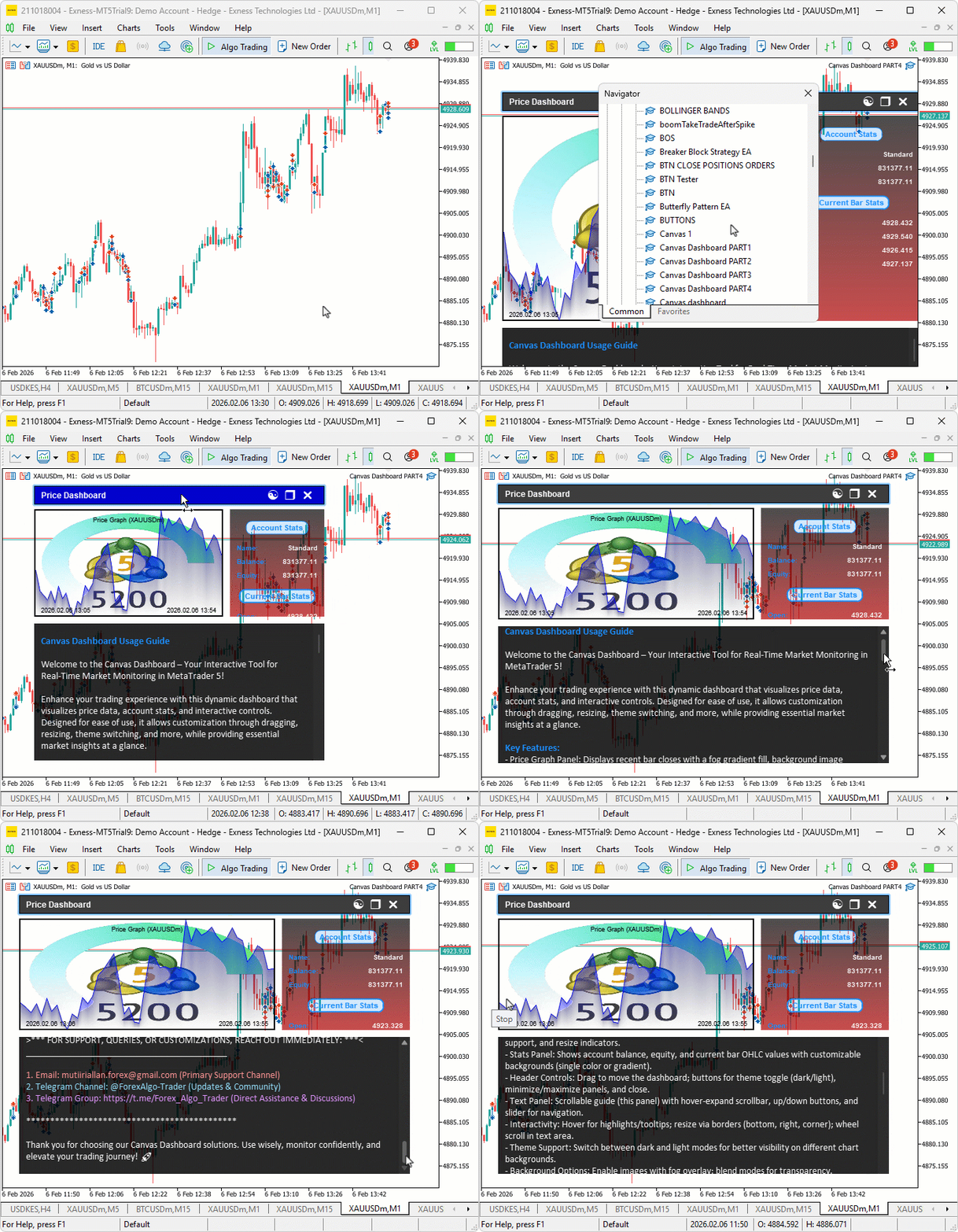
結論
結論として、今回の実装では、スーパーサンプリングを利用したアンチエイリアス処理および高解像度レンダリング技術をMQL5のキャンバスダッシュボードへ導入し、より滑らかなグラフィックスとUI要素を実現しました。統計パネルおよびテキストパネル用に高解像度キャンバスを追加し、さらに角丸枠線、角丸矩形、矢印などを正確に描画する専用関数を実装することで、ダッシュボード全体の視覚品質を向上させました。この強化されたアンチエイリアス処理と高解像度レンダリングにより、より鮮明でプロフェッショナルなトレーディングダッシュボードを構築できるようになります。今後の開発では、さらに柔軟なカスタマイズを加えながら、より高度なUI設計へ発展させることができます。それでは、よいトレードを。
MetaQuotes Ltdにより英語から翻訳されました。
元の記事: https://www.mql5.com/en/articles/21252
警告: これらの資料についてのすべての権利はMetaQuotes Ltd.が保有しています。これらの資料の全部または一部の複製や再プリントは禁じられています。
この記事はサイトのユーザーによって執筆されたものであり、著者の個人的な見解を反映しています。MetaQuotes Ltdは、提示された情報の正確性や、記載されているソリューション、戦略、または推奨事項の使用によって生じたいかなる結果についても責任を負いません。

 MQL5における二変量コピュラ(第3回):混合コピュラモデルの実装とチューニング
 MQL5とデータ処理パッケージの統合(第7回):銘柄間連携のためのマルチエージェント環境の構築
 ラリー・ウィリアムズの『市場の秘密』(第11回):カスタムインジケータによるスマッシュデー反転の検出
 プライスアクション分析ツールキットの開発(第60回): 構造分析のための客観的なスイングベースのトレンドライン

- 無料取引アプリ
- 8千を超えるシグナルをコピー
- 金融ニュースで金融マーケットを探索