

MQL5取引ツール(第15回):Canvas/ja/ぼかし効果、影描画、滑らかなマウスホイールスクロール
 700
700
 0
0

はじめに
前回/ja/記事(第14回)では、MetaQuotes Language 5 (MQL5)においてピクセルパーフェクトなスクロール可能テキストCanvasを構築しました。こ/ja/Canvasは、滑らかなレンダリングを実現するアンチエイリアス処理、インタラクティブな操作が可能な丸みを帯びたスクロールバー、そしてダッシュボード/ja/使いやすさを向上させるカスタマイズ可能な背景を備えています。第15回では、ぼかし効果によるフォググラデーション、ヘッダーに奥行きを与える影描画、そして滑らかなマウスホイールスクロールを導入し、Canvasダッシュボードをさらに発展させます。本記事では以下/ja/トピックを扱います。
本記事を読み終える頃には、視覚的に強化され、よりインタラクティブになった完全に機能するMQL5ダッシュボードを手に入れることができます。これにより、カスタマイズが容易になり、ユーザー体験も向上します。それでは始めましょう。
Canvasにおけるぼかしと影描画/ja/理解
Canvas/ja/ぼかし効果は、背景上/ja/フォグオーバーレイ/ja/ような滑らかなグラデーションを生成し、透明度を変化させながらピクセルカラーを補間することで、奥行きを表現し、硬い輪郭を和らげます。影描画は、ヘッダー/ja/ような要素に対して、オフセットされた矩形を用いたレイヤー描画と徐々に減衰する不透明度によって現実感を与えます。また、ガウシアンぼかしに近い処理を複数回/ja/パスで適用することで、柔らかく拡散したエッジを生成し、UI/ja/三次元的な印象を強化します。マウスホイールスクロールは、テキストパネル内/ja/スクロール位置を段階的に更新することでシームレスなナビゲーションを可能にし、オーバーフローを防ぐためにクランプ処理を行い、さらにホバーで拡張可能なスクロールバーと統合することで、直感的なコンテンツ探索を実現します。
高品質な画像スケーリング/ja/ためにバイキュービック補間を適用し、線/ja/アンチエイリアス処理を実装し、距離やぼかし半径をパラメータとして制御できる影関数を実装し、さらにホイールイベントを処理してチャート操作を維持しながらテキストオフセットを更新します。要するに、これら/ja/拡張は、視覚的な美しさとユーザーフレンドリーな操作性を組み合わせた、洗練された応答性/ja/高いダッシュボードを実現し、取引データをより見やすく表示できる環境を提供します。以下にそ/ja/例を示します。

MQL5で/ja/実装
MQL5でプログラムを強化するためには、ヘッダー/ja/表示やぼかし効果を制御するため/ja/新しい入力パラメータを追加する必要があります。また、入力項目が多くなっているため、明確さ/ja/ために入力をグループ化するように再構成する必要もあります。
//+------------------------------------------------------------------+
//|                                       Canvas Dashboard PART3.mq5 |
//|                           Copyright 2026, Allan Munene Mutiiria. |
//|                                   https://t.me/Forex_Algo_Trader |
//+------------------------------------------------------------------+
#property copyright "Copyright 2026, Allan Munene Mutiiria."
#property link "https://t.me/Forex_Algo_Trader"
#property version "1.00"
#property strict

#include <Canvas/Canvas.mqh>

//+------------------------------------------------------------------+
//| Resources                                                        |
//+------------------------------------------------------------------+
#resource "1. Transparent MT5 bmp image.bmp" // Define background image resource

//+------------------------------------------------------------------+
//| Enumerations                                                     |
//+------------------------------------------------------------------+
enum ENUM_BACKGROUND_MODE {             // Define background mode enumeration
   NoColor          = 0,                // No color mode
   SingleColor      = 1,                // Single color mode
   GradientTwoColors = 2                // Gradient with two colors mode
};

enum ENUM_RESIZE_MODE {                 // Define resize mode enumeration
   NONE,                                // No resize mode
   BOTTOM,                              // Bottom resize mode
   RIGHT,                               // Right resize mode
   BOTTOM_RIGHT                         // Bottom-right resize mode
};

//+------------------------------------------------------------------+
//| Canvas objects                                                   |
//+------------------------------------------------------------------+
CCanvas canvasGraph;                    //--- Declare graph canvas object
CCanvas canvasStats;                    //--- Declare stats canvas object
CCanvas canvasHeader;                   //--- Declare header canvas object
CCanvas canvasText;                     //--- Declare text canvas object

//+------------------------------------------------------------------+
//| Canvas names                                                     |
//+------------------------------------------------------------------+
string canvasGraphName = "GraphCanvas"; //--- Set graph canvas name
string canvasStatsName = "StatsCanvas"; //--- Set stats canvas name
string canvasHeaderName = "HeaderCanvas"; //--- Set header canvas name
string canvasTextName = "TextCanvas";   //--- Set text canvas name

//+------------------------------------------------------------------+
//| Inputs                                                           |
//+------------------------------------------------------------------+
sinput group "=== GENERAL CANVAS SETTINGS ==="
input int CanvasX                     = 30;                             // Canvas X Position
input int CanvasY                     = 50;                             // Canvas Y Position
input int CanvasWidth                 = 400;                            // Canvas Width
input int CanvasHeight                = 300;                            // Canvas Height
input bool EnableStatsPanel           = true;                           // Enable Stats Panel
input int PanelGap                    = 10;                             // Panel Gap
input bool EnableTextPanel            = true;                           // Enable Text Panel
input int TextPanelHeight             = 200;                            // Text Panel Height
input double TextBackgroundOpacityPercent = 85.0;                       // Text Background Opacity Percent

sinput group "=== HEADER CANVAS SETTINGS ==="
input color HeaderShadowColor         = clrDodgerBlue;                  // Header Shadow Color
input double HeaderShadowOpacityPercent = 70.0;                         // Header Shadow Opacity Percent
input int HeaderShadowDistance        = 4;                              // Header Shadow Distance
input int HeaderShadowBlurRadius      = 3;                              // Header Shadow Blur Radius

sinput group "=== GRAPH PANEL SETTINGS ==="
input int graphBars                   = 50;                             // Graph Bars
input color borderColor               = clrBlack;                       // Border Color
input color borderHoverColor          = clrRed;                         // Border Hover Color
input bool UseBackground              = true;                           // Use Background
input double FogOpacity               = 0.5;                            // Fog Opacity
input bool BlendFog                   = true;                           // Blend Fog

sinput group "=== STATS PANEL SETTINGS ==="
input int StatsFontSize               = 12;                             // Stats Font Size
input color StatsLabelColor           = clrDodgerBlue;                  // Stats Label Color
input color StatsValueColor           = clrWhite;                       // Stats Value Color
input color StatsHeaderColor          = clrDodgerBlue;                  // Stats Header Color
input int StatsHeaderFontSize         = 14;                             // Stats Header Font Size
input double BorderOpacityPercentReduction = 20.0;                      // Border Opacity Percent Reduction
input double BorderDarkenPercent      = 30.0;                           // Border Darken Percent
input double StatsHeaderBgOpacityPercent = 20.0;                        // Stats Header Bg Opacity Percent
input int StatsHeaderBgRadius         = 8;                              // Stats Header Bg Radius
input ENUM_BACKGROUND_MODE StatsBackgroundMode = GradientTwoColors;     // Stats Background Mode
input color TopColor                   = clrBlack;                      // Top Color
input color BottomColor                = clrRed;                        // Bottom Color
input double BackgroundOpacity         = 0.7;                           // Background Opacity
新しい構成は上記/ja/ようになっており、[HEADER CANVAS SETTINGS]/ja/入力グループ内で、影効果/ja/ため/ja/パラメータを提供しています。HeaderShadowColorは影/ja/色合いを設定し、HeaderShadowOpacityPercentは透明度をパーセンテージで制御し、HeaderShadowDistanceはヘッダーから/ja/オフセット距離を指定し、HeaderShadowBlurRadiusはぼかし/ja/強さ(柔らかさ)を決定します。これにより、重要な変更点が分かりやすいように強調されています。これにより、入力パラメータが整理された次/ja/設定画面が表示されます。

これが完了したら、次に行うべきことはヘッダー/ja/描画ロジックを調整することです。なぜなら、今回/ja/拡張はそ/ja/部分を基盤として行うためです。ここでは、ループとアルファフェーディングを用いた多層/ja/ぼかし影描画を追加し、ソフトなドロップ影効果を実現します。また、ヘッダーを拡張されたCanvas/ja/中央に配置するために、すべて/ja/描画をオフセットする必要があります。これにより立体感/ja/ある効果が得られ、ヘッダーへ/ja/視認性とデザイン性が向上します。さらに、境界や各要素はこ/ja/追加領域を基準に描画されるようになり、位置ずれを防止します。以下がそ/ja/ロジックです。
//+------------------------------------------------------------------+
//| Draw header on canvas                                            |
//+------------------------------------------------------------------+
void DrawHeaderOnCanvas() {             // Render header elements
   canvasHeader.Erase(0);               //--- Clear header canvas

   int extra = HeaderShadowBlurRadius + HeaderShadowDistance; //--- Compute extra space
   int inner_header_width = canvasHeader.Width() - 2 * extra; //--- Compute inner width

   int header_left = extra;             //--- Set header left
   int header_top = extra;              //--- Set header top
   int header_right = header_left + inner_header_width - 1; //--- Set header right
   int header_bottom = header_top + header_height - 1; //--- Set header bottom

   if (HeaderShadowBlurRadius > 0 || HeaderShadowDistance > 0) { //--- Check shadow settings
      int offset_x = HeaderShadowDistance; //--- Set X offset
      int offset_y = HeaderShadowDistance; //--- Set Y offset
      int blur = HeaderShadowBlurRadius;   //--- Set blur radius

      for(int layer = blur; layer >= 0; layer--) {     //--- Loop through layers
         double factor = (double)layer / (blur + 1.0); //--- Compute factor
         uchar alpha = (uchar)(255 * (HeaderShadowOpacityPercent / 100.0) * (1.0 - factor)); //--- Compute alpha
         uint argb_shadow = ColorToARGB(HeaderShadowColor, alpha); //--- Convert to ARGB

         int s_left = header_left + offset_x - layer;     //--- Set shadow left
         int s_top = header_top + offset_y - layer;       //--- Set shadow top
         int s_right = header_right + offset_x + layer;   //--- Set shadow right
         int s_bottom = header_bottom + offset_y + layer; //--- Set shadow bottom

         int s_width = s_right - s_left + 1;  //--- Compute shadow width
         int s_height = s_bottom - s_top + 1; //--- Compute shadow height
         int s_radius = layer;                //--- Set shadow radius

         if (s_width > 0 && s_height > 0) {   //--- Check valid dimensions
            FillRoundedRectangle(canvasHeader, s_left, s_top, s_width, s_height, s_radius, argb_shadow); //--- Fill shadow rectangle
         }
      }
   }

   color header_bg = panel_dragging ? GetHeaderDragColor() : (header_hovered ? GetHeaderHoverColor() : GetHeaderColor()); //--- Determine bg color
   uint argb_bg = ColorToARGB(header_bg, 255); //--- Convert to ARGB
   canvasHeader.FillRectangle(header_left, header_top, header_right, header_bottom, argb_bg); //--- Fill header rectangle

   uint argbBorder = ColorToARGB(GetBorderColor(), 255); //--- Convert border to ARGB
   canvasHeader.Line(header_left, header_top, header_right, header_top, argbBorder);       //--- Draw top border
   canvasHeader.Line(header_right, header_top, header_right, header_bottom, argbBorder);   //--- Draw right border
   canvasHeader.Line(header_right, header_bottom, header_left, header_bottom, argbBorder); //--- Draw bottom border
   canvasHeader.Line(header_left, header_bottom, header_left, header_top, argbBorder);     //--- Draw left border

   canvasHeader.FontSet("Arial Bold", 15);                 //--- Set font for title
   uint argbText = ColorToARGB(GetHeaderTextColor(), 255); //--- Convert text to ARGB
   canvasHeader.TextOut(header_left + 10, header_top + (header_height - 15) / 2, "Price Dashboard", argbText, TA_LEFT); //--- Draw title text

   int theme_x = header_left + inner_header_width + theme_x_offset;      //--- Compute theme X
   string theme_symbol = CharToString((uchar)91);                        //--- Set theme symbol
   color theme_color = theme_hovered ? clrYellow : GetHeaderTextColor(); //--- Determine theme color
   canvasHeader.FontSet("Wingdings", 22);                                //--- Set font for theme
   uint argb_theme = ColorToARGB(theme_color, 255);                      //--- Convert to ARGB
   canvasHeader.TextOut(theme_x, header_top + (header_height - 22) / 2, theme_symbol, argb_theme, TA_CENTER); //--- Draw theme symbol

   int min_x = header_left + inner_header_width + minimize_x_offset;      //--- Compute minimize X
   string min_symbol = panels_minimized ? CharToString((uchar)111) : CharToString((uchar)114); //--- Set minimize symbol
   color min_color = minimize_hovered ? clrYellow : GetHeaderTextColor(); //--- Determine minimize color
   canvasHeader.FontSet("Wingdings", 22);                                 //--- Set font for minimize
   uint argb_min = ColorToARGB(min_color, 255);                           //--- Convert to ARGB
   canvasHeader.TextOut(min_x, header_top + (header_height - 22) / 2, min_symbol, argb_min, TA_CENTER); //--- Draw minimize symbol

   int close_x = header_left + inner_header_width + close_x_offset;       //--- Compute close X
   string close_symbol = CharToString((uchar)114);                        //--- Set close symbol
   color close_color = close_hovered ? clrRed : GetHeaderTextColor();     //--- Determine close color
   canvasHeader.FontSet("Webdings", 22);                                  //--- Set font for close
   uint argb_close = ColorToARGB(close_color, 255);                       //--- Convert to ARGB
   canvasHeader.TextOut(close_x, header_top + (header_height - 22) / 2, close_symbol, argb_close, TA_CENTER); //--- Draw close symbol

   canvasHeader.Update();                                                 //--- Update header canvas
}
DrawHeaderOnCanvas関数を改善し、視覚効果を強化したダッシュボードヘッダーを描画します。まず、canvasHeader.Eraseを使用してCanvasをクリアし、空/ja/状態から開始します。HeaderShadowBlurRadiusとHeaderShadowDistance/ja/合計として余白を計算し、そ/ja/余白/ja/2倍をCanvas幅から引くことでヘッダー内部/ja/幅を決定します。ヘッダー矩形/ja/位置を設定し、leftとtopをextraとし、rightをleftにヘッダー内部/ja/幅を加えて1を引いた値、bottomをtopにheader_heightを加えて1を引いた値とします。
ぼかし半径または影距離/ja/いずれかが正/ja/場合、影効果を生成するためにぼかし半径から0までループします。各レイヤーごとに、factorをlayerをblur+1で割った値として計算し、alpha値を255×影不透明度×(1−factor)として算出します。そ/ja/後、HeaderShadowColorをこ/ja/alphaでARGBに変換し、影カラーを作成します。影矩形/ja/位置はオフセットとレイヤーによって拡張されます。leftはheader left+offset−layerとし、top、right、bottomも同様に調整します。影/ja/幅と高さを計算し、半径をlayerに設定し、サイズが正/ja/場合はFillRoundedRectangleを使用して影カラーで塗りつぶし描画を行います。
ヘッダー背景色は条件によって決定されます。ドラッグ中はドラッグカラー、ホバー中はホバーカラー、それ以外は標準/ja/ヘッダーカラーを使用します。これをARGB/ja/フル不透明に変換し、ヘッダー矩形を塗りつぶします。境界はヘッダー/ja/周囲に線として描画され、ボーダーカラーをARGBに変換して使用します。テキスト描画ではフォントをArial Bold、サイズ15に設定し、ヘッダーテキストカラーをARGBに変換した上で、価格ダッシュボードを左揃えでパディング付きで描画します。
アイコン処理は次/ja/通りです。テーマアイコンは計算されたX位置に配置され、フォントはWingdings、サイズ22、シンボルは91です。ホバー時は黄色、それ以外はヘッダーテキストカラーで描画し、中央揃えにします。最小化アイコンはWingdingsを使用し、最小化時は111、それ以外は114を使用し、ホバー時は黄色で表示し中央揃えにします。クローズアイコンはWebdingsフォントを使用し、シンボル114を使い、ホバー時は赤、それ以外は通常色で中央揃えにします。最後にcanvasHeader.Updateを呼び出して表示を更新します。これは前回/ja/パートと同様です。次におこなう/ja/は、ヘッダー/ja/ホバー判定ロジックを変更することです。影領域を含めるようにヒット検出範囲を拡張し、拡張されたCanvas上でもホバーやクリックが正確に認識されるようにします。これにより、影パディングによる端付近で/ja/誤検出や見逃しを防ぎ、操作性を向上させます。
//+------------------------------------------------------------------+
//| Check mouse over header                                          |
//+------------------------------------------------------------------+
bool IsMouseOverHeader(int mouse_x, int mouse_y) {            // Detect header hover
   int extra = HeaderShadowBlurRadius + HeaderShadowDistance; //--- Compute extra space
   int inner_header_width = currentWidth + (EnableStatsPanel && !panels_minimized ? PanelGap + currentWidth / 2 : 0); //--- Compute inner width
   int header_canvas_x = currentCanvasX - extra;              //--- Set canvas X
   int header_canvas_y = currentCanvasY - extra;              //--- Set canvas Y
   int header_canvas_w = inner_header_width + 2 * extra;      //--- Set canvas width
   int header_canvas_h = header_height + 2 * extra;           //--- Set canvas height

   if (mouse_x < header_canvas_x || mouse_x > header_canvas_x + header_canvas_w || mouse_y < header_canvas_y || mouse_y > header_canvas_y + header_canvas_h) return false; //--- Return false if outside

   int theme_left = header_canvas_x + extra + inner_header_width + theme_x_offset - button_size / 2; //--- Set theme left
   int theme_right = theme_left + button_size;                //--- Set theme right
   int theme_top = header_canvas_y + extra;                   //--- Set theme top
   int theme_bottom = theme_top + header_height;              //--- Set theme bottom
   if (mouse_x >= theme_left && mouse_x <= theme_right && mouse_y >= theme_top && mouse_y <= theme_bottom) return false; //--- Return false if over theme

   int min_left = header_canvas_x + extra + inner_header_width + minimize_x_offset - button_size / 2; //--- Set minimize left
   int min_right = min_left + button_size;                    //--- Set minimize right
   int min_top = header_canvas_y + extra;                     //--- Set minimize top
   int min_bottom = min_top + header_height;                  //--- Set minimize bottom
   if (mouse_x >= min_left && mouse_x <= min_right && mouse_y >= min_top && mouse_y <= min_bottom) return false; //--- Return false if over minimize

   int close_left = header_canvas_x + extra + inner_header_width + close_x_offset - button_size / 2; //--- Set close left
   int close_right = close_left + button_size;                //--- Set close right
   int close_top = header_canvas_y + extra;                   //--- Set close top
   int close_bottom = close_top + header_height;              //--- Set close bottom
   if (mouse_x >= close_left && mouse_x <= close_right && mouse_y >= close_top && mouse_y <= close_bottom) return false; //--- Return false if over close

   return true;                                               //--- Return true if over header
}
IsMouseOverHeader関数を更新し、影効果によって追加された余白を考慮した正確なヘッダー領域/ja/マウスホバー検出をおこないます。これを実現するために、extraをHeaderShadowBlurRadiusとHeaderShadowDistance/ja/合計として計算し、Header Canvas/ja/座標を調整します。header_canvas_xはcurrentCanvasXからextraを引いた値、header_canvas_yも同様にcurrentCanvasYからextraを引いた値とします。header_canvas_wはinner_header_widthにextra/ja/2倍を加えた値、header_canvas_hはheader_heightにextra/ja/2倍を加えた値とします。
マウス位置がこれら/ja/拡張されたCanvas境界/ja/外側にある場合はfalseを返します。ボタン領域については、テーマ・最小化・クローズボタンを除外するために位置計算を行います。theme_leftはheader_canvas_xにextraを加え、さらにinner_header_widthとtheme_x_offsetを加えた後、button_size/ja/半分を引いた位置として算出します。同様にright、top、bottomも計算し、マウスがこれら/ja/ボタン上にある場合はfalseを返すことで、一般的なヘッダーホバー判定から除外します。次に、最小化トグル時/ja/ヘッダーリサイズ処理も調整する必要があります。影用/ja/extraを含めて計算することで、パネル/ja/表示・非表示切り替え時にも影が正しく描画され、視覚的な一貫性が維持されます。
//+------------------------------------------------------------------+
//| Toggle minimize                                                  |
//+------------------------------------------------------------------+
void ToggleMinimize() {                 // Switch minimize state
   panels_minimized = !panels_minimized; //--- Invert minimized state
   if (panels_minimized) {              //--- Check minimized
      canvasGraph.Destroy();            //--- Destroy graph canvas
      graphCreated = false;             //--- Reset graph flag
      if (EnableStatsPanel) {           //--- Check stats enabled
         canvasStats.Destroy();         //--- Destroy stats canvas
         statsCreated = false;          //--- Reset stats flag
      }
      if (EnableTextPanel) {            //--- Check text enabled
         canvasText.Destroy();          //--- Destroy text canvas
         textCreated = false;           //--- Reset text flag
      }
   } else {                             //--- Handle maximized
      if (!canvasGraph.CreateBitmapLabel(0, 0, canvasGraphName, currentCanvasX, currentCanvasY + header_height + gap_y, currentWidth, currentHeight, COLOR_FORMAT_ARGB_NORMALIZE)) { //--- Recreate graph
         Print("Failed to recreate Graph Canvas"); //--- Log failure
      }
      graphCreated = true;              //--- Set graph flag
      UpdateGraphOnCanvas();            //--- Update graph
      if (EnableStatsPanel) {           //--- Check stats enabled
         int statsX = currentCanvasX + currentWidth + PanelGap; //--- Compute stats X
         if (!canvasStats.CreateBitmapLabel(0, 0, canvasStatsName, statsX, currentCanvasY + header_height + gap_y, currentWidth / 2, currentHeight, COLOR_FORMAT_ARGB_NORMALIZE)) { //--- Recreate stats
            Print("Failed to recreate Stats Canvas"); //--- Log failure
         }
         statsCreated = true;           //--- Set stats flag
         UpdateStatsOnCanvas();         //--- Update stats
      }
      if (EnableTextPanel) {            //--- Check text enabled
         int textY = currentCanvasY + header_height + gap_y + currentHeight + PanelGap; //--- Compute text Y
         int inner_header_width = currentWidth + (EnableStatsPanel ? PanelGap + currentWidth / 2 : 0); //--- Compute width
         int text_width = inner_header_width; //--- Set text width
         int text_height = TextPanelHeight;   //--- Set text height
         if (!canvasText.CreateBitmapLabel(0, 0, canvasTextName, currentCanvasX, textY, text_width, text_height, COLOR_FORMAT_ARGB_NORMALIZE)) { //--- Recreate text
            Print("Failed to recreate Text Canvas"); //--- Log failure
         }
         textCreated = true;            //--- Set text flag
         UpdateTextOnCanvas();          //--- Update text
      }
   }

   int extra = HeaderShadowBlurRadius + HeaderShadowDistance; //--- Compute extra space
   int inner_header_width = currentWidth + (EnableStatsPanel && !panels_minimized ? PanelGap + currentWidth / 2 : 0); //--- Compute inner width
   int header_canvas_width = inner_header_width + 2 * extra; //--- Compute header width
   canvasHeader.Resize(header_canvas_width, header_height + 2 * extra); //--- Resize header
   ObjectSetInteger(0, canvasHeaderName, OBJPROP_XSIZE, header_canvas_width); //--- Set X size
   ObjectSetInteger(0, canvasHeaderName, OBJPROP_YSIZE, header_height + 2 * extra); //--- Set Y size
   DrawHeaderOnCanvas();                //--- Redraw header
   canvasHeader.Update();               //--- Update header
   ChartRedraw();                       //--- Redraw chart
}
ToggleMinimize関数を更新し、ダッシュボード/ja/パネルにおける最小化状態と最大化状態/ja/切り替えを処理します。こ/ja/関数では、panels_minimizedを反転させて状態を切り替えます。最小化時には、canvasGraph.Destroyを使用してグラフCanvasを破棄し、graphCreatedをfalseにリセットします。statsパネルが有効な場合はcanvasStatsを破棄し、statsCreatedをfalseにリセットします。テキストパネルが有効な場合はcanvasTextを破棄し、textCreatedをfalseにリセットします。
最大化時には、canvasGraph.CreateBitmapLabelを使用して現在/ja/位置とサイズでグラフCanvasを再作成し、graphCreatedをtrueに設定し、UpdateGraphOnCanvasで更新します。statsが有効な場合はX位置を計算し、canvasStatsを再作成してstatsCreatedをtrueに設定し、UpdateStatsOnCanvasで更新します。テキストパネルが有効な場合はY位置を計算し、inner_header_widthをstats/ja/有無を含めて決定し、そ/ja/幅とTextPanelHeightでcanvasTextを再作成し、textCreatedをtrueに設定し、UpdateTextOnCanvasで更新します。
次にヘッダーサイズを調整します。ぼかし半径と影距離/ja/合計としてextraを計算し、inner_header_widthを現在/ja/幅とstats状態に基づいて決定し、header_canvas_widthをinner widthにextra/ja/2倍を加えた値として算出します。canvasHeaderをこ/ja/幅とheader_heightにextra/ja/2倍を加えた高さへリサイズし、オブジェクト/ja/XおよびYサイズプロパティを設定し、DrawHeaderOnCanvasでヘッダーを再描画し、更新を行い、そ/ja/後チャートを再描画します。
前回/ja/バージョンでは、影用/ja/余白を考慮せずに単純に新しい幅へリサイズしていましたが、今回/ja/修正ではextraを幅と高さ/ja/両方に含めることで、ぼかし影/ja/オフセットによるクリッピングを防ぎ、パネル再生成ロジックはそ/ja/まま維持しています。次に初期化処理では、影/ja/ため/ja/スペースextraを全方向に含めてHeader Canvasを拡張し、そ/ja/分だけ位置もオフセットする必要があります。これにより影がクリッピングされず、ヘッダー外側に正しく描画されるようになります。
//+------------------------------------------------------------------+
//| Initialize expert                                                |
//+------------------------------------------------------------------+
int OnInit() {                          // Initialize expert advisor

   //--- existing logic

   int extra = HeaderShadowBlurRadius + HeaderShadowDistance; //--- Compute extra space
   int inner_header_width = currentWidth + (EnableStatsPanel ? PanelGap + currentWidth / 2 : 0); //--- Compute inner width
   int header_canvas_width = inner_header_width + 2 * extra; //--- Compute header width
   int header_canvas_height = header_height + 2 * extra; //--- Compute header height

   if (!canvasHeader.CreateBitmapLabel(0, 0, canvasHeaderName, currentCanvasX - extra, currentCanvasY - extra, header_canvas_width, header_canvas_height, COLOR_FORMAT_ARGB_NORMALIZE)) { //--- Create header canvas
      Print("Failed to create Header Canvas"); //--- Log creation failure
      return(INIT_FAILED);              //--- Return initialization failure
   }

   //--- existing logic

   return(INIT_SUCCEEDED);              //--- Return initialization success
}
OnInitイベントハンドラを拡張し、初期化時/ja/Header Canvasにおける影効果に対応させます。まず現在/ja/サイズと位置を設定した後、HeaderShadowBlurRadiusとHeaderShadowDistance/ja/合計としてextraを計算し、影用/ja/余白を確保します。次に、inner_header_widthをstatsパネル/ja/追加要素が有効な場合はそれを含めたcurrentWidthとして算出し、header_canvas_widthをinner widthにextra/ja/2倍を加えた値として設定します。また、header_canvas_heightはheader_heightにextra/ja/2倍を加え、影を完全に内包できるようにします。そ/ja/後、canvasHeader.CreateBitmapLabelを使用してHeader Canvasを作成します。位置は現在/ja/XおよびYからextraを引いたオフセット位置とし、拡張された幅と高さを使用し、ARGBカラー形式で初期化します。作成に失敗した場合はエラーを出力しINIT_FAILEDを返します。成功した場合は既存/ja/ロジックを継続し、INIT_SUCCEEDEDを返します。コンパイルすると、次/ja/結果が得られます。

影処理が完了したら、次におこなうべきことはチャートイベント/ja/更新です。テキストCanvasでマウスホイールスクロールをおこなう際に、チャート/ja/スケール変更に干渉しないようにします。そ/ja/ために、初期的にチャートスケールを変更していたロジックを削除します。
//+------------------------------------------------------------------+
//| Handle chart events                                              |
//+------------------------------------------------------------------+
void OnChartEvent(const int id, const long &lparam, const double &dparam, const string &sparam) { // Process chart events

   //--- existing logic

   } else if (id == CHARTEVENT_MOUSE_WHEEL) { //--- Check mouse wheel
      int flg_keys = (int)(lparam >> 32);     //--- Get keys
      int mx = (int)(short)lparam;            //--- Get X
      int my = (int)(short)(lparam >> 16);    //--- Get Y
      int delta = (int)dparam;                //--- Get delta

      if (EnableTextPanel && !panels_minimized && text_scroll_visible) {                  //--- Check text wheel
         int text_canvas_x = (int)ObjectGetInteger(0, canvasTextName, OBJPROP_XDISTANCE); //--- Get text X
         int text_canvas_y = (int)ObjectGetInteger(0, canvasTextName, OBJPROP_YDISTANCE); //--- Get text Y
         int text_canvas_w = (int)ObjectGetInteger(0, canvasTextName, OBJPROP_XSIZE);     //--- Get width
         int text_canvas_h = (int)ObjectGetInteger(0, canvasTextName, OBJPROP_YSIZE);     //--- Get height
         bool is_over_text_body = (mx >= text_canvas_x && mx <= text_canvas_x + text_canvas_w - text_track_width &&
                                   my >= text_canvas_y && my <= text_canvas_y + text_canvas_h); //--- Check over body
         if (is_over_text_body) {            //--- Handle over body
            int scroll_step = 20;            //--- Set step
            text_scroll_pos += (delta > 0 ? -scroll_step : scroll_step);                  //--- Adjust pos
            text_scroll_pos = MathMax(0, MathMin(text_scroll_pos, text_max_scroll));      //--- Clamp pos
            UpdateTextOnCanvas();            //--- Update text

            // REMOVED: Scale revert code (this was causing the chart scale interference)
            // No need to change CHART_SCALE; wheel now only scrolls text content.

            int current_scale = (int)ChartGetInteger(0, CHART_SCALE); //--- Get scale
            int adjust = (delta > 0 ? 1 : -1);  // Swap to (delta > 0 ? -1 : 1) if wheel direction is opposite
            int revert_scale = current_scale + adjust; //--- Calculate revert
            revert_scale = MathMax(0, MathMin(5, revert_scale)); //--- Clamp scale
            ChartSetInteger(0, CHART_SCALE, revert_scale); //--- Set scale

            ChartRedraw();                  //--- Redraw chart
         }
      }
   }
}
チャートスケールへ/ja/干渉を引き起こしていたロジックを削除しただけで、それがすべてです。該当する特定/ja/ロジックは強調表示されています。最終的なOnChartEventイベントハンドラ/ja/ロジックは以下/ja/通りです。
//+------------------------------------------------------------------+ //| Handle chart events | //+------------------------------------------------------------------+ void OnChartEvent(const int id, const long &lparam, const double &dparam, const string &sparam) { // Process chart events if (id == CHARTEVENT_CHART_CHANGE) { //--- Check chart change DrawHeaderOnCanvas(); //--- Redraw header UpdateGraphOnCanvas(); //--- Update graph if (EnableStatsPanel) UpdateStatsOnCanvas(); //--- Update stats if (EnableTextPanel) UpdateTextOnCanvas(); //--- Update text ChartRedraw(); //--- Redraw chart } else if (id == CHARTEVENT_MOUSE_MOVE) { //--- Check mouse move int mouse_x = (int)lparam; //--- Get mouse X int mouse_y = (int)dparam; //--- Get mouse Y int mouse_state = (int)sparam; //--- Get mouse state bool prev_header_hovered = header_hovered; //--- Store prev header hover bool prev_min_hovered = minimize_hovered; //--- Store prev minimize hover bool prev_close_hovered = close_hovered; //--- Store prev close hover bool prev_theme_hovered = theme_hovered; //--- Store prev theme hover bool prev_resize_hovered = resize_hovered; //--- Store prev resize hover header_hovered = IsMouseOverHeader(mouse_x, mouse_y); //--- Check header hover theme_hovered = IsMouseOverTheme(mouse_x, mouse_y); //--- Check theme hover minimize_hovered = IsMouseOverMinimize(mouse_x, mouse_y); //--- Check minimize hover close_hovered = IsMouseOverClose(mouse_x, mouse_y); //--- Check close hover resize_hovered = IsMouseOverResize(mouse_x, mouse_y, hover_mode); //--- Check resize hover if (resize_hovered || resizing) { //--- Check resize state hover_mouse_local_x = mouse_x - currentCanvasX; //--- Set local X hover_mouse_local_y = mouse_y - (currentCanvasY + header_height + gap_y); //--- Set local Y } bool hover_changed = (prev_header_hovered != header_hovered || prev_min_hovered != minimize_hovered || prev_close_hovered != close_hovered || prev_theme_hovered != theme_hovered || prev_resize_hovered != resize_hovered); //--- Check hover change if (hover_changed) { //--- Handle change DrawHeaderOnCanvas(); //--- Redraw header UpdateGraphOnCanvas(); //--- Update graph ChartRedraw(); //--- Redraw chart } else if ((resize_hovered || resizing) && (mouse_x != last_mouse_x || mouse_y != last_mouse_y)) { //--- Check position change UpdateGraphOnCanvas(); //--- Update graph ChartRedraw(); //--- Redraw chart } string header_tooltip = ""; //--- Initialize tooltip if (theme_hovered) header_tooltip = "Toggle Theme (Dark/Light)"; //--- Set theme tooltip else if (minimize_hovered) header_tooltip = panels_minimized ? "Maximize Panels" : "Minimize Panels"; //--- Set minimize tooltip else if (close_hovered) header_tooltip = "Close Dashboard"; //--- Set close tooltip ObjectSetString(0, canvasHeaderName, OBJPROP_TOOLTIP, header_tooltip); //--- Apply header tooltip string resize_tooltip = ""; //--- Initialize resize tooltip if (resize_hovered || resizing) { //--- Check resize state ENUM_RESIZE_MODE active_mode = resizing ? resize_mode : hover_mode; //--- Get mode switch (active_mode) { //--- Switch mode case BOTTOM: //--- Handle bottom resize_tooltip = "Resize Bottom"; //--- Set tooltip break; //--- Exit case case RIGHT: //--- Handle right resize_tooltip = "Resize Right"; //--- Set tooltip break; //--- Exit case case BOTTOM_RIGHT: //--- Handle bottom-right resize_tooltip = "Resize Bottom-Right"; //--- Set tooltip break; //--- Exit case default: //--- Handle default break; //--- Exit case } } ObjectSetString(0, canvasGraphName, OBJPROP_TOOLTIP, resize_tooltip); //--- Apply graph tooltip if (EnableTextPanel && !panels_minimized) { //--- Check text enabled int text_canvas_x = (int)ObjectGetInteger(0, canvasTextName, OBJPROP_XDISTANCE); //--- Get text X int text_canvas_y = (int)ObjectGetInteger(0, canvasTextName, OBJPROP_YDISTANCE); //--- Get text Y int text_canvas_w = (int)ObjectGetInteger(0, canvasTextName, OBJPROP_XSIZE); //--- Get text width int text_canvas_h = (int)ObjectGetInteger(0, canvasTextName, OBJPROP_YSIZE); //--- Get text height bool is_over_text = (mouse_x >= text_canvas_x && mouse_x <= text_canvas_x + text_canvas_w && mouse_y >= text_canvas_y && mouse_y <= text_canvas_y + text_canvas_h); //--- Check over text bool prev_scroll_hovered = text_scroll_area_hovered; //--- Store prev scroll hover text_scroll_area_hovered = false; //--- Reset area hover if (is_over_text) { //--- Handle over text int local_x = mouse_x - text_canvas_x; //--- Compute local X int local_y = mouse_y - text_canvas_y; //--- Compute local Y if (local_x >= text_canvas_w - text_track_width) { //--- Check in scroll area text_scroll_area_hovered = true; //--- Set area hover } bool prev_up = text_scroll_up_hovered; //--- Store prev up bool prev_down = text_scroll_down_hovered; //--- Store prev down bool prev_slider = text_scroll_slider_hovered; //--- Store prev slider TextUpdateHoverEffects(local_x, local_y); //--- Update hovers if (prev_scroll_hovered != text_scroll_area_hovered || prev_up != text_scroll_up_hovered || prev_down != text_scroll_down_hovered || prev_slider != text_scroll_slider_hovered) { //--- Check change UpdateTextOnCanvas(); //--- Update text ChartRedraw(); //--- Redraw chart } text_mouse_in_body = (local_x < text_canvas_w - text_track_width); //--- Set body mouse } else { //--- Handle not over text bool need_redraw = prev_scroll_hovered || text_scroll_up_hovered || text_scroll_down_hovered || text_scroll_slider_hovered; //--- Check need redraw if (need_redraw) { //--- Handle redraw text_scroll_area_hovered = false; //--- Reset area text_scroll_up_hovered = false; //--- Reset up text_scroll_down_hovered = false; //--- Reset down text_scroll_slider_hovered = false; //--- Reset slider UpdateTextOnCanvas(); //--- Update text ChartRedraw(); //--- Redraw chart } text_mouse_in_body = false; //--- Reset body mouse } if (text_mouse_in_body != prev_text_mouse_in_body) { //--- Check body change ChartSetInteger(0, CHART_MOUSE_SCROLL, !text_mouse_in_body); //--- Set mouse scroll prev_text_mouse_in_body = text_mouse_in_body; //--- Update prev } } if (mouse_state == 1 && prev_mouse_state == 0) { //--- Check mouse down if (header_hovered) { //--- Handle header click panel_dragging = true; //--- Set dragging panel_drag_x = mouse_x; //--- Set drag X panel_drag_y = mouse_y; //--- Set drag Y panel_start_x = currentCanvasX; //--- Set start X panel_start_y = currentCanvasY; //--- Set start Y ChartSetInteger(0, CHART_MOUSE_SCROLL, false); //--- Disable scroll DrawHeaderOnCanvas(); //--- Redraw header ChartRedraw(); //--- Redraw chart } else if (theme_hovered) { //--- Handle theme click ToggleTheme(); //--- Toggle theme } else if (minimize_hovered) { //--- Handle minimize click ToggleMinimize(); //--- Toggle minimize } else if (close_hovered) { //--- Handle close click CloseDashboard(); //--- Close dashboard } else { //--- Handle other clicks ENUM_RESIZE_MODE temp_mode = NONE; //--- Set temp mode if (!panel_dragging && !resizing && IsMouseOverResize(mouse_x, mouse_y, temp_mode)) { //--- Check resize start resizing = true; //--- Set resizing resize_mode = temp_mode; //--- Set mode resize_start_x = mouse_x; //--- Set start X resize_start_y = mouse_y; //--- Set start Y start_width = currentWidth; //--- Set start width start_height = currentHeight; //--- Set start height ChartSetInteger(0, CHART_MOUSE_SCROLL, false); //--- Disable scroll UpdateGraphOnCanvas(); //--- Update graph ChartRedraw(); //--- Redraw chart } } if (EnableTextPanel && !panels_minimized && text_scroll_visible && text_scroll_area_hovered) { //--- Check text click int text_canvas_x = (int)ObjectGetInteger(0, canvasTextName, OBJPROP_XDISTANCE); //--- Get text X int text_canvas_y = (int)ObjectGetInteger(0, canvasTextName, OBJPROP_YDISTANCE); //--- Get text Y int local_x = mouse_x - text_canvas_x; //--- Compute local X int local_y = mouse_y - text_canvas_y; //--- Compute local Y int scrollbar_x = canvasText.Width() - text_track_width; //--- Set scrollbar X int scrollbar_y = 0; //--- Set scrollbar Y int scrollbar_height = canvasText.Height(); //--- Set height int scroll_area_y = scrollbar_y + text_button_size; //--- Set area Y int scroll_area_height = scrollbar_height - 2 * text_button_size; //--- Compute area height int slider_y = scroll_area_y + (int)(((double)text_scroll_pos / text_max_scroll) * (scroll_area_height - text_slider_height)); //--- Compute slider Y if (local_x >= scrollbar_x && local_x <= scrollbar_x + text_track_width - 1) { //--- Check in scrollbar if (local_y >= scrollbar_y && local_y <= scrollbar_y + text_button_size - 1) { //--- Check up button TextScrollUp(); //--- Scroll up } else if (local_y >= scrollbar_y + scrollbar_height - text_button_size && local_y <= scrollbar_y + scrollbar_height - 1) { //--- Check down button TextScrollDown(); //--- Scroll down } else if (local_y >= scroll_area_y && local_y <= scroll_area_y + scroll_area_height - 1) { //--- Check slider area if (local_y >= slider_y && local_y <= slider_y + text_slider_height - 1) { //--- Check on slider text_movingStateSlider = true; //--- Set moving state text_mlbDownY_Slider = local_y; //--- Set down Y text_mlbDown_YD_Slider = slider_y; //--- Set down YD ChartSetInteger(0, CHART_MOUSE_SCROLL, false); //--- Disable scroll } else { //--- Handle track click int new_slider_y = local_y - text_slider_height / 2; //--- Compute new Y new_slider_y = MathMax(scroll_area_y, MathMin(new_slider_y, scroll_area_y + scroll_area_height - text_slider_height)); //--- Clamp Y double ratio = (double)(new_slider_y - scroll_area_y) / (scroll_area_height - text_slider_height); //--- Compute ratio text_scroll_pos = (int)MathRound(ratio * text_max_scroll); //--- Set scroll pos } UpdateTextOnCanvas(); //--- Update text ChartRedraw(); //--- Redraw chart } } } } else if (panel_dragging && mouse_state == 1) { //--- Check dragging int dx = mouse_x - panel_drag_x; //--- Compute delta X int dy = mouse_y - panel_drag_y; //--- Compute delta Y int new_x = panel_start_x + dx; //--- Compute new X int new_y = panel_start_y + dy; //--- Compute new Y int chart_w = (int)ChartGetInteger(0, CHART_WIDTH_IN_PIXELS); //--- Get chart width int chart_h = (int)ChartGetInteger(0, CHART_HEIGHT_IN_PIXELS); //--- Get chart height int full_w = currentWidth + (EnableStatsPanel && !panels_minimized ? PanelGap + currentWidth / 2 : 0); //--- Compute full width int full_h = header_height + gap_y + (panels_minimized ? 0 : currentHeight) + (EnableTextPanel && !panels_minimized ? PanelGap + TextPanelHeight : 0); //--- Compute full height new_x = MathMax(0, MathMin(chart_w - full_w, new_x)); //--- Clamp new X new_y = MathMax(0, MathMin(chart_h - full_h, new_y)); //--- Clamp new Y currentCanvasX = new_x; //--- Update canvas X currentCanvasY = new_y; //--- Update canvas Y int extra = HeaderShadowBlurRadius + HeaderShadowDistance; //--- Compute extra ObjectSetInteger(0, canvasHeaderName, OBJPROP_XDISTANCE, new_x - extra); //--- Set header X ObjectSetInteger(0, canvasHeaderName, OBJPROP_YDISTANCE, new_y - extra); //--- Set header Y if (!panels_minimized) { //--- Check not minimized ObjectSetInteger(0, canvasGraphName, OBJPROP_XDISTANCE, new_x); //--- Set graph X ObjectSetInteger(0, canvasGraphName, OBJPROP_YDISTANCE, new_y + header_height + gap_y); //--- Set graph Y if (EnableStatsPanel) { //--- Check stats enabled int stats_x = new_x + currentWidth + PanelGap; //--- Compute stats X ObjectSetInteger(0, canvasStatsName, OBJPROP_XDISTANCE, stats_x); //--- Set stats X ObjectSetInteger(0, canvasStatsName, OBJPROP_YDISTANCE, new_y + header_height + gap_y); //--- Set stats Y } if (EnableTextPanel) { //--- Check text enabled int textY = new_y + header_height + gap_y + currentHeight + PanelGap; //--- Compute text Y ObjectSetInteger(0, canvasTextName, OBJPROP_XDISTANCE, new_x); //--- Set text X ObjectSetInteger(0, canvasTextName, OBJPROP_YDISTANCE, textY); //--- Set text Y } } ChartRedraw(); //--- Redraw chart } else if (resizing && mouse_state == 1) { //--- Check resizing int dx = mouse_x - resize_start_x; //--- Compute delta X int dy = mouse_y - resize_start_y; //--- Compute delta Y int new_width = currentWidth; //--- Set new width int new_height = currentHeight; //--- Set new height if (resize_mode == RIGHT || resize_mode == BOTTOM_RIGHT) { //--- Check right modes new_width = MathMax(min_width, start_width + dx); //--- Adjust width } if (resize_mode == BOTTOM || resize_mode == BOTTOM_RIGHT) { //--- Check bottom modes new_height = MathMax(min_height, start_height + dy); //--- Adjust height } if (new_width != currentWidth || new_height != currentHeight) { //--- Check dimension change int chart_w = (int)ChartGetInteger(0, CHART_WIDTH_IN_PIXELS); //--- Get chart width int chart_h = (int)ChartGetInteger(0, CHART_HEIGHT_IN_PIXELS); //--- Get chart height int avail_w = chart_w - currentCanvasX; //--- Compute available width int avail_h = chart_h - (currentCanvasY + header_height + gap_y); //--- Compute available height new_height = MathMin(new_height, avail_h - (EnableTextPanel ? PanelGap + TextPanelHeight : 0)); //--- Clamp height if (EnableStatsPanel) { //--- Check stats enabled double max_w_d = (avail_w - PanelGap) / 1.5; //--- Compute max width double int max_w = (int)MathFloor(max_w_d); //--- Floor max width new_width = MathMin(new_width, max_w); //--- Clamp width } else { //--- Handle no stats new_width = MathMin(new_width, avail_w); //--- Clamp width } currentWidth = new_width; //--- Update width currentHeight = new_height; //--- Update height if (UseBackground && ArraySize(original_bg_pixels) > 0) { //--- Check background ArrayCopy(bg_pixels_graph, original_bg_pixels); //--- Copy graph pixels ScaleImage(bg_pixels_graph, (int)orig_w, (int)orig_h, currentWidth, currentHeight); //--- Scale graph if (EnableStatsPanel) { //--- Check stats ArrayCopy(bg_pixels_stats, original_bg_pixels); //--- Copy stats pixels ScaleImage(bg_pixels_stats, (int)orig_w, (int)orig_h, currentWidth / 2, currentHeight); //--- Scale stats } } canvasGraph.Resize(currentWidth, currentHeight); //--- Resize graph ObjectSetInteger(0, canvasGraphName, OBJPROP_XSIZE, currentWidth); //--- Set graph X size ObjectSetInteger(0, canvasGraphName, OBJPROP_YSIZE, currentHeight); //--- Set graph Y size if (EnableStatsPanel) { //--- Check stats int stats_width = currentWidth / 2; //--- Compute stats width canvasStats.Resize(stats_width, currentHeight); //--- Resize stats ObjectSetInteger(0, canvasStatsName, OBJPROP_XSIZE, stats_width); //--- Set stats X size ObjectSetInteger(0, canvasStatsName, OBJPROP_YSIZE, currentHeight); //--- Set stats Y size int stats_x = currentCanvasX + currentWidth + PanelGap; //--- Compute stats X ObjectSetInteger(0, canvasStatsName, OBJPROP_XDISTANCE, stats_x); //--- Set stats X distance } int extra = HeaderShadowBlurRadius + HeaderShadowDistance; //--- Compute extra int inner_header_width = currentWidth + (EnableStatsPanel ? PanelGap + currentWidth / 2 : 0); //--- Compute inner width int header_canvas_width = inner_header_width + 2 * extra; //--- Compute header width canvasHeader.Resize(header_canvas_width, header_height + 2 * extra); //--- Resize header ObjectSetInteger(0, canvasHeaderName, OBJPROP_XSIZE, header_canvas_width); //--- Set header X size ObjectSetInteger(0, canvasHeaderName, OBJPROP_YSIZE, header_height + 2 * extra); //--- Set header Y size if (EnableTextPanel) { //--- Check text int text_width = inner_header_width; //--- Set text width canvasText.Resize(text_width, TextPanelHeight); //--- Resize text ObjectSetInteger(0, canvasTextName, OBJPROP_XSIZE, text_width); //--- Set text X size ObjectSetInteger(0, canvasTextName, OBJPROP_YSIZE, TextPanelHeight); //--- Set text Y size int textY = currentCanvasY + header_height + gap_y + currentHeight + PanelGap; //--- Compute text Y ObjectSetInteger(0, canvasTextName, OBJPROP_YDISTANCE, textY); //--- Set text Y distance } DrawHeaderOnCanvas(); //--- Redraw header UpdateGraphOnCanvas(); //--- Update graph if (EnableStatsPanel) UpdateStatsOnCanvas(); //--- Update stats if (EnableTextPanel) UpdateTextOnCanvas(); //--- Update text ChartRedraw(); //--- Redraw chart } } else if (text_movingStateSlider && mouse_state == 1) { //--- Check slider moving int text_canvas_y = (int)ObjectGetInteger(0, canvasTextName, OBJPROP_YDISTANCE); //--- Get text Y int local_y = mouse_y - text_canvas_y; //--- Compute local Y int delta_y = local_y - text_mlbDownY_Slider; //--- Compute delta Y int new_slider_y = text_mlbDown_YD_Slider + delta_y; //--- Compute new Y int scrollbar_y = 0; //--- Set scrollbar Y int scrollbar_height = canvasText.Height(); //--- Set height int slider_min_y = scrollbar_y + text_button_size; //--- Set min Y int slider_max_y = scrollbar_y + scrollbar_height - text_button_size - text_slider_height; //--- Set max Y new_slider_y = MathMax(slider_min_y, MathMin(new_slider_y, slider_max_y)); //--- Clamp Y double scroll_ratio = (double)(new_slider_y - slider_min_y) / (slider_max_y - slider_min_y); //--- Compute ratio int new_scroll_pos = (int)MathRound(scroll_ratio * text_max_scroll); //--- Compute new pos if (new_scroll_pos != text_scroll_pos) { //--- Check change text_scroll_pos = new_scroll_pos; //--- Update pos UpdateTextOnCanvas(); //--- Update text ChartRedraw(); //--- Redraw chart } } else if (mouse_state == 0 && prev_mouse_state == 1) { //--- Check mouse up if (panel_dragging) { //--- Handle drag end panel_dragging = false; //--- Reset dragging ChartSetInteger(0, CHART_MOUSE_SCROLL, true); //--- Enable scroll DrawHeaderOnCanvas(); //--- Redraw header ChartRedraw(); //--- Redraw chart } if (resizing) { //--- Handle resize end resizing = false; //--- Reset resizing ChartSetInteger(0, CHART_MOUSE_SCROLL, true); //--- Enable scroll UpdateGraphOnCanvas(); //--- Update graph ChartRedraw(); //--- Redraw chart } if (text_movingStateSlider) { //--- Handle slider end text_movingStateSlider = false; //--- Reset moving ChartSetInteger(0, CHART_MOUSE_SCROLL, true); //--- Enable scroll UpdateTextOnCanvas(); //--- Update text ChartRedraw(); //--- Redraw chart } } last_mouse_x = mouse_x; //--- Update last X last_mouse_y = mouse_y; //--- Update last Y prev_mouse_state = mouse_state; //--- Update prev state } else if (id == CHARTEVENT_MOUSE_WHEEL) { //--- Check mouse wheel int flg_keys = (int)(lparam >> 32); //--- Get keys int mx = (int)(short)lparam; //--- Get X int my = (int)(short)(lparam >> 16); //--- Get Y int delta = (int)dparam; //--- Get delta if (EnableTextPanel && !panels_minimized && text_scroll_visible) { //--- Check text wheel int text_canvas_x = (int)ObjectGetInteger(0, canvasTextName, OBJPROP_XDISTANCE); //--- Get text X int text_canvas_y = (int)ObjectGetInteger(0, canvasTextName, OBJPROP_YDISTANCE); //--- Get text Y int text_canvas_w = (int)ObjectGetInteger(0, canvasTextName, OBJPROP_XSIZE); //--- Get width int text_canvas_h = (int)ObjectGetInteger(0, canvasTextName, OBJPROP_YSIZE); //--- Get height bool is_over_text_body = (mx >= text_canvas_x && mx <= text_canvas_x + text_canvas_w - text_track_width && my >= text_canvas_y && my <= text_canvas_y + text_canvas_h); //--- Check over body if (is_over_text_body) { //--- Handle over body int scroll_step = 20; //--- Set step text_scroll_pos += (delta > 0 ? -scroll_step : scroll_step); //--- Adjust pos text_scroll_pos = MathMax(0, MathMin(text_scroll_pos, text_max_scroll)); //--- Clamp pos UpdateTextOnCanvas(); //--- Update text // REMOVED: Scale revert code (this was causing the chart scale interference) // No need to change CHART_SCALE; wheel now only scrolls text content. ChartRedraw(); //--- Redraw chart } } } }
初期状態では、ホイールスクロール/ja/挙動はこ/ja/ようになっていました。
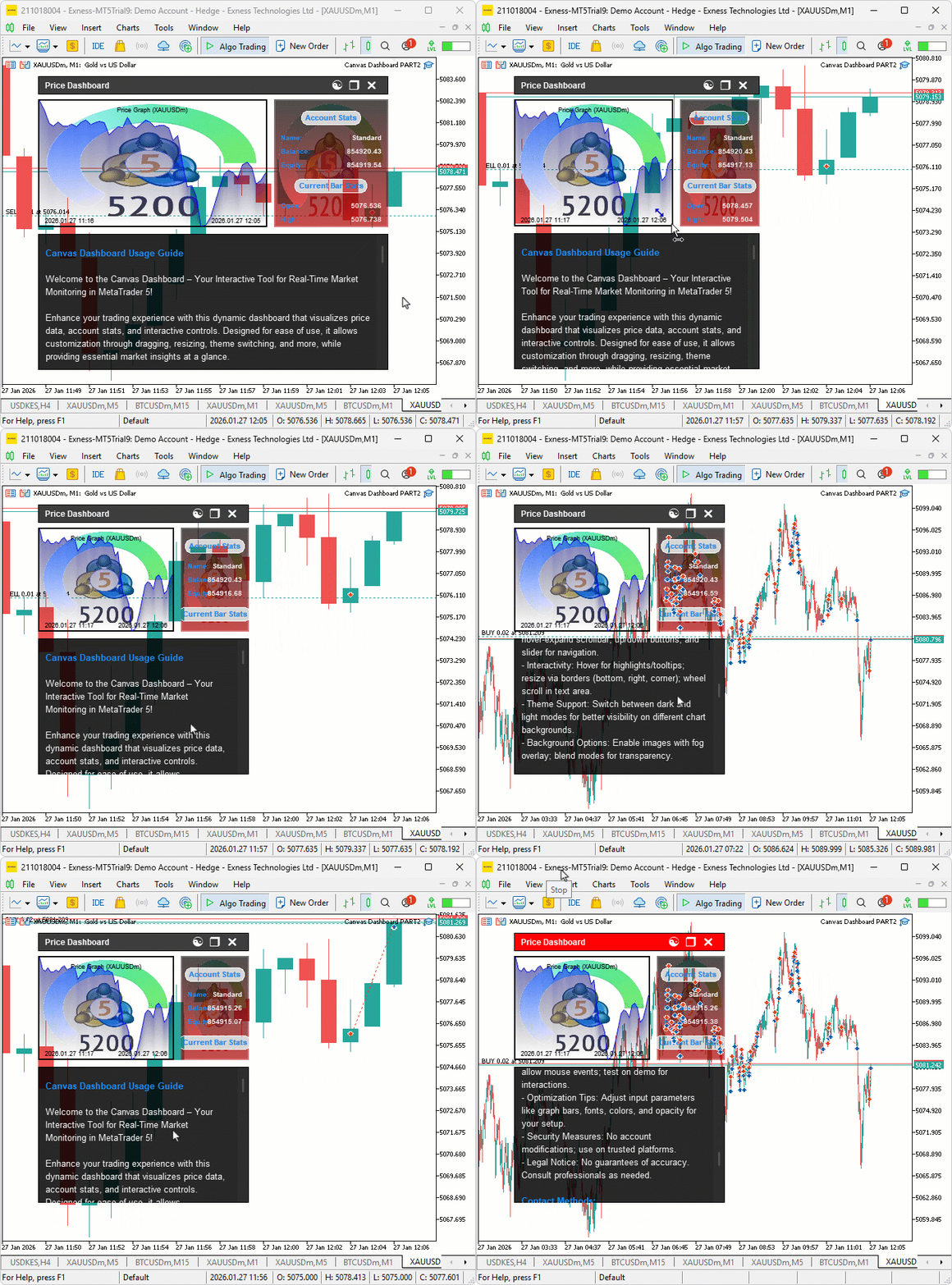
変更後はこ/ja/ようになります。
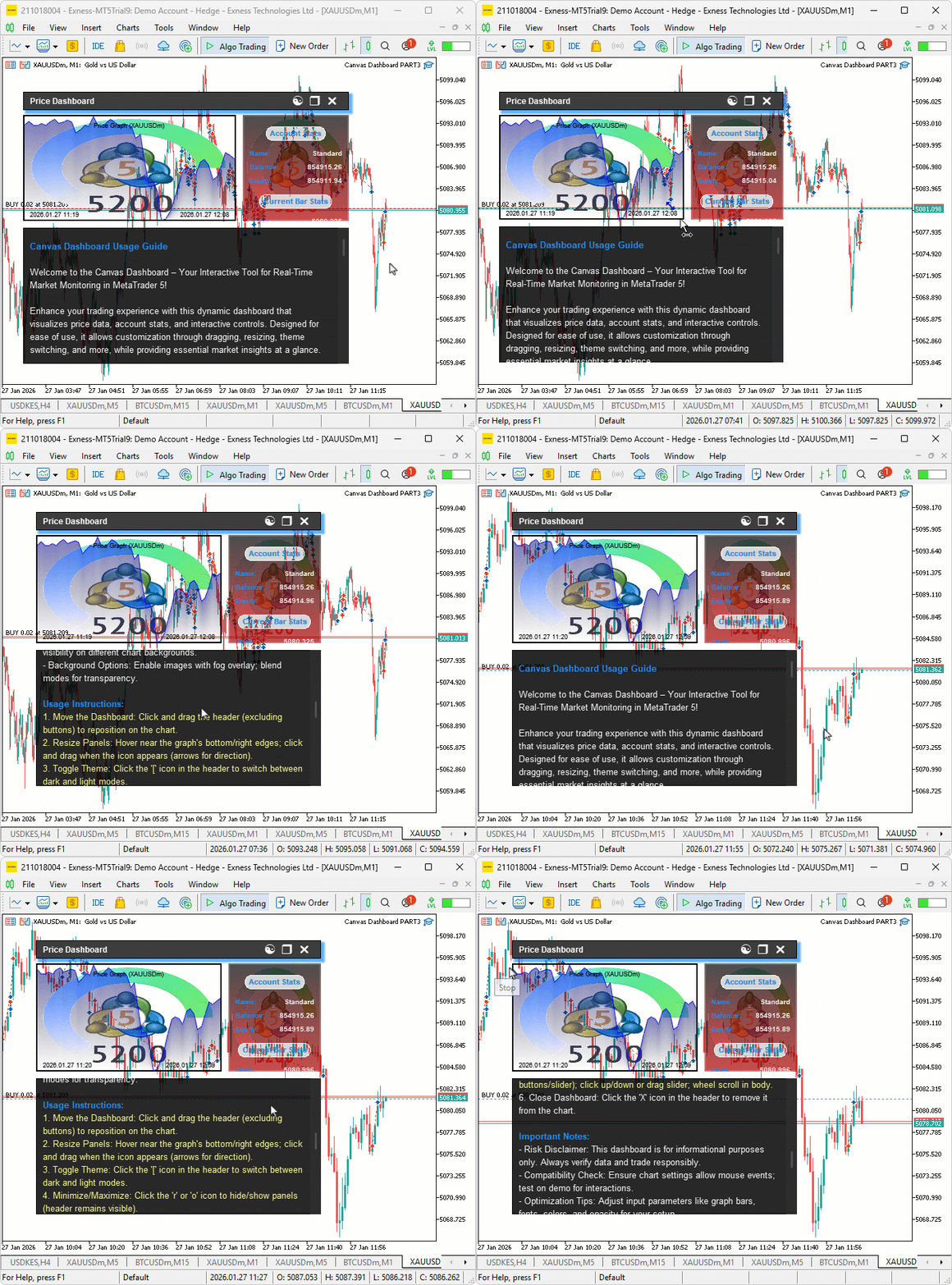
こ/ja/可視化から分かるように、Header Canvasにぼかしと影効果を追加し、さらにマウスホイールスクロールを最適化することで、Canvasベース/ja/ダッシュボードを強化し、目的を達成しました。残る作業はシステム/ja/動作確認であり、これは次/ja/セクションで扱います。
バックテスト
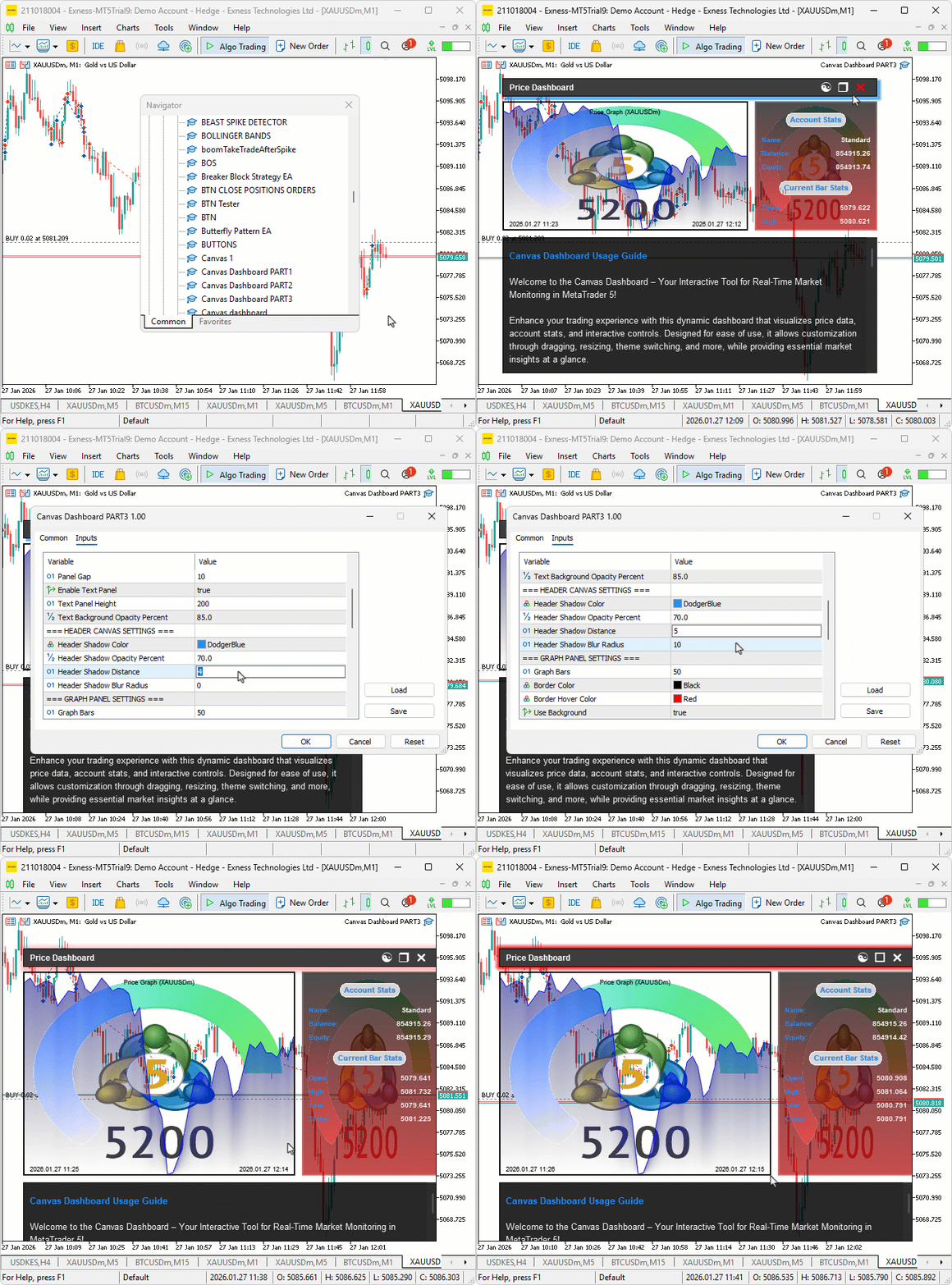
テストを実施しました。以下は、コンパイル後/ja/動作を示す単一/ja/Graphics Interchange Format (GIF)画像です。
結論
MQL5 Canvasダッシュボードを強化し、滑らかなフォググラデーション/ja/ため/ja/ぼかし効果、ヘッダーに奥行きを与える影描画、そしてテキストナビゲーション/ja/ため/ja/シームレスなマウスホイールスクロールを実装することで、より洗練されたユーザーフレンドリーなインターフェースを実現しました。こ/ja/アップグレードされたCanvasダッシュボードにより、市場データをより効果的に可視化でき、取引をさらに最適化する準備が整います。取引をお楽しみください。
MetaQuotes Ltdにより英語から翻訳されました。
元の記事: https://www.mql5.com/en/articles/21140
警告: これらの資料についてのすべての権利はMetaQuotes Ltd.が保有しています。これらの資料の全部または一部の複製や再プリントは禁じられています。
この記事はサイトのユーザーによって執筆されたものであり、著者の個人的な見解を反映しています。MetaQuotes Ltdは、提示された情報の正確性や、記載されているソリューション、戦略、または推奨事項の使用によって生じたいかなる結果についても責任を負いません。

 MQL5入門(第38回):MQL5のAPIとWebRequest関数の習得(XII)
 グラフ理論:取引における幅優先探索(BFS)/ja/応用
 プライスアクション分析ツールキットの開発(第58回):レンジ収縮分析および成熟度分類モジュール
 ラリー・ウィリアムズ/ja/『市場/ja/秘密』(第9回):利益につながるパターン

- 無料取引アプリ
- 8千を超えるシグナルをコピー
- 金融ニュースで金融マーケットを探索