
Swing Sniper EA
- Experts
-
Haidar Lionel Haj Ali
 I am committed to developing high-performance trading solutions for MetaTrader 5. Backed by over nine years of live-market experience, I designed and deliver Expert Advisors, custom indicators, and utilities that minimize complexity and maximize precision in real-world conditions.
 - Version: 1.2
- Updated: 27 July 2026
- Activations: 10
Swing Sniper — Smart Money Concepts Expert Advisor for MetaTrader 5
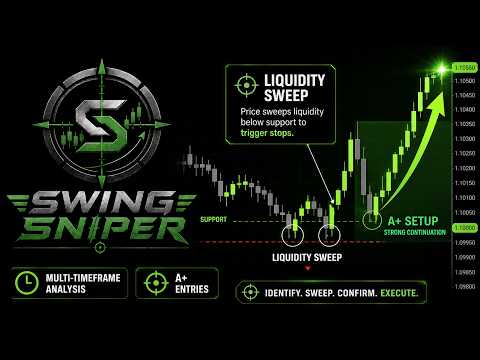
Swing Sniper is a Smart Money Concepts Expert Advisor for MetaTrader 5 designed to automate a disciplined liquidity sweep strategy with structured confirmation, controlled risk, and transparent execution logic.
The EA does not randomly enter the market and does not rely on grid, martingale, or dangerous averaging. Instead, it follows a strict confirmation model based on swing structure, liquidity sweep detection, momentum confirmation, multi-timeframe context, and risk-controlled trade management.
Swing Sniper is built for traders who understand SMC concepts and want to automate the execution side with precision, consistency, and discipline.
WARNING: This is a LIMITED launch price for the first 10 copies only! Only a few copies are available at this price.
This limited release is intentional. We want to keep Swing Sniper exclusive, protect the quality of the community, and avoid making the same strategy available to too many traders at the same time.
After the first 10 copies are sold, the price may increase without prior notice.
Swing Sniper comes with 4 strategy sets prepared for Gold, EURUSD, and USDJPY. Please check the first comment to download the strategy sets. The default settings are for USDJPY M20.
The user guide link is also available in the first comment. If you need help or have questions before purchasing, contact me here.
Key Features Overview
Swing Sniper combines Smart Money Concepts logic with practical automation and risk management:
- Liquidity sweep detection based on swing and sessions highs and swing lows
- Multi-step confirmation before any entry is allowed
- EMA momentum filter to avoid stale or weak setups
- Multi-timeframe context engine for directional bias confirmation
- Kill Zone trading window for session-based execution
- One-trade-at-a-time logic
- Structurally placed stop loss based on the swing extreme
- Take profit based on R-multiple logic
- Break-even management
- Fixed lot, percentage balance, percentage equity, and fixed money risk modes
- Optional obfuscation module to randomize entries and exits
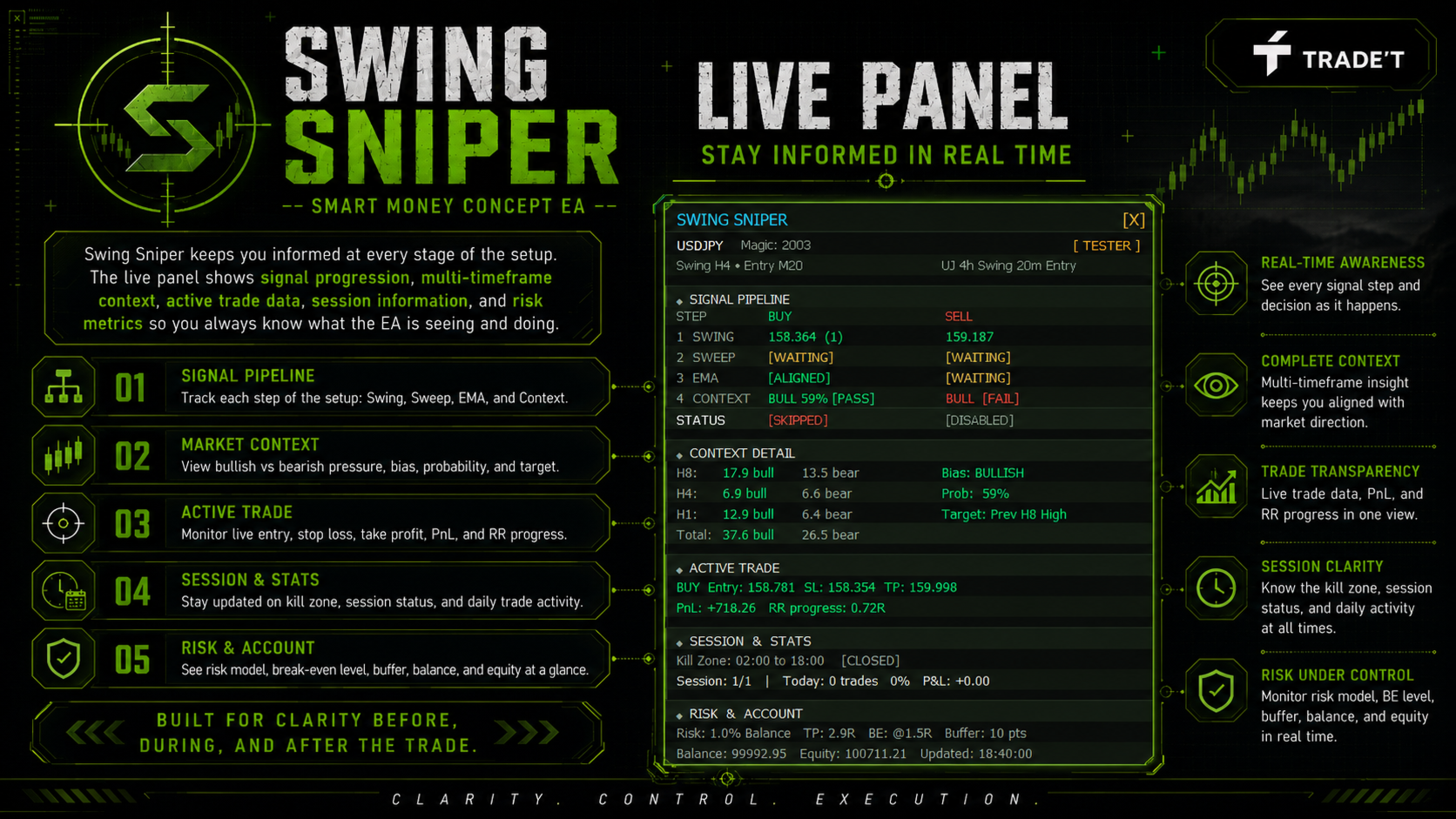
- Visual on-chart dashboard showing the full signal pipeline status
- Structured logs for testing, debugging, optimization, and support
- Full transparency with no martingale, no grid, and no averaging
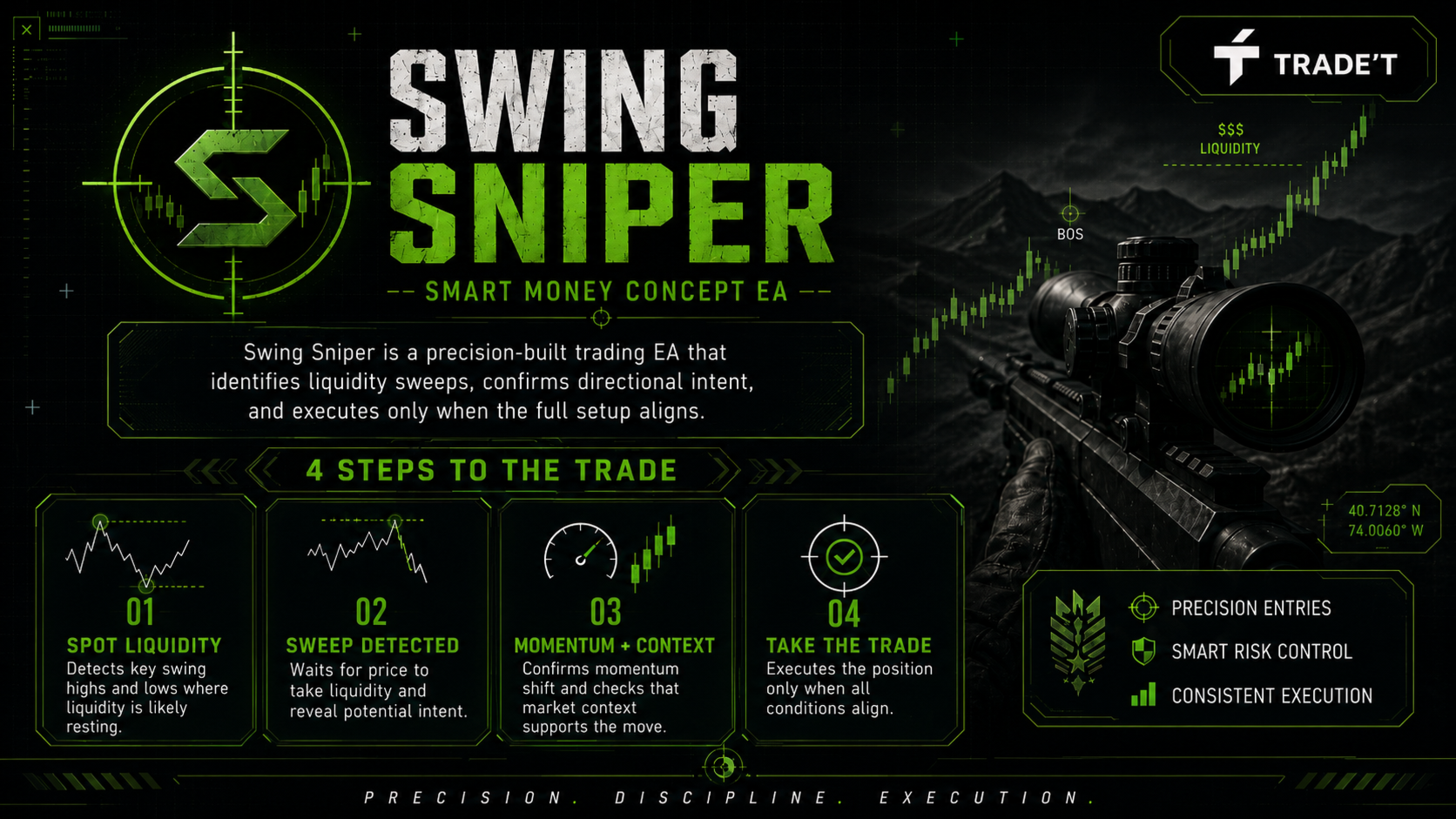
How the Strategy Works
Swing Sniper follows a clear Smart Money Concepts execution process.
- Swing Structure Mapping: the EA identifies important swing highs and swing lows where liquidity may be resting.
- Liquidity Sweep Detection: the EA waits for price to sweep a previous swing level before a setup becomes valid.
- Momentum Confirmation: EMA-based logic confirms that short-term momentum supports the trade direction.
- Multi-Timeframe Context: the EA checks whether the broader market context supports the setup.
- Risk-Controlled Execution: an A+ trade is opened only when all required conditions align inside the configured Kill Zone.
No single condition is enough. All steps must align before Swing Sniper is allowed to execute a trade.
Who It’s For
Swing Sniper is built for:
- Traders who understand liquidity, sweeps, and Smart Money Concepts
- Traders who want structured execution instead of emotional entries
- Traders looking for an EA with real stop loss and controlled risk
- Traders who prefer fewer, higher-quality setups
- Traders who want to test and optimize their own SMC-based strategy
- Prop-firm style traders who need disciplined risk and no martingale logic
Not suitable for traders searching for a black box EA, guaranteed profits, aggressive grid recovery, martingale systems, or high-risk shortcuts.
Recommended Usage and Market Suitability
Primary Default Setup: USDJPY
Entry Timeframe: M10
Minimum Account: from 250 USD
Suggested Risk: 0.5% to 1% per trade
This configuration is designed for controlled exposure and disciplined testing. The EA can be adapted to other symbols, timeframes, and sessions, but every change should be tested properly before live trading.
Included strategy sets: 2xGold, EURUSD, USDJPY, and an additional optimized strategy set. Please check the first comment to download the sets.
The user guide link is also available in the first comment. For questions, configuration help, or additional details, contact me directly.
Inputs and Configuration
All runtime configuration is controlled from the MT5 input parameters window when attaching Swing Sniper to a chart. The inputs are grouped to match the EA logic, from general setup, swing and entry settings, Kill Zone timing, context confirmation, stop-loss management, risk sizing, and optional obfuscation.
General Settings
- Magic Number : Unique identifier for this EA instance's trades. Change it when running multiple Swing Sniper instances on the same trading account.
- Trade Comment : Comment string attached to each order for easier identification in the account history.
- Show Panel : Enables the on-chart dashboard panel to display EA status, signal pipeline, context information, and active trade details.
- Log Verbosity Level : Controls how much information is printed in the MT5 Experts tab. Higher levels provide more detailed debugging information.
Swing and Entry
- Allows Buys : Enables or disables buy trades.
- Allows Sells : Enables or disables sell trades.
- Max Simultaneous Trades : Defines the maximum number of trades the EA may open at the same time. Once reached, no further entries are attempted until an existing trade closes.
- Swing Timeframe : Timeframe used to identify swing highs and swing lows. Higher timeframes usually produce more significant structure levels.
- Entry Timeframe : Timeframe used for sweep detection, EMA alignment, and the final entry trigger. It should be equal to or lower than the Swing Timeframe.
Kill Zone
The Kill Zone defines the time window where Swing Sniper is allowed to open new trades. Setups outside this window may be detected and tracked, but they are not executed.
- Kill Zone Start Hour : Broker server hour when the EA starts looking for entries.
- Kill Zone Start Minute : Minute offset for the start of the Kill Zone.
- Kill Zone End Hour : Broker server hour when the EA stops opening new trades.
- Kill Zone End Minute : Minute offset for the end of the Kill Zone.
Recommended active periods are usually high-liquidity sessions such as London session or New York overlap. Always configure these times using your broker server time, not your local time.
Close Positions
- Enable End of Day Closure : If enabled, the EA forces open trades to close at the configured force-close time, regardless of profit or loss. This helps avoid holding positions overnight.
- Force Close Hour : Broker server hour used as the force-close trigger if a trade is still open.
- Force Close Minute : Minute offset for the force-close trigger.
Context Engine
- Higher Timeframe : First higher timeframe used for bias analysis.
- Mid Timeframe : Second higher timeframe used for bias analysis.
- Lower Timeframe : Third higher timeframe used for bias analysis.
- Min Probability % : Minimum context probability required to allow a trade. If the probability is below this threshold, the trade is blocked.
- Max Probability % : Maximum context probability cap. This can be used to filter extreme readings if needed.
The context engine probability thresholds move from 50% to 100%. A trade is allowed only when the broader directional context supports the setup inside the configured probability range.
Stop-Loss and Break-Even
The stop loss is placed at the absolute swing extreme from which the sweep was triggered, using the furthest point reached by the wick. This creates a structural stop-loss placement instead of an arbitrary fixed-points stop.
- SL Padding Points : Additional points added beyond the swing extreme to reduce the chance of being stopped by a small market spike.
- TP R-Multiple : Take profit distance expressed as a multiple of the stop-loss distance. For example, 2.0 means the TP is placed at 2 times the SL distance from entry.
- Enable Break-Even : When enabled, the stop loss is moved to entry plus the BE Buffer Points once the trade reaches the configured BE Trigger R-Multiple.
- BE Trigger R-Multiple : The trade must reach this R profit level before break-even is activated.
- BE Buffer Points : Points beyond entry used when moving the stop loss to break-even, allowing the EA to lock a small profit instead of moving exactly to entry.
Lot Size / Risk
Lot sizing is controlled by the Risk Mode parameter. Swing Sniper supports multiple risk modes depending on how you want the EA to calculate exposure.
- Fixed Lot : A fixed lot size is used for every trade, regardless of account size or stop-loss distance.
- % Balance : Lot size is calculated so that the stop-loss distance equals the selected percentage of account balance.
- % Equity : Same logic as percentage balance, but calculated using live account equity instead of balance.
- Fixed Dollar : Lot size is calculated so that the stop-loss distance equals the selected fixed money amount.
- Risk Mode : Defines which lot sizing method the EA will use.
- Risk Value : Defines the risk amount according to the selected mode. For example, 1.0 can mean 1% in percentage risk modes or 1 lot in fixed lot mode.
Obfuscator Module
The optional obfuscator introduces controlled randomness into execution so users running the same configuration do not always have identical entries and exits. This can be useful for traders who want more variation in execution behavior, especially on prop-firm accounts.
- Enable Obfuscation : Activates the obfuscator module. When disabled, all obfuscation settings are ignored and the EA behaves normally.
- Exits Min Random Offset : Minimum number of points randomly added or subtracted from the SL and TP on each trade.
- Exits Max Random Offset : Maximum number of points randomly added or subtracted from the SL and TP on each trade.
- Entry Min Delay : Minimum random delay applied between the signal trigger and the order placement.
- Entry Max Delay : Maximum random delay applied between the signal trigger and the order placement.
- Max Minutes to Close Before Target Time : Shifts the force-close time earlier by a random number of minutes up to this value on each trading day.
You need more details?
The full user guide is available in the first comment.
The strategy sets for Gold, EURUSD, USDJPY, and the additional optimized setup are also available in the first comment.
If you need help before or after purchasing, contact me here.









































Ein weiterer EA der absolut empfehlenswert ist. Seit ORB Revolution (mit dem ich ebenfalls sehr zufrieden bin; vgl. Bewertung dort) bin ich auf den Entwickler Lio aufmerksam geworden. Eine unvergleichbare Community, die er auf Discord ins Leben gerufen hat. Er ist jederzeit ansprechbar und hilfsbereit. Und ist immer für Anregungen offen und implementiert sie bei Updates. Genauso muss das! Ich freu mich dabei sein zu können. Zum EA selbst. Er konzentriert sich auf A+ Setups und dementsprechend gibt es seltener trades. Dafür aber in hoher Qualität. Der EA läuft bei mir noch nicht so lange. Bislang zwei trades und zwei winner. Gerne aktualisiere ich die Bewertung nach einiger Zeit und mehr trades.