Spread Control MT5

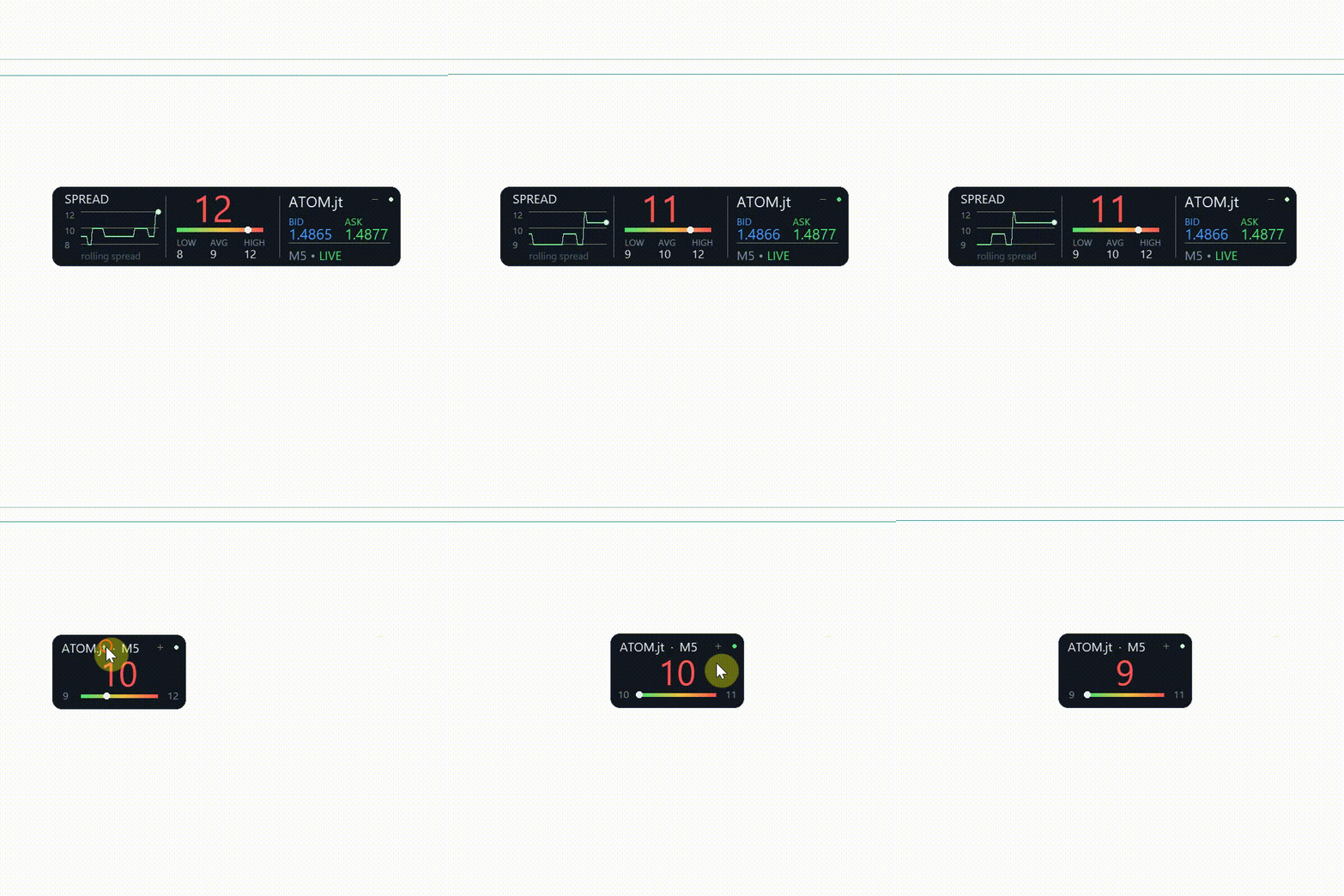
Spread Control is a compact indicator for MetaTrader 5 that allows you to monitor the current spread and its dynamics directly on the instrument chart.

Features

  • Real-time spread monitoring
  • Spread change chart with a history of recent values
  • Calculation of LOW / AVG / HIGH for the displayed period
  • Spread status color indication:
    • normal level;
    • warning level;
    • critical level
  • Visual scale of the current spread value
  • Display of current Bid and Ask
  • Market activity indicator:
    • LIVE — quotes are changing;
    • OFFLINE — Bid and Ask have not changed for the specified period
  • Display of the current symbol and timeframe
  • Full and Compact modes

Settings

Position X — initial horizontal position of the panel.
Position Y — initial vertical position of the panel.
Refresh Interval — interface refresh frequency.
Spread Sampling Interval — interval for recording spread values into history.
Spread History Size — number of spread values stored in history.
Warning Spread — spread level considered elevated.
Critical Spread — critical spread level.
Market Inactivity Timeout — time without Bid/Ask changes after which the market is shown as OFFLINE.
Status Indicator Blink Interval — blinking speed of the market activity indicator.

When Spread Control Can Be Useful

The indicator can be especially useful:

  • during high volatility;
  • before opening a trade;
  • when trading during news releases;
  • during trading session transitions;
  • on instruments with floating spreads;
  • when comparing trading conditions across different symbols;
  • for visual monitoring of current quote quality.

Spread Control — less unnecessary information, more control over real trading conditions.

Recommended products
Real-Time Spread Display Tool A   real-time spread display tool   is a specialized software or application designed to provide traders and investors with instant, live data on the   spread —the difference between the bid price (the price at which buyers are willing to purchase an asset) and the ask price (the price at which sellers are willing to sell it)—for various financial instruments. This tool is critical in markets such as forex (FX), stocks, futures, and cryptocurrencies, where price f
Forget about enabling templates when you launch the window. Auto Template Master Service  is a professional utility tool that runs as a system service in MetaTrader 5, and it will do it for you. Unlike traditional indicators or expert advisors (EAs), the program runs in the background of the entire terminal and doesn't require you to add it to each window individually. As soon as you open a new chart of any instrument (Forex, Stocks, Crypto), the service immediately detects the new window and a
AUTO RISK MANAGER PRO: your partner in Forex trading! AUTO RISK MANAGER PRO_MT4 — version for MT4 Demo version + detailed description Stop losing money due to emotions! It’s time to trust risk management to a professional algorithm. Imagine this situation: the market suddenly moves against your position while you are sleeping, working, or spending time with your family. Sounds familiar? With Auto Risk Manager Pro — not anymore! Advantages: Revolutionary approach to risk management Automatic capi
One Click Trader  is a tool designed for MetaTrader 4 platform, which enables you to take your trading to the next level. It enables you to open, manage and close your trades in simple an efficient way by just one click of your mouse button. "-"   ,  "+"  change OCT window size  Up arrow minimizes the OCT panel Down arrow maximizes the OCT panel Right arrow displays the next panel with additional features Left arrow hides the panel with additional features Red  SELL  button enables you to open s
This tool can help you close all open orders with one click, just click "Close all". If you only want to close profitable orders, click the "Close profitable" button. After clicking, all floating orders will be closed; If you only want to close the orders with floating losses, click the "Close losable" button. After clicking, all orders with floating losses will be closed. This tool has been tested for a year. The one-click position closing function is very complete, the position closing is time
Chart Date Jump Chart Date Jump is a lightweight MetaTrader 5 utility that helps you open historical chart context in seconds. Enter a target Day / Month / Year / Hour / Minute , press Go to datetime , and the chart scrolls to the matching bar and centers it in the window. A vertical marker is drawn on the located candle so you can instantly see the exact time you jumped to. Key features Jump to an exact date and time on the current symbol/period Center the found bar in the visible chart area Ma
This tool allows you to export MetaTrader indicator data (buffers) for any financial instrument available in your MetaTrader 5. You can export multiple Symbols and Timeframes into a single CSV file. You can also schedule the export frequency (every 1 minute, 5 minutes, 60 minutes, etc.). There is no need to open multiple charts to retrieve recent data—the tool downloads the data directly. The CSV file will be saved in the folder: \MQL5\Files . How it works Report Tab Select the indicators and o
FREE
You have 5 positions open on XAUUSD. Net floating is +$30 - looks fine. But look closer: 3 buys, 2 sells. The buys are carrying 0.60 lots, the sells only 0.20. One of those buys has been sitting underwater for 90 minutes. Margin level is at 390% and drifting down. Stress is building - quietly, invisibly - while the terminal just shows you a list of rows. Current price: $59 - increases by $10 after every 20 purchases until reaching the final price of $119 . Next price: $69 . Complete Buyer Kit: 4
Boleta de negociação, adiciona automáticamente as ordens Take Profit e Stop Loss quando excutada uma ordem de compra ou venda. Ao apertar as teclas de atalho (A, D, ou TAB), serão inseridas duas linhas de pre-visualização, representando as futuras ordens de take profit (azul) e stop loss (vermelho), as quais irão manter o distanciamento especificado pelo usuário. Ditas ordens só serão adicionadas ao ser executada a ordem inicial. Ao operar a mercado, as ordens pendentes de take profit, e stop lo
T Manager for Price action Traders
Haidar Lionel Haj Ali
4.5 (10)
T Manager, the ultimate trade management solution designed by traders for traders. If you are searching for a simple and efficient trade panel, trade manager, or trade assistant, you are at the right place.   The market contains a diverse number of those tools , but this one is designed by traders for traders . I designed this tool, and I am using it daily. Take my advice and stop buying tools blended with un-useful features that you will never use,   T Manager provides you with the essential y
MQL5 Blogs : https://www.mql5.com/en/blogs/post/761446 MT4 Version : https://www.mql5.com/en/market/product/136790 MT5 Version : https://www.mql5.com/en/market/product/136791 Time Wizard is a professional trading assistant built for traders who need speed, timing, and execution control in one clean dashboard. This Expert Advisor is designed for event-based trading, scheduled execution, and fast semi-automatic order management. It allows you to prepare your orders in advance, define the exact
Volatility Regime Monitor is a professional MetaTrader 5 dashboard for classifying current volatility with transparent, measurable context. It combines ATR, recent bar-range statistics and historical percentiles to show whether the market is compressed, normal or expanding without generating entry signals. MAIN FEATURES • ATR and recent range context • Historical volatility percentile state • Compression, normal and expansion classification • Historical regime table • Transparent thresholds and
Telegram to mt5 signal copier
Chukwuemeka Kingsley Anyanwu
5 (2)
Copies Signal from any Telegram channel and instantly executes the trade on MT5 without admin rights! Do you receive trading signals on Telegram and wish they could execute instantly on Meta Trader 5? Telegram to MT5 Signal Copier  is a powerful bridge between your Telegram signal channels and MetaTrader 5. It listens to messages from a specific Telegram channel and automatically extracts trading signals — including symbol, action, entry price, stop loss, and take profit — then executes them in
You can see Binance Spot data instantly in Metatrader 5 and it allows you to use all the features that Metatrader has provided to you. You can access the data of all symbols listed on Binance Futures. Don't forget to set the timezone. Binance it's 00:00 UTC. You need to fix it according to your own country You need to install the free Binance Spot Symbol List plugin. https://www.mql5.com/tr/market/product/83507 After loading, it automatically downloads the data of the cryptos in the market obser
BerelzBridge
Barend Willem Van Den Berg
BerelzBridge Pro Read also comment sectie above for more. MT5-to-JSON data bridge for all timeframes with account information. Overview BerelzBridge Pro is an MT5 indicator that exports live market data to a JSON file on disk. It writes bid and ask prices, spread, tick volume, daily statistics, account information and OHLCV bars for all 9 timeframes. The file is updated at a configurable interval with a default of 2 seconds. The indicator runs alongside Expert Advisors on the same chart without
​Notification Spy Protector is a MetaTrader 5 Expert Advisor (Utility) that monitors your trading activity and sends real-time alerts to your mobile device (via MT5 Push) and/or Telegram. Equipped with a solid and reliable Account Protector, this utility is fully compatible and highly recommended for Prop Firm trading to safeguard your accounts from violating drawdown limits. It also provides advanced transaction filters and a clean on-chart dashboard. Never miss a trade. Protect your account f
Safety Control: Your Ultimate Balance Management Solution for Prop Firm Challenges Overview Tired of manually monitoring your trading activities in prop trading challenges? Meet Safety Control, an advanced Expert Advisor for MetaTrader 5 that will change the way you trade forever. This proprietary software aims to help you manage your balance effortlessly during prop firm challenges. Features Automated Drawdown Control : Safety Control continuously monitors your account's balance and equity in r
Telegram EA Manager
Ebunoluwa Abimb Owodunni
All in one Multipurpose Telegram Trade Management , Manage and Copy Trades on the go From Telegram Pro Version MT5:  www.mql5.com/en/market/product/95742 Pro Version MT4:  www.mql5.com/en/market/product/85691 Execute Trades on mobile with fast execution When away from desktop MT5, or scalping the market with mobile device, or needed to copy trades from telegram groups while away, or doing some other activities, Telegram EA Manager is an effective tool to perform any trade operation with swift
FREE
Position Prime
Mariana Cordeiro Neves Fernandes
Download the free demo version now and test all the risk management features within your Strategy Tester before you buy! Position Prime is an institutional-grade visual execution assistant and risk manager for MetaTrader 5. Designed for traders who demand speed and precision, it eliminates the need for manual lot calculations and transforms your chart into a true trading desk. Plan, execute, and protect your trades in fractions of a second. ️ Risk Management & Automatic Lot Calculation Dyna
MQT AutoClose Expert MT5
Josue Fernando Servellon Fuentes
MQT AutoClose Expert closes your orders automatically once they reach the profit target you set — in real pips (with a separate target for gold) or in account money. Open your trades as you always do; the EA watches every position on every symbol and locks the profit in for you. It never opens trades. How it works (logic summary): Every tick and every 500 ms it scans all open market orders. Pending orders are never touched. Pips mode: profit distance is computed from prices — Bid for buys, Ask f
COPYLATOR – MT5 Trade Copier Key Highlights Multi-Sender / Multi-Receiver Trade Replication – supports one-to-many, many-to-one, and many-to-many configurations, with complete real-time copying of market orders, pending orders, SL, and TP. Advanced drawdown protection – closing, blocking, pending-order deletion, manual and automatic reset mechanisms. Automatic symbol mapping – finds correct symbols, alerts if missing, allows manual override. Hedging & Netting support – auto-detected, no manual s
Drawdown monitor constantly monitors your account, preventing you from blowing your account and losing more money than you expected! You can monitor the overall drawdown as well as up to two additional drawdowns for specific magic numbers This licensed version of Drawdown monitor EA  can be used  both  on demo and live accounts without any limitation. Before using Drawdown monitor EA on a live account , I advise you to configure and test all parameters and verify that its operation meets your
# Ronin Copier - Tactical Prop Sync **Zero-Latency, Zero-DLL Local Trade Copier Built for Serious Prop Traders.** **EARLY ADOPTER PROMOTION (LIMITED COPIES):** - **First 10 copies:** **$59** (Current Stage) - **Next 10 copies:** **$99** - **Final Price:** **$199** *Price increases automatically as review milestones are reached.* --- Managing multiple MT5 accounts across prop firms (FTMO, FundedNext, Alpha Capital, etc.) or private brokers? **Ronin Copier** provides seamless, millisecond-
R.E.A. Automatic Risk Monetary (MT5) – Per-symbol manager for manual entries & pending orders Summary (hero) Automate risk management for manual trades (magic 0) and pending orders on the chart’s symbol : SL/TP by % of balance or fixed amount , BreakEven and Trailing (for positions), with instant reaction on order placement/execution. What it does Locked to the symbol where you attach it, this EA manages only: Your manual positions on that symbol. Your pending orders on that symbol (limit/stop/s
FREE
MT5 history exporter for accurate trade analysis and CSV export. Export trades to Excel from MetaTrader 5 with full performance metrics. Advanced MT5 trade analyzer with MAE, trade duration, and reconstruction. Usually platforms hide critical information about how your trades actually behave. History Downloader and Trade Analyzer solves this. It rebuilds your trades from raw deal history and exports a clean, structured dataset with accurate metrics MT5 does not provide. What You Get A fully s
Protected profit
Vasiliy Pritchin
Protected profit это логическое продолжение проекта Equity monitor. Исправлены недочёты и внесены дополнительные моменты. В данном продукте разработан процентный  Traling stop, как на отдельную позицию, так и на дневную прибыль в целом. Есть возможность закрыть позицию по заданному проценту убытка, а так же можно закрыть все позиции по проценту дневной прибыли. Настройки просты и понятны.  Например: Риск на позицию 1% Позиция закроется если процент убытка превысит 1%. Traling 3% допустимое сниже
Binance Copier allows to seamlessly and easily copy trades between MT5 and Binance Futures! The tool's main feature is to replicate trades and all available orders between MetaTrader 5 and Binance that can be applied to both Expert Advisors and manually opened ones. Before purchase please familiarize with comparison between MT5 to Binance and Binance Copier Key Features: Bidirectional Copying - MT5 → Binance (Master Mode): Copy your MT5 trades to Binance - Binance → MT5 (Slave Mode): Mirror Bi
COMPLETE USER MANUAL The   Local Trade Copier & Safety Manager   is an institutional-grade, ultra-low latency local trade replication and equity protection system designed specifically for MetaTrader 5. Engineered for professional traders, account managers, and Prop Firm challengers, this software operates via a secure, high-speed binary stream written directly to your local PC or VPS. It achieves near-instantaneous execution speed   without using external DLLs, cloud servers, or slow network
FREE
QBrain Strategy Auditor
Nesrine Emilie Darragi
QBrain Strategy Auditor helps users identify incomplete or weak evidence before drawing conclusions from closed MetaTrader 5 outcomes. The utility is designed for strategy review. It does not open, modify, or close trades. It does not predict returns and does not certify a strategy. Main functions - Reads closed terminal account history in a selected date range or a normalized CSV placed in the MT5 file sandbox. - Checks whether the available evidence is sufficient for analysis. - Displays k
Quick operation, quick purchase, sale, empty operation. Provide three buttons: Buy, Sell, empty. Buy: Quickly place more orders after clicking, default 1 hand, profit point and stop-loss point are 110 points, after successful order can be manually modified. Sell: Quickly place an empty order after clicking, default 1 hand, profit point and stop-loss point are 110 points, can be manually modified after the order is successful. Empty: Quickly clear all orders, including purchase and s
Buyers of this product also purchase
Trade Assistant MT5
Evgeniy Kravchenko
4.43 (216)
It helps to calculate the risk per trade, the easy installation of a new order, order management with partial closing functions, trailing stop of 7 types and other useful functions. Additional materials and instructions Installation instructions - Application instructions - Trial version of the application for a demo account Line function -   shows on the chart the Opening line, Stop Loss, Take Profit. With this function it is easy to set a new order and see its additional characteristics bef
Forex Trade Manager MT5
InvestSoft
4.98 (687)
Trade Manager MT5 is an advanced position size calculator and trade management tool for MetaTrader 5, designed to help traders plan trades faster, control risk more precisely, and manage open positions directly from the chart. It combines order placement, risk based lot calculation, Stop Loss and Take Profit management, Break Even, Trailing Stop, Partial Close, Equity Protection, and external trade management in one panel. Whether you trade forex, indices, metals, commodities, crypto, or future
Local Trade Copier EA MT5
Juvenille Emperor Limited
4.94 (149)
Local Trade Copier EA MT5 is a fast and flexible trade copier for copying and managing trades between multiple MetaTrader 5 accounts on the same Windows computer or Windows VPS. It combines local trade synchronization with Receiver-side controls for lot sizing, risk management, trade filtering, symbol mapping, trade management and account protection. Set up your Transmitter and Receiver terminals in about 1 minute and copy manual or EA trades between accounts at the same or different brokers. U
Telegram to MT5 MultiChannel Copier
Sergio Marquez Uroz
4.65 (20)
Telegram to MT5 Multi-Channel Copier   automatically copies trading signals from your Telegram and Discord channels straight to MetaTrader 5. No bots, no browser extensions, no manual copying. A signal arrives in Telegram or Discord and the EA opens the trade in your terminal within seconds. And before you copy a channel, the built-in backtester shows you what that channel would have done in your account. The product has two components: a Windows application that listens to your Telegram channel
================================================================================ POC BREAKOUT - V20.72. Full Professional Grade Toolkit ================================================================================ POC Breakout is a full MetaTrader 5 trading dashboard for discretionary traders who want breakout signals, Point of Control (POC) context, volume profiles, order flow, market structure, news, alerts, and advanced trade planning in one professional workspace. Attached directly to you
Strategy Ledger Pro
Abdullah Uygar Tuna
5 (11)
Strategy Ledger Pro is a read-only account analysis panel for MetaTrader 5. It separates account results by Expert Advisor, strategy, symbol, and magic number, so you can see what each one really contributes. The panel is available in 11 languages: English, Français, Deutsch, Español, Italiano, Português, Русский, Türkçe, 中文, 日本語 and 한국어. Before you download the demo. The Market runs the demo of any paid product in the Strategy Tester only. This panel analyses the trades on your own account, and
TradePanel MT5
Alfiya Fazylova
4.88 (170)
Trade Panel is a multi-functional trading assistant. The app contains over 50 trading functions for manual trading and allows you to automate most trading tasks. Application instructions: https://www.mql5.com/en/blogs/post/756482 Trial version of the application for a demo account: https://www.mql5.com/en/blogs/post/750865 How to install the application: https://www.mql5.com/en/blogs/post/756239 How to test the application in visual mode: https://www.mql5.com/en/blogs/post/770277 How to install
The Patch
Mian Rameez Ali
The Patch It never opens a trade. It walks behind the ones that did. Every open position, every pending order — checked twice a second for the one thing that's easy to forget: a stop, a target. Found bare, it doesn't ask. It writes the missing number in, measured in points from wherever the position began, and moves on to the next. No strategy, no opinion on direction. Just the quiet assumption that nothing should ever sit on the market unprotected — not because someone decided it shouldn't,
Floor Watch
Syed Tauqeer Hussain Shah
Floor Watch One number, watched every thirty seconds: how far equity has fallen since the day began — or since its highest point, if it's told to trail the peak instead of the open. Cross the line and it doesn't argue. Every open position closes, every pending order vanishes, and anything that slips through afterward gets shut the moment it appears. Not asked. Removed. The floor holds until the clock turns 5 AM Pakistan time — then, and only then, does the day start over. One rule. No except
Copy Telegram signals with your own trading rules Telegram to MT5 Signal Trader automatically copies text-based trading signals from public and private Telegram channels and groups into MetaTrader 5. Manage multiple providers and MT5 accounts from one desktop app, with individual risk and trade settings for each provider . No Telegram bot or API setup needed for copying. Simply sign in with your own Telegram account by phone or QR code and select the channels or groups you have already joined. Y
Power Candles Strategy Scanner - Self-Optimizing Multi-Symbol Setup Finder Self-optimizing settings work one chart at a time, and finding where they pay off right now means opening chart after chart. Power Candles Strategy Scanner runs the same self-optimizing engine as the Power Candles indicator on every symbol in your Market Watch, side by side. One panel ranks where it pays off: the winning strategy per symbol, its optimized Stop Loss and Take Profit. An alert fires the moment a fresh signal
The product will copy all telegram signal to MT5 ( which you are member) , also it can work as remote copier.  Easy to set up, copy order instant, can work with almost signal formats, image signal,  s upport to translate other language to English Work with all type of channel or group, even channel have "Restrict Saving Content", work with  multi channel, multi MT5 Work as remote copier: with signal have ticket number, it will copy exactly via ticket number. Support to backtest signal. How to s
Buy once. Get all my MT4 and MT5 indicators - available now and released in the future - at no extra cost. Contact me after purchase for instructions to receive them. The price is planned to rise by 50$ after every 10 purchases, up to 999$. The Market price at checkout applies. Keep the indicator you trust. Automate the work around it. Your signal. Your rules. Your execution. Already have an MT5 indicator you rely on, but still need to watch the chart, wait for a signal, calculate the lot, plac
Welcome to ENTRY IN THE ZONE with SMC MULTI TIMEFRAME SPECIAL BENEFIT / FOR OUR MQL5 CUSTOMERS FREE ACCESS TO THE NEW TOOL  — COMING SOON — Learn more on our official website  : https://www.fableedge.net Entry In The Zone with SMC Multi Timeframe is a real-time market analysis tool based on Smart Money Concepts (SMC), designed to analyze market structure, price direction, and key trading zones. It supports both Single-Timeframe and Multi-Timeframe Analysis, providing a clearer view of overall ma
Quant AI Agents
Ho Tuan Thang
5 (1)
Quant AI Agents are independent trading Expert Advisors. Instead of trading using a fixed strategy like other conventional EAs, Quant AI Agents   is a   multi-agent AI trading framework   that turns natural-language strategy prompts into live.  WANT THE SAME RESULTS AS MY LIVE SIGNAL?   Use the exact same brokers I do:   IC MARKETS , IC TRADING   .  Unlike the centralized stock market, Forex has no single, unified price feed.  Every broker sources liquidity from different providers, creating un
Daily Trading Limiter
AL MOOSAWI ABDULLAH JAFFER BAQER
5 (8)
• Please test the product in the Strategy Tester before purchasing to understand how it works. • If you face any issues, contact me via private message—I’m always available to help. • After purchase, send me a screenshot of your order to receive a FREE EA as a gift. Daily Trading Limiter — the rule you cannot break Every trader knows the number. Three trades. Two percent. One bad day and stop. And every trader has watched themselves take the fourth trade anyway. The problem was never knowing th
Grid Manual MT5
Alfiya Fazylova
4.73 (22)
Grid Manual is a trading panel for working with grid strategies. The utility is universal, has flexible settings and an intuitive interface. It works with a grid of orders not only in the direction of averaging losses, but also in the direction of increasing profits. The trader does not need to create and maintain a grid of orders, the utility will do it. It is enough to open an order and the "Grid manual" will automatically create a grid of orders for it and will accompany it until the close. F
Telegram To MT5 Ultra
Mirel Daniel Gheonu
5 (5)
Telegram To MT5 — Signal Copier Turn the trading calls from your Telegram channels into real MT5 orders — automatically, on as many accounts as you like, with risk and rules fully under your control. Telegram To MT5 connects the VIP / signal channels you already follow on Telegram to your MetaTrader 5 terminal. A free companion desktop app reads the messages (even from channels that block bots), and this Expert Advisor executes them on your account — applying your own risk settings, symbol mappi
VirtualTradePad PRO SE MT5 — professional trading control center for MetaTrader 5 VirtualTradePad PRO SE is a premium chart-based trading panel and trade-management workspace for MetaTrader 5 . It is designed for traders who want faster execution, clearer position control, structured trade management, visual level planning and a professional workflow directly from the chart. This is not only a BUY / SELL panel. PRO SE combines manual trading, pending orders, position management, partial exits, b
Seconds Chart MT5
Boris Sedov
4.61 (18)
Seconds Chart is a unique tool for creating second-based charts in MetaTrader 5 . With Seconds Chart , you can construct charts with timeframes set in seconds, providing unparalleled flexibility and precision in analysis that is unavailable with standard minute or hourly charts. For example, the S15 timeframe indicates a chart with candles lasting 15 seconds. You can use any indicators and Expert Advisors that support custom symbols. Working with them is just as convenient as on standard charts.
FUTURES ORDERFLOW FOOTPRINT CHART Professional OrderFlow EA for MetaTrader 5 Version 1.01| Professional tool for real traders | Institutional-Grade Visualization STRATEGY TESTER USERS - PLEASE SELECT EVERY REAL TICK WHEN TESTING AND YOU HAVE DOWNLOADED HISTORICAL DATA. IF YOU SEE A WAITING SCREEN AND IT IS NOT DOWNLOADING, IT MEANS YOU HAVE LOW HISTORICAL DATA. TRY 1 MIN AND 5 MIN FIRST ON 1 DAY DATA. ONE DAY DATA SHOULD BE THE NEWEST AND MOST CURRENT DATE. PLEASE WAIT UNTIL THE MARKET HAS ROL
Exp COPYLOT CLIENT for MT5
Vladislav Andruschenko
3.97 (35)
Professional Trade Copier for MetaTrader 5 Fast, professional, and reliable trade copier for MetaTrader . COPYLOT allows you to copy Forex trades between MT4 and MT5 terminals with support for Hedge and Netting accounts. COPYLOT MT5 version supports: - MT5 Hedge to MT5 Hedge - MT5 Hedge to MT5 Netting - MT5 Netting to MT5 Hedge - MT5 Netting to MT5 Netting - MT4 to MT5 Hedge - MT4 to MT5 Netting MT4 version Full Description +DEMO +PDF How To Buy How To Install How to get Log Files H
Trade copier MT5
Alfiya Fazylova
4.61 (57)
Trade Copier is a professional utility designed to copy and synchronize trades between trading accounts. Copying occurs from the account / terminal of the supplier to the account / terminal of the recipient, which are installed on the same computer or VPS . Before buying, you can test the demo version on a demo account. Demo version here . Full instruction here . Main functionality and benefits: Supports copying MT5> MT5, MT4> MT5, MT5> MT4, including MT5 netting accounts. * Supports copying Dem
Trade Dashboard MT5
Fatemeh Ameri
4.94 (135)
Trade Dashboard simplifies how you open, manage, and control your trades, with built-in lot size calculation. It allows you to execute trades, manage risk, and control positions directly on the chart, with tools such as partial close, breakeven, and trailing stop. Designed to reduce manual work and help you stay focused on your trading decisions. A demo version is available for testing. Detailed explanations of features are provided within the MQL5 platform. Installation instructions are include

Anchor Trade Manager
Kalinskie Gilliam
5 (9)
Your EAs cannot see each other, but Anchor can. Anchor gives you one place to coordinate your EAs, manage risk, and decide when trading is allowed. It works alongside the trading bots you already use without any changes to them. The Problem One EA opens a trade. Then another starts trading. The next thing you know, you wake up to multiple grids built across your account. Each EA may be doing exactly what it was designed to do, but together they can place far more risk on your account than you in
Trade Manager DaneTrades
Levi Dane Benjamin
4.23 (30)
DaneTrades Trade Manager is a professional trade panel for MetaTrader 5, designed for fast, accurate execution with built‑in risk control. Place market or pending orders directly from the chart while the panel automatically calculates position size from your chosen risk, helping you stay consistent and avoid emotional decision‑making. The Trade Manager is built for manual traders who want structure: clear risk/reward planning, automation for repeatable management, and safeguards that help reduc
The News Filter MT5
Leolouiski Gan
4.78 (23)
This product filters   all expert advisors and manual charts   during news time.  It is able to remove any of your EA during news and automatically reattach them after news ends. This product also comes with a complete  order management system   that can handle your open positions and pending orders before the release of any news. Once you purchase   The News Filter , you will no longer need to rely on built-in news filters for future expert advisors, as this product can filter them all from her
Astro Trade MT5
Indra Maulana
5 (8)
25% discount on the release of the tool: only for the next 3 buyers Send a message to receive a demo version. AstroTrade Trading Assistant AstroTrade is a comprehensive multi-functional trading utility developed for the MetaTrader 5 platform. It integrates essential tools for trade execution, risk management, and technical monitoring into a single unified interface. The application is designed to assist traders in managing their daily operations through a visual and structured environment. Vi
Premium Trade Manager - The Trade Panel With a Coach Built In Premium Trade Manager puts a trading coach inside your chart, with a full execution engine underneath it. Set the trade up the way you always do, then let Max, your AI trading coach, read that exact setup against your live account and give you a straight verdict before you commit: is the stop disciplined, is the risk sane, is a high-impact release minutes away, are you near a prop-firm limit. Below sits the engine that runs everything
YuClusters
Yury Kulikov
4.93 (43)
Attention: You can view the program operation in the free version  YuClusters DEMO .  YuClusters is a professional market analysis system. The trader has unique opportunities to analyze the flow of orders, trade volumes, price movements using various charts, profiles, indicators, and graphical objects. YuClusters operates on data based on Time&Sales or ticks information, depending on what is available in the quotes of a financial instrument. YuClusters allows you to build graphs by combining da
More from author
Account Balance
Nikita Chernyshov
5 (2)
Простая утилита, которая показывает на какую сумму средств куплено активов в портфеле. Необходима для отслеживания загрузки депозита. Выводит информацию в удобную надпись, которую можно разместить в любом месте графика.  Учитывает валюту депозита: USD или RUB Учитывает, в какой валюте торгуется актив (USD или RUB) и автоматически конвертирует по текущему курсу. Можно настроить размер и цвет надписи
FREE
Month Profit
Nikita Chernyshov
Convenient and easy to use mini-panel, which displays the profitability from January to the current month . This will help to quickly evaluate the results of transactions without resorting to monitoring the account. Data is updated automatically Each panel element can be configured with its own color and transparency . There are English and Russian languages. The panel can be run in the strategy tester and see how it is built. Monthly profitability is calculated using the fo
FREE
Spread Control is a compact indicator for MetaTrader 4 that allows you to monitor the current spread and its dynamics directly on the instrument chart. Features Real-time spread monitoring Spread change chart with a history of recent values Calculation of LOW / AVG / HIGH for the displayed period Spread status color indication: normal level; warning level; critical level Visual scale of the current spread value Display of current Bid and Ask Market activity indicator: LIVE — quotes are changing;
SmartLot MT4
Nikita Chernyshov
Free version for demo accounts   |   MT5  Version SmartLot   MT4  is an interactive and simple panel for quick lot calculation, placing pending and market orders directly from the chart. It does not work in the Strategy Tester.   To test the utility, download the free version for demo accounts. Instructions and the file are in the header of the description. Features: Graphical Interface:   Interactive Entry, SL, TP lines with color-coded profit and loss zones. Real-time Calculation:   When
Telegram Signal
Nikita Chernyshov
5 (2)
Utility Description A utility that sends text and graphics messages from MetaTrader to Telegram . The information transmitted relates to trading activity on the account: Opening \ closing deals; Placing \ deleting pending orders; Modification of Stop Loss \ Take Profit \ pending order prices; Triggering Stop Loss \ Take Profit; Pending order activation. It does not work in the strategy tester. Check the utility on the demo account using the free version of Telegram Signal Free  The utility ha
SmartLot MT5
Nikita Chernyshov
Free version for demo accounts   | MT4  Version SmartLot   MT5  is an interactive and simple panel for quick lot calculation, placing pending and market orders directly from the chart. It does not work in the Strategy Tester.   To test the utility, download the free version for demo accounts. Instructions and the file are in the header of the description. Features: Graphical Interface:   Interactive Entry, SL, TP lines with color-coded profit and loss zones. Real-time Calculation:   When c
Filter:
No reviews
Reply to review