Grid Treasure EA
- Experts
-
AL MOOSAWI ABDULLAH JAFFER BAQER
 To trade successfully we need to go through the proven path that others had gone and reached!
Here are 17 quotes from such successful investors:
1- Limit your size in any position so that fear does not become the prevailing instinct guiding your judgment.
Joe Vidich - Version: 3.10
- Activations: 5
|
|---|
Why this grid is called Treasure
A treasure is not found by digging everywhere. It is found by waiting for the right sign and then digging with discipline. Grid Treasure EA is built on that idea. It stays calm while the market is stretched, refuses to chase, and only arms a new cycle when price shows that the pressure in one direction has genuinely faded. From that moment a full management engine takes over: it builds the ladder, banks small profits, retires old orders piece by piece and keeps the account breathing.
Version 3.10 brings a brand-new on-chart interface with a rich gold-and-umber look, a completely reworked money check that no longer refuses valid orders on large accounts, a calmer signal rhythm, sensible default limits and full support for both hedging and netting accounts.
The journey of one cycle
Step one, the sign. A slow, smoothed momentum reading watches the chart. It does not jump at the first touch of an extreme. It waits for price to leave the extreme behind, and it accepts a fresh sign only after a quiet spacing of bars since the previous one, so a choppy session cannot fire a burst of new cycles. The signal is read from closed bars only and never repaints.
Step two, the ladder. Once armed, the grid opens its levels. You can run a BUY grid and a SELL grid side by side, each with its own anchor, counter, spacing and bar gate, or keep to one direction at a time. Spacing can follow volatility through ATR, with a floor, a ceiling and the option to freeze the value for the whole cycle so the distance between levels never drifts under you.
Step three, the harvest. This is where the EA earns its name. Instead of waiting for one old order to come back to break-even, the closer looks at groups made of the oldest and the newest orders and closes the group the moment the combined result clears your target, after swap and commission. When a whole old order is still too heavy, it closes only a slice of it, funded by profit that is already on the table. Over several bounces the heaviest position melts away while the market keeps doing whatever it wants.
Step four, the guard. A reopen guard rejects any closure that would immediately reopen the same level, the silent habit that makes many grids churn their own balance into commission. Every closure is verified against the deal history, failed legs go to a retry queue, and a plan is cancelled if the book changes between the scan and the send.
Optional step five, the hedge cycle. Switched off by default. When enabled it holds a perfectly balanced pair on a symbol you choose and retires it in equal slices paid for by a small surcharge on closures the grid already makes. It is checked on a timer and repaired automatically if one side is ever left alone.
The new Treasure panel
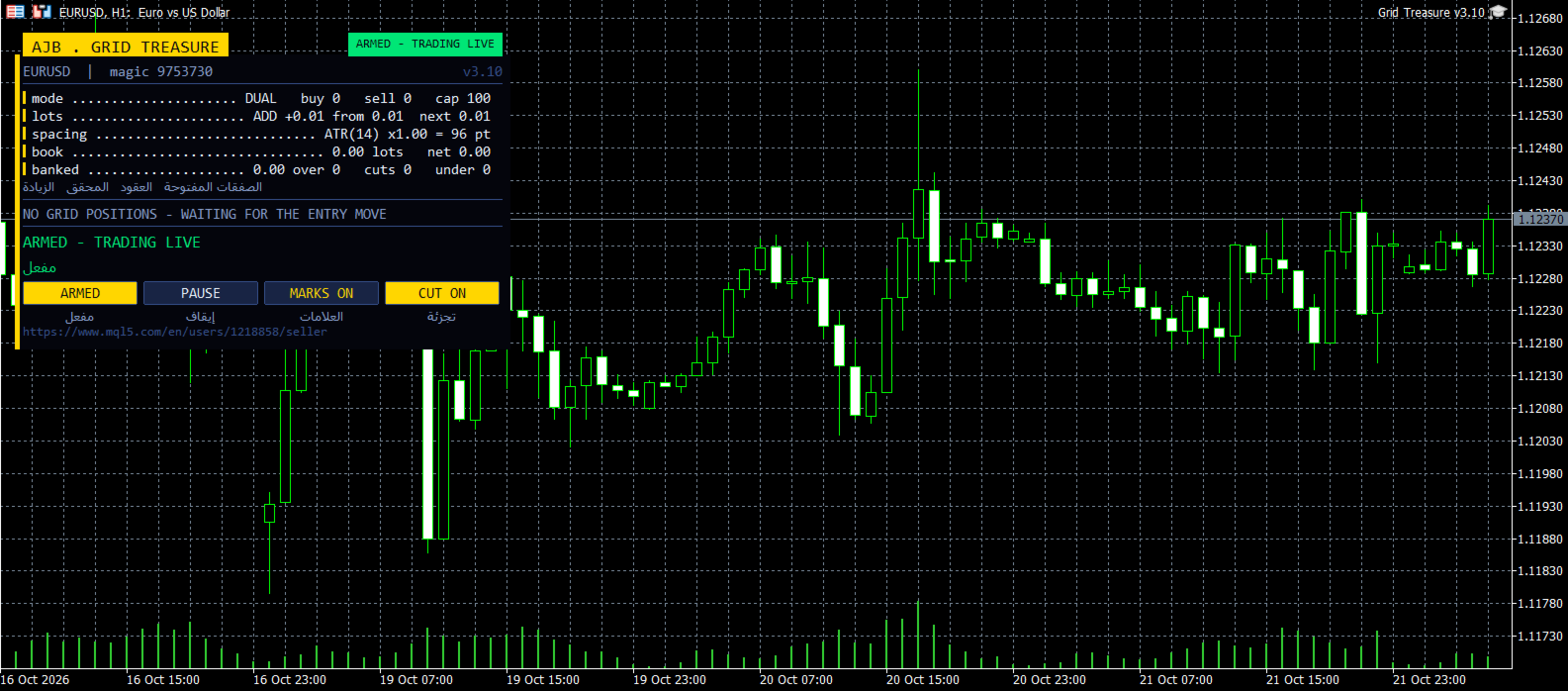
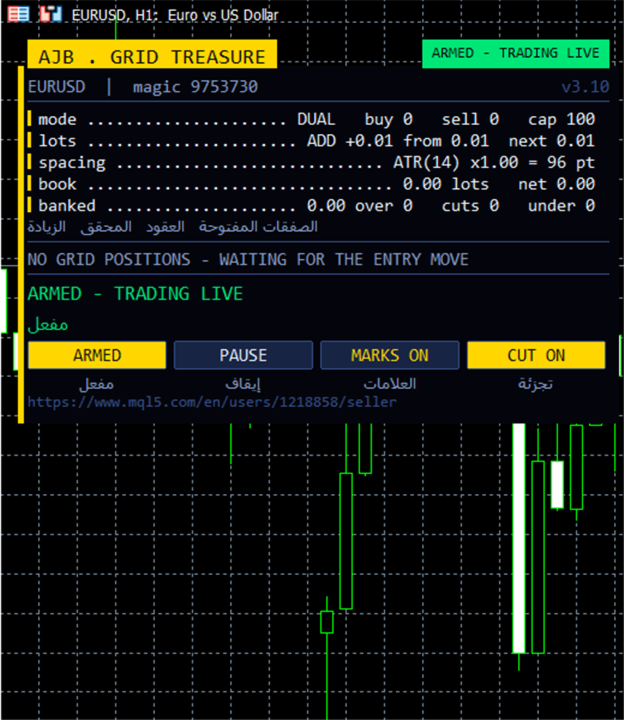
The panel sits on the left side of the chart and leaves the right side and the price scale completely clean for your own analysis. Gold belongs to the grid, warm umber belongs to the hedge. It shows symbol and magic number, a status pill (ARMED, SCAN ONLY or PAUSED), grid mode, lot step, ATR spacing, banked profit, the book in lots and net result, the current closing plan for each side with its own close button, and the list of open orders. Four buttons switch ARMED / SCAN ONLY, PAUSE / RESUME, chart marks and the slicing cutter. The panel can be dragged and minimised, it measures its own text and adapts to any screen size, and in a non-visual backtest nothing is drawn so optimisation runs at full speed.
Safety you control
- No stop loss and no forced close-all: protection works by blocking new levels, never by dumping the book at the worst moment.
- The money check now only asks one honest question: is there enough free margin, with a 50 percent buffer, for this order? Hidden hard limits from older versions are gone; every limit is a visible input.
- A maximum number of levels per grid (100 by default), a maximum number of orders per side and a maximum lot per order keep the ladder bounded.
- The lot ladder stops growing at the level limit, so partial closes can never push lot sizes beyond what you allowed.
- On netting accounts a separate cap keeps the margin of the merged position within a percentage of equity.
- A Scan Only mode shows every decision on the panel without sending a single order.
How to start
- Attach the EA to any chart and timeframe; EURUSD H1 and XAUUSD are good first choices.
- Start in SCAN ONLY to watch the plans it would make, then press the button to switch to ARMED.
- Keep the default starting lot of 0.01 with the additive ladder until you know how deep your symbol tends to go.
- Leave the hedge cycle off at first. Turn it on later only if you want the extra volume.
- Run the Strategy Tester on your own broker's data first; spreads and swaps differ between brokers.
Every setting explained
Grid
- Trade mode - two independent grids (BUY and SELL) or a single grid.
- Grid space between levels - distance in points when fixed spacing is used.
- Spacing multiplier per level - 1.0 keeps levels evenly spaced; higher values widen the grid as it deepens.
- Maximum levels per grid - hard ceiling on the depth of each grid (default 100).
- An up move arms the BUY side - sets which direction an up move belongs to when distance triggering is used.
- Magic number and order comment - identify this EA's grid orders.
- At most one new level per bar - prevents several levels opening on one spike.
Lot ladder
- Starting lot - the lot of the first level.
- Lot sizing mode - multiply each level by a factor, or add a fixed step.
- Lot multiplier and additive step - the growth for each mode.
- Maximum lot for any single order - upper bound for any one level.
- Auto lot, reference balance, allow decrease - scale the starting lot with the balance, optionally also downwards.
ATR spacing
- Spacing mode - fixed points or ATR based.
- ATR timeframe, period, factor and bar shift - how the volatility distance is measured.
- Spacing floor and ceiling - minimum and maximum distance in points.
- Freeze ATR for the whole cycle - keeps the distance constant until the cycle ends.
Profit target
- Desired profit per closure and final multiplier - the money each closure must clear.
- Target mode - fixed, or scaled by volume and depth.
- Volume exponent, depth bonus, ceiling multiple, safety cap - fine control of the scaled target so it never becomes unreachable.
Fragment scanner and target slicing
- Scan multi-order combinations - lets the closer group several orders together.
- Max oldest and newest orders per closure - how many from each end may join one group.
- Ranking - which qualifying group is preferred.
- Never bank less than the pair, closing volume must exceed target volume, minimum volume ratio - quality filters for each closure.
- Target slicing - allow partial closes of the oldest order, with profit weighting, a minimum slice size, multi-closer clubbing and a preference for full closures.
Reopen guard and account protection
- Reopen guard and cushion - block closures that would reopen a level straight away.
- Minimum margin level and maximum floating loss percent - block new levels under stress (0 = off).
- Absolute cap on grid orders per side - total order limit.
- Netting margin cap - percent of equity the merged netting position may use as margin (0 = off).
Execution and verification
- Run mode - start ARMED or in SCAN ONLY.
- Close sequence, slippage, maximum spread - how and when closing legs are sent.
- Seconds between closures, attempts per leg, verify timeout - pacing and retry behaviour.
- Wait when the market is closed, retry interval, automatic resume - weekend and session handling.
- Abort if the book changed - cancels plans that are no longer valid.
- Full commission and commission per lot - how costs are counted (0 = read from history).
- Closing comment - text written on closing deals.
Hedge cycle and weekly cash day
- Enable hedge cycle, symbols, rotation, tester symbol cap - where and how the hedge runs.
- Cycle lots and slice lots - size of the pair and of each retired slice.
- Bonus, bonus as percent, surcharge caps - what the hedge may add to a closure and the safety limits on it.
- Hedge magic, reopen on finish, wait for first grid trade - cycle lifecycle.
- Integrity check, auto repair, naked-leg action - keep both legs balanced.
- Hedge spread, slippage, attempts, timeout, commission, comment - execution details for hedge orders.
- Weekly cash day, day and cutoff hour - pause new cycles and slices around a planned withdrawal.
Panel and chart
- Show panel, X and Y offset, font size, corner - placement and size.
- Show Arabic line - bilingual captions.
- Chart marks - draw the plan and levels on the chart.
- Max table rows - length of the order list.
Entry trigger and signal
- What arms the first level - the signal only, distance only, or both together.
- Signal bar - 1 reads the last closed bar.
- Signal valid for N bars - how long a sign may wait for its grid.
- Bars between accepted signals - quiet spacing before a new sign is accepted (default 30).
- Allow BUY, allow SELL, invert - direction filters.
- Signal periods, smoothing, line read, lower and upper zones - the speed and sensitivity of the Treasure reading.
- Verbose logging - detailed messages in the Experts journal.
Honest expectations
A grid manages a position; it does not predict the future. Grid Treasure EA decides carefully when to begin and then works hard to keep every cycle short and every old order shrinking. Choose a lot size your account can carry through a long trend, test on your own broker first, and let the Strategy Tester show you its rhythm before you trade it live. Works on any symbol and timeframe, needs no DLLs and no extra files.