Clarity Panel
- Utilities
- Version: 1.0
- Activations: 5

Clarity Panel is a manual trading panel for MetaTrader 5. You set the risk and the stop, and it calculates the lot. Before you send the order it also shows what the trade costs and how often you have to be right to break even. The lot already includes spread, commission and slippage, so a 1% risk stays 1% after costs.
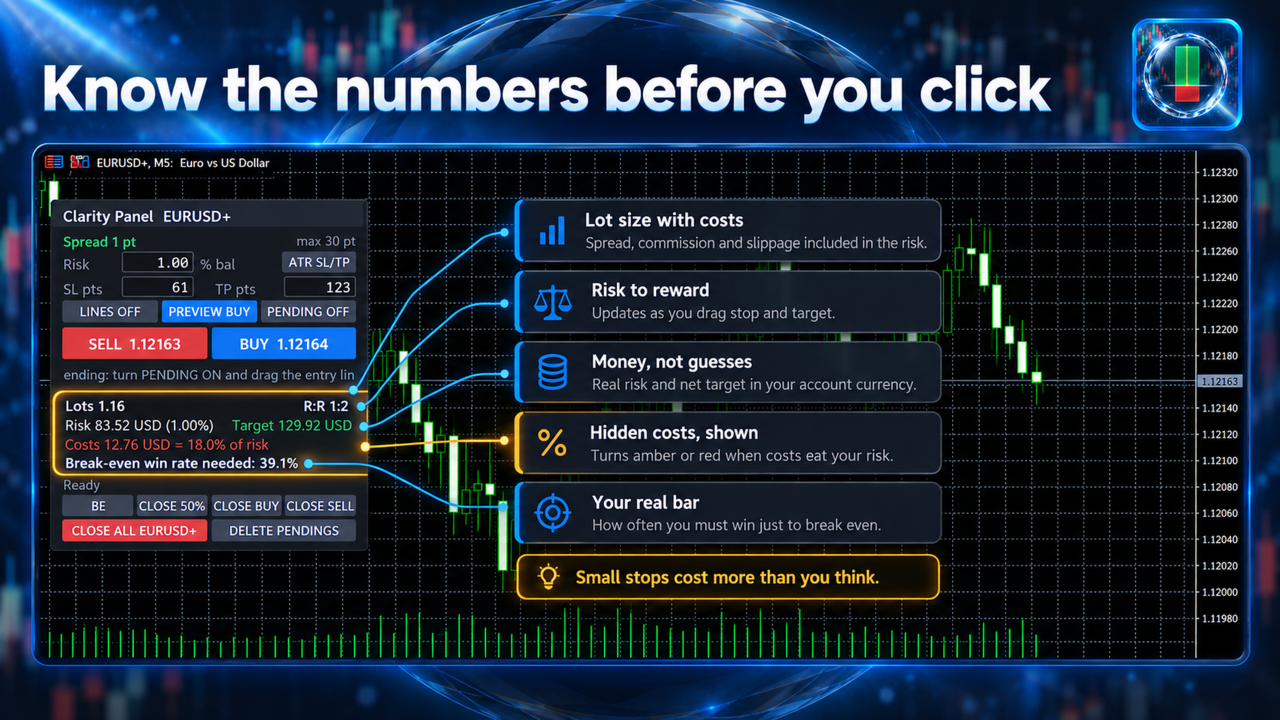
Most panels stop at the lot size. This one adds the numbers that usually stay hidden: on a small stop the costs can be 10 or 20 percent of the risk, and a 1:2 trade then needs well over 33 percent winners to break even. The panel shows that figure in red or orange when it gets high.
The panel does not give signals and does not open trades on its own. You decide when to buy or sell.
𝗪𝗵𝗮𝘁 𝘁𝗵𝗲 𝗽𝗮𝗻𝗲𝗹 𝘀𝗵𝗼𝘄𝘀 𝗯𝗲𝗳𝗼𝗿𝗲 𝘁𝗵𝗲 𝘁𝗿𝗮𝗱𝗲
- Lot size and risk to reward.
- Risk in money and as a percent of the balance, with costs included.
- Target in money, net of costs.
- Costs (spread, commission, expected slippage) in money and as a percent of the risk.
- Break-even win rate for the current stop and target.
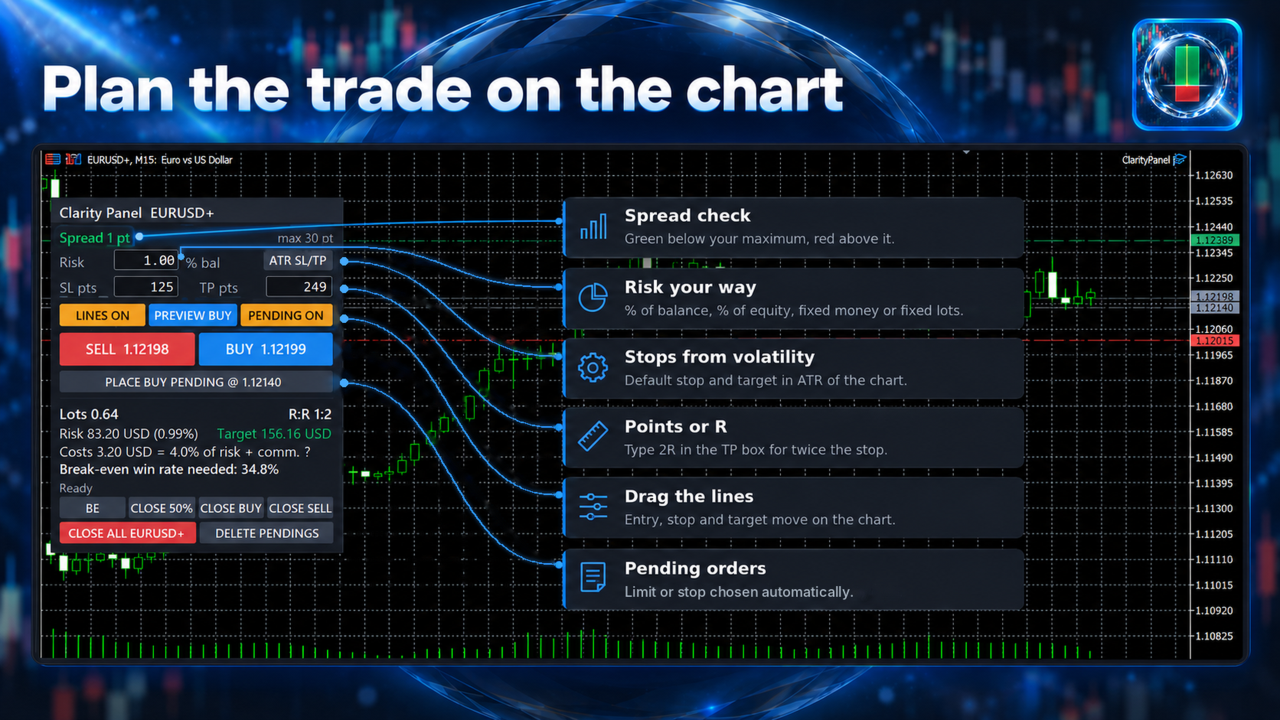
- Current spread against your maximum: green below it, red above it.
𝗣𝗹𝗮𝗰𝗶𝗻𝗴 𝘁𝗿𝗮𝗱𝗲𝘀
- Risk as percent of balance, percent of equity, fixed money or fixed lots, with a hard cap per trade (5% of balance by default).
- Stop loss and take profit in points, or as multiples of ATR(14) of the chart timeframe. In the TP box you can type "2R" for twice the stop.
- Draggable SL, TP and entry lines. Drag the stop to the other side of price and the preview switches between buy and sell.
- Market orders, or pending orders from the entry line. The panel picks limit or stop by itself, depending on where the line is.
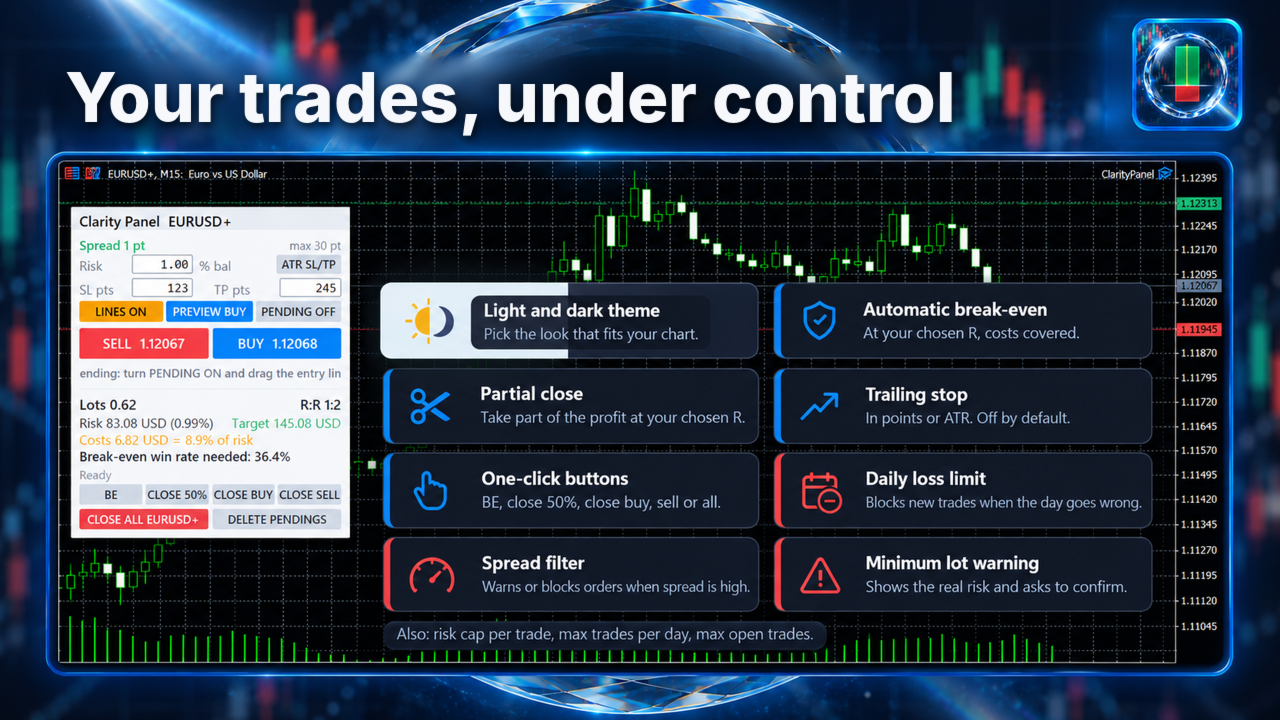
- If the risk you asked for is smaller than the minimum lot allows, the panel shows the real risk and asks for a second click within 6 seconds.
- Before sending, it checks free margin, the broker's stops level, the volume limits and that algo trading is on.
𝗠𝗮𝗻𝗮𝗴𝗶𝗻𝗴 𝗼𝗽𝗲𝗻 𝘁𝗿𝗮𝗱𝗲𝘀
- Break-even at a chosen profit in R. The offset is calculated by itself to cover commission and slippage, so a break-even exit is not a small loss.
- Partial close at a chosen profit in R (50% at 1R by default).
- Trailing stop in points or in ATR, starting at a chosen R. Off by default.
- Buttons: BE, Close 50%, Close buy, Close sell, Close all, Delete pendings.
- It can manage only the trades opened by the panel, or every position on the chart symbol, including trades from the mobile app or from another EA (R is taken from their existing stop).
- With two charts of the same symbol open, only one panel manages the positions, so nothing is modified twice.
𝗔𝗰𝗰𝗼𝘂𝗻𝘁 𝗽𝗿𝗼𝘁𝗲𝗰𝘁𝗶𝗼𝗻
- Daily loss limit in percent, closed trades plus floating, measured from the balance at the start of the day. When it is hit new trades are blocked, and the panel can also close its own open trades.
- Maximum number of trades per day.
- Maximum open trades plus pending orders.
- Maximum spread, with the option to block orders above it.
𝗛𝗶𝘀𝘁𝗼𝗿𝗶𝗰𝗮𝗹 𝗼𝗱𝗱𝘀 (𝗼𝗽𝘁𝗶𝗼𝗻𝗮𝗹, 𝗼𝗳𝗳 𝗯𝘆 𝗱𝗲𝗳𝗮𝘂𝗹𝘁)
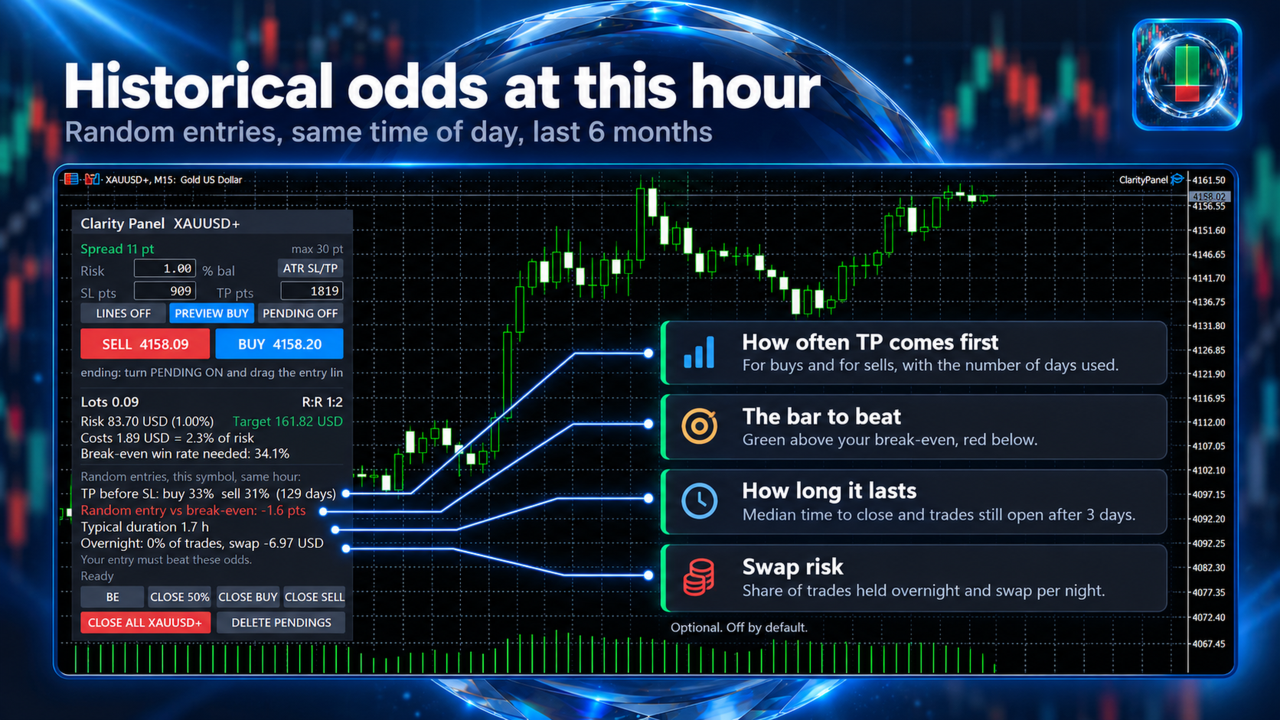
When you turn it on, the panel tests random entries on this symbol from the last 6 months of M5 data, within 45 minutes of the current time of day, with your stop and target scaled to the volatility of each day. It shows:
- how often the TP was hit before the SL, for buys and for sells, and on how many days;
- how far that is from your break-even win rate;
- the median time to close and the share of trades still open after 3 days;
- how many trades stay open overnight, and the swap per night for your lot.
On EURUSD in 2024, random entries with a 1:2 stop and target reached the target first about 32.5 percent of the time, close to the 33 percent the ratio predicts. A good risk to reward does not create an edge by itself. The odds section shows the bar your entry has to clear.
𝗢𝘁𝗵𝗲𝗿 𝗱𝗲𝘁𝗮𝗶𝗹𝘀
- Dark and light theme.
- Risk, SL and TP are remembered for each chart.
- Works in the Strategy Tester in visual mode, so you can try the whole panel on history with the free demo.
𝗦𝗲𝘁𝘁𝗶𝗻𝗴𝘀
- Risk mode, Risk value, Never risk more than (% of balance).
- Measure SL/TP in: ATR or points. SL and TP in ATR (1.5 and 3.0). SL and TP in points (300 and 600).
- Manage: panel trades only, or all positions on the symbol.
- Break-even at R and extra points (0 = automatic). Partial close at R and percent. Trailing mode, start in R and distance.
- Daily loss limit %, close panel trades at the limit, max trades per day, max open trades, max spread and block above max.
- Magic number, max price deviation, expected slippage per side.
- Panel position, dark theme, show historical odds.
Download the free demo and run it in the Strategy Tester in visual mode to see the numbers before you buy.
Trading involves risk. The panel calculates and manages trades; it does not predict the market.
Most panels stop at the lot size. This one adds the numbers that usually stay hidden: on a small stop the costs can be 10 or 20 percent of the risk, and a 1:2 trade then needs well over 33 percent winners to break even. The panel shows that figure in red or orange when it gets high.
The panel does not give signals and does not open trades on its own. You decide when to buy or sell.
𝗪𝗵𝗮𝘁 𝘁𝗵𝗲 𝗽𝗮𝗻𝗲𝗹 𝘀𝗵𝗼𝘄𝘀 𝗯𝗲𝗳𝗼𝗿𝗲 𝘁𝗵𝗲 𝘁𝗿𝗮𝗱𝗲
- Lot size and risk to reward.
- Risk in money and as a percent of the balance, with costs included.
- Target in money, net of costs.
- Costs (spread, commission, expected slippage) in money and as a percent of the risk.
- Break-even win rate for the current stop and target.
- Current spread against your maximum: green below it, red above it.
𝗣𝗹𝗮𝗰𝗶𝗻𝗴 𝘁𝗿𝗮𝗱𝗲𝘀
- Risk as percent of balance, percent of equity, fixed money or fixed lots, with a hard cap per trade (5% of balance by default).
- Stop loss and take profit in points, or as multiples of ATR(14) of the chart timeframe. In the TP box you can type "2R" for twice the stop.
- Draggable SL, TP and entry lines. Drag the stop to the other side of price and the preview switches between buy and sell.
- Market orders, or pending orders from the entry line. The panel picks limit or stop by itself, depending on where the line is.
- If the risk you asked for is smaller than the minimum lot allows, the panel shows the real risk and asks for a second click within 6 seconds.
- Before sending, it checks free margin, the broker's stops level, the volume limits and that algo trading is on.
𝗠𝗮𝗻𝗮𝗴𝗶𝗻𝗴 𝗼𝗽𝗲𝗻 𝘁𝗿𝗮𝗱𝗲𝘀
- Break-even at a chosen profit in R. The offset is calculated by itself to cover commission and slippage, so a break-even exit is not a small loss.
- Partial close at a chosen profit in R (50% at 1R by default).
- Trailing stop in points or in ATR, starting at a chosen R. Off by default.
- Buttons: BE, Close 50%, Close buy, Close sell, Close all, Delete pendings.
- It can manage only the trades opened by the panel, or every position on the chart symbol, including trades from the mobile app or from another EA (R is taken from their existing stop).
- With two charts of the same symbol open, only one panel manages the positions, so nothing is modified twice.
𝗔𝗰𝗰𝗼𝘂𝗻𝘁 𝗽𝗿𝗼𝘁𝗲𝗰𝘁𝗶𝗼𝗻
- Daily loss limit in percent, closed trades plus floating, measured from the balance at the start of the day. When it is hit new trades are blocked, and the panel can also close its own open trades.
- Maximum number of trades per day.
- Maximum open trades plus pending orders.
- Maximum spread, with the option to block orders above it.
𝗛𝗶𝘀𝘁𝗼𝗿𝗶𝗰𝗮𝗹 𝗼𝗱𝗱𝘀 (𝗼𝗽𝘁𝗶𝗼𝗻𝗮𝗹, 𝗼𝗳𝗳 𝗯𝘆 𝗱𝗲𝗳𝗮𝘂𝗹𝘁)
When you turn it on, the panel tests random entries on this symbol from the last 6 months of M5 data, within 45 minutes of the current time of day, with your stop and target scaled to the volatility of each day. It shows:
- how often the TP was hit before the SL, for buys and for sells, and on how many days;
- how far that is from your break-even win rate;
- the median time to close and the share of trades still open after 3 days;
- how many trades stay open overnight, and the swap per night for your lot.
On EURUSD in 2024, random entries with a 1:2 stop and target reached the target first about 32.5 percent of the time, close to the 33 percent the ratio predicts. A good risk to reward does not create an edge by itself. The odds section shows the bar your entry has to clear.
𝗢𝘁𝗵𝗲𝗿 𝗱𝗲𝘁𝗮𝗶𝗹𝘀
- Dark and light theme.
- Risk, SL and TP are remembered for each chart.
- Works in the Strategy Tester in visual mode, so you can try the whole panel on history with the free demo.
𝗦𝗲𝘁𝘁𝗶𝗻𝗴𝘀
- Risk mode, Risk value, Never risk more than (% of balance).
- Measure SL/TP in: ATR or points. SL and TP in ATR (1.5 and 3.0). SL and TP in points (300 and 600).
- Manage: panel trades only, or all positions on the symbol.
- Break-even at R and extra points (0 = automatic). Partial close at R and percent. Trailing mode, start in R and distance.
- Daily loss limit %, close panel trades at the limit, max trades per day, max open trades, max spread and block above max.
- Magic number, max price deviation, expected slippage per side.
- Panel position, dark theme, show historical odds.
Download the free demo and run it in the Strategy Tester in visual mode to see the numbers before you buy.
Trading involves risk. The panel calculates and manages trades; it does not predict the market.