MiniBull Board
- Indicators
-
Yusuf Levent Aksun
 Platform Engineer и сертифицированный специалист AWS с более чем 20-летним опытом
в разработке программного обеспечения, облачной архитектуре и DevOps-трансформации.
В настоящее время руковожу инициативами платформенной инженерии в World Wide Technology - Version: 1.19
- Updated: 2 October 2026
# MiniBull Board
**Version 1.14 — MetaTrader 5 indicator (separate window)**
**11 languages: English, Turkish, Russian, Chinese, Spanish, Portuguese, Japanese, German, French, Italian, Korean** — automatically in the language of your MetaTrader terminal, or chosen with a single input.
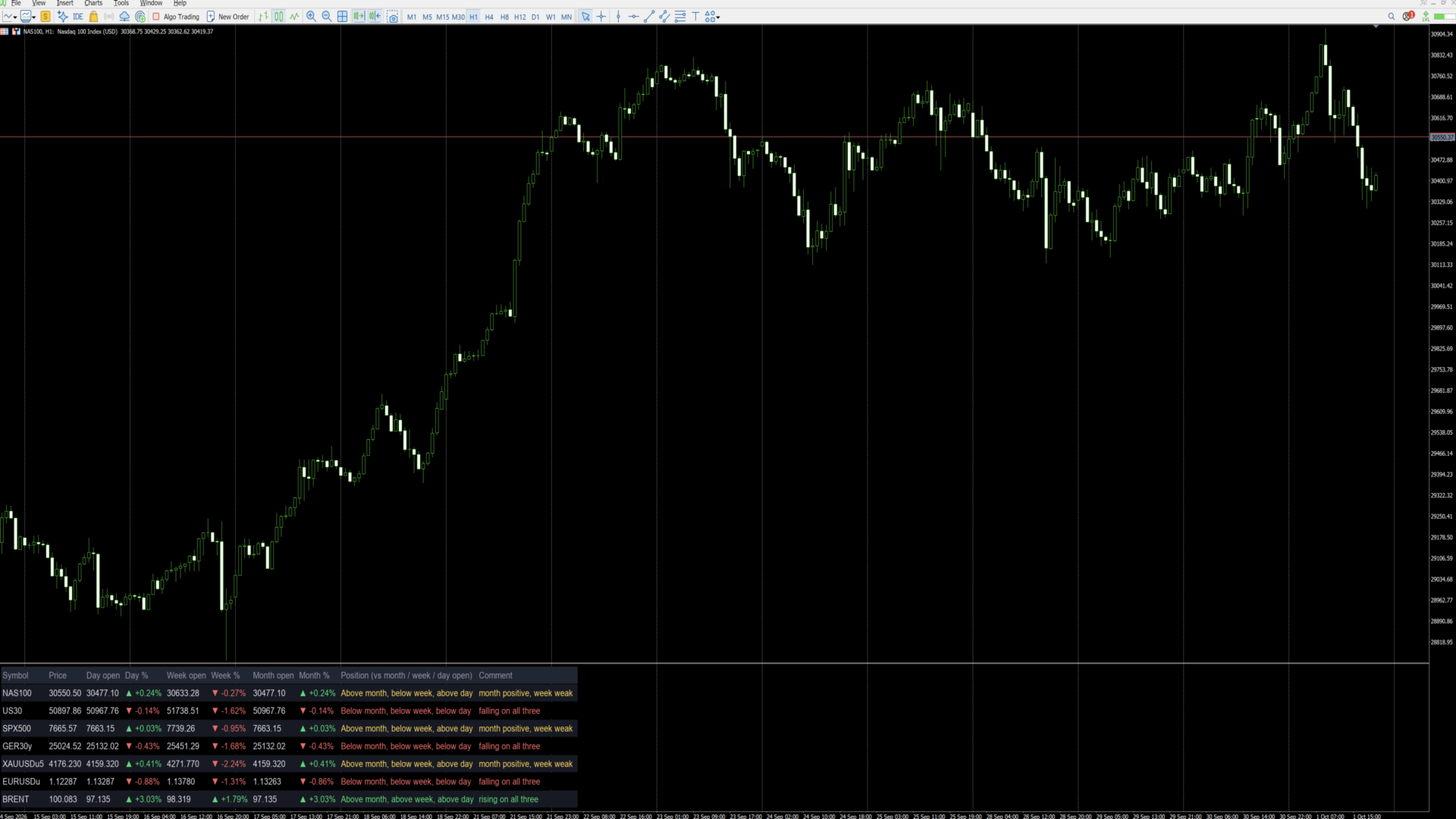
MiniBull Board is a compact watch-list dashboard for MetaTrader 5. For every symbol you choose it shows where the price stands today, this week and this month: the current price, the day / week / month opening price, the percentage change from each, and a short plain-language sentence that sums up the picture, such as *"Above month open, below week, below day — uptrend, pulling back today"*.
It answers the question every trader asks before looking at a chart: *"Is this market up or down — today, this week, this month?"* — for up to 8 symbols (or more) at a glance.
The board is descriptive only. It shows where price is relative to its opening levels; it does not forecast and does not trade.
---
## Key features
- **Day, week and month at a glance:** current price, opening price and % change for each period.
- **Plain-language summary per symbol:** a position sentence and a colour-coded comment on every row.
- **11 languages with automatic selection:** all on-screen text — column headers, sentences and number format — follows your MetaTrader terminal language, or the language you choose.
- **Your own symbol list or Market Watch:** type the symbols you want, in the order you want, or let the board take them from Market Watch.
- **Correct trading-day open:** the day open is taken at the real start of the trading day — 18:00 New York for indices, FX and metals, 00:00 UTC for Brent-type symbols — not at an arbitrary server midnight. Works with any broker time zone.
- **Sorting:** list order, or strongest first by day %, week % or month %.
- **Click to open:** click a symbol name and the chart switches to that symbol.
- **Clean, readable layout:** column widths are measured from the actual text, so nothing overlaps on any screen, font or DPI setting. Alternating row shading, auto-fit window height.
- **No blinking:** objects are created once and only their text and colour are updated, once per second.
- **Lightweight:** no buffers, no plots, independent of other indicators. Use it on any chart, in its own sub-window.
---
## Language support
The board speaks **11 languages**:
**English · Türkçe (Turkish) · Русский (Russian) · 中文 (Chinese) · Español (Spanish) · Português (Portuguese) · 日本語 (Japanese) · Deutsch (German) · Français (French) · Italiano (Italian) · 한국어 (Korean)**
With the default setting **Language = Auto** the board reads the language of your MetaTrader 5 terminal and uses it automatically — no setup needed. If your terminal runs in a language that is not on the list, the board uses English. You can also pick any of the 11 languages manually with the **Language** input.
What follows the language:
- column headers (for example *Day open / Gün açılış / Откр. дня / 日开盘*),
- the Position sentence and the Comment on every row,
- the "loading data" message,
- the decimal separator: comma in Turkish, Russian, Spanish, Portuguese, German, French and Italian (30411,50); point in English, Chinese, Japanese and Korean (30411.50).
Example of one row in three languages:
| Language | Position | Comment |
|---|---|---|
| English | Above month, below week, below day | month positive, week weak |
| Türkçe | Ayın üstünde, haftanın altında, günün altında | ay pozitif, bu hafta zayıf |
| Deutsch | Monat: darüber, Woche: darunter, Tag: darunter | Monat positiv, Woche schwach |
**Fonts for Chinese, Japanese and Korean:** when one of these languages is active and the Font input is left at Arial, the board switches automatically to a font that contains the characters (Microsoft YaHei, Meiryo, Malgun Gothic). If characters still show as boxes on your system, enter another installed CJK font in the **Font** input.
Note: the names of the inputs in the MetaTrader properties dialog are always shown in English. This is a MetaTrader limitation; everything displayed on the chart follows the selected language.
---|---|---|
| Column headers | Symbol, Price, Day open, Day %, Week open, Week %, Month open, Month %, Position, Comment | Sembol, Fiyat, Gün açılış, Gün %, Hafta açılış, Hafta %, Ay açılış, Ay %, Konum, Yorum |
| Position sentence | Above month, below week, below day | Ayın üstünde, haftanın altında, günün altında |
| Comment | uptrend, pulling back today | genel yön yukarı, bugün geri çekiliyor |
| Decimal separator | 30411.50 / +0.61% | 30411,50 / +0,61% |
Note: the names of the inputs in the MetaTrader properties dialog are always shown in English. This is a MetaTrader limitation; everything displayed on the chart follows the selected language.
---
## Installation and quick start
1. Copy the indicator to your terminal (MQL5 Market purchases and downloads are installed automatically).
2. Open any chart. The chart symbol and timeframe do not matter.
3. Drag **MiniBull Board** onto the chart. It opens in its own sub-window below the price chart.
4. In the **Inputs** tab:
- choose your **Language**,
- type your symbols into **My symbol list**, separated by commas, using the exact names your broker uses (for example `NAS100,US30,SPX500,GER40,XAUUSD,EURUSD,GBPUSD,UKOIL`),
- set **Maximum rows** to at least the number of symbols in your list.
5. Press **OK**. The board fills in within a few seconds.
Weekly and monthly values may show "-" for a few seconds the first time a symbol is used, while the terminal downloads its history. They fill in automatically.
---
## Reading the board
Each row is one symbol. From left to right:
| Column | Meaning |
|---|---|
| **Symbol** | Symbol name. Click it to switch the chart to this symbol. |
| **Price** | Current bid price. |
| **Day open** | Opening price of the current trading day. |
| **Day %** | Change from the day open to the current price. |
| **Week open** | Opening price of the current week. |
| **Week %** | Change from the week open. |
| **Month open** | Opening price of the current month. |
| **Month %** | Change from the month open. |
| **Position** | Where the price is relative to the month, week and day open, from long-term to short-term. |
| **Comment** | One-line summary of the three periods together. |
**Colours and arrows**
- Green ▲ — price is above that opening price (positive change).
- Red ▼ — price is below that opening price (negative change).
- Grey "-" — data not yet available (history still loading, or the symbol name is wrong).
**What "month", "week" and "day" mean**
All comparisons use the **opening price of the current period**:
- **Month** — the first traded price of the current calendar month.
- **Week** — the first traded price of the current week (for US indices: Sunday 18:00 New York).
- **Day** — the first traded price of the current trading day (see *Day open source* below).
"Above month" therefore means the price is higher now than where it started this month, i.e. the month so far is positive. Previous-period highs, lows or closes are not used.
**The Comment column**
| Comment | Colour | Situation |
|---|---|---|
| rising on all three | green | above the month, week and day open |
| falling on all three | red | below the month, week and day open |
| uptrend, pulling back today | yellow | above month and week, below day |
| downtrend, recovering today | yellow | below month and week, above day |
| month positive, week weak | yellow | above month, below week |
| month negative, week recovering | yellow | below month, above week |
Yellow means a mixed picture: the periods point in different directions. The Position column always shows the full detail.
---
## Inputs
### Symbols
| Input | Default | What it does |
|---|---|---|
| **Symbol source** | My symbol list | *My symbol list*: the board shows only the symbols you type, in your order. *Market Watch*: the board takes the first symbols from your Market Watch window. |
| **My symbol list** | (example list) | Comma-separated symbol names, exactly as your broker writes them, including suffixes (e.g. `XAUUSD.m`, `EURUSDu`). Spaces after commas are ignored. Symbols that are not in Market Watch are added to it automatically. A misspelt name shows "-" on its row. |
| **Maximum rows** | 8 | Upper limit of rows. With *My symbol list* it should be at least the number of symbols you entered; with *Market Watch* it decides how many symbols are taken. |
| **Sort order** | List order | *List order*: as typed / as in Market Watch. *Day % / Week % / Month %*: highest change at the top, re-sorted every second. |
| **Day open source** | Session start | *Session start*: the day starts at the real beginning of the trading day — 18:00 New York for indices, FX and metals; 00:00 UTC for the symbols listed in the next input (Brent). This matches how these markets define their trading day. *Broker D1*: uses the broker's daily candle, which starts at the broker's server midnight. |
| **Symbols whose day starts 00:00 UTC** | BRENT,UKOIL,XBR | Any symbol whose name contains one of these words uses 00:00 UTC as its day start (ICE Brent opens at 01:00 London time = 00:00 UTC in summer). Add other names if needed. |
### Layout
| Input | Default | What it does |
|---|---|---|
| **Language** | Auto | *Auto*: the language of your MetaTrader terminal (English if it is not one of the 11). Or choose English, Türkçe, Русский, 中文, Español, Português, 日本語, Deutsch, Français, Italiano or 한국어. See *Language support*. |
| **Show the open prices** | true | *false* hides the Day / Week / Month open columns and leaves the price, the three % columns and the sentences — useful on narrow screens. |
| **Show the plain-language summary column** | true | *false* hides the Position and Comment columns for a numbers-only table. |
| **Font size** | 10 | Text size. Row height and column widths follow automatically. |
| **Font** | Arial | Any font installed on your computer. Column widths are measured from the real text, so any font works. Left at Arial, Chinese / Japanese / Korean switch automatically to a suitable font. |
| **Left margin / Top margin** | 12 / 8 | Distance of the table from the window edges, in pixels. |
| **Gap between columns** | 18 | Space between columns, in pixels. |
| **Row height** | 1.7 | Row height as a multiple of the text height. Larger = more spacious. |
| **Fit the window height to the table** | true | *true*: the sub-window height follows the number of rows. *false*: you can resize the window freely by dragging its border. |
| **Click a symbol to switch the chart to it** | true | *true*: clicking a symbol name changes the chart to that symbol. *false*: clicks do nothing. |
### Colours
| Input | What it colours |
|---|---|
| **Header** | Column titles |
| **Symbol / prices** | Symbol names and prices |
| **Above / positive** | Positive % values and "rising on all three" |
| **Below / negative** | Negative % values and "falling on all three" |
| **No data** | "-" and loading messages |
| **Mixed picture** | Yellow comments (periods disagree) |
| **Row shading** | Background of every second row |
| **Header background** | Background of the title row |
---
## Tips
- **Exact symbol names matter.** Copy them from Market Watch (right-click a symbol, *Specification*) if your broker uses suffixes.
- **Many symbols:** raise *Maximum rows*, set *Show the open prices* to false, and use a smaller font.
- **Daily routine:** sort by *Day %* to see the strongest and weakest markets of the day at the top.
- **Use it as a launcher:** keep the board on one chart and click through your symbols.
- **Time zones:** the trading-day start is calculated from UTC with the US daylight-saving rule, so the board is correct for any broker time zone and any user location.
---
## FAQ
**Why does a row show "-"?**
Either the terminal is still downloading the weekly/monthly history (wait a few seconds), or the symbol name does not exist at your broker (check the spelling and suffix).
**Why is my day % different from another platform?**
Platforms use different day starts. With *Session start* the board uses the market's own trading-day start (18:00 New York, or 00:00 UTC for Brent). Switch *Day open source* to *Broker D1* to use your broker's daily candle instead.
**Does it work on any chart timeframe?**
Yes. All values come from fixed daily, weekly, monthly and one-minute data, independent of the chart.
**Can I run two boards on the same chart?**
Use one board per chart. To watch more symbols, raise *Maximum rows*, or add the board to a second chart.
**Does it slow down my terminal?**
No. It refreshes once per second and only changes text that has actually changed.
**Does it trade or give signals?**
No. It is an information panel only.
---
## Important notes
- The board describes the current position of price relative to its period opens. It makes no prediction and gives no trading advice.
- Values depend on your broker's price data. Brokers may differ slightly in prices and trading hours.
- *Session start* needs one-minute history for each symbol of the current day; the terminal provides it automatically.
- Trading leveraged products carries a high level of risk.
---
## Version history
- **1.14** — Faster start: the board appears within a second (text measurements are cached).
- **1.13** — Removing the indicator now cleans all its objects from the chart, including leftovers of older versions.
- **1.12** — 11 languages and automatic language selection from the terminal. Automatic CJK fonts. Fix: objects no longer stay on the chart after the indicator is removed.
- **1.11** — The window name shows the version number ("MiniBull Board v1.11").
- **1.10** — New layout: measured column widths (no overlapping on any font or DPI), larger rows, row shading, auto-fit window height. New Position and Comment columns with a plain-language summary per symbol.
- **1.02** — Day open at the real start of the trading day (18:00 New York; 00:00 UTC for Brent-type symbols).
- **1.01** — Language option: English / Turkish.
- **1.00** — First release.