MiniBull Board

# MiniBull Board

**Version 1.14 — MetaTrader 5 indicator (separate window)**

**11 languages: English, Turkish, Russian, Chinese, Spanish, Portuguese, Japanese, German, French, Italian, Korean** — automatically in the language of your MetaTrader terminal, or chosen with a single input.

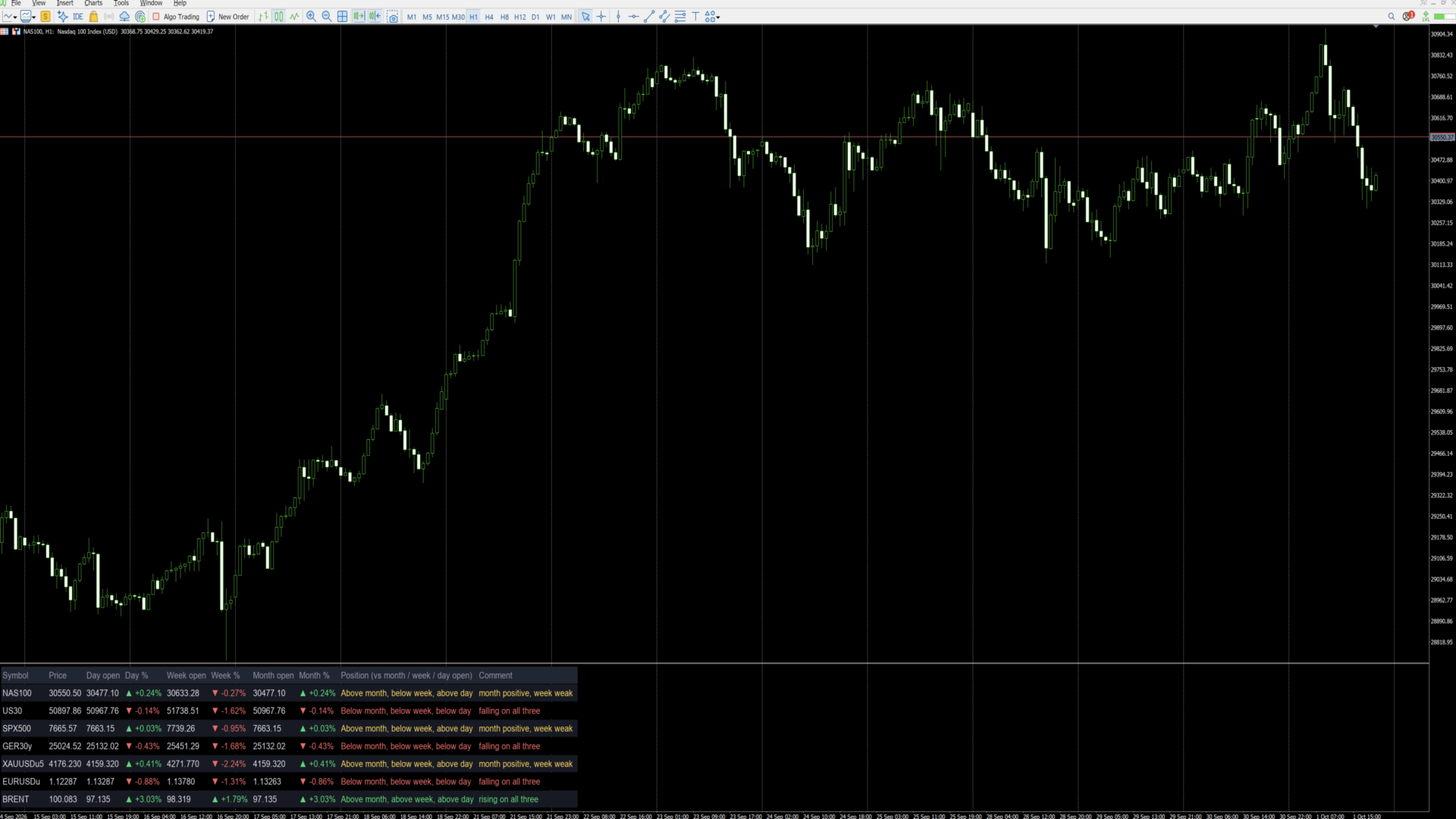
MiniBull Board is a compact watch-list dashboard for MetaTrader 5. For every symbol you choose it shows where the price stands today, this week and this month: the current price, the day / week / month opening price, the percentage change from each, and a short plain-language sentence that sums up the picture, such as *"Above month open, below week, below day — uptrend, pulling back today"*.

It answers the question every trader asks before looking at a chart: *"Is this market up or down — today, this week, this month?"* — for up to 8 symbols (or more) at a glance.

The board is descriptive only. It shows where price is relative to its opening levels; it does not forecast and does not trade.

---

## Key features

- **Day, week and month at a glance:** current price, opening price and % change for each period.
- **Plain-language summary per symbol:** a position sentence and a colour-coded comment on every row.
- **11 languages with automatic selection:** all on-screen text — column headers, sentences and number format — follows your MetaTrader terminal language, or the language you choose.
- **Your own symbol list or Market Watch:** type the symbols you want, in the order you want, or let the board take them from Market Watch.
- **Correct trading-day open:** the day open is taken at the real start of the trading day — 18:00 New York for indices, FX and metals, 00:00 UTC for Brent-type symbols — not at an arbitrary server midnight. Works with any broker time zone.
- **Sorting:** list order, or strongest first by day %, week % or month %.
- **Click to open:** click a symbol name and the chart switches to that symbol.
- **Clean, readable layout:** column widths are measured from the actual text, so nothing overlaps on any screen, font or DPI setting. Alternating row shading, auto-fit window height.
- **No blinking:** objects are created once and only their text and colour are updated, once per second.
- **Lightweight:** no buffers, no plots, independent of other indicators. Use it on any chart, in its own sub-window.

---

## Language support

The board speaks **11 languages**:

**English · Türkçe (Turkish) · Русский (Russian) · 中文 (Chinese) · Español (Spanish) · Português (Portuguese) · 日本語 (Japanese) · Deutsch (German) · Français (French) · Italiano (Italian) · 한국어 (Korean)**

With the default setting **Language = Auto** the board reads the language of your MetaTrader 5 terminal and uses it automatically — no setup needed. If your terminal runs in a language that is not on the list, the board uses English. You can also pick any of the 11 languages manually with the **Language** input.

What follows the language:

- column headers (for example *Day open / Gün açılış / Откр. дня / 日开盘*),
- the Position sentence and the Comment on every row,
- the "loading data" message,
- the decimal separator: comma in Turkish, Russian, Spanish, Portuguese, German, French and Italian (30411,50); point in English, Chinese, Japanese and Korean (30411.50).

Example of one row in three languages:

| Language | Position | Comment |
|---|---|---|
| English | Above month, below week, below day | month positive, week weak |
| Türkçe | Ayın üstünde, haftanın altında, günün altında | ay pozitif, bu hafta zayıf |
| Deutsch | Monat: darüber, Woche: darunter, Tag: darunter | Monat positiv, Woche schwach |

**Fonts for Chinese, Japanese and Korean:** when one of these languages is active and the Font input is left at Arial, the board switches automatically to a font that contains the characters (Microsoft YaHei, Meiryo, Malgun Gothic). If characters still show as boxes on your system, enter another installed CJK font in the **Font** input.

Note: the names of the inputs in the MetaTrader properties dialog are always shown in English. This is a MetaTrader limitation; everything displayed on the chart follows the selected language.

---|---|---|
| Column headers | Symbol, Price, Day open, Day %, Week open, Week %, Month open, Month %, Position, Comment | Sembol, Fiyat, Gün açılış, Gün %, Hafta açılış, Hafta %, Ay açılış, Ay %, Konum, Yorum |
| Position sentence | Above month, below week, below day | Ayın üstünde, haftanın altında, günün altında |
| Comment | uptrend, pulling back today | genel yön yukarı, bugün geri çekiliyor |
| Decimal separator | 30411.50 / +0.61% | 30411,50 / +0,61% |

Note: the names of the inputs in the MetaTrader properties dialog are always shown in English. This is a MetaTrader limitation; everything displayed on the chart follows the selected language.

---

## Installation and quick start

1. Copy the indicator to your terminal (MQL5 Market purchases and downloads are installed automatically).
2. Open any chart. The chart symbol and timeframe do not matter.
3. Drag **MiniBull Board** onto the chart. It opens in its own sub-window below the price chart.
4. In the **Inputs** tab:
   - choose your **Language**,
   - type your symbols into **My symbol list**, separated by commas, using the exact names your broker uses (for example `NAS100,US30,SPX500,GER40,XAUUSD,EURUSD,GBPUSD,UKOIL`),
   - set **Maximum rows** to at least the number of symbols in your list.
5. Press **OK**. The board fills in within a few seconds.

Weekly and monthly values may show "-" for a few seconds the first time a symbol is used, while the terminal downloads its history. They fill in automatically.

---

## Reading the board

Each row is one symbol. From left to right:

| Column | Meaning |
|---|---|
| **Symbol** | Symbol name. Click it to switch the chart to this symbol. |
| **Price** | Current bid price. |
| **Day open** | Opening price of the current trading day. |
| **Day %** | Change from the day open to the current price. |
| **Week open** | Opening price of the current week. |
| **Week %** | Change from the week open. |
| **Month open** | Opening price of the current month. |
| **Month %** | Change from the month open. |
| **Position** | Where the price is relative to the month, week and day open, from long-term to short-term. |
| **Comment** | One-line summary of the three periods together. |

**Colours and arrows**

- Green ▲ — price is above that opening price (positive change).
- Red ▼ — price is below that opening price (negative change).
- Grey "-" — data not yet available (history still loading, or the symbol name is wrong).

**What "month", "week" and "day" mean**

All comparisons use the **opening price of the current period**:

- **Month** — the first traded price of the current calendar month.
- **Week** — the first traded price of the current week (for US indices: Sunday 18:00 New York).
- **Day** — the first traded price of the current trading day (see *Day open source* below).

"Above month" therefore means the price is higher now than where it started this month, i.e. the month so far is positive. Previous-period highs, lows or closes are not used.

**The Comment column**

| Comment | Colour | Situation |
|---|---|---|
| rising on all three | green | above the month, week and day open |
| falling on all three | red | below the month, week and day open |
| uptrend, pulling back today | yellow | above month and week, below day |
| downtrend, recovering today | yellow | below month and week, above day |
| month positive, week weak | yellow | above month, below week |
| month negative, week recovering | yellow | below month, above week |

Yellow means a mixed picture: the periods point in different directions. The Position column always shows the full detail.

---

## Inputs

### Symbols

| Input | Default | What it does |
|---|---|---|
| **Symbol source** | My symbol list | *My symbol list*: the board shows only the symbols you type, in your order. *Market Watch*: the board takes the first symbols from your Market Watch window. |
| **My symbol list** | (example list) | Comma-separated symbol names, exactly as your broker writes them, including suffixes (e.g. `XAUUSD.m`, `EURUSDu`). Spaces after commas are ignored. Symbols that are not in Market Watch are added to it automatically. A misspelt name shows "-" on its row. |
| **Maximum rows** | 8 | Upper limit of rows. With *My symbol list* it should be at least the number of symbols you entered; with *Market Watch* it decides how many symbols are taken. |
| **Sort order** | List order | *List order*: as typed / as in Market Watch. *Day % / Week % / Month %*: highest change at the top, re-sorted every second. |
| **Day open source** | Session start | *Session start*: the day starts at the real beginning of the trading day — 18:00 New York for indices, FX and metals; 00:00 UTC for the symbols listed in the next input (Brent). This matches how these markets define their trading day. *Broker D1*: uses the broker's daily candle, which starts at the broker's server midnight. |
| **Symbols whose day starts 00:00 UTC** | BRENT,UKOIL,XBR | Any symbol whose name contains one of these words uses 00:00 UTC as its day start (ICE Brent opens at 01:00 London time = 00:00 UTC in summer). Add other names if needed. |

### Layout

| Input | Default | What it does |
|---|---|---|
| **Language** | Auto | *Auto*: the language of your MetaTrader terminal (English if it is not one of the 11). Or choose English, Türkçe, Русский, 中文, Español, Português, 日本語, Deutsch, Français, Italiano or 한국어. See *Language support*. |
| **Show the open prices** | true | *false* hides the Day / Week / Month open columns and leaves the price, the three % columns and the sentences — useful on narrow screens. |
| **Show the plain-language summary column** | true | *false* hides the Position and Comment columns for a numbers-only table. |
| **Font size** | 10 | Text size. Row height and column widths follow automatically. |
| **Font** | Arial | Any font installed on your computer. Column widths are measured from the real text, so any font works. Left at Arial, Chinese / Japanese / Korean switch automatically to a suitable font. |
| **Left margin / Top margin** | 12 / 8 | Distance of the table from the window edges, in pixels. |
| **Gap between columns** | 18 | Space between columns, in pixels. |
| **Row height** | 1.7 | Row height as a multiple of the text height. Larger = more spacious. |
| **Fit the window height to the table** | true | *true*: the sub-window height follows the number of rows. *false*: you can resize the window freely by dragging its border. |
| **Click a symbol to switch the chart to it** | true | *true*: clicking a symbol name changes the chart to that symbol. *false*: clicks do nothing. |

### Colours

| Input | What it colours |
|---|---|
| **Header** | Column titles |
| **Symbol / prices** | Symbol names and prices |
| **Above / positive** | Positive % values and "rising on all three" |
| **Below / negative** | Negative % values and "falling on all three" |
| **No data** | "-" and loading messages |
| **Mixed picture** | Yellow comments (periods disagree) |
| **Row shading** | Background of every second row |
| **Header background** | Background of the title row |

---

## Tips

- **Exact symbol names matter.** Copy them from Market Watch (right-click a symbol, *Specification*) if your broker uses suffixes.
- **Many symbols:** raise *Maximum rows*, set *Show the open prices* to false, and use a smaller font.
- **Daily routine:** sort by *Day %* to see the strongest and weakest markets of the day at the top.
- **Use it as a launcher:** keep the board on one chart and click through your symbols.
- **Time zones:** the trading-day start is calculated from UTC with the US daylight-saving rule, so the board is correct for any broker time zone and any user location.

---

## FAQ

**Why does a row show "-"?**
Either the terminal is still downloading the weekly/monthly history (wait a few seconds), or the symbol name does not exist at your broker (check the spelling and suffix).

**Why is my day % different from another platform?**
Platforms use different day starts. With *Session start* the board uses the market's own trading-day start (18:00 New York, or 00:00 UTC for Brent). Switch *Day open source* to *Broker D1* to use your broker's daily candle instead.

**Does it work on any chart timeframe?**
Yes. All values come from fixed daily, weekly, monthly and one-minute data, independent of the chart.

**Can I run two boards on the same chart?**
Use one board per chart. To watch more symbols, raise *Maximum rows*, or add the board to a second chart.

**Does it slow down my terminal?**
No. It refreshes once per second and only changes text that has actually changed.

**Does it trade or give signals?**
No. It is an information panel only.

---

## Important notes

- The board describes the current position of price relative to its period opens. It makes no prediction and gives no trading advice.
- Values depend on your broker's price data. Brokers may differ slightly in prices and trading hours.
- *Session start* needs one-minute history for each symbol of the current day; the terminal provides it automatically.
- Trading leveraged products carries a high level of risk.

---

## Version history

- **1.14** — Faster start: the board appears within a second (text measurements are cached).
- **1.13** — Removing the indicator now cleans all its objects from the chart, including leftovers of older versions.
- **1.12** — 11 languages and automatic language selection from the terminal. Automatic CJK fonts. Fix: objects no longer stay on the chart after the indicator is removed.
- **1.11** — The window name shows the version number ("MiniBull Board v1.11").
- **1.10** — New layout: measured column widths (no overlapping on any font or DPI), larger rows, row shading, auto-fit window height. New Position and Comment columns with a plain-language summary per symbol.
- **1.02** — Day open at the real start of the trading day (18:00 New York; 00:00 UTC for Brent-type symbols).
- **1.01** — Language option: English / Turkish.
- **1.00** — First release.

Prodotti consigliati
Free Slave Version – Remote Trade Receiver MT5. This is the FREE Slave version of our professional Remote Trade Copier system. It allows you to receive trades from a Master account running our full Copy Trade solution. Designed for simplicity and reliability, this version is read-only and cannot send trades or operate independently. Key Features: One-click setup – simply connect to the Master. Fast and accurate order copying. Supports all symbols, order types, and brokers. Minimal resource us
FREE
RelicusRoad CopyTrader è un copiatore di operazioni ( trade copier ) gratuito per MetaTrader 5 . Copia le operazioni tra terminali MT5 sullo stesso computer, così puoi operare su un conto e far seguire gli altri, ciascuno con la propria dimensione e il proprio rischio. Versione completa, senza limitazioni né periodo di prova. Fai trading su un conto. Lascia che gli altri seguano. MetaTrader 4: RelicusRoad CopyTrader MT4 Come funziona Un terminale funziona come Leader (master) e condivide gli ord
FREE
Trade Copier Local MT5 is a fast local trade copier for copying trades between multiple MT4 and MT5 accounts. One EA works in both Master and Slave modes. Simply select the required Copier Mode and use the same product on your MetaTrader terminals. Copy trades between: • MT5 → MT5 • MT5 → MT4 • MT4 → MT5 • MT4 → MT4 Perfect for: • Trading multiple accounts at once • Linking multiple trading accounts • Personal account mirroring • Signal providers • Account managers • Prop trading setups #
Limited-time free release: Adaptive SuperSmoother Trend Signals MT5 is free while MetaCoderStore collects trader feedback, comments, and feature requests for the first public version. Adaptive SuperSmoother Trend Signals MT5 plots a low-lag adaptive SuperSmoother line on price, adds optional ATR bands, and marks filtered bullish or bearish cross signals with EA-readable buffers. Use cases Follow a smoother adaptive trend line without adding heavy lag. Find price crosses that agree with the curre
FREE
Copy your MT5 trades to accounts anywhere in the world with the   MetaToolsLab Master EA . Unlike local copiers that only work between terminals on the   same   PC or VPS, MetaToolsLab uses a secure cloud relay — so you can broadcast your trades to followers across   different computers, VPS providers, brokers, and continents , with   sub-second delivery   and   no broker passwords . Whether you're a signal provider, a multi-account trader, or an account manager, the Master EA installs in about
FREE
Run one strategy across every account you trade. Revanche Miroir Local Copier is a free local trade copier that mirrors trades between MetaTrader 5 accounts on the same computer, in real time. One program plays both parts: set it as the Master on the account you trade, and as a Slave on each account that should follow. A complete copier, free. It copies on any symbol, in any account currency, and between different brokers. If the master falls silent, open trades are held rather than closed, and
FREE
Babel Assistant
Iurii Bazhanov
4.33 (9)
Babel assistant 1 Il robot di netting per MT5 "Babel_assistant_1" utilizza l'indicatore ZigZag per generare livelli di Fibonacci su vari timeframe (M1, M5, M15, H1, H4, D1 e W1) e calcola la forza delle tendenze di acquisto e vendita. Apre una posizione utilizzando l'impostazione "Lot for open a position" se viene superato il livello di tendenza specificato di 4,925. Dopodiché, Babel posiziona ordini pendenti su determinati livelli di Fibonacci e imposta le linee di Stop Loss e Take Profit speci
FREE
CosmiCLab SMC FIBO CosmiCLab SMC FIBO is a professional trading indicator designed for traders who use Smart Money Concepts (SMC), market structure analysis and Fibonacci retracement levels. The indicator automatically detects market swings and builds Fibonacci levels based on the latest impulse movement. It also identifies market structure changes such as BOS (Break of Structure) and CHOCH (Change of Character), helping traders understand the current market direction. CosmiCLab SMC FIBO also pr
GOM Trade Manager
Wannapach Chinnaprapa
GOM Trade Manager helps you execute trades the way you want it. Works on all instruments Forex, Commodities, & Crypto. It helps you with lot calculations, spread addition and balance calculations so you can just focus on actual trading. For full automatic planned management, stackable triggers and spread widening protection >> check out GOM Trade Manager Pro . ------------------------------------------NOTABLE FEATURES------------------------------------------ You set everything based on bid
FREE
Supply and Demand indicator powered by advanced multi-timeframe fractal algorithms, Zone Merging technology, and full EA readiness. -  Finding the exact areas where institutional buying and selling occur is the key to successful trading. Advanced Supply & Demand Zones Simple  takes the guesswork out of chart analysis. By utilizing a dual-layered fractal calculation (Fast and Slow points) combined with dynamic ATR scaling, this indicator pinpoints high-probability reversal and continuation zones
FREE
AXR Market Check
Stoyan Kirilov Karlov
5 (2)
AXR Market Check è un indicatore gratuito di market readiness per MetaTrader 5, pensato per i trader che vogliono capire a colpo d’occhio l’ambiente attuale del grafico. Fa parte della linea di strumenti AXR. Per aggiornamenti e opzioni di contatto, usa le pagine ufficiali MQL5: AXR MQL5 Channel: aggiornamenti del prodotto, note di rilascio e nuovi strumenti AXR Telegram: aprire il profilo del venditore ; il contatto Telegram è indicato nella descrizione del profilo. Riunisce stato della sessio
FREE
CopyTrader Pro FAST MT5 — FREE Real-Time Trade Copier | MT4 ↔ MT5 Cross-Platform | 20ms Latency CopyTrader Pro FAST is a professional trade copier Expert Advisor that copies trades between MetaTrader terminals in real time using a high-speed file-based communication system. No VPS, no network setup, no DLL — just attach and copy. FREE VERSION : Copies up to 1 trade at a time. Upgrade to the full version, Copy Trader Pro FAST MT5 , for unlimited copying. Key Features 20ms refresh rate — in
FREE
Northstar Flow Candles MT5 is a free chart indicator for traders who use Heikin Ashi candles to review trend context. Its purpose is visual analysis, with candle states and optional markers on the MetaTrader 5 chart. This is a visual tool. It does not place trades or provide popup, push or email notifications. Chart context Five candle states: strong bullish, bullish, balanced, bearish and strong bearish. Context settings based on fast and slow exponential moving averages, ADX and ATR-normalize
FREE
GDS Renko Pip ST Chart - Pip-Based Renko Chart Indicator for MetaTrader 5 GDS Renko Pip ST Chart is a pip-based Renko chart indicator for MetaTrader 5. It helps traders build and study cleaner Renko price movement using a practical fixed pip or point-based brick structure. This tool is designed as a Renko chart foundation for manual analysis. It does not predict the market, does not generate buy or sell signals and does not decide whether a trade should be opened. Renko EDGE EA Golden Delta | A
SessionRangeBox
Alexandre Vincent Traber
Session Range Box — Session High/Low Visualizer Overview Session Range Box draws live, color-coded rectangles on your chart marking the high and low reached during the Asia, London, and New York trading sessions. As each session unfolds, its box grows in real time to reflect the range built so far, then locks in place once the session closes. A simple on-chart control panel lets you show or hide any session instantly, so you can study one session's range in isolation or view all three overlaid a
FREE
RenkoExpert
Andrey Goida
3.67 (6)
Renko Expert Advisor based on Renko bar simulation.    The EA has two options for building Renko bars. Classic and ATR. In the classic version, renko bars are marked with areas on the main chart; in the ATR version, renko bars are modeled and drawn in the indicator window. Modeling renko bars inside the EA allows you to optimize the robot better than drawing renko bars offline. Renko EDGE EA   Set file Golden Delta | Algo Trading Research Updates, research and new developments: https://www.mql5
FREE
AliSessions
Alexandra Voicu
5 (2)
AliSession Highlight is an indicator that highlights a specific period of time according to your preferences. It can help you gain a clear vision of price movements into a specific session, the range of a session, and also to easily identify the high and low of the session. You can use it on any currency pairs, indices, and any timeframes. Settings: Start Hour: Set the hour to initiate the session highlight. Start Min: Set the minute for the start of the session highlight. End Hour: Specify the
FREE
I Blocchi d'Ordini di Offerta e Domanda: L'indicatore "Blocchi d'Ordini di Offerta e Domanda" è uno strumento sofisticato basato sui concetti di Smart Money, fondamentale per l'analisi tecnica nel mercato del Forex. Si concentra sull'identificazione delle zone di offerta e domanda, aree cruciali in cui i trader istituzionali lasciano tracce significative. La zona di offerta, che indica gli ordini di vendita, e la zona di domanda, che indica gli ordini di acquisto, aiutano i trader a anticipare
FREE
Stocastic Alarm Osw MT5
William Oswaldo Mayorga Urduy
**STOCHASTIC ALARM** Questo indicatore funziona come un normale Stocastico, mantenendo tutte le sue impostazioni abituali come K, D, Rallentamento (Slowing), colori, livelli e altre opzioni disponibili per personalizzare il suo funzionamento e la sua visualizzazione. Dispone inoltre di funzionalità aggiuntive che consentono di impostare allarmi al livello superiore e inferiore, ad esempio 80 e 20. Questi livelli possono essere facilmente regolati spostando le linee blu e rossa direttamente su
Indicatore Crypto_Forex "WPR con 2 Medie Mobili" per MT5, senza ridisegno. - WPR è uno dei migliori oscillatori per lo scalping. - L'indicatore "WPR e 2 Medie Mobili" consente di visualizzare le medie mobili veloci e lente dell'oscillatore WPR. - L'indicatore offre l'opportunità di visualizzare le correzioni di prezzo molto presto. - È molto facile impostare questo indicatore tramite parametri e può essere utilizzato su qualsiasi timeframe. - È possibile visualizzare le condizioni di ingresso
This indicator is especially for the binary trading. Time frame is 1 minutes and exp time 5 or 3 minutes only. You must be use martingale 3 step. So you must put lots size is 10 % at most. You should use Mt2 trading platform to connect with my indicator to get more signal without human working. This indicator wining rate is over 80% but you may get 100% of profit by using martingale 3 step. You should use MT2 Trading Platform to connect meta trader platform and binary platform . You can get mt2
FREE
Auto Trade Copier for MT5
Vu Trung Kien
4.56 (27)
Auto Trade Copier is designed to copy trades to multiple MT4, MT5 and cTrader accounts/terminals with 100% accuracy. The provider and receiver accounts must be on the same PC/VPS. With this tool, you can copy trades to receiver accounts on the same PC/VPS. All trading actions will be copied from provider to receiver perfectly. This version can be used on MT5 accounts only. For MT4 accounts, you must use Auto Trade Copier (for MT4). Reference: - For MT4 receiver, please download Trade Receiver Fr
HiperCube VIX
Adrian Lara Carrasco
Benvenuti a HiperCube VIX Codice sconto del 25% su Darwinex Zero: DWZ2328770MGM Questo indicatore fornisce informazioni reali sul mercato del volume di sp500 / us500 Definizione HiperCube VIX, noto come CBOE Volatility Index, è una misura ampiamente riconosciuta della paura o dello stress del mercato. Segnala il livello di incertezza e volatilità nel mercato azionario, utilizzando l'indice S&P 500 come proxy per il mercato in generale. L'indice VIX è calcolato in base ai prezzi dei contratti d
FREE
TradeInfos
Dustin Ricardo Pierenz
Track your spread and all position PnLs (Buy & Sell) in real-time – stay in control of your trades at a glance! Features: Real-time spread display (in pips) Total Buy position PnL Total Sell position PnL Clean, non-intrusive display layout Works with all symbols and timeframes Perfect for: Scalpers needing quick spread awareness Day traders monitoring long/short performance Risk managers optimizing exposure No need to switch tabs or rely on external tools — everything you need is visible at
FREE
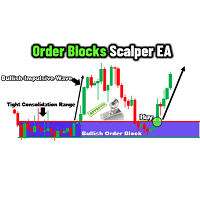
Order Blocks Scalper
Allan Munene Mutiiria
4.43 (7)
The Order Blocks Scalper EA is a next-generation, fully automated trading tool that identifies and trades key order block zones with precision and speed. Designed for traders seeking consistent entries and exits, this EA harnesses advanced market structure analysis to detect consolidation ranges, breakouts, and impulsive price movements, enabling optimal trade execution. Key Features Smart Order Block Detection : Identifies bullish and bearish order blocks based on institutional order flow. Each
FREE
Dynamic DOM
Artem Bezmenov
Instructions for the Dynamic_DOM_Labels indicator Dynamic_DOM_Labels is a professional analytical tool for the MetaTrader 5 terminal, designed to analyze the Order Flow in real time. The indicator connects directly to the broker's Depth of Market /DOM, finds large limit orders from buyers (Buy Limit) and sellers (Sell Limit) and projects them onto the work schedule. The tool is designed specifically for liquid markets such as Gold (XAUUSD) and major currency pairs (for example, GBPUSD), where la
FREE
RandomChoice
Aleksei Lesnikov
5 (1)
Expert capable of generating profit by opening positions randomly. Shows good results in long-term trading – on timeframes from H12. Features Fully automatic mode is available. Positions are opened randomly. Martingale is applied – if the previous position closed with a loss, the current one is opened with a volume that compensates for that loss. Parameters Mode – Expert's operating mode: Automatic – automated (recommended); Manual – manual. In automatic mode, the Expert does not require any p
FREE
EA13 Gold Whale Hunter
Nhat Tien Duong
3 (1)
Gold Whale Hunter EA (EA13_M3RX): The Prop Firm Survivor Are you tired of EAs that only work on "Zero Spread" accounts but fail miserably on real Prop Firm conditions? Meet Gold Whale Hunter , the EA designed specifically for XAUUSD (Gold) on the M15 timeframe. It doesn't scalp for pennies; it hunts for the big trends.   ENTER YOUR KEY HERE: [  EA13_99999D_TANINCODER_5946594662422 ] -- MANDATORY: ALLOW WEBREQUEST TO ACTIVATE THE BOT To verify your License Key, the Bot needs permission
FREE
SmartPullback
Samuel Jesus Fidalgo Lopez
Smart Pullback Pro v4 High-Probability Pullback Indicator for MT5 Smart Pullback Pro v4 is a professional trend-following indicator for MetaTrader 5 that identifies high-probability pullback entries in real time. It automatically plots entry zones, Stop Loss, and Take Profit levels directly on the chart, giving traders a complete visual trading plan with every signal. How It Works Smart Pullback Pro v4 combines multiple confluence filters to eliminate low-quality signals and focus only on va
FREE
Gli utenti di questo prodotto hanno anche acquistato
SMART TREND TRADING SYSTEM — OFFERTA SPECIALE Il tuo sistema di trading. Il tuo EA per l’automazione. La tua formazione e il tuo supporto. Acquista Smart Trend Trading System per MT5 a 99 USD e ricevi Smart Universal Expert Advisor GRATIS per automatizzare i segnali del sistema. STTS riunisce la direzione del trend, i segnali di entrata e uscita, le zone di inversione e i livelli di prezzo importanti direttamente sul grafico. Segui il sistema manualmente oppure collega l’EA incluso per eseguire
Trend Sniper X
Sarvarbek Abduvoxobov
4.9 (39)
Trend Sniper X è un indicatore trend-following multi-timeframe per MetaTrader 5 che aiuta i trader a identificare la direzione del trend e i potenziali punti di inversione con chiarezza e precisione. per MT4: https://www.mql5.com/en/market/product/193245 Informazioni sul prezzo: Il prezzo attuale è promozionale ed è soggetto a modifiche con il rilascio di futuri aggiornamenti e nuove funzionalità. Offerta Bonus: Per ricevere GRATIS l'Auto-Trade Assistant EA per questo indicatore, invia un messa
ARIPoint
Temirlan Kdyrkhan
1 (4)
ARIPoint is a powerful trading companion designed to generate high-probability entry signals with dynamic TP/SL/DP levels based on volatility. Built-in performance tracking shows win/loss stats, PP1/PP2 hits, and success rates all updated live. Key Features: Buy/Sell signals with adaptive volatility bands Real-time TP/SL/DP levels based on ATR Built-in MA Filter with optional ATR/StdDev volatility Performance stats panel (Success, Profit/Loss, PP1/PP2) Alerts via popup, sound, push, or email Cu
Zoryk Gold
Reda El Koutbane
5 (15)
ZORYK — Sistema avanzato di segnali XAUUSD per MetaTrader 5 Conosci sicuramente questa sensazione. Passi molto tempo ad analizzare l’oro. Aspetti il punto d’ingresso corretto. Finalmente apri l’operazione e il prezzo inizia immediatamente a muoversi contro di te. Chiudi troppo presto, sposti lo Stop Loss o esiti per alcuni secondi. Successivamente il mercato raggiunge esattamente l’obiettivo che avevi previsto inizialmente, ma senza di te nella posizione. Il problema non era sempre la direzione.
SuperScalp Pro
Van Minh Nguyen
4.66 (35)
SuperScalp Pro - Professional Multi-Layer Confluence Scalping System SuperScalp Pro è un indicatore avanzato per lo scalping che migliora il Supertrend classico attraverso diversi filtri intelligenti di conferma. Aiuta a identificare opportunità di Buy/Sell con una probabilità maggiore, riducendo significativamente i falsi segnali. Le frecce Buy e Sell vengono visualizzate direttamente sul grafico, mentre i livelli di Stop Loss e Take Profit basati sull’ATR vengono calcolati automaticamente in t
GoldenX Entry MT5
VividMind Digital Solutions
5 (16)
GoldenX Entry è un indicatore per MT5 con un algoritmo adattivo Smart Entry Trend, un sistema di scoring dei segnali, un rilevatore del regime di mercato e un filtro di volatilità. Ogni segnale include un livello di ingresso calcolato, tre livelli di Take-Profit (TP1, TP2, TP3) e un livello di Stop-Loss. È costruito su più livelli analitici progettati per adattarsi a diverse condizioni di mercato, combinando un sistema analitico multilivello con un ottimizzatore integrato e un sistema di traccia
Gann Made Easy è un sistema di trading Forex professionale e facile da usare che si basa sui migliori principi del trading utilizzando la teoria di mr. WD Gann. L'indicatore fornisce segnali ACQUISTA e VENDI accurati, inclusi i livelli di Stop Loss e Take Profit. Puoi fare trading anche in movimento utilizzando le notifiche PUSH. CONTATTAMI DOPO L'ACQUISTO PER RICEVERE GRATUITAMENTE LE ISTRUZIONI DI TRADING E OTTIMI INDICATORI EXTRA! Probabilmente hai già sentito parlare molte volte dei metodi d
Neuro Poseidon MT5
Daria Rezueva
4.75 (52)
Neuro Poseidon is a new indicator by Daria Rezueva. It combines precise trading signals with adaptive TP/SL levels - creating best possible trades as a result! Message me and get  Neuro Poseidon Assistant  as a gift to automize your trading process! What makes it stand out? 1. Proven profitability on all assets and timeframes 2. Only confirmed BUY and SELL signals present on the chart 3. Adaptive TP & SL levels generated by the software for each trade 4. Easy to understand - suitable for al
SMC Intraday Formula
VividMind Digital Solutions
5 (26)
Cominciamo con la verità. Nessun indicatore da solo ti renderà profittevole. Se qualcuno ti dice il contrario, ti sta vendendo un sogno. Qualsiasi indicatore che mostra frecce perfette di acquisto/vendita può essere reso impeccabile — basta ingrandire la giusta sezione della storia e catturare solo i trade vincenti. Noi non lo facciamo.  SMC Intraday Formula è uno strumento. Legge la struttura del mercato per te, identifica le zone a più alta probabilità e ti mostra esattamente come appare la t
M1 Sniper MT5
Oleg Rodin
5 (7)
M1 SNIPER   è un sistema di indicatori di trading facile da usare. Si tratta di un indicatore a freccia progettato per l'intervallo temporale M1. L'indicatore può essere utilizzato come sistema autonomo per lo scalping sull'intervallo temporale M1 e come parte del tuo sistema di trading esistente. Sebbene questo sistema di trading sia stato progettato specificamente per il trading sull'intervallo temporale M1, può comunque essere utilizzato anche con altri intervalli temporali. Inizialmente ho p
La leggenda ritorna: Entry Points Pro 10. Il rilancio del leggendario indicatore che per 3 anni è rimasto nella Top-3 del MQL5 Market. Centinaia di recensioni entusiaste (589 su due versioni), migliaia di trader lo usano ogni giorno per operare, 31.000+ download della demo   MT4+MT5 . Ho letto ogni vostra recensione degli ultimi cinque anni — e invece di promesse ho inserito nella versione 10 le risposte. Dall'autore che opera sui mercati dal 1999 e tiene all'onestà, alla propria reputazione e a
FiboSniper Pro
Van Minh Nguyen
5 (3)
FiboSniper Pro – Multi-Filter Fibonacci System with Auto SL/TP and Control Panel FiboSniper Pro è un indicatore tecnico che combina Fibonacci Envelopes dinamici con diversi filtri di conferma per generare segnali Buy e Sell selezionati. I livelli di Fibonacci vengono calcolati sulla base di Moving Average e ATR e successivamente filtrati tramite ADX, EMA, RSI, ATR, Volume, Time e struttura delle candele. L’indicatore visualizza direttamente sul grafico i livelli automatici di Stop Loss e Take Pr
Un nuovo Re in città - Indicatore + Gestione ordini (TP1 + TP2 + TP3) + Invio opzionale di segnali Telegram INCLUSO (GRATIS) (SISTEMA COMPLETO DI TRADING e SEGNALI) Il nostro miglior EA per l’Oro: Gold Slayer Questo indicatore include una strategia avanzata, un sistema di trading con gestione ordini personalizzabile e un sistema mean reversion che combina estensioni di envelope, supportato da molteplici filtri intelligenti di conferma come RSI per individuare ingressi di inversione ad alta proba
Auto Optimized SpeedAngle è un sistema di vettorizzazione del momento di livello istituzionale che elimina l'overfitting ( curve-fitting ) attraverso l'ottimizzazione continua Walk-Forward (WFO). Invece di affidarsi a input statici che si degradano quando i regimi di mercato cambiano, l'indicatore recalibra dinamicamente i suoi parametri utilizzando la validazione Out-of-Sample (OOS), assicurando che i segnali visualizzati rappresentino reali vantaggi statistici anziché anomalie storiche. Quadro
Unix Scalper
Issam Kassas
4 (4)
UNIX SCALPER — OFFERTA SPECIALE Individua il setup. Esamina il piano. Scegli come operare. Acquista UNIX Scalper per MT5 a 99 USD e ricevi Smart Universal Expert Advisor GRATIS per automatizzarne i segnali. UNIX Scalper riunisce analisi di mercato, indicazioni BUY/SELL/WAIT e livelli Entry, Stop Loss, TP1 e TP2 in un unico pannello organizzato. Segui il piano di trading manualmente oppure collega l’EA incluso per eseguire automaticamente le operazioni secondo le impostazioni scelte. Il prezzo at
Welcome to ENTRY IN THE ZONE AND SMC MULTI TIMEFRAME / SPECIAL BENEFIT FOR OUR MQL5 CUSTOMERS  FREE ACCESS TO THE NEW TOOL —COMING SOON —   Learn More on Our Official Website : https://www.fableedge.net Entry In The Zone and SMC Multi Timeframe is a real-time market analysis tool based on Smart Money Concepts (SMC), designed to analyze market structure, price direction, and key trading zones. It supports both Single-Timeframe Analysis and Multi-Timeframe Analysis, providing a clearer view of the
Gold Entry Sniper
Tahir Mehmood
5 (21)
Gold Entry Sniper – Dashboard ATR Multi-Timeframe per Scalping e Swing Trading sull’Oro Gold Entry Sniper è un indicatore avanzato per MetaTrader 5 che offre segnali di acquisto/vendita precisi per XAUUSD e altri strumenti, basato sulla logica ATR Trailing Stop e l' analisi multi-timeframe . Caratteristiche e Vantaggi Analisi Multi-Timeframe – Visualizza trend su M1, M5, M15 in un'unica dashboard. Trailing Stop Basato su ATR – Stop dinamici che si adattano alla volatilità. Dashboard Professional
Tokyo mt5 Indicator
Vasiliy Strukov
5 (2)
Il Tokyo Indicator offre una chiara panoramica visiva della direzione del trend, dei potenziali segnali di trading e delle condizioni di mercato. La sua linea di trend a gradini, codificata a colori, distingue le fasi rialziste (in blu) da quelle ribassiste (in magenta). Frecce direzionali dedicate evidenziano potenziali opportunità di acquisto e vendita al variare del trend visualizzato. Una dashboard integrata riunisce in un'unica visualizzazione pratica il segnale corrente, il bias di mercato
Atomic Analyst MT5
Issam Kassas
4.47 (60)
ATOMIC ANALYST — OFFERTA SPECIALE La tua analisi di mercato. Il tuo EA per l’automazione. La tua formazione e il tuo supporto. Acquista Atomic Analyst per MT5 a 99 USD e ricevi Smart Universal Expert Advisor GRATIS per automatizzare i segnali dell’indicatore. Atomic Analyst riunisce l’azione del prezzo, la direzione del trend, i segnali di entrata e uscita, lo Stop Loss e diversi livelli di Take Profit direttamente sul grafico. Opera manualmente utilizzando la sua analisi oppure collega l’EA in
SMART PRICE ACTION CONCEPTS — OFFERTA SPECIALE Osserva la struttura. Identifica le zone. Costruisci il tuo piano di trading. Acquista Smart Price Action Concepts per MT5 a 49 USD e ricevi Smart Universal Expert Advisor GRATIS. Riunisci Smart Money Concepts (SMC), analisi in stile ICT e azione del prezzo in un grafico organizzato. Identifica la struttura del mercato, gli order block, i livelli di riferimento della liquidità e gli squilibri, poi scegli quali elementi visualizzare tramite lo Smart
Power Candles MT5
Daniel Stein
4.58 (12)
Power Candles V3 - Indicatore di forza ad ottimizzazione automatica Power Candles V3 trasforma la forza delle valute e degli strumenti in un piano di trading attuabile su ogni grafico a cui è collegato. Invece di limitarsi a colorare le candele, esegue un'auto-ottimizzazione in tempo reale in background e ti fornisce i migliori valori di Stop Loss, Take Profit e soglia di segnale per il simbolo che hai davanti. Basta un clic per adottarlo nel trading live: i raggi di ingresso, Stop Loss e Take P
FX Trend MT5 NG
Daniel Stein
5 (6)
FX Trend NG: La Nuova Generazione di Intelligenza di Trend Multi-Mercato Panoramica FX Trend NG è uno strumento professionale di analisi del trend multi-timeframe e monitoraggio dei mercati. Ti consente di comprendere la struttura completa del mercato in pochi secondi. Invece di passare tra numerosi grafici, puoi identificare immediatamente quali strumenti sono in trend, dove il momentum sta diminuendo e dove esiste un forte allineamento tra i timeframe. Offerta di Lancio – Ottieni FX Trend NG
Adaptive Price Action Engine Acquista un indicatore, ricevi l'EA gratis Analisi Auto-Ottimizzata del Trend e dei Pattern Candlestick Multi-Timeframe I mercati cambiano continuamente e non tutti i pattern di Price Action hanno lo stesso valore in ogni condizione di mercato. Adaptive Price Action Engine è progettato per adattarsi alle condizioni di mercato in continua evoluzione, combinando struttura del trend, analisi Multi-Timeframe, pattern Candlestick e ottimizzazione statistica in un unico fr
FX Power MT5 NG
Daniel Stein
5 (33)
FX Power: Analizza la Forza delle Valute per Decisioni di Trading Più Intelligenti Panoramica FX Power è lo strumento essenziale per comprendere la reale forza delle principali valute e dell'oro in qualsiasi condizione di mercato. Identificando le valute forti da comprare e quelle deboli da vendere, FX Power semplifica le decisioni di trading e rivela opportunità ad alta probabilità. Che tu segua le tendenze o anticipi inversioni utilizzando valori estremi di Delta, questo strumento si adatta
Market Structure Order Block Dashboard MT5 è un indicatore MT5 progettato per i trader che vogliono leggere la struttura di mercato e le principali zone di reazione del prezzo direttamente sul grafico. Combina BOS, ChoCH, Order Blocks, Fair Value Gaps (FVG), Liquidità, Kill Zones, Volume Profile e un pannello compatto per un'analisi rapida. Questo indicatore è rivolto ai trader che utilizzano la struttura di mercato, i concetti ICT e Smart Money come quadro decisionale. Può aiutare a individuare
Currency Strength Wizard   è un indicatore molto potente che ti fornisce una soluzione all-in-one per un trading di successo. L'indicatore calcola la potenza di questa o quella coppia forex utilizzando i dati di tutte le valute su più intervalli di tempo. Questi dati sono rappresentati in una forma di indice di valuta facile da usare e linee elettriche di valuta che puoi utilizzare per vedere il potere di questa o quella valuta. Tutto ciò di cui hai bisogno è collegare l'indicatore al grafico ch
M1 Quantum MT5
Hamed Dehgani
4.2 (10)
Segnali di Trading Live con M1 Quantum: Segnale   (Operazione eseguita automaticamente dal Quantum Trade Assistant , incluso gratuitamente con questo prodotto.) Ultime notizie: La versione 1.64 è stata rilasciata. Ora tutte le operazioni hanno uno Stop Loss posizionato dietro le relative zone di Supporto/Resistenza. Anche la funzione Smart Close è stata migliorata per aumentare le prestazioni dell'EA in questa versione. Dal 9 agosto, il segnale live è in esecuzione sulla versione 1.64. Piano pr
PZ Trend Trading MT5
PZ TRADING SLU
3.8 (5)
Capture every opportunity: your go-to indicator for profitable trend trading Trend Trading is an indicator designed to profit as much as possible from trends taking place in the market, by timing pullbacks and breakouts. It finds trading opportunities by analyzing what the price is doing during established trends. [ Installation Guide | Update Guide | Troubleshooting | FAQ | All Products ] Trade financial markets with confidence and efficiency Profit from established trends without getting whips
Scalper Vault   è un sistema di scalping professionale che ti fornisce tutto il necessario per scalping di successo. Questo indicatore è un sistema di trading completo che può essere utilizzato dai trader di forex e opzioni binarie. L'intervallo di tempo consigliato è M5. Il sistema fornisce segnali di freccia accurati nella direzione della tendenza. Ti fornisce anche i segnali più alti e più bassi e i livelli di mercato di Gann. Gli indicatori forniscono tutti i tipi di avvisi, comprese le noti
Smc Pro ToolKit
Talal N Z Aljarusha
5 (13)
SMC PRO TOOLKIT — SMART MONEY ANALYSIS & STRUCTURED TRADE PLANNING SMC Pro ToolKit is a professional Smart Money Concepts analysis workspace for MetaTrader 5. It combines market structure, multi-timeframe analysis, institutional price zones, setup evaluation, confirmation tools, volume context, alerts, and risk planning inside one organized chart environment. One workspace. Multiple layers of confirmation. One structured trading plan. OPEN COMPLETE USER GUIDE MULTI-CONDITION SETUP ENGINE At
Altri dall’autore
MiniBull Report
Yusuf Levent Aksun
# MiniBull Report (v1.06) — free **Your market briefing in a sub-window. MiniBull Report answers the questions an intraday trader asks before every decision — in plain language, in your own time zone, and with the same answers on every chart timeframe.** *Where is price against the monthly, weekly, daily and 4H trend? How far is it stretched? How much of today's typical range is used? Where are the nearest resistance and support? Is a high-impact event coming? What speaks for a long, what spe
FREE
Analizzatore MTF MA: Posizione prezzo vs SMA/EMA/KAMA su 11 timeframe in un pannello. ### Full Description: ** Basta monitorare grafici su diversi timeframe!** MiniBull Periscope - Analizzatore di Posizione Multi-Timeframe della Media Mobile Vedi il quadro completo senza aprire più grafici! MiniBull Periscope mostra la posizione attuale del prezzo rispetto alle medie mobili su 11 timeframe contemporaneamente - dal Mensile (MN1) fino a 1 Minuto (M1). **CARATTERISTICHE PRINCIPALI:** • 11
FREE
Analizzatore MTF Composito: 9 indicatori su 11 TF con sistema di punteggio (-9 a +9). ### Full Description: ** Basta monitorare grafici su diversi timeframe!** MiniBull MTF Observer - Analizzatore di Segnali Compositi Multi-Timeframe Il pannello multi-indicatore definitivo! Analizza 9 indicatori tecnici diversi su 11 timeframe contemporaneamente e fornisce un punteggio composito da -9 a +9 per ogni timeframe. **9 INDICATORI ANALIZZATI:** • RSI (Indice di Forza Relativa) • MACD (Converge
Risultati completi del backtest (222 file): https://drive.google.com/drive/folders/1-1QefUiJ1lm6Se0HYCpAmYIbERZ8xjR8 Strategia: MN1/W1 Trend + D1 Falsa Rottura + Multi-TF MA Inversione Backtest: 2024.07.01 – 2026.02.03 | $10,000 | 1:10 | 26,784 Trade | 10/20 Profittevoli ️  TUTTI I TEST SONO STATI CONDOTTI CON EMA(20). SMA e KAMA NON sono stati completamente testati.   ️  PARAMETRI DI INPUT
BullBOP13 — Bilancio dei Poteri | Oro vs Indici USA BullBOP13 rileva divergenze temporanee tra l'Oro (XAUUSD) e tre indici azionari statunitensi (NAS100, US500, US30). Quando 3 asset su 4 si muovono in una direzione e 1 nella direzione opposta, l'anomalia sta subendo un "falso movimento" che tende a invertirsi. FUNZIONAMENTO — Filtro segnale a 4 livelli: 1. Filtro di Fase — analisi del regime di mercato su D1 (Allineato / Divergente / Forte Divergenza) 2. Rilevamento Falso Movimento — regola 3
Minibull Sniper Ama
Yusuf Levent Aksun
Minibull AMA Sniper v7.30 è un Expert Advisor professionale per il trend following ottimizzato per NAS100 (Nasdaq 100). Compatibile anche con US30 (Dow Jones), SPX500 (S&P 500) e DAX40. L'EA rileva automaticamente il nome del simbolo del tuo broker — NAS100, US100, NASDAQ100, USTEC, NQ100, US30, NYA30, NYSE30, SPX500, US500 o altre varianti comuni — e si adatta di conseguenza. La strategia si basa su due Medie Mobili Adattive — AMA(200) e AMA(9) — calcolate sul grafico giornaliero (D1), con se
Minibull Logical Pro
Yusuf Levent Aksun
**MiniBull Logical EA** individua la direzione del trend sui timeframe mensile (MN1) e settimanale (W1), filtrando gli ingressi con la logica del falso breakout su D1 e segnali di inversione della media mobile su più timeframe (M15→D1). Il pannello interattivo sul grafico consente di attivare/disattivare l'EA, passare tra modalità AUTO/MANUALE e cambiare la strategia di uscita con un solo clic. Tre strategie di uscita e uno stop d'emergenza basato sull'ATR garantiscono la massima flessibilità
### BullBOP19 Live EA — Rilevamento dei "Falsi Movimenti" tra Oro e Indici USA BullBOP19 è un Expert Advisor completamente automatizzato per MetaTrader 5, costruito attorno alla relazione di equilibrio delle forze (Balance of Power) tra l'Oro e i principali indici azionari statunitensi (NASDAQ 100, S&P 500, US30/DJIA). Confrontando l'andamento del prezzo dell'Oro con questi indici, l'EA identifica i "falsi movimenti" — movimenti privi di reale convinzione — filtrando i segnali poco affidabili
**Minibull AMA Sniper — Indicatore di Segnali Senza Repaint** Minibull AMA Sniper è un indicatore di posizionamento del trend costruito attorno a due Medie Mobili Adattive di Kaufman (AMA200 e AMA9), combinato con un esclusivo filtro di Conferma della Pendenza (Slope Confirm) che evita di operare in un mercato piatto e indeciso. **Come funziona** L'indicatore monitora la posizione del prezzo rispetto alle due AMA: - **BUY (acquisto)** quando il prezzo chiude sopra AMA200 e AMA9 - **SELL (ven
**Vedi esattamente dove si trova il prezzo — su ogni timeframe rilevante — senza cambiare grafico.** MiniBull LOP è un indicatore a dashboard multi-timeframe per trader che analizzano più timeframe contemporaneamente. Mostra, per MN, W, D, H8, H4, H1, M30, M15, M5 e M1: la posizione del prezzo rispetto all'ultima candela chiusa (breakout al rialzo/ribasso, all'interno del range sopra/sotto la chiusura, sulla chiusura), una lettura del trend basata sulla Media Mobile Adattiva di Kaufman (AMA),
VAMA Signal Simulator analizza 7 timeframe (M1-D1, ponderati dal 5% al 30%) e valuta ciascuno con 4 medie mobili e 6 oscillatori, combinandoli in una lettura ponderata Strong Buy/Buy/Neutral/Sell/Strong Sell. Un segnale confermato deve anche concordare con una media mobile H4 adattiva alla volatilità (il periodo si accorcia con alta volatilità, si allunga nei mercati calmi) E con la direzione del trend su M15 e H1. Ogni segnale confermato riceve una freccia e un'etichetta BUY/SELL sul grafico, c
MiniBull Algorithmic Signal Engine è un sistema di trading multi-timeframe per MetaTrader 5, disponibile come indicatore e come Expert Advisor. Valuta 7 timeframe (M1-D1) su 4 medie mobili e 6 oscillatori, filtra il risultato tramite una media di tendenza H4 adattiva alla volatilità (VAMA), quindi richiede che sia M15 sia H1 confermino la direzione prima di agire — nessuna conferma parziale. L'EA offre due modalità: Faithful (lotto fisso di 0,02, rischio:rendimento 1:1, replica esatta dello sc
# MiniBull Session S/R · MTF VWAP · Auto **A MetaTrader 5 indicator for intraday index and CFD traders who read the market through session structure, volume-weighted price, and multi-timeframe support/resistance.** Version 4.51 · MT5 (MQL5) · Works on any chart timeframe --- ## What it is MiniBull Session S/R MTF VWAP Auto is an all-in-one context indicator built for people who trade indices (NAS100 and similar) intraday, around session opens, prior-day levels, and volume-weighted fair valu
Filtro:
Nessuna recensione
Rispondi alla recensione