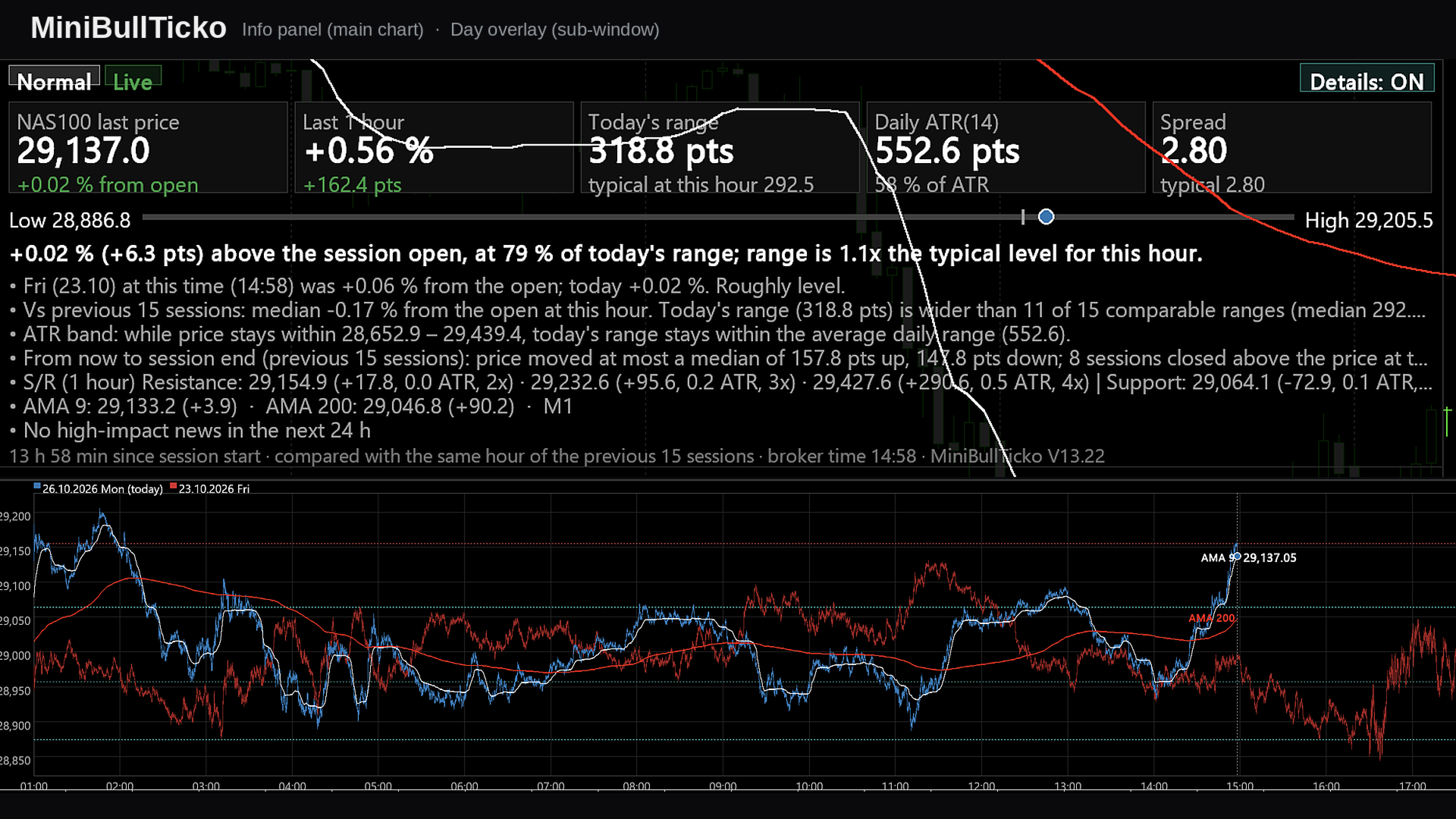
MiniBull Ticko

  • Indicators
  • Yusuf Levent Aksun
    Yusuf Levent Aksun
    Platform Engineer и сертифицированный специалист AWS с более чем 20-летним опытом
    в разработке программного обеспечения, облачной архитектуре и DevOps-трансформации.
    В настоящее время руковожу инициативами платформенной инженерии в World Wide Technology
  • Version: 13.22
  • Updated: 26 October 2026
  • Activations: 5

**Tick-level day overlay, live info panel and automatic Support/Resistance for MetaTrader 5 — built for scalpers.**

MiniBullTicko answers one question that matters to a short-term trader at any moment of the session:

> *"Is today behaving like a normal day **at this exact time of day**, or is something different — more volatile, more expensive to trade, or stretched against a known level?"*

It does this by laying every recent trading session on top of each other **at tick resolution** in an indicator sub-window, while a compact, semi-transparent panel on the main chart summarises the comparison in numbers and plain sentences.

---

## Contents

1. [Screenshots](#1-screenshots)
2. [Key features](#2-key-features)
3. [Requirements and installation](#3-requirements-and-installation)
4. [What you see on the screen](#4-what-you-see-on-the-screen)
5. [Input parameters](#5-input-parameters)
6. [How it works](#6-how-it-works)
7. [Metric and formula reference](#7-metric-and-formula-reference)
8. [A scalper's workflow](#8-a-scalpers-workflow)
9. [Performance notes](#9-performance-notes)
10. [Chart objects and global variables](#10-chart-objects-and-global-variables)
11. [Troubleshooting](#11-troubleshooting)
12. [Limitations and disclaimer](#12-limitations-and-disclaimer)

---

## 1. Screenshots

All images are 1920 × 1080 and use illustrative (synthetic) data.

| # | File | What it explains |
|---|------|------------------|
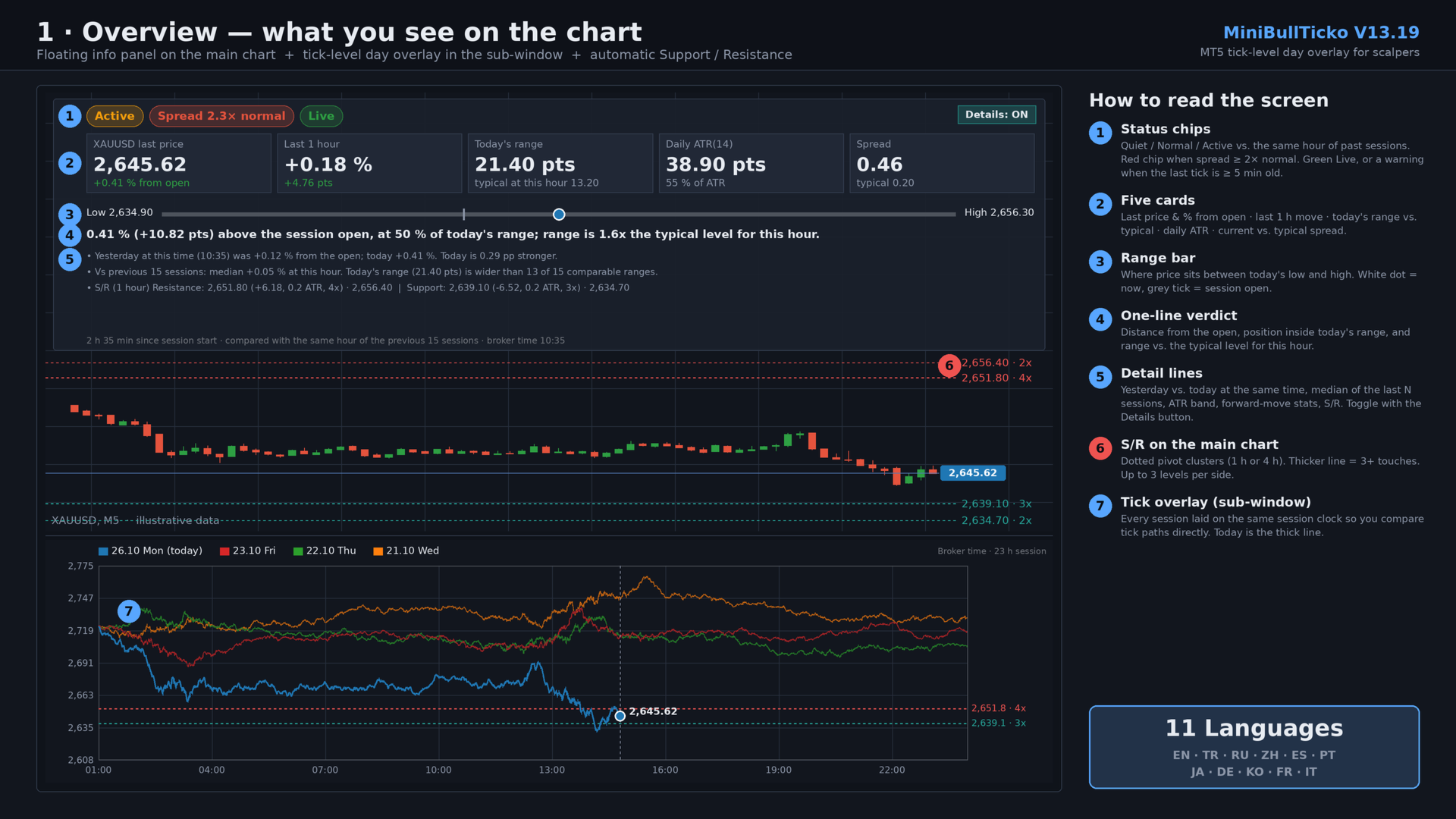
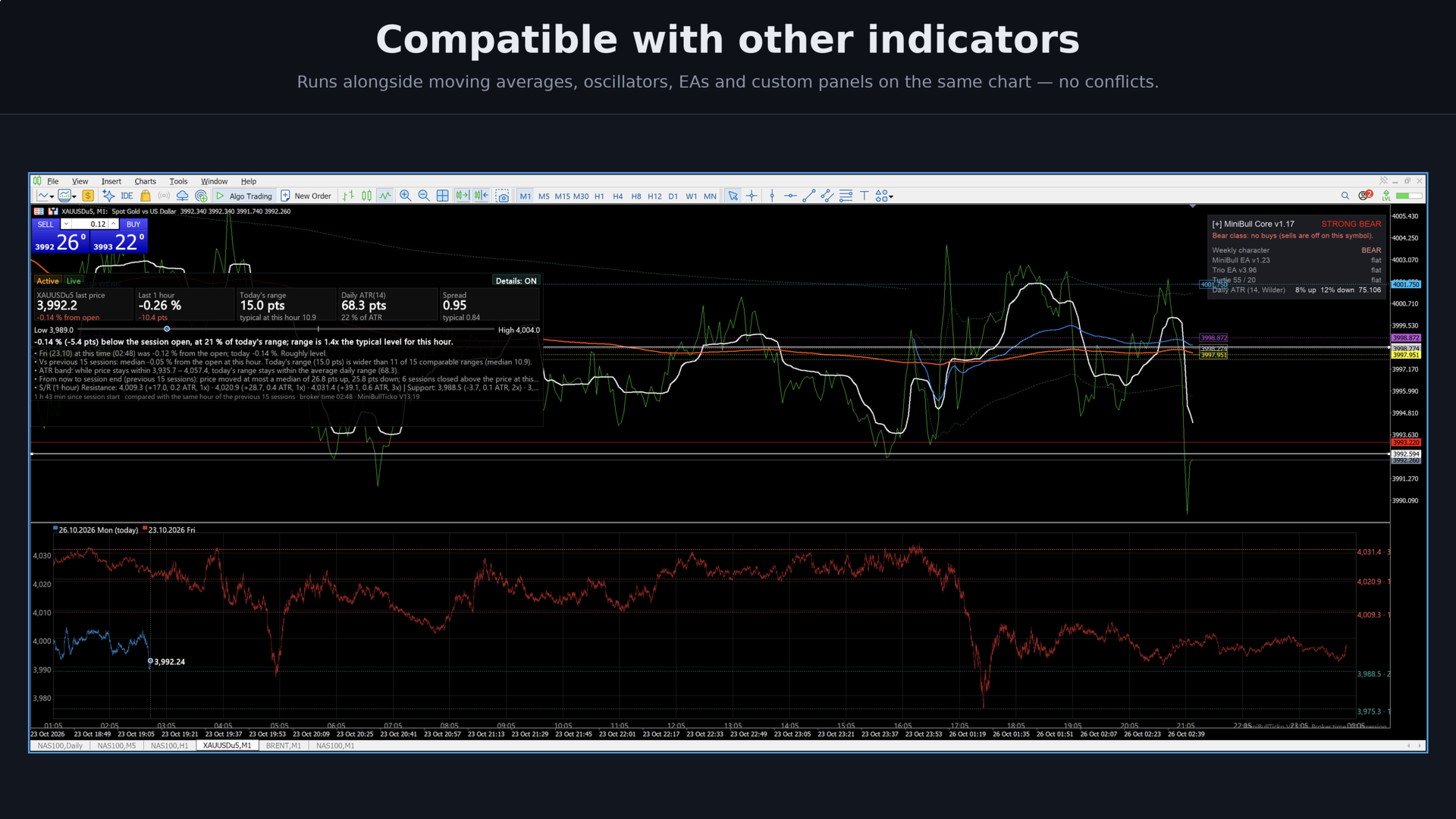
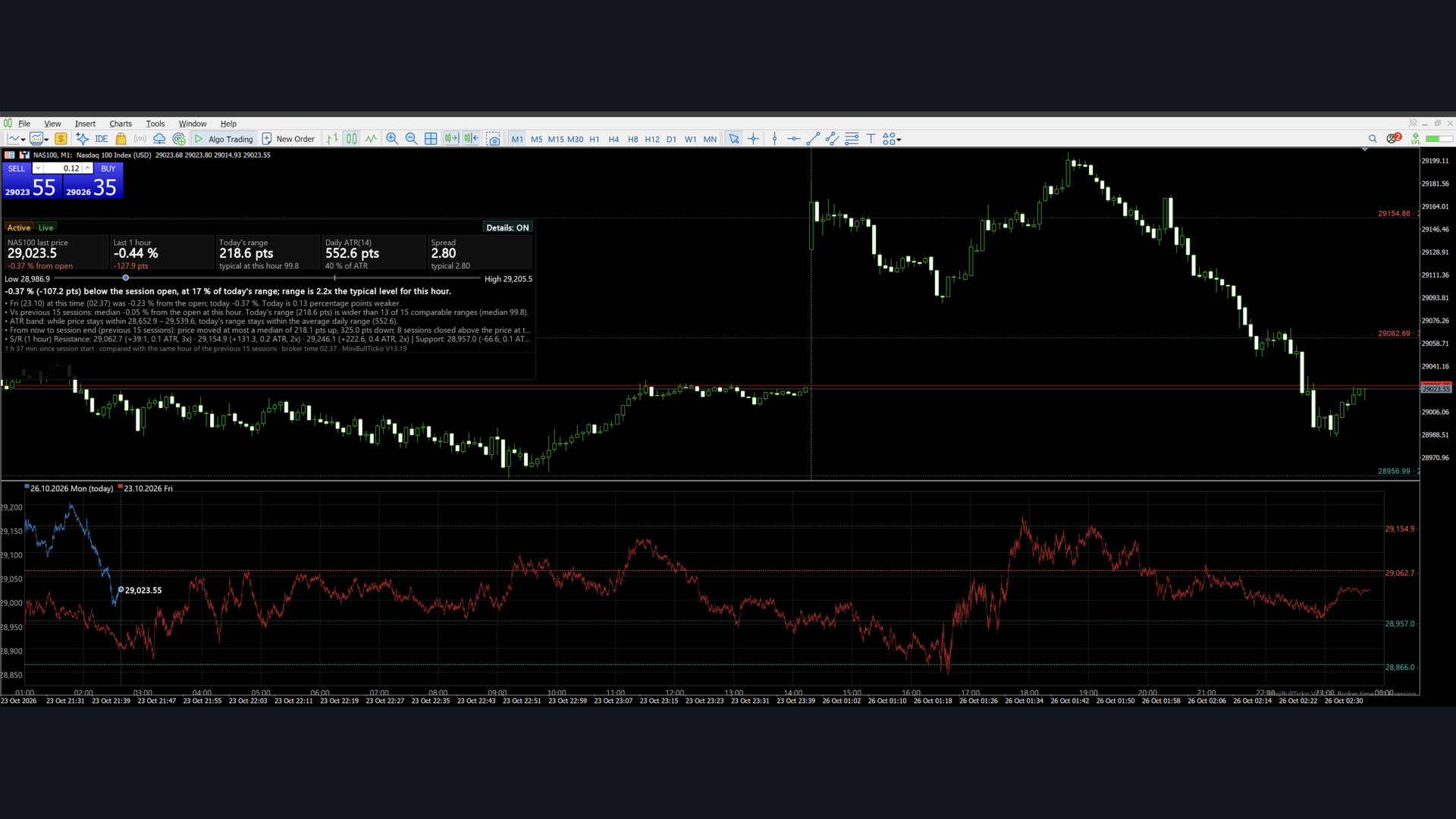
| 1 | `01_overview.png` | The whole screen: main-chart panel, S/R lines, tick overlay sub-window |
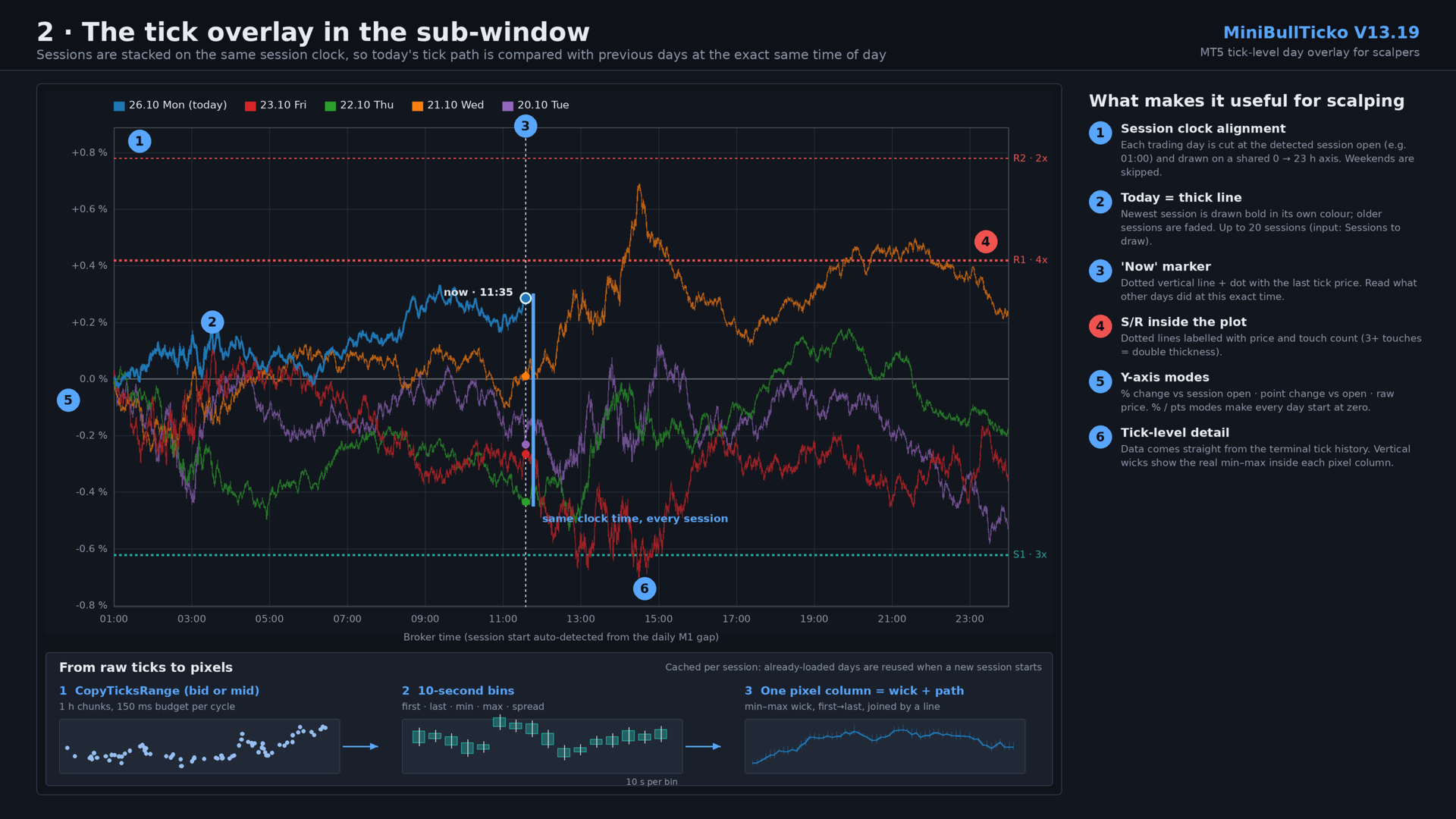
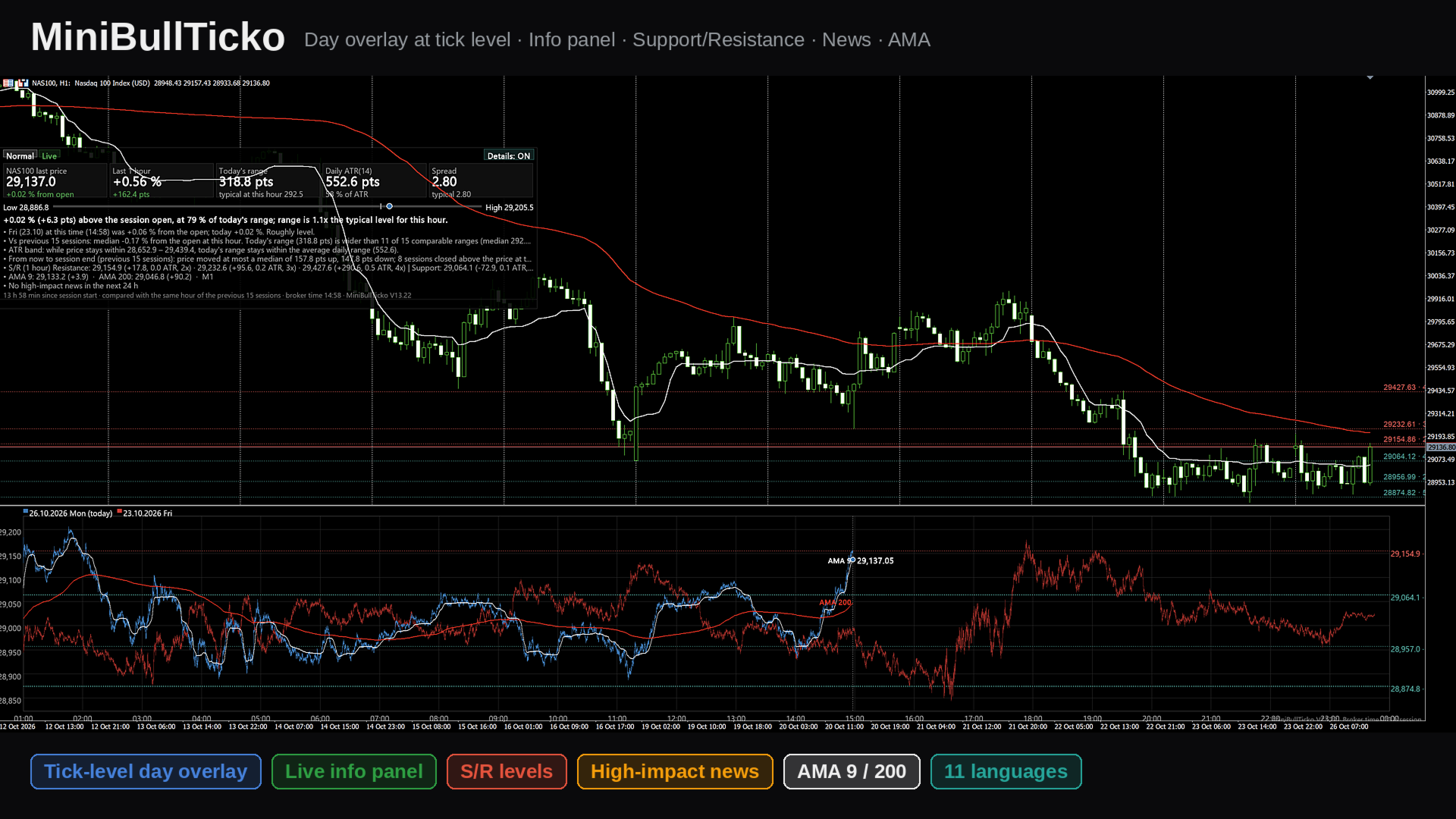
| 2 | `02_tick_overlay.png` | The sub-window in detail: session-clock alignment, "now" marker, tick → bin → pixel pipeline |
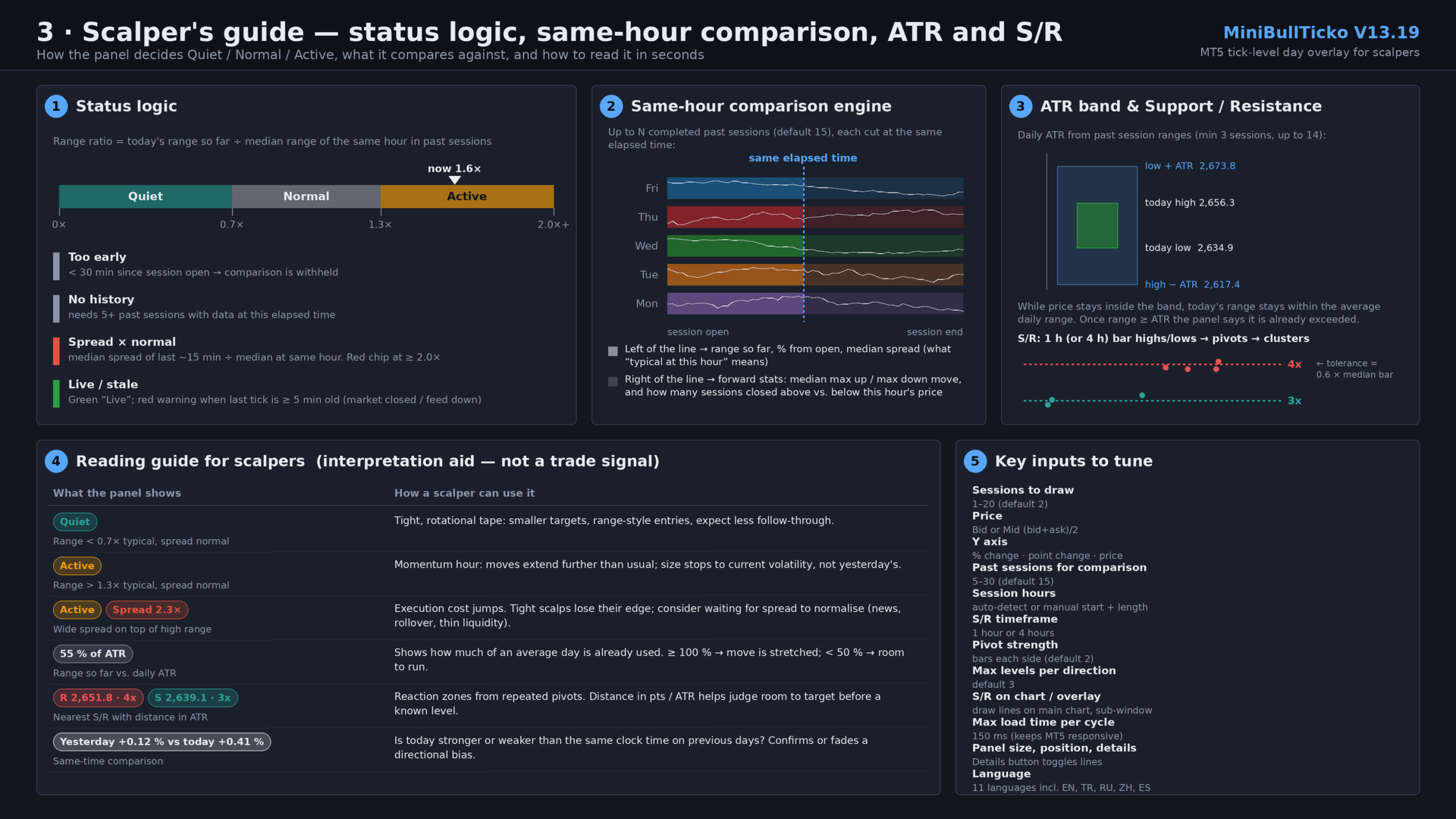
| 3 | `03_scalper_guide.png` | Status logic, same-hour comparison engine, ATR band, S/R clustering, reading guide, key inputs |

![Overview](01_overview.png)

![Tick overlay](02_tick_overlay.png)

![Scalper guide](03_scalper_guide.png)

---

## 2. Key features

- **Tick-level day overlay (sub-window).** Up to 20 sessions are drawn on one shared session clock. Today is a thick line; previous days are faded. Because each day is aligned to the *same time of day*, you compare like with like.
- **Real tick data, no external files.** Ticks are read straight from the terminal with `CopyTicksRange`. No tick-recorder EA and no CSV export/import are needed.
- **"Same hour" comparison panel (main chart).** Status chip (Quiet / Normal / Active), five metric cards, a range bar, a one-sentence verdict and optional detail lines — all computed against the same elapsed time in previous sessions.
- **Spread awareness.** Current spread (median of the last ~15 minutes) is compared with the typical spread at that hour. A red chip appears when it is 2× normal or worse.
- **Feed-health indicator.** "Live" in green, or a warning when the last tick is five minutes old or more.
- **Daily ATR in session terms.** ATR is built from the stored sessions' tick ranges, with an "ATR band" that shows where price must stay for today's range not to exceed the average.
- **Automatic Support / Resistance.** Pivot highs/lows from 1-hour or 4-hour bars (built from tick data) are clustered into levels with touch counts, drawn on the main chart and in the overlay, and listed in the panel with distance in points and in ATR.
- **Automatic session detection.** Session open and length are detected from gaps in M1 history, so it adapts to indices, metals, FX and futures-style CFDs. Manual override is available.
- **11 UI languages.** English, Türkçe, Русский, 中文, Español, Português, 日本語, Deutsch, 한국어, Français, Italiano.
- **Responsive loading.** Data loads in time-boxed slices so the terminal never freezes; already-loaded sessions are cached and reused.

---

## 3. Requirements and installation

**Requirements**

- MetaTrader 5 (build with `CCanvas` and `CopyTicksRange` support — any current build).
- Tick history for the symbol. The indicator needs ticks for roughly *N + 1* sessions (default: 16). If the terminal has not downloaded them yet, `CopyTicksRange` will trigger the download and the panel shows "Loading…" until it is done.
- M1 history for automatic session detection (about 9 days).

**Installation**

1. Save `MiniBullTicko_V13_19.mq5` to `MQL5\Indicators\` (File → Open Data Folder).
2. Open it in MetaEditor and compile (F7). The file is UTF-8 with BOM; if non-Latin characters look broken, re-save as *UTF-8 with BOM*.
3. In the terminal: **Insert → Indicators → Custom → MiniBullTicko_V13_19**. It opens in its own sub-window (`indicator_separate_window`, no plots).
4. The info panel appears on the **main chart** and S/R lines are placed on it automatically.

> Tip: use a chart timeframe you scalp on (M1–M5). The indicator itself is timeframe-independent — it works from ticks — but S/R lines are anchored to the chart and the panel sits on top of it.

---

## 4. What you see on the screen

### 4.1 Info panel (main chart)

A semi-transparent canvas (default 1500 × 450 px, 200 px from the top, 0 px from the left).

| Area | Content |
|------|---------|
| **Status chips** | Session state: *too early / not enough history / Quiet / Normal / Active*; a red *Spread N× normal* chip; *Live* or *Last tick N ago* warning (or *Not live · last tick …* when the session is over). |
| **Five cards** | 1) Last price and % from session open. 2) Last 1-hour change in % and points. 3) Today's range in points and the typical range at this hour. 4) Daily ATR(n) and today's range as % of ATR. 5) Current spread and typical spread. |
| **Range bar** | Today's low ↔ high. Grey tick = session open, white/blue dot = current price. |
| **Verdict sentence** | e.g. *"0.41 % (+10.82 pts) above the session open, at 50 % of today's range; range is 1.6x the typical level for this hour."* |
| **Detail lines** (toggle) | Previous session at the same time vs. today; median of the previous N sessions; ATR exceeded / ATR band; forward-looking stats; S/R list. |
| **Details button** | Top-right of the panel; click to turn the detail lines on/off. The choice is remembered. |
| **Caption** | Time since session start, number of sessions compared, broker time, version. |

### 4.2 Tick overlay (sub-window)

- **X axis:** the session clock in broker time (e.g. 01:00 → 00:00).
- **Y axis (selectable):** % change vs. session open, point change vs. session open, or raw price.
- **Lines:** every session is drawn per pixel column from its 10-second bins — a vertical min-max wick, plus a line joining first/last values — so the path keeps real intraday spikes.
- **Today:** thick line, full colour. **Older sessions:** faded.
- **"Now" marker:** dotted vertical line and a dot with the latest tick price.
- **S/R:** dotted horizontal lines with price and touch count on the right; double thickness at 3+ touches.
- **Legend:** date, weekday and "(today)" tag for each session; a "Loading… n/N" counter while data is still being fetched.

### 4.3 S/R on the main chart

Horizontal lines (`OBJ_HLINE`, dotted) with small text labels showing price and touch count. Resistance is red, support is teal. Tooltips show *Resistance/Support price · touches*.

---

## 5. Input parameters

### General

| Input | Default | Description |
|-------|---------|-------------|
| `InpLang` | English | UI language (11 options). |
| `InpFontName` | *(empty)* | Font name; empty = automatic per language. |
| `InpDays` | 2 | Sessions drawn in the overlay (1–20). |
| `InpPrice` | Bid | `Bid` or `Mid` = (bid + ask) / 2. |
| `InpYMode` | Price | Y axis: `% change`, `Point change`, or `Price`. |
| `InpWindowHeight` | 600 | Sub-window height in px (0 = leave unchanged). |
| `InpFont` | 13 | Base font size (px). |
| `InpFontScale` | 0.9 | Font multiplier — raise to 1.3 / 1.6 on high-DPI screens. |

### Session (broker time)

| Input | Default | Description |
|-------|---------|-------------|
| `InpAutoSession` | true | Detect session start/length automatically from M1 gaps. |
| `InpSessHour` / `InpSessMin` | 1 / 0 | Manual session start. |
| `InpSessLen` | 23 | Manual session length in hours. |

### Panel

| Input | Default | Description |
|-------|---------|-------------|
| `InpShowPanel` | true | Show the info panel on the main chart. |
| `InpPanelWidth` | 1500 | Panel width (px). |
| `InpPanelHeight` | 450 | Panel height (px); 0 = automatic, maximum 600. |
| `InpPanelX` / `InpPanelY` | 0 / 200 | Distance from the left / top of the chart. |
| `InpSpacing` | 1.3 | Line-spacing multiplier. |
| `InpShowDetails` | true | Initial state of the detail lines (the button overrides it afterwards). |
| `InpProfileDays` | 15 | Past sessions used for comparison (clamped to 5–30). |

### Support / Resistance

| Input | Default | Description |
|-------|---------|-------------|
| `InpShowSR` | true | Calculate S/R. |
| `InpSRTf` | 1 hour | Bar timeframe for pivots: 1 h or 4 h. |
| `InpSRPivotK` | 2 | Bars required on each side of a pivot. |
| `InpSRLevels` | 3 | Maximum levels per direction. |
| `InpSROnChart` | true | Draw S/R on the main chart. |
| `InpSROnOverlay` | true | Draw S/R inside the sub-window. |

### Performance

| Input | Default | Description |
|-------|---------|-------------|
| `InpBudgetMs` | 150 | Maximum tick-loading time per timer cycle (ms). |

---

## 6. How it works

### 6.1 Session detection

1. Reads about 9 days of M1 bar times.
2. Finds **gaps between consecutive M1 bars from 30 minutes to 10 hours** — the daily break.
3. Buckets the gap-end times into 5-minute slots over the clock and picks the most frequent slot as the **session start**.
4. Measures the time from that start to the last bar before the next break; the **median** (rounded up with a small tolerance) is the **session length** in hours (1–24).
5. If detection keeps failing (20 attempts), it falls back to the manual inputs.

Sessions are then built backwards day by day from the current session date. **Saturdays and Sundays are skipped.** A day with no ticks (holiday) is marked empty and ignored.

### 6.2 Tick loading

- A timer runs every **250 ms**.
- Each session is read in **1-hour chunks** with `CopyTicksRange(…, COPY_TICKS_ALL, …)`.
- Total loading time per cycle is capped by `InpBudgetMs`; the next cycle continues where it stopped.
- Up to 8 consecutive read failures are tolerated per session before it is treated as empty.
- The live session only reads up to the current server time and resumes from the last tick received.
- When a new session begins, existing session objects are **reused**, so the 15–20 previous days are not reloaded.

### 6.3 Binning

Each tick is reduced into a **10-second bin** of its session: first, last, min and max price (bid or mid) and the last observed spread (`ask − bid`). This keeps memory small (a 23-hour session = 8 280 bins) while preserving intrabar extremes.

### 6.4 Redrawing

- Redraw when new data arrived, at most every 300 ms; a forced refresh every 5 seconds.
- A new session start is checked every second.
- Two `CCanvas` layers are used: one in the sub-window (overlay) and one bitmap object on the main chart (panel, semi-transparent).

---

## 7. Metric and formula reference

All "typical at this hour" values compare today with **completed** previous sessions, each evaluated at the **same elapsed time since session open**.

| Metric | Definition |
|--------|------------|
| **% from open** | `last / first_tick_of_session − 1`, in %. |
| **Last 1 h** | `last / price_one_hour_ago − 1`; shown as "no full hour yet" before 1 h has elapsed. |
| **Today's range** | `session high − session low` so far. |
| **Typical range at this hour** | Median over past sessions of `(high − low)` from session open up to the same elapsed time. Requires ≥ 5 sessions with data at that time. |
| **Range ratio** | `today's range / typical range`. Shown only after the first 30 minutes. |
| **Status** | ratio < 0.7 → **Quiet**; 0.7 – 1.3 → **Normal**; > 1.3 → **Active**. |
| **Too early** | Fewer than 30 minutes since session open. |
| **Spread now** | Median of per-bin spreads over the last 90 bins (≈ 15 min). |
| **Typical spread** | Median over past sessions of the same ~15-minute median spread at that hour (needs ≥ 3 values). |
| **Spread × normal** | `spread now / typical spread`; the red chip appears at ≥ 2.0. |
| **Daily ATR(n)** | Average True Range of past sessions' (high, low, previous close); `n = min(14, sessions − 1)`; needs ≥ 3 past sessions. |
| **% of ATR** | `today's range / ATR × 100`. |
| **ATR band** | While price stays between `today_high − ATR` and `today_low + ATR`, today's range remains within the average daily range. If the range already exceeds ATR, the panel states so. |
| **Previous session line** | Previous session's % from open at this time vs. today's, with the difference in percentage points. |
| **Forward statistics** | From the same elapsed time to session end in past sessions: median maximum up-move, median maximum down-move, and how many closed above vs. below the price at that hour. Shown for the live session only (≥ 5 samples). |

### Support / Resistance algorithm

1. Build 1-hour (or 4-hour) high/low bars from the stored 10-second bins of the last `InpProfileDays + 1` sessions (at least 5 bars required).
2. A bar high/low is a **pivot** if it is the extreme within `InpSRPivotK` bars on each side.
3. Sort pivots and **cluster** neighbours whose distance from the running cluster mean is ≤ `0.6 × median bar range`.
4. Each cluster becomes a level at its **mean price**, with the **number of pivots** as its touch count.
5. Levels above the last price are **resistance** (nearest first), levels at or below are **support** (nearest first), up to `InpSRLevels` per side.
6. In the panel each level shows the distance in points and in ATR, and the touch count (e.g. `2,651.80 (+6.18, 0.2 ATR, 4x)`).

---

## 8. A scalper's workflow

> This is an interpretation aid, not a signal generator. Entries, exits and risk remain your decision.

1. **Glance at the chips.** *Quiet* means tight, rotational tape; *Active* means moves extend further than usual; a red *Spread N×* chip means execution is currently more expensive than normal.
2. **Check feed health.** Green *Live* — good. A "last tick N min ago" warning means the market is closed or the feed is down; ignore stale numbers.
3. **Compare with the same clock time.** In the sub-window, look where the thick line sits relative to the faded days at the dotted "now" line. In `% change` mode, every day starts at zero, so strength vs. weakness is immediate.
4. **Size your targets and stops to today's volatility.** Use the *typical range at this hour* and *% of ATR* cards: below ~50 % of ATR there is room to run; above 100 % the move is already stretched.
5. **Respect the levels.** The nearest resistance/support and their distance in ATR show how much room exists before a level that has been touched repeatedly.
6. **Watch spread before scalping tight.** If spread is ≥ 2× normal (news, rollover, thin liquidity), tight targets can lose their edge.
7. **Use the detail lines** (button on the panel) when you want the written comparison; switch them off to keep the chart clean.

Suggested starting configurations:

| Style | Suggestion |
|-------|-----------|
| Pure scalping, one chart | `InpDays` = 2–3, `InpYMode` = % change, `InpSRTf` = 1 h |
| Intraday context | `InpDays` = 5–8, `InpSRTf` = 4 h, `InpProfileDays` = 20 |
| Small screen | Smaller `InpPanelWidth` / `InpPanelHeight`, details OFF, `InpWindowHeight` ≈ 400 |
| High-DPI display | `InpFontScale` = 1.3–1.6 |

---

## 9. Performance notes

- The first start on a new symbol can take a while: the terminal may need to download tick history for ~16 sessions. The overlay appears first; the panel fills in as completed sessions arrive (counter "Loading… n/N").
- Loading is time-boxed (`InpBudgetMs`), so the terminal remains responsive. Lower it on slow machines; raise it to load faster on strong ones.
- Memory per session is small (≈ 8 k bins × 5 arrays); 20 sessions are comfortably handled.
- Canvas redraws are throttled (300 ms minimum interval).

---

## 10. Chart objects and global variables

| Name | Type | Purpose |
|------|------|---------|
| `GUA_Canvas_<n>` | Bitmap label (canvas) in the indicator sub-window | The tick overlay itself (`<n>` = sub-window index). |
| `GUA_Panel` | Bitmap label (canvas) | The info panel on the main chart; click handling for the Details button. |
| `GUA_SR_R0…` / `GUA_SR_S0…` | `OBJ_HLINE` | Resistance / support lines. |
| `GUA_SR_*_t` | `OBJ_TEXT` | Price and touch-count labels next to the lines. |
| `MBT_details` | Terminal global variable | Remembers the Details ON/OFF state across restarts. |

All `GUA_SR_*` objects are removed when the indicator is removed.

---

## 11. Troubleshooting

| Symptom | Likely cause / fix |
|---------|--------------------|
| "Loading tick data…" for a long time | Terminal is downloading tick history. Keep the chart open; check *Tools → Options → Charts* for the tick-history limits and make sure the symbol is in Market Watch. |
| "No tick data found (check symbol / session hours)" | Broker provides no tick history for this symbol, or session hours were detected incorrectly — set `InpAutoSession = false` and enter the session start/length manually. |
| "Window too small – increase its height" | Sub-window is too short; raise `InpWindowHeight` or drag the splitter. |
| Panel says "too early to compare" | Fewer than 30 minutes since session open — expected. |
| Panel says "Not enough history to compare" | Fewer than 5 past sessions have data at this elapsed time. Wait for loading or increase available tick history. |
| ATR shows "needs 3+ past sessions" | Same reason — ATR needs at least 3 completed past sessions. |
| Text too small / too large | Adjust `InpFont` and `InpFontScale`. |
| Non-Latin characters broken | Re-save the file as UTF-8 with BOM in MetaEditor. |
| No S/R lines | Needs ≥ 5 hourly (or 4-hour) bars of stored sessions; also check `InpShowSR` and `InpSROnChart`. |
| Last tick warning during the day | The market is closed for that symbol or the feed is interrupted. |

---

## 12. Limitations and disclaimer

- Works from **broker time** and the broker's tick history; different brokers may produce slightly different shapes and spreads.
- Weekend days are skipped; holidays without ticks are ignored automatically.
- Bid price is the default; the `Mid` option averages bid and ask when both are available.
- Statistics ("typical", ATR, forward moves) are descriptive summaries of recent sessions and do not predict future price.
- The indicator does not place orders and does not generate alerts.

**Disclaimer:** This tool is for information and analysis only and is not financial advice. Trading leveraged products carries a high risk of loss.

---

*MiniBullTicko V13.19 · © MiniBull*
Recommended products
VWAP Fibo Bands RSJ
JETINVEST
4.83 (12)
VWAP Fibo Bands RSJ is an indicator that traces the lines of the daily VWAP and from it creates bands using Fibonacci proportions. This spectacular indicator creates 10 band levels through the selected VWAP period using Fibonacci ratios. It is fantastic how the prices respect each level of the bands, where it is possible to realize that almost every time the price closes above / below a level of the bands he will seek the next one. If close above will seek to reach the level above and if close
FREE
Haven Stop Loss Hunter
Maksim Tarutin
4.5 (6)
Haven Stop Loss Hunter 2.0 - A New Level of Liquidity Analysis Meet the major update — Haven Stop Loss Hunter 2.0 ! This is a professional tool designed for identifying liquidity pools and false breakouts (Sweeps), now with even greater flexibility and functionality [1]. In this version, we have implemented full multi-timeframe (MTF) analysis and an advanced alert system, helping you track market manipulations based on the Smart Money Concept with timely notifications, without wasting time switc
FREE
Watermark Centralized
Ronnie Ferreira Silva
4 (4)
Watermark Centralized Adds a watermark centered with the asset name and chosen period. It is possible to override the font type, font size, font color and separator character. The watermark is positioned behind the candles, not disturbing the visualization. It has automatic re-centering if the window is resized. Hope this indicator helps you, good trading ;)
FREE
Professional Renko Chart MT5 Professional Renko Chart MT5 is a clean MetaTrader 5 Renko chart indicator designed to display Renko bricks in a separate indicator window, with optional Renko box visualization directly on the main price chart. The indicator is built for traders who want a familiar Renko chart style inside MetaTrader 5, similar to the Renko chart visualization available on popular modern charting platforms such as TradingView. It converts normal time-based candles into Renko bricks
Stop guessing and start executing with precision. Learning complex trading methodologies takes years of screen time—until now. The Propfolio Strategy Mentor OS is an elite, on-chart analytical dashboard that acts as your live digital trading mentor. It doesn't just draw lines on your chart; it actively scans the market, identifies high-probability setups across 8 different institutional strategies, and tells you exactly what to look for in real-time via the Live Mentorship Terminal. Whether you
Ksm mt5
Andriy Sydoruk
3 (2)
Ksm: Smart Solution for Automated Forex Trading Ksm is a tool designed for automating Forex trading, using modern methods of time-series data analysis to work with multiple currency pairs across different timeframes. Key Features and Benefits Multi-currency support : Ksm enables trading across multiple currency pairs, helping traders adapt their strategies to various market conditions. New currency pairs can be easily added. Time-series data analysis : Utilizing advanced algorithms, Ksm analyze
Investopedia FIVE
Joseph Anthony Aya-ay Yutig
Investopedia FIVE EA is based on this article: https://www.investopedia.com/articles/forex/08/five-minute-momo.asp TRADING CONDITIONS - Look for currency pair trading below the X-period EMA and MACD to be in negative territory. - Wait for price to cross above the X-period EMA, then make sure that MACD is either in the process of crossing from negative to positive or has crossed into positive territory within five bars. - Go long X pips above the X-period EMA. - Sell X of the position at en
Viking Alpha DAX Ivar Edition
Valdeci Carlos Dos Passos Albuquerque
Viking Alpha DAX — Germany 40 Expert Advisor for MetaTrader 5 LAUNCH PROMO Only 10 copies at launch price. Price increases with each sale. Launch price: $297 Next price: $497 Final price: $997 Live Performance: FX Blue — Vikingtradingbots What Makes Viking Alpha DAX Different Most DAX robots fail for one simple reason: they treat the Germany 40 like a forex pair. It isn't. The DAX has a heartbeat — a specific rhythm tied to the Frankfurt Stock Exchange opening, the European session structure, an
BTC Master Pro
Farzad Saadatinia
4.62 (13)
BTC Master Pro – Your trusted partner in disciplined Bitcoin trading. The new version is now enhanced with OpenAI artificial intelligence , delivering smarter execution and improved trade filtering in volatile crypto conditions. This professional Expert Advisor is built specifically for Bitcoin (BTCUSD) trading on MetaTrader 5 , focusing on structured execution, controlled exposure, and intelligent risk management. Price: $699  →  Next: $999  →  Final: $999 LIVE SIGNAL HERE OpenAI-Powered Exec
Phantom Gold
Ignacio Agustin Mene Franco
Phantom GOLD MT5 v1.0 Phantom GOLD MT5: The algorithmic spectrum that hunts gold moves with surgical precision Phantom GOLD is a next-generation Expert Advisor designed exclusively for XAUUSD (gold), combining modern artificial intelligence with the most powerful Smart Money Concept (SMC) strategies, institutional price action, and advanced trend filters. It's not just a robot: it's an invisible hunter operating in the shadows of the market, detecting high-probability zones where large instit
DAILY OH/OL SDEV QUANT MODEL - STATISTICAL TRADING WITH PRECISION RISK MANAGEMENT TRADE WITH MATHEMATICAL CERTAINTY - KNOW YOUR EXACT STOP-LOSS AND TAKE-PROFIT BEFORE YOU ENTER This indicator analyzes 5,000+ days of price history to give you: Exact entry levels (sigma bands locked at daily open) Exact stop-loss distance (from M
ACRON Supply Demand EA
Georgios Kalomoiropoulos
4.5 (4)
ACRON Supply Demand EA is a fully automated expert advisor built around Supply and Demand concepts combined with price action filtering logic. Every strategy configuration logic is embedded within the EA as a unique STRATEGY ID. All trading filtering and logic execution are handled internally based on this ID.  R eal and honest results .  No curve-fitting, no optimization tricks, and no misleading backtests. Performance is based solely on your broker’s past market data, giving realistic expectat
ProTrade EA
Jim Ariel Camarce Ignao
Key Features   Automated Candle Pattern Recognition 10 Professional Patterns : Detects Bullish/Bearish Engulfing, Hammer/Shooting Star, Morning/Evening Star, Piercing/Dark Cloud, and 6 additional professional candlestick patterns Smart Filtering : Combine multiple patterns with configurable confirmation logic Volume Confirmation : Optional volume filter to validate pattern strength Multi-Timeframe Analysis : Separate execution and bias timeframes for better timing   Trading Dashboard Int
" Blow It Up!" - The Trading Indicator That Questions Your Life Choices Tired of boring indicators? Meet your new market companion that delivers: "YOLO BUY!" arrows when you should probably panic Explosive rectangle confetti (because why not?) 200+ soul-crushing quotes like "Your stop loss is imaginary" and "This is n't trading, it's donating to whales" Random alerts that roast your strategy This Indicator is lik e Therapy - Because daytrading shouldn't fe el like watching paint dry! Highlights
X Sensors Pro is a professional volume profile indicator that visualizes the distribution of trading volume across price levels over a selected period. The indicator automatically identifies local extremes (HH and LL), calculates the Point of Control (POC) — the level with maximum volume, and builds support and resistance levels based on the identified range. Key Features: Visualization of volume profile as colored histograms Automatic POC (Point of Control) detection Construction of HH (Highe
TrailingFusion
Christos Iakovou
FusionTrailing EA – Your Ultimate Weapon for Market Domination! Transform your trading and crush every market move with the most advanced trailing stop system available. FusionTrailing EA delivers unstoppable power with its dual-mode setup: • Fusion Mode: Automatically sets a bulletproof stop loss using a maximum loss threshold and activates smart trailing
Market Projection Pro — MT5 Want to visualize how the price cycles in your chosen chart section could extend? Market Projection Pro analyzes a historical window you select, extracts cycle components and draws a composite projection to its right. You control the source window and forward horizon to compare the scenario with price structure and potential turning zones. What you see on the chart Interactive boundaries let you select a historical analysis window directly on the chart. Cycle componen
Introducing Neural Bitcoin Impulse - an innovative trading bot created using neural network training technology on voluminous market data sets. The built-in mathematical model of artificial intelligence searches for the potential impulse of each next market bar and uses the resulting patterns of divergence and convergence between the predictive indicators and the price to form high-precision reversal points for opening trading positions. The trading robot is based on the Neural Bar Impulse ind
Acronix Acronix is a Counter Trend Scalping Expert Advisor for MetaTrader 5, focused on EURUSD and GBPUSD. Developed by Blackore Finance, Acronix combines RSI entry signals, ADX filtering, adaptive trade spacing, and automatic position management. Its multi-currency compatibility extends to major Forex pairs and Gold (XAUUSD), with symbol-specific settings. Trading Strategy Acronix looks for short-term price retracements using candle movement and RSI, with an ADX filter to select entry condition
V Wave EA
STANTON ROUX
5 (1)
V-Wave EA Unlock the power of automated trading with V-Wave EA ! This cutting-edge Expert Advisor integrates a robust set of indicators, including VWAP , Moving Averages ,  IBS , and FIBO Levels for precise entries. Key Features: 1. Powerful Indicators: VWAP (Volume-Weighted Average Price): The core of the strategy, ensuring optimal entries based on volume-driven market trends. Two Moving Averages: Customize crossover and trend strategies for added confirmation. IBS (Internal Bar Strength): Fin
Exclusive EA for FOREX HEDGE account The EA (FuzzyLogicTrendEA) is based on fuzzy logic strategies based on the analysis of a set of 5 indicators and filters. Each indicator and filter has a weight in the calculation and, when the fuzzy logic result reaches the value defined in the EA parameter, a negotiation is opened seeking a pre-defined gain. As additional functions it is possible to define maximum spread, stop loss and so on . Recommended Symbol: EURUSD, AUDUSD, GBPUSD, NZDUSD, USDCAD, AU
Smart SuperTrend Scalping Signals Pro is a MetaTrader 5 indicator designed for traders who want a clean visual trend-following system directly on the chart. Instead of displaying the traditional SuperTrend as a line, the indicator colors the actual price candles based on the current market condition. Green candles indicate bullish SuperTrend conditions, red candles indicate bearish SuperTrend conditions, and gray candles indicate sideways or weak-trend conditions. The indicator also includes a s
Manyal trading system, CovEchoTrend Robot, focuses on reliability and flexibility. By employing statistical analysis methods to study the relationships between the base indicator and market patterns, the system enables a deeper understanding of market processes. Intelligent pattern analysis: The application of statistical data processing helps identify key trend reversal points more accurately, signaling significant market shifts. Informed decision-making is based on the intersection of indicato
Gold Quant Intelligence EA Advanced Multi-Market Quantitative Intelligence for XAUUSD Gold Quant Intelligence EA is a professional MetaTrader 5 Expert Advisor designed to analyze the gold market through a multi-market quantitative framework rather than relying on a single technical indicator. The EA continuously evaluates XAUUSD together with Silver, EURUSD, GBPUSD, USDJPY, DXY and US10Y to identify relationships that may provide additional context for the current gold market environment. Its q
Pattern Recognition EA
Claudiu-georgian Zavera
Pattern Recognition EA - From Learn to Earn. The market repeats itself. This EA finds every past repeat of the current candle sequence - and lets history vote the direction. ONE SHAPE. EVERY REPEAT IN HISTORY VOTES. The last N candles on your signal timeframe form a shape. The EA scans the history you choose - a fixed number of bars or everything your broker provides - for the SAME shape, and checks what happened next, every single time. Only when enough repeats exist AND a clear majority of t
Trend Sniper Matrix is an institutional-grade trend-riding quantitative trading terminal engineered strictly for Tier-1 multi-asset market environments. Meticulously optimized for advanced Prop Firm Evaluation Compliance and low-latency execution, this Expert Advisor integrates a high-performance bare-metal framework customized for XAUUSD (GOLD), EURUSD, GBPUSD, and USDJPY on low-latency hedging accounts. The core analytical framework leverages a dual-layered Multi-Timeframe Heiken Ashi Smooth
Day Direction Scanner
Efren Hernandez Partida
5 (3)
Day Direction Scanner is an indicator that uses the direction of the current candlestick on the 1-Day, 4-Hour, 1-Hour, 15-Minute, and 5-Minute periods to determine the market's direction. When all the candlesticks converge in a single direction, the indicator indicates whether the day is bullish or bearish, or if there is no clear direction. It is useful for easily getting an idea of the market's direction during the day. Features: - Works on all currency pairs, indices, and commodities. - F
FREE
O Alpha B3 Renko Trader  é um robô especialista para negociação no Bovespa B3  (miniíndice e minidólar) que une a análise de candlesticks do gráfico Renko (calculado internamente, sem imagens gráficas) com a estratégia Alpha B3 . O robô permite configurar, para os sinais de entrada, o tamanho do brick do gráfico Renko, bem como um número de candlesticks para análise. Além disso, você deve configurar os stops fixos, em pontos. O robô permite também a configuração de funções, tais como número de c
Exclusive Imperium MT5 — Automated Trading System Exclusive Imperium MT5 is an Expert Advisor for MetaTrader 5, based on market analysis algorithms and risk management. The EA operates in a fully automated mode and requires minimal trader intervention. Attention! Contact me immediately after purchase to receive setup instructions! IMPORTANT: All examples, screenshots, and tests are provided for demonstration purposes only. If a certain currency pair shows good results with one broker, it does no
This indicator uses a mathematical calculation algorithm . This algorithm calculates the remainder between the updated model and the actual values and produces the possible progress of the graph on the graph. It is not a super prophet in trading, but it is very good for the trader when entering the market and to analyze it before entering. Applicable for all currencies. Данный индикатор использует алгоритм математических вычислений . Данный алгоритм вычисляет остаток между обновленной моделью и
Buyers of this product also purchase
Trend Sniper X
Sarvarbek Abduvoxobov
4.86 (42)
Trend Sniper X is a multi-timeframe trend-following indicator for MetaTrader 5 that helps traders identify trend direction and potential reversal points with clarity and precision. for MT4: https://www.mql5.com/en/market/product/193245 Price Information: The current price is promotional and is subject to change as upcoming updates and new features are released. Bonus Offer: To get the FREE Auto-Trade Assistant EA for this indicator, please message the author after purchasing. Code2Profit Channe
A new King in town - Indicator + Order management indications(tp1+tp2+tp3) + Optional Telegram Signal sender   INCLUDED (FREE) + Bonus EA Robot ( FULL TRADING  and SIGNAL SYSTEM ) Our best EA for Gold: Gold Slayer TRY > Reversion Queen  Expert advisor >JOIN Community Channel < NEW Free Automation EA link < click here ( disclaimer: this is new and still on testing and phase , use at your risk on demo) Free Telegram Bridge < click here  This indicator includes an advanced Strategy, a trading sys
Smart Trend Trading System — MetaTrader 5 Message me on MQL5 after purchase to receive Smart Universal Expert Advisor for FREE, plus the online course, PDF manual, and private group access. STTS brings trend direction, entry and exit signals, reversal zones, and important price levels together on your chart. Follow the system manually, or connect a separate compatible EA for automated execution using your chosen settings. ONE SYSTEM. FOUR TRADING APPROACHES. STTS organizes its trading approaches
M5 Sniper
MeanFX
5 (3)
Get your trading edge in the line of sight M5 Sniper   is a new indicator by MeanFX. It combines   precise trading signals   with   adaptive TP/SL levels   - creating best possible statistical trades as a result! The price increases every 5 purchases, the next price is 79$ Message me after purchase to receive tips/guide and bonus EA Auto Optimisation only works on LIVE chart , needs data feed >JOIN Community Channel < What makes it stand out?   Proven statistical performance   on Gold XAUUSD
SuperScalp Pro
Van Minh Nguyen
4.54 (37)
SuperScalp Pro - Professional Multi-Layer Confluence Scalping System SuperScalp Pro is an advanced scalping indicator that upgrades the classic Supertrend with multiple intelligent confirmation filters. It helps you identify higher-probability Buy/Sell opportunities while significantly reducing false signals. Clear Buy and Sell arrows appear directly on the chart, along with automatic ATR-based Stop Loss and Take Profit levels calculated in real time. After purchase, please message me on MQL5 to
SMC Intraday Formula
VividMind Digital Solutions
5 (26)
Secure the Lowest Price Today. After purchase, contact via   MQL5 inbox   to receive your buyer kit and bonus. Let's be honest first. No indicator will make you profitable on its own. If someone tells you otherwise, they're selling you a dream. Every indicator that shows perfect buy/sell arrows can be made to look flawless — just zoom into the right window of history and screenshot the winners. We won't do that. SMC Intraday Formula is a tool. It reads the market structure for you, maps the hig
Entry Points Pro 10 — the legend of the MQL5 Market. Three years in the Market's Top-3. More than 600 reviews across two versions. More than 28,000 demo downloads. Thousands of traders open their charts with it every morning. Built and traded by an author who has been in the market since 1999. Version 10 is the biggest rebuild in the indicator's history: I read every review from five years — and built the answers into the code. WHAT IT DOES It shows the entry point in advance — strictly without
Auto Optimized SpeedAngle is an institutional-grade momentum vectoring system that eliminates curve-fitting through continuous Walk-Forward Optimization (WFO). Rather than relying on static inputs that degrade when market regimes shift, the indicator dynamically recalibrates its parameters using Out-of-Sample (OOS) validation, ensuring the displayed signals represent genuine statistical edges rather than historical anomalies. By shifting the focus from subjective visual angles to normalized, qua
Gann Made Easy   is a professional and easy to use Forex trading system which is based on the best principles of trading using the theory of W.D. Gann. The indicator provides accurate BUY and SELL signals including Stop Loss and Take Profit levels. You can trade even on the go using PUSH notifications. PLEASE CONTACT ME AFTER PURCHASE TO GET TRADING  INSTRUCTIONS   AND GREAT EXTRA INDICATORS  FOR FREE! Probably you already heard about the Gann trading methods before. Usually the Gann theory is a
ARIPoint
Temirlan Kdyrkhan
1 (4)
ARIPoint is a powerful trading companion designed to generate high-probability entry signals with dynamic TP/SL/DP levels based on volatility. Built-in performance tracking shows win/loss stats, PP1/PP2 hits, and success rates all updated live. Key Features: Buy/Sell signals with adaptive volatility bands Real-time TP/SL/DP levels based on ATR Built-in MA Filter with optional ATR/StdDev volatility Performance stats panel (Success, Profit/Loss, PP1/PP2) Alerts via popup, sound, push, or email Cu
Adaptive Price Action Engine Buy Indicator- Get EA Based on it for FREE. Self-Optimizing Multi-Timeframe Trend & Candlestick Intelligence Markets do not behave the same way all the time—and not every price-action pattern has the same value in every market regime. Adaptive Price Action Engine is designed to adapt to changing market conditions by combining trend structure, multi-timeframe analysis, candlestick patterns, and statistical optimization into one analytical framework. Two Adaptive Mode
M1 Sniper MT5
Oleg Rodin
5 (7)
M1 SNIPER  is an easy to use trading indicator system. It is an arrow indicator which is designed for M1 time frame. The indicator can be used as a standalone system for scalping on M1 time frame and it can be used as a part of your existing trading system. Though this trading system was designed specifically for short-term trading, it still can be helpful for all traders. This trading system can be used with any forex pair and time frame, though lower time frames are recommended from M1 up to M
Tokyo mt5 Indicator
Vasiliy Strukov
5 (12)
Tokyo Indicator provides a clear visual overview of trend direction, potential trading signals, and market conditions. Its colour-coded, stepped trend line distinguishes bullish phases in blue from bearish phases in magenta. Matching directional arrows highlight potential buying and selling opportunities when the displayed trend changes. An integrated dashboard brings together the current signal, market bias, momentum, volatility, and signal quality in one convenient view. This allows traders t
Next Update — Version 2.52 Coming Soon! [NEW] Get Ready for 4 Major New Features Designed to Enhance Your Market Analysis and Trading Workflow We’re taking market analysis to the next level with 4   new features designed to meet your trading needs. Introducing: TRADE OVERVIEW DASHBOARD CONFLUENCE AT ZONE STRONG & WEAK HIGH/LOW OTE 1. TADE OVERVIEW DASHBOARD  A dashboard that helps you understand the overall market picture more easily, providing guidance to support your trading decisions and h
Boba Analysis Suite
Trade Ready Solutions LLC
5 (2)
Boba Analysis Suite Boba Analysis Suite is an analytical indicator for MetaTrader 5. It brings market structure, relevant price zones and broader market context together in a single chart view. Developed through practical experience as a trader and trading coach, it supports a structured analysis process: assessing market direction, identifying important levels and considering multiple timeframes together. Analysis in Context Individual signals gain meaning through context. Boba Analysis Suite h
FiboSniper Pro
Van Minh Nguyen
5 (4)
FiboSniper Pro - Multi-Filter Fibonacci System with Auto SL/TP and Control Panel FiboSniper Pro is a technical indicator that combines dynamic Fibonacci Envelopes with multiple confirmation filters to generate selective Buy and Sell signals. Fibonacci levels are calculated from Moving Average and ATR, then filtered by ADX, EMA, RSI, ATR, Volume, Time and Candle structure. The indicator displays automatic ATR-based Stop Loss and Take Profit levels directly on the chart, along with an interactive
Break and Retest Hunter
Mohamed Hassan
3.67 (3)
Break and Retest Hunter is a powerful MetaTrader 5 indicator designed to automatically identify support and resistance levels, breakout structures, and potential retest opportunities in real time. Bonus Indicator: After purchasing Break and Retest Hunter , contact me to receive Trade Indicator Assistant EA completely free as a bonus utility. $65 for the next 10 copies . Next price is $120.  Combining adaptive market analysis, clear BUY/SELL signals, Fibonacci-based profit targets, and a premiu
Trend Catcher ind mt5
Ramil Minniakhmetov
5 (18)
TREND CATCHER INDICATOR Trend Catcher Indicator analyzes market price movements, using a combination of the author’s proprietary and customized adaptive trend-analysis indicators.  It identifies the true market direction by filtering out short-term noise and focusing on underlying momentum strength, volatility expansion, and price structure behavior.  It also uses a combination of smoothing and trend-filtering customized indicators such as moving averages, RSI, and volatility filters.   Real ope
Power Candles MT5
Daniel Stein
4.58 (12)
Power Candles - Self-Optimizing Strength Indicator Strength usually lives in a sub-window. The line runs below, the candle above, and your eye keeps connecting the two. Power Candles puts the strength into the candle itself, colored from dark red to dark green, so the chart reads at a glance and the sub-window stays closed. The indicator also finds its own settings for the symbol and timeframe in front of you. One click on [ Apply Best ] draws entry, Stop Loss and Take Profit at the exact prices
Neuro Poseidon MT5
Daria Rezueva
4.75 (52)
Neuro Poseidon is a new indicator by Daria Rezueva. It combines precise trading signals with adaptive TP/SL levels - creating best possible trades as a result! Message me and get  Neuro Poseidon Assistant  as a gift to automize your trading process! What makes it stand out? 1. Proven profitability on all assets and timeframes 2. Only confirmed BUY and SELL signals present on the chart 3. Adaptive TP & SL levels generated by the software for each trade 4. Easy to understand - suitable for al
Unix Scalper
Issam Kassas
4 (4)
Unix Scalper — MetaTrader 5 Message me on MQL5 after purchase to receive Smart Universal Expert Advisor for FREE, plus the online course, PDF manual, and private group access. Find the setup. See the plan. Choose how to trade it. UNIX Scalper brings market analysis, BUY/SELL/WAIT decisions and Entry, Stop Loss, TP1 and TP2 levels into one organized panel. SEE THE SIGNAL AND THE PLAN • Clear decisions: BUY, SELL or WAIT. • Defined levels: Entry, Stop Loss, TP1 and TP2. • Multi-timeframe overvie
Introducing   Quantum Breakout PRO , the groundbreaking MQL5 Indicator that's transforming the way you trade Breakout Zones! Developed by a team of experienced traders with trading experience of over 13 years,   Quantum Breakout PRO   is designed to propel your trading journey to new heights with its innovative and dynamic breakout zone strategy. Quantum Breakout Indicator will give you signal arrows on breakout zones with 5 profit target zones and stop loss suggestion based on the breakout b
FX Trend MT5 NG
Daniel Stein
5 (6)
FX Trend NG: The Next Generation Multi-Market Trend Intelligence Overview FX Trend NG is a professional multi-timeframe trend and market monitoring tool designed to give you a complete structural overview of the market in seconds. Instead of switching between dozens of charts, you instantly see which symbols are trending, where momentum is fading, and where strong alignment exists across timeframes. This tool is part of the Stein Investments ecosystem - 18+ tools plus Max, your 1-on-1 AI tradi
Multi Currency Strength and Momentum Indicator MT5 Dynamic Forex28 Navigator is the evolution of our long-time, popular indicators, combining the power of three into one: Advanced Currency Strength28 Indicator (700 reviews) Advanced Currency IMPULSE with ALERT (530 reviews) CS28 Combo Signals (recent Bonus) The two predecessor indicators together have received more than 1,200 reviews on the MQL5 Market and have been a staple in the MT4 community since 2016. Dynamic Forex28 Navigator MT5 carries
Scalper Vault is a powerful, fully-equipped trading system designed for traders who want to achieve consistency in intraday trading . This high-precision indicator serves as a complete, standalone trading system that delivers institutional-grade analysis for both Forex and Binary Options traders. PLEASE CONTACT ME AFTER PURCHASE TO GET MY TRADING TIPS PLUS A GREAT BONUS! By eliminating the guesswork and complex manual analysis, Scalper Vault allows you to focus purely on execution using easy to
Volatility Master for MetaTrader is a real-time dashboard tool that scans up to  50 symbols  to identify high-volatility , trending markets instantly. With bullish/bearish signals, customizable alerts, and a user-friendly interface, it helps you avoid range-bound conditions and focus on high-probability trades. Clarity leads to confidence. Trade confidently and protect your capital effectively with this powerful dashboard. We don't offer free or bonus indicators in exchange of reviews from you.
Apex Patterns PRO Buy Indicator - Get Expert Advisor Based on it for FREE. Self-Optimizing Chart Pattern & Breakout Intelligence Traditional pattern scanners rely on fixed inputs, often underperforming when market volatility and structures shift. Apex Patterns PRO is designed to adapt to changing market conditions by combining structural chart pattern recognition, momentum filtering, and statistical self-optimization into one analytical framework. Adaptive Scanning Engine Self-Optimizing Patter
SR Liquidity   is a trading indicator designed to reveal the hidden zones where market liquidity concentrates and price reacts most strongly. These special liquidity areas act as powerful support and resistance levels, giving you a clear map of where the market is most likely to reverse. Instead of drawing ordinary Support/Resistance lines, SR Liquidity analyzes real price behavior to detect the zones where buying and selling pressure accumulate. These are actually the pools of liquidity that dr
OrderFlux – Orderflow Footprint Chart, Volume Profile & Market Profile Indicator for MetaTrader 5 OrderFlux is an order flow footprint indicator for MetaTrader 5 that explains itself. It opens the single candle and shows what happens inside it: the volume traded at every price level, split into aggressive buyers and aggressive sellers. From the ticks it builds a complete footprint chart in real time with delta, imbalance, absorption, volume profile, market profile (TPO), VWAP, cumulative delta (
Advanced Supply Demand MT5
Bernhard Schweigert
4.53 (15)
Best Solution for any Newbie or Expert Trader! This indicator is a unique, high quality and affordable trading tool because we have incorporated a number of proprietary features and a new formula. With this update, you will be able to show double timeframe zones. You will not only be able to show a higher TF but to show both, the chart TF, PLUS the higher TF: SHOWING NESTED ZONES. All Supply Demand traders will love it. :) Important Information Revealed Maximize the potential of Advanced Supply
More from author
# MiniBull Guard v1.30 ## Never trade without a stop again. **You open the trade. MiniBull Guard sets the stop, shows the risk and keeps your head clear.** - **No more naked positions.** Every new trade gets a stop loss within moments, even when you forget, hesitate or trade from your phone. - **A stop the market can breathe around.** Sized from real volatility (ATR) by default, or from a distance you choose. - **Know your loss before it happens.** In money and in percent of your equity, not
FREE
MiniBull Board
Yusuf Levent Aksun
# MiniBull Board **Version 1.14 — MetaTrader 5 indicator (separate window)** **11 languages: English, Turkish, Russian, Chinese, Spanish, Portuguese, Japanese, German, French, Italian, Korean** — automatically in the language of your MetaTrader terminal, or chosen with a single input. MiniBull Board is a compact watch-list dashboard for MetaTrader 5. For every symbol you choose it shows where the price stands today, this week and this month: the current price, the day / week / month opening
FREE
MiniBull Report
Yusuf Levent Aksun
# MiniBull Report (v1.06) — free **Your market briefing in a sub-window. MiniBull Report answers the questions an intraday trader asks before every decision — in plain language, in your own time zone, and with the same answers on every chart timeframe.** *Where is price against the monthly, weekly, daily and 4H trend? How far is it stretched? How much of today's typical range is used? Where are the nearest resistance and support? Is a high-impact event coming? What speaks for a long, what spe
FREE
Multi-Timeframe MA Analyzer: See price position vs SMA/EMA/KAMA across 11 timeframes in one panel. ** Say goodbye to watching multiple timeframe charts!** **Product Name:** MiniBull Observer Calculator **Short Description (for listing):** Multi-timeframe composite scoring indicator with 9 technical indicators across 11 timeframes, built-in trade calculator, and price level analysis. --- ### Full Description MiniBull Observer Calculator is a multi-timeframe analysis indicator for MetaTra
FREE
Version 1.5   2026.07.09 Version 1.05: Added chart overlay for the built-in Adaptive Moving Average indicator — AMA(9) and AMA(200), Fast EMA 2 / Slow EMA 30, applied to Close, plotted in red on the main chart. Sound Alert is now disabled by default; Popup Alert remains enabled by default and fires instantly when price crosses above the last closed D1 bar's High or drops below its Low. MiniBull Observer Calculator is a multi-timeframe market analysis panel with weighted composite scoring (EMA5
VAMA Signal Simulator scans 7 timeframes (M1-D1, weighted 5% to 30%) and scores each on 4 moving averages plus 6 oscillators, combining them into a weighted Strong Buy/Buy/Neutral/Sell/Strong Sell reading. A confirmed signal must also agree with a volatility-adaptive H4 moving average (period shortens in high volatility, lengthens in calm markets) AND both M15 and H1 trend direction. Every confirmed signal gets an arrow and a BUY/SELL label on the chart, colored by direction, plus a CSV log entr
# MiniBull Session S/R · MTF VWAP · Auto **A MetaTrader 5 indicator for intraday index and CFD traders who read the market through session structure, volume-weighted price, and multi-timeframe support/resistance.** Version 4.51 · MT5 (MQL5) · Works on any chart timeframe --- ## What it is MiniBull Session S/R MTF VWAP Auto is an all-in-one context indicator built for people who trade indices (NAS100 and similar) intraday, around session opens, prior-day levels, and volume-weighted fair valu
# MiniBull Price Action v49.14 **A complete top-down trading map on one chart: market direction, the zones worth trading, and the exact moment a reversal is confirmed — calculated on closed bars only, no repaint.** MiniBull Price Action answers three questions in order, the same way a disciplined discretionary trader does: 1. **Direction** – Is this a bull market, a bear market, or no market at all? 2. **Zone** – Where is the price worth trading? (In a bull market: pullbacks. In a bear market
MiniBull Core
Yusuf Levent Aksun
# MiniBull Core v1.07 **One chart tool built only from the parts that passed our tests: the MiniBull market class and weekly character, the signals of the MiniBull Price Action EA and the Algorithmic Trio EA, the key daily levels, a day-anchored VWAP and a minimum-lot risk calculator. No repaint, closed bars only.** MiniBull Core is an indicator. **It does not open, close or change any trade.** It shows on your chart where the two MiniBull Expert Advisors would enter and exit, explains in a s
# MiniBull Price Action EA v1.26 **A slow, rule-based trend follower for MetaTrader 5. It buys only when the whole market structure is bullish, holds for weeks, and steps aside when the structure turns.** MiniBull Price Action EA trades the **market class** of the MiniBull Price Action indicator (v49.19). The class combines the monthly, weekly and daily KAMA with a long and a short adaptive moving average into one number from −3 (Strong Bear) to +3 (Strong Bull). The EA enters when the class
# MiniBull Guard&Journal **Automatic ATR stop loss, live risk and margin panel, and a trade journal that grades your discipline from A to F.** Most accounts are not lost because of bad setups. They are lost because of size, missing stops, revenge trades and holding losers too long. MiniBull Guard&Journal watches all of that for you, live, and then shows you the truth in a report card. It never opens a trade. It never closes a trade. It does not use WebRequest or any internet access. Everythi
# Algorithmic Trio EA v3.96 A MetaTrader 5 Expert Advisor that trades US index CFDs (**SPX500, NAS100, US30**) with a multi-timeframe trend engine and a separate, pre-tuned profile for each instrument. It opens one market order at a time at the broker's **minimum lot**, attaches an ATR-based stop-loss and a 2.5 x ATR take-profit, and stops itself after a losing streak. > **Test it on a demo account first.** The EA places real orders. --- ## What it does The EA works only on **closed H4 bar
Filter:
No reviews
Reply to review