MiniBull Board

  • 指标
  • Yusuf Levent Aksun
    Yusuf Levent Aksun
    平台工程师 & AWS 认证专家,拥有超过 20 年的软件开发、云架构和 DevOps 转型经验。
    目前在伦敦 World Wide Technology 公司主导平台工程项目,构建可扩展的基础设施解决方案,
    帮助开发团队更快、更可靠地交付产品。
    🔹 AWS Certified Solutions Architect – Professional
    🔹 AWS Certified DevOps Engineer – Professional
    🔹 数据科学与机器学习(密歇根大学)
  • 版本: 1.19
  • 更新: 2 十月 2026
# MiniBull Board

**Version 1.14 — MetaTrader 5 indicator (separate window)**

**11 languages: English, Turkish, Russian, Chinese, Spanish, Portuguese, Japanese, German, French, Italian, Korean** — automatically in the language of your MetaTrader terminal, or chosen with a single input.

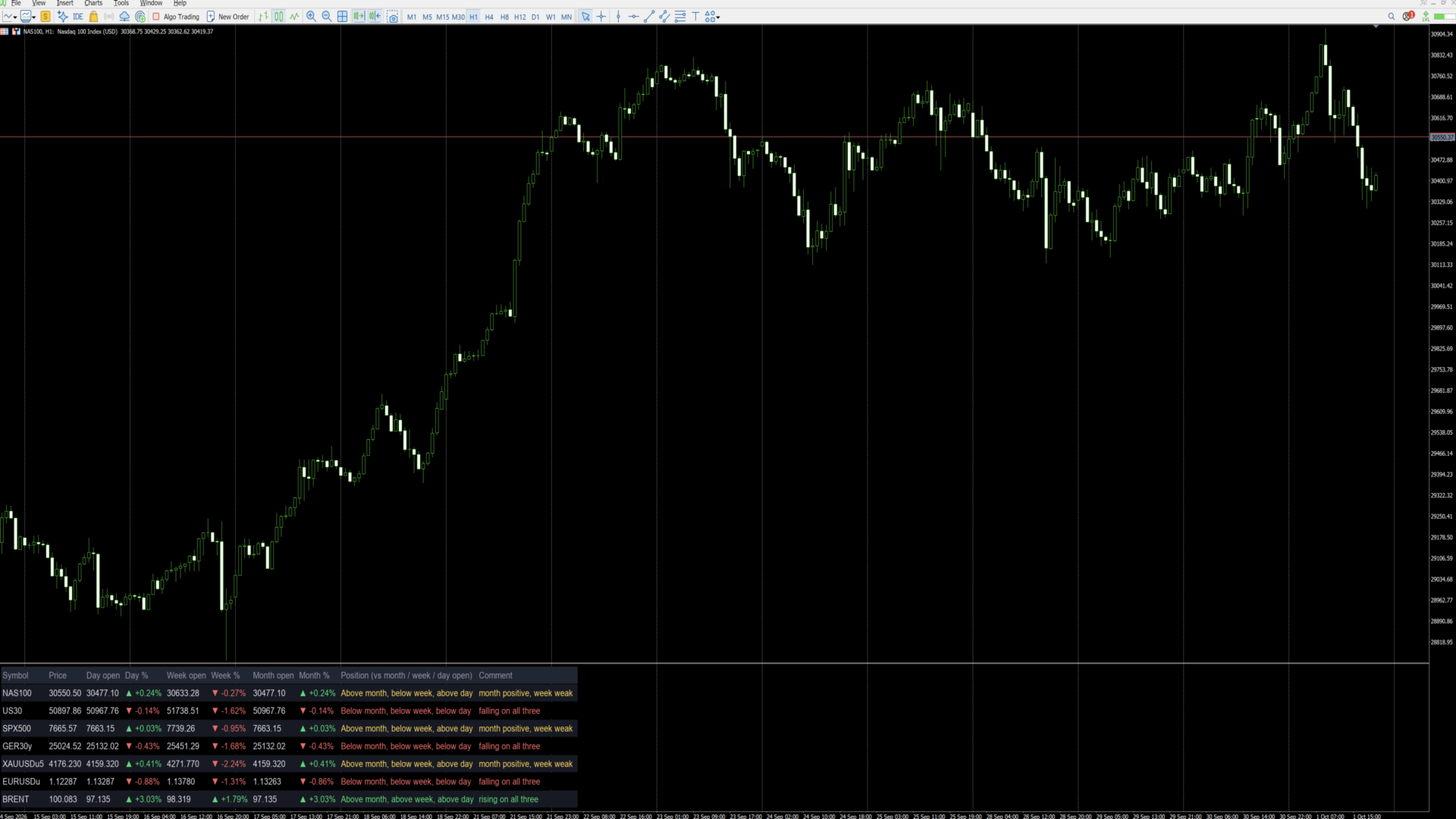
MiniBull Board is a compact watch-list dashboard for MetaTrader 5. For every symbol you choose it shows where the price stands today, this week and this month: the current price, the day / week / month opening price, the percentage change from each, and a short plain-language sentence that sums up the picture, such as *"Above month open, below week, below day — uptrend, pulling back today"*.

It answers the question every trader asks before looking at a chart: *"Is this market up or down — today, this week, this month?"* — for up to 8 symbols (or more) at a glance.

The board is descriptive only. It shows where price is relative to its opening levels; it does not forecast and does not trade.

---

## Key features

- **Day, week and month at a glance:** current price, opening price and % change for each period.
- **Plain-language summary per symbol:** a position sentence and a colour-coded comment on every row.
- **11 languages with automatic selection:** all on-screen text — column headers, sentences and number format — follows your MetaTrader terminal language, or the language you choose.
- **Your own symbol list or Market Watch:** type the symbols you want, in the order you want, or let the board take them from Market Watch.
- **Correct trading-day open:** the day open is taken at the real start of the trading day — 18:00 New York for indices, FX and metals, 00:00 UTC for Brent-type symbols — not at an arbitrary server midnight. Works with any broker time zone.
- **Sorting:** list order, or strongest first by day %, week % or month %.
- **Click to open:** click a symbol name and the chart switches to that symbol.
- **Clean, readable layout:** column widths are measured from the actual text, so nothing overlaps on any screen, font or DPI setting. Alternating row shading, auto-fit window height.
- **No blinking:** objects are created once and only their text and colour are updated, once per second.
- **Lightweight:** no buffers, no plots, independent of other indicators. Use it on any chart, in its own sub-window.

---

## Language support

The board speaks **11 languages**:

**English · Türkçe (Turkish) · Русский (Russian) · 中文 (Chinese) · Español (Spanish) · Português (Portuguese) · 日本語 (Japanese) · Deutsch (German) · Français (French) · Italiano (Italian) · 한국어 (Korean)**

With the default setting **Language = Auto** the board reads the language of your MetaTrader 5 terminal and uses it automatically — no setup needed. If your terminal runs in a language that is not on the list, the board uses English. You can also pick any of the 11 languages manually with the **Language** input.

What follows the language:

- column headers (for example *Day open / Gün açılış / Откр. дня / 日开盘*),
- the Position sentence and the Comment on every row,
- the "loading data" message,
- the decimal separator: comma in Turkish, Russian, Spanish, Portuguese, German, French and Italian (30411,50); point in English, Chinese, Japanese and Korean (30411.50).

Example of one row in three languages:

| Language | Position | Comment |
|---|---|---|
| English | Above month, below week, below day | month positive, week weak |
| Türkçe | Ayın üstünde, haftanın altında, günün altında | ay pozitif, bu hafta zayıf |
| Deutsch | Monat: darüber, Woche: darunter, Tag: darunter | Monat positiv, Woche schwach |

**Fonts for Chinese, Japanese and Korean:** when one of these languages is active and the Font input is left at Arial, the board switches automatically to a font that contains the characters (Microsoft YaHei, Meiryo, Malgun Gothic). If characters still show as boxes on your system, enter another installed CJK font in the **Font** input.

Note: the names of the inputs in the MetaTrader properties dialog are always shown in English. This is a MetaTrader limitation; everything displayed on the chart follows the selected language.

---|---|---|
| Column headers | Symbol, Price, Day open, Day %, Week open, Week %, Month open, Month %, Position, Comment | Sembol, Fiyat, Gün açılış, Gün %, Hafta açılış, Hafta %, Ay açılış, Ay %, Konum, Yorum |
| Position sentence | Above month, below week, below day | Ayın üstünde, haftanın altında, günün altında |
| Comment | uptrend, pulling back today | genel yön yukarı, bugün geri çekiliyor |
| Decimal separator | 30411.50 / +0.61% | 30411,50 / +0,61% |

Note: the names of the inputs in the MetaTrader properties dialog are always shown in English. This is a MetaTrader limitation; everything displayed on the chart follows the selected language.

---

## Installation and quick start

1. Copy the indicator to your terminal (MQL5 Market purchases and downloads are installed automatically).
2. Open any chart. The chart symbol and timeframe do not matter.
3. Drag **MiniBull Board** onto the chart. It opens in its own sub-window below the price chart.
4. In the **Inputs** tab:
   - choose your **Language**,
   - type your symbols into **My symbol list**, separated by commas, using the exact names your broker uses (for example `NAS100,US30,SPX500,GER40,XAUUSD,EURUSD,GBPUSD,UKOIL`),
   - set **Maximum rows** to at least the number of symbols in your list.
5. Press **OK**. The board fills in within a few seconds.

Weekly and monthly values may show "-" for a few seconds the first time a symbol is used, while the terminal downloads its history. They fill in automatically.

---

## Reading the board

Each row is one symbol. From left to right:

| Column | Meaning |
|---|---|
| **Symbol** | Symbol name. Click it to switch the chart to this symbol. |
| **Price** | Current bid price. |
| **Day open** | Opening price of the current trading day. |
| **Day %** | Change from the day open to the current price. |
| **Week open** | Opening price of the current week. |
| **Week %** | Change from the week open. |
| **Month open** | Opening price of the current month. |
| **Month %** | Change from the month open. |
| **Position** | Where the price is relative to the month, week and day open, from long-term to short-term. |
| **Comment** | One-line summary of the three periods together. |

**Colours and arrows**

- Green ▲ — price is above that opening price (positive change).
- Red ▼ — price is below that opening price (negative change).
- Grey "-" — data not yet available (history still loading, or the symbol name is wrong).

**What "month", "week" and "day" mean**

All comparisons use the **opening price of the current period**:

- **Month** — the first traded price of the current calendar month.
- **Week** — the first traded price of the current week (for US indices: Sunday 18:00 New York).
- **Day** — the first traded price of the current trading day (see *Day open source* below).

"Above month" therefore means the price is higher now than where it started this month, i.e. the month so far is positive. Previous-period highs, lows or closes are not used.

**The Comment column**

| Comment | Colour | Situation |
|---|---|---|
| rising on all three | green | above the month, week and day open |
| falling on all three | red | below the month, week and day open |
| uptrend, pulling back today | yellow | above month and week, below day |
| downtrend, recovering today | yellow | below month and week, above day |
| month positive, week weak | yellow | above month, below week |
| month negative, week recovering | yellow | below month, above week |

Yellow means a mixed picture: the periods point in different directions. The Position column always shows the full detail.

---

## Inputs

### Symbols

| Input | Default | What it does |
|---|---|---|
| **Symbol source** | My symbol list | *My symbol list*: the board shows only the symbols you type, in your order. *Market Watch*: the board takes the first symbols from your Market Watch window. |
| **My symbol list** | (example list) | Comma-separated symbol names, exactly as your broker writes them, including suffixes (e.g. `XAUUSD.m`, `EURUSDu`). Spaces after commas are ignored. Symbols that are not in Market Watch are added to it automatically. A misspelt name shows "-" on its row. |
| **Maximum rows** | 8 | Upper limit of rows. With *My symbol list* it should be at least the number of symbols you entered; with *Market Watch* it decides how many symbols are taken. |
| **Sort order** | List order | *List order*: as typed / as in Market Watch. *Day % / Week % / Month %*: highest change at the top, re-sorted every second. |
| **Day open source** | Session start | *Session start*: the day starts at the real beginning of the trading day — 18:00 New York for indices, FX and metals; 00:00 UTC for the symbols listed in the next input (Brent). This matches how these markets define their trading day. *Broker D1*: uses the broker's daily candle, which starts at the broker's server midnight. |
| **Symbols whose day starts 00:00 UTC** | BRENT,UKOIL,XBR | Any symbol whose name contains one of these words uses 00:00 UTC as its day start (ICE Brent opens at 01:00 London time = 00:00 UTC in summer). Add other names if needed. |

### Layout

| Input | Default | What it does |
|---|---|---|
| **Language** | Auto | *Auto*: the language of your MetaTrader terminal (English if it is not one of the 11). Or choose English, Türkçe, Русский, 中文, Español, Português, 日本語, Deutsch, Français, Italiano or 한국어. See *Language support*. |
| **Show the open prices** | true | *false* hides the Day / Week / Month open columns and leaves the price, the three % columns and the sentences — useful on narrow screens. |
| **Show the plain-language summary column** | true | *false* hides the Position and Comment columns for a numbers-only table. |
| **Font size** | 10 | Text size. Row height and column widths follow automatically. |
| **Font** | Arial | Any font installed on your computer. Column widths are measured from the real text, so any font works. Left at Arial, Chinese / Japanese / Korean switch automatically to a suitable font. |
| **Left margin / Top margin** | 12 / 8 | Distance of the table from the window edges, in pixels. |
| **Gap between columns** | 18 | Space between columns, in pixels. |
| **Row height** | 1.7 | Row height as a multiple of the text height. Larger = more spacious. |
| **Fit the window height to the table** | true | *true*: the sub-window height follows the number of rows. *false*: you can resize the window freely by dragging its border. |
| **Click a symbol to switch the chart to it** | true | *true*: clicking a symbol name changes the chart to that symbol. *false*: clicks do nothing. |

### Colours

| Input | What it colours |
|---|---|
| **Header** | Column titles |
| **Symbol / prices** | Symbol names and prices |
| **Above / positive** | Positive % values and "rising on all three" |
| **Below / negative** | Negative % values and "falling on all three" |
| **No data** | "-" and loading messages |
| **Mixed picture** | Yellow comments (periods disagree) |
| **Row shading** | Background of every second row |
| **Header background** | Background of the title row |

---

## Tips

- **Exact symbol names matter.** Copy them from Market Watch (right-click a symbol, *Specification*) if your broker uses suffixes.
- **Many symbols:** raise *Maximum rows*, set *Show the open prices* to false, and use a smaller font.
- **Daily routine:** sort by *Day %* to see the strongest and weakest markets of the day at the top.
- **Use it as a launcher:** keep the board on one chart and click through your symbols.
- **Time zones:** the trading-day start is calculated from UTC with the US daylight-saving rule, so the board is correct for any broker time zone and any user location.

---

## FAQ

**Why does a row show "-"?**
Either the terminal is still downloading the weekly/monthly history (wait a few seconds), or the symbol name does not exist at your broker (check the spelling and suffix).

**Why is my day % different from another platform?**
Platforms use different day starts. With *Session start* the board uses the market's own trading-day start (18:00 New York, or 00:00 UTC for Brent). Switch *Day open source* to *Broker D1* to use your broker's daily candle instead.

**Does it work on any chart timeframe?**
Yes. All values come from fixed daily, weekly, monthly and one-minute data, independent of the chart.

**Can I run two boards on the same chart?**
Use one board per chart. To watch more symbols, raise *Maximum rows*, or add the board to a second chart.

**Does it slow down my terminal?**
No. It refreshes once per second and only changes text that has actually changed.

**Does it trade or give signals?**
No. It is an information panel only.

---

## Important notes

- The board describes the current position of price relative to its period opens. It makes no prediction and gives no trading advice.
- Values depend on your broker's price data. Brokers may differ slightly in prices and trading hours.
- *Session start* needs one-minute history for each symbol of the current day; the terminal provides it automatically.
- Trading leveraged products carries a high level of risk.

---

## Version history

- **1.14** — Faster start: the board appears within a second (text measurements are cached).
- **1.13** — Removing the indicator now cleans all its objects from the chart, including leftovers of older versions.
- **1.12** — 11 languages and automatic language selection from the terminal. Automatic CJK fonts. Fix: objects no longer stay on the chart after the indicator is removed.
- **1.11** — The window name shows the version number ("MiniBull Board v1.11").
- **1.10** — New layout: measured column widths (no overlapping on any font or DPI), larger rows, row shading, auto-fit window height. New Position and Comment columns with a plain-language summary per symbol.
- **1.02** — Day open at the real start of the trading day (18:00 New York; 00:00 UTC for Brent-type symbols).
- **1.01** — Language option: English / Turkish.
- **1.00** — First release.

推荐产品
Free Slave Version – Remote Trade Receiver MT5. This is the FREE Slave version of our professional Remote Trade Copier system. It allows you to receive trades from a Master account running our full Copy Trade solution. Designed for simplicity and reliability, this version is read-only and cannot send trades or operate independently. Key Features: One-click setup – simply connect to the Master. Fast and accurate order copying. Supports all symbols, order types, and brokers. Minimal resource us
FREE
RelicusRoad CopyTrader 是一款适用于 MetaTrader 5 的免费跟单软件( trade copier )。它可以在同一台电脑上的 MT5 终端之间复制交易,让你只操作一个账户,其余账户按各自的仓位和风险自动跟随。 完整版本,无功能限制,无需试用期。 只交易一个账户,其余自动跟随。 MetaTrader 4: RelicusRoad CopyTrader MT4 运作原理 一个终端作为 主账户 (Leader)运行,负责发布其持有的订单;任意数量的终端可作为 跟随账户 (Follower)运行,镜像复制这些订单。终端通过 频道 名称配对,因此同一台电脑上可以同时运行多组互不干扰的跟单组合。 复制引擎以 200 毫秒为周期运行,因此跟随账户无需等待自己图表上出现新的报价,就能对新订单作出反应。 设置步骤 1. 将所有终端运行在 同一台电脑 或同一台 VPS 上。无法在两台不同的电脑之间复制。 2. 在每个终端中,将 EA 加载到一个图表上。任意品种和周期均可。 3. 在 EA 窗口的 Common 选项卡中勾选 Allow Algo Trading ,并在每个终
FREE
Trade Copier Local MT5 is a fast local trade copier for copying trades between multiple MT4 and MT5 accounts. One EA works in both Master and Slave modes. Simply select the required Copier Mode and use the same product on your MetaTrader terminals. Copy trades between: • MT5 → MT5 • MT5 → MT4 • MT4 → MT5 • MT4 → MT4 Perfect for: • Trading multiple accounts at once • Linking multiple trading accounts • Personal account mirroring • Signal providers • Account managers • Prop trading setups #
Limited-time free release: Adaptive SuperSmoother Trend Signals MT5 is free while MetaCoderStore collects trader feedback, comments, and feature requests for the first public version. Adaptive SuperSmoother Trend Signals MT5 plots a low-lag adaptive SuperSmoother line on price, adds optional ATR bands, and marks filtered bullish or bearish cross signals with EA-readable buffers. Use cases Follow a smoother adaptive trend line without adding heavy lag. Find price crosses that agree with the curre
FREE
Copy your MT5 trades to accounts anywhere in the world with the   MetaToolsLab Master EA . Unlike local copiers that only work between terminals on the   same   PC or VPS, MetaToolsLab uses a secure cloud relay — so you can broadcast your trades to followers across   different computers, VPS providers, brokers, and continents , with   sub-second delivery   and   no broker passwords . Whether you're a signal provider, a multi-account trader, or an account manager, the Master EA installs in about
FREE
Run one strategy across every account you trade. Revanche Miroir Local Copier is a free local trade copier that mirrors trades between MetaTrader 5 accounts on the same computer, in real time. One program plays both parts: set it as the Master on the account you trade, and as a Slave on each account that should follow. A complete copier, free. It copies on any symbol, in any account currency, and between different brokers. If the master falls silent, open trades are held rather than closed, and
FREE
Babel Assistant
Iurii Bazhanov
4.33 (9)
Babel assistant 1 MT5 净额制机器人 "Babel_assistant_1" 使用 ZigZag 指标在 M1、M5、M15、H1、H4、D1 和 W1 图表周期上生成斐波那契水平线,并计算买入和卖出趋势的强度。当突破指定的 4.925 趋势水平时,它会使用 "Lot for open a position" 设置开仓。然后,Babel 会在某些斐波那契水平上放置挂单,并设置指定的止损(Stop Loss)和止盈(Take Profit)线。屏幕上会显示当前持仓、交易和趋势的运行结果。 手动增加 0.02 手或更多的仓位会被机器人视为其自身挂单的触发。0.01 手的挂单或市价单在执行时只会改变持仓量。 免责声明: 以下材料仅供信息和教育参考。通过使用本产品(外汇市场自动交易程序 Babel assistant 1),您将完全承担未能实现预期利润的风险以及损失所有投资资金的风险。过去的业绩、测试和优化结果并不保证未来的收益。 Babel 机器人的参数: Indicator Mode Only true :机器人仅显示斐波那契水平和趋势概率,不执行交易。 false :
FREE
CosmiCLab FIBO
Kirils Subins
CosmiCLab SMC FIBO CosmiCLab SMC FIBO is a professional trading indicator designed for traders who use Smart Money Concepts (SMC), market structure analysis and Fibonacci retracement levels. The indicator automatically detects market swings and builds Fibonacci levels based on the latest impulse movement. It also identifies market structure changes such as BOS (Break of Structure) and CHOCH (Change of Character), helping traders understand the current market direction. CosmiCLab SMC FIBO also pr
GOM Trade Manager
Wannapach Chinnaprapa
GOM Trade Manager helps you execute trades the way you want it. Works on all instruments Forex, Commodities, & Crypto. It helps you with lot calculations, spread addition and balance calculations so you can just focus on actual trading. For full automatic planned management, stackable triggers and spread widening protection >> check out GOM Trade Manager Pro . ------------------------------------------NOTABLE FEATURES------------------------------------------ You set everything based on bid
FREE
Supply and Demand indicator powered by advanced multi-timeframe fractal algorithms, Zone Merging technology, and full EA readiness. -  Finding the exact areas where institutional buying and selling occur is the key to successful trading. Advanced Supply & Demand Zones Simple  takes the guesswork out of chart analysis. By utilizing a dual-layered fractal calculation (Fast and Slow points) combined with dynamic ATR scaling, this indicator pinpoints high-probability reversal and continuation zones
FREE
AXR Market Check
Stoyan Kirilov Karlov
5 (2)
AXR Market Check 是一款免费的 MetaTrader 5 市场就绪度指标,适合希望一眼了解当前图表环境的交易者。 它属于 AXR 工具系列。如需获取更新和联系选项,请使用官方 MQL5 页面: AXR MQL5 Channel: 产品更新、发布说明和新的 AXR 工具 Telegram: 打开卖家资料 ;Telegram 联系方式写在资料说明中。 它将交易时段状态、新闻时间、日内波动区间、波动率、点差压力、市场结构和每日 Profile 关键水平整合到一个清晰的可视化仪表板中。 核心问题: 当前市场是否足够活跃、清晰且值得现在关注? 它为什么有帮助 在交易形态变得重要之前,市场环境更重要。图表可能看起来很有机会,但当前时段可能较弱,日内区间可能已经过度消耗,波动率可能过低,点差可能偏高,或者重要新闻可能即将到来。 AXR Market Check 帮助你更快读取这些条件。它为图表提供结构化的第一眼判断,让你决定注意力是否值得投入。 将它作为第一步市场检查:确认环境,理解交易时段,关注即将到来的新闻,读取区间和波动率,然后继续执行自己的交易计划。 市场就绪度仪表板
FREE
CopyTrader Pro FAST MT5 — FREE Real-Time Trade Copier | MT4 ↔ MT5 Cross-Platform | 20ms Latency CopyTrader Pro FAST is a professional trade copier Expert Advisor that copies trades between MetaTrader terminals in real time using a high-speed file-based communication system. No VPS, no network setup, no DLL — just attach and copy. FREE VERSION : Copies up to 1 trade at a time. Upgrade to the full version, Copy Trader Pro FAST MT5 , for unlimited copying. Key Features 20ms refresh rate — in
FREE
Calmer chart context, kept practical Northstar Flow Candles MT5 is a chart-window indicator that presents Heikin Ashi candles with a five-state trend context. It is designed for traders who want a quieter view of price while keeping the native chart available as an optional reference. Visual-only indicator: Northstar Flow Candles MT5 does not place trades and does not send popup, push, or email notifications. What appears on the chart Five candle states: strong bullish, bullish, balanced, bearis
FREE
GDS Renko Pip ST Chart - Pip-Based Renko Chart Indicator for MetaTrader 5 GDS Renko Pip ST Chart is a pip-based Renko chart indicator for MetaTrader 5. It helps traders build and study cleaner Renko price movement using a practical fixed pip or point-based brick structure. This tool is designed as a Renko chart foundation for manual analysis. It does not predict the market, does not generate buy or sell signals and does not decide whether a trade should be opened. Renko EDGE EA Golden Delta | A
SessionRangeBox
Alexandre Vincent Traber
Session Range Box — Session High/Low Visualizer Overview Session Range Box draws live, color-coded rectangles on your chart marking the high and low reached during the Asia, London, and New York trading sessions. As each session unfolds, its box grows in real time to reflect the range built so far, then locks in place once the session closes. A simple on-chart control panel lets you show or hide any session instantly, so you can study one session's range in isolation or view all three overlaid a
FREE
RenkoExpert
Andrey Goida
3.67 (6)
Renko Expert Advisor based on Renko bar simulation.    The EA has two options for building Renko bars. Classic and ATR. In the classic version, renko bars are marked with areas on the main chart; in the ATR version, renko bars are modeled and drawn in the indicator window. Modeling renko bars inside the EA allows you to optimize the robot better than drawing renko bars offline. Renko EDGE EA   Set file Golden Delta | Algo Trading Research Updates, research and new developments: https://www.mql5
FREE
AliSessions
Alexandra Voicu
5 (2)
AliSession Highlight is an indicator that highlights a specific period of time according to your preferences. It can help you gain a clear vision of price movements into a specific session, the range of a session, and also to easily identify the high and low of the session. You can use it on any currency pairs, indices, and any timeframes. Settings: Start Hour: Set the hour to initiate the session highlight. Start Min: Set the minute for the start of the session highlight. End Hour: Specify the
FREE
供需订单区块: “供需订单区块”指标是基于智能资金概念的复杂工具,这对于外汇技术分析至关重要。它专注于识别供需区域,这些是机构交易者留下重要足迹的关键区域。供应区表示卖单,需求区表示买单,帮助交易者预测价格走势的潜在反转或减速。该指标采用了巧妙的算法,结合了结构突破(BoS)和公平价值差(FVG)组件。BoS检测市场中的干扰,确定潜在的订单区块,而FVG考虑了公平价值差以提高准确性。该工具提供了这些条件的视觉表现,通过突出显示潜在的订单区块并提供市场动态和转折点的见解,帮助交易者做出决策。其用户友好设计使其适用于具有各种技术专业知识水平的交易者,为高级分析提供了全面的解决方案。 特点: - 智能资金概念:基于机构交易策略。 - 供需区域:识别卖单和买单区块。 - 自定义订单区块绘制类型。 - 算法复杂性:BoS检测市场中的干扰,FVG考虑公平价值差。 - 视觉表示:在图表上突出显示潜在的订单区块。 - 用户友好:适用于各种专业知识水平。 - 全面分析:集成BoS和FVG以获取见解。 - 理性决策:帮助预测反转和减速。
FREE
Stocastic Alarm Osw MT5
William Oswaldo Mayorga Urduy
**STOCHASTIC ALARM (随机指标报警)** 此指标的功能与普通的随机指标(Stochastic)相同,保留了所有常规设置,如 K、D、放慢(Slowing)、颜色、水平线以及其他可用于自定义运行和可视化的选项。 此外,它还具有额外功能,允许在上限和下限(例如 80 和 20)设置报警。通过直接在图表上移动蓝色和红色的线条,可以轻松调整所需的上下限水平。 它还允许您选择是使用随机指标的 MAIN(主线)还是 SIGNAL(信号线)数值来触发警报,从而适应您使用指标警报的方式。 此外,还可以开启或关闭在达到预期数值时直接在图表上生成箭头(无论是在上限还是下限)的功能。 别忘了查看我为 MetaTrader 4 和 MetaTrader 5 开发的其他指标、专家交易系统(EA)和工具。
适用于MT5平台的“WPR双均线指标”,无重绘。 - WPR本身就是短线交易的最佳震荡指标之一。 - “WPR双均线指标”允许您查看WPR震荡指标的快慢均线。 - 该指标能够帮助您及早发现价格回调。 - 此指标的参数设置非常简单,适用于任何时间周期。 - 您可以在图片中看到买入和卖出的入场条件。 - 通过 PC 和移动设备接收 WPR MAs 交叉警报。 买入信号示例: (1) - 如果快均线向上穿过慢均线,且WPR值低于-50:开立买单。 (2) - 一旦WPR值进入超买区域,高于-20:平仓。 卖出信号示例: (1) - 如果快均线向下穿过慢均线,且WPR值高于-50:开立卖单。 (2) - 一旦 WPR 值低于 -80 进入超卖区域:平仓卖单。 点击这里查看高质量的交易机器人和指标! 这是仅在 MQL5 网站上提供的原创产品。
Binary Profit Gainer
Myo Min Aung
5 (2)
This indicator is especially for the binary trading. Time frame is 1 minutes and exp time 5 or 3 minutes only. You must be use martingale 3 step. So you must put lots size is 10 % at most. You should use Mt2 trading platform to connect with my indicator to get more signal without human working. This indicator wining rate is over 80% but you may get 100% of profit by using martingale 3 step. You should use MT2 Trading Platform to connect meta trader platform and binary platform . You can get mt2
FREE
Auto Trade Copier 被设计成多的MT5账户/端子,绝对精度之间复制交易。 有了这个工具,你可以充当要么提供商(源)或接收(目的地) 。每一个交易行为将由提供商克隆到接收器,没有延迟。 以下是亮点功能:     在一个工具提供商或接收器之间转换角色。     一个供应商可以交易复制到多个接收者的账户。     绝对兼容MT5的顺序/位置管理规则,该规则允许与调整容积为每个符号只有一个位置。     自动识别和同步代理之间的符号后缀。     允许高达5特殊符号的设置(即: GOLD - > XAUUSD ,等等) 。     多lotsize设置选项。     允许过滤的订单类型将被复制。     关断端子或电源关闭后恢复以前的设置和状态。     实时控制面板。     使用方便,界面友好。 用法: - 安装工具提供的MT5终端,并选择角色“提供者” ,然后启用它。 - 安装工具接收的MT5终端,并选择角色的“接收器” ,输入提供商的帐号,然后启用它(你可以有很多接收者的帐户,只要你想) 。 设置和参数:      特殊符号设置(菜单) : 配置高达5对特殊
Tired of false signals? Trade with reliable buy & sell arrows! Download now  and see how it works !  High-Performance Signals Suitable for trend-following or trend trading Never repaints, recalculates, or backpaints signals This is   FREE / DEMO /   version and  works only on EURUSD M15, M5“  (demo version; no suffix/prefix brokers). Test it   FREE  now - see real results! TREND REVERTING PRO full version here :  Get accurate arrows on every setup! Trade safely - full version work
FREE
HiperCube VIX
Adrian Lara Carrasco
Welcome to HiperCube VIX Discount code for 25% off at Darwinex Zero: DWZ2328770MGM This indicator provide you a real info of market of volume of sp500 / us500 Definition  HiperCube VIX  known as the CBOE Volatility Index, is   a widely recognized measure of market fear or stress . It signals the level of uncertainty and volatility in the stock market, using the S&P 500 index as a proxy for the broad market. The VIX Index is calculated based on the prices of options contracts on the S&P 500 inde
FREE
TradeInfos
Dustin Ricardo Pierenz
Track your spread and all position PnLs (Buy & Sell) in real-time – stay in control of your trades at a glance! Features: Real-time spread display (in pips) Total Buy position PnL Total Sell position PnL Clean, non-intrusive display layout Works with all symbols and timeframes Perfect for: Scalpers needing quick spread awareness Day traders monitoring long/short performance Risk managers optimizing exposure No need to switch tabs or rely on external tools — everything you need is visible at
FREE
Order Blocks Scalper
Allan Munene Mutiiria
4.43 (7)
The Order Blocks Scalper EA is a next-generation, fully automated trading tool that identifies and trades key order block zones with precision and speed. Designed for traders seeking consistent entries and exits, this EA harnesses advanced market structure analysis to detect consolidation ranges, breakouts, and impulsive price movements, enabling optimal trade execution. Key Features Smart Order Block Detection : Identifies bullish and bearish order blocks based on institutional order flow. Each
FREE
Dynamic DOM
Artem Bezmenov
Instructions for the Dynamic_DOM_Labels indicator Dynamic_DOM_Labels is a professional analytical tool for the MetaTrader 5 terminal, designed to analyze the Order Flow in real time. The indicator connects directly to the broker's Depth of Market /DOM, finds large limit orders from buyers (Buy Limit) and sellers (Sell Limit) and projects them onto the work schedule. The tool is designed specifically for liquid markets such as Gold (XAUUSD) and major currency pairs (for example, GBPUSD), where la
FREE
RandomChoice
Aleksei Lesnikov
5 (1)
Expert capable of generating profit by opening positions randomly. Shows good results in long-term trading – on timeframes from H12. Features Fully automatic mode is available. Positions are opened randomly. Martingale is applied – if the previous position closed with a loss, the current one is opened with a volume that compensates for that loss. Parameters Mode – Expert's operating mode: Automatic – automated (recommended); Manual – manual. In automatic mode, the Expert does not require any p
FREE
EA13 Gold Whale Hunter
Nhat Tien Duong
3 (1)
Gold Whale Hunter EA (EA13_M3RX): The Prop Firm Survivor Are you tired of EAs that only work on "Zero Spread" accounts but fail miserably on real Prop Firm conditions? Meet Gold Whale Hunter , the EA designed specifically for XAUUSD (Gold) on the M15 timeframe. It doesn't scalp for pennies; it hunts for the big trends.   ENTER YOUR KEY HERE: [  EA13_99999D_TANINCODER_5946594662422 ] -- MANDATORY: ALLOW WEBREQUEST TO ACTIVATE THE BOT To verify your License Key, the Bot needs permission
FREE
SmartPullback
Samuel Jesus Fidalgo Lopez
Smart Pullback Pro v4 High-Probability Pullback Indicator for MT5 Smart Pullback Pro v4 is a professional trend-following indicator for MetaTrader 5 that identifies high-probability pullback entries in real time. It automatically plots entry zones, Stop Loss, and Take Profit levels directly on the chart, giving traders a complete visual trading plan with every signal. How It Works Smart Pullback Pro v4 combines multiple confluence filters to eliminate low-quality signals and focus only on va
FREE
该产品的买家也购买
SMART TREND TRADING SYSTEM — 特别优惠 您的交易系统、自动化 EA,以及配套培训与支持。 以 99 美元购买适用于 MT5 的 Smart Trend Trading System,即可 免费获赠 Smart Universal Expert Advisor ,用于自动执行系统的交易信号。 STTS 将趋势方向、入场和出场信号、反转区域及重要价格水平集中呈现在图表上。您可以根据系统手动交易,也可以连接随附的 EA,按照您选择的设置自动执行交易。 当前 99 美元的价格适用于接下来的 30 次购买。此后,价格将上调至 149 美元。 您的完整产品套装 购买后,您将获得: • 适用于 MT5 的 Smart Trend Trading System。 • Smart Universal Expert Advisor — 免费赠送。 • 完整的 STTS PDF 用户手册。 • STTS 官方在线课程。 • 逐步安装与设置指导。 • 私人客户社区访问权限及支持服务。 您不仅能获得工具,还能按照清晰的步骤学习如何使用它们。 一套系统,四种交易思路 STTS
Trend Sniper X
Sarvarbek Abduvoxobov
4.9 (39)
Trend Sniper X 是一款适用于 MetaTrader 5 的多周期趋势跟踪指标,可帮助交易者清晰精准地识别趋势方向和潜在的反转点。 适用于 MT4: https://www.mql5.com/en/market/product/193245 价格信息: 当前价格为促销价,随着后续更新和新功能的推出,价格可能会有所变动。 赠品优惠: 购买后联系作者,即可免费获取该指标的 Auto-Trade Assistant EA(自动交易助手 EA)。 Code2Profit 频道 通过多时间框架分析掌控市场! 如何使用 Trend Sniper X 最大化您的胜率:核心规则与交易时段技巧 技术规格 平台 MetaTrader 5 指标类型 多时间周期趋势指标 运行时间周期 任何图表时间周期,可独立选择更高的时间周期 (M1–MN1) 主要交易品种 外汇、黄金 (XAUUSD) 及其他差价合约 (CFD) 推荐账户 任何账户类型 可视化 彩色趋势蜡烛 (买入/卖出/微弱/变化) + 买入/卖出箭头 附加模块 交易时段方框 (悉尼、东京、伦敦、纽约) 主要功能 多时间周期趋势分析: 直接在
ARIPoint
Temirlan Kdyrkhan
1 (4)
ARIPoint is a powerful trading companion designed to generate high-probability entry signals with dynamic TP/SL/DP levels based on volatility. Built-in performance tracking shows win/loss stats, PP1/PP2 hits, and success rates all updated live. Key Features: Buy/Sell signals with adaptive volatility bands Real-time TP/SL/DP levels based on ATR Built-in MA Filter with optional ATR/StdDev volatility Performance stats panel (Success, Profit/Loss, PP1/PP2) Alerts via popup, sound, push, or email Cu
Zoryk Gold
Reda El Koutbane
5 (15)
折扣将在 24 小时后结束——下一价格为 69 美元 ZORYK — MetaTrader 5 专用高级 XAUUSD 黄金信号系统 你一定熟悉这种感觉。 你花了很多时间分析黄金,等待合适的入场机会。终于开仓后,价格却立刻朝相反方向移动。你过早平仓、移动止损,或者只犹豫了几秒钟。随后,市场却在没有你的情况下到达了你原本预期的目标。 问题并不总是方向判断错误。 真正的问题是缺乏确定性。 你不知道准确的入场位置在哪里。 你不知道什么时候交易逻辑已经失效。 你不知道应该先锁定较近的利润,还是继续等待更大的行情。 你也不知道当前信号是否足够强,还是自己只是在强行寻找交易机会。 黄金市场变化非常快。一个没有明确计划的好想法,可能在几秒钟内变成错误的交易决定。 ZORYK 正是为了解决这个问题而开发。 什么是 ZORYK ZORYK 是一套完整的 XAUUSD 黄金信号与交易计划系统,专门为 MetaTrader 5  和 M5 时间周期 开发。 它不是一个只显示 BUY 或 SELL 箭头,然后让你独自决定其余所有内容的简单指标。 每个确认后的信号都可以在图表上显示完整的可视化交易计划,包
SuperScalp Pro
Van Minh Nguyen
4.66 (35)
SuperScalp Pro - Professional Multi-Layer Confluence Scalping System SuperScalp Pro 是一款高级剥头皮交易指标,在经典 Supertrend 的基础上加入了多个智能确认过滤器。它可以帮助您识别概率更高的 Buy/Sell 交易机会,同时显著减少虚假信号。 清晰的 Buy 和 Sell 箭头会直接显示在图表上,基于 ATR 的 Stop Loss 和 Take Profit 水平会实时自动计算。 购买后,请联系我获取设置指导和推荐配置。 使用 SuperScalp Pro Auto Trader 轻松实现信号自动化: [Auto Trader] 下载推荐设置文件: [Set File] 完整文档请参阅产品博客: [User Guide] 加入官方频道获取最新更新: [Official Channel] SuperScalp Pro 如何工作? 只有当多个确认层同时一致时,指标才会生成交易信号(趋势 + 动能 + 成交量 + 波动率)。 您可以手动交易,也可以连接 SuperScalp Pro Auto Tr
GoldenX Entry MT5
VividMind Digital Solutions
5 (16)
GoldenX Entry 是一款用于 MT5 的指标,包含自适应 Smart Entry Trend 算法、信号评分系统、市场状态识别器以及波动率过滤器。每个信号都包含计算得出的入场位、三个止盈位(TP1、TP2、TP3)以及止损位。它基于多个分析层构建,旨在适应不同市场条件,将多层分析系统与内置优化器及统计跟踪系统相结合。该指标基于风险收益比(RR)指标和历史交易行为提供量化分析。 开始使用非常简单——在所选时间周期上运行优化器,然后在图表上开始使用该指标。 核心功能 GoldenX Entry 将信号引擎与内置交易管理及历史统计跟踪整合在同一图表中: - 内置优化器: 优化器可在图表上单击运行。它通过两阶段搜索流程测试200种参数组合——先进行探索,再进行优化——并在完成后自动应用选定配置。结果会按时间周期缓存,因此当返回已优化的周期时,会立即恢复相同设置。 - 黄金品种自动周期识别: 将指标加载到任何 XAUUSD 图表(M1 到月线)。系统会自动识别当前周期并加载对应预设。共包含9个时间周期配置文件,专为黄金在标准周期上优化设计。切换周期时,参数会自动调整。 - 资金参考面
Gann Made Easy MT5
Oleg Rodin
5 (10)
Gann Made Easy   是一个专业且易于使用的外汇交易系统,它基于使用先生理论的最佳交易原则。 W.D.江恩。该指标提供准确的买入和卖出信号,包括止损和获利水平。您甚至可以使用推送通知在旅途中进行交易。 购买后请联系我,即可免费获得交易指导和超棒的额外指标! 您可能已经多次听说过江恩交易方法。通常 Gann 的理论不仅对于新手交易者而且对于那些已经有一定交易经验的人来说都是非常复杂的东西。这是因为江恩的交易方法在理论上并不那么容易应用。我花了几年时间来完善这些知识,并将最好的原则应用到我的外汇指标中。 该指标非常易于应用。您所需要的只是将其附加到您的图表并遵循简单的交易建议。该指标不断进行市场分析工作并寻找交易机会。当它检测到一个好的入口点时,它会为您提供一个箭头信号。该指标还显示止损和获利水平。 换句话说,当您像先生一样进行交易时,该指标会为您提供最佳江恩建议。江恩亲自告诉你此时此刻该做什么。但最好的部分是您不需要了解任何有关江恩交易原则的知识,因为该指标会为您完成整个市场分析工作。
Neuro Poseidon MT5
Daria Rezueva
4.75 (52)
Neuro Poseidon is a new indicator by Daria Rezueva. It combines precise trading signals with adaptive TP/SL levels - creating best possible trades as a result! Message me and get  Neuro Poseidon Assistant  as a gift to automize your trading process! What makes it stand out? 1. Proven profitability on all assets and timeframes 2. Only confirmed BUY and SELL signals present on the chart 3. Adaptive TP & SL levels generated by the software for each trade 4. Easy to understand - suitable for al
SMC Intraday Formula
VividMind Digital Solutions
5 (26)
让我们先坦诚一点。 没有任何一个指标可以单独让你实现盈利。如果有人告诉你可以,那他是在向你兜售一个梦想。任何显示完美买卖箭头的指标都可以被做得看起来毫无瑕疵——只需要放大历史中的某一段并截取成功交易的截图。我们不会这样做。 SMC Intraday Formula 是一个工具。 它为你读取市场结构,标记出概率最高的价格区域,并用简单直白的语言准确告诉你当前智能资金的行为轨迹。你仍然需要做决定。你仍然需要执行交易。但现在,你是带着精确性执行,而不是靠希望。 我们已经在黄金(XAUUSD)以及主要外汇货币对的日内剥头皮交易中使用该指标将近三年。这是我们在 M1、M5、M15 和 M30 上的日常主力工具。它之所以有效,是因为它不试图预测未来——它展示的是当前正在形成的高概率交易机会,并解释 为什么 。 它与其他所有指标有什么不同? 大多数交易指标只做一件事。移动平均线交叉。振荡指标触及某个水平。出现一个箭头。你进场交易。你亏损。你责怪指标。重复。 SMC Intraday Formula 将多个机构级概念整合为一个统一的市场解读: - 斐波那契共振引擎 不只是普通的斐波那契水平——该指标
M1 Sniper MT5
Oleg Rodin
5 (7)
M1 SNIPER   是一款易于使用的交易指标系统。它是一个专为 M1 时间框架设计的箭头指标。该指标可以作为独立的系统在 M1 时间框架下进行剥头皮交易,也可以作为您现有交易系统的一部分使用。虽然该交易系统专为 M1 时间框架交易而设计,但它也可以用于其他时间框架。我最初设计此方法是为了交易 XAUUSD 和 BTCUSD。但我发现这种方法在其他市场交易中也同样有用。 指标信号既可以顺势交易,也可以逆势交易。我教授一种特殊的交易技巧,帮助您利用指标信号进行双向交易。该方法基于使用特殊的动态支撑位和阻力位区域。 购买后,您可以立即下载 M1 SNIPER 箭头指标。此外,我还为所有 M1 SNIPER 工具用户免费提供下方屏幕截图所示的 Apollo Dynamic SR 指标!这两个指标的组合可以帮助您更轻松、更准确地利用 M1 时间框架进行交易。 购买后请联系我,免费获取交易提示和奖励指标! 祝您交易成功!
Entry Points Pro for MT5
Yury Orlov
4.52 (151)
传奇回归:Entry Points Pro 10。 这款传奇指标曾 3 年稳居 MQL5 Market 前三,如今全面重启。 数百条热情好评(两个版本合计 589 条),每天有数千名交易者用它交易,演示版下载 31,000+   MT4+MT5  次。 五年来我读过你们的每一条评价——在第 10 版里,我没有给出许诺,而是把答案直接做进了产品。指标作者自 1999 年入市, 珍视诚信、自己的声誉和自己的客户 。 Entry Points Pro 给出的入场信号严格不重绘。 而且这一次不再只是作者的一面之词,而是可验证的事实:确认信号只在 K 线收盘后标出,自动化测试记录到 零重绘 (在 EURUSD、XAUUSD 和 BTCUSD 上共 2,486,568 次不变量检查——0 次违规)。测试方法完全公开——您可以在策略测试器中自行复现。 购买后请务必第一时间给我发私信。 我会发给您 扩展版说明书《交易者圣经》 ——使用本指标交易的完整指南——并告诉您如何免费获得 赠品:市场扫描器 ,它能同时分析多个品种和多个时间周期,并在一个界面上显示 Entry Points Pro 此刻在哪里表现
FiboSniper Pro
Van Minh Nguyen
5 (3)
FiboSniper Pro – Multi-Filter Fibonacci System with Auto SL/TP and Control Panel FiboSniper Pro 是一款技术指标,将动态 Fibonacci Envelopes 与多个确认过滤器相结合,以生成经过筛选的 Buy 和 Sell 信号。Fibonacci 水平基于 Moving Average 和 ATR 计算,然后通过 ADX、EMA、RSI、ATR、Volume、Time 和 Candle 结构进行过滤。该指标直接在图表上显示基于 ATR 自动计算的 Stop Loss 和 Take Profit 水平,并提供交互式控制面板,以便快速调整参数。 购买后,请联系我以获取推荐的设置文件和详细使用说明。 使用 Auto Trader X 自动执行 FiboSniper Pro 信号: [Auto Trader X] 用户指南和设置文件: [Click here] 加入官方频道获取最新更新: [Click here] 专为偏好结构化入场和清晰风险管理的交易者设计,适用于 Gold (XAUUSD)、B
全新王者降临 - 指标 + 订单管理提示(TP1 + TP2 + TP3)+ 可选 Telegram 信号发送器 INCLUDED(免费) (完整交易与信号系统) 我们最强的黄金 EA: Gold Slayer 该指标包含先进的交易策略、可自定义订单管理系统,以及结合 Envelope 扩展的均值回归系统,并通过 RSI 等多重智能确认过滤器进行验证,以捕捉高概率反转入场机会,提供 BUY 与 SELL 信号。 你不仅能够学习如何交易,还能学会如何高效管理多个仓位,并利用之前盈利的持仓来覆盖亏损交易。 专为 M5 周期打造并优化,在 BTCUSD 和 XAUUSD 上表现尤为出色,因为这些市场的流动性能够让信号更加干净、可靠。 该指标会自动生成清晰的多头(Long)与空头(Short)信号,同时基于 ATR 自动计算入场位、止损位和止盈位,让风险管理从一开始就融入系统之中。 多 TP 系统设有三个渐进式目标位,你可以在 TP1 锁定部分利润、在 TP2 继续持仓,并在更大的行情中将仓位持有至 TP3,而这正是平均风险回报比真正开始大放异彩的地方。 默认参数开箱即用,已经针对稳定表现进行
Auto Optimized SpeedAngle 是一款机构级的动量向量化系统,通过持续的前瞻优化(Walk-Forward Optimization, WFO)彻底消除了曲线拟合(curve-fitting)。该指标没有采用在市场 状态转换时容易失效的静态输入参数,而是利用出样外验证(Out-of-Sample, OOS) dynamically 动态重新校准设置,从而确保显示的 信号代表真正的统计优势,而非历史巧合。 核心机构级架构 前瞻优化引擎(Walk-Forward Optimization Engine): 核心算法持续扫描数千种回溯周期(lookback)与阈值组合,严格将数据划分为样本内(in-sample)和样本外(out-of-sample)。只有当参数配置在未知数据环境中证明具备数学优越性时,系统才会对其进行 adoption。 量化目标函数(Quantitative Objective Functions): 优化引擎不一味追求绝对毛利,而是聚焦于机构级的稳定性指标。用户可针对系统质量数(SQN)、期望值(每笔交易的平均 R 倍数)或净 R 值进行优化,从而优
Unix Scalper
Issam Kassas
4 (4)
UNIX SCALPER — 特别优惠 发现交易形态,看清交易计划,选择执行方式。 以 99 美元购买适用于 MT5 的 UNIX Scalper,即可免费获赠 Smart Universal Expert Advisor,用于自动执行指标的交易信号。 UNIX Scalper 将市场分析、BUY/SELL/WAIT 决策以及 Entry、Stop Loss、TP1 和 TP2 水平集中在一个清晰的面板中。您可以按照交易计划手动交易,也可以连接随附的 EA,按照您选择的设置自动执行交易。 当前 99 美元的价格适用于接下来的 30 次购买。此后,价格将上调至 149 美元。 您的完整产品套装 购买后,您将获得: • 适用于 MT5 的 UNIX Scalper。 • Smart Universal Expert Advisor — 免费赠送。 • 完整的 UNIX Scalper PDF 用户手册。 • UNIX Scalper 官方在线课程。 • 逐步安装与设置指导。 • 私人客户社区访问权限及支持服务。 您不仅能获得工具,还能按照清晰的步骤学习如何使用它们。 看清信号与交
Welcome to ENTRY IN THE ZONE AND SMC MULTI TIMEFRAME / SPECIAL BENEFIT FOR OUR MQL5 CUSTOMERS  FREE ACCESS TO THE NEW TOOL —COMING SOON —   Learn More on Our Official Website : https://www.fableedge.net Entry In The Zone and SMC Multi Timeframe is a real-time market analysis tool based on Smart Money Concepts (SMC), designed to analyze market structure, price direction, and key trading zones. It supports both Single-Timeframe Analysis and Multi-Timeframe Analysis, providing a clearer view of the
Gold Entry Sniper
Tahir Mehmood
5 (21)
Gold Entry Sniper – 专业多周期ATR黄金交易仪表盘,适合黄金剥头皮与波段交易 Gold Entry Sniper 是一款先进的 MetaTrader 5 指标,旨在为 XAUUSD 及其他品种提供精准的 买/卖信号 。基于 ATR 移动止损逻辑 和 多周期分析仪表盘 ,适合剥头皮交易者与波段交易者,帮助识别 高概率黄金入场点 。 主要功能与优势 多周期信号分析 – 同时显示 M1、M5、M15 趋势方向。 基于ATR的动态止损 – 根据波动性自动调整。 专业图表仪表盘 – 展示信号状态、ATR水平、线性回归中线和交易方向。 清晰买卖标记 – 自动箭头与文字标签提示。 离场提示与交易管理 – 自动检测离场信号锁定利润。 全面自定义 – 调整仪表盘位置、颜色、字体及参数。 专为黄金优化 – 适用于 M1至M15 黄金剥头皮 ,也适合外汇、指数与加密货币。 为什么选择 Gold Entry Sniper? 为追求 快速、精准、可视化交易决策 的交易者打造,ATR 与多周期确认结合,帮助你抓住 最佳黄金入场点
Tokyo mt5 Indicator
Vasiliy Strukov
5 (2)
Tokyo Indicator(东京指标)直观地展示了趋势方向、潜在交易信号及市场状况。 其采用颜色编码的阶梯式趋势线,以蓝色标识看涨阶段,以洋红色标识看跌阶段。配套的方向箭头会在趋势发生变化时,标示出潜在的买入与卖出机会。 内置的综合仪表盘将当前信号、市场倾向、动能、波动率及信号质量整合于同一视图中,方便交易者在观察价格走势的同时评估指标数据,无需在不同面板间切换。 凭借清晰的图表显示和简洁的市场概览,Tokyo Indicator 支持以系统化的方式进行趋势分析与交易确认。 适用于任何时间周期及各类交易品种,尤其适合黄金交易。 购买后请立即联系我,以获取专属赠品!您可以免费获得我们的“强力支撑与趋势扫描”(Strong Support and Trend Scanner)指标,请私信我! 设置说明与使用手册请见此处。 请注意:我不会在 Telegram 上出售我的 EA 或特殊参数设置(set files);我的 EA 仅在 Mql5 平台上提供,而参数设置文件仅在我的博客(此处链接)上发布。请务必警惕诈骗,切勿从他人处购买任何参数设置! 设置 ShowHUD —— 在图表上显示
Atomic Analyst MT5
Issam Kassas
4.47 (60)
ATOMIC ANALYST — 特别优惠 您的市场分析工具、自动化 EA,以及配套培训与支持。 以 99 美元购买适用于 MT5 的 Atomic Analyst,即可 免费获赠 Smart Universal Expert Advisor ,用于自动执行指标的交易信号。 Atomic Analyst 将价格行为、趋势方向、入场和出场信号、止损位及多个止盈位集中呈现在图表上。您可以参考其分析手动交易,也可以连接随附的 EA,按照您选择的设置自动执行交易。 当前 99 美元的价格适用于接下来的 30 次购买。此后,价格将上调至 149 美元。 您的完整产品套装 购买后,您将获得: • 适用于 MT5 的 Atomic Analyst。 • Smart Universal Expert Advisor — 免费赠送。 • 完整的 Atomic Analyst PDF 用户手册。 • Atomic Analyst 官方在线课程。 • 逐步安装与设置指导。 • 私人客户社区访问权限及支持服务。 您不仅能获得工具,还能按照清晰的步骤学习如何使用它们。 看清信号,理解交易形态 Atom
SMART PRICE ACTION CONCEPTS — 特别优惠 看清结构,识别区域,制定交易计划。 以49美元购买MT5版Smart Price Action Concepts,即可免费获得Smart Universal Expert Advisor。 在一张清晰有序的图表中整合Smart Money Concepts(SMC)、ICT风格分析与价格行为分析。识别市场结构、订单块、流动性参考价位和失衡区域,再通过Smart Panel选择要显示的内容。 当前49美元的价格适用于接下来的30笔购买。之后价格将上调至100美元。 完整套餐 • MT5版Smart Price Action Concepts。 • Smart Universal Expert Advisor — 免费赠品。 • 完整PDF用户手册及官方在线课程。 • 分步骤安装和设置指导。 • 私人客户社区访问权限及支持服务。 工具、培训和清晰的入门指引,均包含在购买中。 更有条理地分析市场 • 市场结构:内部与波段结构、HH/HL/LL/LH、BOS与CHoCH、高周期分析及多周期仪表板。 • 关键区域:内
Power Candles MT5
Daniel Stein
4.58 (12)
Power Candles V3 - 自我优化的强度指标 Power Candles V3 把货币与品种的强度直接转化为图表上可执行的交易方案。指标不再仅根据强度给K线着色,而是在后台持续运行实时自动优化,为您正面对的品种给出最佳 Stop Loss、Take Profit 与信号阈值。一键采用,Entry、Stop Loss、Take Profit 线就以精确价格绘制在图表上,提醒消息中直接包含方向。 本工具是 Stein Investments 生态系统的一部分 - 18+ 款工具,加上 Max,您的一对一 AI 交易导师。  随时在线,深入了解每一款指标,在您需要梳理思路的那一刻就在那里。  立即认识他: https://stein.investments 每根收盘K线运行 3,000+ 次交易模拟。9 种强度状态。2 种策略并行测试。一键采用最优配置。 为什么需要这个 大多数强度指标只给您一个数值,然后留下三个问题:相信哪个阈值、用哪个 Stop Loss、走哪个交易方向。Power Candles V3 在每根收盘K线上自动回答这些问题。结果就是一个完整的交易方案 -
FX Trend MT5 NG
Daniel Stein
5 (6)
FX Trend NG:新一代多市场趋势智能分析工具 概述 FX Trend NG 是一款专业的多时间周期趋势分析与市场监控工具,帮助您在几秒钟内全面了解市场结构。 无需在多个图表之间来回切换,您可以立即看到哪些品种处于趋势中、哪里动能正在减弱,以及哪些时间周期之间存在强烈共振。 限时发布优惠 – 仅需 $30(6个月) 或 $80 终身授权 即可拥有 FX Trend NG 。 已经是 Stein Investments 客户? -> 发送消息 以获取专属客户群访问权限。 需要帮助或安装指导? -> 请访问 Stein Investments 官方页面 。 1. FX Trend NG 的核心优势 三状态趋势逻辑 —— 不只是 Buy 或 Sell • 大多数指标仅显示两种状态:Buy 或 Sell。 • FX Trend NG 增加第三种状态: Fade 。 • Fade 表示趋势强度正在减弱,在完全反转之前提前发出信号。 这种结构化逻辑让您看到趋势变化过程,而不仅仅是简单方向信号。 多时间周期分析(M1 至 MN1) • 从短线交易到中长线交易全面覆盖。 • 快速识别趋势
Adaptive Price Action Engine 买指标,免费送EA 自适应多时间框架趋势与K线形态智能分析系统 市场环境始终在变化,不同的市场阶段中,并非所有 Price Action 形态都具有相同的参考价值。 Adaptive Price Action Engine 旨在适应不断变化的市场条件,将 趋势结构、多时间框架分析、K线形态与统计优化 整合到一个统一的分析框架中。 两种自适应模式 Dual Alpha Trend Mode(双 Alpha Trend 模式) 自动搜索适合的 Alpha Trend 参数,并结合低周期与高周期市场结构,使指标能够根据近期市场行为动态调整趋势识别。 Candlestick + Alpha Mode(K线 + Alpha 模式) 将 Alpha Trend 市场状态与 22种多空K线形态 相结合。系统不会简单地对所有形态一视同仁,而是对不同的形态组合进行统计评估,并识别在特定市场环境下表现出更强历史统计特征的配置。 主要功能 趋势参数自动优化 多时间框架市场状态分析 22种多头与空头 Price Action K线形态 对数千种可能
FX Power MT5 NG
Daniel Stein
5 (33)
FX Power:分析货币强度,助您做出更明智的交易决策 概述 FX Power 是一款专业工具,帮助您全面了解主要货币和黄金在任何市场条件下的真实强度。通过识别强势货币用于买入,弱势货币用于卖出, FX Power 简化了交易决策,并帮助您发现高概率的交易机会。不论您是想跟随趋势还是通过极端的 Delta 值预测反转,这款工具都能完美适应您的交易风格。别再盲目交易——用 FX Power 让您的交易更加智慧。 1. 为什么 FX Power 对交易者极具价值 实时货币和黄金强度分析 • FX Power 实时计算并显示主要货币和黄金的相对强度,助您全面了解市场动态。 • 监控领先或落后资产,轻松识别值得交易的货币对。 全面的多时间框架视图 • 跟踪短期、中期和长期时间框架的货币和黄金强度,以便将您的交易策略与市场趋势保持一致。 • 无论是快进快出的短线交易还是更长期的投资策略, FX Power 都能为您提供所需的信息。 Delta 动态分析用于趋势和反转 • 极端 Delta 值常常预示反转机会,而平缓的 Delta 变化则确认趋势延续。 • 使用 Delta 分析,轻
Market Structure Order Block Dashboard MT5 是一款专为希望直接在图表上解读市场结构和主要价格反应区域的交易者设计的MT5指标。它结合了BOS、ChoCH、订单块(Order Blocks)、公允价值缺口(FVG)、流动性、Kill Zones、成交量分布图以及一个紧凑的面板,便于快速分析。 本指标面向使用市场结构、ICT和Smart Money概念作为决策框架的交易者。它可以帮助以更结构化的方式识别趋势延续、可能的反转、价格失衡、流动性目标和关注区域。 面向买家的资源 购买后可通过MQL5私信申请获取完整的PDF使用指南和参数配置建议。通过MQL5私信提供直接技术支持。 1.20版本带来两项重要新增: Pending BOS / Pending ChoCH 检测 和 可拖动面板 (按住面板标题栏即可将其拖动到图表任意位置,不影响图表本身)。当K线收于前一摆动点之外时,Pending Breaks 立即显示待确认的结构突破,无需等待经典的摆动确认。 重要 本产品仅为指标。它不会自动开仓、平仓或管理仓位。它不是EA(智能交易系统)。 主要功能 市场
货币强度向导是一个非常强大的指标,为您提供成功交易的一体化解决方案。该指标使用多个时间范围内所有货币的数据来计算这个或那个外汇对的力量。此数据以易于使用的货币指数和货币电力线的形式表示,您可以使用它们来查看这种或那种货币的力量。 您所需要的只是将指标附加到您要交易的图表上,该指标将向您显示您交易的货币的真实强度。该指标还向您显示买卖量压力的极值,您可以在顺势交易时利用这些压力。该指标还显示了基于斐波那契的可能目标。该指标可用于各种交易时间范围。该指标支持各种货币对的交易。   该指标为您提供所有类型的警报,包括推送通知。 购买后请联系我。我将与您分享我的交易技巧,并免费为您提供丰厚的红利指标! 祝您交易愉快,获利丰厚!
M1 Quantum MT5
Hamed Dehgani
4.2 (10)
使用 M1 Quantum 的实盘交易信号 : 信号 (交易由 Quantum Trade Assistant 自动 执行,并作为本产品 免费 提供。) 最新消息: 版本 1.64 已发布。现在所有交易的止损都会设置在相应的支撑位/阻力位之后。Smart Close 功能也进行了改进,以提升此版本 EA 的性能。 自 8 月 9 日起,实盘信号一直运行在版本 1.64 上。 价格计划: 当前价格: $169 (早期用户优惠) 下一阶段计划价格: $189 计划零售价: $299 开发者提示: 购买后请联系我,以获取 最新推荐的参数设置文件(Set File) 、交易建议,以及加入 VIP 支持群组 ,与其他 M1 Quantum 用户交流经验。 常见问题 - 设置文件 - 安装指南 M1 Quantum 是一款专业的 M1 交易系统,提供快速且精准的交易信号,并内置止损(Stop Loss)、止盈(Take Profit)以及智能资金管理功能。 M1 Quantum 包含专业的资金管理系统,通过专注于 连续盈利交易 ,帮助交易者更快地增长账户资金。 M1 Quantum 指标 的主
PZ Trend Trading MT5
PZ TRADING SLU
3.8 (5)
许多盈利交易者不仅知道如何识别市场趋势,而且也能把握趋势建立后的交易机会。 Pz 趋势交易 指标设计用来在趋势行情中尽可能的赚取利润。 已建立的趋势提供了一揽子交易机会,但大多数趋势交易指标完全忽视了它们,让交易者在趋势行情时完全不知道该如何做!一般趋势指标只通知有关的趋势变化,但根本不足以得到卓越的回报. Pz 趋势交易 指标比一般趋势指标显示多达 20 倍的交易 , 因为它注重所谓的市场时机。它不仅显示当前的市场趋势,也有回调,内柱线的突破和调整。它令您在趋势回调之后介入,安全的柱线内突破金字塔加仓,以及发现潜在的反转,和已知的调整。 趋势改变 一个趋势改变在市场方向变化时发生。趋势变化在图表上用带数字的彩色圆圈显示。蓝色 (1) 信号为上涨开始, 而红色 (1) 信号为下跌开始。趋势变化并非评估当前价格动作的结果, 它意味着交易设置是不定时地。如果您正确使用本指标, 在趋势变化时, 您将将已经入场 (参看下面的调整)。 回调 但凡趋势在运动中,行情上下抖动,盈利者收割利润,且其它参与者入场。趋势回调代表好的买入机会,通常是由主力获利离场导致。如果行情在回调后回归上行, 指标将
Scalper Vault   是一个专业的剥头皮系统,为您提供成功剥头皮所需的一切。该指标是一个完整的交易系统,可供外汇和二元期权交易者使用。推荐的时间范围是 M5。 该系统为您提供趋势方向的准确箭头信号。它还为您提供顶部和底部信号以及江恩市场水平。无论您拥有何种交易经验,该系统都易于使用。您只需要遵循简单的规则并每天重复该过程。 建议将此系统用于主要货币对。感谢您的关注! 请注意,该指标在策略测试器中可能无法正常工作。因此,我建议仅在模拟或真实账户的真实交易条件下使用该系统。 指示器提供所有类型的警报,包括推送通知。 购买指标后请与我联系。我将免费与您分享我的个人交易建议和出色的奖励指标! 祝您交易愉快,盈利!
Smc Pro ToolKit
Talal N Z Aljarusha
5 (13)
SMC PRO TOOLKIT — 智能资金分析与结构化交易规划 SMC Pro ToolKit 是一款面向 MetaTrader 5 的专业智能资金概念(Smart Money Concepts / SMC)分析工作空间。 它将市场结构、多周期分析、机构级价格区域、交易机会评估、确认工具、成交量背景、提醒系统和风险规划整合在一个结构清晰的图表环境中。 一个工作空间,多层确认,一套结构化交易计划。 打开完整用户指南 多条件交易机会引擎 SMC Pro ToolKit 的核心是一套 多条件交易机会引擎 。 该引擎不会依赖单一指标或单一市场事件,而是通过多个层面的市场信息,对潜在交易机会进行综合评估。 系统会分析市场结构和背景条件,将各项结果整合为 交易机会质量评分 ,并且只有在所需确认框架完整成立后,才会展示相应的交易思路。 市场背景 → 多周期一致性 → 智能资金区域 → 确认信号 → 质量评分 → 交易计划 当交易机会满足条件时,SMC Pro ToolKit 可以直接在图表上生成完整的交易计划,包括: 买入 / 卖出方向 入场价 止损价 止盈价 风险回报比 交易机会质量
作者的更多信息
MiniBull Report
Yusuf Levent Aksun
# MiniBull Report (v1.06) — free **Your market briefing in a sub-window. MiniBull Report answers the questions an intraday trader asks before every decision — in plain language, in your own time zone, and with the same answers on every chart timeframe.** *Where is price against the monthly, weekly, daily and 4H trend? How far is it stretched? How much of today's typical range is used? Where are the nearest resistance and support? Is a high-impact event coming? What speaks for a long, what spe
FREE
多时间框架MA分析器:在一个面板中查看11个时间框架的SMA/EMA/KAMA价格位置。 ### Full Description: ** 告别在多个时间框架图表之间切换!** MiniBull Periscope - 多时间框架移动平均线位置分析器 无需打开多个图表即可纵观全局!MiniBull Periscope 同时显示11个时间框架的当前价格相对于移动平均线的位置 - 从月线(MN1)到1分钟(M1)。 **主要功能:** • 11个时间框架合一:MN1、W1、D1、H12、H8、H4、H1、M30、M15、M5、M1 • 3种MA类型:一键切换SMA、EMA和考夫曼自适应均线(KAMA) • 图表可视化:带有独特颜色的水平MA线 • 距离显示:同时显示点数和百分比距离 • 斜率检测:自动趋势方向箭头指示( →) • 信号系统:BUY(高于MA)/ SELL(低于MA)/ WAIT(中性) • 交互按钮:无需重新加载即可更改MA类型 • 警报系统:弹窗、声音和推送通知 • 简洁面板:在独立窗口显示 • 所有计算基于已收盘K线数据 **工作原理:**
FREE
多时间框架综合信号分析器:11个时间框架上的9个指标,评分系统(-9至+9)。 ### Full Description: ** 告别在多个时间框架图表之间切换!** MiniBull MTF Observer - 多时间框架综合信号分析器 终极多指标仪表板!同时分析11个时间框架上的9种不同技术指标,为每个时间框架提供-9到+9的综合评分。 **分析的9个指标:** • RSI(相对强弱指数) • MACD(移动平均收敛散度) • 随机震荡器 • CCI(商品通道指数) • 动量指标 • SMA 5(简单移动平均) • SMA 20 • EMA 21(指数移动平均) • EMA 50 **主要功能:** • 11个时间框架:MN1、W1、D1、H12、H8、H4、H1、M30、M15、M5、M1 • 综合评分:每个时间框架-9至+9 • 信号强度:强(±7-9) / 买卖(±4-6) / 弱(±1-3) / 中性(0) • MA位置信号:可选BUY/SELL/WAIT • 3种MA类型:一键切换SMA、EMA、KAMA • 图表可视化线条 • 点数和百分比距离显
MiniBull Logical v21 — 交易品种与时间框架指南   完整回测结果(222个文件): https://drive.google.com/drive/folders/1-1QefUiJ1lm6Se0HYCpAmYIbERZ8xjR8 策略: MN1/W1趋势 + D1假突破 + 多时间框架MA反转 回测: 2024.07.01 – 2026.02.03 | $10,000 | 1:10 | 26,784笔交易 | 10/20盈利 ️  所有测试均使用EMA(20)。SMA和KAMA未经完整测试。   ️  输入参数 MA类型: EMA ← 已测试 | MA周期: 20 | MA触碰区: 0.5×ATR | 趋势接近警告: 1.5×ATR 评估周期: 5/10
BullBOP13 — 力量平衡 | 黄金 vs 美国指数 BullBOP13 检测黄金 (XAUUSD) 与三大美国股指 (NAS100, US500, US30) 之间的临时偏离。当 4 种资产中有 3 种同向运动而 1 种反向运动时,该异常资产正在经历 " 假动作 " ,往往会反转。 工作原理 — 4 层信号过滤: 1. 阶段过滤 — D1 时间框架市场状态分析(对齐 / 背离 / 强背离) 2. 假动作检测 — 3 对 1 规则: 3 种资产一致, 1 种偏离 = 对异常资产发出信号 3. 比率反转 — 黄金 / 指数比率配合 EMA + 标准差带确认背离正在回归 4. 价格确认 — 假动作资产的 MA 偏离度必须递减 仅当全部 4 层同时一致时才生成信号。 功能特点: • 子窗口比率图表,含 EMA 和 ±1/±2 SD 布林带(颜色编码) • 当所有 4 个条件触发时显示买入 / 卖出箭头 • 交互面板:价格、 MA 偏离、比率 SD 水平、 6 时间框架阶段分析( MN1→M30 ) • 比率切换器:黄金 /NDX 、黄金 /SPX 、黄金 /US30 视图 •
Minibull Sniper Ama
Yusuf Levent Aksun
Minibull AMA Sniper v7.30 是一款专为 NAS100(纳斯达克100指数)优化的专业趋势跟踪智能交易系统,同时兼容 US30(道琼斯)、SPX500(标普500)和 DAX40。EA 能自动识别您经纪商的合约名称,无论其显示为 NAS100、US100、NASDAQ100、USTEC、NQ100、US30、NYA30、NYSE30、SPX500、US500 或其他常见变体,均可正常运行。 策略核心基于日线图(D1)上计算的两条自适应移动平均线 — AMA(200) 与 AMA(9),在每根 H1 K 线收盘时精确触发入场信号。 **策略逻辑** - 做多(BUY):收盘价高于 AMA(200) 和 AMA(9) - 做空(SELL):收盘价低于两条 AMA - 中性:价格位于两条均线之间 — 关闭所有持仓 **风险管理** - 止盈:每笔 2000 USD(面板实时调整) - 止损:每笔 600 USD(面板实时调整) - 灾难止损:1000 USD 账户总保护 - 每日最多 5 笔 · 手数:0.1 **时段过滤** NYSE/纳斯达克 09:30–
Minibull Logical Pro
Yusuf Levent Aksun
# MiniBull Logical Pro: a trend-fade system, tested through real market stress ## What it is MiniBull Logical Pro is a multi-timeframe trend and false-breakout trading system, available as an MT5 Expert Advisor, a cTrader cBot, and a standalone cTrader indicator. The engine is the same across all three: - **Monthly + Weekly trend confluence** sets the directional bias. The system only trades in the direction both higher timeframes agree on — if they disagree, no trend, no trade. - **Daily fa
### BullBOP19 Live EA — 黄金与美股指数"假动作"识别系统 BullBOP19 是一款为 MetaTrader 5 打造的全自动交易顾问(EA),其核心逻辑基于黄金与美国主要股指(纳斯达克100、标普500、道琼斯US30)之间的力量平衡关系。通过对比黄金价格走势与这些指数的关系,该 EA 能够识别缺乏真实动能的"假动作",从而在入场前过滤掉不可靠的信号。 **主要功能** - 适用于任何交易品种和任何时间周期(自动识别黄金/纳斯达克/标普/道琼斯品种,也可手动设置) - 可自定义信号生成所用的均线类型、周期及价格来源 - 基于 ATR(Wilder 平均真实波幅)的安全止损,可在不同波动环境下保持稳定的风险管理 - 止盈、移动止损及保本设置,均以 ATR 倍数定义 - 可选的最大持仓时间限制(以已完成的日线根数计) - 可选自动附加 BullBOP19 副图指标,便于在图表上进行视觉确认 - 图表上的信息面板,位置可自定义 - 可选择在 EA 从图表移除时自动平掉所有持仓 **策略测试结果** 交易品种:US30 | 时间周期:H1 | 测试区间:20
**Minibull AMA Sniper — 不重绘信号指标** Minibull AMA Sniper 是一款趋势定位指标,基于两条考夫曼自适应均线(Kaufman AMA)——AMA200 和 AMA9 构建,并结合独特的斜率确认(Slope Confirm)过滤器,避免你在盘整、方向不明的市场中交易。 **工作原理** 指标追踪价格相对于两条 AMA 的位置: - **BUY(买入)**:价格收盘价高于 AMA200 和 AMA9 - **SELL(卖出)**:价格收盘价低于 AMA200 和 AMA9 - **NEUTRAL(中性)**:价格夹在两条均线之间 仅凭价格位置还不够。斜率确认过滤器会检查 AMA 本身是否真的朝信号方向倾斜——如果 AMA 走平,信号将被取消并回归中性,从而过滤掉容易被扫损的弱信号。 **自动 Swing / Scalp 模式** 指标会根据你所使用的时间周期自动调整斜率过滤器的灵敏度:日线及以上周期使用 Swing(波段)设置(更宽松、回溯周期更长);低于日线的任何周期使用 Scalp(剥头皮)设置(更严格、回溯周期更短、斜率阈值更
**无需切换图表,即可精确掌握价格在每个关键周期中的位置。** MiniBull LOP 是一款多周期仪表盘指标,专为同时关注多个周期的交易者设计。它针对月线(MN)、周线(W)、日线(D)、H8、H4、H1、M30、M15、M5 和 M1,显示:价格相对于上一收盘K线的位置(向上突破/向下突破、区间内偏上/偏下、位于收盘价),基于考夫曼自适应移动平均线(AMA)的趋势判断,以及当前收盘K线的成交量与该周期近期平均成交量的比率。 **主要功能** - 图表上的仪表盘面板,配有真正可点击的 Panel / Lines / AMA 开关按钮。 - 持续显示的价格水平线,会根据价格位置自动变为绿色(支撑)或红色(阻力)。 - 直接绘制在图表上的连续 AMA 线,逐根K线跟随价格。 - 一行式趋势摘要,一次性显示所有被追踪周期的多空状态。 - 直接标记在图表上的突破标记,加载时自动回溯标记历史突破。 **值得信赖的提醒:** 突破提醒(声音+弹窗)可设置为仅在成交量确认后才触发,从而过滤掉缺乏说服力的假突破。 **适合谁使用:** 适合只交易一个周期但希望了解其他周期背景的交易者——
VAMA Signal Simulator 扫描7个时间周期(M1-D1,权重从5%到30%),对每个周期用4条均线和6个振荡指标打分,综合成加权的Strong Buy/Buy/Neutral/Sell/Strong Sell信号。确认信号还必须与波动率自适应的H4均线方向一致(高波动时周期缩短,低波动时周期延长),并且M15和H1趋势方向也要一致。 每个确认信号都会在图表上显示箭头和BUY/SELL标签(按方向着色),并写入CSV日志,包含入场价、ATR、止盈和止损。止损/止盈距离、手数以及可选的重新入场模式(上一笔平仓后立即在同方向开新单,而不是等待反转)均可在Inputs中调整——默认值完全复现原策略的1:1盈亏比,修改则是明确的自主偏离。 面板显示实时的Win/Loss/Pending计数、胜率、按你设置手数计算的模拟盈亏,以及当前方向已持续了多久。 仅信号工具:从不真实下单、修改或平仓。 使用的均线(共4条,每条±1分): SMA(5)、SMA(20)、EMA(21)、EMA(50) 使用的振荡指标(共6个,每个±1分): 指标 参数 信号规则 RSI 周期14 <30→买入
MiniBull Algorithmic Signal Engine 是一款适用于 MetaTrader 5 的多时间周期交易系统,提供指标和智能交易系统(EA)两种形式。系统对7个时间周期(M1-D1)分别用4条均线和6个振荡指标打分,通过波动率自适应的H4趋势均线(VAMA)过滤结果,然后要求M15和H1同时确认方向才会行动——不接受部分确认。 EA提供两种模式:Faithful(固定0.1手,1:1风险回报比,完全复现原始脚本)或Flexible(根据账户净值百分比计算手数,止损/止盈可独立配置,默认1:2.5风险回报比)。图表面板实时显示真实盈亏、胜率和当前信号方向,并提供一键交易开关按钮,可立即暂停新交易。 在SPX500上验证(2024.04-2026.07,回测+前向测试):88笔交易,净利润+12,836美元,平均盈利因子1.53,最大回撤7.9%。参数选择基于样本内外两个阶段的一致表现,而非仅回测结果。
# MiniBull Session S/R · MTF VWAP · Auto **A MetaTrader 5 indicator for intraday index and CFD traders who read the market through session structure, volume-weighted price, and multi-timeframe support/resistance.** Version 4.51 · MT5 (MQL5) · Works on any chart timeframe --- ## What it is MiniBull Session S/R MTF VWAP Auto is an all-in-one context indicator built for people who trade indices (NAS100 and similar) intraday, around session opens, prior-day levels, and volume-weighted fair valu
筛选:
无评论
回复评论