Manuel Gold Assistant

MGA – Manual Gold Assistant

A Different Way to Manage Difficult XAUUSD Exposure

What if a difficult position did not always have to be immediately realized as a loss, but could instead be frozen, reduced, and managed progressively when the market offers new opportunities?

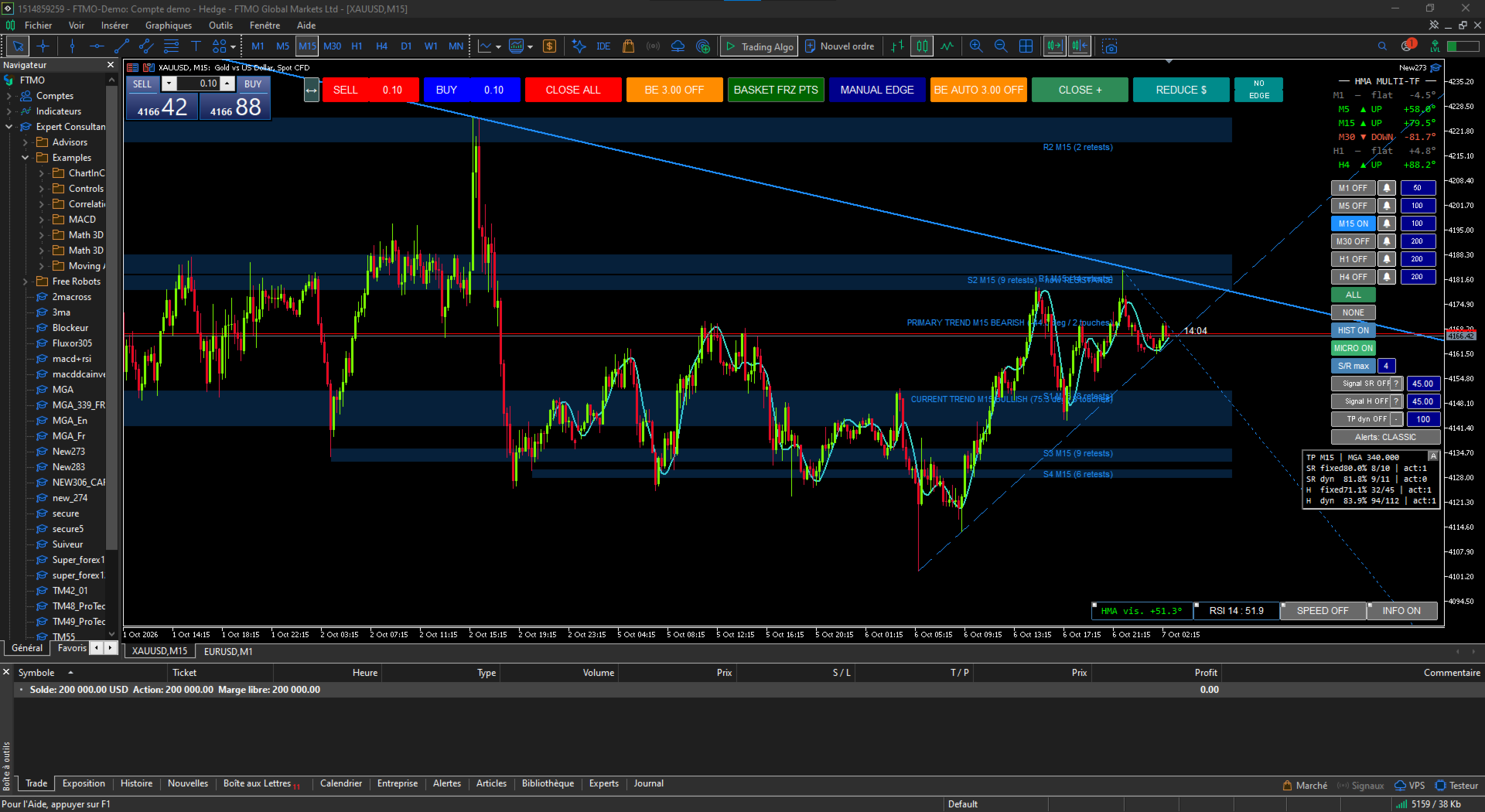
MGA – Manuel Gold Assistant is a complete manual trading environment developed primarily for XAUUSD.

It combines, within a single interface:

market analysis, position management, risk management, hedging, progressive exposure reduction, Break Even management, basket targets, support and resistance, multi-timeframe trend lines, and decision-support tools.

But MGA’s main difference becomes most apparent when the market does not behave as expected.

EDGE – Freeze Exposure Before Deciding

When exposure becomes difficult to manage, MGA allows the trader to use EDGE to neutralize or significantly reduce the remaining directional exposure.

The objective is simple:

temporarily limit the directional evolution of the existing exposure and give the trader time to reassess the situation.

A hedge does not eliminate the existing loss.

Instead, it can approximately freeze the current situation, subject to spread, commissions, swaps, execution differences, and other trading costs.

From there, MGA provides an additional management mechanism.

REDUCE – Turn Available Profits Into Debt Reduction

The REDUCE button is one of MGA’s core functions.

When some positions become profitable while others remain in loss, MGA can use the available floating profit as a budget to reduce the opposite exposure.

The logic is:

AVAILABLE PROFIT → REDUCE → DEBT REDUCTION → GROSS VOLUME REDUCTION → POTENTIALLY FREED MARGIN

MGA analyzes BUY and SELL exposure separately.

If the available budget is not sufficient to completely close the next losing position, MGA can calculate the portion of volume that can actually be reduced.

Exposure can therefore be reduced progressively.

A favorable directional move may generate new floating profit.

That profit can then be used to reduce another portion of the remaining debt.

The trader can then decide whether to protect the newly achieved level.

REDUCE + EDGE – Reduce and Protect Progress

After a reduction, MGA can rebuild a hedge based on the remaining exposure.

The process can therefore become:

EDGE → WAIT → AVAILABLE PROFIT → REDUCE → LOWER EXPOSURE → RE-EDGE

Each reduction can potentially decrease the gross volume still tied up in the basket.

Under certain market conditions, this may allow a highly congested situation to be managed as a sequence of waiting periods, favorable price movements, and progressive reductions, rather than requiring the entire exposure to be resolved in a single operation.

However, recovery is never guaranteed.

The market may continue moving unfavorably, trading costs may increase, and sufficient reduction opportunities may never appear.

MGA provides the management mechanism. The trader keeps control of the decisions and the risk.

REDUCE Without EDGE – Reduce and Keep Directional Exposure

The same reduction engine can also be used without immediately rebuilding the hedge.

The trader can therefore choose between two approaches:

REDUCE + EDGE
Reduce exposure and then protect the newly achieved level.

REDUCE WITHOUT EDGE
Reduce exposure while intentionally keeping directional exposure.

The decision remains entirely manual.

Complete Visual Market Analysis

MGA is not only a position-management tool.

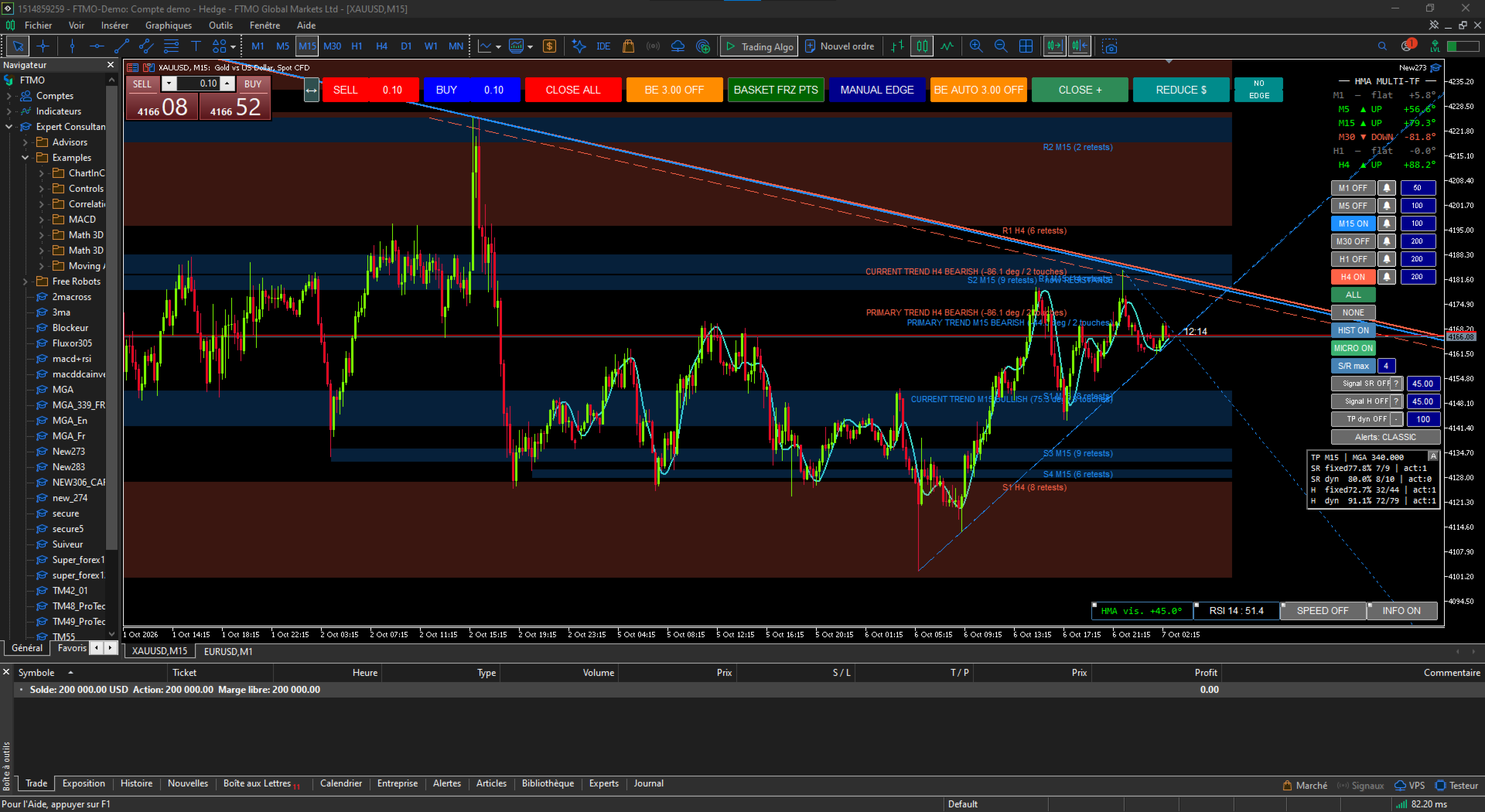
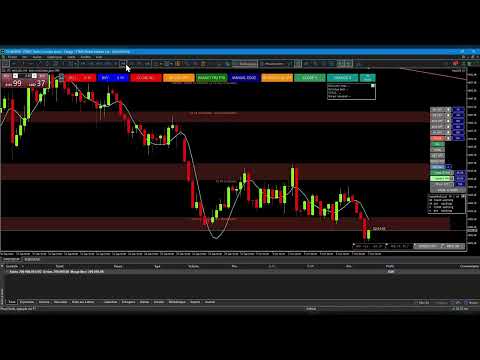
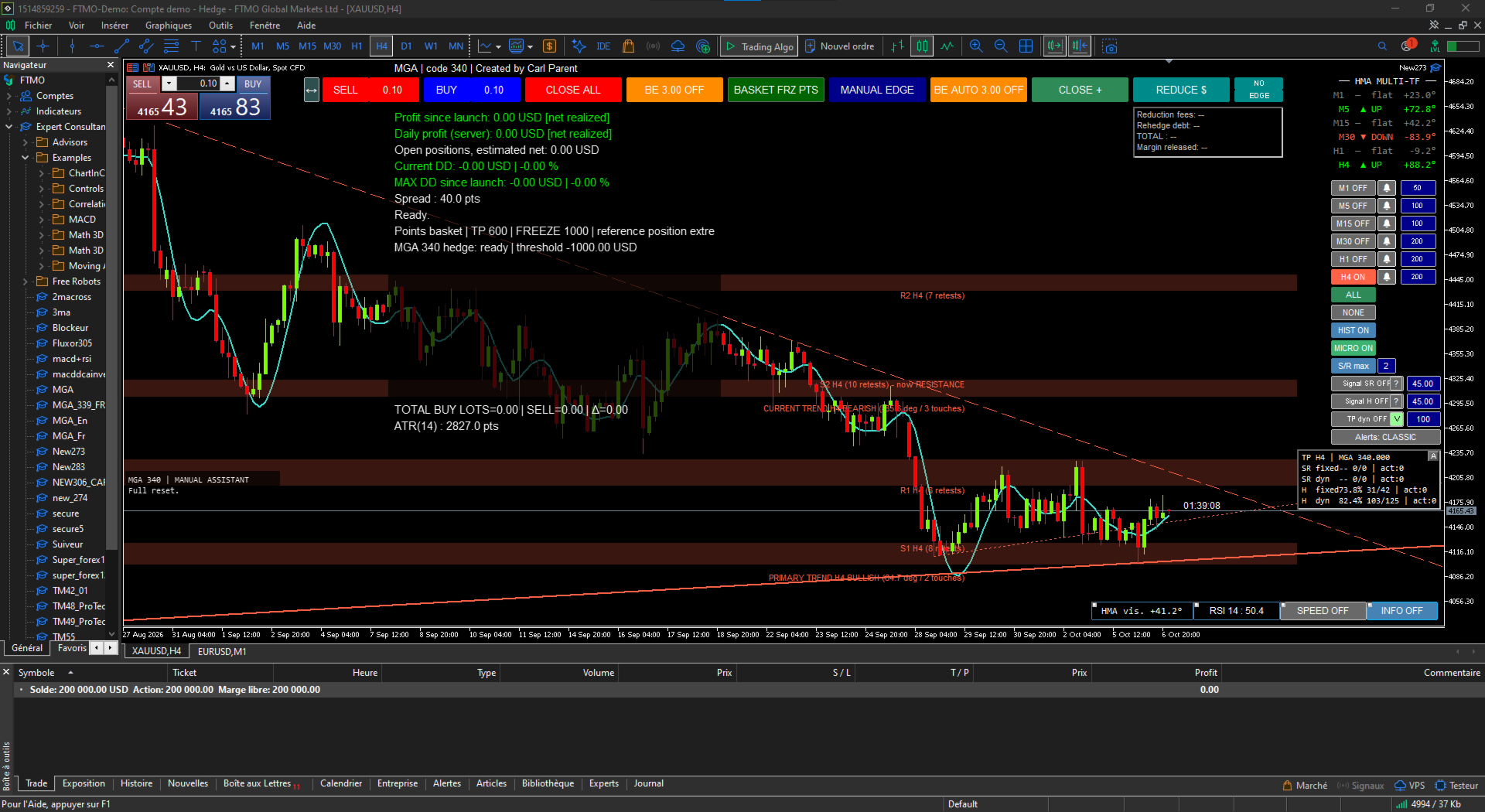
Its graphical environment displays multiple analytical elements directly on the chart to make market structure easier to interpret.

Automatic and adaptive support and resistance zones help identify the main areas currently being respected or tested by price.

Automatic trend lines, main trends, corrections, accelerations, and micro-trends provide an additional view of market structure.

One of MGA’s useful features is its multi-timeframe approach.

For example, a trader working on an M15 chart can also display important zones coming from H1 or H4.

This makes it easier to immediately recognize when a short-term price area also corresponds to a stronger higher-timeframe structure.

MGA supports several timeframes, including:

M1, M5, M15, M30, H1 and H4.

The goal is not to predict the market, but to make important market zones easier to see, compare, and evaluate.

BUY / SELL Signals – Decision Support, Not a Prediction

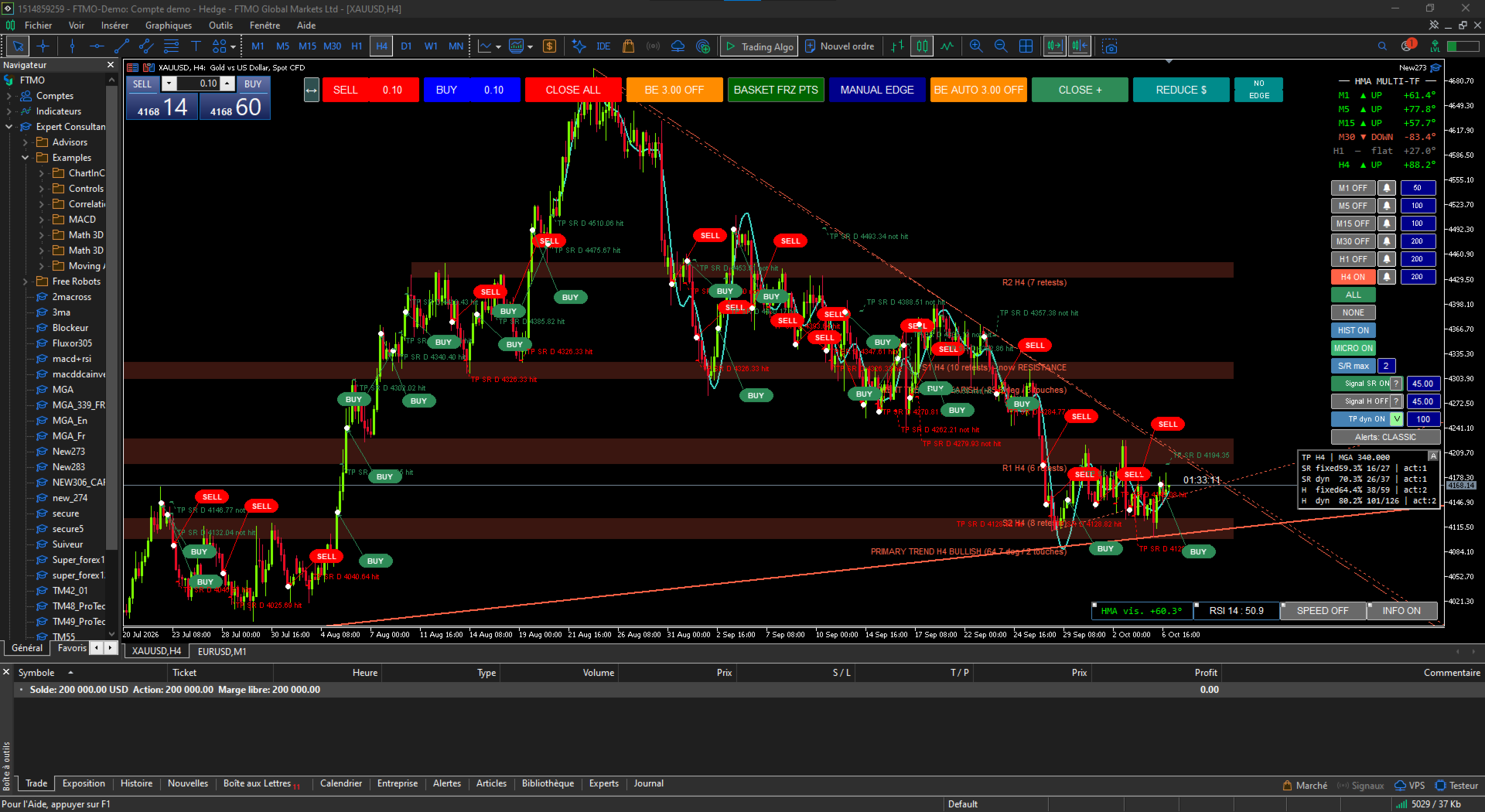
MGA can display BUY and SELL signal bubbles when a combination of technical conditions is detected.

These signals may use information derived from market structure, momentum, support and resistance, trend behavior, and configured confirmation rules.

They should be considered context and momentum indicators, not trading commands or market predictions.

Signals can be used across multiple timeframes.

During MGA development and observation, higher timeframes — particularly H4 — may produce more stable signals than very short timeframes.

However, these observations remain hypothetical and can vary depending on the market period, volatility, parameters, and trading conditions.

A BUY or SELL signal never guarantees that the expected move will occur.

Dynamic TP – A Target That Can Adapt to Momentum

MGA also includes a visual dynamic Take Profit system.

Its objective is not necessarily to keep the same fixed target indefinitely.

When market momentum begins to weaken, particularly through information derived from the HMA and movement strength, the target can progressively move closer to current price.

The idea is to account for a possible slowdown or reversal instead of always maintaining a target that may have become less realistic.

MGA can also display statistics showing how many observed TP levels were subsequently reached by price.

These statistics are descriptive only.

They represent historical observations and do not constitute a certified backtest, a prediction, or a guarantee of future performance.

HMA, Momentum and Market Strength

MGA also displays information related to the HMA, including its slope and the distance between price and the moving average.

These measurements provide another visual indication of:

movement strength, acceleration, slowdown, and potential changes in momentum.

They complement the support, resistance, and trend structures already displayed on the chart.

Complete Position Management

MGA includes several tools that allow traders to adapt position management to their own trading style.

Break Even can be activated manually or automatically.

Basket management can use targets expressed in either points or monetary value, depending on the selected mode.

The trader can also work without an automatic basket target when manual exit management is preferred.

Trailing functions, equity protection, exposure freezing, re-hedging, and other management tools are available directly from the MGA trading cockpit.

Designed for Manual Trading

MGA does not replace the trader.

It does not automatically decide when to buy or sell.

Instead, it provides an infrastructure designed to help the trader:

ANALYZE → DECIDE → PROTECT → REDUCE → REASSESS

The trader remains in control of the trading decisions.

Prop Firm Trading

MGA may also be useful in a Prop Firm environment, where drawdown control, exposure management, and available margin can be just as important as entry quality.

However, every Prop Firm has its own rules regarding hedging, Expert Advisors, trade-management tools, daily loss limits, and maximum drawdown.

Users must always verify that MGA and their intended trading method comply with the rules of their specific program.

MGA does not guarantee that a drawdown limit will not be exceeded.

Mandatory Requirement – MT5 Hedging Account

MGA requires a MetaTrader 5 account operating in HEDGING mode.

This account architecture is required to simultaneously maintain BUY and SELL positions and to properly use:

EDGE, exposure freezing, re-hedging, and progressive exposure reduction.

Accounts operating exclusively in NETTING mode cannot use MGA’s complete architecture.

MGA is developed primarily for XAUUSD.

ANALYZE. DECIDE. PROTECT. REDUCE. REGAIN FLEXIBILITY.

MGA – Manuel Gold Assistant
A complete analysis and position-management environment for manual XAUUSD trading.
Recommended products
Local Trade Copier by RWBTradeLab Local Trade Copier copies trades between MetaTrader 5 terminals that run on the same computer or VPS. One file is both sides: an input sets it to MASTER, which sends its trades, or to CLIENT, which copies them. Overview Attach the program to a chart on the account whose trades are to be copied and set the role to MASTER. Attach it to a chart on every account that should follow and set the role to CLIENT, each with its own Client ID. Give all of them the same
FREE
Copy your MT5 trades to accounts anywhere in the world with the   MetaToolsLab Master EA . Unlike local copiers that only work between terminals on the   same   PC or VPS, MetaToolsLab uses a secure cloud relay — so you can broadcast your trades to followers across   different computers, VPS providers, brokers, and continents , with   sub-second delivery   and   no broker passwords . Whether you're a signal provider, a multi-account trader, or an account manager, the Master EA installs in about
FREE
CopyTrader Pro FAST MT5 — FREE Real-Time Trade Copier | MT4 ↔ MT5 Cross-Platform | 20ms Latency CopyTrader Pro FAST is a professional trade copier Expert Advisor that copies trades between MetaTrader terminals in real time using a high-speed file-based communication system. No VPS, no network setup, no DLL — just attach and copy. FREE VERSION : Copies up to 1 trade at a time. Upgrade to the full version, Copy Trader Pro FAST MT5 , for unlimited copying. Key Features 20ms refresh rate — in
FREE
Opening EA - Start Edition Is a tool to trade the OpeningStrategy! The Opening EA is a semi-automated EA for MetaTrader 5! This means that the trader must actively start the EA using the Start button and stop it using the Stop button. This EA pursues an opening strategy which, at the start of trading, e.g. on the DAX or Nasdaq, etc., opens a trading channel with predefined TP's (TakeProfit). Two pending orders with the same lot size are set at the beginning. As soon as one of the pending order
FREE
Demo copier of deals from MetaTrader 5 to MetaTrader 5 ( MetaTrader 4<->MetaTrader 4 version is available ; with both versions, you can copy MetaTrader 5<->MetaTrader 4, MetaTrader 4<->MetaTrader 5, MetaTrader 5<->MetaTrader 5, MetaTrader 4<->MetaTrader 4). Works only in the mode of hedging. Spread filter. Select the best price (start copying positions with a profit or loss). Configure the lot size, fixed or ratio-based (provider signals can be copied with an increased lot). Configure order copy
FREE
RelicusRoad CopyTrader is a free trade copier for MetaTrader 5 . It copies trades between MT5 terminals on the same computer, so you can trade one account and have the others follow it, each at its own size and risk. Full version, no limitations, no trial period. Trade one account. Let the rest follow. MetaTrader 4: RelicusRoad CopyTrader MT4 How it works One terminal runs as the Leader (master) and shares the orders it holds. Any number of terminals run as Followers (slaves) and mirror them. Te
FREE
Profit & Loss Display - MT5 Panel On chart panel to display profit and loss per product over specified time period View P/L for EA trades only or also with manual trades Note this is a panel, not an indicator or algorithm, it simply displays profit and loss from account history //---- Install ----// After download, attach indicator to chart from the markets folder which is in navigator window (Cntrl N) //---- Study ----// Set target profit for product per week/specified period Set loss limi
FREE
TRADE PANEL MASTER — Know Your Risk Before You Click Open your chart. See your panel. Trade with confidence. Before you click Buy or Sell, Trade Panel Master shows you  exactly what you risk, what you gain, and your R:R ratio —  in real time. No mental math. No surprises. FEATURES - Lot sizing with real-time margin display - SL & TP in 3 modes: Points / Money / Price - Au
FREE
The Dual MACD & Stochastic Expert Advisor (EA)  is a fully automated trading system that utilizes two  MACD (Moving Average Convergence Divergence) indicators along with the  Stochastic Oscillator  to identify high-probability trading opportunities. By combining trend confirmation from MACD with momentum analysis from Stochastic, this EA provides precise entry and exit points for optimized trading performance. Key Features: • Dual MACD Strategy – Uses two MACD indicators with different setting
FREE
Copy your MT5 trades to accounts anywhere in the world with the   MetaToolsLab Slave EA . Unlike local copiers that only work between terminals on the   same   PC or VPS, MetaToolsLab uses a secure cloud relay — so you can broadcast your trades to followers across   different computers, VPS providers, brokers, and continents , with   sub-second delivery   and   no broker passwords . Whether you're a signal provider, a multi-account trader, or an account manager, the Slave EA installs in about a
FREE
MAGIC PROTECTOR — Advanced Equity Protection EA Magic Protector   is a utility built for traders who want better control over daily, weekly, or monthly risk exposure. The EA continuously monitors trading performance based on your selected protection period and helps prevent further losses or overtrading once your defined limits are reached. It can work with either the entire account or only trades belonging to a specific Magic Number, making it suitable for traders running multiple Expert Ad
FREE
Free Slave Version – Remote Trade Receiver MT5. This is the FREE Slave version of our professional Remote Trade Copier system. It allows you to receive trades from a Master account running our full Copy Trade solution. Designed for simplicity and reliability, this version is read-only and cannot send trades or operate independently. Key Features: One-click setup – simply connect to the Master. Fast and accurate order copying. Supports all symbols, order types, and brokers. Minimal resource us
FREE
Eagle Trade Copier Local trade copier for MetaTrader 4 and MetaTrader 5: copy from MT4 to MT5, from MT5 to MT4 or between terminals of the same platform on one computer or VPS. Every symbol is checked before the first copy, and every copy is checked like a manual order. A dashboard on the chart shows the accounts, the links and every copy in real time. Eagle Trade Copier copies trades and pending orders between MetaTrader terminals running on the same computer or VPS. One file covers three r
FREE
SmartEntry EA
Saksit Pawapootanont
Overview SmartEntry EA gives traders full control over any trading symbol — Gold (XAUUSD), Indices, Crypto, and Forex — with both manual and automated entry modes. The EA automatically detects the symbol type and adjusts pip/unit calculations accordingly. The built-in panel allows real-time control of every feature without restarting the EA.   Key Features Auto HG Trigger •   Automatically detects bullish M1 candles exceeding a configurable size threshold •   Mode 1 — HG Sure-Fire: Opens BUY an
FREE
MiniBull Board
Yusuf Levent Aksun
# MiniBull Board **Version 1.14 — MetaTrader 5 indicator (separate window)** **11 languages: English, Turkish, Russian, Chinese, Spanish, Portuguese, Japanese, German, French, Italian, Korean** — automatically in the language of your MetaTrader terminal, or chosen with a single input. MiniBull Board is a compact watch-list dashboard for MetaTrader 5. For every symbol you choose it shows where the price stands today, this week and this month: the current price, the day / week / month opening
FREE
Exit Vector MT5 Type: Expert Advisor (position management utility) Price: Free Exit Vector MT5 is a trade exit manager for MetaTrader 5. It monitors existing open positions and requests closure when an individual position reaches a configured gain or loss amount. It does not open positions or generate trade entry signals. Main functions - Independent thresholds for a positive and negative floating result per position. - Default levels: +1,500 and -450 in account currency. - Multi-symbol moni
FREE
Эксперт  MACD_LevelTrader MT5   создан для торговле валютной пары XAUUSD. Данная версия это наработки того, что можно извлечь  из  индикатора MACD и Moving Average.  Важно   перед тестированием изменить настройку с 1000 на 5000                       Offset in points UP from SMA200 for sell              5000                       Offset in points DOWN from SMA200 for buy        5000   Тайм фрейм  М5. Два варианта логики, П араметр  true=вход по уровню  MACD +   SMA200, false=вход по MACD  Тестиру
FREE
VR Unlock Smart MT5
Vladimir Pastushak
5 (1)
Have you ended up with a negative lock on your trading account and don't know what to do next? Both BUY and SELL positions are open, the overall loss is spread across dozens of trades, and you really don't want to close everything at once. The price moves up and down, but the situation hardly changes. It feels like your trading account is trapped: should you leave the positions open or close them at a substantial loss ? This is exactly the problem many traders face when using hedging and positio
FREE
Trade Mirror Follower
Nguyen Thanh Cong
5 (1)
Advanced Trade Mirror   is a powerful Forex tool designed for traders who need instant, seamless trade replication across multiple terminals on the same machine. With lightning-fast execution, it ensures zero lag in copying trades, maintaining precision and efficiency in high-speed trading environments. Get the Trade Mirror Master here:  https://www.mql5.com/en/market/product/133891 Specification: Master ID: Identity value of master terminal, please use a unique value to prevent duplicated mas
FREE
Fast CopyTrade LAN
Achraf Mouine
5 (6)
Fast CopyTrade LAN — Local Trade Copier for MetaTrader 5 Overview Fast CopyTrade LAN is a fast, DLL-free local trade copier for MetaTrader 5. It instantly copies trades between MT5 accounts on the same PC — copying OPEN, PARTIAL, MOD (SL/TP) and CLOSE from a Provider to one or more Receivers. This copy trader uses the MT5 Files folder for secure local messaging, requires no external files, no DLLs, and is fully Market-compliant. Advantages Fastest local copy trading with very low latency Market
FREE
AureliusQuantum
Nicola Biacca Notari
VERSIONE INGLESE (ENGLISH VERSION) ️ ATTENTION: IMPORTANT NOTE ABOUT THE VERSION AND STRATEGY TESTER RESULTS Due to the strict restrictions and memory limitations imposed by the MQL5 automatic validator, which often rejects algorithms with highly complex protection logics, the version downloadable directly here from the Market serves as a validation/demo setup. To download the FULL, UNRESTRICTED, and REAL production version of the algorithm (.ex5 file), please connect to our official GitHub re
FREE
TradeInfos
Dustin Ricardo Pierenz
Track your spread and all position PnLs (Buy & Sell) in real-time – stay in control of your trades at a glance! Features: Real-time spread display (in pips) Total Buy position PnL Total Sell position PnL Clean, non-intrusive display layout Works with all symbols and timeframes Perfect for: Scalpers needing quick spread awareness Day traders monitoring long/short performance Risk managers optimizing exposure No need to switch tabs or rely on external tools — everything you need is visible at
FREE
MT5 History Checker Can you trust the historical data behind your MT5 backtest? MT5 History Checker is a diagnostic utility designed to identify missing periods and coverage problems in the historical data supplied by your MetaTrader 5 broker. Select the symbol and date range you want to examine and run the checker. The utility analyses the available history and provides a clear PASS, WARNING or FAIL result. What it checks Historical tick-hour coverage M1 historical-data coverage Missing periods
FREE
URGENT: PLEASE READ BEFORE DOWNLOADING This EA is ONLY the "Receiver" (Slave) part of the copy trade system. IT WILL NOT WORK ON ITS OWN! To successfully copy trades, you MUST have the "Master" (Sender) EA installed on your provider account. GET THE REQUIRED "MASTER" EA HERE:   AW Trade Copier Master Unlock lightning-fast trade replication across multiple MetaTrader 5 accounts on the same PC or VPS. The AW Local Trade Copier is designed for speed, reliability, and ease of use
FREE
SL Manager
Gabriel Paul Ange Perrin
SL Manager is a trade management utility for MetaTrader 5. It removes the Stop Loss of your open positions during a time window that you choose, then puts it back at the end of the window. The goal is to keep a stop from being hit only by a spread spike, for example around the daily rollover or a session close when liquidity is low. Why a time window Around the daily rollover, many brokers widen the spread for a few minutes. A Buy closes at the Bid and a Sell at the Ask, so a wider spread can re
FREE
Clean and fast real-time Average Win tracking directly on your MetaTrader 5 chart. Say goodbye to cluttered screens and heavy, laggy dashboards. The Simple Average Win Tracker by InnovaDash is an ultra-lightweight widget that gives you the exact data you need, right where you need it. Why track your Average Win? Knowing your Average Winning Trade ($) is crucial for building your Risk-to-Reward ratio. When paired with your average loss, this metric tells you exactly how much your strategy pays ou
FREE
Just downloaded it? Message me after you download it and I will help you set it up, step by step, free. Free. One click to switch the chart to another symbol. TrueRisk Symbol Changer puts your symbols on the chart as buttons, each with today's % change in green or red. Click one and the chart switches to it, keeping your timeframe, your template and your other indicators. One row of timeframe buttons (M1 to MN) does the same for the timeframe. No more right-click, Symbols, find, drag. MT4 versio
FREE
SimpleTrade by Gioeste
Giovanni Scelzi
4 (3)
Discover the power of automated trading with **SimpleTradeGioeste**, an Expert Advisor (EA) designed to optimize your trading operations in the Forex market. This innovative EA combines advanced trading strategies with proven technical indicators, offering an unparalleled trading experience. video backtest :  https://youtu.be/OPqqIbu8d3k?si=xkMX6vwOdfmfsE-A ****Strengths**** - **Multi-Indicator Strategy**: SimpleTradeGioeste employs an integrated approach that combines four main technical ind
FREE
Tandem is a local trade copier for MetaTrader. It copies trades between terminals that run on the same computer or VPS: from MT4 to MT4, MT4 to MT5, MT5 to MT5 and MT5 to MT4. There is one version for each platform, and the two work together. I built it around a single Expert Advisor for both sides. You attach it to a chart in each terminal, click MASTER on the account that trades and leave SLAVE on the accounts that should follow. As long as they use the same channel number, the slaves pick up
FREE
AI One Click Risk Trade Panel
Fadi Hassan Khaled Ghanem
Place trades in one click with the lot size calculated from your risk. How it works Type your risk percent, stop loss in points and take profit as a multiple of the stop. The panel shows the lot size and the money at risk before you click. BUY and SELL open the order with SL and TP already attached. Management buttons move stops to break-even, close half or close all positions on the chart symbol. Key features Risk based lot size from balance, tick value and stop distance SL and TP attached to e
FREE
Buyers of this product also purchase
Trade Assistant MT5
Evgeniy Kravchenko
4.43 (216)
It helps to calculate the risk per trade, the easy installation of a new order, order management with partial closing functions, trailing stop of 7 types and other useful functions. Additional materials and instructions Installation instructions - Application instructions Line function -   shows on the chart the Opening line, Stop Loss, Take Profit. With this function it is easy to set a new order and see its additional characteristics before opening.   Risk management  - The risk calculation
Forex Trade Manager MT5
InvestSoft
4.98 (693)
Trade Manager MT5 is an advanced position size calculator and trade management tool for MetaTrader 5, designed to help traders plan trades faster, control risk more precisely, and manage open positions directly from the chart. It combines order placement, risk based lot calculation, Stop Loss and Take Profit management, Break Even, Trailing Stop, Partial Close, Equity Protection, and external trade management in one panel. Whether you trade forex, indices, metals, commodities, crypto, or future
FarmedHedge Pair Trading Dashboard
Tanapisit Tepawarapruek
5 (7)
Farmed Hedge Yield Farming | All Markets (Manual - Hybrid - Semi/Automated EA) VERIFIED TRADING RESULTS - Farmed Hedge Yield Axi Copy:  https://www.mql5.com/en/signals/2356376 - Farmed Hedge Yield Exn Copy:   https://www.mql5.com/en/signals/2356404 - Farmed Hedge Yield V Copy:  https://www.mql5.com/en/signals/2357156 IMPORTANT NOTICE: FarmedHedge is a MANUAL-FOCUSED TRADING UTILITY ,not a fully automated EA. Results shown on this Signal include manual trades and overall strategic management.
Telegram to MT5 MultiChannel Copier
Sergio Marquez Uroz
4.73 (26)
Telegram to MT5 Multi-Channel Copier   automatically copies trading signals from your Telegram and Discord channels straight to MetaTrader 5. No bots, no browser extensions, no manual copying. A signal arrives in Telegram or Discord and the EA opens the trade in your terminal within seconds. And before you copy a channel, the built-in backtester shows you what that channel would have done in your account. The product has two components: a Windows application that listens to your Telegram channel
Local Trade Copier EA MT5
Juvenille Emperor Limited
4.94 (150)
Local Trade Copier EA MT5 is a fast and flexible trade copier for copying and managing trades between multiple MetaTrader 5 accounts on the same Windows computer or Windows VPS. It combines local trade synchronization with Receiver-side controls for lot sizing, risk management, trade filtering, symbol mapping, trade management and account protection. Set up your Transmitter and Receiver terminals in about 1 minute and copy manual or EA trades between accounts at the same or different brokers. U
EA Overfitter
Stephen J Martret
5 (4)
That backtest looks great. But will it still be making money tomorrow, next week, next month? EA Overfitter re-runs your EA on 100 price histories it has never seen. One score tells you if the edge is real. A backtest tells you what an EA did on one price history — the one that happened to occur. What you cannot tell from it is how much of that result was the strategy and how much was the particular path. EA Overfitter answers that. It builds up to 100 synthetic price histories your EA has n
TradePanel MT5
Alfiya Fazylova
4.89 (174)
Trade Panel is a multi-functional trading assistant. The app contains over 50 trading functions for manual trading and allows you to automate most trading tasks. Application instructions: https://www.mql5.com/en/blogs/post/756482 Trial version of the application for a demo account: https://www.mql5.com/en/blogs/post/750865 How to install the application: https://www.mql5.com/en/blogs/post/756239 How to test the application in visual mode: https://www.mql5.com/en/blogs/post/770277 How to install
Copy Telegram signals with your own trading rules Telegram to MT5 Signal Trader automatically copies text-based trading signals from public and private Telegram channels and groups into MetaTrader 5. Manage multiple providers and MT5 accounts from one desktop app, with individual risk and trade settings for each provider . No Telegram bot or API setup needed for copying. Simply sign in with your own Telegram account by phone or QR code and select the channels or groups you have already joined. Y
Strategy Ledger Pro
Abdullah Uygar Tuna
5 (17)
Strategy Ledger Pro is a read-only account analysis panel for MetaTrader 5. It separates account results by Expert Advisor, strategy, symbol, and magic number, so you can see what each one really contributes. The panel is available in 11 languages: English, Français, Deutsch, Español, Italiano, Português, Русский, Türkçe, 中文, 日本語 and 한국어. Before you download the demo. The Market runs the demo of any paid product in the Strategy Tester only. This panel analyses the trades on your own account, and
Exp COPYLOT CLIENT for MT5
Vladislav Andruschenko
3.97 (35)
Professional Trade Copier for MetaTrader 5 Fast, professional, and reliable trade copier for MetaTrader . COPYLOT allows you to copy Forex trades between MT4 and MT5 terminals with support for Hedge and Netting accounts. COPYLOT MT5 version supports: - MT5 Hedge to MT5 Hedge - MT5 Hedge to MT5 Netting - MT5 Netting to MT5 Hedge - MT5 Netting to MT5 Netting - MT4 to MT5 Hedge - MT4 to MT5 Netting MT4 version Full Description +DEMO +PDF How To Buy How To Install How to get Log Files H
News Trade EA MT5
Konstantin Kulikov
4.55 (11)
Present to you the useful robot that I have been using for several years. It can be used in both semi-automatic mode and fully automatic mode. >>> Chat <<< The program contains flexible settings for trading on the news of the economic calendar. It cannot be checked in the strategy tester. Only real work. Download the latest archive of settings: https://www.mql5.com/en/blogs/post/747929 Signals monitoring: https://www.mql5.com/en/signals/author/test-standart When creating your own sets of setti
Power Candles Strategy Scanner - Self-Optimizing Multi-Symbol Setup Finder Self-optimizing settings work one chart at a time, and finding where they pay off right now means opening chart after chart. Power Candles Strategy Scanner runs the same self-optimizing engine as the Power Candles indicator on every symbol in your Market Watch, side by side. One panel ranks where it pays off: the winning strategy per symbol, its optimized Stop Loss and Take Profit. An alert fires the moment a fresh signal
================================================================================ POC BREAKOUT - V20.72. Full Professional Grade Toolkit ================================================================================ POC Breakout is a full MetaTrader 5 trading dashboard for discretionary traders who want breakout signals, Point of Control (POC) context, volume profiles, order flow, market structure, news, alerts, and advanced trade planning in one professional workspace. Attached directly to you
The product will copy all telegram signal to MT5 ( which you are member) , also it can work as remote copier.  Easy to set up, copy order instant, can work with almost signal formats, image signal,  s upport to translate other language to English Work with all type of channel or group, even channel have "Restrict Saving Content", work with  multi channel, multi MT5 Work as remote copier: with signal have ticket number, it will copy exactly via ticket number. Support to backtest signal. How to s
Unlimited Trade Copier Pro MT5 is a tool to copy trade remotely to multiple MT4, MT5 and cTrader accounts at different computers/locations over internet. This is an ideal solution for you if you are a signal provider and want to copy your trades to other receivers globally on your own rules. One provider can copy trades to multiple receivers and one receiver can get trade from multiple providers as well. The provider can even set the subscription expiry for each receiver, so that receiver will n
SMC Trade Pilot MT5
Prime Horizon
5 (1)
Order block, BOS and ChoCH expert advisor for MetaTrader 5, with Telegram alerts SMC Trade Pilot MT5 reads market structure on your chart and sends the signal to Telegram. It marks break of structure (BOS) and change of character (ChoCH), draws order blocks with a strength score , tracks fair value gaps (FVG) and liquidity sweeps, displays a volume profile with point of control, value area high and low, and sums everything up in a compact dashboard with a multi-timeframe panel, a confluence scor
VirtualTradePad PRO SE MT5 — professional trading control center for MetaTrader 5 VirtualTradePad PRO SE is a premium chart-based trading panel and trade-management workspace for MetaTrader 5 . It is designed for traders who want faster execution, clearer position control, structured trade management, visual level planning and a professional workflow directly from the chart. This is not only a BUY / SELL panel. PRO SE combines manual trading, pending orders, position management, partial exits, b
Timeless Charts
Samuel Manoel De Souza
5 (9)
Timeless Charts is an all-in-one trading utility for professional traders. It combines custom chart types such as Seconds Charts and Renko with advanced order flow analysis using Footprints , Clusters , Volume Profiles , VWAP studies, and anchored analysis tools for deeper market insight. Trading and position management are handled directly from the chart through an integrated trade management panel , while Market Replay and Virtual Accounts provide environments for practicing trading skills and
Equity Protect Pro: Your Comprehensive Account Protection Expert for Worry-Free Trading If you're looking for features like account protection, equity protection, portfolio protection, multi-strategy protection, profit protection, profit harvesting, trading security, risk control programs, automatic risk control, automatic liquidation, conditional liquidation, scheduled liquidation, dynamic liquidation, trailing stop loss, one-click close, one-click liquidation, and one-click restore, Equity P
HINN MagicEntry Extra
ALGOFLOW OÜ
4.74 (19)
HINN MAGIC ENTRY – the ultimate tool for entry and position management! SIMPLE. FASTEST. INTUITIVE. MAX AUTOMATED. Place orders by selecting a level directly on the chart! full description   ::  demo-version  :: 60-sec-video-description Key features: - Market, limit, and pending orders - Automatic lot size calculation - Automatic spread and commission accounting - Unlimited partitial take-profits  - Breakeven and trailing stop-loss and take-profit  functions - Invalidation leves - Intuitive, a
Strategy Builder offers an incredible amount of functionality. It combines a trade panel with configurable automation (covert indicators into an EA), real-time statistics (profit & draw down) plus automatic optimization of SL, TP/exit, trading hours, indicator inputs. Multiple indicators can be combined into an single alert/trade signal and can include custom indicators, even if just have ex4 file or purchased from Market. The system is easily configured via a CONFIG button and associated pop-u
News Filter EA
Rashed Samir
5 (2)
News Filter EA: Advanced Algo Trading Assistant News Filter EA is an advanced algo trading assistant designed to enhance your trading experience. By using the News Filter EA , you can integrate a Forex economic news filter into your existing expert advisor, even if you do not have access to its source code. In addition to the news filter, you can also specify trading days and hours for your expert. The News Filter EA also includes risk management  and equity protection features. MT4 Version Ma
Trade copier MT5
Alfiya Fazylova
4.61 (57)
Trade Copier is a professional utility designed to copy and synchronize trades between trading accounts. Copying occurs from the account / terminal of the supplier to the account / terminal of the recipient, which are installed on the same computer or VPS . Before buying, you can test the demo version on a demo account. Demo version here . Full instruction here . Main functionality and benefits: Supports copying MT5> MT5, MT4> MT5, MT5> MT4, including MT5 netting accounts. * Supports copying Dem
VirtualTradePad One Click Trading Panel
Vladislav Andruschenko
4.59 (74)
Trading Panel for MetaTrader 5 — professional one-click trading from chart and keyboard A powerful trading panel for active manual trading, designed to open, manage, and close trades far faster and more efficiently than the standard MetaTrader interface. This panel is built for traders who want full control over positions, pending orders, profit management, and trading execution inside one professional workspace. This is not just another utility. It is a complete trading cockpit for MetaTrader
Trade Dashboard MT5
Fatemeh Ameri
4.94 (135)
Trade Dashboard simplifies how you open, manage, and control your trades, with built-in lot size calculation. It allows you to execute trades, manage risk, and control positions directly on the chart, with tools such as partial close, breakeven, and trailing stop. Designed to reduce manual work and help you stay focused on your trading decisions. A demo version is available for testing. Detailed explanations of features are provided within the MQL5 platform. Installation instructions are include
Telegram To MT5 Ultra
Mirel Daniel Gheonu
5 (5)
Telegram To MT5 — Signal Copier Turn the trading calls from your Telegram channels into real MT5 orders — automatically, on as many accounts as you like, with risk and rules fully under your control. Telegram To MT5 connects the VIP / signal channels you already follow on Telegram to your MetaTrader 5 terminal. A free companion desktop app reads the messages (even from channels that block bots), and this Expert Advisor executes them on your account — applying your own risk settings, symbol mappi
Trade Manager DashPlus
Henry Lyubomir Wallace
4.85 (13)
DashPlus is an advanced trade management tool designed to enhance your trading efficiency and effectiveness on the MetaTrader 5 platform. It offers a comprehensive suite of features, including risk calculation, order management, advanced grid systems, chart-based tools, and performance analytics. Key Features 1. Recovery Grid Implements an averaging and flexible grid system to manage trades during adverse market conditions. Allows for strategic entry and exit points to optimize trade recovery
Found a great signal, but a provider's lot is too small? You need larger position volume, but terminal settings are too poor? Signal Lot Manager will increase the provider's position volume by means of a duplicate order of the needed volume. Just set a lot size and a name of a signal for copying orders from. Signal Lot Manager is a lot multiplier utility for duplicating orders on your terminal. The source can be selected any adviser, manual trading, a separate trading signal. It has wide functio
Boleta Scalper Ultra
Nelson Lopes De Paula Neto
ScalperBoleta Ultra — Trading Panel for MetaTrader 5 ScalperBoleta Ultra is a manual trading panel developed for MetaTrader 5, focused on scalping and day trading. It centralizes order execution, position management, and risk control directly on the chart, providing greater convenience and operational efficiency. Main Features: Buy and Sell: Execute orders using on-screen buttons or keyboard shortcuts. Position Management: Fully or partially close open positions. Lot Size Control: Adjust trading

Trade Manager DaneTrades
Levi Dane Benjamin
4.13 (31)
DaneTrades Trade Manager is a professional trade panel for MetaTrader 5, designed for fast, accurate execution with built‑in risk control. Place market or pending orders directly from the chart while the panel automatically calculates position size from your chosen risk, helping you stay consistent and avoid emotional decision‑making. The Trade Manager is built for manual traders who want structure: clear risk/reward planning, automation for repeatable management, and safeguards that help reduc

Filter:
No reviews
Reply to review