MiniBull Board

  • Indicateurs
  • Yusuf Levent Aksun
    Yusuf Levent Aksun
    Platform Engineer & professionnel certifié AWS avec plus de 20 ans d'expérience en
    développement logiciel, architecture cloud et transformation DevOps.
    Actuellement en charge des initiatives d'ingénierie de plateforme chez World Wide
  • Version: 1.19
  • Mise à jour: 2 octobre 2026
# MiniBull Board

**Version 1.14 — MetaTrader 5 indicator (separate window)**

**11 languages: English, Turkish, Russian, Chinese, Spanish, Portuguese, Japanese, German, French, Italian, Korean** — automatically in the language of your MetaTrader terminal, or chosen with a single input.

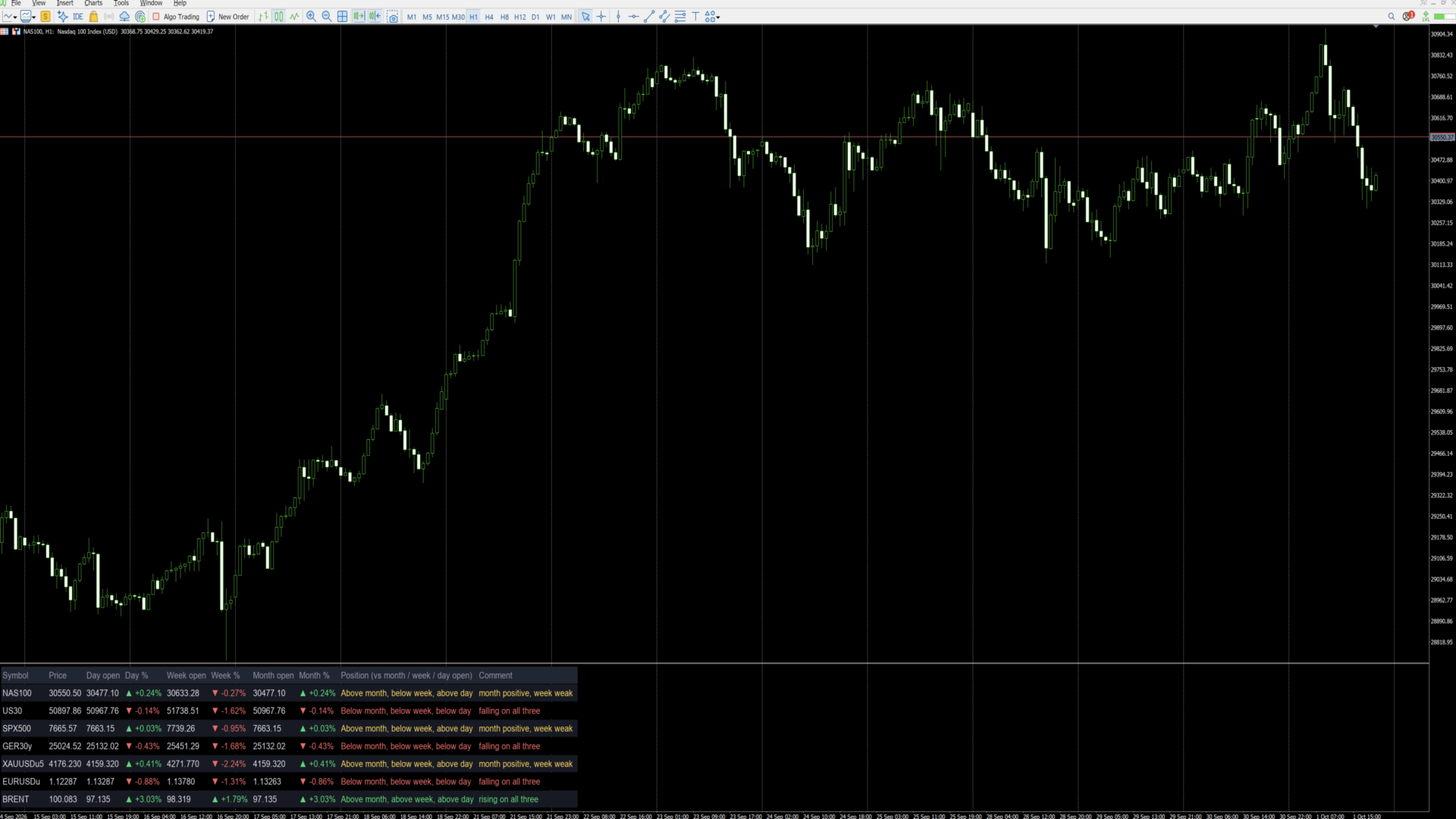
MiniBull Board is a compact watch-list dashboard for MetaTrader 5. For every symbol you choose it shows where the price stands today, this week and this month: the current price, the day / week / month opening price, the percentage change from each, and a short plain-language sentence that sums up the picture, such as *"Above month open, below week, below day — uptrend, pulling back today"*.

It answers the question every trader asks before looking at a chart: *"Is this market up or down — today, this week, this month?"* — for up to 8 symbols (or more) at a glance.

The board is descriptive only. It shows where price is relative to its opening levels; it does not forecast and does not trade.

---

## Key features

- **Day, week and month at a glance:** current price, opening price and % change for each period.
- **Plain-language summary per symbol:** a position sentence and a colour-coded comment on every row.
- **11 languages with automatic selection:** all on-screen text — column headers, sentences and number format — follows your MetaTrader terminal language, or the language you choose.
- **Your own symbol list or Market Watch:** type the symbols you want, in the order you want, or let the board take them from Market Watch.
- **Correct trading-day open:** the day open is taken at the real start of the trading day — 18:00 New York for indices, FX and metals, 00:00 UTC for Brent-type symbols — not at an arbitrary server midnight. Works with any broker time zone.
- **Sorting:** list order, or strongest first by day %, week % or month %.
- **Click to open:** click a symbol name and the chart switches to that symbol.
- **Clean, readable layout:** column widths are measured from the actual text, so nothing overlaps on any screen, font or DPI setting. Alternating row shading, auto-fit window height.
- **No blinking:** objects are created once and only their text and colour are updated, once per second.
- **Lightweight:** no buffers, no plots, independent of other indicators. Use it on any chart, in its own sub-window.

---

## Language support

The board speaks **11 languages**:

**English · Türkçe (Turkish) · Русский (Russian) · 中文 (Chinese) · Español (Spanish) · Português (Portuguese) · 日本語 (Japanese) · Deutsch (German) · Français (French) · Italiano (Italian) · 한국어 (Korean)**

With the default setting **Language = Auto** the board reads the language of your MetaTrader 5 terminal and uses it automatically — no setup needed. If your terminal runs in a language that is not on the list, the board uses English. You can also pick any of the 11 languages manually with the **Language** input.

What follows the language:

- column headers (for example *Day open / Gün açılış / Откр. дня / 日开盘*),
- the Position sentence and the Comment on every row,
- the "loading data" message,
- the decimal separator: comma in Turkish, Russian, Spanish, Portuguese, German, French and Italian (30411,50); point in English, Chinese, Japanese and Korean (30411.50).

Example of one row in three languages:

| Language | Position | Comment |
|---|---|---|
| English | Above month, below week, below day | month positive, week weak |
| Türkçe | Ayın üstünde, haftanın altında, günün altında | ay pozitif, bu hafta zayıf |
| Deutsch | Monat: darüber, Woche: darunter, Tag: darunter | Monat positiv, Woche schwach |

**Fonts for Chinese, Japanese and Korean:** when one of these languages is active and the Font input is left at Arial, the board switches automatically to a font that contains the characters (Microsoft YaHei, Meiryo, Malgun Gothic). If characters still show as boxes on your system, enter another installed CJK font in the **Font** input.

Note: the names of the inputs in the MetaTrader properties dialog are always shown in English. This is a MetaTrader limitation; everything displayed on the chart follows the selected language.

---|---|---|
| Column headers | Symbol, Price, Day open, Day %, Week open, Week %, Month open, Month %, Position, Comment | Sembol, Fiyat, Gün açılış, Gün %, Hafta açılış, Hafta %, Ay açılış, Ay %, Konum, Yorum |
| Position sentence | Above month, below week, below day | Ayın üstünde, haftanın altında, günün altında |
| Comment | uptrend, pulling back today | genel yön yukarı, bugün geri çekiliyor |
| Decimal separator | 30411.50 / +0.61% | 30411,50 / +0,61% |

Note: the names of the inputs in the MetaTrader properties dialog are always shown in English. This is a MetaTrader limitation; everything displayed on the chart follows the selected language.

---

## Installation and quick start

1. Copy the indicator to your terminal (MQL5 Market purchases and downloads are installed automatically).
2. Open any chart. The chart symbol and timeframe do not matter.
3. Drag **MiniBull Board** onto the chart. It opens in its own sub-window below the price chart.
4. In the **Inputs** tab:
   - choose your **Language**,
   - type your symbols into **My symbol list**, separated by commas, using the exact names your broker uses (for example `NAS100,US30,SPX500,GER40,XAUUSD,EURUSD,GBPUSD,UKOIL`),
   - set **Maximum rows** to at least the number of symbols in your list.
5. Press **OK**. The board fills in within a few seconds.

Weekly and monthly values may show "-" for a few seconds the first time a symbol is used, while the terminal downloads its history. They fill in automatically.

---

## Reading the board

Each row is one symbol. From left to right:

| Column | Meaning |
|---|---|
| **Symbol** | Symbol name. Click it to switch the chart to this symbol. |
| **Price** | Current bid price. |
| **Day open** | Opening price of the current trading day. |
| **Day %** | Change from the day open to the current price. |
| **Week open** | Opening price of the current week. |
| **Week %** | Change from the week open. |
| **Month open** | Opening price of the current month. |
| **Month %** | Change from the month open. |
| **Position** | Where the price is relative to the month, week and day open, from long-term to short-term. |
| **Comment** | One-line summary of the three periods together. |

**Colours and arrows**

- Green ▲ — price is above that opening price (positive change).
- Red ▼ — price is below that opening price (negative change).
- Grey "-" — data not yet available (history still loading, or the symbol name is wrong).

**What "month", "week" and "day" mean**

All comparisons use the **opening price of the current period**:

- **Month** — the first traded price of the current calendar month.
- **Week** — the first traded price of the current week (for US indices: Sunday 18:00 New York).
- **Day** — the first traded price of the current trading day (see *Day open source* below).

"Above month" therefore means the price is higher now than where it started this month, i.e. the month so far is positive. Previous-period highs, lows or closes are not used.

**The Comment column**

| Comment | Colour | Situation |
|---|---|---|
| rising on all three | green | above the month, week and day open |
| falling on all three | red | below the month, week and day open |
| uptrend, pulling back today | yellow | above month and week, below day |
| downtrend, recovering today | yellow | below month and week, above day |
| month positive, week weak | yellow | above month, below week |
| month negative, week recovering | yellow | below month, above week |

Yellow means a mixed picture: the periods point in different directions. The Position column always shows the full detail.

---

## Inputs

### Symbols

| Input | Default | What it does |
|---|---|---|
| **Symbol source** | My symbol list | *My symbol list*: the board shows only the symbols you type, in your order. *Market Watch*: the board takes the first symbols from your Market Watch window. |
| **My symbol list** | (example list) | Comma-separated symbol names, exactly as your broker writes them, including suffixes (e.g. `XAUUSD.m`, `EURUSDu`). Spaces after commas are ignored. Symbols that are not in Market Watch are added to it automatically. A misspelt name shows "-" on its row. |
| **Maximum rows** | 8 | Upper limit of rows. With *My symbol list* it should be at least the number of symbols you entered; with *Market Watch* it decides how many symbols are taken. |
| **Sort order** | List order | *List order*: as typed / as in Market Watch. *Day % / Week % / Month %*: highest change at the top, re-sorted every second. |
| **Day open source** | Session start | *Session start*: the day starts at the real beginning of the trading day — 18:00 New York for indices, FX and metals; 00:00 UTC for the symbols listed in the next input (Brent). This matches how these markets define their trading day. *Broker D1*: uses the broker's daily candle, which starts at the broker's server midnight. |
| **Symbols whose day starts 00:00 UTC** | BRENT,UKOIL,XBR | Any symbol whose name contains one of these words uses 00:00 UTC as its day start (ICE Brent opens at 01:00 London time = 00:00 UTC in summer). Add other names if needed. |

### Layout

| Input | Default | What it does |
|---|---|---|
| **Language** | Auto | *Auto*: the language of your MetaTrader terminal (English if it is not one of the 11). Or choose English, Türkçe, Русский, 中文, Español, Português, 日本語, Deutsch, Français, Italiano or 한국어. See *Language support*. |
| **Show the open prices** | true | *false* hides the Day / Week / Month open columns and leaves the price, the three % columns and the sentences — useful on narrow screens. |
| **Show the plain-language summary column** | true | *false* hides the Position and Comment columns for a numbers-only table. |
| **Font size** | 10 | Text size. Row height and column widths follow automatically. |
| **Font** | Arial | Any font installed on your computer. Column widths are measured from the real text, so any font works. Left at Arial, Chinese / Japanese / Korean switch automatically to a suitable font. |
| **Left margin / Top margin** | 12 / 8 | Distance of the table from the window edges, in pixels. |
| **Gap between columns** | 18 | Space between columns, in pixels. |
| **Row height** | 1.7 | Row height as a multiple of the text height. Larger = more spacious. |
| **Fit the window height to the table** | true | *true*: the sub-window height follows the number of rows. *false*: you can resize the window freely by dragging its border. |
| **Click a symbol to switch the chart to it** | true | *true*: clicking a symbol name changes the chart to that symbol. *false*: clicks do nothing. |

### Colours

| Input | What it colours |
|---|---|
| **Header** | Column titles |
| **Symbol / prices** | Symbol names and prices |
| **Above / positive** | Positive % values and "rising on all three" |
| **Below / negative** | Negative % values and "falling on all three" |
| **No data** | "-" and loading messages |
| **Mixed picture** | Yellow comments (periods disagree) |
| **Row shading** | Background of every second row |
| **Header background** | Background of the title row |

---

## Tips

- **Exact symbol names matter.** Copy them from Market Watch (right-click a symbol, *Specification*) if your broker uses suffixes.
- **Many symbols:** raise *Maximum rows*, set *Show the open prices* to false, and use a smaller font.
- **Daily routine:** sort by *Day %* to see the strongest and weakest markets of the day at the top.
- **Use it as a launcher:** keep the board on one chart and click through your symbols.
- **Time zones:** the trading-day start is calculated from UTC with the US daylight-saving rule, so the board is correct for any broker time zone and any user location.

---

## FAQ

**Why does a row show "-"?**
Either the terminal is still downloading the weekly/monthly history (wait a few seconds), or the symbol name does not exist at your broker (check the spelling and suffix).

**Why is my day % different from another platform?**
Platforms use different day starts. With *Session start* the board uses the market's own trading-day start (18:00 New York, or 00:00 UTC for Brent). Switch *Day open source* to *Broker D1* to use your broker's daily candle instead.

**Does it work on any chart timeframe?**
Yes. All values come from fixed daily, weekly, monthly and one-minute data, independent of the chart.

**Can I run two boards on the same chart?**
Use one board per chart. To watch more symbols, raise *Maximum rows*, or add the board to a second chart.

**Does it slow down my terminal?**
No. It refreshes once per second and only changes text that has actually changed.

**Does it trade or give signals?**
No. It is an information panel only.

---

## Important notes

- The board describes the current position of price relative to its period opens. It makes no prediction and gives no trading advice.
- Values depend on your broker's price data. Brokers may differ slightly in prices and trading hours.
- *Session start* needs one-minute history for each symbol of the current day; the terminal provides it automatically.
- Trading leveraged products carries a high level of risk.

---

## Version history

- **1.14** — Faster start: the board appears within a second (text measurements are cached).
- **1.13** — Removing the indicator now cleans all its objects from the chart, including leftovers of older versions.
- **1.12** — 11 languages and automatic language selection from the terminal. Automatic CJK fonts. Fix: objects no longer stay on the chart after the indicator is removed.
- **1.11** — The window name shows the version number ("MiniBull Board v1.11").
- **1.10** — New layout: measured column widths (no overlapping on any font or DPI), larger rows, row shading, auto-fit window height. New Position and Comment columns with a plain-language summary per symbol.
- **1.02** — Day open at the real start of the trading day (18:00 New York; 00:00 UTC for Brent-type symbols).
- **1.01** — Language option: English / Turkish.
- **1.00** — First release.

Produits recommandés
Free Slave Version – Remote Trade Receiver MT5. This is the FREE Slave version of our professional Remote Trade Copier system. It allows you to receive trades from a Master account running our full Copy Trade solution. Designed for simplicity and reliability, this version is read-only and cannot send trades or operate independently. Key Features: One-click setup – simply connect to the Master. Fast and accurate order copying. Supports all symbols, order types, and brokers. Minimal resource us
FREE
RelicusRoad CopyTrader est un copieur de trades ( trade copier ) gratuit pour MetaTrader 5 . Il copie les opérations entre terminaux MT5 sur le même ordinateur, afin que vous puissiez trader sur un compte et laisser les autres le suivre, chacun avec sa propre taille et son propre risque. Version complète, sans limitation ni période d'essai. Tradez un compte. Laissez les autres suivre. MetaTrader 4: RelicusRoad CopyTrader MT4 Fonctionnement Un terminal fonctionne comme Leader (maître) et partage
FREE
Trade Copier Local MT5 is a fast local trade copier for copying trades between multiple MT4 and MT5 accounts. One EA works in both Master and Slave modes. Simply select the required Copier Mode and use the same product on your MetaTrader terminals. Copy trades between: • MT5 → MT5 • MT5 → MT4 • MT4 → MT5 • MT4 → MT4 Perfect for: • Trading multiple accounts at once • Linking multiple trading accounts • Personal account mirroring • Signal providers • Account managers • Prop trading setups #
Limited-time free release: Adaptive SuperSmoother Trend Signals MT5 is free while MetaCoderStore collects trader feedback, comments, and feature requests for the first public version. Adaptive SuperSmoother Trend Signals MT5 plots a low-lag adaptive SuperSmoother line on price, adds optional ATR bands, and marks filtered bullish or bearish cross signals with EA-readable buffers. Use cases Follow a smoother adaptive trend line without adding heavy lag. Find price crosses that agree with the curre
FREE
Copy your MT5 trades to accounts anywhere in the world with the   MetaToolsLab Master EA . Unlike local copiers that only work between terminals on the   same   PC or VPS, MetaToolsLab uses a secure cloud relay — so you can broadcast your trades to followers across   different computers, VPS providers, brokers, and continents , with   sub-second delivery   and   no broker passwords . Whether you're a signal provider, a multi-account trader, or an account manager, the Master EA installs in about
FREE
Run one strategy across every account you trade. Revanche Miroir Local Copier is a free local trade copier that mirrors trades between MetaTrader 5 accounts on the same computer, in real time. One program plays both parts: set it as the Master on the account you trade, and as a Slave on each account that should follow. A complete copier, free. It copies on any symbol, in any account currency, and between different brokers. If the master falls silent, open trades are held rather than closed, and
FREE
Babel Assistant
Iurii Bazhanov
4.33 (9)
Babel assistant 1 Le robot de compensation (netting) MT5 "Babel_assistant_1" utilise l'indicateur ZigZag pour générer des niveaux de Fibonacci sur les unités de temps M1, M5, M15, H1, H4, D1 et W1, et calcule la force des tendances d'achat et de vente. Il ouvre une position en utilisant le paramètre "Lot for open a position" si le niveau de tendance spécifié de 4,925 est dépassé. Ensuite, Babel place des ordres en attente à certains niveaux de Fibonacci et définit les lignes de Stop Loss et de T
FREE
CosmiCLab SMC FIBO CosmiCLab SMC FIBO is a professional trading indicator designed for traders who use Smart Money Concepts (SMC), market structure analysis and Fibonacci retracement levels. The indicator automatically detects market swings and builds Fibonacci levels based on the latest impulse movement. It also identifies market structure changes such as BOS (Break of Structure) and CHOCH (Change of Character), helping traders understand the current market direction. CosmiCLab SMC FIBO also pr
GOM Trade Manager
Wannapach Chinnaprapa
GOM Trade Manager helps you execute trades the way you want it. Works on all instruments Forex, Commodities, & Crypto. It helps you with lot calculations, spread addition and balance calculations so you can just focus on actual trading. For full automatic planned management, stackable triggers and spread widening protection >> check out GOM Trade Manager Pro . ------------------------------------------NOTABLE FEATURES------------------------------------------ You set everything based on bid
FREE
Supply and Demand indicator powered by advanced multi-timeframe fractal algorithms, Zone Merging technology, and full EA readiness. -  Finding the exact areas where institutional buying and selling occur is the key to successful trading. Advanced Supply & Demand Zones Simple  takes the guesswork out of chart analysis. By utilizing a dual-layered fractal calculation (Fast and Slow points) combined with dynamic ATR scaling, this indicator pinpoints high-probability reversal and continuation zones
FREE
AXR Market Check
Stoyan Kirilov Karlov
5 (2)
AXR Market Check est un indicateur gratuit de market readiness pour MetaTrader 5, conçu pour les traders qui veulent comprendre l’environnement actuel du graphique en un coup d’œil. Il fait partie de la gamme d’outils AXR. Pour les mises à jour et les options de contact, utilisez les pages officielles MQL5 : AXR MQL5 Channel: mises à jour du produit, notes de version et nouveaux outils AXR Telegram: ouvrir le profil du vendeur ; le contact Telegram est indiqué dans la description du profil. Il
FREE
CopyTrader Pro FAST MT5 — FREE Real-Time Trade Copier | MT4 ↔ MT5 Cross-Platform | 20ms Latency CopyTrader Pro FAST is a professional trade copier Expert Advisor that copies trades between MetaTrader terminals in real time using a high-speed file-based communication system. No VPS, no network setup, no DLL — just attach and copy. FREE VERSION : Copies up to 1 trade at a time. Upgrade to the full version, Copy Trader Pro FAST MT5 , for unlimited copying. Key Features 20ms refresh rate — in
FREE
Calmer chart context, kept practical Northstar Flow Candles MT5 is a chart-window indicator that presents Heikin Ashi candles with a five-state trend context. It is designed for traders who want a quieter view of price while keeping the native chart available as an optional reference. Visual-only indicator: Northstar Flow Candles MT5 does not place trades and does not send popup, push, or email notifications. What appears on the chart Five candle states: strong bullish, bullish, balanced, bearis
FREE
GDS Renko Pip ST Chart - Pip-Based Renko Chart Indicator for MetaTrader 5 GDS Renko Pip ST Chart is a pip-based Renko chart indicator for MetaTrader 5. It helps traders build and study cleaner Renko price movement using a practical fixed pip or point-based brick structure. This tool is designed as a Renko chart foundation for manual analysis. It does not predict the market, does not generate buy or sell signals and does not decide whether a trade should be opened. Renko EDGE EA Golden Delta | A
SessionRangeBox
Alexandre Vincent Traber
Session Range Box — Session High/Low Visualizer Overview Session Range Box draws live, color-coded rectangles on your chart marking the high and low reached during the Asia, London, and New York trading sessions. As each session unfolds, its box grows in real time to reflect the range built so far, then locks in place once the session closes. A simple on-chart control panel lets you show or hide any session instantly, so you can study one session's range in isolation or view all three overlaid a
FREE
RenkoExpert
Andrey Goida
3.67 (6)
Renko Expert Advisor based on Renko bar simulation.    The EA has two options for building Renko bars. Classic and ATR. In the classic version, renko bars are marked with areas on the main chart; in the ATR version, renko bars are modeled and drawn in the indicator window. Modeling renko bars inside the EA allows you to optimize the robot better than drawing renko bars offline. Renko EDGE EA   Set file Golden Delta | Algo Trading Research Updates, research and new developments: https://www.mql5
FREE
AliSessions
Alexandra Voicu
5 (2)
AliSession Highlight is an indicator that highlights a specific period of time according to your preferences. It can help you gain a clear vision of price movements into a specific session, the range of a session, and also to easily identify the high and low of the session. You can use it on any currency pairs, indices, and any timeframes. Settings: Start Hour: Set the hour to initiate the session highlight. Start Min: Set the minute for the start of the session highlight. End Hour: Specify the
FREE
Les Blocs d'Ordres d'Offre et de Demande : L'indicateur "Blocs d'Ordres d'Offre et de Demande" est un outil sophistiqué basé sur les concepts de l'argent intelligent, fondamental pour l'analyse technique sur le marché du Forex. Il se concentre sur l'identification des zones d'offre et de demande, des zones cruciales où les traders institutionnels laissent des empreintes significatives. La zone d'offre, indiquant les ordres de vente, et la zone de demande, indiquant les ordres d'achat, aident l
FREE
Stocastic Alarm Osw MT5
William Oswaldo Mayorga Urduy
**STOCHASTIC ALARM** Cet indicateur fonctionne comme un Stochastique normal, conservant tous ses paramètres habituels tels que K, D, le ralentissement (Slowing), les couleurs, les niveaux et d'autres options disponibles pour personnaliser son fonctionnement et sa visualisation. Il dispose également de fonctionnalités supplémentaires permettant de définir des alarmes aux niveaux supérieur et inférieur, par exemple 80 et 20. Ces niveaux peuvent être facilement ajustés en déplaçant les lignes bl
Indicateur Crypto_Forex « WPR avec 2 Moyennes Mobiles » pour MT5, sans repeint. - Le WPR est l'un des meilleurs oscillateurs pour le scalping. - L'indicateur « WPR et 2 Moyennes Mobiles » permet de visualiser les moyennes mobiles rapide et lente de l'oscillateur WPR. - Cet indicateur permet d'anticiper les corrections de prix. - Très facile à configurer via ses paramètres, il est utilisable sur toutes les unités de temps. - Les conditions d'entrée à l'achat et à la vente sont illustrées. - Ave
This indicator is especially for the binary trading. Time frame is 1 minutes and exp time 5 or 3 minutes only. You must be use martingale 3 step. So you must put lots size is 10 % at most. You should use Mt2 trading platform to connect with my indicator to get more signal without human working. This indicator wining rate is over 80% but you may get 100% of profit by using martingale 3 step. You should use MT2 Trading Platform to connect meta trader platform and binary platform . You can get mt2
FREE
Auto Trade Copier is designed to copy trades to multiple MT4, MT5 and cTrader accounts/terminals with 100% accuracy. The provider and receiver accounts must be on the same PC/VPS. With this tool, you can copy trades to receiver accounts on the same PC/VPS. All trading actions will be copied from provider to receiver perfectly. This version can be used on MT5 accounts only. For MT4 accounts, you must use Auto Trade Copier (for MT4). Reference: - For MT4 receiver, please download Trade Receiver Fr
Tired of false signals? Trade with reliable buy & sell arrows! Download now  and see how it works !  High-Performance Signals Suitable for trend-following or trend trading Never repaints, recalculates, or backpaints signals This is   FREE / DEMO /   version and  works only on EURUSD M15, M5“  (demo version; no suffix/prefix brokers). Test it   FREE  now - see real results! TREND REVERTING PRO full version here :  Get accurate arrows on every setup! Trade safely - full version work
FREE
HiperCube VIX
Adrian Lara Carrasco
Bienvenue sur HiperCube VIX Code de réduction de 25% sur Darwinex Zero : DWZ2328770MGM Cet indicateur vous fournit une information réelle sur le marché du volume de sp500 / us500 Définition HiperCube VIX connu sous le nom d'indice de volatilité CBOE, est une mesure largement reconnue de la peur ou du stress du marché. Il signale le niveau d'incertitude et de volatilité sur le marché boursier, en utilisant l'indice S&P 500 comme proxy pour le marché au sens large. L'indice VIX est calculé sur l
FREE
TradeInfos
Dustin Ricardo Pierenz
Track your spread and all position PnLs (Buy & Sell) in real-time – stay in control of your trades at a glance! Features: Real-time spread display (in pips) Total Buy position PnL Total Sell position PnL Clean, non-intrusive display layout Works with all symbols and timeframes Perfect for: Scalpers needing quick spread awareness Day traders monitoring long/short performance Risk managers optimizing exposure No need to switch tabs or rely on external tools — everything you need is visible at
FREE
Order Blocks Scalper
Allan Munene Mutiiria
4.43 (7)
The Order Blocks Scalper EA is a next-generation, fully automated trading tool that identifies and trades key order block zones with precision and speed. Designed for traders seeking consistent entries and exits, this EA harnesses advanced market structure analysis to detect consolidation ranges, breakouts, and impulsive price movements, enabling optimal trade execution. Key Features Smart Order Block Detection : Identifies bullish and bearish order blocks based on institutional order flow. Each
FREE
Dynamic DOM
Artem Bezmenov
Instructions for the Dynamic_DOM_Labels indicator Dynamic_DOM_Labels is a professional analytical tool for the MetaTrader 5 terminal, designed to analyze the Order Flow in real time. The indicator connects directly to the broker's Depth of Market /DOM, finds large limit orders from buyers (Buy Limit) and sellers (Sell Limit) and projects them onto the work schedule. The tool is designed specifically for liquid markets such as Gold (XAUUSD) and major currency pairs (for example, GBPUSD), where la
FREE
RandomChoice
Aleksei Lesnikov
5 (1)
Expert capable of generating profit by opening positions randomly. Shows good results in long-term trading – on timeframes from H12. Features Fully automatic mode is available. Positions are opened randomly. Martingale is applied – if the previous position closed with a loss, the current one is opened with a volume that compensates for that loss. Parameters Mode – Expert's operating mode: Automatic – automated (recommended); Manual – manual. In automatic mode, the Expert does not require any p
FREE
EA13 Gold Whale Hunter
Nhat Tien Duong
3 (1)
Gold Whale Hunter EA (EA13_M3RX): The Prop Firm Survivor Are you tired of EAs that only work on "Zero Spread" accounts but fail miserably on real Prop Firm conditions? Meet Gold Whale Hunter , the EA designed specifically for XAUUSD (Gold) on the M15 timeframe. It doesn't scalp for pennies; it hunts for the big trends.   ENTER YOUR KEY HERE: [  EA13_99999D_TANINCODER_5946594662422 ] -- MANDATORY: ALLOW WEBREQUEST TO ACTIVATE THE BOT To verify your License Key, the Bot needs permission
FREE
SmartPullback
Samuel Jesus Fidalgo Lopez
Smart Pullback Pro v4 High-Probability Pullback Indicator for MT5 Smart Pullback Pro v4 is a professional trend-following indicator for MetaTrader 5 that identifies high-probability pullback entries in real time. It automatically plots entry zones, Stop Loss, and Take Profit levels directly on the chart, giving traders a complete visual trading plan with every signal. How It Works Smart Pullback Pro v4 combines multiple confluence filters to eliminate low-quality signals and focus only on va
FREE
Les acheteurs de ce produit ont également acheté
SMART TREND TRADING SYSTEM — OFFRE SPÉCIALE Votre système de trading. Votre EA d’automatisation. Votre formation et votre accompagnement. Achetez Smart Trend Trading System pour MT5 à 99 USD et recevez Smart Universal Expert Advisor GRATUITEMENT pour automatiser ses signaux. STTS réunit la direction de la tendance, les signaux d’entrée et de sortie, les zones de retournement et les niveaux de prix importants directement sur votre graphique. Suivez le système manuellement ou connectez l’EA inclus
Trend Sniper X
Sarvarbek Abduvoxobov
4.9 (39)
Trend Sniper X est un indicateur de suivi de tendance multi-unités de temps pour MetaTrader 5 qui aide les traders à identifier la direction de la tendance et les points d'inversion potentiels avec clarté et précision. pour MT4: https://www.mql5.com/en/market/product/193245 Informations sur le prix : Le prix actuel est un prix promotionnel et est susceptible de changer lors des prochaines mises à jour et nouvelles fonctionnalités. Offre bonus : Pour obtenir GRATUITEMENT l'Auto-Trade Assistant E
ARIPoint
Temirlan Kdyrkhan
1 (4)
ARIPoint is a powerful trading companion designed to generate high-probability entry signals with dynamic TP/SL/DP levels based on volatility. Built-in performance tracking shows win/loss stats, PP1/PP2 hits, and success rates all updated live. Key Features: Buy/Sell signals with adaptive volatility bands Real-time TP/SL/DP levels based on ATR Built-in MA Filter with optional ATR/StdDev volatility Performance stats panel (Success, Profit/Loss, PP1/PP2) Alerts via popup, sound, push, or email Cu
SuperScalp Pro
Van Minh Nguyen
4.66 (35)
SuperScalp Pro - Professional Multi-Layer Confluence Scalping System SuperScalp Pro est un indicateur avancé de scalping qui améliore le Supertrend classique grâce à plusieurs filtres intelligents de confirmation. Il aide à identifier des opportunités de Buy/Sell présentant une probabilité plus élevée, tout en réduisant considérablement les faux signaux. Des flèches Buy et Sell claires apparaissent directement sur le graphique, tandis que les niveaux de Stop Loss et Take Profit basés sur l’ATR s
Zoryk Gold
Reda El Koutbane
5 (15)
ZORYK — Système avancé de signaux XAUUSD pour MetaTrader 5 Vous connaissez certainement cette sensation. Vous passez du temps à analyser l’or. Vous attendez le bon point d’entrée. Vous ouvrez enfin la position, puis le prix commence immédiatement à évoluer contre vous. Vous fermez trop tôt, déplacez le Stop Loss ou hésitez pendant quelques secondes. Ensuite, le marché atteint exactement l’objectif que vous aviez initialement prévu, mais sans vous dans la position. Le problème n’était pas toujour
Neuro Poseidon MT5
Daria Rezueva
4.75 (52)
Neuro Poseidon is a new indicator by Daria Rezueva. It combines precise trading signals with adaptive TP/SL levels - creating best possible trades as a result! Message me and get  Neuro Poseidon Assistant  as a gift to automize your trading process! What makes it stand out? 1. Proven profitability on all assets and timeframes 2. Only confirmed BUY and SELL signals present on the chart 3. Adaptive TP & SL levels generated by the software for each trade 4. Easy to understand - suitable for al
M1 Sniper MT5
Oleg Rodin
5 (7)
M1 SNIPER   est un système d'indicateurs de trading facile à utiliser. Il s'agit d'un indicateur à flèche conçu pour l'unité de temps M1. Cet indicateur peut être utilisé seul pour le scalping sur l'unité de temps M1 ou intégré à votre système de trading existant. Bien que conçu spécifiquement pour le trading sur l'unité de temps M1, ce système peut également être utilisé avec d'autres unités de temps. Initialement, j'avais conçu cette méthode pour le trading du XAUUSD et du BTCUSD. Cependant, j
Gann Made Easy   est un système de trading Forex professionnel et facile à utiliser qui est basé sur les meilleurs principes de trading en utilisant la théorie de mr. WD Gann. L'indicateur fournit des signaux d'ACHAT et de VENTE précis, y compris les niveaux Stop Loss et Take Profit. Vous pouvez échanger même en déplacement en utilisant les notifications PUSH. VEUILLEZ ME CONTACTER APRÈS L'ACHAT POUR RECEVOIR GRATUITEMENT DES INSTRUCTIONS DE TRADING ET D'EXCELLENTS INDICATEURS SUPPLÉMENTAIRES! V
SMC Intraday Formula
VividMind Digital Solutions
5 (25)
Commençons par être honnêtes. Aucun indicateur ne vous rendra rentable à lui seul. Si quelqu’un vous dit le contraire, il vous vend un rêve. Tout indicateur qui affiche des flèches parfaites d’achat/vente peut être rendu impeccable — il suffit de zoomer sur la bonne partie de l’historique et de capturer uniquement les trades gagnants. Nous ne faisons pas cela.  SMC Intraday Formula est un outil. Il lit la structure du marché pour vous, identifie les zones de prix à la probabilité la plus élevée
GoldenX Entry MT5
VividMind Digital Solutions
5 (16)
GoldenX Entry est un indicateur MT5 doté d’un algorithme adaptatif Smart Entry Trend, d’un système de scoring des signaux, d’un détecteur de régime de marché et d’un filtre de volatilité. Chaque signal inclut un niveau d’entrée calculé, trois niveaux de Take-Profit (TP1, TP2, TP3) ainsi qu’un niveau de Stop-Loss. Il est construit sur plusieurs couches analytiques conçues pour s’adapter à différentes conditions de marché, combinant un système analytique multicouche avec un optimiseur intégré et u
La légende est de retour : Entry Points Pro 10. La relance de l'indicateur légendaire qui s'est maintenu 3 ans dans le Top-3 du MQL5 Market. Des centaines d'avis enthousiastes (589 sur les deux versions), des milliers de traders l'utilisent chaque jour, 31 000+ téléchargements de la démo   MT4+MT5 . J'ai lu chacun de vos avis publiés en cinq ans — et au lieu de promettre, j'ai intégré les réponses directement dans la version 10. Par un auteur présent sur les marchés depuis 1999, qui tient à l'ho
Unix Scalper
Issam Kassas
4 (4)
UNIX SCALPER — OFFRE SPÉCIALE Repérez la configuration. Consultez le plan. Choisissez comment intervenir. Achetez UNIX Scalper pour MT5 à 99 USD et recevez Smart Universal Expert Advisor GRATUITEMENT pour automatiser ses signaux. UNIX Scalper réunit l’analyse du marché, les décisions BUY/SELL/WAIT et les niveaux Entry, Stop Loss, TP1 et TP2 dans un panneau organisé. Suivez le plan de trading manuellement ou connectez l’EA inclus pour une exécution automatique selon vos paramètres. Le prix actuel
Un nouveau Roi en ville - Indicateur + Gestion des ordres (TP1 + TP2 + TP3) + Envoi optionnel de signaux Telegram INCLUS (GRATUIT) (SYSTÈME COMPLET DE TRADING et DE SIGNAUX) Notre meilleur EA pour l’Or : Gold Slayer Cet indicateur inclut une stratégie avancée, un système de trading avec gestion des ordres personnalisable ainsi qu’un système de retour à la moyenne combinant des extensions d’enveloppes, soutenu par plusieurs filtres intelligents de confirmation comme le RSI afin de détecter des en
Auto Optimized SpeedAngle est un système de vectorisation du momentum de niveau institutionnel qui élimine l'ajustement de courbe ( curve-fitting ) grâce à une optimisation continue par avancement ( Walk-Forward Optimization , WFO). Plutôt que de s'appuyer sur des entrées statiques qui se dégradent lorsque les régimes de marché changent, l'indicateur recalibre dynamiquement ses paramètres en utilisant une validation hors échantillon ( Out-of-Sample , OOS), garantissant ainsi que les signaux affi
Gold Entry Sniper
Tahir Mehmood
5 (20)
Gold Entry Sniper – Tableau de Bord ATR Multi-Unités de Temps pour Scalping et Swing Trading sur l'Or Gold Entry Sniper est un indicateur avancé pour MetaTrader 5 qui fournit des signaux d'achat/vente précis sur XAUUSD et autres actifs, basé sur la logique de Trailing Stop ATR et l' analyse multi-unités de temps . Caractéristiques et Avantages Clés Analyse Multi-Unités de Temps – Affiche les tendances en M1, M5, M15 sur un seul tableau. Trailing Stop Basé sur l'ATR – Ajuste automatiquement selon
FiboSniper Pro
Van Minh Nguyen
5 (3)
FiboSniper Pro – Multi-Filter Fibonacci System with Auto SL/TP and Control Panel FiboSniper Pro est un indicateur technique qui combine des Fibonacci Envelopes dynamiques avec plusieurs filtres de confirmation afin de générer des signaux Buy et Sell sélectionnés. Les niveaux de Fibonacci sont calculés à partir de Moving Average et ATR, puis filtrés par ADX, EMA, RSI, ATR, Volume, Time et la structure des bougies. L’indicateur affiche directement sur le graphique les niveaux automatiques de Stop
Welcome to ENTRY IN THE ZONE AND SMC MULTI TIMEFRAME /  Official Website: https://www.fableedge.net Entry In The Zone and SMC Multi Timeframe is a real-time market analysis tool based on Smart Money Concepts (SMC), designed to analyze market structure, price direction, and key trading zones. It supports both Single-Timeframe Analysis and Multi-Timeframe Analysis, providing a clearer view of the overall market structure across multiple timeframes, with real-time BUY / SELL signals that do not rep
Atomic Analyst MT5
Issam Kassas
4.47 (60)
ATOMIC ANALYST — OFFRE SPÉCIALE Votre analyse de marché. Votre EA d’automatisation. Votre formation et votre accompagnement. Achetez Atomic Analyst pour MT5 à 99 USD et recevez Smart Universal Expert Advisor GRATUITEMENT pour automatiser ses signaux. Atomic Analyst réunit l’action des prix, la direction de la tendance, les signaux d’entrée et de sortie, le Stop Loss et plusieurs niveaux de Take Profit directement sur votre graphique. Tradez manuellement à l’aide de son analyse ou connectez l’EA
Tokyo mt5 Indicator
Vasiliy Strukov
5 (2)
Le Tokyo Indicator offre une vue d'ensemble visuelle et claire de l'orientation de la tendance, des signaux de trading potentiels et des conditions du marché. Sa ligne de tendance en escalier, codée par couleur, distingue les phases haussières (en bleu) des phases baissières (en magenta). Des flèches directionnelles associées mettent en évidence les opportunités d'achat et de vente potentielles lors des changements de tendance. Un tableau de bord intégré regroupe le signal actuel, l'orientation
Adaptive Price Action Engine Achetez un indicateur, obtenez l'EA gratuitement Analyse auto-optimisée des tendances et des figures de chandeliers Multi-Timeframe Les marchés évoluent constamment, et tous les modèles de Price Action n’ont pas la même valeur dans toutes les conditions de marché. Adaptive Price Action Engine a été conçu pour s’adapter aux changements du marché en combinant structure de tendance, analyse Multi-Timeframe, figures de chandeliers et optimisation statistique au sein d’un
Market Structure Order Block Dashboard MT5 est un indicateur MT5 conçu pour les traders qui veulent lire la structure de marché et les principales zones de réaction du prix directement sur le graphique. Il combine BOS, ChoCH, Order Blocks, Fair Value Gaps (FVG), Liquidité, Kill Zones, Volume Profile, et un dashboard compact pour une analyse rapide. Cet indicateur s'adresse aux traders qui utilisent la structure de marché, les concepts ICT et Smart Money comme cadre de décision. Il peut aider à r
SMART PRICE ACTION CONCEPTS — OFFRE SPÉCIALE Observez la structure. Identifiez les zones. Construisez votre plan de trading. Achetez Smart Price Action Concepts pour MT5 à 49 USD et recevez Smart Universal Expert Advisor GRATUITEMENT. Réunissez Smart Money Concepts (SMC), analyse de style ICT et action des prix sur un graphique organisé. Identifiez la structure du marché, les blocs d’ordres, les niveaux de référence de liquidité et les déséquilibres, puis choisissez les éléments à afficher avec
Power Candles MT5
Daniel Stein
4.58 (12)
Power Candles V3 - Indicateur de force à optimisation automatique Power Candles V3 transforme la force des devises et des instruments en un plan de trading exploitable sur chaque graphique auquel il est associé. Au lieu de se contenter de colorer les bougies, il effectue une optimisation automatique en temps réel en arrière-plan et vous fournit les meilleurs niveaux de Stop Loss, Take Profit et seuils de signal pour le symbole que vous avez sous les yeux. Un simple clic suffit pour l'adopter en
FX Power MT5 NG
Daniel Stein
5 (33)
FX Power : Analysez la force des devises pour des décisions de trading plus intelligentes Aperçu FX Power est l'outil essentiel pour comprendre la force réelle des principales devises et de l'or, quelles que soient les conditions du marché. En identifiant les devises fortes à acheter et les faibles à vendre, FX Power simplifie vos décisions de trading et révèle des opportunités à forte probabilité. Que vous suiviez les tendances ou anticipiez les retournements à l'aide de valeurs extrêmes de D
FX Trend MT5 NG
Daniel Stein
5 (6)
FX Trend NG : La Nouvelle Génération d’Intelligence de Tendance Multi-Marchés Vue d’ensemble FX Trend NG est un outil professionnel d’analyse de tendance multi-timeframe et de surveillance des marchés. Il vous permet de comprendre la structure complète du marché en quelques secondes. Au lieu de naviguer entre de nombreux graphiques, vous identifiez immédiatement quels instruments sont en tendance, où le momentum s’affaiblit et où plusieurs unités de temps sont alignées. Offre de Lancement – Ob
Currency Strength Wizard   est un indicateur très puissant qui vous offre une solution tout-en-un pour un trading réussi. L'indicateur calcule la puissance de telle ou telle paire de devises en utilisant les données de toutes les devises sur plusieurs périodes. Ces données sont représentées sous la forme d'un indice de devise facile à utiliser et de lignes électriques de devise que vous pouvez utiliser pour voir la puissance de telle ou telle devise. Tout ce dont vous avez besoin est d'attacher
Volatility Master for MetaTrader is a real-time dashboard tool that scans up to  50 symbols  to identify high-volatility , trending markets instantly. With bullish/bearish signals, customizable alerts, and a user-friendly interface, it helps you avoid range-bound conditions and focus on high-probability trades. Clarity leads to confidence. Trade confidently and protect your capital effectively with this powerful dashboard. We don't offer free or bonus indicators in exchange of reviews from you.
M1 Quantum MT5
Hamed Dehgani
4.2 (10)
Signaux de Trading en Direct avec M1 Quantum : Signal   (L’opération est exécutée automatiquement par le Quantum Trade Assistant , inclus gratuitement avec ce produit.) Dernières nouvelles : La version 1.64 a été publiée. Toutes les transactions disposent désormais d’un Stop Loss placé derrière les zones de support/résistance correspondantes. La fonction Smart Close a également été améliorée afin d’augmenter les performances de l’EA dans cette version. Depuis le 9 août, le signal en direct fonc
PZ Trend Trading MT5
PZ TRADING SLU
3.8 (5)
Capture every opportunity: your go-to indicator for profitable trend trading Trend Trading is an indicator designed to profit as much as possible from trends taking place in the market, by timing pullbacks and breakouts. It finds trading opportunities by analyzing what the price is doing during established trends. [ Installation Guide | Update Guide | Troubleshooting | FAQ | All Products ] Trade financial markets with confidence and efficiency Profit from established trends without getting whips
Scalper Vault   est un système de scalpage professionnel qui vous fournit tout ce dont vous avez besoin pour un scalpage réussi. Cet indicateur est un système de trading complet qui peut être utilisé par les traders de forex et d'options binaires. Le délai recommandé est M5. Le système vous fournit des signaux fléchés précis dans le sens de la tendance. Il vous fournit également des signaux supérieurs et inférieurs et des niveaux de marché Gann. Les indicateurs fournissent tous les types d'alert
Plus de l'auteur
MiniBull Report
Yusuf Levent Aksun
# MiniBull Report (v1.06) — free **Your market briefing in a sub-window. MiniBull Report answers the questions an intraday trader asks before every decision — in plain language, in your own time zone, and with the same answers on every chart timeframe.** *Where is price against the monthly, weekly, daily and 4H trend? How far is it stretched? How much of today's typical range is used? Where are the nearest resistance and support? Is a high-impact event coming? What speaks for a long, what spe
FREE
Analyseur MTF MA: Position du prix vs SMA/EMA/KAMA sur 11 unités de temps dans un panneau. ### Full Description: ** Fini de surveiller les graphiques sur plusieurs unités de temps!** MiniBull Periscope - Analyseur de Position de Moyenne Mobile Multi-Temporel Voyez la vue d'ensemble sans ouvrir plusieurs graphiques! MiniBull Periscope affiche la position actuelle du prix par rapport aux moyennes mobiles sur 11 unités de temps simultanément - du Mensuel (MN1) jusqu'à 1 Minute (M1). **FONCT
FREE
Analyseur MTF Composite: 9 indicateurs sur 11 UTs avec système de score (-9 à +9). ### Full Description: ** Fini de surveiller les graphiques sur plusieurs unités de temps!** MiniBull MTF Observer - Analyseur de Signaux Composites Multi-Temporel Le tableau de bord multi-indicateurs ultime! Analyse 9 indicateurs techniques différents sur 11 unités de temps simultanément et fournit un score composite de -9 à +9 pour chaque unité de temps. **9 INDICATEURS ANALYSÉS:** • RSI (Indice de Force
MiniBull Logical v21 — Guide des Symboles et Timeframes   Résultats complets du backtest (222 fichiers): https://drive.google.com/drive/folders/1-1QefUiJ1lm6Se0HYCpAmYIbERZ8xjR8 Stratégie: MN1/W1 Tendance + D1 Faux Cassure + Multi-TF MA Retournement Backtest: 2024.07.01 – 2026.02.03 | $10,000 | 1:10 | 26,784 Trades | 10/20 Rentables ️  TOUS LES TESTS ONT ÉTÉ RÉALISÉS AVEC EMA(20). SMA et KAMA n'ont PAS été entièrement testés.
BullBOP13 — Balance des Pouvoirs | Or vs Indices US BullBOP13 détecte les divergences temporaires entre l'Or (XAUUSD) et trois indices américains (NAS100, US500, US30). Quand 3 actifs sur 4 évoluent dans une direction et 1 dans la direction opposée, l'actif divergent subit un « faux mouvement » qui tend à s'inverser. FONCTIONNEMENT — Filtre de signal à 4 niveaux : 1. Filtre de Phase — analyse du régime de marché sur D1 (Aligné / Divergent / Forte Divergence) 2. Détection de Faux Mouvement — rè
Minibull Sniper Ama
Yusuf Levent Aksun
Minibull AMA Sniper v7.30 est un Expert Advisor professionnel de suivi de tendance optimisé pour NAS100 (Nasdaq 100). Compatible avec US30 (Dow Jones), SPX500 (S&P 500) et DAX40. L'EA détecte automatiquement le nom du symbole de votre courtier — NAS100, US100, NASDAQ100, USTEC, NQ100, US30, NYA30, NYSE30, SPX500, US500 ou autres variantes courantes — et s'adapte en conséquence. La stratégie repose sur deux Moyennes Mobiles Adaptatives — AMA(200) et AMA(9) — calculées sur le graphique journalie
Minibull Logical Pro
Yusuf Levent Aksun
**MiniBull Logical EA** identifie la direction de tendance sur les unités de temps mensuelle (MN1) et hebdomadaire (W1), puis filtre les entrées via une logique de fausse cassure D1 et des signaux de retournement de moyenne mobile multi-unités (M15→D1). Le panneau interactif sur le graphique permet d'activer/désactiver l'EA, de basculer entre AUTO/MANUEL et de changer le mode de sortie en un seul clic. Trois stratégies de sortie et un stop d'urgence basé sur l'ATR offrent une flexibilité total
### BullBOP19 Live EA — Détection des "Faux Mouvements" entre l'Or et les Indices Américains BullBOP19 est un Expert Advisor entièrement automatisé pour MetaTrader 5, construit autour de la relation d'équilibre des forces (Balance of Power) entre l'Or et les principaux indices boursiers américains (NASDAQ 100, S&P 500, US30/DJIA). En comparant l'évolution du prix de l'Or à ces indices, l'EA identifie les "faux mouvements" — des mouvements sans véritable conviction — et filtre les signaux peu f
**Minibull AMA Sniper — Indicateur de Signaux Sans Repeint** Minibull AMA Sniper est un indicateur de positionnement de tendance construit autour de deux Moyennes Mobiles Adaptatives de Kaufman (AMA200 et AMA9), combiné à un filtre exclusif de Confirmation de Pente (Slope Confirm) qui évite de trader sur un marché plat et indécis. **Fonctionnement** L'indicateur suit la position du prix par rapport aux deux AMA : - **BUY (achat)** lorsque le prix clôture au-dessus de l'AMA200 et de l'AMA9 -
**Voyez exactement où se trouve le prix — sur chaque unité de temps pertinente — sans changer de graphique.** MiniBull LOP est un indicateur de tableau de bord multi-temporel destiné aux traders qui analysent plusieurs unités de temps à la fois. Il affiche, pour MN, W, D, H8, H4, H1, M30, M15, M5 et M1 : la position du prix par rapport à la dernière bougie clôturée (cassure haussière/baissière, à l'intérieur de la fourchette au-dessus/en dessous de la clôture, à la clôture), une lecture de ten
VAMA Signal Simulator analyse 7 unités de temps (M1-D1, pondérées de 5% à 30%) et note chacune sur 4 moyennes mobiles et 6 oscillateurs, les combinant en une lecture pondérée Strong Buy/Buy/Neutral/Sell/Strong Sell. Un signal confirmé doit également concorder avec une moyenne mobile H4 adaptative à la volatilité (la période se raccourcit en forte volatilité, s'allonge sur un marché calme) ET avec la direction de tendance sur M15 et H1. Chaque signal confirmé reçoit une flèche et une étiquette BU
MiniBull Algorithmic Signal Engine est un système de trading multi-timeframe pour MetaTrader 5, disponible sous forme d'indicateur et d'Expert Advisor. Il évalue 7 unités de temps (M1-D1) sur 4 moyennes mobiles et 6 oscillateurs, filtre le résultat via une moyenne de tendance H4 adaptative à la volatilité (VAMA), puis exige que M15 et H1 confirment tous deux la direction avant d'agir — sans confirmation partielle. L'EA propose deux modes : Faithful (lot fixe de 0,02, risque:rendement 1:1, répl
# MiniBull Session S/R · MTF VWAP · Auto **A MetaTrader 5 indicator for intraday index and CFD traders who read the market through session structure, volume-weighted price, and multi-timeframe support/resistance.** Version 4.51 · MT5 (MQL5) · Works on any chart timeframe --- ## What it is MiniBull Session S/R MTF VWAP Auto is an all-in-one context indicator built for people who trade indices (NAS100 and similar) intraday, around session opens, prior-day levels, and volume-weighted fair valu
Filtrer:
Aucun avis
Répondre à l'avis