MiniBull Board

  • インディケータ
  • Yusuf Levent Aksun
    Yusuf Levent Aksun
    プラットフォームエンジニア & AWS認定プロフェッショナル。ソフトウェア開発、クラウドアーキテクチャ、
    DevOpsトランスフォーメーションにおいて20年以上の経験を持つ。
    現在、ロンドンのWorld Wide Technologyにてプラットフォームエンジニアリングを推進。
    スケーラブルなインフラソリューションを構築し、開発チームがより迅速かつ確実に
    デリバリーできる環境を実現。
    🔹 AWS Certified Solutions Architect – Professional
  • バージョン: 1.19
  • アップデート済み: 2 10月 2026
# MiniBull Board

**Version 1.14 — MetaTrader 5 indicator (separate window)**

**11 languages: English, Turkish, Russian, Chinese, Spanish, Portuguese, Japanese, German, French, Italian, Korean** — automatically in the language of your MetaTrader terminal, or chosen with a single input.

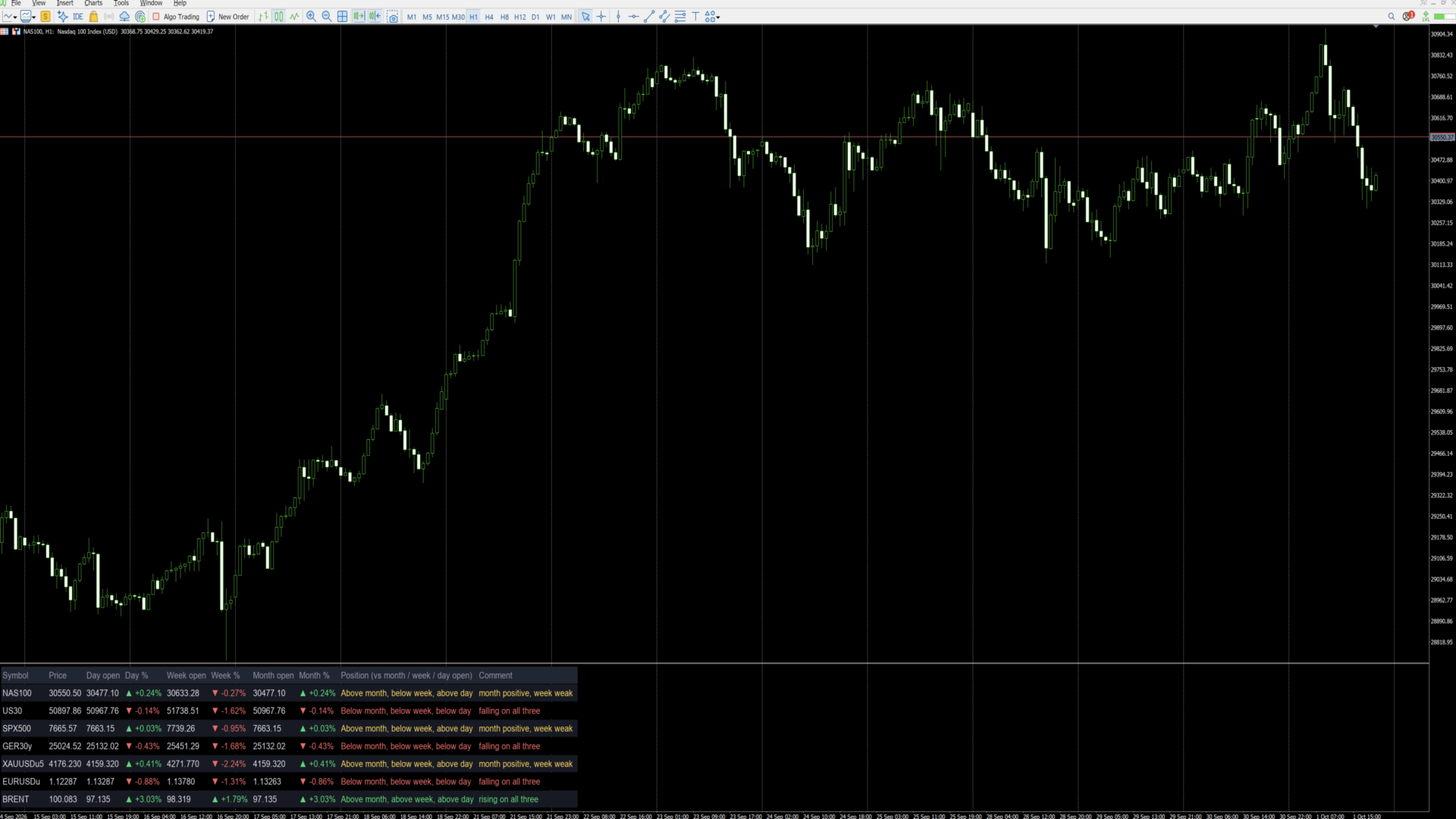
MiniBull Board is a compact watch-list dashboard for MetaTrader 5. For every symbol you choose it shows where the price stands today, this week and this month: the current price, the day / week / month opening price, the percentage change from each, and a short plain-language sentence that sums up the picture, such as *"Above month open, below week, below day — uptrend, pulling back today"*.

It answers the question every trader asks before looking at a chart: *"Is this market up or down — today, this week, this month?"* — for up to 8 symbols (or more) at a glance.

The board is descriptive only. It shows where price is relative to its opening levels; it does not forecast and does not trade.

---

## Key features

- **Day, week and month at a glance:** current price, opening price and % change for each period.
- **Plain-language summary per symbol:** a position sentence and a colour-coded comment on every row.
- **11 languages with automatic selection:** all on-screen text — column headers, sentences and number format — follows your MetaTrader terminal language, or the language you choose.
- **Your own symbol list or Market Watch:** type the symbols you want, in the order you want, or let the board take them from Market Watch.
- **Correct trading-day open:** the day open is taken at the real start of the trading day — 18:00 New York for indices, FX and metals, 00:00 UTC for Brent-type symbols — not at an arbitrary server midnight. Works with any broker time zone.
- **Sorting:** list order, or strongest first by day %, week % or month %.
- **Click to open:** click a symbol name and the chart switches to that symbol.
- **Clean, readable layout:** column widths are measured from the actual text, so nothing overlaps on any screen, font or DPI setting. Alternating row shading, auto-fit window height.
- **No blinking:** objects are created once and only their text and colour are updated, once per second.
- **Lightweight:** no buffers, no plots, independent of other indicators. Use it on any chart, in its own sub-window.

---

## Language support

The board speaks **11 languages**:

**English · Türkçe (Turkish) · Русский (Russian) · 中文 (Chinese) · Español (Spanish) · Português (Portuguese) · 日本語 (Japanese) · Deutsch (German) · Français (French) · Italiano (Italian) · 한국어 (Korean)**

With the default setting **Language = Auto** the board reads the language of your MetaTrader 5 terminal and uses it automatically — no setup needed. If your terminal runs in a language that is not on the list, the board uses English. You can also pick any of the 11 languages manually with the **Language** input.

What follows the language:

- column headers (for example *Day open / Gün açılış / Откр. дня / 日开盘*),
- the Position sentence and the Comment on every row,
- the "loading data" message,
- the decimal separator: comma in Turkish, Russian, Spanish, Portuguese, German, French and Italian (30411,50); point in English, Chinese, Japanese and Korean (30411.50).

Example of one row in three languages:

| Language | Position | Comment |
|---|---|---|
| English | Above month, below week, below day | month positive, week weak |
| Türkçe | Ayın üstünde, haftanın altında, günün altında | ay pozitif, bu hafta zayıf |
| Deutsch | Monat: darüber, Woche: darunter, Tag: darunter | Monat positiv, Woche schwach |

**Fonts for Chinese, Japanese and Korean:** when one of these languages is active and the Font input is left at Arial, the board switches automatically to a font that contains the characters (Microsoft YaHei, Meiryo, Malgun Gothic). If characters still show as boxes on your system, enter another installed CJK font in the **Font** input.

Note: the names of the inputs in the MetaTrader properties dialog are always shown in English. This is a MetaTrader limitation; everything displayed on the chart follows the selected language.

---|---|---|
| Column headers | Symbol, Price, Day open, Day %, Week open, Week %, Month open, Month %, Position, Comment | Sembol, Fiyat, Gün açılış, Gün %, Hafta açılış, Hafta %, Ay açılış, Ay %, Konum, Yorum |
| Position sentence | Above month, below week, below day | Ayın üstünde, haftanın altında, günün altında |
| Comment | uptrend, pulling back today | genel yön yukarı, bugün geri çekiliyor |
| Decimal separator | 30411.50 / +0.61% | 30411,50 / +0,61% |

Note: the names of the inputs in the MetaTrader properties dialog are always shown in English. This is a MetaTrader limitation; everything displayed on the chart follows the selected language.

---

## Installation and quick start

1. Copy the indicator to your terminal (MQL5 Market purchases and downloads are installed automatically).
2. Open any chart. The chart symbol and timeframe do not matter.
3. Drag **MiniBull Board** onto the chart. It opens in its own sub-window below the price chart.
4. In the **Inputs** tab:
   - choose your **Language**,
   - type your symbols into **My symbol list**, separated by commas, using the exact names your broker uses (for example `NAS100,US30,SPX500,GER40,XAUUSD,EURUSD,GBPUSD,UKOIL`),
   - set **Maximum rows** to at least the number of symbols in your list.
5. Press **OK**. The board fills in within a few seconds.

Weekly and monthly values may show "-" for a few seconds the first time a symbol is used, while the terminal downloads its history. They fill in automatically.

---

## Reading the board

Each row is one symbol. From left to right:

| Column | Meaning |
|---|---|
| **Symbol** | Symbol name. Click it to switch the chart to this symbol. |
| **Price** | Current bid price. |
| **Day open** | Opening price of the current trading day. |
| **Day %** | Change from the day open to the current price. |
| **Week open** | Opening price of the current week. |
| **Week %** | Change from the week open. |
| **Month open** | Opening price of the current month. |
| **Month %** | Change from the month open. |
| **Position** | Where the price is relative to the month, week and day open, from long-term to short-term. |
| **Comment** | One-line summary of the three periods together. |

**Colours and arrows**

- Green ▲ — price is above that opening price (positive change).
- Red ▼ — price is below that opening price (negative change).
- Grey "-" — data not yet available (history still loading, or the symbol name is wrong).

**What "month", "week" and "day" mean**

All comparisons use the **opening price of the current period**:

- **Month** — the first traded price of the current calendar month.
- **Week** — the first traded price of the current week (for US indices: Sunday 18:00 New York).
- **Day** — the first traded price of the current trading day (see *Day open source* below).

"Above month" therefore means the price is higher now than where it started this month, i.e. the month so far is positive. Previous-period highs, lows or closes are not used.

**The Comment column**

| Comment | Colour | Situation |
|---|---|---|
| rising on all three | green | above the month, week and day open |
| falling on all three | red | below the month, week and day open |
| uptrend, pulling back today | yellow | above month and week, below day |
| downtrend, recovering today | yellow | below month and week, above day |
| month positive, week weak | yellow | above month, below week |
| month negative, week recovering | yellow | below month, above week |

Yellow means a mixed picture: the periods point in different directions. The Position column always shows the full detail.

---

## Inputs

### Symbols

| Input | Default | What it does |
|---|---|---|
| **Symbol source** | My symbol list | *My symbol list*: the board shows only the symbols you type, in your order. *Market Watch*: the board takes the first symbols from your Market Watch window. |
| **My symbol list** | (example list) | Comma-separated symbol names, exactly as your broker writes them, including suffixes (e.g. `XAUUSD.m`, `EURUSDu`). Spaces after commas are ignored. Symbols that are not in Market Watch are added to it automatically. A misspelt name shows "-" on its row. |
| **Maximum rows** | 8 | Upper limit of rows. With *My symbol list* it should be at least the number of symbols you entered; with *Market Watch* it decides how many symbols are taken. |
| **Sort order** | List order | *List order*: as typed / as in Market Watch. *Day % / Week % / Month %*: highest change at the top, re-sorted every second. |
| **Day open source** | Session start | *Session start*: the day starts at the real beginning of the trading day — 18:00 New York for indices, FX and metals; 00:00 UTC for the symbols listed in the next input (Brent). This matches how these markets define their trading day. *Broker D1*: uses the broker's daily candle, which starts at the broker's server midnight. |
| **Symbols whose day starts 00:00 UTC** | BRENT,UKOIL,XBR | Any symbol whose name contains one of these words uses 00:00 UTC as its day start (ICE Brent opens at 01:00 London time = 00:00 UTC in summer). Add other names if needed. |

### Layout

| Input | Default | What it does |
|---|---|---|
| **Language** | Auto | *Auto*: the language of your MetaTrader terminal (English if it is not one of the 11). Or choose English, Türkçe, Русский, 中文, Español, Português, 日本語, Deutsch, Français, Italiano or 한국어. See *Language support*. |
| **Show the open prices** | true | *false* hides the Day / Week / Month open columns and leaves the price, the three % columns and the sentences — useful on narrow screens. |
| **Show the plain-language summary column** | true | *false* hides the Position and Comment columns for a numbers-only table. |
| **Font size** | 10 | Text size. Row height and column widths follow automatically. |
| **Font** | Arial | Any font installed on your computer. Column widths are measured from the real text, so any font works. Left at Arial, Chinese / Japanese / Korean switch automatically to a suitable font. |
| **Left margin / Top margin** | 12 / 8 | Distance of the table from the window edges, in pixels. |
| **Gap between columns** | 18 | Space between columns, in pixels. |
| **Row height** | 1.7 | Row height as a multiple of the text height. Larger = more spacious. |
| **Fit the window height to the table** | true | *true*: the sub-window height follows the number of rows. *false*: you can resize the window freely by dragging its border. |
| **Click a symbol to switch the chart to it** | true | *true*: clicking a symbol name changes the chart to that symbol. *false*: clicks do nothing. |

### Colours

| Input | What it colours |
|---|---|
| **Header** | Column titles |
| **Symbol / prices** | Symbol names and prices |
| **Above / positive** | Positive % values and "rising on all three" |
| **Below / negative** | Negative % values and "falling on all three" |
| **No data** | "-" and loading messages |
| **Mixed picture** | Yellow comments (periods disagree) |
| **Row shading** | Background of every second row |
| **Header background** | Background of the title row |

---

## Tips

- **Exact symbol names matter.** Copy them from Market Watch (right-click a symbol, *Specification*) if your broker uses suffixes.
- **Many symbols:** raise *Maximum rows*, set *Show the open prices* to false, and use a smaller font.
- **Daily routine:** sort by *Day %* to see the strongest and weakest markets of the day at the top.
- **Use it as a launcher:** keep the board on one chart and click through your symbols.
- **Time zones:** the trading-day start is calculated from UTC with the US daylight-saving rule, so the board is correct for any broker time zone and any user location.

---

## FAQ

**Why does a row show "-"?**
Either the terminal is still downloading the weekly/monthly history (wait a few seconds), or the symbol name does not exist at your broker (check the spelling and suffix).

**Why is my day % different from another platform?**
Platforms use different day starts. With *Session start* the board uses the market's own trading-day start (18:00 New York, or 00:00 UTC for Brent). Switch *Day open source* to *Broker D1* to use your broker's daily candle instead.

**Does it work on any chart timeframe?**
Yes. All values come from fixed daily, weekly, monthly and one-minute data, independent of the chart.

**Can I run two boards on the same chart?**
Use one board per chart. To watch more symbols, raise *Maximum rows*, or add the board to a second chart.

**Does it slow down my terminal?**
No. It refreshes once per second and only changes text that has actually changed.

**Does it trade or give signals?**
No. It is an information panel only.

---

## Important notes

- The board describes the current position of price relative to its period opens. It makes no prediction and gives no trading advice.
- Values depend on your broker's price data. Brokers may differ slightly in prices and trading hours.
- *Session start* needs one-minute history for each symbol of the current day; the terminal provides it automatically.
- Trading leveraged products carries a high level of risk.

---

## Version history

- **1.14** — Faster start: the board appears within a second (text measurements are cached).
- **1.13** — Removing the indicator now cleans all its objects from the chart, including leftovers of older versions.
- **1.12** — 11 languages and automatic language selection from the terminal. Automatic CJK fonts. Fix: objects no longer stay on the chart after the indicator is removed.
- **1.11** — The window name shows the version number ("MiniBull Board v1.11").
- **1.10** — New layout: measured column widths (no overlapping on any font or DPI), larger rows, row shading, auto-fit window height. New Position and Comment columns with a plain-language summary per symbol.
- **1.02** — Day open at the real start of the trading day (18:00 New York; 00:00 UTC for Brent-type symbols).
- **1.01** — Language option: English / Turkish.
- **1.00** — First release.

おすすめのプロダクト
Free Slave Version – Remote Trade Receiver MT5. This is the FREE Slave version of our professional Remote Trade Copier system. It allows you to receive trades from a Master account running our full Copy Trade solution. Designed for simplicity and reliability, this version is read-only and cannot send trades or operate independently. Key Features: One-click setup – simply connect to the Master. Fast and accurate order copying. Supports all symbols, order types, and brokers. Minimal resource us
FREE
RelicusRoad CopyTrader は MetaTrader 5 向けの無料のトレードコピーツール( trade copier )です。同じパソコン上のMT5端末間でトレードをコピーするので、1つの口座で取引し、他の口座にはそれぞれ独自のロット数とリスクで追従させることができます。 フルバージョンで、機能制限も試用期間もありません。 1つの口座で取引し、残りは追従させる。 MetaTrader 4: RelicusRoad CopyTrader MT4 仕組み 1つの端末が リーダー (Leader)として動作し、保有しているオーダーを共有します。任意の数の端末が フォロワー (Follower)として動作し、それらをミラーリングします。端末は チャンネル 名でペアリングされるため、同じマシン上で複数の独立したコピーグループを同時に運用できます。 コピー処理は200ミリ秒のタイマーで実行されるため、フォロワーは自分のチャート上のティックを待たずに新しいオーダーに反応します。 セットアップ手順 1. すべての端末を 同じパソコン または同じVPS上で実行してください。異なる2台
FREE
Trade Copier Local MT5 is a fast local trade copier for copying trades between multiple MT4 and MT5 accounts. One EA works in both Master and Slave modes. Simply select the required Copier Mode and use the same product on your MetaTrader terminals. Copy trades between: • MT5 → MT5 • MT5 → MT4 • MT4 → MT5 • MT4 → MT4 Perfect for: • Trading multiple accounts at once • Linking multiple trading accounts • Personal account mirroring • Signal providers • Account managers • Prop trading setups #
Limited-time free release: Adaptive SuperSmoother Trend Signals MT5 is free while MetaCoderStore collects trader feedback, comments, and feature requests for the first public version. Adaptive SuperSmoother Trend Signals MT5 plots a low-lag adaptive SuperSmoother line on price, adds optional ATR bands, and marks filtered bullish or bearish cross signals with EA-readable buffers. Use cases Follow a smoother adaptive trend line without adding heavy lag. Find price crosses that agree with the curre
FREE
Copy your MT5 trades to accounts anywhere in the world with the   MetaToolsLab Master EA . Unlike local copiers that only work between terminals on the   same   PC or VPS, MetaToolsLab uses a secure cloud relay — so you can broadcast your trades to followers across   different computers, VPS providers, brokers, and continents , with   sub-second delivery   and   no broker passwords . Whether you're a signal provider, a multi-account trader, or an account manager, the Master EA installs in about
FREE
Run one strategy across every account you trade. Revanche Miroir Local Copier is a free local trade copier that mirrors trades between MetaTrader 5 accounts on the same computer, in real time. One program plays both parts: set it as the Master on the account you trade, and as a Slave on each account that should follow. A complete copier, free. It copies on any symbol, in any account currency, and between different brokers. If the master falls silent, open trades are held rather than closed, and
FREE
Babel Assistant
Iurii Bazhanov
4.33 (9)
Babel assistant 1 MT5ネッティングロボット「Babel_assistant_1」は、ZigZagインジケーターを使用してM1、M5、M15、H1、H4、D1、W1の時間足全体でフィボナッチレベルを生成し、買いトレンドと売りトレンドの強さを計算します。指定されたトレンドレベル4.925を超えると、「Lot for open a position」の設定を使用してポジションをオープンします。その後、Babelは特定のフィボナッチレベルに指値注文(または逆指値注文)を配置し、指定されたストップロス(Stop Loss)およびテイクプロフィット(Take Profit)のラインを設定します。画面には、ポジション、トレード、トレンドの現在の結果が表示されます。 0.02ロット以上の手動でのポジション追加は、ロボットによって独自の保留注文のトリガーとして認識されます。0.01ロットの保留注文または成行注文は、執行時に単にポジション量を変更します。 免責事項: 以下の資料は、情報提供および教育目的のみを目的としています。外国為替市場向けの自動取引プログラムである本製品「Babel
FREE
CosmiCLab SMC FIBO CosmiCLab SMC FIBO is a professional trading indicator designed for traders who use Smart Money Concepts (SMC), market structure analysis and Fibonacci retracement levels. The indicator automatically detects market swings and builds Fibonacci levels based on the latest impulse movement. It also identifies market structure changes such as BOS (Break of Structure) and CHOCH (Change of Character), helping traders understand the current market direction. CosmiCLab SMC FIBO also pr
GOM Trade Manager helps you execute trades the way you want it. Works on all instruments Forex, Commodities, & Crypto. It helps you with lot calculations, spread addition and balance calculations so you can just focus on actual trading. For full automatic planned management, stackable triggers and spread widening protection >> check out GOM Trade Manager Pro . ------------------------------------------NOTABLE FEATURES------------------------------------------ You set everything based on bid
FREE
Supply and Demand indicator powered by advanced multi-timeframe fractal algorithms, Zone Merging technology, and full EA readiness. -  Finding the exact areas where institutional buying and selling occur is the key to successful trading. Advanced Supply & Demand Zones Simple  takes the guesswork out of chart analysis. By utilizing a dual-layered fractal calculation (Fast and Slow points) combined with dynamic ATR scaling, this indicator pinpoints high-probability reversal and continuation zones
FREE
AXR Market Check
Stoyan Kirilov Karlov
5 (2)
AXR Market Check は、現在のチャート環境をひと目で把握したいトレーダー向けの、無料の MetaTrader 5 マーケット・レディネス・インジケーターです。 AXR ツールラインの一部です。アップデート情報や連絡先については、公式 MQL5 ページをご利用ください。 AXR MQL5 Channel: 製品アップデート、リリースノート、新しい AXR ツール Telegram: 販売者プロフィールを開く 。Telegram の連絡先はプロフィール説明に記載されています。 セッション状況、ニュースのタイミング、日中レンジ、ボラティリティ、スプレッド圧力、マーケット構造、日次プロファイルレベルを、1つの見やすいビジュアルダッシュボードにまとめます。 中心となる問い: 現在の市場は、今見る価値があるほどアクティブで、クリアで、関連性があるのか? なぜ役立つのか セットアップを見る前に、市場環境を理解することが重要です。チャートが魅力的に見えても、セッションが弱い、日中レンジがすでに伸びている、ボラティリティが低い、スプレッドが高い、重要ニュースが近いといった状況がありま
FREE
CopyTrader Pro FAST MT5 — FREE Real-Time Trade Copier | MT4 ↔ MT5 Cross-Platform | 20ms Latency CopyTrader Pro FAST is a professional trade copier Expert Advisor that copies trades between MetaTrader terminals in real time using a high-speed file-based communication system. No VPS, no network setup, no DLL — just attach and copy. FREE VERSION : Copies up to 1 trade at a time. Upgrade to the full version, Copy Trader Pro FAST MT5 , for unlimited copying. Key Features 20ms refresh rate — in
FREE
Calmer chart context, kept practical Northstar Flow Candles MT5 is a chart-window indicator that presents Heikin Ashi candles with a five-state trend context. It is designed for traders who want a quieter view of price while keeping the native chart available as an optional reference. Visual-only indicator: Northstar Flow Candles MT5 does not place trades and does not send popup, push, or email notifications. What appears on the chart Five candle states: strong bullish, bullish, balanced, bearis
FREE
GDS Renko Pip ST Chart - Pip-Based Renko Chart Indicator for MetaTrader 5 GDS Renko Pip ST Chart is a pip-based Renko chart indicator for MetaTrader 5. It helps traders build and study cleaner Renko price movement using a practical fixed pip or point-based brick structure. This tool is designed as a Renko chart foundation for manual analysis. It does not predict the market, does not generate buy or sell signals and does not decide whether a trade should be opened. Renko EDGE EA Golden Delta | A
SessionRangeBox
Alexandre Vincent Traber
Session Range Box — Session High/Low Visualizer Overview Session Range Box draws live, color-coded rectangles on your chart marking the high and low reached during the Asia, London, and New York trading sessions. As each session unfolds, its box grows in real time to reflect the range built so far, then locks in place once the session closes. A simple on-chart control panel lets you show or hide any session instantly, so you can study one session's range in isolation or view all three overlaid a
FREE
RenkoExpert
Andrey Goida
3.67 (6)
Renko Expert Advisor based on Renko bar simulation.    The EA has two options for building Renko bars. Classic and ATR. In the classic version, renko bars are marked with areas on the main chart; in the ATR version, renko bars are modeled and drawn in the indicator window. Modeling renko bars inside the EA allows you to optimize the robot better than drawing renko bars offline. Renko EDGE EA   Set file Golden Delta | Algo Trading Research Updates, research and new developments: https://www.mql5
FREE
AliSessions
Alexandra Voicu
5 (2)
AliSession Highlight is an indicator that highlights a specific period of time according to your preferences. It can help you gain a clear vision of price movements into a specific session, the range of a session, and also to easily identify the high and low of the session. You can use it on any currency pairs, indices, and any timeframes. Settings: Start Hour: Set the hour to initiate the session highlight. Start Min: Set the minute for the start of the session highlight. End Hour: Specify the
FREE
供給と需要のオーダーブロック: 「供給と需要のオーダーブロック」インジケーターは、外国為替のテクニカル分析において重要なスマートマネーの概念に基づいた洗練されたツールです。このツールは供給と需要ゾーンを特定し、機関投資家が重要な足跡を残す重要な領域に焦点を当てています。売り注文を示す供給ゾーンと買い注文を示す需要ゾーンは、トレーダーが価格の逆転や減速を予測するのに役立ちます。このインジケーターは、ブレイクアウト・オブ・ストラクチャー(BoS)およびフェアバリューギャップ(FVG)のコンポーネントを組み合わせた賢明なアルゴリズムを採用しています。BoSは市場の混乱を検出し、潜在的なオーダーブロックを特定し、FVGは精度を向上させるためにフェアバリューギャップを考慮しています。このツールはこれらの条件の視覚的表現を提供し、潜在的なオーダーブロックを強調し、市場のダイナミクスや転換点に関する洞察を提供することで、トレーダーの意思決定を支援します。使いやすいデザインは、さまざまな技術的な専門知識レベルのトレーダーにアクセスしやすく、高度な分析の包括的なソリューションを提供します。 特徴:
FREE
Stocastic Alarm Osw MT5
William Oswaldo Mayorga Urduy
**STOCHASTIC ALARM** このインジケーターは通常のストキャスティクスとして機能し、K、D、スローイング、色、レベルなど、動作や表示をカスタマイズするための通常の設定をすべて維持しています。 さらに、80や20などの上限および下限レベルでアラームを設定できる追加機能を備えています。これらのレベルは、チャート上の青と赤のラインを直接動かすことで簡単に調整できます。 また、アラートをストキャスティクスのMAIN値またはSIGNAL値のどちらで生成するかを選択できるため、用途に合わせたアラートの使用が可能です。 さらに、上限または下限で期待される値に達したときにチャート上に矢印を表示する機能を有効または無効にすることができます。 MetaTrader 4およびMetaTrader 5用の他のインジケーター、エキスパートアドバイザー、ツールもぜひご覧ください。
Crypto_Forex MT5用インジケーター「 WPR with 2 Moving Averages 」(リペイント機能なし) - WPR自体はスキャルピングに最適なオシレーターの1つです。 - 「WPR and 2 Moving Averages」インジケーターを使用すると、WPRオシレーターの高速移動平均線と低速移動平均線を確認できます。 - このインジケーターを使用すると、価格調整を早期に把握できます。 - このインジケーターはパラメータで簡単に設定でき、どの時間枠でも使用できます。 - 買いと売りのエントリー条件は画像で確認できます。 - WPR MA クロスの PC およびモバイル アラート付き。 買いシグナルの条件例: (1) - 高速MAが低速MAを下向きにクロスし、WPR値が-50を下回っている場合:買いトレードを開きます。 (2) - WPR値が-20を超える買われすぎゾーンに入ったら:買いトレードを終了します。 売りシグナルの条件例: (1) - 高速MAが低速MAを下向きにクロスし、WPR値が-50を超えている場合:売りトレードを開きます。 (2) WP
This indicator is especially for the binary trading. Time frame is 1 minutes and exp time 5 or 3 minutes only. You must be use martingale 3 step. So you must put lots size is 10 % at most. You should use Mt2 trading platform to connect with my indicator to get more signal without human working. This indicator wining rate is over 80% but you may get 100% of profit by using martingale 3 step. You should use MT2 Trading Platform to connect meta trader platform and binary platform . You can get mt2
FREE
Auto Trade Copier is designed to copy trades to multiple MT4, MT5 and cTrader accounts/terminals with 100% accuracy. The provider and receiver accounts must be on the same PC/VPS. With this tool, you can copy trades to receiver accounts on the same PC/VPS. All trading actions will be copied from provider to receiver perfectly. This version can be used on MT5 accounts only. For MT4 accounts, you must use Auto Trade Copier (for MT4). Reference: - For MT4 receiver, please download Trade Receiver Fr
Tired of false signals? Trade with reliable buy & sell arrows! Download now  and see how it works !  High-Performance Signals Suitable for trend-following or trend trading Never repaints, recalculates, or backpaints signals This is   FREE / DEMO /   version and  works only on EURUSD M15, M5“  (demo version; no suffix/prefix brokers). Test it   FREE  now - see real results! TREND REVERTING PRO full version here :  Get accurate arrows on every setup! Trade safely - full version work
FREE
HiperCube VIX へようこそ Darwinex Zero 25%割引コード: DWZ2328770MGM この指標は、sp500 / us500 の市場のボリュームに関する実際の情報を提供します 定義 CBOE ボラティリティ インデックスとして知られる HiperCube VIX は、市場の恐怖やストレスを測る広く認知された指標です。株式市場の不確実性とボラティリティのレベルを示し、S&P 500 インデックスを広範な市場の代理として使用します。VIX インデックスは、S&P 500 インデックスのオプション契約の価格に基づいて計算されます。 機能: カスタムカラー カスタムチャートカラー メイングラフを明瞭に保つためにサブウィンドウにインジケーターを表示 解釈が簡単 完全にカスタマイズ可能 Chat gptとAIが開発に使用されました 使用例: VIX は実際の市場に関する優れた情報を提供するボリュームインジケーターです。このインジケーターの値が高いということは、ボラティリティが高いことを意味します ボラティリティが高いということは、市場の動きにアプローチし、市場
FREE
TradeInfos
Dustin Ricardo Pierenz
Track your spread and all position PnLs (Buy & Sell) in real-time – stay in control of your trades at a glance! Features: Real-time spread display (in pips) Total Buy position PnL Total Sell position PnL Clean, non-intrusive display layout Works with all symbols and timeframes Perfect for: Scalpers needing quick spread awareness Day traders monitoring long/short performance Risk managers optimizing exposure No need to switch tabs or rely on external tools — everything you need is visible at
FREE
Order Blocks Scalper
Allan Munene Mutiiria
4.43 (7)
The Order Blocks Scalper EA is a next-generation, fully automated trading tool that identifies and trades key order block zones with precision and speed. Designed for traders seeking consistent entries and exits, this EA harnesses advanced market structure analysis to detect consolidation ranges, breakouts, and impulsive price movements, enabling optimal trade execution. Key Features Smart Order Block Detection : Identifies bullish and bearish order blocks based on institutional order flow. Each
FREE
Instructions for the Dynamic_DOM_Labels indicator Dynamic_DOM_Labels is a professional analytical tool for the MetaTrader 5 terminal, designed to analyze the Order Flow in real time. The indicator connects directly to the broker's Depth of Market /DOM, finds large limit orders from buyers (Buy Limit) and sellers (Sell Limit) and projects them onto the work schedule. The tool is designed specifically for liquid markets such as Gold (XAUUSD) and major currency pairs (for example, GBPUSD), where la
FREE
RandomChoice
Aleksei Lesnikov
5 (1)
Expert capable of generating profit by opening positions randomly. Shows good results in long-term trading – on timeframes from H12. Features Fully automatic mode is available. Positions are opened randomly. Martingale is applied – if the previous position closed with a loss, the current one is opened with a volume that compensates for that loss. Parameters Mode – Expert's operating mode: Automatic – automated (recommended); Manual – manual. In automatic mode, the Expert does not require any p
FREE
Gold Whale Hunter EA (EA13_M3RX): The Prop Firm Survivor Are you tired of EAs that only work on "Zero Spread" accounts but fail miserably on real Prop Firm conditions? Meet Gold Whale Hunter , the EA designed specifically for XAUUSD (Gold) on the M15 timeframe. It doesn't scalp for pennies; it hunts for the big trends.   ENTER YOUR KEY HERE: [  EA13_99999D_TANINCODER_5946594662422 ] -- MANDATORY: ALLOW WEBREQUEST TO ACTIVATE THE BOT To verify your License Key, the Bot needs permission
FREE
SmartPullback
Samuel Jesus Fidalgo Lopez
Smart Pullback Pro v4 High-Probability Pullback Indicator for MT5 Smart Pullback Pro v4 is a professional trend-following indicator for MetaTrader 5 that identifies high-probability pullback entries in real time. It automatically plots entry zones, Stop Loss, and Take Profit levels directly on the chart, giving traders a complete visual trading plan with every signal. How It Works Smart Pullback Pro v4 combines multiple confluence filters to eliminate low-quality signals and focus only on va
FREE
このプロダクトを購入した人は以下も購入しています
SMART TREND TRADING SYSTEM — 特別オファー トレードシステム、自動化EA、学習コンテンツとサポートをひとつに。 MT5用のSmart Trend Trading Systemを99米ドルでご購入いただくと、シグナルの自動売買に使える Smart Universal Expert Advisorを無料でプレゼント します。 STTSは、トレンドの方向、エントリー・決済シグナル、反転ゾーン、重要な価格水準をチャート上にまとめて表示します。システムを参考に手動で取引することも、付属のEAを接続し、ご自身で選んだ設定に基づいて自動売買することもできます。 現在の99米ドルという価格は、これからの30件の購入に適用されます。その後、価格は149米ドルに上がります。 充実のパッケージ内容 ご購入には以下が含まれます。 • MT5用Smart Trend Trading System。 • Smart Universal Expert Advisor — 無料。 • STTSの完全版PDFユーザーマニュアル。 • STTS公式オンラインコース。 • インストールと
Trend Sniper X
Sarvarbek Abduvoxobov
4.9 (39)
Trend Sniper X は、トレードの方向性と潜在的な反転ポイントを明確かつ正確に特定するのに役立つ、MetaTrader 5 用のマルチタイムフレーム・トレンドフォロー指標です。 MT4用: https://www.mql5.com/en/market/product/193245 価格情報: 現在の価格はプロモーション価格であり、今後のアップデートや新機能のリリースに伴い変更される場合があります。 ボーナス特典: このインジケーター用の無料自動売買アシスタントEAを入手するには、購入後に an 著者(開発者)へメッセージをお送りください。 Code2Profit チャンネル マルチタイムフレーム分析で相場をマスターしよう! Trend Sniper X で勝率を最大化する方法:重要なルールとセッションのコツ 技術仕様 プラットフォーム MetaTrader 5 インジケータータイプ マルチタイムフレーム・トレンドインジケーター 操作タイムフレーム あらゆるチャートタイムフレームに対応。個別に選択可能な上位タイムフレーム (M1–MN1) を搭載 主要銘柄 FX、ゴールド (X
ARIPoint
Temirlan Kdyrkhan
1 (4)
ARIPoint is a powerful trading companion designed to generate high-probability entry signals with dynamic TP/SL/DP levels based on volatility. Built-in performance tracking shows win/loss stats, PP1/PP2 hits, and success rates all updated live. Key Features: Buy/Sell signals with adaptive volatility bands Real-time TP/SL/DP levels based on ATR Built-in MA Filter with optional ATR/StdDev volatility Performance stats panel (Success, Profit/Loss, PP1/PP2) Alerts via popup, sound, push, or email Cu
Zoryk Gold
Reda El Koutbane
5 (15)
割引は 24 時間後に終了します — 次の価格は$ 69 ZORYK — MetaTrader 5専用 XAUUSDシグナル・トレードプランニングシステム このような経験はありませんか。 ゴールドを分析し、エントリーを待ち、ようやくポジションを持った直後に価格が逆方向へ動く。 早すぎる決済をしてしまったり、Stop Lossを動かしたり、数秒迷っている間にチャンスを逃したりする。 その後、相場は自分が最初に予想していた方向へ進み、目標へ到達する。 問題は常に方向判断ではありません。 本当の問題は、明確な計画がなかったことです。 どこでエントリーすべきか。 どこでトレードの前提が無効になるのか。 近い利益を確保すべきか、より大きな値動きを待つべきか。 現在のsetupが本当に強いのか、それとも無理にトレードを探しているだけなのか。 ゴールドは非常に速く動きます。 正しい分析でも、明確なプランがなければ数秒で悪い判断に変わることがあります。 ZORYKは、その問題を解決するために開発されました。 ZORYKとは ZORYKは、MetaTrader 5とXAU
SuperScalp Pro
Van Minh Nguyen
4.66 (35)
SuperScalp Pro - Professional Multi-Layer Confluence Scalping System SuperScalp Proは、クラシックなSupertrendに複数のインテリジェントな確認フィルターを追加した、高度なスキャルピングインジケーターです。より高い確率が期待できるBuy/Sellの取引機会を特定し、ダマシのシグナルを大幅に減らすことをサポートします。 明確なBuyとSellの矢印がチャート上に直接表示され、ATRに基づくStop LossとTake Profitのレベルがリアルタイムで自動計算されます。 購入後、設定方法や推奨設定についてのサポートが必要な場合は、私にご連絡ください。 SuperScalp Pro Auto Traderを使用して、シグナルを簡単に自動化できます: [Auto Trader] 推奨設定ファイルをダウンロード: [Set File] 完全なドキュメントは製品ブログでご覧いただけます: [User Guide] 最新情報を受け取るには公式チャンネルに参加してください: [Official Channel]
GoldenX Entry MT5
VividMind Digital Solutions
5 (16)
GoldenX Entryは、MT5向けのインジケーターであり、適応型Smart Entry Trendアルゴリズム、シグナルスコアリングシステム、マーケットレジーム検出機能、およびボラティリティフィルターを備えています。各シグナルには、計算されたエントリーレベル、3つのテイクプロフィット(TP1、TP2、TP3)、およびストップロスレベルが含まれます。本インジケーターは、異なる市場環境に適応するために設計された複数の分析レイヤー上に構築されており、マルチレイヤー分析システムと内蔵オプティマイザーおよび統計トラッキングシステムを組み合わせています。リスク・リワード(RR)指標および過去のトレード履歴に基づく定量分析を提供します。 使い始めは簡単です — 選択した時間足でオプティマイザーを実行し、そのままチャート上でインジケーターを使用します。 コア機能 GoldenX Entryは、シグナルエンジンとトレード管理機能、そして過去統計トラッキングを1つのチャートに統合しています: - 内蔵オプティマイザー: オプティマイザーはチャート上でワンクリックで実行できます。200通りのパラメー
SMC Intraday Formula
VividMind Digital Solutions
5 (26)
まず正直に言いましょう。 どんなインジケーターも、それ単体であなたを利益化させることはできません。もしそう言う人がいるなら、それは夢を売っているだけです。完璧な売買シグナル(矢印)を表示するインジケーターは、いくらでも“完璧に見せる”ことができます。正しい過去の区間を拡大して、勝ちトレードだけを切り取ればいいだけです。私たちはそれをしません。 SMC Intraday Formula はツールです。 市場構造を読み取り、最も高い確率の価格ゾーンを特定し、今この瞬間のスマートマネーの痕跡をシンプルな言葉で正確に示します。最終判断はあなたが行います。トレードを実行するのもあなたです。しかし今は「希望」ではなく「精度」でエントリーできます。 私たちはこのインジケーターを、ゴールド(XAUUSD)および主要FX通貨ペアで約3年間、日々のスキャルピングに使用してきました。M1、M5、M15、M30の主要ツールです。これは未来を予測しようとするのではなく、今まさに形成されている高確率セットアップを示し、その理由を説明します。 他のすべてのインジケーターと何が違うのか? ほとんどのトレーディングイ
Gann Made Easy   は、ミスター・ギャンの理論を使用した取引の最良の原則に基づいた、プロフェッショナルで使いやすい外国為替取引システムです。 W・D・ガン。このインジケーターは、ストップロスとテイクプロフィットレベルを含む正確な買いと売りのシグナルを提供します。 PUSH通知を利用して外出先でも取引可能です。 ご購入後、取引方法の説明と優れた追加インジケーターを無料で入手するには、私にご連絡ください! おそらく、ギャンの取引手法についてはすでに何度も聞いたことがあるでしょう。通常、ギャンの理論は初心者のトレーダーだけでなく、すでにある程度の取引経験がある人にとっても非常に複雑なものです。なぜなら、ギャンの取引手法は理論的にはそれほど簡単に適用できるものではないからです。私はその知識を磨き、最良の原則を私の外国為替インジケーターに組み込むために数年を費やしました。 このインジケーターは非常に簡単に適用できます。必要なのは、それをチャートに添付し、簡単な取引推奨事項に従うだけです。このインジケーターは常に市場分析の仕事を行い、取引の機会を探します。適切なエントリーポイントを検
Neuro Poseidon is a new indicator by Daria Rezueva. It combines precise trading signals with adaptive TP/SL levels - creating best possible trades as a result! Message me and get  Neuro Poseidon Assistant  as a gift to automize your trading process! What makes it stand out? 1. Proven profitability on all assets and timeframes 2. Only confirmed BUY and SELL signals present on the chart 3. Adaptive TP & SL levels generated by the software for each trade 4. Easy to understand - suitable for al
M1 SNIPER は使いやすいトレーディングインジケーターシステムです。M1時間足向けに設計された矢印インジケーターです。M1時間足でのスキャルピングのためのスタンドアロンシステムとして、また既存のトレーディングシステムの一部としても使用できます。このトレーディングシステムはM1時間足での取引に特化して設計されていますが、他の時間足でも使用できます。元々、この手法はXAUUSDとBTCUSDの取引用に設計しましたが、他の市場においても役立つと考えています。 インジケーターのシグナルは、トレンドの方向と逆方向に取引できます。インジケーターのシグナルを利用して両方向に取引するのに役立つ特別な取引テクニックをご紹介します。この手法は、特別な動的なサポートとレジスタンスの価格帯を利用することに基づいています。 ご購入後、M1 SNIPER矢印インジケーターをすぐにダウンロードできます。さらに、M1 SNIPERツールのすべてのユーザーに、以下のスクリーンショットに表示されているApollo Dynamic SRインジケーターを無料で提供しています。この2つのインジケーターを組み合わせることで
伝説が帰ってきました:Entry Points Pro 10。 MQL5 Marketのトップ3に3年間入り続けた伝説的インジケーターの再始動です。 2つのバージョンで合計589件の高評価レビュー、毎日数千人のトレーダーが実際のトレードに使用し、デモのダウンロードは31,000件以上   MT4+MT5 。 私はこの5年間に寄せられたレビューをすべて読み、約束を並べる代わりに、その答えをバージョン10に組み込みました。1999年から相場に携わり、 誠実さ、自らの評判、そして顧客を大切にする 作者による製品です。 Entry Points Proのエントリーシグナルは、リペイント(再描画)を一切行いません。 そして今回初めて、これは作者の言葉ではなく検証可能な事実になりました。確定シグナルはローソク足の終値確定後にのみ表示され、自動テストで リペイントはゼロ と確認されています(EURUSD、XAUUSD、BTCUSDで2,486,568回の不変条件チェック、違反0件)。検証方法は公開されており、ストラテジーテスターでご自身で再現できます。 ご購入後は、必ずすぐにダイレクトメッセージでご
UNIX SCALPER — 特別オファー セットアップを見つけ、取引プランを確認し、取引方法を選ぶ。 MT5用UNIX Scalperを99米ドルで購入すると、シグナルを自動売買に活用できるSmart Universal Expert Advisorが無料で付属します。 UNIX Scalperは、市場分析、BUY/SELL/WAITの判断、Entry、Stop Loss、TP1、TP2の水準を、見やすいパネルにまとめています。取引プランに沿って手動で取引することも、付属のEAを接続し、ご自身の設定に従って自動執行することもできます。 現在の99米ドルの価格は、今後30件の購入に適用されます。その後、価格は149米ドルになります。 パッケージの内容 ご購入には以下が含まれます。 • MT5用UNIX Scalper。 • Smart Universal Expert Advisor — 無料。 • UNIX Scalperの完全版PDFユーザーマニュアル。 • UNIX Scalper公式オンラインコース。 • インストールと設定の手順ガイド。 • 購入者限定コミュニティへ
新たな王者が登場 - インジケーター + 注文管理表示(TP1 + TP2 + TP3)+ オプションのTelegramシグナル送信機能付き(無料) (完全なトレード&シグナルシステム) ゴールド向け最高のEA: Gold Slayer このインジケーターには、高度な戦略、カスタマイズ可能な注文管理システム、そしてエンベロープ拡張を組み合わせた平均回帰システムが搭載されています。さらに、RSIなど複数のインテリジェントな確認フィルターによって、高確率の反転エントリーをBUY・SELLシグナルとして検出します。 単にトレードを学ぶだけでなく、複数ポジションを効果的に管理し、過去に利益を出しているオープンポジションで損失トレードをカバーする方法も学べます。 M5向けに構築・最適化されており、流動性が高くシグナルの精度が安定しているBTCUSDとXAUUSDで優れたパフォーマンスを発揮します。 このインジケーターは、ATRを基に自動計算されたエントリー、ストップロス、テイクプロフィットレベルを備えた明確なLong・Shortシグナルを提供するため、リスク管理が最初から組み込まれています。 マ
Auto Optimized SpeedAngle は、継続的なウォークフォワード最適化(WFO:Walk-Forward Optimization)によりカーブフィッティング(過剰最適化)を排除した、機関投資家レベルのモメンタムベクトルシステムです。市場レジームの変化時に効果が低下する静的な入力に依存せず、アウトオブサンプル(OOS)検証を用いてパラメーターを動的に再キャリブレーションすることで、表示されるシグナルが単なる過去の偶然ではなく、確実な統計的優位性に基づいていることを保証します。 主な機関投資家向けフレームワーク ウォークフォワード最適化エンジン: ルックバック期間やしきい値の数千に及ぶ組み合わせを継続的にスキャンし、データをインサンプルとアウトオブサンプルに厳格に分離します。未検証のデータ環境において数学的優位性が証明された場合にのみ、新しいパラメーター設定を採用します。 定量的目的関数: 単なる純利益の追求ではなく、機関投資家レベルの安定性指標をターゲットとします。システム品質ナンバー(SQN)、期待値(1トレードあたりの平均Rマルチプル)、またはネットRの最適化を選
FiboSniper Pro – Multi-Filter Fibonacci System with Auto SL/TP and Control Panel FiboSniper Proは、動的なFibonacci Envelopesと複数の確認フィルターを組み合わせ、選別されたBuyおよびSellシグナルを生成するテクニカルインジケーターです。FibonacciレベルはMoving AverageとATRを基に計算され、その後ADX、EMA、RSI、ATR、Volume、Time、Candle構造によってフィルタリングされます。インジケーターは、ATRに基づく自動Stop LossおよびTake Profitレベルをチャート上に直接表示し、さらに迅速な調整が可能なインタラクティブControl Panelを提供します。 購入後、推奨設定ファイルと詳細な使用方法については、私にご連絡ください。 Auto Trader Xを使用してFiboSniper Proのシグナルを自動化できます: [Auto Trader X] User GuideとSet Files: [Click her
Welcome to ENTRY IN THE ZONE AND SMC MULTI TIMEFRAME /  Official Website: https://www.fableedge.net Entry In The Zone and SMC Multi Timeframe is a real-time market analysis tool based on Smart Money Concepts (SMC), designed to analyze market structure, price direction, and key trading zones. It supports both Single-Timeframe Analysis and Multi-Timeframe Analysis, providing a clearer view of the overall market structure across multiple timeframes, with real-time BUY / SELL signals that do not rep
Gold Entry Sniper – ゴールドスキャルピング&スイングトレード用プロフェッショナル多時間足ATRダッシュボード Gold Entry Sniper は、XAUUSDや他の銘柄向けに正確な 売買シグナル を提供する、MetaTrader 5用の高度なインジケーターです。 ATRトレーリングストップロジック と 多時間足分析ダッシュボード を搭載し、スキャルピングからスイングトレードまで対応します。 主な特徴と利点 多時間足シグナル分析 – M1、M5、M15 のトレンドを同時表示。 ATRベースのトレーリングストップ – ボラティリティに応じて動的に調整。 プロ仕様のチャートダッシュボード – シグナル状況、ATRレベル、回帰線、売買方向を表示。 明確な売買マーカー – 自動矢印とテキストラベル。 エグジットアラートとトレード管理 – 利益確定のための自動検出。 完全カスタマイズ可能 – パネル位置、色、フォント、ATR/回帰設定を調整可能。 ゴールド(XAUUSD)に最適化 – M1〜M15のスキャルピングに最適、FXや指数、暗号資産にも対応。 Gold Entry
Tokyo Indicatorは、トレンドの方向性、潜在的な取引シグナル、および市場状況を視覚的に分かりやすく表示します。 色分けされた階段状のトレンドラインにより、強気局面(青色)と弱気局面(マゼンタ色)が明確に区別されます。トレンドの変化に合わせて表示される方向矢印は、売買の好機を強調します。 統合されたダッシュボードには、現在のシグナル、市場のバイアス(傾向)、モメンタム、ボラティリティ、シグナルの品質がひと目で分かるようにまとめられています。これにより、トレーダーはパネルを切り替えることなく、価格変動(プライスアクション)とインジケーターの数値を照らし合わせて分析を行うことができます。 すっきりとしたチャート表示と簡潔な市場概要により、Tokyo Indicatorはトレンド分析や取引判断における体系的なアプローチをサポートします。 あらゆる時間足や銘柄に対応しており、特に金(ゴールド)の取引に適しています。 トレンド スキャナーの強力なサポートを利用して、無料のインジケーターを入手し、プライバシーを守ります。あーみー!     設定 ShowHUD - チャート上のパネ
ATOMIC ANALYST — 特別オファー 市場分析、自動化EA、学習コンテンツとサポートをひとつに。 MT5用のAtomic Analystを99米ドルでご購入いただくと、シグナルの自動売買に使える Smart Universal Expert Advisorを無料でプレゼント します。 Atomic Analystは、プライスアクション、トレンドの方向、エントリー・決済シグナル、損切り水準、複数の利確水準をチャート上にまとめて表示します。分析を参考に手動で取引することも、付属のEAを接続し、ご自身で選んだ設定に基づいて自動売買することもできます。 現在の99米ドルという価格は、これからの30件の購入に適用されます。その後、価格は149米ドルに上がります。 充実のパッケージ内容 ご購入には以下が含まれます。 • MT5用Atomic Analyst。 • Smart Universal Expert Advisor — 無料。 • Atomic Analystの完全版PDFユーザーマニュアル。 • Atomic Analyst公式オンラインコース。 • インストールと設
Power Candles V3 - 自己最適化型強弱インジケーター Power Candles V3は 、通貨や銘柄の強さを、適用されたすべてのチャート上で実行可能なトレードプランに変換します。単にローソク足を色分けするだけでなく、バックグラウンドでリアルタイムの自動最適化を実行し、目の前の銘柄に対して最適なストップロス、テイクプロフィット、およびシグナルの閾値を提示します。ワンクリックで実取引に適用でき、エントリーポイント、ストップロス、テイクプロフィットのラインが正確な価格位置にチャート上に表示され、方向性を示すアラートがリアルタイムで発動します。 このツールは、Stein Investmentsのエコシステムの一部です。  18種類以上のツールをすべて閲覧し、AIを活用したセットアップの推奨事項を入手し、  https://stein.investments でコミュニティに参加しましょう クローズしたバーごとに3,000回以上のトレードシミュレーション。9つの強さの状態。2つの戦略を並行してテスト。勝率の高い設定をワンクリックで適用。 なぜこれが必要なのか ほとんどの強
SMART PRICE ACTION CONCEPTS — 特別オファー 構造を確認し、ゾーンを見つけ、取引プランを立てる。 MT5用Smart Price Action Conceptsを49米ドルで購入すると、Smart Universal Expert Advisorが無料で付属します。 Smart Money Concepts(SMC)、ICTスタイルの分析、プライスアクションを、見やすいチャートにまとめます。市場構造、オーダーブロック、流動性の参考水準、インバランスを確認し、Smart Panelで表示する要素を選択できます。 現在の49米ドルの価格は、今後30件の購入に適用されます。その後、価格は100米ドルになります。 パッケージの内容 • MT5用Smart Price Action Concepts。 • Smart Universal Expert Advisor — 無料特典。 • 完全版PDFユーザーマニュアルと公式オンラインコース。 • インストールと設定の手順ガイド。 • 購入者限定コミュニティへの参加とサポート。 ツール、学習教材、わかりやすい入門
Market Structure Order Block Dashboard MT5 は、市場構造と主要な価格反応ゾーンをチャート上で直接読み取りたいトレーダー向けに設計された MT5 インジケーターです。BOS、ChoCH、オーダーブロック、Fair Value Gap (FVG)、流動性、Kill Zones、Volume Profile、そして素早い分析のためのコンパクトなダッシュボードを組み合わせています。 本インジケーターは、市場構造、ICT、Smart Money の概念を意思決定の枠組みとして使用するトレーダーを対象としています。トレンド継続、反転の可能性、価格の不均衡、流動性ターゲット、注目ゾーンをより構造的に特定する助けとなります。 購入者向けの付属リソース 購入後、MQL5 のプライベートメッセージにてご依頼いただくと、完全な PDF ユーザーガイドとパラメータ設定のヒントを提供いたします。MQL5 のプライベートメッセージによる直接的な技術サポート。 バージョン 1.20 では 2 つの重要な追加機能があります: Pending BOS / Pending Cho
FX Trend NG:次世代マルチマーケット・トレンドインテリジェンス 概要 FX Trend NG は、複数の時間足に対応したプロフェッショナル向けトレンド分析およびマーケット監視ツールです。 市場全体の構造を数秒で把握することができます。 複数のチャートを切り替える必要はありません。どの銘柄がトレンド中なのか、どこでモメンタムが弱まっているのか、そしてどの時間足で強い整合性があるのかを瞬時に確認できます。 ローンチ特別オファー – FX Trend NG を $30(6ヶ月) または $80 永久ライセンス でご利用いただけます。 すでに Stein Investments のユーザーですか? -> メッセージを送信 して、プライベートグループへアクセスしてください。 セットアップや詳細情報が必要ですか? -> Stein Investments 公式ページ をご覧ください。 1. FX Trend NG が他と異なる理由 3ステート・トレンドロジック ― Buy と Sell だけではない • 多くのインジケーターは Buy または Sell の2状態のみを表示します。
FX Power: 通貨の強弱を分析して、より賢い取引を実現 概要 FX Power は主要通貨と金の実際の強弱をあらゆる市場状況で理解するための必須ツールです。強い通貨を買い、弱い通貨を売ることで、 FX Power は取引の意思決定を簡素化し、高い確率の取引機会を見出します。トレンドを追従する場合でも、極端なデルタ値を使用して反転を予測する場合でも、このツールはあなたの取引スタイルに完全に適応します。ただ取引するだけではなく、 FX Power で賢く取引をしましょう。 1. なぜ FX Power がトレーダーにとって非常に有益なのか 通貨と金のリアルタイム強弱分析 • FX Power は主要通貨と金の相対的な強弱を計算し、マーケットダイナミクスに関する明確な洞察を提供します。 • どの資産がリードしているか、または後れを取っているかを監視して、取引するペアを賢く選びましょう。 マルチタイムフレームの包括的なビュー • 短期、中期、長期のタイムフレームで通貨と金の強弱を追跡し、マーケットトレンドに基づいて取引戦略を調整できます。 • スキャルピングからスイングトレード
通貨強さウィザードは、取引を成功させるためのオールインワン ソリューションを提供する非常に強力な指標です。このインジケーターは、複数の時間枠のすべての通貨のデータを使用して、このまたはその外国為替ペアのパワーを計算します。このデータは、使いやすい通貨インデックスと通貨パワーラインの形式で表され、特定の通貨のパワーを確認するために使用できます。 必要なのは、取引したいチャートにインジケーターを接続することだけです。インジケーターは、取引する通貨の実際の強さを示します。このインジケーターは、トレンドに合わせて取引するときに有利に利用できる売買高の圧力の極値も示します。このインジケーターには、フィボナッチに基づく可能なターゲットも表示されます。 このインジケーターは、PUSH 通知を含むあらゆるタイプのアラートを提供します。 購入後ご連絡下さい。私の取引のヒントをあなたと共有し、素晴らしいボーナスインジケーターを無料で提供します! 幸せで有益な取引をお祈りします。
Adaptive Price Action Engine インジケーターを購入すると、EAが無料に マルチタイムフレーム対応・自己最適化トレンド&ローソク足パターン分析 市場環境は常に変化しており、すべてのPrice Actionパターンが、あらゆる市場環境で同じ価値を持つわけではありません。 Adaptive Price Action Engine は、変化する市場環境への適応を目的として、 トレンド構造、マルチタイムフレーム分析、ローソク足パターン、統計的最適化 を1つの分析フレームワークに統合しています。 2つのアダプティブモード Dual Alpha Trend Mode 低い時間足と高い時間足のAlpha Trendパラメータを自動的に探索し、直近の市場動向に合わせてトレンド判定を適応させます。 Candlestick + Alpha Mode Alpha Trendによる市場レジーム判定と、 22種類の強気・弱気ローソク足パターン を組み合わせます。すべてのパターンを同じように扱うのではなく、さまざまなパターンの組み合わせを統計的に評価し、選択された市場環境において過去
M1 Quantum を使用したライブトレードシグナル : シグナル (取引は 自動的に Quantum Trade Assistant によって実行され、この製品に 無料 で含まれています。) 最新ニュース: バージョン1.64がリリースされました。現在、すべての取引で、関連するサポート/レジスタンスゾーンの後ろにStop Lossが設定されます。今回のバージョンでは、EAのパフォーマンスを向上させるためにSmart Close機能も改善されました。 8月9日から、ライブシグナルはバージョン1.64で稼働しています。 価格プラン: 現在価格: $169 (早期購入者向けオファー) 次回予定価格: $189 予定小売価格: $299 開発者からのお知らせ: ご購入後、 最新の推奨設定ファイル(Set File) 、運用アドバイス、および他の M1 Quantum ユーザーと交流できる VIPサポートグループ への招待をご希望の場合は、お気軽にご連絡ください。 よくある質問 - 設定ファイル - インストールガイド M1 Quantum は、M1専用のプロフェッショナルトレーディング
トレンドトレーディング は、タイミングのプルバックとブレイクアウトにより、市場で起こっているトレンドから可能な限り利益を得るように設計された指標です。確立されたトレンドの中で価格が何をしているかを分析することにより、取引の機会を見つけます。 [ インストールガイド | 更新ガイド | トラブルシューティング | よくある質問 | すべての製品 ] 自信を持って効率的に金融市場を取引する むち打ちにならずに確立されたトレンドから利益を得る 収益性の高いプルバック、ブレイクアウト、早期の逆転を認識する この指標は、独自の品質とパフォーマンスを分析します 複数時間枠のダッシュボードを実装します インジケーターは再描画されていません 電子メール/音声/視覚アラートを実装します 確立されたトレンドは多くの取引機会を提供しますが、ほとんどのトレンド指標はそれらを完全に無視しています。インジケーターの解釈はかなり簡単です: (1) トレンドの変化 (2) トレンドの方向への後退 (3) トレンドの方向へのブレイクアウト 赤いダッシュ は下降トレンド中の修正です 青いダッシュ は上昇トレンド中
Scalper Vault は、スキャルピングを成功させるために必要なすべてを提供するプロフェッショナルなスキャルピング システムです。このインジケーターは、外国為替およびバイナリー オプションのトレーダーが使用できる完全な取引システムです。推奨される時間枠は M5 です。 システムは、トレンドの方向に正確な矢印シグナルを提供します。また、トップとボトムのシグナルとギャン マーケット レベルも提供します。 インジケーターは、プッシュ通知を含むすべてのタイプのアラートを提供します。 インジケータの購入後にご連絡ください。私の個人的な取引の推奨事項と素晴らしいボーナス指標を無料で共有します! 幸せで有益な取引をお祈りします!
このインジケーターを購入された方には、以下の特典を 無料 で提供しています: 各トレードを自動で管理し、ストップロスとテイクプロフィットを設定し、戦略ルールに基づいてポジションを決済する補助ツール 「Bomber Utility」 様々な銘柄に合わせたインジケーターの設定ファイル(セットファイル) 「最小リスク」、「バランスリスク」、「待機戦略」 の3つのモードで使用できる Bomber Utility 用の設定ファイル このトレーディング戦略をすぐに導入・設定・開始できる ステップバイステップのビデオマニュアル ご注意: 上記の特典を受け取るには、MQL5のプライベートメッセージシステムを通じて販売者にご連絡ください。 オリジナルのカスタムインジケーター 「Divergence Bomber(ダイバージェンス・ボンバー)」 をご紹介します。これは、MACDのダイバージェンス(乖離)戦略に基づいた 「オールインワン」型のトレーディングシステム です。 このテクニカルインジケーターの主な目的は、価格とMACDインジケーターの間に発生するダイバージェンスを検出 し、将来の価格の動きを示
作者のその他のプロダクト
# MiniBull Report (v1.06) — free **Your market briefing in a sub-window. MiniBull Report answers the questions an intraday trader asks before every decision — in plain language, in your own time zone, and with the same answers on every chart timeframe.** *Where is price against the monthly, weekly, daily and 4H trend? How far is it stretched? How much of today's typical range is used? Where are the nearest resistance and support? Is a high-impact event coming? What speaks for a long, what spe
FREE
MTF MA分析:11タイムフレームのSMA/EMA/KAMA価格位置を1パネルで表示。 ### Full Description: ** 複数タイムフレームのチャート監視はもう不要!** MiniBull Periscope - マルチタイムフレーム移動平均線ポジションアナライザー 複数チャートを開かずに全体像を把握!MiniBull Periscopeは、月足(MN1)から1分足(M1)まで、11タイムフレームの移動平均線に対する現在価格の位置を同時に表示します。 **主な機能:** • 11タイムフレームを一画面で:MN1、W1、D1、H12、H8、H4、H1、M30、M15、M5、M1 • 3種類のMA:SMA、EMA、カウフマンAMA(KAMA)をワンクリックで切替 • チャートライン:タイムフレームごとに異なる色の水平MAライン • 距離表示:Pipsとパーセンテージの両方で表示 • 傾き検出:矢印によるトレンド方向の自動表示( →) • シグナルシステム:BUY(MA上)/ SELL(MA下)/ WAIT(中立) • インタラクティブボタン:再読み
FREE
MTF複合シグナル分析:11タイムフレームの9指標をスコアリング(-9〜+9)。 ### Full Description: ** 複数タイムフレームのチャート監視はもう不要!** MiniBull MTF Observer - マルチタイムフレーム複合シグナルアナライザー 究極のマルチインジケーターダッシュボード!11タイムフレームで9種類のテクニカル指標を同時に分析し、各タイムフレームに-9から+9の複合スコアを提供。 **分析する9つの指標:** • RSI(相対力指数) • MACD(移動平均収束拡散) • ストキャスティクス • CCI(商品チャネル指数) • モメンタム • SMA 5(単純移動平均) • SMA 20 • EMA 21(指数移動平均) • EMA 50 **主な機能:** • 11タイムフレーム:MN1、W1、D1、H12、H8、H4、H1、M30、M15、M5、M1 • 複合スコア:各タイムフレームに-9〜+9 • シグナル強度:STRONG (±7-9) / BUY-SELL (±4-6) / WEAK (±1-3) / NEUT
MiniBull Logical v21 — シンボル&タイムフレームガイド   全バックテスト結果(222ファイル): https://drive.google.com/drive/folders/1-1QefUiJ1lm6Se0HYCpAmYIbERZ8xjR8 戦略: MN1/W1トレンド + D1フォルスブレイクアウト + マルチTF MA反転 バックテスト: 2024.07.01 – 2026.02.03 | $10,000 | 1:10 | 26,784トレード | 10/20が利益 ️  全テストはEMA(20)で実施。SMAとKAMAは完全にはテストされていません。   ️  入力パラメータ MA種類: EMA ← テスト済 | MA期間: 20 | MAタッ
BullBOP13 — バランス・オブ・パワーズ | ゴールド vs 米国指数 BullBOP13 は、ゴールド( XAUUSD ) と 3 つの米国株価指数( NAS100 、 US500 、 US30 )間 の一時的な乖離を検出します。 4 資産中 3 つが同方向に動き 1 つが逆方向に動く場合、その異常値は反転する傾向のある「フェイクムーブ」です。 動作原理 — 4 層 シグナルフィルター: 1. フェーズフィルター — D1 時間軸 の市場レジーム分析(整列 / 乖離 / 強 い乖離) 2. フェイクムーブ検出 — 3 対 1 ルール: 3 資産 が一致、 1 つが乖離 = シグナル発生 3. レシオ反転 — ゴールド / 指数 レシオの EMA+ 標準偏差 バンドで乖離の転換を確認 4. 価格確認 — フェイクムーバーの MA 乖離度 が減少中であること 4 層 すべてが同時に一致した場合のみシグナルを生成。 機能: • サブウィンドウのレシオチャート( EMA 、 ±1/±2 SD ボリンジャーバンド付き、色分け表示) • 全 4 条件 トリガー時に BUY/SEL
Minibull AMA Sniper v7.30 は、NAS100(ナスダック100)向けに最適化されたプロフェッショナルなトレンドフォロー型エキスパートアドバイザーです。US30(ダウ)、SPX500(S&P500)、DAX40 にも対応しています。ブローカーのシンボル名(NAS100、US100、NASDAQ100、USTEC、NQ100、US30、NYA30、NYSE30、SPX500、US500 など)を自動検出し、適切に動作します。 戦略は日足(D1)上の AMA(200) と AMA(9) の2本の適応移動平均を基盤とし、H1 ローソク足の終値でシグナルを生成します。 **シグナルロジック** - BUY:価格が AMA(200) と AMA(9) 両方を上回って終値 - SELL:価格が両 AMA を下回って終値 - ニュートラル:価格が2本の間 — 全ポジションをクローズ **リスク管理** - テイクプロフィット:2000 USD · ストップロス:600 USD(ダッシュボードからリアルタイム調整可) - 緊急ストップ:1000 USD · 1日最大5トレ
# MiniBull Logical Pro: a trend-fade system, tested through real market stress ## What it is MiniBull Logical Pro is a multi-timeframe trend and false-breakout trading system, available as an MT5 Expert Advisor, a cTrader cBot, and a standalone cTrader indicator. The engine is the same across all three: - **Monthly + Weekly trend confluence** sets the directional bias. The system only trades in the direction both higher timeframes agree on — if they disagree, no trend, no trade. - **Daily fa
### BullBOP19 Live EA — ゴールドと米国株価指数の「フェイクムーブ」検知システム BullBOP19 は、MetaTrader 5 向けの完全自動売買 EA(エキスパートアドバイザー)です。ゴールドと米国の主要株価指数(NASDAQ 100、S&P 500、US30/DJIA)との間の力関係(Balance of Power)を分析することを基本ロジックとしています。ゴールドの値動きをこれらの指数と比較することで、本当の勢いを伴わない「フェイクムーブ」を検知し、信頼性の低いシグナルをエントリー前にフィルタリングします。 **主な特徴** - あらゆる銘柄・あらゆる時間足で動作(Gold / NDX / SPX / US30 の銘柄を自動検出、または手動設定も可能) - シグナル生成に使う移動平均のタイプ、期間、価格ソースをカスタマイズ可能 - ATR(ワイルダーATR)ベースの安全ストップロスにより、ボラティリティの状況に応じた一貫したリスク管理を実現 - テイクプロフィット、トレーリングストップ、ブレークイーブンをすべて ATR 倍数で設定 - 最大保有
**Minibull AMA Sniper — 非リペイント・シグナルインジケーター** Minibull AMA Sniperは、2本のカウフマン適応移動平均線(Kaufman AMA) — AMA200とAMA9 — を軸としたトレンド位置判定インジケーターで、方向感のない停滞市場での取引を防ぐ独自の「スロープ確認フィルター(Slope Confirm)」を搭載しています。 **動作原理** 本インジケーターは、価格が2本のAMAに対してどの位置にあるかを追跡します。 - **BUY(買い)**:価格がAMA200とAMA9の両方の上で終値を付けたとき - **SELL(売り)**:価格がAMA200とAMA9の両方の下で終値を付けたとき - **NEUTRAL(中立)**:価格が2本の平均線の間にあるとき 価格の位置だけでは不十分です。Slope Confirmフィルターは、AMA自体がシグナルの方向へ実際に傾いているかを確認します。AMAが横ばいの場合、シグナルは中立に取り消され、弱くだまされやすいセットアップを除外します。 **Swing / Scalp 自動モー
**チャートを切り替えずに、重要なすべての時間軸で価格の位置を正確に把握できます。** MiniBull LOP は、複数の時間軸を同時に分析するトレーダー向けのマルチタイムフレーム・ダッシュボード指標です。MN、W、D、H8、H4、H1、M30、M15、M5、M1 のそれぞれについて、直前の確定バーに対する価格の位置(上抜け/下抜け、レンジ内で終値より上/下、終値と同値)、カウフマン適応型移動平均線(AMA)によるトレンド判定、そして直前の確定バーのティックボリュームとその時間軸自身の直近平均ボリュームとの比率を表示します。 **主な機能** - Panel / Lines / AMA の実際にクリックできるトグルボタンを備えたチャート上のダッシュボード。 - 価格の位置に応じて自動的にサポート(緑)またはレジスタンス(赤)に色が変わる、常時表示のレベルライン。 - チャート上に直接描画され、バーごとに価格を追従する連続的なAMAライン。 - 追跡しているすべての時間軸のブル/ベア状態を一行で表示するトレンドサマリー。 - チャート上に直接表示されるブレイクアウトマーカー。読み
VAMA Signal Simulatorは7つの時間足(M1〜D1、重み5%〜30%)をスキャンし、それぞれを4本の移動平均線と6つのオシレーターでスコア化して、加重合成のStrong Buy/Buy/Neutral/Sell/Strong Sellシグナルにまとめます。確定シグナルは、ボラティリティに応じて期間が変化するH4移動平均線(高ボラティリティでは期間短縮、落ち着いた相場では期間延長)の方向、およびM15とH1のトレンド方向の両方と一致する必要があります。 確定シグナルごとに、方向別に色分けされた矢印とBUY/SELLラベルがチャートに表示され、エントリー価格・ATR・利確・損切りを記載したCSVログも記録されます。SL/TPの距離、ロットサイズ、そしてオプションの再エントリーモード(反転を待たずに前回のトレードが決済され次第、同方向で新規エントリー)はすべてInputsから調整可能です——デフォルト値は元の1:1リスクリワード戦略を正確に再現しており、変更は明示的なオプトインの逸脱です。 パネルにはWin/Loss/Pendingのリアルタイム集計、勝率、指定ロットでのシ
MiniBull Algorithmic Signal Engineは、MetaTrader 5向けのマルチタイムフレーム取引システムで、インジケーターとEA(自動売買)の両方で利用可能です。7つの時間足(M1〜D1)をそれぞれ4本の移動平均線と6つのオシレーターでスコア化し、ボラティリティに応じて期間が変化するH4トレンド平均線(VAMA)で結果をフィルタリングし、M15とH1の両方が方向を確認した場合のみ行動します——部分的な確認は認めません。 EAには2つのモードがあります:Faithful(固定0.02ロット、リスクリワード比1:1、元のスクリプトを正確に再現)またはFlexible(口座資金の割合からロットを算出、ストップロス/テイクプロフィットを個別に設定可能、デフォルトは1:2.5)。チャート上のライブパネルには実際の損益、勝率、現在のシグナル方向が表示され、ワンクリックで新規取引を即座に一時停止できるボタンも備えています。 SPX500で検証済み(2024.04〜2026.07、バックテスト+フォワード):取引数88回、純利益+12,836ドル、平均プロフィットフ
# MiniBull Session S/R · MTF VWAP · Auto **A MetaTrader 5 indicator for intraday index and CFD traders who read the market through session structure, volume-weighted price, and multi-timeframe support/resistance.** Version 4.51 · MT5 (MQL5) · Works on any chart timeframe --- ## What it is MiniBull Session S/R MTF VWAP Auto is an all-in-one context indicator built for people who trade indices (NAS100 and similar) intraday, around session opens, prior-day levels, and volume-weighted fair valu
フィルタ:
レビューなし
レビューに返信