Chart Pilot

CHARTPILOT RISK SUITE
Chart planning, position sizing, staged exits and trade management for MetaTrader 5

SHORT DESCRIPTION

Plan chart setups, calculate risk-based lots, review orders and manage TP1-TP4 exits in MetaTrader 5.


PRODUCT DESCRIPTION

ChartPilot Risk Suite is an all-in-one chart planning and execution utility for MetaTrader 5. It is designed for traders who want their drawings, position-sizing calculations and trade controls in one focused workspace without covering most of the chart.

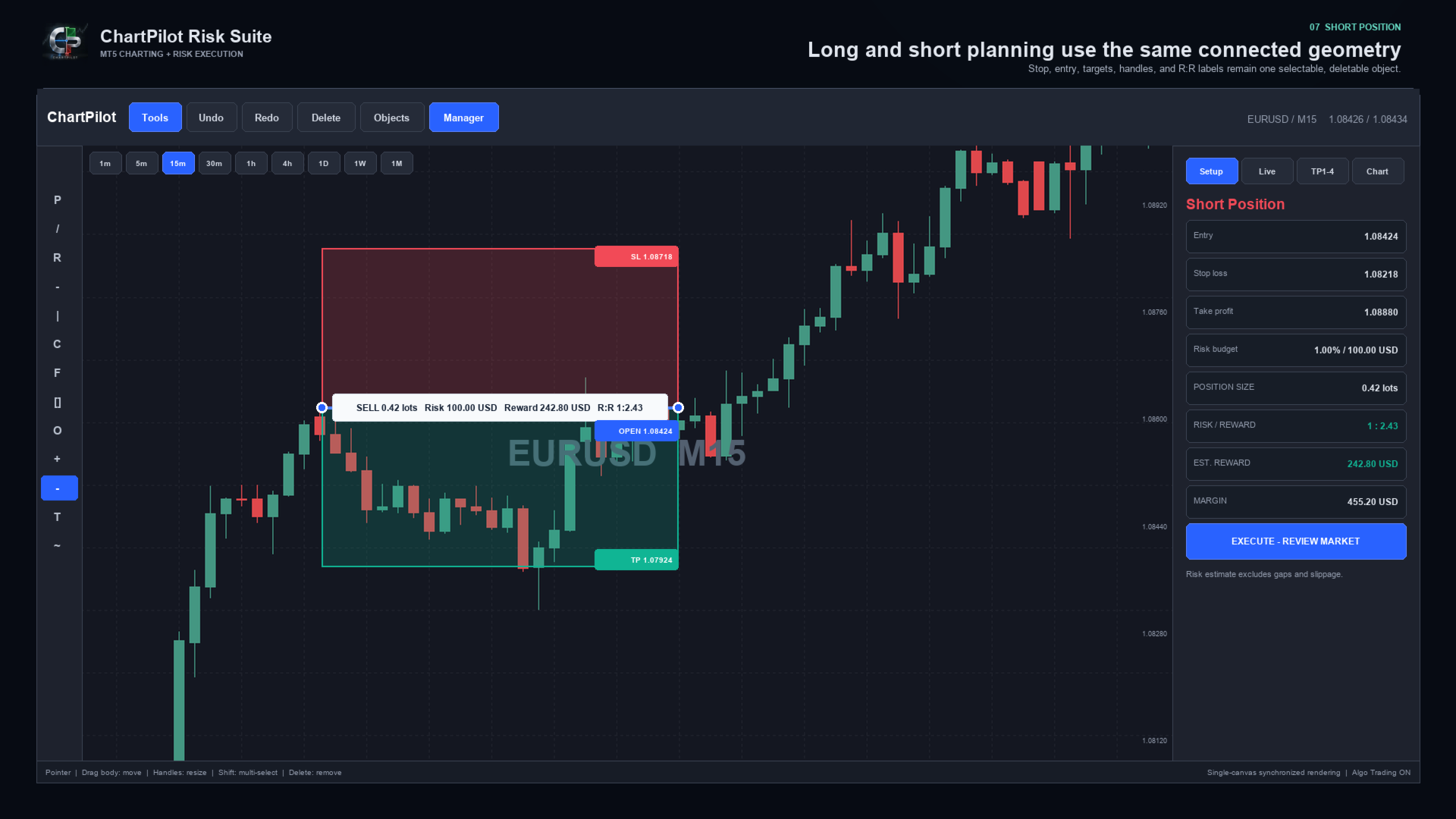
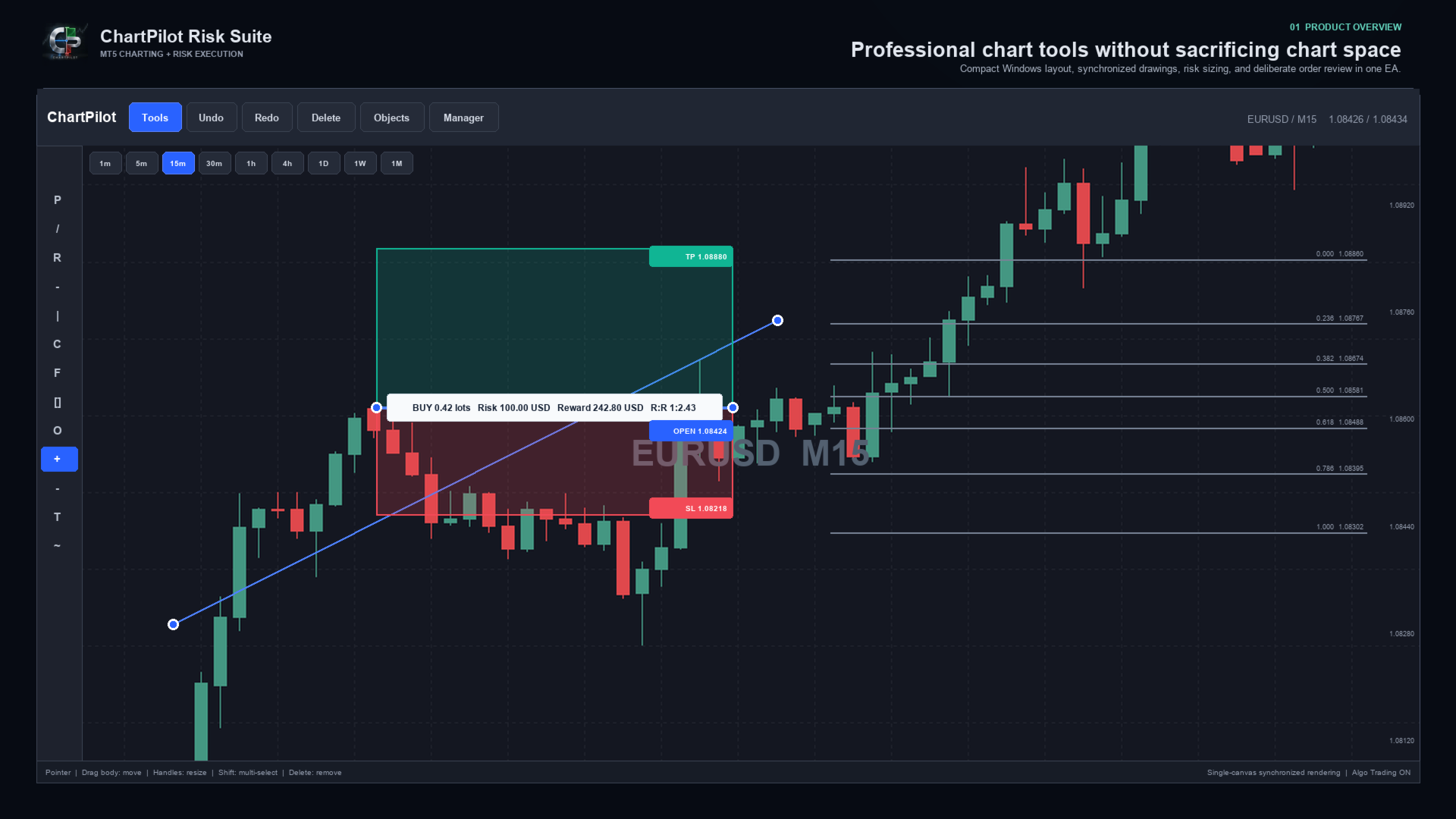
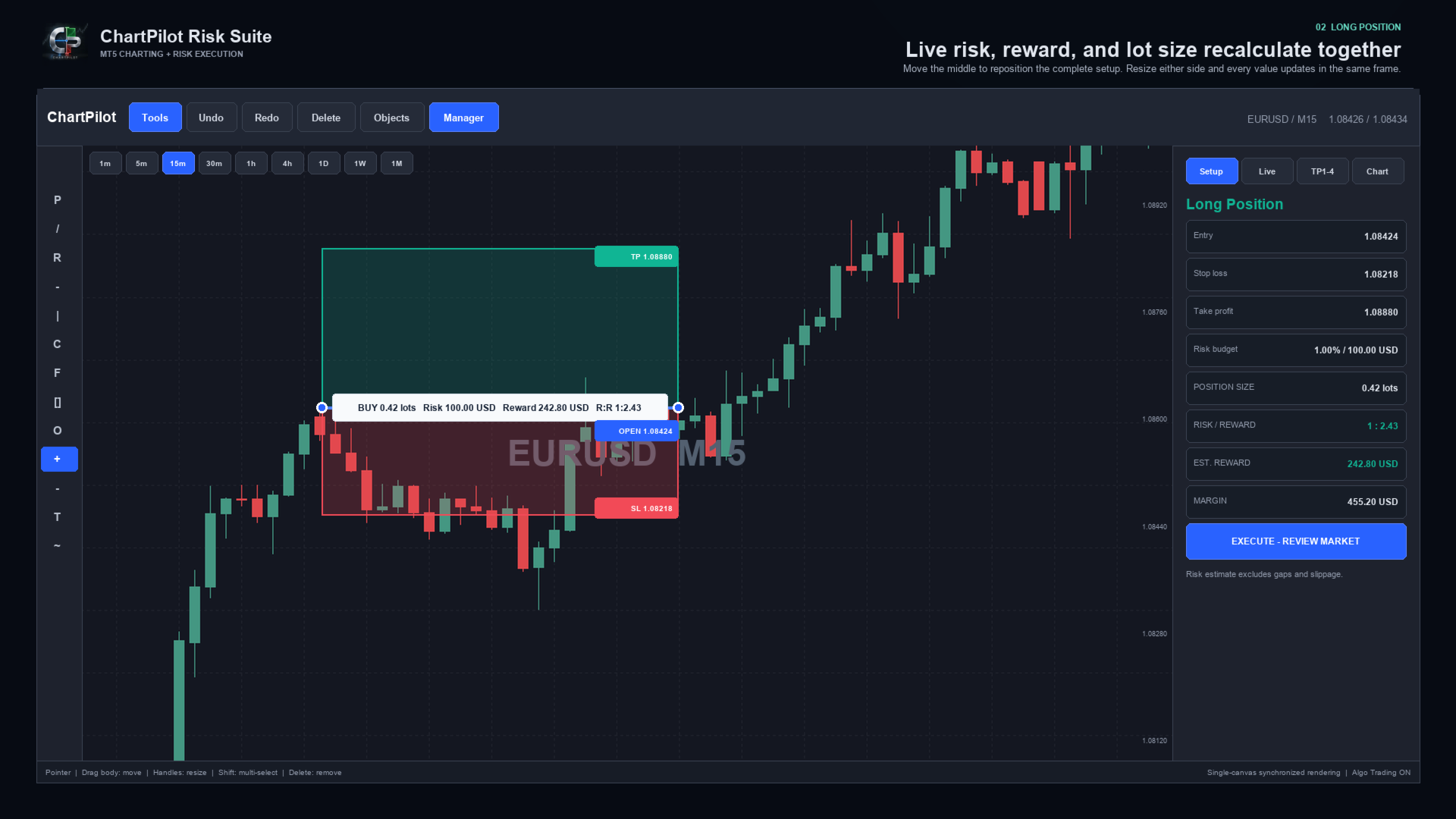
The Long Position and Short Position tools behave as connected objects. Drag the middle of a setup to move the complete position plan. Drag its handles to change the time range, stop or target. The profit zone, loss zone, entry line, labels, position size and risk-to-reward calculation update from the same underlying anchors.

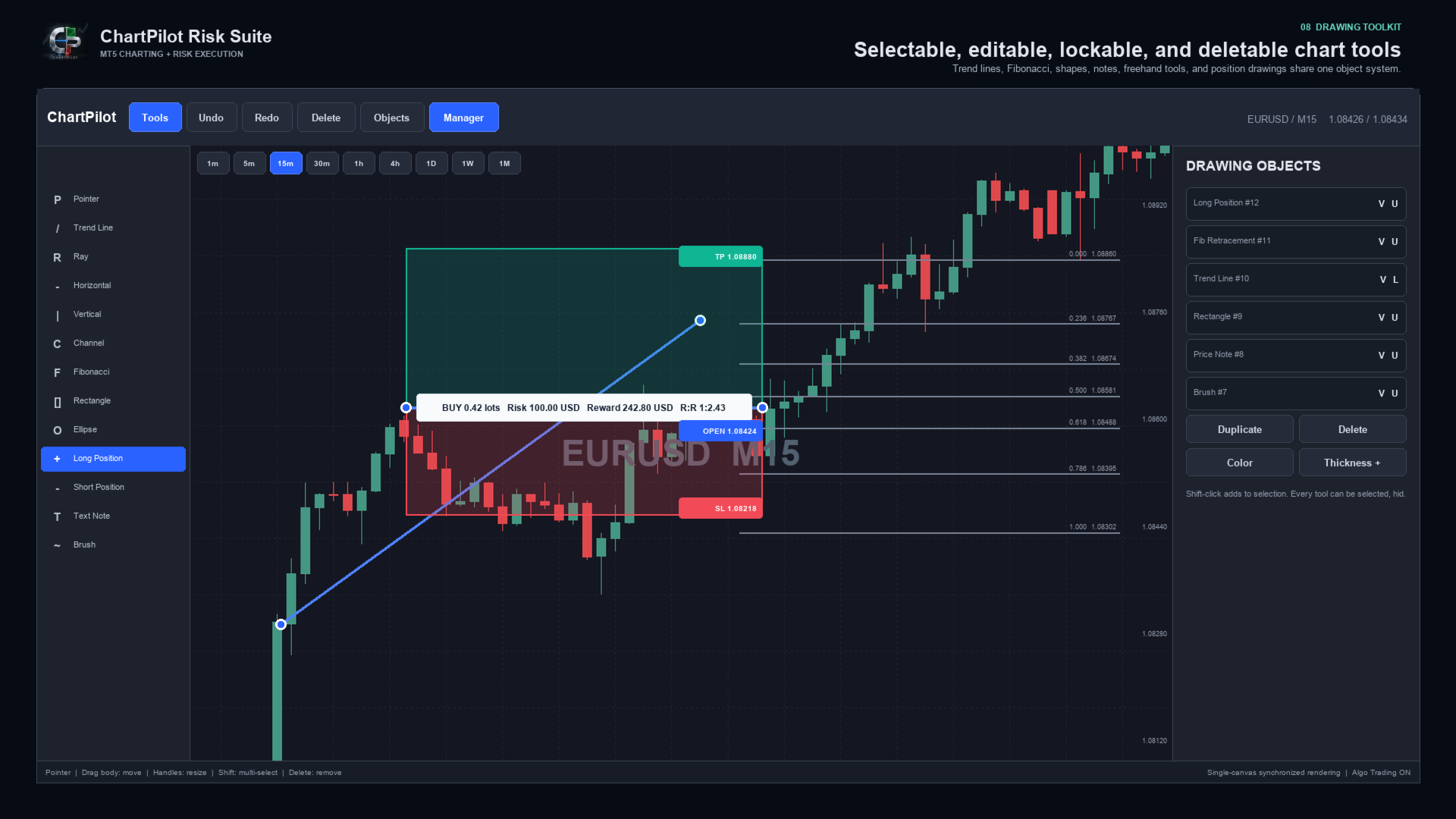
Every drawing can be selected and deleted. Drawings can also be hidden, locked, duplicated, recolored or given a different line thickness. The interface includes undo and redo history, multi-selection, object management and optional OHLC snapping.

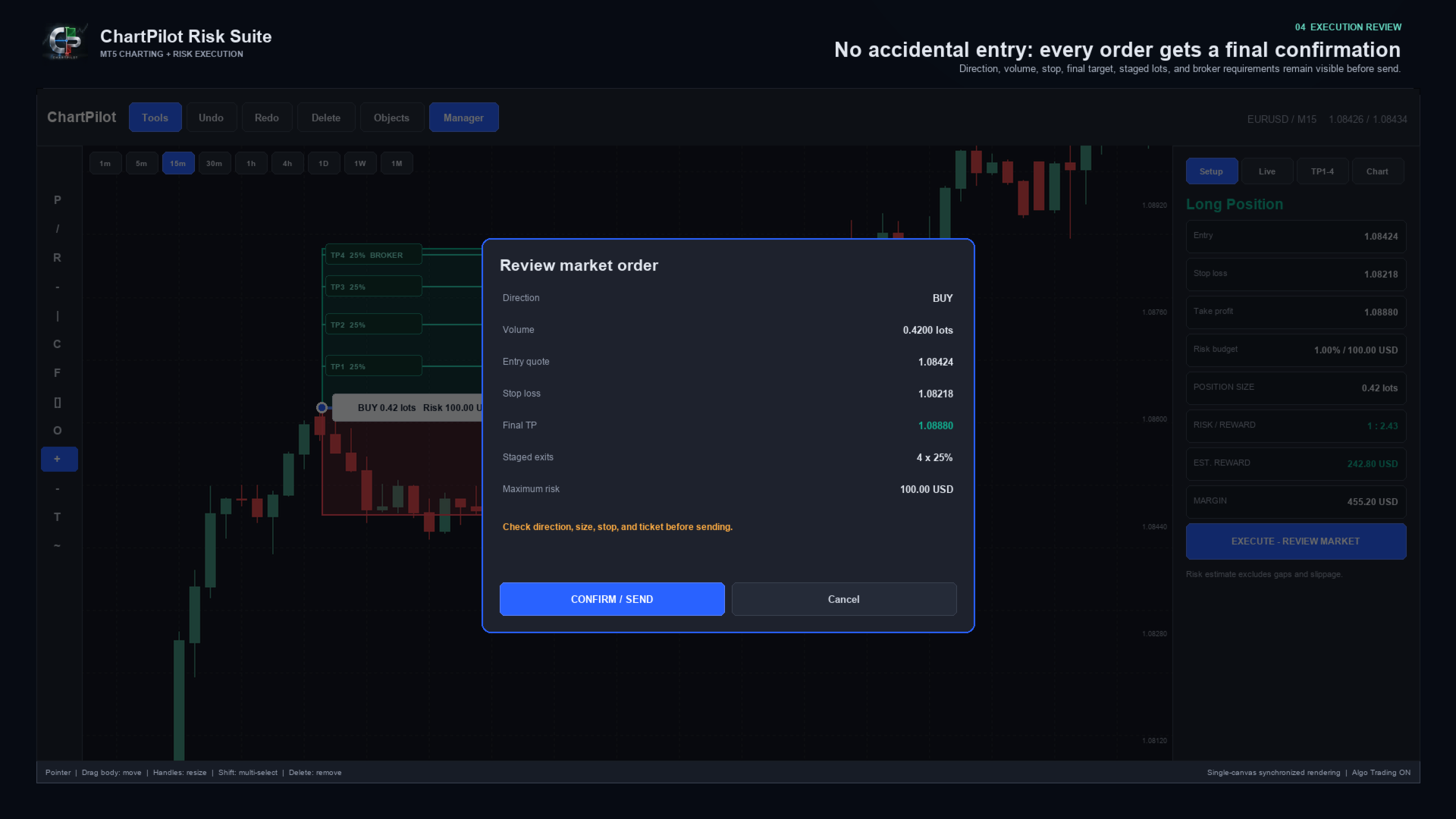
ChartPilot does not place a trade simply because a position drawing exists. Select the setup, check its values, press the execution button and review the complete request. The order is sent only after CONFIRM / SEND is pressed.


MAIN FEATURES

- Long Position and Short Position planning tools
- Percentage-of-equity risk sizing
- Fixed cash-risk sizing
- Optional manual lot size
- Estimated commission-per-lot input
- Live position size, cash risk, estimated reward, margin and R:R calculations
- Market entry and drawn-price pending entry modes
- Final confirmation before every submitted order
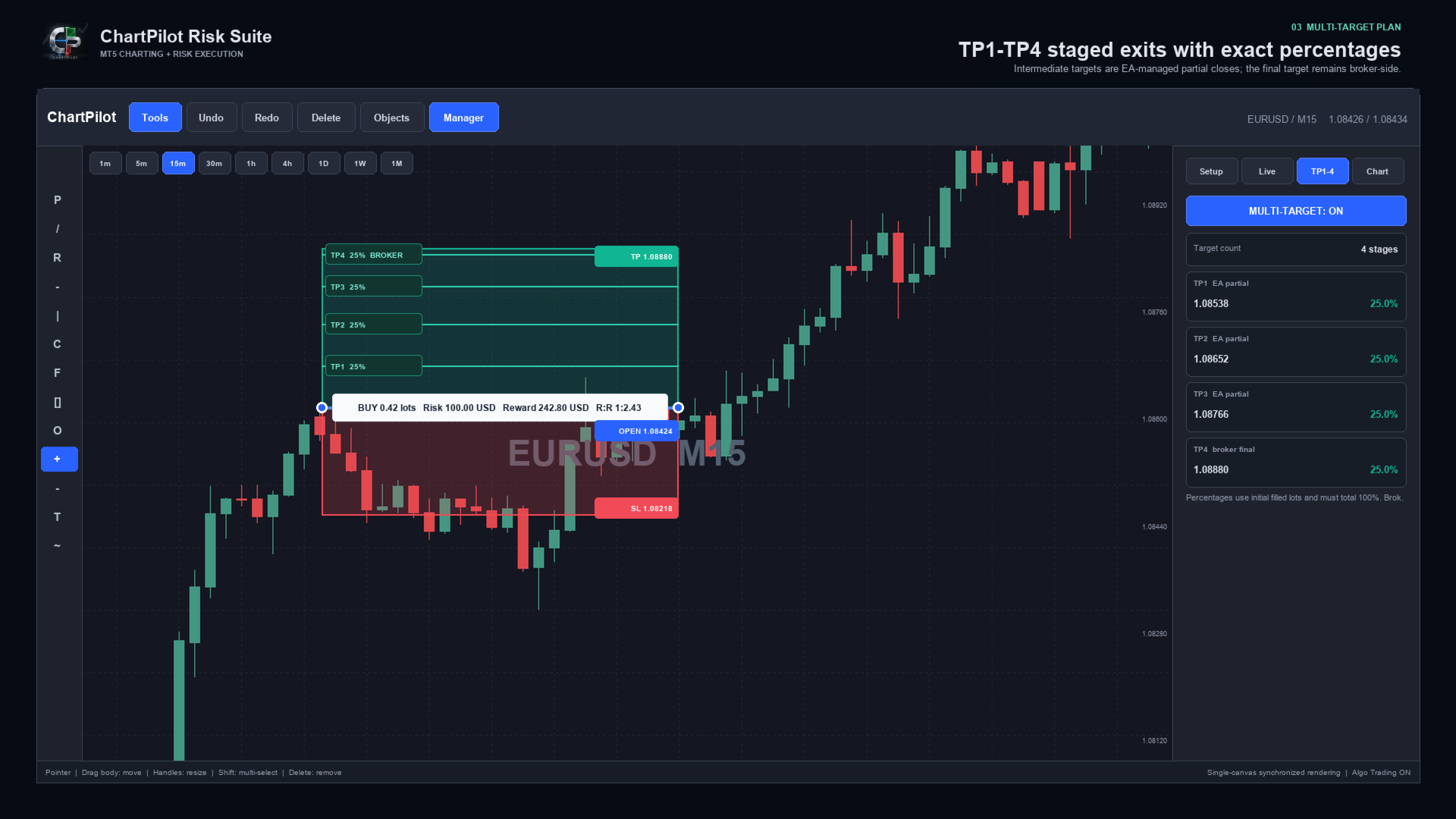
- TP1, TP2, TP3 and TP4 planning
- Two, three or four target stages
- Percentage allocation based on the initial filled volume
- Automatic intermediate partial closes for confirmed ChartPilot positions
- Broker-side stop loss and final take profit
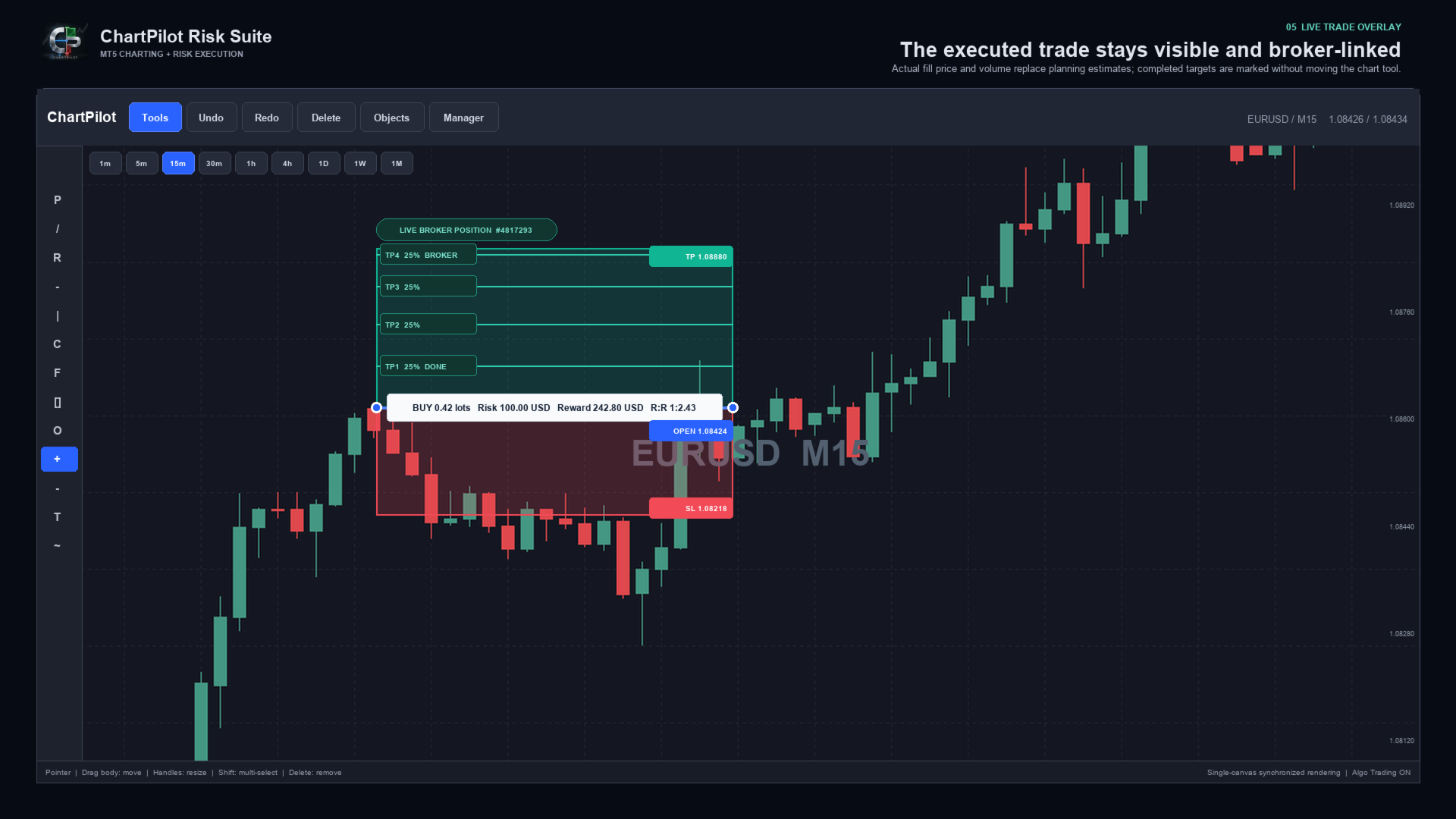
- Live broker-position overlay using the actual fill price and volume
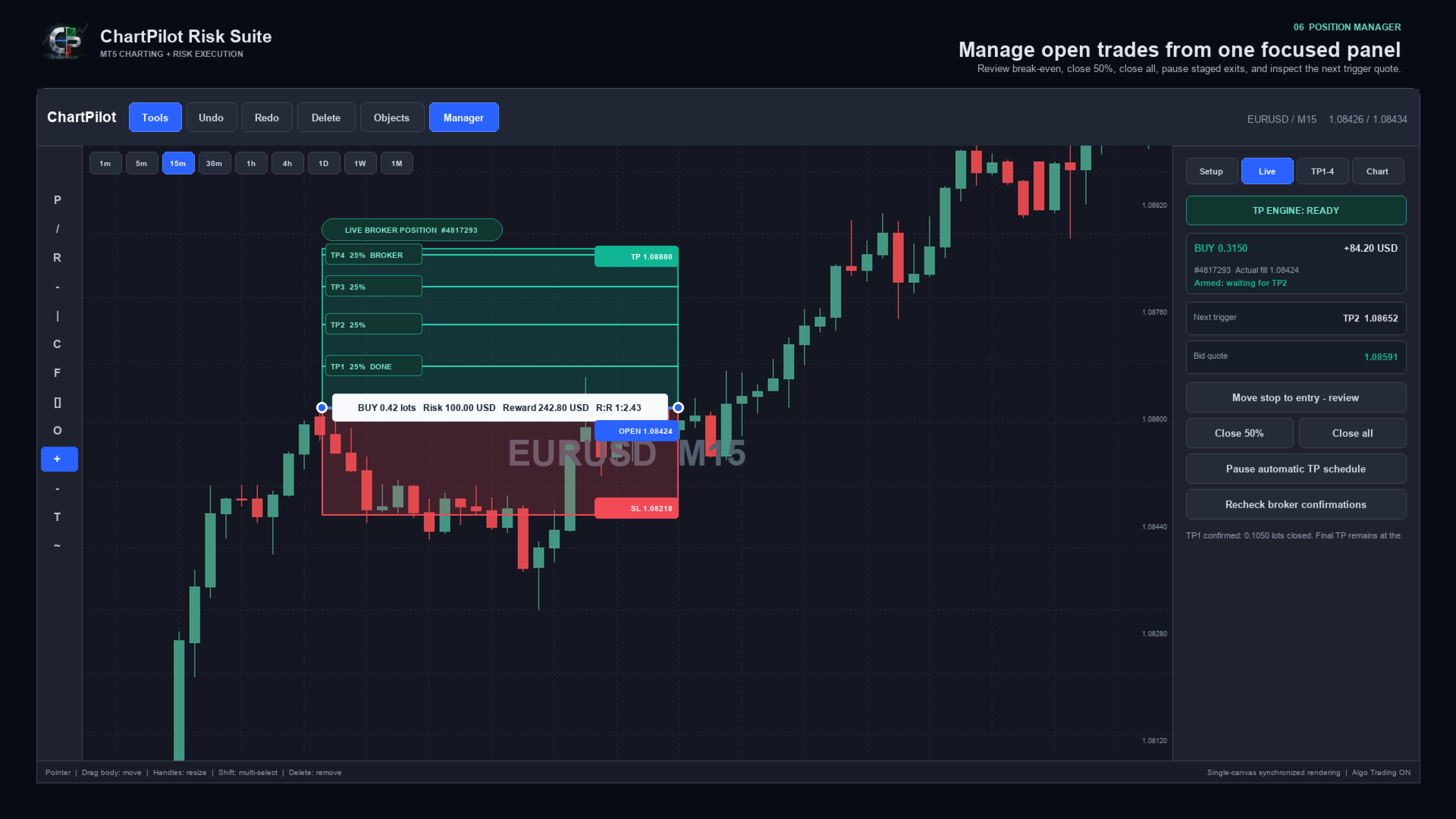
- TP engine status, next target and live trigger quote
- Position manager with reviewed break-even, Close 50% and Close All actions
- Pause, review and resume controls for an automatic TP schedule
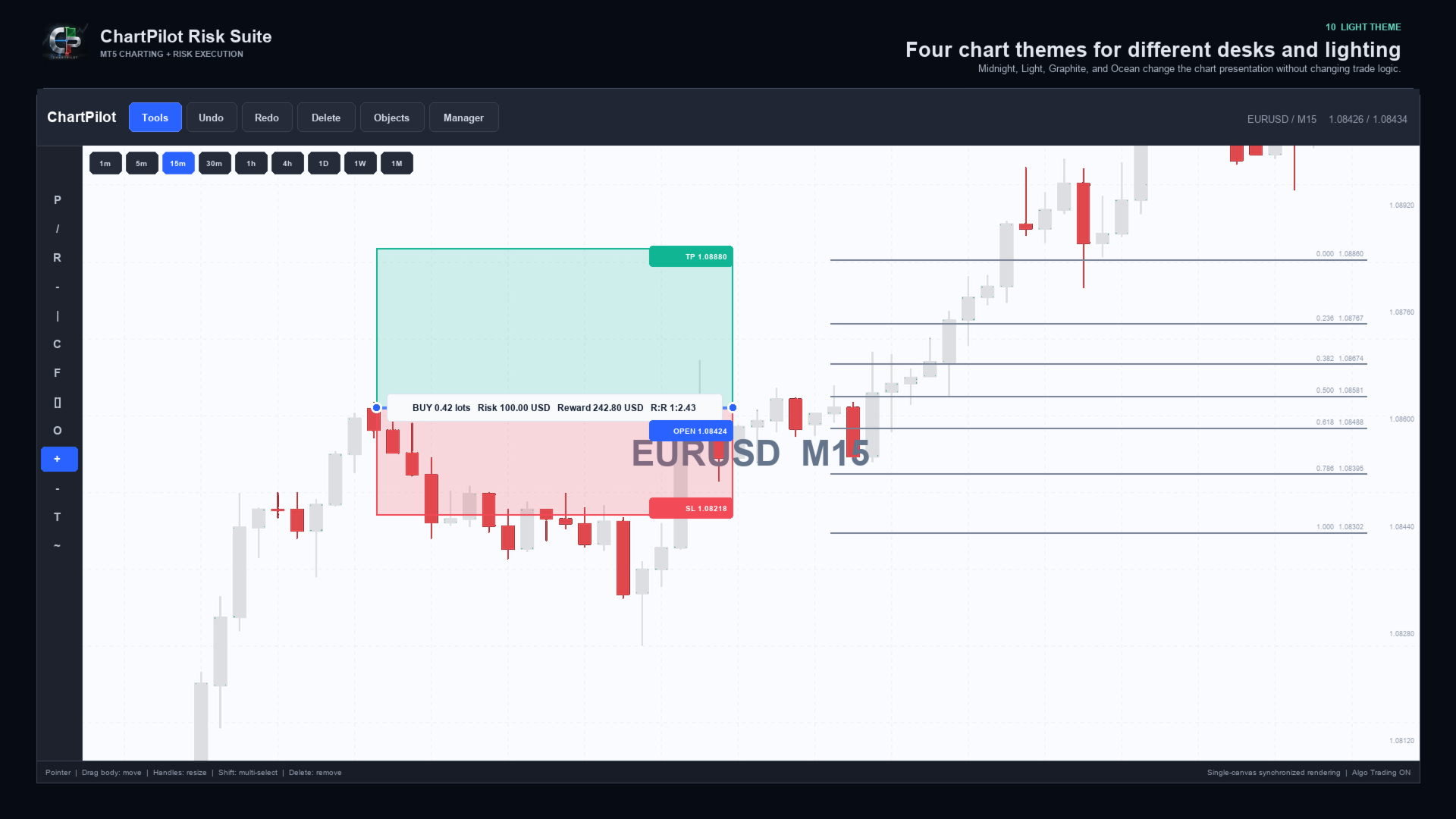
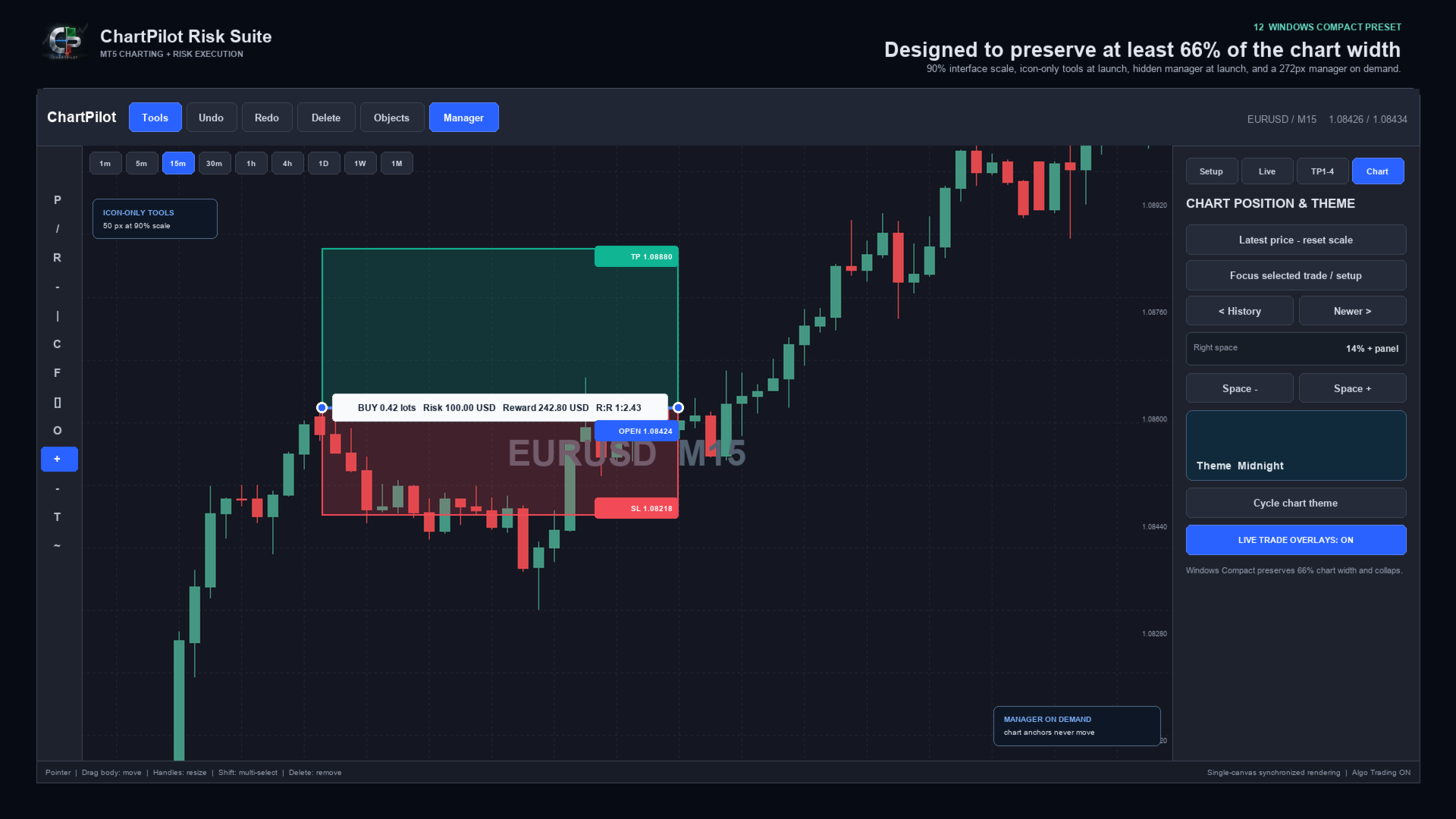
- Midnight, Light, Graphite and Ocean chart themes
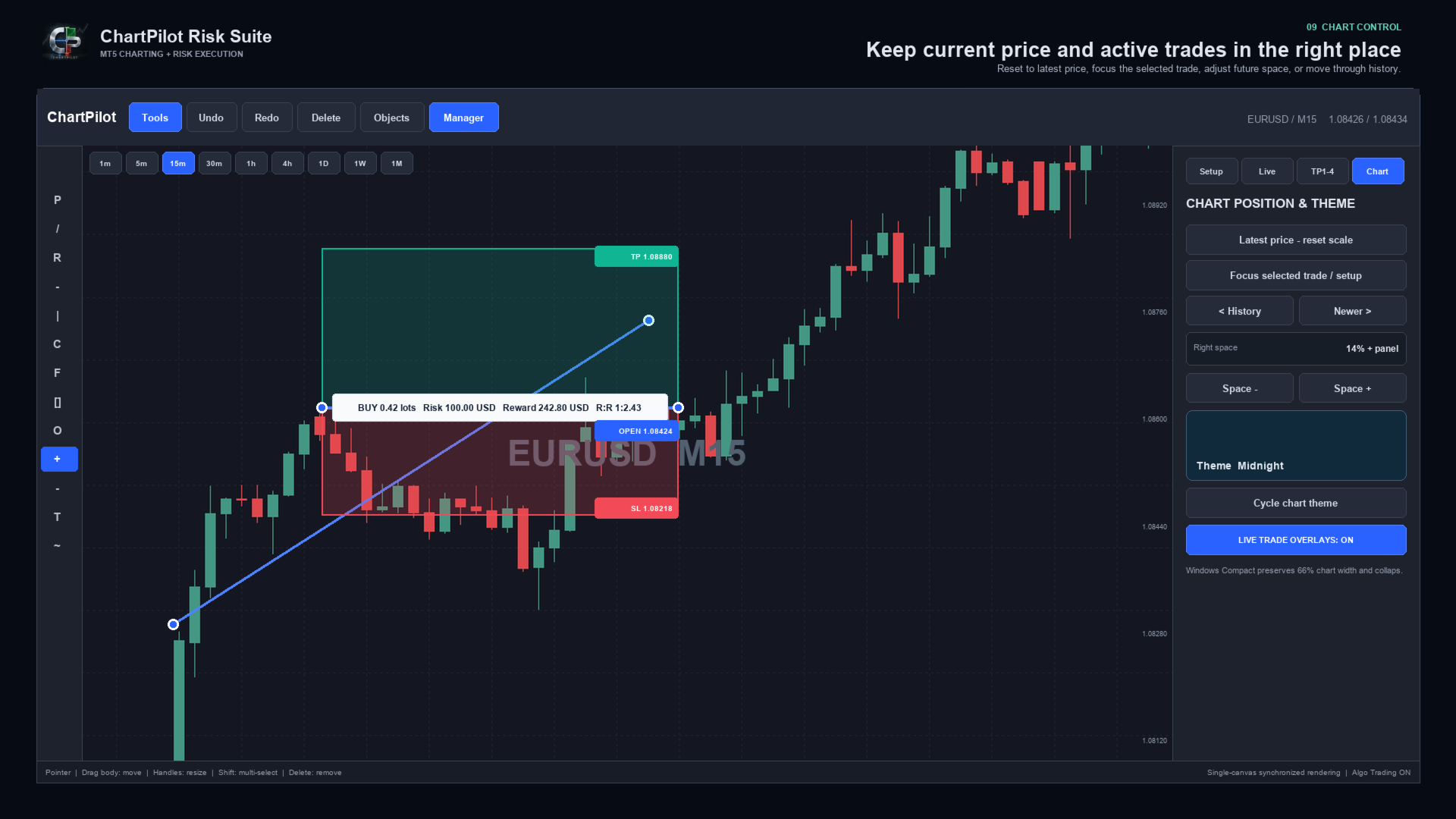
- Latest-price reset, Focus Trade, history navigation and adjustable right-side chart space
- Compact Windows layout with automatic panel reduction
- Persistent chart workspaces and confirmed-plan journal
- Self-contained Market product with no companion indicator or DLL imports


DRAWING WORKSPACE

Included tool groups cover:

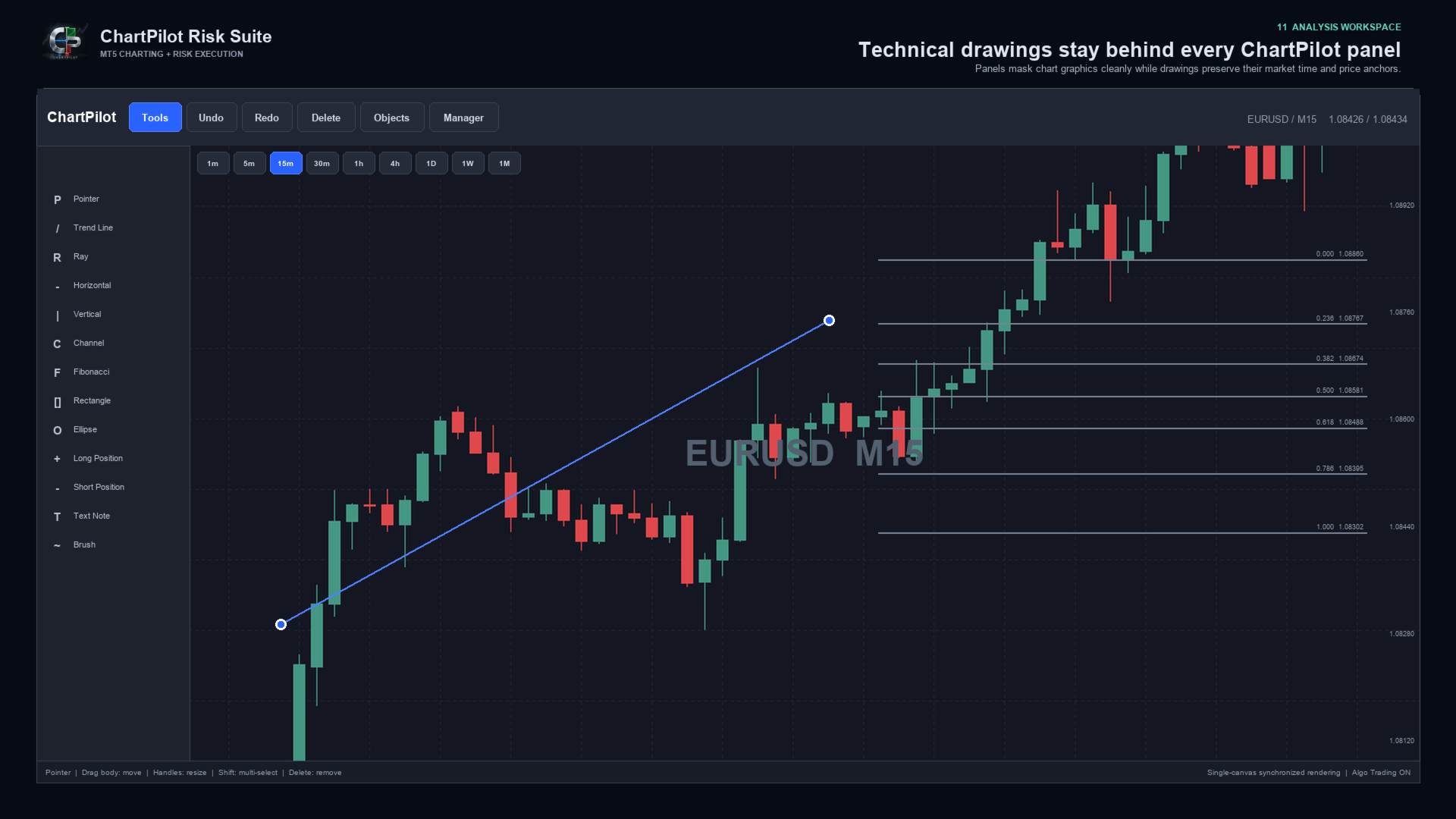
- Pointer and crosshair
- Trend line, ray, extended line and horizontal/vertical lines
- Arrow and double-arrow lines
- Parallel channel, regression channel and standard-error channel
- Fibonacci retracement, extension, fan, arc and time tools
- Gann fan and Gann box
- Rectangle, ellipse and triangle
- Bezier, ABCD and XABCD patterns
- Elliott impulse and correction tools
- Long and short position tools
- Ruler, price range, date range and date/price range
- Text note and price note
- Brush, highlighter and polyline

Drawings use chart time and price coordinates. Panning, zooming or changing the visible chart range changes their screen position in the same way as normal market-anchored drawings, but it does not rewrite their stored market anchors.


POSITION AND LOT-SIZE MANAGER

ChartPilot calculates volume from the selected setup and symbol specifications. Choose one sizing method:

1. Risk percentage: volume is based on the selected percentage of current account equity.
2. Fixed risk: enter a cash amount in the account currency. A non-zero fixed amount takes priority over percentage risk.
3. Manual lots: enter a manual volume when an exact size is required.

The calculated volume is normalized to the broker's minimum volume, maximum volume and lot step. If the requested staged percentages cannot produce valid partial volumes, ChartPilot rejects the plan instead of silently increasing the risk.

Commission is an estimate supplied by the user. It is not automatically read from the broker. Swap, slippage, price gaps and execution differences can change the final result.


HOW MULTI-TARGET MANAGEMENT WORKS

1. Draw or select a Long Position or Short Position.
2. Open Manager, then TP1-4.
3. Enable Multi-Target and select two, three or four stages.
4. Enter the target prices and closing percentages.
5. Ensure the active percentages total exactly 100%.
6. Return to Setup and press EXECUTE - REVIEW.
7. Check the entry, stop, final TP and rounded lot allocation.
8. Press CONFIRM / SEND.

Intermediate stages are managed by the EA as partial market exits. The final target is placed at the broker. For example, a four-stage plan can close 25% at TP1, 25% at TP2, 25% at TP3 and leave the final 25% for the broker-side TP4.

Automatic staged exits apply only to positions linked to a confirmed ChartPilot entry plan. Creating a drawing does not authorize automatic trading, and ChartPilot does not attach a staged schedule to an unrelated manual trade or another EA's position.

MetaTrader 5 must remain open, connected and permitted to use Algo Trading for intermediate partial exits. The broker-side stop loss and final take profit can remain active when the terminal is closed, subject to the broker's normal execution rules.

If price gaps through several targets, ChartPilot advances confirmed partial exits sequentially. If price reaches or gaps through the final broker target, the broker may close all remaining volume before every intermediate stage is filled.

Do not manually change the volume, direction, opening price or final TP of a managed position unless you intend to take control. An external position change causes ChartPilot to suspend the original percentage schedule for safety.


QUICK START

1. Test the EA on a demo account before live use.
2. Attach one ChartPilot instance to the chart and symbol you want to manage.
3. Enable Allow Algo Trading in the EA properties.
4. Enable the main Algo Trading button in MetaTrader 5.
5. Choose a risk percentage, fixed cash risk or manual lot size.
6. Select Long Position or Short Position and place the setup on the chart.
7. Drag the body to move the complete setup or drag a handle to resize it.
8. Configure TP1-TP4 if staged exits are required.
9. Press EXECUTE - REVIEW and inspect the complete request.
10. Confirm only when the direction, size, stop and targets are correct.
11. Open Manager > Live to monitor the TP engine and selected position.

Use only one managing ChartPilot chart for the same account, broker server, symbol and magic number. This prevents two chart instances from attempting to manage the same confirmed plan.


WINDOWS INSTALLATION AND DISPLAY SETUP

Installation:

1. Open the desktop MetaTrader 5 terminal and sign in to the MQL5 account used for the purchase.
2. Open Market > Purchased and install ChartPilot Risk Suite.
3. Find ChartPilot Risk Suite under Expert Advisors in the Navigator.
4. Drag the EA onto the chart and symbol you want to manage.
5. Enable Allow Algo Trading in the EA properties if execution or staged exits will be used.
6. Enable the main Algo Trading control in MetaTrader 5.

Recommended Windows layout:

- Start with a maximized chart window.
- Recommended interface scale: 90% to 100%.
- Recommended Windows display scaling: 100% or 125% when possible.
- Keep Start Tools Expanded disabled for an icon-only toolbar at launch.
- Keep Show Manager disabled so the chart opens at maximum width.
- Open Manager only when sizing, executing or managing a trade.
- Keep Auto Compact Panels enabled.
- Set Minimum Chart Percent to 66 when maximum chart space is preferred.

Recommended compact input values:

- Interface Scale: 90
- Start Tools Expanded: false
- Show Manager: false
- Expanded Tools Width: 170
- Manager Width: 272
- Minimum Chart Percent: 66
- Auto Compact Panels: true
- Right Space: 14

If you have the optional ChartPilot_Windows_Compact.set developer preset, open EA Properties > Inputs > Load and select it. Market installation itself supplies only the compiled product, so the same values can be entered manually when the preset is not present.

At Windows display scaling of 150% or higher, start with Interface Scale at 80% to 90%. MetaTrader uses pixel-based chart dimensions, so Windows DPI scaling and the EA interface scale can compound. If the chart becomes crowded, reduce Interface Scale, close the Manager panel or collapse the Tools panel.

These compact values change only EA inputs. They do not alter account, broker or MetaTrader installation settings.


MACOS INSTALLATION AND DISPLAY SETUP

MetaTrader 5 for macOS runs through the compatibility environment supplied with the terminal installation. Install Market products from inside MetaTrader. Do not copy product files into the visible application bundle in Finder.

Installation:

1. Start the desktop MetaTrader 5 application and sign in to the MQL5 account used for the purchase.
2. Open Market > Purchased and install ChartPilot Risk Suite.
3. Find it under Expert Advisors in the Navigator.
4. Attach it to the chart and symbol you want to manage.
5. Enable Allow Algo Trading in the EA properties and the terminal's Algo Trading control when execution is required.
6. If Navigator does not refresh, restart MetaTrader 5 and check the Purchased section again.

For a separately supplied developer MQ5 file, use File > Open Data Folder, then place the source in MQL5 > Experts and compile it in MetaEditor. This manual process is not required for the normal Market version.

Recommended macOS layout:

- Begin with Interface Scale at 100%.
- On a high-resolution Retina display, 110% to 125% may be comfortable.
- Use a maximized chart before increasing the interface size.
- Keep the Manager hidden until it is needed.
- If the compatibility environment applies additional scaling, reduce Interface Scale in 10% steps.
- The Windows Compact preset can also be loaded on macOS, but it is normally necessary only on a small window or a heavily scaled display.

Font weight and edge smoothing can look slightly different between Windows and macOS because MetaTrader and the compatibility layer use different system text and display-rendering paths. This is visual only and does not change price, volume or trade-management calculations.


IMPORTANT OPERATING NOTES

- ChartPilot manages the current chart symbol.
- Use a unique magic number when separating different ChartPilot strategies or workspaces.
- Deleting a drawing never closes a broker position.
- Hiding a drawing does not pause a confirmed TP schedule.
- Use Manager > Live to pause or resume a linked staged schedule.
- Manual partial closes suspend the original staged allocation.
- Do not delete the ChartPilot plan journal from MQL5/Files while a managed position is open.
- If TP ENGINE reports an Algo Trading or connection warning, intermediate partial exits cannot be sent.
- Pending orders remain subject to the broker's supported order types, filling policies, stop distance and expiration rules.
- The EA rejects unsupported or invalid requests when broker checks fail.
- Broker execution, spreads and symbol specifications differ. Test every symbol and account type on demo first.


RISK NOTICE

Trading foreign exchange, CFDs and other leveraged products involves substantial risk. Position-size and risk-to-reward figures are estimates based on the information available when calculated. Gaps, slippage, spread changes, commissions, swaps, partial fills, broker rules and connection failures can produce a different result.

ChartPilot Risk Suite is an execution and chart-management utility. It does not provide trading signals, investment advice or any guarantee of profit. The user remains responsible for every setup, confirmation, broker setting and trade decision. Use a demo account first and never risk funds you cannot afford to lose.
Recommended products
Moon Break MT5
Anthony Dewayne Wasome
Moon Break MT5 is an automated breakout Expert Advisor for MetaTrader 5. It trades breakouts based on previous 12-hour, daily, weekly, and monthly price ranges. The EA uses price highs and lows without relying on technical indicators or external signals. Buy and sell breakout orders can be controlled independently. Entries, stop losses, and take profits use configurable Fibonacci range levels. Trade volume can be fixed or calculated using a percentage of account balance. An optional trailing sto
Gap Straddle EA
Nazat Hossain Adi
Gap Straddle Trailing EA Automated Pending Order Management with Smart Trailing Stop Gap Straddle Trailing EA is an Expert Advisor for MetaTrader 5 designed to manage pending orders and trade protection through configurable settings. It includes automated order management, risk-based lot sizing, trailing stop functionality, session controls, and an on-chart dashboard. Key Features Buy Stop & Sell Stop Management — Automated pending-order placement and management. OCO Functionality — Opposite pen
Trade Analyzer
Jared Wayne Broderick
Trade Analyzer is an interactive charting utility designed to make trade planning and performance tracking easier directly inside MetaTrader 5. It allows you to quickly create and visualize trade setups on your chart, giving you a clear view of your Entry, Stop Loss, and Take Profit levels. Every trade setup you chart is automatically measured and analyzed, showing you the exact risk-to-reward ratio, risk in pips, potential reward, and outcome of the setup. As you chart more trades, RR Analytics
FREE
The   AI Concept EA   is a 100% hands free Auto Trader that is designed to trade and maximize your financial status, it's also designed to a certain trading behavior by which profits will always be   stabled throughout your trading journey .   This   EA   use   Martingale Strategy   but in the   very safe and effective way   of multiplying Lots to your balance. This AI Expert Advisor   search for a particular price action behavior that investors haven't come across as yet, in other words this EA
Kings ea
Rodrick T Russell
KINGS EA V2.51 – Advanced Multi-Strategy Expert Advisor KINGS EA V2.51 is a powerful, fully automated trading robot for MetaTrader 5, designed for traders who want flexibility, robust risk management, and advanced strategy options.   It combines trend, breakout, and reversal trading in one easy-to-use package, with extensive customization and safety features Key Features Three Strategies in One:    Trade with Trend, Breakout, or Reversal logic – enable or disable each as you wish. -Flexibl
Volatility 75 Pro Auto
RhasPro Innovatives
Volatility 75 Pro Auto (Contact for .set files) Professional Grid + Trend Expert Advisor for Deriv Synthetic Indices Volatility 75 Pro Auto (V75 Pro) is a professional Expert Advisor (EA) designed exclusively for trading Deriv Synthetic Indices on MetaTrader 5. Unlike conventional grid systems that rely solely on averaging positions, V75 Pro combines trend analysis, multi-timeframe confirmation, and multiple technical indicators to filter low-quality market entries before executing trades. The
Press AI
Oshawn Y Bailey
Universal SMA+EMA+RSI EA – Fixed USD SL, ATR Trailing, Next-Candle Entries Overview: The Universal SMA+EMA+RSI EA is a fully automated, versatile trading robot designed to trade any symbol (Forex, Metals, Indices, Cryptocurrencies) on any timeframe . It combines trend-following SMA crossovers , EMA bias , and RSI momentum to identify high-probability trade entries, while implementing robust risk management to protect your account. Key Features: Next-Candle Entry: Trades are executed on the cand
Trend Scalper Infinite   — это агрессивный высокоскоростной торговый эксперт (EA), созданный специально для торговли на волатильных инструментах, таких как Золото (XAUUSD). В основе его алгоритма лежит следование за трендом с уникальной и бескомпромиссной системой управления рисками. Главная фишка советника —   асимметричное соотношение риска и прибыли . Бот использует экстремально жесткий фиксированный Stop Loss всего в 1$ (настраивается), но при этом у него   НЕТ ограничения по Take Profit . В
This is the HFT Flame Ea....This is a complex Expert Advisor that basically pick trades from price movements, it is also a none-martingale mechanism with netting strategy that makes this Ea more interested and profitable throughout your trading journey. The HFT Flame EA can be super consistent on profits depending on the inputs selected for your style of trading. This is a hand free trading robot that can trade your way to success while you are away from the charts, another perfect advantage abo
如果产品有任何问题或者您需要在此产品上添加功能,请联系我 Contact/message me if you encounter any issue using the product or need extra feature to add on the base version. There is Demo version of this panel Dashboard Super Three MA MT5 Demo in my product list, please try it out to get familiar with all functionalities for free Free version: LINK MT4 version: LINK This system basically utilizes PA and three adjustable Moving Average as the main indicator set to generate trading signal. With the feature that all MA_timefram
Discord Notify
Aleh Piatrenka
5 (3)
Automatically sends real-time  notifications about trade opening,  closing, partial closing and modification of MT5 to Discord . The utility supports 16 languages : English, French, German, Indian (Hindi), Indonesian, Italian, Kazakh, Korean, Dutch, Polish, Portuguese, Russian, Spanish, Turkish, Ukrainian, and Vietnamese. You can also use any other language by customizing the notification text.  The product is designed for traders who need to receive Discord notifications without constantly moni
FREE
Slack Notify
Aleh Piatrenka
Automatically sends real-time  notifications about trade opening, closing, partial closing and modification of MT5 to Slack. The utility supports 16 languages : English, French, German, Indian (Hindi), Indonesian, Italian, Kazakh, Korean, Dutch, Polish, Portuguese, Russian, Spanish, Turkish, Ukrainian, and Vietnamese. You can also use any other language by customizing the notification text.  The product is designed for traders who need to receive Slack notifications without constantly monitoring
FREE
MT5 Trade Manager Pro
Anthony Dewayne Wasome
Trade Manager Pro is a MetaTrader 5 tool designed to assist with trade execution, position management, risk control, and account monitoring from a single on-chart interface. It is built to work alongside manual trading or automated systems and does not interfere with external Expert Advisors. The tool is intended for traders who require direct control over order execution and position management while maintaining consistent risk rules across different market conditions. Core Function The indica
FREE
MarSe MT5
Roman Gergert
This Expert Advisor uses additional filters to determine the trend. It protects orders with the help of locking. The robot uses martingale. This EA use pending orders. Sooner or later martingale can lose the deposit, it is recommended to control the trading of the EA while analyzing the market. The EA trades on any symbol. The minimum recommended deposit is $1000 (it is better to start with a cent account). The EA works on M1 timeframe. Telegram channel Settings:  https://drive.google.com/file/
The Scalper Pro
Sahib Ul Ahsan
The Scalper Pro  --- Advanced Multi-Strategy Scalping Expert Advisor The Scalper Pro is a high-precision automated scalping system designed for traders who require fast execution, structured logic, and controlled risk. It combines multiple price-action strategies with advanced trade and basket-level management to create a flexible solution for short-term trading. Built for performance and stability, the EA focuses on identifying intraday price movements and executing trades with disciplined man
TradeArmor HUD   is an ATR-based risk panel and trade manager built to protect your account from execution errors and emotional decision-making. Before you enter a trade, its mathematical safety checks guard against spread spikes, invalid stops, and margin-busting lot sizes. Once executed, it takes over management — securing partial profits, locking in break-even, and trailing stops objectively — entirely eliminating the need for manual interference. Designed to be invisible.   No indicator dep
Pro Scalping Tool
Mohammad Nazmul Hassan
### **ProScalpingToolEA.mq5 Analysis & Description** **Overview:**   The `ProScalpingToolEA.mq5` script is an Expert Advisor (EA) for MetaTrader 5, designed to assist with automated trading. It includes features for placing, managing, and monitoring trades. --- ### **Key Functionalities:** 1. **Trade Execution & Management:**    - Uses the `CTrade` class from `Trade.mqh` to manage trading operations.    - Allows placing buy and sell orders with a configurable lot size.    - Trades are iden
FlowAxis
Aysar Alafif
5 (1)
Product Overview   FlowAxis is a semi-automated Expert Advisor for Meta Trader 5 designed for traders who rely on manual trendline analysis and want precise, rule-based trade execution.   Instead of guessing market direction, the trader defines the trend visually, and FlowAxis executes trades automatically when price interacts with predefined trendlines. This approach       combines human market analysis with disciplined, rule-based execution. Important – Please Read Before Use   FlowAxis EA
Choppa bot
Tyler Wayne Henry
This code snippet is a comprehensive Expert Advisor (EA) developed for the MetaTrader platform, utilizing or MQL5 programming languages. The EA, named "CHOPPA BOT," is designed to automate trading strategies based on a combination of technical indicators, including the Relative Strength Index (RSI), Parabolic SAR, Exponential Moving Averages (EMA), Simple Moving Average (SMA), and the Average Directional Movement Index (ADX). Here's an overview of its functionality: Initialization and Setup : Up
Prop-Firm Risk Guardian watches your MetaTrader 5 account in real time. When any rule you have set is breached, Guardian closes the offending positions and locks new entries. It does not open trades. It does not prevent order placement, because no chart-attached EA can do that. It reacts to a breach within one tick, which is what saves the account. This is a rules utility for funded-challenge, funded, and personal accounts. All account data stays on your terminal. Optional Telegram alerts use y
BossFXTradePanelEA (MT5)  [First 10 copies sold at 50 USD price will increase to 99USD] BossFXTradePanelEA is a fully interactive trade management panel designed for MetaTrader 5, providing traders with an easy-to-use, one-click interface to execute and manage trades. This EA simplifies trade execution , risk management, and position control by combining market orders, stop loss, take profit, trailing stops, and breakeven functionalities into a single, intuitive panel.  Key features include: On
EA XAU Queen
Dmitriq Evgenoeviz Ko
EA XAU Queen - Fully Automated XAUUSD Trading EA XAU Queen is a fully automated trading system designed specifically for the gold market ( XAUUSD ). The advisor uses a unique algorithm for tracking institutional liquidity and price imbalance zones (Smart Money + Price Action), allowing it to find highly accurate entry points with minimal slippage. The robot doesn't use dangerous money management methods, such as classic martingale without stop losses, huge grids, or arbitrage. Each trade is str
如果产品有任何问题或者您需要在此产品上添加功能,请联系我 Contact/message me if you encounter any issue using the product or need extra feature to add on the base version. There is Demo version of this panel Dashboard Super MA RSI CCI Demo in my product list, please try it out to get familiar with all functionalities for free, LINK . Dashboard Super MA RSI CCI is an intuitive and handy graphic tool to help you to: Have 28 pairs under control with one dashboard Monitor price movement, identify possible trend based on MA, RS
MSM Trade Manager
Muhammad Sirazul Monir
MSM Trade Manager is a manual trading panel for MetaTrader 5. You choose the entries. The panel sizes the lot by risk, places the stop loss and take profit, and manages the trade on the chart. It does not generate signals and never opens trades on its own on a live or demo account. One-click trading with fixed risk Buy and Sell in one click. The lot is sized from a fixed money risk per trade ($20, $50 or $100 by default) or from a percentage of the balance (1%, 2% or 5%). One button switches bet
Mad Turtle
Gennady Sergienko
4.36 (124)
Symbol XAUUSD Timeframe (period) H1-M15 (any) Support for single-position trading YES Minimum deposit 500 USD  (or the equivalent in another currency) Compatible with any broker YES (supports 2 or 3-digit brokers. Any deposit currency. Any symbol name. Any GMT time.) Runs without pre-configuration YES If you are interested in the topic of machine learning, subscribe to the channel:  Subscribe! Key Facts about the Mad Turtle Project: Real Machine Learning This Expert Advisor does not conn
TechRiven EC Pro EA
Md Ariful Moula Chowdhury
TechRiven EC Pro — Smart, Fast, and Adaptive EA TechRiven EC Pro   is a powerful automated trading system designed to identify and execute trades rapidly when market conditions are most favorable. It intelligently adapts to   current market volatility , allowing it to stay profitable even during unpredictable market movements. Proven Performance: The attached backtest results demonstrate   consistent profitability over several years . Even during periods of aggressive market change, TechRiven EC
The Fortress: Ultimate Discipline & Risk Manager: "The Holy Grail of trading isn't a strategy—it's Discipline." Every trader knows the feeling: you have a great plan, but then  emotion takes over. You over-leverage, you revenge trade after a loss, you move your Stop Loss, or you "change your mind" about a pair mid-day. The Fortress was created to solve the "Human Element." It is not a signal generator; it is a  Hard-Rule Execution Manager. It acts as a digital supervisor that monitors your accou
Quantum Aurus X
Dmitriq Evgenoeviz Ko
Quantum Aurus X is an innovative trading ecosystem that combines a classic breakout algorithm (Breakout Engine) with modern machine learning methods to filter out market noise. The system is designed for professional trading in metals (Gold), indices, and volatile currency pairs. Intelligent neural network filter Unlike standard breakout advisors, Quantum Aurus X is equipped with the Neuro-Core V2 module. This is a pre-trained neural network (Perceptron) that analyzes market microstructure in r
SL Limiter Pro
Carlito Manaloto Jr
Experience a new level of precision and control with the SL Limiter Pro , an enhanced version of the SL Limiter, now available on MetaTrader 5. Built for serious traders, SL Limiter Pro offers sophisticated features that allow you to manage your trades more effectively and with greater flexibility. Take your trading strategy to the next level with this powerful risk management tool! Whether manual trading, EA trading, or using Trade Signals, SL Limiter Pro will help you minimize your risk! Anoth
Pulse Engine
Jimmy Peter Eriksson
4.14 (35)
PRICE INCREASE SOON! The main goal of this system is long-term live performance without using any risky martingale or grid.  VERY LIMITED COPIES AT CURRENT PRICE Final Price $1499 [Live Signal]  |  [Backtest Results]  |  [Setup Guide]  |  [FTMO Results] A Different Approach to Trading Pulse Engine does not use any indicators or specific timeframes. It has a very unique approach that is not used by any other trading system on MQL5. It trades intraday directional patterns. These patterns have bee
Buyers of this product also purchase
Trade Assistant MT5
Evgeniy Kravchenko
4.43 (216)
It helps to calculate the risk per trade, the easy installation of a new order, order management with partial closing functions, trailing stop of 7 types and other useful functions. Additional materials and instructions Installation instructions - Application instructions Line function -   shows on the chart the Opening line, Stop Loss, Take Profit. With this function it is easy to set a new order and see its additional characteristics before opening.   Risk management  - The risk calculation
Forex Trade Manager MT5
InvestSoft
4.98 (689)
Trade Manager MT5 is an advanced position size calculator and trade management tool for MetaTrader 5, designed to help traders plan trades faster, control risk more precisely, and manage open positions directly from the chart. It combines order placement, risk based lot calculation, Stop Loss and Take Profit management, Break Even, Trailing Stop, Partial Close, Equity Protection, and external trade management in one panel. Whether you trade forex, indices, metals, commodities, crypto, or future
Local Trade Copier EA MT5
Juvenille Emperor Limited
4.94 (149)
Local Trade Copier EA MT5 is a fast and flexible trade copier for copying and managing trades between multiple MetaTrader 5 accounts on the same Windows computer or Windows VPS. It combines local trade synchronization with Receiver-side controls for lot sizing, risk management, trade filtering, symbol mapping, trade management and account protection. Set up your Transmitter and Receiver terminals in about 1 minute and copy manual or EA trades between accounts at the same or different brokers. U
Telegram to MT5 MultiChannel Copier
Sergio Marquez Uroz
4.68 (22)
Telegram to MT5 Multi-Channel Copier   automatically copies trading signals from your Telegram and Discord channels straight to MetaTrader 5. No bots, no browser extensions, no manual copying. A signal arrives in Telegram or Discord and the EA opens the trade in your terminal within seconds. And before you copy a channel, the built-in backtester shows you what that channel would have done in your account. The product has two components: a Windows application that listens to your Telegram channel
Strategy Ledger Pro
Abdullah Uygar Tuna
5 (14)
Strategy Ledger Pro is a read-only account analysis panel for MetaTrader 5. It separates account results by Expert Advisor, strategy, symbol, and magic number, so you can see what each one really contributes. The panel is available in 11 languages: English, Français, Deutsch, Español, Italiano, Português, Русский, Türkçe, 中文, 日本語 and 한국어. Before you download the demo. The Market runs the demo of any paid product in the Strategy Tester only. This panel analyses the trades on your own account, and
Copy Telegram signals with your own trading rules Telegram to MT5 Signal Trader automatically copies text-based trading signals from public and private Telegram channels and groups into MetaTrader 5. Manage multiple providers and MT5 accounts from one desktop app, with individual risk and trade settings for each provider . No Telegram bot or API setup needed for copying. Simply sign in with your own Telegram account by phone or QR code and select the channels or groups you have already joined. Y
TradePanel MT5
Alfiya Fazylova
4.88 (170)
Trade Panel is a multi-functional trading assistant. The app contains over 50 trading functions for manual trading and allows you to automate most trading tasks. Application instructions: https://www.mql5.com/en/blogs/post/756482 Trial version of the application for a demo account: https://www.mql5.com/en/blogs/post/750865 How to install the application: https://www.mql5.com/en/blogs/post/756239 How to test the application in visual mode: https://www.mql5.com/en/blogs/post/770277 How to install
================================================================================ POC BREAKOUT - V20.72. Full Professional Grade Toolkit ================================================================================ POC Breakout is a full MetaTrader 5 trading dashboard for discretionary traders who want breakout signals, Point of Control (POC) context, volume profiles, order flow, market structure, news, alerts, and advanced trade planning in one professional workspace. Attached directly to you
VirtualTradePad PRO SE MT5 — professional trading control center for MetaTrader 5 VirtualTradePad PRO SE is a premium chart-based trading panel and trade-management workspace for MetaTrader 5 . It is designed for traders who want faster execution, clearer position control, structured trade management, visual level planning and a professional workflow directly from the chart. This is not only a BUY / SELL panel. PRO SE combines manual trading, pending orders, position management, partial exits, b
MT5 to Telegram Signal Provider turns your trading account into a signal provider. Every trade action, whether manual, by EA or from your phone, is instantly sent as a message to Telegram. You can fully customize the format or use a ready-made template for quick setup. [ Demo ] [ Manual ] [ MT4 Version ] [ Discord Version ]     New: [ Telegram To MT5 ] Setup A step by step user guide is available. Key Features Ability to customize order details sent to subscribers You can create a tiered subs
FarmedHedge Pair Trading Dashboard
Tanapisit Tepawarapruek
5 (7)
Farmed Hedge Yield Farming | All Markets (Manual - Hybrid - Semi/Automated EA) VERIFIED TRADING RESULTS - Farmed Hedge Yield Axi Copy:  https://www.mql5.com/en/signals/2356376 - Farmed Hedge Yield Exn Copy:   https://www.mql5.com/en/signals/2356404 - Farmed Hedge Yield V Copy:  https://www.mql5.com/en/signals/2357156 IMPORTANT NOTICE: FarmedHedge is a MANUAL-FOCUSED TRADING UTILITY ,not a fully automated EA. Results shown on this Signal include manual trades and overall strategic management.
Trade copier MT5
Alfiya Fazylova
4.61 (57)
Trade Copier is a professional utility designed to copy and synchronize trades between trading accounts. Copying occurs from the account / terminal of the supplier to the account / terminal of the recipient, which are installed on the same computer or VPS . Before buying, you can test the demo version on a demo account. Demo version here . Full instruction here . Main functionality and benefits: Supports copying MT5> MT5, MT4> MT5, MT5> MT4, including MT5 netting accounts. * Supports copying Dem
RETAILBERG FOOTPRINT CHART PRO — Order-Flow Workspace for MetaTrader 5 Version 7.00  |  Professional System  |  31 tools  |  One chart A full 150-page illustrated User Manual is included. Please read the full manual to understand this feature packed footprint chart elements and ui. https://www.mql5.com/en/blogs/post/777982 DEMO / STRATEGY TESTER — PLEASE READ FIRST
Exp COPYLOT CLIENT for MT5
Vladislav Andruschenko
3.97 (35)
Professional Trade Copier for MetaTrader 5 Fast, professional, and reliable trade copier for MetaTrader . COPYLOT allows you to copy Forex trades between MT4 and MT5 terminals with support for Hedge and Netting accounts. COPYLOT MT5 version supports: - MT5 Hedge to MT5 Hedge - MT5 Hedge to MT5 Netting - MT5 Netting to MT5 Hedge - MT5 Netting to MT5 Netting - MT4 to MT5 Hedge - MT4 to MT5 Netting MT4 version Full Description +DEMO +PDF How To Buy How To Install How to get Log Files H
News Trade EA MT5
Konstantin Kulikov
4.55 (11)
Present to you the useful robot that I have been using for several years. It can be used in both semi-automatic mode and fully automatic mode. >>> Chat <<< The program contains flexible settings for trading on the news of the economic calendar. It cannot be checked in the strategy tester. Only real work. In the terminal settings, you need to add the news site to the list of allowed URLs. Click Tools > Options > Expert Advisors. Check the option "Allow WebRequests for listed URL:". Add this (de
The Patch
Mian Rameez Ali
The Patch It never opens a trade. It walks behind the ones that did. Every open position, every pending order — checked twice a second for the one thing that's easy to forget: a stop, a target. Found bare, it doesn't ask. It writes the missing number in, measured in points from wherever the position began, and moves on to the next. No strategy, no opinion on direction. Just the quiet assumption that nothing should ever sit on the market unprotected — not because someone decided it shouldn't,
Telegram To MT5 Ultra
Mirel Daniel Gheonu
5 (5)
Telegram To MT5 — Signal Copier Turn the trading calls from your Telegram channels into real MT5 orders — automatically, on as many accounts as you like, with risk and rules fully under your control. Telegram To MT5 connects the VIP / signal channels you already follow on Telegram to your MetaTrader 5 terminal. A free companion desktop app reads the messages (even from channels that block bots), and this Expert Advisor executes them on your account — applying your own risk settings, symbol mappi
Next Update — Version 2.52 Coming Soon! [NEW] Get Ready for 4 Major New Features Designed to Enhance Your Market Analysis and Trading Workflow We’re taking market analysis to the next level with 4   new features designed to meet your trading needs. Introducing: TRADE OVERVIEW DASHBOARD CONFLUENCE AT ZONE STRONG & WEAK HIGH/LOW OPTIMAL TRADE ENTRY —  OTE 1. TADE OVERVIEW DASHBOARD  A dashboard that helps you understand the overall market picture more easily, providing guidance to support your
HINN MagicEntry Extra
ALGOFLOW OÜ
4.74 (19)
HINN MAGIC ENTRY – the ultimate tool for entry and position management! SIMPLE. FASTEST. INTUITIVE. MAX AUTOMATED. Place orders by selecting a level directly on the chart! full description   ::  demo-version  :: 60-sec-video-description Key features: - Market, limit, and pending orders - Automatic lot size calculation - Automatic spread and commission accounting - Unlimited partitial take-profits  - Breakeven and trailing stop-loss and take-profit  functions - Invalidation leves - Intuitive, a
Anchor Trade Manager
Kalinskie Gilliam
5 (8)
Your EAs cannot see each other, but Anchor can. Anchor gives you one place to coordinate your EAs, manage risk, and decide when trading is allowed. It works alongside the trading bots you already use without any changes to them. The Problem One EA opens a trade. Then another starts trading. The next thing you know, you wake up to multiple grids built across your account. Each EA may be doing exactly what it was designed to do, but together they can place far more risk on your account than you in
Trader Evolution
Siarhei Vashchylka
5 (7)
" Trader Evolution " - A utility designed for traders who use wave and technical analysis in their work. One tab of the utility is capable of money management and opening orders, and the other can help in making Elliott wave and technical analysis. Manual (Be sure to read before purchasing) | Version for MT4 Advantages 1. Trading in a few clicks. Immediate and pending orders are available in the panel 2. Money management. The program automatically selects the appropriate lot size 3. Simplifies
Grid Manual MT5
Alfiya Fazylova
4.73 (22)
Grid Manual is a trading panel for working with grid strategies. The utility is universal, has flexible settings and an intuitive interface. It works with a grid of orders not only in the direction of averaging losses, but also in the direction of increasing profits. The trader does not need to create and maintain a grid of orders, the utility will do it. It is enough to open an order and the "Grid manual" will automatically create a grid of orders for it and will accompany it until the close. F

YuClusters
Yury Kulikov
4.93 (43)
Attention: You can view the program operation in the free version  YuClusters DEMO .  YuClusters is a professional market analysis system. The trader has unique opportunities to analyze the flow of orders, trade volumes, price movements using various charts, profiles, indicators, and graphical objects. YuClusters operates on data based on Time&Sales or ticks information, depending on what is available in the quotes of a financial instrument. YuClusters allows you to build graphs by combining da
The product will copy all telegram signal to MT5 ( which you are member) , also it can work as remote copier.  Easy to set up, copy order instant, can work with almost signal formats, image signal,  s upport to translate other language to English Work with all type of channel or group, even channel have "Restrict Saving Content", work with  multi channel, multi MT5 Work as remote copier: with signal have ticket number, it will copy exactly via ticket number. Support to backtest signal. How to s
Timeless Charts
Samuel Manoel De Souza
5 (9)
Timeless Charts is an all-in-one trading utility for professional traders. It combines custom chart types such as Seconds Charts and Renko with advanced order flow analysis using Footprints , Clusters , Volume Profiles , VWAP studies, and anchored analysis tools for deeper market insight. Trading and position management are handled directly from the chart through an integrated trade management panel , while Market Replay and Virtual Accounts provide environments for practicing trading skills and
Floor Watch
Syed Tauqeer Hussain Shah
Floor Watch One number, watched every thirty seconds: how far equity has fallen since the day began — or since its highest point, if it's told to trail the peak instead of the open. Cross the line and it doesn't argue. Every open position closes, every pending order vanishes, and anything that slips through afterward gets shut the moment it appears. Not asked. Removed. The floor holds until the clock turns 5 AM Pakistan time — then, and only then, does the day start over. One rule. No except

Power Candles Strategy Scanner - Self-Optimizing Multi-Symbol Setup Finder Self-optimizing settings work one chart at a time, and finding where they pay off right now means opening chart after chart. Power Candles Strategy Scanner runs the same self-optimizing engine as the Power Candles indicator on every symbol in your Market Watch, side by side. One panel ranks where it pays off: the winning strategy per symbol, its optimized Stop Loss and Take Profit. An alert fires the moment a fresh signal
RS Trade Copier - the ultra-fast local trade copier with a real graphical interface. Stop typing account numbers manually. No more 200+ cryptic inputs. A reliable and flexible tool for copying trading operations between multiple MT5 and MT4 terminals. It suits experienced traders, signal providers, and individual investors. It enables trade synchronization from one or multiple Providers to one or multiple Clients with high precision and minimal latency. It supports simple automatic configuration
Seconds Chart MT5
Boris Sedov
4.61 (18)
Seconds Chart is a unique tool for creating second-based charts in MetaTrader 5 . With Seconds Chart , you can construct charts with timeframes set in seconds, providing unparalleled flexibility and precision in analysis that is unavailable with standard minute or hourly charts. For example, the S15 timeframe indicates a chart with candles lasting 15 seconds. You can use any indicators and Expert Advisors that support custom symbols. Working with them is just as convenient as on standard charts.
[ My Channel ]   ,   [ My Products ]  ,  [ ABOUT ME ]   OMG Market Heat — Multi-Symbol Volatility & Breakout Scanner OMG Market Heat is a dashboard indicator that scans up to 50 symbols at once and shows how "hot" each market is right now on the M15, H1, H4 or D1 timeframe. At a glance you see which symbols are moving strongly, which ones are waking up after a quiet period and which ones are asleep — so you spend your time only on markets that are worth trading. It works with Forex, Gold, indic
More from author
Sniper Liquidity Indicator Sniper Liquidity System Sniper Liquidity System maps where liquidity rests, tracks when price takes it, and confirms the shift in market structure that often follows. Once a setup forms, it draws a complete trade plan on your chart: entry, stop loss, take profit and Risk:Reward. No DLLs. No external software. No repainting after a bar closes. Just attach it to a chart. Features Complete signals with a fixed Risk:Reward tool Entry at the fair value gap's full fill or th
FREE
MT5 Trade Manager
Anthony Dewayne Wasome
MT5 Trade Manager is a MetaTrader 5 trade management panel designed to provide order execution, position monitoring, and risk control tools within a single interface. It operates as an on-chart dashboard with multiple pages for different trading functions. The tool is designed to support manual trading by centralizing trade operations and account monitoring in one place without requiring external applications. Interface Structure The dashboard is organized into six main sections: Dashboard Provi
FREE
MT5 Trade Manager Pro
Anthony Dewayne Wasome
Trade Manager Pro is a MetaTrader 5 tool designed to assist with trade execution, position management, risk control, and account monitoring from a single on-chart interface. It is built to work alongside manual trading or automated systems and does not interfere with external Expert Advisors. The tool is intended for traders who require direct control over order execution and position management while maintaining consistent risk rules across different market conditions. Core Function The indica
FREE
Ultimate Gold Breakout
Anthony Dewayne Wasome
Ultimate Gold Breakout Ultimate Gold Breakout is an automated MetaTrader 5 Expert Advisor designed specifically for XAUUSD (Gold) , focusing on structured breakout opportunities around key market levels. The EA monitors important daily, 12-hour, weekly, and monthly Gold levels to identify potential breakout movements and execute trades automatically according to predefined rules. Key Features Designed specifically for XAUUSD / Gold Previous Day High & Low breakout detection 12-hour, weekly & mon
Moon Break MT5
Anthony Dewayne Wasome
Moon Break MT5 is an automated breakout Expert Advisor for MetaTrader 5. It trades breakouts based on previous 12-hour, daily, weekly, and monthly price ranges. The EA uses price highs and lows without relying on technical indicators or external signals. Buy and sell breakout orders can be controlled independently. Entries, stop losses, and take profits use configurable Fibonacci range levels. Trade volume can be fixed or calculated using a percentage of account balance. An optional trailing sto
Filter:
No reviews
Reply to review