Chart Pilot

CHARTPILOT RISK SUITE
Chart planning, position sizing, staged exits and trade management for MetaTrader 5

SHORT DESCRIPTION

Plan chart setups, calculate risk-based lots, review orders and manage TP1-TP4 exits in MetaTrader 5.


PRODUCT DESCRIPTION

ChartPilot Risk Suite is an all-in-one chart planning and execution utility for MetaTrader 5. It is designed for traders who want their drawings, position-sizing calculations and trade controls in one focused workspace without covering most of the chart.

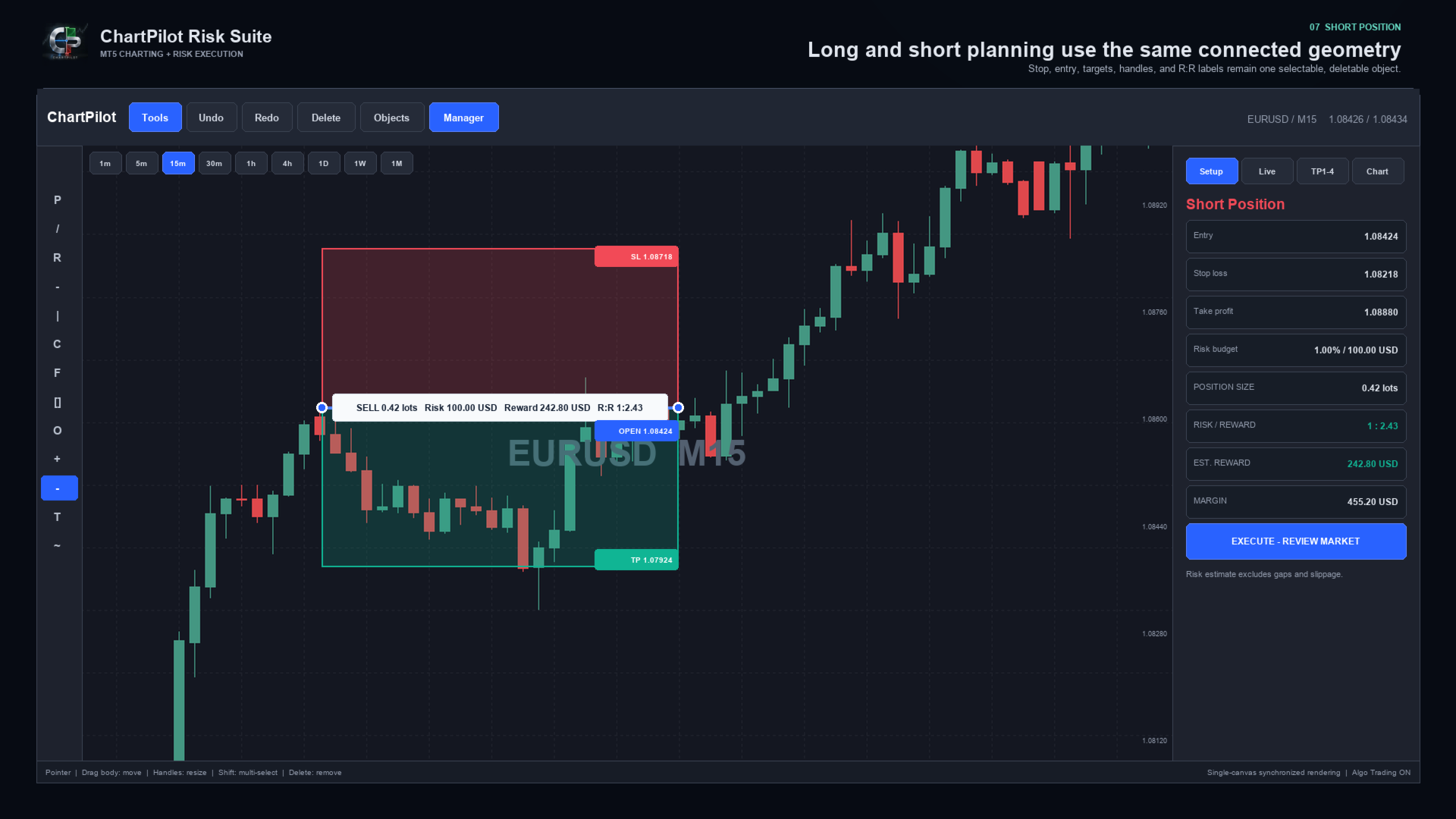
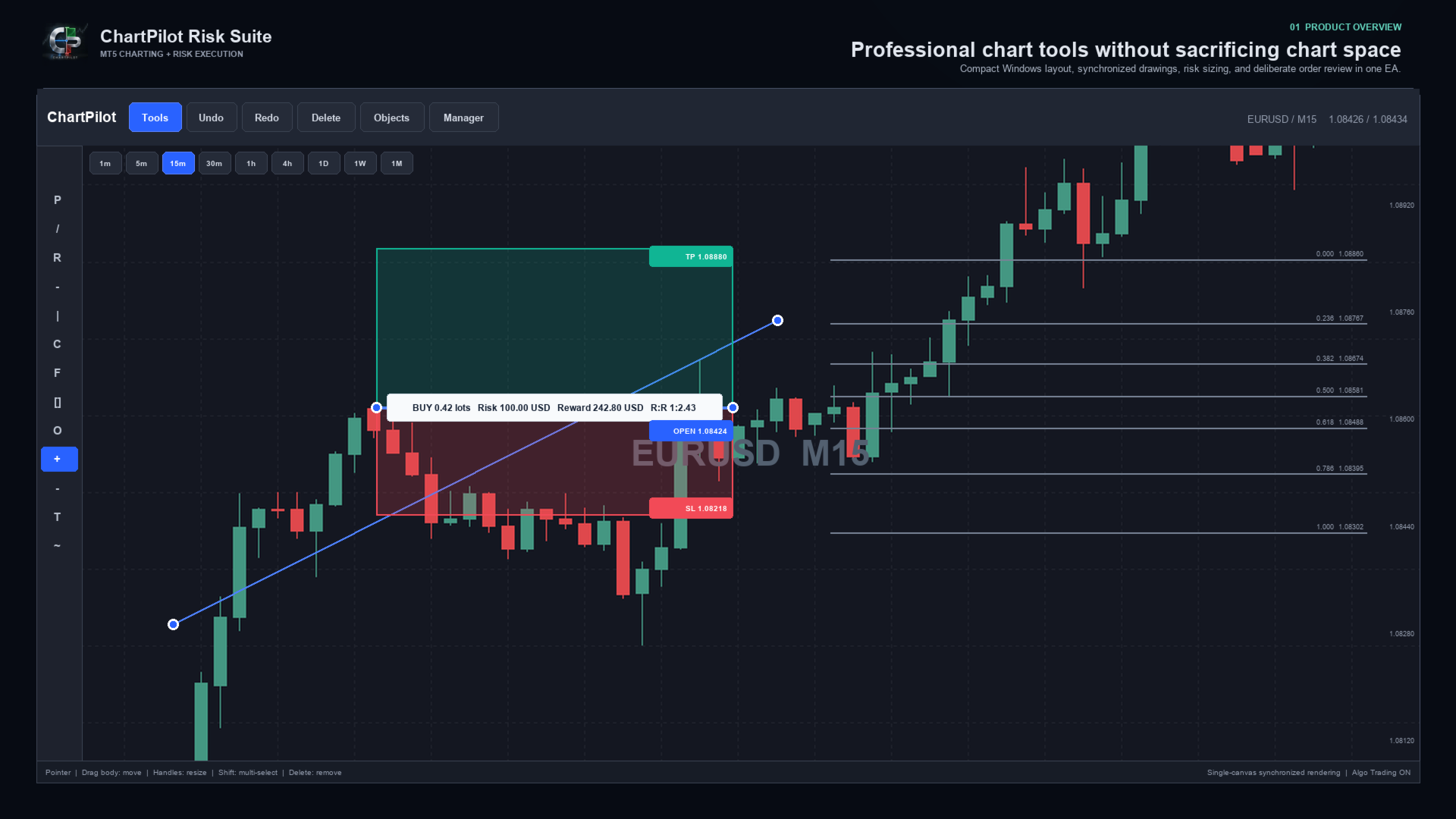
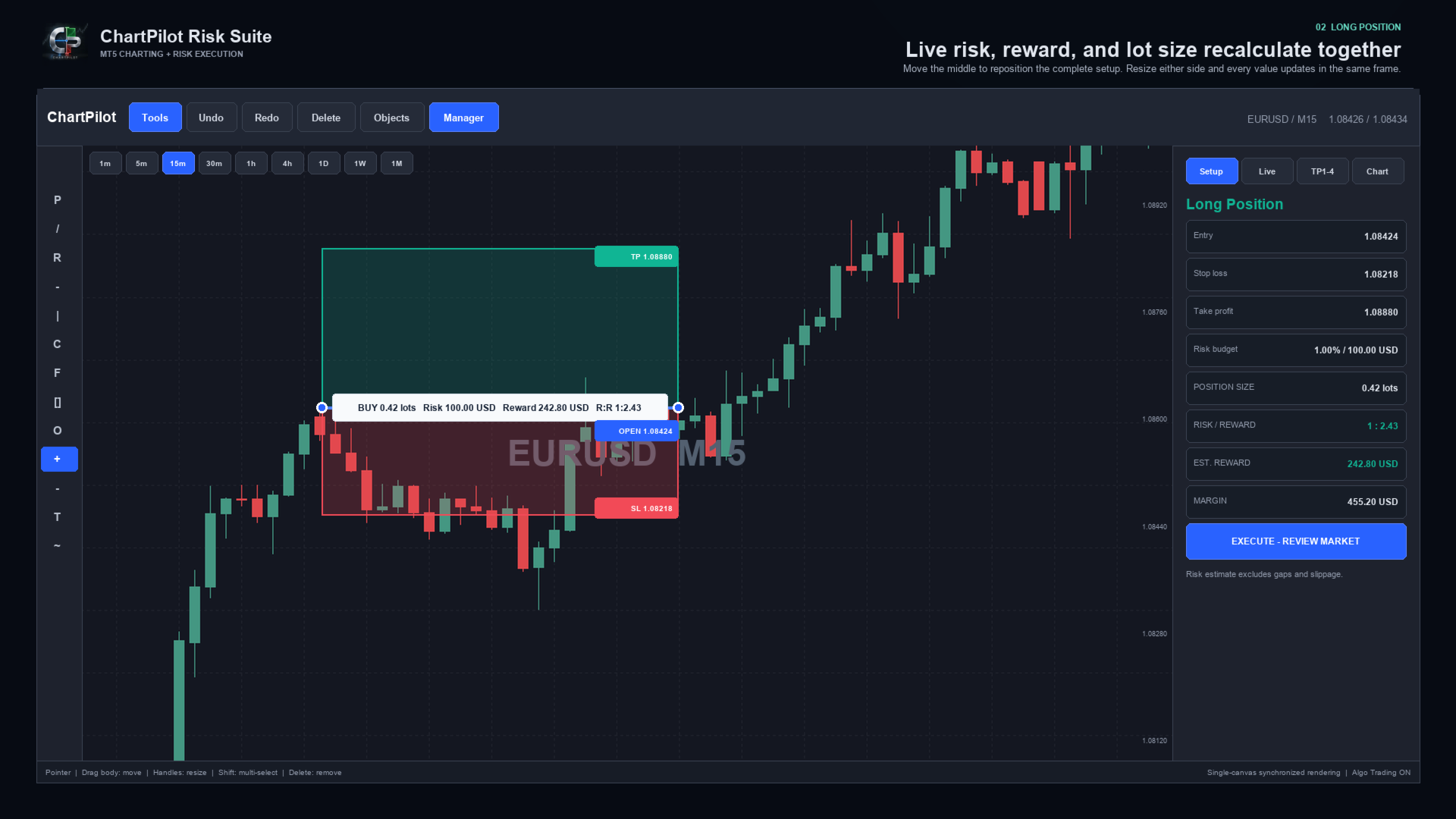
The Long Position and Short Position tools behave as connected objects. Drag the middle of a setup to move the complete position plan. Drag its handles to change the time range, stop or target. The profit zone, loss zone, entry line, labels, position size and risk-to-reward calculation update from the same underlying anchors.

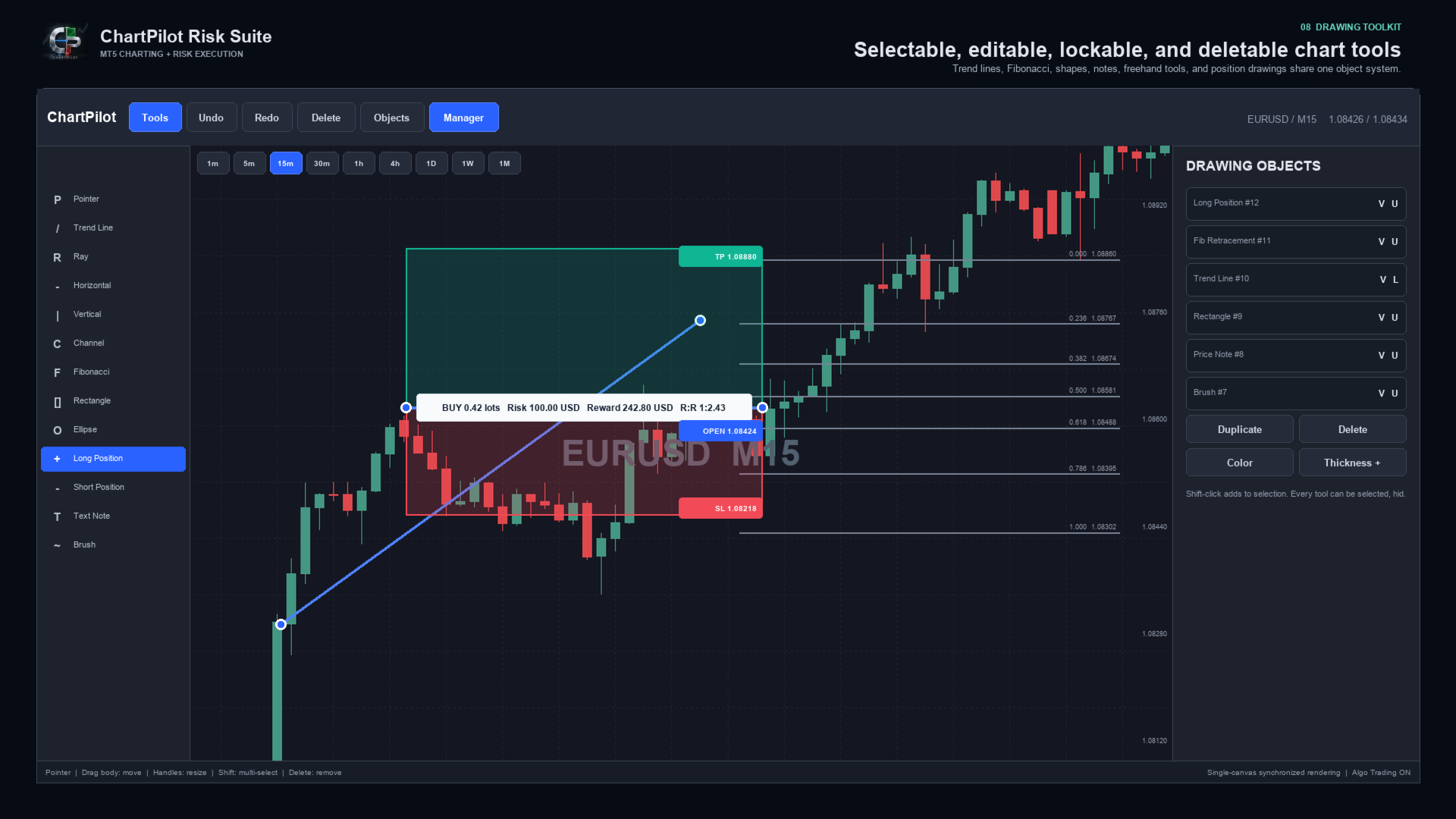
Every drawing can be selected and deleted. Drawings can also be hidden, locked, duplicated, recolored or given a different line thickness. The interface includes undo and redo history, multi-selection, object management and optional OHLC snapping.

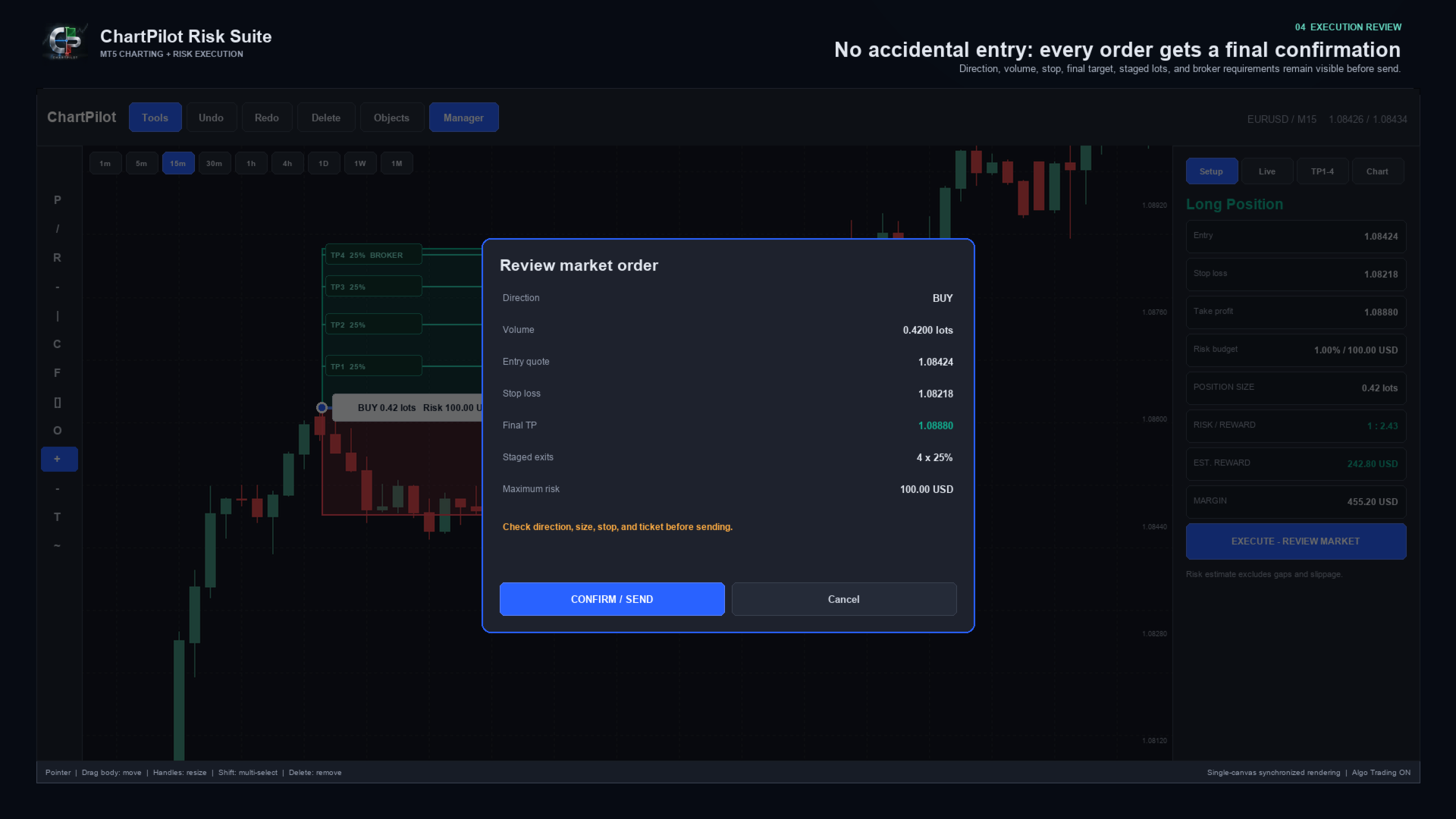
ChartPilot does not place a trade simply because a position drawing exists. Select the setup, check its values, press the execution button and review the complete request. The order is sent only after CONFIRM / SEND is pressed.


MAIN FEATURES

- Long Position and Short Position planning tools
- Percentage-of-equity risk sizing
- Fixed cash-risk sizing
- Optional manual lot size
- Estimated commission-per-lot input
- Live position size, cash risk, estimated reward, margin and R:R calculations
- Market entry and drawn-price pending entry modes
- Final confirmation before every submitted order
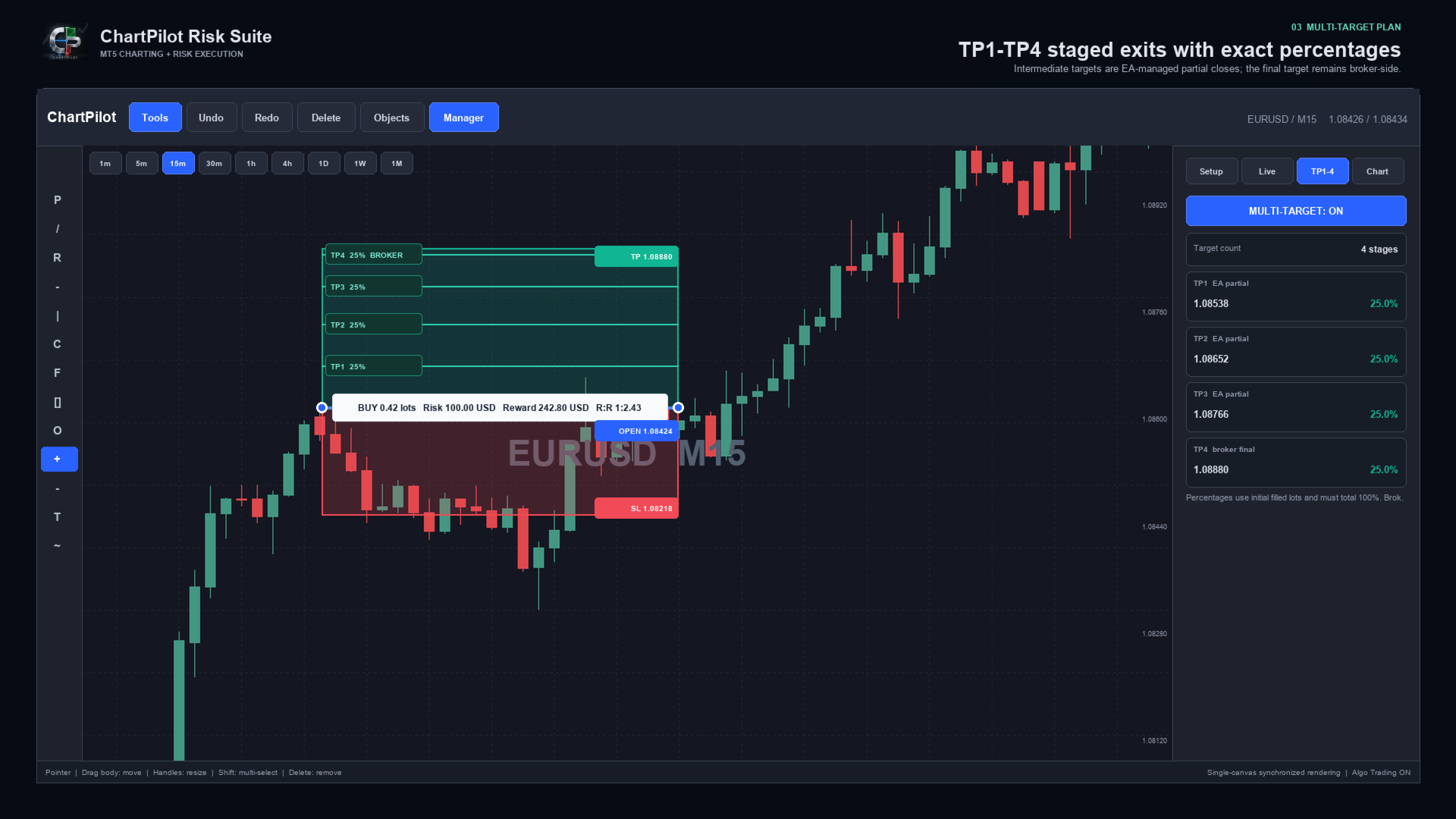
- TP1, TP2, TP3 and TP4 planning
- Two, three or four target stages
- Percentage allocation based on the initial filled volume
- Automatic intermediate partial closes for confirmed ChartPilot positions
- Broker-side stop loss and final take profit
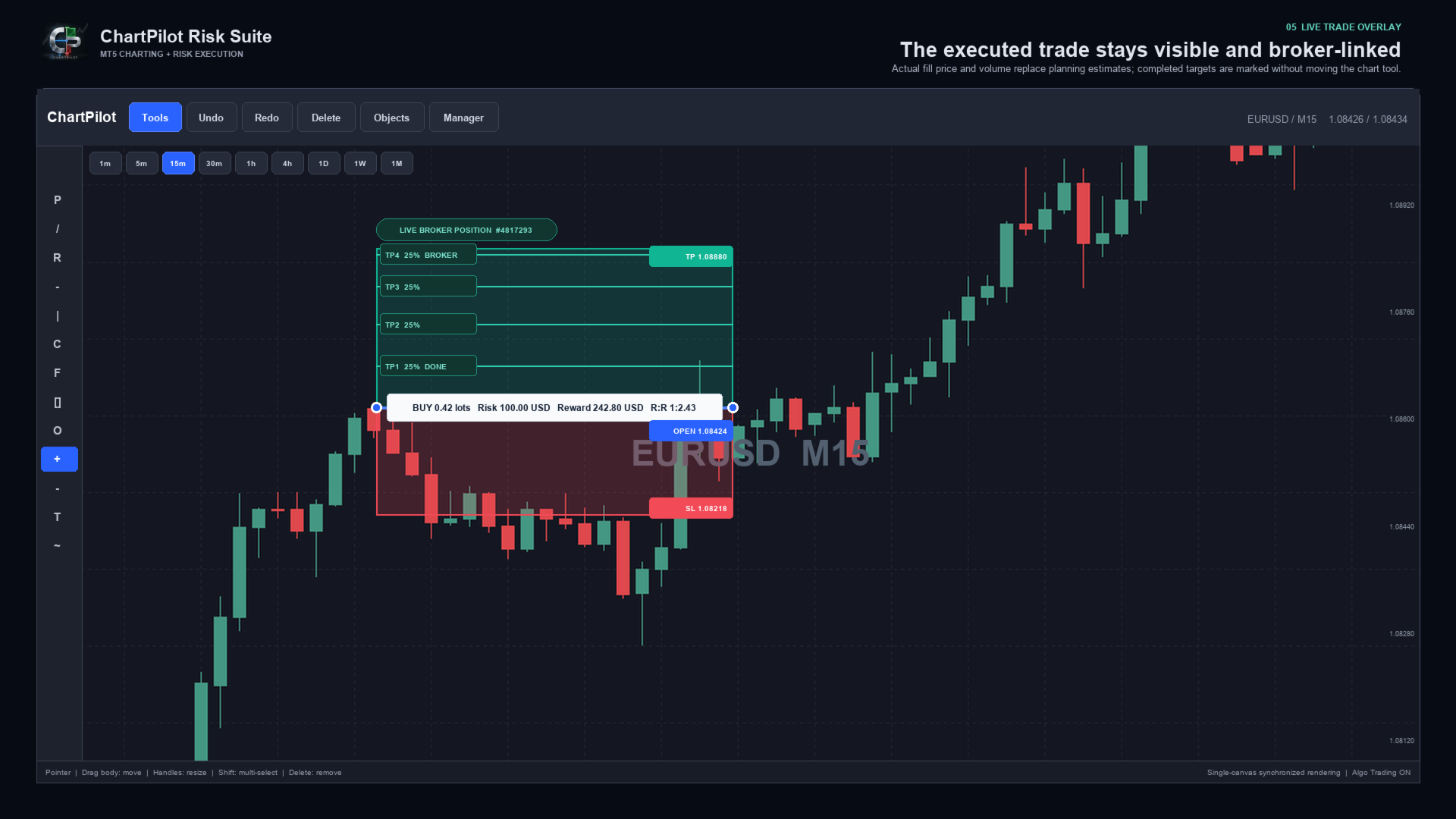
- Live broker-position overlay using the actual fill price and volume
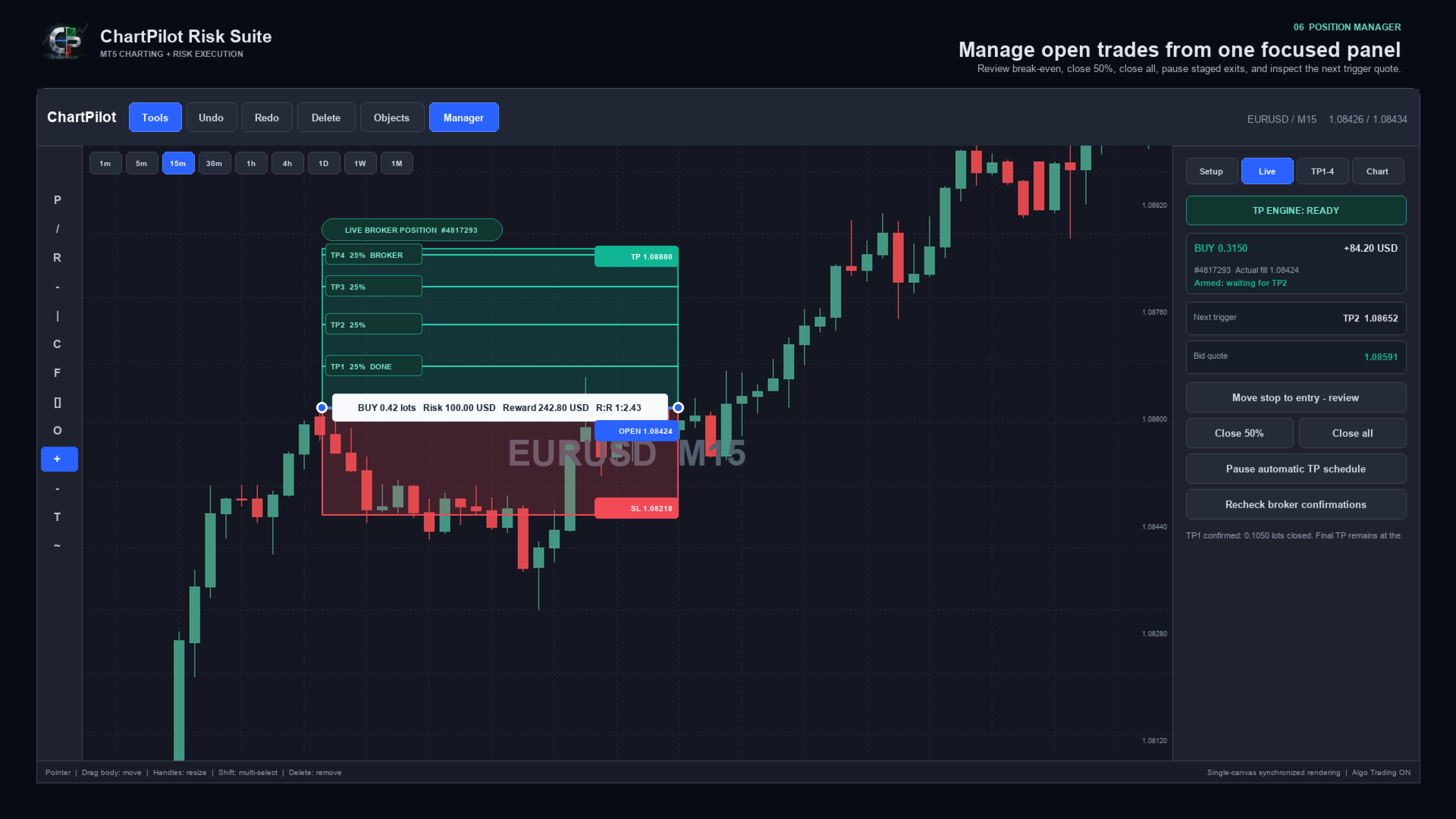
- TP engine status, next target and live trigger quote
- Position manager with reviewed break-even, Close 50% and Close All actions
- Pause, review and resume controls for an automatic TP schedule
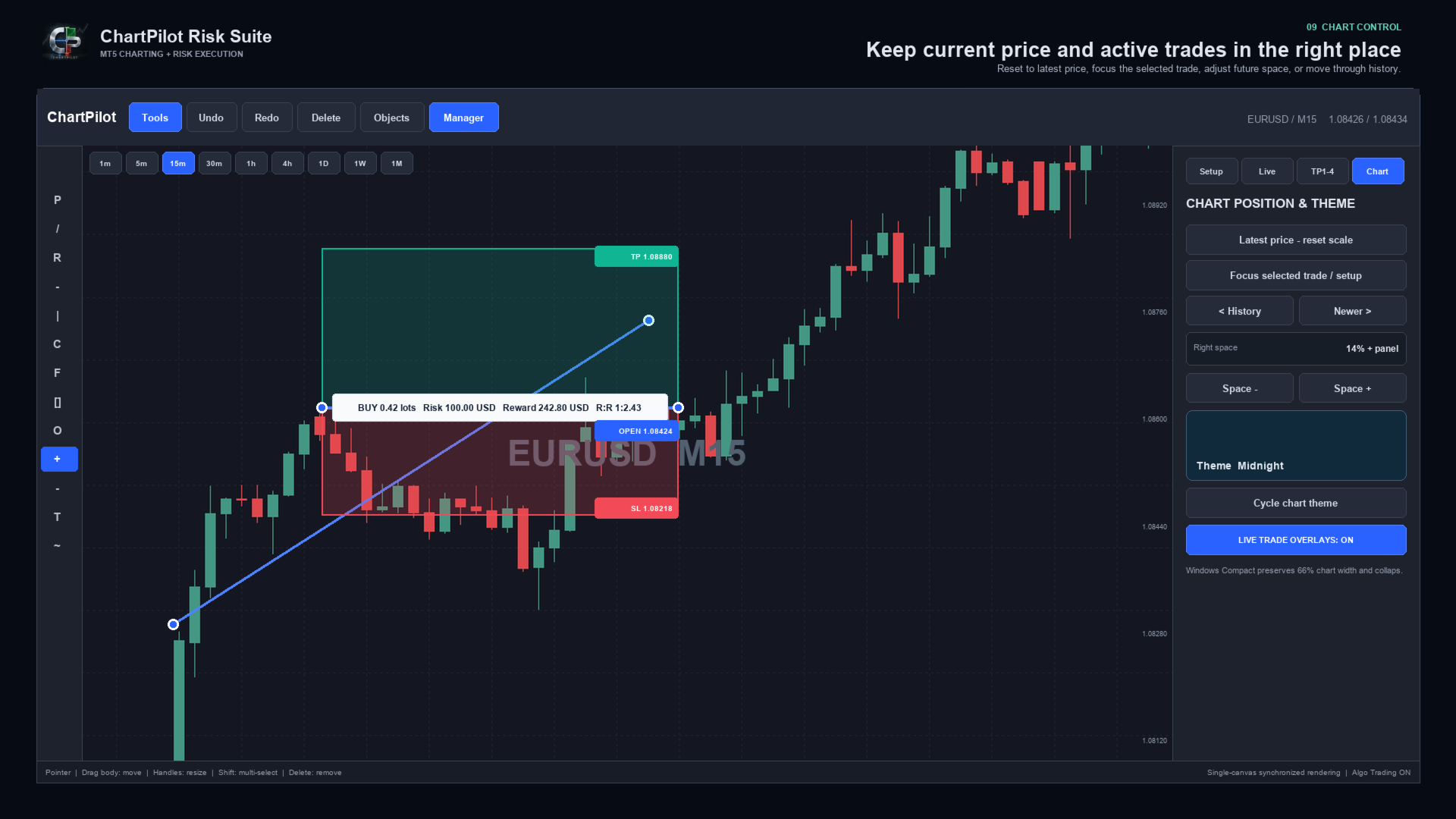
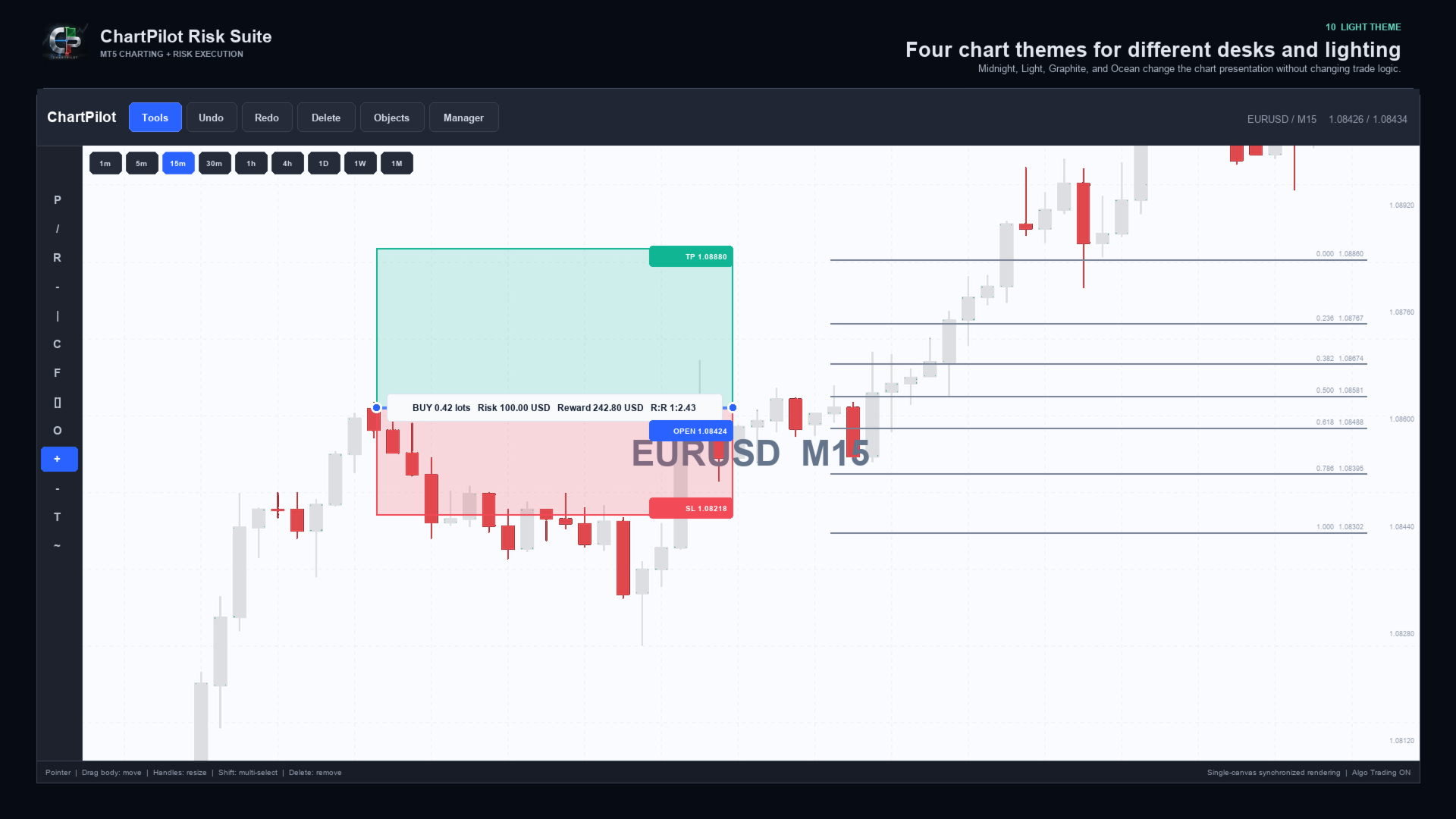
- Midnight, Light, Graphite and Ocean chart themes
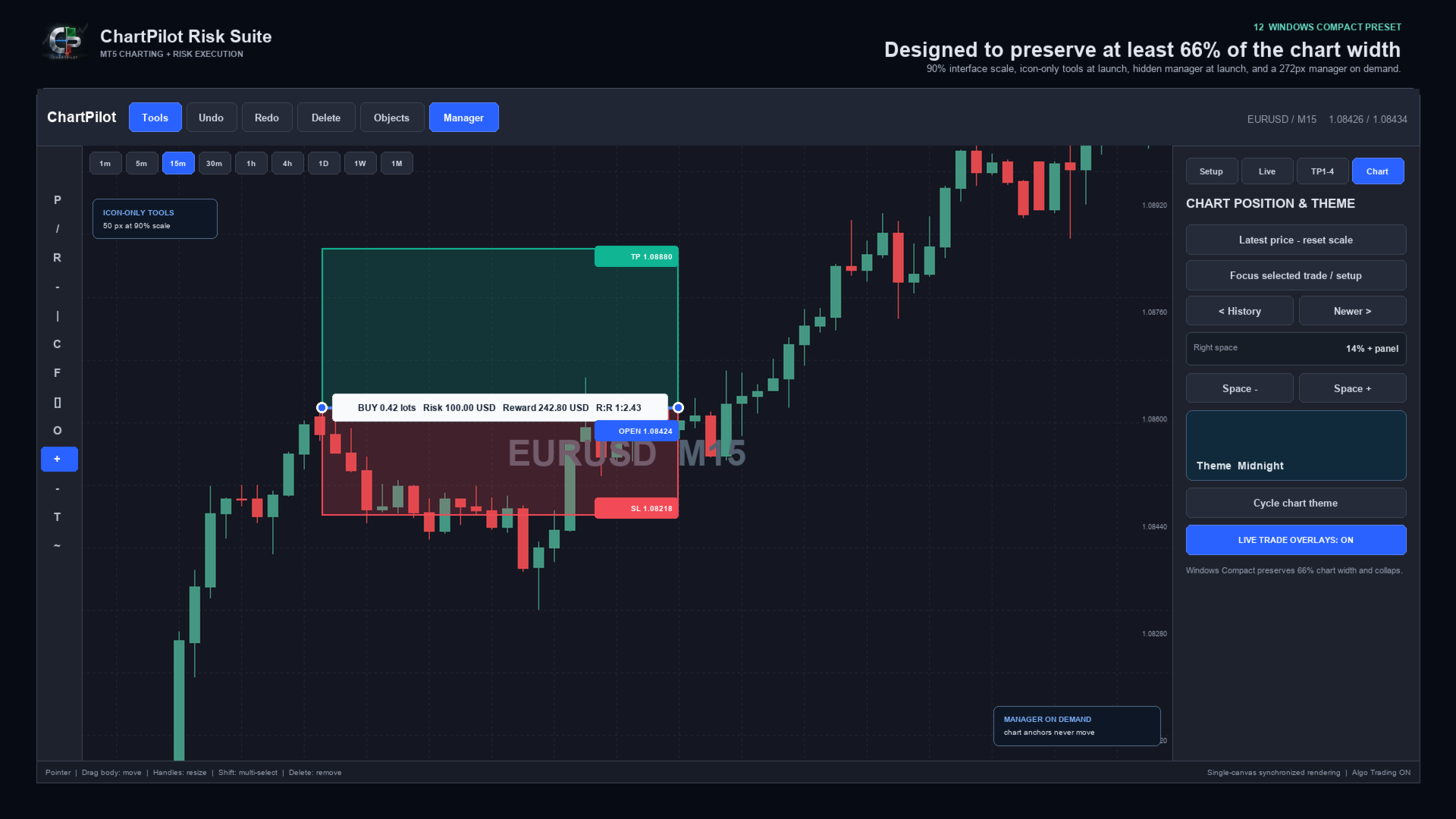
- Latest-price reset, Focus Trade, history navigation and adjustable right-side chart space
- Compact Windows layout with automatic panel reduction
- Persistent chart workspaces and confirmed-plan journal
- Self-contained Market product with no companion indicator or DLL imports


DRAWING WORKSPACE

Included tool groups cover:

- Pointer and crosshair
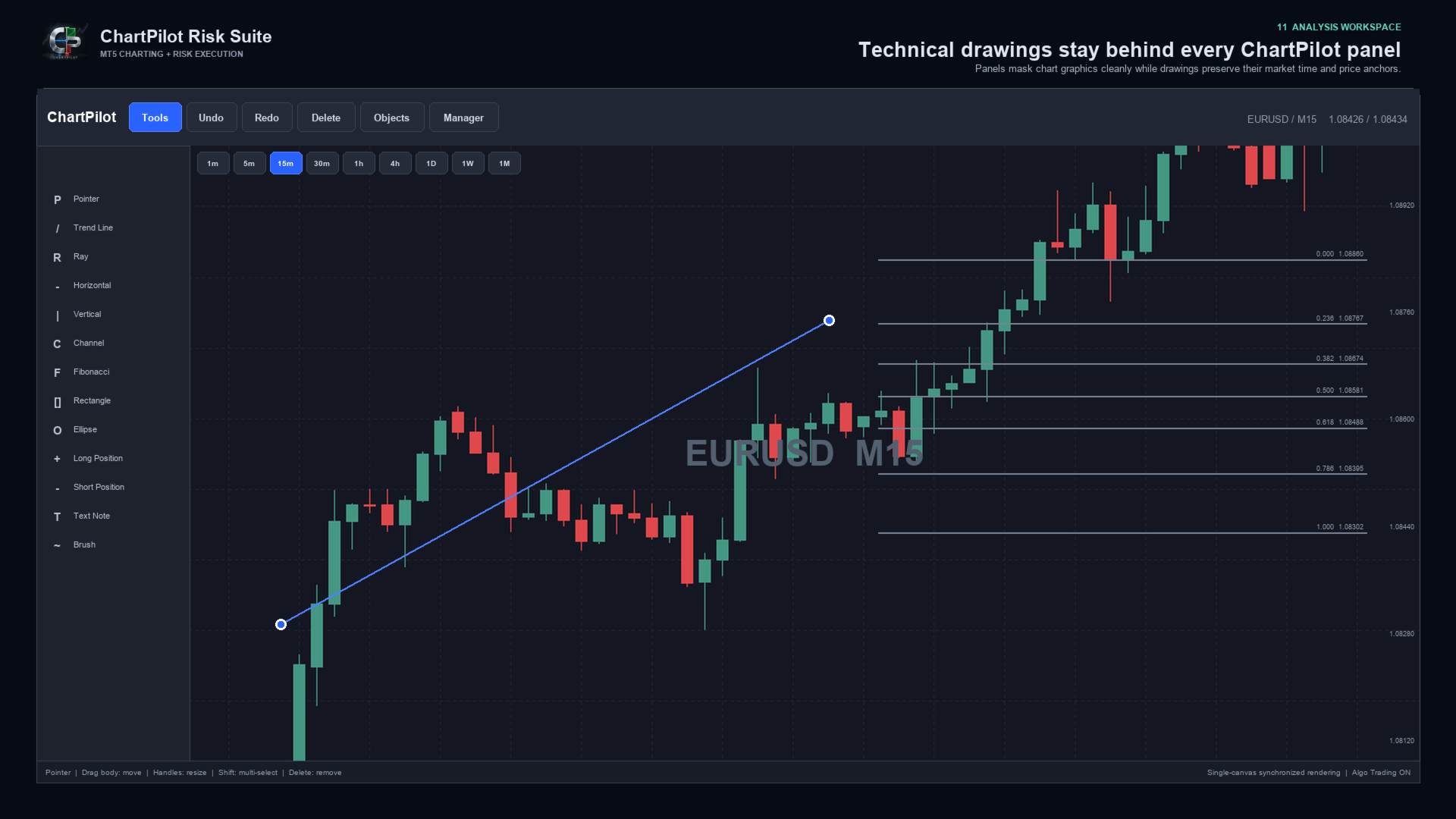
- Trend line, ray, extended line and horizontal/vertical lines
- Arrow and double-arrow lines
- Parallel channel, regression channel and standard-error channel
- Fibonacci retracement, extension, fan, arc and time tools
- Gann fan and Gann box
- Rectangle, ellipse and triangle
- Bezier, ABCD and XABCD patterns
- Elliott impulse and correction tools
- Long and short position tools
- Ruler, price range, date range and date/price range
- Text note and price note
- Brush, highlighter and polyline

Drawings use chart time and price coordinates. Panning, zooming or changing the visible chart range changes their screen position in the same way as normal market-anchored drawings, but it does not rewrite their stored market anchors.


POSITION AND LOT-SIZE MANAGER

ChartPilot calculates volume from the selected setup and symbol specifications. Choose one sizing method:

1. Risk percentage: volume is based on the selected percentage of current account equity.
2. Fixed risk: enter a cash amount in the account currency. A non-zero fixed amount takes priority over percentage risk.
3. Manual lots: enter a manual volume when an exact size is required.

The calculated volume is normalized to the broker's minimum volume, maximum volume and lot step. If the requested staged percentages cannot produce valid partial volumes, ChartPilot rejects the plan instead of silently increasing the risk.

Commission is an estimate supplied by the user. It is not automatically read from the broker. Swap, slippage, price gaps and execution differences can change the final result.


HOW MULTI-TARGET MANAGEMENT WORKS

1. Draw or select a Long Position or Short Position.
2. Open Manager, then TP1-4.
3. Enable Multi-Target and select two, three or four stages.
4. Enter the target prices and closing percentages.
5. Ensure the active percentages total exactly 100%.
6. Return to Setup and press EXECUTE - REVIEW.
7. Check the entry, stop, final TP and rounded lot allocation.
8. Press CONFIRM / SEND.

Intermediate stages are managed by the EA as partial market exits. The final target is placed at the broker. For example, a four-stage plan can close 25% at TP1, 25% at TP2, 25% at TP3 and leave the final 25% for the broker-side TP4.

Automatic staged exits apply only to positions linked to a confirmed ChartPilot entry plan. Creating a drawing does not authorize automatic trading, and ChartPilot does not attach a staged schedule to an unrelated manual trade or another EA's position.

MetaTrader 5 must remain open, connected and permitted to use Algo Trading for intermediate partial exits. The broker-side stop loss and final take profit can remain active when the terminal is closed, subject to the broker's normal execution rules.

If price gaps through several targets, ChartPilot advances confirmed partial exits sequentially. If price reaches or gaps through the final broker target, the broker may close all remaining volume before every intermediate stage is filled.

Do not manually change the volume, direction, opening price or final TP of a managed position unless you intend to take control. An external position change causes ChartPilot to suspend the original percentage schedule for safety.


QUICK START

1. Test the EA on a demo account before live use.
2. Attach one ChartPilot instance to the chart and symbol you want to manage.
3. Enable Allow Algo Trading in the EA properties.
4. Enable the main Algo Trading button in MetaTrader 5.
5. Choose a risk percentage, fixed cash risk or manual lot size.
6. Select Long Position or Short Position and place the setup on the chart.
7. Drag the body to move the complete setup or drag a handle to resize it.
8. Configure TP1-TP4 if staged exits are required.
9. Press EXECUTE - REVIEW and inspect the complete request.
10. Confirm only when the direction, size, stop and targets are correct.
11. Open Manager > Live to monitor the TP engine and selected position.

Use only one managing ChartPilot chart for the same account, broker server, symbol and magic number. This prevents two chart instances from attempting to manage the same confirmed plan.


WINDOWS INSTALLATION AND DISPLAY SETUP

Installation:

1. Open the desktop MetaTrader 5 terminal and sign in to the MQL5 account used for the purchase.
2. Open Market > Purchased and install ChartPilot Risk Suite.
3. Find ChartPilot Risk Suite under Expert Advisors in the Navigator.
4. Drag the EA onto the chart and symbol you want to manage.
5. Enable Allow Algo Trading in the EA properties if execution or staged exits will be used.
6. Enable the main Algo Trading control in MetaTrader 5.

Recommended Windows layout:

- Start with a maximized chart window.
- Recommended interface scale: 90% to 100%.
- Recommended Windows display scaling: 100% or 125% when possible.
- Keep Start Tools Expanded disabled for an icon-only toolbar at launch.
- Keep Show Manager disabled so the chart opens at maximum width.
- Open Manager only when sizing, executing or managing a trade.
- Keep Auto Compact Panels enabled.
- Set Minimum Chart Percent to 66 when maximum chart space is preferred.

Recommended compact input values:

- Interface Scale: 90
- Start Tools Expanded: false
- Show Manager: false
- Expanded Tools Width: 170
- Manager Width: 272
- Minimum Chart Percent: 66
- Auto Compact Panels: true
- Right Space: 14

If you have the optional ChartPilot_Windows_Compact.set developer preset, open EA Properties > Inputs > Load and select it. Market installation itself supplies only the compiled product, so the same values can be entered manually when the preset is not present.

At Windows display scaling of 150% or higher, start with Interface Scale at 80% to 90%. MetaTrader uses pixel-based chart dimensions, so Windows DPI scaling and the EA interface scale can compound. If the chart becomes crowded, reduce Interface Scale, close the Manager panel or collapse the Tools panel.

These compact values change only EA inputs. They do not alter account, broker or MetaTrader installation settings.


MACOS INSTALLATION AND DISPLAY SETUP

MetaTrader 5 for macOS runs through the compatibility environment supplied with the terminal installation. Install Market products from inside MetaTrader. Do not copy product files into the visible application bundle in Finder.

Installation:

1. Start the desktop MetaTrader 5 application and sign in to the MQL5 account used for the purchase.
2. Open Market > Purchased and install ChartPilot Risk Suite.
3. Find it under Expert Advisors in the Navigator.
4. Attach it to the chart and symbol you want to manage.
5. Enable Allow Algo Trading in the EA properties and the terminal's Algo Trading control when execution is required.
6. If Navigator does not refresh, restart MetaTrader 5 and check the Purchased section again.

For a separately supplied developer MQ5 file, use File > Open Data Folder, then place the source in MQL5 > Experts and compile it in MetaEditor. This manual process is not required for the normal Market version.

Recommended macOS layout:

- Begin with Interface Scale at 100%.
- On a high-resolution Retina display, 110% to 125% may be comfortable.
- Use a maximized chart before increasing the interface size.
- Keep the Manager hidden until it is needed.
- If the compatibility environment applies additional scaling, reduce Interface Scale in 10% steps.
- The Windows Compact preset can also be loaded on macOS, but it is normally necessary only on a small window or a heavily scaled display.

Font weight and edge smoothing can look slightly different between Windows and macOS because MetaTrader and the compatibility layer use different system text and display-rendering paths. This is visual only and does not change price, volume or trade-management calculations.


IMPORTANT OPERATING NOTES

- ChartPilot manages the current chart symbol.
- Use a unique magic number when separating different ChartPilot strategies or workspaces.
- Deleting a drawing never closes a broker position.
- Hiding a drawing does not pause a confirmed TP schedule.
- Use Manager > Live to pause or resume a linked staged schedule.
- Manual partial closes suspend the original staged allocation.
- Do not delete the ChartPilot plan journal from MQL5/Files while a managed position is open.
- If TP ENGINE reports an Algo Trading or connection warning, intermediate partial exits cannot be sent.
- Pending orders remain subject to the broker's supported order types, filling policies, stop distance and expiration rules.
- The EA rejects unsupported or invalid requests when broker checks fail.
- Broker execution, spreads and symbol specifications differ. Test every symbol and account type on demo first.


RISK NOTICE

Trading foreign exchange, CFDs and other leveraged products involves substantial risk. Position-size and risk-to-reward figures are estimates based on the information available when calculated. Gaps, slippage, spread changes, commissions, swaps, partial fills, broker rules and connection failures can produce a different result.

ChartPilot Risk Suite is an execution and chart-management utility. It does not provide trading signals, investment advice or any guarantee of profit. The user remains responsible for every setup, confirmation, broker setting and trade decision. Use a demo account first and never risk funds you cannot afford to lose.
Рекомендуем также
Trade Analyzer
Jared Wayne Broderick
Trade Analyzer is an interactive charting utility designed to make trade planning and performance tracking easier directly inside MetaTrader 5. It allows you to quickly create and visualize trade setups on your chart, giving you a clear view of your Entry, Stop Loss, and Take Profit levels. Every trade setup you chart is automatically measured and analyzed, showing you the exact risk-to-reward ratio, risk in pips, potential reward, and outcome of the setup. As you chart more trades, RR Analytics
FREE
Kings ea
Rodrick T Russell
KINGS EA V2.51 – Advanced Multi-Strategy Expert Advisor KINGS EA V2.51 is a powerful, fully automated trading robot for MetaTrader 5, designed for traders who want flexibility, robust risk management, and advanced strategy options.   It combines trend, breakout, and reversal trading in one easy-to-use package, with extensive customization and safety features Key Features Three Strategies in One:    Trade with Trend, Breakout, or Reversal logic – enable or disable each as you wish. -Flexibl
EA XAU Queen
Dmitriq Evgenoeviz Ko
EA XAU Queen  — Полностью автоматическая торговля XAUUSD EA XAU Queen  — это полностью автоматическая торговая система, разработанная специально для рынка золота ( XAUUSD ). Советник использует уникальный алгоритм отслеживания институциональной ликвидности и зон дисбаланса цены (Smart Money + Price Action), что позволяет находить высокоточные точки входа с минимальным проскальзыванием. Робот не использует опасные методы управления капиталом, такие как классический мартингейл без стоп-лосса, сет
Discord Notify
Aleh Piatrenka
5 (3)
Автоматически отправляет уведомления об открытии, закрытии , частичном закрытии и изменении сделок MT5  в Discord в реальном времени . Утилита поддерживает 16 языков : English, French, German, Indian (Hindi), Indonesian, Italian, Kazakh, Korean, Dutch, Polish, Portuguese, Russian, Spanish, Turkish, Ukrainian и Vietnamese. Также можно использовать любой другой язык, изменив текст уведомлений.  Продукт предназначен для трейдеров, которым важно получать уведомления в Discord без необходимости посто

FREE
Автоматически отправляет уведомления об открытии, закрытии , частичном закрытии и изменении сделок MT5  в Slack в реальном времени . Утилита поддерживает 16 языков : English, French, German, Indian (Hindi), Indonesian, Italian, Kazakh, Korean, Dutch, Polish, Portuguese, Russian, Spanish, Turkish, Ukrainian и Vietnamese. Также можно использовать любой другой язык, изменив текст уведомлений.  Продукт предназначен для трейдеров, которым важно получать уведомления в Slack без необходимости постоянно

FREE
The   AI Concept EA   is a 100% hands free Auto Trader that is designed to trade and maximize your financial status, it's also designed to a certain trading behavior by which profits will always be   stabled throughout your trading journey .   This   EA   use   Martingale Strategy   but in the   very safe and effective way   of multiplying Lots to your balance. This AI Expert Advisor   search for a particular price action behavior that investors haven't come across as yet, in other words this EA
Prop-Firm Risk Guardian watches your MetaTrader 5 account in real time. When any rule you have set is breached, Guardian closes the offending positions and locks new entries. It does not open trades. It does not prevent order placement, because no chart-attached EA can do that. It reacts to a breach within one tick, which is what saves the account. This is a rules utility for funded-challenge, funded, and personal accounts. All account data stays on your terminal. Optional Telegram alerts use y
This is the HFT Flame Ea....This is a complex Expert Advisor that basically pick trades from price movements, it is also a none-martingale mechanism with netting strategy that makes this Ea more interested and profitable throughout your trading journey. The HFT Flame EA can be super consistent on profits depending on the inputs selected for your style of trading. This is a hand free trading robot that can trade your way to success while you are away from the charts, another perfect advantage abo
The Fortress: Ultimate Discipline & Risk Manager: "The Holy Grail of trading isn't a strategy—it's Discipline." Every trader knows the feeling: you have a great plan, but then  emotion takes over. You over-leverage, you revenge trade after a loss, you move your Stop Loss, or you "change your mind" about a pair mid-day. The Fortress was created to solve the "Human Element." It is not a signal generator; it is a  Hard-Rule Execution Manager. It acts as a digital supervisor that monitors your accou
Choppa bot
Tyler Wayne Henry
This code snippet is a comprehensive Expert Advisor (EA) developed for the MetaTrader platform, utilizing or MQL5 programming languages. The EA, named "CHOPPA BOT," is designed to automate trading strategies based on a combination of technical indicators, including the Relative Strength Index (RSI), Parabolic SAR, Exponential Moving Averages (EMA), Simple Moving Average (SMA), and the Average Directional Movement Index (ADX). Here's an overview of its functionality: Initialization and Setup : Up
Trend Scalper Infinite   — это агрессивный высокоскоростной торговый эксперт (EA), созданный специально для торговли на волатильных инструментах, таких как Золото (XAUUSD). В основе его алгоритма лежит следование за трендом с уникальной и бескомпромиссной системой управления рисками. Главная фишка советника —   асимметричное соотношение риска и прибыли . Бот использует экстремально жесткий фиксированный Stop Loss всего в 1$ (настраивается), но при этом у него   НЕТ ограничения по Take Profit . В
В данном советнике используется дополнительные фильтры тренда. Имеет защиту ордеров в виде хеджирования. Использует мартингейл. Советник торгует отложенными ордерами. Мартингейл рано или поздно может слить весь ваш депозит, рекомендуется, анализируя рынок, контролировать торговлю советника. Для торговли подойдет любая валютная пара. Минимальный рекомендуемый депозит 1000$ (лучше начать с центового счета). Таймфрейм М1. Телеграмм канал Настройки:  https://drive.google.com/file/d/1Uauc8Mn7HpPWLKn
提供专业的EA编程服务,推出特色仪表盘EA编程,将您的交易策略自动化,可视化,一个图表管理多个交易货币对,详情查看: http://www.ex4gzs.com   Providing quick Developments and Conversion of MT4/MT5 EAs, Indicators, Scripts, and Tools. If you are looking for an Dashboard EA to turn your trading strategy into auto trading algo and to manage multi trades in one chart with visualizing tool, come and visit http://www.ex4gzs.com/en for more details. 如果产品有任何问题或者您需要在此产品上添加功能,请联系我 Contact/message me if you encounter any issue using the product or need extra feat
Mad Turtle
Gennady Sergienko
4.44 (124)
Символ XAUUSD Timeframe (период) H1-M15 (любой) Поддержка торговли 1 позицией ДА Минимальный депозит 500 USD  (or the equivalent of another currency) Совместимость с любым брокером  ДА (поддержка брокера с 2 или 3 знака. Любая валюта депозита. Любое название символа. Любое время GMT) Запуск без предварительных настроек  ДА Если вам интересна тема машинного обучения подписывайтесь на канал:  Subscribe! Ключевые факты проекта Mad Turtle: Настоящее машинное обучение Данный эксперт не подкл
Volatility 75 Pro Auto (Свяжитесь с нами для получения .set-файлов) Изначально Volatility 75 Pro (сокращённо V75 Pro) представляет собой торговый советник, основанный на стратегии Grid + Trend, специально разработанный для торговли только синтетическими индексами. Стратегия использует несколько технических индикаторов на различных таймфреймах для фильтрации некачественных торговых сигналов. Советник не использует уровни Stop Loss и Take Profit. Вместо этого применяется система нескольких услов
BossFXTradePanelEA (MT5)  [First 10 copies sold at 50 USD price will increase to 99USD] BossFXTradePanelEA is a fully interactive trade management panel designed for MetaTrader 5, providing traders with an easy-to-use, one-click interface to execute and manage trades. This EA simplifies trade execution , risk management, and position control by combining market orders, stop loss, take profit, trailing stops, and breakeven functionalities into a single, intuitive panel.  Key features include: On
TechRiven EC Pro EA
Md Ariful Moula Chowdhury
TechRiven EC Pro — Умный, Быстрый и Адаптивный Советник TechRiven EC Pro   — это мощный автоматический торговый советник, который открывает сделки быстро и точно, когда рыночные условия наиболее благоприятны. Он интеллектуально адаптируется к   текущей волатильности рынка , что позволяет сохранять прибыльность даже в периоды высокой неопределённости. Доказанная Эффективность Результаты тестирования за несколько последних лет показывают   стабильную прибыльность . Даже во время резких рыночных из
Trade Manager Pro is a MetaTrader 5 tool designed to assist with trade execution, position management, risk control, and account monitoring from a single on-chart interface. It is built to work alongside manual trading or automated systems and does not interfere with external Expert Advisors. The tool is intended for traders who require direct control over order execution and position management while maintaining consistent risk rules across different market conditions. Core Function The indica
FlowAxis
Aysar Alafif
5 (1)
Product Overview   FlowAxis is a semi-automated Expert Advisor for Meta Trader 5 designed for traders who rely on manual trendline analysis and want precise, rule-based trade execution.   Instead of guessing market direction, the trader defines the trend visually, and FlowAxis executes trades automatically when price interacts with predefined trendlines. This approach       combines human market analysis with disciplined, rule-based execution. Important – Please Read Before Use   FlowAxis EA
Session Ambush EA
Cristian-bogdan Buzatu
LIMITED FREE RELEASE This Expert Advisor is temporarily available free of charge. The free release may end at any time. If you decide to test it, I would greatly appreciate an honest review based on your experience with the EA. I am also particularly interested in promising parameter sets found on different symbols and timeframes. Please include the symbol, timeframe, test period, number of trades and modelling method so the results can be reproduced. I am currently working on a new Expert Advis
FREE
TradeArmor HUD   is an ATR-based risk panel and trade manager built to protect your account from execution errors and emotional decision-making. Before you enter a trade, its mathematical safety checks guard against spread spikes, invalid stops, and margin-busting lot sizes. Once executed, it takes over management — securing partial profits, locking in break-even, and trailing stops objectively — entirely eliminating the need for manual interference. Designed to be invisible.   No indicator dep
Quantum Aurus X
Dmitriq Evgenoeviz Ko
Quantum Aurus X — это инновационная торговая экосистема, объединяющая классический пробойный алгоритм (Breakout Engine) и современные методы машинного обучения для фильтрации рыночного шума. Система разработана для профессионального трейдинга на металлах (Gold), индексах и волатильных валютных парах. Интеллектуальный нейросетевой фильтр В отличие от стандартных пробойных советников, Quantum Aurus X оснащен модулем Neuro-Core V2 . Это пре-тренированная нейронная сеть (Perceptron), которая в реал
Описание: Wave 5 - советник, который торгует по волной теории Элиота и уровням Фибоначчи. Пара: EURUSD Таймфрейм: M15 Подробное описание: Советник Wave 5 торгует на паре EURUSD . Для анализа волнового паттерна используется комбинация нескольких индикаторов. Решение о входе в сделку принимается при формировании волн вверх или вниз. Наиболее эффективно эксперт торгует на периоде М15 на паре EURUSD . Здесь зафиксирован минимальный риск при достаточно высокой прибыли.   Риск-менеджмент: Торговый о
Pro Scalping Tool
Mohammad Nazmul Hassan
### **ProScalpingToolEA.mq5 Analysis & Description** **Overview:**   The `ProScalpingToolEA.mq5` script is an Expert Advisor (EA) for MetaTrader 5, designed to assist with automated trading. It includes features for placing, managing, and monitoring trades. --- ### **Key Functionalities:** 1. **Trade Execution & Management:**    - Uses the `CTrade` class from `Trade.mqh` to manage trading operations.    - Allows placing buy and sell orders with a configurable lot size.    - Trades are iden
Orydax Keldrix — XAUUSD Expert Advisor for MetaTrader 5 Turn a demanding market routine into a clear, automated process. Orydax Keldrix is a liquidity-structure breakout strategy for MetaTrader 5, with XAUUSD M15 as the recommended starting setup. It follows the market continuously, waits for a defined liquidity structure with room for expansion, and handles the trading workflow when its confirmation process is complete. It is designed for users seeking selective structure-based breakout exposu
提供专业的EA编程服务,推出特色仪表盘EA编程,将您的交易策略自动化,可视化,一个图表管理多个交易货币对,详情查看: http://www.ex4gzs.com   Providing quick Developments and Conversion of MT4/MT5 EAs, Indicators, Scripts, and Tools. If you are looking for an Dashboard EA to turn your trading strategy into auto trading algo and to manage multi trades in one chart with visualizing tool, come and visit http://www.ex4gzs.com/en for more details. 如果产品有任何问题或者您需要在此产品上添加功能,请联系我 Contact/message me if you encounter any issue using the product or need extra feat
Лучший брокер для Imperium Expert (лучшая стабильность, спреды, комиссии, кредитное плечо и безопасность): https://www.mql5.com/fr/channels/imperiumbroker IMPERIUM Imperium — это советник (Expert Advisor) для MetaTrader 5, предназначенный для автоматизации торговли на рынке Forex с использованием вероятностного механизма принятия решений в сочетании с внешней моделью машинного обучения. Советник постоянно анализирует различные рыночные условия перед открытием позиции. Торговая активность автомат
FREE
The Scalper Pro  --- Advanced Multi-Strategy Scalping Expert Advisor The Scalper Pro is a high-precision automated scalping system designed for traders who require fast execution, structured logic, and controlled risk. It combines multiple price-action strategies with advanced trade and basket-level management to create a flexible solution for short-term trading. Built for performance and stability, the EA focuses on identifying intraday price movements and executing trades with disciplined man
Templerfx Nightmare is an EA that uses artificial intelligence technology to analyze data of many indicators. EA will have the best option to enter orders. The biggest difference of Templerfx Nightmare  is that the EA can control the Risk:Reward ratio much better than other EAs.That is possible because of a set of indicators to control entry points and manage open orders.  This EA is specifically designed to maximize trading opportunities on (Rise 300 Index ) pair on the M15 timeframe on a spec
С этим продуктом покупают
Trade Assistant MT5
Evgeniy Kravchenko
4.43 (215)
Помогает рассчитать риск на сделку, простая установка нового ордера с помощью линий, управление ордерами с функциями частичного закрытия, 7 типов трейлинг-стопа и другие полезные функции. Дополнительные материалы и инструкции Инструкция по установке - Инструкция к приложению - Пробная версия приложения для демо счета Функция Линии   - отображает на графике линию открытия, стоп-лосс, тейк-профит. С помощью этой функции легко установить новый ордер и увидеть его дополнительные характеристики пе
Добро пожаловать в Trade Manager EA — лучший инструмент для управления рисками, предназначенный для упрощения, точности и эффективности торговли. Это не просто инструмент для размещения ордеров; это комплексное решение для удобного планирования торгов, управления позициями и усиленного контроля над рисками. Независимо от того, начинающий вы трейдер, опытный специалист или скальпер, нуждающийся в быстром исполнении, Trade Manager EA адаптируется к вашим потребностям и работает с любыми активами:
================================================================================ POC BREAKOUT - V20.72. Full Professional Grade Toolkit ================================================================================ POC Breakout is a full MetaTrader 5 trading dashboard for discretionary traders who want breakout signals, Point of Control (POC) context, volume profiles, order flow, market structure, news, alerts, and advanced trade planning in one professional workspace. Attached directly to you
TradePanel MT5
Alfiya Fazylova
4.88 (167)
Trade Panel — это многофункциональный торговый помощник. Приложение содержит более 50 торговых функций для ручной торговли и позволяет автоматизировать большинство торговых операций. Инструкция к приложению + видео-инструкции: https://www.mql5.com/ru/blogs/post/771695 Пробная версия приложения для демо-счета: https://www.mql5.com/ru/blogs/post/750864 Как установить приложение: https://www.mql5.com/ru/blogs/post/750096 Как тестировать приложение в визуальном режиме: https://www.mql5.com/ru/blogs/
Telegram to MT5 Multi-Channel Copier   автоматически копирует торговые сигналы из ваших Telegram-каналов прямо в MetaTrader 5. Без ботов, без браузерных расширений, без ручного копирования. Сигнал приходит в Telegram — и советник открывает сделку в вашем терминале за считанные секунды. А перед тем как копировать канал, встроенный бэктестер покажет, что этот канал сделал бы на вашем счёте. Продукт состоит из двух компонентов: приложения для Windows, которое слушает ваши Telegram-каналы, и этого с
Бета-версия Telegram to MT5 Signal Trader почти готов к официальному альфа-релизу. Некоторые функции все еще находятся в разработке, и вы можете столкнуться с небольшими ошибками. Если вы заметите проблемы, пожалуйста, сообщите о них, ваша обратная связь помогает улучшать программное обеспечение для всех. Telegram to MT5 Signal Trader — мощный инструмент, который автоматически копирует торговые сигналы из каналов и групп Telegram прямо в ваш счёт MetaTrader 5 . Поддерживаются как публичные, так
Farmed Hedge Yield Farming | All Markets (Manual - Hybrid - Semi/Automated EA) VERIFIED TRADING RESULTS - Farmed Hedge Yield Axi Copy:  https://www.mql5.com/en/signals/2356376 - Farmed Hedge Yield Exn Copy:   https://www.mql5.com/en/signals/2356404 - Farmed Hedge Yield V Copy:  https://www.mql5.com/en/signals/2357156 IMPORTANT NOTICE: FarmedHedge is a MANUAL-FOCUSED TRADING UTILITY ,not a fully automated EA. Results shown on this Signal include manual trades and overall strategic management.
Astro Trade MT5
Indra Maulana
5 (7)
25% discount on the release of the tool: only for the next 3 buyers Send a message to receive a demo version. AstroTrade Trading Assistant AstroTrade is a comprehensive multi-functional trading utility developed for the MetaTrader 5 platform. It integrates essential tools for trade execution, risk management, and technical monitoring into a single unified interface. The application is designed to assist traders in managing their daily operations through a visual and structured environment. Vi
Premium Trade Manager - Торговая панель со встроенным коучем Premium Trade Manager помещает торгового коуча прямо в ваш график, а под ним работает полноценный движок исполнения. Настройте сделку так, как вы всегда это делаете, затем позвольте Max, вашему ИИ-наставнику по трейдингу, прочитать именно эту настройку с учётом вашего живого счёта и дать чёткое заключение до того, как вы входите: соответствует ли стоп дисциплинированному подходу, разумен ли риск, не выходит ли высоковолатильный релиз ч
EA Overfitter
Stephen J Martret
5 (1)
Бэктест выглядит отлично. Но будет ли советник зарабатывать завтра, через неделю, через месяц? EA Overfitter прогоняет вашего советника по 100 историям цены, которых он никогда не видел. Одна оценка показывает, реально ли преимущество. Бэктест показывает, что советник сделал на одной истории цены — на той, которая случайно произошла. Из него невозможно понять, какая часть результата была заслугой стратегии, а какая — конкретного пути цены. EA Overfitter отвечает на этот вопрос. Он строит до 10
Exp COPYLOT CLIENT for MT5
Vladislav Andruschenko
3.97 (35)
Профессиональный копировщик сделок для MetaTrader 5 Быстрый, профессиональный и надежный копировщик сделок для MetaTrader . COPYLOT позволяет копировать сделки Forex между терминалами MT4 и MT5 с поддержкой счетов Hedge и Netting . Версия COPYLOT для MT5 поддерживает: - MT5 Hedge → MT5 Hedge - MT5 Hedge → MT5 Netting - MT5 Netting → MT5 Hedge - MT5 Netting → MT5 Netting - MT4 → MT5 Hedge - MT4 → MT5 Netting Версия MT4 Полное описание + DEMO + PDF Как купить Как установить Как получить файлы жур
HINN MAGIC ENTRY - лучший инструмент для входа и менеджмента позиций! ПРОСТО. БЫСТРО. ИНТУИТИВНО. МАКСИМАЛЬНО АВТОМАТИЗИРОВАНО. Выставляет ордера через выбор уровня на графике! полное описание    ::    demo-версия    ::   60-sec-video-description Основные функции: - Рыночные, лимитные и отложенные ордера -  Автоматический подсчет лоттажа  -  Автоматический учет спреда и комиссий -  Неограниченное количество промежуточных тейков для позиций - Перевод в безубыток и трейл стоп-лосса и тейк-проф
Welcome to ENTRY IN THE ZONE WITH SMC MULTI TIMEFRAME Entry In The Zone and SMC Multi Timeframe is a real-time market analysis tool based on Smart Money Concepts (SMC), designed to analyze market structure, price direction, and key trading zones. It supports both Single-Timeframe Analysis and Multi-Timeframe Analysis, providing a clearer view of the overall market structure across multiple timeframes, with real-time BUY / SELL signals that do not repaint. It is designed to help filter trading op
Grid Manual MT5
Alfiya Fazylova
4.73 (22)
Grid Manual — это торговая панель для работы с сеточными стратегиями. Утилита универсальная, имеет гибкие настройки и понятный интерфейс. Работает с сеткой ордеров не только в сторону усреднения убытков, но и в сторону наращивания прибыли. Трейдеру не нужно создавать и сопровождать сетку ордеров, это сделает утилита. Достаточно открыть ордер и Grid manual автоматически создаст ему сетку ордеров и будет сопровождать его до самого закрытия. Полная инструкция и демо-версия здесь . Основные особенно
The product will copy all telegram signal to MT5 ( which you are member) , also it can work as remote copier.  Easy to set up, copy order instant, can work with almost signal formats, image signal,  s upport to translate other language to English Work with all type of channel or group, even channel have "Restrict Saving Content", work with  multi channel, multi MT5 Work as remote copier: with signal have ticket number, it will copy exactly via ticket number. Support to backtest signal. How to s
Signal TradingView to MT5 Pro Automator Мгновенное профессиональное исполнение между TradingView и MetaTrader 5 Автоматизируйте свою торговую стратегию с помощью самого надежного моста связи между алертами TradingView и реальным исполнением в MT5. Разработанный для трейдеров, которым требуются скорость, гибкость и безупречное управление рисками, этот советник (Expert Advisor) превращает любое сообщение с алертом в точный рыночный или лимитный ордер. ПРЕИМУЩЕСТВА И СИЛЬНЫЕ СТОРОНЫ Универсальный д
Trade Dashboard MT5
Fatemeh Ameri
4.95 (132)
Trade Dashboard simplifies how you open, manage, and control your trades, with built-in lot size calculation. It allows you to execute trades, manage risk, and control positions directly on the chart, with tools such as partial close, breakeven, and trailing stop. Designed to reduce manual work and help you stay focused on your trading decisions. A demo version is available for testing. Detailed explanations of features are provided within the MQL5 platform. Installation instructions are include
FUTURES ORDERFLOW FOOTPRINT CHART Professional OrderFlow EA for MetaTrader 5 Version 1.01| Professional tool for real traders | Institutional-Grade Visualization STRATEGY TESTER USERS - PLEASE SELECT EVERY REAL TICK WHEN TESTING AND YOU HAVE DOWNLOADED HISTORICAL DATA. IF YOU SEE A WAITING SCREEN AND IT IS NOT DOWNLOADING, IT MEANS YOU HAVE LOW HISTORICAL DATA. TRY 1 MIN AND 5 MIN FIRST ON 1 DAY DATA. ONE DAY DATA SHOULD BE THE NEWEST AND MOST CURRENT DATE. PLEASE WAIT UNTIL THE MARKET HAS ROL
Footprint Chart Pro — Professional OrderFlow EA for MetaTrader 5 Version 6.34 | Professional tool for real traders | Institutional-Grade Visualization DEMO USERS - PLEASE SELECT EVERY TICK / REAL TICK WHEN TESTING AND YOU HAVE DOWNLOADED HISTORICAL DATA. IF YOU SEE A WAITING SCREEN AND IT IS NOT DOWNLOADING, IT MEANS YOU HAVE LOW HISTORICAL DATA. TRY 1 MIN AND 5 MIN FIRST ON 1 DAY DATA. ONE DAY DATA SHOULD BE THE NEWEST AND MOST CURRENT DATE. PLEASE WAIT UNTIL THE MARKET HAS ROLLED OVER PERIOD.
Trade Copier Ultimate
Janitha Sandaruwan Amaradasa Wickramasingha Arachchilage
5 (5)
Trade Copier Ultimate - Telegram to MT5 Signal Copier Trade Copier Ultimate automatically copies Telegram trading signals into MetaTrader 5. The EA can read signal messages, detect the symbol, order type, entry price, Stop Loss, Take Profit levels and selected update commands, then execute or manage the trade in MT5 using your lot and risk settings. It is more than a basic Telegram to MT5 copier. TCU also supports Bot API and user-account Bridge workflows, Discord signal routing, local MT5 to MT
Timeless Charts
Samuel Manoel De Souza
5 (8)
Timeless Charts is an all-in-one trading utility for professional traders. It combines custom chart types such as Seconds Charts and Renko with advanced order flow analysis using Footprints , Clusters , Volume Profiles , VWAP studies, and anchored analysis tools for deeper market insight. Trading and position management are handled directly from the chart through an integrated trade management panel , while Market Replay and Virtual Accounts provide environments for practicing trading skills and
MT5 to Telegram Signal Provider — это простой в использовании полностью настраиваемый инструмент, который позволяет отправлять определённые сигналы в чат, канал или группу Telegram, превращая вашу учётную запись в провайдера сигналов . В отличие от большинства конкурирующих продуктов, он не использует импорт DLL. [ Демо ]   [ Руководство ] [ Версия MT4 ] [ Версия для Discord ] [ Канал в Telegram ]  New: [ Telegram To MT5 ] Настройка Доступно пошаговое руководство пользователя . Никаких знаний A
Trade Indicator Assistant   is a powerful MT5 utility designed to turn indicators into automated trading systems. Its main feature is the ability to automatically detect an indicator’s   BUY and SELL signal buffers , without requiring you to know the buffer numbers, search through indicator settings, or modify the indicator source code. Bonus Indicator:   After purchasing Trade Indicator Assistant, contact me to receive   Trade Signal Pro   completely free as a bonus indicator. [Download Demo V
Торговая панель для MetaTrader 5 — профессиональная торговля в один клик с графика и клавиатуры Мощная торговая панель для активного ручного трейдинга, которая позволяет открывать, сопровождать и закрывать сделки значительно быстрее и удобнее, чем стандартными средствами MetaTrader. Панель создана для тех, кто хочет получить полный контроль над позициями, ордерами, прибылью и торговыми сценариями в одном рабочем пространстве. Это не просто вспомогательная утилита. Это полноценный торговый интер
Anchor Trade Manager
Kalinskie Gilliam
5 (9)
Your EAs cannot see each other, but Anchor can. Anchor gives you one place to coordinate your EAs, manage risk, and decide when trading is allowed. It works alongside the trading bots you already use without any changes to them. The Problem One EA opens a trade. Then another starts trading. The next thing you know, you wake up to multiple grids built across your account. Each EA may be doing exactly what it was designed to do, but together they can place far more risk on your account than you in
Trade Manager DashPlus
Henry Lyubomir Wallace
4.85 (13)
DashPlus – это продвинутое средство для управления торговлей, разработанное для повышения эффективности и результативности торговли на платформе MetaTrader 5. Оно предлагает широкий набор функций, включая расчет рисков, управление ордерами, продвинутые системы сеток, инструменты на основе графиков и аналитику производительности. Основные функции Восстановительная Сетка Внедряет систему усреднения и гибкую сетку для управления сделками в неблагоприятных рыночных условиях. Позволяет стратегически
Power Candles Strategy Scanner — самооптимизирующийся инструмент для поиска настроек по нескольким инструментам Power Candles Strategy Scanner использует тот же самооптимизирующийся движок, что и индикатор Power Candles — для всех символов в вашем Market Watch, одновременно. На одной панели отображается информация о том, какие символы в данный момент являются статистически торгуемыми, какая стратегия выигрывает на каждом из них, оптимальная пара Stop Loss / Take Profit, а также отправляется увед
This Expert Advisor waits a position to be opened, no matter if you open manually or with the EA buttons or eventually via mobile: it creates a Grid in Anti Martingale with pending stop orders in the same direction of the first position. You can specify the number of orders, the size and the distance between the orders. You can also adjust the Monetary Target of the Grid, the monetary Stop Loss, the Intermediate Target (when reached the EA insert an order with opposite direction of the total pos
Risk Manager Pro MT5 - это советник для защиты торгового счета и контроля рисков в MetaTrader 5. Утилита отслеживает equity, дневной и недельный результат, просадку, открытые позиции, количество сделок, серии убыточных сделок и разрешенное торговое время. Когда заданный лимит достигнут, Risk Manager Pro MT5 может автоматически закрыть позиции, удалить отложенные ордера, остановить другие советники, отправить уведомление или закрыть терминал. Вместо того чтобы полагаться только на дисциплину во в
Trade Assistant 38 in 1
Makarii Gubaydullin
4.91 (23)
Многофункциональная утилита: калькулятор лота, сеточные ордера, индикатор Price Action, менеджер ордеров, рассчёт R/R, и многое другое Демо-веpсия  |   Инструкция  |   Версия для MT4 Утилита не работает в тестере стратегий: вы можете скачать демо-версию ЗДЕСЬ , чтобы протестировать продукт перед покупкой. Напишите мне  если есть вопросы / идеи по улучшению / в случае найденного бага Упроситите и сделайте вашу торговлю быстрее, при этом расширяя стандартные возможности терминала. 1. Открытие но
Другие продукты этого автора
Ultimate Gold Breakout Ultimate Gold Breakout is an automated MetaTrader 5 Expert Advisor designed specifically for XAUUSD (Gold) , focusing on structured breakout opportunities around key market levels. The EA monitors important daily, 12-hour, weekly, and monthly Gold levels to identify potential breakout movements and execute trades automatically according to predefined rules. Key Features Designed specifically for XAUUSD / Gold Previous Day High & Low breakout detection 12-hour, weekly & mon
MT5 Trade Manager
Anthony Dewayne Wasome
MT5 Trade Manager is a MetaTrader 5 trade management panel designed to provide order execution, position monitoring, and risk control tools within a single interface. It operates as an on-chart dashboard with multiple pages for different trading functions. The tool is designed to support manual trading by centralizing trade operations and account monitoring in one place without requiring external applications. Interface Structure The dashboard is organized into six main sections: Dashboard Provi
FREE
Sniper Liquidity System Smart money liquidity signals for MetaTrader 5, from liquidity grab to take profit Trade the way institutions do, not the way retail traders get trapped.   Sniper Liquidity System maps where liquidity rests, waits for the algorithm to grab it, confirms the shift in market structure and gives you a complete trade plan: entry, stop loss, take profit and Risk:Reward. Everything is drawn on your chart the moment the setup forms. No DLLs. No external software. No repainting af
FREE
Trade Manager Pro is a MetaTrader 5 tool designed to assist with trade execution, position management, risk control, and account monitoring from a single on-chart interface. It is built to work alongside manual trading or automated systems and does not interfere with external Expert Advisors. The tool is intended for traders who require direct control over order execution and position management while maintaining consistent risk rules across different market conditions. Core Function The indica
Kryvos Gold is a fully automated trading robot for XAUUSD built entirely on raw price action. It does not use any technical indicators. Every decision is derived directly from candle highs, lows, opens and closes, and from the swing structure they form on the chart. The EA runs six independent breakout engines, each reading market structure in a different way: a conservative engine that requires dominant, well-confirmed swing levels, a standard engine for balanced structure, an aggressive engine
Фильтр:
Нет отзывов
Ответ на отзыв