Chart Pilot

CHARTPILOT RISK SUITE
Chart planning, position sizing, staged exits and trade management for MetaTrader 5

SHORT DESCRIPTION

Plan chart setups, calculate risk-based lots, review orders and manage TP1-TP4 exits in MetaTrader 5.


PRODUCT DESCRIPTION

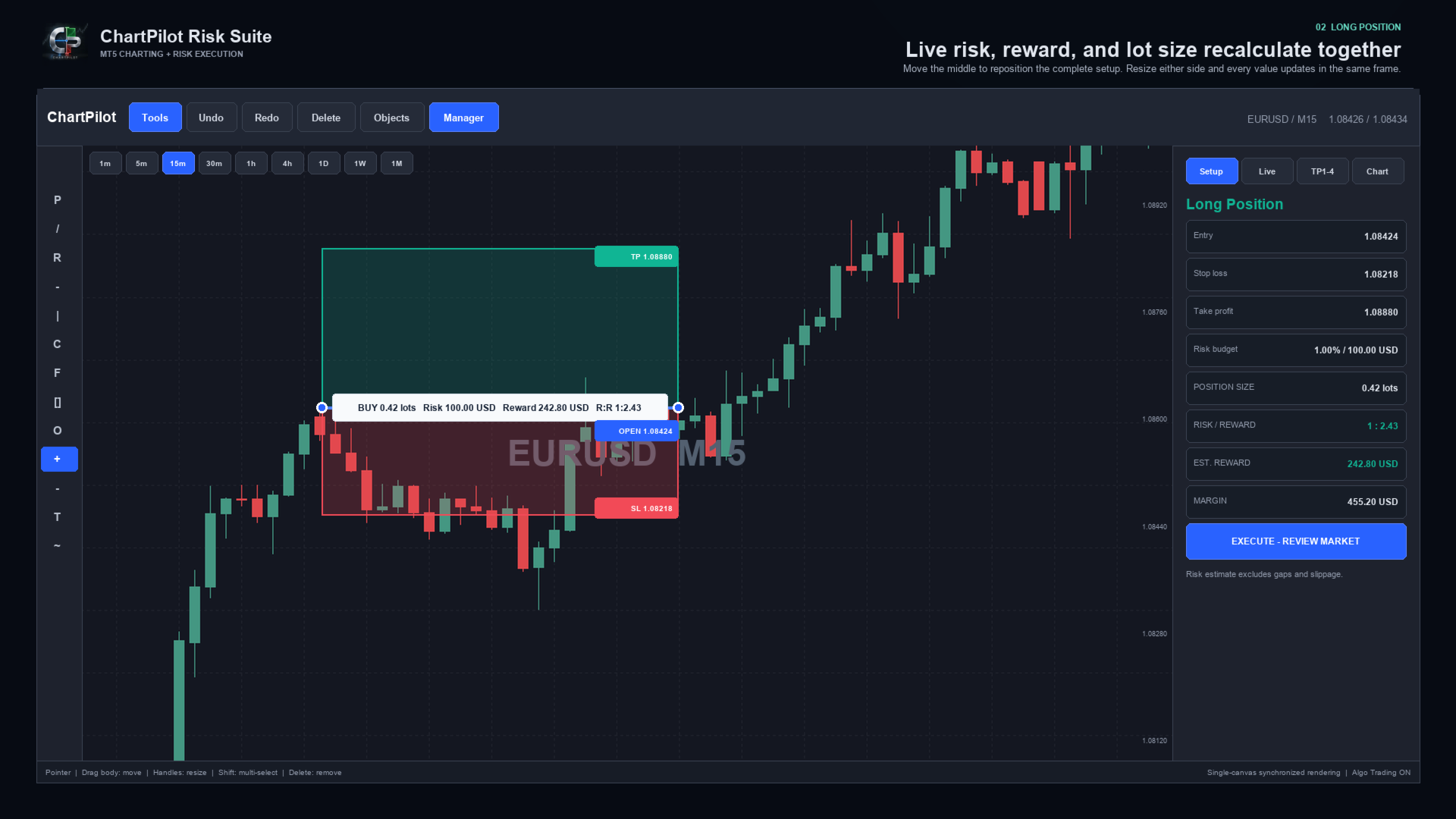
ChartPilot Risk Suite is an all-in-one chart planning and execution utility for MetaTrader 5. It is designed for traders who want their drawings, position-sizing calculations and trade controls in one focused workspace without covering most of the chart.

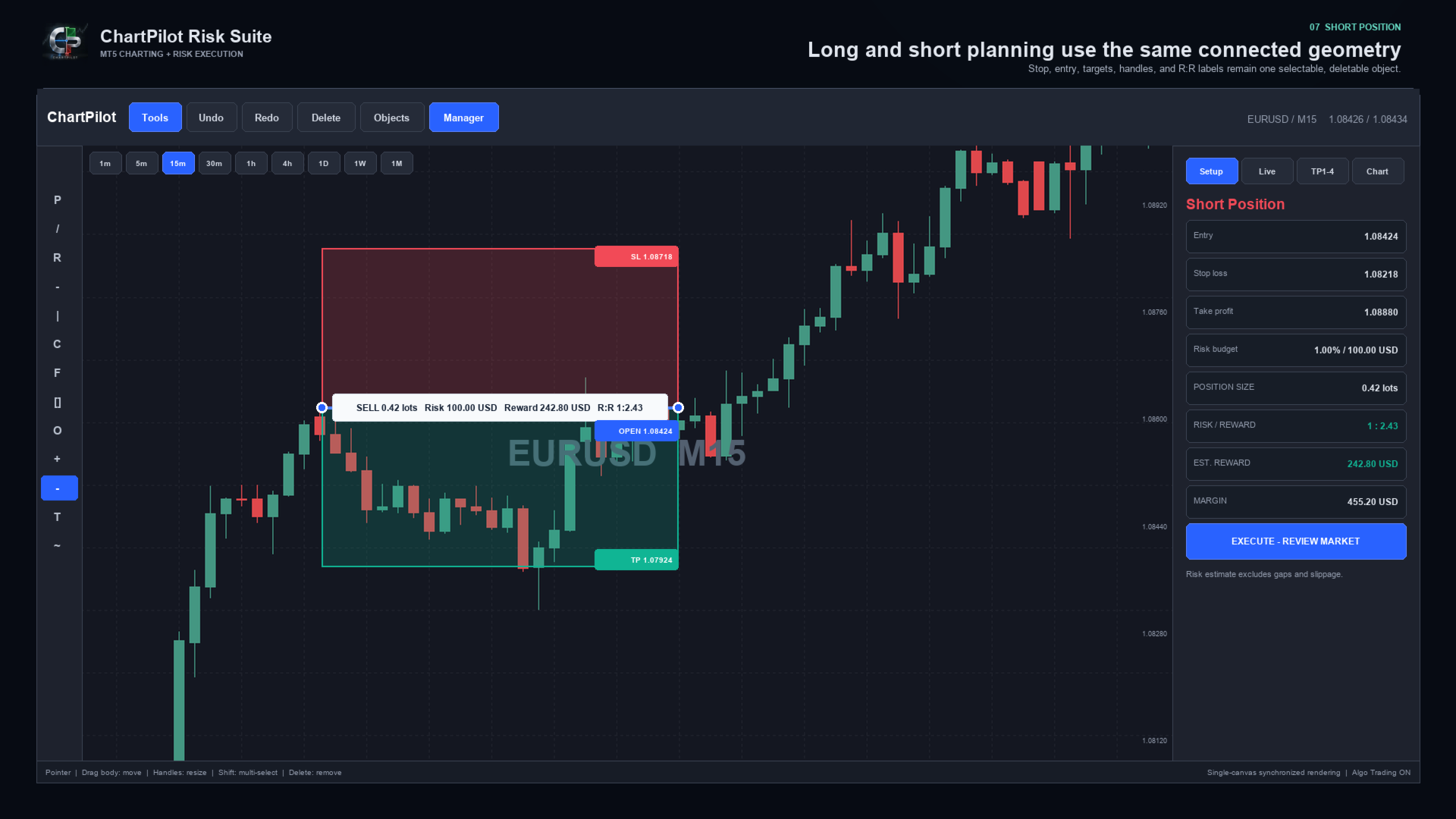
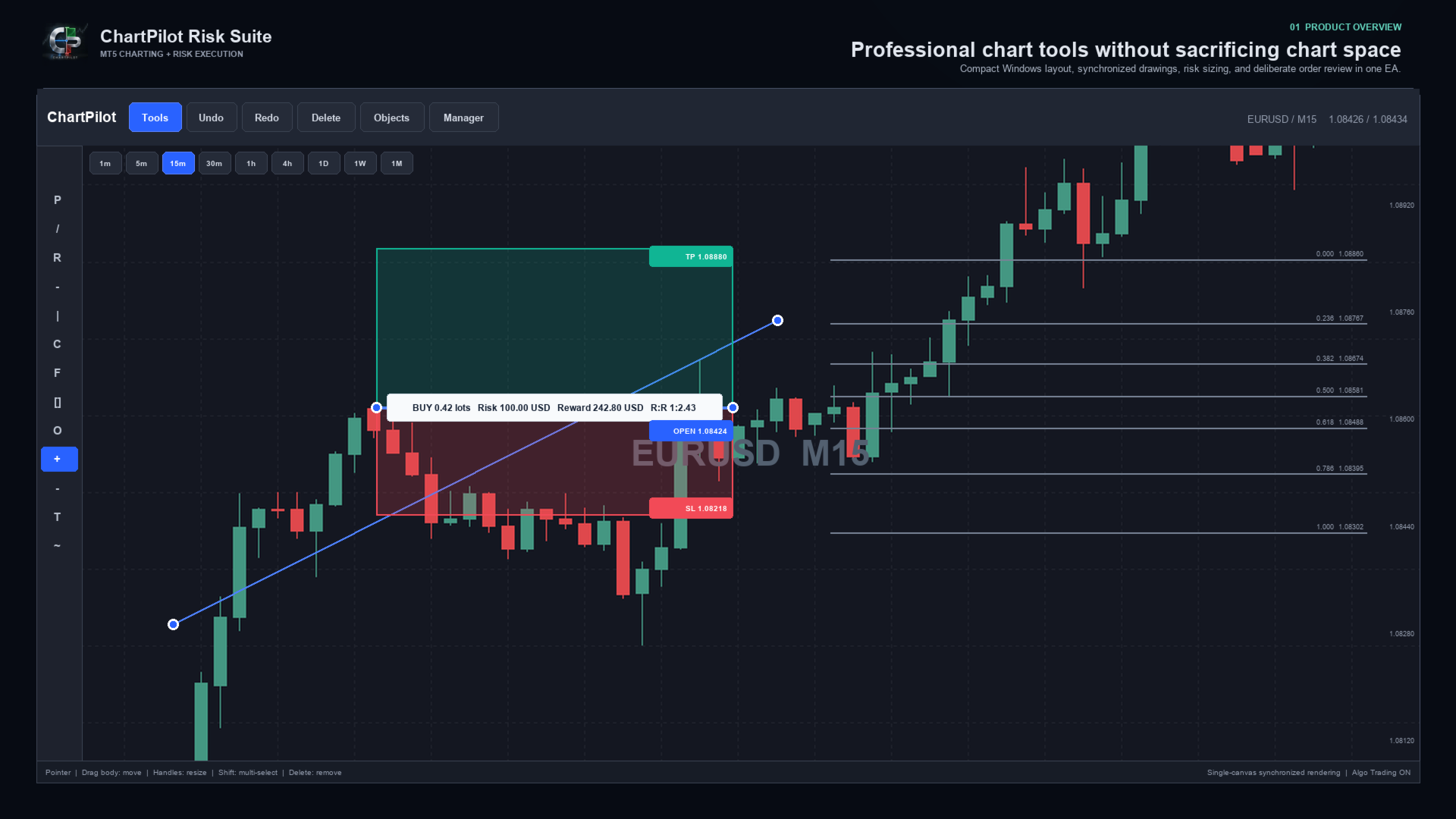
The Long Position and Short Position tools behave as connected objects. Drag the middle of a setup to move the complete position plan. Drag its handles to change the time range, stop or target. The profit zone, loss zone, entry line, labels, position size and risk-to-reward calculation update from the same underlying anchors.

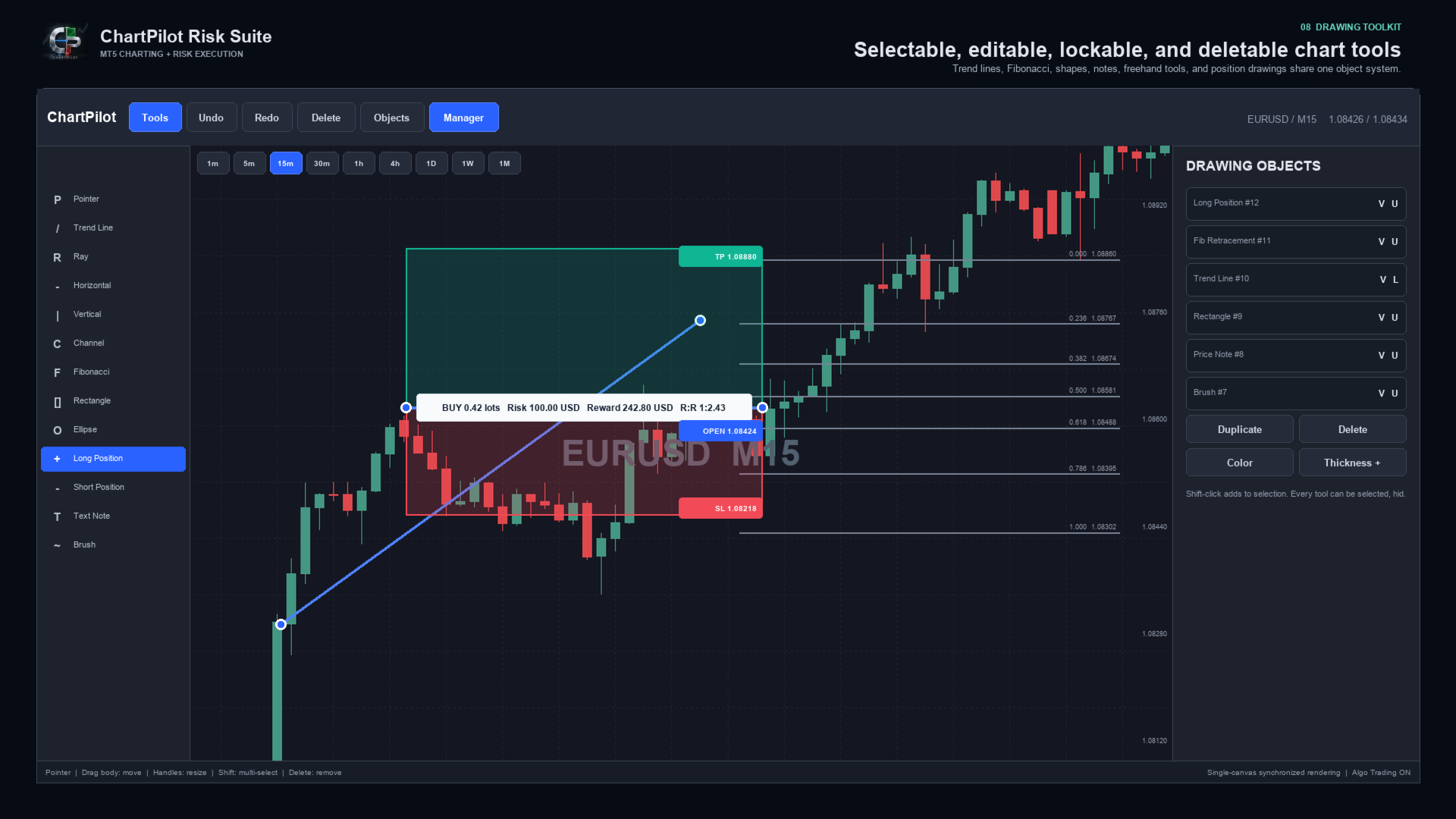
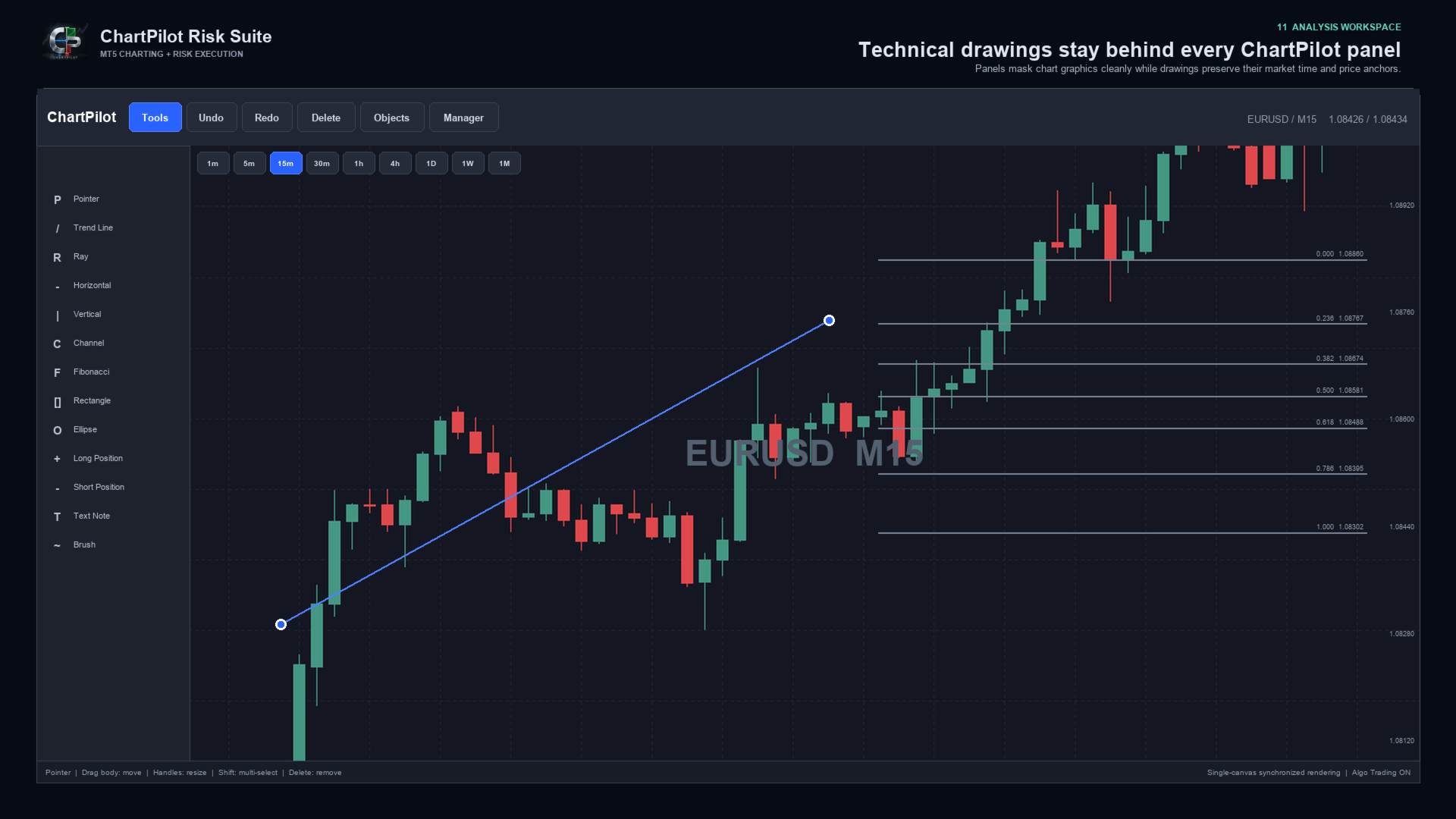
Every drawing can be selected and deleted. Drawings can also be hidden, locked, duplicated, recolored or given a different line thickness. The interface includes undo and redo history, multi-selection, object management and optional OHLC snapping.

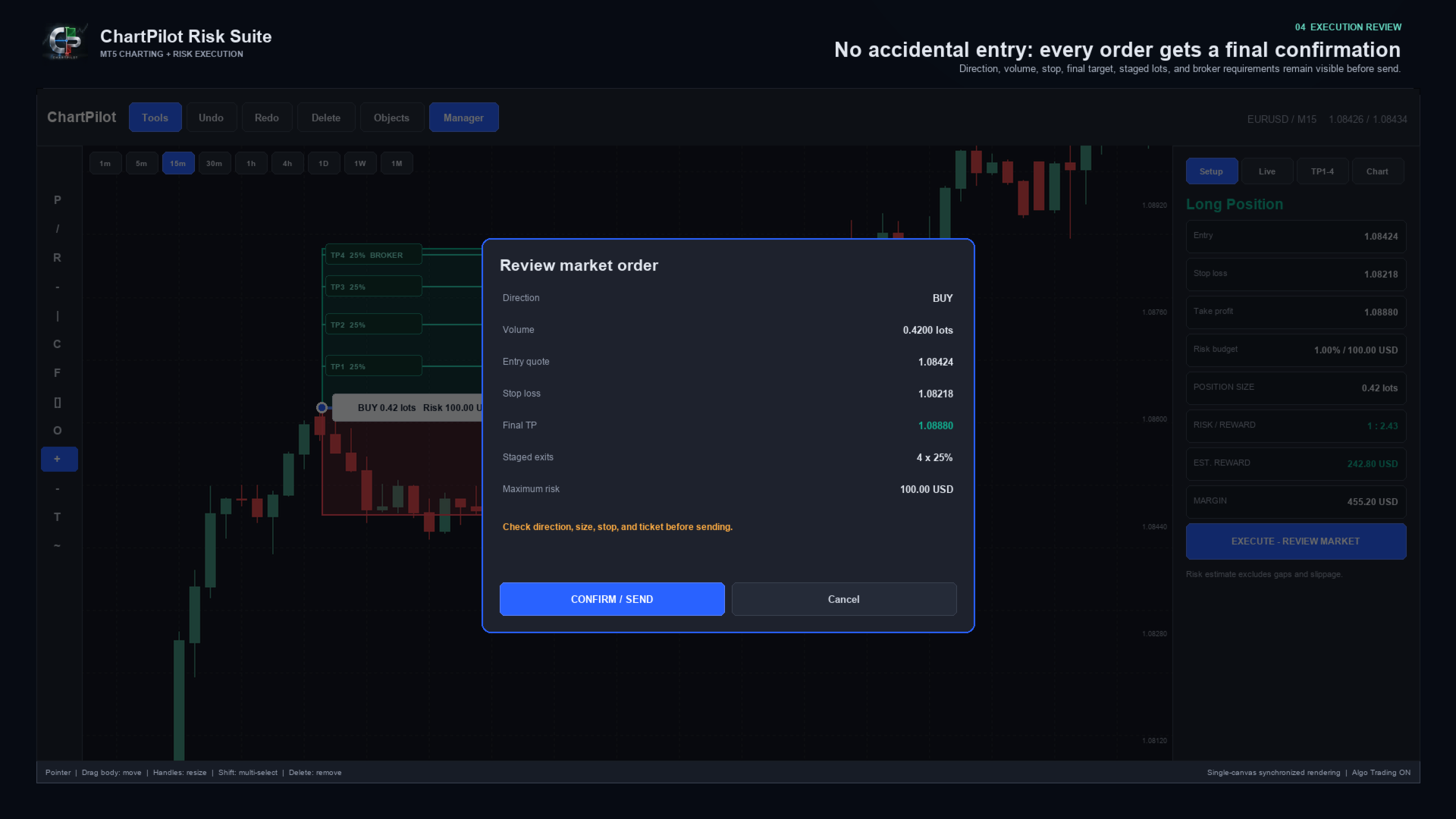
ChartPilot does not place a trade simply because a position drawing exists. Select the setup, check its values, press the execution button and review the complete request. The order is sent only after CONFIRM / SEND is pressed.


MAIN FEATURES

- Long Position and Short Position planning tools
- Percentage-of-equity risk sizing
- Fixed cash-risk sizing
- Optional manual lot size
- Estimated commission-per-lot input
- Live position size, cash risk, estimated reward, margin and R:R calculations
- Market entry and drawn-price pending entry modes
- Final confirmation before every submitted order
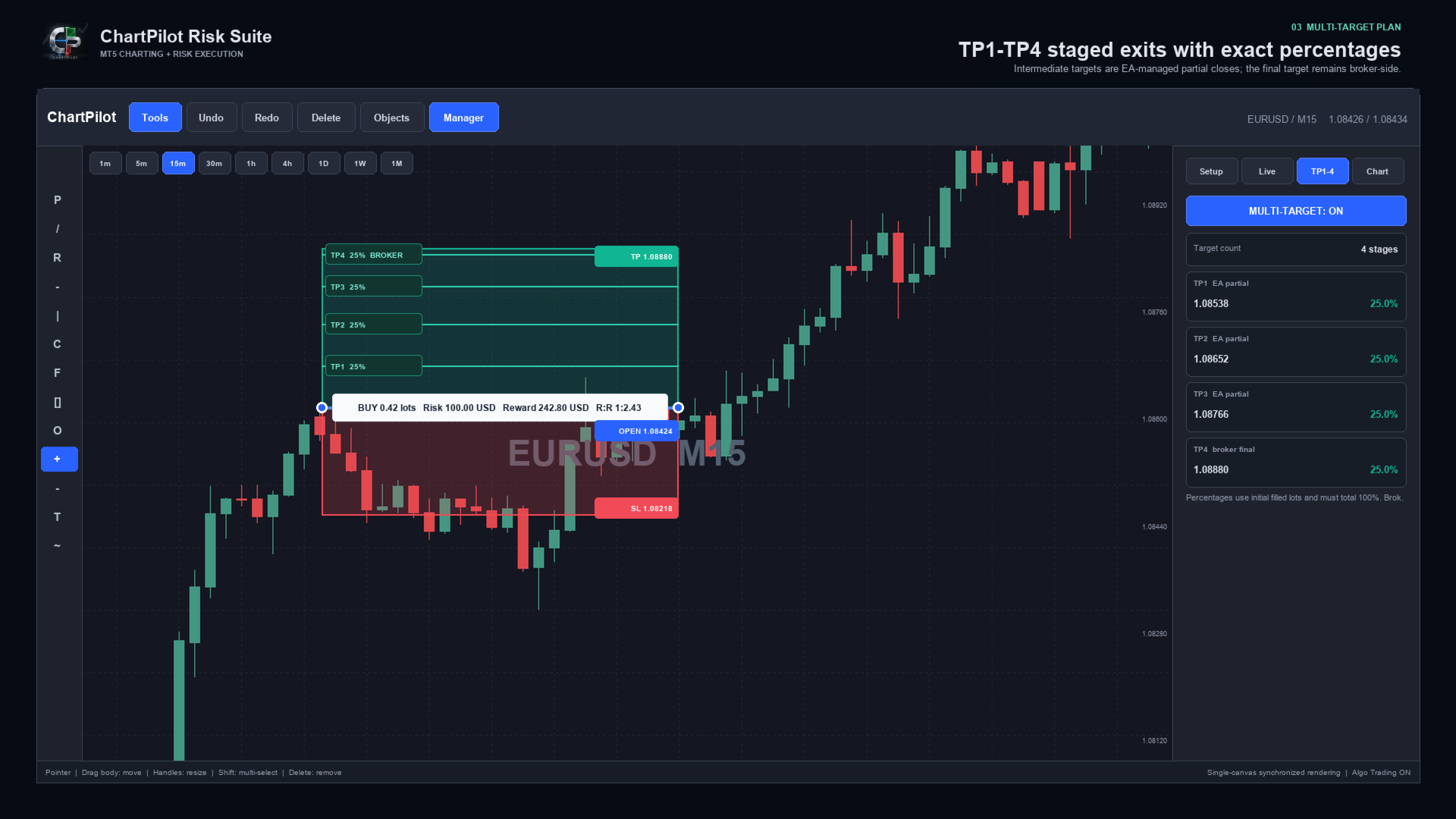
- TP1, TP2, TP3 and TP4 planning
- Two, three or four target stages
- Percentage allocation based on the initial filled volume
- Automatic intermediate partial closes for confirmed ChartPilot positions
- Broker-side stop loss and final take profit
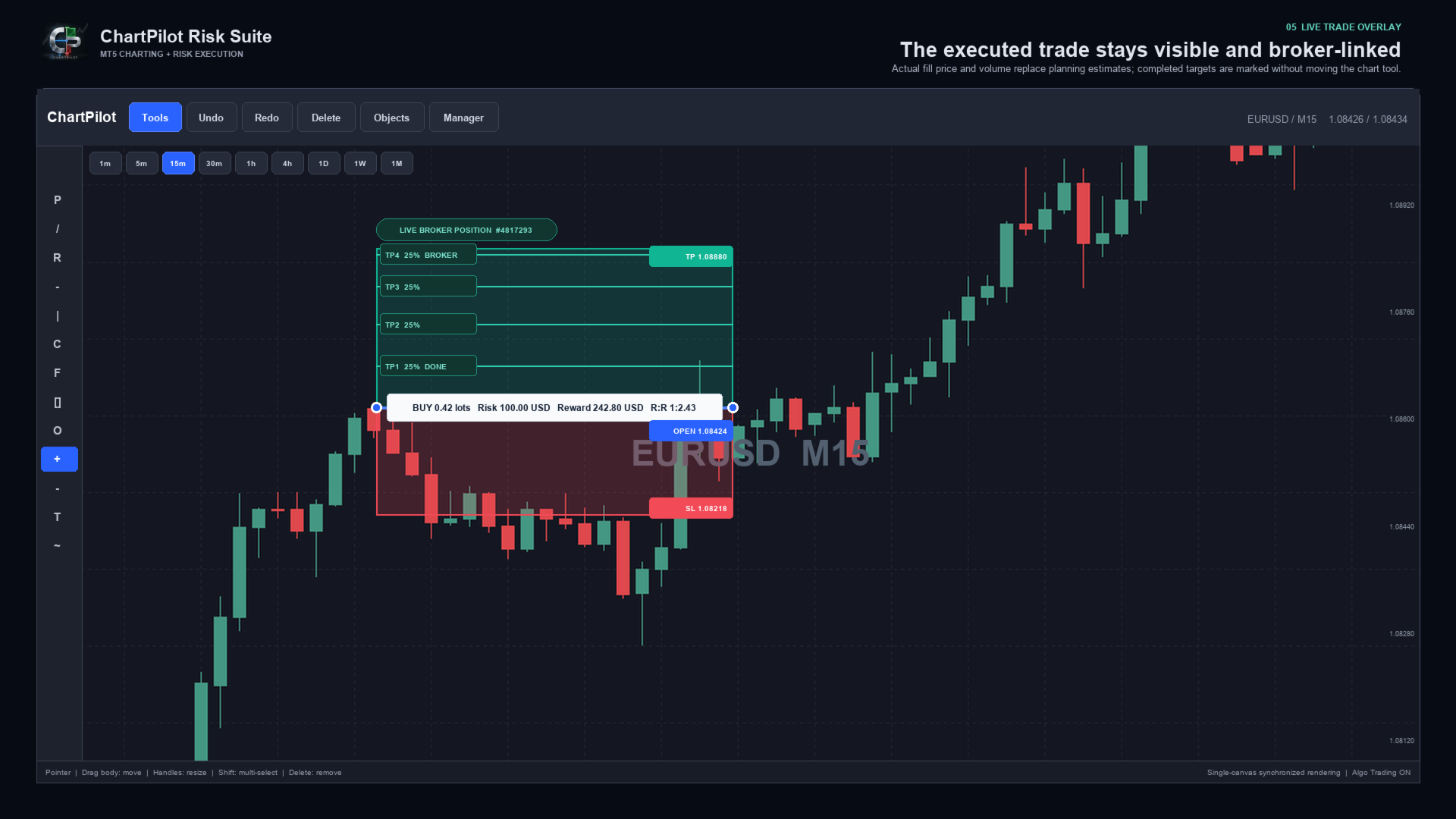
- Live broker-position overlay using the actual fill price and volume
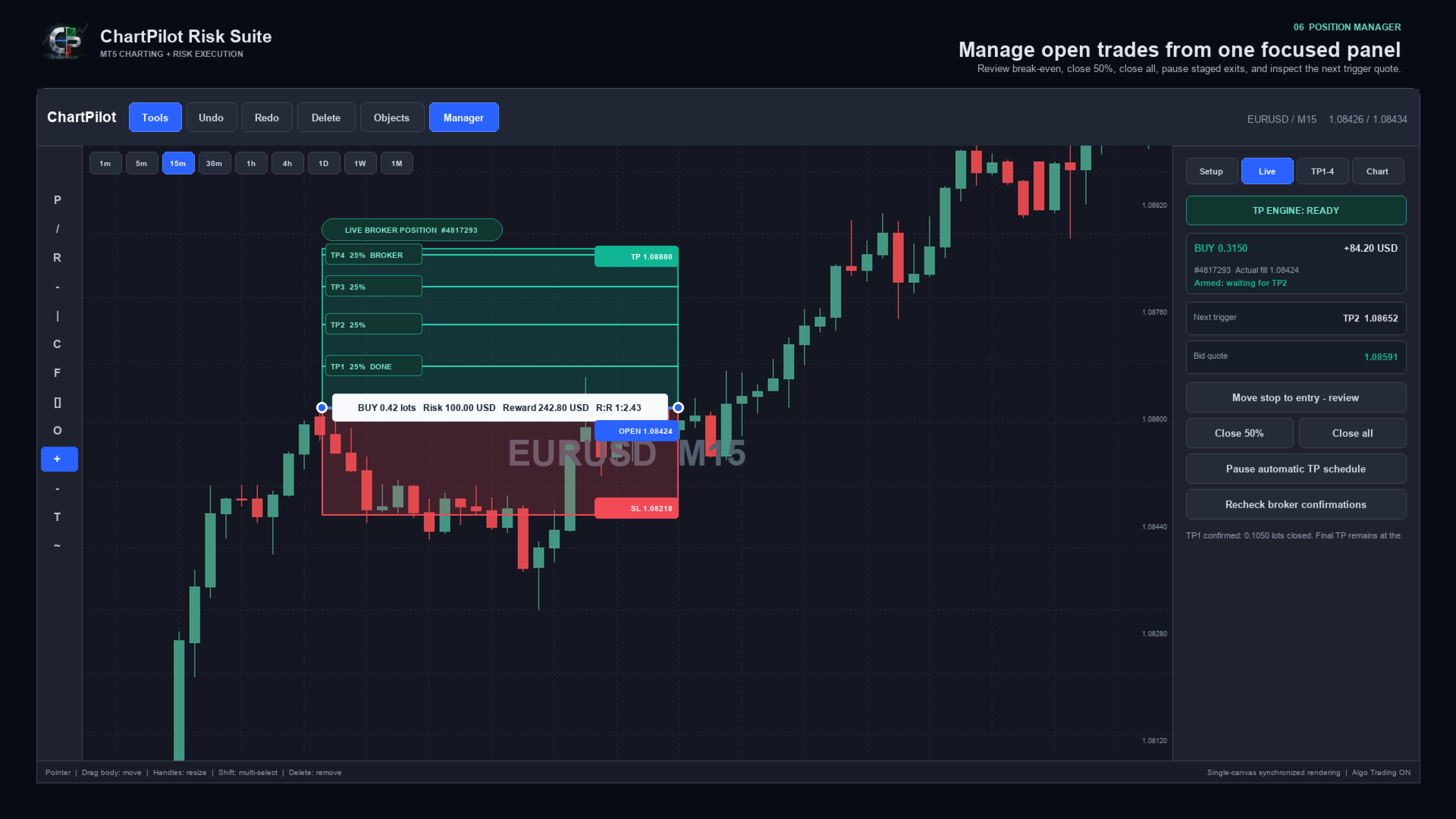
- TP engine status, next target and live trigger quote
- Position manager with reviewed break-even, Close 50% and Close All actions
- Pause, review and resume controls for an automatic TP schedule
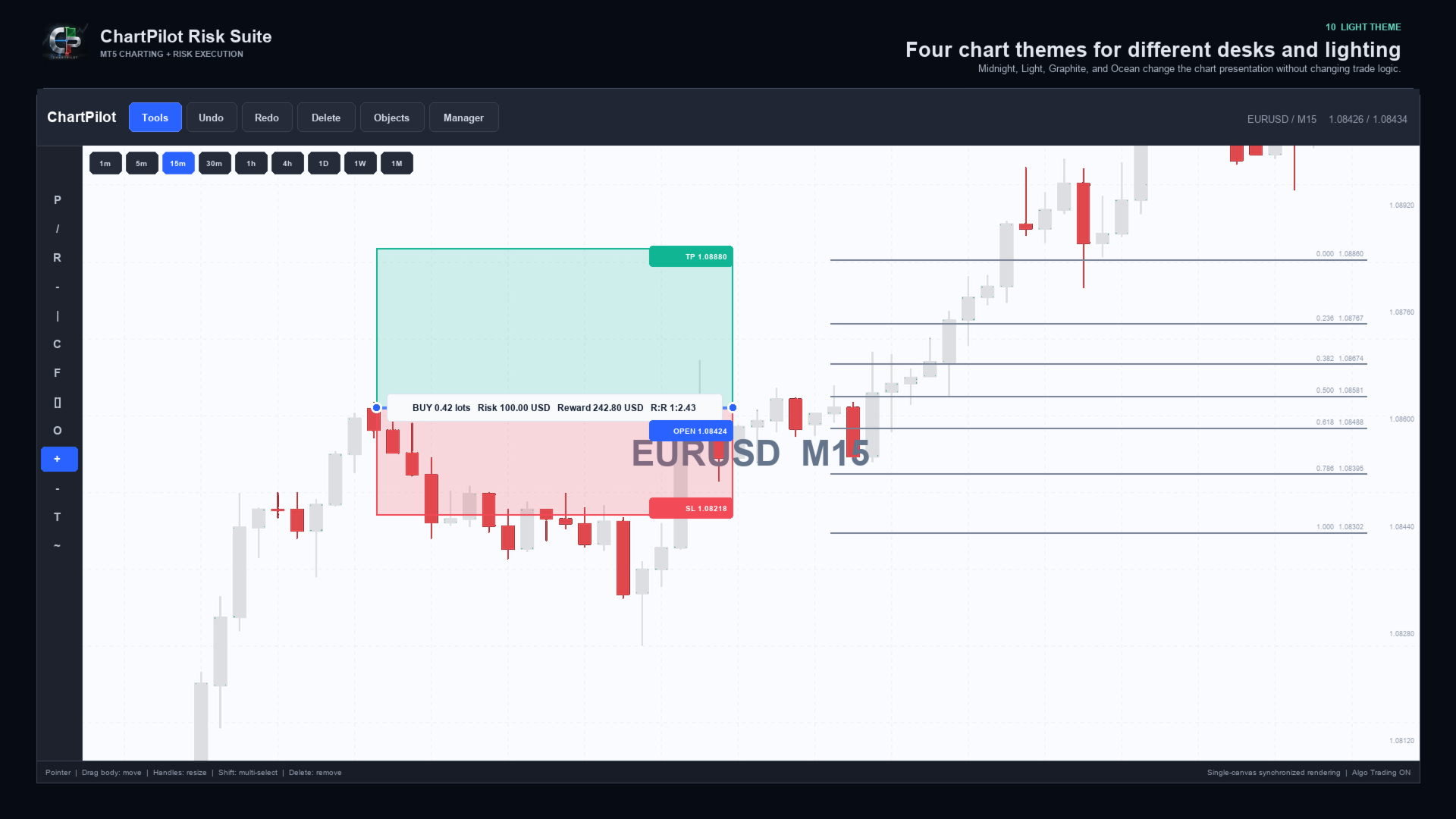
- Midnight, Light, Graphite and Ocean chart themes
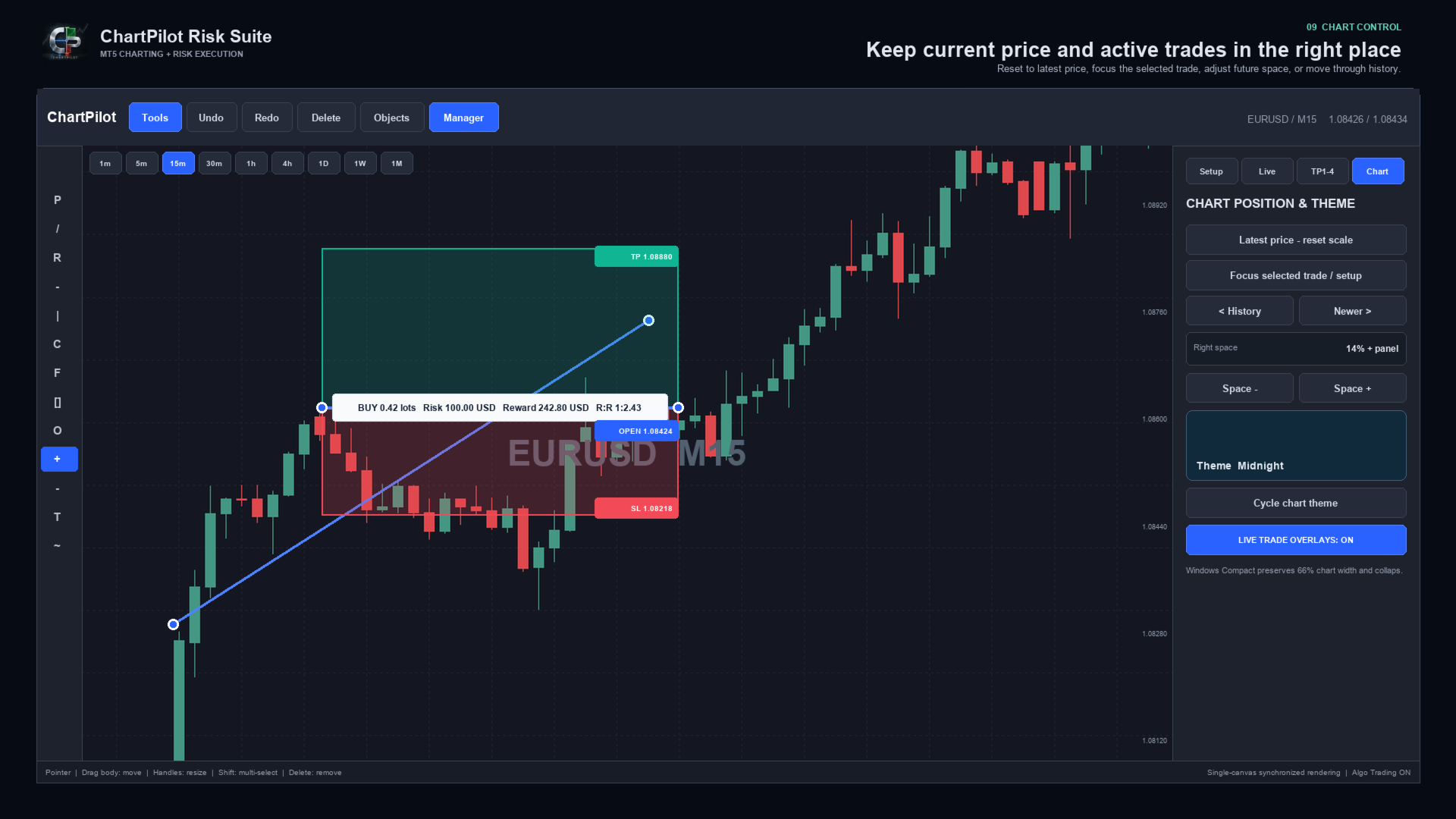
- Latest-price reset, Focus Trade, history navigation and adjustable right-side chart space
- Compact Windows layout with automatic panel reduction
- Persistent chart workspaces and confirmed-plan journal
- Self-contained Market product with no companion indicator or DLL imports


DRAWING WORKSPACE

Included tool groups cover:

- Pointer and crosshair
- Trend line, ray, extended line and horizontal/vertical lines
- Arrow and double-arrow lines
- Parallel channel, regression channel and standard-error channel
- Fibonacci retracement, extension, fan, arc and time tools
- Gann fan and Gann box
- Rectangle, ellipse and triangle
- Bezier, ABCD and XABCD patterns
- Elliott impulse and correction tools
- Long and short position tools
- Ruler, price range, date range and date/price range
- Text note and price note
- Brush, highlighter and polyline

Drawings use chart time and price coordinates. Panning, zooming or changing the visible chart range changes their screen position in the same way as normal market-anchored drawings, but it does not rewrite their stored market anchors.


POSITION AND LOT-SIZE MANAGER

ChartPilot calculates volume from the selected setup and symbol specifications. Choose one sizing method:

1. Risk percentage: volume is based on the selected percentage of current account equity.
2. Fixed risk: enter a cash amount in the account currency. A non-zero fixed amount takes priority over percentage risk.
3. Manual lots: enter a manual volume when an exact size is required.

The calculated volume is normalized to the broker's minimum volume, maximum volume and lot step. If the requested staged percentages cannot produce valid partial volumes, ChartPilot rejects the plan instead of silently increasing the risk.

Commission is an estimate supplied by the user. It is not automatically read from the broker. Swap, slippage, price gaps and execution differences can change the final result.


HOW MULTI-TARGET MANAGEMENT WORKS

1. Draw or select a Long Position or Short Position.
2. Open Manager, then TP1-4.
3. Enable Multi-Target and select two, three or four stages.
4. Enter the target prices and closing percentages.
5. Ensure the active percentages total exactly 100%.
6. Return to Setup and press EXECUTE - REVIEW.
7. Check the entry, stop, final TP and rounded lot allocation.
8. Press CONFIRM / SEND.

Intermediate stages are managed by the EA as partial market exits. The final target is placed at the broker. For example, a four-stage plan can close 25% at TP1, 25% at TP2, 25% at TP3 and leave the final 25% for the broker-side TP4.

Automatic staged exits apply only to positions linked to a confirmed ChartPilot entry plan. Creating a drawing does not authorize automatic trading, and ChartPilot does not attach a staged schedule to an unrelated manual trade or another EA's position.

MetaTrader 5 must remain open, connected and permitted to use Algo Trading for intermediate partial exits. The broker-side stop loss and final take profit can remain active when the terminal is closed, subject to the broker's normal execution rules.

If price gaps through several targets, ChartPilot advances confirmed partial exits sequentially. If price reaches or gaps through the final broker target, the broker may close all remaining volume before every intermediate stage is filled.

Do not manually change the volume, direction, opening price or final TP of a managed position unless you intend to take control. An external position change causes ChartPilot to suspend the original percentage schedule for safety.


QUICK START

1. Test the EA on a demo account before live use.
2. Attach one ChartPilot instance to the chart and symbol you want to manage.
3. Enable Allow Algo Trading in the EA properties.
4. Enable the main Algo Trading button in MetaTrader 5.
5. Choose a risk percentage, fixed cash risk or manual lot size.
6. Select Long Position or Short Position and place the setup on the chart.
7. Drag the body to move the complete setup or drag a handle to resize it.
8. Configure TP1-TP4 if staged exits are required.
9. Press EXECUTE - REVIEW and inspect the complete request.
10. Confirm only when the direction, size, stop and targets are correct.
11. Open Manager > Live to monitor the TP engine and selected position.

Use only one managing ChartPilot chart for the same account, broker server, symbol and magic number. This prevents two chart instances from attempting to manage the same confirmed plan.


WINDOWS INSTALLATION AND DISPLAY SETUP

Installation:

1. Open the desktop MetaTrader 5 terminal and sign in to the MQL5 account used for the purchase.
2. Open Market > Purchased and install ChartPilot Risk Suite.
3. Find ChartPilot Risk Suite under Expert Advisors in the Navigator.
4. Drag the EA onto the chart and symbol you want to manage.
5. Enable Allow Algo Trading in the EA properties if execution or staged exits will be used.
6. Enable the main Algo Trading control in MetaTrader 5.

Recommended Windows layout:

- Start with a maximized chart window.
- Recommended interface scale: 90% to 100%.
- Recommended Windows display scaling: 100% or 125% when possible.
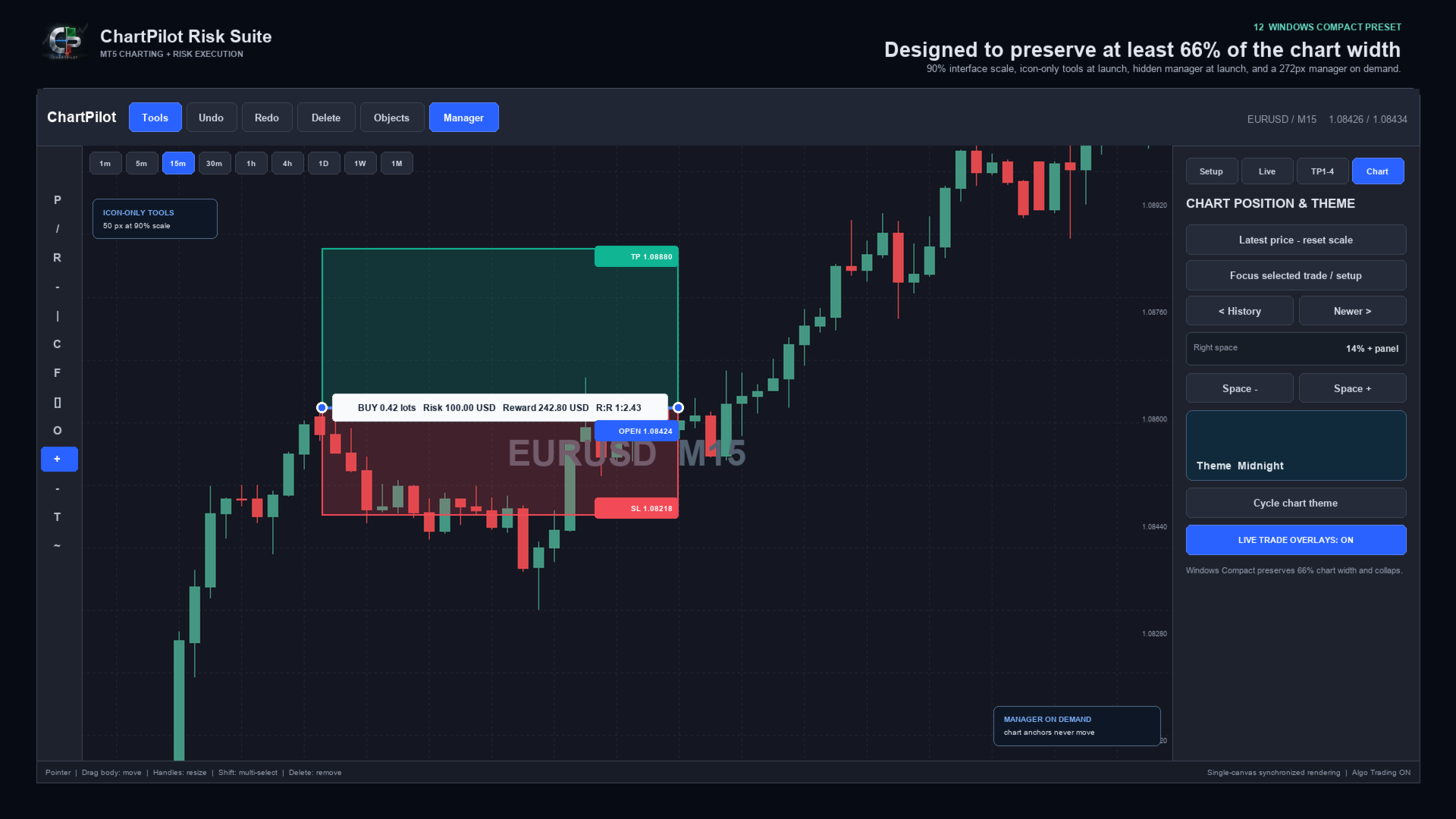
- Keep Start Tools Expanded disabled for an icon-only toolbar at launch.
- Keep Show Manager disabled so the chart opens at maximum width.
- Open Manager only when sizing, executing or managing a trade.
- Keep Auto Compact Panels enabled.
- Set Minimum Chart Percent to 66 when maximum chart space is preferred.

Recommended compact input values:

- Interface Scale: 90
- Start Tools Expanded: false
- Show Manager: false
- Expanded Tools Width: 170
- Manager Width: 272
- Minimum Chart Percent: 66
- Auto Compact Panels: true
- Right Space: 14

If you have the optional ChartPilot_Windows_Compact.set developer preset, open EA Properties > Inputs > Load and select it. Market installation itself supplies only the compiled product, so the same values can be entered manually when the preset is not present.

At Windows display scaling of 150% or higher, start with Interface Scale at 80% to 90%. MetaTrader uses pixel-based chart dimensions, so Windows DPI scaling and the EA interface scale can compound. If the chart becomes crowded, reduce Interface Scale, close the Manager panel or collapse the Tools panel.

These compact values change only EA inputs. They do not alter account, broker or MetaTrader installation settings.


MACOS INSTALLATION AND DISPLAY SETUP

MetaTrader 5 for macOS runs through the compatibility environment supplied with the terminal installation. Install Market products from inside MetaTrader. Do not copy product files into the visible application bundle in Finder.

Installation:

1. Start the desktop MetaTrader 5 application and sign in to the MQL5 account used for the purchase.
2. Open Market > Purchased and install ChartPilot Risk Suite.
3. Find it under Expert Advisors in the Navigator.
4. Attach it to the chart and symbol you want to manage.
5. Enable Allow Algo Trading in the EA properties and the terminal's Algo Trading control when execution is required.
6. If Navigator does not refresh, restart MetaTrader 5 and check the Purchased section again.

For a separately supplied developer MQ5 file, use File > Open Data Folder, then place the source in MQL5 > Experts and compile it in MetaEditor. This manual process is not required for the normal Market version.

Recommended macOS layout:

- Begin with Interface Scale at 100%.
- On a high-resolution Retina display, 110% to 125% may be comfortable.
- Use a maximized chart before increasing the interface size.
- Keep the Manager hidden until it is needed.
- If the compatibility environment applies additional scaling, reduce Interface Scale in 10% steps.
- The Windows Compact preset can also be loaded on macOS, but it is normally necessary only on a small window or a heavily scaled display.

Font weight and edge smoothing can look slightly different between Windows and macOS because MetaTrader and the compatibility layer use different system text and display-rendering paths. This is visual only and does not change price, volume or trade-management calculations.


IMPORTANT OPERATING NOTES

- ChartPilot manages the current chart symbol.
- Use a unique magic number when separating different ChartPilot strategies or workspaces.
- Deleting a drawing never closes a broker position.
- Hiding a drawing does not pause a confirmed TP schedule.
- Use Manager > Live to pause or resume a linked staged schedule.
- Manual partial closes suspend the original staged allocation.
- Do not delete the ChartPilot plan journal from MQL5/Files while a managed position is open.
- If TP ENGINE reports an Algo Trading or connection warning, intermediate partial exits cannot be sent.
- Pending orders remain subject to the broker's supported order types, filling policies, stop distance and expiration rules.
- The EA rejects unsupported or invalid requests when broker checks fail.
- Broker execution, spreads and symbol specifications differ. Test every symbol and account type on demo first.


RISK NOTICE

Trading foreign exchange, CFDs and other leveraged products involves substantial risk. Position-size and risk-to-reward figures are estimates based on the information available when calculated. Gaps, slippage, spread changes, commissions, swaps, partial fills, broker rules and connection failures can produce a different result.

ChartPilot Risk Suite is an execution and chart-management utility. It does not provide trading signals, investment advice or any guarantee of profit. The user remains responsible for every setup, confirmation, broker setting and trade decision. Use a demo account first and never risk funds you cannot afford to lose.
Önerilen ürünler
Moon Break MT5
Anthony Dewayne Wasome
Moon Break MT5 is an automated breakout Expert Advisor for MetaTrader 5. It trades breakouts based on previous 12-hour, daily, weekly, and monthly price ranges. The EA uses price highs and lows without relying on technical indicators or external signals. Buy and sell breakout orders can be controlled independently. Entries, stop losses, and take profits use configurable Fibonacci range levels. Trade volume can be fixed or calculated using a percentage of account balance. An optional trailing sto
Gap Straddle EA
Nazat Hossain Adi
Gap Straddle Trailing EA Automated Pending Order Management with Smart Trailing Stop Gap Straddle Trailing EA is an Expert Advisor for MetaTrader 5 designed to manage pending orders and trade protection through configurable settings. It includes automated order management, risk-based lot sizing, trailing stop functionality, session controls, and an on-chart dashboard. Key Features Buy Stop & Sell Stop Management — Automated pending-order placement and management. OCO Functionality — Opposite pen
Trade Analyzer is an interactive charting utility designed to make trade planning and performance tracking easier directly inside MetaTrader 5. It allows you to quickly create and visualize trade setups on your chart, giving you a clear view of your Entry, Stop Loss, and Take Profit levels. Every trade setup you chart is automatically measured and analyzed, showing you the exact risk-to-reward ratio, risk in pips, potential reward, and outcome of the setup. As you chart more trades, RR Analytics
FREE
The   AI Concept EA   is a 100% hands free Auto Trader that is designed to trade and maximize your financial status, it's also designed to a certain trading behavior by which profits will always be   stabled throughout your trading journey .   This   EA   use   Martingale Strategy   but in the   very safe and effective way   of multiplying Lots to your balance. This AI Expert Advisor   search for a particular price action behavior that investors haven't come across as yet, in other words this EA
Kings ea
Rodrick T Russell
KINGS EA V2.51 – Advanced Multi-Strategy Expert Advisor KINGS EA V2.51 is a powerful, fully automated trading robot for MetaTrader 5, designed for traders who want flexibility, robust risk management, and advanced strategy options.   It combines trend, breakout, and reversal trading in one easy-to-use package, with extensive customization and safety features Key Features Three Strategies in One:    Trade with Trend, Breakout, or Reversal logic – enable or disable each as you wish. -Flexibl
Volatility 75 Pro Auto (.set dosyalarını almak için bizimle iletişime geçin.) Deriv Sentetik Endeksleri için Profesyonel Grid + Trend Expert Advisor Volatility 75 Pro Auto (V75 Pro), MetaTrader 5 üzerinde Deriv Sentetik Endeksleri için özel olarak geliştirilmiş profesyonel bir Expert Advisor’dır (EA). Geleneksel Grid sistemlerinin yalnızca pozisyon ekleme mantığına dayanmasının aksine, V75 Pro işlem açılmadan önce düşük kaliteli sinyalleri filtrelemek için trend analizi, çoklu zaman dilimi doğr
Press AI
Oshawn Y Bailey
Universal SMA+EMA+RSI EA – Fixed USD SL, ATR Trailing, Next-Candle Entries Overview: The Universal SMA+EMA+RSI EA is a fully automated, versatile trading robot designed to trade any symbol (Forex, Metals, Indices, Cryptocurrencies) on any timeframe . It combines trend-following SMA crossovers , EMA bias , and RSI momentum to identify high-probability trade entries, while implementing robust risk management to protect your account. Key Features: Next-Candle Entry: Trades are executed on the cand
Turk tili (Türkçe) Trend Scalper Infinite , Altın (XAUUSD) gibi oldukça hareketli (volatil) enstrümanlarda işlem yapmak için özel olarak tasarlanmış agresif ve yüksek hızlı bir Expert Advisor'dır (Uzman Danışman - EA). Algoritmasının temelinde, benzersiz ve tavizsiz bir risk yönetim sistemiyle birlikte trend takibi yatmaktadır. Bu EA'nın ana özelliği, asimetrik risk-kazanç oranıdır. Bot, sadece 1$ (ayarlanabilir) gibi son derece dar, sabit bir Stop Loss (Zararı Durdur) kullanır, ancak   Tak
This is the HFT Flame Ea....This is a complex Expert Advisor that basically pick trades from price movements, it is also a none-martingale mechanism with netting strategy that makes this Ea more interested and profitable throughout your trading journey. The HFT Flame EA can be super consistent on profits depending on the inputs selected for your style of trading. This is a hand free trading robot that can trade your way to success while you are away from the charts, another perfect advantage abo
如果产品有任何问题或者您需要在此产品上添加功能,请联系我 Contact/message me if you encounter any issue using the product or need extra feature to add on the base version. There is Demo version of this panel Dashboard Super Three MA MT5 Demo in my product list, please try it out to get familiar with all functionalities for free Free version: LINK MT4 version: LINK This system basically utilizes PA and three adjustable Moving Average as the main indicator set to generate trading signal. With the feature that all MA_timefram
MT5 işlemlerinin açılması, kapanması, kısmi kapanması ve değiştirilmesi hakkında gerçek zamanlı bildirimleri Discord’a otomatik olarak gönderir. Araç 16 dili destekler : İngilizce, Fransızca, Almanca, Hintçe (Hindi), Endonezce, İtalyanca, Kazakça, Korece, Felemenkçe, Lehçe, Portekizce, Rusça, İspanyolca, Türkçe, Ukraynaca ve Vietnamca. Bildirim metnini özelleştirerek başka herhangi bir dili de kullanabilirsiniz. Ürün, terminali sürekli izlemek zorunda kalmadan Discord bildirimleri almak isteyen
FREE
MT5 işlemlerinin açılması, kapanması, kısmi kapanması ve değiştirilmesi hakkında gerçek zamanlı bildirimleri Slack’a otomatik olarak gönderir. Araç 16 dili destekler : İngilizce, Fransızca, Almanca, Hintçe (Hindi), Endonezce, İtalyanca, Kazakça, Korece, Felemenkçe, Lehçe, Portekizce, Rusça, İspanyolca, Türkçe, Ukraynaca ve Vietnamca. Bildirim metnini özelleştirerek başka herhangi bir dili de kullanabilirsiniz. Ürün, terminali sürekli izlemek zorunda kalmadan Slack bildirimleri almak isteyen yat
FREE
Trade Manager Pro is a MetaTrader 5 tool designed to assist with trade execution, position management, risk control, and account monitoring from a single on-chart interface. It is built to work alongside manual trading or automated systems and does not interfere with external Expert Advisors. The tool is intended for traders who require direct control over order execution and position management while maintaining consistent risk rules across different market conditions. Core Function The indica
FREE
MarSe MT5
Roman Gergert
This Expert Advisor uses additional filters to determine the trend. It protects orders with the help of locking. The robot uses martingale. This EA use pending orders. Sooner or later martingale can lose the deposit, it is recommended to control the trading of the EA while analyzing the market. The EA trades on any symbol. The minimum recommended deposit is $1000 (it is better to start with a cent account). The EA works on M1 timeframe. Telegram channel Settings:  https://drive.google.com/file/
The Scalper Pro  --- Advanced Multi-Strategy Scalping Expert Advisor The Scalper Pro is a high-precision automated scalping system designed for traders who require fast execution, structured logic, and controlled risk. It combines multiple price-action strategies with advanced trade and basket-level management to create a flexible solution for short-term trading. Built for performance and stability, the EA focuses on identifying intraday price movements and executing trades with disciplined man
TradeArmor HUD   is an ATR-based risk panel and trade manager built to protect your account from execution errors and emotional decision-making. Before you enter a trade, its mathematical safety checks guard against spread spikes, invalid stops, and margin-busting lot sizes. Once executed, it takes over management — securing partial profits, locking in break-even, and trailing stops objectively — entirely eliminating the need for manual interference. Designed to be invisible.   No indicator dep
### **ProScalpingToolEA.mq5 Analysis & Description** **Overview:**   The `ProScalpingToolEA.mq5` script is an Expert Advisor (EA) for MetaTrader 5, designed to assist with automated trading. It includes features for placing, managing, and monitoring trades. --- ### **Key Functionalities:** 1. **Trade Execution & Management:**    - Uses the `CTrade` class from `Trade.mqh` to manage trading operations.    - Allows placing buy and sell orders with a configurable lot size.    - Trades are iden
FlowAxis
Aysar Alafif
5 (1)
Product Overview   FlowAxis is a semi-automated Expert Advisor for Meta Trader 5 designed for traders who rely on manual trendline analysis and want precise, rule-based trade execution.   Instead of guessing market direction, the trader defines the trend visually, and FlowAxis executes trades automatically when price interacts with predefined trendlines. This approach       combines human market analysis with disciplined, rule-based execution. Important – Please Read Before Use   FlowAxis EA
Choppa bot
Tyler Wayne Henry
This code snippet is a comprehensive Expert Advisor (EA) developed for the MetaTrader platform, utilizing or MQL5 programming languages. The EA, named "CHOPPA BOT," is designed to automate trading strategies based on a combination of technical indicators, including the Relative Strength Index (RSI), Parabolic SAR, Exponential Moving Averages (EMA), Simple Moving Average (SMA), and the Average Directional Movement Index (ADX). Here's an overview of its functionality: Initialization and Setup : Up
Prop-Firm Risk Guardian watches your MetaTrader 5 account in real time. When any rule you have set is breached, Guardian closes the offending positions and locks new entries. It does not open trades. It does not prevent order placement, because no chart-attached EA can do that. It reacts to a breach within one tick, which is what saves the account. This is a rules utility for funded-challenge, funded, and personal accounts. All account data stays on your terminal. Optional Telegram alerts use y
BossFXTradePanelEA (MT5)  [First 10 copies sold at 50 USD price will increase to 99USD] BossFXTradePanelEA is a fully interactive trade management panel designed for MetaTrader 5, providing traders with an easy-to-use, one-click interface to execute and manage trades. This EA simplifies trade execution , risk management, and position control by combining market orders, stop loss, take profit, trailing stops, and breakeven functionalities into a single, intuitive panel.  Key features include: On
EA XAU Queen
Dmitriq Evgenoeviz Ko
EA XAU Queen - Fully Automated XAUUSD Trading EA XAU Queen is a fully automated trading system designed specifically for the gold market ( XAUUSD ). The advisor uses a unique algorithm for tracking institutional liquidity and price imbalance zones (Smart Money + Price Action), allowing it to find highly accurate entry points with minimal slippage. The robot doesn't use dangerous money management methods, such as classic martingale without stop losses, huge grids, or arbitrage. Each trade is str
如果产品有任何问题或者您需要在此产品上添加功能,请联系我 Contact/message me if you encounter any issue using the product or need extra feature to add on the base version. There is Demo version of this panel Dashboard Super MA RSI CCI Demo in my product list, please try it out to get familiar with all functionalities for free, LINK . Dashboard Super MA RSI CCI is an intuitive and handy graphic tool to help you to: Have 28 pairs under control with one dashboard Monitor price movement, identify possible trend based on MA, RS
MSM Trade Manager is a manual trading panel for MetaTrader 5. You choose the entries. The panel sizes the lot by risk, places the stop loss and take profit, and manages the trade on the chart. It does not generate signals and never opens trades on its own on a live or demo account. One-click trading with fixed risk Buy and Sell in one click. The lot is sized from a fixed money risk per trade ($20, $50 or $100 by default) or from a percentage of the balance (1%, 2% or 5%). One button switches bet
Mad Turtle
Gennady Sergienko
4.36 (124)
Sembol XAUUSD (Altın / ABD Doları) Zaman Aralığı H1-M15 (isteğe bağlı) Tek işlem desteği EVET Minimum Mevduat 500 USD (veya başka bir para biriminde eşdeğeri) Tüm brokerlarla uyumlu EVET (2 veya 3 basamaklı fiyatlandırma, tüm hesap para birimleri, semboller ve GMT zaman dilimi desteklenir) Önceden ayar yapmadan çalışır EVET Makine öğrenimine ilgi duyuyorsanız, kanala abone olun: Abone Ol! Mad Turtle Projesinin Ana Özellikleri: Gerçek Makine Öğrenimi Bu Expert Advisor (EA), herhangi bir GPT
TechRiven EC Pro EA
Md Ariful Moula Chowdhury
TechRiven EC Pro — Akıllı, Hızlı ve Esnek EA TechRiven EC Pro , piyasa koşulları uygun olduğunda hızlı bir şekilde işlem açmak için tasarlanmış güçlü bir otomatik ticaret sistemidir (EA). Mevcut   piyasa volatilitesine   akıllıca uyum sağlar ve öngörülemeyen piyasa koşullarında bile istikrarlı kâr elde etmeye devam eder. Kanıtlanmış Performans Son birkaç yılın backtest sonuçları,   sürekli ve istikrarlı kârlılığı   göstermektedir. Piyasa agresif bir şekilde değişse bile,   TechRiven EC Pro   yük
The Fortress: Ultimate Discipline & Risk Manager: "The Holy Grail of trading isn't a strategy—it's Discipline." Every trader knows the feeling: you have a great plan, but then  emotion takes over. You over-leverage, you revenge trade after a loss, you move your Stop Loss, or you "change your mind" about a pair mid-day. The Fortress was created to solve the "Human Element." It is not a signal generator; it is a  Hard-Rule Execution Manager. It acts as a digital supervisor that monitors your accou
Quantum Aurus X
Dmitriq Evgenoeviz Ko
Quantum Aurus X is an innovative trading ecosystem that combines a classic breakout algorithm (Breakout Engine) with modern machine learning methods to filter out market noise. The system is designed for professional trading in metals (Gold), indices, and volatile currency pairs. Intelligent neural network filter Unlike standard breakout advisors, Quantum Aurus X is equipped with the Neuro-Core V2 module. This is a pre-trained neural network (Perceptron) that analyzes market microstructure in r


Experience a new level of precision and control with the SL Limiter Pro , an enhanced version of the SL Limiter, now available on MetaTrader 5. Built for serious traders, SL Limiter Pro offers sophisticated features that allow you to manage your trades more effectively and with greater flexibility. Take your trading strategy to the next level with this powerful risk management tool! Whether manual trading, EA trading, or using Trade Signals, SL Limiter Pro will help you minimize your risk! Anoth
Pulse Engine
Jimmy Peter Eriksson
4.14 (35)
GÜNCELLEME - MEVCUT FİYATLA SADECE BİRKAÇ ADET KALDI! Bu sistemin temel amacı, riskli martingale veya grid yöntemlerini kullanmadan uzun vadeli canlı performans sağlamaktır.  MEVCUT FİYATLA ÇOK SINIRLI SAYIDA KOPYA Son Fiyat 1499$ [Canlı Sinyal]    |    [Geri Test Sonuçları]    |    [Kurulum Kılavuzu]    |    [FTMO Sonuçları] Ticarete Farklı Bir Yaklaşım Pulse Engine herhangi bir gösterge veya belirli zaman dilimi kullanmaz. MQL5'teki diğer hiçbir işlem sisteminin kullanmadığı çok benzersiz bir
Bu ürünün alıcıları ayrıca şunları da satın alıyor
Trade Assistant MT5
Evgeniy Kravchenko
4.43 (216)
It helps to calculate the risk per trade, the easy installation of a new order, order management with partial closing functions, trailing stop of 7 types and other useful functions. Additional materials and instructions Installation instructions - Application instructions Line function -   shows on the chart the Opening line, Stop Loss, Take Profit. With this function it is easy to set a new order and see its additional characteristics before opening.   Risk management  - The risk calculation
Trade Manager EA’ye hoş geldiniz! Ticaretin daha sezgisel, hassas ve verimli hale gelmesi için tasarlanmış nihai risk yönetim aracı ile tanışın. Bu sadece bir emir verme aracı değil; ticaret planlaması, pozisyon yönetimi ve risk kontrolü için kapsamlı bir çözüm. İster yeni başlayan bir yatırımcı olun, ister deneyimli bir trader ya da hızlı emir gerektiren bir scalper, Trade Manager EA ihtiyaçlarınıza uyum sağlar ve forex, endeksler, emtialar ve kripto paralar dahil tüm piyasalarda esneklik sunar
Local Trade Copier EA MT5
Juvenille Emperor Limited
4.94 (149)
Local Trade Copier EA MT5, aynı Windows bilgisayarı veya Windows VPS üzerinde çalışan birden fazla MetaTrader 5 hesabı arasında işlemleri kopyalamak ve yönetmek için hızlı ve esnek bir işlem kopyalayıcıdır. Yerel işlem senkronizasyonunu, Receiver tarafında lot büyüklüğü, risk yönetimi, işlem filtreleme, sembol eşleştirme, işlem yönetimi ve hesap koruması kontrolleriyle birleştirir. Transmitter ve Receiver terminallerinizi yaklaşık 1 dakika içinde ayarlayın ve aynı veya farklı brokerlardaki hesa
Telegram to MT5 Multi-Channel Copier   , Telegram ve Discord kanallarınızdaki alım-satım sinyallerini doğrudan MetaTrader 5'e otomatik kopyalar. Bot yok, tarayıcı uzantısı yok, elle kopyalama yok. Sinyal Telegram'a veya Discord'a düşer ve EA birkaç saniye içinde terminalinizde işlemi açar. Ve bir kanalı kopyalamadan önce, yerleşik backtester o kanalın hesabınızda ne yapmış olacağını gösterir. Ürün iki bileşenden oluşur: Telegram kanallarınızı dinleyen bir Windows uygulaması ve sinyalleri MT5 ter
Strategy Ledger Pro
Abdullah Uygar Tuna
5 (14)
Şimdi Türkçe dil desteği ile. Strategy Ledger Pro , MetaTrader 5 için salt okunur bir hesap analiz panelidir. Hesap sonuçlarını Uzman Danışman (EA), strateji, sembol ve magic numaraya göre ayırır; böylece her birinin gerçekte ne kattığını görürsünüz. Panel 11 dilde kullanılabilir: English, Français, Deutsch, Español, Italiano, Português, Русский, Türkçe, 中文, 日本語 ve 한국어. Demoyu indirmeden önce. Market, her ücretli ürünün demosunu yalnızca Strateji Test Cihazında çalıştırır. Bu panel kendi hesabı
TradePanel MT5
Alfiya Fazylova
4.88 (170)
Trade Panel, çok işlevli bir ticaret asistanıdır. Uygulama, manuel ticaret için 50'den fazla ticaret fonksiyonu içerir ve çoğu ticaret görevini otomatikleştirmeyi mümkün kılar. Uygulama talimatları: https://www.mql5.com/en/blogs/post/756482 Demo hesabı için uygulamanın deneme sürümü: https://www.mql5.com/en/blogs/post/750865 Uygulamayı nasıl kurulur: https://www.mql5.com/en/blogs/post/756239 Uygulamayı görsel modda nasıl test edilir: https://www.mql5.com/en/blogs/post/770277 Uygulamayı VPS MetaT
Telegram sinyallerini kendi işlem kurallarınızla kopyalayın Telegram to MT5 Signal Trader , herkese açık ve özel Telegram kanallarındaki ve gruplarındaki metin tabanlı işlem sinyallerini otomatik olarak MetaTrader 5'e kopyalar. Tek bir masaüstü uygulamasından birden fazla sinyal sağlayıcısını ve MT5 hesabını yönetin; her sağlayıcı için ayrı risk ve işlem ayarları belirleyin. Sinyal kopyalamak için Telegram botu veya API kurulumu gerekmez. Kendi Telegram hesabınızla telefon numarası veya QR kod k
================================================================================ POC BREAKOUT - V20.72. Full Professional Grade Toolkit ================================================================================ POC Breakout is a full MetaTrader 5 trading dashboard for discretionary traders who want breakout signals, Point of Control (POC) context, volume profiles, order flow, market structure, news, alerts, and advanced trade planning in one professional workspace. Attached directly to you
News Trade EA MT5
Konstantin Kulikov
4.55 (11)
Birkaç yıldır kullandığım çok yararlı bir robotu tanıtıyorum. Hem yarı otomatik hem de tam otomatik modlarda kullanılabilir. >>> Chat <<< Program, ekonomik takvim haberlerinde esnek ticaret ayarlarını içeriyor. Stratejiler test cihazında kontrol edilemez. Sadece gerçek bir iş. Terminal ayarlarında, haberler sitesini izin verilen URL'ler listesine eklemeniz gerekir. Servisler > Araçlar > Danışmanlar'a tıklayın. "Aşağıdaki URL'ler için WebRequest'e İzin Ver:" kutucuğunu işaretle. Aşağıdakini ekl
Dealer's Panel No signal decides anything here — a hand does. One click, and the panel calculates what's underneath: lot size from risk, target from a 30-step balance ladder that remembers exactly how far an account has climbed. Toggle between market and pending without touching an input field. Set a stop, and the take-profit can write itself — a fixed share of the balance, translated into price with no arithmetic left for the trader to get wrong. One trade live at a time; it won't let a seco
Farmed Hedge Yield Farming | All Markets (Manual - Hybrid - Semi/Automated EA) VERIFIED TRADING RESULTS - Farmed Hedge Yield Axi Copy:  https://www.mql5.com/en/signals/2356376 - Farmed Hedge Yield Exn Copy:   https://www.mql5.com/en/signals/2356404 - Farmed Hedge Yield V Copy:  https://www.mql5.com/en/signals/2357156 IMPORTANT NOTICE: FarmedHedge is a MANUAL-FOCUSED TRADING UTILITY ,not a fully automated EA. Results shown on this Signal include manual trades and overall strategic management.
MT5 to Telegram Signal Provider , hesabınızı bir sinyal sağlayıcı haline getirerek belirtilen sinyalleri Telegram'ın sohbetine, kanalına veya grubuna göndermeyi sağlayan kullanımı kolay, tamamen özelleştirilebilir bir araçtır. Rakip ürünlerin çoğunun aksine, DLL içe aktarması yapmaz. [ Demo ] [ Kılavuz ] [ MT4 Versiyonu ] [ Discord Versiyonu ] [ Telegram Kanalı ]  New: [ Telegram To MT5 ] Kurulum Adım adım bir kullanıcı kılavuzu mevcuttur. Telegram API'si hakkında bilgi gerekmemektedir; ihtiyac
Sonraki Güncelleme — Sürüm 2.52 Çok Yakında! [YENİ] Piyasa Analizinizi ve İşlem Sürecinizi Geliştirmek İçin Tasarlanmış 4 Büyük Yeni Özelliğe Hazır Olun İşlem ihtiyaçlarınızı karşılamak üzere tasarlanmış 4 yeni özellikle piyasa analizini bir üst seviyeye taşıyoruz. İşte yeni özellikler: TRADE OVERVIEW DASHBOARD CONFLUENCE AT ZONE STRONG & WEAK HIGH/LOW OTE 1. TRADE OVERVIEW DASHBOARD Piyasanın genel görünümünü daha kolay anlamanıza yardımcı olan, işlem kararlarınızı desteklemek için rehberlik s
Trade copier MT5
Alfiya Fazylova
4.61 (57)
Trade Copier, ticaret hesapları arasındaki işlemleri kopyalamak ve senkronize etmek için tasarlanmış profesyonel bir yardımcı programdır. Kopyalama, tedarikçinin hesabından/terminalinden alıcının aynı bilgisayarda veya vps'de kurulu olan hesabına/terminaline gerçekleşir. Satın almadan önce demo sürümünü bir demo hesabında test edebilirsiniz. Demo versiyonu burada . Tüm talimatlar burada . Ana işlevler ve avantajlar: Emirlerin kopyalanmasını destekler: МТ5> МТ5, МТ4> МТ5, МТ5> МТ4. Emirlerin kopy
Telegram To MT5 — Sinyal Kopyalayıcı Telegram kanallarınızdaki işlem çağrılarını gerçek MT5 emirlerine dönüştürün — otomatik olarak, istediğiniz kadar hesapta ve risk ile kurallar tamamen sizin kontrolünüzde. Telegram To MT5, Telegram'da zaten takip ettiğiniz VIP / sinyal kanallarını MetaTrader 5 terminalinize bağlar. Ücretsiz bir eşlik eden masaüstü uygulaması mesajları okur (botlara izin vermeyen kanallardan bile), ve bu Expert Advisor bunları hesabınızda yürütür — kendi risk ayarlarınızı, sem
VirtualTradePad PRO SE MT5 — MetaTrader 5 için profesyonel işlem kontrol merkezi VirtualTradePad PRO SE , MetaTrader 5 için grafik tabanlı premium bir işlem paneli ve trade yönetim çalışma alanıdır. Daha hızlı emir yürütme, daha net pozisyon kontrolü, yapılandırılmış trade yönetimi, görsel seviye planlama ve doğrudan grafik üzerinden profesyonel bir çalışma akışı isteyen traderlar için tasarlanmıştır. Bu yalnızca basit bir BUY / SELL paneli değildir. PRO SE; manuel işlem, bekleyen emirler, pozis
RETAILBERG FOOTPRINT CHART PRO — Order-Flow Workspace for MetaTrader 5 Version 7.00  |  Professional System  |  31 tools  |  One chart A full 150-page illustrated User Manual is included. Please read the full manual to understand this feature packed footprint chart elements and ui. https://www.mql5.com/en/blogs/post/777982 DEMO / STRATEGY TESTER — PLEASE READ FIRST
Exp COPYLOT CLIENT for MT5
Vladislav Andruschenko
3.97 (35)
MetaTrader 5 için profesyonel işlem kopyalayıcı MetaTrader için hızlı, profesyonel ve güvenilir bir işlem kopyalayıcı . COPYLOT , MT4 ve MT5 terminalleri arasında Forex işlemlerini kopyalamanıza olanak tanır ve Hedge ile Netting hesaplarını destekler. COPYLOT MT5 sürümü şunları destekler: - MT5 Hedge → MT5 Hedge - MT5 Hedge → MT5 Netting - MT5 Netting → MT5 Hedge - MT5 Netting → MT5 Netting - MT4 → MT5 Hedge - MT4 → MT5 Netting MT4 sürümü Tam açıklama + DEMO + PDF Nasıl satın alınır Nasıl kurul
Grid Manual MT5
Alfiya Fazylova
4.73 (22)
Grid Manual, sipariş ızgarasıyla çalışmak için kullanılan bir ticaret yardımcı programıdır. Yardımcı program evrenseldir, esnek ayarlara ve sezgisel bir arayüze sahiptir. Sadece kayıpların ortalaması yönünde değil, aynı zamanda kazanç artışı yönünde de bir emir ızgarası ile çalışır. Tüccarın bir emir ızgarası oluşturmasına ve eşlik etmesine gerek yoktur, bu yardımcı programı yapacaktır. Emri açmanız yeterlidir ve Grid manual otomatik olarak ona bir emir ızgarası oluşturacak ve kapanana kadar ona
Your EAs cannot see each other, but Anchor can. Anchor gives you one place to coordinate your EAs, manage risk, and decide when trading is allowed. It works alongside the trading bots you already use without any changes to them. The Problem One EA opens a trade. Then another starts trading. The next thing you know, you wake up to multiple grids built across your account. Each EA may be doing exactly what it was designed to do, but together they can place far more risk on your account than you in
The Patch It never opens a trade. It walks behind the ones that did. Every open position, every pending order — checked twice a second for the one thing that's easy to forget: a stop, a target. Found bare, it doesn't ask. It writes the missing number in, measured in points from wherever the position began, and moves on to the next. No strategy, no opinion on direction. Just the quiet assumption that nothing should ever sit on the market unprotected — not because someone decided it shouldn't,
RS Trade Copier - gerçek grafik arayüze sahip, ultra hızlı yerel işlem kopyalayıcı. Hesap numaralarını elle girmeyi bırakın. Artık 200'den fazla anlaşılmaz giriş parametresiyle uğraşmak yok. Birden fazla MT5 ve MT4 terminali arasında işlem operasyonlarını kopyalamak için güvenilir ve esnek bir araçtır. Hem profesyonel yatırımcılar, sinyal hizmetleri hem de bireysel yatırımcılar için uygundur. Bir veya birden fazla Sağlayıcıdan bir veya birden fazla Alıcıya ticareti senkronize eder ve bunu yüksek
Power Candles Strateji Tarayıcısı - Kendi Kendini Optimize Eden Çoklu Sembol Kurulum Bulucu Power Candles Strateji Tarayıcısı , Power Candles göstergesini çalıştıran aynı kendinden optimize edici motoru, Piyasa İzleyicinizdeki her sembol üzerinde yan yana çalıştırır. Tek bir panel, şu anda istatistiksel olarak hangi sembollerin işlem yapılabilir olduğunu, her birinde hangi stratejinin kazandığını, en uygun Stop Loss / Take Profit çiftini gösterir ve yeni bir sinyal geldiği anda size bildirim gön
HINN MAGIC ENTRY – the ultimate tool for entry and position management! SIMPLE. FASTEST. INTUITIVE. MAX AUTOMATED. Place orders by selecting a level directly on the chart! full description   ::  demo-version  :: 60-sec-video-description Key features: - Market, limit, and pending orders - Automatic lot size calculation - Automatic spread and commission accounting - Unlimited partitial take-profits  - Breakeven and trailing stop-loss and take-profit  functions - Invalidation leves - Intuitive, a
Trader Evolution
Siarhei Vashchylka
5 (7)
" Trader Evolution " - A utility designed for traders who use wave and technical analysis in their work. One tab of the utility is capable of money management and opening orders, and the other can help in making Elliott wave and technical analysis. Manual (Be sure to read before purchasing) | Version for MT4 Advantages 1. Trading in a few clicks. Immediate and pending orders are available in the panel 2. Money management. The program automatically selects the appropriate lot size 3. Simplifies
YuClusters
Yury Kulikov
4.93 (43)
Attention: You can view the program operation in the free version  YuClusters DEMO .  YuClusters is a professional market analysis system. The trader has unique opportunities to analyze the flow of orders, trade volumes, price movements using various charts, profiles, indicators, and graphical objects. YuClusters operates on data based on Time&Sales or ticks information, depending on what is available in the quotes of a financial instrument. YuClusters allows you to build graphs by combining da
Prop Guardian Risk Manager MT5 – Drawdown, Risk & Hedge Protection for Prop Firm and Managed Accounts Prop Guardian Risk Manager is a professional risk-control utility for MetaTrader 5, designed for prop firm traders, money managers and anyone who wants strict account-level risk protection. It does not generate trading signals, strategy entries or trading decisions. Instead, it runs in the background, monitors your account risk and can automatically block new exposure, close managed positions or
The product will copy all telegram signal to MT5 ( which you are member) , also it can work as remote copier.  Easy to set up, copy order instant, can work with almost signal formats, image signal,  s upport to translate other language to English Work with all type of channel or group, even channel have "Restrict Saving Content", work with  multi channel, multi MT5 Work as remote copier: with signal have ticket number, it will copy exactly via ticket number. Support to backtest signal. How to s
Floor Watch
Syed Tauqeer Hussain Shah
Floor Watch One number, watched every thirty seconds: how far equity has fallen since the day began — or since its highest point, if it's told to trail the peak instead of the open. Cross the line and it doesn't argue. Every open position closes, every pending order vanishes, and anything that slips through afterward gets shut the moment it appears. Not asked. Removed. The floor holds until the clock turns 5 AM Pakistan time — then, and only then, does the day start over. One rule. No except
[ My Channel ]   ,   [ My Products ]  ,  [ ABOUT ME ]   OMG Market Heat — Çoklu Sembol Volatilite ve Kırılım Tarayıcısı OMG Market Heat, aynı anda 50 sembole kadar tarama yapan ve her piyasanın şu anda M15, H1, H4 veya D1 zaman diliminde ne kadar "sıcak" olduğunu gösteren bir panel göstergesidir. Hangi sembollerin güçlü hareket ettiğini, hangilerinin sakin bir dönemin ardından uyandığını ve hangilerinin uykuda olduğunu tek bakışta görürsünüz; böylece zamanınızı yalnızca işlem yapmaya değer piya
Yazarın diğer ürünleri
Sniper Liquidity Indicator Sniper Liquidity System Sniper Liquidity System maps where liquidity rests, tracks when price takes it, and confirms the shift in market structure that often follows. Once a setup forms, it draws a complete trade plan on your chart: entry, stop loss, take profit and Risk:Reward. No DLLs. No external software. No repainting after a bar closes. Just attach it to a chart. Features Complete signals with a fixed Risk:Reward tool Entry at the fair value gap's full fill or th
FREE
MT5 Trade Manager is a MetaTrader 5 trade management panel designed to provide order execution, position monitoring, and risk control tools within a single interface. It operates as an on-chart dashboard with multiple pages for different trading functions. The tool is designed to support manual trading by centralizing trade operations and account monitoring in one place without requiring external applications. Interface Structure The dashboard is organized into six main sections: Dashboard Provi
FREE
Trade Manager Pro is a MetaTrader 5 tool designed to assist with trade execution, position management, risk control, and account monitoring from a single on-chart interface. It is built to work alongside manual trading or automated systems and does not interfere with external Expert Advisors. The tool is intended for traders who require direct control over order execution and position management while maintaining consistent risk rules across different market conditions. Core Function The indica
FREE
Ultimate Gold Breakout
Anthony Dewayne Wasome
Ultimate Gold Breakout Ultimate Gold Breakout is an automated MetaTrader 5 Expert Advisor designed specifically for XAUUSD (Gold) , focusing on structured breakout opportunities around key market levels. The EA monitors important daily, 12-hour, weekly, and monthly Gold levels to identify potential breakout movements and execute trades automatically according to predefined rules. Key Features Designed specifically for XAUUSD / Gold Previous Day High & Low breakout detection 12-hour, weekly & mon
Moon Break MT5
Anthony Dewayne Wasome
Moon Break MT5 is an automated breakout Expert Advisor for MetaTrader 5. It trades breakouts based on previous 12-hour, daily, weekly, and monthly price ranges. The EA uses price highs and lows without relying on technical indicators or external signals. Buy and sell breakout orders can be controlled independently. Entries, stop losses, and take profits use configurable Fibonacci range levels. Trade volume can be fixed or calculated using a percentage of account balance. An optional trailing sto
Filtrele:
Değerlendirme yok
Değerlendirmeye yanıt