Chart Pilot

CHARTPILOT RISK SUITE
Chart planning, position sizing, staged exits and trade management for MetaTrader 5

SHORT DESCRIPTION

Plan chart setups, calculate risk-based lots, review orders and manage TP1-TP4 exits in MetaTrader 5.


PRODUCT DESCRIPTION

ChartPilot Risk Suite is an all-in-one chart planning and execution utility for MetaTrader 5. It is designed for traders who want their drawings, position-sizing calculations and trade controls in one focused workspace without covering most of the chart.

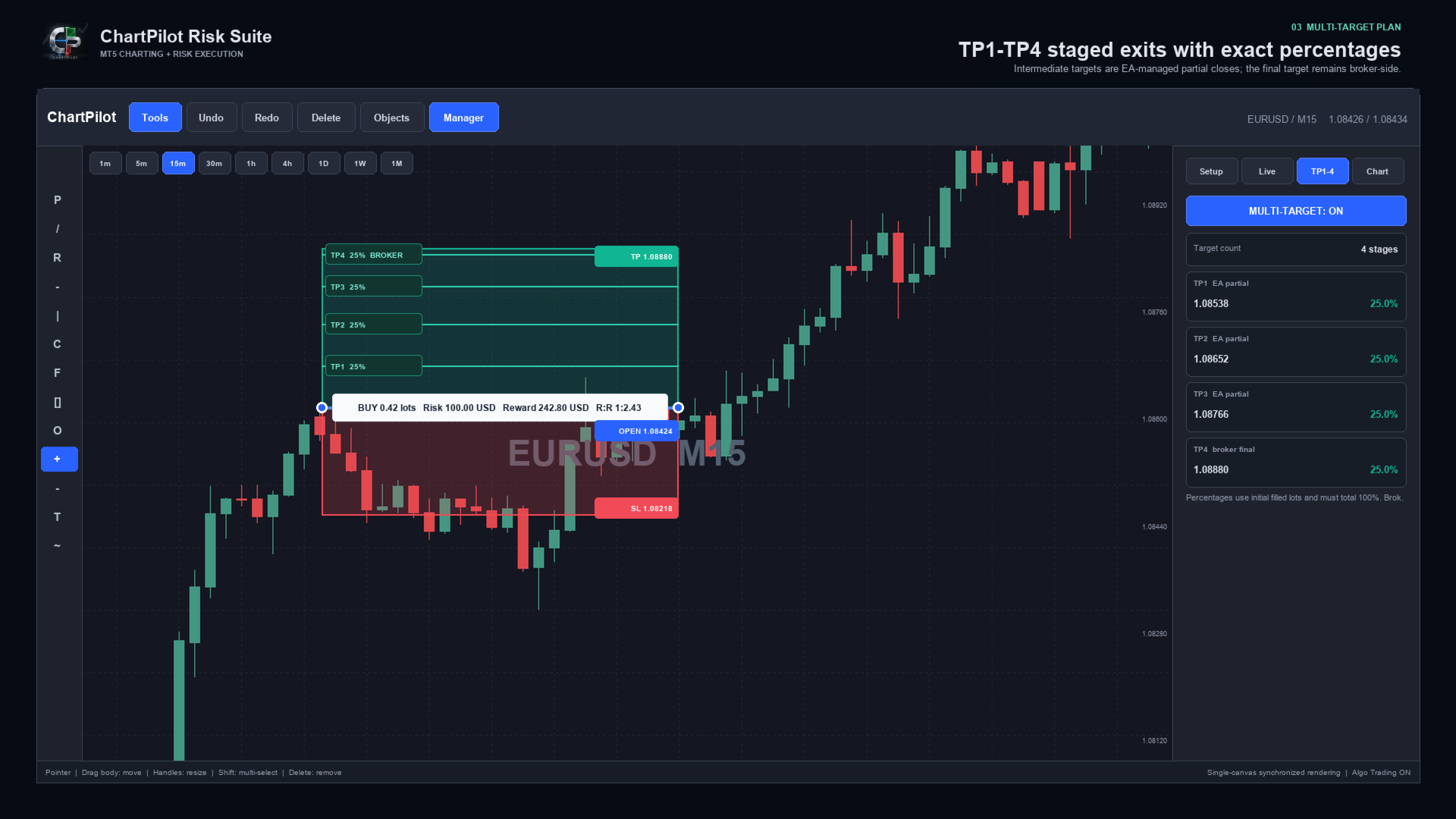
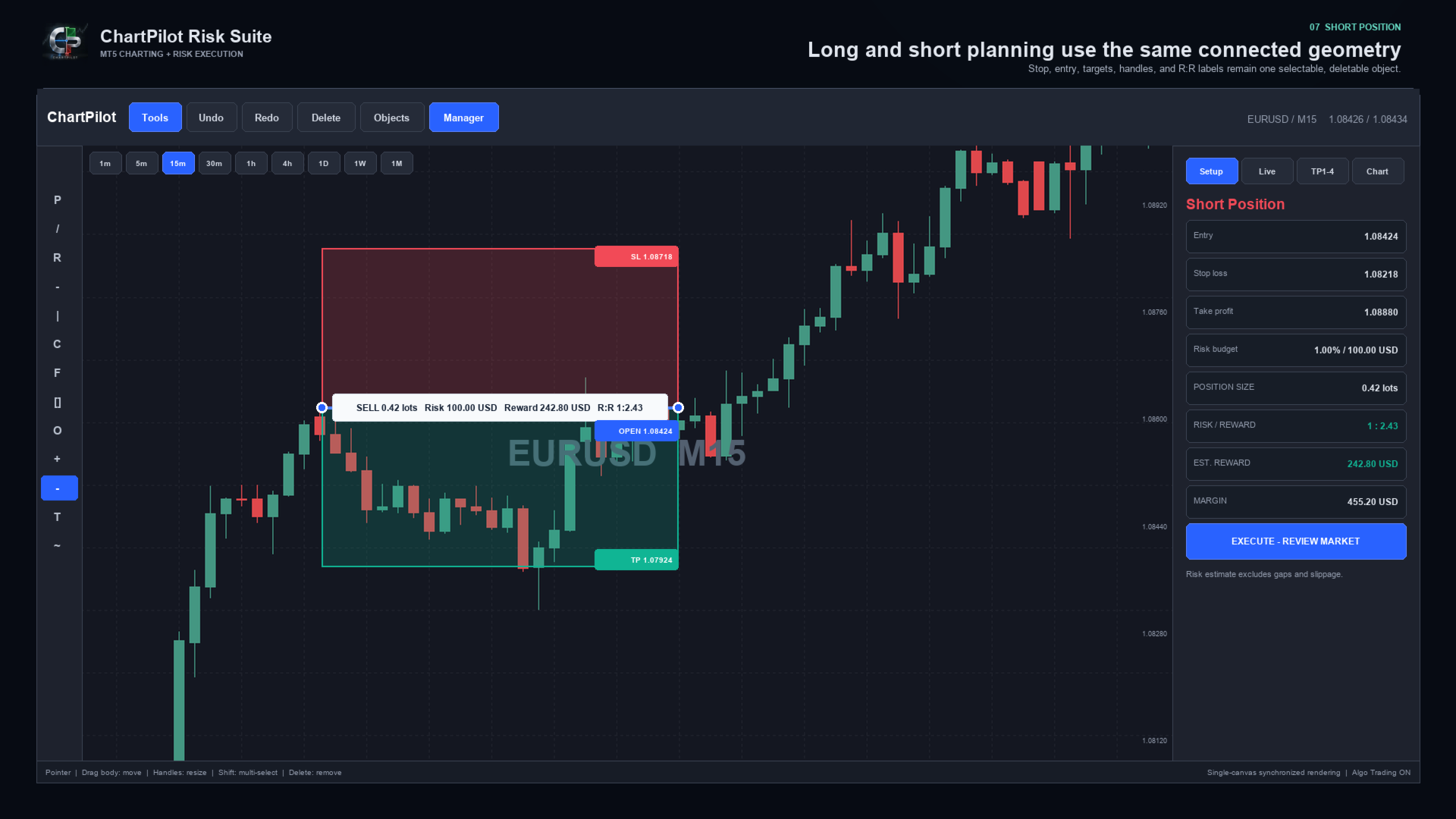
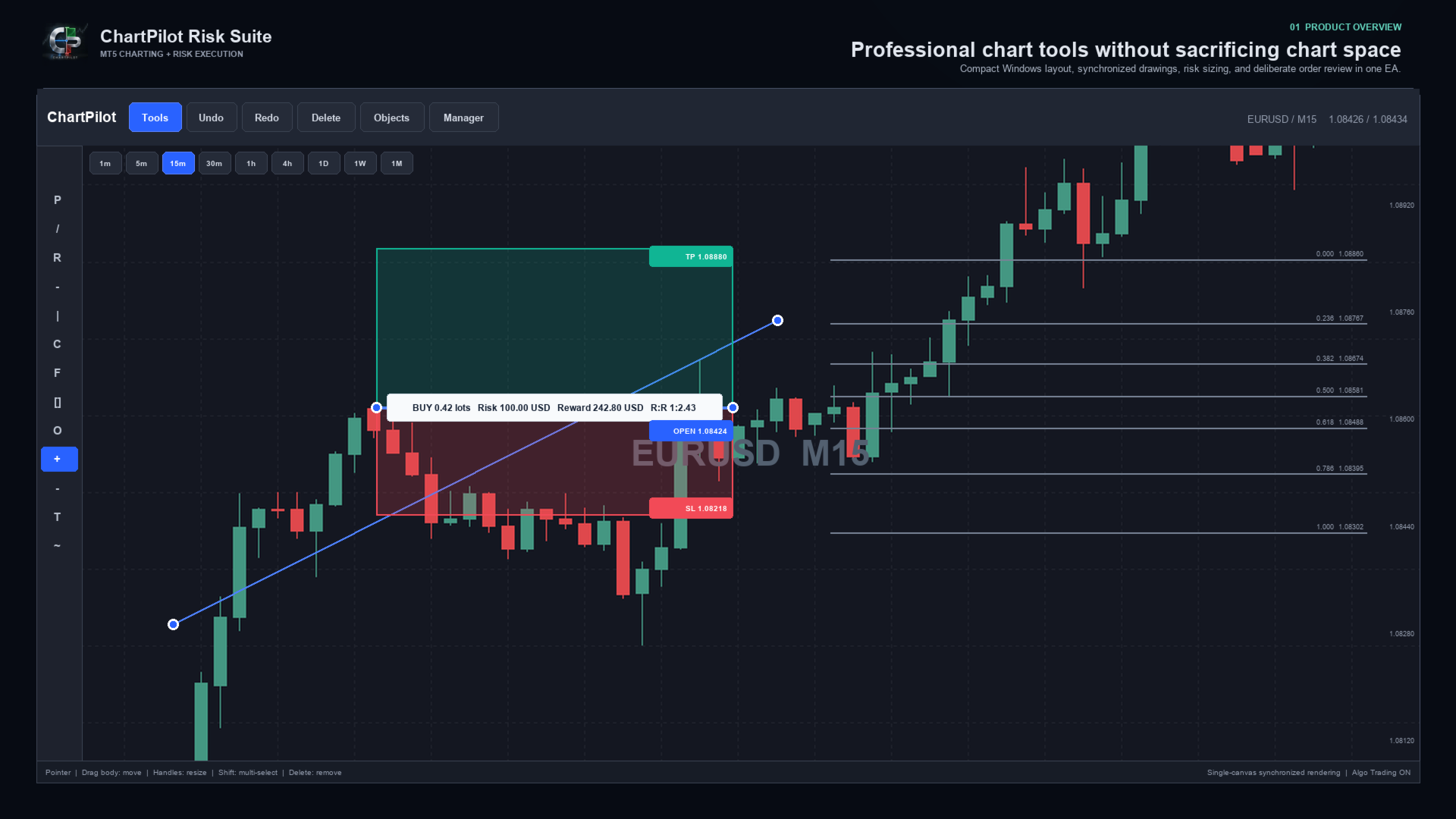
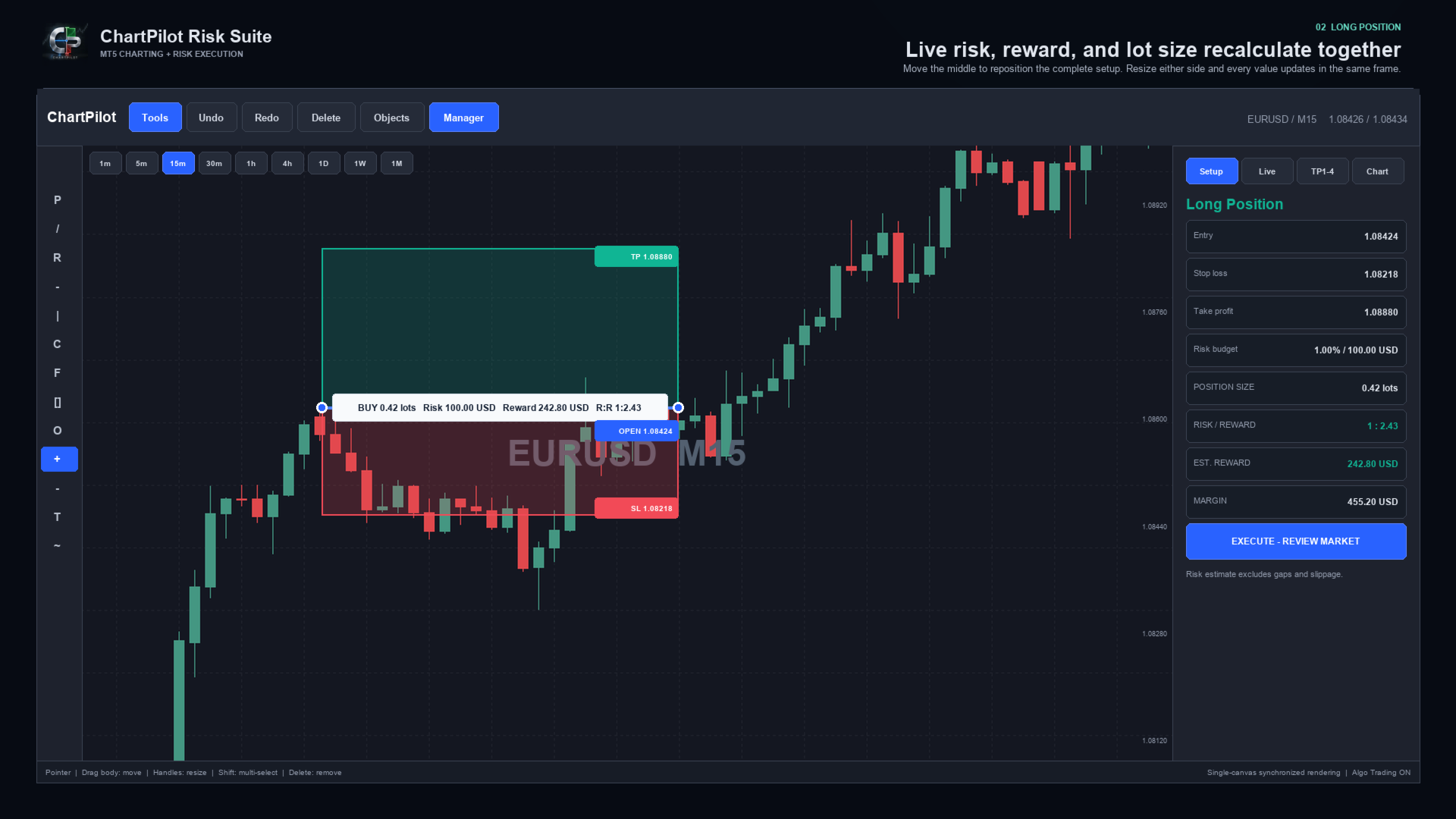
The Long Position and Short Position tools behave as connected objects. Drag the middle of a setup to move the complete position plan. Drag its handles to change the time range, stop or target. The profit zone, loss zone, entry line, labels, position size and risk-to-reward calculation update from the same underlying anchors.

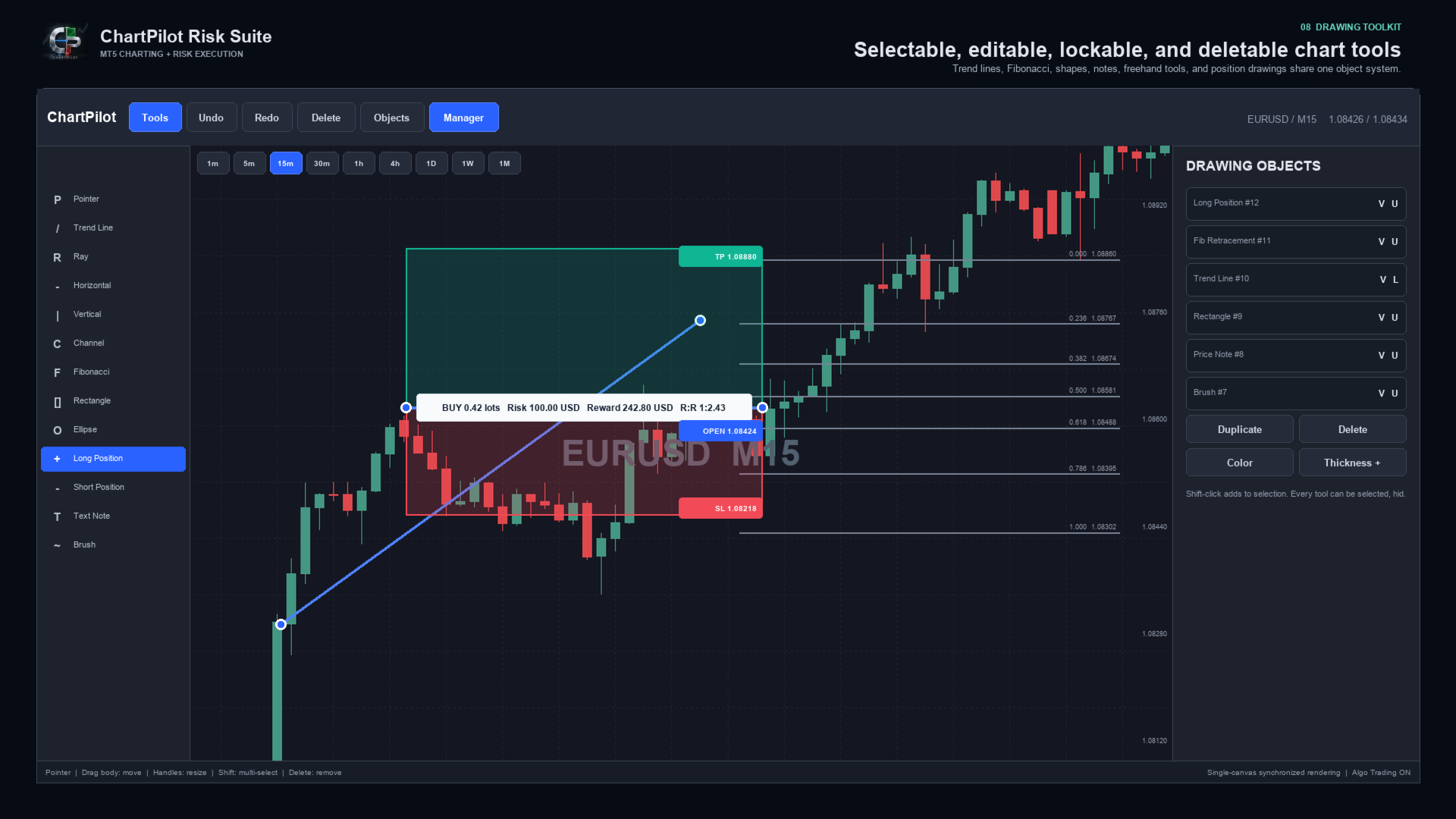
Every drawing can be selected and deleted. Drawings can also be hidden, locked, duplicated, recolored or given a different line thickness. The interface includes undo and redo history, multi-selection, object management and optional OHLC snapping.

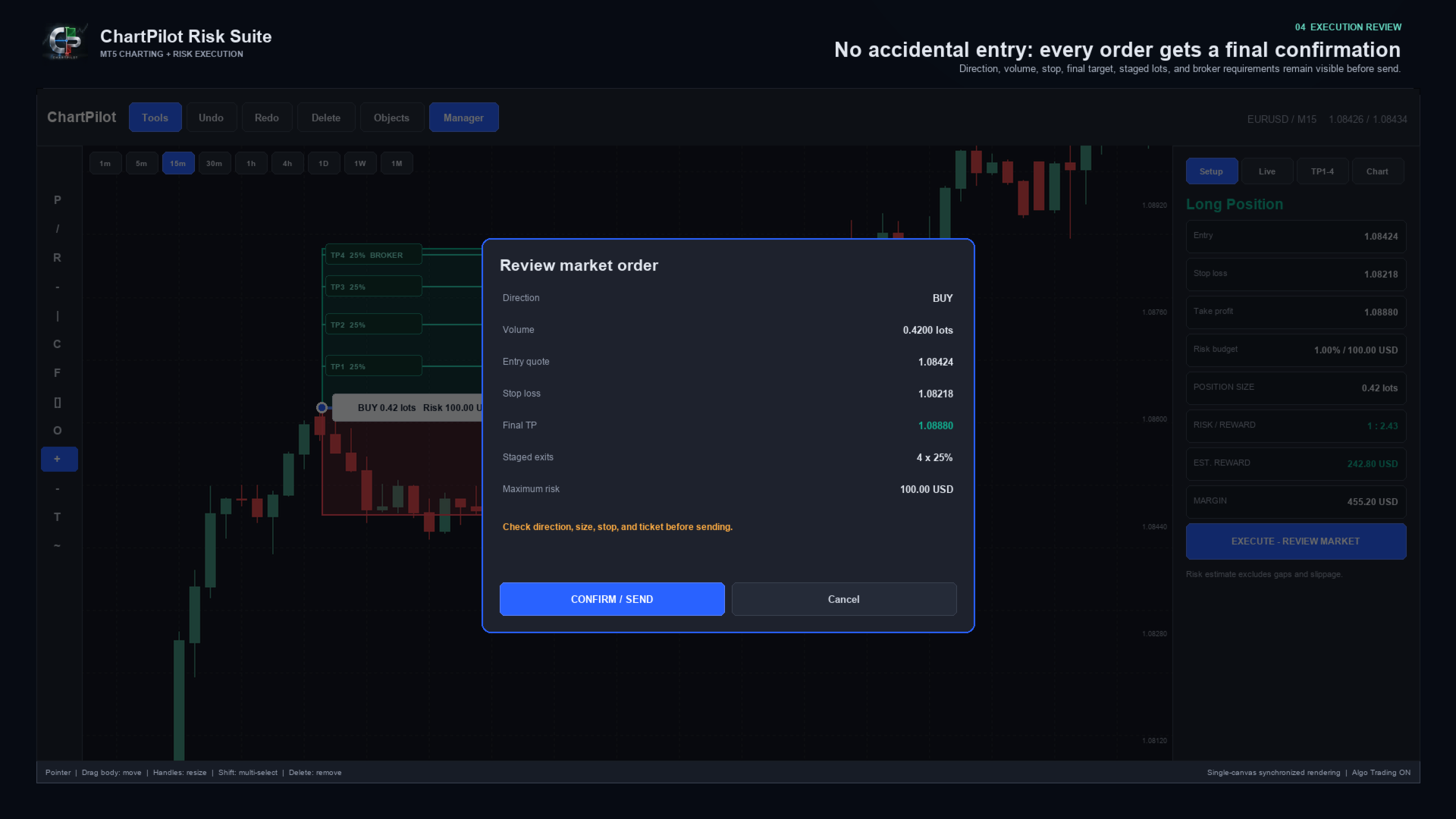
ChartPilot does not place a trade simply because a position drawing exists. Select the setup, check its values, press the execution button and review the complete request. The order is sent only after CONFIRM / SEND is pressed.


MAIN FEATURES

- Long Position and Short Position planning tools
- Percentage-of-equity risk sizing
- Fixed cash-risk sizing
- Optional manual lot size
- Estimated commission-per-lot input
- Live position size, cash risk, estimated reward, margin and R:R calculations
- Market entry and drawn-price pending entry modes
- Final confirmation before every submitted order
- TP1, TP2, TP3 and TP4 planning
- Two, three or four target stages
- Percentage allocation based on the initial filled volume
- Automatic intermediate partial closes for confirmed ChartPilot positions
- Broker-side stop loss and final take profit
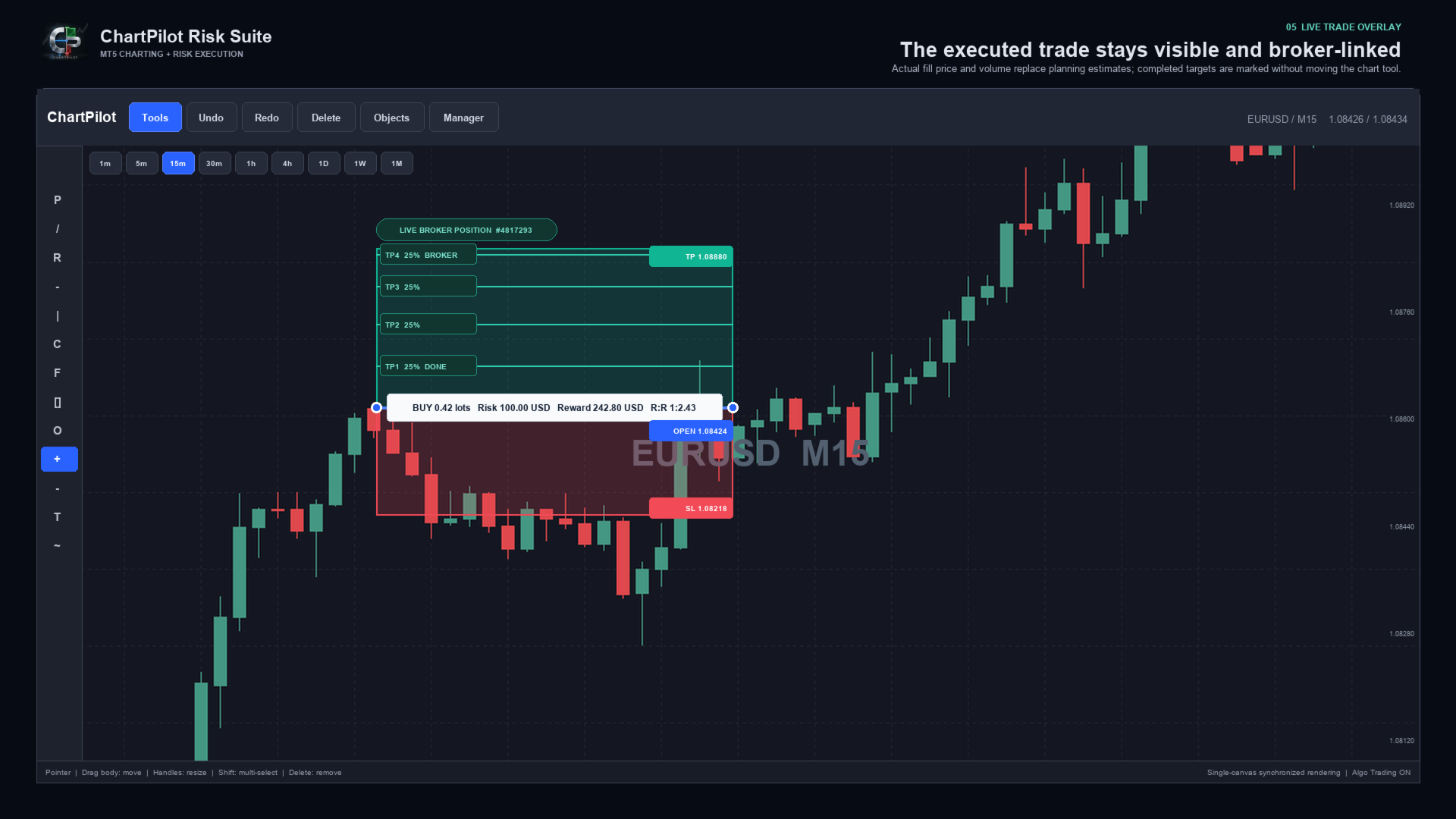
- Live broker-position overlay using the actual fill price and volume
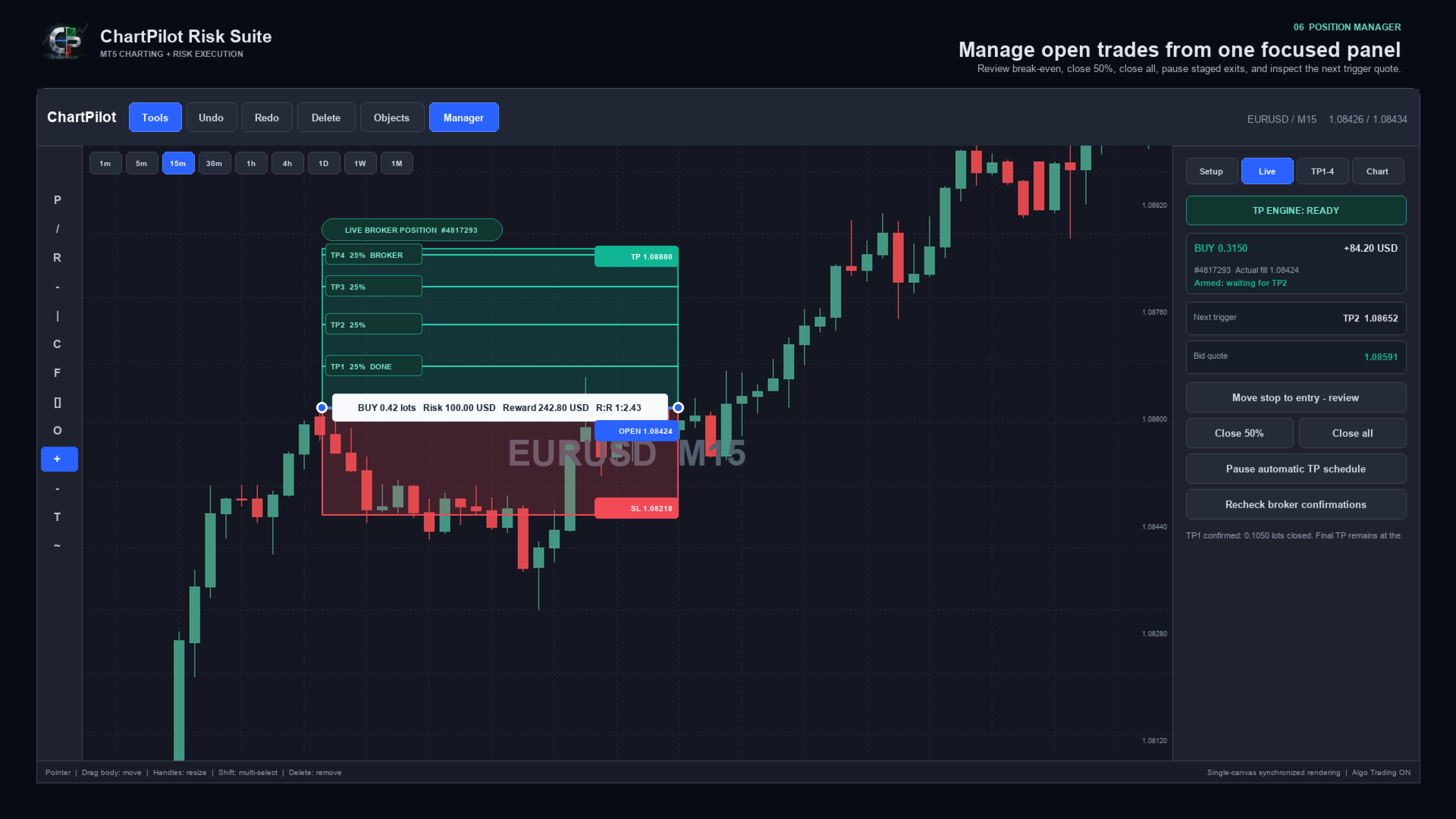
- TP engine status, next target and live trigger quote
- Position manager with reviewed break-even, Close 50% and Close All actions
- Pause, review and resume controls for an automatic TP schedule
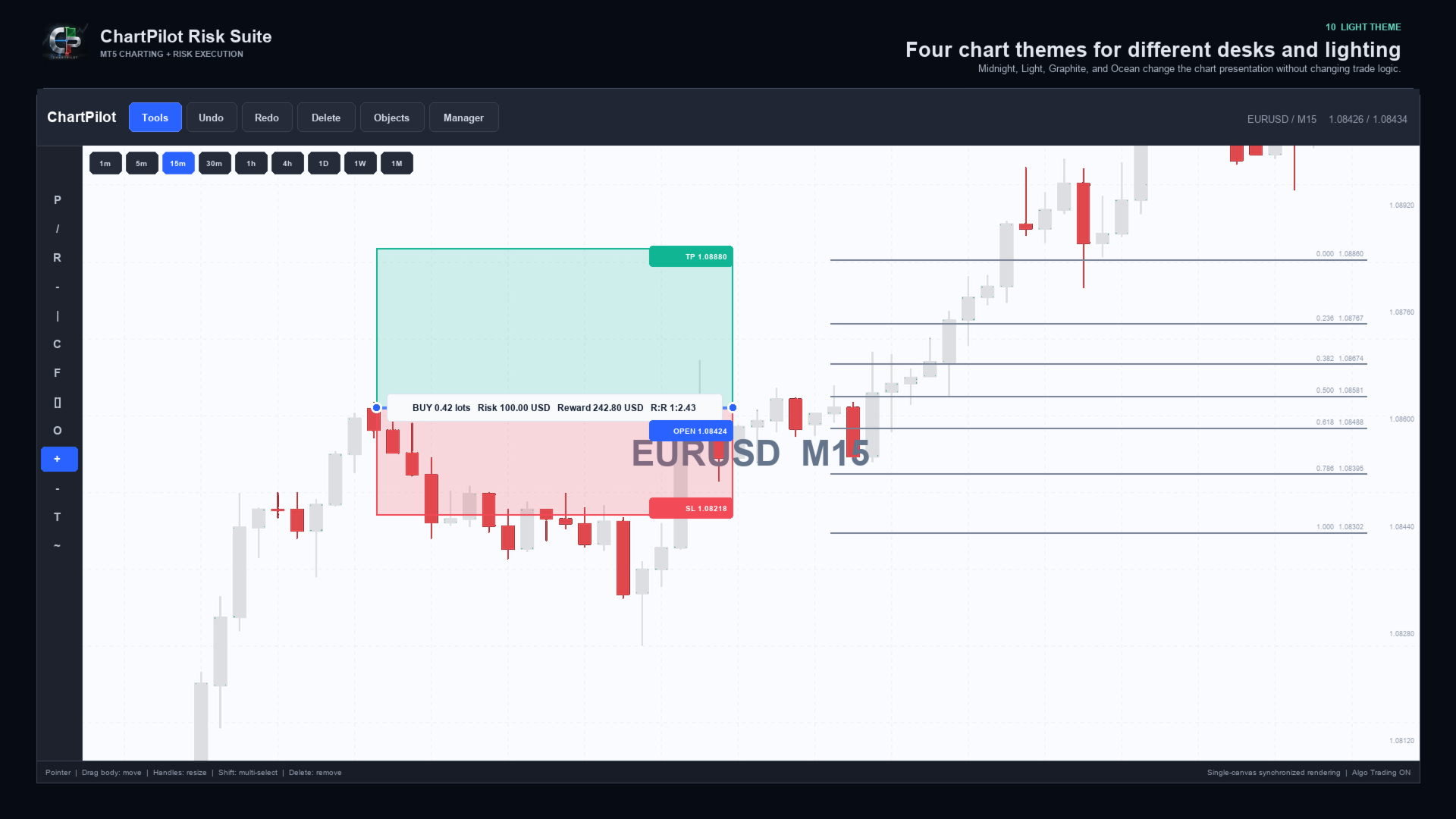
- Midnight, Light, Graphite and Ocean chart themes
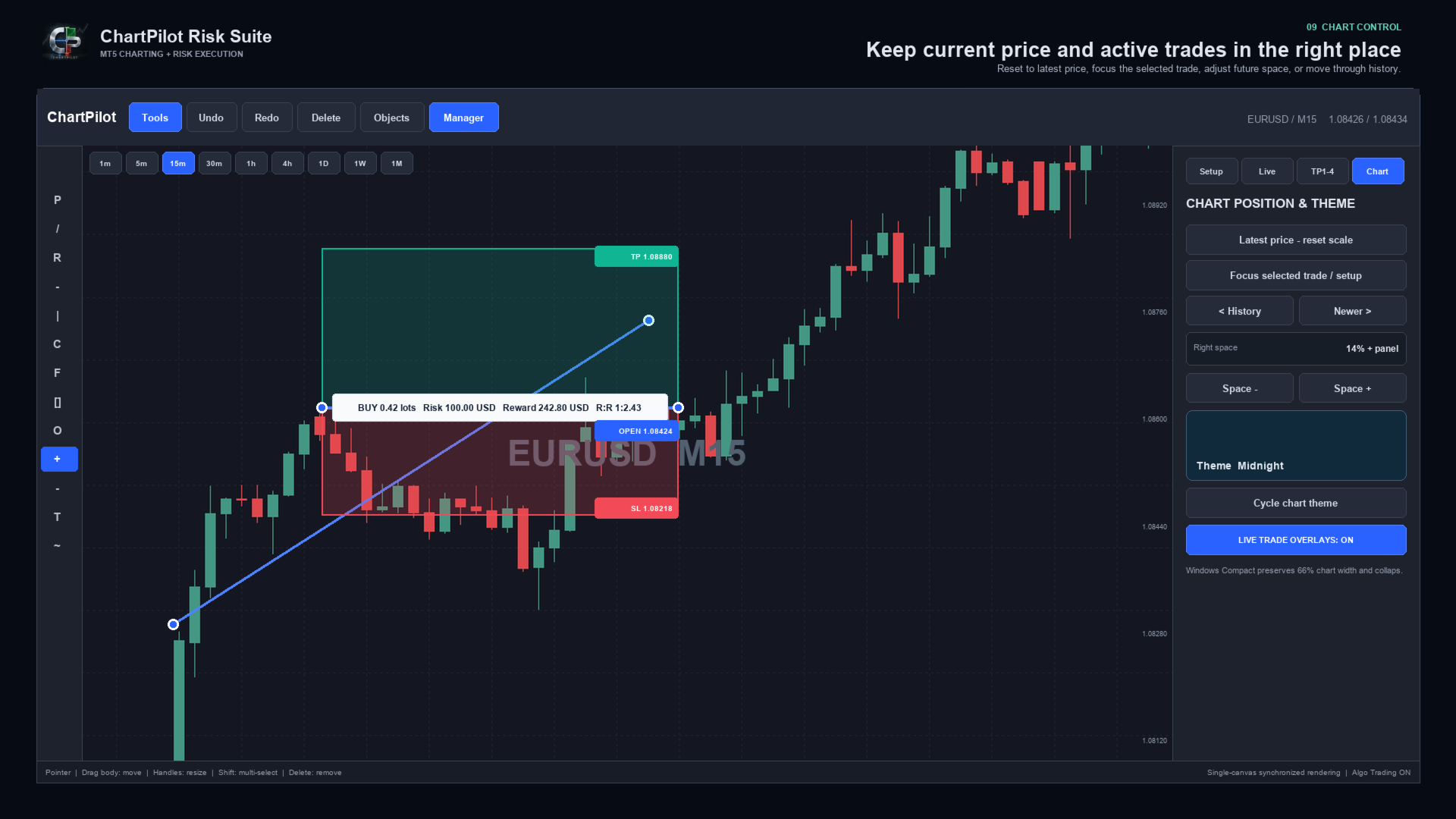
- Latest-price reset, Focus Trade, history navigation and adjustable right-side chart space
- Compact Windows layout with automatic panel reduction
- Persistent chart workspaces and confirmed-plan journal
- Self-contained Market product with no companion indicator or DLL imports


DRAWING WORKSPACE

Included tool groups cover:

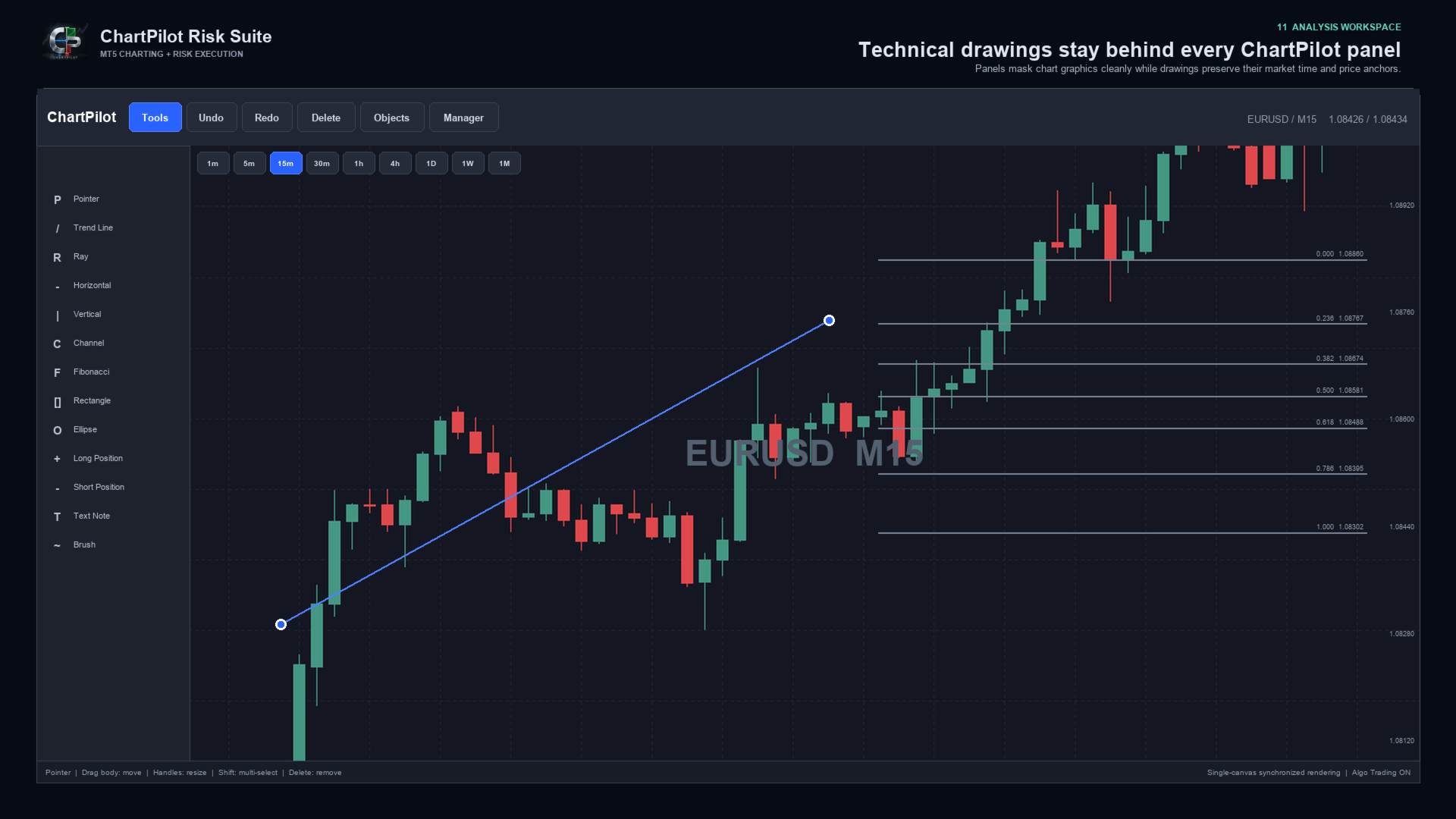
- Pointer and crosshair
- Trend line, ray, extended line and horizontal/vertical lines
- Arrow and double-arrow lines
- Parallel channel, regression channel and standard-error channel
- Fibonacci retracement, extension, fan, arc and time tools
- Gann fan and Gann box
- Rectangle, ellipse and triangle
- Bezier, ABCD and XABCD patterns
- Elliott impulse and correction tools
- Long and short position tools
- Ruler, price range, date range and date/price range
- Text note and price note
- Brush, highlighter and polyline

Drawings use chart time and price coordinates. Panning, zooming or changing the visible chart range changes their screen position in the same way as normal market-anchored drawings, but it does not rewrite their stored market anchors.


POSITION AND LOT-SIZE MANAGER

ChartPilot calculates volume from the selected setup and symbol specifications. Choose one sizing method:

1. Risk percentage: volume is based on the selected percentage of current account equity.
2. Fixed risk: enter a cash amount in the account currency. A non-zero fixed amount takes priority over percentage risk.
3. Manual lots: enter a manual volume when an exact size is required.

The calculated volume is normalized to the broker's minimum volume, maximum volume and lot step. If the requested staged percentages cannot produce valid partial volumes, ChartPilot rejects the plan instead of silently increasing the risk.

Commission is an estimate supplied by the user. It is not automatically read from the broker. Swap, slippage, price gaps and execution differences can change the final result.


HOW MULTI-TARGET MANAGEMENT WORKS

1. Draw or select a Long Position or Short Position.
2. Open Manager, then TP1-4.
3. Enable Multi-Target and select two, three or four stages.
4. Enter the target prices and closing percentages.
5. Ensure the active percentages total exactly 100%.
6. Return to Setup and press EXECUTE - REVIEW.
7. Check the entry, stop, final TP and rounded lot allocation.
8. Press CONFIRM / SEND.

Intermediate stages are managed by the EA as partial market exits. The final target is placed at the broker. For example, a four-stage plan can close 25% at TP1, 25% at TP2, 25% at TP3 and leave the final 25% for the broker-side TP4.

Automatic staged exits apply only to positions linked to a confirmed ChartPilot entry plan. Creating a drawing does not authorize automatic trading, and ChartPilot does not attach a staged schedule to an unrelated manual trade or another EA's position.

MetaTrader 5 must remain open, connected and permitted to use Algo Trading for intermediate partial exits. The broker-side stop loss and final take profit can remain active when the terminal is closed, subject to the broker's normal execution rules.

If price gaps through several targets, ChartPilot advances confirmed partial exits sequentially. If price reaches or gaps through the final broker target, the broker may close all remaining volume before every intermediate stage is filled.

Do not manually change the volume, direction, opening price or final TP of a managed position unless you intend to take control. An external position change causes ChartPilot to suspend the original percentage schedule for safety.


QUICK START

1. Test the EA on a demo account before live use.
2. Attach one ChartPilot instance to the chart and symbol you want to manage.
3. Enable Allow Algo Trading in the EA properties.
4. Enable the main Algo Trading button in MetaTrader 5.
5. Choose a risk percentage, fixed cash risk or manual lot size.
6. Select Long Position or Short Position and place the setup on the chart.
7. Drag the body to move the complete setup or drag a handle to resize it.
8. Configure TP1-TP4 if staged exits are required.
9. Press EXECUTE - REVIEW and inspect the complete request.
10. Confirm only when the direction, size, stop and targets are correct.
11. Open Manager > Live to monitor the TP engine and selected position.

Use only one managing ChartPilot chart for the same account, broker server, symbol and magic number. This prevents two chart instances from attempting to manage the same confirmed plan.


WINDOWS INSTALLATION AND DISPLAY SETUP

Installation:

1. Open the desktop MetaTrader 5 terminal and sign in to the MQL5 account used for the purchase.
2. Open Market > Purchased and install ChartPilot Risk Suite.
3. Find ChartPilot Risk Suite under Expert Advisors in the Navigator.
4. Drag the EA onto the chart and symbol you want to manage.
5. Enable Allow Algo Trading in the EA properties if execution or staged exits will be used.
6. Enable the main Algo Trading control in MetaTrader 5.

Recommended Windows layout:

- Start with a maximized chart window.
- Recommended interface scale: 90% to 100%.
- Recommended Windows display scaling: 100% or 125% when possible.
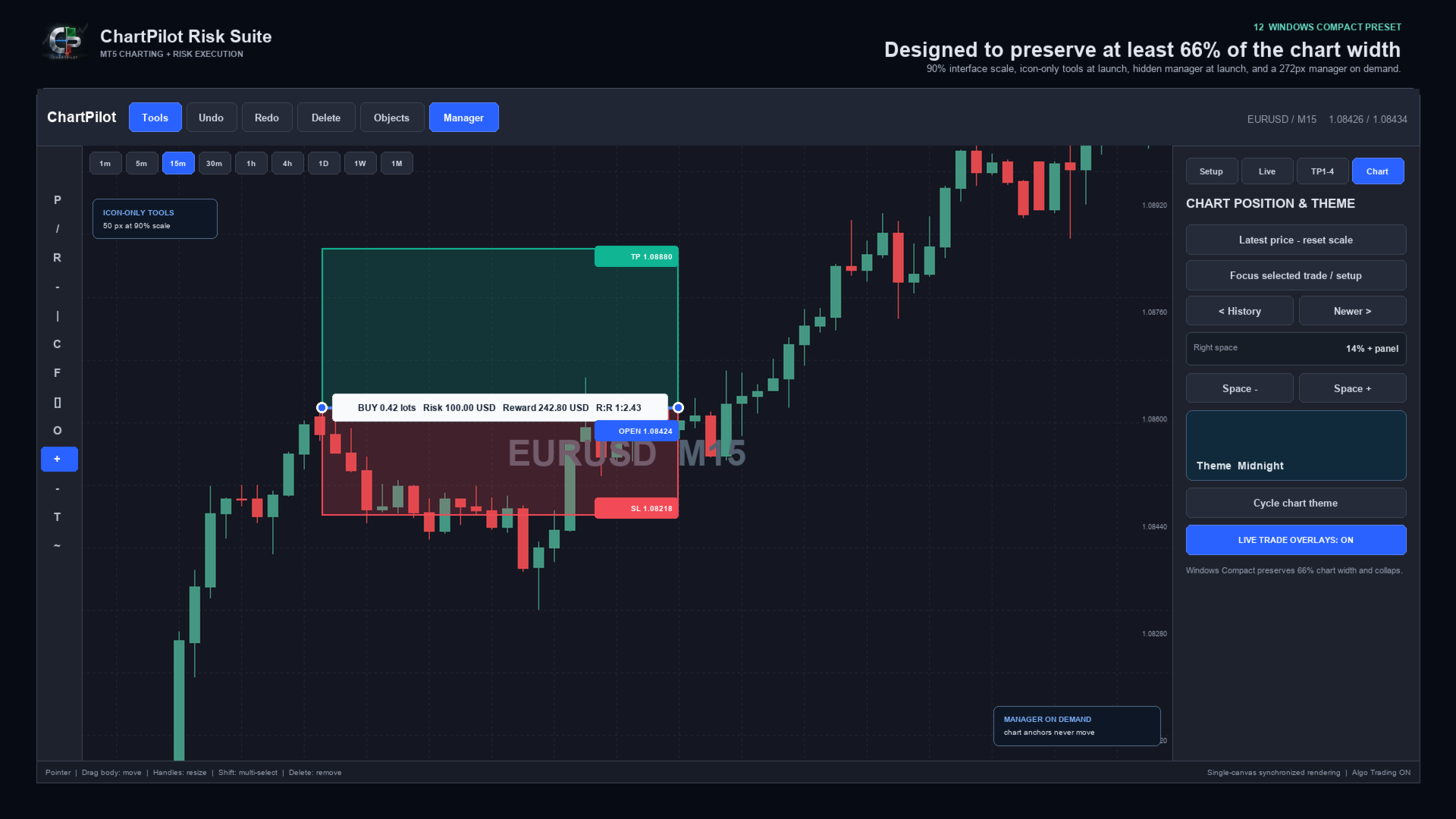
- Keep Start Tools Expanded disabled for an icon-only toolbar at launch.
- Keep Show Manager disabled so the chart opens at maximum width.
- Open Manager only when sizing, executing or managing a trade.
- Keep Auto Compact Panels enabled.
- Set Minimum Chart Percent to 66 when maximum chart space is preferred.

Recommended compact input values:

- Interface Scale: 90
- Start Tools Expanded: false
- Show Manager: false
- Expanded Tools Width: 170
- Manager Width: 272
- Minimum Chart Percent: 66
- Auto Compact Panels: true
- Right Space: 14

If you have the optional ChartPilot_Windows_Compact.set developer preset, open EA Properties > Inputs > Load and select it. Market installation itself supplies only the compiled product, so the same values can be entered manually when the preset is not present.

At Windows display scaling of 150% or higher, start with Interface Scale at 80% to 90%. MetaTrader uses pixel-based chart dimensions, so Windows DPI scaling and the EA interface scale can compound. If the chart becomes crowded, reduce Interface Scale, close the Manager panel or collapse the Tools panel.

These compact values change only EA inputs. They do not alter account, broker or MetaTrader installation settings.


MACOS INSTALLATION AND DISPLAY SETUP

MetaTrader 5 for macOS runs through the compatibility environment supplied with the terminal installation. Install Market products from inside MetaTrader. Do not copy product files into the visible application bundle in Finder.

Installation:

1. Start the desktop MetaTrader 5 application and sign in to the MQL5 account used for the purchase.
2. Open Market > Purchased and install ChartPilot Risk Suite.
3. Find it under Expert Advisors in the Navigator.
4. Attach it to the chart and symbol you want to manage.
5. Enable Allow Algo Trading in the EA properties and the terminal's Algo Trading control when execution is required.
6. If Navigator does not refresh, restart MetaTrader 5 and check the Purchased section again.

For a separately supplied developer MQ5 file, use File > Open Data Folder, then place the source in MQL5 > Experts and compile it in MetaEditor. This manual process is not required for the normal Market version.

Recommended macOS layout:

- Begin with Interface Scale at 100%.
- On a high-resolution Retina display, 110% to 125% may be comfortable.
- Use a maximized chart before increasing the interface size.
- Keep the Manager hidden until it is needed.
- If the compatibility environment applies additional scaling, reduce Interface Scale in 10% steps.
- The Windows Compact preset can also be loaded on macOS, but it is normally necessary only on a small window or a heavily scaled display.

Font weight and edge smoothing can look slightly different between Windows and macOS because MetaTrader and the compatibility layer use different system text and display-rendering paths. This is visual only and does not change price, volume or trade-management calculations.


IMPORTANT OPERATING NOTES

- ChartPilot manages the current chart symbol.
- Use a unique magic number when separating different ChartPilot strategies or workspaces.
- Deleting a drawing never closes a broker position.
- Hiding a drawing does not pause a confirmed TP schedule.
- Use Manager > Live to pause or resume a linked staged schedule.
- Manual partial closes suspend the original staged allocation.
- Do not delete the ChartPilot plan journal from MQL5/Files while a managed position is open.
- If TP ENGINE reports an Algo Trading or connection warning, intermediate partial exits cannot be sent.
- Pending orders remain subject to the broker's supported order types, filling policies, stop distance and expiration rules.
- The EA rejects unsupported or invalid requests when broker checks fail.
- Broker execution, spreads and symbol specifications differ. Test every symbol and account type on demo first.


RISK NOTICE

Trading foreign exchange, CFDs and other leveraged products involves substantial risk. Position-size and risk-to-reward figures are estimates based on the information available when calculated. Gaps, slippage, spread changes, commissions, swaps, partial fills, broker rules and connection failures can produce a different result.

ChartPilot Risk Suite is an execution and chart-management utility. It does not provide trading signals, investment advice or any guarantee of profit. The user remains responsible for every setup, confirmation, broker setting and trade decision. Use a demo account first and never risk funds you cannot afford to lose.
おすすめのプロダクト
Trade Analyzer is an interactive charting utility designed to make trade planning and performance tracking easier directly inside MetaTrader 5. It allows you to quickly create and visualize trade setups on your chart, giving you a clear view of your Entry, Stop Loss, and Take Profit levels. Every trade setup you chart is automatically measured and analyzed, showing you the exact risk-to-reward ratio, risk in pips, potential reward, and outcome of the setup. As you chart more trades, RR Analytics
FREE
Kings ea
Rodrick T Russell
KINGS EA V2.51 – Advanced Multi-Strategy Expert Advisor KINGS EA V2.51 is a powerful, fully automated trading robot for MetaTrader 5, designed for traders who want flexibility, robust risk management, and advanced strategy options.   It combines trend, breakout, and reversal trading in one easy-to-use package, with extensive customization and safety features Key Features Three Strategies in One:    Trade with Trend, Breakout, or Reversal logic – enable or disable each as you wish. -Flexibl
EA XAU Queen
Dmitriq Evgenoeviz Ko
EA XAU Queen - Fully Automated XAUUSD Trading EA XAU Queen is a fully automated trading system designed specifically for the gold market ( XAUUSD ). The advisor uses a unique algorithm for tracking institutional liquidity and price imbalance zones (Smart Money + Price Action), allowing it to find highly accurate entry points with minimal slippage. The robot doesn't use dangerous money management methods, such as classic martingale without stop losses, huge grids, or arbitrage. Each trade is str
MT5の取引の新規、決済、一部決済、および変更に関するリアルタイム通知をdiscordへ自動送信します。 このユーティリティは16言語に対応しています:英語、フランス語、ドイツ語、ヒンディー語、インドネシア語、イタリア語、カザフ語、韓国語、オランダ語、ポーランド語、ポルトガル語、ロシア語、スペイン語、トルコ語、ウクライナ語、ベトナム語。本製品は、ターミナルを常に監視することなくdiscord通知を受け取りたいトレーダー向けに設計されています。エキスパートアドバイザーを使用するユーザー、複数のシンボルで取引するトレーダー、vpsユーザーに適しています。 完全および部分的なポジション決済は正確に検出されます(例:0.10 / 0.30 ロット)。また、重複メッセージ防止機能も実装されています。 通知は、取引口座内のすべてのシンボル、またはこのユーティリティを適用したチャートのシンボルのみ(オプション)で送信できます。 「test discord」ボタンが用意されており、チャット機能を確認でき、設定後はチャートから非表示にすることも可能です。また、「send open positions」ボ
FREE
MT5の取引の新規、決済、一部決済、および変更に関するリアルタイム通知をSlackへ自動送信します。 このユーティリティは16言語に対応しています:英語、フランス語、ドイツ語、ヒンディー語、インドネシア語、イタリア語、カザフ語、韓国語、オランダ語、ポーランド語、ポルトガル語、ロシア語、スペイン語、トルコ語、ウクライナ語、ベトナム語。通知テキストをカスタマイズすることで、その他の言語にも対応可能です。本製品は、ターミナルを常に監視することなくSlack通知を受け取りたいトレーダー向けに設計されています。エキスパートアドバイザーを使用するユーザー、複数のシンボルで取引するトレーダー、VPSユーザーに適しています。 完全および部分的なポジション決済は正確に検出されます(例:0.10 / 0.30 ロット)。また、重複メッセージ防止機能も実装されています。 通知は、取引口座内のすべてのシンボル、またはこのユーティリティを適用したチャートのシンボルのみ(オプション)で送信できます。 「Test Slack」ボタンが用意されており、チャット機能を確認でき、設定後はチャートから非表示にすることも可能
FREE
The   AI Concept EA   is a 100% hands free Auto Trader that is designed to trade and maximize your financial status, it's also designed to a certain trading behavior by which profits will always be   stabled throughout your trading journey .   This   EA   use   Martingale Strategy   but in the   very safe and effective way   of multiplying Lots to your balance. This AI Expert Advisor   search for a particular price action behavior that investors haven't come across as yet, in other words this EA
Prop-Firm Risk Guardian watches your MetaTrader 5 account in real time. When any rule you have set is breached, Guardian closes the offending positions and locks new entries. It does not open trades. It does not prevent order placement, because no chart-attached EA can do that. It reacts to a breach within one tick, which is what saves the account. This is a rules utility for funded-challenge, funded, and personal accounts. All account data stays on your terminal. Optional Telegram alerts use y
This is the HFT Flame Ea....This is a complex Expert Advisor that basically pick trades from price movements, it is also a none-martingale mechanism with netting strategy that makes this Ea more interested and profitable throughout your trading journey. The HFT Flame EA can be super consistent on profits depending on the inputs selected for your style of trading. This is a hand free trading robot that can trade your way to success while you are away from the charts, another perfect advantage abo
The Fortress: Ultimate Discipline & Risk Manager: "The Holy Grail of trading isn't a strategy—it's Discipline." Every trader knows the feeling: you have a great plan, but then  emotion takes over. You over-leverage, you revenge trade after a loss, you move your Stop Loss, or you "change your mind" about a pair mid-day. The Fortress was created to solve the "Human Element." It is not a signal generator; it is a  Hard-Rule Execution Manager. It acts as a digital supervisor that monitors your accou
This code snippet is a comprehensive Expert Advisor (EA) developed for the MetaTrader platform, utilizing or MQL5 programming languages. The EA, named "CHOPPA BOT," is designed to automate trading strategies based on a combination of technical indicators, including the Relative Strength Index (RSI), Parabolic SAR, Exponential Moving Averages (EMA), Simple Moving Average (SMA), and the Average Directional Movement Index (ADX). Here's an overview of its functionality: Initialization and Setup : Up
Yapon tili (日本語) Trend Scalper Infinite   は、ゴールド (XAUUSD) などのボラティリティの高い商品向けに特別に作成された、アグレッシブな高速取引エキスパートアドバイザー (EA) です。そのアルゴリズムの核となるのは、独自で妥協のないリスク管理システムを備えたトレンドフォローです。 このEAの最大の特徴は、非対称なリスク・リワード比率です。ボットはわずか1ドル(カスタマイズ可能)という非常にタイトな固定Stop Lossを使用しますが、Take Profitの制限は ありません 。代わりに、価格に「くっつく」動的なTrailing Stopを使用し、強力なトレンドの動きから最大限のPipsを絞り出します。   主な利点: 厳密なドローダウン制御 (1$ Risk):   1回の取引あたりの最大損失は、証拠金通貨の固定金額(デフォルトは1ドル)に厳密に制限されています。ボットはブローカーの手数料とスワップを自動的に考慮します。 無限の利益 (Infinite TP):   固定のTake Profitがないため、巨大な価格の
This Expert Advisor uses additional filters to determine the trend. It protects orders with the help of locking. The robot uses martingale. This EA use pending orders. Sooner or later martingale can lose the deposit, it is recommended to control the trading of the EA while analyzing the market. The EA trades on any symbol. The minimum recommended deposit is $1000 (it is better to start with a cent account). The EA works on M1 timeframe. Telegram channel Settings:  https://drive.google.com/file/
如果产品有任何问题或者您需要在此产品上添加功能,请联系我 Contact/message me if you encounter any issue using the product or need extra feature to add on the base version. There is Demo version of this panel Dashboard Super Three MA MT5 Demo in my product list, please try it out to get familiar with all functionalities for free Free version: LINK MT4 version: LINK This system basically utilizes PA and three adjustable Moving Average as the main indicator set to generate trading signal. With the feature that all MA_timefram
Mad Turtle
Gennady Sergienko
4.44 (125)
シンボル XAUUSD(ゴールド/米ドル) タイムフレーム(期間) H1-M15(任意) シングルポジショントレード対応 はい 最低入金額 500 USD (または他通貨の同等額) すべてのブローカーに対応 はい(2桁または3桁の価格表示、任意の通貨、シンボル名、GMT時間に対応) 事前設定なしで稼働可能 はい 機械学習に興味がある方は、こちらのチャンネルを購読してください: 購読する! Mad Turtle プロジェクトの主な特徴: 本物の機械学習 このエキスパートアドバイザー(EA)は、GPTサイトや類似サービスに接続しません。 モデルはMT5に組み込まれたONNXライブラリを使用して展開されます。初回の起動時に、偽造不可能なシステムメッセージが表示されます。 CLICK 参照: ONNX(Open Neural Network Exchange)。 資金の安全性 プリロールオーバーやマイクロスキャルピング、統計的サンプルの少ない狭いレンジでの取引を使用しません。 グリッドやマーチンゲールなどの危険な戦略を使用しません。 また、長期間稼働し、1日で利益や資金をすべて
Volatility 75 Pro Auto (.setファイルについてはお問い合わせください) Deriv シンセティックインデックス向けプロフェッショナル Grid + Trend EA Volatility 75 Pro Auto(V75 Pro)は、MetaTrader 5上で**Deriv シンセティックインデックス専用に設計されたプロフェッショナルEA(Expert Advisor)**です。 従来のグリッドシステムがポジションの平均化のみに依存するのに対し、V75 Proはトレンド分析・マルチタイムフレーム確認・複数のテクニカル指標を組み合わせ、質の低いエントリーシグナルを事前にフィルタリングします。 本EAは、従来のStop Loss(損切り)や Take Profit(利確)に依存しない、構造化されたGrid + Trend手法を採用しています。固定価格で決済するのではなく、複数の条件に基づいて動的にポジション管理を行います。 対応する80以上のシンセティックインデックスをサポートしており、複数銘柄への分散トレードが可能です。 各銘柄には最適化された**.SETファ
BossFXTradePanelEA (MT5)  [First 10 copies sold at 50 USD price will increase to 99USD] BossFXTradePanelEA is a fully interactive trade management panel designed for MetaTrader 5, providing traders with an easy-to-use, one-click interface to execute and manage trades. This EA simplifies trade execution , risk management, and position control by combining market orders, stop loss, take profit, trailing stops, and breakeven functionalities into a single, intuitive panel.  Key features include: On
TechRiven EC Pro EA
Md Ariful Moula Chowdhury
TechRiven EC Pro — 賢く、速く、柔軟に対応するEA TechRiven EC Pro   は、市場環境が有利なときに素早く取引を行うよう設計された、強力で高度な自動売買システム(EA)です。 現在の   市場ボラティリティ(変動性)   に賢く適応し、予測困難な相場でも安定した利益を維持します。 実績のあるパフォーマンス 過去数年間のバックテスト結果から、 安定した利益と高い信頼性   が証明されています。 急激な市場変化の中でも、 TechRiven EC Pro   は優れた回復力を発揮し、長期的に安定した成果を上げています。 簡単操作で使いやすい このEAは   ユーザーフレンドリー   に設計されており、複雑な設定は不要です。 インストールしてチャートに適用するだけで、自動的に取引を開始します。 購入後は、 最新の最適化設定   と   詳細なインストール手順   を受け取るために、私に   プライベートメッセージ   をお送りください。   期間限定の特別割引 TechRiven EC Pro   は現在、 特別価格   で販売中です! この高性能EA
Trade Manager Pro is a MetaTrader 5 tool designed to assist with trade execution, position management, risk control, and account monitoring from a single on-chart interface. It is built to work alongside manual trading or automated systems and does not interfere with external Expert Advisors. The tool is intended for traders who require direct control over order execution and position management while maintaining consistent risk rules across different market conditions. Core Function The indica
FlowAxis
Aysar Alafif
5 (1)
Product Overview   FlowAxis is a semi-automated Expert Advisor for Meta Trader 5 designed for traders who rely on manual trendline analysis and want precise, rule-based trade execution.   Instead of guessing market direction, the trader defines the trend visually, and FlowAxis executes trades automatically when price interacts with predefined trendlines. This approach       combines human market analysis with disciplined, rule-based execution. Important – Please Read Before Use   FlowAxis EA
LIMITED FREE RELEASE This Expert Advisor is temporarily available free of charge. The free release may end at any time. If you decide to test it, I would greatly appreciate an honest review based on your experience with the EA. I am also particularly interested in promising parameter sets found on different symbols and timeframes. Please include the symbol, timeframe, test period, number of trades and modelling method so the results can be reproduced. I am currently working on a new Expert Advis
FREE
TradeArmor HUD   is an ATR-based risk panel and trade manager built to protect your account from execution errors and emotional decision-making. Before you enter a trade, its mathematical safety checks guard against spread spikes, invalid stops, and margin-busting lot sizes. Once executed, it takes over management — securing partial profits, locking in break-even, and trailing stops objectively — entirely eliminating the need for manual interference. Designed to be invisible.   No indicator dep
Fibo Any Pair(クリックして set ファイルをダウンロード) Fibo Any Pairs は、フィボナッチレベルに基づいたトレーディングEA(自動売買システム)です。良いエントリーポイントを見つけるのに役立ち、どの通貨ペアでも、いつでも、どの方向でも取引できます。 テスト手順 リアル口座で使用する前に: Strategy Tester またはデモ口座でテストしてください Strategy Tester では低速で実行すると精度が向上します 最良の結果のために 「実際のティックに基づく毎ティック」 を選択してください トレードのポイント おすすめ通貨ペア: XAUUSD(ゴールド)または任意のペア すべての通貨ペアで動作しますが、ゴールドがおすすめです 口座タイプ: セント口座(例:Exness Cent) 手数料なし・スワップなしでコストとリスクを抑えられます 最低入金額: 50,000セント($500) 実際のトレードでは .set ファイルを使用してください(デフォルト設定はテスト用です) 始め方 セント口座を開設する XAUUSD のチャート(または任意のペア)に
FREE
Quantum Aurus X is an innovative trading ecosystem that combines a classic breakout algorithm (Breakout Engine) with modern machine learning methods to filter out market noise. The system is designed for professional trading in metals (Gold), indices, and volatile currency pairs. Intelligent neural network filter Unlike standard breakout advisors, Quantum Aurus X is equipped with the Neuro-Core V2 module. This is a pre-trained neural network (Perceptron) that analyzes market microstructure in r


Description: Wave5 is an adviser that trades on the Eliot wave theory and Fibonacci levels. Currencies : EURUSD Timeframe: M15 Detailed description: The Wave5 Expert Advisor is trading on the EURUSD pair. A combination of several indicators is used to analyze the wave pattern. The decision to enter the transaction is made when the waves form up or down. Most effectively, the expert trades on the M15 period on the EURUSD pair. There is a minimal risk with a sufficiently high profit. Risk manag
### **ProScalpingToolEA.mq5 Analysis & Description** **Overview:**   The `ProScalpingToolEA.mq5` script is an Expert Advisor (EA) for MetaTrader 5, designed to assist with automated trading. It includes features for placing, managing, and monitoring trades. --- ### **Key Functionalities:** 1. **Trade Execution & Management:**    - Uses the `CTrade` class from `Trade.mqh` to manage trading operations.    - Allows placing buy and sell orders with a configurable lot size.    - Trades are iden
Orydax Keldrix — XAUUSD Expert Advisor for MetaTrader 5 Turn a demanding market routine into a clear, automated process. Orydax Keldrix is a liquidity-structure breakout strategy for MetaTrader 5, with XAUUSD M15 as the recommended starting setup. It follows the market continuously, waits for a defined liquidity structure with room for expansion, and handles the trading workflow when its confirmation process is complete. It is designed for users seeking selective structure-based breakout exposu
如果产品有任何问题或者您需要在此产品上添加功能,请联系我 Contact/message me if you encounter any issue using the product or need extra feature to add on the base version. There is Demo version of this panel Dashboard Super MA RSI CCI Demo in my product list, please try it out to get familiar with all functionalities for free, LINK . Dashboard Super MA RSI CCI is an intuitive and handy graphic tool to help you to: Have 28 pairs under control with one dashboard Monitor price movement, identify possible trend based on MA, RS
Imperium Expert に最適なブローカー(安定性、スプレッド、手数料、レバレッジ、安全性に優れています): https://www.mql5.com/fr/channels/imperiumbroker IMPERIUM Imperium は、MetaTrader 5 向けに開発された Expert Advisor です。確率ベースの意思決定エンジンと外部機械学習モデルを組み合わせ、Forex市場での取引を自動化することを目的としています。 このExpert Advisorは、ポジションを開く前に複数の市場条件を継続的に分析します。取引活動は市場環境の変化に応じて自動的に調整されます。 推奨使用環境 パラメータ 値 推奨シンボル EURUSD 対応シンボル すべてのForex通貨ペア 推奨時間足 M15 ~ H1 Nettingモード 対応 Hedgingモード 対応 VPS 推奨 初期設定はEURUSD向けに最適化されています。 他の通貨ペア向けの設定は、MQL5メッセージシステムを通じて提供できます。 証拠金とレバレッジ このExpert Advisorは、さまざまな口座
FREE
The Scalper Pro  --- Advanced Multi-Strategy Scalping Expert Advisor The Scalper Pro is a high-precision automated scalping system designed for traders who require fast execution, structured logic, and controlled risk. It combines multiple price-action strategies with advanced trade and basket-level management to create a flexible solution for short-term trading. Built for performance and stability, the EA focuses on identifying intraday price movements and executing trades with disciplined man
Templerfx Nightmare is an EA that uses artificial intelligence technology to analyze data of many indicators. EA will have the best option to enter orders. The biggest difference of Templerfx Nightmare  is that the EA can control the Risk:Reward ratio much better than other EAs.That is possible because of a set of indicators to control entry points and manage open orders.  This EA is specifically designed to maximize trading opportunities on (Rise 300 Index ) pair on the M15 timeframe on a spec
このプロダクトを購入した人は以下も購入しています
Trade Assistant MT5
Evgeniy Kravchenko
4.43 (215)
取引 ごとのリスクの 計算、新規注文 の 簡単 な 設置、部分的 な 決済機能 を 持 つ 注文管理、 7 種類 のトレーリングストップなど 、便利 な 機能 を 備 えています 。 追加の資料と説明書 インストール手順   -   アプリケーションの手順   -   デモアカウント用アプリケーションの試用版 ライン機能 チャート上にオープニングライン、ストップロス、テイクプロフィットを表示します。この機能により、新規注文を簡単に設定することができ、注文を出す前にその特徴を確認することができます。   リスク計算 リスク計算機能は、設定されたリスクとストップロス注文のサイズを考慮して、新規注文のボリュームを計算します。ストップロスの大きさを自由に設定できると同時に、設定したリスクを守ることができます。 Lot calc ボタン - リスク 計算 を 有効 / 無効 にします 。 Risk フィールドでは 、必要 なリスクの 値 を 0 から 100 までのパーセンテージまたは 預金通貨 で 設定 します 。 設定」 タブで 、 リスク 計算 の 種類 を 選択 します :「 $ 通
Trade Manager EAへようこそ。これは、取引をより直感的、正確、そして効率的にするために設計された究極の リスク管理ツール です。これは単なるオーダー実行ツールではなく、包括的な取引計画、ポジション管理、リスク管理のためのソリューションです。初心者から上級者、迅速な実行を必要とするスキャルパーまで、Trade Manager EAはあらゆるニーズに対応し、為替、指数、商品、暗号通貨などさまざまな市場で柔軟に対応します。 Trade Manager EAを使用すると、複雑な計算が過去のものになります。市場を分析し、エントリーポイント、ストップロス、テイクプロフィットのレベルをチャート上のラインでマークし、リスクを設定するだけで、Trade Managerが最適なポジションサイズを即座に計算し、SLとTPをピップ、ポイント、口座通貨でリアルタイムに表示します。すべての取引が簡単かつ効果的に管理されます。 主な機能: ポジションサイズ計算機 :定義されたリスクに基づいて取引サイズを瞬時に決定します。 簡単な取引計画 :エントリー、ストップロス、テイクプロフィットを設定するためのド
Farmed Hedge Yield Farming | All Markets (Manual - Hybrid - Semi/Automated EA) VERIFIED TRADING RESULTS - Farmed Hedge Yield Axi Copy:  https://www.mql5.com/en/signals/2356376 - Farmed Hedge Yield Exn Copy:   https://www.mql5.com/en/signals/2356404 - Farmed Hedge Yield V Copy:  https://www.mql5.com/en/signals/2357156 IMPORTANT NOTICE: FarmedHedge is a MANUAL-FOCUSED TRADING UTILITY ,not a fully automated EA. Results shown on this Signal include manual trades and overall strategic management.
ベータリリース Telegram to MT5 Signal Trader はまもなく正式なアルファ版をリリースします。いくつかの機能はまだ開発中で、小さな不具合に遭遇する可能性があります。問題が発生した場合はぜひご報告ください。皆さまのフィードバックがソフトウェア改善に役立ちます。 Telegram to MT5 Signal Trader は、 Telegram のチャンネルやグループからの取引シグナルを自動的に MetaTrader 5 にコピーする強力なツールです。 パブリックおよびプライベートの両方のチャネルに対応し、複数のシグナル提供元を複数のMT5口座に接続可能です。ソフトウェアは高速で安定し、すべての取引を細かく制御できます。 インターフェースは直感的で、ダッシュボードとチャートは見やすく設計されており、リアルタイムで動作状況をモニターできます。 必要環境 MQL の制限により、EA は Telegram と通信するためのデスクトップアプリが必要です。 インストーラーは公式の インストールガイド にあります。 主な機能 マルチプロバイダー: 複数の Telegram
Telegram to MT5 Multi-Channel Copier   は、Telegram チャンネルのトレードシグナルを MetaTrader 5 へ自動コピーします。ボット不要、ブラウザ拡張不要、手動コピー不要。Telegram にシグナルが届くと、EA が数秒であなたのターミナルに注文を出します。 さらに、チャンネルをコピーする前に、内蔵バックテスターでそのチャンネルがあなたの口座でどう動いたかを確認できます。 製品は 2 つのコンポーネントで構成されます:Telegram チャンネルを監視する Windows アプリと、MT5 ターミナルでシグナルを執行する本 EA です。MT4 版もあります   こちら . セットアップガイドとアプリのダウンロード:   https://www.mql5.com/en/blogs/post/768988 現在の価格は今後値上げされます。 仕組み Windows アプリは、ボットではなくあなた自身の API 認証情報で Telegram に接続します。そのため、プライベートや VIP を含む、購読中のあらゆるチャンネル・グループ・トピッ
================================================================================ POC BREAKOUT - V20.72. Full Professional Grade Toolkit ================================================================================ POC Breakout is a full MetaTrader 5 trading dashboard for discretionary traders who want breakout signals, Point of Control (POC) context, volume profiles, order flow, market structure, news, alerts, and advanced trade planning in one professional workspace. Attached directly to you
TradePanel MT5
Alfiya Fazylova
4.88 (167)
Trade Panelは多機能なトレーディングアシスタントです。アプリには手動取引用の50以上のトレーディング機能が搭載されており、ほとんどの取引作業を自動化することができます。 アプリの説明書+ビデオガイド: https://www.mql5.com/en/blogs/post/772292 デモ口座用アプリの試用版: https://www.mql5.com/en/blogs/post/750865 アプリのインストール方法: https://www.mql5.com/en/blogs/post/756239 アプリをビジュアルモードでテストする方法: https://www.mql5.com/en/blogs/post/770277 VPSのMetaTraderにアプリをインストールする方法: https://www.mql5.com/en/blogs/post/770190 取引。 ワンクリックで取引操作を行うことができます: リスクを自動計算して指値注文やポジションを開く。 複数の注文やポジションをワンクリックで開く。 注文のグリッドを開く。 保留中の注文やポジションをグルー
Premium Trade Manager - コーチ内蔵型トレードパネル Premium Trade Manager は、AIトレーディングコーチをあなたのチャートの中に置き、その下に完全な執行エンジンを備えたツールです。いつも通りにトレードをセットアップし、あなた専任のAIトレーディングコーチ Max にそのセットアップをそのまま読み取らせて、発注前に率直な見解を伝えてもらいましょう。ストップの幅が規律あるアプローチに合っているか、リスクサイズは適切か、高影響のニュースイベントが数分後に迫っていないか、プロップファームの制限に近づいていないか。その下には、クリックの後をすべて処理するエンジンが備わっています。ワンクリックのリスクサイズ計算による発注、チャート上でドラッグして組み立て、発注後も動かせるプラン、最大4段階の分割利確、7種類のトレール方式、リアルタイムのプロップファームコンプライアンス、ニュースガード、そしてコストを自ら採点するスプレッド機能。判断はあなたが下す。Max がもう一度確認する。後のことはすべてパネルが担う。 購入前に実際に触れて試せます。 ブラウザ上でライブ
25% discount on the release of the tool: only for the next 3 buyers Send a message to receive a demo version. AstroTrade Trading Assistant AstroTrade is a comprehensive multi-functional trading utility developed for the MetaTrader 5 platform. It integrates essential tools for trade execution, risk management, and technical monitoring into a single unified interface. The application is designed to assist traders in managing their daily operations through a visual and structured environment. Vi
Exp COPYLOT CLIENT for MT5
Vladislav Andruschenko
3.97 (35)
MetaTrader 5 用のプロフェッショナル取引コピー機 MetaTrader 向けの高速・高性能・信頼性の高い 取引コピー機 です。 COPYLOT は、MT4 と MT5 のターミナル間で Forex 取引をコピーでき、 Hedge 口座と Netting 口座の両方に対応しています。 COPYLOT MT5 版の対応構成: - MT5 Hedge → MT5 Hedge - MT5 Hedge → MT5 Netting - MT5 Netting → MT5 Hedge - MT5 Netting → MT5 Netting - MT4 → MT5 Hedge - MT4 → MT5 Netting MT4 版 完全な説明 + DEMO + PDF 購入方法 インストール方法 ログファイルの取得方法 テストと最適化の方法 Expforex のすべての製品 MT4 ターミナルへのコピーも可能です(MT4 → MT4、MT5 → MT4): COPYLOT CLIENT for MT4 COPYLOT は、2台、3台、さらには10台のターミナル間で同時に動作できる、プロフェッ
HINN MAGIC ENTRY – the ultimate tool for entry and position management! SIMPLE. FASTEST. INTUITIVE. MAX AUTOMATED. Place orders by selecting a level directly on the chart! full description   ::  demo-version  :: 60-sec-video-description Key features: - Market, limit, and pending orders - Automatic lot size calculation - Automatic spread and commission accounting - Unlimited partitial take-profits  - Breakeven and trailing stop-loss and take-profit  functions - Invalidation leves - Intuitive, a
EA Overfitter
Stephen J Martret
5 (1)
That backtest looks great. But will it still be making money tomorrow, next week, next month? EA Overfitter re-runs your EA on 100 price histories it has never seen. One score tells you if the edge is real. A backtest tells you what an EA did on one price history — the one that happened to occur. What you cannot tell from it is how much of that result was the strategy and how much was the particular path. EA Overfitter answers that. It builds up to 100 synthetic price histories your EA has n
Signal TradingView to MT5 Pro Automator TradingViewとMetaTrader 5間の即時プロフェッショナル実行 TradingViewのシグナル(アラート)とMT5での実際の約定を繋ぐ、最も強固なコミュニケーションブリッジで、取引戦略を自動化します。スピード、柔軟性、そして完璧なリスク管理を求めるトレーダー向けに設計されたこのExpert Advisorは、あらゆるアラートメッセージを正確な成行または指値注文に変換します。 強みと利点 ユニバーサルパーシングエンジン(独自技術): あらゆるアラート形式からデータを自動的に認識し、抽出できる高度なテクノロジー。単一の固定フォーマットに制限されることはありません。システムはシンボル(銘柄)、アクション、価格、SL(ストップロス)、TP(テイクプロフィット)を自動的に理解します。 リアルタイム実行: レイテンシ(遅延)を最小限に抑えるよう最適化された、1秒未満の超高速ポーリング技術。シグナルを受信してから数ミリ秒以内に注文が実行されます。 機関投資家レベルのリスク管理: 以下に基づく自動かつ正確
Your EAs cannot see each other, but Anchor can. Anchor gives you one place to coordinate your EAs, manage risk, and decide when trading is allowed. It works alongside the trading bots you already use without any changes to them. The Problem One EA opens a trade. Then another starts trading. The next thing you know, you wake up to multiple grids built across your account. Each EA may be doing exactly what it was designed to do, but together they can place far more risk on your account than you in
MT5 to Telegram Signal Provider は、Telegramのチャット、チャンネル、またはグループに 指定された シグナルを送信することができる、完全にカスタマイズ可能な簡単なユーティリティです。これにより、あなたのアカウントは シグナルプロバイダー になります。 競合する製品とは異なり、DLLのインポートは使用していません。 [ デモ ] [ マニュアル ] [ MT4版 ] [ Discord版 ] [ Telegramチャンネル ]  New: [ Telegram To MT5 ] セットアップ ステップバイステップの ユーザーガイド が利用可能です。 Telegram APIの知識は必要ありません。必要な全ては開発者から提供されます。 主な特長 購読者に送信する注文の詳細をカスタマイズする機能 例えば、Bronze、Silver、Goldといった階層型のサブスクリプションモデルを作成できます。Goldサブスクリプションでは、すべてのシグナルが提供されます。 id、シンボル、またはコメントによって注文をフィルターできます 注文が実行されたチャート
Power Candles Strategy Scanner - 自動最適化型マルチシンボル設定ファインダー パワーキャンドル・ストラテジー・スキャナーは 、パワーキャンドル・インジケーターを駆動するのと全く同じ自己最適化エンジンを、マーケットウォッチに登録されているすべての銘柄に対して並行して実行します。1つのパネルで、現在統計的に取引可能な銘柄、各銘柄で勝率の高い戦略、最適なストップロス/テイクプロフィットの組み合わせが表示され、新たなシグナルが発生した瞬間に通知が届きます。 このツールは、Stein Investmentsのエコシステムの一部です。  18種類以上のツールをすべて閲覧し、AIを活用したセットアップの推奨を受け取り、  https://stein.investments でコミュニティに参加しましょう 市場動向を網羅。銘柄ごとに3,000件以上の自動最適化。2種類のアラート。ワンクリックでチャートを切り替えて即座にアクション。 なぜこれが必要なのか 多くのマルチ銘柄スキャナーは、 価格の動き (ボラティリティ、変動率、銘柄ごとのRSI)を表示するだけです。それ
The product will copy all telegram signal to MT5 ( which you are member) , also it can work as remote copier.  Easy to set up, copy order instant, can work with almost signal formats, image signal,  s upport to translate other language to English Work with all type of channel or group, even channel have "Restrict Saving Content", work with  multi channel, multi MT5 Work as remote copier: with signal have ticket number, it will copy exactly via ticket number. Support to backtest signal. How to s
Footprint Chart Pro — Professional OrderFlow EA for MetaTrader 5 Version 6.34 | Professional tool for real traders | Institutional-Grade Visualization DEMO USERS - PLEASE SELECT EVERY TICK / REAL TICK WHEN TESTING AND YOU HAVE DOWNLOADED HISTORICAL DATA. IF YOU SEE A WAITING SCREEN AND IT IS NOT DOWNLOADING, IT MEANS YOU HAVE LOW HISTORICAL DATA. TRY 1 MIN AND 5 MIN FIRST ON 1 DAY DATA. ONE DAY DATA SHOULD BE THE NEWEST AND MOST CURRENT DATE. PLEASE WAIT UNTIL THE MARKET HAS ROLLED OVER PERIOD.
Timeless Charts
Samuel Manoel De Souza
5 (8)
Timeless Charts is an all-in-one trading utility for professional traders. It combines custom chart types such as Seconds Charts and Renko with advanced order flow analysis using Footprints , Clusters , Volume Profiles , VWAP studies, and anchored analysis tools for deeper market insight. Trading and position management are handled directly from the chart through an integrated trade management panel , while Market Replay and Virtual Accounts provide environments for practicing trading skills and
Trade Copier Ultimate
Janitha Sandaruwan Amaradasa Wickramasingha Arachchilage
5 (5)
Trade Copier Ultimate - Telegram to MT5 Signal Copier Trade Copier Ultimate automatically copies Telegram trading signals into MetaTrader 5. The EA can read signal messages, detect the symbol, order type, entry price, Stop Loss, Take Profit levels and selected update commands, then execute or manage the trade in MT5 using your lot and risk settings. It is more than a basic Telegram to MT5 copier. TCU also supports Bot API and user-account Bridge workflows, Discord signal routing, local MT5 to MT
Trade Dashboard simplifies how you open, manage, and control your trades, with built-in lot size calculation. It allows you to execute trades, manage risk, and control positions directly on the chart, with tools such as partial close, breakeven, and trailing stop. Designed to reduce manual work and help you stay focused on your trading decisions. A demo version is available for testing. Detailed explanations of features are provided within the MQL5 platform. Installation instructions are include
Risk Manager Pro MT5 is an account protection Expert Advisor for traders who want strict risk control inside MetaTrader 5. The utility monitors your account equity, daily and weekly results, drawdown, open positions, trade count, consecutive losses, and trading hours. When a configured limit is reached, it can automatically close positions, cancel pending orders, stop other EAs, send notifications, or close the terminal. Instead of relying on discipline during a stressful trading session, you de
Trade Indicator Assistant   is a powerful MT5 utility designed to turn indicators into automated trading systems. Its main feature is the ability to automatically detect an indicator’s   BUY and SELL signal buffers , without requiring you to know the buffer numbers, search through indicator settings, or modify the indicator source code. Bonus Indicator:   After purchasing Trade Indicator Assistant, contact me to receive   Trade Signal Pro   completely free as a bonus indicator. [Download Demo V
MetaTrader 5 用トレーディングパネル — チャートとキーボードから行うプロフェッショナルなワンクリック取引 アクティブトレーダーのために設計された高機能 Trading Panel。標準の MetaTrader 操作よりも、はるかに速く、直感的に、そして効率的に取引を実行できます。 本パネルは、ポジション管理、未決注文管理、利益コントロール、執行スピードをひとつのプロフェッショナルなワークスペースに集約した実践的なソリューションです。 これは単なる補助ツールではありません。MetaTrader 5 のための本格的な trading cockpit です。チャートから直接操作し、キーボードで素早くコマンドを実行し、自動計算や視覚的なガイドを活用することで、手動トレードをより速く、より明確に、より快適にします。 このパネルを使えば、チャート上からワンクリックで注文を実行でき、標準の MetaTrader コントロールと比べて最大 30 倍速く取引操作を行うことができます。 新しいプレミアム版が利用可能です: VirtualTradePad PRO SE で取引ワークフローを強
あなたがメンバーである任意のチャネルから(プライベートおよび制限されたものを含む)シグナルを直接あなたのMT5にコピーします。  このツールは、トレードを管理し監視するために必要な多くの機能を提供しながら、ユーザーを考慮して設計されています。 この製品は使いやすく、視覚的に魅力的なグラフィカルインターフェースで提供されています。設定をカスタマイズして、数分で製品を使用を開始できます! ユーザーガイド + デモ  | MT4版 | Discord版 デモを試してみたい場合は、ユーザーガイドにアクセスしてください。 Telegram To MT5 受信機は、ストラテジーテスターで動作しません! Telegram To MT5の特徴 複数のチャネルから一度にシグナルをコピー プライベートおよび制限されたチャネルからシグナルをコピー BotトークンまたはChat IDは必要ありません   (必要に応じて使用することができます) リスク%または固定ロットを使用して取引 特定のシンボルを除外 すべてのシグナルをコピーするか、コピーするシグナルをカスタマイズするかを選択 すべてのシグナルを認
この製品は、ニュースタイム中にすべてのエキスパートアドバイザーと手動チャートをフィルタリングするため、急激な価格変動によるマニュアルトレードのセットアップの破壊や他のエキスパートアドバイザーによって入力された取引について心配する必要はありません。この製品には、ニュースのリリース前にオープンポジションとペンディングオーダーを処理できる完全な注文管理システムも付属しています。 The News Filter  を購入すると、将来のエキスパートアドバイザーのためにビルトインのニュースフィルターに頼る必要はなく、今後はすべてのエキスパートアドバイザーをここからフィルタリングできます。 ニュース選択 ニュースソースは、Forex Factoryの経済カレンダーから取得されます。 USD、EUR、GBP、JPY、AUD、CAD、CHF、NZD、CNYなど、任意の通貨数に基づいて選択できます。 Non-Farm(NFP)、FOMC、CPIなどのキーワード識別に基づいて選択することもできます。 影響レベルによってフィルタリングするニュースを選択することができ、低、中、高の影響範囲から選択できます。
Trade Manager DashPlus
Henry Lyubomir Wallace
4.85 (13)
DashPlus は、MetaTrader 5プラットフォーム上での取引効率と効果を向上させるために設計された高度なトレード管理ツールです。リスク計算、注文管理、高度なグリッドシステム、チャートベースのツール、パフォーマンス分析など、包括的な機能を提供します。 主な機能 1. リカバリーグリッド 逆境の市場環境下で取引を管理するための平均化および柔軟なグリッドシステムを実装します。 取引回復のための戦略的なエントリーおよびエグジットポイントを可能にします。 2. スタックグリッド 強い市場の動きの中でポジションを追加することで、有利な取引での潜在的なリターンを最大化するように設計されています。 トレンド市場で利益を得られるよう、勝ち取引を拡大します。 3. 損益(P&L)ライン チャート上に直接、潜在的な利益と損失のシナリオを視覚的に表示します。 設定を調整し、P&Lラインをドラッグして、実行前にさまざまな取引結果を評価します。 4. バスケットモード 同じシンボルでの複数ポジションの管理を簡素化し、それらを単一の集約ポジションにまとめます。 平均価格に基づいて、ストップロスやテイクプ
Grid Manual MT5
Alfiya Fazylova
4.73 (22)
「Grid Manual」は、注文のグリッドを操作するための取引パネルです。 ユーティリティはユニバーサルで、柔軟な設定と直感的なインターフェイスを備えています。 それは、損失を平均化する方向だけでなく、利益を増やす方向でも注文のグリッドで機能します。 トレーダーは注文のグリッドを作成して維持する必要はありません。 すべてが「Grid Manual」によって行われます。 注文を開くだけで十分であり、「Grid Manual」は注文のグリッドを自動的に作成し、非常に閉じるまでそれに付随します。 完全な説明とデモバージョン ここ。 ユーティリティの主な機能と機能 ユーティリティは、モバイル端末から開かれた注文を含め、あらゆる方法で開かれた注文を処理します。 「制限」と「停止」の2種類のグリッドで機能します。 グリッド間隔の計算には、固定と動的(ATRインジケーターに基づく)の2つの方法で機能します。 オープンオーダーグリッドの設定を変更できます。 チャート上の各注文グリッドの損益分岐点を表示します。 各注文グリッドの利益率を表示します。 ワンクリックでグリッドから収益性の高い注文を閉じるこ
Trade Assistant 38 in 1
Makarii Gubaydullin
4.91 (23)
多機能ツール:ロット計算、グリッド注文、R/R比率、トレードマネージャー、サプライ&デマンドゾーン、プライスアクションなど デモ版   |   ユーザーマニュアル トレードアシスタント   はストラテジーテスターでは動作しません :   こちらからデモ版をダウンロード  して ユーティリティ をテストできます。 ご質問、改善のご提案、バグ発見の場合は ご連絡ください MT4版が必要な場合は こちら から入手できます トレード   プロセス を簡素化、高速化、自動化。   ダッシュボード で標準端末の機能を拡張。 トレードパネルは  あらゆる取引商品で動作:外国為替、株式、インデックス、暗号通貨など。 1. 新規トレードの実行 :ロット / リスク / R/R計算 :手動トレードのためのリスク管理 ロット計算機(リスクサイズに基づく取引量計算) リスク計算機(ロットサイズに基づくリスク額) リスクリワード   比率 グリッド注文:  + 動的間隔オプション、スプリットロットオプション 注文のアクティベーショントリガー、+ バイストップリミット / セルストップリミット 仮想SL、仮想
作者のその他のプロダクト
Ultimate Gold Breakout Ultimate Gold Breakout is an automated MetaTrader 5 Expert Advisor designed specifically for XAUUSD (Gold) , focusing on structured breakout opportunities around key market levels. The EA monitors important daily, 12-hour, weekly, and monthly Gold levels to identify potential breakout movements and execute trades automatically according to predefined rules. Key Features Designed specifically for XAUUSD / Gold Previous Day High & Low breakout detection 12-hour, weekly & mon
MT5 Trade Manager is a MetaTrader 5 trade management panel designed to provide order execution, position monitoring, and risk control tools within a single interface. It operates as an on-chart dashboard with multiple pages for different trading functions. The tool is designed to support manual trading by centralizing trade operations and account monitoring in one place without requiring external applications. Interface Structure The dashboard is organized into six main sections: Dashboard Provi
FREE
Trade Manager Pro is a MetaTrader 5 tool designed to assist with trade execution, position management, risk control, and account monitoring from a single on-chart interface. It is built to work alongside manual trading or automated systems and does not interfere with external Expert Advisors. The tool is intended for traders who require direct control over order execution and position management while maintaining consistent risk rules across different market conditions. Core Function The indica
Kryvos Gold is a fully automated trading robot for XAUUSD built entirely on raw price action. It does not use any technical indicators. Every decision is derived directly from candle highs, lows, opens and closes, and from the swing structure they form on the chart. The EA runs six independent breakout engines, each reading market structure in a different way: a conservative engine that requires dominant, well-confirmed swing levels, a standard engine for balanced structure, an aggressive engine
フィルタ:
レビューなし
レビューに返信