FXSN EasyPanel

An Essential Tool for Traders regardless of experience


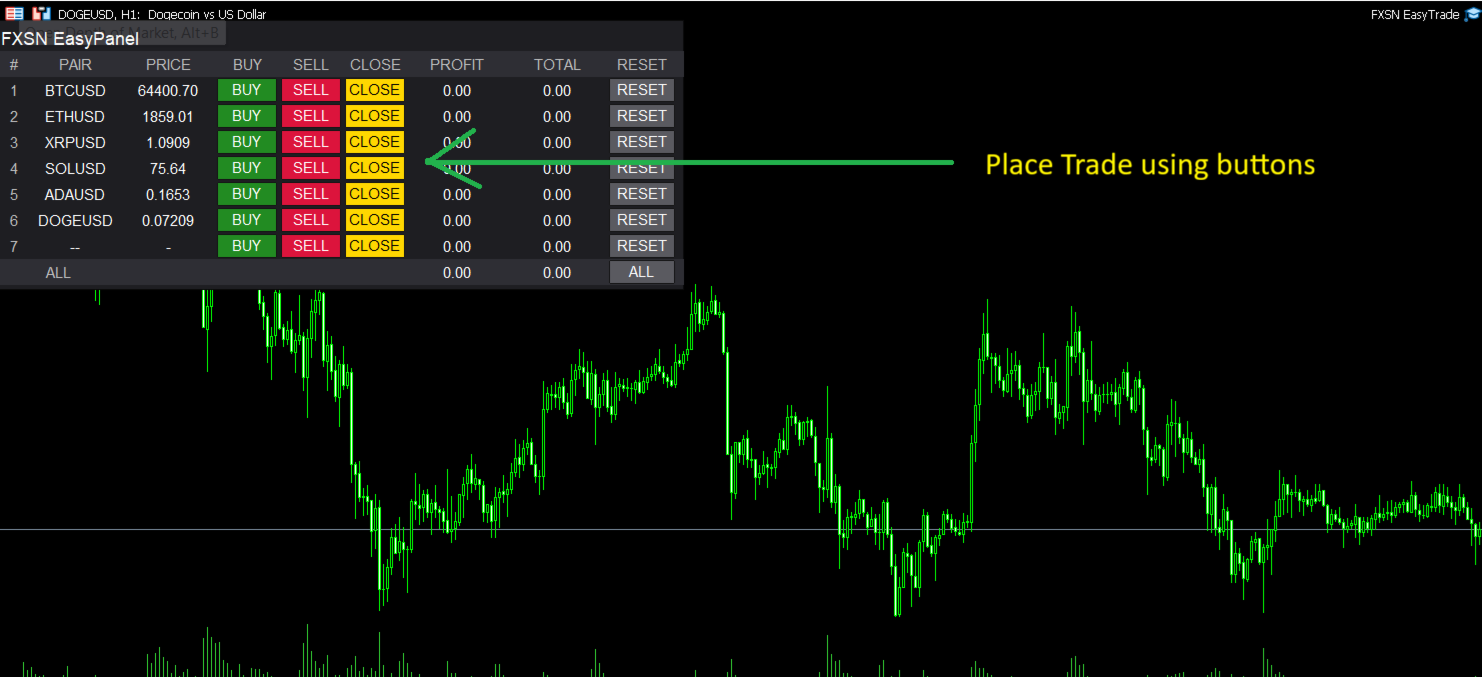
Problem: You want to place trades for a few trading pairs, you now have to scroll through individual charts to place your trades. Your playing it wisely and would like to secure small gains for trades that go in your favour and here you are again checking your trades back and forth and closing some off manually

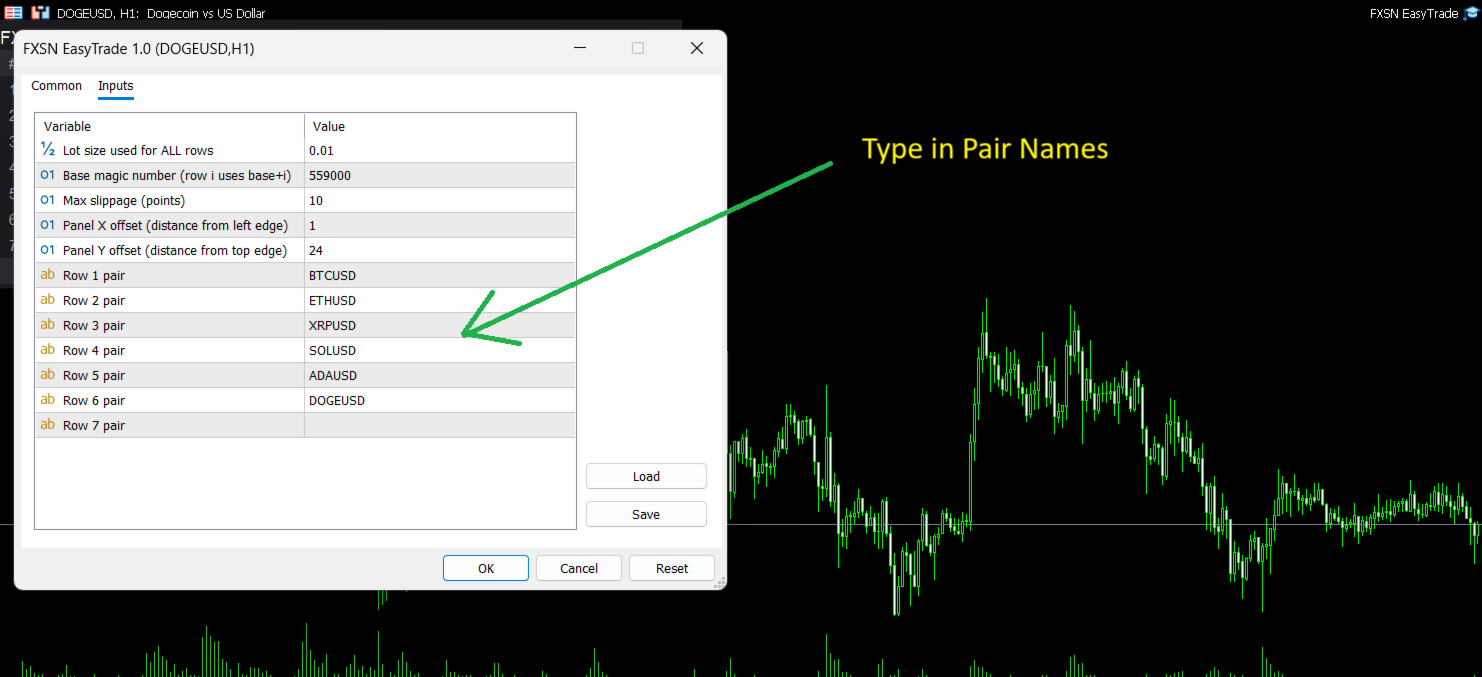
Solution: Use the panel. Drag and Drop the panel into any single chart and type in the pairs you need in the inputs. Save time and make your trading day easy. Features of the panel are as follows:


PAIR: Displays the name of the trading pair

PRICE: Displays and updates the trading pair price as it changes

BUY, SELL and CLOSE Button: Use these to place the trade and close it off

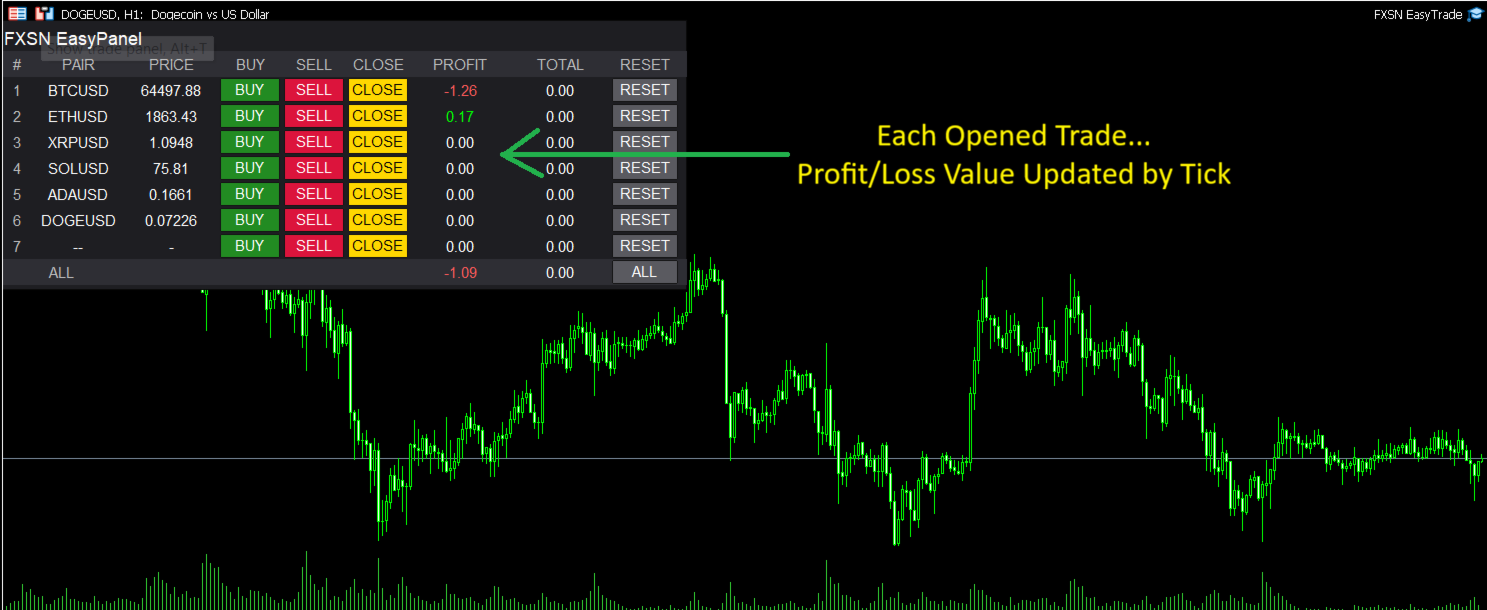
PROFIT Amount: Displays and updates the current floating profit of the trade

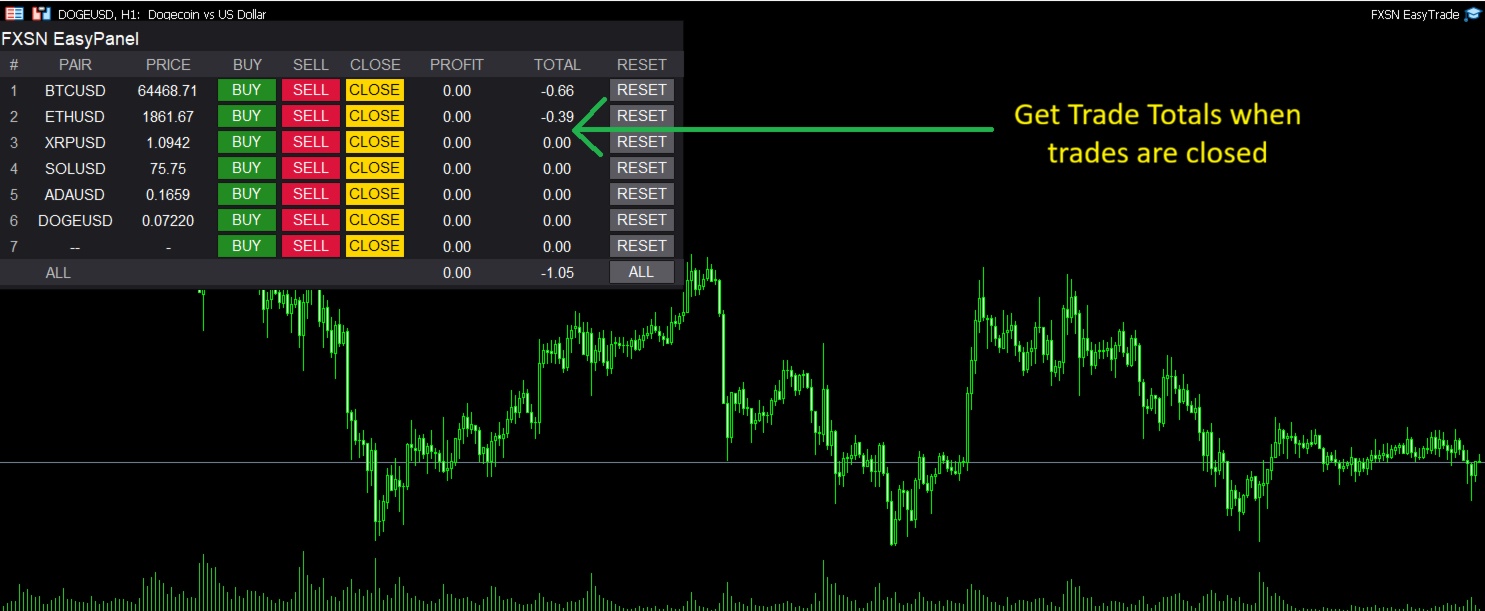
TOTAL Amount: Displays and updates the accumulated total profit/loss for closed trades for that pair

RESET Button: Closes any opened trade and resets the total value

ALL Button: Closes all trades and resets all totals


Note: This product will be free for a limited time only

Recommended products
PZ Penta O MT5
PZ TRADING SLU
3.8 (5)
The Penta-O is a 6-point retracement harmonacci pattern which usually precedes big market movements. Penta-O patterns can expand and repaint quite a bit. To make things easier this indicator implements a twist: it waits for a donchian breakout in the right direction before signaling the trade. The end result is an otherwise repainting indicator with a very reliable trading signal. The donchian breakout period is entered as an input. [ Installation Guide | Update Guide | Troubleshooting | FAQ | A
FREE
Manual position management. Missing SL. Price moves against you. No protection. Trade Manager Lite automates Stop Loss, Take Profit, Trailing Stop, and Break-Even for your open positions. Attach to one chart. Configure your default SL/TP distance. Let it manage your positions automatically. What's Included (FREE Version) Auto SL/TP: Applies missing Stop Loss and Take Profit to positions based on your configured distance in points Trailing Stop: Adjusts SL dynamically as price moves in your favor
FREE
This indicator automatically detects harmonic price patterns on your chart, both bullish and bearish, and shows them as soon as they form, including potential patterns that are still developing. For every pattern it draws the Potential Reversal Zone (PRZ), and for completed patterns it also draws two take-profit and two stop-loss levels. Supported Patterns: Gartley, Bat, Butterfly, Crab, Deep Crab, Shark and Cypher. Each pattern can be switched on or off individually. Key Features: Completed
FREE
TradeMasterPanel — One-Click Manual Trading Panel for MT5 TradeMasterPanel is a professional one-click trading assistant for MetaTrader 5, designed to help traders execute, manage, and protect positions directly from the chart. All settings can be adjusted on-chart and are automatically saved for each trading symbol, eliminating the need to reopen the Inputs dialog or reattach the EA. The interface is fully scalable and DPI-aware for modern high-resolution displays. 1. Market Order Entry Open B
FREE
Free automatic Fibonacci is an indicator that automatically plots a Fibonacci retracement based on the number of bars you select on the BarsToScan setting in the indicator. The Fibonacci is automatically updated in real time as new highest and lowest values appears amongst the selected bars. You can select which level values to be displayed in the indicator settings. You can also select the color of the levels thus enabling the trader to be able to attach the indicator several times with differe
FREE
TradeDeck Lot Calculator
Joaquin Nicolas Metayer
LotCalc is a minimalist MT5 indicator designed for fast, precise position sizing. Set your risk amount in dollars, click the button, then click your entry and stop-loss levels directly on the chart — the lot size and point distance are calculated and displayed instantly. No clutter, no extra panels, just the one tool you actually need before placing a trade.
FREE
Important Lines
Terence Gronowski
4.88 (24)
This indicator displays Pivot-Lines, preday high and low, preday close and the minimum and maximum of the previous hour. You just have to put this single indicator to the chart to have all these important lines, no need to setup many single indicators. Why certain lines are important Preday high and low : These are watched by traders who trade in a daily chart. Very often, if price climbs over or falls under a preday low/high there is an acceleration in buying/selling. It is a breakout out of a
FREE
RSI abcd
Francisco Gomes Da Silva
3.75 (4)
RSI ABCD Pattern Finder: Technical Strategy 1. How the Indicator Works Combines the classic RSI with automatic detection of ABCD harmonic patterns . Key Components Standard RSI (adjustable period) Peak and Trough Markers (arrows) ABCD Patterns (green/red lines) Overbought (70) and Oversold (30) Filters 2. MT5 Setup period = 14 ; // RSI period size = 4 ; // Maximum pattern size OverBought = 70 ; // Overbought level OverSold = 30 ; // Oversold level Filter = USE_FILTER_ YES ; // Confirmation filte
FREE
MACD Enhanced
Nikita Berdnikov
4 (4)
Introducing the MACD  Enhanced – an advanced MACD (Moving Average Convergence Divergence) indicator that provides traders with extended capabilities for trend and momentum analysis in financial markets. The indicator uses the difference between the fast and slow exponential moving averages to determine momentum, direction, and strength of the trend, creating clear visual signals for potential entry and exit points. Attention! To achieve the best results, it is recommended to adapt the indicator
FREE
AI Weekly Open Bias Trader
Fadi Hassan Khaled Ghanem
Uses the weekly opening price as the bias line and trades rejections of that line in the direction of the weekly bias. How it works The EA evaluates its rules once per closed bar of the signal timeframe (H1 by default), so signals do not repaint and the logic is the same in the tester and on a live chart. When the setup appears and no position of this EA is open on the symbol, it opens one market order with a stop loss and a target. Key features Risk based lot size from a percent of balance, wit
FREE
Ninja MT5 Doctor
Atsushi Katayama
NINJA MT5 DOCTOR OVERVIEW NINJA MT5 Doctor is a free, non-trading MT5 environment-diagnostic utility that captures a one-time snapshot of the terminal, account, open charts, selected history and current host-chart symbol. It is an Expert Advisor-format utility, not a trading EA and not an indicator. The panel and input names are in English. WHAT IT CHECKS It reviews broker-server connection, terminal and account trading permissions, Doctor's own permission, trade mode and published sessions, quo
FREE
FiT Panel Pro
Thonglak Janyakorn
Overview FiT Panel Pro is a professional-grade trade management panel designed for MetaTrader 5 traders who demand speed, precision, and full control over their trades. Built with a modern dark-theme UI, it combines one-click execution with advanced risk management, visual SL/TP drag lines, automatic Fibonacci-based levels, and comprehensive order management — all in a single, compact panel. Whether you are a scalper, day trader, or swing trader, FiT Panel Pro gives you the edge you need to exec
FREE
TrendVision AI
Murtadha Majid Jeyad Al-Khuzaie
TrendVision AI – Smart Trend Channels & Price Forecasting for MetaTrader 5 Discover market structure and explore potential future price direction with TrendVision AI, an advanced technical indicator for MetaTrader 5 that combines automatic trendline analysis with a machine-learning-based price forecasting model. How Does TrendVision AI Work? TrendVision AI analyzes historical candlestick data within a configurable lookback window. It automatically draws two trendlines directly on the chart:
FREE
Indicator Description 4 Hull MA Color + Envelopes is a powerful trend-following indicator for MetaTrader 5 that combines four Hull Moving Averages (HMA) with Moving Average Envelopes to clearly identify market direction, trend strength, and potential reversal or pullback zones. This indicator is designed to reduce noise, react quickly to price movement, and provide a clean visual structure for professional trading.   Key Features   4 Hull Moving Averages (20, 50, 100, 200) Automatic color change
FREE
Donchian Breakout And Rsi
Mattia Impicciatore
4.33 (3)
General Description This indicator is an enhanced version of the classic Donchian Channel , upgraded with practical trading functions. In addition to the standard three lines (high, low, and middle), the system detects breakouts and displays them visually with arrows on the chart, showing only the line opposite to the current trend direction for a cleaner view. The indicator includes: Visual signals : colored arrows on breakout Automatic notifications : popup, push, and email RSI filter : to val

FREE
Read-only analytics for accounts running several EAs. Groups your closed trades by magic number and measures how much of their combined risk actually cancels out. Free measurement edition. The monitoring and alerting edition is Portfolio Command Desk:  https://www.mql5.com/en/market/product/188884 The problem You run five Expert Advisors. Each backtest looked fine on its own. But the account does not trade five systems, it trades one portfolio, and no report in MetaTrader tells you how those sys
FREE
# DAILY SUPPORT AND RESISTANCE LEVELS - SEO OPTIMIZED DESCRIPTION ## SHORT DESCRIPTION (160 characters max) ``` Free pivot points indicator with daily support resistance levels for MT5. Perfect for intraday forex day trading and scalping strategies. ``` **Character count:** 159 **Keywords included:** pivot points, support, resistance, MT5, forex, day trading, scalping, free --- ## FULL DESCRIPTION (HTML Formatted for MQL5) ### Main Title **Daily Support and Resistance Levels - Free Pivot
FREE
Position Selective Close MT5
Francisco Manuel Vicente Berardo
The Position Selective Close is a multi-symbol multi-timeframe script used to close simultaneously various positions.  General Description   The Position Selective Close   possesses   three operation modes (Intersection,   Union   and All) that control the way   as   four position features (symbol, magic number,   type   and profit) are used. The modes, available through the Selection Mode input parameter, relate to the features, available through the “Select by Feature” and “Feature” input pa
FREE
Indicator and Expert Adviser  EA Available in the comments section of this product. Download with Indicator must have indicator installed for EA to work. Mt5 indicator alerts for bollinger band and envelope extremes occurring at the same time. Buy signal alerts occur when A bullish candle has formed below both the lower bollinger band and the lower envelope  Bar must open and close below both these indicators. Sell signal occur when A bear bar is formed above the upper bollinger band and upper
FREE
Basic Harmonic Pattern MT5
Mehran Sepah Mansoor
4.78 (99)
This indicator identifies the most popular   Harmonic Patterns   which predict market reversal points.  These harmonic patterns are price formations that are constantly repeating in the forex market and suggest possible future price movements /    Free MT4 Version Dashboard Scanner for this indicator: ( Basic Harmonic Patterns Dashboard ) Comparison of "Basic Harmonic Pattern" vs. "Basic Harmonic Patterns Dashboard" Indicators Feature Basic Harmonic Pattern Basic Harmonic Patterns Dashboard F
FREE
Candle Detector By Mahefa R. General Description Candle Detector is an advanced technical indicator for MetaTrader 5 , designed to automatically detect and highlight the most important Japanese candlestick patterns directly on the price chart . It allows traders to quickly identify market reversal and continuation setups without visual clutter. The indicator recolors only the candles that match the selected pattern , ensuring a clear, accurate, and professional chart analysis . ️ How It Work
FREE
Draws the current and previous daily, weekly and monthly opening prices as labelled lines, the levels many intraday traders use as bias and reaction points. Key features Calculated on closed bars, values do not repaint Works on any symbol and timeframe All periods, levels and colours can be changed in the inputs Light on resources with a maximum bars setting Objects are removed automatically when the indicator is deleted Inputs Lines: Show daily opens, Show weekly opens, Show monthly opens, Peri

FREE
Pivot Points Indicator – a fast, reliable, and fully customizable pivot detection for MetaTrader 5. This indicator uses MetaTrader’s native iHighest and iLowest functions to identify pivot highs and lows by scanning for the highest and lowest prices within a user-defined window of bars. A pivot is confirmed only when the current bar is the absolute maximum or minimum within the selected range, ensuring accurate and timely signals based on robust built-in logic. Key Features No Repainting : Onc
FREE
Auto Lots MT5  Auto Lots MT5 is an innovative and powerful application designed for traders on the MetaTrader 5 (MT5) platform. The application offers a user-friendly and intuitive interface, allowing traders to efficiently manage their positions, set precise entry levels and apply advanced risk management. Key features: 1. Creation of SL/TP zones on the chart: The application allows users to create two customisable rectangles directly on the chart, making it easy to adjust entry points, take
FREE
Morning Range Breakout (Free Version) Morning Range Breakout (Free Version) is a straightforward trading advisor that implements a breakout strategy based on the morning range. It identifies the high and low within a specified time interval (e.g., 08:00–10:00 UTC) and opens a trade on a breakout upward or downward. The free version includes core functionality without restrictions. All parameters and messages are in English, per MQL5 Market requirements. Key Features Detects morning range based
FREE
HeatMap – Volume & Pips Change Analyzer for MT5 The HeatMap indicator for MetaTrader 5 is a powerful and interactive tool designed to help traders identify the most active and volatile trading hours across the last 14 days. By default, the indicator starts as a simple floating button labeled "HeatMap" in the top corner of your chart. With just one click, it opens a compact, easy-to-read panel showing historical market behavior in a 24-hour x 14-day grid layout . What it shows: Hourly Data: Each
FREE
Blame The Box
Karim Abdelwahab
Blame The Box is a lightweight session range and breakout analysis indicator engineered specifically for MetaTrader 5. Built to support and enhance your personal trading strategy, it automatically identifies custom intraday consolidation ranges, maps out dynamic breakout levels, and displays real-time position sizing directly on your chart. Important Note: Blame The Box is an analytical and risk-calculation tool designed to assist your own technical analysis and discretionary trading strategy.
FREE
PZ Order History MT5
PZ TRADING SLU
1 (1)
See beyond the numbers: visualize your trade history for smarter decisions General purpose indicator that displays the trade/order history of any live chart, very much alike the visual mode of the strategy tester. It allows you to examine the real trading history of any particular symbol for educative, improvement, reverse-engineering or diagnostic purposes. It can be used successfully with both the master and investor password. [ Installation Guide | Update Guide | Troubleshooting | FAQ | All P
FREE
Trade Behavior Mirror reads your own account's closed trade history and counts one specific pattern: opening a new position shortly after a loss, at a lot size larger than your own recent normal. It does not predict, and it does not advise. Every number on the panel is something that already happened on this account. How the numbers are built: it reads up to 31 days of closed deals across every symbol and every magic number - this is an account-wide picture, not a chart-specific one. From the 3
FREE
Your chart. One glance. Total clarity. Built by @Ash_TheTrader for traders who are tired of guessing, Extreme Trading Dashboard is a professional-grade heads-up display that sits quietly in the corner of your chart — dark charcoal, rounded, semi-transparent, and genuinely easy on the eyes — until the moment it matters. Dual Session Highlighter Shade up to two independent time windows directly on your chart — London, New York, or your own custom kill-zone. Each gets its own color, so overlapp
FREE
Buyers of this product also purchase
Trade Assistant MT5
Evgeniy Kravchenko
4.43 (216)
It helps to calculate the risk per trade, the easy installation of a new order, order management with partial closing functions, trailing stop of 7 types and other useful functions. Additional materials and instructions Installation instructions - Application instructions Line function -   shows on the chart the Opening line, Stop Loss, Take Profit. With this function it is easy to set a new order and see its additional characteristics before opening.   Risk management  - The risk calculation
FarmedHedge Pair Trading Dashboard
Tanapisit Tepawarapruek
5 (7)
Farmed Hedge Yield Farming | All Markets (Manual - Hybrid - Semi/Automated EA) VERIFIED TRADING RESULTS - Farmed Hedge Yield Axi Copy:  https://www.mql5.com/en/signals/2356376 - Farmed Hedge Yield Exn Copy:   https://www.mql5.com/en/signals/2356404 - Farmed Hedge Yield V Copy:  https://www.mql5.com/en/signals/2357156 IMPORTANT NOTICE: FarmedHedge is a MANUAL-FOCUSED TRADING UTILITY ,not a fully automated EA. Results shown on this Signal include manual trades and overall strategic management.
Forex Trade Manager MT5
InvestSoft
4.98 (690)
Trade Manager MT5 is an advanced position size calculator and trade management tool for MetaTrader 5, designed to help traders plan trades faster, control risk more precisely, and manage open positions directly from the chart. It combines order placement, risk based lot calculation, Stop Loss and Take Profit management, Break Even, Trailing Stop, Partial Close, Equity Protection, and external trade management in one panel. Whether you trade forex, indices, metals, commodities, crypto, or future
Telegram to MT5 Multi-Channel Copier   automatically copies trading signals from your Telegram and Discord channels straight to MetaTrader 5. No bots, no browser extensions, no manual copying. A signal arrives in Telegram or Discord and the EA opens the trade in your terminal within seconds. And before you copy a channel, the built-in backtester shows you what that channel would have done in your account. The product has two components: a Windows application that listens to your Telegram channel
Local Trade Copier EA MT5
Juvenille Emperor Limited
4.94 (150)
Local Trade Copier EA MT5 is a fast and flexible trade copier for copying and managing trades between multiple MetaTrader 5 accounts on the same Windows computer or Windows VPS. It combines local trade synchronization with Receiver-side controls for lot sizing, risk management, trade filtering, symbol mapping, trade management and account protection. Set up your Transmitter and Receiver terminals in about 1 minute and copy manual or EA trades between accounts at the same or different brokers. U
TradePanel MT5
Alfiya Fazylova
4.89 (174)
Trade Panel is a multi-functional trading assistant. The app contains over 50 trading functions for manual trading and allows you to automate most trading tasks. Application instructions: https://www.mql5.com/en/blogs/post/756482 Trial version of the application for a demo account: https://www.mql5.com/en/blogs/post/750865 How to install the application: https://www.mql5.com/en/blogs/post/756239 How to test the application in visual mode: https://www.mql5.com/en/blogs/post/770277 How to install
EA Overfitter
Stephen J Martret
5 (4)
That backtest looks great. But will it still be making money tomorrow, next week, next month? EA Overfitter re-runs your EA on 100 price histories it has never seen. One score tells you if the edge is real. A backtest tells you what an EA did on one price history — the one that happened to occur. What you cannot tell from it is how much of that result was the strategy and how much was the particular path. EA Overfitter answers that. It builds up to 100 synthetic price histories your EA has n
Copy Telegram signals with your own trading rules Telegram to MT5 Signal Trader automatically copies text-based trading signals from public and private Telegram channels and groups into MetaTrader 5. Manage multiple providers and MT5 accounts from one desktop app, with individual risk and trade settings for each provider . No Telegram bot or API setup needed for copying. Simply sign in with your own Telegram account by phone or QR code and select the channels or groups you have already joined. Y
Exp COPYLOT CLIENT for MT5
Vladislav Andruschenko
3.97 (35)
Professional Trade Copier for MetaTrader 5 Fast, professional, and reliable trade copier for MetaTrader . COPYLOT allows you to copy Forex trades between MT4 and MT5 terminals with support for Hedge and Netting accounts. COPYLOT MT5 version supports: - MT5 Hedge to MT5 Hedge - MT5 Hedge to MT5 Netting - MT5 Netting to MT5 Hedge - MT5 Netting to MT5 Netting - MT4 to MT5 Hedge - MT4 to MT5 Netting MT4 version Full Description +DEMO +PDF How To Buy How To Install How to get Log Files H
Strategy Ledger Pro
Abdullah Uygar Tuna
5 (17)
Strategy Ledger Pro is a read-only account analysis panel for MetaTrader 5. It separates account results by Expert Advisor, strategy, symbol, and magic number, so you can see what each one really contributes. The panel is available in 11 languages: English, Français, Deutsch, Español, Italiano, Português, Русский, Türkçe, 中文, 日本語 and 한국어. Before you download the demo. The Market runs the demo of any paid product in the Strategy Tester only. This panel analyses the trades on your own account, and
News Trade EA MT5
Konstantin Kulikov
4.55 (11)
Present to you the useful robot that I have been using for several years. It can be used in both semi-automatic mode and fully automatic mode. >>> Chat <<< The program contains flexible settings for trading on the news of the economic calendar. It cannot be checked in the strategy tester. Only real work. Download the latest archive of settings: https://www.mql5.com/en/blogs/post/747929 Signals monitoring: https://www.mql5.com/en/signals/author/test-standart When creating your own sets of setti
================================================================================ POC BREAKOUT - V20.72. Full Professional Grade Toolkit ================================================================================ POC Breakout is a full MetaTrader 5 trading dashboard for discretionary traders who want breakout signals, Point of Control (POC) context, volume profiles, order flow, market structure, news, alerts, and advanced trade planning in one professional workspace. Attached directly to you
The product will copy all telegram signal to MT5 ( which you are member) , also it can work as remote copier.  Easy to set up, copy order instant, can work with almost signal formats, image signal,  s upport to translate other language to English Work with all type of channel or group, even channel have "Restrict Saving Content", work with  multi channel, multi MT5 Work as remote copier: with signal have ticket number, it will copy exactly via ticket number. Support to backtest signal. How to s
Welcome to Entry In The Zone with SMC Multi Timeframe  —  COMPLETE SMC ANALYSIS SYSTEM — ALL IN ONE INDICATOR  Entry In The Zone with SMC Multi Timeframe  An indicator designed for market analysis based on Smart Money Concepts (SMC), displaying Market Structure, Key Zones (Order Blocks, Supply & Demand Zones, and Fair Value Gaps), Liquidity, and real-time BUY / SELL signals. It supports both Single-Timeframe and Multi-Timeframe analysis, along with the Confluence at Zone feature, which helps you
EA Auditor
Stephen J Martret
5 (7)
EA Auditor is an independent analysis tool for traders evaluating Expert Advisors and trading signals on MetaTrader 5. It audits backtest reports, reviews posted developer signals, and cross-verifies the two against each other to help traders assess strategies before committing capital. The MQL5 market offers a wide range of Expert Advisors from many developers, with varying approaches, quality, and transparency. EA Auditor provides a consistent, data-driven framework for reviewing them, answer
HINN MagicEntry Extra
ALGOFLOW OÜ
4.74 (19)
HINN MAGIC ENTRY – the ultimate tool for entry and position management! SIMPLE. FASTEST. INTUITIVE. MAX AUTOMATED. Place orders by selecting a level directly on the chart! full description   ::  demo-version  :: 60-sec-video-description Key features: - Market, limit, and pending orders - Automatic lot size calculation - Automatic spread and commission accounting - Unlimited partitial take-profits  - Breakeven and trailing stop-loss and take-profit  functions - Invalidation leves - Intuitive, a
Telegram To MT5 Ultra
Mirel Daniel Gheonu
5 (5)
Telegram To MT5 — Signal Copier Turn the trading calls from your Telegram channels into real MT5 orders — automatically, on as many accounts as you like, with risk and rules fully under your control. Telegram To MT5 connects the VIP / signal channels you already follow on Telegram to your MetaTrader 5 terminal. A free companion desktop app reads the messages (even from channels that block bots), and this Expert Advisor executes them on your account — applying your own risk settings, symbol mappi
Telegram to MT5 Coppy
Sergey Batudayev
5 (10)
Telegram to MT5: The Ultimate Signal Copying Solution Simplify your trading with Telegram to MT5, the modern tool that copies trading signals directly from Telegram channels and chats to your MetaTrader 5 platform, without the need for DLLs. This powerful solution ensures precise signal execution, extensive customization options, saves time, and boosts your efficiency. [ Instructions and DEMO ] [ FAQ ] [ How atach logs properly ] [ Settings descrition ] Key Features Direct Telegram API Integrati
Trade copier MT5
Alfiya Fazylova
4.61 (57)
Trade Copier is a professional utility designed to copy and synchronize trades between trading accounts. Copying occurs from the account / terminal of the supplier to the account / terminal of the recipient, which are installed on the same computer or VPS . Before buying, you can test the demo version on a demo account. Demo version here . Full instruction here . Main functionality and benefits: Supports copying MT5> MT5, MT4> MT5, MT5> MT4, including MT5 netting accounts. * Supports copying Dem
AW Shepherd Safety MT5
AW Trading Software Limited
5 (5)
AW Shepherd Safety EA is an Expert Advisor for managing open positions. The trader opens the first order from the panel, and from there the EA runs the basket on its own: it adds recovery orders with a trend filter, closes a side on TakeProfit, trailing or stop, and shows the close levels on the chart. Buys and sells are managed separately, and both sides can be open at the same time. A recovery order opens not just on a price step but once Parabolic SAR, two MAs or candle color show a reversal
Kontrol01 Manager
Andrei Koval
5 (1)
EA Portfolio Control & Cloud Monitoring for MetaTrader 5 Your EAs manage trades. KONTROL_01 manages your EAs. A control system for traders running multiple Expert Advisors on the same account. Coordinate EA activity, manage trading risks and monitor your setup remotely. A detailed User Manual is available via DM after purchase. IN PRACTICE Multiple EAs. No coordination. Your EAs trade independently, unaware of each other's activity. KONTROL_01 coordinates them, limits simultaneous activity a
News Filter EA
Rashed Samir
5 (2)
News Filter EA: Advanced Algo Trading Assistant News Filter EA is an advanced algo trading assistant designed to enhance your trading experience. By using the News Filter EA , you can integrate a Forex economic news filter into your existing expert advisor, even if you do not have access to its source code. In addition to the news filter, you can also specify trading days and hours for your expert. The News Filter EA also includes risk management  and equity protection features. MT4 Version Ma
MT5 to Telegram Signal Provider turns your trading account into a signal provider. Every trade action, whether manual, by EA or from your phone, is instantly sent as a message to Telegram. You can fully customize the format or use a ready-made template for quick setup. [ Demo ] [ Manual ] [ MT4 Version ] [ Discord Version ]     New: [ Telegram To MT5 ] Setup A step by step user guide is available. Key Features Ability to customize order details sent to subscribers You can create a tiered subs
Seconds Chart MT5
Boris Sedov
4.61 (18)
Seconds Chart is a unique tool for creating second-based charts in MetaTrader 5 . With Seconds Chart , you can construct charts with timeframes set in seconds, providing unparalleled flexibility and precision in analysis that is unavailable with standard minute or hourly charts. For example, the S15 timeframe indicates a chart with candles lasting 15 seconds. You can use any indicators and Expert Advisors that support custom symbols. Working with them is just as convenient as on standard charts.
VirtualTradePad PRO SE MT5 — professional trading control center for MetaTrader 5 VirtualTradePad PRO SE is a premium chart-based trading panel and trade-management workspace for MetaTrader 5 . It is designed for traders who want faster execution, clearer position control, structured trade management, visual level planning and a professional workflow directly from the chart. This is not only a BUY / SELL panel. PRO SE combines manual trading, pending orders, position management, partial exits, b
Trader Evolution
Siarhei Vashchylka
5 (7)
" Trader Evolution " - A utility designed for traders who use wave and technical analysis in their work. One tab of the utility is capable of money management and opening orders, and the other can help in making Elliott wave and technical analysis. Manual (Be sure to read before purchasing) | Version for MT4 Advantages 1. Trading in a few clicks. Immediate and pending orders are available in the panel 2. Money management. The program automatically selects the appropriate lot size 3. Simplifies
AW Trade Manager
AW Trading Software Limited
AW Trade Manager is a trade panel for MetaTrader 5 with a risk/reward tool on the chart. A trade is planned with Entry, Stop Loss and Take Profit lines dragged with the mouse: plates show price, distance and money, zones show profit and loss, and the volume is calculated from the risk. Before sending, the confirmation window shows the whole trade with risk, margin and the rules of the position. Manual and instruction -> HERE / Free LIVE Demo -> HERE To manage a position after the entry the panel
RETAILBERG FOOTPRINT CHART PRO — Order-Flow Workspace for MetaTrader 5 Version 7.00  |  Professional System  |  31 tools  |  One chart A full 150-page illustrated User Manual is included. Please read the full manual to understand this feature packed footprint chart elements and ui. https://www.mql5.com/en/blogs/post/777982 DEMO / STRATEGY TESTER — PLEASE READ FIRST
On-Chart Trade Assistant & Risk Management Panel Ergotick Trade Manager gives you a complete set of trading tools directly on your MetaTrader 5 chart: a trade panel with lot size calculator, visual R:R tool, and daily loss limit protection; a separate statistics panel that tracks your performance and past trades; and an economic calendar you can toggle with one click. Built for scalpers, day traders, and prop firm traders. Ergotick Trade Manager is fast , light on resources , and stable , so it
RS Trade Copier - the ultra-fast local trade copier with a real graphical interface. Stop typing account numbers manually. No more 200+ cryptic inputs. A reliable and flexible tool for copying trading operations between multiple MT5 and MT4 terminals. It suits experienced traders, signal providers, and individual investors. It enables trade synchronization from one or multiple Providers to one or multiple Clients with high precision and minimal latency. It supports simple automatic configuration
More from author
EA Ronit Gold
Davindra Adrian Pyankaroo
An Essential Expert Advisor for Traders with Medium to Advanced Experience Problem : When it comes to the martingale expert advisors, one of the most important aspects of keeping any account afloat is entry of the initial trade whilst anticipating a price retraction in terms of future trends. This ensures a high probability of securing gains with this particular method Solution : Ea Ronit Gold is the big brother to EA Ronit. It utilises a three Exponential Moving average backed by the Ichimoku
FREE
FXSN Ronit
Davindra Adrian Pyankaroo
Trading Expert Advisor – Capped Martingale Strategy Problem : With the standard martingale strategy, the biggest issue traders face is that of excessive drawdown when price action is trending and it does not retract to secure a take profit Solution : The capped martingale strategy. Our expert advisor utilises a “Fixed Take Profit” as per series of trades and secures the gain to a single cycle of trades. Rather than making a profit from then bombarding the account with constant cycles in refere
FREE
FXSN EasyAlert
Davindra Adrian Pyankaroo
An Essential Tool for the Professional Trader Problem:  As a professional trader, you have worked out entry points across several charts and now your anticipating price action. At this stage, you are having to constantly check your mobile phone or PC across several charts hoping for those prices to be achieved Solution:  Enter all the prices for all charts into a single display and get instant notifications to your mobile phone or PC. Save yourself time and frustration Note:  This product wil
FREE
Filter:
No reviews
Reply to review