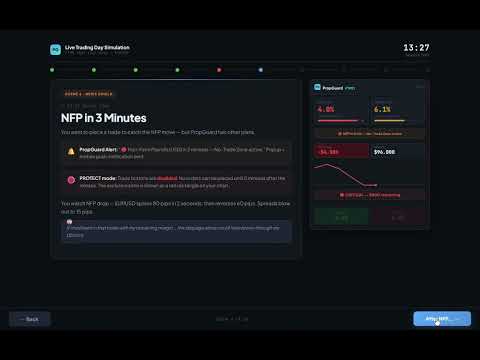
PropGuard OS Risk Manager Trade Panel Prop Firm EA

PropGuard OS — The Airbag for Your Prop-Trading Account
Risk Manager | Trade Panel | Prop Firm EA | FTMO & Funding Pips Ready

Be honest: How did you really lose your last challenge?

Was it the strategy? Probably not.
It was that one moment:

  • The moment a small loss turned into a revenge trade.

  • The moment you “just quickly” bent the rules.

  • The moment your brain screamed “BUY” while your plan said “STOP”.

You wouldn’t drive a car without a seatbelt.
So why risk a $100,000 account without PropGuard OS?

PropGuard OS is not a normal trade panel add-on.
It’s your safety software.
It’s the digital risk manager that taps your shoulder and says: “That’s enough for today.”
…before you drive your account into a wall.

THE 3 WAYS TRADERS LOSE THEIR ACCOUNTS (AND HOW PROPGUARD SAVES YOU)

We analyzed thousands of traders. In the end, almost everyone fails for one of these three reasons.
Which one is yours?

Story #1: “Red Fog” (Discipline)

It’s 15:30. You’re up nicely today. Then you take a small loss.
“No problem,” you think. You increase risk a bit.
The market turns against you. Your pulse spikes. The plan is gone.
You just want to get back to breakeven.

Buy. Sell. Buy.
And 10 minutes later you stare at the screen: Account gone.

Story #2: “Silent Death” (The Equity Trap)

You wake up feeling good. No open trades.
Then you get the email:

“Challenge Failed. Daily Drawdown Violation.”

You don’t understand. Your balance was green.
The mistake: You missed that your prop firm calculates loss based on equity (floating P/L) — and often exactly at 00:00 server time.

Your PropGuard Aha Moment:
No more guessing. No more manual calculations.

The Equity Protector works like a forensic accountant in the background:

  • It stores your exact account value at midnight (server time).

  • It visualizes your real “Safe Zone.”

  • And if you get too close to the limit, it triggers an emergency action (Hard Close) before the prop firm disqualifies you.

Story #3: “Fat Finger” (Execution)

Gold moves fast. You see the setup. You need to act now.
You open the calculator:

Account balance × 1% ÷ stop-loss distance…

While you type, price jumps 10 pips.
You chase the entry, rush the lot size — and mistype.

Your PropGuard Aha Moment:
Forget the calculator.

With Drag & Trade, you simply draw a line on the chart where your stop should be.
PropGuard calculates the exact lot size for your 1% risk in milliseconds.

Precision like a sniper. Speed like an algorithm.

THE 3 SHIELDS OF PROPGUARD OS

SHIELD 1: COMPLIANCE ENGINE (The Guardian)

The core system for FTMO, Apex, Funding Pips, and more.

Equity-Based Daily Drawdown

  • Calculates daily loss exactly like many prop firms (Equity @ 00:00 server time)

  • Visualizes your status clearly:

    • Green: Safe

    • Yellow: Warning

    • Red: Critical

Auto-Lockout & Hard Close

  • Automatically closes all positions and locks trading until the next day when the limit is reached

News Filter (Funding Pips Ready)

  • Automatically creates a No-Trade Zone around high-impact events (CPI, NFP, etc.)

  • Blocks execution X minutes before/after the event (configurable)

Firm Selector

  • Select your prop firm in the menu and the EA applies the rules automatically

SHIELD 2: TRADE EXECUTION (The Cockpit)

Trading that feels like a modern app.

Drag & Trade

  • Place orders visually directly on the chart

Live Risk Calculator

  • Shows risk in USD and % right at your SL line

Smart Grid

  • Automatically split positions into up to 3 parts (scale-out)

NEXT-GEN TECHNOLOGY

PropGuard OS does not rely on outdated standard buttons.

Glassmorphism UI

  • Modern dark interface (TradingView style)

High Performance Rendering

  • CCanvas & Blend2D engine for smooth visuals without flicker

  • Low CPU usage (< 2% CPU)

YOUR INVESTMENT IN SAFETY

One FTMO challenge can cost around $540.
PropGuard OS costs only a fraction of that.

If this tool prevents even one emotional mistake or rule violation, it pays for itself immediately.
It’s the cheapest insurance you can buy for your trading business.

Don’t buy hope. Buy safety.

Download the demo now and test the “Airbag” in the Strategy Tester!

🛡️ PROPGUARD — Complete Feature Overview

1. DRAWDOWN PROTECTION SYSTEM (Core Feature)

Three DD Modes:

  • Equity-Based DD (FTMO, FundingPips, The5ers, FundedNext)
  • Balance-Based DD (alternative reference)
  • Trailing DD / High Water Mark (Apex Trader Funding)

Daily Drawdown:

  • Real-time monitoring from midnight equity snapshot
  • Automatic reset at server midnight
  • Countdown timer to reset (HH:MM:SS)
  • 4-tier traffic light system: Safe → Warning → Critical → Pre-Trade Block
  • Lockout on limit breach with Unlock button

Overall Drawdown:

  • Tracking from Initial Balance (persistent, never resets)
  • Auto-detection of initial deposit from deal history
  • Permanent lockout on limit breach

Safety Buffer & Hard Close:

  • Configurable safety buffer (default: 4%)
  • Automatic closure of ALL positions before DD limit is hit
  • Protects against account loss at prop firms

2. PROP FIRM PRESETS (6 Firms + Custom)

Firm Daily DD Max DD DD Type Leverage
FTMO 5% 10% Equity 1:100
Apex Trader 5% Trailing HWM 1:50
FundingPips 5% 10% Equity 1:100
The5ers 4% 6% Equity 1:30
FundedNext 5% 10% Equity 1:100
Custom User User User User
  • One-click firm switching directly in the panel
  • All DD limits, leverage, and challenge defaults set automatically

3. ONE-CLICK TRADING

Market Orders:

  • BUY / SELL with a single click
  • Automatic lot calculation based on risk
  • Mandatory Stop Loss (no trade without SL)
  • Optional Take Profit
  • Slippage management (configurable)

Pending Orders:

  • BUY LIMIT, BUY STOP, SELL LIMIT, SELL STOP
  • Entry price defined via interactive chart line
  • STOPS_LEVEL minimum distance enforced automatically

2-Click Close:

  • BUY/SELL button morphs to CLOSE when a position is open
  • Confirmation click prevents accidental closures
  • Volume displayed in button (e.g. "CLOSE 0.50 lots")

4. LOT CALCULATOR

Two Risk Modes:

  • Percent Mode: Risk as % of equity (e.g. 1%)
  • Dollar Mode: Fixed amount per trade (e.g. $100)

Calculated Metrics:

  • Lot size (normalized, Min/Max/Step compliant)
  • Risk amount in $
  • Potential loss / profit in $
  • Risk:Reward ratio
  • Required margin
  • SL/TP distance in pips and points

Multi-Instrument:

  • Forex (majors, exotics, 3/5 digit)
  • Indices, commodities, crypto
  • Automatic contract size handling

5. TRADE MANAGEMENT

  • Break-Even: Move SL to entry + buffer (1 click)
  • Partial Close: Close 25% / 50% / 75% of a position
  • Trailing Stop: Automatic trailing in pips (configurable)
  • 4 management buttons directly in the panel

6. INTERACTIVE CHART LINES

  • Entry line (blue), SL line (red), TP line (green)
  • Drag & drop to adjust — prices + lots update live
  • Price labels + distance labels (pips) between lines
  • R:R preset pills: 1:1 / 1:2 / 1:3 / Free — TP adjusts automatically
  • Toggle Show/Hide + Reset to defaults
  • All colors customizable via inputs

7. NEWS ENGINE (Economic Calendar)

4 News Modes:

  • OFF: No display
  • INFO: Markers + countdown timer on chart
  • WARN: Yellow exclusion zones + warning (trading allowed)
  • PROTECT: Red exclusion zones + trade block (no new trades)

Features:

  • Native MT5 Calendar API (no DLLs)
  • Automatic scan 4h ahead + 30min back
  • Impact filter: High only / Medium+High / All events
  • Currency auto-filter (based on symbol) or All
  • Countdown display: "Next: NFP in 00:34:22"
  • Push & popup alerts on entering exclusion zone
  • 5-minute cooldown prevents alert spam

Session Zones:

  • Sydney, Tokyo, London, New York as background overlays
  • Two intensity levels: Subtle / Normal
  • UTC-based with automatic broker offset detection

8. SL GUARD (Stop Loss Monitoring)

  • Automatically detects Stop Loss widening on open positions
  • Visual warning overlay when risk increases
  • 3 severity levels: Info (blue) → Caution (yellow) → Danger (red)
  • 3 sensitivity levels: Low / Medium / High
  • Risk delta shown in $ (e.g. "+$47 additional risk")
  • Break-even moves intelligently ignored
  • Configurable display duration (default: 5 seconds)

9. CHALLENGE PROGRESS TRACKING

3 Modular Metrics (individually toggleable):

Metric Description Firm Defaults
Profit Target Progress toward profit goal FTMO: 10%/5%, FPips: 8%/5%
Min Trading Days Trading days counted FTMO: 4, FPips: 3, FNext: 5
Time Limit Countdown in days FTMO: 30d, FPips: 30d

Challenge Phases: None / Phase 1 / Phase 2 / Funded

  • Automatic firm defaults per phase
  • User override anytime (input > 0 overrides default)
  • Start date configurable (YYYYMMDD) or Auto
  • Trading days calculated from deal history (robust across restarts)
  • Dynamic panel height (1–3 metrics = 36–76px extra)

10. GLASSMORPHIC DASHBOARD UI

Panel Features:

  • Dark transparent design with glassmorphism aesthetics
  • 3 scaling modes: Compact (HD) / Standard (QHD) / Large (4K)
  • Drag & drop, freely positionable
  • Minimize to 40×40px badge ("PG" logo)
  • All positions persistent (survive EA restart)

Visual Design:

  • Rounded corners on all cards + buttons
  • Color-coded DD tiers (green/yellow/red)
  • Hover effects on buttons
  • Real-time input validation (risk field: green/yellow/red border)
  • Pulsing red dot on Pre-Trade Block

Layout Sections:

  1. Header (logo + firm + minimize)
  2. DD Cards (Daily + Overall / Trailing)
  3. P&L + Equity
  4. Risk Input + Lot Calculation
  5. Trade Buttons (BUY/SELL/CLOSE)
  6. Pending Orders (BL/BS/SL/SS)
  7. Management (BE/25/50/75)
  8. Challenge Progress (optional, dynamic)
  9. Footer (Lines toggle + Reset)

11. PRE-TRADE SAFETY CHECKS (7 Layers)

  1. ✅ Trading allowed? (EA + Terminal)
  2. ✅ Market open?
  3. ✅ Lot size valid? (Min/Max/Step)
  4. ✅ Stop Loss set?
  5. ✅ Margin sufficient? (95% free margin)
  6. ✅ Daily DD Pre-Trade Block?
  7. ✅ News exclusion zone active? (PROTECT mode only)

12. PERSISTENCE & MULTI-ACCOUNT

  • All states saved in GlobalVariables
  • Account login as key suffix → multi-account support
  • Survives: EA restart, terminal restart, PC reboot
  • Persisted: Risk, firm, panel position, DD state, lockout, HWM, challenge date

13. SELF-TEST SYSTEM

  • 52 automated tests (T01–T52)
  • Activation via input parameter
  • Validates: symbol properties, lot calculation, inputs, DD detection, challenge config, panel height
  • Output in Experts log

14. TECHNICAL SPECS

Property Value
Version 1.2
Build S12.1
Platform MetaTrader 5
Files 11 (.mq5 + .mqh)
Lines of Code ~10,700
DLLs Required None
External Dependencies None (MT5 Standard Library only)

Recommended products
Martingale Osw MT5
William Oswaldo Mayorga Urduy
User Manual: Advanced Martingale Management and Risk Control System This professional manual describes the operation, configuration, and visual interface of the Advanced Martingale order management system, designed to automate position recovery and risk management in MetaTrader. 1. Introduction and Purpose This tool acts as a high-precision order manager whose main logic is cost averaging. Its purpose is to protect and recover trades that move against the initial direction by deploying a netwo
No EA, no complex configuration – just run this script and see your professional trade setup instantly on the chart. The MTT   Breakout Trade Setup Pro   script is built for manual breakout traders who want   institutional‑grade risk management   without the overhead of an Expert Advisor. It uses a proprietary higher‑timeframe detection algorithm (calibrated for the 9:00 GMT+3 session) to identify the optimal breakout reference levels. Your Stop Loss distance is derived automatically from market
Elliott Wave Helper
Siarhei Vashchylka
4.92 (13)
Elliott Wave Helper - a panel for making elliott wave and technical analysis. Includes all known wave patterns, support and resistance levels, trend lines and cluster zones. Manual (Be sure to read before purchasing) | Version for MT4 Advantages 1. Making wave analysis and technical analysis in a few clicks 2. All Elliott wave patterns available, including triangle and combinations 3. All nine wave display styles, including a special circle font 4. E lements of technical analysis : trend lines,
RSImaxmin
Carlos Andrés Moya Erazo
4.5 (10)
The indicator shows when there are overprice and divergences on the RSI. In addition, it has configurable alerts, dynamic overprice levels and a special “RSI cleaner” function. The indicator that automatically calculates the premium rates! RSImaxmin is an indicator based on the Relative Strength Index (RSI) oscillator that effectively identifies changes in price trends as it reflects the relative strength of bullish movements compared to bearish movements. It is widely used by traders to measur
Sync In Many Ways MT5
Sa No Tsuyoshi Kokorozashi
Description This is a Utility tool for MT5 which will make our chart analysis task quite more efficient and save large amount of time. As for chart analysis, some are watching out several symbol simultaneously with single timeframe and others are trading only one single pair with   multi timeframe analysis. For both, a common troublesome issue is “scroll chart to look back” or “draw chart objects” in multi charts at the same time.  Especially for those who are trading with multi timeframe soluti
The Definitive Performance Testing Solution for MetaTrader Environments What This Tool Does This specialized benchmark utility measures the performance of your MetaTrader environment, providing insights that impact your trading execution. Unlike generic system benchmarks, this tool evaluates performance specifically within the MetaTrader runtime environment. For Professional Traders & Developers: Performance Metrics : Measurements of calculation throughput and memory efficiency Trading-Specific
EA Claim Consistency Checker is a local MT5 utility for checking whether manually entered EA sales-page claims are internally consistent as statistics. You type the headline values from an EA sales page or description directly into the script inputs: Profit Factor, win rate, reward/risk ratio or average win/loss, trade count, max drawdown, monthly return, claim period, and initial capital. The utility reads no report files and no account data; every input is a manual parameter. Explicit units
The EA works directly on the main chart of MetaTrader 5. Visual order execution system with: trade panel visual OCO sending floating mini charts entry/stop/take lines mouse interaction graphic position management Main panel: Containing: asset selection lot field stop loss take profit trailing stop BUY and SELL buttons OCO button cancel orders button close all button BE (break even) button reverse button Panel is movable on the chart. 2. MINI CHARTS Create a floating mini chart system. U
AI Trade Analyzer is an intelligent market analysis tool implemented in the indicator format. The program visualizes signals on the chart and helps the trader evaluate the market situation based on technical indicators and news background. Supported Models: The indicator is compatible with current ChatGPT models, including GPT-5.5 , GPT-5.4 , GPT-5.4-mini , GPT-5.4-nano , GPT-5.1 , GPT-4o , GPT-4o-mini , O1 , and GPT-3.5-turbo . GPT-5.5 is the newest model in the list, designed for deeper marke
This indicator helps you control several pairs in a small workspace, therefore, it is not necessary to open several charts on the platform to do so. The indicator shows sequentially up to 6 different pairs, besides that each of these pairs has a button with which you can stop the indicator to observe the selected pair. Place the indicator on a chart to monitor several pairs and the rest of your space use it on the chart of the pair you wish to observe in detail.   MT4 version       Parameters Ob
Correlation Master
Agus Santoso
3.67 (3)
Blogs :  https://www.mql5.com/en/blogs/post/761835 MT4 Version :   https://www.mql5.com/en/market/product/122732 MT5 Version :  https://www.mql5.com/en/market/product/122733 CORRELATION MASTER : DOUBLE THE PAIRS, HALF THE RISK Smart EA for Negative Correlation & Auto Hedging Correlation Master is an automated Expert Advisor that utilizes the negative correlation strategy between currency pairs. By opening opposite positions on opposing pairs (e.g. EURUSD Buy and USDCHF Sell), this EA aims to
Topos e fundos com fibo
Paulo Henrique Sanches Bonanni
PHSB_Topo_Fundo A clearer view of market extremes and the current market structure PHSB_Topo_Fundo is an indicator developed for MetaTrader 5 to help traders visualize the price structure within a market range , highlighting its main extremes and intermediate areas. In addition to identifying the Top and Bottom , the indicator combines other relevant information into a single interface, allowing traders to simultaneously observe the analyzed price range, the current position of price within that
FREE
This Dashboard is very useful . That will help us analyzing graph. In this dashboard has some functions. such as  - Buy Stop - Sell Stop - Buy Limit Order - Sell Limit Order - Close All trade on this graph - Close All Profit - Delete Pending Order = Notify to enter an order - Percentage Calculation of chance to win an order On this strategy i calculated all Major EMA to find a higher chance and take more profits
Sinaleiro Trader
Renato Takahashi
O Sinaleiro Trader é o robô de daytrade que usa multiníveis de acordo com a abertura do dia. Assim, a cada rompimento dos níveis, o robô emite ordens de compra ou venda, de acordo com a tendência. Os stops podem ser fixos ou dinâmicos de acordo com os níveis. É possível configurar a distância do sinaleiro, bem como horários de trades e dias da semana. Alterar o parâmetro BR1 para BR.
Danko DTC Panel
Ricardo Almeida Branco
Do not buy before seeing the Danko Trend Color product, as this panel is a way to view a summary of this indicator on various timeframes. The Danko DTC Panel utility allows you to look at the trend in up to 5 timeframes. When clicking on the timeframe texts, a new window will open with the indicator plotted on the screen so you can see the complete chart. The width of the panel, with the amount of candles you want to see, is customizable, see the images below. Ao clicar nos textos dos timeframe
RR Gestion
Wilson Eduardo Loor Arguello
Trade with absolute precision, speed, and visual control. RR Gestion V4.0 is the ultimate Risk-to-Reward utility panel for MetaTrader 5, designed to bring the fluid, visual order-placement experience of TradingView directly into your MT5 charts. Whether you are a lightning-fast scalper or a meticulous swing trader, this tool completely eliminates human error in risk calculation. Simply drag the visual zones on your chart, and the panel handles the math, lot sizing, and partial closures automatic
ADAM for FTMO 5
Vyacheslav Izvarin
5 (1)
ADAM EA Special Version for FTMO Please find new Version here  https://www.mql5.com/en/market/product/113326 Our 1st EA created using ChatGPT technology Trade only GOOD and checked PROP FIRMS  Default parameters for Challenge $100,000 Tested on EURUSD and GBPUSD only  Use 15MIN Time Frame Close all deals and Auto-trading  before Weekend at 12:00 GMT+3  Friday For Prop Firms MUST use special Protector  https://www.mql5.com/en/market/product/94362 -------------------------------------------------
The Simple Manual Trading Panel (v2.11) Is a professional trade management tool designed with a clean, movable UI to streamline manual execution and automated exit strategies. Core Features Dynamic Visual Interface: A movable GUI panel that provides real-time information including a bar countdown timer, live spread, and advanced volume analysis. Flexible Lot Size setting, with 2 decimals (If broker supports it). Multi-Stage Take Profit: Supports three distinct Take Profit (TP) levels in either
Multi Currency Previous Candle or Previous Bar Scanner helps you scan multi symbol charts with any custom timeframe which you select from indicator settings. Based on product : https://www.mql5.com/en/market/product/78657 It can be used to scan multi symbols for Previous Day high low, Previous week high low, Previous month High low or any custom timeframe e.g. Previous 4 hour chart high low It filters noise and gives directional alerts when price touches High or low line  The strategy is simpl
News Clock
Victor Klenov
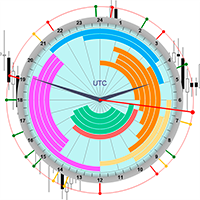
The professional browser of News and Trading Sessions is now available in MetaTrader 5. Now all the most important market information is collected on one dial! News located on the Time scale. Planning your working time has never been so easy and convenient ... The news scale can be switched a day, two, a week, a month forward or backward (see the details in the short video). All news updates in real time. Thanks to the built-in filters, you can configure the display of news by importance, cou
️ UMNi-CMND MT5 Remote Command & Trade Control System UMNi-CMND turns Telegram into a full remote control panel for your MetaTrader terminal. Send commands from your phone to open trades, manage positions, query account status, and receive complete trade telemetry — all without touching the platform. KEY FEATURES Full remote trade execution via Telegram Open, close, and manage positions by command Move SL/TP, set breakeven, partial close Live status, account, and position
DD Guardian Bot — User Guide Requirements MetaTrader 5 (any broker) A Telegram account Step 1 — Create your Telegram Bot Open Telegram and search for @BotFather Send /newbot and follow the prompts to set a name and username BotFather will reply with a Bot Token — copy and save it Send any message to your new bot (e.g. /start ) so it can detect your Chat ID Open the following URL in a browser to find your Chat ID: https://api.telegram.org/bot&lt ;YOUR_TOKEN>/getUpdates Look for "chat":{"id": 12
Smart Close Manager v1.1 is a lightweight but powerful order-management utility designed for traders who need fast, safe, and precise control over their positions. This tool allows you to instantly close positions and delete pending orders based on smart filters such as symbol, direction, profit state, or order type. Perfect for scalpers, intraday traders, and anyone managing multiple orders. Key Features Close all orders with one click Close only BUY / only SELL positions Close only profitabl
Custom Alerts MT5
Daniel Stein
5 (9)
Custom Alerts: Monitor Multiple Markets and Never Miss a Key Setup Overview Custom Alerts is a dynamic solution for traders who want a consolidated way to track potential setups across multiple instruments. By integrating data from our flagship tools—such as FX Power, FX Volume, FX Dynamic, FX Levels, and IX Power— Custom Alerts automatically notifies you of crucial market developments without juggling multiple charts or missing prime opportunities. With support for all asset classes your brok
Volume Flow Binance
Thalles Nascimento De Carvalho
Volume Flow Binance! Have you ever imagined accessing the times and trades of your favorite cryptocurrency, with detailed insights into volume flow and price movement analysis, even if your broker doesn’t offer complete trading history access? With Volume Flow Binance , that’s now a reality! This MQL5 script is designed for cryptocurrency traders seeking a detailed view of real-time market dynamics. Key Features: Direct access to the times and trades of any cryptocurrency listed i
FREE
BRM Trade Assistant Pro – The Ultimate One-Click Execution & Advanced Order Management for MT5 Overview Do you often miss golden market opportunities due to MetaTrader 5's cumbersome default order windows? Or does your trading psychology suffer because you are too slow to secure profits before the market aggressively reverses? BRM Trade Assistant Pro is designed as a premium on-screen tactical assistant to bridge the gap between manual trader intuition, lightning-fast execution, and automated r
ICT PD Arrays Trader
Aesen Noah Remolacio Perez
Attention All ICT Students! This indispensable tool is a must-have addition to your trading arsenal... Introducing the ICT PD Arrays Trader: Empower your trading with this innovative utility designed to enhance and simplify your ICT trading strategy and maximize your potential profits.  How does it work? It's simple yet highly effective. Begin by placing a rectangle on your trading chart and assigning it a name like 'ict' or any preferred identifier. This allows the system to accurately ident
Everything in Essential, plus real-time market structure and trend analysis on your chart. See major and minor structure breaks, shifts, and trend direction the moment they happen — no separate indicator, no manual marking. Combined with one-click execution and auto risk calculation, you get context and control in the same panel. Includes: market structure analysis, real-time structure updates, major/minor trend display, plus the full Essential feature set — one-click execution, risk calculator,
Meditation Seed: Meditation is a practice in which an individual uses a technique – such as mindfulness, or focusing the mind on a particular object, thought, or activity – to train attention and awareness, and achieve a mentally clear and emotionally calm and stable state.[1][2][3][4][web 1][web 2] Meditation is practiced in numerous religious traditions. The earliest records of meditation (dhyana) are found in the Upanishads, and meditation plays a salient role in the contemplative repertoire
FREE
Trading Session Dashboard
Marwan Bin Mohammed Al Eid Bin Mohammed Carpenter
The Trading Sessions Dashboard is a powerful and user-friendly MT5 indicator designed to provide traders with real-time insights into the major forex trading sessions. It displays the status of each session (Active or Closed) along with the remaining time until closure or the next opening, helping you align your trading strategy with market hours. Built for clarity and professionalism, this indicator is perfect for beginners and experienced traders alike, ensuring you never miss key session tran
Buyers of this product also purchase
Trade Assistant MT5
Evgeniy Kravchenko
4.41 (216)
It helps to calculate the risk per trade, the easy installation of a new order, order management with partial closing functions, trailing stop of 7 types and other useful functions. Additional materials and instructions Installation instructions - Application instructions - Trial version of the application for a demo account Line function -   shows on the chart the Opening line, Stop Loss, Take Profit. With this function it is easy to set a new order and see its additional characteristics bef
Forex Trade Manager MT5
InvestSoft
4.98 (676)
Trade Manager MT5 is an advanced position size calculator and trade management tool for MetaTrader 5, designed to help traders plan trades faster, control risk more precisely, and manage open positions directly from the chart. It combines order placement, risk based lot calculation, Stop Loss and Take Profit management, Break Even, Trailing Stop, Partial Close, Equity Protection, and external trade management in one panel. Whether you trade forex, indices, metals, commodities, crypto, or future
FarmedHedge Pair Trading Dashboard
Tanapisit Tepawarapruek
5 (4)
Farmed Hedge Yield Farming | All Markets (Manual - Hybrid - Semi/Automated EA) VERIFIED TRADING RESULTS - Farmed Hedge Yield Axi Copy:  https://www.mql5.com/en/signals/2356376 - Farmed Hedge Yield Exn Copy:   https://www.mql5.com/en/signals/2356404 - Farmed Hedge Yield V Copy:  https://www.mql5.com/en/signals/2357156 * Before purchasing, please feel free to send me a message if you have any questions about the product or setup. - You can test the system using Strategy Tester: Visual Mode , a

Beta Release The Telegram to MT5 Signal Trader is nearly at the official alpha release. Some features are still under development and you may encounter minor bugs. If you experience issues, please report them, your feedback helps improve the software for everyone. Telegram to MT5 Signal Trader is a powerful tool that automatically copies trading signals from Telegram channels or groups directly to your MetaTrader 5 account. It supports both public and private Telegram channels, and you can conn
================================================================================ POC BREAKOUT - V20.72. Full Professional Grade Toolkit ================================================================================ POC Breakout is a full MetaTrader 5 trading dashboard for discretionary traders who want breakout signals, Point of Control (POC) context, volume profiles, order flow, market structure, news, alerts, and advanced trade planning in one professional workspace. Attached directly to you
TradePanel MT5
Alfiya Fazylova
4.88 (167)
Trade Panel is a multi-functional trading assistant. The app contains over 50 trading functions for manual trading and allows you to automate most trading tasks. Application instructions + video instructions: https://www.mql5.com/en/blogs/post/772292 Trial version of the application for a demo account: https://www.mql5.com/en/blogs/post/750865 How to install the application: https://www.mql5.com/en/blogs/post/756239 How to test the application in visual mode: https://www.mql5.com/en/blogs/post/7
Local Trade Copier EA MT5
Juvenille Emperor Limited
4.94 (148)
Experience exceptionally fast trade copying with the   Local Trade Copier EA MT5 . With its easy 1-minute setup, this trade copier allows you to copy trades between multiple MetaTrader terminals on the same Windows computer or Windows VPS with lightning-fast copying speeds of under 0.5 seconds. Whether you're a beginner or a professional trader, the   Local Trade Copier EA MT5   offers a wide range of options to customize it to your specific needs. It's the ultimate solution for anyone looking t
EA Overfitter
Stephen J Martret
5 (1)
That backtest looks great. But will it still be making money tomorrow, next week, next month? EA Overfitter re-runs your EA on 100 price histories it has never seen. One score tells you if the edge is real. A backtest tells you what an EA did on one price history — the one that happened to occur. What you cannot tell from it is how much of that result was the strategy and how much was the particular path. EA Overfitter answers that. It builds up to 100 synthetic price histories your EA has n
Telegram to MT5 MultiChannel Copier
Sergio Marquez Uroz
4.46 (13)
Telegram to MT5 Multi-Channel Copier   automatically copies trading signals from your Telegram channels straight to MetaTrader 5. No bots, no browser extensions, no manual copying. A signal arrives in Telegram and the EA opens the trade in your terminal within seconds. And before you copy a channel, the built-in backtester shows you what that channel would have done in your account. The product has two components: a Windows application that listens to your Telegram channels, and this Expert Advi
Astro Trade MT5
Indra Maulana
5 (6)
25% discount on the release of the tool: only for the next 3 buyers Send a message to receive a demo version. AstroTrade Trading Assistant AstroTrade is a comprehensive multi-functional trading utility developed for the MetaTrader 5 platform. It integrates essential tools for trade execution, risk management, and technical monitoring into a single unified interface. The application is designed to assist traders in managing their daily operations through a visual and structured environment. Vi
HINN MagicEntry Extra
ALGOFLOW OÜ
4.74 (19)
HINN MAGIC ENTRY – the ultimate tool for entry and position management! SIMPLE. FASTEST. INTUITIVE. MAX AUTOMATED. Place orders by selecting a level directly on the chart! full description   ::  demo-version  :: 60-sec-video-description Key features: - Market, limit, and pending orders - Automatic lot size calculation - Automatic spread and commission accounting - Unlimited partitial take-profits  - Breakeven and trailing stop-loss and take-profit  functions - Invalidation leves - Intuitive, a
Exp COPYLOT CLIENT for MT5
Vladislav Andruschenko
3.97 (35)
Professional Trade Copier for MetaTrader 5 Fast, professional, and reliable trade copier for MetaTrader . COPYLOT allows you to copy Forex trades between MT4 and MT5 terminals with support for Hedge and Netting accounts. COPYLOT MT5 version supports: - MT5 Hedge to MT5 Hedge - MT5 Hedge to MT5 Netting - MT5 Netting to MT5 Hedge - MT5 Netting to MT5 Netting - MT4 to MT5 Hedge - MT4 to MT5 Netting MT4 version Full Description +DEMO +PDF How To Buy How To Install How to get Log Files H
Premium Trade Manager - The Trade Panel With a Coach Built In Series price: 89 USD until Sunday, 13 September 2026, then 111 USD again. The setup was the easy part. By the third order of the morning the lot size gets worked out in your head, the stop lands where the hand stops, and the numbers due in forty minutes sit in a tab you closed at breakfast. Premium Trade Manager takes that off you: one click sends the order at the size your risk allows, entry, stop and target as draggable lines and th
Anchor Trade Manager
Kalinskie Gilliam
5 (9)
Your EAs cannot see each other, but Anchor can. Anchor gives you one place to coordinate your EAs, manage risk, and decide when trading is allowed. It works alongside the trading bots you already use without any changes to them. The Problem One EA opens a trade. Then another starts trading. The next thing you know, you wake up to multiple grids built across your account. Each EA may be doing exactly what it was designed to do, but together they can place far more risk on your account than you in
Power Candles Strategy Scanner - Self-Optimizing Multi-Symbol Setup Finder Power Candles Strategy Scanner runs the same self-optimizing engine that powers the Power Candles indicator - on every symbol in your Market Watch, side by side. One panel tells you which symbols are statistically tradable right now, which strategy wins on each, the optimal Stop Loss / Take Profit pair, and pings you the moment a fresh signal fires. This tool is part of the Stein Investments ecosystem - 18+ tools plus Max
MT5 to Telegram Signal Provider turns your trading account into a signal provider. Every trade action, whether manual, by EA or from your phone, is instantly sent as a message to Telegram. You can fully customize the format or use a ready-made template for quick setup. [ Demo ] [ Manual ] [ MT4 Version ] [ Discord Version ]     New: [ Telegram To MT5 ] Setup A step by step user guide is available. Key Features Ability to customize order details sent to subscribers You can create a tiered subs
Grid Manual MT5
Alfiya Fazylova
4.73 (22)
Grid Manual is a trading panel for working with grid strategies. The utility is universal, has flexible settings and an intuitive interface. It works with a grid of orders not only in the direction of averaging losses, but also in the direction of increasing profits. The trader does not need to create and maintain a grid of orders, the utility will do it. It is enough to open an order and the "Grid manual" will automatically create a grid of orders for it and will accompany it until the close. F
The News Filter MT5
Leolouiski Gan
4.78 (23)
This product filters   all expert advisors and manual charts   during news time.  It is able to remove any of your EA during news and automatically reattach them after news ends. This product also comes with a complete  order management system   that can handle your open positions and pending orders before the release of any news. Once you purchase   The News Filter , you will no longer need to rely on built-in news filters for future expert advisors, as this product can filter them all from her
Signal Trading View to MT5 Pro
Mirel Daniel Gheonu
4.5 (2)
Signal TradingView to MT5 Pro  Instant professional execution between TradingView and MetaTrader 5 Automate your trading strategy with the most robust communication bridge between TradingView alerts and real execution in MT5. Designed for traders who demand speed, flexibility, and impeccable risk management, this Expert Advisor transforms any alert message into a precise market or limit order.   Install and TEST the TRIAL version HERE STRENGTHS AND ADVANTAGES Universal Parsing Engine (Propriet
Footprint Chart Pro — Professional OrderFlow EA for MetaTrader 5 Version 6.34 | Professional tool for real traders | Institutional-Grade Visualization DEMO USERS - PLEASE SELECT EVERY TICK / REAL TICK WHEN TESTING AND YOU HAVE DOWNLOADED HISTORICAL DATA. IF YOU SEE A WAITING SCREEN AND IT IS NOT DOWNLOADING, IT MEANS YOU HAVE LOW HISTORICAL DATA. TRY 1 MIN AND 5 MIN FIRST ON 1 DAY DATA. ONE DAY DATA SHOULD BE THE NEWEST AND MOST CURRENT DATE. PLEASE WAIT UNTIL THE MARKET HAS ROLLED OVER PERIOD.

Trade Dashboard MT5
Fatemeh Ameri
4.95 (132)
Trade Dashboard simplifies how you open, manage, and control your trades, with built-in lot size calculation. It allows you to execute trades, manage risk, and control positions directly on the chart, with tools such as partial close, breakeven, and trailing stop. Designed to reduce manual work and help you stay focused on your trading decisions. A demo version is available for testing. Detailed explanations of features are provided within the MQL5 platform. Installation instructions are include
FUTURES ORDERFLOW FOOTPRINT CHART Professional OrderFlow EA for MetaTrader 5 Version 1.01| Professional tool for real traders | Institutional-Grade Visualization STRATEGY TESTER USERS - PLEASE SELECT EVERY REAL TICK WHEN TESTING AND YOU HAVE DOWNLOADED HISTORICAL DATA. IF YOU SEE A WAITING SCREEN AND IT IS NOT DOWNLOADING, IT MEANS YOU HAVE LOW HISTORICAL DATA. TRY 1 MIN AND 5 MIN FIRST ON 1 DAY DATA. ONE DAY DATA SHOULD BE THE NEWEST AND MOST CURRENT DATE. PLEASE WAIT UNTIL THE MARKET HAS ROL
Ultimate Extractor
Clifton Creath
5 (8)
Ultimate Extractor - Professional Trading Analytics for MT5 *****this is the local HTML version of Ultimate Extractor. !!!!!it is not compatible with Cloud!!!! For the online version please reach out to me directly****** Ultimate EA manager also now available when you use cloud pro and above for free!! Ultimate Extractor transforms your MetaTrader 5 trading history into actionable insights with comprehensive analytics, interactive charts, and real-time performance tracking. What It Does Automa
Risk Manager Pro MT5
Roman Zhitnik
5 (8)
Risk Manager Pro MT5 is an account protection Expert Advisor for traders who want strict risk control inside MetaTrader 5. The utility monitors your account equity, daily and weekly results, drawdown, open positions, trade count, consecutive losses, and trading hours. When a configured limit is reached, it can automatically close positions, cancel pending orders, stop other EAs, send notifications, or close the terminal. Instead of relying on discipline during a stressful trading session, you de
Seconds Chart MT5
Boris Sedov
4.61 (18)
Seconds Chart is a unique tool for creating second-based charts in MetaTrader 5 . With Seconds Chart , you can construct charts with timeframes set in seconds, providing unparalleled flexibility and precision in analysis that is unavailable with standard minute or hourly charts. For example, the S15 timeframe indicates a chart with candles lasting 15 seconds. You can use any indicators and Expert Advisors that support custom symbols. Working with them is just as convenient as on standard charts.
Telegram To MT5 Receiver
Levi Dane Benjamin
4.53 (15)
Copy trade signals from Telegram channels you already belong to (including private and restricted channels) directly into MetaTrader 5. Set your risk rules once, monitor execution, and manage positions with built-in protections designed to reduce mistakes and overtrading. Fast setup : configure your channels, select what to copy, and start within minutes using a clean on-chart interface. User Guide + Demo | MT4 Version Who this is for Traders who follow one or more signal providers and want cons
X2 Copy MT5
Liubov' Shkandrii
Fast. Accurate. Innovative. Tech-Driven. Discover instant trade copying with the revolutionary X2 Copy MT5. With just a 10-second simple setup, you'll get a powerful tool for syncing trades between MetaTrader terminals on a single computer or Windows VPS with unprecedented speed. Whether you're managing multiple accounts, following signals, or scaling your strategy, X2 Copy MT5 adapts to your workflow with unparalleled precision and control. Work faster and more reliably with the most tech-drive
Welcome to ENTRY IN THE ZONE WITH SMC MULTI TIMEFRAME Entry In The Zone and SMC Multi Timeframe is a real-time market analysis tool based on Smart Money Concepts (SMC), designed to analyze market structure, price direction, and key trading zones. It supports both Single-Timeframe Analysis and Multi-Timeframe Analysis, providing a clearer view of the overall market structure across multiple timeframes, with real-time BUY / SELL signals that do not repaint. It is designed to help filter trading op
Trade Copier Ultimate
Janitha Sandaruwan Amaradasa Wickramasingha Arachchilage
5 (5)
Trade Copier Ultimate - Telegram to MT5 Signal Copier Trade Copier Ultimate automatically copies Telegram trading signals into MetaTrader 5. The EA can read signal messages, detect the symbol, order type, entry price, Stop Loss, Take Profit levels and selected update commands, then execute or manage the trade in MT5 using your lot and risk settings. It is more than a basic Telegram to MT5 copier. TCU also supports Bot API and user-account Bridge workflows, Discord signal routing, local MT5 to MT
The product will copy all telegram signal to MT5 ( which you are member) , also it can work as remote copier.  Easy to set up, copy order instant, can work with almost signal formats, image signal,  s upport to translate other language to English Work with all type of channel or group, even channel have "Restrict Saving Content", work with  multi channel, multi MT5 Work as remote copier: with signal have ticket number, it will copy exactly via ticket number. Support to backtest signal. How to s
More from author
PGuard Basic
Richard Heronimus Oehmig Kuhn
The Free Drawdown Dashboard Built for Prop Firm Traders PGuard Basic is the first free Drawdown Dashboard and Lot Calculator designed specifically for Prop Firm Traders on MetaTrader 5. Monitor your Daily and Overall Drawdown in real time, calculate the perfect lot size for every trade, and see the exact impact on your remaining drawdown budget before you open a position. Built for FTMO, Apex Trader Funding, Funding Pips, and any other Prop Firm with configurable Custom Presets. Most traders fa
FREE
CableStarV2 MT4
Richard Heronimus Oehmig Kuhn
Timeframe   H1 Pair   GBPUSD The CableStarV2 follows a   trend trading strategy . It uses   Bollinger Bands   on   HeikenAshi Charts   to find the perfect entry and exit points in the market. Every position is secured with a stopp loss. The backtests shown in the screenshots were done with the default settings. Do you own testing to find even better settings. Please download the free demo to do your own testing. The CableStarV2 is not using any   martingale and/or grid functionalities . Still th
CableStarV2
Richard Heronimus Oehmig Kuhn
Timeframe H1 Pair GBPUSD The CableStarV2 follows a trend trading strategy . It uses Bollinger Bands on HeikenAshi Charts to find the perfect entry and exit points in the market. Every position is secured with a stopp loss. The backtests shown in the screenshots were done with the default settings. Do you own testing to find even better settings. Please download the free demo to do your own testing. The CableStarV2 is not using any martingale and/or grid functionalities . Still the tests shown b
Goldwise Trend Advisor
Richard Heronimus Oehmig Kuhn
Goldwise Trend Advisor — Professional Gold Trading with Full Transparency Do you know why most Gold EAs fail? Because they trade against the market. Goldwise does the opposite: it identifies the dominant trend on the Daily chart and trades exclusively in its direction. No guessing, no hoping — just disciplined trades with the market, not against it. And the best part: you can see what the EA is doing and why, at all times. No black-box trading. Full transparency, right on your chart. Why Goldwis
Filter:
No reviews
Reply to review