PropGuard OS Risk Manager Trade Panel Prop Firm EA

PropGuard OS — The Airbag for Your Prop-Trading Account
Risk Manager | Trade Panel | Prop Firm EA | FTMO & Funding Pips Ready

Be honest: How did you really lose your last challenge?

Was it the strategy? Probably not.
It was that one moment:

  • The moment a small loss turned into a revenge trade.

  • The moment you “just quickly” bent the rules.

  • The moment your brain screamed “BUY” while your plan said “STOP”.

You wouldn’t drive a car without a seatbelt.
So why risk a $100,000 account without PropGuard OS?

PropGuard OS is not a normal trade panel add-on.
It’s your safety software.
It’s the digital risk manager that taps your shoulder and says: “That’s enough for today.”
…before you drive your account into a wall.

THE 3 WAYS TRADERS LOSE THEIR ACCOUNTS (AND HOW PROPGUARD SAVES YOU)

We analyzed thousands of traders. In the end, almost everyone fails for one of these three reasons.
Which one is yours?

Story #1: “Red Fog” (Discipline)

It’s 15:30. You’re up nicely today. Then you take a small loss.
“No problem,” you think. You increase risk a bit.
The market turns against you. Your pulse spikes. The plan is gone.
You just want to get back to breakeven.

Buy. Sell. Buy.
And 10 minutes later you stare at the screen: Account gone.

Story #2: “Silent Death” (The Equity Trap)

You wake up feeling good. No open trades.
Then you get the email:

“Challenge Failed. Daily Drawdown Violation.”

You don’t understand. Your balance was green.
The mistake: You missed that your prop firm calculates loss based on equity (floating P/L) — and often exactly at 00:00 server time.

Your PropGuard Aha Moment:
No more guessing. No more manual calculations.

The Equity Protector works like a forensic accountant in the background:

  • It stores your exact account value at midnight (server time).

  • It visualizes your real “Safe Zone.”

  • And if you get too close to the limit, it triggers an emergency action (Hard Close) before the prop firm disqualifies you.

Story #3: “Fat Finger” (Execution)

Gold moves fast. You see the setup. You need to act now.
You open the calculator:

Account balance × 1% ÷ stop-loss distance…

While you type, price jumps 10 pips.
You chase the entry, rush the lot size — and mistype.

Your PropGuard Aha Moment:
Forget the calculator.

With Drag & Trade, you simply draw a line on the chart where your stop should be.
PropGuard calculates the exact lot size for your 1% risk in milliseconds.

Precision like a sniper. Speed like an algorithm.

THE 3 SHIELDS OF PROPGUARD OS

SHIELD 1: COMPLIANCE ENGINE (The Guardian)

The core system for FTMO, Apex, Funding Pips, and more.

Equity-Based Daily Drawdown

  • Calculates daily loss exactly like many prop firms (Equity @ 00:00 server time)

  • Visualizes your status clearly:

    • Green: Safe

    • Yellow: Warning

    • Red: Critical

Auto-Lockout & Hard Close

  • Automatically closes all positions and locks trading until the next day when the limit is reached

News Filter (Funding Pips Ready)

  • Automatically creates a No-Trade Zone around high-impact events (CPI, NFP, etc.)

  • Blocks execution X minutes before/after the event (configurable)

Firm Selector

  • Select your prop firm in the menu and the EA applies the rules automatically

SHIELD 2: TRADE EXECUTION (The Cockpit)

Trading that feels like a modern app.

Drag & Trade

  • Place orders visually directly on the chart

Live Risk Calculator

  • Shows risk in USD and % right at your SL line

Smart Grid

  • Automatically split positions into up to 3 parts (scale-out)

NEXT-GEN TECHNOLOGY

PropGuard OS does not rely on outdated standard buttons.

Glassmorphism UI

  • Modern dark interface (TradingView style)

High Performance Rendering

  • CCanvas & Blend2D engine for smooth visuals without flicker

  • Low CPU usage (< 2% CPU)

YOUR INVESTMENT IN SAFETY

One FTMO challenge can cost around $540.
PropGuard OS costs only a fraction of that.

If this tool prevents even one emotional mistake or rule violation, it pays for itself immediately.
It’s the cheapest insurance you can buy for your trading business.

Don’t buy hope. Buy safety.

Download the demo now and test the “Airbag” in the Strategy Tester!

🛡️ PROPGUARD — Complete Feature Overview

1. DRAWDOWN PROTECTION SYSTEM (Core Feature)

Three DD Modes:

  • Equity-Based DD (FTMO, FundingPips, The5ers, FundedNext)
  • Balance-Based DD (alternative reference)
  • Trailing DD / High Water Mark (Apex Trader Funding)

Daily Drawdown:

  • Real-time monitoring from midnight equity snapshot
  • Automatic reset at server midnight
  • Countdown timer to reset (HH:MM:SS)
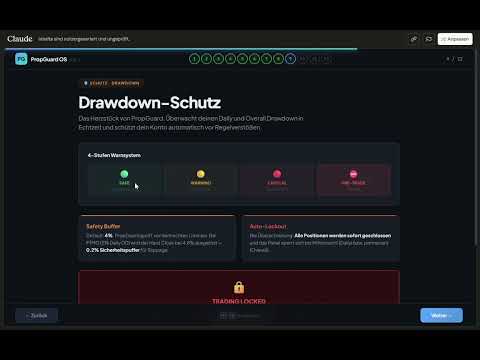
  • 4-tier traffic light system: Safe → Warning → Critical → Pre-Trade Block
  • Lockout on limit breach with Unlock button

Overall Drawdown:

  • Tracking from Initial Balance (persistent, never resets)
  • Auto-detection of initial deposit from deal history
  • Permanent lockout on limit breach

Safety Buffer & Hard Close:

  • Configurable safety buffer (default: 4%)
  • Automatic closure of ALL positions before DD limit is hit
  • Protects against account loss at prop firms

2. PROP FIRM PRESETS (6 Firms + Custom)

Firm Daily DD Max DD DD Type Leverage
FTMO 5% 10% Equity 1:100
Apex Trader 5% Trailing HWM 1:50
FundingPips 5% 10% Equity 1:100
The5ers 4% 6% Equity 1:30
FundedNext 5% 10% Equity 1:100
Custom User User User User
  • One-click firm switching directly in the panel
  • All DD limits, leverage, and challenge defaults set automatically

3. ONE-CLICK TRADING

Market Orders:

  • BUY / SELL with a single click
  • Automatic lot calculation based on risk
  • Mandatory Stop Loss (no trade without SL)
  • Optional Take Profit
  • Slippage management (configurable)

Pending Orders:

  • BUY LIMIT, BUY STOP, SELL LIMIT, SELL STOP
  • Entry price defined via interactive chart line
  • STOPS_LEVEL minimum distance enforced automatically

2-Click Close:

  • BUY/SELL button morphs to CLOSE when a position is open
  • Confirmation click prevents accidental closures
  • Volume displayed in button (e.g. "CLOSE 0.50 lots")

4. LOT CALCULATOR

Two Risk Modes:

  • Percent Mode: Risk as % of equity (e.g. 1%)
  • Dollar Mode: Fixed amount per trade (e.g. $100)

Calculated Metrics:

  • Lot size (normalized, Min/Max/Step compliant)
  • Risk amount in $
  • Potential loss / profit in $
  • Risk:Reward ratio
  • Required margin
  • SL/TP distance in pips and points

Multi-Instrument:

  • Forex (majors, exotics, 3/5 digit)
  • Indices, commodities, crypto
  • Automatic contract size handling

5. TRADE MANAGEMENT

  • Break-Even: Move SL to entry + buffer (1 click)
  • Partial Close: Close 25% / 50% / 75% of a position
  • Trailing Stop: Automatic trailing in pips (configurable)
  • 4 management buttons directly in the panel

6. INTERACTIVE CHART LINES

  • Entry line (blue), SL line (red), TP line (green)
  • Drag & drop to adjust — prices + lots update live
  • Price labels + distance labels (pips) between lines
  • R:R preset pills: 1:1 / 1:2 / 1:3 / Free — TP adjusts automatically
  • Toggle Show/Hide + Reset to defaults
  • All colors customizable via inputs

7. NEWS ENGINE (Economic Calendar)

4 News Modes:

  • OFF: No display
  • INFO: Markers + countdown timer on chart
  • WARN: Yellow exclusion zones + warning (trading allowed)
  • PROTECT: Red exclusion zones + trade block (no new trades)

Features:

  • Native MT5 Calendar API (no DLLs)
  • Automatic scan 4h ahead + 30min back
  • Impact filter: High only / Medium+High / All events
  • Currency auto-filter (based on symbol) or All
  • Countdown display: "Next: NFP in 00:34:22"
  • Push & popup alerts on entering exclusion zone
  • 5-minute cooldown prevents alert spam

Session Zones:

  • Sydney, Tokyo, London, New York as background overlays
  • Two intensity levels: Subtle / Normal
  • UTC-based with automatic broker offset detection

8. SL GUARD (Stop Loss Monitoring)

  • Automatically detects Stop Loss widening on open positions
  • Visual warning overlay when risk increases
  • 3 severity levels: Info (blue) → Caution (yellow) → Danger (red)
  • 3 sensitivity levels: Low / Medium / High
  • Risk delta shown in $ (e.g. "+$47 additional risk")
  • Break-even moves intelligently ignored
  • Configurable display duration (default: 5 seconds)

9. CHALLENGE PROGRESS TRACKING

3 Modular Metrics (individually toggleable):

Metric Description Firm Defaults
Profit Target Progress toward profit goal FTMO: 10%/5%, FPips: 8%/5%
Min Trading Days Trading days counted FTMO: 4, FPips: 3, FNext: 5
Time Limit Countdown in days FTMO: 30d, FPips: 30d

Challenge Phases: None / Phase 1 / Phase 2 / Funded

  • Automatic firm defaults per phase
  • User override anytime (input > 0 overrides default)
  • Start date configurable (YYYYMMDD) or Auto
  • Trading days calculated from deal history (robust across restarts)
  • Dynamic panel height (1–3 metrics = 36–76px extra)

10. GLASSMORPHIC DASHBOARD UI

Panel Features:

  • Dark transparent design with glassmorphism aesthetics
  • 3 scaling modes: Compact (HD) / Standard (QHD) / Large (4K)
  • Drag & drop, freely positionable
  • Minimize to 40×40px badge ("PG" logo)
  • All positions persistent (survive EA restart)

Visual Design:

  • Rounded corners on all cards + buttons
  • Color-coded DD tiers (green/yellow/red)
  • Hover effects on buttons
  • Real-time input validation (risk field: green/yellow/red border)
  • Pulsing red dot on Pre-Trade Block

Layout Sections:

  1. Header (logo + firm + minimize)
  2. DD Cards (Daily + Overall / Trailing)
  3. P&L + Equity
  4. Risk Input + Lot Calculation
  5. Trade Buttons (BUY/SELL/CLOSE)
  6. Pending Orders (BL/BS/SL/SS)
  7. Management (BE/25/50/75)
  8. Challenge Progress (optional, dynamic)
  9. Footer (Lines toggle + Reset)

11. PRE-TRADE SAFETY CHECKS (7 Layers)

  1. ✅ Trading allowed? (EA + Terminal)
  2. ✅ Market open?
  3. ✅ Lot size valid? (Min/Max/Step)
  4. ✅ Stop Loss set?
  5. ✅ Margin sufficient? (95% free margin)
  6. ✅ Daily DD Pre-Trade Block?
  7. ✅ News exclusion zone active? (PROTECT mode only)

12. PERSISTENCE & MULTI-ACCOUNT

  • All states saved in GlobalVariables
  • Account login as key suffix → multi-account support
  • Survives: EA restart, terminal restart, PC reboot
  • Persisted: Risk, firm, panel position, DD state, lockout, HWM, challenge date

13. SELF-TEST SYSTEM

  • 52 automated tests (T01–T52)
  • Activation via input parameter
  • Validates: symbol properties, lot calculation, inputs, DD detection, challenge config, panel height
  • Output in Experts log

14. TECHNICAL SPECS

Property Value
Version 1.2
Build S12.1
Platform MetaTrader 5
Files 11 (.mq5 + .mqh)
Lines of Code ~10,700
DLLs Required None
External Dependencies None (MT5 Standard Library only)

おすすめのプロダクト
O Sinaleiro Trader é o robô de daytrade que usa multiníveis de acordo com a abertura do dia. Assim, a cada rompimento dos níveis, o robô emite ordens de compra ou venda, de acordo com a tendência. Os stops podem ser fixos ou dinâmicos de acordo com os níveis. É possível configurar a distância do sinaleiro, bem como horários de trades e dias da semana. Alterar o parâmetro BR1 para BR.
Elliott Wave Helper
Siarhei Vashchylka
4.92 (13)
Elliott Wave Helper - a panel for making elliott wave and technical analysis. Includes all known wave patterns, support and resistance levels, trend lines and cluster zones. Manual (Be sure to read before purchasing) | Version for MT4 Advantages 1. Making wave analysis and technical analysis in a few clicks 2. All Elliott wave patterns available, including triangle and combinations 3. All nine wave display styles, including a special circle font 4. E lements of technical analysis : trend lines,
RSImaxmin
Carlos Andrés Moya Erazo
4.5 (10)
The indicator shows when there are overprice and divergences on the RSI. In addition, it has configurable alerts, dynamic overprice levels and a special “RSI cleaner” function. The indicator that automatically calculates the premium rates! RSImaxmin is an indicator based on the Relative Strength Index (RSI) oscillator that effectively identifies changes in price trends as it reflects the relative strength of bullish movements compared to bearish movements. It is widely used by traders to measur
製品概要 本製品はMT5用のツールであり、チャート分析の利便性を大幅に向上させ、分析にかかる時間を短縮させることを目的としています。 チャート分析に関して一般的に言えることとして、単一時間軸を使いつつも複数のシンボルでを監視する場合と、マルチタイムフレーム分析を用いて少数ペアのみを取引する場合があります。 ここで、いずれの場合にもよくある問題として、複数のチャートの扱いにおいて「チャートを同時にスクロールする」または「チャートオブジェクトを同時に描画する」ことが難しいことです。 特に、マルチタイムフレーム分析において、異なるチャートの全く同じ位置にオブジェクトを正確に描画することは、非常に難しいと言えます。 また、トレーダーは時間軸毎に描画したオブジェクトに対して優先順位を付けるたいと思うかもしれません。事実、これらの課題解決を試みようとしている製品を調べていくといくつかは見つける事ができます。 しかし正直なところ、品質が十分でないものもあれば、自分の想像どおりに機能しないものもあります。 こういった経緯があり、私自身がこの状況に満足していませんでした。そこで私自身でこのMT5の「
Timeless Charts
Samuel Manoel De Souza
5 (3)
Timeless Charts is an advanced charting solution designed for professional traders seeking for custom charts / custom timeframes , including seconds charts / seconds timeframe, renko charts / renko bars, cluster charts / footprint charts and advanced tools present in most of the popular platforms. Unlike traditional offline charts or simplistic custom indicators, this solution constructs fully custom bars with true timestamp accuracy , down to miliseconds, allowing for a powerful and precise tr
The Definitive Performance Testing Solution for MetaTrader Environments What This Tool Does This specialized benchmark utility measures the performance of your MetaTrader environment, providing insights that impact your trading execution. Unlike generic system benchmarks, this tool evaluates performance specifically within the MetaTrader runtime environment. For Professional Traders & Developers: Performance Metrics : Measurements of calculation throughput and memory efficiency Trading-Specific
Tired of complex order placement and manual calculations? Trade Dashboard is your solution. With its user-friendly interface, placing orders becomes effortless, by a single click, you can open trades, set stop loss and take profit levels, manage trade lot size, and calculate risk to reward ratios, allowing you to only focus on your strategy. Say goodbye to manual calculations and streamline your trading experience with Trade Dashboard. Download  Demo Version  right now. You can find  Details of
SessionSync   is a smart and elegant timing tool for MetaTrader 5, created to keep traders fully synchronized with the market. It shows the remaining time of the current candle in real time and displays the main trading clocks, including server time, local time, New York, and London. With a clean floating panel and an intuitive layout, SessionSync helps you track candle expiration and market sessions quickly and efficiently, without overloading your chart. Whether you trade price action, intrada
AI トレード アナライザーは、 インジケーター形式で実装されたインテリジェントな市場分析ツールです。このプログラムはチャート上のシグナルを視覚化し、テクニカル指標とニュースの背景に基づいてトレーダーが市場の状況を評価するのを支援します。 主な機能: 1. テクニカル分析: 人気の指標のサポート: EMA (ショート/ロング)、一目均衡表、ADX、RSI、MACD、ストキャスティクス、ATR、ボリンジャー バンド、ピボット ポイント、フィボナッチ。 トレンド、相違、主要レベルを特定します。 2. ニュースの背景を扱う: 指定されたパラメータ (時間枠、日付) に従って経済イベントを受信します。 マクロ経済データが市場に及ぼす可能性のある影響を考慮に入れる。 3. 自動化とカスタマイズ性: 潜在的なエントリ ポイント、SL、TP を計算して分析結論を形成します。 確立されたパラメータに従って情報を解釈する能力を使用して市場の状況を評価します。 4. 多言語サポート: 結果はロシア語、英語、ドイツ語、インドネシア語で表示できます。 5. 柔軟なインターフェース: ユーザーは、コントロール
This indicator helps you control several pairs in a small workspace, therefore, it is not necessary to open several charts on the platform to do so. The indicator shows sequentially up to 6 different pairs, besides that each of these pairs has a button with which you can stop the indicator to observe the selected pair. Place the indicator on a chart to monitor several pairs and the rest of your space use it on the chart of the pair you wish to observe in detail.   MT4 version       Parameters Ob
ブログ: https://www.mql5.com/en/blogs/post/761835 MT4バージョン: https://www.mql5.com/en/market/product/122732 MT5バージョン: https://www.mql5.com/en/market/product/122733 CORRELATION MASTER:ペアを2倍にしてリスクを半分に 負の相関と自動ヘッジのためのスマートEA Correlation Masterは、通貨ペア間の負の相関戦略を活用する自動EAです。このEAは、反対のペア(例:EURUSDの買いとUSDCHFの売り)で反対のポジションを開くことで、リスクを最小限に抑えながら利益を最大化することを目指します。 柔軟なリスク管理と複数通貨ペアの設定を備えたこのEAは、スマートな自動ヘッジ戦略を求めるトレーダーに最適です。 主な機能 自動負相関戦略 反対方向に動く通貨ペアで買いと売りのポジションをオープンします。 例:EURUSD(買い)↔ USDCHF(売り) 複数通貨ペアのサポート 最大13通貨ペア(E
This Dashboard is very useful . That will help us analyzing graph. In this dashboard has some functions. such as  - Buy Stop - Sell Stop - Buy Limit Order - Sell Limit Order - Close All trade on this graph - Close All Profit - Delete Pending Order = Notify to enter an order - Percentage Calculation of chance to win an order On this strategy i calculated all Major EMA to find a higher chance and take more profits
Do not buy before seeing the Danko Trend Color product, as this panel is a way to view a summary of this indicator on various timeframes. The Danko DTC Panel utility allows you to look at the trend in up to 5 timeframes. When clicking on the timeframe texts, a new window will open with the indicator plotted on the screen so you can see the complete chart. The width of the panel, with the amount of candles you want to see, is customizable, see the images below. Ao clicar nos textos dos timeframe
Binanceは世界的に有名な暗号通貨取引所です!暗号化されたデジタル通貨市場のリアルタイムデータ分析を容易にするために、プログラムは分析のためにBinanceリアルタイムトランザクションデータをMT5に自動的にインポートできます。主な機能は次のとおりです。 1.通貨セキュリティ部門でのスポット取引ペアの自動作成をサポートします。また、利益通貨と基本通貨を別々に設定することもできます。たとえば、ProfitCurrencyが空の場合、すべての取引エリアを意味します。オプション:USDT、BTC、DAI、およびBinanceでサポートされているその他の取引エリア(契約取引は現在サポートされていません)。BaseCurrencyは空で、すべての通貨を示します。BNBおよびETCも可能です。個別に設定するBinanceでサポートされている暗号通貨を待ちます。 2. Binanceの各通貨の価格精度、取引量の精度、および最大取引量を同期します。 3. WebSocketを介してBinanceをリンクすると、すべてのトランザクションをMt5にプッシュして市場を更新できます。 4.すべての
ADAM for FTMO 5
Vyacheslav Izvarin
5 (1)
ADAM EA Special Version for FTMO Please find new Version here  https://www.mql5.com/en/market/product/113326 Our 1st EA created using ChatGPT technology Trade only GOOD and checked PROP FIRMS  Default parameters for Challenge $100,000 Tested on EURUSD and GBPUSD only  Use 15MIN Time Frame Close all deals and Auto-trading  before Weekend at 12:00 GMT+3  Friday For Prop Firms MUST use special Protector  https://www.mql5.com/en/market/product/94362 -------------------------------------------------
マルチ通貨の前のキャンドルまたは前のバースキャナーは、インジケーター設定から選択したカスタム時間枠でマルチシンボルチャートをスキャンするのに役立ちます。 製品に基づく: https://www.mql5.com/en/market/product/78657 前日の高値安値、前週の高値安値、前月の高値安値、または任意のカスタム時間枠の複数のシンボルをスキャンするために使用できます。 過去4時間チャートの高値安値 ノイズをフィルターし、価格が高値ラインまたは安値ラインに接触したときに方向性のある警告を発します。 戦略はシンプルで、前日、週または月の高値安値に触れると、価格が5分などの短い時間枠で拒否されると見なされます。 さまざまなアラートの種類を選択するオプションがあります スキャン頻度をミリ秒単位で選択および設定できます 1000 は、相場監視のすべてのシンボルを毎秒スキャンすることを意味します 製品の特徴 1. ターミナルアラート 2.電子メールアラート 3. プッシュ通知
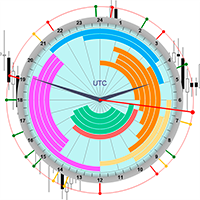
The professional browser of News and Trading Sessions is now available in MetaTrader 5. Now all the most important market information is collected on one dial! News located on the Time scale. Planning your working time has never been so easy and convenient ... The news scale can be switched a day, two, a week, a month forward or backward (see the details in the short video). All news updates in real time. Thanks to the built-in filters, you can configure the display of news by importance, cou
Martingale Osw MT5
William Oswaldo Mayorga Urduy
ユーザーマニュアル:高度なマーチンゲール管理およびリスク管理システム この専門マニュアルでは、MetaTrader におけるポジションリカバリーとリスク管理を自動化するために設計された高度なマーチンゲール注文管理システムの操作、設定、およびビジュアルインターフェースについて説明します。 1. 概要と目的 このツールは、コスト平均法を主なロジックとする高精度の注文管理ツールとして機能します。その目的は、保留注文のネットワークを展開して平均決済価格を改善することにより、当初の方向とは逆の動きをした取引を保護および回復することです。 基本的なシステムとは異なり、このソフトウェアは動的な損益分岐点およびトレーリングストップアルゴリズムに加え、迅速な手動介入のための画面上のコントロールインターフェースを備えており、常に資金管理を最優先にすることができます。 2. パラメータガイド(エントリーメニュー) マーチンゲール設定と距離 マーチンゲール数:最初の取引後にシステムが許容するヘッジ注文の最大数を定義します。 距離タイプ:ポイント単位の固定距離、またはATR(平均真範囲)インジケーター
Smart Close Manager v1.1 is a lightweight but powerful order-management utility designed for traders who need fast, safe, and precise control over their positions. This tool allows you to instantly close positions and delete pending orders based on smart filters such as symbol, direction, profit state, or order type. Perfect for scalpers, intraday traders, and anyone managing multiple orders. Key Features Close all orders with one click Close only BUY / only SELL positions Close only profitabl
Custom Alerts:複数市場を監視し、重要なチャンスを見逃さない 概要 Custom Alerts は、複数の銘柄にまたがるトレードチャンスを一元的に監視したいトレーダーのためのダイナミックなソリューションです。FX Power、FX Volume、FX Dynamic、FX Levels、IX Power などの主要ツールと連携し、複数のチャートを切り替える手間なく、重要な市場変動を自動で通知します。ブローカーが提供するすべての資産クラスに対応しており、シンボルを入力する必要はありません。設定で資産クラスを選択するだけで、すぐにアラートを構成できます。 1. Custom Alerts がトレーダーにとって非常に有益な理由 オールインワンの市場監視 • Custom Alerts は、為替、金属、暗号資産、指数、株式(ブローカーが対応している場合)からのシグナルを収集・統合します。 • 複数のチャートを切り替える必要がなくなり、明確で一元化された通知が得られます。 戦略に合わせたアラート構成 • ボリューム急増、通貨強弱の閾値、極端な価格変動など、目的に応じたアラート
Volume Flow Binance
Thalles Nascimento De Carvalho
Volume Flow Binance! お気に入りの暗号通貨の times and trades データにアクセスし、取引量の流れや価格の動きを分析する詳細を得られるとしたら、あなたのブローカーが取引履歴の完全なアクセスを提供していなくても、それが現実になると思いませんか? Volume Flow Binance を使えば、それが実現します!この MQL5 スクリプトは、リアルタイムの市場のダイナミクスを詳しく理解したい暗号通貨トレーダーのために設計されています。 主な特徴: スクリプトのメニューにある任意の暗号通貨の times and trades データに直接アクセス。 世界的に有名な取引所 Binance からのリアルタイムデータ更新。 価格の動きを予測し、取引量の流れを正確に分析。 Times and Sales Crypto インジケーター と統合し、市場分析を次のレベルに引き上げます。 なぜ Volume Flow Binance を選ぶべきなのか? これは、リアルタイムで売買行動を理解し、行われた取引を観察するための完璧なツールで
FREE
Attention All ICT Students! This indispensable tool is a must-have addition to your trading arsenal... Introducing the ICT PD Arrays Trader: Empower your trading with this innovative utility designed to enhance and simplify your ICT trading strategy and maximize your potential profits.  How does it work? It's simple yet highly effective. Begin by placing a rectangle on your trading chart and assigning it a name like 'ict' or any preferred identifier. This allows the system to accurately ident
Meditation Seed: Meditation is a practice in which an individual uses a technique – such as mindfulness, or focusing the mind on a particular object, thought, or activity – to train attention and awareness, and achieve a mentally clear and emotionally calm and stable state.[1][2][3][4][web 1][web 2] Meditation is practiced in numerous religious traditions. The earliest records of meditation (dhyana) are found in the Upanishads, and meditation plays a salient role in the contemplative repertoire
FREE
Trading Session Dashboard
Marwan Bin Mohammed Al Eid Bin Mohammed Carpenter
The Trading Sessions Dashboard is a powerful and user-friendly MT5 indicator designed to provide traders with real-time insights into the major forex trading sessions. It displays the status of each session (Active or Closed) along with the remaining time until closure or the next opening, helping you align your trading strategy with market hours. Built for clarity and professionalism, this indicator is perfect for beginners and experienced traders alike, ensuring you never miss key session tran
The Problem Every Trader Faces Every serious trader knows the struggle: Wasted time   scrolling through years of data to find specific dates Missed opportunities   because you can't quickly jump to historical patterns Frustrating navigation   with manual scrolling that never lands exactly where you need No quick way   to mark important dates for future reference Inconsistent chart positioning   when trying to compare different time periods These inefficiencies cost you valuable analysis time and
Introducing the BlackWing Signal Provider—an advanced EA designed to enhance your trading experience by facilitating seamless communication between your MetaTrader 5 platform and Telegram channels, groups, or individual users. Key Features: 1. Real-Time Event Notifications: Receive instant alerts on new trades, modified orders, closed positions, and deleted orders. Stay informed and make well-timed decisions. 2. Interactive Chart Snapshots: Share chart snapshots along with new trades and ord
革新的な Trades Time Manager を使用して、取引ルーチンを簡単に管理できます。この強力なツールは、指定された時間に注文執行を自動化し、取引アプローチを変革します。 購入から注文の設定まで、すべて手動介入なしで、さまざまな取引アクションのためのパーソナライズされたタスク リストを作成します。 Trades Time Manager のインストールと入力ガイド EA に関する通知を受け取りたい場合は、MT4/MT5 ターミナルに URL を追加してください (スクリーンショットを参照)。 MT4のバージョン     https://www.mql5.com/en/market/product/103716 MT5のバージョン     https://www.mql5.com/en/market/product/103715 手動監視に別れを告げ、合理化された効率を採用します。直感的なインターフェイスにより、シンボル、約定時間、価格、ストップロス (SL)、テイクプロフィット (TP) ポイント、ロットサイズなどの正確なパラメーターを設定できます。 このツールの柔軟性は、市
概要 外国為替や金融市場では、迅速な反応と正確な意思決定が非常に重要です。しかし、標準のMetaTrader 5端末は最小でも1分のチャートしかサポートしておらず、トレーダーが市場の変動に敏感であることを制限しています。この問題を解決するために、 秒単位チャートキャンドルインジケーター を導入しました。このインジケーターを使用すれば、1秒から30秒の市場の動向をサブチャートで簡単に表示・分析できます。 主な機能 複数の秒単位タイムフレームのサポート :このインジケーターは、以下のタイムフレームを選択でき、さまざまな取引戦略に対応します: S1 : 1秒 S2 : 2秒 S3 : 3秒 S4 : 4秒 S5 : 5秒 S10 : 10秒 S15 : 15秒 S20 : 20秒 S30 : 30秒 リアルタイム更新 :秒単位チャートはリアルタイムで更新され、各瞬間に最新の市場情報を提供します。これにより、迅速な取引判断が可能になります。 ユーザーフレンドリーなインターフェース :インジケーターはサブチャートに表示され、直感的で使いやすいです。異なるタイムフレームに素早く切り替えて市場を迅速
推測をやめて、統計的優位性を持って取引を始めましょう 株価指数はFXとは異なる動きをします。決まったセッションがあり、オーバーナイトでギャップが発生し、予測可能な統計パターンに従います。このインジケーターは、DAX、S&P 500、ダウ・ジョーンズなどの指数を自信を持って取引するために必要な確率データを提供します。 何が違うのか ほとんどのインジケーターは何が起こったかを示します。このインジケーターは次に何が起こる可能性が高いかを示します。毎取引日、インジケーターは100日間のヒストリカルデータに対して現在のセットアップを分析します。類似のギャップ、類似のオープニングポジションを持つ日を見つけ、価格が主要なレベルに到達した頻度を正確に計算します。ギャップが埋まるか、昨日の高値がテストされるかの推測はもう必要ありません。実際のデータに基づいた正確なパーセンテージが得られます。 すべての入力パラメータを説明した完全なマニュアルはこちら: https://www.mql5.com/en/blogs/post/766370 優れたセットアップを見つけるための戦略ガイドはこちら: https:/
Time Closer can help you closing all the open position at the specified time "Everyday". Mainly for Day trader that don't want to hold position overnight, or over different session, or over a specific time. Simple Parameter to use. Usage Download and drag Time Closer on the chart (Chart Symbol should be the same Chart Symbol as you want the position close) Check Allow AutoTrading is "On" Set parameters Input Parameters Turnon  True - Turnon the utility False - Turnoff the utility Close all Symb
このプロダクトを購入した人は以下も購入しています
Trade Assistant MT5
Evgeniy Kravchenko
4.42 (207)
取引 ごとのリスクの 計算、新規注文 の 簡単 な 設置、部分的 な 決済機能 を 持 つ 注文管理、 7 種類 のトレーリングストップなど 、便利 な 機能 を 備 えています 。 追加の資料と説明書 インストール手順   -   アプリケーションの手順   -   デモアカウント用アプリケーションの試用版 ライン機能 チャート上にオープニングライン、ストップロス、テイクプロフィットを表示します。この機能により、新規注文を簡単に設定することができ、注文を出す前にその特徴を確認することができます。   リスク計算 リスク計算機能は、設定されたリスクとストップロス注文のサイズを考慮して、新規注文のボリュームを計算します。ストップロスの大きさを自由に設定できると同時に、設定したリスクを守ることができます。 Lot calc ボタン - リスク 計算 を 有効 / 無効 にします 。 Risk フィールドでは 、必要 なリスクの 値 を 0 から 100 までのパーセンテージまたは 預金通貨 で 設定 します 。 設定」 タブで 、 リスク 計算 の 種類 を 選択 します :「 $ 通
Trade Manager EAへようこそ。これは、取引をより直感的、正確、そして効率的にするために設計された究極の リスク管理ツール です。これは単なるオーダー実行ツールではなく、包括的な取引計画、ポジション管理、リスク管理のためのソリューションです。初心者から上級者、迅速な実行を必要とするスキャルパーまで、Trade Manager EAはあらゆるニーズに対応し、為替、指数、商品、暗号通貨などさまざまな市場で柔軟に対応します。 Trade Manager EAを使用すると、複雑な計算が過去のものになります。市場を分析し、エントリーポイント、ストップロス、テイクプロフィットのレベルをチャート上のラインでマークし、リスクを設定するだけで、Trade Managerが最適なポジションサイズを即座に計算し、SLとTPをピップ、ポイント、口座通貨でリアルタイムに表示します。すべての取引が簡単かつ効果的に管理されます。 主な機能: ポジションサイズ計算機 :定義されたリスクに基づいて取引サイズを瞬時に決定します。 簡単な取引計画 :エントリー、ストップロス、テイクプロフィットを設定するためのド
Local Trade Copier EA MT5
Juvenille Emperor Limited
4.96 (133)
Local Trade Copier EA MT5 による、驚くほど高速な取引コピーを体験してください。1分で簡単にセットアップできるこの取引コピー機は、同じWindowsコンピュータまたはWindows VPS上の複数のMetaTrader端末間で取引をコピーすることができ、0.5秒未満の高速コピースピードを実現します。 初心者であろうとプロのトレーダーであろうと、 Local Trade Copier EA MT5 には、あなたの特定のニーズに合わせてカスタマイズするための幅広いオプションが用意されています。これは、利益の可能性を高めたい人にとって究極のソリューションです。 今すぐ試してみて、これが市場で最も速くて簡単なトレードコピー機である理由を理解してください。 ヒント: デモアカウントで Local Trade Copier EA MT5 デモバージョンをダウンロードして試すことができます: ここ ダウンロードした無料のデモ ファイルを MT5 >> ファイル >> データ フォルダを開く >> MQL5 >> Experts フォルダに貼り付けて、ターミナルを再起動しま
TradePanel MT5
Alfiya Fazylova
4.87 (149)
Trade Panelは多機能なトレーディングアシスタントです。アプリには手動取引用の50以上のトレーディング機能が搭載されており、ほとんどの取引作業を自動化することができます。 ご注意ください!割引は期間限定で、毎週火曜日に価格が5ドルずつ上昇します(上限100ドルまで)。 購入前に、デモアカウントでアプリのデモ版をテストすることができます。デモアカウント用のアプリの試用版をダウンロードするには、次のリンクをご利用ください: https://www.mql5.com/en/blogs/post/750865 。 完全な手順 こちら 。 取引。 ワンクリックで取引操作を行うことができます: リスクを自動計算して指値注文やポジションを開く。 複数の注文やポジションをワンクリックで開く。 注文のグリッドを開く。 保留中の注文やポジションをグループごとに閉じる。 ポジションの方向を反転(Buyを閉じてSellを開く、またはSellを閉じてBuyを開く)。 ポジションをブロックする(不足している量のポジションを開くことでBuyとSellのポジション量を等しくする)。 すべてのポジションを部分的
VERIFIED TRADING RESULTS - Farmed Hedge Yield Axi Copy:  https://www.mql5.com/en/signals/2356376 - Farmed Hedge Yield Exn Copy:   https://www.mql5.com/en/signals/2356404 - Farmed Hedge Yield V Copy:  https://www.mql5.com/en/signals/2357156 Contact me via private message to receive the User Manual and Setup. * Thai Lauguage Support Available Farmed Hedge Yield Farming - Professional Pair Trading Dashboard (Manual - Hybrid - Semi/Automated EA) VERSION 3 - WILD HARVEST UPDATE Trading Approac
ベータリリース Telegram to MT5 Signal Trader はまもなく正式なアルファ版をリリースします。いくつかの機能はまだ開発中で、小さな不具合に遭遇する可能性があります。問題が発生した場合はぜひご報告ください。皆さまのフィードバックがソフトウェア改善に役立ちます。 Telegram to MT5 Signal Trader は、 Telegram のチャンネルやグループからの取引シグナルを自動的に MetaTrader 5 にコピーする強力なツールです。 パブリックおよびプライベートの両方のチャネルに対応し、複数のシグナル提供元を複数のMT5口座に接続可能です。ソフトウェアは高速で安定し、すべての取引を細かく制御できます。 インターフェースは直感的で、ダッシュボードとチャートは見やすく設計されており、リアルタイムで動作状況をモニターできます。 必要環境 MQL の制限により、EA は Telegram と通信するためのデスクトップアプリが必要です。 インストーラーは公式の インストールガイド にあります。 主な機能 マルチプロバイダー: 複数の Telegram
Exp COPYLOT CLIENT for MT5
Vladislav Andruschenko
3.82 (34)
MT5のトレードコピー機は、МetaТrader5プラットフォームのトレードコピー機です 。 それは間の 外国為替取引をコピーします   任意のは 、MT5 - MT5、MT4 - MT5   COPYLOT MT5版の アカウント (またはを MT4 - MT4   MT5 - MT4   COPYLOT MT4版用) 信頼できるコピー機! MT4のバージョン 完全な説明   +DEMO +PDF 購入する方法 インストールする方法     ログファイルの取得方法     テストと最適化の方法     Expforex のすべての製品 МТ4ターミナルでトレードをコピーすることもできます(   МТ4   -   МТ4、МТ5   -   МТ4   ):   MT4のCOPYLOT CLIENT このバージョンには、端末間 МТ5   -   МТ5、МТ4   -   МТ5が含まれ ます。 ディールコピー機は、2/3/10端末間でディール/ポジションをコピーするために作成されます。 デモ口座と投資口座からのコピーがサポートされています。 プログラムは、複数の端末バインデ
MT5 to Telegram Signal Provider は、Telegramのチャット、チャンネル、またはグループに 指定された シグナルを送信することができる、完全にカスタマイズ可能な簡単なユーティリティです。これにより、あなたのアカウントは シグナルプロバイダー になります。 競合する製品とは異なり、DLLのインポートは使用していません。 [ デモ ] [ マニュアル ] [ MT4版 ] [ Discord版 ] [ Telegramチャンネル ]  New: [ Telegram To MT5 ] セットアップ ステップバイステップの ユーザーガイド が利用可能です。 Telegram APIの知識は必要ありません。必要な全ては開発者から提供されます。 主な特長 購読者に送信する注文の詳細をカスタマイズする機能 例えば、Bronze、Silver、Goldといった階層型のサブスクリプションモデルを作成できます。Goldサブスクリプションでは、すべてのシグナルが提供されます。 id、シンボル、またはコメントによって注文をフィルターできます 注文が実行されたチャート
多くのトレーダーは、気づかないうちに同じ間違いをしています。1つの過去バックテストで良い結果が出ただけで、そのEAを信頼してしまうことです。 しかし、1つの過去検証だけではロバスト性は証明できません。分かるのは、そのロジックが過去の特定の相場の流れでは機能したということだけです。そして、実際の市場が見せたその流れは一度きりでした。 そこで AntiOverfit PRO の出番です。 AntiOverfit PRO は、MetaTrader 5 上のあらゆるEAについて、本当の意味での頑健さを評価するために作られたツールです。美しい損益曲線で見栄えを良くするためのものではありません。もっと重要な問い、つまり 市場が過去とまったく同じようには動かなくなったときでも、そのシステムは本当に通用するのか を見極めるためのものです。 言い換えれば、AntiOverfit PRO は「そのEAが過去に儲かったかどうか」だけを見るためのツールではありません。その結果が本当に堅いロジックに支えられているのか、それとも過去に実際に起きたあの値動きに強く依存しているだけなのかを判断しやすくします。
HINN MAGIC ENTRY – the ultimate tool for entry and position management! Place orders by selecting a level directly on the chart! full description   ::  demo-version  :: 60-sec-video-description Key features: - Market, limit, and pending orders - Automatic lot size calculation - Automatic spread and commission accounting - Unlimited partitial take-profits  - Breakeven and trailing stop-loss and take-profit  functions - Invalidation leves - Intuitive, adaptive, and customizable interface - Works
Copy Cat More Trade Copier MT5 (コピーキャット MT5) は、今日の取引課題に対応して設計されたローカルトレードコピーシステムと完全なリスク管理・実行フレームワークです。プロップファームのチャレンジから個人ポートフォリオ管理まで、堅牢な実行、資本保護、柔軟な設定、高度な取引処理の組み合わせで、あらゆる状況に適応します。 コピーシステムはマスター(送信側)とスレーブ(受信側)の両方のモードで動作し、成行注文と指値注文、取引修正、部分決済、両建て決済操作のリアルタイム同期を行います。デモ口座とライブ口座、取引ログインまたは投資家ログインの両方に対応し、EA、ターミナル、またはVPSが再起動してもパーシスタント取引メモリシステムを通じて復旧を保証します。複数のマスターとスレーブをユニークIDで同時に管理でき、ブローカー間の違いはプレフィックス/サフィックス調整またはカスタムシンボルマッピングを通じて自動的に処理されます。 マニュアル/設定  | Copy Cat More MT4 | チャンネル  特別機能: 設定が簡単 — わずか30秒で完了(ビデオをご覧


Easy Trade – シンプルかつ強力なスマートトレード管理 Easy Trade は、リスクを適切にコントロールし、スムーズな取引執行を実現したい MetaTrader ユーザーのためのオールインワン・トレードマネジメントソリューションです。 トレーダーの声をもとにゼロから設計された Easy Trade は、複数シンボルの取引を簡単に実行・監視・管理できるようにし、作業フローを複雑にしません。 手動スキャルピングでも、少数のセットアップを管理するポートフォリオでも、Easy Trade は賢明な判断と安定した成果に集中できるようサポートします。 ⸻ なぜ Easy Trade を使うべきか? 精密なリスク管理:固定ロットサイズまたはパーセンテージによるリスク設定が可能。リアルタイムでリスクとリワード情報を確認。 バスケット型トレーリング:複数の取引の利益を監視。目標到達で部分利益を自動確保。 取引の自動記録:各取引をスクリーンショットで記録。ジャーナル記録やパフォーマンス分析に最適。 時限クローズ機能:指定日時での自動クローズ設定が可能。週末前や取引終了時に便利。 カス
この製品は、ニュースタイム中にすべてのエキスパートアドバイザーと手動チャートをフィルタリングするため、急激な価格変動によるマニュアルトレードのセットアップの破壊や他のエキスパートアドバイザーによって入力された取引について心配する必要はありません。この製品には、ニュースのリリース前にオープンポジションとペンディングオーダーを処理できる完全な注文管理システムも付属しています。 The News Filter  を購入すると、将来のエキスパートアドバイザーのためにビルトインのニュースフィルターに頼る必要はなく、今後はすべてのエキスパートアドバイザーをここからフィルタリングできます。 ニュース選択 ニュースソースは、Forex Factoryの経済カレンダーから取得されます。 USD、EUR、GBP、JPY、AUD、CAD、CHF、NZD、CNYなど、任意の通貨数に基づいて選択できます。 Non-Farm(NFP)、FOMC、CPIなどのキーワード識別に基づいて選択することもできます。 影響レベルによってフィルタリングするニュースを選択することができ、低、中、高の影響範囲から選択できます。
ウォッチリスト全体の極端なバーをリアルタイムでスキャン。 Power Bar Scannerは全てのシンボルを同時に監視し、極端な価格バーが出現した瞬間にアラートを送信します。チャートを切り替える必要はありません。全ての機会を一つのパネルで確認できます。 あらゆる時間足に対応。Forex、Indices、ゴールド、Crypto - 全てを一画面で表示。 仕組み スキャナーはMarket Watch内の各シンボルについて、ローソク足の実体が N x ATR を超えるバーをチェックします。検出すると、そのシンボルが方向(BUY/SELL)、ATR比率、何本前にシグナルが発生したかと共に表示されます。どのシンボルが今アクティブかを一目で確認できます。 ワンクリックナビゲーション スキャナー内の任意のシンボル名をクリックすると、チャートが即座にそのシンボルに切り替わります。シグナルを見つけて、クリックして、分析する。手動でのシンボル切り替えやチャートタブの検索は不要です。 ソート可能なカラム 任意のカラムヘッダーをクリックして、シンボル、価格、シグナル、比率、経過時間でソートできます。最も
The core idea: using the user interface, you configure the parameters the chart must meet before entering a position (or positions), choose which entry models to use, and set the rules for when trading and planning should end. Lazy Trader  handles the rest: it  takes over all the routine chart watching and execution! full description  :: 3 key videos [1] ->  [2]   ->  [3] What can it do? - Understands Larry Williams market structure - Understands swing market structure by Michael Huddleston
Trade Manager は、リスクを自動的に計算しながら、取引を迅速に開始および終了するのに役立ちます。 過剰取引、復讐取引、感情的な取引を防止する機能が含まれています。 取引は自動的に管理され、アカウントのパフォーマンス指標はグラフで視覚化できます。 これらの機能により、このパネルはすべてのマニュアル トレーダーにとって理想的なものとなり、MetaTrader 5 プラットフォームの強化に役立ちます。多言語サポート。 MT4バージョン  |  ユーザーガイド + デモ Trade Manager はストラテジー テスターでは機能しません。 デモについてはユーザーガイドをご覧ください。 危機管理 % または $ に基づくリスクの自動調整 固定ロットサイズを使用するか、ボリュームとピップに基づいた自動ロットサイズ計算を使用するオプション RR、Pips、または価格を使用した損益分岐点ストップロス設定トレーリングストップロス設定 目標に達したときにすべての取引を自動的に終了するための 1 日あたりの最大損失 (%)。 過度のドローダウンからアカウントを保護し、オーバートレードを防ぎます
The product will copy all telegram signal to MT5 ( which you are member) , also it can work as remote copier.  Easy to set up, copy order instant, can work with almost signal formats, image signal,  s upport to translate other language to English Work with all type of channel or group, even channel have "Restrict Saving Content", work with  multi channel, multi MT5 Work as remote copier: with signal have ticket number, it will copy exactly via ticket number. Support to backtest signal. How to s
Crypto Charting for MT5 – MetaTrader 5 向け暗号資産チャートツール 概要 Crypto Charting for MT5 は、WebSocket を介して暗号資産の OHLC チャートデータをリアルタイムで提供します。複数の取引所に対応し、MT5 上で履歴データの自動更新が可能です。 機能 WebSocket によるリアルタイムデータ 自動履歴データ更新 接続障害時のスケジュール更新 全ての MT5 時間足に対応 OHLCV データ構成 ストラテジーテスターに対応 自動再接続機能付き 対応取引所 Binance、Bybit、OKX、KuCoin、MEXC、Gate.io、Bitget、XT.com 補足情報 ティックデータおよび板情報には、別製品の Crypto Ticks をご覧ください。 注意事項 DLL を使用していません。VPS に適しています。 Strategy Tester では WebRequest 機能は動作しません。 デモをご希望の場合は、MQL5 のプライベートメッセージでご連絡ください。 Full Documentati
Footprint Chart Pro — Professional OrderFlow EA for MetaTrader 5 Version 6.34 | Professional tool for real traders | Institutional-Grade Visualization DEMO USERS - PLEASE SELECT EVERY TICK / REAL TICK WHEN TESTING AND YOU HAVE DOWNLOADED HISTORICAL DATA. IF YOU SEE A WAITING SCREEN AND IT IS NOT DOWNLOADING, IT MEANS YOU HAVE LOW HISTORICAL DATA. TRY 1 MIN AND 5 MIN FIRST ON 1 DAY DATA. ONE DAY DATA SHOULD BE THE NEWEST AND MOST CURRENT DATE. PLEASE WAIT UNTIL THE MARKET HAS ROLLED OVER PERIOD.
ワンクリックで取引できるトレーディングパネル。ポジションと注文の操作!チャートまたはキーボードから取引。 当社の取引パネルを使用すると、チャートから直接シングルクリックで取引を実行でき、標準の MetaTrader コントロールよりも 30 倍高速に取引操作を実行できます。 パラメータと関数の自動計算により、トレーダーにとって取引がより速く、より便利になります。 グラフィックのヒント、情報ラベル、取引取引に関する完全な情報はチャート MetaTrader にあります。 MT4のバージョン 完全な説明   +DEMO +PDF 購入する方法 インストールする方法     ログファイルの取得方法     テストと最適化の方法     Expforex のすべての製品 手動取引用の取引パネル。チャート(チャートウィンドウ)またはキーボードから取引できます。  開閉、リバース、ロックポジションと注文を処理する МetaТrader5 のメインオーダーのトレーディングコントロールパネル:売買、売却、売却、売却、売却、閉じる、削除、修正、トレーリングストップ、ストップロス、takeproft
TelegramからMT5へ: 究極のシグナルコピーソリューション Telegram to MT5 を使えば、取引がシンプルになります。DLL を必要とせず、Telegram のチャンネルやチャットから MetaTrader 5 プラットフォームに取引シグナルを直接コピーできる最新ツールです。この強力なソリューションは、正確なシグナル実行、豊富なカスタマイズオプション、時間の節約、そして効率性の向上を実現します。 [ Instructions and DEMO ] 主な特徴 直接的なTelegram API統合 電話番号とセキュアコードで認証します。 ユーザーフレンドリーな EXE ブリッジを通じてチャット ID を簡単に管理できます。 複数のチャネル/チャットを追加、削除、更新して、同時に信号をコピーします。 高度なフィルターによる信号解析 例外的な単語 (例: 「レポート」、「結果」) を含む不要な信号をスキップします。 柔軟な SL および TP 形式 (価格、ピップ、ポイント) をサポートします。 価格ではなくポイントを指定するシグナルのエントリ ポイントを自動的に計算します。
Trade Assistant 38 in 1
Makarii Gubaydullin
4.91 (23)
多機能ツール:ロット計算、グリッド注文、R/R比率、トレードマネージャー、サプライ&デマンドゾーン、プライスアクションなど デモ版   |   ユーザーマニュアル トレードアシスタント   はストラテジーテスターでは動作しません :   こちらからデモ版をダウンロード  して ユーティリティ をテストできます。 ご質問、改善のご提案、バグ発見の場合は ご連絡ください MT4版が必要な場合は こちら から入手できます トレード   プロセス を簡素化、高速化、自動化。   ダッシュボード で標準端末の機能を拡張。 トレードパネルは  あらゆる取引商品で動作:外国為替、株式、インデックス、暗号通貨など。 1. 新規トレードの実行 :ロット / リスク / R/R計算 :手動トレードのためのリスク管理 ロット計算機(リスクサイズに基づく取引量計算) リスク計算機(ロットサイズに基づくリスク額) リスクリワード   比率 グリッド注文:  + 動的間隔オプション、スプリットロットオプション 注文のアクティベーショントリガー、+ バイストップリミット / セルストップリミット 仮想SL、仮想
EA AUDITOR - VERIFY EA'S BEFORE YOU BUY The Only Independent EA & Signal Verification Tool for MetaTrader 5 MAKE SMARTER EA PURCHASES. EVERY TIME. The MQL5 market is home to some genuinely outstanding Expert Advisors built by talented developers — strategies that can transform your trading. But it can also include EAs with history readers coded in to produce fake backtest results, curve-fitted strategies, manipulated signals, and EAs falsely marketed as "AI-powered" or "machine learning" when th
Smart Stop Manager – プロレベルの精度でストップロスを自動実行 概要 Smart Stop Manager は Smart Stop ラインナップの「実行レイヤー」であり、複数ポジションを持つトレーダーのために構築された、構造化された信頼性の高い完全自動ストップロス管理システムです。すべての保有中ポジションを継続的に監視し、Smart Stop のマーケットストラクチャー・ロジックを用いて最適なストップレベルを計算し、明確で透明性のあるルールに従ってストップを自動更新します。 単一の銘柄から複数銘柄のポートフォリオ全体まで、Smart Stop Manager は各トレードに規律、安定性、そして完全なリスク可視化をもたらします。感情的判断を排除し、手作業を大幅に削減し、すべてのストップが常に市場構造に基づいた論理的なプロセスに従うことを保証します。 ハイライト マーケットストラクチャーに基づく自動ストップ配置 • Smart Stop ロジックに基づき、各オープンポジションへ最適なストップロスを自動適用します。 ポートフォリオ全体を一目で把握 • 銘柄、方向
Seconds Chart - MetaTrader 5で秒足チャートを作成するユニークなツールです。 Seconds Chart を使用すると、秒単位のタイムフレームでチャートを構築でき、標準的な分足や時間足チャートでは得られない柔軟性と分析精度を実現します。例えば、 S15 は15秒足を表します。カスタムシンボルをサポートしているインジケーターやEAをすべて使用できます。標準的なチャートと同様に便利に操作できます。 標準的なツールとは異なり、 Seconds Chart は超短期のタイムフレームでも高い精度と遅延なく作業できるように設計されています。 Seconds Chartの利点 1秒から900秒 までのタイムフレームをサポート。 組み込みのティックデータベースにより、ヒストリカルデータを 瞬時にロード 。 リアルタイムでデータが更新され、 遅延やラグなし 。 複数の秒足チャートを同時に作成可能。 Seconds Chartが最適な用途 スキャルピング や高頻度取引。 正確なエントリーとエグジット。 短期タイムフレームでの取引戦略のテスト。 タイムフレームの設定 デフォルトの設
Anchor: The EA Manager A coordination system for traders running multiple EAs. Anchor ensures only one EA can trade at a time, preventing conflicting positions and keeping your portfolio safer. Attach Anchor to any chart. Configure your EAs and their magic numbers. Anchor handles the rest. Built for portfolios. Built for discipline. Built for prop firms. The Problem Running multiple EAs on the same account creates risk. Two gold EAs can open opposite positions on the same candle. Three EA
MT5のエキスパートアドバイザーリスクマネージャーは非常に重要であり、私の意見ではすべてのトレーダーにとって必要なプログラムです。 このエキスパートアドバイザーを使用すると、取引口座のリスクを管理することができます。リスクと利益の管理は、金銭的およびパーセンテージの両方で実行できます。 エキスパートアドバイザーが機能するには、それを通貨ペアチャートに添付し、許容可能なリスク値を預金通貨または現在の残高の%で設定するだけです。 [Instruction for Risk Manager parameters] アドバイザ機能 このリスクマネージャーは、リスクの管理を支援します。 -取引のために -1日あたり - 1週間 - ひと月ほど 制御することもできます 1)取引時の最大許容ロット 2)1日あたりの最大注文数 3)1日あたりの最大利益 4)エクイティを引き受ける利益を設定する それだけではありません。設定で自動設定を指定した場合、アドバイザーはデフォルトのSLとTPを設定することもできます。 アドバイザーは各イベントにアラートを添えて、注文を削除する理由を説明し
Ultimate Extractor - Professional Trading Analytics for MT5 *****this is the local HTML version of Ultimate Extractor. For the online version please reach out to me directly****** Ultimate Extractor transforms your MetaTrader 5 trading history into actionable insights with comprehensive analytics, interactive charts, and real-time performance tracking. What It Does Automatically analyzes your MT5 trading history across all Expert Advisors and generates detailed HTML reports with interactive vi
Grid Manual MT5
Alfiya Fazylova
4.9 (21)
「Grid Manual」は、注文のグリッドを操作するための取引パネルです。 ユーティリティはユニバーサルで、柔軟な設定と直感的なインターフェイスを備えています。 それは、損失を平均化する方向だけでなく、利益を増やす方向でも注文のグリッドで機能します。 トレーダーは注文のグリッドを作成して維持する必要はありません。 すべてが「Grid Manual」によって行われます。 注文を開くだけで十分であり、「Grid Manual」は注文のグリッドを自動的に作成し、非常に閉じるまでそれに付随します。 完全な説明とデモバージョン ここ。 ユーティリティの主な機能と機能 ユーティリティは、モバイル端末から開かれた注文を含め、あらゆる方法で開かれた注文を処理します。 「制限」と「停止」の2種類のグリッドで機能します。 グリッド間隔の計算には、固定と動的(ATRインジケーターに基づく)の2つの方法で機能します。 オープンオーダーグリッドの設定を変更できます。 チャート上の各注文グリッドの損益分岐点を表示します。 各注文グリッドの利益率を表示します。 ワンクリックでグリッドから収益性の高い注文を閉じるこ
作者のその他のプロダクト
PGuard Basic
Richard Heronimus Oehmig Kuhn
The Free Drawdown Dashboard Built for Prop Firm Traders PGuard Basic is the first free Drawdown Dashboard and Lot Calculator designed specifically for Prop Firm Traders on MetaTrader 5. Monitor your Daily and Overall Drawdown in real time, calculate the perfect lot size for every trade, and see the exact impact on your remaining drawdown budget before you open a position. Built for FTMO, Apex Trader Funding, Funding Pips, and any other Prop Firm with configurable Custom Presets. Most traders fa
FREE
CableStarV2 MT4
Richard Heronimus Oehmig Kuhn
Timeframe   H1 Pair   GBPUSD The CableStarV2 follows a   trend trading strategy . It uses   Bollinger Bands   on   HeikenAshi Charts   to find the perfect entry and exit points in the market. Every position is secured with a stopp loss. The backtests shown in the screenshots were done with the default settings. Do you own testing to find even better settings. Please download the free demo to do your own testing. The CableStarV2 is not using any   martingale and/or grid functionalities . Still th
CableStarV2
Richard Heronimus Oehmig Kuhn
Timeframe H1 Pair GBPUSD The CableStarV2 follows a trend trading strategy . It uses Bollinger Bands on HeikenAshi Charts to find the perfect entry and exit points in the market. Every position is secured with a stopp loss. The backtests shown in the screenshots were done with the default settings. Do you own testing to find even better settings. Please download the free demo to do your own testing. The CableStarV2 is not using any martingale and/or grid functionalities . Still the tests shown b
Goldwise Trend Advisor
Richard Heronimus Oehmig Kuhn
Goldwise Trend Advisor — Professional Gold Trading with Full Transparency Do you know why most Gold EAs fail? Because they trade against the market. Goldwise does the opposite: it identifies the dominant trend on the Daily chart and trades exclusively in its direction. No guessing, no hoping — just disciplined trades with the market, not against it. And the best part: you can see what the EA is doing and why, at all times. No black-box trading. Full transparency, right on your chart. Why Goldwis
フィルタ:
レビューなし
レビューに返信