PropGuard OS Risk Manager Trade Panel Prop Firm EA
- Utilità
- Versione: 1.30
- Aggiornato: 7 marzo 2026
- Attivazioni: 12

PropGuard OS — The Airbag for Your Prop-Trading Account
Risk Manager | Trade Panel | Prop Firm EA | FTMO & Funding Pips Ready
Be honest: How did you really lose your last challenge?
Was it the strategy? Probably not.
It was that one moment:
-
The moment a small loss turned into a revenge trade.
-
The moment you “just quickly” bent the rules.
-
The moment your brain screamed “BUY” while your plan said “STOP”.
You wouldn’t drive a car without a seatbelt.
So why risk a $100,000 account without PropGuard OS?
PropGuard OS is not a normal trade panel add-on.
It’s your safety software.
It’s the digital risk manager that taps your shoulder and says: “That’s enough for today.”
…before you drive your account into a wall.
THE 3 WAYS TRADERS LOSE THEIR ACCOUNTS (AND HOW PROPGUARD SAVES YOU)
We analyzed thousands of traders. In the end, almost everyone fails for one of these three reasons.
Which one is yours?
Story #1: “Red Fog” (Discipline)
It’s 15:30. You’re up nicely today. Then you take a small loss.
“No problem,” you think. You increase risk a bit.
The market turns against you. Your pulse spikes. The plan is gone.
You just want to get back to breakeven.
Buy. Sell. Buy.
And 10 minutes later you stare at the screen: Account gone.
Story #2: “Silent Death” (The Equity Trap)
You wake up feeling good. No open trades.
Then you get the email:
“Challenge Failed. Daily Drawdown Violation.”
You don’t understand. Your balance was green.
The mistake: You missed that your prop firm calculates loss based on equity (floating P/L) — and often exactly at 00:00 server time.
Your PropGuard Aha Moment:
No more guessing. No more manual calculations.
The Equity Protector works like a forensic accountant in the background:
-
It stores your exact account value at midnight (server time).
-
It visualizes your real “Safe Zone.”
-
And if you get too close to the limit, it triggers an emergency action (Hard Close) before the prop firm disqualifies you.
Story #3: “Fat Finger” (Execution)
Gold moves fast. You see the setup. You need to act now.
You open the calculator:
Account balance × 1% ÷ stop-loss distance…
While you type, price jumps 10 pips.
You chase the entry, rush the lot size — and mistype.
Your PropGuard Aha Moment:
Forget the calculator.
With Drag & Trade, you simply draw a line on the chart where your stop should be.
PropGuard calculates the exact lot size for your 1% risk in milliseconds.
Precision like a sniper. Speed like an algorithm.
THE 3 SHIELDS OF PROPGUARD OS
SHIELD 1: COMPLIANCE ENGINE (The Guardian)
The core system for FTMO, Apex, Funding Pips, and more.
Equity-Based Daily Drawdown
-
Calculates daily loss exactly like many prop firms (Equity @ 00:00 server time)
-
Visualizes your status clearly:
-
Green: Safe
-
Yellow: Warning
-
Red: Critical
-
Auto-Lockout & Hard Close
-
Automatically closes all positions and locks trading until the next day when the limit is reached
News Filter (Funding Pips Ready)
-
Automatically creates a No-Trade Zone around high-impact events (CPI, NFP, etc.)
-
Blocks execution X minutes before/after the event (configurable)
Firm Selector
-
Select your prop firm in the menu and the EA applies the rules automatically
SHIELD 2: TRADE EXECUTION (The Cockpit)
Trading that feels like a modern app.
Drag & Trade
-
Place orders visually directly on the chart
Live Risk Calculator
-
Shows risk in USD and % right at your SL line
Smart Grid
-
Automatically split positions into up to 3 parts (scale-out)
NEXT-GEN TECHNOLOGY
PropGuard OS does not rely on outdated standard buttons.
Glassmorphism UI
-
Modern dark interface (TradingView style)
High Performance Rendering
-
CCanvas & Blend2D engine for smooth visuals without flicker
-
Low CPU usage (< 2% CPU)
YOUR INVESTMENT IN SAFETY
One FTMO challenge can cost around $540.
PropGuard OS costs only a fraction of that.
If this tool prevents even one emotional mistake or rule violation, it pays for itself immediately.
It’s the cheapest insurance you can buy for your trading business.
Don’t buy hope. Buy safety.
Download the demo now and test the “Airbag” in the Strategy Tester!
🛡️ PROPGUARD — Complete Feature Overview
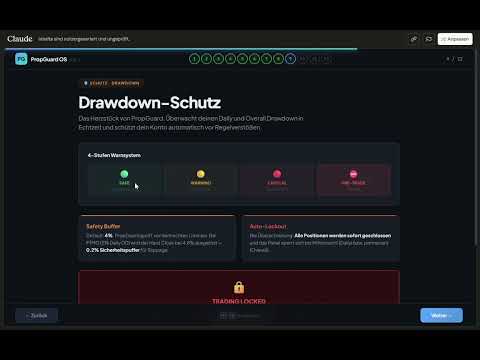
1. DRAWDOWN PROTECTION SYSTEM (Core Feature)
Three DD Modes:
- Equity-Based DD (FTMO, FundingPips, The5ers, FundedNext)
- Balance-Based DD (alternative reference)
- Trailing DD / High Water Mark (Apex Trader Funding)
Daily Drawdown:
- Real-time monitoring from midnight equity snapshot
- Automatic reset at server midnight
- Countdown timer to reset (HH:MM:SS)
- 4-tier traffic light system: Safe → Warning → Critical → Pre-Trade Block
- Lockout on limit breach with Unlock button
Overall Drawdown:
- Tracking from Initial Balance (persistent, never resets)
- Auto-detection of initial deposit from deal history
- Permanent lockout on limit breach
Safety Buffer & Hard Close:
- Configurable safety buffer (default: 4%)
- Automatic closure of ALL positions before DD limit is hit
- Protects against account loss at prop firms
2. PROP FIRM PRESETS (6 Firms + Custom)
| Firm | Daily DD | Max DD | DD Type | Leverage |
|---|---|---|---|---|
| FTMO | 5% | 10% | Equity | 1:100 |
| Apex Trader | — | 5% | Trailing HWM | 1:50 |
| FundingPips | 5% | 10% | Equity | 1:100 |
| The5ers | 4% | 6% | Equity | 1:30 |
| FundedNext | 5% | 10% | Equity | 1:100 |
| Custom | User | User | User | User |
- One-click firm switching directly in the panel
- All DD limits, leverage, and challenge defaults set automatically
3. ONE-CLICK TRADING
Market Orders:
- BUY / SELL with a single click
- Automatic lot calculation based on risk
- Mandatory Stop Loss (no trade without SL)
- Optional Take Profit
- Slippage management (configurable)
Pending Orders:
- BUY LIMIT, BUY STOP, SELL LIMIT, SELL STOP
- Entry price defined via interactive chart line
- STOPS_LEVEL minimum distance enforced automatically
2-Click Close:
- BUY/SELL button morphs to CLOSE when a position is open
- Confirmation click prevents accidental closures
- Volume displayed in button (e.g. "CLOSE 0.50 lots")
4. LOT CALCULATOR
Two Risk Modes:
- Percent Mode: Risk as % of equity (e.g. 1%)
- Dollar Mode: Fixed amount per trade (e.g. $100)
Calculated Metrics:
- Lot size (normalized, Min/Max/Step compliant)
- Risk amount in $
- Potential loss / profit in $
- Risk:Reward ratio
- Required margin
- SL/TP distance in pips and points
Multi-Instrument:
- Forex (majors, exotics, 3/5 digit)
- Indices, commodities, crypto
- Automatic contract size handling
5. TRADE MANAGEMENT
- Break-Even: Move SL to entry + buffer (1 click)
- Partial Close: Close 25% / 50% / 75% of a position
- Trailing Stop: Automatic trailing in pips (configurable)
- 4 management buttons directly in the panel
6. INTERACTIVE CHART LINES
- Entry line (blue), SL line (red), TP line (green)
- Drag & drop to adjust — prices + lots update live
- Price labels + distance labels (pips) between lines
- R:R preset pills: 1:1 / 1:2 / 1:3 / Free — TP adjusts automatically
- Toggle Show/Hide + Reset to defaults
- All colors customizable via inputs
7. NEWS ENGINE (Economic Calendar)
4 News Modes:
- OFF: No display
- INFO: Markers + countdown timer on chart
- WARN: Yellow exclusion zones + warning (trading allowed)
- PROTECT: Red exclusion zones + trade block (no new trades)
Features:
- Native MT5 Calendar API (no DLLs)
- Automatic scan 4h ahead + 30min back
- Impact filter: High only / Medium+High / All events
- Currency auto-filter (based on symbol) or All
- Countdown display: "Next: NFP in 00:34:22"
- Push & popup alerts on entering exclusion zone
- 5-minute cooldown prevents alert spam
Session Zones:
- Sydney, Tokyo, London, New York as background overlays
- Two intensity levels: Subtle / Normal
- UTC-based with automatic broker offset detection
8. SL GUARD (Stop Loss Monitoring)
- Automatically detects Stop Loss widening on open positions
- Visual warning overlay when risk increases
- 3 severity levels: Info (blue) → Caution (yellow) → Danger (red)
- 3 sensitivity levels: Low / Medium / High
- Risk delta shown in $ (e.g. "+$47 additional risk")
- Break-even moves intelligently ignored
- Configurable display duration (default: 5 seconds)
9. CHALLENGE PROGRESS TRACKING
3 Modular Metrics (individually toggleable):
| Metric | Description | Firm Defaults |
|---|---|---|
| Profit Target | Progress toward profit goal | FTMO: 10%/5%, FPips: 8%/5% |
| Min Trading Days | Trading days counted | FTMO: 4, FPips: 3, FNext: 5 |
| Time Limit | Countdown in days | FTMO: 30d, FPips: 30d |
Challenge Phases: None / Phase 1 / Phase 2 / Funded
- Automatic firm defaults per phase
- User override anytime (input > 0 overrides default)
- Start date configurable (YYYYMMDD) or Auto
- Trading days calculated from deal history (robust across restarts)
- Dynamic panel height (1–3 metrics = 36–76px extra)
10. GLASSMORPHIC DASHBOARD UI
Panel Features:
- Dark transparent design with glassmorphism aesthetics
- 3 scaling modes: Compact (HD) / Standard (QHD) / Large (4K)
- Drag & drop, freely positionable
- Minimize to 40×40px badge ("PG" logo)
- All positions persistent (survive EA restart)
Visual Design:
- Rounded corners on all cards + buttons
- Color-coded DD tiers (green/yellow/red)
- Hover effects on buttons
- Real-time input validation (risk field: green/yellow/red border)
- Pulsing red dot on Pre-Trade Block
Layout Sections:
- Header (logo + firm + minimize)
- DD Cards (Daily + Overall / Trailing)
- P&L + Equity
- Risk Input + Lot Calculation
- Trade Buttons (BUY/SELL/CLOSE)
- Pending Orders (BL/BS/SL/SS)
- Management (BE/25/50/75)
- Challenge Progress (optional, dynamic)
- Footer (Lines toggle + Reset)
11. PRE-TRADE SAFETY CHECKS (7 Layers)
- ✅ Trading allowed? (EA + Terminal)
- ✅ Market open?
- ✅ Lot size valid? (Min/Max/Step)
- ✅ Stop Loss set?
- ✅ Margin sufficient? (95% free margin)
- ✅ Daily DD Pre-Trade Block?
- ✅ News exclusion zone active? (PROTECT mode only)
12. PERSISTENCE & MULTI-ACCOUNT
- All states saved in GlobalVariables
- Account login as key suffix → multi-account support
- Survives: EA restart, terminal restart, PC reboot
- Persisted: Risk, firm, panel position, DD state, lockout, HWM, challenge date
13. SELF-TEST SYSTEM
- 52 automated tests (T01–T52)
- Activation via input parameter
- Validates: symbol properties, lot calculation, inputs, DD detection, challenge config, panel height
- Output in Experts log
14. TECHNICAL SPECS
| Property | Value |
|---|---|
| Version | 1.2 |
| Build | S12.1 |
| Platform | MetaTrader 5 |
| Files | 11 (.mq5 + .mqh) |
| Lines of Code | ~10,700 |
| DLLs Required | None |
| External Dependencies | None (MT5 Standard Library only) |