PGuard Basic


The Free Drawdown Dashboard Built for Prop Firm Traders

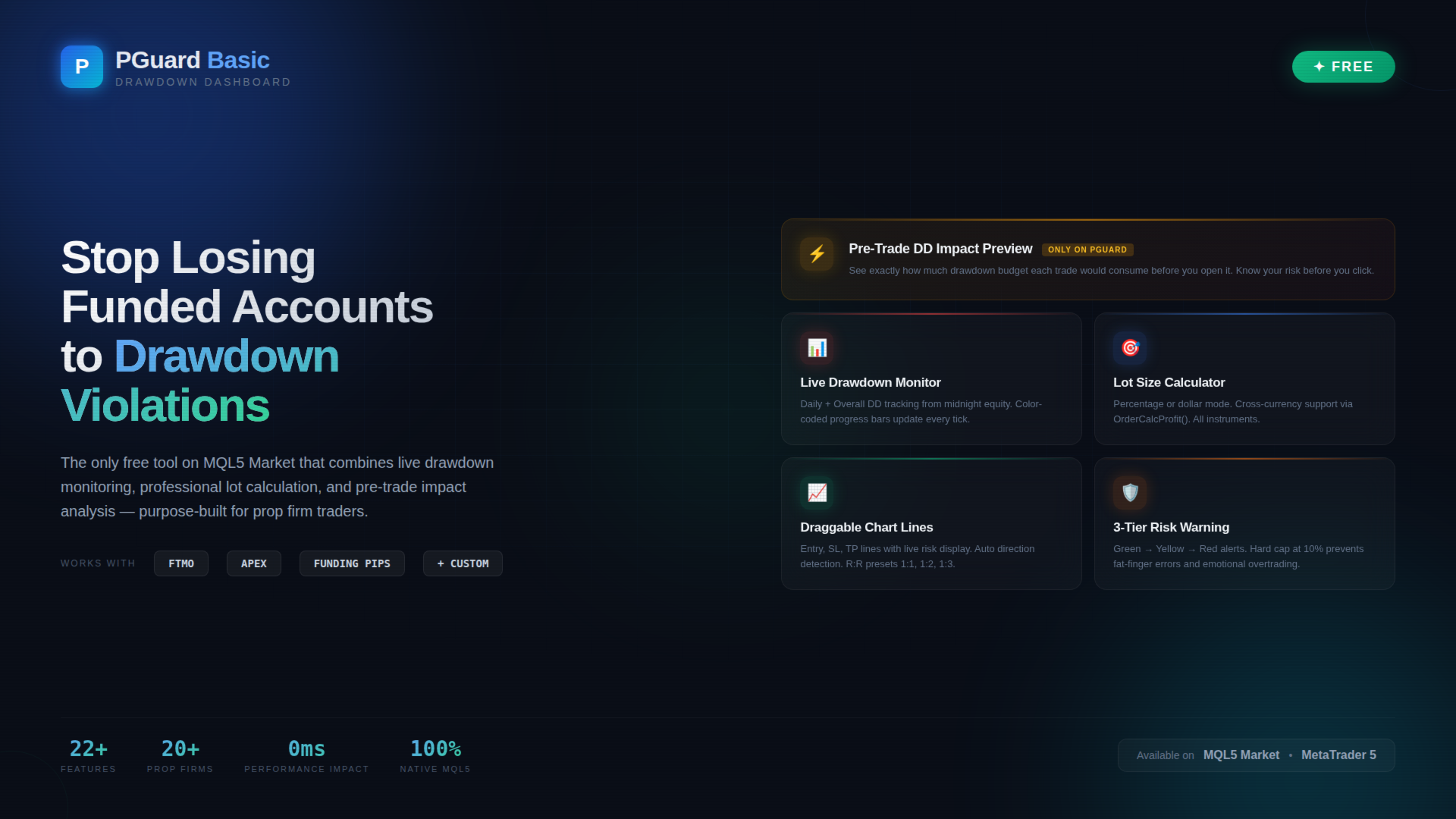
PGuard Basic is the first free Drawdown Dashboard and Lot Calculator designed specifically for Prop Firm Traders on MetaTrader 5. Monitor your Daily and Overall Drawdown in real time, calculate the perfect lot size for every trade, and see the exact impact on your remaining drawdown budget before you open a position. Built for FTMO, Apex Trader Funding, Funding Pips, and any other Prop Firm with configurable Custom Presets.

Most traders fail funded account challenges not because of bad strategy — but because they lose track of their drawdown. One emotional trade, one miscalculated position size, and the account is gone. PGuard Basic solves this by putting your drawdown status front and center on every chart, every session, every trade.

🛡 Why PGuard Basic?

Prop Firm Challenges have strict drawdown rules. FTMO allows only 5% daily and 10% overall drawdown. Apex Trader Funding uses trailing drawdown. Funding Pips calculates on balance. Every firm is different — and manual tracking with spreadsheets or mental math is the number one reason traders blow funded accounts.

PGuard Basic gives you a professional-grade drawdown monitoring dashboard directly on your MetaTrader 5 chart. No external tools, no browser tabs, no manual calculations. Just clear, real-time data exactly where you need it — next to your price action.

⭐ Unique Feature: Pre-Trade Drawdown Impact Preview

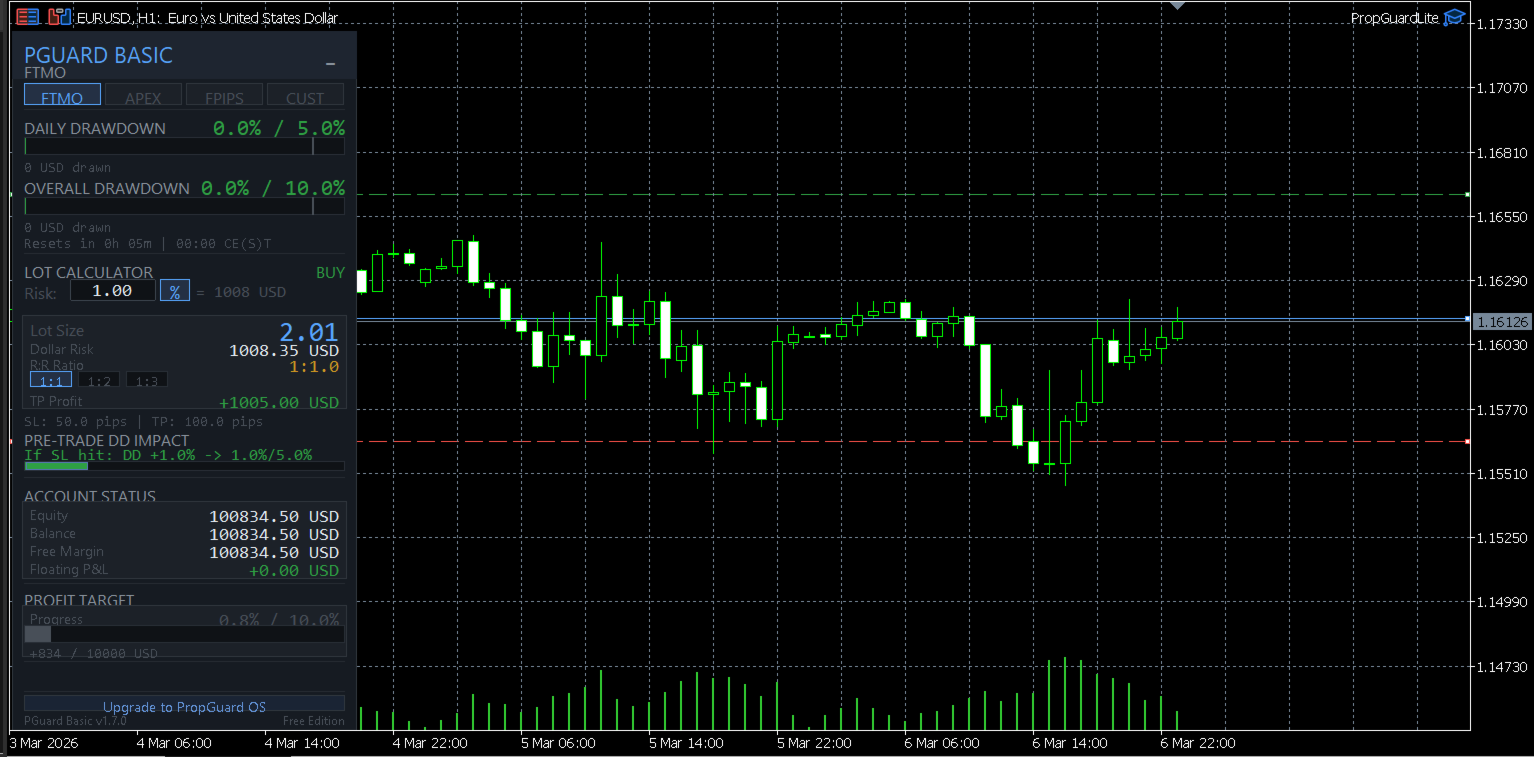
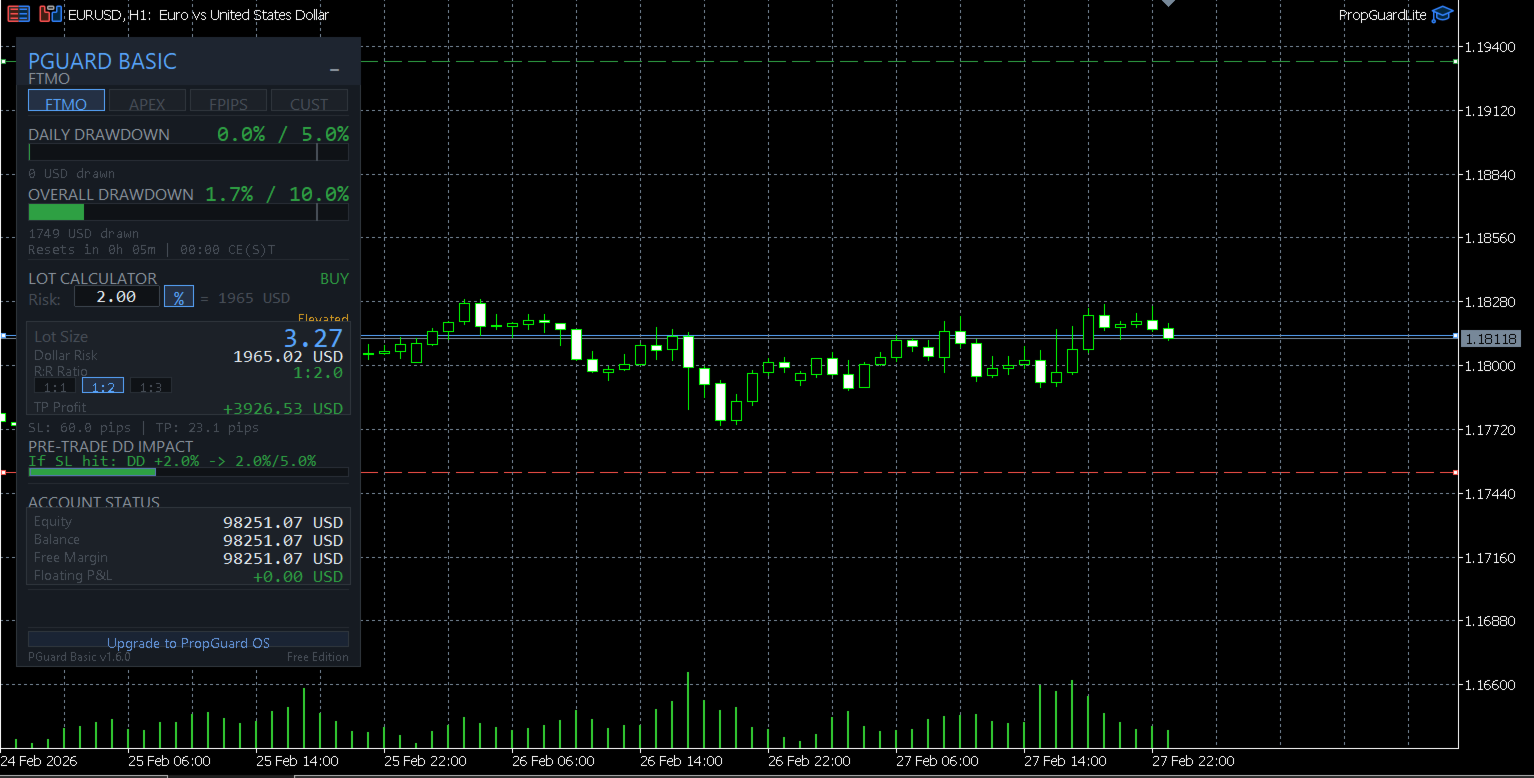
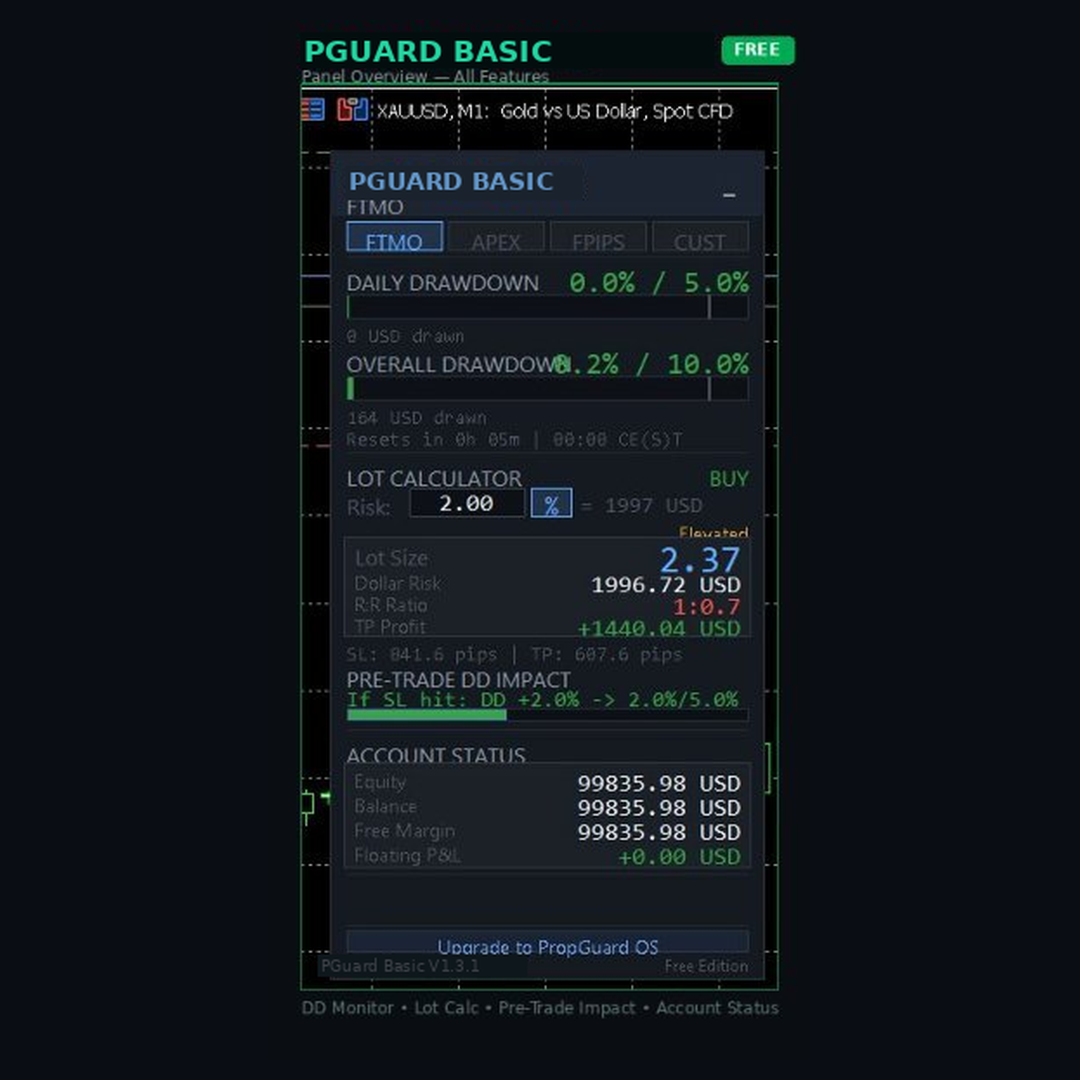
This is the feature that no other free tool on the MQL5 Market offers. Before you open any trade, PGuard Basic shows you exactly how much of your drawdown budget that trade would consume if the stop loss is hit. You see the projected drawdown percentage, the dollar amount at risk, and how close the trade would bring you to your daily or overall limit.

Example: Your FTMO account has 5% daily drawdown. You have already used 2.1%. PGuard Basic shows: "If SL hit: DD +1.4% → 3.5% / 5.0% (70% used)" — so you know instantly whether this trade fits within your risk budget. This single feature has prevented countless account violations for traders who use it consistently.

📊 Live Drawdown Monitoring

PGuard Basic tracks two drawdown metrics simultaneously in real time:

Daily Drawdown: Calculated from your equity at midnight server time (the method used by most prop firms including FTMO). The dashboard shows a visual progress bar that fills up as your daily loss increases, with clear color coding — green for safe zone, yellow for warning zone, and red for critical zone approaching your limit.

Overall Drawdown: Tracked from your initial account balance or highest equity (depending on your firm's rules). This gives you the big-picture view of how close you are to violating the maximum loss rule that would end your challenge or funded account.

Both metrics update on every tick when positions are open. The dashboard shows the exact dollar amount lost, the percentage used, and the remaining budget in both dollars and percent. No guessing, no mental math, no surprises at the end of the trading day.

💰 Professional Lot Size Calculator

Calculate the correct position size for any instrument in seconds. PGuard Basic supports two risk modes:

Percentage Mode: Risk a fixed percentage of your account equity per trade. Set 1% risk and PGuard calculates the exact lot size based on your stop loss distance, the instrument's tick value, and your account currency. The calculation works correctly for Forex pairs, Gold (XAUUSD), Silver, Indices (US30, NAS100, GER40), Crypto (BTCUSD, ETHUSD), and any other CFD instrument.

Dollar Mode: Risk a fixed dollar amount per trade. If your prop firm allows maximum $500 risk per trade, enter $500 and PGuard calculates the matching lot size regardless of the instrument or stop loss distance.

The lot size is automatically rounded to the symbol's lot step (VOLUME_STEP) and clamped between minimum and maximum lot sizes (VOLUME_MIN / VOLUME_MAX). Margin requirements are validated before any calculation is displayed. PGuard Basic uses the native OrderCalcProfit() function as a fallback for cross-currency pairs and exotic instruments where simple tick-value calculations would produce incorrect results.

📈 Visual Chart Lines with Live Risk Display

PGuard Basic places three draggable horizontal lines on your chart: Entry (blue), Stop Loss (red), and Take Profit (green). As you drag any line, the risk calculation updates in real time on the dashboard panel. This gives you an intuitive, visual way to plan your trade setup directly on the price chart.

The system automatically detects the trade direction from line positions. If the Stop Loss is below the Entry line, PGuard recognizes a BUY setup. If the Stop Loss is above Entry, it switches to SELL. No manual selection required.

Pip distances between Entry and SL, as well as Entry and TP, are displayed next to each line. The Risk-to-Reward Ratio updates automatically as you adjust the Take Profit line. Quick-select presets for common R:R ratios (1:1, 1:2, 1:3) let you set your Take Profit with a single click — the TP line moves to the calculated level instantly.

🏢 Prop Firm Presets

PGuard Basic ships with built-in configurations for the most popular prop firms:

FTMO (Challenge & Funded): 5% daily drawdown, 10% overall drawdown, equity-based calculation, reset at 00:00 CE(S)T. PGuard Basic reads the correct midnight equity reference point and calculates daily drawdown exactly as FTMO does — including unrealized floating losses.

Apex Trader Funding: Trailing drawdown model based on the highest equity reached. PGuard Basic tracks the high-water mark and shows remaining drawdown distance from peak equity. Apex uses 17:00 ET as reset time — PGuard adjusts automatically.

Funding Pips: 5% daily drawdown, 10% overall drawdown, balance-based calculation, reset at 00:00 UTC. Balance-based means only closed trades count for daily drawdown — PGuard shows both realized and unrealized calculations so you always have the complete picture.

Custom Preset: For any prop firm not listed above. Configure daily drawdown percentage, overall drawdown percentage, initial balance, reset time (HH:MM), and drawdown model (equity-based or balance-based). This makes PGuard Basic compatible with every prop firm on the market — including The5ers, FundedNext, TrueForex, E8 Funding, SurgeTrader, and any future firm.

🎨 Modern Canvas-Based Dashboard

PGuard Basic features a professionally designed dashboard rendered entirely with the MQL5 Canvas library. The dark theme with glassmorphism-inspired visual elements creates a clean, modern interface that is immediately distinguishable from standard MetaTrader panels and basic label-based tools.

The dashboard displays all critical information at a glance: Account balance and equity, current drawdown status with color-coded progress bars, the lot calculator result with dollar risk and R:R ratio, prop firm preset selection, and the Pre-Trade DD Impact Preview. The panel is compact and does not obstruct your chart analysis. Panel position is saved between sessions via GlobalVariables — it remembers where you placed it even after restarting MetaTrader.

⚙ Risk Warning System

PGuard Basic includes a three-tier risk warning system that alerts you when your per-trade risk exceeds safe thresholds:

Normal (Green): Risk is within acceptable parameters. The panel displays risk values in standard colors. No intervention needed.

Warning (Yellow): Risk exceeds the warning threshold (default: 2% of account). The risk display changes color and a visual warning indicator appears on the panel. This is your signal to double-check the position size before proceeding.

Critical (Red): Risk exceeds the critical threshold (default: 5% of account). The entire risk field pulses red as a clear danger signal. A hard cap at 10% prevents any calculation beyond extremely dangerous risk levels. These thresholds are the safety net that prevents fat-finger errors and emotional overtrading.

📋 Complete Feature List

  • Real-time Daily Drawdown monitoring (equity-based, as used by FTMO)
  • Real-time Overall Drawdown monitoring (balance or equity-based)
  • Pre-Trade Drawdown Impact Preview (unique to PGuard)
  • Visual drawdown progress bars with color-coded zones
  • Professional lot size calculator (percentage and dollar modes)
  • Cross-currency and exotic instrument support via OrderCalcProfit()
  • Draggable Entry, Stop Loss, and Take Profit chart lines
  • Automatic trade direction detection from line positions
  • Risk-to-Reward ratio display with 1:1, 1:2, 1:3 quick presets
  • Prop Firm presets: FTMO, Apex Trader Funding, Funding Pips
  • Custom preset for any prop firm with configurable rules
  • Three-tier risk warning system (normal, warning, critical)
  • Hard cap risk protection (10% maximum risk per trade)
  • Account information display (balance, equity, free margin)
  • Canvas-based dark theme dashboard with glassmorphism design
  • Panel position persistence across MetaTrader restarts
  • Built-in self-test framework for system validation
  • Compatible with all symbols: Forex, Gold, Silver, Indices, Crypto, CFDs
  • Works on all timeframes from M1 to Monthly
  • Hedging and Netting account support
  • Strategy Tester compatible (visual mode)
  • No DLL imports — 100% native MQL5 code

🎯 Who Is PGuard Basic For?

Prop Firm Challenge Traders: You are in an FTMO Challenge, Apex Evaluation, or Funding Pips Assessment and cannot afford to lose the account to a drawdown violation. PGuard Basic gives you real-time visibility into your remaining drawdown budget so every trade is calculated and deliberate — not emotional and risky.

Funded Account Traders: You passed the challenge and now manage a funded account. The stakes are higher because a drawdown violation means losing the payout and the account. PGuard Basic monitors your daily and overall limits continuously so you can focus on trading rather than calculating in your head.

Risk-Conscious Retail Traders: Even without a prop firm, PGuard Basic is a professional risk management tool. The lot calculator, chart lines, and risk warning system help you maintain consistent position sizing and avoid the common mistake of taking oversized positions after a losing streak.

Traders Switching Between Firms: If you trade multiple prop firm accounts (e.g., FTMO and Apex simultaneously), switching between drawdown rules is confusing and error-prone. PGuard Basic's firm presets let you swap configurations with a single click — no mental recalculation needed when moving between different accounts and rule sets.

💡 Trading Scenarios Where PGuard Basic Prevents Account Violations

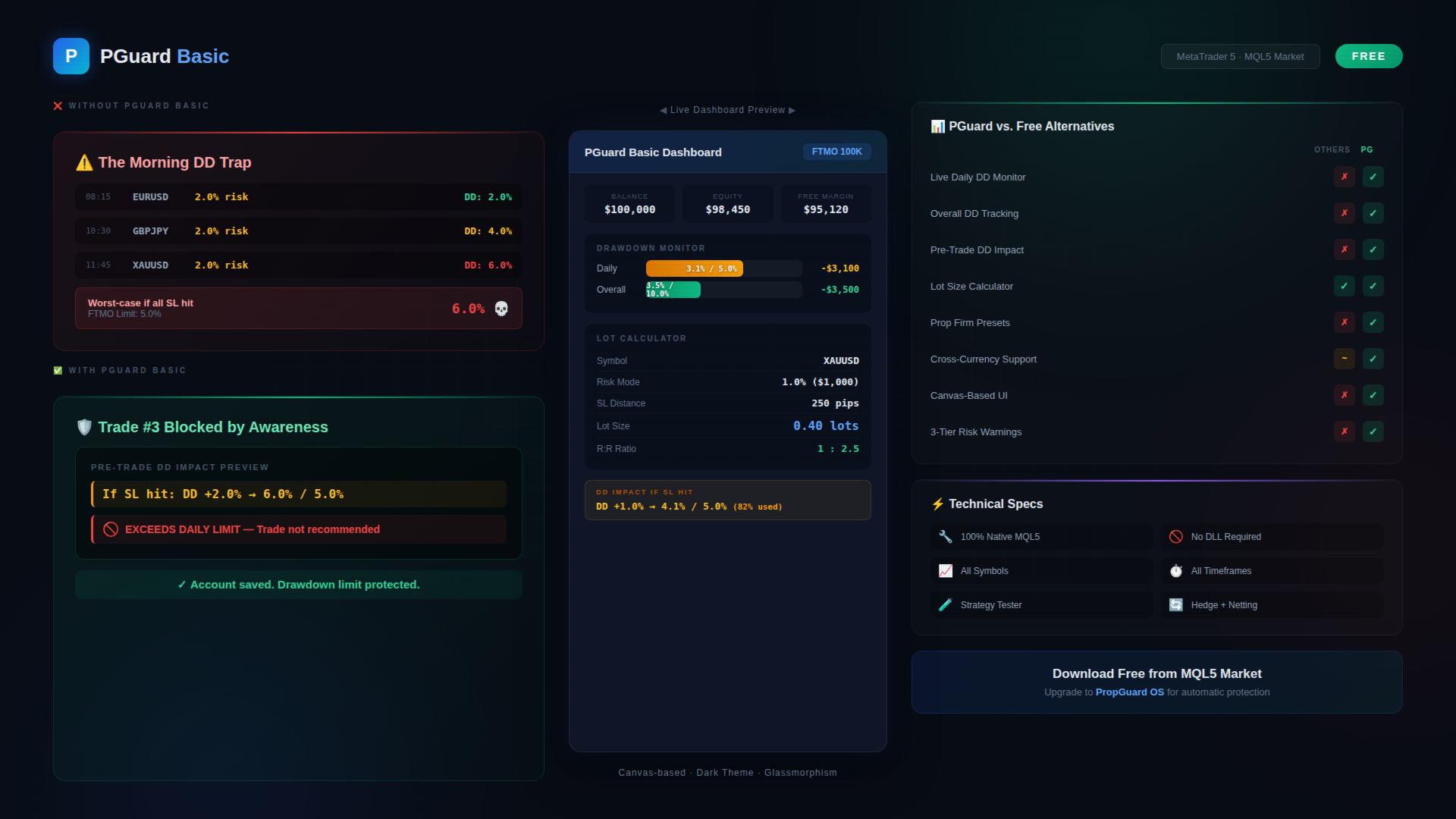
Scenario 1 — The Morning Drawdown Trap: You open MetaTrader at 8:00 AM and see a great setup on EURUSD. You enter a 2% risk trade. Two hours later, another setup on GBPJPY — 2% risk again. Then Gold shows a breakout — 2% risk. By noon, you have three positions running with a combined worst-case drawdown of 6% — exceeding your FTMO 5% daily limit if all stop losses hit. Without PGuard Basic, you would only realize this when checking your balance. With PGuard Basic, the Pre-Trade DD Impact Preview warns you before the third trade: "If SL hit: DD +2.0% → 6.1% / 5.0% — EXCEEDS DAILY LIMIT." The trade is flagged before you risk your account.

Scenario 2 — The Lot Size Miscalculation: You want to trade NAS100 with a 50-point stop loss and 1% risk. NAS100 has a contract size and tick value that differs significantly from Forex pairs. Mental calculation leads to overestimation — you enter 3 lots instead of the correct 1.8 lots. The trade loses, and the actual loss is 1.7% instead of 1%. After three such trades in a week, the accumulated error pushes you over the overall drawdown limit. PGuard Basic's cross-currency calculator would have shown the correct lot size instantly.

Scenario 3 — The Equity vs. Balance Confusion: Your FTMO account shows $100,000 balance after a profitable morning session. You take a swing trade and go to sleep. Overnight, the position moves against you — equity drops to $96,000. When midnight server time hits, FTMO captures the equity at $96,000 as the new daily reference. Your actual daily drawdown budget is now based on $96,000, not $100,000. Many traders miss this distinction. PGuard Basic captures midnight equity automatically via GlobalVariable and shows the correct drawdown calculation from the actual reference point.

🔍 How PGuard Basic Compares to Other Free Tools

The MQL5 Market has many free lot calculators and trade panels. However, none of them combine a position size calculator with live drawdown monitoring and pre-trade drawdown impact analysis. Here is what sets PGuard Basic apart:

Versus standard lot calculators: Free lot calculators calculate position size but show nothing about your drawdown status. You get the right lot size but have no idea whether the trade fits within your daily or overall drawdown budget. PGuard Basic combines both into a single dashboard — lot size AND drawdown context for every trade setup.

Versus generic trade panels: Free trade panels offer one-click execution but ignore prop firm rules entirely. They do not know what FTMO's equity-based drawdown means, they do not track midnight equity, and they do not warn you when a trade would push you over the limit. PGuard Basic is purpose-built for the prop firm workflow.

Versus paid drawdown limiters: Paid drawdown protection tools (typically $50 to $100) close positions automatically when limits are hit. PGuard Basic takes a different approach: it gives you complete drawdown visibility so you can make informed decisions before entering a trade — prevention through awareness rather than reactive position closing. For automatic protection, upgrade to PropGuard OS.

🔧 Input Parameters

  • Risk Mode — Choose between percentage-based risk or fixed dollar amount per trade
  • Risk Value — Default risk per trade (default: 1.0%)
  • Firm Preset — Select your prop firm (FTMO, Apex, Funding Pips) or choose Custom
  • Daily DD Limit (%) — Daily drawdown percentage limit for Custom preset
  • Overall DD Limit (%) — Overall drawdown percentage limit for Custom preset
  • Initial Balance ($) — Starting balance for drawdown calculations
  • DD Model — Equity-based or balance-based drawdown calculation
  • Reset Time — Daily drawdown reset time (server timezone)
  • Magic Number — Unique identifier for order management
  • Run Self-Test — Execute the built-in diagnostic system check

💻 System Requirements

  • MetaTrader 5 (any broker)
  • Hedging or Netting account mode
  • Algo Trading enabled in terminal settings
  • Works on all timeframes and all symbols
  • No external dependencies or DLL files
  • Minimum chart size: 340 x 460 pixels

🧪 Testing

You can test PGuard Basic in the MetaTrader 5 Strategy Tester using Visual Mode. Attach the utility to a chart, enable the panel, and explore the drawdown monitoring, lot calculator, and chart lines with simulated data. This allows you to evaluate the complete interface and all calculations before using the tool on a live or demo prop firm account.

PGuard Basic includes a built-in self-test framework. Enable the "Run Self-Test" input parameter to execute the diagnostic suite. The system validates lot calculations, drawdown computations, risk warning thresholds, R:R preset logic, and chart line functionality. All tests must pass with status PASS in the Experts tab.

📦 Installation

Download PGuard Basic from the MQL5 Market. The file is automatically placed in your MetaTrader 5 data folder. Open any chart, click "Insert" → "Expert Advisors" and select PGuard Basic. The dashboard panel appears immediately. Select your prop firm from the dropdown, set your preferred risk level, and you are ready to trade with full drawdown visibility.

Make sure "Algo Trading" is enabled in your MetaTrader 5 terminal settings (Tools → Options → Expert Advisors → Allow Algo Trading). PGuard Basic needs this permission to access account data and manage chart objects.

🚀 Looking for Automatic Protection?

PGuard Basic shows you the danger — PropGuard OS prevents it automatically. If you want your trades to be automatically closed when drawdown limits are reached, automatic lockout when the daily limit is hit, pre-trade validation that blocks dangerous trades before execution, SL Guard that warns you when you widen your stop loss emotionally, one-click break-even, partial close, and trailing stop — then check out PropGuard OS in the MQL5 Market. It includes everything in PGuard Basic plus a complete Compliance Engine, Trade Execution panel, and Psychological Protection features.

Search for PropGuard OS in the MQL5 Market or visit the link in the screenshots section.

❓ Frequently Asked Questions

Does PGuard Basic place trades automatically?
No. PGuard Basic is a risk management dashboard and lot calculator. It monitors your drawdown and calculates position sizes, but all trading decisions and order execution are made by you. For automatic trade execution and compliance protection, see PropGuard OS.

Does it work with my prop firm?
Yes. PGuard Basic supports FTMO, Apex Trader Funding, and Funding Pips out of the box. For any other firm, use the Custom Preset and enter your firm's specific rules (daily DD %, overall DD %, reset time, DD model). This makes PGuard compatible with every prop firm in the market.

Is the drawdown calculation accurate?
PGuard Basic calculates daily drawdown from midnight equity — the same method used by FTMO and most major prop firms. The equity value at server midnight is captured via GlobalVariable and compared to current equity on every tick. This is more accurate than balance-based tools that ignore floating losses.

Does it work on Gold, Indices, and Crypto?
Yes. The lot calculator supports all instrument types: Forex pairs (Majors, Minors, Crosses), Metals (XAUUSD, XAGUSD), Indices (US30, NAS100, GER40, JP225), Crypto (BTCUSD, ETHUSD), and any other CFD. Cross-currency calculations use OrderCalcProfit() as a fallback to ensure correct results on every symbol.

Can I test it before using it on a live account?
Yes. PGuard Basic works in the MetaTrader 5 Strategy Tester (Visual Mode). You can evaluate all features with simulated data. We also recommend testing on a demo account before using it on your funded prop firm account.

Does it slow down my MetaTrader?
No. PGuard Basic uses an event-driven architecture. The dashboard only redraws when data changes (line movement, tick update, button click). There are no heavy calculations running on every tick. CPU usage is negligible even with multiple charts open.

What if my broker uses a different server timezone?
The Custom Preset allows you to configure the exact reset time for daily drawdown. Enter the time in server timezone format (HH:MM). PGuard Basic reads the server time via TimeCurrent() and resets the midnight equity reference at the configured time.

📝 Version History

Version 1.0 — Initial release. Drawdown Dashboard, Lot Calculator, Chart Lines, Firm Presets, Pre-Trade DD Impact Preview, Risk Warning System, Canvas-based UI, Self-Test Framework.

ℹ About the Developer

PGuard is developed and maintained by an active trader who understands the daily challenges of passing and maintaining prop firm accounts. Every feature in PGuard Basic was built to solve real problems that cost real money — missed drawdown limits, miscalculated position sizes, and emotional decisions made without data. If you have questions, feedback, or feature requests, please leave a comment on this product page or send a direct message. Your input directly shapes future updates.

⚠ Disclaimer

PGuard Basic is a risk management utility. It does not generate trading signals, does not execute trades automatically, and does not guarantee compliance with any prop firm's rules. All trading decisions and responsibility remain with the user. Past drawdown calculations depend on accurate midnight equity capture — ensure PGuard Basic is running on your chart during the daily reset time. Always verify critical drawdown levels with your prop firm's official dashboard.

📖 Best Practices for Prop Firm Trading with PGuard Basic

1. Always check the Pre-Trade DD Impact before opening a position. This is the single most important habit for passing prop firm challenges. If the projected drawdown exceeds 80% of your daily limit, reduce the position size or skip the trade entirely.

2. Set your Firm Preset before the trading session starts. Switch to the correct profile (FTMO, Apex, Funding Pips, or Custom) at the beginning of each session. This ensures all drawdown calculations reference the correct limits, reset times, and calculation models.

3. Keep PGuard Basic running during the daily reset window. The midnight equity capture depends on PGuard Basic being active on your chart when the server resets. If MetaTrader is closed at midnight, PGuard captures the equity on the next start — but the reference may be slightly different from what your prop firm recorded.

4. Use the Risk-to-Reward presets consistently. The 1:2 and 1:3 R:R presets help maintain a consistent trading approach. When your stop loss is set, click the R:R preset to automatically place the Take Profit at the correct level. This removes the temptation to set unrealistic take profit targets.

5. Trust the risk warnings. When PGuard Basic shows a yellow or red risk warning, take it seriously. The warning thresholds are calibrated to protect against common mistakes — oversized positions, accumulated risk from multiple trades, and emotional overtrading after losses.

🌐 Supported Prop Firms and Drawdown Models

PGuard Basic's Custom Preset system makes it compatible with virtually every prop firm in the industry. Here is a non-exhaustive list of firms that traders successfully use PGuard Basic with:

FTMO (Challenge, Verification, Funded) — Apex Trader Funding (Evaluation, Funded) — Funding Pips (Assessment, Funded) — The5ers (Hyper Growth, High Stakes) — FundedNext (Stellar Challenge, Express) — E8 Funding (Standard, Extended) — MyFundedFX (Challenge, Rapid) — True Forex Funds — SurgeTrader — Lux Trading Firm — City Traders Imperium — TopStep — OneUp Trader — Earn2Trade — BluFX — The Funded Trader — and many more.

If your prop firm is not listed in the presets, use the Custom configuration. Enter your firm's daily drawdown percentage, overall drawdown percentage, starting balance, reset time, and whether drawdown is calculated from equity or balance. The Custom Preset adapts to any rule set.

Keywords: prop firm risk manager, drawdown dashboard MT5, lot calculator MetaTrader 5, position size calculator free, FTMO drawdown tool, Apex Trader drawdown, Funding Pips calculator, daily drawdown monitor, equity drawdown tracker, prop firm challenge tool, funded account protection, pre-trade risk assessment, drawdown limiter free, risk calculator MT5, lot size calculator, prop firm EA free, trade panel utility MT5, drawdown compliance, prop firm trading tool, equity guard, MetaTrader risk management, funded trader utility
Recommended products
Crypto_Forex Indicator "WPR with 2 Moving Averages" for MT5, No Repaint. - WPR itself is one of the best oscillators for scalping. - "WPR and 2 Moving Averages" Indicator allows you to see Fast and Slow Moving Averages of WPR oscillator. - Indicator gives opportunities to see the price corrections very early. - It is very easy to set up this indicator via parameters, it can be used on any time-frame. - You can see Buy and Sell entry conditions on the pictures. - With PC and Mobile alerts on WP
CosmiCLab SMC FIBO CosmiCLab SMC FIBO is a professional trading indicator designed for traders who use Smart Money Concepts (SMC), market structure analysis and Fibonacci retracement levels. The indicator automatically detects market swings and builds Fibonacci levels based on the latest impulse movement. It also identifies market structure changes such as BOS (Break of Structure) and CHOCH (Change of Character), helping traders understand the current market direction. CosmiCLab SMC FIBO also pr
CCI Fixed Dual
Edoardo Centorame
What is CCI FIXED DUAL CCI FIXED DUAL is a professional Trend Direction Filter, designed to accurately identify: the dominant direction of the market the structural quality of the movement the consistency between the main trend and acceleration phases It is not a direct entry indicator. It is not a classic oscillator. It is a context tool, designed to help the trader decide when to trade and when NOT to trade, drastically reducing noise and interpretation errors. Basic philosophy of CCI FIXED DU
Introducing   Order Blocks Breaker , a brand-new way to identify and leverage order blocks in your trading strategy. After developing multiple order block tools with unique concepts, I’m proud to present this tool that takes things to the next level. Unlike previous tools,   Order Blocks Breaker   not only identifies order blocks but also highlights   Breaker Order Blocks —key areas where the price is likely to retest after a breakout. MT4 -  https://www.mql5.com/en/market/product/124101/ This t
LT Rainbow Trend
Thiago Duarte
5 (1)
Do you, like me, like to trade with the trend? Then this indicator will help you! Rainbow Trend is a trend indicator, which uses several Moving Averages on the chart. It measures different trend strenght zones for different periods: very long term, long term, mid term, short term and very short term. Each zone has its color, and it is possible to have sound alert when the prices leaves a zone and enters another. Its configuration is very simple. If you find any bug or have any suggestions, conta
Time to Close Candle
German David Nino Cifuentes
TimeToClose The "TimeToClose" indicator is an essential tool for traders who need to monitor the remaining time before a candle closes. This indicator displays the remaining time directly on the BID line, providing a clear and precise reference during real-time trading. Key Features: Displays the remaining time for the current candle to close. Direct integration on the BID line for better visualization. Simple and user-friendly configuration. Ideal for all types of traders, from beginners to pro
FREE
HAS RSI Signal — Professional Trend Indicator with SL/TP Calculation HAS RSI Signal is a powerful trading tool that combines time-tested classics with modern noise-filtering algorithms. The indicator analyzes the market through the prism of Heiken Ashi Smoothed candles and the RSI oscillator, providing clear entry signals at trend reversals or when exiting overbought/oversold zones. Key Advantages: Double Filtration: Using Heiken Ashi Smoothed eliminates market "noise," while RSI confirms the mo
Let us introduce the Heikin Ashi RSI Oscillator! This indicator combines the concepts of Heikin Ashi candles with the RSI (Relative Strength Index) to produce an oscillator-like format that can be used to filter out some of the noise associated with standard RSI readings. This provides traders with a smoother representation of market conditions. Here are some articles to read more about the RSI and Heikin Ashi candles: https://www.investopedia.com/terms/r/rsi.asp https://www.investopedia.com/ter
Auto Stop Loss MT5
Nabil Oukhouma
5 (1)
The "Set & Forget" Risk Manager for Multi-Asset Trading Never Leave a Trade Unprotected. Auto Stop Loss (MT5 Manager) is the ultimate background utility for traders who prioritize safety. Unlike standard panels, this tool works tirelessly behind the scenes to instantly secure every trade you place. Whether you open trades manually or via another EA, this manager ensures every position has a hard Stop Loss, Take Profit, and dynamic Trailing Stop attached immediately. The Game Changer:  Manage yo

Candlestick Pattern Scanner is a multi-timeframe and multi-symbol dashboard and alert system that checks all timeframes and currency pairs for different candlestick patterns that are formed in them. Scanner is integrated   with support and resistance zones so you can check the candlestick patterns in most important areas of the chart to find breakout and reversal patterns in the price chart. Download demo version   (works on M4,M6,M12,H3,H8 timeframes and 20 symbols of Market Watch window) Read
Divergent Stochastic Filter II Catch Reversals Early, Filter Noise, Trade with Confidence The Edge: Why This Stochastic is Different  Every trader knows the Stochastic oscillator. But knowing when to trust its signals, that's the real challenge. The Divergent Stochastic Filter II transforms this classic indicator into a precision reversal detection system by adding critical elements: divergence intelligence, signal filtering and exhaustion detection.  While standard Stochastic oscillators fire s
The   Trendlines Oscillator   helps traders identify trends and momentum based on the normalized distances between the current price and the most recently detected bullish and bearish trend lines. The indicator features bullish and bearish momentum, a signal line with crossings, and multiple smoothing options. USAGE The   Trendlines Oscillator   works by systematically: Identifying pivot highs and lows. Connecting pivots to form bullish (support) and bearish (resistance) trendlines. Measuring
This EA is primarily used for scalping XAUUSD. Purpose Removes emotion from trade management   - automatically protects positions and takes profits so you don't have to make difficult decisions under pressure. What It Does ️   Auto Stop Loss Sets SL based on recent highs/lows + buffer No more manual placement stress   Auto Partial Profits Two modes: Fixed Movement : Close 50% after X price movement R-Ratio : Close 50% at 1.2R profit target Locks in gains while letting winners run. ️   One
SlopeChannelB MT5
MIKHAIL VINOGRADOV
SlopeChannelB – a technical analysis tool that constructs a sloping price movement channel, offering unique opportunities to assess the current market situation and find trading signals. Main features of the indicator: Sloping price movement channel : The indicator helps visualize support and resistance levels, which may indicate potential reversal points or trend continuations. Various line colors and background highlighting : Sloping support and resistance levels are displayed in differen
Visual Dolphin Indicator
AL MOOSAWI ABDULLAH JAFFER BAQER
Visual Dolphin Indicator Unlock the rhythm of the market with the Visual Dolphin Indicator, your ultimate tool for identifying and capitalizing on market trends with clarity and confidence. Designed for both novice and experienced traders, this indicator eliminates the noise and guesswork, providing crystal-clear buy and sell signals directly on your chart. The Logic Behind the Waves The core of the Visual Dolphin Indicator is a sophisticated yet intuitive dual-wave system based on moving avera
Size Bars
Viktor Loginov
Size Bars – индикатор отображает на графике максимальный, минимальный, текущий и средний размер баров (свечей) за выбранный период. Отображаемые параметры индикатора Size Bars: 1)       Текущий размер бара в писах (по максимум/минимум, тело бара). 2)       Максимальный, минимальный и средний размер свечей BUY . 3)       Максимальный, минимальный, средний размер свечей SELL . 4)       Количество свечей BUY и количество свечей SELL . 5)       Среднее количество свечей подряд BUY и SELL . 6)     
Fibo Channels
Jeffrey Quiatchon
Fibo Daily Channel Indicator The  Indicator is a powerful tool for traders, providing precise daily support and resistance levels based on Fibonacci retracement and extension calculations. This indicator automatically draws key pivot points (PP, R1, R2, S1, S2) as well as additional extension levels (R3, R4, S3, S4), helping traders identify potential reversal and breakout zones with ease. It includes customizable alerts and push notifications, allowing traders to receive updates whenever the pr
HiperCube VIX
Adrian Lara Carrasco
Welcome to HiperCube VIX Discount code for 25% off at Darwinex Zero: DWZ2328770MGM This indicator provide you a real info of market of volume of sp500 / us500 Definition  HiperCube VIX  known as the CBOE Volatility Index, is   a widely recognized measure of market fear or stress . It signals the level of uncertainty and volatility in the stock market, using the S&P 500 index as a proxy for the broad market. The VIX Index is calculated based on the prices of options contracts on the S&P 500 inde
FREE
Price Magnet — Price Density and Attraction Levels Indicator Price Magnet is a professional analytical tool designed to identify key support and resistance levels based on statistical Price Density. The indicator analyzes a specified historical period and detects price levels where the market spent the most time. These zones act as “magnets,” attracting price action or forming a structural base for potential reversals. Unlike traditional Volume Profile tools, Price Magnet focuses on price-time d
Trading Room Indcator
Meshari F M Alkhawaled
Trading Room Indicator is a professional market-structure tool built to give traders a clear, complete trading framework — combining CPR levels, dynamic targets, and trend direction in one clean view. Instead of guessing direction or overloading the chart with indicators, Trading Room Indicator focuses on what actually matters : levels, direction, and potential price expansion. What This Indicator Provides CPR Structure BUY level SELL level Pivot Point (PP) Designed to highlight equilibrium
BerelzBridge
Barend Willem Van Den Berg
BerelzBridge Pro Read also comment sectie above for more. MT5-to-JSON data bridge for all timeframes with account information. Overview BerelzBridge Pro is an MT5 indicator that exports live market data to a JSON file on disk. It writes bid and ask prices, spread, tick volume, daily statistics, account information and OHLCV bars for all 9 timeframes. The file is updated at a configurable interval with a default of 2 seconds. The indicator runs alongside Expert Advisors on the same chart without
Antabod Multiplier
Rev Anthony Olusegun Aboderin
Antabod Multiplier , the ultimate trading indicator designed to simplify your decision-making process and maximize your trading potential. Built with a robust combination of moving averages and stochastic oscillators, this tool provides clear, actionable signals for both buy and sell opportunities. The Antabod Multiplier stands out with its dynamic trend detection and precision filtering, giving you real-time visual signals to catch trend reversals and optimal entry/exit points with ease. Whethe
The indicator detects and displays М. Gartley's Butterfly pattern. The pattern is plotted by the extreme values of the ZigZag indicator (included in the resources, no need to install). After detecting the pattern, the indicator notifies of that by the pop-up window, a mobile notification and an email. The pattern and wave parameters are displayed on the screenshots. The default parameters are used for demonstration purposes only in order to increase the amount of detected patterns. Parameters z
Silver Zebra Trading System
AL MOOSAWI ABDULLAH JAFFER BAQER
Silver Zebra Trading System - Uncover Market Momentum Unlock a powerful new way to visualize market trends and momentum with the Silver Zebra Trading System. This unique MetaTrader 5 indicator is designed to give you a clear and immediate understanding of market dynamics, helping you make more informed trading decisions. For just $30, you can add this indispensable tool to your trading arsenal. What is the Silver Zebra Trading System? The Silver Zebra Trading System is a sophisticated indicator
ZT Scalper Bundle 1
Damien Joseph Marie Juge
This Bundle offers an all-in-one tools for scalpers. Basic but effective. Powerfull together. Namely Breakout detector with pivot or ohlc and a colored MA to check the trend. --------------- It includes :  - Pivot levels with different parameters - Colored MA, to visualize trends and reversals - OHLC, to keep an eye on daily key levels. - BreakOut detector, to take advantage of breakouts on all UT and take the trend.
Ichimoku MTF
Hoang Ngoc Thach
MTF Ichimoku is a MetaTrader 5 indicator based on well known Ichimoku. In MetaTrader 5 we have Ichimoku already included as a standard technical indicator. However it can be used only for the current timeframe. When we are looking for a trend, it is very desirable to have Ichimokuis showing higher timeframes. MTF Ichimoku presented here has additional parameter - TimeFrame. You can use it to set up higher timeframe from which Ichimokuis will calculate its values. Other basic parameters are not c
TradePilotmt5
Hossein Khalil Alishir
TradePilot Expert Advisor (EA) for MetaTrader 5 TradePilot is a professional and user-friendly Expert Advisor (EA) for MetaTrader 5 (MT5) . It simplifies automated trading , risk management , and trade execution with a smart trading panel . Perfect for beginners and experienced traders looking for a reliable trade manager EA with automated lot size calculation and smart position management. Key Advantages User-Friendly Trading Panel: Customizable panel with buttons and hotkeys for fast ex
Trend Follower LukaHo
Lukasz Mariusz Holla
TrendFollower (The Swiss Army Knife for Trends) Forget standard indicators. Discover TrendFollower – 5 strategies in one! Tired of indicators that show a buy signal when the market is long past its peak? Your moving averages are so laggy that they show last Tuesday's trend? Let's get this straightened out. I present to you TrendFollower – a powerful, modular framework (Institution-Grade) that analyzes market structure from five different perspectives. Whether you're a patient sw
Laguerre SuperTrend Clouds   adds an Adaptive Laguerre averaging algorithm and alerts to the widely popular SuperTrend indicator. As the name suggests,   Laguerre SuperTrend Clouds (LSC)   is a trending indicator which works best in trendy (not choppy) markets. The SuperTrend is an extremely popular indicator for intraday and daily trading, and can be used on any timeframe. Incorporating Laguerre's equation to this can facilitate more robust trend detection and smoother filters. The LSC uses the
RSI Currency Strength Meter is a powerful and elegant multi-currency indicator that measures the real-time relative strength of the 8 major currencies using RSI logic. By calculating the smoothed performance of each currency across its major pairs and applying the RSI formula, it delivers clean and responsive strength lines that make it easy to spot which currencies are truly strong or weak at any moment. This indicator is particularly useful for visualizing currency correlations and divergence
Buyers of this product also purchase
Trade Assistant MT5
Evgeniy Kravchenko
4.42 (211)
It helps to calculate the risk per trade, the easy installation of a new order, order management with partial closing functions, trailing stop of 7 types and other useful functions. Additional materials and instructions Installation instructions - Application instructions - Trial version of the application for a demo account Line function -   shows on the chart the Opening line, Stop Loss, Take Profit. With this function it is easy to set a new order and see its additional characteristics bef
Forex Trade Manager MT5
InvestSoft
4.98 (658)
Welcome to Trade Manager MT5 - the ultimate risk management tool designed to make trading more intuitive, precise, and efficient. This is not just an order placement tool; it's a comprehensive solution for seamless trade planning, position management, and enhanced control over risk. Whether you're a beginner taking your first steps, an advanced trader, or a scalper needing rapid executions, Trade Manager MT5 adapts to your needs, offering flexibility across all markets, from forex and indices t
Quant AI Agents is NOT AN Expert Advisor. Quant AI Agents   is a   multi-agent AI trading framework   that turns natural-language strategy prompts into live.  WANT THE SAME RESULTS AS MY LIVE SIGNAL?   Use the exact same brokers I do:   IC MARKETS , IC TRADING   .  Unlike the centralized stock market, Forex has no single, unified price feed.  Every broker sources liquidity from different providers, creating unique data streams. Other brokers can only achieve trading performance equivalent to 60
Local Trade Copier EA MT5
Juvenille Emperor Limited
4.96 (138)
Experience exceptionally fast trade copying with the   Local Trade Copier EA MT5 . With its easy 1-minute setup, this trade copier allows you to copy trades between multiple MetaTrader terminals on the same Windows computer or Windows VPS with lightning-fast copying speeds of under 0.5 seconds. Whether you're a beginner or a professional trader, the   Local Trade Copier EA MT5   offers a wide range of options to customize it to your specific needs. It's the ultimate solution for anyone looking t
TradePanel MT5
Alfiya Fazylova
4.87 (155)
Trade Panel is a multi-functional trading assistant. The app contains over 50 trading functions for manual trading and allows you to automate most trading tasks. Before making a purchase, you can test the demo version on a demo account. Download the trial version of the application for a demonstration account: https://www.mql5.com/en/blogs/post/750865 . Full instructions here . Trade. Allows you to perform trading operations in one click: Open pending orders and positions with automatic risk cal
Beta Release The Telegram to MT5 Signal Trader is nearly at the official alpha release. Some features are still under development and you may encounter minor bugs. If you experience issues, please report them, your feedback helps improve the software for everyone. Telegram to MT5 Signal Trader is a powerful tool that automatically copies trading signals from Telegram channels or groups directly to your MetaTrader 5 account. It supports both public and private Telegram channels, and you can conn
FarmedHedge Pair Trading Dashboard
Tanapisit Tepawarapruek
5 (3)
Farmed Hedge Yield Farming | All Markets (Manual - Hybrid - Semi/Automated EA) MULTI-ASSET SUPPORT Trade any asset available on your broker - Forex: Major, Minor, Exotic pairs - Crypto: BTC, ETH, XRP, SOL, BNB - Stocks: Apple, Tesla, Amazon, Google, etc. - Commodities: Gold, Silver, Oil, Gas - Indices: US30, NAS100, SPX500, DAX40 - Any CFD your broker offers VERIFIED TRADING RESULTS - Farmed Hedge Yield Axi Copy:  https://www.mql5.com/en/signals/2356376 - Farmed Hedge Yield Exn Copy:   https:/
Power Candles Strategy Scanner - Self-Optimizing Multi-Symbol Setup Finder Power Candles Strategy Scanner runs the same self-optimizing engine that powers the Power Candles indicator - on every symbol in your Market Watch, side by side. One panel tells you which symbols are statistically tradable right now, which strategy wins on each, the optimal Stop Loss / Take Profit pair, and pings you the moment a fresh signal fires. This tool is part of the Stein Investments ecosystem - 18+ tools plus Max
YuClusters
Yury Kulikov
4.93 (43)
Attention: You can view the program operation in the free version  YuClusters DEMO .  YuClusters is a professional market analysis system. The trader has unique opportunities to analyze the flow of orders, trade volumes, price movements using various charts, profiles, indicators, and graphical objects. YuClusters operates on data based on Time&Sales or ticks information, depending on what is available in the quotes of a financial instrument. YuClusters allows you to build graphs by combining da
Premium Trade Manager - Fast, Disciplined Trade Management for MetaTrader 5 Premium Trade Manager is a fast on-chart panel for MetaTrader 5 that takes the mechanical work out of every trade. You decide direction, symbol and timing - the panel sizes the position to your risk, places the order with stop and target, scales out in partials, trails the stop and watches the economic calendar for you. Its built-in news intelligence goes one step further: it scores upcoming events by their real, measure
Exp COPYLOT CLIENT for MT5
Vladislav Andruschenko
3.91 (33)
Professional Trade Copier for MetaTrader 5 Fast, professional, and reliable trade copier for MetaTrader . COPYLOT allows you to copy Forex trades between MT4 and MT5 terminals with support for Hedge and Netting accounts. COPYLOT MT5 version supports: - MT5 Hedge to MT5 Hedge - MT5 Hedge to MT5 Netting - MT5 Netting to MT5 Hedge - MT5 Netting to MT5 Netting - MT4 to MT5 Hedge - MT4 to MT5 Netting MT4 version Full Description +DEMO +PDF How To Buy How To Install How to get Log Files H
Trade Dashboard MT5
Fatemeh Ameri
4.94 (125)
Trade Dashboard simplifies how you open, manage, and control your trades, with built-in lot size calculation. It allows you to execute trades, manage risk, and control positions directly on the chart, with tools such as partial close, breakeven, and trailing stop. Designed to reduce manual work and help you stay focused on your trading decisions. A demo version is available for testing. Detailed explanations of features are provided within the MQL5 platform. Installation instructions are include
Trade copier MT5
Alfiya Fazylova
4.53 (43)
Trade Copier is a professional utility designed to copy and synchronize trades between trading accounts. Copying occurs from the account / terminal of the supplier to the account / terminal of the recipient, which are installed on the same computer or VPS . PROMOTION - If you have already purchased the "Trade Copier MT5," you can receive the "Trade Copier MT4" for free (for copying MT4 > MT5 and MT4 < MT5). For more detailed information about the conditions, please contact us via private message
AntiOverfit PRO MT5
Enrique Enguix
5 (5)
Before you buy an EA, check whether it really holds up or just got lucky in a backtest. Most robots are sold with a beautiful backtest. Rising equity curve. Good profit factor. Very few doubts. And yet, many of those EAs fall apart as soon as the market stops moving the way it did in that historical run. Why? Because a backtest only proves one thing: that the strategy worked on one specific price path. It does not prove it will hold up under different paths. It does not prove it is robust. And i
MT5 to Telegram Signal Provider turns your trading account into a signal provider. Every trade action, whether manual, by EA or from your phone, is instantly sent as a message to Telegram. You can fully customize the format or use a ready-made template for quick setup. [ Demo ] [ Manual ] [ MT4 Version ] [ Discord Version ]     New: [ Telegram To MT5 ] Setup A step by step user guide is available. Key Features Ability to customize order details sent to subscribers You can create a tiered subs
Ultimate Extractor
Clifton Creath
5 (9)
Ultimate Extractor - Professional Trading Analytics for MT5 *****this is the local HTML version of Ultimate Extractor. !!!!!it is not compatible with Cloud!!!! For the online version please reach out to me directly****** Ultimate Extractor transforms your MetaTrader 5 trading history into actionable insights with comprehensive analytics, interactive charts, and real-time performance tracking. What It Does Automatically analyzes your MT5 trading history across all Expert Advisors and generates
Trade Manager DaneTrades
Levi Dane Benjamin
4.28 (29)
DaneTrades Trade Manager is a professional trade panel for MetaTrader 5, designed for fast, accurate execution with built‑in risk control. Place market or pending orders directly from the chart while the panel automatically calculates position size from your chosen risk, helping you stay consistent and avoid emotional decision‑making. The Trade Manager is built for manual traders who want structure: clear risk/reward planning, automation for repeatable management, and safeguards that help reduc
VirtualTradePad One Click Trading Panel
Vladislav Andruschenko
4.59 (74)
Trading Panel for MetaTrader 5 — professional one-click trading from chart and keyboard A powerful trading panel for active manual trading, designed to open, manage, and close trades far faster and more efficiently than the standard MetaTrader interface. This panel is built for traders who want full control over positions, pending orders, profit management, and trading execution inside one professional workspace. This is not just another utility. It is a complete trading cockpit for MetaTrader
Custom Alerts AIO: All-in-One Market Scanner – No Setup Required Overview Custom Alerts AIO is the fastest and easiest way to monitor multiple markets for real-time trading signals—without any setup or extra licenses. It comes with all required Stein Investments indicators already embedded, making it the perfect plug-and-play solution for traders who value simplicity and performance. Just load it to any chart and start receiving alerts across Forex, Metals, Crypto, and Indices. Shares can be a
Poc Breakout Signal: The Ultimate Institutional Order Flow & Price Action System Elevate your trading with Poc Breakout, a comprehensive technical analysis tool designed to bridge the gap between retail trading and institutional market understanding. This all-in-one system combines powerful Buy/Sell signals, advanced Volume Profile analysis, real-time Order Flow (Depth of Market), and critical macroeconomic data to give you a clear, unambiguous edge in the markets. Poc Breakout Signal decodes c
Timeless Charts
Samuel Manoel De Souza
5 (5)
Timeless Charts is an all-in-one trading utility for professional traders. It combines custom chart types such as Seconds Charts and Renko with advanced order flow analysis using Footprints , Clusters , Volume Profiles , VWAP studies, and anchored analysis tools for deeper market insight. Trading and position management are handled directly from the chart through an integrated trade management panel , while Market Replay and Virtual Accounts provide environments for practicing trading skills and
The News Filter MT5
Leolouiski Gan
4.77 (22)
This product filters   all expert advisors and manual charts   during news time.  It is able to remove any of your EA during news and automatically reattach them after news ends. This product also comes with a complete  order management system   that can handle your open positions and pending orders before the release of any news. Once you purchase   The News Filter , you will no longer need to rely on built-in news filters for future expert advisors, as this product can filter them all from her
Seconds Chart MT5
Boris Sedov
4.59 (17)
Seconds Chart is a unique tool for creating second-based charts in MetaTrader 5 . With Seconds Chart , you can construct charts with timeframes set in seconds, providing unparalleled flexibility and precision in analysis that is unavailable with standard minute or hourly charts. For example, the S15 timeframe indicates a chart with candles lasting 15 seconds. You can use any indicators and Expert Advisors that support custom symbols. Working with them is just as convenient as on standard charts.
Uber Trade Manager
Meelis Hynninen
4.88 (16)
The UTM Trade Manager is a powerful, yet intuitive trading tool offering fast, efficient trade execution and advanced features such as the "Ignore Spread" mode and a built-in local trade copier, and others. Designed to simplify your trading operations, it provides a user-friendly graphical interface and on-chart controls for seamless management. Important Notice: This manager may experience performance issues on systems with less than 8GB of RAM or when running on Mac ARM (M1) systems using emul
Footprint Chart Pro — Professional OrderFlow EA for MetaTrader 5 Version 6.34 | Professional tool for real traders | Institutional-Grade Visualization DEMO USERS - PLEASE SELECT EVERY TICK / REAL TICK WHEN TESTING AND YOU HAVE DOWNLOADED HISTORICAL DATA. IF YOU SEE A WAITING SCREEN AND IT IS NOT DOWNLOADING, IT MEANS YOU HAVE LOW HISTORICAL DATA. TRY 1 MIN AND 5 MIN FIRST ON 1 DAY DATA. ONE DAY DATA SHOULD BE THE NEWEST AND MOST CURRENT DATE. PLEASE WAIT UNTIL THE MARKET HAS ROLLED OVER PERIOD.
Copy Cat More Trade Copier MT5 is a local trade copier and a complete risk management and execution framework designed for today’s trading challenges. From prop firm challenges to personal portfolio management, it adapts to every situation with a blend of robust execution, capital protection, flexible configuration, and advanced trade handling. The copier works in both Master (sender) and Slave (receiver) modes, with real-time synchronization of market and pending orders, trade modifications, pa
Signal TradingView to MT5 Pro  Instant professional execution between TradingView and MetaTrader 5 Automate your trading strategy with the most robust communication bridge between TradingView alerts and real execution in MT5. Designed for traders who demand speed, flexibility, and impeccable risk management, this Expert Advisor transforms any alert message into a precise market or limit order.   Install and TEST the TRIAL version HERE STRENGTHS AND ADVANTAGES Universal Parsing Engine (Propriet
HINN MagicEntry Extra
ALGOFLOW OÜ
4.71 (14)
HINN MAGIC ENTRY – the ultimate tool for entry and position management! Place orders by selecting a level directly on the chart! full description   ::  demo-version  :: 60-sec-video-description Key features: - Market, limit, and pending orders - Automatic lot size calculation - Automatic spread and commission accounting - Unlimited partitial take-profits  - Breakeven and trailing stop-loss and take-profit  functions - Invalidation leves - Intuitive, adaptive, and customizable interface - Works
AlgoRadar
Stephen J Martret
5 (4)
AlgoRadar is an on-chart analytics dashboard for MT5 that aggregates Expert Advisor performance across multiple accounts, brokers, and platforms, including both MT4 and MT5 data, into a single live view on your MT5 chart. All analysis runs from the chart interface, with no external applications or manual report processing required. EA Analysis and Ranking For traders running multiple Expert Advisors, AlgoRadar provides a consolidated view of each EA's performance across accounts. Active EAs a
Advanced Dashboard Ultra
Mirel Daniel Gheonu
5 (2)
Stats Dashboard & Journal ULTRA for MT5   The Complete Trading Command Center: Analytics, Automation & News Intelligence. Installation instructions and Demo version   Stats Dashboard ULTRA is the ultimate evolution of the analytics tool. It transforms MetaTrader 5 into a professional trading station, combining institutional-grade performance analysis with automated news   protection and advanced psychological metrics. Designed for manual traders and EA portfolio managers who demand total con
More from author
PropGuard OS — The Airbag for Your Prop-Trading Account Risk Manager | Trade Panel | Prop Firm EA | FTMO & Funding Pips Ready Be honest: How did you really lose your last challenge? Was it the strategy? Probably not. It was that one moment : The moment a small loss turned into a revenge trade. The moment you “just quickly” bent the rules. The moment your brain screamed “BUY” while your plan said “STOP”. You wouldn’t drive a car without a seatbelt. So why risk a $100,000 account without PropGuar
CableStarV2 MT4
Richard Heronimus Oehmig Kuhn
Timeframe   H1 Pair   GBPUSD The CableStarV2 follows a   trend trading strategy . It uses   Bollinger Bands   on   HeikenAshi Charts   to find the perfect entry and exit points in the market. Every position is secured with a stopp loss. The backtests shown in the screenshots were done with the default settings. Do you own testing to find even better settings. Please download the free demo to do your own testing. The CableStarV2 is not using any   martingale and/or grid functionalities . Still th
CableStarV2
Richard Heronimus Oehmig Kuhn
Timeframe H1 Pair GBPUSD The CableStarV2 follows a trend trading strategy . It uses Bollinger Bands on HeikenAshi Charts to find the perfect entry and exit points in the market. Every position is secured with a stopp loss. The backtests shown in the screenshots were done with the default settings. Do you own testing to find even better settings. Please download the free demo to do your own testing. The CableStarV2 is not using any martingale and/or grid functionalities . Still the tests shown b
Goldwise Trend Advisor
Richard Heronimus Oehmig Kuhn
Goldwise Trend Advisor — Professional Gold Trading with Full Transparency Do you know why most Gold EAs fail? Because they trade against the market. Goldwise does the opposite: it identifies the dominant trend on the Daily chart and trades exclusively in its direction. No guessing, no hoping — just disciplined trades with the market, not against it. And the best part: you can see what the EA is doing and why, at all times. No black-box trading. Full transparency, right on your chart. Why Goldwis
Filter:
No reviews
Reply to review