PropGuard OS Risk Manager Trade Panel Prop Firm EA

PropGuard OS — The Airbag for Your Prop-Trading Account
Risk Manager | Trade Panel | Prop Firm EA | FTMO & Funding Pips Ready

Be honest: How did you really lose your last challenge?

Was it the strategy? Probably not.
It was that one moment:

  • The moment a small loss turned into a revenge trade.

  • The moment you “just quickly” bent the rules.

  • The moment your brain screamed “BUY” while your plan said “STOP”.

You wouldn’t drive a car without a seatbelt.
So why risk a $100,000 account without PropGuard OS?

PropGuard OS is not a normal trade panel add-on.
It’s your safety software.
It’s the digital risk manager that taps your shoulder and says: “That’s enough for today.”
…before you drive your account into a wall.

THE 3 WAYS TRADERS LOSE THEIR ACCOUNTS (AND HOW PROPGUARD SAVES YOU)

We analyzed thousands of traders. In the end, almost everyone fails for one of these three reasons.
Which one is yours?

Story #1: “Red Fog” (Discipline)

It’s 15:30. You’re up nicely today. Then you take a small loss.
“No problem,” you think. You increase risk a bit.
The market turns against you. Your pulse spikes. The plan is gone.
You just want to get back to breakeven.

Buy. Sell. Buy.
And 10 minutes later you stare at the screen: Account gone.

Story #2: “Silent Death” (The Equity Trap)

You wake up feeling good. No open trades.
Then you get the email:

“Challenge Failed. Daily Drawdown Violation.”

You don’t understand. Your balance was green.
The mistake: You missed that your prop firm calculates loss based on equity (floating P/L) — and often exactly at 00:00 server time.

Your PropGuard Aha Moment:
No more guessing. No more manual calculations.

The Equity Protector works like a forensic accountant in the background:

  • It stores your exact account value at midnight (server time).

  • It visualizes your real “Safe Zone.”

  • And if you get too close to the limit, it triggers an emergency action (Hard Close) before the prop firm disqualifies you.

Story #3: “Fat Finger” (Execution)

Gold moves fast. You see the setup. You need to act now.
You open the calculator:

Account balance × 1% ÷ stop-loss distance…

While you type, price jumps 10 pips.
You chase the entry, rush the lot size — and mistype.

Your PropGuard Aha Moment:
Forget the calculator.

With Drag & Trade, you simply draw a line on the chart where your stop should be.
PropGuard calculates the exact lot size for your 1% risk in milliseconds.

Precision like a sniper. Speed like an algorithm.

THE 3 SHIELDS OF PROPGUARD OS

SHIELD 1: COMPLIANCE ENGINE (The Guardian)

The core system for FTMO, Apex, Funding Pips, and more.

Equity-Based Daily Drawdown

  • Calculates daily loss exactly like many prop firms (Equity @ 00:00 server time)

  • Visualizes your status clearly:

    • Green: Safe

    • Yellow: Warning

    • Red: Critical

Auto-Lockout & Hard Close

  • Automatically closes all positions and locks trading until the next day when the limit is reached

News Filter (Funding Pips Ready)

  • Automatically creates a No-Trade Zone around high-impact events (CPI, NFP, etc.)

  • Blocks execution X minutes before/after the event (configurable)

Firm Selector

  • Select your prop firm in the menu and the EA applies the rules automatically

SHIELD 2: TRADE EXECUTION (The Cockpit)

Trading that feels like a modern app.

Drag & Trade

  • Place orders visually directly on the chart

Live Risk Calculator

  • Shows risk in USD and % right at your SL line

Smart Grid

  • Automatically split positions into up to 3 parts (scale-out)

NEXT-GEN TECHNOLOGY

PropGuard OS does not rely on outdated standard buttons.

Glassmorphism UI

  • Modern dark interface (TradingView style)

High Performance Rendering

  • CCanvas & Blend2D engine for smooth visuals without flicker

  • Low CPU usage (< 2% CPU)

YOUR INVESTMENT IN SAFETY

One FTMO challenge can cost around $540.
PropGuard OS costs only a fraction of that.

If this tool prevents even one emotional mistake or rule violation, it pays for itself immediately.
It’s the cheapest insurance you can buy for your trading business.

Don’t buy hope. Buy safety.

Download the demo now and test the “Airbag” in the Strategy Tester!

🛡️ PROPGUARD — Complete Feature Overview

1. DRAWDOWN PROTECTION SYSTEM (Core Feature)

Three DD Modes:

  • Equity-Based DD (FTMO, FundingPips, The5ers, FundedNext)
  • Balance-Based DD (alternative reference)
  • Trailing DD / High Water Mark (Apex Trader Funding)

Daily Drawdown:

  • Real-time monitoring from midnight equity snapshot
  • Automatic reset at server midnight
  • Countdown timer to reset (HH:MM:SS)
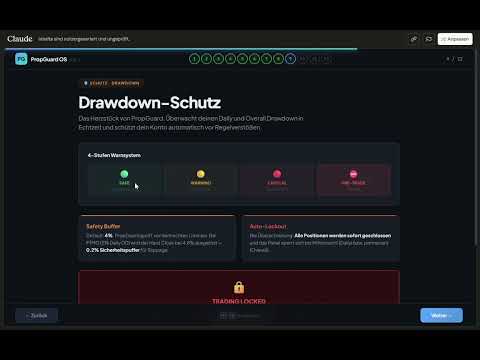
  • 4-tier traffic light system: Safe → Warning → Critical → Pre-Trade Block
  • Lockout on limit breach with Unlock button

Overall Drawdown:

  • Tracking from Initial Balance (persistent, never resets)
  • Auto-detection of initial deposit from deal history
  • Permanent lockout on limit breach

Safety Buffer & Hard Close:

  • Configurable safety buffer (default: 4%)
  • Automatic closure of ALL positions before DD limit is hit
  • Protects against account loss at prop firms

2. PROP FIRM PRESETS (6 Firms + Custom)

Firm Daily DD Max DD DD Type Leverage
FTMO 5% 10% Equity 1:100
Apex Trader 5% Trailing HWM 1:50
FundingPips 5% 10% Equity 1:100
The5ers 4% 6% Equity 1:30
FundedNext 5% 10% Equity 1:100
Custom User User User User
  • One-click firm switching directly in the panel
  • All DD limits, leverage, and challenge defaults set automatically

3. ONE-CLICK TRADING

Market Orders:

  • BUY / SELL with a single click
  • Automatic lot calculation based on risk
  • Mandatory Stop Loss (no trade without SL)
  • Optional Take Profit
  • Slippage management (configurable)

Pending Orders:

  • BUY LIMIT, BUY STOP, SELL LIMIT, SELL STOP
  • Entry price defined via interactive chart line
  • STOPS_LEVEL minimum distance enforced automatically

2-Click Close:

  • BUY/SELL button morphs to CLOSE when a position is open
  • Confirmation click prevents accidental closures
  • Volume displayed in button (e.g. "CLOSE 0.50 lots")

4. LOT CALCULATOR

Two Risk Modes:

  • Percent Mode: Risk as % of equity (e.g. 1%)
  • Dollar Mode: Fixed amount per trade (e.g. $100)

Calculated Metrics:

  • Lot size (normalized, Min/Max/Step compliant)
  • Risk amount in $
  • Potential loss / profit in $
  • Risk:Reward ratio
  • Required margin
  • SL/TP distance in pips and points

Multi-Instrument:

  • Forex (majors, exotics, 3/5 digit)
  • Indices, commodities, crypto
  • Automatic contract size handling

5. TRADE MANAGEMENT

  • Break-Even: Move SL to entry + buffer (1 click)
  • Partial Close: Close 25% / 50% / 75% of a position
  • Trailing Stop: Automatic trailing in pips (configurable)
  • 4 management buttons directly in the panel

6. INTERACTIVE CHART LINES

  • Entry line (blue), SL line (red), TP line (green)
  • Drag & drop to adjust — prices + lots update live
  • Price labels + distance labels (pips) between lines
  • R:R preset pills: 1:1 / 1:2 / 1:3 / Free — TP adjusts automatically
  • Toggle Show/Hide + Reset to defaults
  • All colors customizable via inputs

7. NEWS ENGINE (Economic Calendar)

4 News Modes:

  • OFF: No display
  • INFO: Markers + countdown timer on chart
  • WARN: Yellow exclusion zones + warning (trading allowed)
  • PROTECT: Red exclusion zones + trade block (no new trades)

Features:

  • Native MT5 Calendar API (no DLLs)
  • Automatic scan 4h ahead + 30min back
  • Impact filter: High only / Medium+High / All events
  • Currency auto-filter (based on symbol) or All
  • Countdown display: "Next: NFP in 00:34:22"
  • Push & popup alerts on entering exclusion zone
  • 5-minute cooldown prevents alert spam

Session Zones:

  • Sydney, Tokyo, London, New York as background overlays
  • Two intensity levels: Subtle / Normal
  • UTC-based with automatic broker offset detection

8. SL GUARD (Stop Loss Monitoring)

  • Automatically detects Stop Loss widening on open positions
  • Visual warning overlay when risk increases
  • 3 severity levels: Info (blue) → Caution (yellow) → Danger (red)
  • 3 sensitivity levels: Low / Medium / High
  • Risk delta shown in $ (e.g. "+$47 additional risk")
  • Break-even moves intelligently ignored
  • Configurable display duration (default: 5 seconds)

9. CHALLENGE PROGRESS TRACKING

3 Modular Metrics (individually toggleable):

Metric Description Firm Defaults
Profit Target Progress toward profit goal FTMO: 10%/5%, FPips: 8%/5%
Min Trading Days Trading days counted FTMO: 4, FPips: 3, FNext: 5
Time Limit Countdown in days FTMO: 30d, FPips: 30d

Challenge Phases: None / Phase 1 / Phase 2 / Funded

  • Automatic firm defaults per phase
  • User override anytime (input > 0 overrides default)
  • Start date configurable (YYYYMMDD) or Auto
  • Trading days calculated from deal history (robust across restarts)
  • Dynamic panel height (1–3 metrics = 36–76px extra)

10. GLASSMORPHIC DASHBOARD UI

Panel Features:

  • Dark transparent design with glassmorphism aesthetics
  • 3 scaling modes: Compact (HD) / Standard (QHD) / Large (4K)
  • Drag & drop, freely positionable
  • Minimize to 40×40px badge ("PG" logo)
  • All positions persistent (survive EA restart)

Visual Design:

  • Rounded corners on all cards + buttons
  • Color-coded DD tiers (green/yellow/red)
  • Hover effects on buttons
  • Real-time input validation (risk field: green/yellow/red border)
  • Pulsing red dot on Pre-Trade Block

Layout Sections:

  1. Header (logo + firm + minimize)
  2. DD Cards (Daily + Overall / Trailing)
  3. P&L + Equity
  4. Risk Input + Lot Calculation
  5. Trade Buttons (BUY/SELL/CLOSE)
  6. Pending Orders (BL/BS/SL/SS)
  7. Management (BE/25/50/75)
  8. Challenge Progress (optional, dynamic)
  9. Footer (Lines toggle + Reset)

11. PRE-TRADE SAFETY CHECKS (7 Layers)

  1. ✅ Trading allowed? (EA + Terminal)
  2. ✅ Market open?
  3. ✅ Lot size valid? (Min/Max/Step)
  4. ✅ Stop Loss set?
  5. ✅ Margin sufficient? (95% free margin)
  6. ✅ Daily DD Pre-Trade Block?
  7. ✅ News exclusion zone active? (PROTECT mode only)

12. PERSISTENCE & MULTI-ACCOUNT

  • All states saved in GlobalVariables
  • Account login as key suffix → multi-account support
  • Survives: EA restart, terminal restart, PC reboot
  • Persisted: Risk, firm, panel position, DD state, lockout, HWM, challenge date

13. SELF-TEST SYSTEM

  • 52 automated tests (T01–T52)
  • Activation via input parameter
  • Validates: symbol properties, lot calculation, inputs, DD detection, challenge config, panel height
  • Output in Experts log

14. TECHNICAL SPECS

Property Value
Version 1.2
Build S12.1
Platform MetaTrader 5
Files 11 (.mq5 + .mqh)
Lines of Code ~10,700
DLLs Required None
External Dependencies None (MT5 Standard Library only)

Produits recommandés
Sinaleiro Trader
Renato Takahashi
O Sinaleiro Trader é o robô de daytrade que usa multiníveis de acordo com a abertura do dia. Assim, a cada rompimento dos níveis, o robô emite ordens de compra ou venda, de acordo com a tendência. Os stops podem ser fixos ou dinâmicos de acordo com os níveis. É possível configurar a distância do sinaleiro, bem como horários de trades e dias da semana. Alterar o parâmetro BR1 para BR.
Elliott Wave Helper
Siarhei Vashchylka
4.92 (13)
Elliott Wave Helper - a panel for making elliott wave and technical analysis. Includes all known wave patterns, support and resistance levels, trend lines and cluster zones. Manual (Be sure to read before purchasing) | Version for MT4 Advantages 1. Making wave analysis and technical analysis in a few clicks 2. All Elliott wave patterns available, including triangle and combinations 3. All nine wave display styles, including a special circle font 4. E lements of technical analysis : trend lines,
RSImaxmin
Carlos Andrés Moya Erazo
4.5 (10)
The indicator shows when there are overprice and divergences on the RSI. In addition, it has configurable alerts, dynamic overprice levels and a special “RSI cleaner” function. The indicator that automatically calculates the premium rates! RSImaxmin is an indicator based on the Relative Strength Index (RSI) oscillator that effectively identifies changes in price trends as it reflects the relative strength of bullish movements compared to bearish movements. It is widely used by traders to measur
Sync In Many Ways MT5
Sa No Tsuyoshi Kokorozashi
Description This is a Utility tool for MT5 which will make our chart analysis task quite more efficient and save large amount of time. As for chart analysis, some are watching out several symbol simultaneously with single timeframe and others are trading only one single pair with   multi timeframe analysis. For both, a common troublesome issue is “scroll chart to look back” or “draw chart objects” in multi charts at the same time.  Especially for those who are trading with multi timeframe soluti
Timeless Charts
Samuel Manoel De Souza
5 (5)
Timeless Charts est un utilitaire de trading tout-en-un destiné aux traders professionnels. Il combine des types de graphiques personnalisés tels que les graphiques en secondes et Renko avec une analyse avancée du flux d’ordre s utilisant Footprints , Clusters , Profils de Volume , études VWAP et outils d’analyse ancrés pour une compréhension plus approfondie du marché. Le trading et la gestion des positions sont effectués directement depuis le graphique via un panneau intégré de gestion des ord
The Definitive Performance Testing Solution for MetaTrader Environments What This Tool Does This specialized benchmark utility measures the performance of your MetaTrader environment, providing insights that impact your trading execution. Unlike generic system benchmarks, this tool evaluates performance specifically within the MetaTrader runtime environment. For Professional Traders & Developers: Performance Metrics : Measurements of calculation throughput and memory efficiency Trading-Specific
SessionSync   is a smart and elegant timing tool for MetaTrader 5, created to keep traders fully synchronized with the market. It shows the remaining time of the current candle in real time and displays the main trading clocks, including server time, local time, New York, and London. With a clean floating panel and an intuitive layout, SessionSync helps you track candle expiration and market sessions quickly and efficiently, without overloading your chart. Whether you trade price action, intrada
AI Trade Analyzer   est un outil d'analyse de marché intelligent implémenté au format indicateur. Le programme visualise les signaux sur le graphique et aide le trader à évaluer la situation du marché en fonction des indicateurs techniques et de l'actualité. Fonctions principales : 1. Analyse technique : Prise en charge des indicateurs populaires : EMA (court/long), Ichimoku, ADX, RSI, MACD, stochastique, ATR, bandes de Bollinger, points pivots, Fibonacci. Identifier les tendances, les divergenc
This indicator helps you control several pairs in a small workspace, therefore, it is not necessary to open several charts on the platform to do so. The indicator shows sequentially up to 6 different pairs, besides that each of these pairs has a button with which you can stop the indicator to observe the selected pair. Place the indicator on a chart to monitor several pairs and the rest of your space use it on the chart of the pair you wish to observe in detail.   MT4 version       Parameters Ob
Correlation Master
Agus Santoso
5 (2)
Blogs : https://www.mql5.com/en/blogs/post/761835 Version MT4 : https://www.mql5.com/en/market/product/122732 Version MT5 : https://www.mql5.com/en/market/product/122733 CORRELATION MASTER : DOUBLEZ LES PAIRES, MOITIÉ LE RISQUE EA intelligent pour la corrélation négative et la couverture automatique Correlation Master est un Expert Advisor automatisé qui utilise la stratégie de corrélation négative entre paires de devises. En ouvrant des positions opposées sur des paires opposées (par exem
This Dashboard is very useful . That will help us analyzing graph. In this dashboard has some functions. such as  - Buy Stop - Sell Stop - Buy Limit Order - Sell Limit Order - Close All trade on this graph - Close All Profit - Delete Pending Order = Notify to enter an order - Percentage Calculation of chance to win an order On this strategy i calculated all Major EMA to find a higher chance and take more profits
Trade Dashboard MT5
Fatemeh Ameri
4.94 (125)
Trade Dashboard simplifies how you open, manage, and control your trades, with built-in lot size calculation. It allows you to execute trades, manage risk, and control positions directly on the chart, with tools such as partial close, breakeven, and trailing stop. Designed to reduce manual work and help you stay focused on your trading decisions. A demo version is available for testing. Detailed explanations of features are provided within the MQL5 platform. Installation instructions are include
Danko DTC Panel
Ricardo Almeida Branco
Do not buy before seeing the Danko Trend Color product, as this panel is a way to view a summary of this indicator on various timeframes. The Danko DTC Panel utility allows you to look at the trend in up to 5 timeframes. When clicking on the timeframe texts, a new window will open with the indicator plotted on the screen so you can see the complete chart. The width of the panel, with the amount of candles you want to see, is customizable, see the images below. Ao clicar nos textos dos timeframe
ADAM for FTMO 5
Vyacheslav Izvarin
5 (1)
ADAM EA Special Version for FTMO Please find new Version here  https://www.mql5.com/en/market/product/113326 Our 1st EA created using ChatGPT technology Trade only GOOD and checked PROP FIRMS  Default parameters for Challenge $100,000 Tested on EURUSD and GBPUSD only  Use 15MIN Time Frame Close all deals and Auto-trading  before Weekend at 12:00 GMT+3  Friday For Prop Firms MUST use special Protector  https://www.mql5.com/en/market/product/94362 -------------------------------------------------
The Simple Manual Trading Panel (v2.11) Is a professional trade management tool designed with a clean, movable UI to streamline manual execution and automated exit strategies. Core Features Dynamic Visual Interface: A movable GUI panel that provides real-time information including a bar countdown timer, live spread, and advanced volume analysis. Flexible Lot Size setting, with 2 decimals (If broker supports it). Multi-Stage Take Profit: Supports three distinct Take Profit (TP) levels in either
La bougie précédente multi-devises ou le scanner de barres précédentes vous aident à numériser des graphiques multi-symboles avec n'importe quelle période personnalisée que vous sélectionnez dans les paramètres de l'indicateur. Basé sur le produit : https://www.mql5.com/en/market/product/78657 Il peut être utilisé pour numériser plusieurs symboles pour le haut-bas du jour précédent, le haut-bas de la semaine précédente, le haut-bas du mois précédent ou toute période personnalisée, par exemple
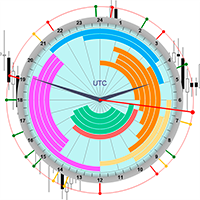
The professional browser of News and Trading Sessions is now available in MetaTrader 5. Now all the most important market information is collected on one dial! News located on the Time scale. Planning your working time has never been so easy and convenient ... The news scale can be switched a day, two, a week, a month forward or backward (see the details in the short video). All news updates in real time. Thanks to the built-in filters, you can configure the display of news by importance, cou
Martingale Osw MT5
William Oswaldo Mayorga Urduy
Manuel d'utilisation : Système avancé de gestion des martingales et de contrôle des risques Ce manuel professionnel décrit le fonctionnement, la configuration et l'interface visuelle du système de gestion des ordres martingales avancé, conçu pour automatiser la reprise de position et la gestion des risques dans MetaTrader. 1. Introduction et objectif Cet outil agit comme un gestionnaire d'ordres de haute précision dont la logique principale repose sur le lissage des coûts. Son objectif est d
Smart Close Manager v1.1 is a lightweight but powerful order-management utility designed for traders who need fast, safe, and precise control over their positions. This tool allows you to instantly close positions and delete pending orders based on smart filters such as symbol, direction, profit state, or order type. Perfect for scalpers, intraday traders, and anyone managing multiple orders. Key Features Close all orders with one click Close only BUY / only SELL positions Close only profitabl
Custom Alerts MT5
Daniel Stein
5 (8)
Custom Alerts : Surveillez plusieurs marchés sans jamais manquer une configuration clé Présentation Custom Alerts est une solution dynamique pour les traders qui souhaitent surveiller plusieurs instruments de manière centralisée. En intégrant les données de nos outils phares — comme FX Power, FX Volume, FX Dynamic, FX Levels et IX Power — Custom Alerts vous alerte automatiquement des mouvements importants du marché sans avoir à surveiller plusieurs graphiques ou risquer de manquer des opportun
Volume Flow Binance
Thalles Nascimento De Carvalho
Volume Flow Binance! Avez-vous déjà imaginé avoir accès aux times and trades de votre cryptomonnaie préférée, avec des détails sur les flux de volumes et l'analyse des mouvements de prix, même si votre courtier ne fournit pas un accès complet à l'historique des transactions ? Avec Volume Flow Binance , c'est désormais possible ! Ce script en MQL5 a été conçu pour les traders de cryptomonnaies qui recherchent une vue détaillée de la dynamique du marché en temps réel. Caractéristiqu
FREE
ICT PD Arrays Trader
Aesen Noah Remolacio Perez
Attention All ICT Students! This indispensable tool is a must-have addition to your trading arsenal... Introducing the ICT PD Arrays Trader: Empower your trading with this innovative utility designed to enhance and simplify your ICT trading strategy and maximize your potential profits.  How does it work? It's simple yet highly effective. Begin by placing a rectangle on your trading chart and assigning it a name like 'ict' or any preferred identifier. This allows the system to accurately ident
Meditation Seed: Meditation is a practice in which an individual uses a technique – such as mindfulness, or focusing the mind on a particular object, thought, or activity – to train attention and awareness, and achieve a mentally clear and emotionally calm and stable state.[1][2][3][4][web 1][web 2] Meditation is practiced in numerous religious traditions. The earliest records of meditation (dhyana) are found in the Upanishads, and meditation plays a salient role in the contemplative repertoire
FREE
Trading Session Dashboard
Marwan Bin Mohammed Al Eid Bin Mohammed Carpenter
Le Trading Sessions Dashboard est un indicateur MT5 puissant et convivial conçu pour fournir aux traders des informations en temps réel sur les principales sessions de trading forex. Il affiche le statut de chaque session (Active ou Closed) ainsi que le temps restant jusqu'à la clôture ou la prochaine ouverture, vous aidant à aligner votre stratégie de trading avec les heures de marché. Conçu pour la clarté et le professionnalisme, cet indicateur est idéal pour les débutants comme pour les trade
Introducing the BlackWing Signal Provider—an advanced EA designed to enhance your trading experience by facilitating seamless communication between your MetaTrader 5 platform and Telegram channels, groups, or individual users. Key Features: 1. Real-Time Event Notifications: Receive instant alerts on new trades, modified orders, closed positions, and deleted orders. Stay informed and make well-timed decisions. 2. Interactive Chart Snapshots: Share chart snapshots along with new trades and ord
Prenez le contrôle de votre routine de trading sans effort avec le Trades Time Manager révolutionnaire. Cet outil puissant automatise l'exécution des ordres à des moments précis, transformant votre approche de trading. Créez des listes de tâches personnalisées pour diverses actions commerciales, de l'achat à la définition des commandes, le tout sans intervention manuelle. Guide d'installation et d'entrées de Trades Time Manager Si vous souhaitez recevoir des notifications sur l'EA, ajoutez notre
MultiSecondStudio is a next‑generation chart‑building tool that combines second‑chart generation, standard charts, UI synchronization, and template application — all in a single EA. If you want to use second‑based charts but struggle with: complicated setup creating custom symbols applying templates synchronizing multiple charts manual resets MultiSecondStudio automates everything for you. Main Features 1. Fully automatic second‑chart generation Generate any second‑based chart (e.g., 5‑second
CChart
Rong Bin Su
Overview In the fast-paced world of forex and financial markets, quick reactions and precise decision-making are crucial. However, the standard MetaTrader 5 terminal only supports a minimum of 1-minute charts, limiting traders' sensitivity to market fluctuations. To address this issue, we introduce the Second-Level Chart Candlestick Indicator , allowing you to effortlessly view and analyze market dynamics from 1 second to 30 seconds on a sub-chart. Key Features Support for Multiple Second-Level
Arrêtez de deviner. Commencez à trader avec un avantage statistique. Les indices boursiers ne se négocient pas comme le forex. Ils ont des sessions définies, des gaps overnight et suivent des modèles statistiques prévisibles. Cet indicateur vous fournit les données de probabilité dont vous avez besoin pour trader des indices comme le DAX, S&P 500 et Dow Jones avec confiance. Ce qui le rend différent La plupart des indicateurs vous montrent ce qui s'est passé. Celui-ci vous montre ce qui va proba
Time Closer MT5
To Pui Kuen
5 (1)
Time Closer can help you closing all the open position at the specified time "Everyday". Mainly for Day trader that don't want to hold position overnight, or over different session, or over a specific time. Simple Parameter to use. Usage Download and drag Time Closer on the chart (Chart Symbol should be the same Chart Symbol as you want the position close) Check Allow AutoTrading is "On" Set parameters Input Parameters Turnon  True - Turnon the utility False - Turnoff the utility Close all Symb
Les acheteurs de ce produit ont également acheté
Trade Assistant MT5
Evgeniy Kravchenko
4.42 (211)
It helps to calculate the risk per trade, the easy installation of a new order, order management with partial closing functions, trailing stop of 7 types and other useful functions. Additional materials and instructions Installation instructions - Application instructions - Trial version of the application for a demo account Line function -   shows on the chart the Opening line, Stop Loss, Take Profit. With this function it is easy to set a new order and see its additional characteristics bef
Bienvenue sur Trade Manager EA, l’outil ultime de gestion des risques conçu pour rendre le trading plus intuitif, précis et efficace. Ce n’est pas seulement un outil d’exécution d’ordres ; c’est une solution complète pour la planification des trades, la gestion des positions et le contrôle des risques. Que vous soyez débutant, trader expérimenté ou scalpeur ayant besoin d’une exécution rapide, Trade Manager EA s’adapte à vos besoins, offrant une flexibilité sur tous les marchés, des devises et i
Quant AI Agents is NOT AN Expert Advisor. Quant AI Agents   is a   multi-agent AI trading framework   that turns natural-language strategy prompts into live.  WANT THE SAME RESULTS AS MY LIVE SIGNAL?   Use the exact same brokers I do:   IC MARKETS , IC TRADING   .  Unlike the centralized stock market, Forex has no single, unified price feed.  Every broker sources liquidity from different providers, creating unique data streams. Other brokers can only achieve trading performance equivalent to 60
Local Trade Copier EA MT5
Juvenille Emperor Limited
4.96 (138)
Découvrez une expérience exceptionnellement rapide de copie de trades avec le   Local Trade Copier EA MT5 . Avec sa configuration facile en 1 minute, ce copieur de trades vous permet de copier des trades entre plusieurs terminaux MetaTrader sur le même ordinateur Windows ou Windows VPS avec des vitesses de copie ultra-rapides de moins de 0.5 seconde. Que vous soyez un trader débutant ou professionnel, le   Local Trade Copier EA MT5   offre une large gamme d'options pour le personnaliser en fonc
TradePanel MT5
Alfiya Fazylova
4.87 (155)
Trade Panel est un assistant commercial multifonction. L'application contient plus de 50 fonctions de trading pour le trading manuel et permet d'automatiser la plupart des tâches commerciales. Avant l'achat, vous pouvez tester la version de démonstration sur un compte de démonstration. Télécharger la version d'essai de l'application pour un compte de démonstration : https://www.mql5.com/fr/blogs/post/762644 . Instructions complètes ici . Commerce. Permet d'effectuer des opérations commerciales e
Version Bêta Le Telegram to MT5 Signal Trader est presque prêt pour la sortie officielle en version alpha. Certaines fonctionnalités sont encore en développement et vous pourriez rencontrer de petits bugs. Si vous rencontrez des problèmes, merci de les signaler, vos retours aident à améliorer le logiciel pour tout le monde. Telegram to MT5 Signal Trader est un outil puissant qui copie automatiquement les signaux de trading depuis des chaînes ou groupes Telegram vers votre compte MetaTrader 5 .
Farmed Hedge Yield Farming | All Markets (Manual - Hybrid - Semi/Automated EA) MULTI-ASSET SUPPORT Trade any asset available on your broker - Forex: Major, Minor, Exotic pairs - Crypto: BTC, ETH, XRP, SOL, BNB - Stocks: Apple, Tesla, Amazon, Google, etc. - Commodities: Gold, Silver, Oil, Gas - Indices: US30, NAS100, SPX500, DAX40 - Any CFD your broker offers VERIFIED TRADING RESULTS - Farmed Hedge Yield Axi Copy:  https://www.mql5.com/en/signals/2356376 - Farmed Hedge Yield Exn Copy:   https:/
Power Candles Strategy Scanner - Outil de recherche de configurations multi-symboles à optimisation automatique Le Power Candles Strategy Scanner utilise le même moteur d'auto-optimisation que celui qui alimente l'indicateur Power Candles, pour chaque symbole de votre Market Watch, en parallèle. Un panneau vous indique quels symboles sont statistiquement négociables à l'instant, quelle stratégie est la plus performante pour chacun, la paire Stop Loss / Take Profit optimale, et vous alerte dès qu
YuClusters
Yury Kulikov
4.93 (43)
Attention: You can view the program operation in the free version  YuClusters DEMO .  YuClusters is a professional market analysis system. The trader has unique opportunities to analyze the flow of orders, trade volumes, price movements using various charts, profiles, indicators, and graphical objects. YuClusters operates on data based on Time&Sales or ticks information, depending on what is available in the quotes of a financial instrument. YuClusters allows you to build graphs by combining da
Premium Trade Manager - Gestion de trades rapide et disciplinée pour MetaTrader 5 Premium Trade Manager est un panneau rapide sur le graphique pour MetaTrader 5 qui prend en charge tout le travail mécanique à chaque trade. Vous décidez de la direction, du symbole et du moment - le panneau calcule la taille de la position selon votre risque, place l'ordre avec son stop et son objectif, réduit en partiels, déplace le stop et surveille le calendrier économique à votre place. Son intelligence de new
Exp COPYLOT CLIENT for MT5
Vladislav Andruschenko
3.91 (33)
Copieur professionnel de trades pour MetaTrader 5 Un copieur de trades rapide, professionnel et fiable pour MetaTrader . COPYLOT permet de copier des trades Forex entre les terminaux MT4 et MT5 avec prise en charge des comptes Hedge et Netting . La version MT5 de COPYLOT prend en charge : - MT5 Hedge → MT5 Hedge - MT5 Hedge → MT5 Netting - MT5 Netting → MT5 Hedge - MT5 Netting → MT5 Netting - MT4 → MT5 Hedge - MT4 → MT5 Netting Version MT4 Description complète + DEMO + PDF Comment acheter Comme
AntiOverfit PRO MT5
Enrique Enguix
5 (5)
Avant d’acheter un EA, vérifiez s’il tient vraiment la route ou s’il a simplement eu de la chance en backtest. La plupart des robots se vendent avec un beau backtest. Une courbe qui monte. Un bon profit factor. Très peu de doutes. Et pourtant, beaucoup de ces EA s’effondrent dès que le marché cesse de se comporter comme dans cet historique précis. Pourquoi ? Parce qu’un backtest ne prouve qu’une seule chose : que cette stratégie a fonctionné sur un parcours de prix bien précis. Il ne prouve pas
MT5 to Telegram Signal Provider est un utilitaire facile à utiliser et entièrement personnalisable qui permet l'envoi de signaux spécifiés vers un chat, un canal ou un groupe Telegram, transformant ainsi votre compte en fournisseur de signaux. Contrairement à la plupart des produits concurrents, il n'utilise pas d'importations DLL. [ Démonstration ] [ Manuel ] [ Version MT4 ] [ Version Discord ] [ Canal Telegram ]  New: [ Telegram To MT5 ] Configuration Un guide utilisateur étape par étape est
Ultimate Extractor
Clifton Creath
5 (9)
Ultimate Extractor - Professional Trading Analytics for MT5 *****this is the local HTML version of Ultimate Extractor. !!!!!it is not compatible with Cloud!!!! For the online version please reach out to me directly****** Ultimate Extractor transforms your MetaTrader 5 trading history into actionable insights with comprehensive analytics, interactive charts, and real-time performance tracking. What It Does Automatically analyzes your MT5 trading history across all Expert Advisors and generates
Copy Cat More Trade Copier MT5 (Chat Copieur MT5) est un copieur de trades local et un framework complet de gestion des risques et d'exécution conçu pour les défis commerciaux d'aujourd'hui. Des défis de prop firms à la gestion de portefeuille personnel, il s'adapte à chaque situation avec une combinaison d'exécution robuste, de protection du capital, de configuration flexible et de gestion avancée des trades. Le copieur fonctionne à la fois en mode Master (expéditeur) et Slave (récepteur), avec
Panneau de trading pour MetaTrader 5 — contrôle professionnel du trading en un clic depuis le graphique et le clavier Un panneau de trading avancé conçu pour les traders actifs, afin d’ouvrir, gérer et clôturer des positions bien plus rapidement qu’avec l’interface standard de MetaTrader. Cette solution s’adresse à ceux qui veulent contrôler positions, ordres en attente, profit global et exécution depuis un seul espace de travail professionnel. Il ne s’agit pas d’un simple utilitaire. C’est un
Custom Alerts AIO : Surveillez tous les marchés à la fois — sans aucune configuration Présentation Custom Alerts AIO est une solution de surveillance du marché prête à l’emploi, sans configuration nécessaire. Tous les indicateurs requis — FX Power, FX Volume, FX Dynamic, FX Levels, IX Power — sont directement intégrés. Aucun graphique n’est affiché, ce qui rend cet outil idéal pour la génération d’alertes en temps réel. Il prend en charge toutes les classes d’actifs proposées par votre courtie
Poc Breakout Signal: The Ultimate Institutional Order Flow & Price Action System Elevate your trading with Poc Breakout, a comprehensive technical analysis tool designed to bridge the gap between retail trading and institutional market understanding. This all-in-one system combines powerful Buy/Sell signals, advanced Volume Profile analysis, real-time Order Flow (Depth of Market), and critical macroeconomic data to give you a clear, unambiguous edge in the markets. Poc Breakout Signal decodes c
The News Filter MT5
Leolouiski Gan
4.77 (22)
Ce produit filtre tous les conseillers experts et les graphiques manuels pendant les heures de publication des actualités, de sorte que vous n'avez pas à vous soucier des pics de prix soudains qui pourraient détruire vos configurations de trading manuelles ou les transactions entrées par d'autres conseillers experts. Ce produit est également livré avec un système de gestion des ordres complet qui peut gérer vos positions ouvertes et vos ordres en attente avant la publication de toute actualité.
HINN MagicEntry Extra
ALGOFLOW OÜ
4.71 (14)
HINN MAGIC ENTRY – the ultimate tool for entry and position management! Place orders by selecting a level directly on the chart! full description   ::  demo-version  :: 60-sec-video-description Key features: - Market, limit, and pending orders - Automatic lot size calculation - Automatic spread and commission accounting - Unlimited partitial take-profits  - Breakeven and trailing stop-loss and take-profit  functions - Invalidation leves - Intuitive, adaptive, and customizable interface - Works
Seconds Chart MT5
Boris Sedov
4.59 (17)
Seconds Chart - un outil unique pour créer des graphiques en secondes dans MetaTrader 5 . Grâce à Seconds Chart , vous pouvez créer un graphique avec une période définie en secondes, offrant une flexibilité et une précision idéales pour l'analyse, indisponibles sur les graphiques standards en minutes ou en heures. Par exemple, la période S15 indique un graphique avec des bougies d'une durée de 15 secondes. Vous pouvez utiliser n'importe quels indicateurs et experts advisors compatibles avec les
Footprint Chart Pro — Professional OrderFlow EA for MetaTrader 5 Version 6.34 | Professional tool for real traders | Institutional-Grade Visualization DEMO USERS - PLEASE SELECT EVERY TICK / REAL TICK WHEN TESTING AND YOU HAVE DOWNLOADED HISTORICAL DATA. IF YOU SEE A WAITING SCREEN AND IT IS NOT DOWNLOADING, IT MEANS YOU HAVE LOW HISTORICAL DATA. TRY 1 MIN AND 5 MIN FIRST ON 1 DAY DATA. ONE DAY DATA SHOULD BE THE NEWEST AND MOST CURRENT DATE. PLEASE WAIT UNTIL THE MARKET HAS ROLLED OVER PERIOD.

AlgoRadar
Stephen J Martret
5 (4)
AlgoRadar is an on-chart analytics dashboard for MT5 that aggregates Expert Advisor performance across multiple accounts, brokers, and platforms, including both MT4 and MT5 data, into a single live view on your MT5 chart. All analysis runs from the chart interface, with no external applications or manual report processing required. EA Analysis and Ranking For traders running multiple Expert Advisors, AlgoRadar provides a consolidated view of each EA's performance across accounts. Active EAs a
Anchor Trade Manager
Kalinskie Gilliam
5 (2)
Anchor: The EA Manager Run your full EA portfolio without conflicts, without stacked risk, and without watching every chart yourself. Anchor coordinates up to 64 Expert Advisors on a single account so only one trades at a time. Attach Anchor to any chart. Type your EA names and magic numbers in one line. Anchor handles the rest. Built for portfolios. Built for discipline. Built for prop firms. The Problem Running multiple EAs on the same account creates risk. Two gold EAs can open opposite posit
Advanced Dashboard Ultra
Mirel Daniel Gheonu
5 (2)
Stats Dashboard & Journal ULTRA pour MT5 Le Centre de Commandement de Trading Complet : Analytique, Automatisation & Intelligence des Actualités. Stats Dashboard ULTRA est l'évolution ultime de l'outil d'analyse Pro. Il transforme MetaTrader 5 en une station de trading professionnelle, combinant une analyse de performance de niveau institutionnel avec une protection automatisée contre les actualités et des métriques psychologiques avancées. Conçu pour les traders manuels et les gestionnaires de
Trade Manager DaneTrades
Levi Dane Benjamin
4.28 (29)
Trade Manager pour vous aider à entrer et sortir rapidement des transactions tout en calculant automatiquement votre risque. Y compris des fonctionnalités pour vous aider à éviter le sur-trading, le trading de vengeance et le trading émotionnel. Les transactions peuvent être gérées automatiquement et les mesures de performances du compte peuvent être visualisées dans un graphique. Ces fonctionnalités rendent ce panneau idéal pour tous les traders manuels et contribuent à améliorer la plateforme
Telegram to MT5 Coppy
Sergey Batudayev
5 (9)
Télégramme vers MT5 :   la solution ultime pour copier des signaux Simplifiez votre trading avec Telegram vers MT5, l'outil moderne qui copie les signaux de trading directement des canaux et chats Telegram vers votre plateforme MetaTrader 5, sans DLL. Cette solution puissante garantit une exécution précise des signaux, de nombreuses options de personnalisation, un gain de temps et une efficacité accrue. [ Instructions and DEMO ] Caractéristiques principales Intégration directe de l'API Telegram
Trading View ToMT5
Mirel Daniel Gheonu
The Ultimate TradingView to MT5 Bridge Automation Arrêtez le trading manuel et les problèmes de latence. TradingView to MT5 Copier PRO est la passerelle (bridge) la plus rapide et la plus fiable pour exécuter vos alertes TradingView directement sur MetaTrader 5. Que vous utilisiez des indicateurs personnalisés, des scripts du Testeur de Stratégie ou des dessins manuels, cet Expert Advisor (EA) exécute vos trades instantanément grâce à la technologie WebSocket Haute Vitesse . Contrairement aux co
Telegram to mt5 pro
Janet Abu Khalil
3.67 (3)
Telegram to MT5 Pro — Advanced Telegram Signal Copier with Auto-Fix, Multi-TP, Risk Control and Full Trade Management Telegram to MT5 Pro — Copieur de signaux Telegram professionnel Telegram to MT5 Pro est un copieur de trading haute performance qui exécute automatiquement les signaux de Telegram directement dans votre compte MetaTrader 5, avec un contrôle total du risque, de l’exécution et de la gestion des trades. Le système se compose de deux composants : • L’Expert Advisor (EA) exécuté dans
The product will copy all telegram signal to MT5 ( which you are member) , also it can work as remote copier.  Easy to set up, copy order instant, can work with almost signal formats, image signal,  s upport to translate other language to English Work with all type of channel or group, even channel have "Restrict Saving Content", work with  multi channel, multi MT5 Work as remote copier: with signal have ticket number, it will copy exactly via ticket number. Support to backtest signal. How to s
Plus de l'auteur
PGuard Basic
Richard Heronimus Oehmig Kuhn
The Free Drawdown Dashboard Built for Prop Firm Traders PGuard Basic is the first free Drawdown Dashboard and Lot Calculator designed specifically for Prop Firm Traders on MetaTrader 5. Monitor your Daily and Overall Drawdown in real time, calculate the perfect lot size for every trade, and see the exact impact on your remaining drawdown budget before you open a position. Built for FTMO, Apex Trader Funding, Funding Pips, and any other Prop Firm with configurable Custom Presets. Most traders fa
FREE
CableStarV2 MT4
Richard Heronimus Oehmig Kuhn
Timeframe   H1 Pair   GBPUSD The CableStarV2 follows a   trend trading strategy . It uses   Bollinger Bands   on   HeikenAshi Charts   to find the perfect entry and exit points in the market. Every position is secured with a stopp loss. The backtests shown in the screenshots were done with the default settings. Do you own testing to find even better settings. Please download the free demo to do your own testing. The CableStarV2 is not using any   martingale and/or grid functionalities . Still th
CableStarV2
Richard Heronimus Oehmig Kuhn
Timeframe H1 Paire GBPUSD Le CableStarV2 suit une stratégie de trading de tendance. Il utilise les bandes de Bollinger sur les graphiques HeikenAshi pour trouver les points d'entrée et de sortie parfaits sur le marché. Chaque position est sécurisée par un stop loss. Les backtests présentés dans les captures d'écran ont été réalisés avec les paramètres par défaut. Faites vos propres tests pour trouver des paramètres encore meilleurs. Veuillez télécharger la démo gratuite pour faire vos propre
Goldwise Trend Advisor
Richard Heronimus Oehmig Kuhn
Goldwise Trend Advisor — Professional Gold Trading with Full Transparency Do you know why most Gold EAs fail? Because they trade against the market. Goldwise does the opposite: it identifies the dominant trend on the Daily chart and trades exclusively in its direction. No guessing, no hoping — just disciplined trades with the market, not against it. And the best part: you can see what the EA is doing and why, at all times. No black-box trading. Full transparency, right on your chart. Why Goldwis
Filtrer:
Aucun avis
Répondre à l'avis