One Click B3 MT4

This is not just an EA for quickly closing positions, regardless of how many trades or instruments are open. This is also an EA for controlling, protecting, and achieving maximum percentage profit from all open positions when the platform is closed. This is an EA that allows peaceful sleep and rest. This is an EA that keeps working even when you're enjoying your brief privilege of freedom, using what you've earned from this work. Look closely, invest time just once to set the parameters according to your own expectations, and practice this profession stress-free.


One Click B3 MT4 – One-Click Trade Management Panel with Trailing Stop, Auto TP and Signal Lines

One Click B3 MT4 is a trade management Expert Advisor for MetaTrader 4. It does not open positions on its own. All entries are made manually or by other EAs. This tool takes over from the moment a position is open and manages Stop Loss, Trailing Stop, Take Profit and closing actions according to your settings.

IAmMaster – designates this chart as the Master for SL/TS modifications on this instrument. Set true on one chart only, false on all others running the same instrument.

It is designed for traders who want to define their risk plan once, set the parameters, and then step away from the screen. If you run it on a VPS it will watch your trades between sessions without interruption. During normal trading hours the built-in sound system reports what matters: a new position detected, SL moved, TP set, position closed. If you hear nothing, nothing important is happening.

This tool is also effective for scalping. It can protect any number of open positions across any number of instruments simultaneously and close all of them, or only profitable ones, with a single click on the selected symbol button.

Please verify before use that your MetaTrader 4 installation includes the sound files order-filled.wav and order-submitted.wav. These are standard MT4 sounds and should be present by default.


STRATEGY TESTER


Visual elements such as buttons, panels and signal lines are not displayed correctly in the Strategy Tester. This is a MetaTrader 4 platform limitation. Order execution, Stop Loss and Take Profit management, Auto TP, Trailing Stop logic, profit calculations and all internal trading mechanisms work normally in the tester. For full visual testing use a demo account.


CONTROL PANELS


The EA provides two independent panels. The Main Panel has two buttons: Close Profit closes all profitable positions across the entire platform, Close All closes every open position across the entire platform. The Instrument Panel is generated automatically from the PanelSymbols parameter. You enter up to 20 symbol names separated by commas. The EA creates a pair of buttons for each symbol: one to close all positions on that instrument, one to close only profitable positions on that instrument. Net profit calculation includes swap and manual commission defined per symbol using Commission_1 to Commission_20. Panel position, button size, spacing, colors and corner anchoring are fully configurable. Individual X and Y coordinates can be set separately for each of the 20 symbol slots. If not defined the panel arranges automatically.


THIRD PANEL (LAST POSITION CONTROL)


In addition to the main panels, the EA has a Third Panel designed for precise, surgical outputs. This panel is also automatically generated from the PanelSymbols parameter. For each specific symbol, it creates a pair of small buttons: one to close the last open position on the instrument if it is currently profitable, and the other to close the last free position if it is on the track. This allows you to quickly manage the latest entry without affecting older positions on the same instrument. Panel position, button sizes, spacing, colors, and font size are fully customizable. Individual X and Y coordinates can be set separately for each predefined symbol slot. If not defined, the panel is arranged


STOP LOSS AND TRAILING STOP


The EA monitors all open positions on the current instrument. When a position reaches the profit distance defined by TriggerPips, the EA places an initial Stop Loss at breakeven offset by SL_Offset_Pips. This is the most important parameter pair. SL_Offset_Pips defines how many pips from the open price the SL is placed. Include your transaction cost and expected slippage in this value. For XAUUSD with a commission of 4.5 USD per lot a safe value is 80 to 100 pips. TriggerPips defines how far the position must travel in profit before the SL is activated. For XAUUSD with longer holds a safe value is 250 to 300 pips. All parameters must be identical on every chart of the same instrument. After the initial SL is set, Trailing Stop takes over if enabled. The small TS square button on the chart toggles trailing on and off. Its color reflects the current state. Trailing settings cover trigger distance, step size, minimum movement and minimum time between modifications. The system uses Global Variables to synchronize state across charts and prevent duplicate modifications.


AUTOMATIC TAKE PROFIT


When EnableAutoTP is active the EA sets Take Profit automatically for every newly opened position that does not already have one. The distance is defined by AutoTP_Pips. Auto TP is applied once per position. If you remove it manually it will not be reapplied. The calculation adapts to the pip structure of the symbol.


VIRTUAL STOP LOSS (VIRTUAL STOP LOSS (VSL)


For traders who prefer to completely hide their risk management from the broker, the EA includes a full-featured Virtual Stop Loss (VSL) and Virtual Trailing Stop system. When enabled, the EA keeps track of the Stop Loss and Trailing Stop levels internally in its memory instead of placing physical stop orders on the broker's server.


The key advantages of a virtual SL are absolute invisibility for the broker and the complete elimination of the broker's slippage during Stop Loss execution. Since the broker cannot see the exit levels, they cannot manipulate or trigger your stops beforehand. Once the market price reaches the virtual level, the EA sends a market order to close the position, executing the exit on your terms. The system also includes a maximum spread filter to prevent premature closures


To enable or disable Virtual SL, a small button with the letter "V" is placed on the graph. This button can be freely moved and placed anywhere on the chart, in any of the four corners. Its size, position, and colors (for ON/OFF states) are fully customizable in the settings. When VSL is active, the physical SL and Trailing Stop functions are disabled to prevent duplicate orders. The system uses global variables to synchronize the state of VSL across all charts


GRAY AND GREEN SIGNAL LINES


The EA draws a two-stage signal structure on the chart based on price action analyzed on the SignalTF timeframe. The Gray line marks the initial impulse. It appears when a candle closes with its body fully beyond the body of the previous candle, confirming directional momentum. The line is placed at the opposite edge of the signal candle body. The Green line marks the corrective entry zone. After the impulse completes, the EA tracks the retracement. When price enters the 50 to 61.8 percent Fibonacci zone of the impulse and then closes back in the direction of the original move, the Green line is placed at the extreme of the retracement within that zone. A Green line cannot exist without an active Gray line. If the Gray structure is invalidated the Green is automatically removed. Lines are restored after chart refresh. The entire structure resets automatically every defined number of hours. Colors, styles and widths are configurable separately for Buy and Sell. The entire logic can be disabled with EnableGrayGreenLogic = false.


TECHNICAL DETAILS


The EA supports hedging accounts. Up to 100 positions are tracked simultaneously. Modification locks prevent duplicate trailing operations. Button states and panel positions are saved locally and restored after platform restart. All trade operations include margin validation before execution.

IAmMaster – designates this chart as the Master for SL/TS/TP modifications on this instrument. Set true on one chart only, false on all others running the same instrument. Example: If you use 3 charts of the same instrument (e.g. XAUUSD), set IAmMaster = true on one chart and IAmMaster = false on the remaining two. The Master chart handles all SL, Trailing Stop and sound notifications. Non-master charts can still open and close positions normally. Note: If you run the EA on a VPS and a laptop simultaneously on the same account, set IAmMaster = true only on the VPS charts and IAmMaster = false on all laptop charts. We write the names of instrument symbols in the EA exactly as the broker describes them.


TROUBLESHOOTING

Before anything else — after setting up the indicator and saving your final parameters, create a chart template with the instrument name. This way you can restore everything in seconds if needed.

If the indicator behaves unexpectedly or causes platform slowdowns, please note: these issues are not caused by this indicator. They are caused by accumulated data from previous chart configurations stored in your platform.

Follow these steps:

  1. Go to Tools → Global Variables → delete all variables.

  2. Go to File → Open Data Folder.

  3. Close MetaTrader completely.

  4. In the data folder open the Logs folder and delete everything inside.

  5. In the data folder open the History folder, then open your broker folder and delete everything inside.

  6. Close the data folder.

  7. Reopen MetaTrader — everything will work correctly.

If problems persist, contact me directly. I respond to every message.


SETTINGS:


GENERAL & EA STATE


Language – selects the interface language (Polish/English/German/Russian/Spanish) for main panel labels.

IAmMaster – defines this chart as the Master for SL/TS modifications on this instrument. Set to true on one chart only, false on all others running the same instrument.

InitialEnableEA – EA starts enabled/disabled on chart attach.

StateFileName – template for the EA on/off state INI file per symbol.


TS ADVISOR (External Parameter Sync)


TSAdvisor_Column – selects the column (1 for nervous, 2 for calm) to read from the B_Parameter MT4 indicator.

EnableTSAdvisor – enables/disables reading dynamic Trailing Stop parameters from the B_Parameter MT4 indicator. If disabled, EA uses the static inputs below.


AUTO TP & SL / TRAILING


TriggerPips – distance in pips from the open price for automatic Take Profit placement.

EnableAutoTP – enables/disables automatic TP for new positions.

AutoTP_Pips – profit pip threshold after which the initial protective SL (or VSL) is placed.

SL_Offset_Pips – pip offset from the open price for the initial breakeven SL.

Slippage – max price slippage pips for modifying/closing.

TrailingTriggerPips – pip profit from price to trigger TS update.

TrailingMovePips – pip steps for SL moves during a trailing move.

MinSLMovePips – minimum pip difference for SL modifications. Check the minimum stop order level your broker accepts.

MinSecondsBetweenTrailing – minimum seconds between SL updates.

EnableTrailingStop – global toggle for trailing stop.


TS BUTTON (Trailing Stop Toggle)


ColorOn – TS button background when ON.

ColorOff – TS button background when OFF.

AnchorCorner – chart corner anchor for the TS button (0=Top Left, 1=Top Right, 2=Bottom Left, 3=Bottom Right).

ButtonSize_mm – TS button size in mm.

ButtonPosX – TS button X position from corner.

ButtonPosY – TS button Y position from corner.

TS_TextColor – text color for the TS button.


VIRTUAL SL (VSL)


VSL_AnchorCorner – chart corner anchor for the VSL button (0=Top Left, 1=Top Right, 2=Bottom Left, 3=Bottom Right).

VSL_ButtonSize_mm – VSL button size in mm.

VSL_PosX – VSL button X position from corner.

VSL_PosY – VSL button Y position from corner.

VSL_ColorOn – VSL button background when ON.

VSL_ColorOff – VSL button background when OFF.

VSL_TextColor – text color for the VSL button.

VSL_MaxSpread_Pips – maximum allowed spread (in pips) to close a position when VSL is hit.


MAIN PANEL (Close All / Close Profit)


xOffsetLeft – X position of the main Close Profit button.

yOffsetLeft – Y position of the main Close Profit button.

xOffsetRight – X position of the main Close All button.

yOffsetRight – Y position of the main Close All button.

btnColorProfit – background color for the Close Profit button.

txtColorProfit – text color for the Close Profit button.

btnColorAll – background color for the Close All button.

txtColorAll – text color for the Close All button.

ButtonFontSizeMainPanel – font size for main panel buttons.


SYMBOL PANEL (Panel 1 & 2 - Close All/Profit per Symbol)


PanelSymbols – comma-separated symbol names for individual instrument buttons (up to 20).

PanelCorner – anchor corner for the symbols panel.

PanelX – base X offset for the symbols panel.

PanelY – base Y offset for the symbols panel.

PanelWidthMM – main panel button width in mm.

PanelHeightMM – main panel button height in mm.

ButtonGapMM – spacing between panel buttons in mm.

ButtonWidthMM – per-symbol button width in mm.

ButtonHeightMM – per-symbol button height in mm.

ButtonFontSizePanel – font size for per-symbol buttons.

ButtonTextColor – text color for symbol buttons.

ButtonCloseAllColor – background color for Close All in the symbol panel.

ButtonCloseProfitColor – background color for Close Profit in the symbol panel.

PosX_1 to PosX_20 – custom X position for each symbol button (use -1 for auto).

PosY_1 to PosY_20 – custom Y position for each symbol button (use -1 for auto).

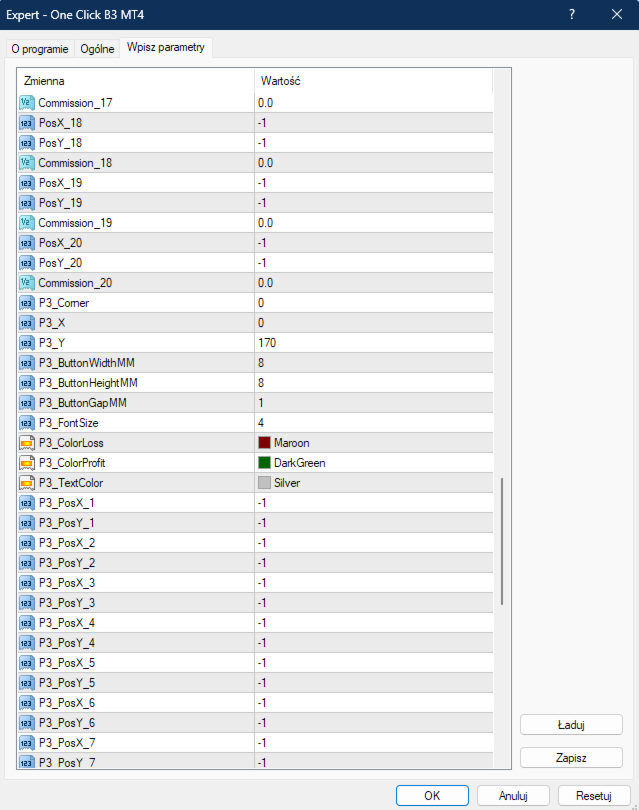
Commission_1 to Commission_20 – per-lot commission for each symbol slot.


PANEL 3 (Last Position - Close Last Loss/Profit per Symbol)

P3_Corner – anchor corner for Panel 3.

P3_X – base X offset for Panel 3.

P3_Y – base Y offset for Panel 3.

P3_ButtonWidthMM – Panel 3 button width in mm.

P3_ButtonHeightMM – Panel 3 button height in mm.

P3_ButtonGapMM – spacing between Panel 3 buttons in mm.

P3_FontSize – font size for Panel 3 buttons.

P3_ColorLoss – background color for the Close Last Loss button.

P3_ColorProfit – background color for the Close Last Profit button.

P3_TextColor – text color for Panel 3 buttons.

P3_PosX_1 to P3_PosX_20 – custom X position for each Panel 3 button (use -1 for auto).

P3_PosY_1 to P3_PosY_20 – custom Y position for each Panel 3 button (use -1 for auto).


TECH SIGNAL LINES (Gray/Green)


EnableGrayGreenLogic – enables/disables Gray and Green signal lines drawing.

SignalTF – timeframe for Gray/Green signal analysis (default M1).

BuyGrayLineColor – color of the Gray Buy signal line.

BuyGreenLineColor – color of the Green Buy signal line.

BuyLineStyle – line style for Buy signals.

BuyLineWidth – width of the Buy signal lines.

SellGrayLineColor – color of the Gray Sell signal line.

SellGreenLineColor – color of the Green Sell signal line.

SellLineStyle – line style for Sell signals.

SellLineWidth – width of the Sell signal lines.

ClearLayoutsEveryHours – hours interval to auto-clear signal lines (0=disabled).


Bots will only bring success when you have access to unlimited capital. Only "eyes and mind" will turn your account green, and simple, clean, fast, and efficient tools will help you achieve that.

Real success requires YOUR brain making decisions. My tools are not bots - they are instruments for traders who think.

Previous day's closing price acts like a magnet → High Low Close MT4 

Asian Session sets the direction for London and New York sessions → Asia Session Levels MT4 

If you scalp multiple instruments:

One Click B3 MT4, Symbol Positions Panel MT4 , SL TP Toggle Button MT4, Volume Delta MT4 ,  Volume Delta Scanner MT4 

If you scalp one instrument:

One Click B3 MT4, Symbol Positions Panel MT4 ,SL TP Toggle Button MT4 ,Pips Label Last Trade MT4 , Volume Delta MT4, Volume Delta Scanner MT4 

If you invest long-term across multiple instruments:

One Click B3 MT4, Symbol Positions Panel MT4,Volume Delta MT4 ,  Volume Delta Scanner MT4 

If you've read the descriptions and need clarification - contact me. I'll explain every function, setting, and use case to assure you that these tools fit your trading strategy.






Recommended products
Make grid trading safe again | Built by a grid trader >> for grid traders.    Walkthrough Video  <== Get Grid Rescue up and running in 5 minutes  This is MT4 version, click  here  for  BlueSwift GridRescue MT5  (settings and logics are same in both versions) BlueSwift Grid Rescue MT4  is a risk management utility  EA  (used together with other grid trading experts) that can help you trade aggressive grid systems with manageable drawdown, therefore reduce substanstially margin call risk as we
Adaptive Recovery Trading System GridFollowWithMartingale  is a high-performance Expert Advisor designed for XAUUSD (Gold) trading on MT4 . It combines progressive trade scaling , dynamic risk control , and profit-locking logic to capture consistent returns in volatile markets. This EA intelligently manages buy and sell positions with a built-in recovery system and configurable trade direction. The algorithm has been optimized to limit exposure while maximizing daily profit potential. Key Featur
The Arrow Scalper
Fawwaz Abdulmantaser Salim Albaker
1 (2)
Dear Friend..  I share with you this simple Expert Adviser .. it is full automatic  this Expert Adviser following the trend of the pair you install on or any stocks or indices , it is works like that: - when the trend on H4 chart show a start of up trend the expert will wait till the 15M & 1H charts show an up trend the EA will open a buy order directly , and do the same for down trend and open a sell order the buy or sell  order lot size and take profit and stop loss will measured manually  by
FREE
JumpLump
Olga Zhdanova
A great addition to your lucrative portfolio of expert advisors. The strategy is based on an algorithm for breaking through the built levels for a certain period of time. The EA has a fixed StopLoss, which allows you to keep the minimum drawdown. Tested on all ticks using the Tick Data Suite , with the closest possible real trading conditions, watch the video. Price for the first 10 buyers $ 75 (I beg you to post your reports in the comments) Recommendations: Good ECN broker with low spread.
The algorithm of the adviser's work: When the Expert Advisor is launched at a specified distance from the price (first_step), BuyStop and SellStop orders are placed. Further, depending on which way the price went, one of them becomes market, and the other begins to crawl after the price. When the price rolls back, it also becomes market. If we have reached a set profit in some direction, the order is closed and a creeping pending order of the same direction is placed again. If the profit is no
NebularMan
Viktor Shpakovskiy
EA for manual trading with the ability to add new orders with increasing in one lot. You can manage the risk by changing the lot volume, the step between orders, and limiting the number of open positions and the total volume of lots. There is a trailing stop, virtual stop loss and virtual take profit, which can be freely moved around the chart. With the help of the built-in trading simulator, you can check how the EA works in the strategy tester. Benefits the initial lot is opened by a trader or
Autolock
Aleksey Semenov
4.2 (5)
Autolock Expert Advisor is based on the mathematical system with no indicators. The first order direction is specified in the settings, then the algorithm sets to work. The main operation principle - no averaging till the opposite order is closed by trailing. The EA uses averaging with martingale, trailing and stop orders. The product can be used as an assistant - select NOTRADE as the frist order type and magic = 0. Settings First order type – first order type. martingale mode – martingale typ
AI Swing MT4
Reza Aghajanpour
5 (1)
Introduction : AI Swing EA is a fully automated trader with Fixed SL and high win rate. It will be 200$, it is now just 49$. No Martingale, No Grid Contact me  to send you instruction and add you in group. The next generation OpenAI model quickly gained significant attention with its broad range of capabilities and versatility, We used its expertise in assisting prediction prices in formulating and applying improved trading strategies. Our AI core is capable of extracting data insights from
Reiona
Ubaidillah
Reiona is an Expert Advisor (EA) that build based on martingale and hedging method. The main idea is place buy and sell in parallel, save the unprofitable positions with martingale, and keep the profit during trade with hedging. The RSI, iClose, iHighest and iLowest indicators are used for entries. The highest and lowest prices are to indicate the range of new orders, where the next order, with same type must be higher than 75% of difference between this lowest and highest prices. When the bu
FoxterAI
Serhii Shal
FoxterAI — Grid Trading EA with ATR-Adaptive Step and Interactive Control Panel FoxterAI is an automated grid trading robot for MetaTrader 4 built on an averaging grid strategy. The grid step is calculated from the ATR indicator rather than a fixed pip value: during high volatility orders are placed wider, during low volatility — closer together. The EA manages two independent series simultaneously — BUY and SELL. Key Feature: Control Panel Fully Works Inside the Strategy Tester The built-in int
EA Locking Grid
Sergey Deev
5 (1)
Semiautomatic EA for trading based on the averaging and locking strategy. The trader sends signals for opening grids by using the buttons on the chart. The EA opens a market order, places a grid of limit orders in the same direction with lot multiplication according to specified parameters and a locking stop order in the opposite direction with the volume equal to the sum of all the previous ones. Once the price passes the specified breakeven level, the EA places a stop loss at the open price+sp
Globus Pro
Aleh Rabtsau
This Expert Advisor is the result of my observations of the market for many years. This system has been tested and optimized on real accounts, in real time. This is a very complex algorithm, which is built on 9 indicators, important levels and mathematical calculations. During trading, the robot constantly analyzes the indicators Combo Trend, Envelopes, Fractals, Parabolic SAR, Levels QP, RSI, Bears Power, Stochastic Oscillator, GLB. This affects the opening, maintenance and closing of orders.
Grid Flat
Iurii Tokman
The Expert Advisor places a grid of orders with the specified step. Orders have the take profit level set at the distance of grid step, as well as the total stop loss level for all order of the same type. Trading is performed only within the time interval specified in the settings. Once the time ends, all pending orders are deleted and all open positions are force-closed. It is not recommended to use the EA as a fully automated trading system for continuous trading, only for working in certain m
Rhythm Master EA - A Five-Year Journey to Master the Market's Pulse Core Value Proposition Forged over five years of development and market testing, Rhythm Master EA is built with one core principle: survival first. Sets files:  https://www.mql5.com/zh/market/product/157626/comments?source=Site+Market+Product+Page#comment_58671939 Trading Philosophy & Core Advantages Three Core Trading Principles Rhythm is King : Doesn't predict direction, only follows the natural ebb and flow of market vola
Trading strategy: Scalping. The   "EA Ultra Speed"   Expert Advisor is based on non-indicator work strictly according to the specified rules for opening and closing deals. The EA was created and tested on the main pairs, but this does not mean that you cannot try it on other currency pairs. The idea is that pending orders up or down are placed at a given distance from the current price. Let's say the price increased by 10 points within an hour and reached 1.3025. The EA follows the price and now
Secret Average Trade : this is a revolutionary system unlike any other, the strategy uses algorithms such as grids, averaging, hedging and partially uses martingale algorithms. Trading is carried out on 17 currency pairs simultaneously and uses timeframes: 9. Fully automatic trading with the calculation of entries based on a system of various Trends and also supports reverse trading. Benefits Partial closure to reduce the load on the deposit. Averaging orders, which are required to close past o
GoldenTrend
Aliaksandr Sych
GoldenTrend — a next-generation high-frequency scalping Expert Advisor designed to extract profit from the smallest market movements. Utilizing advanced algorithms for price action and volume analysis, it opens dozens of highly accurate trades daily with minimal risk. Why GoldenTrend? Монитор Ultra-Fast Trades : Captures profit from 5–15 pip movements. Ideal for ECN accounts with low spreads. Adaptive Strategy : Automatically adjusts to current market volatility and dynamically shifts tradi
| Fully-automated Smart Money Concept (ICT) inspired trading solution with multi-strategy capabilities | Built by a grid trader >> for grid traders.  This is MT4 version, click  here  for  Blue CARA MT5  (settings and logics are same in both versions)     Real monitoring signal  -->  Cara Gold Intro Blue CARA EA   ('CARA') - short for  C omprehensive  A lgorithmic R esponsive A dvisor is a next-gen  multi-currency    multi-timeframe  EA base on the widely known (and perhapse most popular) Inn
Trend BtD
Roman Meskhidze
LAUNCH PROMO Next price:        $249 The price will be rise to limit the number of users for this strategy The "Trend BtD" Expert Advisor is a representative of robots trading breakout levels. Levels built automatically. The uniqueness of the advisor is that it work WITHOUT averaging and using the martingale principle. ALL orders have StopLoss and TakeProfit. VERY IMPORTANT: Always load SET Files for each pair! Adjust Lot size to yours deposit! HOW TO TEST: 1. Choose  H1  TimeFrame 2. Load my  
Elastic Grid
Aliaksandr Charkes
4.86 (7)
Elastic Grid MT4 is a multi-functional grid Expert Advisor, designed for full or partial automation of various ideas related to grid trading. The EA trades on any timeframe and symbol. It can also trade several symbols with any amount of decimal places. It does not interfere with manual trading and other EAs' operation or any indicators. It allows to adjust its settings on the fly, works only with its own orders displaying all necessary data on them when needed, and for some situations it can be
Pivot Levels EA
Aleksey Semenov
5 (2)
The Pivot Levels Expert Advisor is based on the Pivot levels indicator. The EA trades a very simple strategy - daily reversal. Averaging and martingale are used in the process of trading, it trades instant and pending orders, does not use stop loss or take profit. Orders are opened and closed only at a signal. System settings martingale mode – martingale type. martingale geometric progression – geometric progression step. martingale arithmetic progression – arithmetic progression step. lotsize
Bar Boss
Iurii Tokman
5 (1)
The Expert Advisor uses the FletBoxPush indicator for market analysis and for determining trading signals. The indicator is built into the Expert Advisor, there is no need to additionally run it on a chart. The EA trades breakouts of certain levels determined as flat borders. The EA uses Stop Loss. Description of EA Parameters TimeFrames chart period required for the indicator colour - the color of the price zone defined as flat, a setting for the indicator Rectangle - show price zones defined
Live grid
Aleksej Shcherbak
Dedicated to grid trading fans. For a long period I was trading using Manual Trader by Ramil Minniakmetov. I liked this program but soon I came up with an idea to improve the program by making the grid vivid and adding something mine. 1) I taught the program to take swaps and commission into account. 2) If the market allows, the program trails a gain by moving Profit. 3) The program spends a part of the gain partially killing the lower order and moving to a smaller lot, preventing it from going
This EA trades a narrow range at night. At the top and bottom of the range, the EA will try to generate trades in the opposite direction. To open suitable trades, the Expert Advisor uses several indicators and analyzes several timeframes. In order to maintain the quality of the EA, we may choose to stop selling new licenses at any time. Current price $50 , finally price will be $499. By prioritising quality over quantity, we are able to ensure that the product remains a reliable and effectiv
This Expert Advisor trades based on trend lines, as well as on the basis of volume analysis. Volumes are calculated using minute bars, in order to determine if they were ascending or descending. The trend lines are drawn based on High and Lows in the trade history. There are also additional indicators. Buy or sell signals depend on all those factors. This allows the EA to enter the market with more accuracy and to perform more deals. Input parameters Lots - lot size (if 0, a lot is calculated b
Fat Cow
Georgios Baizanis
1 trade maximum 1 time per daily. No grid, no martingale. Each trade is protected by Stop loss while there is a profit trailing logic all inbuilt in the logic. Very high accuracy. The EA is not trading daily but when it trades is profitable almost all the time. Is very easy to set up and you can run it out of the box as long as you specify according to your balance the trading lots. There is a slippage control parameter field where you can send to your broker the desired threshold of slippage d
The Expert Advisor trades using the Stochastic indicator with the specified parameters. A trade is opened at the crossover of the specified levels. The default levels are K = 11, D = 3, Sl = 3. The EA opens a trade when overbought and oversold levels specified by the trader are crossed. Trades are closed by Take Profit levels, which are hidden form the broker. If a wrong direction is chosen, the EA opens an averaging grid of orders. If there is no signal for opening a position by Stochastic indi
Hedging Forex EA1
Samir Arman
5 (3)
️ Hedging Forex EA1 – Smart Risk Control with ATR & Hedge Strategy Now with enhanced features and virtual strategy tester guidance Hedging Forex EA1 version   "8.00" I work at a demo account https://t.me/hfmq4/109 --- . Recommended Broker: For optimal performance, a low-spread account is highly recommended to execute the Smart Martingale basket efficiently. Open an Exness Zero Account: https://one.exnesstrack.org/a/lmeqq9b7 Overview Hedging Forex EA1 is a smart, risk-managed Expe
Hello traders! I present to you Argo Gold Edition - an expert built for gold trading, which is tailored to the specifics of gold movements on international markets. The basis of its logic is that it follows profitable patterns drawn from past periods. Mathematical algorithms are based on the correlation between the values of the indicators used and the corresponding movement of the price of gold. The expert is built on the basis of the ARGO series. It specializes in GOLD / XAUUSD trading. 2 or 3
PZ Grid MT4
Evgenii Aksenov
5 (3)
You can use Stop Loss and Take Profit or activate the GRID function to open a series of orders in the direction of the Expert Advisor signal. We use advanced technologies DrawDown Reduce (reduce the deposit load) and Dynamic Zones (dynamic Buy and Sell zones) as well as News Filter and Time Filter to control price spikes during important news. Big sale 50% OFF! Price $199. Regular price $399 All our signals are now available on myfxbook:   click here   Unique set files and all recommendations ar
Buyers of this product also purchase
Waka Waka EA
Valeriia Mishchenko
4.25 (48)
8+ years of live track record with +12,000% account growth: Live performance MT 5 version can be found here Waka Waka is the advanced grid system which already works on real accounts for years. Instead of fitting the system to reflect historical data (like most people do) it was designed to exploit existing market inefficiencies. Therefore it is not a simple "hit and miss" system which only survives by using grid. Instead it uses real market mechanics to its advantage to make profit Supported cu
Scalping Robot Pro MT4
MQL TOOLS SL
4.29 (17)
Scalping Robot Pro is a  professional trading system  designed specifically for fast and precise scalping on XAUUSD using the M1 timeframe. The system is built to capture short term market movements with accurate execution and controlled risk management. It focuses on real time price behavior, momentum shifts, short term volatility, and selective grid based trade management techniques to identify high probability  trading opportunities  in the gold market. Scalping Robot Pro is optimized for tra
The Gold Reaper MT4
Profalgo Limited
4.61 (33)
PROP FIRM READY! ( download  SETFILE ) LAUNCH PROMO: Only a few copies left at current price! Final price: 990$ Get 1 EA for free (for 3 trade accounts) -> contact me after purchase Ultimate Combo Deal   ->   click here JOIN PUBLIC GROUP:   Click here Live Signal LATEST MANUAL Welcome to the Gold Reaper! Build on the very succesfull Goldtrade Pro, this EA has been designed to run on multiple timeframes at the same time, and has the option to set the trade frequency from very conservative to e
MEET BTCUSD CONSENSUS MY NEW PROJECT FOR BITCOIN I wanted to create something more serious for BTCUSD than just another EA built around a couple of indicators. That is why there is not just one strategy and not just one signal here. Inside BTCUSD Consensus there are 5 individually trained models and 1360 decision trees . D LONG • D SHORT • U LONG • U SHORT • SELL META Each model has its own task, its own training and its own optimization. Before entering the market, the EA also identifies the
Apex Gold MT4
Dmitriq Evgenoeviz Ko
Apex Gold Advisor: Accuracy and Efficiency for MT4 In the fast-paced world of forex trading, where every second and every pip counts, Apex Gold Advisor stands out as a tool designed to provide high accuracy of market entries. Designed specifically for the MetaTrader 4 (MT4) platform, this advisor is a powerful solution for traders looking to maximize their profitability while minimizing risk. the full list for your convenience is available https://www.mql5.com/ru/users/pants-dmi/seller Apex G
Big Forex Players MT4
MQL TOOLS SL
4.63 (43)
We proudly present our cutting-edge robot, the  Big Forex Players EA  designed to maximize your trading potential, minimize emotional trading, and make smarter decisions powered by cutting-edge technology. The whole system in this EA took us many months to build, and then we spent a lot of time testing it. This unique EA includes three distinct strategies that can be used independently or in together. The robot receives the positions of the  biggest Banks  (positions are sent from our database t
AW Recovery EA
AW Trading Software Limited
4.35 (84)
The Expert Advisor is a system designed to recover unprofitable positions. The author's algorithm locks a losing position, splits it into many separate parts, and closes each of them separately. Easy setup, delayed launch in case of drawdown, locking, disabling other Expert Advisors, averaging with trend filtering and partial closing of a losing position are built into one tool. It is the use of closing losses in parts that allows you to reduce losses with a lower deposit load, which ensures saf
Chaos Algo Trading EA
Stefano Frisetti
3.67 (3)
DESCRIPTION With the CHAOS ALGO TRADING EA, You dont need anymore to guess prices direction, You can profit when prices move either in mark up or in mark down from the moment You activate the EA in Your trading account. The ALGO TRADING EA was created to fully automate the TRADING STRATEGY OF CHAOS, leaving the single TRADE OPEN and TRADE CLOSE to the EA, and keeping for the TRADER only the decision when to activate it or close it. The EA is best used in loops; so if USER activate it, and then
Fortune MT4
Shane Lee
5 (3)
Real Trading Account LIVE SIGNAL 100K:   https://www.mql5.com/en/signals/2388151 Real Trading Account  LIVE SIGNAL 3K:  https://www.mql5.com/en/signals/2363526 Check Out All Our Products :   Click Here Fortune is an automated breakout Expert Advisor for MetaTrader 4 & 5, developed primarily for XAUUSD. The EA identifies potential breakout and breakdown zones based on recent market structure, then manages each trade according to the risk percentage set by the user. Every position is opened wit
Trend Radar — Expert Advisor for MetaTrader 4 Overview Trend Radar is an Expert Advisor (EA) for MetaTrader 4 that opens trades based on a proprietary price-channel analysis model, filtered by slope angle and corridor width. The EA combines clear signal logic with flexible risk management and full control over every stage of trade management — from entry to trailing stop. How It Works Channel analysis. The EA builds a price channel from the last SignalBarCount bars and determines its overall dir
Forex Diamond EA
Lachezar Krastev
5 (6)
FOREX MEGA SALE! 50% OFF! Buy Forex Diamond EA with a huge –50% discount ! Promo Price: $267 (Regular Price: $547 — You Save $280! ) Act now before this deal ends! Live Results:   https://www.mql5.com/en/signals/2379493 Forex Diamond EA – Reliable Automated Trading Powered by Smart Algorithms Forex Diamond EA is a proven expert advisor designed to deliver consistent results using a combination of trend and counter-trend strategies. Trusted by thousands of traders since its launch, Forex Diamo
Quantum Scalperr Gold
Ignacio Agustin Mene Franco
Quantum Scalper GOLD v2.00 High-Precision Scalping for XAUUSD (Gold) Quantum Scalper GOLD is an advanced and fully automated Expert Advisor designed exclusively for trading XAUUSD (Gold) on the M5 timeframe. Key Features: Intelligent Hybrid Strategy: Combines RSI signals (overbought/overbold detection), Envelopes (volatility filter), and a real-time trained MLP Neural Network using price, EMA, MACD, and ATR features. Dynamic Risk Management: Adaptive Stop Loss based on ATR, intelligent traili
WallStreet Recovery PRO
Lachezar Krastev
5 (2)
FOREX MEGA SALE! 50% OFF! Buy WallStreet Recovery PRO with a huge –50% discount ! Promo Price: $217 (Regular Price: $447 — You Save $230!) Act now before this deal ends! Live Results:   https://www.mql5.com/en/signals/2331815 WallStreet Recovery PRO is a powerful FULLY automated trading system built on the legendary WallStreet Forex Robot core — one of the most popular and time-proven expert advisors in the world. It combines the reliable WallStreet trading logic with an enhanced, intelligent
VR Proton
Vladimir Pastushak
Trading Robot (Expert Advisor) for MetaTrader  that combines trend-based position opening, averaging during pullbacks, automatic breakeven protection, trailing stop, and closing a series of trades with a controlled minimum profit. VR Proton is not just a “signal-based Expert Advisor.” It is a complete position-series management system that automatically decides when to add a trade, when to protect profit with a breakeven stop, when to move the protective level along with the price, and when to e
Gold Trade Pro
Profalgo Limited
4.61 (23)
LAUNCH PROMO: Only a few copies left at current price! Final price: 990$ Get 1 EA for free (for 2 trade accounts) -> contact me after purchase Ultimate Combo Deal -> click here New live signal:   https://www.mql5.com/en/signals/2084890 Live Signal high risk :  https://www.mql5.com/en/signals/2242498 Live Signal Set Prop Firm Set JOIN PUBLIC GROUP:   Click here Parameter overview Gold Trade Pro joins the club of Gold trading EA's, but with one big difference: this is a real trading strategy.

PolyGold Scalper MT4
Connor Michael Woodson
PolyGold Scalper is a short-term scalping system for XAUUSD that can make trading decisions based on integration with Polymarket API. Live Signal: CLICK HERE All trading is done within MetaTrader and does not require API keys or a Polymarket account. The chart includes a panel that mirrors the data feed from Polymarket and refreshes every few seconds. The EA only enters single-shot positions and manages them without the use of grid or martingale. Exits are based on a dynamic virtual stop loss an
AW Double Grids EA
AW Trading Software Limited
4.5 (8)
Advisor AW Double Grids MT4 - is an aggressive, fully automated grid advisor, with an information trading panel and simple setup. The strategy consists of simultaneous two-way work, multiplying the volume of one direction. Built-in automatic lot calculation, various variations of increasing the volume of positions, and other functions are implemented. Instructions ->  HERE  /  Problem solving ->  HERE  / MT5 version ->  HERE How the advisor trades: AW Double Grids conducts two-way trading with
Range Breakout EA MT4
BM Trading GmbH
5 (2)
Unlike many other programs in the mql5 market this is a REAL day trading strategy. It does not use any martingale or grid functionalities and follows a logical concept. The Range Breakout Expert Advisor can be used to trade time ranges. The market often finds its direction in the morning hours and then follows this trend for the day. This expert advisor is designed to trade these trends after the morning breakout. Still you can trade all sorts of time breakouts with this program.  I use the stra


ToTheMoon MT4
Daniel Moraes Da Silva
5 (1)
ONE OF THE FEW ROBOTS WITH A SIGNAL HISTORY OF MORE THAN 3 YEARS AND AMONG THE TOP 10.   LINK TO MY ROBOTS AND SIGNAL PRESETS: In my profile there is a link to download the PRESETS that I use in my SIGNALS, you can download and Backtest for free, there are explanations in the my WebSite. https://www.mql5.com/en/users/tec_daniel   LINK TO OTHER ROBOT VERSIONS: MT4:  https://www.mql5.com/en/market/product/97963 MT5:  https://www.mql5.com/en/market/product/97962   SOME EXAMPLES OF SIGNALS ON “mql5.
FOREX MEGA SALE! 50% OFF! Buy WallStreet GOLD Trader with a huge –50% discount ! Promo Price: $217 (Regular Price: $447 — You Save $230!) Act now before this deal ends! WallStreet GOLD Trader Live Results:  https://www.mql5.com/en/signals/2389404 WallStreet GOLD Trader is a professional Expert Advisor designed specifically for trading Gold (XAUUSD) . Its trading concept is based on the core principles behind the WallStreet trading technology — a straightforward but powerful approach focused o
Quantum King MT4
Bogdan Ion Puscasu
5 (6)
Quantum King EA — Intelligent Power, Refined for Every Trader IMPORTANT! After the purchase please send me a private message to receive the installation manual and the setup instructions. Special Launch Price Live Signal:   CLICK HERE MT5 version : CLICK HERE Quantum King channel:   Click Here ***Buy Quantum King MT4 and you could get Quantum StarMan for free !*** Ask in private for more details! Rule   your trading with precision and discipline. Quantum King EA   brings the strengt
THE MARKET CHANGES. EUR MACHINE PRO CHANGES WITH IT. Not one strategy for every situation. Not one signal. Not one fixed set of rules. EUR MACHINE PRO first determines what kind of market it is dealing with, and only then decides which trading logic should be used. Range? Trend? Calm market? High volatility? Different market conditions activate different models, different entry logic and different trade management. This is what many traditional Expert Advisors are missing: they continue applyin
Frontier MT4
Shane Lee
5 (1)
Real Trading Account LIVE SIGNAL 100K REAL:   https://www.mql5.com/en/signals/2388151 Real Trading Account  LIVE SIGNAL VT MARKETS:  https://www.mql5.com/en/signals/2388143 Check Out All Our Products :   Click Here Frontier is an automated Swing Pivot Breakout Expert Advisor for MetaTrader 4 & 5, developed primarily for XAUUSD. The EA identifies confirmed swing highs and swing lows from recent price structure and uses these levels to prepare pending Buy Stop and Sell Stop orders. When price br
XGen Scalper MT4
Burak Baltaci
3 (2)
XGen Scalper MT4 - Professional Automated Trading System XGen Scalper is a state-of-the-art Expert Advisor that combines advanced algorithmic structure with proven technical analysis to deliver consistent results across all markets. This powerful trading system operates seamlessly on forex pairs, precious metals such as gold and silver, cryptocurrencies, and commodity indices. Advanced Algorithmic Technology The proprietary wave scanning algorithm processes market data in real time, identify
Vortex Gold MT4
Stanislav Tomilov
4.93 (45)
Vortex - your investment in the future The Vortex Gold EA expert Advisor made specifically for trading gold (XAU/USD) on the Metatrader platform. Built using proprietary indicators and secret author's algorithms, this EA employs a comprehensive trading strategy designed to capture profitable movements in the gold market. Key components of its strategy include classic indicators as CCI and Parabolic Indicator, which work together to accurately signal ideal entry and exit points. At the heart of V
Multi Sniper mq
DMITRII GRIDASOV
5 (3)
MULTI SNIPER EA is precise automatic trading system with around 90% accuracy for MT4 platform. This profitable scalping EA is really one of the most stable system on the market at the present time. No grid! No martingale! It is original product which is offered only on this MQL5 website. Download EA Set_files for testing and trading: GBPAUD Set_file GBPCAD Set_file - Implemented compound interest method and scalping techniques. - System sets dynamic SL automatically depending on market volati
Gold King AI MT4
Rodrigo Arana Garcia
5 (1)
Only 1/5 copies left at this price ---> Next price 250$ //  MT5 Version Gold King AI was created using TensorTrade, an open-source Python framework designed specifically for building, training, evaluating, and deploying robust trading algorithms using reinforcement learning. The algorithm operates during the New York trading session. After analysing the market for a couple of hours to identify areas of interest, it places pending orders that are executed when the price reaches them. This quickl
Aurum AI mt4
Leonid Arkhipov
4.94 (34)
UPDATE — DECEMBER 2025 At the end of November 2024, the Aurum expert advisor was released for sale. Throughout this time, it traded in real market conditions without a news filter, without additional protective restrictions, and without complex limitations — while confidently remaining profitable and stable. Live Signal (launch April 14, 2026) This full year of real trading clearly demonstrated the reliability of the trading system. Only after that, based on real experience and statistics, a m
Trend Catcher Exp
Ramil Minniakhmetov
5 (2)
Trend Catcher EA analyzes market price movements, using the author’s proprietary and customized adaptive trend-analysis indicators.   It identifies the true market direction by filtering out short-term noise and focusing on underlying momentum strength, volatility expansion, and price structure behavior.   By combining the smoothing and trend-filtering capabilities of special customized indicators such as moving averages, RSI, and volatility filters, the EA can automatically execute trades based
GbpUsd Robot Pro MT4
MQL TOOLS SL
5 (1)
The GBPUSD Robot Pro is an advanced automated trading system developed specifically for the unique dynamics of the   GBP/USD currency   pair. Using advanced technical analysis, the robot continuously analyzes historical and real-time market data to   identify trends,   key support and resistance levels, price momentum, volatility, and other important market conditions specific to GBP/USD. The Robot opens positions every day, from Monday to Friday, and all positions are secured with Take Profit,
More from author
Volume Delta MT5
Mariusz Franciszek Szczepanczyk
Volume Delta MT5 is a professional order flow indicator for MetaTrader 5 designed to visualize buying and selling pressure directly on the main chart window using volume imbalance logic. The indicator calculates delta as the difference between aggressive buying and selling pressure based on candle structure and available tick or real volume, providing a clear view of market dominance. The indicator works on all symbols and timeframes, including Forex, indices, commodities, crypto and stocks. It
Volume Delta MT4
Mariusz Franciszek Szczepanczyk
Volume Delta MT4 is a professional order flow indicator for MetaTrader 4 designed to visualize buying and selling pressure through two real-time monitoring panels. The indicator calculates delta as the difference between aggressive buying and selling pressure based on candle structure and tick volume, providing a clear view of market dominance without cluttering the chart. The indicator works on all symbols and timeframes, including Forex, indices, commodities, crypto and stocks. It is fully co
Asia Session Levels MT4
Mariusz Franciszek Szczepanczyk
B_Asr MT4 — Asian Session  Asian Session Range is a clean and simple indicator that automatically draws key price levels based on the Asian trading session directly on your chart. No manual drawing, no complicated setup — just load it and trade. WHAT IT DRAWS Once the Asian session is complete, the indicator draws 7 horizontal levels for the rest of the trading day: High — session high Low — session low Mid — midpoint between High and Low Upper — 100% expansion above High UpperMid — 50% expan
Pips Label Last Trade MT4
Mariusz Franciszek Szczepanczyk
B_Pipsy MT4 — Last Position Pips Label Compact on‑chart indicator for MT4 that shows the current floating result of the last opened position on the symbol, in whole pips, with automatic green/red coloring for profit or loss. Works on any symbol and timeframe and is fully configurable in terms of font, color and screen position.[1][2] Key features:    Detects the most recently opened market position (BUY or SELL) on the current symbol and ignores all others.    Calculates real‑time floating re
SL TP Toggle Button MT4
Mariusz Franciszek Szczepanczyk
IMPORTANT – THIS IS NOT A STANDALONE INDICATOR This tool does NOT manage Stop Loss or Take Profit by itself and does NOT execute any trading logic independently. It is designed exclusively to work in combination with One Click B3 MT4 Expert Advisor. Without One Click B3 MT4 running on the same symbol, this indicator will only display the button and will NOT control SL/TP functionality. If you do not own or use One Click B3 MT4, this product will not provide any trading functionality. B SL_TP MT
Symbol Positions Panel MT4
Mariusz Franciszek Szczepanczyk
Positions Profit Monitor Indicator MT4 The Positions Profit Monitor is an advanced, lightweight tool (uses no heavy buffers, only timer and text labels), displaying real-time profit/loss, buy/sell position counts separately, buy/sell SL counters separately, portfolio total, and complete sum of all open positions across selected instruments. It works on all charts after attaching and shows positions from the entire MT4 account – regardless of chart or instrument. Does not burden the platform (mi
High Low Close MT4
Mariusz Franciszek Szczepanczyk
High Low Close Open MT4 Indicator displays High, Low, and either Previous Close or Current Open levels from a selected timeframe as horizontal lines and historical segments on the chart. It works seamlessly on both netting and hedging account types in MetaTrader 4 platforms. All levels update dynamically via timer and chart events for real-time accuracy.  Key Features - Current Period Lines: Draws infinite horizontal lines for the High, Low, and static level (Previous Close or Current Open by
Volume Delta Scanner MT4
Mariusz Franciszek Szczepanczyk
Volume Delta Scanner MT4 Volume Delta Scanner is a real-time market scanning indicator for MetaTrader 4 that monitors multiple symbols and timeframes simultaneously from a single panel. Instead of switching between charts manually, you get an instant overview of buying and selling pressure across your entire watchlist in one glance. The indicator is built on Volume Delta logic — it calculates the difference between buying and selling pressure based on candle structure and tick volume, giving
TS Parameter Advisor MT4
Mariusz Franciszek Szczepanczyk
TS Parameter Advisor MT4 – Automatic Trailing Stop Parameter Calculator for One Click B3 MT4 TS Parameter Advisor MT4 is a lightweight support indicator that analyzes recent price behavior on any instrument and automatically calculates ready-to-use Trailing Stop parameters. It does not open, close, or manage any trades itself. Its only job is to measure how "nervous" or how "calm" the market currently is, and turn that measurement into concrete pip values that can be fed directly into the One
Symbol Positions Panel
Mariusz Franciszek Szczepanczyk
Positions Profit Monitor Indicator MT5 The Positions Profit Monitor is an advanced, lightweight tool (uses no heavy buffers, only timer and text labels), displaying real-time profit/loss, buy/sell position counts separately, buy/sell SL counters separately, portfolio total, and complete sum of all open positions across selected instruments. It works on all charts after attaching and shows positions from the entire MT5 account – regardless of chart or instrument. Does not burden the platform (m
Asia Session Levels
Mariusz Franciszek Szczepanczyk
B_Asr MT5 — Asian Session Range Asian Session Range is a clean and simple indicator that automatically draws key price levels based on the Asian trading session directly on your chart. No manual drawing, no complicated setup — just load it and trade. WHAT IT DRAWS Once the Asian session is complete, the indicator draws 7 horizontal levels for the rest of the trading day: High — session high Low — session low Mid — midpoint between High and Low Upper — 100% expansion above High UpperMid — 50%
Pips Label Last Trade
Mariusz Franciszek Szczepanczyk
B_Pipsy MT5 — Real-Time Last Position Pips Display Ultra-lightweight indicator that shows the current profit/loss in pips for your most recent open position on the current symbol. Updates on every tick and provides an instant view of how many pips your latest trade is currently gaining or losing. ​ Main features Real-time pips display for the latest open position on the chart symbol (BUY or SELL detected automatically). ​Optional spread inclusion for more precise calculations (IncludeSpread p
SL TP Toggle Button
Mariusz Franciszek Szczepanczyk
IMPORTANT – THIS IS NOT A STANDALONE INDICATOR This tool does NOT manage Stop Loss or Take Profit by itself and does NOT execute any trading logic independently. It is designed exclusively to work in combination with One Click B3 MT5 Expert Advisor. Without One Click B3 MT5 running on the same symbol, this indicator will only display the button and will NOT control SL/TP functionality. If you do not own or use One Click B3 MT5, this product will not provide any trading functionality. SL TP Tog
One Click B3 MT5
Mariusz Franciszek Szczepanczyk
This is not just an EA for quickly closing positions, regardless of how many trades or instruments are open. This is also an EA for controlling, protecting, and achieving maximum percentage profit from all open positions when the platform is closed. This is an EA that allows peaceful sleep and rest. This is an EA that keeps working even when you're enjoying your brief privilege of freedom, using what you've earned from this work. Look closely, invest time just once to set the parameters accordi
Zoom MT5 B
Mariusz Franciszek Szczepanczyk
Zoom MT5 — Smooth Zoom like TradingView Brings TradingView-style smooth zoom to MetaTrader 5. One scroll of the mouse wheel zooms the chart with a fluid animation instead of the default instant jump. Key features: Smooth animated zoom — gradual scale change with ease-out   effect Optional horizontal pan with each zoom step Zero CPU overhead — only active on mouse wheel events Works on all charts and timeframes instantly No visual objects — clean chart, no clutter How it works: Scroll up to
High Low Close MT5
Mariusz Franciszek Szczepanczyk
High Low Close Open MT5 Indicator displays High, Low, and either Previous Close or Current Open levels from a selected timeframe as horizontal lines and historical segments on the chart. It works seamlessly on both netting and hedging account types in MetaTrader 5 platforms. All levels update dynamically via timer and chart events for real-time accuracy.  Key Features - Current Period Lines: Draws infinite horizontal lines for the High, Low, and static level (Previous Close or Current Open by
Volume Delta Scanner MT5
Mariusz Franciszek Szczepanczyk
Volume Delta Scanner MT5 Volume Delta Scanner is a real-time market scanning indicator for MetaTrader 5 that monitors multiple symbols and timeframes simultaneously from a single panel. Instead of switching between charts manually, you get an instant overview of buying and selling pressure across your entire watchlist in one glance. The indicator is built on Volume Delta logic — it calculates the difference between buying and selling pressure based on candle structure and tick volume, giving
TS Parameter Advisor MT5
Mariusz Franciszek Szczepanczyk
TS Parameter Advisor MT5 – Automatic Trailing Stop Parameter Calculator for One Click B3 MT5 TS Parameter Advisor MT5 is a lightweight support indicator that analyzes recent price behavior on any instrument and automatically calculates ready-to-use Trailing Stop parameters. It does not open, close, or manage any trades itself. Its only job is to measure how "nervous" or how "calm" the market currently is, and turn that measurement into concrete pip values that can be fed directly into the One
Filter:
No reviews
Reply to review