Volume Delta MT5
- Indicators
-
Mariusz Franciszek Szczepanczyk
 I have been trading since 2005. Over the years I have built my own set of tools because I could not find what I actually needed on the market. Not magic entry signals. Not promises. Just clean, reliable trade management that works while I am away from the screen.
 - Version: 1.16
- Updated: 2 May 2026
- Activations: 5
Volume Delta MT5 is a professional order flow indicator for MetaTrader 5 designed to visualize buying and selling pressure directly on the main chart window using volume imbalance logic. The indicator calculates delta as the difference between aggressive buying and selling pressure based on candle structure and available tick or real volume, providing a clear view of market dominance.
The indicator works on all symbols and timeframes, including Forex, indices, commodities, crypto and stocks. It is fully compatible with netting and hedging accounts, works on live and demo accounts, and is optimized for stable performance without overloading CPU resources. All calculations are efficient and performed only on necessary bars, ensuring smooth operation even on lower-spec VPS environments.
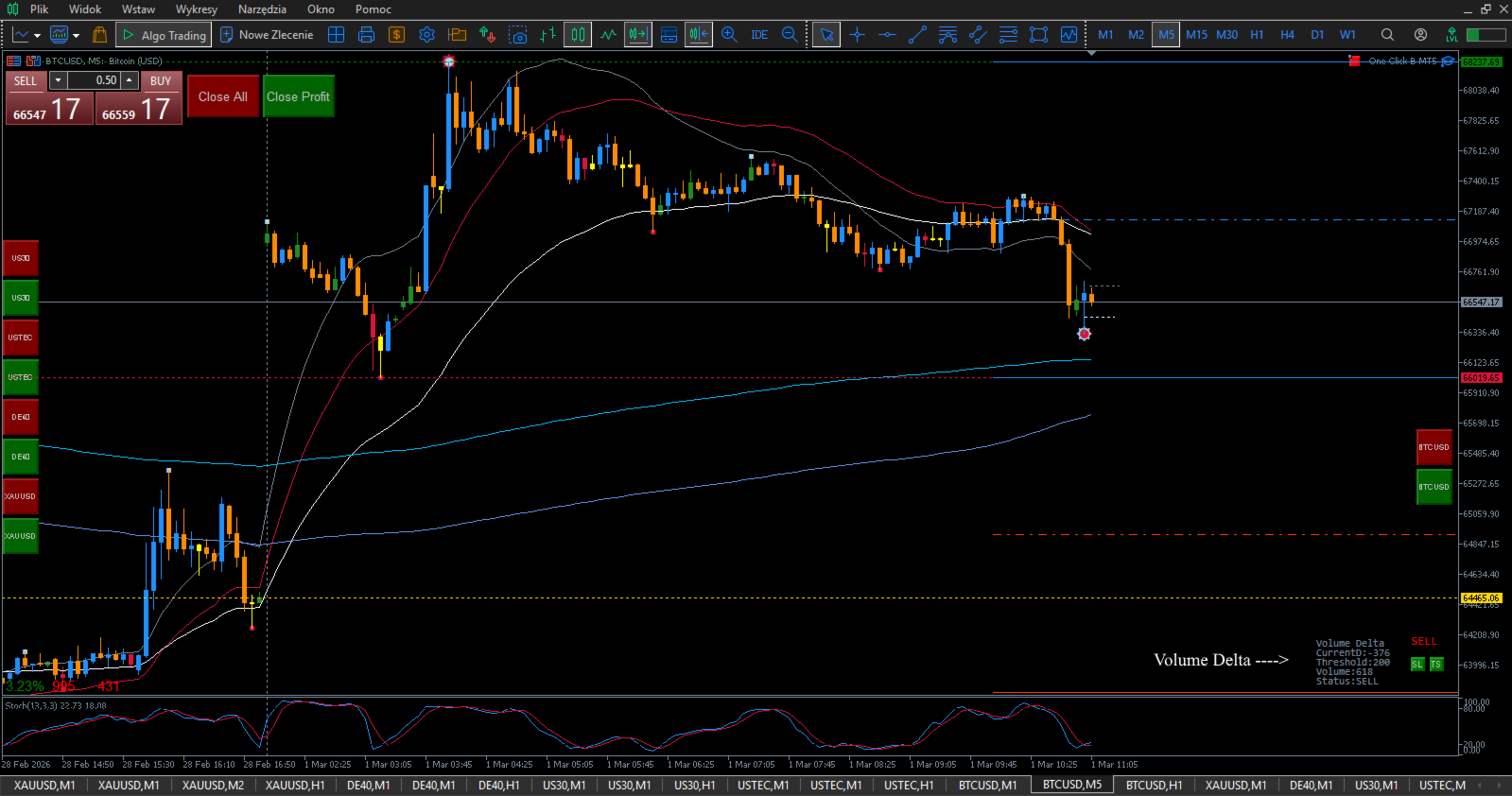
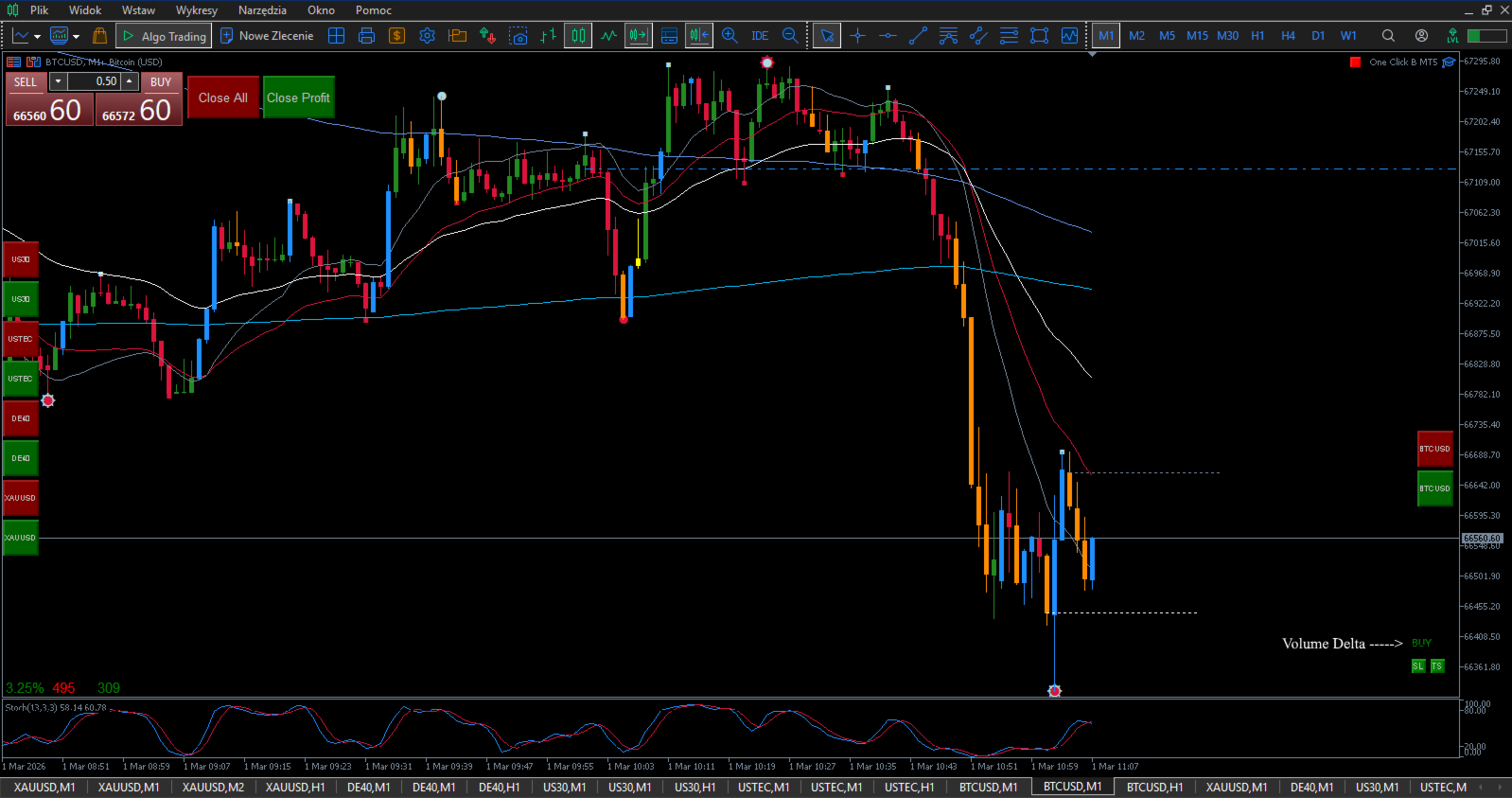
Volume Delta colors candles directly on the chart according to market pressure. Strong buying pressure above the DeltaThreshold parameter highlights candles in BuyVolumeColor. Strong selling pressure below negative DeltaThreshold highlights candles in SellVolumeColor. When divergence between price and delta is detected, candles are marked using DivergenceColor. Neutral candles remain uncolored.
The DeltaThreshold parameter allows the user to define the sensitivity of the indicator according to their own strategy. Lower values generate more signals and higher responsiveness. Higher values filter weaker imbalances and reduce signal frequency. This makes the indicator adaptable to scalping, intraday trading and swing trading.
Optional BUY/SELL alerts can be enabled when delta exceeds the defined threshold on the current candle. Alerts are controlled to prevent repetition on the same bar.
The indicator includes a real-time Delta Monitor panel displaying current delta value, threshold level, volume and market status. The monitor can be enabled or disabled, repositioned to any chart corner and fully customized in terms of font size and text color. The monitor visibility can be toggled directly from the chart.
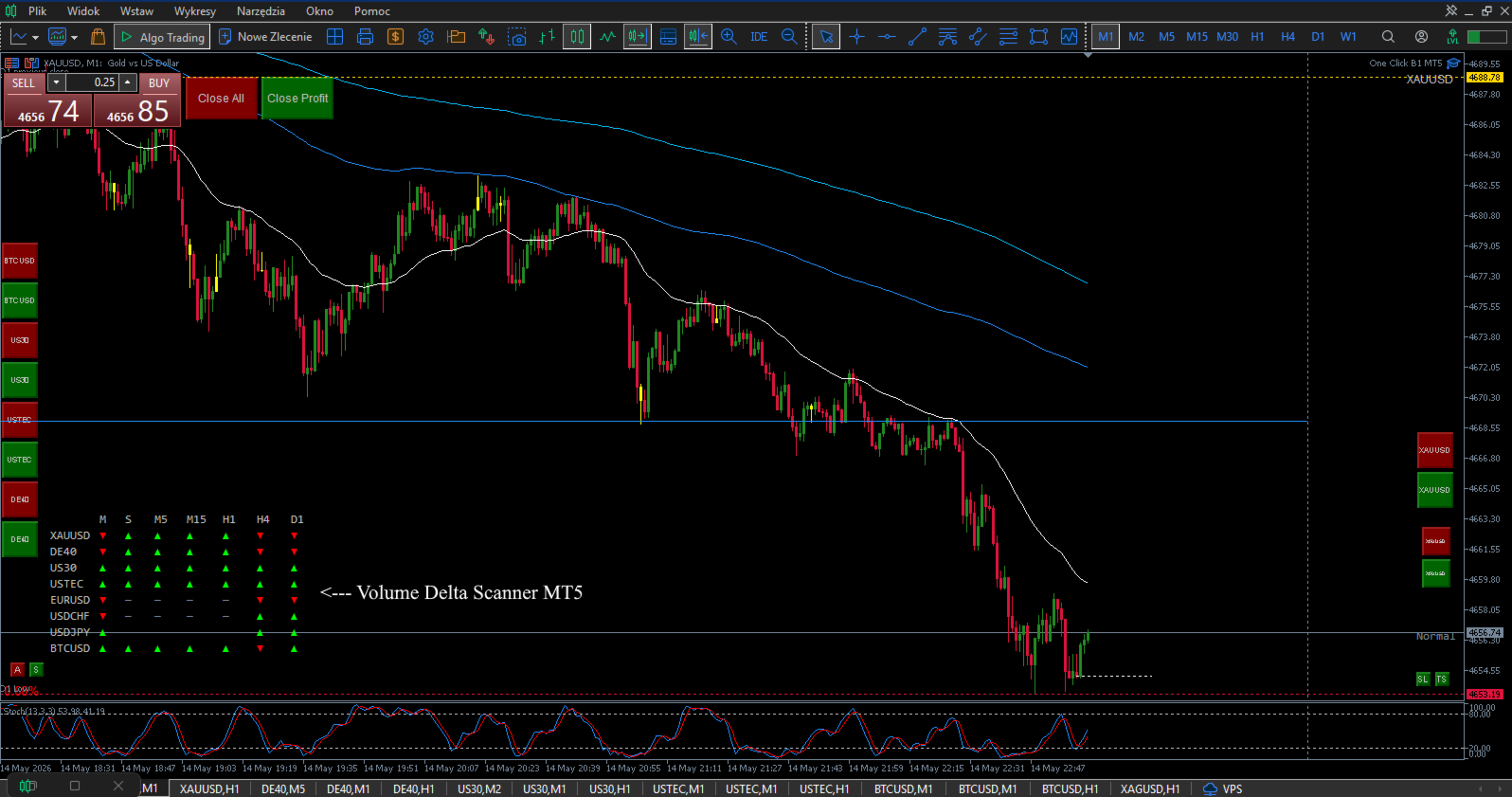
An additional Status Label displays simplified market conditions (BUY, SELL, Normal) using customizable colors and font size. Its position and appearance can also be freely configured.
All visual elements including candle colors, divergence highlighting, monitor panel, status label and alerts can be independently enabled or disabled in the settings. The indicator supports Strategy Tester mode where delta is displayed as a histogram for analytical purposes.
Volume Delta is intended for traders who want to analyze real-time market pressure, confirm breakouts, detect exhaustion and identify hidden divergence between price and volume imbalance in a clean and stable chart environment.
MULTI-TIMEFRAME CONFIRMATION STRATEGY
This indicator uses a single threshold value across all timeframes, creating a natural strength filter that eliminates the need to adjust settings when switching between timeframes.
HOW IT WORKS
The same threshold value produces different signal frequencies across timeframes:
M1 Timeframe: Shows frequent signals. Short 1-minute candles reach the threshold more easily, making this timeframe ideal for precise entry timing.
M5 Timeframe: Shows moderate signals. 5-minute candles require more sustained volume pressure to trigger colored candles. Use for short-term trend confirmation.
M15 Timeframe: Shows fewer signals. Volume imbalance must persist across a full 15-minute candle. Most reliable for intraday trading direction.
H1 Timeframe: Shows the fewest signals. Only strong, sustained buying or selling pressure throughout the full hour triggers colored candles. Use for identifying the main trend direction.
The longer a higher timeframe holds a signal, the stronger the trend. An M15 showing BUY for 30 minutes indicates very strong buying pressure.
PROFESSIONAL TRADING SETUPS
Strong Setup (High Probability):
-
M15 panel shows BUY
-
M5 panel shows BUY
-
M1 candle turns blue
-
Entry: Open LONG position
Alignment across all three timeframes indicates strong buying pressure with high probability of continuation.
Weak Setup (Low Probability – avoid):
-
M1 candle turns blue
-
M5 panel shows Normal
-
M15 panel shows Normal
-
Entry: Skip this signal
Isolated M1 signals without higher timeframe support are often false breakouts or market noise.
Conflicting Signals (wait):
-
M15 panel shows BUY
-
M5 panel shows SELL
-
M1 candle is red
-
Entry: Wait for alignment
Conflicting timeframes indicate either a correction within a larger trend or unstable market conditions. Wait until all timeframes align before entering.
THRESHOLD RECOMMENDATIONS
Start with 100 for most instruments. Adjust based on instrument characteristics:
-
High volume instruments (Bitcoin, Ethereum): 200–300
-
Medium volume instruments (Gold, indices, major Forex): 100–150
-
Low volume instruments (minor currency pairs): 50–80
Key rule: set the threshold once and it works across all timeframes. No need to change settings when switching from M1 to M15 or H1.
WHY THIS APPROACH IS DIFFERENT
Most volume indicators require different settings for each timeframe, causing confusion and forcing traders to constantly adjust parameters.
This indicator solves that problem. A single threshold setting automatically creates appropriate sensitivity for each timeframe. Higher timeframes naturally show fewer signals, representing stronger and more reliable trend confirmation. Lower timeframes naturally show more signals, providing precise entry timing.
Result: Clean multi-timeframe analysis without any parameter adjustments.
PRACTICAL EXAMPLE
Set the threshold to 100 and monitor XAUUSD on three charts simultaneously:
-
M1 chart: Shows 15–20 blue candles per hour (responds to short-term volume spikes)
-
M5 chart: Shows 8–12 blue candles per hour (sustained 5-minute trends)
-
M15 chart: Shows 2–3 blue candles per hour (only strong, established trends)
When all three timeframes show blue candles simultaneously, you have maximum confirmation for a LONG entry.
When only M1 shows a blue candle while M5 and M15 remain neutral, skip the signal — it lacks higher timeframe support.
INDICATOR FEATURES
Dwa panele wyświetlacza:
Panel 1: Shows current delta value, threshold, volume, and status
Panel 2: Shows large status text (Normal, BUY, SELL) for quick visual reference
Both panels are fully customizable:
Position: Choose any corner (left/right, top/bottom)
Offset: Adjust X and Y distance from corner
Font size: Adjust text size
Colors: Customize all text colors
Strategy Tester Mode:
Enable Tester Mode in settings to backtest strategies
Displays volume delta as histogram below price chart
Test historical performance across different timeframes
The indicator works on all symbols and all timeframes. Set your threshold once and switch between timeframes freely. The natural filtering creates the multi-timeframe confirmation system automatically.
TROUBLESHOOTING
Before anything else — after setting up the indicator and saving your final parameters, create a chart template with the instrument name. This way you can restore everything in seconds if needed.
If the indicator behaves unexpectedly or causes platform slowdowns, please note: these issues are not caused by this indicator. They are caused by accumulated data from previous chart configurations stored in your platform.
Follow these steps:
-
Go to Tools → Global Variables → delete all variables.
-
Go to File → Open Data Folder.
-
Close MetaTrader completely.
-
In the data folder open the Logs folder and delete everything inside.
-
In the data folder open the Bases folder, then open your broker folder, then open the History folder and delete everything inside.
-
Close the data folder.
-
Reopen MetaTrader — everything will work correctly.
If problems persist, contact me directly. I respond to every message.
INPUT PARAMETERS SPECIFICATION
DeltaThreshold – defines the minimum delta value required to generate BUY or SELL pressure signals and directly controls signal frequency according to the user strategy.
BuyVolumeColor – color of candles when strong positive delta indicates dominant buying pressure.
SellVolumeColor – color of candles when strong negative delta indicates dominant selling pressure.
DivergenceColor – color of candles when price and delta divergence is detected.
ShowBuySell – enables or disables coloring of candles based on delta threshold signals.
ShowDivergence – enables or disables divergence detection and highlighting.
EnableAlert – enables popup alert when current candle delta exceeds the defined threshold.
ShowDeltaMonitor – enables or disables the on-chart Delta Monitor information panel.
MonitorCorner – defines which chart corner the Delta Monitor panel is anchored to.
MonitorOffsetX – horizontal distance in pixels of the Delta Monitor from selected corner.
MonitorOffsetY – vertical distance in pixels of the Delta Monitor from selected corner.
MonitorTextColor – text color of the Delta Monitor panel.
MonitorFontSize – font size used in the Delta Monitor panel.
ShowStatusLabel – enables or disables the large market status label on the chart.
StatusCorner – defines which chart corner the status label is anchored to.
StatusOffsetX – horizontal distance in pixels of the status label from selected corner.
StatusOffsetY – vertical distance in pixels of the status label from selected corner.
StatusFontSize – font size of the status label text.
StatusNormalColor – text color when market condition is neutral.
StatusBuyColor – text color when delta indicates strong buying pressure.
StatusSellColor – text color when delta indicates strong selling pressure.
TesterMode – enables histogram-based delta visualization for Strategy Tester environment.
Bots will only bring success when you have access to unlimited capital. Only "eyes and mind" will turn your account green, and simple, clean, fast, and efficient tools will help you achieve that.
Real success requires YOUR brain making decisions. My tools are not bots - they are instruments for traders who think.
Previous day's closing price acts like a magnet → High Low Close MT5
Asian Session sets the direction for London and New York sessions → Asia Session Levels
If you scalp multiple instruments:
One Click B3 MT5, Symbol Positions Panel, SL TP Toggle Button, Zoom MT5 B, Volume Delta MT5, Volume Delta Scanner MT5
If you scalp one instrument:
One Click B3 MT5, Symbol Positions Panel, SL TP Toggle Button, Pips Label Last Trade, Zoom MT5 B, Volume Delta MT5, Volume Delta Scanner MT5
If you invest long-term across multiple instruments:
One Click B3 MT5, Symbol Positions Panel, Volume Delta MT5, Volume Delta Scanner MT5
If you've read the descriptions and need clarification - contact me. I'll explain every function, setting, and use case to assure you that these tools fit your trading strategy.