Volume Bubbles
- Indicators
- Antonio Grassi
- Version: 1.0
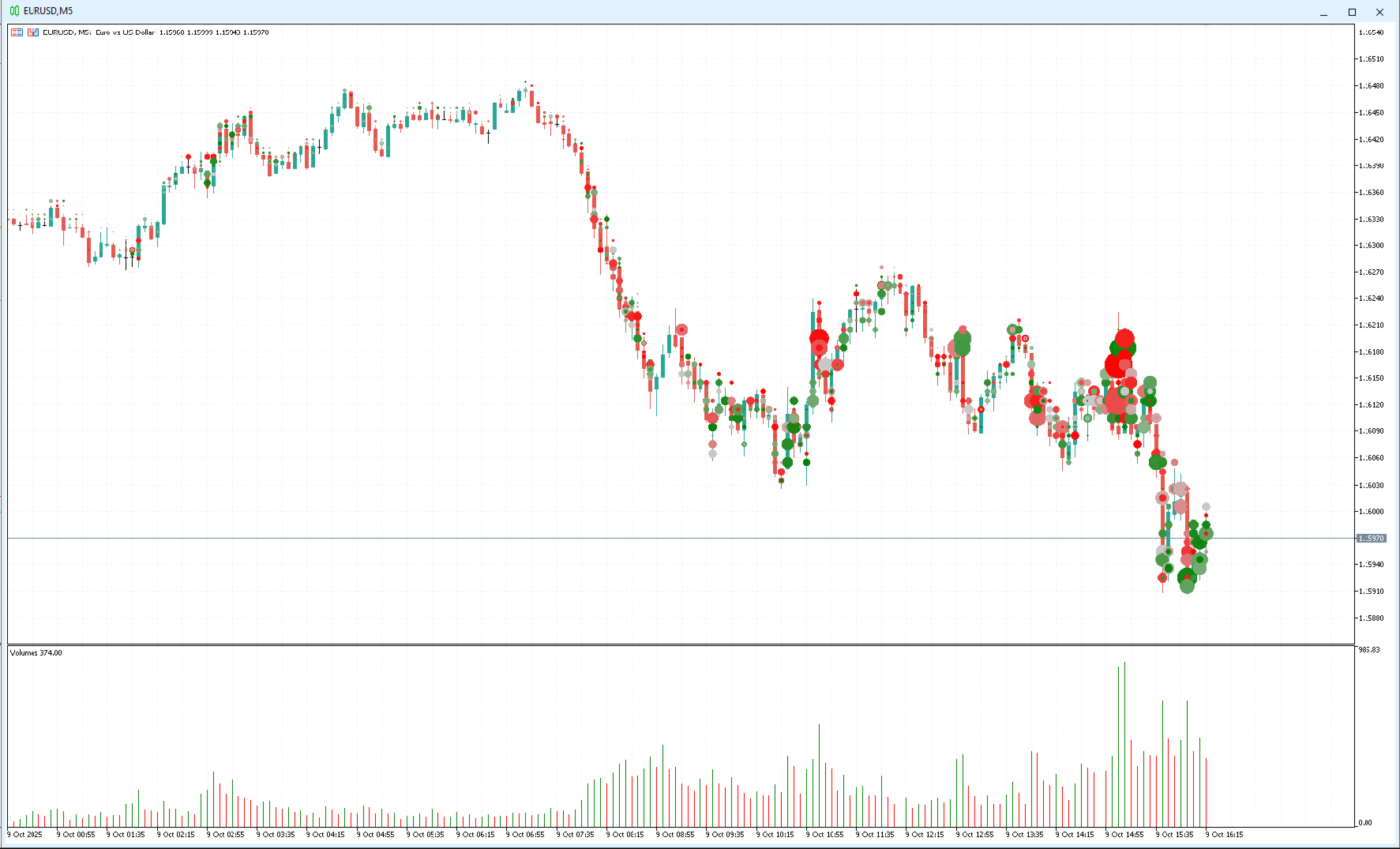
Delta Volume Bubbles is an advanced MetaTrader 5 indicator designed to visually display buy and sell pressure through dynamic, colored bubbles plotted directly on the price chart.
It calculates the net volume delta (difference between buy and sell volume) and represents it as bubbles of different sizes and colors giving traders a clear, intuitive picture of order flow activity.
This indicator provides a visual form of order flow analysis, allowing traders to interpret market pressure even without access to depth-of-market or footprint data.
Real Volume vs Tick-Based Estimation
In markets such as Forex, where real traded volume is not available or not provided by the broker, the indicator uses a tick-by-tick estimation method.
Extensive studies have shown that tick-based volume data is a very close approximation of actual market volume, with a correlation above 80%.
This makes it possible to apply volume-based analysis techniques to virtually any market, including Forex, indices, and commodities.
How Volume Is Calculated
On every tick, the indicator records:
-
Buy volume,
-
Sell volume,
-
Total volume (Buy + Sell),
-
Delta volume (Buy − Sell).
If your broker provides real volume data, the indicator will use it.
Otherwise, it automatically estimates the values based on price movement:
-
If the last price increases, Buy volume is incremented.
-
If the last price decreases, Sell volume is incremented.
-
If the price remains unchanged, both volumes increase slightly.
When the Last Price feed is not available (some brokers omit it), you can choose whether to base the estimation on:
-
the Bid, or
-
the average between Bid and Ask.
How Volume Is Displayed
Each bubble represents volume at a specific price level.
-
The bubble size is proportional to the total volume traded at that level.
-
The bubble color reflects the balance between buying and selling pressure.
🔹 Example:
-
At 1.16000 → 6 Buy vs 2 Sell → smaller bubble, but strong green color (high imbalance).
-
At 1.16100 → 26 Buy vs 22 Sell → larger bubble, but lighter color (big total volume, small delta).
This dual visualization allows you to immediately identify both where the volume is concentrated and which side dominates.
Data Management and History
All tick-by-tick volume data is stored while the indicator is running and saved into a CSV file.
This allows data persistence across timeframe changes or chart reloads.
👉 There are no historical data before the indicator starts, so the first few minutes after launching are used to build the initial dataset.
📂 The CSV file is stored in: Terminal\Common\Files\
⚠️ If the file becomes too large over time, you can manually delete it. A new one will be automatically created (but you’ll lose the stored history).
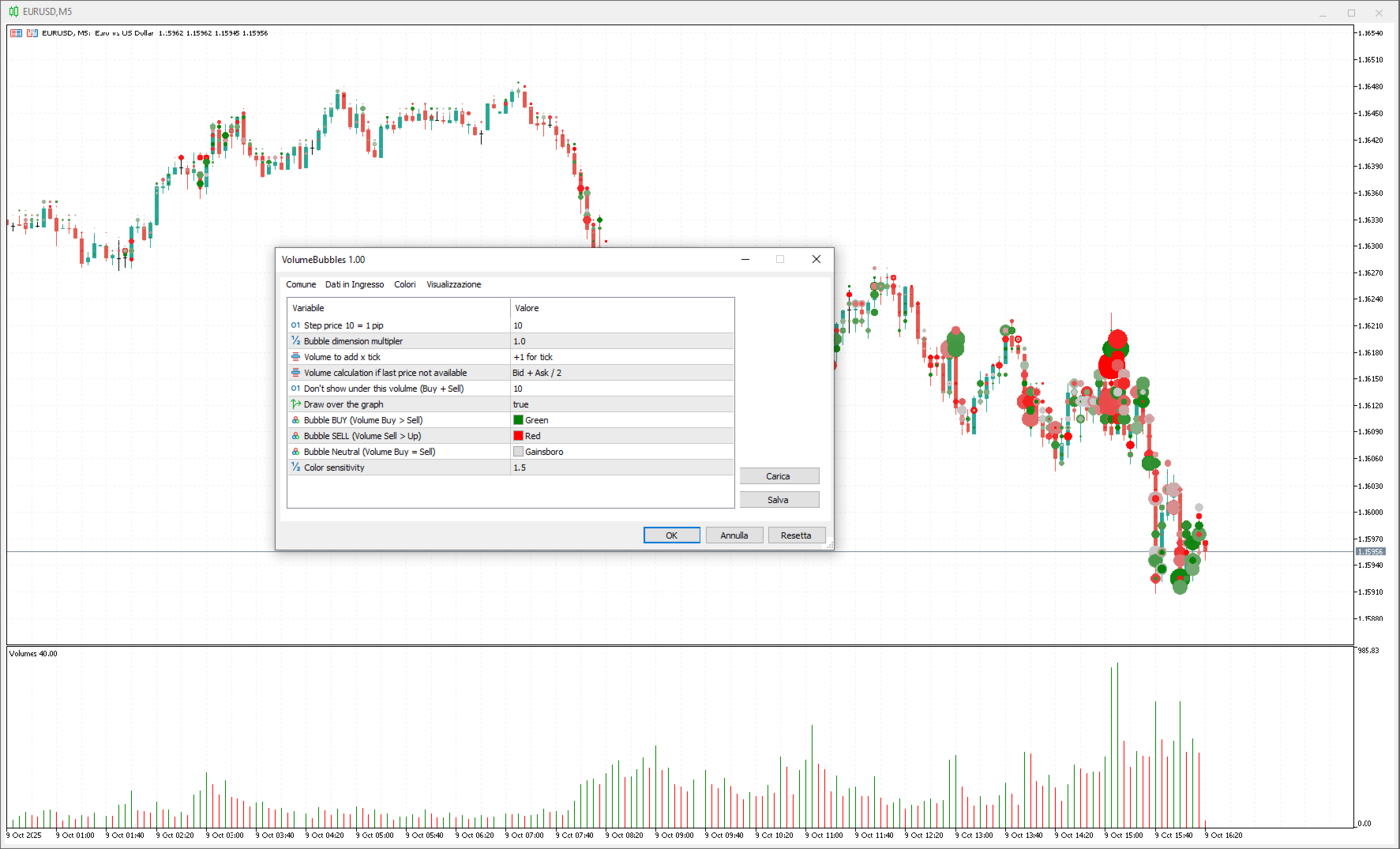
Input Parameters
| Parameter | Description |
|---|---|
| Step price | Price step interval in pippets (e.g. 10 = 1 pip). |
| Bubble dimension multiplier | Adjusts the overall bubble size. |
| Volume to add per tick | Amount of volume added for each tick (real, tick-based, or fixed). |
| Volume calculation mode | Method used when Last Price is unavailable. |
| Minimum volume to display | Hides bubbles below the specified total volume. |
| Draw over the chart | If true, bubbles are drawn above candles; otherwise, below. |
| Color bubble volume up | Color for dominant Buy pressure. |
| Color bubble volume down | Color for dominant Sell pressure. |
| Color bubble neutral | Neutral color (balanced volume). |
| Color sensitivity | Controls how quickly color changes with delta imbalance. |
Important Notes
-
The indicator is currently in development (v1.0).
Please report any bugs, issues, or feature suggestions — your feedback is extremely valuable. -
Occasionally, after changing timeframe or zoom level, the bubbles may not refresh immediately.
➜ Solution: switch timeframe again or adjust a parameter to trigger a redraw. -
The CSV file is not yet optimized and may grow large over time. Delete it periodically if needed.
How to Access the CSV File
-
In MetaTrader, click File → Open Data Folder
-
Go one level up to the Terminal directory
-
Open Common → Files
-
Locate the file DeltaVolumeBubbles-XXX.csv
Conclusion
Delta Volume Bubbles v1.0 brings volume delta and order flow visualization directly into MetaTrader 5 — letting you see where buyers and sellers are most active.
Ideal for:
-
Traders using Volume Spread Analysis (VSA),
-
Delta volume or order flow enthusiasts,
-
Anyone who wants a clear and intuitive way to analyze market pressure dynamics without external tools.















































super