Smart Trading Panel MT5

Smart Trading Panel MT5 - Умная торговая панель

Обзор продукта

Smart Trading Panel MT5 — это не просто панель управления - это профессиональная торговая панель для MetaTrader 5 больше похожа на советник, который значительно упрощает процесс торговли и добавляет функции, отсутствующие в стандартном терминале: 3 режима расчета лота, Автоматическая установка StopLoss, Продвинутый трейлинг-стоп, Трейлинг отложенных ордеров.

Ключевые преимущества

   Эффективность и скорость

  • Мгновенное открытие позиций одним кликом без дополнительных диалогов
  • Быстрое размещение отложенных ордеров SELL STOP и BUY STOP
  • Одним кликом закрытие прибыльных позиций или всех позиций
  • Глобальное управление - закрытие всех позиций на всех инструментах

   Умное управление лотом (уникальная функция)

  • 3 режима расчета лота: фиксированный, процент от баланса, процент от маржи
  • Автоматический расчет размера позиции в зависимости от выбранного режима
  • Безопасность: исключение ошибок при ручном вводе лота

   Автоматический риск-менеджмент (уникальная функция)

  • Автоматическая установка StopLoss на основе процента от баланса
  • Работает для всех позиций: открытых через панель или стандартными средствами терминала
  • Защита капитала: точный контроль максимального убытка

   Продвинутый трейлинг-стоп (расширенная функция)

  • Гибкие настройки активации: минимальная прибыль для включения трейлинга
  • Защита прибыли: настраиваемый уровень безубытка
  • Умный шаг трейлинга: оптимизация частоты обновлений

   Трейлинг отложенных ордеров (уникальная функция)

  • SELL STOP трейлится вверх вслед за ростом цены
  • BUY STOP трейлится вниз вслед за падением цены
  • Автоматическая активация: начинает работать сразу после размещения
  • Настраиваемые параметры: дистанция и шаг трейлинга

   Удобство использования

  • Интуитивный интерфейс: логичное расположение кнопок как в терминале
  • Настраиваемый дизайн: выбор цветов для каждой кнопки
  • Компактная панель: не загромождает рабочее пространство
  • Перемещаемая: настройка координат размещения

Для кого предназначен продукт

   Для профессиональных трейдеров

  • Увеличение скорости принятия торговых решений
  • Автоматизация рутинных операций
  • Точный контроль рисков
  • Эффективное управление множественными позициями

   Для начинающих трейдеров

  • Исключение ошибок при расчете лота
  • Автоматическая защита капитала
  • Простое и понятное управление
  • Обучение правильным принципам риск-менеджмента

   Для скальперов и дей-трейдеров

  • Мгновенное исполнение торговых решений
  • Быстрое закрытие позиций при достижении целей
  • Эффективное управление короткими позициями
  • Продвинутый трейлинг для фиксации прибыли

Преимущества над стандартным терминалом

Функция

Стандартный MT5

Smart Trading Panel

Открытие позиций

Диалоговое окно с ручным вводом

Один клик

Расчет лота

Ручной ввод

3 автоматических режима

StopLoss

Ручная установка

Автоматический расчет

Трейлинг позиций

Базовый трейлинг

Умный трейлинг с настройками

Трейлинг ордеров

Отсутствует

Полная автоматизация

Управление рисками

Ручное

Автоматическое

Скорость операций

Медленная

Мгновенная

Технические характеристики

  • Платформа: MetaTrader 5
  • Совместимость: Все типы счетов и брокеры
  • Ресурсы: Минимальное потребление CPU и памяти
  • Настройки: Полная кастомизация через параметры советника
  • Языки: Русский интерфейс и документация

Установка и настройка

  1. Поместите файл в папку Experts терминала MT5
  2. Перетащите советника на график торгового инструмента
  3. Настройте параметры в соответствии с вашей стратегией
  4. Начинайте торговать с максимальным комфортом!

Smart Trading Panel — это не просто панель кнопок, это комплексное решение для современной торговли, которое объединяет скорость, безопасность и эффективность в одном инструменте.


Smart Trading Panel MT5 - Руководство пользователя

Установка

  1. Скопируйте файл Smart Trading Panel MT5.ex5 в папку MQL5/Experts вашего терминала
  2. Перезапустите MetaTrader 5 или обновите навигатор (F5)
  3. Перетащите советника из навигатора на график нужного инструмента
  4. Разрешите автоторговлю и импорт DLL при появлении диалога
  5. Настройте параметры согласно вашей стратегии

Настройка параметров

Все настройки панели осуществляются через входные параметры советника. Кнопки панели не содержат настроек - они выполняют действия согласно заданным параметрам.

Расчет лота

Параметр

Описание

Рекомендуемые значения

Способ расчета лота

Выбор метода определения размера позиции

Процент от свободной маржи

Фиксированный размер лота

Постоянный размер для всех позиций

0.01 - 1.0

Процент от баланса

Процент баланса для расчета лота

1-10%

Процент от свободной маржи

Процент маржи для расчета лота

5-25%

Управление рисками

Параметр

Описание

Рекомендуемые значения

Процент от баланса для StopLoss

Максимальный убыток от баланса

1-5%

Трейлинг стоп

Параметр

Описание

Рекомендуемые значения

Минимальная прибыль при активации

Прибыль в пунктах для начала трейлинга

50-200 пунктов

Минимальный уровень безубытка

Защищенная прибыль в пунктах

10-50 пунктов

Шаг трейлинг стопа

Минимальный шаг обновления

5-20 пунктов

Отложенные ордера

Параметр

Описание

Рекомендуемые значения

Дистанция от цены

Расстояние ордера от текущей цены

20-100 пунктов

Шаг трейлинга ордеров

Минимальный шаг обновления цены

5-30 пунктов

Описание кнопок

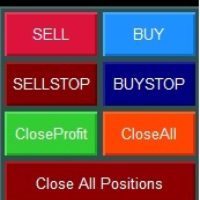
Верхний ряд - Рыночные ордера

![Кнопки SELL и BUY]

SELL (красная кнопка)

  • Действие: Открытие позиции на продажу по текущей цене Bid
  • Объем: Рассчитывается автоматически согласно выбранному режиму
  • StopLoss: Устанавливается автоматически согласно настройкам риска
  • Трейлинг: Активируется автоматически при достижении заданной прибыли

BUY (синяя кнопка)

  • Действие: Открытие позиции на покупку по текущей цене Ask
  • Объем: Рассчитывается автоматически согласно выбранному режиму
  • StopLoss: Устанавливается автоматически согласно настройкам риска
  • Трейлинг: Активируется автоматически при достижении заданной прибыли

Второй ряд - Отложенные ордера

![Кнопки SELL STOP и BUY STOP]

SELL STOP (темно-красная кнопка)

  • Действие: Размещение ордера SELL STOP ниже текущей цены
  • Расстояние: Определяется параметром "Дистанция отложенных ордеров"
  • Трейлинг: Ордер автоматически поднимается вслед за ростом цены
  • Применение: Вход в короткую позицию при пробитии поддержки

BUY STOP (темно-синяя кнопка)

  • Действие: Размещение ордера BUY STOP выше текущей цены
  • Расстояние: Определяется параметром "Дистанция отложенных ордеров"
  • Трейлинг: Ордер автоматически опускается вслед за падением цены
  • Применение: Вход в длинную позицию при пробитии сопротивления

Третий ряд - Управление позициями текущего инструмента

![Кнопки Close Profit и Close All]

Close Profit (зеленая кнопка)

  • Действие: Закрытие всех прибыльных позиций текущего инструмента
  • Условие: Закрываются только позиции с положительным результатом
  • Применение: Быстрая фиксация прибыли при достижении целей

Close All (оранжевая кнопка)

  • Действие: Закрытие всех позиций текущего инструмента
  • Условие: Закрываются все позиции независимо от результата
  • Применение: Полный выход из инструмента

Четвертый ряд - Глобальное управление

![Кнопка Close All Positions]

Close All Positions (темно-красная широкая кнопка)

  • Действие: Закрытие всех позиций на всех инструментах
  • Масштаб: Работает глобально для всего счета
  • Применение: Экстренное закрытие всех позиций
  • Внимание: Используйте осторожно - закрывает позиции по всем символам!

Режимы расчета лота

1. Фиксированное значение

  • Описание: Всегда используется заданный размер лота
  • Плюсы: Простота, предсказуемость
  • Минусы: Не учитывает изменения баланса
  • Применение: Для опытных трейдеров с четкой стратегией

2. Процент от баланса

  • Описание: Размер лота рассчитывается от общего баланса счета
  • Плюсы: Безопасность, медленный рост рисков
  • Минусы: Консервативный подход
  • Применение: Для долгосрочной торговли и сохранения капитала

3. Процент от свободной маржи

  • Описание: Размер лота рассчитывается от доступной маржи
  • Плюсы: Максимальное использование капитала
  • Минусы: Более высокие риски
  • Применение: Для агрессивных стратегий и опытных трейдеров

Система трейлинга

Трейлинг позиций

Принцип работы:

  1. Позиция должна достичь заданной минимальной прибыли
  2. StopLoss переносится в безубыток с заданным отступом
  3. При дальнейшем движении в прибыль SL подтягивается с заданным шагом

Пример настроек:

  • Минимальная прибыль: 100 пунктов
  • Уровень безубытка: 20 пунктов
  • Шаг трейлинга: 10 пунктов

Результат: При достижении +100 пунктов SL установится на +20 пунктов от входа

Трейлинг отложенных ордеров

SELL STOP ордера:

  • Трейлятся только ВВЕРХ при росте цены
  • Дистанция от цены остается постоянной
  • Позволяет входить в рынок при пробитии динамических уровней

BUY STOP ордера:

  • Трейлятся только ВНИЗ при падении цены
  • Дистанция от цены остается постоянной
  • Позволяет входить в рынок при пробитии динамических уровней

Практические рекомендации

Настройка для скальпинга

  • Режим лота: Процент от маржи (10-20%)
  • StopLoss: 1-2% от баланса
  • Трейлинг: Активация 20-50 пунктов, безубыток 5-10 пунктов

Настройка для дей-трейдинга

  • Режим лота: Процент от баланса (2-5%)
  • StopLoss: 2-3% от баланса
  • Трейлинг: Активация 50-100 пунктов, безубыток 15-25 пунктов

Настройка для свинг-трейдинга

  • Режим лота: Фиксированный или процент от баланса (1-3%)
  • StopLoss: 3-5% от баланса
  • Трейлинг: Активация 100-200 пунктов, безубыток 30-50 пунктов

Общие рекомендации

  1. Начинайте с консервативных настроек и постепенно адаптируйте под свой стиль
  2. Тестируйте настройки на демо-счете перед применением на реальном счете
  3. Регулярно анализируйте результаты и корректируйте параметры
  4. Помните: панель - это инструмент, успех зависит от вашей торговой стратегии

Поддержка

Если у вас возникли вопросы по использованию Smart Trading Panel MT5, обратитесь к разработчику через личные сообщения на MQL5.com или комментарии к продукту.

Успешной торговли!


Recommended products
izi hedge is a tool that helps you manage risk, manage hedge orders and rebalance losing orders. How it works   It will place an order opposite to the order you placed with that currency pair.   If the order you place is correct, the reverse order will be automatically deleted   If the market unfortunately goes against your order and touches the hedge order, it will begin to calculate the hedging volume to limit the risk of the market going in reverse.
FREE
TradeInfo MT5
Manuraj Dhanda
4.36 (14)
TradeInfo is a utility indicator which displays the most important information of the current account and position. Displayed information: Information about the current account (Balance, Equity, Free Margin). Current spread, current drawdown (DD), planned profit, expected losses, etc. Number of open position(s), volume (LOT), profit. Today’s and yesterday’s range. Remaining time to the next candle. Last day profit information. MagicNumber filter. Comment filter. Indicator parameters: ShowPro
FREE
Correlation Matrix Pro - Multi Currency Pairs Hedge Scanner Understand the relationships between currency pairs in real-time! A powerful analysis tool that helps you visualize statistical relationships between up to 6 currency pairs simultaneously. Perfect for portfolio management, risk diversification, and hedging strategies. KEY FEATURES - Real-time Pearson correlation using log returns - Monitor up to 6 currency pairs simultaneously - Automatic timeframe detection - Adjustable lookback
FREE
Close Button MT5
Wang Yu
2.53 (19)
如果产品有任何问题或者您需要在此产品上添加功能,请联系我 Contact/message me if you encounter any issue using the product or need extra feature to add on the base version. You can get the free Close Button MT4 version at LINK . Close Button provides you an intuitive, effective, and handy way to close your orders and/or positions based on their type and their profit status. The tool provides seven close options: Close All: close all pending orders and positions. Close Profit: close all positions which are in profit. Close L
FREE
Prop Firm Protector Basic
Janitha Sandaruwan Amaradasa Wickramasingha Arachchilage
5 (1)
Prop Firm Protector Lite - Essential Risk Management Tool A risk management utility designed to help traders monitor their trading activity according to predefined rules and limits. This tool runs in the background on any chart and monitors all trades regardless of their source, including manual trades, signal subscriptions, or other Expert Advisors. --- Core Features Symbol and Lot Monitoring: The symbol monitoring module allows you to define which currency pairs are permitted for trading.
FREE
Exp Assistant 5
Vladislav Andruschenko
4.77 (125)
Auto Setting, stop loss, take profit, trailing stop, breakeven levels, enabling virtual stop loss and take profit. Exp Assistant will help you organize maintenance of your positions. This program, the Expert Advisor, is designed to automatically set the  Real or Virtual   Stop Loss and Take Profit  levels for your positions while trading.  You can easily manage all the operations of the Expert Advisor from the control panel on the chart.  If you face any difficulty in setting stop loss, take pro
FREE
Market Hours Pro
Musa Terrance Khosa
Market Hours Pro shows Tokyo, London, and New York trading sessions directly on your MT5 chart, including scheduled overlap periods. It’s designed to give you a clear view of global market timing so you can plan trades, spot high-activity periods, and align strategies with standard Forex hours. How It Works Displays scheduled session times visually on your chart. Highlights session overlaps for London/New York and Tokyo/London. Automatically adjusts times for your timezone or broker time. Shows
FREE
(Special New Year promotion - free price!) The indicator displays the actual 'Scale in points per bar' (identical to the manual setting in the Terminal, see screenshot) in the upper right corner of the chart. The displayed value changes INSTANTLY whenever the chart scale is changed! (This is very convenient when planning screenshots). In Settings: Change language (Russian/English), font size of the displayed text, text label offset coefficient from the graph corner, equally in X and Y directi
FREE
Manual position management. Missing SL. Price moves against you. No protection. Trade Manager Lite automates Stop Loss, Take Profit, Trailing Stop, and Break-Even for your open positions. Attach to one chart. Configure your default SL/TP distance. Let it manage your positions automatically. What's Included (FREE Version) Auto SL/TP: Applies missing Stop Loss and Take Profit to positions based on your configured distance in points Trailing Stop: Adjusts SL dynamically as price moves in your favor
FREE
Trade assistant pro v8
Ahmed Mohammed Bakr Bakr
FREE FREE FREE Trade Assistant MT5 – Professional Trading & Risk Management Panel Trade Assistant MT5 is an advanced trading panel designed to help traders execute orders faster, safer, and more professionally . It simplifies manual trading by combining smart order management , precise risk control , and one-click execution , making it ideal for both beginners and advanced traders. This tool does not trade automatically . Instead, it empowers you with full control while applying professional-gra
FREE
VFI Quantum
Nikita Berdnikov
5 (1)
Introducing VFI (Volume Flow Indicator) – a trading indicator that analyzes the relationship between volume and price movement to identify key trading opportunities. The indicator displays the strength and direction of volume flow, providing clear signals about potential entry and exit points. Signals are formed based on zero line crossovers, crossovers between the VFI line and its exponential moving average (EMA), and when the indicator exits overbought and oversold zones. Attention! This stra
FREE
QuickClose EA
Peechanat Chatsermsak
QuickClose EA: Manage Trades Quickly and Efficiently QuickClose EA is a tool designed to help traders manage orders on the current chart easily and quickly. It provides full control over your trading status with clear feedback. Key Features of QuickClose EA: User-Friendly Control Panel: Clearly displays essential information such as the current symbol name, total profit/loss for Buy and Sell positions, and open lot sizes, giving you an immediate overview of your trading status. Precise Lot Size
FREE
TrendLine Manager
Mirel Daniel Gheonu
4.5 (2)
TrendLine Manager - Professional Trading Assistant TrendLine Manager is a smart trading tool that helps you manage your trades using trendlines drawn directly on your charts. Instead of manually watching every line you draw, this Expert Advisor does the monitoring for you. What it does: Converts any trendline you draw into an active trading trigger Automatically closes positions when price hits your stop loss or take profit lines Opens new trades when price crosses your entry lines Works with sl
FREE
NAS100 Auto Sl And TP MT5
Moustapha Boulouz
5 (2)
Introducing NAS100 Auto SL and TP Maker for MT5: Never miss setting StopLoss and TakeProfit again with our NAS100 Auto SL and TP Maker, an indispensable assistant for traders navigating the Nasdaq 100 market on MetaTrader 5. This tool is designed for those who seek a seamless solution to automate the management of StopLoss and TakeProfit levels. Key Features: Effortless Automation: Automatically monitors Nasdaq 100 trades without StopLoss and/or TakeProfit. Dynamically adjusts levels based on u
FREE
The   Matrix Arrow Indicator Multi Timeframe Panel MT5   is a free add on and a great asset for your   Matrix Arrow Indicator MT5 . It shows the current   Matrix Arrow Indicator MT5   signal for 5 user customized timeframes and for 16 modifiable symbols/instruments in total. The user has the option to enable/disable any of the 10 standard indicators, that the Matrix Arrow Indicator MT5 consists of. All of the 10 standard indicators attributes are also adjustable, as in the   Matrix Arrow Indicat
FREE
Lot Size Line
Stefan Warratz
This little tool helps you to define your risk management with a simple line dragging on the chart. It shows you the actual lot size calculated on account % or fixed money amount directly at the line. All you have to do is activate the line by pressing the "t" key on your keyboard and drag the line to your stop loss point. Thats it. In the settings you can define the color and width of line and text, also space of text to line and the right and you can set the risk in percent of account or fixed
FREE
Strong movement levels
Nikolay Mitrofanov
5 (2)
Looks for strong price movements and draws levels upon their completion. You determine the strength of the movement yourself by specifying in the settings the number of points and the number of candles of the same color in a row in one direction. There are 2 types of building in the settings: extrenum - high / low close - close price You can also adjust the number of displayed levels and the number of candles for calculations. By default, the settings indicate 5 levels for 360 candles. That
FREE
Bundle Risk Manager Pro EA "Risk Manager Pro EA is an all-in-one trading utility that combines advanced risk management tools, ensuring full control over your trading account while protecting your capital and complying with trading regulations. By bundling Limit Positions , Concurrent Risk Capital , and the newly added Limit Profit , this EA is the ultimate solution for disciplined trading and achieving evaluation goals. Key Features: 1. Limit Positions : Enforces a maximum number of open posi
FREE
LT Trade Panel Lite
Thiago Duarte
4.58 (53)
Have you missed any tools or shortcuts in Meta Trader? Simple things that would make your daily trading much easier ? We have the solution for you: our Trade Panel! This is an EA tool (Expert Advisor) that, if configured to controll all symbols, needs to be loaded only once. This is the Lite version (free) of our tool. Professional version:   https://www.mql5.com/en/market/product/42658 If you have some problemas with the shortcut buttons on chart on unpinned mode try change the tickets digi
FREE
Expert Advisor (EA) that utilizes the basic Dow Theory strategy along with RSI for take profit, and employs support and resistance levels from the Zigzag indicator as stop-loss and take-profit points, you can follow these guidelines: Dow Theory Strategy : This involves analyzing trends using the Dow Theory principles, mainly focusing on identifying primary trends (bullish or bearish) and secondary trends (corrections). You'll need to implement rules for identifying these trends based on price ac
FREE
Free automatic Fibonacci is an indicator that automatically plots a Fibonacci retracement based on the number of bars you select on the BarsToScan setting in the indicator. The Fibonacci is automatically updated in real time as new highest and lowest values appears amongst the selected bars. You can select which level values to be displayed in the indicator settings. You can also select the color of the levels thus enabling the trader to be able to attach the indicator several times with differe
FREE
Pin Bars MT5
Yury Emeliyanov
Main purpose:   "Pin Bars"   is designed to automatically detect pin bars on financial market charts. A pin bar is a candle with a characteristic body and a long tail, which can signal a trend reversal or correction. How it works:   The indicator analyzes each candle on the chart, determining the size of the body, tail and nose of the candle. When a pin bar corresponding to predefined parameters is detected, the indicator marks it on the chart with an up or down arrow, depending on the directi
FREE
Posh Candle Info MT5
Theresia Yovitha Herwanda
5 (1)
Show candle info with: Time in selected timezone  Bar number Candle range points Upper wick points and percentage Body   points and percentage Lower wick   points and percentage Mark large/small candle body with customizable line. Settings group: Broker and local timezone. Lookback bars for candle marking. Large candle body Small candle body Date and time info with auto position or custom the x and y coordinate.
FREE
VWAP Personnal Custom
Vincent Jose Proenca
VWAP_PC_MQL5 — a simple home-built VWAP indicator showing real-time volume-weighted price levels directly on your MT5 chart. TF: Works on all timeframes. Pair: Compatible with all symbols — Forex, indices, commodities, and stocks. Settings: Applied Price – price type used for VWAP calculation (Close, Typical, Weighted, etc.) Line Color / Width / Style – customize VWAP line appearance Session Reset – optional reset per day or continuous mode How it works (VWAP principle): VWAP (Volume Weighted
FREE
Analise Probabilistica
Valter Cezar Costa
4.78 (9)
I'm sure after a lot of research on the internet, you haven't found any indicator that can help you with forex or binary trading in the latest probability strategy created by famous trader Ronald Cutrim. The strategy is based on a simple count of green and red candles, checking for a numerical imbalance between them over a certain period of time on an investment market chart. If this imbalance is confirmed and is equal to or greater than 16%, according to trader Ronald Cutrim, creator of the pro
FREE
LT Day High Low
Thiago Duarte
4.57 (30)
This indicator draw a line on high and low levels of X number of days. It is possible to have an alert (in the software and mobile app) for when the price breaks the high or low of the current day. Configurações: Days -   past days to calculate (1 = actual day only). Alert when reach levels -   activate the alert for specific levels or both. Push notification -   enable the alert to the mobile MT5 app. Appearance High -   high level color. Low -   low level color. Size actual day -   thickness
FREE
IMPORTANT NOTE: This is a professional Trade Management Utility and on-chart assistant. It is NOT an automated trading robot. It does not open trades on its own. The UltraFast Trade Manager MT5 is the ultimate execution and risk-management suite designed to give you absolute control over your manual and algorithmic trades. When managing multiple positions, calculating complex net break-even points, or constantly monitoring the economic calendar, hesitation can lead to costly mistakes. This utili
FREE
NS Financas Automatic Clear All Chart Indicators Script Automatically remove all indicators from your chart offered for free by NS Financas! Don't waste any more time deleting the indicators one by one. With this script it is possible in one click to remove all indicators from the screen to adjust your new strategy while still using the settings of your graph, in addition to the possibility of configuring keyboard shortcuts for quick access to the script. Take the opportunity to visit our cha
FREE
Bneu Prop Firm Pass System
Marvinson Salavia Caballero
Bneu Prop Firm Pass System — All-in-One Challenge Management Utility Premium on-chart dashboard with 5 tabs for MetaTrader 5. Real-time rule tracking for any prop firm challenge. News filter auto-blocks trading before high-impact events. Risk Sentinel enforces 6 protection layers automatically. Visual trade manager with draggable SL/TP lines. Adaptive money management protects every position. Built-in prop firm simulator for risk-free practice. Telegram alerts for trades, violations, and daily
RSI abcd
Francisco Gomes Da Silva
4.33 (3)
RSI ABCD Pattern Finder: Technical Strategy 1. How the Indicator Works Combines the classic RSI with automatic detection of ABCD harmonic patterns . Key Components Standard RSI (adjustable period) Peak and Trough Markers (arrows) ABCD Patterns (green/red lines) Overbought (70) and Oversold (30) Filters 2. MT5 Setup period = 14 ; // RSI period size = 4 ; // Maximum pattern size OverBought = 70 ; // Overbought level OverSold = 30 ; // Oversold level Filter = USE_FILTER_ YES ; // Confirmation filte
FREE
Buyers of this product also purchase
Trade Assistant MT5
Evgeniy Kravchenko
4.42 (208)
It helps to calculate the risk per trade, the easy installation of a new order, order management with partial closing functions, trailing stop of 7 types and other useful functions. Additional materials and instructions Installation instructions - Application instructions - Trial version of the application for a demo account Line function -   shows on the chart the Opening line, Stop Loss, Take Profit. With this function it is easy to set a new order and see its additional characteristics bef
Forex Trade Manager MT5
InvestSoft
4.98 (646)
Welcome to Trade Manager MT5 - the ultimate risk management tool designed to make trading more intuitive, precise, and efficient. This is not just an order placement tool; it's a comprehensive solution for seamless trade planning, position management, and enhanced control over risk. Whether you're a beginner taking your first steps, an advanced trader, or a scalper needing rapid executions, Trade Manager MT5 adapts to your needs, offering flexibility across all markets, from forex and indices t
Local Trade Copier EA MT5
Juvenille Emperor Limited
4.96 (135)
Experience exceptionally fast trade copying with the   Local Trade Copier EA MT5 . With its easy 1-minute setup, this trade copier allows you to copy trades between multiple MetaTrader terminals on the same Windows computer or Windows VPS with lightning-fast copying speeds of under 0.5 seconds. Whether you're a beginner or a professional trader, the   Local Trade Copier EA MT5   offers a wide range of options to customize it to your specific needs. It's the ultimate solution for anyone looking t
TradePanel MT5
Alfiya Fazylova
4.87 (151)
Trade Panel is a multi-functional trading assistant. The app contains over 50 trading functions for manual trading and allows you to automate most trading tasks. Attention! Discounts are limited in time, every Tuesday the price will increase by $5 (up to $100). Before making a purchase, you can test the demo version on a demo account. Download the trial version of the application for a demonstration account: https://www.mql5.com/en/blogs/post/750865 . Full instructions here . Trade. Allows you t
Beta Release The Telegram to MT5 Signal Trader is nearly at the official alpha release. Some features are still under development and you may encounter minor bugs. If you experience issues, please report them, your feedback helps improve the software for everyone. Telegram to MT5 Signal Trader is a powerful tool that automatically copies trading signals from Telegram channels or groups directly to your MetaTrader 5 account. It supports both public and private Telegram channels, and you can conn
FarmedHedge Pair Trading Dashboard
Tanapisit Tepawarapruek
5 (4)
Farmed Hedge Yield Farming | All Markets (Manual - Hybrid - Semi/Automated EA) MULTI-ASSET SUPPORT Trade any asset available on your broker - Forex: Major, Minor, Exotic pairs - Crypto: BTC, ETH, XRP, SOL, BNB - Stocks: Apple, Tesla, Amazon, Google, etc. - Commodities: Gold, Silver, Oil, Gas - Indices: US30, NAS100, SPX500, DAX40 - Any CFD your broker offers VERIFIED TRADING RESULTS - Farmed Hedge Yield Axi Copy:  https://www.mql5.com/en/signals/2356376 - Farmed Hedge Yield Exn Copy:   https:/
HINN Lazy Trader
ALGOFLOW OÜ
5 (2)
Limited time offer: 20% off for a few days only!  - Annual subscription $360 instead of $450  - Lifetime plan $550 instead of $690 The core idea: using the user interface, you configure the parameters the chart must meet before entering a position (or positions), choose which entry models to use, and set the rules for when trading and planning should end. Lazy Trader  handles the rest: it  takes over all the routine chart watching and execution! full description  :: 3 key videos [1] ->  [2]   -
Exp COPYLOT CLIENT for MT5
Vladislav Andruschenko
3.82 (34)
Professional Trade Copier for MetaTrader 5 Fast, professional, and reliable trade copier for MetaTrader . COPYLOT allows you to copy Forex trades between MT4 and MT5 terminals with support for Hedge and Netting accounts. COPYLOT MT5 version supports: - MT5 Hedge to MT5 Hedge - MT5 Hedge to MT5 Netting - MT5 Netting to MT5 Hedge - MT5 Netting to MT5 Netting - MT4 to MT5 Hedge - MT4 to MT5 Netting MT4 version Full Description +DEMO +PDF How To Buy How To Install How to get Log Files H
Trade Dashboard MT5
Fatemeh Ameri
4.94 (121)
Tired of complex order placement and manual calculations? Trade Dashboard is your solution. With its user-friendly interface, placing orders becomes effortless, by a single click, you can open trades, set stop loss and take profit levels, manage trade lot size, and calculate risk to reward ratios, allowing you to only focus on your strategy. Say goodbye to manual calculations and streamline your trading experience with Trade Dashboard. Download  Demo Version  right now. You can find  Details of
Footprint Chart Pro — Professional OrderFlow EA for MetaTrader 5 Version 6.34 | Professional tool for real traders | Institutional-Grade Visualization DEMO USERS - PLEASE SELECT EVERY TICK / REAL TICK WHEN TESTING AND YOU HAVE DOWNLOADED HISTORICAL DATA. IF YOU SEE A WAITING SCREEN AND IT IS NOT DOWNLOADING, IT MEANS YOU HAVE LOW HISTORICAL DATA. TRY 1 MIN AND 5 MIN FIRST ON 1 DAY DATA. ONE DAY DATA SHOULD BE THE NEWEST AND MOST CURRENT DATE. PLEASE WAIT UNTIL THE MARKET HAS ROLLED OVER PERIOD.
Copy Cat More Trade Copier MT5 is a local trade copier and a complete risk management and execution framework designed for today’s trading challenges. From prop firm challenges to personal portfolio management, it adapts to every situation with a blend of robust execution, capital protection, flexible configuration, and advanced trade handling. The copier works in both Master (sender) and Slave (receiver) modes, with real-time synchronization of market and pending orders, trade modifications, pa
Trade copier MT5
Alfiya Fazylova
4.59 (41)
Trade Copier is a professional utility designed to copy and synchronize trades between trading accounts. Copying occurs from the account / terminal of the supplier to the account / terminal of the recipient, which are installed on the same computer or VPS . PROMOTION - If you have already purchased the "Trade Copier MT5," you can receive the "Trade Copier MT4" for free (for copying MT4 > MT5 and MT4 < MT5). For more detailed information about the conditions, please contact us via private message
MT5 to Telegram Signal Provider turns your trading account into a signal provider. Every trade action, whether manual, by EA or from your phone, is instantly sent as a message to Telegram. You can fully customize the format or use a ready-made template for quick setup. [ Demo ] [ Manual ] [ MT4 Version ] [ Discord Version ]     New: [ Telegram To MT5 ] Setup A step by step user guide is available. Key Features Ability to customize order details sent to subscribers You can create a tiered subs
The product will copy all telegram signal to MT5 ( which you are member) , also it can work as remote copier.  Easy to set up, copy order instant, can work with almost signal formats, image signal,  s upport to translate other language to English Work with all type of channel or group, even channel have "Restrict Saving Content", work with  multi channel, multi MT5 Work as remote copier: with signal have ticket number, it will copy exactly via ticket number. Support to backtest signal. How to s
Anchor Trade Manager
Kalinskie Gilliam
5 (2)
Anchor: The EA Manager A coordination system for traders running multiple EAs. Anchor ensures only one EA can trade at a time, preventing conflicting positions and keeping your portfolio safer. Attach Anchor to any chart. Configure your EAs and their magic numbers. Anchor handles the rest. Built for portfolios. Built for discipline. Built for prop firms. The Problem Running multiple EAs on the same account creates risk. Two gold EAs can open opposite positions on the same candle. Three EA
HINN MagicEntry Extra
ALGOFLOW OÜ
4.71 (14)
HINN MAGIC ENTRY – the ultimate tool for entry and position management! Place orders by selecting a level directly on the chart! full description   ::  demo-version  :: 60-sec-video-description Key features: - Market, limit, and pending orders - Automatic lot size calculation - Automatic spread and commission accounting - Unlimited partitial take-profits  - Breakeven and trailing stop-loss and take-profit  functions - Invalidation leves - Intuitive, adaptive, and customizable interface - Works
Timeless Charts
Samuel Manoel De Souza
5 (4)
Timeless Charts is an advanced charting solution designed for professional traders seeking for custom charts / custom timeframes , including seconds charts / seconds timeframe, renko charts / renko bars, cluster charts / footprint charts and advanced tools present in most of the popular platforms. Unlike traditional offline charts or simplistic custom indicators, this solution constructs fully custom bars with true timestamp accuracy , down to miliseconds, allowing for a powerful and precise tr
Ultimate Extractor
Clifton Creath
5 (9)
Ultimate Extractor - Professional Trading Analytics for MT5 *****this is the local HTML version of Ultimate Extractor. !!!!!it is not compatible with Cloud!!!! For the online version please reach out to me directly****** Ultimate Extractor transforms your MetaTrader 5 trading history into actionable insights with comprehensive analytics, interactive charts, and real-time performance tracking. What It Does Automatically analyzes your MT5 trading history across all Expert Advisors and generates
Equity Protect Pro: Your Comprehensive Account Protection Expert for Worry-Free Trading If you're looking for features like account protection, equity protection, portfolio protection, multi-strategy protection, profit protection, profit harvesting, trading security, risk control programs, automatic risk control, automatic liquidation, conditional liquidation, scheduled liquidation, dynamic liquidation, trailing stop loss, one-click close, one-click liquidation, and one-click restore, Equity P
Scan your entire watchlist for extreme bars - in real time. Power Bar Scanner monitors all your symbols at once and alerts you the moment an extreme price bar appears. No more flipping through charts. See every opportunity in one panel. Works on any timeframe. Forex, Indices, Gold, Crypto - all in one view. This tool is part of the Stein Investments ecosystem.  Browse all 18 tools, get AI-powered setup recommendations,  and join the community at https://stein.investments How it works The scanne
Trade Manager DashPlus
Henry Lyubomir Wallace
5 (13)
DashPlus is an advanced trade management tool designed to enhance your trading efficiency and effectiveness on the MetaTrader 5 platform. It offers a comprehensive suite of features, including risk calculation, order management, advanced grid systems, chart-based tools, and performance analytics. Key Features 1. Recovery Grid Implements an averaging and flexible grid system to manage trades during adverse market conditions. Allows for strategic entry and exit points to optimize trade recovery
Trader Evolution
Siarhei Vashchylka
5 (7)
" Trader Evolution " - A utility designed for traders who use wave and technical analysis in their work. One tab of the utility is capable of money management and opening orders, and the other can help in making Elliott wave and technical analysis. Manual (Be sure to read before purchasing) | Version for MT4 Advantages 1. Trading in a few clicks. Immediate and pending orders are available in the panel 2. Money management. The program automatically selects the appropriate lot size 3. Simplifies
Trade Manager DaneTrades
Levi Dane Benjamin
4.36 (28)
DaneTrades Trade Manager is a professional trade panel for MetaTrader 5, designed for fast, accurate execution with built‑in risk control. Place market or pending orders directly from the chart while the panel automatically calculates position size from your chosen risk, helping you stay consistent and avoid emotional decision‑making. The Trade Manager is built for manual traders who want structure: clear risk/reward planning, automation for repeatable management, and safeguards that help reduc
Telegram to MT5 Coppy
Sergey Batudayev
5 (8)
Telegram to MT5: The Ultimate Signal Copying Solution Simplify your trading with Telegram to MT5, the modern tool that copies trading signals directly from Telegram channels and chats to your MetaTrader 5 platform, without the need for DLLs. This powerful solution ensures precise signal execution, extensive customization options, saves time, and boosts your efficiency. [ Instructions and DEMO ] [ FAQ ] [ How atach logs properly ] [ Settings descrition ] Key Features Direct Telegram API Integrati
Smart Stop Scanner – Multi-Asset Stop-Loss Intelligence for Modern Traders Overview The Smart Stop Scanner brings professional stop-loss monitoring to every chart. It analyzes market structure, detects meaningful breakouts, and identifies the most relevant protective levels across Forex, Gold, Indices, Metals, Crypto, and more. All results appear inside one clean, DPI-aware dashboard designed for clarity, speed, and instant decision-making. How Stop-Loss Levels Are Identified Instead of rely
EasyTrade MT5
Alain Verleyen
5 (3)
Easy Trade – Smart, Simple, Powerful Trade Management Easy Trade is the all-in-one trade management solution for MetaTrader users who want to keep risk under control and execution ultra-smooth. Designed from scratch with trader feedback in mind, Easy Trade makes it easy to execute, monitor, and manage trades across multiple symbols – without overcomplicating your workflow. Whether you're scalping manually or managing a small portfolio of setups, Easy Trade keeps your focus where it belongs: on
Seconds Chart MT5
Boris Sedov
4.59 (17)
Seconds Chart is a unique tool for creating second-based charts in MetaTrader 5 . With Seconds Chart , you can construct charts with timeframes set in seconds, providing unparalleled flexibility and precision in analysis that is unavailable with standard minute or hourly charts. For example, the S15 timeframe indicates a chart with candles lasting 15 seconds. You can use any indicators and Expert Advisors that support custom symbols. Working with them is just as convenient as on standard charts.
The News Filter MT5
Leolouiski Gan
4.77 (22)
This product filters   all expert advisors and manual charts   during news time.  It is able to remove any of your EA during news and automatically reattach them after news ends. This product also comes with a complete  order management system   that can handle your open positions and pending orders before the release of any news. Once you purchase   The News Filter , you will no longer need to rely on built-in news filters for future expert advisors, as this product can filter them all from her
Risk Manager for MT5
Sergey Batudayev
4.31 (16)
Expert Advisor Risk Manager for MT5 is a very important and in my opinion necessary program for every trader. With this Expert Advisor, you will be able to control the risk in your trading account. Risk and profit control can be carried out both in monetary terms and in percentage terms. For the Expert Advisor to work, simply attach it to the currency pair chart and set the acceptable risk values ​​in the deposit currency or in % of the current balance. [Instruction for Risk Manager parameter
Trading View ToMT5
Mirel Daniel Gheonu
The Ultimate TradingView to MT5 Bridge Automation Stop manual trading and latency issues. TradingView to MT5 Copier PRO is the fastest and most reliable bridge to execute your TradingView alerts directly on MetaTrader 5. Whether you use custom indicators, Strategy Tester scripts, or manual drawings, this EA executes your trades instantly using High-Speed WebSocket technology . Installation instructions and Trial version Promo = upon purchase of this "TradingView toMT5" utility, you will recei
Filter:
AlexZ1976
24
AlexZ1976 2025.09.30 16:10 
 

User didn't leave any comment to the rating

Reply to review