Smart Trading Panel MT5

Smart Trading Panel MT5 - Умная торговая панель

Обзор продукта

Smart Trading Panel MT5 — это не просто панель управления - это профессиональная торговая панель для MetaTrader 5 больше похожа на советник, который значительно упрощает процесс торговли и добавляет функции, отсутствующие в стандартном терминале: 3 режима расчета лота, Автоматическая установка StopLoss, Продвинутый трейлинг-стоп, Трейлинг отложенных ордеров.

Ключевые преимущества

   Эффективность и скорость

  • Мгновенное открытие позиций одним кликом без дополнительных диалогов
  • Быстрое размещение отложенных ордеров SELL STOP и BUY STOP
  • Одним кликом закрытие прибыльных позиций или всех позиций
  • Глобальное управление - закрытие всех позиций на всех инструментах

   Умное управление лотом (уникальная функция)

  • 3 режима расчета лота: фиксированный, процент от баланса, процент от маржи
  • Автоматический расчет размера позиции в зависимости от выбранного режима
  • Безопасность: исключение ошибок при ручном вводе лота

   Автоматический риск-менеджмент (уникальная функция)

  • Автоматическая установка StopLoss на основе процента от баланса
  • Работает для всех позиций: открытых через панель или стандартными средствами терминала
  • Защита капитала: точный контроль максимального убытка

   Продвинутый трейлинг-стоп (расширенная функция)

  • Гибкие настройки активации: минимальная прибыль для включения трейлинга
  • Защита прибыли: настраиваемый уровень безубытка
  • Умный шаг трейлинга: оптимизация частоты обновлений

   Трейлинг отложенных ордеров (уникальная функция)

  • SELL STOP трейлится вверх вслед за ростом цены
  • BUY STOP трейлится вниз вслед за падением цены
  • Автоматическая активация: начинает работать сразу после размещения
  • Настраиваемые параметры: дистанция и шаг трейлинга

   Удобство использования

  • Интуитивный интерфейс: логичное расположение кнопок как в терминале
  • Настраиваемый дизайн: выбор цветов для каждой кнопки
  • Компактная панель: не загромождает рабочее пространство
  • Перемещаемая: настройка координат размещения

Для кого предназначен продукт

   Для профессиональных трейдеров

  • Увеличение скорости принятия торговых решений
  • Автоматизация рутинных операций
  • Точный контроль рисков
  • Эффективное управление множественными позициями

   Для начинающих трейдеров

  • Исключение ошибок при расчете лота
  • Автоматическая защита капитала
  • Простое и понятное управление
  • Обучение правильным принципам риск-менеджмента

   Для скальперов и дей-трейдеров

  • Мгновенное исполнение торговых решений
  • Быстрое закрытие позиций при достижении целей
  • Эффективное управление короткими позициями
  • Продвинутый трейлинг для фиксации прибыли

Преимущества над стандартным терминалом

Функция

Стандартный MT5

Smart Trading Panel

Открытие позиций

Диалоговое окно с ручным вводом

Один клик

Расчет лота

Ручной ввод

3 автоматических режима

StopLoss

Ручная установка

Автоматический расчет

Трейлинг позиций

Базовый трейлинг

Умный трейлинг с настройками

Трейлинг ордеров

Отсутствует

Полная автоматизация

Управление рисками

Ручное

Автоматическое

Скорость операций

Медленная

Мгновенная

Технические характеристики

  • Платформа: MetaTrader 5
  • Совместимость: Все типы счетов и брокеры
  • Ресурсы: Минимальное потребление CPU и памяти
  • Настройки: Полная кастомизация через параметры советника
  • Языки: Русский интерфейс и документация

Установка и настройка

  1. Поместите файл в папку Experts терминала MT5
  2. Перетащите советника на график торгового инструмента
  3. Настройте параметры в соответствии с вашей стратегией
  4. Начинайте торговать с максимальным комфортом!

Smart Trading Panel — это не просто панель кнопок, это комплексное решение для современной торговли, которое объединяет скорость, безопасность и эффективность в одном инструменте.


Smart Trading Panel MT5 - Руководство пользователя

Установка

  1. Скопируйте файл Smart Trading Panel MT5.ex5 в папку MQL5/Experts вашего терминала
  2. Перезапустите MetaTrader 5 или обновите навигатор (F5)
  3. Перетащите советника из навигатора на график нужного инструмента
  4. Разрешите автоторговлю и импорт DLL при появлении диалога
  5. Настройте параметры согласно вашей стратегии

Настройка параметров

Все настройки панели осуществляются через входные параметры советника. Кнопки панели не содержат настроек - они выполняют действия согласно заданным параметрам.

Расчет лота

Параметр

Описание

Рекомендуемые значения

Способ расчета лота

Выбор метода определения размера позиции

Процент от свободной маржи

Фиксированный размер лота

Постоянный размер для всех позиций

0.01 - 1.0

Процент от баланса

Процент баланса для расчета лота

1-10%

Процент от свободной маржи

Процент маржи для расчета лота

5-25%

Управление рисками

Параметр

Описание

Рекомендуемые значения

Процент от баланса для StopLoss

Максимальный убыток от баланса

1-5%

Трейлинг стоп

Параметр

Описание

Рекомендуемые значения

Минимальная прибыль при активации

Прибыль в пунктах для начала трейлинга

50-200 пунктов

Минимальный уровень безубытка

Защищенная прибыль в пунктах

10-50 пунктов

Шаг трейлинг стопа

Минимальный шаг обновления

5-20 пунктов

Отложенные ордера

Параметр

Описание

Рекомендуемые значения

Дистанция от цены

Расстояние ордера от текущей цены

20-100 пунктов

Шаг трейлинга ордеров

Минимальный шаг обновления цены

5-30 пунктов

Описание кнопок

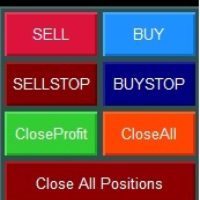
Верхний ряд - Рыночные ордера

![Кнопки SELL и BUY]

SELL (красная кнопка)

  • Действие: Открытие позиции на продажу по текущей цене Bid
  • Объем: Рассчитывается автоматически согласно выбранному режиму
  • StopLoss: Устанавливается автоматически согласно настройкам риска
  • Трейлинг: Активируется автоматически при достижении заданной прибыли

BUY (синяя кнопка)

  • Действие: Открытие позиции на покупку по текущей цене Ask
  • Объем: Рассчитывается автоматически согласно выбранному режиму
  • StopLoss: Устанавливается автоматически согласно настройкам риска
  • Трейлинг: Активируется автоматически при достижении заданной прибыли

Второй ряд - Отложенные ордера

![Кнопки SELL STOP и BUY STOP]

SELL STOP (темно-красная кнопка)

  • Действие: Размещение ордера SELL STOP ниже текущей цены
  • Расстояние: Определяется параметром "Дистанция отложенных ордеров"
  • Трейлинг: Ордер автоматически поднимается вслед за ростом цены
  • Применение: Вход в короткую позицию при пробитии поддержки

BUY STOP (темно-синяя кнопка)

  • Действие: Размещение ордера BUY STOP выше текущей цены
  • Расстояние: Определяется параметром "Дистанция отложенных ордеров"
  • Трейлинг: Ордер автоматически опускается вслед за падением цены
  • Применение: Вход в длинную позицию при пробитии сопротивления

Третий ряд - Управление позициями текущего инструмента

![Кнопки Close Profit и Close All]

Close Profit (зеленая кнопка)

  • Действие: Закрытие всех прибыльных позиций текущего инструмента
  • Условие: Закрываются только позиции с положительным результатом
  • Применение: Быстрая фиксация прибыли при достижении целей

Close All (оранжевая кнопка)

  • Действие: Закрытие всех позиций текущего инструмента
  • Условие: Закрываются все позиции независимо от результата
  • Применение: Полный выход из инструмента

Четвертый ряд - Глобальное управление

![Кнопка Close All Positions]

Close All Positions (темно-красная широкая кнопка)

  • Действие: Закрытие всех позиций на всех инструментах
  • Масштаб: Работает глобально для всего счета
  • Применение: Экстренное закрытие всех позиций
  • Внимание: Используйте осторожно - закрывает позиции по всем символам!

Режимы расчета лота

1. Фиксированное значение

  • Описание: Всегда используется заданный размер лота
  • Плюсы: Простота, предсказуемость
  • Минусы: Не учитывает изменения баланса
  • Применение: Для опытных трейдеров с четкой стратегией

2. Процент от баланса

  • Описание: Размер лота рассчитывается от общего баланса счета
  • Плюсы: Безопасность, медленный рост рисков
  • Минусы: Консервативный подход
  • Применение: Для долгосрочной торговли и сохранения капитала

3. Процент от свободной маржи

  • Описание: Размер лота рассчитывается от доступной маржи
  • Плюсы: Максимальное использование капитала
  • Минусы: Более высокие риски
  • Применение: Для агрессивных стратегий и опытных трейдеров

Система трейлинга

Трейлинг позиций

Принцип работы:

  1. Позиция должна достичь заданной минимальной прибыли
  2. StopLoss переносится в безубыток с заданным отступом
  3. При дальнейшем движении в прибыль SL подтягивается с заданным шагом

Пример настроек:

  • Минимальная прибыль: 100 пунктов
  • Уровень безубытка: 20 пунктов
  • Шаг трейлинга: 10 пунктов

Результат: При достижении +100 пунктов SL установится на +20 пунктов от входа

Трейлинг отложенных ордеров

SELL STOP ордера:

  • Трейлятся только ВВЕРХ при росте цены
  • Дистанция от цены остается постоянной
  • Позволяет входить в рынок при пробитии динамических уровней

BUY STOP ордера:

  • Трейлятся только ВНИЗ при падении цены
  • Дистанция от цены остается постоянной
  • Позволяет входить в рынок при пробитии динамических уровней

Практические рекомендации

Настройка для скальпинга

  • Режим лота: Процент от маржи (10-20%)
  • StopLoss: 1-2% от баланса
  • Трейлинг: Активация 20-50 пунктов, безубыток 5-10 пунктов

Настройка для дей-трейдинга

  • Режим лота: Процент от баланса (2-5%)
  • StopLoss: 2-3% от баланса
  • Трейлинг: Активация 50-100 пунктов, безубыток 15-25 пунктов

Настройка для свинг-трейдинга

  • Режим лота: Фиксированный или процент от баланса (1-3%)
  • StopLoss: 3-5% от баланса
  • Трейлинг: Активация 100-200 пунктов, безубыток 30-50 пунктов

Общие рекомендации

  1. Начинайте с консервативных настроек и постепенно адаптируйте под свой стиль
  2. Тестируйте настройки на демо-счете перед применением на реальном счете
  3. Регулярно анализируйте результаты и корректируйте параметры
  4. Помните: панель - это инструмент, успех зависит от вашей торговой стратегии

Поддержка

Если у вас возникли вопросы по использованию Smart Trading Panel MT5, обратитесь к разработчику через личные сообщения на MQL5.com или комментарии к продукту.

Успешной торговли!


Prodotti consigliati
izi hedge is a tool that helps you manage risk, manage hedge orders and rebalance losing orders. How it works   It will place an order opposite to the order you placed with that currency pair.   If the order you place is correct, the reverse order will be automatically deleted   If the market unfortunately goes against your order and touches the hedge order, it will begin to calculate the hedging volume to limit the risk of the market going in reverse.
FREE
TradeInfo MT5
Manuraj Dhanda
4.31 (13)
TradeInfo is a utility indicator which displays the most important information of the current account and position. Displayed information: Information about the current account (Balance, Equity, Free Margin). Current spread, current drawdown (DD), planned profit, expected losses, etc. Number of open position(s), volume (LOT), profit. Today’s and yesterday’s range. Remaining time to the next candle. Last day profit information. MagicNumber filter. Comment filter. Indicator parameters: ShowPro
FREE
Swift Close
Maksim Novikov
Swift Close Utility for closing Buy and Sell positions in MetaTrader 5. Purpose This utility is designed for batch closing of Buy or Sell positions on the current symbol. Operating Modes Close BUY   — Close all open Buy positions on the current symbol. Close SELL   — Close all open Sell positions on the current symbol. Magic Number Filtering The   MagicNumber   parameter allows the utility to target only positions opened by an Expert Advisor with the specified magic number. If   MagicNumber =
FREE
One thousand Pip  Set1:TP/SL 20kpip. Set2:TP/SL 10kpip. Set3: TP/SL 5k pip. Set4:  TP/SL 2k pip. Set5:  TP/SL 500 pip. Rate Prop FTMO Broker.  Only Pair DE40, US100, US30. Automatic added EU London Session. This Version works with fixed Lot and buy/sell. Robot Strategy: Trade open = First "Round Price-Number Entry". Write me a Message of Questions when undecided. I send ex4 Code by Request.
FREE
Close Button MT5
Wang Yu
2.53 (19)
如果产品有任何问题或者您需要在此产品上添加功能,请联系我 Contact/message me if you encounter any issue using the product or need extra feature to add on the base version. You can get the free Close Button MT4 version at LINK . Close Button provides you an intuitive, effective, and handy way to close your orders and/or positions based on their type and their profit status. The tool provides seven close options: Close All: close all pending orders and positions. Close Profit: close all positions which are in profit. Close L
FREE
"While our free indicators provide a solid foundation, our paid products offer advanced neural filtering and automated risk management features that help you scale your trading consistency. Upgrade your edge today by visiting our specialized catalog for professional-grade EAs and indicators." What is this indicator? This Basic Support and Resistance Indicator -Free-   is designed to help traders automatically identify key market levels, such as supports and resistances, across multiple symbols
FREE
Exp Assistant 5
Vladislav Andruschenko
4.77 (122)
Impostazione automatica, stop loss, take profit, trailing stop, livelli di pareggio, attivazione di stop loss e take profit   virtuali   . Exp Assistant   ti aiuterà a organizzare il mantenimento delle tue posizioni. Questo programma, l'Expert Advisor, è progettato per impostare automaticamente il   Reale o il Virtuale       Livelli   di Stop Loss e Take Profit   per le tue posizioni durante il trading. Puoi gestire facilmente tutte le operazioni dell'Expert Advisor dal pannello di controllo sul
FREE
Market Hours Pro
Musa Terrance Khosa
Market Hours Pro shows Tokyo, London, and New York trading sessions directly on your MT5 chart, including scheduled overlap periods. It’s designed to give you a clear view of global market timing so you can plan trades, spot high-activity periods, and align strategies with standard Forex hours. How It Works Displays scheduled session times visually on your chart. Highlights session overlaps for London/New York and Tokyo/London. Automatically adjusts times for your timezone or broker time. Shows
FREE
(Special New Year promotion - free price!) The indicator displays the actual 'Scale in points per bar' (identical to the manual setting in the Terminal, see screenshot) in the upper right corner of the chart. The displayed value changes INSTANTLY whenever the chart scale is changed! (This is very convenient when planning screenshots). In Settings: Change language (Russian/English), font size of the displayed text, text label offset coefficient from the graph corner, equally in X and Y directi
FREE
Trade assistant pro v8
Ahmed Mohammed Bakr Bakr
FREE FREE FREE Trade Assistant MT5 – Professional Trading & Risk Management Panel Trade Assistant MT5 is an advanced trading panel designed to help traders execute orders faster, safer, and more professionally . It simplifies manual trading by combining smart order management , precise risk control , and one-click execution , making it ideal for both beginners and advanced traders. This tool does not trade automatically . Instead, it empowers you with full control while applying professional-gra
FREE
VFI Quantum
Nikita Berdnikov
5 (1)
Introducing VFI (Volume Flow Indicator) – a trading indicator that analyzes the relationship between volume and price movement to identify key trading opportunities. The indicator displays the strength and direction of volume flow, providing clear signals about potential entry and exit points. Signals are formed based on zero line crossovers, crossovers between the VFI line and its exponential moving average (EMA), and when the indicator exits overbought and oversold zones. Attention! This stra
FREE
QuickClose EA
Peechanat Chatsermsak
QuickClose EA: Manage Trades Quickly and Efficiently QuickClose EA is a tool designed to help traders manage orders on the current chart easily and quickly. It provides full control over your trading status with clear feedback. Key Features of QuickClose EA: User-Friendly Control Panel: Clearly displays essential information such as the current symbol name, total profit/loss for Buy and Sell positions, and open lot sizes, giving you an immediate overview of your trading status. Precise Lot Size
FREE
TrendLine Manager
Mirel Daniel Gheonu
4.5 (2)
TrendLine Manager - Professional Trading Assistant TrendLine Manager is a smart trading tool that helps you manage your trades using trendlines drawn directly on your charts. Instead of manually watching every line you draw, this Expert Advisor does the monitoring for you. What it does: Converts any trendline you draw into an active trading trigger Automatically closes positions when price hits your stop loss or take profit lines Opens new trades when price crosses your entry lines Works with sl
FREE
NAS100 Auto Sl And TP MT5
Moustapha Boulouz
5 (2)
Vi presentiamo NAS100 Auto SL e TP Maker per MT5: Non perdete mai più l'impostazione di StopLoss e TakeProfit con il nostro NAS100 Auto SL e TP Maker, un assistente indispensabile per i trader che navigano sul mercato del Nasdaq 100 su MetaTrader 5. Questo strumento è stato progettato per coloro che cercano una soluzione perfetta per automatizzare la gestione dei livelli di StopLoss e TakeProfit. Caratteristiche principali: Automazione senza sforzo: Monitora automaticamente le operazioni sul N
FREE
Il Matrix Arrow Indicator Multi Timeframe Panel MT5 è un componente aggiuntivo gratuito e una grande risorsa per il tuo Matrix Arrow Indicator MT5 . Mostra l'attuale segnale Matrix Arrow Indicator MT5 per 5 timeframe personalizzati dall'utente e per 16 simboli/strumenti modificabili in totale. L'utente ha la possibilità di abilitare/disabilitare uno qualsiasi dei 10 indicatori standard di cui è composto il Matrix Arrow Indicator MT5 . Anche tutti i 10 attributi degli indicatori standard sono re
FREE
Lot Size Line
Stefan Warratz
Questo piccolo strumento ti aiuta a definire la gestione del rischio con un semplice trascinamento della linea sul grafico. Ti mostra la dimensione effettiva del lotto calcolata sulla percentuale del conto o sull'importo fisso in denaro direttamente sulla linea. Tutto quello che devi fare è attivare la linea premendo il tasto "t" sulla tastiera e trascinare la linea fino al punto di stop loss. Questo è tutto. Nelle impostazioni puoi definire il colore e la larghezza della linea e del testo, an
FREE
TradeGuard Capital Protection Professional Risk, Exposure & Trade Manager for MetaTrader 5 This utility acts as a professional insurance system for your trading account. TradeGuard Capital Protection is a professional-grade risk & money management utility designed to protect your trading account from excessive losses, emotional trading, and uncontrolled exposure. This tool does NOT open trades . It strictly manages risk, drawdown, exposure, and safety protections . Perfect for manual traders, EA
Strong movement levels
Nikolay Mitrofanov
5 (2)
Looks for strong price movements and draws levels upon their completion. You determine the strength of the movement yourself by specifying in the settings the number of points and the number of candles of the same color in a row in one direction. There are 2 types of building in the settings: extrenum - high / low close - close price You can also adjust the number of displayed levels and the number of candles for calculations. By default, the settings indicate 5 levels for 360 candles. That
FREE
Bundle Risk Manager Pro EA "Risk Manager Pro EA is an all-in-one trading utility that combines advanced risk management tools, ensuring full control over your trading account while protecting your capital and complying with trading regulations. By bundling Limit Positions , Concurrent Risk Capital , and the newly added Limit Profit , this EA is the ultimate solution for disciplined trading and achieving evaluation goals. Key Features: 1. Limit Positions : Enforces a maximum number of open posi
FREE
LT Trade Panel Lite
Thiago Duarte
4.65 (51)
Have you missed any tools or shortcuts in Meta Trader? Simple things that would make your daily trading much easier ? We have the solution for you: our Trade Panel! This is an EA tool (Expert Advisor) that, if configured to controll all symbols, needs to be loaded only once. This is the Lite version (free) of our tool. Professional version:   https://www.mql5.com/en/market/product/42658 If you have some problemas with the shortcut buttons on chart on unpinned mode try change the tickets digi
FREE
Expert Advisor (EA) that utilizes the basic Dow Theory strategy along with RSI for take profit, and employs support and resistance levels from the Zigzag indicator as stop-loss and take-profit points, you can follow these guidelines: Dow Theory Strategy : This involves analyzing trends using the Dow Theory principles, mainly focusing on identifying primary trends (bullish or bearish) and secondary trends (corrections). You'll need to implement rules for identifying these trends based on price ac
FREE
Free automatic Fibonacci is an indicator that automatically plots a Fibonacci retracement based on the number of bars you select on the BarsToScan setting in the indicator. The Fibonacci is automatically updated in real time as new highest and lowest values appears amongst the selected bars. You can select which level values to be displayed in the indicator settings. You can also select the color of the levels thus enabling the trader to be able to attach the indicator several times with differe
FREE
Posh Candle Info MT5
Theresia Yovitha Herwanda
5 (1)
Show candle info with: Time in selected timezone  Bar number Candle range points Upper wick points and percentage Body   points and percentage Lower wick   points and percentage Mark large/small candle body with customizable line. Settings group: Broker and local timezone. Lookback bars for candle marking. Large candle body Small candle body Date and time info with auto position or custom the x and y coordinate.
FREE
VWAP Personnal Custom
Vincent Jose Proenca
VWAP_PC_MQL5 — a simple home-built VWAP indicator showing real-time volume-weighted price levels directly on your MT5 chart. TF: Works on all timeframes. Pair: Compatible with all symbols — Forex, indices, commodities, and stocks. Settings: Applied Price – price type used for VWAP calculation (Close, Typical, Weighted, etc.) Line Color / Width / Style – customize VWAP line appearance Session Reset – optional reset per day or continuous mode How it works (VWAP principle): VWAP (Volume Weighted
FREE
Analise Probabilistica
Valter Cezar Costa
4.78 (9)
I'm sure after a lot of research on the internet, you haven't found any indicator that can help you with forex or binary trading in the latest probability strategy created by famous trader Ronald Cutrim. The strategy is based on a simple count of green and red candles, checking for a numerical imbalance between them over a certain period of time on an investment market chart. If this imbalance is confirmed and is equal to or greater than 16%, according to trader Ronald Cutrim, creator of the pro
FREE
LT Day High Low
Thiago Duarte
4.57 (30)
This indicator draw a line on high and low levels of X number of days. It is possible to have an alert (in the software and mobile app) for when the price breaks the high or low of the current day. Configurações: Days -   past days to calculate (1 = actual day only). Alert when reach levels -   activate the alert for specific levels or both. Push notification -   enable the alert to the mobile MT5 app. Appearance High -   high level color. Low -   low level color. Size actual day -   thickness
FREE
NS Financas Automatic Clear All Chart Indicators Script Automatically remove all indicators from your chart offered for free by NS Financas! Don't waste any more time deleting the indicators one by one. With this script it is possible in one click to remove all indicators from the screen to adjust your new strategy while still using the settings of your graph, in addition to the possibility of configuring keyboard shortcuts for quick access to the script. Take the opportunity to visit our cha
FREE
RSI abcd
Francisco Gomes Da Silva
4 (2)
RSI ABCD Pattern Finder: Strategia Tecnica 1. Come Funziona l'Indicatore Combina il RSI classico con il rilevamento automatico di pattern armonici ABCD . Componenti Principali RSI standard (periodo regolabile) Marcatori di massimi e minimi (frecce) Pattern ABCD (linee verdi/rosse) Filtri ipercomprato (70) e ipervenduto (30) 2. Configurazione su MT5 period = 14 ; // Periodo RSI size = 4 ; // Dimensione massima del pattern OverBought = 70 ; // Livello ipercomprato OverSold = 30 ; // Livello iperve
FREE
Exact Time — detailed time on the seconds chart. The utility shows the opening time of the selected candle. This is necessary when working with seconds charts. For example, it can be used on a seconds chart built using the Seconds Chart utility. Inputs Base corner — the chart corner to which an object Is attached. X distance — the horizontal distance from the chart corner. Y distance — the vertical distance from the chart corner. Text font — font name Font size — font size Color — text color
FREE
CandleBot
Mithlesh Kumar Mandal
Introduzione a CandleBot - Il tuo strumento gratuito definitivo per identificare e scambiare i modelli di candele! Con CandleBot, cogli l'opportunità nei mercati riconoscendo facilmente segnali di engulfing bullish e bearish, stella del mattino e della sera, e martello. I modelli di candele, derivati dai prezzi di apertura, massimi, minimi e di chiusura in un periodo specifico, servono come rappresentazioni visive dei movimenti dei prezzi, aiutando i trader ad analizzare il sentiment di mercato
FREE
Gli utenti di questo prodotto hanno anche acquistato
Trade Assistant MT5
Evgeniy Kravchenko
4.42 (208)
It helps to calculate the risk per trade, the easy installation of a new order, order management with partial closing functions, trailing stop of 7 types and other useful functions. Additional materials and instructions Installation instructions - Application instructions - Trial version of the application for a demo account Line function -   shows on the chart the Opening line, Stop Loss, Take Profit. With this function it is easy to set a new order and see its additional characteristics bef
Forex Trade Manager MT5
InvestSoft
4.96 (620)
Benvenuto a Trade Manager EA, lo strumento definitivo per la gestione del rischio , progettato per rendere il trading più intuitivo, preciso ed efficiente. Non è solo uno strumento per l'esecuzione degli ordini, ma una soluzione completa per la pianificazione delle operazioni, la gestione delle posizioni e il controllo del rischio. Che tu sia un principiante, un trader avanzato o uno scalper che necessita di esecuzioni rapide, Trade Manager EA si adatta alle tue esigenze, offrendo flessibilità s
Local Trade Copier EA MT5
Juvenille Emperor Limited
4.96 (128)
Sperimenta una copia di trading eccezionalmente veloce con il   Local Trade Copier EA MT5 . Con la sua facile configurazione in 1 minuto, questo copiatore di trading ti consente di copiare i trades tra diversi terminali di MetaTrader sullo stesso computer Windows o su Windows VPS con velocità di copia ultra veloci inferiori a 0.5 secondi. Che tu sia un trader principiante o professionista,   Local Trade Copier EA MT5   offre una vasta gamma di opzioni per personalizzarlo alle tue esigenze speci
Versione Beta Telegram to MT5 Signal Trader è quasi pronto per il rilascio ufficiale in versione alpha. Alcune funzionalità sono ancora in fase di sviluppo e potresti riscontrare piccoli bug. Se riscontri problemi, ti preghiamo di segnalarli, il tuo feedback aiuta a migliorare il software per tutti. Telegram to MT5 Signal Trader è uno strumento potente che copia automaticamente segnali di trading da canali o gruppi Telegram al tuo account MetaTrader 5 . Supporta canali pubblici e privati e cons
Trade Dashboard MT5
Fatemeh Ameri
4.97 (117)
Tired of complex order placement and manual calculations? Trade Dashboard is your solution. With its user-friendly interface, placing orders becomes effortless, by a single click, you can open trades, set stop loss and take profit levels, manage trade lot size, and calculate risk to reward ratios, allowing you to only focus on your strategy. Say goodbye to manual calculations and streamline your trading experience with Trade Dashboard. Download  Demo Version  right now. You can find  Details of
FarmedHedge Pair Trading Dashboard
Tanapisit Tepawarapruek
5 (1)
Farmed Hedge Yield Farming - Professional Pair Trading Dashboard (Manual - Hybrid - Semi/Automated EA) VERSION 3 - WILD HARVEST UPDATE Trading Approach: - Manual Trading: Primary focus - Auto Pilot: Optional supplementary feature - Full Automation: Not the main purpose Recommended Timeframe: H1-H4 DEMO VERSION Download the free demo to test functionality. Use Strategy Tester with Visual Mode to see how it works. VERSION 3 - NEW FEATURES Summary Dashboard (SRA Panel) - Quick pair selection w
Copy Cat More Trade Copier MT5 (Gatto Copiatore MT5) è un copiatore di trade locale e un framework completo di gestione del rischio ed esecuzione progettato per le sfide di trading odierne. Dalle sfide delle prop firm alla gestione di portafogli personali, si adatta a ogni situazione con una combinazione di esecuzione robusta, protezione del capitale, configurazione flessibile e gestione avanzata dei trade. Il copiatore funziona sia in modalità Master (mittente) che Slave (ricevente), con sincro
Telegram to MT5 Coppy
Sergey Batudayev
5 (8)
Da Telegram a MT5:   la soluzione definitiva per la copia del segnale Semplifica il tuo trading con Telegram su MT5, il moderno strumento che copia i segnali di trading direttamente dai canali e dalle chat di Telegram sulla tua piattaforma MetaTrader 5, senza bisogno di DLL. Questa potente soluzione garantisce un'esecuzione precisa dei segnali, ampie opzioni di personalizzazione, fa risparmiare tempo e aumenta la tua efficienza. [ Instructions and DEMO ] Caratteristiche principali Integrazione d
Smart Stop Manager MT5
Daniel Stein
4.33 (3)
Smart Stop Manager – Esecuzione automatica dello stop-loss con precisione professionale Panoramica Smart Stop Manager è il livello di esecuzione della linea Smart Stop, progettato per i trader che richiedono una gestione dello stop-loss strutturata, affidabile e completamente automatizzata su più posizioni aperte. Monitora continuamente tutte le operazioni attive, calcola il livello di stop ottimale utilizzando la logica di struttura di mercato Smart Stop e aggiorna gli stop automaticamente se
Trade Manager DashPlus
Henry Lyubomir Wallace
5 (13)
DashPlus è uno strumento avanzato di gestione delle operazioni progettato per migliorare l'efficienza e l'efficacia del trading sulla piattaforma MetaTrader 5. Offre una suite completa di funzionalità, tra cui calcolo del rischio, gestione degli ordini, sistemi di griglia avanzati, strumenti basati su grafici e analisi delle prestazioni. Caratteristiche Principali 1. Griglia di Recupero Implementa un sistema di griglia flessibile e di media per gestire le operazioni in condizioni di mercato avve
HINN MagicEntry Extra
ALGOFLOW OÜ
4.69 (13)
HINN MAGIC ENTRY – the ultimate tool for entry and position management! Place orders by selecting a level directly on the chart! full description   ::  demo-version  :: 60-sec-video-description Key features: - Market, limit, and pending orders - Automatic lot size calculation - Automatic spread and commission accounting - Unlimited partitial take-profits  - Breakeven and trailing stop-loss and take-profit  functions - Invalidation leves - Intuitive, adaptive, and customizable interface - Works
Exp COPYLOT CLIENT for MT5
Vladislav Andruschenko
3.82 (34)
Trade copyr per MT5 è un trade copyr per la piattaforma МetaТrader 5   . Copia le negoziazioni forex   tra       eventuali conti   MT5   -   MT5, MT4   -   MT5 per la versione COPYLOT MT5 (o MT4   -   MT4 MT5   -   MT4 per la versione COPYLOT MT4) Fotocopiatrice affidabile! Versione MT4 Descrizione completa   +DEMO +PDF Come comprare Come installare     Come ottenere i file di registro     Come testare e ottimizzare     Tutti i prodotti di Expforex Puoi anche copiare le operazioni nel termina
YuClusters
Yury Kulikov
4.93 (43)
Attention: You can view the program operation in the free version  YuClusters DEMO .  YuClusters is a professional market analysis system. The trader has unique opportunities to analyze the flow of orders, trade volumes, price movements using various charts, profiles, indicators, and graphical objects. YuClusters operates on data based on Time&Sales or ticks information, depending on what is available in the quotes of a financial instrument. YuClusters allows you to build graphs by combining da
Smart Stop Scanner – Analisi multi-asset degli stop-loss basata sulla reale struttura di mercato Panoramica Smart Stop Scanner offre un monitoraggio professionale dei livelli di stop-loss su più mercati. Il sistema identifica automaticamente le zone di stop più rilevanti basandosi sulla reale struttura di mercato, sulle rotture significative e sulla logica del price action, presentando tutte le informazioni in un pannello chiaro, coerente e ottimizzato per schermi ad alta risoluzione (DPI-awar
MT5 to Telegram Signal Provider è un'utilità facile da usare e completamente personalizzabile che consente l'invio di segnali specificati a una chat, canale o gruppo Telegram, rendendo il tuo account un fornitore di segnali. A differenza della maggior parte dei prodotti concorrenti, non utilizza importazioni DLL. [ Dimostrativo ] [ Manuale ] [ Versione MT4 ] [ Versione Discord ] [ Canale Telegram ]  New: [ Telegram To MT5 ] Configurazione Una guida utente passo-passo è disponibile. Nessuna cono
The product will copy all telegram signal to MT5 ( which you are member) , also it can work as remote copier.  Easy to set up, copy order instant, can work with almost signal formats, image signal,  s upport to translate other language to English Work with all type of channel or group, even channel have "Restrict Saving Content", work with  multi channel, multi MT5 Work as remote copier: with signal have ticket number, it will copy exactly via ticket number. Support to backtest signal. How to s
Trade Manager DaneTrades
Levi Dane Benjamin
4.36 (28)
Trade Manager per aiutarti a entrare e uscire rapidamente dalle operazioni calcolando automaticamente il tuo rischio. Incluse funzionalità che ti aiutano a prevenire l'eccessivo trading, il vendetta trading e il trading emotivo. Le operazioni possono essere gestite automaticamente e i parametri di performance del conto possono essere visualizzati in un grafico. Queste caratteristiche rendono questo pannello ideale per tutti i trader manuali e aiuta a migliorare la piattaforma MetaTrader 5. Suppo
Seconds Chart MT5
Boris Sedov
4.59 (17)
Seconds Chart — uno strumento unico per creare grafici in secondi su MetaTrader 5 . Con Seconds Chart , puoi generare grafici con timeframe definiti in secondi, ottenendo una flessibilità e una precisione d'analisi ideali, non disponibili nei grafici standard in minuti o ore. Ad esempio, il timeframe S15 indica un grafico con candele di 15 secondi. Puoi utilizzare qualsiasi indicatore e Expert Advisor con supporto per simboli personalizzati. Lavorare con loro è comodo quanto operare sui grafici
Equity Protect Pro: Il tuo esperto di protezione del conto completo per un trading senza preoccupazioni Se stai cercando funzionalità come protezione del conto, protezione del capitale proprio, protezione del portafoglio, protezione multi-strategia, protezione dei profitti, raccolta dei profitti, sicurezza del trading, programmi di controllo del rischio, controllo automatico del rischio, liquidazione automatica, liquidazione condizionale, liquidazione programmata, liquidazione dinamica, trailin
Timeless Charts
Samuel Manoel De Souza
5 (3)
Timeless Charts è una soluzione di grafici avanzata, progettata per i trader professionisti che necessitano di grafici personalizzati / timeframe personalizzati – inclusi grafici a secondi / timeframe a secondi, grafici Renko / barre Renko, grafici a cluster / footprint e strumenti avanzati simili a quelli disponibili nelle piattaforme più popolari. A differenza dei tradizionali grafici offline o dei semplici indicatori personalizzati, questa soluzione crea barre completamente personalizzate con
Ultimate Extractor
Clifton Creath
5 (9)
Ultimate Extractor - Professional Trading Analytics for MT5 *****this is the local HTML version of Ultimate Extractor. Check out Ultimate Extractor Cloud on mql5 for the Cloud version****** Ultimate Extractor transforms your MetaTrader 5 trading history into actionable insights with comprehensive analytics, interactive charts, and real-time performance tracking. What It Does Automatically analyzes your MT5 trading history across all Expert Advisors and generates detailed HTML reports with inte
Auto Trade Copier for MT5
Vu Trung Kien
4.41 (27)
Auto Trade Copier is designed to copy trades to multiple MT4, MT5 and cTrader accounts/terminals with 100% accuracy. The provider and receiver accounts must be on the same PC/VPS. With this tool, you can copy trades to receiver accounts on the same PC/VPS. All trading actions will be copied from provider to receiver perfectly. This version can be used on MT5 accounts only. For MT4 accounts, you must use Auto Trade Copier (for MT4). Reference: - For MT4 receiver, please download Trade Receiver Fr
Stats Dashboard & Journal ULTRA per MT5 Il Centro di Comando di Trading Completo: Analitica, Automazione & Intelligence delle Notizie. Stats Dashboard ULTRA è l'evoluzione definitiva dello strumento di analisi Pro. Trasforma MetaTrader 5 in una stazione di trading professionale, combinando analisi delle prestazioni di livello istituzionale con protezione automatizzata dalle notizie e metriche psicologiche avanzate. Progettato per trader manuali e gestori di portafogli EA che richiedono il contro
Custom Alerts AIO: Monitora tutti i mercati — senza alcuna configurazione Panoramica Custom Alerts AIO è una soluzione di monitoraggio dei mercati pronta all’uso che non richiede alcuna configurazione. Tutti gli indicatori necessari — FX Power, FX Volume, FX Dynamic, FX Levels, IX Power — sono integrati internamente. Non vengono mostrati grafici, rendendolo ideale per generare alert in tempo reale in modo discreto ed efficiente. Supporta tutte le classi di asset offerte dal tuo broker: Forex,
Telegram To MT5 Receiver
Levi Dane Benjamin
4.53 (15)
Copia i segnali da qualsiasi canale di cui sei membro (compresi quelli privati e ristretti) direttamente sul tuo MT5.  Questo strumento è stato progettato con l'utente in mente offrendo molte funzionalità necessarie per gestire e monitorare gli scambi. Questo prodotto è presentato in un'interfaccia grafica facile da usare e visivamente accattivante. Personalizza le tue impostazioni e inizia ad utilizzare il prodotto in pochi minuti! Guida per l'utente + Demo  | Versione MT4 | Versione Discord
EA Portfolio Analyzer
Jimmy Peter Eriksson
Guida all'installazione:    clicca qui! Analizzare più consulenti esperti insieme Confronta i risultati EA per numero magico Traccia la redditività e i ribassi Filtra i risultati per intervallo di date Curva di equità visiva e metriche dettagliate Pronto all'uso in meno di un minuto Analizzatore di portafoglio EA EA Portfolio Analyzer è uno   strumento di analisi professionale   progettato per monitorare   in tempo reale le prestazioni di più Expert Advisor   in modo chiaro e strutturato. Quand
Trade Assistant 38 in 1
Makarii Gubaydullin
4.91 (23)
Strumento multifunzionale: Calcolatore di Lotto, Ordini Grid, Rapporto R/R, Gestore di Trade, Zone di Domanda e Offerta, Price Action e molto altro Versione Demo   |   Manuale Utente L'Assistente di Trading   non funziona nel tester di strategie : puoi scaricare la   Versione Demo QUI  per testare l' utilità . Contattami   per qualsiasi domanda  / idee di miglioramento / in caso di bug riscontrato Se hai bisogno di una versione MT4, è disponibile qui Semplifica, accelera e automatizza il tuo  
The News Filter MT5
Leolouiski Gan
4.74 (19)
Questo prodotto filtra tutti gli esperti consulenti e i grafici manuali durante il periodo delle notizie, così non dovrai preoccuparti di improvvisi picchi di prezzo che potrebbero distruggere le tue impostazioni di trading manuali o le negoziazioni effettuate da altri esperti consulenti. Questo prodotto viene fornito anche con un sistema completo di gestione degli ordini che può gestire le tue posizioni aperte e gli ordini in sospeso prima della pubblicazione di qualsiasi notizia. Una volta che
VirtualTradePad One Click Trading Panel
Vladislav Andruschenko
4.59 (73)
Pannello di trading per il trading in 1 clic.   Lavorare con posizioni e ordini!   Trading dal grafico o dalla tastiera. Con il nostro pannello di trading, puoi eseguire operazioni con un solo clic direttamente dal grafico ed eseguire operazioni di trading 30 volte più velocemente rispetto al controllo MetaTrader standard. I calcoli automatici di parametri e funzioni rendono il trading più veloce e conveniente per i trader. Suggerimenti grafici, etichette informative e informazioni complete sugl
Uber Trade Manager
Meelis Hynninen
4.88 (16)
UTM Manager è uno strumento intuitivo e facile da usare che offre un'esecuzione delle negoziazioni rapida ed efficiente. Una delle caratteristiche distintive è la modalità "Ignora spread", che ti consente di fare trading al prezzo delle candele, ignorando completamente gli spread (ad esempio, consente di scambiare coppie di spread più elevate su LTF, evitando di essere esclusi dalle negoziazioni a causa dello spread). Un altro aspetto chiave di UTM Manager è il suo copiatore commerciale locale u
Filtro:
AlexZ1976
24
AlexZ1976 2025.09.30 16:10 
 

L'utente non ha lasciato alcun commento sulla valutazione.

Rispondi alla recensione