Smart Trading Panel MT5

Smart Trading Panel MT5 - Умная торговая панель

Обзор продукта

Smart Trading Panel MT5 — это не просто панель управления - это профессиональная торговая панель для MetaTrader 5 больше похожа на советник, который значительно упрощает процесс торговли и добавляет функции, отсутствующие в стандартном терминале: 3 режима расчета лота, Автоматическая установка StopLoss, Продвинутый трейлинг-стоп, Трейлинг отложенных ордеров.

Ключевые преимущества

   Эффективность и скорость

  • Мгновенное открытие позиций одним кликом без дополнительных диалогов
  • Быстрое размещение отложенных ордеров SELL STOP и BUY STOP
  • Одним кликом закрытие прибыльных позиций или всех позиций
  • Глобальное управление - закрытие всех позиций на всех инструментах

   Умное управление лотом (уникальная функция)

  • 3 режима расчета лота: фиксированный, процент от баланса, процент от маржи
  • Автоматический расчет размера позиции в зависимости от выбранного режима
  • Безопасность: исключение ошибок при ручном вводе лота

   Автоматический риск-менеджмент (уникальная функция)

  • Автоматическая установка StopLoss на основе процента от баланса
  • Работает для всех позиций: открытых через панель или стандартными средствами терминала
  • Защита капитала: точный контроль максимального убытка

   Продвинутый трейлинг-стоп (расширенная функция)

  • Гибкие настройки активации: минимальная прибыль для включения трейлинга
  • Защита прибыли: настраиваемый уровень безубытка
  • Умный шаг трейлинга: оптимизация частоты обновлений

   Трейлинг отложенных ордеров (уникальная функция)

  • SELL STOP трейлится вверх вслед за ростом цены
  • BUY STOP трейлится вниз вслед за падением цены
  • Автоматическая активация: начинает работать сразу после размещения
  • Настраиваемые параметры: дистанция и шаг трейлинга

   Удобство использования

  • Интуитивный интерфейс: логичное расположение кнопок как в терминале
  • Настраиваемый дизайн: выбор цветов для каждой кнопки
  • Компактная панель: не загромождает рабочее пространство
  • Перемещаемая: настройка координат размещения

Для кого предназначен продукт

   Для профессиональных трейдеров

  • Увеличение скорости принятия торговых решений
  • Автоматизация рутинных операций
  • Точный контроль рисков
  • Эффективное управление множественными позициями

   Для начинающих трейдеров

  • Исключение ошибок при расчете лота
  • Автоматическая защита капитала
  • Простое и понятное управление
  • Обучение правильным принципам риск-менеджмента

   Для скальперов и дей-трейдеров

  • Мгновенное исполнение торговых решений
  • Быстрое закрытие позиций при достижении целей
  • Эффективное управление короткими позициями
  • Продвинутый трейлинг для фиксации прибыли

Преимущества над стандартным терминалом

Функция

Стандартный MT5

Smart Trading Panel

Открытие позиций

Диалоговое окно с ручным вводом

Один клик

Расчет лота

Ручной ввод

3 автоматических режима

StopLoss

Ручная установка

Автоматический расчет

Трейлинг позиций

Базовый трейлинг

Умный трейлинг с настройками

Трейлинг ордеров

Отсутствует

Полная автоматизация

Управление рисками

Ручное

Автоматическое

Скорость операций

Медленная

Мгновенная

Технические характеристики

  • Платформа: MetaTrader 5
  • Совместимость: Все типы счетов и брокеры
  • Ресурсы: Минимальное потребление CPU и памяти
  • Настройки: Полная кастомизация через параметры советника
  • Языки: Русский интерфейс и документация

Установка и настройка

  1. Поместите файл в папку Experts терминала MT5
  2. Перетащите советника на график торгового инструмента
  3. Настройте параметры в соответствии с вашей стратегией
  4. Начинайте торговать с максимальным комфортом!

Smart Trading Panel — это не просто панель кнопок, это комплексное решение для современной торговли, которое объединяет скорость, безопасность и эффективность в одном инструменте.


Smart Trading Panel MT5 - Руководство пользователя

Установка

  1. Скопируйте файл Smart Trading Panel MT5.ex5 в папку MQL5/Experts вашего терминала
  2. Перезапустите MetaTrader 5 или обновите навигатор (F5)
  3. Перетащите советника из навигатора на график нужного инструмента
  4. Разрешите автоторговлю и импорт DLL при появлении диалога
  5. Настройте параметры согласно вашей стратегии

Настройка параметров

Все настройки панели осуществляются через входные параметры советника. Кнопки панели не содержат настроек - они выполняют действия согласно заданным параметрам.

Расчет лота

Параметр

Описание

Рекомендуемые значения

Способ расчета лота

Выбор метода определения размера позиции

Процент от свободной маржи

Фиксированный размер лота

Постоянный размер для всех позиций

0.01 - 1.0

Процент от баланса

Процент баланса для расчета лота

1-10%

Процент от свободной маржи

Процент маржи для расчета лота

5-25%

Управление рисками

Параметр

Описание

Рекомендуемые значения

Процент от баланса для StopLoss

Максимальный убыток от баланса

1-5%

Трейлинг стоп

Параметр

Описание

Рекомендуемые значения

Минимальная прибыль при активации

Прибыль в пунктах для начала трейлинга

50-200 пунктов

Минимальный уровень безубытка

Защищенная прибыль в пунктах

10-50 пунктов

Шаг трейлинг стопа

Минимальный шаг обновления

5-20 пунктов

Отложенные ордера

Параметр

Описание

Рекомендуемые значения

Дистанция от цены

Расстояние ордера от текущей цены

20-100 пунктов

Шаг трейлинга ордеров

Минимальный шаг обновления цены

5-30 пунктов

Описание кнопок

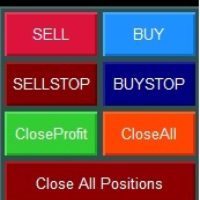
Верхний ряд - Рыночные ордера

![Кнопки SELL и BUY]

SELL (красная кнопка)

  • Действие: Открытие позиции на продажу по текущей цене Bid
  • Объем: Рассчитывается автоматически согласно выбранному режиму
  • StopLoss: Устанавливается автоматически согласно настройкам риска
  • Трейлинг: Активируется автоматически при достижении заданной прибыли

BUY (синяя кнопка)

  • Действие: Открытие позиции на покупку по текущей цене Ask
  • Объем: Рассчитывается автоматически согласно выбранному режиму
  • StopLoss: Устанавливается автоматически согласно настройкам риска
  • Трейлинг: Активируется автоматически при достижении заданной прибыли

Второй ряд - Отложенные ордера

![Кнопки SELL STOP и BUY STOP]

SELL STOP (темно-красная кнопка)

  • Действие: Размещение ордера SELL STOP ниже текущей цены
  • Расстояние: Определяется параметром "Дистанция отложенных ордеров"
  • Трейлинг: Ордер автоматически поднимается вслед за ростом цены
  • Применение: Вход в короткую позицию при пробитии поддержки

BUY STOP (темно-синяя кнопка)

  • Действие: Размещение ордера BUY STOP выше текущей цены
  • Расстояние: Определяется параметром "Дистанция отложенных ордеров"
  • Трейлинг: Ордер автоматически опускается вслед за падением цены
  • Применение: Вход в длинную позицию при пробитии сопротивления

Третий ряд - Управление позициями текущего инструмента

![Кнопки Close Profit и Close All]

Close Profit (зеленая кнопка)

  • Действие: Закрытие всех прибыльных позиций текущего инструмента
  • Условие: Закрываются только позиции с положительным результатом
  • Применение: Быстрая фиксация прибыли при достижении целей

Close All (оранжевая кнопка)

  • Действие: Закрытие всех позиций текущего инструмента
  • Условие: Закрываются все позиции независимо от результата
  • Применение: Полный выход из инструмента

Четвертый ряд - Глобальное управление

![Кнопка Close All Positions]

Close All Positions (темно-красная широкая кнопка)

  • Действие: Закрытие всех позиций на всех инструментах
  • Масштаб: Работает глобально для всего счета
  • Применение: Экстренное закрытие всех позиций
  • Внимание: Используйте осторожно - закрывает позиции по всем символам!

Режимы расчета лота

1. Фиксированное значение

  • Описание: Всегда используется заданный размер лота
  • Плюсы: Простота, предсказуемость
  • Минусы: Не учитывает изменения баланса
  • Применение: Для опытных трейдеров с четкой стратегией

2. Процент от баланса

  • Описание: Размер лота рассчитывается от общего баланса счета
  • Плюсы: Безопасность, медленный рост рисков
  • Минусы: Консервативный подход
  • Применение: Для долгосрочной торговли и сохранения капитала

3. Процент от свободной маржи

  • Описание: Размер лота рассчитывается от доступной маржи
  • Плюсы: Максимальное использование капитала
  • Минусы: Более высокие риски
  • Применение: Для агрессивных стратегий и опытных трейдеров

Система трейлинга

Трейлинг позиций

Принцип работы:

  1. Позиция должна достичь заданной минимальной прибыли
  2. StopLoss переносится в безубыток с заданным отступом
  3. При дальнейшем движении в прибыль SL подтягивается с заданным шагом

Пример настроек:

  • Минимальная прибыль: 100 пунктов
  • Уровень безубытка: 20 пунктов
  • Шаг трейлинга: 10 пунктов

Результат: При достижении +100 пунктов SL установится на +20 пунктов от входа

Трейлинг отложенных ордеров

SELL STOP ордера:

  • Трейлятся только ВВЕРХ при росте цены
  • Дистанция от цены остается постоянной
  • Позволяет входить в рынок при пробитии динамических уровней

BUY STOP ордера:

  • Трейлятся только ВНИЗ при падении цены
  • Дистанция от цены остается постоянной
  • Позволяет входить в рынок при пробитии динамических уровней

Практические рекомендации

Настройка для скальпинга

  • Режим лота: Процент от маржи (10-20%)
  • StopLoss: 1-2% от баланса
  • Трейлинг: Активация 20-50 пунктов, безубыток 5-10 пунктов

Настройка для дей-трейдинга

  • Режим лота: Процент от баланса (2-5%)
  • StopLoss: 2-3% от баланса
  • Трейлинг: Активация 50-100 пунктов, безубыток 15-25 пунктов

Настройка для свинг-трейдинга

  • Режим лота: Фиксированный или процент от баланса (1-3%)
  • StopLoss: 3-5% от баланса
  • Трейлинг: Активация 100-200 пунктов, безубыток 30-50 пунктов

Общие рекомендации

  1. Начинайте с консервативных настроек и постепенно адаптируйте под свой стиль
  2. Тестируйте настройки на демо-счете перед применением на реальном счете
  3. Регулярно анализируйте результаты и корректируйте параметры
  4. Помните: панель - это инструмент, успех зависит от вашей торговой стратегии

Поддержка

Если у вас возникли вопросы по использованию Smart Trading Panel MT5, обратитесь к разработчику через личные сообщения на MQL5.com или комментарии к продукту.

Успешной торговли!


Produtos recomendados
izi hedge is a tool that helps you manage risk, manage hedge orders and rebalance losing orders. How it works   It will place an order opposite to the order you placed with that currency pair.   If the order you place is correct, the reverse order will be automatically deleted   If the market unfortunately goes against your order and touches the hedge order, it will begin to calculate the hedging volume to limit the risk of the market going in reverse.
FREE
TradeInfo MT5
Manuraj Dhanda
4.38 (16)
TradeInfo is a utility indicator which displays the most important information of the current account and position. Displayed information: Information about the current account (Balance, Equity, Free Margin). Current spread, current drawdown (DD), planned profit, expected losses, etc. Number of open position(s), volume (LOT), profit. Today’s and yesterday’s range. Remaining time to the next candle. Last day profit information. MagicNumber filter. Comment filter. Indicator parameters: ShowPro
FREE
Lot Size Ruler
Joshua Akinetos Malik
SI Ruler A clean, one-click price ruler that shows points and exact dollar cost between any two levels on your chart. Every trader needs to quickly measure the distance between two price levels and know what it costs in real money. Most platforms make this harder than it should be. SI Ruler puts a single icon in the corner of your chart — click it, click your entry level, and drag to your stop or target. The label tells you instantly how many points that distance is and exactly what it costs in
FREE
Volume Profile por sessões com POC, Value Area e rastreamento de naked POC — o mapa do leilão do mercado no seu gráfico. • Sessões por qualquer TF de âncora (dia por padrão): para cada sessão o indicador calcula o POC (point of control), VAH/VAL (bordas do Value Area) e a máxima/mínima da sessão, e os desenha como níveis. • Naked POC: POCs não testados de sessões passadas se estendem para a direita até que o preço finalmente os toque — ímãs que o mercado lembra. • Histograma do perfil ao vivo na
FREE
QuantMatrix Probability AI Free QuantMatrix Probability AI Free is a technical indicator for MetaTrader 5 that combines several measurements of current market conditions into three numerical estimates. The indicator uses exponential moving averages, Relative Strength Index (RSI), Average True Range (ATR) and the current price position in its calculation. These measurements are combined into a normalized market score. The resulting information is displayed on the chart as: BUY percentage SELL p
FREE
no Trade operation, Robot Set auto SL to every manually Trade from a Phone Automatic Phone TradeManager Need just Set on 1 Symbol Auto BE Trigger is added that immediately sets a stop-loss for every () But does NOT calculate position size based on risk, allows the fixed  SL to   adjusted dynamically drag on Chart or Menu. It protects capital around the clock, reduces emotional mistakes, and ensures consistent risk management.
FREE
Title:   Smart Position Manager PRO - Advanced Risk & Position Manager Description: Smart Position Manager PRO is an all-in-one visual trade management and risk calculation tool designed for serious traders who prioritize iron discipline and strict risk management. Whether you are executing precise SMC or ICT setups on personal capital or managing large funded accounts on strict prop firms, this tool ensures you focus on counting percentages rather than emotional money swings. With a highly int
FREE
Correlation Matrix Pro - Scanner de Hedge Multi-Moedas Entenda as relações entre pares de moedas em tempo real! Uma poderosa ferramenta de análise que ajuda você a visualizar relações estatísticas entre até 6 pares de moedas simultaneamente. Perfeito para gestão de portfólio, diversificação de riscos e estratégias de hedge. RECURSOS PRINCIPAIS - Correlação de Pearson em tempo real com retornos logarítmicos - Monitore até 6 pares de moedas simultaneamente - Detecção automática de timeframe - Per
FREE
如果产品有任何问题或者您需要在此产品上添加功能,请联系我 Contact/message me if you encounter any issue using the product or need extra feature to add on the base version. You can get the free Close Button MT4 version at LINK . Close Button provides you an intuitive, effective, and handy way to close your orders and/or positions based on their type and their profit status. The tool provides seven close options: Close All: close all pending orders and positions. Close Profit: close all positions which are in profit. Close L
FREE
Planeje a operação no gráfico, veja o dinheiro em jogo antes de clicar e deixe um único painel cuidar de cada posição - uma a uma e todas juntas como uma única carteira. Grátis. Sem versão paga, sem período de teste, sem DLL, sem requisições web. Tipo Utilitário (gerenciador de operações e posições) Símbolos Qualquer Conta Hedging (Netting: ainda não testado, veja a seção 9) Abre operações Somente quando você aperta um botão Por que os traders deixam ele no gráfico Saiba o custo antes do clique
FREE
Prop Firm Protector Basic
Janitha Sandaruwan Amaradasa Wickramasingha Arachchilage
5 (1)
Prop Firm Protector Lite - Essential Risk Management Tool A risk management utility designed to help traders monitor their trading activity according to predefined rules and limits. This tool runs in the background on any chart and monitors all trades regardless of their source, including manual trades, signal subscriptions, or other Expert Advisors. --- Core Features Symbol and Lot Monitoring: The symbol monitoring module allows you to define which currency pairs are permitted for trading.
FREE
Exp Assistant 5
Vladislav Andruschenko
4.77 (126)
Configuração automática, stop loss, takeprofit, trailing stop, níveis de equilíbrio, permitindo stop loss   virtual   e takeprofit. Exp Assistant   irá ajudá-lo a organizar a manutenção de suas posições. Este programa, o Expert Advisor, foi projetado para definir automaticamente o   Real ou Virtual       Níveis   de Stop Loss e Take Profit   para suas posições durante a negociação. Você pode gerenciar facilmente todas as operações do Expert Advisor a partir do painel de controle do gráfico. Se v
FREE
Chart Pro Classic Dark v1.00 Chart Pro Classic Dark is a professional MT5 chart styling and customization tool designed to give your charts a clean, modern, and professional dark appearance. Key Features Dark Black Background — Applies a clean black background to the chart. ️ Candlestick Chart — Automatically configures the chart to use candlesticks. Bullish Candles — Green/Lime bullish candles. Bearish Candles — White bearish candles. Grid Removal — Hides the chart grid for a clean
FREE
Market Hours Pro
Musa Terrance Khosa
Market Hours Pro shows Tokyo, London, and New York trading sessions directly on your MT5 chart, including scheduled overlap periods. It’s designed to give you a clear view of global market timing so you can plan trades, spot high-activity periods, and align strategies with standard Forex hours. How It Works Displays scheduled session times visually on your chart. Highlights session overlaps for London/New York and Tokyo/London. Automatically adjusts times for your timezone or broker time. Shows
FREE
Stop Out Line MT5
Sergey Batudayev
4 (1)
Lógica de trabalho O utilitário Stop Out é um indicador simples, mas muito conveniente, que mostra quantos pontos faltam para o nível Stop Out / Seu benefício reside no fato de que muitos corretores superestimam deliberadamente o risco na negociação em busca de lucro, usam a margem disponível ao máximo, e para este caso é muito importante saber onde o corretor pode fechar suas posições à força. Basta colocar o indicador no gráfico e, dependendo da posição aberta em Compra ou Venda, você verá
FREE
(Special New Year promotion - free price!) The indicator displays the actual 'Scale in points per bar' (identical to the manual setting in the Terminal, see screenshot) in the upper right corner of the chart. The displayed value changes INSTANTLY whenever the chart scale is changed! (This is very convenient when planning screenshots). In Settings: Change language (Russian/English), font size of the displayed text, text label offset coefficient from the graph corner, equally in X and Y directi
FREE
Manual position management. Missing SL. Price moves against you. No protection. Trade Manager Lite automates Stop Loss, Take Profit, Trailing Stop, and Break-Even for your open positions. Attach to one chart. Configure your default SL/TP distance. Let it manage your positions automatically. What's Included (FREE Version) Auto SL/TP: Applies missing Stop Loss and Take Profit to positions based on your configured distance in points Trailing Stop: Adjusts SL dynamically as price moves in your favor
FREE
Trade assistant pro v8
Ahmed Mohammed Bakr Bakr
2 (1)
FREE FREE FREE Trade Assistant MT5 – Professional Trading & Risk Management Panel Trade Assistant MT5 is an advanced trading panel designed to help traders execute orders faster, safer, and more professionally . It simplifies manual trading by combining smart order management , precise risk control , and one-click execution , making it ideal for both beginners and advanced traders. This tool does not trade automatically . Instead, it empowers you with full control while applying professional-gra
FREE
VFI Quantum
Nikita Berdnikov
5 (1)
Introducing VFI (Volume Flow Indicator) – a trading indicator that analyzes the relationship between volume and price movement to identify key trading opportunities. The indicator displays the strength and direction of volume flow, providing clear signals about potential entry and exit points. Signals are formed based on zero line crossovers, crossovers between the VFI line and its exponential moving average (EMA), and when the indicator exits overbought and oversold zones. Attention! This stra
FREE
QuickClose EA
Peechanat Chatsermsak
QuickClose EA: Manage Trades Quickly and Efficiently QuickClose EA is a tool designed to help traders manage orders on the current chart easily and quickly. It provides full control over your trading status with clear feedback. Key Features of QuickClose EA: User-Friendly Control Panel: Clearly displays essential information such as the current symbol name, total profit/loss for Buy and Sell positions, and open lot sizes, giving you an immediate overview of your trading status. Precise Lot Size
FREE
MT5 Trade Manager
Anthony Dewayne Wasome
MT5 Trade Manager is a MetaTrader 5 trade management panel designed to provide order execution, position monitoring, and risk control tools within a single interface. It operates as an on-chart dashboard with multiple pages for different trading functions. The tool is designed to support manual trading by centralizing trade operations and account monitoring in one place without requiring external applications. Interface Structure The dashboard is organized into six main sections: Dashboard Provi
FREE
Easy Entry
Aleksandr Bubnov
### Easy Entry — One-Click LIMIT/MARKET Panel with Auto Risk Sizing Placing a trade shouldn't mean typing a lot size into a calculator, then typing it again into the order ticket. Easy Entry puts two buttons on your chart — LIMIT and MARKET — and lets you set your stop and take-profit by simply clicking on the chart. The lot size is worked out for you from your risk %, and the order only goes out once you've confirmed exactly what it will do. **How it works.** Click MARKET or LIMIT, then clic
FREE
Apresentamos o NAS100 Auto SL e TP Maker para MT5: Nunca mais perca a definição de StopLoss e TakeProfit com o nosso NAS100 Auto SL e TP Maker, um assistente indispensável para os traders que navegam no mercado Nasdaq 100 no MetaTrader 5. Esta ferramenta foi concebida para aqueles que procuram uma solução perfeita para automatizar a gestão dos níveis de StopLoss e TakeProfit. Caraterísticas principais: Automação sem esforço: Monitoriza automaticamente as transacções Nasdaq 100 sem StopLoss e/o
FREE
Account Turbo Flip: The Ultimate Manual Trading & Management Assistant Trading successfully isn't just about finding the perfect entry—it is about how you manage the trade once you are in the market. Account Turbo Flip  is a streamlined utility Expert Advisor designed to take the emotion and hesitation out of trade management. Built for traders who prefer to maintain control over their own entries, it acts as your dedicated tactical assistant. You pull the trigger based on your own analysis, an
FREE
Short description Position sizing and margin calculator for MetaTrader 5 with separate BUY and SELL calculations. Full description QRM Risk Calculator is a position sizing and margin calculation utility for MetaTrader 5. It calculates BUY and SELL volume separately according to the selected percentage risk, stop-loss distance, account data, symbol specifications, and current Bid and Ask prices. The calculator displays the estimated monetary loss at the stop loss, theoretical reward at the take p
FREE
O Matrix Arrow Indicator Multi Timeframe Panel MT5 é um complemento gratuito e um grande trunfo para o seu Matrix Arrow Indicator MT5 . Ele mostra o sinal atual do Matrix Arrow Indicator MT5 para 5 intervalos de tempo personalizados pelo usuário e para 16 símbolos / instrumentos modificáveis ​​no total. O usuário tem a opção de habilitar / desabilitar qualquer um dos 10 indicadores padrão, que compõem o Indicador de Seta de Matriz MT5 . Todos os atributos dos 10 indicadores padrão também são aj
FREE
Esta pequena ferramenta ajuda você a definir seu gerenciamento de riscos com um simples arrastar de linha no gráfico. Ele mostra o tamanho real do lote calculado na% da conta ou no valor fixo em dinheiro diretamente na linha. Tudo o que você precisa fazer é ativar a linha pressionando a tecla “t” do teclado e arrastar a linha até o ponto de stop loss. É isso. Nas configurações você pode definir a cor e a largura da linha e do texto, também o espaço do texto a linha e à direita e pode definir o
FREE
Account Statistics – Painel para estatísticas de trading no MetaTrader 5 Account Statistics é uma ferramenta de análise e relatório para o MetaTrader 5. Ela apresenta os principais indicadores da sua conta de negociação diretamente no gráfico e permite uma avaliação estruturada do seu desempenho ao longo de diferentes períodos. O produto é direcionado a traders que desejam analisar seus resultados de forma sistemática e documentá-los de maneira transparente. Funções O painel integrado exibe em
FREE
Os compradores deste produto também adquirem
Trade Assistant MT5
Evgeniy Kravchenko
4.43 (216)
Ajuda a calcular o risco por comércio, a fácil instalação de uma nova encomenda, gestão de encomendas com funções de fecho parcial, trailing stop de 7 tipos e outras funções úteis. Materiais e instruções adicionais Instruções de instalação   -   Instruções para a aplicação   -   Versão de teste da aplicação para uma conta de demonstração Função de linha Mostra no gráfico a linha de Abertura, Stop Loss, Take Profit. Com esta função é fácil definir uma nova ordem e ver as suas características ad
Bem-vindo ao Trade Manager EA—uma ferramenta de gestão de risco criada para tornar o trading mais intuitivo, preciso e eficiente. Não é apenas uma ferramenta para executar ordens, mas uma solução abrangente para planejamento de operações, gerenciamento de posições e controle de risco. Seja você um iniciante, trader avançado ou scalper que precisa de execução rápida, o Trade Manager EA adapta-se às suas necessidades, oferecendo flexibilidade em todos os mercados, desde forex e índices até commodi
Local Trade Copier EA MT5
Juvenille Emperor Limited
4.94 (149)
Local Trade Copier EA MT5 é um copiador de operações rápido e flexível para copiar e gerenciar operações entre várias contas MetaTrader 5 no mesmo computador Windows ou Windows VPS. Ele combina a sincronização local de operações com controles no lado do Receiver para tamanho de lote, gerenciamento de risco, filtragem de operações, mapeamento de símbolos, gerenciamento de operações e proteção da conta. Configure seus terminais Transmitter e Receiver em aproximadamente 1 minuto e copie operações
================================================================================ POC BREAKOUT - V20.72. Full Professional Grade Toolkit ================================================================================ POC Breakout is a full MetaTrader 5 trading dashboard for discretionary traders who want breakout signals, Point of Control (POC) context, volume profiles, order flow, market structure, news, alerts, and advanced trade planning in one professional workspace. Attached directly to you
O Telegram to MT5 Multi-Channel Copier copia automaticamente os sinais de trading dos seus canais de Telegram diretamente para o MetaTrader 5. Sem bots, sem extensões de navegador, sem copiar à mão. O sinal chega ao Telegram e o EA abre a operação no seu terminal em poucos segundos. E antes de copiar um canal, o backtester integrado mostra o que esse canal teria feito na sua conta. O produto inclui dois componentes: um aplicativo de Windows que escuta os seus canais de Telegram, e este Expert Ad
Strategy Ledger Pro
Abdullah Uygar Tuna
5 (7)
Agora disponível em português. Strategy Ledger Pro é um painel de análise de conta somente leitura para o MetaTrader 5. Ele separa os resultados da conta por Expert Advisor, estratégia, símbolo e número mágico, para que você veja o que cada um realmente contribui. O painel está disponível em 11 idiomas: English, Français, Deutsch, Español, Italiano, Português, Русский, Türkçe, 中文, 日本語 e 한국어. Antes de baixar a demo. O Market executa a demo de qualquer produto pago somente no Testador de Estratég
TradePanel MT5
Alfiya Fazylova
4.88 (170)
Trade Panel é um assistente de negociação multifuncional. O aplicativo contém mais de 50 funções de negociação para trading manual e permite automatizar a maioria das tarefas de negociação. Instruções para o aplicativo: https://www.mql5.com/pt/blogs/post/762435 Versão de teste do aplicativo para conta demo: https://www.mql5.com/pt/blogs/post/762547 Como instalar o aplicativo: https://www.mql5.com/pt/blogs/post/762548 Como testar o aplicativo no modo visual: https://www.mql5.com/pt/blogs/post/770
Copie sinais do Telegram com suas próprias regras de negociação Telegram to MT5 Signal Trader copia automaticamente sinais de negociação em texto de canais e grupos públicos e privados do Telegram para o MetaTrader 5. Gerencie vários provedores e contas MT5 em um único aplicativo para desktop, com configurações individuais de risco e de negociação para cada provedor . Você não precisa de um bot do Telegram nem configurar uma API para copiar sinais. Basta entrar com sua própria conta do Telegram
Grid Manual MT5
Alfiya Fazylova
4.73 (22)
"Grid Manual" é um painel comercial para trabalhar com uma grade de ordens. O utilitário é universal, possui configurações flexíveis e uma interface intuitiva. Ele trabalha com uma grade de ordens não apenas na direção da média das perdas, mas também na direção do aumento dos lucros. O trader não precisa criar e manter uma grade de ordens, tudo será feito pelo ""Grid Manual". Basta abrir um orden e o "Grid manual" criará automaticamente uma grade de ordens para ele e trabalhará com ele até que s
Power Candles Strategy Scanner - Localizador de configurações multissímbolo com auto-otimização O Power Candles Strategy Scanner utiliza o mesmo motor de auto-otimização que alimenta o indicador Power Candles — em todos os símbolos da sua lista de observação, lado a lado. Um painel indica-lhe quais os símbolos que são estatisticamente negociáveis neste momento, qual a estratégia vencedora para cada um, o par ideal de Stop Loss / Take Profit, e avisa-o assim que um novo sinal é emitido. Esta ferr
Trade copier MT5
Alfiya Fazylova
4.61 (56)
Trade Copier é um utilitário profissional projetado para copiar e sincronizar negociações entre contas de negociação. A cópia ocorre da conta / terminal do fornecedor para a conta / terminal do destinatário, instalada no mesmo computador ou vps. Antes de comprar, você pode testar a versão demo em uma conta demo. Versão de demonstração aqui . Instruções completas aqui . Principais funcionalidades e benefícios: Suporta a cópia de MT5> MT5, MT4> MT5, MT5> MT4, incluindo contas "MT5 netting". Os mod
Footprint Chart Pro — Professional OrderFlow EA for MetaTrader 5 Version 6.34 | Professional tool for real traders | Institutional-Grade Visualization DEMO USERS - PLEASE SELECT EVERY TICK / REAL TICK WHEN TESTING AND YOU HAVE DOWNLOADED HISTORICAL DATA. IF YOU SEE A WAITING SCREEN AND IT IS NOT DOWNLOADING, IT MEANS YOU HAVE LOW HISTORICAL DATA. TRY 1 MIN AND 5 MIN FIRST ON 1 DAY DATA. ONE DAY DATA SHOULD BE THE NEWEST AND MOST CURRENT DATE. PLEASE WAIT UNTIL THE MARKET HAS ROLLED OVER PERIOD.
Exp COPYLOT CLIENT for MT5
Vladislav Andruschenko
3.97 (35)
Copiador profissional de operações para MetaTrader 5 Um copiador de operações rápido, profissional e confiável para MetaTrader . COPYLOT permite copiar operações de Forex entre terminais MT4 e MT5 com suporte para contas Hedge e Netting . A versão MT5 do COPYLOT oferece suporte a: - MT5 Hedge → MT5 Hedge - MT5 Hedge → MT5 Netting - MT5 Netting → MT5 Hedge - MT5 Netting → MT5 Netting - MT4 → MT5 Hedge - MT4 → MT5 Netting Versão MT4 Descrição completa + DEMO + PDF Como comprar Como instalar Como
HINN MagicEntry Extra
ALGOFLOW OÜ
4.74 (19)
HINN MAGIC ENTRY – the ultimate tool for entry and position management! SIMPLE. FASTEST. INTUITIVE. MAX AUTOMATED. Place orders by selecting a level directly on the chart! full description   ::  demo-version  :: 60-sec-video-description Key features: - Market, limit, and pending orders - Automatic lot size calculation - Automatic spread and commission accounting - Unlimited partitial take-profits  - Breakeven and trailing stop-loss and take-profit  functions - Invalidation leves - Intuitive, a
Signal TradingView to MT5 Pro Automator Execução profissional instantânea entre TradingView e MetaTrader 5 Automatize a sua estratégia de trading com a ponte de comunicação mais robusta entre os alertas do TradingView e a execução real no MT5. Concebido para traders que exigem velocidade, flexibilidade e uma gestão de risco impecável, este Expert Advisor transforma qualquer mensagem de alerta numa ordem de mercado ou de limite precisa. PONTOS FORTES E VANTAGENS Motor de Parsing Universal (Propri
MT5 to Telegram Signal Provider é uma utilidade fácil de usar e totalmente personalizável que permite o envio de sinais especificados para o chat, canal ou grupo do Telegram, tornando sua conta um fornecedor de sinais . Ao contrário da maioria dos produtos concorrentes, ele não usa importações de DLL. [ Demonstração ] [ Manual ] [ Versão MT4 ] [ Versão Discord ] [ Canal do Telegram ]  New: [ Telegram To MT5 ] Configuração Um guia do usuário passo a passo está disponível. Não é necessário conhec
Farmed Hedge Yield Farming | All Markets (Manual - Hybrid - Semi/Automated EA) VERIFIED TRADING RESULTS - Farmed Hedge Yield Axi Copy:  https://www.mql5.com/en/signals/2356376 - Farmed Hedge Yield Exn Copy:   https://www.mql5.com/en/signals/2356404 - Farmed Hedge Yield V Copy:  https://www.mql5.com/en/signals/2357156 IMPORTANT NOTICE: FarmedHedge is a MANUAL-FOCUSED TRADING UTILITY ,not a fully automated EA. Results shown on this Signal include manual trades and overall strategic management.
Telegram To MT5 Ultra
Mirel Daniel Gheonu
5 (5)
Telegram To MT5 — Copiador de sinais Transforme as chamadas de trading dos seus canais do Telegram em ordens reais no MT5 — automaticamente, em quantas contas quiser, com o risco e as regras totalmente sob o seu controlo. O Telegram To MT5 liga os canais VIP / de sinais que já segue no Telegram ao seu terminal MetaTrader 5. Um aplicativo de desktop complementar gratuito lê as mensagens (mesmo de canais que bloqueiam bots), e este Expert Advisor executa-as na sua conta — aplicando as suas própria
Copy your MT5 trades to Interactive Brokers You keep using MT5. Every order you open or close is sent to your IB account. In real time. No coding. No changes to your strategy or EA. Try it first Rent 1 month: $30. Test on a live or paper account. What it does Real-time copying: same direction, reverse, or one side only. Map any MT5 symbol to any IB symbol. Set a lot ratio for each. Forex, Futures, Stocks, CFDs, Metals and Crypto. Position sync: both accounts checked, any difference fixed. Optio
Trading Chaos Expert
Hennadii Stanilevych
5 (11)
Não existe software igual no mundo e que represente um "console" universal de negociação informando sinais para operar, entrada automatizada do mercado, configurando o Stop Loss e o Take Profit, assim como o Trailling Profit para diversas negociações em apenas uma janela aberta. O controle intuitivo do Expert Advisor em "três cliques" garante um uso abrangente de todas as suas funções em diferentes computadores, incluindo tablets. Interagindo com indicadores de sinal adicionais que marcam o gráf
Anchor Trade Manager
Kalinskie Gilliam
5 (9)
Your EAs cannot see each other, but Anchor can. Anchor gives you one place to coordinate your EAs, manage risk, and decide when trading is allowed. It works alongside the trading bots you already use without any changes to them. The Problem One EA opens a trade. Then another starts trading. The next thing you know, you wake up to multiple grids built across your account. Each EA may be doing exactly what it was designed to do, but together they can place far more risk on your account than you in
The News Filter MT5
Leolouiski Gan
4.78 (23)
Este produto filtra todos os consultores especializados e gráficos manuais durante o horário das notícias, para que você não precise se preocupar com picos de preços repentinos que possam destruir suas configurações de negociação manuais ou negociações realizadas por outros consultores especializados. Este produto também vem com um sistema de gerenciamento de pedidos completo que pode lidar com suas posições abertas e ordens pendentes antes do lançamento de qualquer notícia. Depois de comprar o
Mantenha o indicador em que você confia. Automatize o trabalho ao redor dele. Você já tem um indicador MT5 em que confia, mas ainda precisa acompanhar o gráfico, esperar um sinal, calcular o lote, enviar a ordem e gerenciar cada posição manualmente? O Stratiora Signal Engine MT5 foi criado para conectar essas etapas. Ele pode transformar sinais Buy e Sell de buffers compatíveis em um fluxo automatizado completo: entrada, cálculo de volume, Stop Loss, Take Profit, filtros, gestão de posições e p
Trade Copier Ultimate
Janitha Sandaruwan Amaradasa Wickramasingha Arachchilage
5 (5)
Trade Copier Ultimate - Telegram to MT5 Signal Copier Trade Copier Ultimate automatically copies Telegram trading signals into MetaTrader 5. The EA can read signal messages, detect the symbol, order type, entry price, Stop Loss, Take Profit levels and selected update commands, then execute or manage the trade in MT5 using your lot and risk settings. It is more than a basic Telegram to MT5 copier. TCU also supports Bot API and user-account Bridge workflows, Discord signal routing, local MT5 to MT
EA Overfitter
Stephen J Martret
5 (1)
That backtest looks great. But will it still be making money tomorrow, next week, next month? EA Overfitter re-runs your EA on 100 price histories it has never seen. One score tells you if the edge is real. A backtest tells you what an EA did on one price history — the one that happened to occur. What you cannot tell from it is how much of that result was the strategy and how much was the particular path. EA Overfitter answers that. It builds up to 100 synthetic price histories your EA has n
Trade Indicator Assistant   is a powerful MT5 utility designed to turn indicators into automated trading systems. Its main feature is the ability to automatically detect an indicator’s   BUY and SELL signal buffers , without requiring you to know the buffer numbers, search through indicator settings, or modify the indicator source code. Bonus Indicator:   After purchasing Trade Indicator Assistant, contact me to receive   Trade Signal Pro   completely free as a bonus indicator. [Download Demo V
Welcome to ENTRY IN THE ZONE AND SMC MULTI TIMEFRAME  SPECIAL BENEFIT / FOR OUR MQL5 CUSTOMERS FREE ACCESS TO THE NEW TOOL  — COMING SOON — Learn more on our official website  : https://www.fableedge.net Entry In The Zone and SMC Multi Timeframe is a real-time market analysis tool based on Smart Money Concepts (SMC), designed to analyze market structure, price direction, and key trading zones. It supports both Single-Timeframe Analysis and Multi-Timeframe Analysis, providing a clearer view of th
Quant Panel
Kevin Craig E Gittins
Quant Panel Pro O Painel Definitivo de Desempenho Multi-EA para Traders Quantitativos Pare de alternar entre múltiplos gráficos ou ferramentas externas para monitorar suas estratégias algorítmicas! O Quant Panel Pro oferece monitoramento de portfólio em nível institucional em uma interface profissional e elegante. Principais Recursos Análise Quantitativa ao Seu Alcance Agregação de lucros/perdas (P&L) em tempo real para todos seus Expert Advisors Análise estatística de taxa de acerto com métric
Trade Manager Panel Pro MT5
VividMind Digital Solutions
5 (6)
Envie-me uma mensagem após a compra para receber o kit completo do manual + teste de 3 dias da API da OpenAI para testar os recursos de IA + Outro presente bônus O preço atual é um desconto limitado para a atualização de relançamento de agosto — garanta sua edição agora antes que o preço aumente. Próximo preço: $340 Isso é completamente diferente de qualquer painel de trading que você já experimentou ou viu no mercado. É um dos painéis de trading com tecnologia de IA mais inovadores disponíveis
YuClusters
Yury Kulikov
4.93 (43)
Atenção: A versão demo para revisão e teste está aqui . YuClusters é um sistema profissional de análise de mercado. O trader tem oportunidades únicas para analisar o fluxo de pedidos, volumes de negociação, movimentos de preços usando vários gráficos, perfis, indicadores e objetos gráficos. O YuClusters opera com base em dados de Tempos e Negócios ou informações de ticks, dependendo do que está disponível nas cotações de um instrumento financeiro. O YuClusters permite que você crie gráficos com
Filtro:
AlexZ1976
24
AlexZ1976 2025.09.30 16:10 
 

O usuário não deixou nenhum comentário para sua avaliação

Responder ao comentário