Smart Trading Panel MT5

Smart Trading Panel MT5 - Умная торговая панель

Обзор продукта

Smart Trading Panel MT5 — это не просто панель управления - это профессиональная торговая панель для MetaTrader 5 больше похожа на советник, который значительно упрощает процесс торговли и добавляет функции, отсутствующие в стандартном терминале: 3 режима расчета лота, Автоматическая установка StopLoss, Продвинутый трейлинг-стоп, Трейлинг отложенных ордеров.

Ключевые преимущества

   Эффективность и скорость

  • Мгновенное открытие позиций одним кликом без дополнительных диалогов
  • Быстрое размещение отложенных ордеров SELL STOP и BUY STOP
  • Одним кликом закрытие прибыльных позиций или всех позиций
  • Глобальное управление - закрытие всех позиций на всех инструментах

   Умное управление лотом (уникальная функция)

  • 3 режима расчета лота: фиксированный, процент от баланса, процент от маржи
  • Автоматический расчет размера позиции в зависимости от выбранного режима
  • Безопасность: исключение ошибок при ручном вводе лота

   Автоматический риск-менеджмент (уникальная функция)

  • Автоматическая установка StopLoss на основе процента от баланса
  • Работает для всех позиций: открытых через панель или стандартными средствами терминала
  • Защита капитала: точный контроль максимального убытка

   Продвинутый трейлинг-стоп (расширенная функция)

  • Гибкие настройки активации: минимальная прибыль для включения трейлинга
  • Защита прибыли: настраиваемый уровень безубытка
  • Умный шаг трейлинга: оптимизация частоты обновлений

   Трейлинг отложенных ордеров (уникальная функция)

  • SELL STOP трейлится вверх вслед за ростом цены
  • BUY STOP трейлится вниз вслед за падением цены
  • Автоматическая активация: начинает работать сразу после размещения
  • Настраиваемые параметры: дистанция и шаг трейлинга

   Удобство использования

  • Интуитивный интерфейс: логичное расположение кнопок как в терминале
  • Настраиваемый дизайн: выбор цветов для каждой кнопки
  • Компактная панель: не загромождает рабочее пространство
  • Перемещаемая: настройка координат размещения

Для кого предназначен продукт

   Для профессиональных трейдеров

  • Увеличение скорости принятия торговых решений
  • Автоматизация рутинных операций
  • Точный контроль рисков
  • Эффективное управление множественными позициями

   Для начинающих трейдеров

  • Исключение ошибок при расчете лота
  • Автоматическая защита капитала
  • Простое и понятное управление
  • Обучение правильным принципам риск-менеджмента

   Для скальперов и дей-трейдеров

  • Мгновенное исполнение торговых решений
  • Быстрое закрытие позиций при достижении целей
  • Эффективное управление короткими позициями
  • Продвинутый трейлинг для фиксации прибыли

Преимущества над стандартным терминалом

Функция

Стандартный MT5

Smart Trading Panel

Открытие позиций

Диалоговое окно с ручным вводом

Один клик

Расчет лота

Ручной ввод

3 автоматических режима

StopLoss

Ручная установка

Автоматический расчет

Трейлинг позиций

Базовый трейлинг

Умный трейлинг с настройками

Трейлинг ордеров

Отсутствует

Полная автоматизация

Управление рисками

Ручное

Автоматическое

Скорость операций

Медленная

Мгновенная

Технические характеристики

  • Платформа: MetaTrader 5
  • Совместимость: Все типы счетов и брокеры
  • Ресурсы: Минимальное потребление CPU и памяти
  • Настройки: Полная кастомизация через параметры советника
  • Языки: Русский интерфейс и документация

Установка и настройка

  1. Поместите файл в папку Experts терминала MT5
  2. Перетащите советника на график торгового инструмента
  3. Настройте параметры в соответствии с вашей стратегией
  4. Начинайте торговать с максимальным комфортом!

Smart Trading Panel — это не просто панель кнопок, это комплексное решение для современной торговли, которое объединяет скорость, безопасность и эффективность в одном инструменте.


Smart Trading Panel MT5 - Руководство пользователя

Установка

  1. Скопируйте файл Smart Trading Panel MT5.ex5 в папку MQL5/Experts вашего терминала
  2. Перезапустите MetaTrader 5 или обновите навигатор (F5)
  3. Перетащите советника из навигатора на график нужного инструмента
  4. Разрешите автоторговлю и импорт DLL при появлении диалога
  5. Настройте параметры согласно вашей стратегии

Настройка параметров

Все настройки панели осуществляются через входные параметры советника. Кнопки панели не содержат настроек - они выполняют действия согласно заданным параметрам.

Расчет лота

Параметр

Описание

Рекомендуемые значения

Способ расчета лота

Выбор метода определения размера позиции

Процент от свободной маржи

Фиксированный размер лота

Постоянный размер для всех позиций

0.01 - 1.0

Процент от баланса

Процент баланса для расчета лота

1-10%

Процент от свободной маржи

Процент маржи для расчета лота

5-25%

Управление рисками

Параметр

Описание

Рекомендуемые значения

Процент от баланса для StopLoss

Максимальный убыток от баланса

1-5%

Трейлинг стоп

Параметр

Описание

Рекомендуемые значения

Минимальная прибыль при активации

Прибыль в пунктах для начала трейлинга

50-200 пунктов

Минимальный уровень безубытка

Защищенная прибыль в пунктах

10-50 пунктов

Шаг трейлинг стопа

Минимальный шаг обновления

5-20 пунктов

Отложенные ордера

Параметр

Описание

Рекомендуемые значения

Дистанция от цены

Расстояние ордера от текущей цены

20-100 пунктов

Шаг трейлинга ордеров

Минимальный шаг обновления цены

5-30 пунктов

Описание кнопок

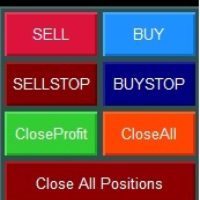
Верхний ряд - Рыночные ордера

![Кнопки SELL и BUY]

SELL (красная кнопка)

  • Действие: Открытие позиции на продажу по текущей цене Bid
  • Объем: Рассчитывается автоматически согласно выбранному режиму
  • StopLoss: Устанавливается автоматически согласно настройкам риска
  • Трейлинг: Активируется автоматически при достижении заданной прибыли

BUY (синяя кнопка)

  • Действие: Открытие позиции на покупку по текущей цене Ask
  • Объем: Рассчитывается автоматически согласно выбранному режиму
  • StopLoss: Устанавливается автоматически согласно настройкам риска
  • Трейлинг: Активируется автоматически при достижении заданной прибыли

Второй ряд - Отложенные ордера

![Кнопки SELL STOP и BUY STOP]

SELL STOP (темно-красная кнопка)

  • Действие: Размещение ордера SELL STOP ниже текущей цены
  • Расстояние: Определяется параметром "Дистанция отложенных ордеров"
  • Трейлинг: Ордер автоматически поднимается вслед за ростом цены
  • Применение: Вход в короткую позицию при пробитии поддержки

BUY STOP (темно-синяя кнопка)

  • Действие: Размещение ордера BUY STOP выше текущей цены
  • Расстояние: Определяется параметром "Дистанция отложенных ордеров"
  • Трейлинг: Ордер автоматически опускается вслед за падением цены
  • Применение: Вход в длинную позицию при пробитии сопротивления

Третий ряд - Управление позициями текущего инструмента

![Кнопки Close Profit и Close All]

Close Profit (зеленая кнопка)

  • Действие: Закрытие всех прибыльных позиций текущего инструмента
  • Условие: Закрываются только позиции с положительным результатом
  • Применение: Быстрая фиксация прибыли при достижении целей

Close All (оранжевая кнопка)

  • Действие: Закрытие всех позиций текущего инструмента
  • Условие: Закрываются все позиции независимо от результата
  • Применение: Полный выход из инструмента

Четвертый ряд - Глобальное управление

![Кнопка Close All Positions]

Close All Positions (темно-красная широкая кнопка)

  • Действие: Закрытие всех позиций на всех инструментах
  • Масштаб: Работает глобально для всего счета
  • Применение: Экстренное закрытие всех позиций
  • Внимание: Используйте осторожно - закрывает позиции по всем символам!

Режимы расчета лота

1. Фиксированное значение

  • Описание: Всегда используется заданный размер лота
  • Плюсы: Простота, предсказуемость
  • Минусы: Не учитывает изменения баланса
  • Применение: Для опытных трейдеров с четкой стратегией

2. Процент от баланса

  • Описание: Размер лота рассчитывается от общего баланса счета
  • Плюсы: Безопасность, медленный рост рисков
  • Минусы: Консервативный подход
  • Применение: Для долгосрочной торговли и сохранения капитала

3. Процент от свободной маржи

  • Описание: Размер лота рассчитывается от доступной маржи
  • Плюсы: Максимальное использование капитала
  • Минусы: Более высокие риски
  • Применение: Для агрессивных стратегий и опытных трейдеров

Система трейлинга

Трейлинг позиций

Принцип работы:

  1. Позиция должна достичь заданной минимальной прибыли
  2. StopLoss переносится в безубыток с заданным отступом
  3. При дальнейшем движении в прибыль SL подтягивается с заданным шагом

Пример настроек:

  • Минимальная прибыль: 100 пунктов
  • Уровень безубытка: 20 пунктов
  • Шаг трейлинга: 10 пунктов

Результат: При достижении +100 пунктов SL установится на +20 пунктов от входа

Трейлинг отложенных ордеров

SELL STOP ордера:

  • Трейлятся только ВВЕРХ при росте цены
  • Дистанция от цены остается постоянной
  • Позволяет входить в рынок при пробитии динамических уровней

BUY STOP ордера:

  • Трейлятся только ВНИЗ при падении цены
  • Дистанция от цены остается постоянной
  • Позволяет входить в рынок при пробитии динамических уровней

Практические рекомендации

Настройка для скальпинга

  • Режим лота: Процент от маржи (10-20%)
  • StopLoss: 1-2% от баланса
  • Трейлинг: Активация 20-50 пунктов, безубыток 5-10 пунктов

Настройка для дей-трейдинга

  • Режим лота: Процент от баланса (2-5%)
  • StopLoss: 2-3% от баланса
  • Трейлинг: Активация 50-100 пунктов, безубыток 15-25 пунктов

Настройка для свинг-трейдинга

  • Режим лота: Фиксированный или процент от баланса (1-3%)
  • StopLoss: 3-5% от баланса
  • Трейлинг: Активация 100-200 пунктов, безубыток 30-50 пунктов

Общие рекомендации

  1. Начинайте с консервативных настроек и постепенно адаптируйте под свой стиль
  2. Тестируйте настройки на демо-счете перед применением на реальном счете
  3. Регулярно анализируйте результаты и корректируйте параметры
  4. Помните: панель - это инструмент, успех зависит от вашей торговой стратегии

Поддержка

Если у вас возникли вопросы по использованию Smart Trading Panel MT5, обратитесь к разработчику через личные сообщения на MQL5.com или комментарии к продукту.

Успешной торговли!


Produits recommandés
izi hedge is a tool that helps you manage risk, manage hedge orders and rebalance losing orders. How it works   It will place an order opposite to the order you placed with that currency pair.   If the order you place is correct, the reverse order will be automatically deleted   If the market unfortunately goes against your order and touches the hedge order, it will begin to calculate the hedging volume to limit the risk of the market going in reverse.
FREE
TradeInfo MT5
Manuraj Dhanda
4.36 (14)
TradeInfo is a utility indicator which displays the most important information of the current account and position. Displayed information: Information about the current account (Balance, Equity, Free Margin). Current spread, current drawdown (DD), planned profit, expected losses, etc. Number of open position(s), volume (LOT), profit. Today’s and yesterday’s range. Remaining time to the next candle. Last day profit information. MagicNumber filter. Comment filter. Indicator parameters: ShowPro
FREE
One thousand Pip  Set1:TP/SL 20kpip. Set2:TP/SL 10kpip. Set3: TP/SL 5k pip. Set4:  TP/SL 2k pip. Set5:  TP/SL 500 pip. Rate Prop FTMO Broker.  Only Pair DE40, US100, US30. Automatic added EU London Session. This Version works with fixed Lot and buy/sell. Robot Strategy: Trade open = First "Round Price-Number Entry". Write me a Message of Questions when undecided. I send ex4 Code by Request.
Correlation Matrix Pro - Analyse Multi-Devises Comprenez les relations entre les paires de devises en temps réel ! Un puissant outil d'analyse qui vous aide à visualiser les relations statistiques entre jusqu'à 6 paires de devises simultanément. Parfait pour la gestion de portefeuille, la diversification des risques et les stratégies de couverture. FONCTIONNALITÉS PRINCIPALES - Corrélation de Pearson en temps réel avec rendements logarithmiques - Surveillance de jusqu'à 6 paires de devises simu

FREE
如果产品有任何问题或者您需要在此产品上添加功能,请联系我 Contact/message me if you encounter any issue using the product or need extra feature to add on the base version. You can get the free Close Button MT4 version at LINK . Close Button provides you an intuitive, effective, and handy way to close your orders and/or positions based on their type and their profit status. The tool provides seven close options: Close All: close all pending orders and positions. Close Profit: close all positions which are in profit. Close L
FREE
> Elevate Your Trading Strategy  This free tool is just the beginning. At  code4trading , we specialize in developing high-performance indicators and Expert Advisors designed for precision and professional-grade analysis. Looking for more advanced features?   Discover our full suite of premium tools, including optimized signals, advanced oscillators, and institutional-grade trading utilities at our official MQL5 store. > Explore the full catalog here:   https://www.mql5.com/en/users/pablogx9
FREE
Prop Firm Protector Basic
Janitha Sandaruwan Amaradasa Wickramasingha Arachchilage
5 (1)
Prop Firm Protector Lite - Essential Risk Management Tool A risk management utility designed to help traders monitor their trading activity according to predefined rules and limits. This tool runs in the background on any chart and monitors all trades regardless of their source, including manual trades, signal subscriptions, or other Expert Advisors. --- Core Features Symbol and Lot Monitoring: The symbol monitoring module allows you to define which currency pairs are permitted for trading.
FREE
Exp Assistant 5
Vladislav Andruschenko
4.77 (124)
Réglage automatique, stop loss, take profit, trailing stop, seuils de rentabilité, permettant un stop loss   virtuel   et un take profit. Exp Assistant   vous aidera à organiser le maintien de vos positions. Ce programme, l'Expert Advisor, est conçu pour définir automatiquement le   réel ou le virtuel       Niveaux   Stop Loss et Take Profit   pour vos positions pendant la négociation. Vous pouvez facilement gérer toutes les opérations de l'Expert Advisor depuis le panneau de contrôle sur la car
FREE
Market Hours Pro
Musa Terrance Khosa
Market Hours Pro shows Tokyo, London, and New York trading sessions directly on your MT5 chart, including scheduled overlap periods. It’s designed to give you a clear view of global market timing so you can plan trades, spot high-activity periods, and align strategies with standard Forex hours. How It Works Displays scheduled session times visually on your chart. Highlights session overlaps for London/New York and Tokyo/London. Automatically adjusts times for your timezone or broker time. Shows
FREE
(Special New Year promotion - free price!) The indicator displays the actual 'Scale in points per bar' (identical to the manual setting in the Terminal, see screenshot) in the upper right corner of the chart. The displayed value changes INSTANTLY whenever the chart scale is changed! (This is very convenient when planning screenshots). In Settings: Change language (Russian/English), font size of the displayed text, text label offset coefficient from the graph corner, equally in X and Y directi
FREE
Manual position management. Missing SL. Price moves against you. No protection. Trade Manager Lite automates Stop Loss, Take Profit, Trailing Stop, and Break-Even for your open positions. Attach to one chart. Configure your default SL/TP distance. Let it manage your positions automatically. What's Included (FREE Version) Auto SL/TP: Applies missing Stop Loss and Take Profit to positions based on your configured distance in points Trailing Stop: Adjusts SL dynamically as price moves in your favor
FREE
Trade assistant pro v8
Ahmed Mohammed Bakr Bakr
FREE FREE FREE Trade Assistant MT5 – Professional Trading & Risk Management Panel Trade Assistant MT5 is an advanced trading panel designed to help traders execute orders faster, safer, and more professionally . It simplifies manual trading by combining smart order management , precise risk control , and one-click execution , making it ideal for both beginners and advanced traders. This tool does not trade automatically . Instead, it empowers you with full control while applying professional-gra
FREE
VFI Quantum
Nikita Berdnikov
5 (1)
Introducing VFI (Volume Flow Indicator) – a trading indicator that analyzes the relationship between volume and price movement to identify key trading opportunities. The indicator displays the strength and direction of volume flow, providing clear signals about potential entry and exit points. Signals are formed based on zero line crossovers, crossovers between the VFI line and its exponential moving average (EMA), and when the indicator exits overbought and oversold zones. Attention! This stra
FREE
QuickClose EA
Peechanat Chatsermsak
QuickClose EA: Manage Trades Quickly and Efficiently QuickClose EA is a tool designed to help traders manage orders on the current chart easily and quickly. It provides full control over your trading status with clear feedback. Key Features of QuickClose EA: User-Friendly Control Panel: Clearly displays essential information such as the current symbol name, total profit/loss for Buy and Sell positions, and open lot sizes, giving you an immediate overview of your trading status. Precise Lot Size
FREE
TrendLine Manager
Mirel Daniel Gheonu
4.5 (2)
TrendLine Manager - Professional Trading Assistant TrendLine Manager is a smart trading tool that helps you manage your trades using trendlines drawn directly on your charts. Instead of manually watching every line you draw, this Expert Advisor does the monitoring for you. What it does: Converts any trendline you draw into an active trading trigger Automatically closes positions when price hits your stop loss or take profit lines Opens new trades when price crosses your entry lines Works with sl
FREE
AI Gold Asia Signal v1.6 Professional Indicator - Asia/London Session Breakout for Gold (XAUUSD) OVERVIEW AI Gold Asia Signal automatically detects the Asian session price range on XAUUSD and generates breakout entry signals for the London and New York trading windows. All key levels are drawn directly on the chart - no manual calculation needed. HOW IT WORKS 1. During the Asian session (03:00-10:00 broker time) the indicator scans M15 candles and records the High and Low of the session. 2
Voici NAS100 Auto SL and TP Maker pour MT5 : Ne manquez plus jamais le réglage du StopLoss et du TakeProfit avec notre NAS100 Auto SL and TP Maker, un assistant indispensable pour les traders qui naviguent sur le marché du Nasdaq 100 sur MetaTrader 5. Cet outil est conçu pour ceux qui recherchent une solution transparente pour automatiser la gestion des niveaux de StopLoss et TakeProfit. Caractéristiques principales : Automatisation sans effort : Surveille automatiquement les transactions sur
FREE
Le Matrix Arrow Indicator Multi Timeframe Panel MT5 est un complément gratuit et un atout majeur pour votre Matrix Arrow Indicator MT5 . Il montre le signal Matrix Arrow Indicator MT5 actuel pour 5 périodes personnalisées par l'utilisateur et pour 16 symboles/instruments modifiables au total. L'utilisateur a la possibilité d'activer/désactiver l'un des 10 indicateurs standard dont se compose l' Indicateur de Flèche Matricielle MT5 . Tous les 10 attributs d'indicateurs standard sont également ré
FREE
Ce petit outil vous aide à définir votre gestion des risques d'un simple glissement de ligne sur le graphique. Il vous montre la taille réelle du lot calculée sur le % du compte ou le montant fixe directement sur la ligne. Tout ce que vous avez à faire est d'activer la ligne en appuyant sur la touche "t" de votre clavier et de faire glisser la ligne jusqu'à votre point stop loss. C'est ça. Dans les paramètres, vous pouvez définir la couleur et la largeur de la ligne et du texte, ainsi que l'es
FREE
Strong movement levels
Nikolay Mitrofanov
5 (2)
Looks for strong price movements and draws levels upon their completion. You determine the strength of the movement yourself by specifying in the settings the number of points and the number of candles of the same color in a row in one direction. There are 2 types of building in the settings: extrenum - high / low close - close price You can also adjust the number of displayed levels and the number of candles for calculations. By default, the settings indicate 5 levels for 360 candles. That
FREE
Bundle Risk Manager Pro EA "Risk Manager Pro EA is an all-in-one trading utility that combines advanced risk management tools, ensuring full control over your trading account while protecting your capital and complying with trading regulations. By bundling Limit Positions , Concurrent Risk Capital , and the newly added Limit Profit , this EA is the ultimate solution for disciplined trading and achieving evaluation goals. Key Features: 1. Limit Positions : Enforces a maximum number of open posi
FREE
LT Trade Panel Lite
Thiago Duarte
4.65 (52)
Have you missed any tools or shortcuts in Meta Trader? Simple things that would make your daily trading much easier ? We have the solution for you: our Trade Panel! This is an EA tool (Expert Advisor) that, if configured to controll all symbols, needs to be loaded only once. This is the Lite version (free) of our tool. Professional version:   https://www.mql5.com/en/market/product/42658 If you have some problemas with the shortcut buttons on chart on unpinned mode try change the tickets digi
FREE
Expert Advisor (EA) that utilizes the basic Dow Theory strategy along with RSI for take profit, and employs support and resistance levels from the Zigzag indicator as stop-loss and take-profit points, you can follow these guidelines: Dow Theory Strategy : This involves analyzing trends using the Dow Theory principles, mainly focusing on identifying primary trends (bullish or bearish) and secondary trends (corrections). You'll need to implement rules for identifying these trends based on price ac
FREE
Free automatic Fibonacci is an indicator that automatically plots a Fibonacci retracement based on the number of bars you select on the BarsToScan setting in the indicator. The Fibonacci is automatically updated in real time as new highest and lowest values appears amongst the selected bars. You can select which level values to be displayed in the indicator settings. You can also select the color of the levels thus enabling the trader to be able to attach the indicator several times with differe
FREE
Pin Bars MT5
Yury Emeliyanov
Main purpose:   "Pin Bars"   is designed to automatically detect pin bars on financial market charts. A pin bar is a candle with a characteristic body and a long tail, which can signal a trend reversal or correction. How it works:   The indicator analyzes each candle on the chart, determining the size of the body, tail and nose of the candle. When a pin bar corresponding to predefined parameters is detected, the indicator marks it on the chart with an up or down arrow, depending on the directi
FREE
Posh Candle Info MT5
Theresia Yovitha Herwanda
5 (1)
Show candle info with: Time in selected timezone  Bar number Candle range points Upper wick points and percentage Body   points and percentage Lower wick   points and percentage Mark large/small candle body with customizable line. Settings group: Broker and local timezone. Lookback bars for candle marking. Large candle body Small candle body Date and time info with auto position or custom the x and y coordinate.
FREE
VWAP_PC_MQL5 — petit indicateur “fait maison” type VWAP affichant le prix moyen pondéré par le volume en temps réel sur MT5. TF : Fonctionne sur tous les timeframes. Paire : Compatible avec tous les marchés : Forex, indices, matières premières, actions. Paramètres : AppliedPrice – type de prix utilisé pour le calcul (Clôture, Typique, Pondéré, etc.) LineColor / Width / Style – personnalisation de la ligne VWAP SessionReset – remise à zéro quotidienne ou mode continu Fonctionnement (principe du
FREE
Analise Probabilistica
Valter Cezar Costa
4.78 (9)
I'm sure after a lot of research on the internet, you haven't found any indicator that can help you with forex or binary trading in the latest probability strategy created by famous trader Ronald Cutrim. The strategy is based on a simple count of green and red candles, checking for a numerical imbalance between them over a certain period of time on an investment market chart. If this imbalance is confirmed and is equal to or greater than 16%, according to trader Ronald Cutrim, creator of the pro
FREE
LT Day High Low
Thiago Duarte
4.57 (30)
This indicator draw a line on high and low levels of X number of days. It is possible to have an alert (in the software and mobile app) for when the price breaks the high or low of the current day. Configurações: Days -   past days to calculate (1 = actual day only). Alert when reach levels -   activate the alert for specific levels or both. Push notification -   enable the alert to the mobile MT5 app. Appearance High -   high level color. Low -   low level color. Size actual day -   thickness
FREE
NS Financas Automatic Clear All Chart Indicators Script Automatically remove all indicators from your chart offered for free by NS Financas! Don't waste any more time deleting the indicators one by one. With this script it is possible in one click to remove all indicators from the screen to adjust your new strategy while still using the settings of your graph, in addition to the possibility of configuring keyboard shortcuts for quick access to the script. Take the opportunity to visit our cha
FREE
Les acheteurs de ce produit ont également acheté
Trade Assistant MT5
Evgeniy Kravchenko
4.42 (207)
It helps to calculate the risk per trade, the easy installation of a new order, order management with partial closing functions, trailing stop of 7 types and other useful functions. Additional materials and instructions Installation instructions - Application instructions - Trial version of the application for a demo account Line function -   shows on the chart the Opening line, Stop Loss, Take Profit. With this function it is easy to set a new order and see its additional characteristics bef
Bienvenue sur Trade Manager EA, l’outil ultime de gestion des risques conçu pour rendre le trading plus intuitif, précis et efficace. Ce n’est pas seulement un outil d’exécution d’ordres ; c’est une solution complète pour la planification des trades, la gestion des positions et le contrôle des risques. Que vous soyez débutant, trader expérimenté ou scalpeur ayant besoin d’une exécution rapide, Trade Manager EA s’adapte à vos besoins, offrant une flexibilité sur tous les marchés, des devises et i
Local Trade Copier EA MT5
Juvenille Emperor Limited
4.96 (133)
Découvrez une expérience exceptionnellement rapide de copie de trades avec le   Local Trade Copier EA MT5 . Avec sa configuration facile en 1 minute, ce copieur de trades vous permet de copier des trades entre plusieurs terminaux MetaTrader sur le même ordinateur Windows ou Windows VPS avec des vitesses de copie ultra-rapides de moins de 0.5 seconde. Que vous soyez un trader débutant ou professionnel, le   Local Trade Copier EA MT5   offre une large gamme d'options pour le personnaliser en fonc
TradePanel MT5
Alfiya Fazylova
4.87 (149)
Trade Panel est un assistant commercial multifonction. L'application contient plus de 50 fonctions de trading pour le trading manuel et permet d'automatiser la plupart des tâches commerciales. Attention ! Les réductions sont limitées dans le temps, chaque mardi le prix augmentera de 5$ (jusqu'à 100$). Avant l'achat, vous pouvez tester la version de démonstration sur un compte de démonstration. Télécharger la version d'essai de l'application pour un compte de démonstration : https://www.mql5.com/
VERIFIED TRADING RESULTS - Farmed Hedge Yield Axi Copy:  https://www.mql5.com/en/signals/2356376 - Farmed Hedge Yield Exn Copy:   https://www.mql5.com/en/signals/2356404 - Farmed Hedge Yield V Copy:  https://www.mql5.com/en/signals/2357156 Contact me via private message to receive the User Manual and Setup. * Thai Lauguage Support Available Farmed Hedge Yield Farming - Professional Pair Trading Dashboard (Manual - Hybrid - Semi/Automated EA) VERSION 3 - WILD HARVEST UPDATE Trading Approac
Version Bêta Le Telegram to MT5 Signal Trader est presque prêt pour la sortie officielle en version alpha. Certaines fonctionnalités sont encore en développement et vous pourriez rencontrer de petits bugs. Si vous rencontrez des problèmes, merci de les signaler, vos retours aident à améliorer le logiciel pour tout le monde. Telegram to MT5 Signal Trader est un outil puissant qui copie automatiquement les signaux de trading depuis des chaînes ou groupes Telegram vers votre compte MetaTrader 5 .
Trade Dashboard MT5
Fatemeh Ameri
4.94 (120)
Tired of complex order placement and manual calculations? Trade Dashboard is your solution. With its user-friendly interface, placing orders becomes effortless, by a single click, you can open trades, set stop loss and take profit levels, manage trade lot size, and calculate risk to reward ratios, allowing you to only focus on your strategy. Say goodbye to manual calculations and streamline your trading experience with Trade Dashboard. Download  Demo Version  right now. You can find  Details of
Exp COPYLOT CLIENT for MT5
Vladislav Andruschenko
3.82 (34)
Le copieur commercial pour MT5 est un copieur commercial pour la plate-forme МetaТrader 5   . Il copie les transactions de change   entre       tous les comptes   MT5   -   MT5, MT4   -   MT5 pour la version COPYLOT MT5 (ou MT4   -   MT4 MT5   -   MT4 pour la version COPYLOT MT4) Copieur fiable ! Version MT4 Description complète   +DEMO +PDF Comment acheter Comment installer     Comment obtenir des fichiers journaux     Comment tester et optimiser     Tous les produits de Expforex Vous pouvez
Timeless Charts
Samuel Manoel De Souza
5 (3)
Timeless Charts est une solution de graphiques avancée conçue pour les traders professionnels qui ont besoin de graphiques personnalisés / unités de temps personnalisées – y compris les graphiques en secondes / unités de temps en secondes, les graphiques Renko / barres Renko, les graphiques en clusters / footprints et des outils avancés similaires à ceux disponibles sur les plateformes les plus populaires. Contrairement aux graphiques hors ligne traditionnels ou aux simples indicateurs personnal
Trade copier MT5
Alfiya Fazylova
4.56 (39)
Trade Copier est un utilitaire professionnel conçu pour copier et synchroniser les commandesentre les comptes de trading. Les commandes sont copiées du compte/terminal du fournisseur vers le compte/terminal du destinataire, qui sont installés sur le même ordinateur ou vps. Avant d'acheter, vous pouvez tester la version démo sur un compte démo. Version démo ici . Instructions complètes ici . Principales fonctionnalités et avantages: Prend en charge la copie des commandes MT5> MT5, MT4> MT5, MT5>
MT5 to Telegram Signal Provider est un utilitaire facile à utiliser et entièrement personnalisable qui permet l'envoi de signaux spécifiés vers un chat, un canal ou un groupe Telegram, transformant ainsi votre compte en fournisseur de signaux. Contrairement à la plupart des produits concurrents, il n'utilise pas d'importations DLL. [ Démonstration ] [ Manuel ] [ Version MT4 ] [ Version Discord ] [ Canal Telegram ]  New: [ Telegram To MT5 ] Configuration Un guide utilisateur étape par étape est
AntiOverfit PRO MT5
Enrique Enguix
5 (3)
La plupart des traders commettent la même erreur sans même s’en rendre compte : ils font confiance à un Expert Advisor simplement parce qu’il a bien fonctionné sur un seul historique. Mais un seul historique ne prouve pas la robustesse. Il montre seulement que cette logique a fonctionné sur un parcours de marché bien précis. Et ce parcours, le marché réel ne l’a montré qu’une seule fois. C’est précisément là qu’intervient AntiOverfit PRO. AntiOverfit PRO est un outil conçu pour vous aider à év
HINN MagicEntry Extra
ALGOFLOW OÜ
4.71 (14)
HINN MAGIC ENTRY – the ultimate tool for entry and position management! Place orders by selecting a level directly on the chart! full description   ::  demo-version  :: 60-sec-video-description Key features: - Market, limit, and pending orders - Automatic lot size calculation - Automatic spread and commission accounting - Unlimited partitial take-profits  - Breakeven and trailing stop-loss and take-profit  functions - Invalidation leves - Intuitive, adaptive, and customizable interface - Works
Copy Cat More Trade Copier MT5 (Chat Copieur MT5) est un copieur de trades local et un framework complet de gestion des risques et d'exécution conçu pour les défis commerciaux d'aujourd'hui. Des défis de prop firms à la gestion de portefeuille personnel, il s'adapte à chaque situation avec une combinaison d'exécution robuste, de protection du capital, de configuration flexible et de gestion avancée des trades. Le copieur fonctionne à la fois en mode Master (expéditeur) et Slave (récepteur), avec
EasyTrade MT5
Alain Verleyen
5 (3)
Easy Trade – Gestion des transactions intelligente, simple et puissante Easy Trade est la solution tout-en-un pour la gestion des transactions destinée aux utilisateurs de MetaTrader souhaitant garder le contrôle du risque et assurer une exécution fluide. Conçu dès le départ avec les retours des traders, Easy Trade facilite l'exécution, la surveillance et la gestion des transactions sur plusieurs symboles – sans complexifier votre flux de travail. Que vous pratiquiez le scalping manuel ou que
The News Filter MT5
Leolouiski Gan
4.75 (20)
Ce produit filtre tous les conseillers experts et les graphiques manuels pendant les heures de publication des actualités, de sorte que vous n'avez pas à vous soucier des pics de prix soudains qui pourraient détruire vos configurations de trading manuelles ou les transactions entrées par d'autres conseillers experts. Ce produit est également livré avec un système de gestion des ordres complet qui peut gérer vos positions ouvertes et vos ordres en attente avant la publication de toute actualité.
Scannez toute votre liste de surveillance pour les barres extremes - en temps reel. Power Bar Scanner surveille tous vos symboles simultanement et vous alerte des qu'une barre de prix extreme apparait. Plus besoin de parcourir vos graphiques. Voyez chaque opportunite dans un seul panneau. Fonctionne sur tous les timeframes. Forex, Indices, Or, Crypto - tout dans une seule vue. Comment ca fonctionne Le scanner verifie chaque symbole de votre Market Watch pour les barres dont le corps depasse N x
HINN Lazy Trader
ALGOFLOW OÜ
5 (2)
The core idea: using the user interface, you configure the parameters the chart must meet before entering a position (or positions), choose which entry models to use, and set the rules for when trading and planning should end. Lazy Trader  handles the rest: it  takes over all the routine chart watching and execution! full description  :: 3 key videos [1] ->  [2]   ->  [3] What can it do? - Understands Larry Williams market structure - Understands swing market structure by Michael Huddleston
Trade Manager DaneTrades
Levi Dane Benjamin
4.36 (28)
Trade Manager pour vous aider à entrer et sortir rapidement des transactions tout en calculant automatiquement votre risque. Y compris des fonctionnalités pour vous aider à éviter le sur-trading, le trading de vengeance et le trading émotionnel. Les transactions peuvent être gérées automatiquement et les mesures de performances du compte peuvent être visualisées dans un graphique. Ces fonctionnalités rendent ce panneau idéal pour tous les traders manuels et contribuent à améliorer la plateforme
The product will copy all telegram signal to MT5 ( which you are member) , also it can work as remote copier.  Easy to set up, copy order instant, can work with almost signal formats, image signal,  s upport to translate other language to English Work with all type of channel or group, even channel have "Restrict Saving Content", work with  multi channel, multi MT5 Work as remote copier: with signal have ticket number, it will copy exactly via ticket number. Support to backtest signal. How to s
Crypto Charting
Rajesh Kumar Nait
5 (5)
Crypto Charting for MT5 – Intégration des graphiques cryptos dans MetaTrader 5 Présentation Crypto Charting for MT5 fournit des graphiques OHLC en temps réel via WebSocket. Il prend en charge plusieurs plateformes d’échange avec une synchronisation automatique dans MT5. Fonctionnalités Données en temps réel via WebSocket Mise à jour automatique des données historiques Synchronisation programmée après perte de connexion Compatibilité avec tous les intervalles de temps MT5 Données OHLCV complètes
Footprint Chart Pro — Professional OrderFlow EA for MetaTrader 5 Version 6.34 | Professional tool for real traders | Institutional-Grade Visualization DEMO USERS - PLEASE SELECT EVERY TICK / REAL TICK WHEN TESTING AND YOU HAVE DOWNLOADED HISTORICAL DATA. IF YOU SEE A WAITING SCREEN AND IT IS NOT DOWNLOADING, IT MEANS YOU HAVE LOW HISTORICAL DATA. TRY 1 MIN AND 5 MIN FIRST ON 1 DAY DATA. ONE DAY DATA SHOULD BE THE NEWEST AND MOST CURRENT DATE. PLEASE WAIT UNTIL THE MARKET HAS ROLLED OVER PERIOD.
Panneau de trading pour trader en 1 clic.   Travailler avec des positions et des commandes!   Trading à partir du graphique ou du clavier. Avec notre panneau de trading, vous pouvez exécuter des transactions en un seul clic directement depuis le graphique et effectuer des opérations de trading 30 fois plus rapidement qu'avec le contrôle MetaTrader standard. Les calculs automatiques des paramètres et des fonctions rendent le trading plus rapide et plus pratique pour les traders. Des conseils grap
Telegram to MT5 Coppy
Sergey Batudayev
5 (8)
Télégramme vers MT5 :   la solution ultime pour copier des signaux Simplifiez votre trading avec Telegram vers MT5, l'outil moderne qui copie les signaux de trading directement des canaux et chats Telegram vers votre plateforme MetaTrader 5, sans DLL. Cette solution puissante garantit une exécution précise des signaux, de nombreuses options de personnalisation, un gain de temps et une efficacité accrue. [ Instructions and DEMO ] Caractéristiques principales Intégration directe de l'API Telegram
Trade Assistant 38 in 1
Makarii Gubaydullin
4.91 (23)
Outil multifonctionnel : Calculateur de Lot, Ordres Grid, Ratio R/R, Gestionnaire de Trades, Zones d'Offre et de Demande, Price Action et bien plus Version Démo   |   Manuel d'Utilisation L'Assistant de Trading   ne fonctionne pas dans le testeur de stratégies : vous pouvez télécharger la   Version Démo ICI  pour tester l' utilitaire . Contactez-moi   pour toute question  / idée d'amélioration / en cas de bug détecté Si vous avez besoin d'une version MT4, elle est disponible ici Simplifiez, acc
Advanced Dashboard Ultra
Mirel Daniel Gheonu
5 (1)
Stats Dashboard & Journal ULTRA pour MT5 Le Centre de Commandement de Trading Complet : Analytique, Automatisation & Intelligence des Actualités. Stats Dashboard ULTRA est l'évolution ultime de l'outil d'analyse Pro. Il transforme MetaTrader 5 en une station de trading professionnelle, combinant une analyse de performance de niveau institutionnel avec une protection automatisée contre les actualités et des métriques psychologiques avancées. Conçu pour les traders manuels et les gestionnaires de
OrderManager MT5
Lukas Roth
4.84 (25)
Présentation du   OrderManager   : Un utilitaire révolutionnaire pour MT5 Gérez vos transactions comme un pro avec le tout nouveau utilitaire Order Manager pour MetaTrader 5. Conçu avec simplicité et facilité d'utilisation à l'esprit, l'Order Manager vous permet de définir et de visualiser sans effort le risque associé à chaque transaction, vous permettant de prendre des décisions éclairées et d'optimiser votre stratégie de trading. Pour plus d'informations sur l'OrderManager, veuillez vous réfé
EA Auditor
Stephen J Martret
EA AUDITOR - VERIFY EA'S BEFORE YOU BUY The Only Independent EA & Signal Verification Tool for MetaTrader 5 MAKE SMARTER EA PURCHASES. EVERY TIME. The MQL5 market is home to some genuinely outstanding Expert Advisors built by talented developers — strategies that can transform your trading. But it can also include EAs with history readers coded in to produce fake backtest results, curve-fitted strategies, manipulated signals, and EAs falsely marketed as "AI-powered" or "machine learning" when th
Smart Stop Manager – Exécution automatique du stop-loss avec une précision professionnelle Présentation Smart Stop Manager est la couche d’exécution de la gamme Smart Stop, conçue pour les traders qui recherchent une gestion du stop-loss structurée, fiable et entièrement automatisée sur plusieurs positions ouvertes. Il surveille en continu toutes les opérations actives, calcule le niveau de stop optimal à l’aide de la logique de structure de marché Smart Stop, puis met à jour les stops automat
Custom Alerts MT5
Daniel Stein
5 (8)
Custom Alerts : Surveillez plusieurs marchés sans jamais manquer une configuration clé Présentation Custom Alerts est une solution dynamique pour les traders qui souhaitent surveiller plusieurs instruments de manière centralisée. En intégrant les données de nos outils phares — comme FX Power, FX Volume, FX Dynamic, FX Levels et IX Power — Custom Alerts vous alerte automatiquement des mouvements importants du marché sans avoir à surveiller plusieurs graphiques ou risquer de manquer des opportun
Filtrer:
AlexZ1976
24
AlexZ1976 2025.09.30 16:10 
 

L'utilisateur n'a laissé aucun commentaire sur la note

Répondre à l'avis