Smart Trading Panel MT5

Smart Trading Panel MT5 - Умная торговая панель

Обзор продукта

Smart Trading Panel MT5 — это не просто панель управления - это профессиональная торговая панель для MetaTrader 5 больше похожа на советник, который значительно упрощает процесс торговли и добавляет функции, отсутствующие в стандартном терминале: 3 режима расчета лота, Автоматическая установка StopLoss, Продвинутый трейлинг-стоп, Трейлинг отложенных ордеров.

Ключевые преимущества

   Эффективность и скорость

  • Мгновенное открытие позиций одним кликом без дополнительных диалогов
  • Быстрое размещение отложенных ордеров SELL STOP и BUY STOP
  • Одним кликом закрытие прибыльных позиций или всех позиций
  • Глобальное управление - закрытие всех позиций на всех инструментах

   Умное управление лотом (уникальная функция)

  • 3 режима расчета лота: фиксированный, процент от баланса, процент от маржи
  • Автоматический расчет размера позиции в зависимости от выбранного режима
  • Безопасность: исключение ошибок при ручном вводе лота

   Автоматический риск-менеджмент (уникальная функция)

  • Автоматическая установка StopLoss на основе процента от баланса
  • Работает для всех позиций: открытых через панель или стандартными средствами терминала
  • Защита капитала: точный контроль максимального убытка

   Продвинутый трейлинг-стоп (расширенная функция)

  • Гибкие настройки активации: минимальная прибыль для включения трейлинга
  • Защита прибыли: настраиваемый уровень безубытка
  • Умный шаг трейлинга: оптимизация частоты обновлений

   Трейлинг отложенных ордеров (уникальная функция)

  • SELL STOP трейлится вверх вслед за ростом цены
  • BUY STOP трейлится вниз вслед за падением цены
  • Автоматическая активация: начинает работать сразу после размещения
  • Настраиваемые параметры: дистанция и шаг трейлинга

   Удобство использования

  • Интуитивный интерфейс: логичное расположение кнопок как в терминале
  • Настраиваемый дизайн: выбор цветов для каждой кнопки
  • Компактная панель: не загромождает рабочее пространство
  • Перемещаемая: настройка координат размещения

Для кого предназначен продукт

   Для профессиональных трейдеров

  • Увеличение скорости принятия торговых решений
  • Автоматизация рутинных операций
  • Точный контроль рисков
  • Эффективное управление множественными позициями

   Для начинающих трейдеров

  • Исключение ошибок при расчете лота
  • Автоматическая защита капитала
  • Простое и понятное управление
  • Обучение правильным принципам риск-менеджмента

   Для скальперов и дей-трейдеров

  • Мгновенное исполнение торговых решений
  • Быстрое закрытие позиций при достижении целей
  • Эффективное управление короткими позициями
  • Продвинутый трейлинг для фиксации прибыли

Преимущества над стандартным терминалом

Функция

Стандартный MT5

Smart Trading Panel

Открытие позиций

Диалоговое окно с ручным вводом

Один клик

Расчет лота

Ручной ввод

3 автоматических режима

StopLoss

Ручная установка

Автоматический расчет

Трейлинг позиций

Базовый трейлинг

Умный трейлинг с настройками

Трейлинг ордеров

Отсутствует

Полная автоматизация

Управление рисками

Ручное

Автоматическое

Скорость операций

Медленная

Мгновенная

Технические характеристики

  • Платформа: MetaTrader 5
  • Совместимость: Все типы счетов и брокеры
  • Ресурсы: Минимальное потребление CPU и памяти
  • Настройки: Полная кастомизация через параметры советника
  • Языки: Русский интерфейс и документация

Установка и настройка

  1. Поместите файл в папку Experts терминала MT5
  2. Перетащите советника на график торгового инструмента
  3. Настройте параметры в соответствии с вашей стратегией
  4. Начинайте торговать с максимальным комфортом!

Smart Trading Panel — это не просто панель кнопок, это комплексное решение для современной торговли, которое объединяет скорость, безопасность и эффективность в одном инструменте.


Smart Trading Panel MT5 - Руководство пользователя

Установка

  1. Скопируйте файл Smart Trading Panel MT5.ex5 в папку MQL5/Experts вашего терминала
  2. Перезапустите MetaTrader 5 или обновите навигатор (F5)
  3. Перетащите советника из навигатора на график нужного инструмента
  4. Разрешите автоторговлю и импорт DLL при появлении диалога
  5. Настройте параметры согласно вашей стратегии

Настройка параметров

Все настройки панели осуществляются через входные параметры советника. Кнопки панели не содержат настроек - они выполняют действия согласно заданным параметрам.

Расчет лота

Параметр

Описание

Рекомендуемые значения

Способ расчета лота

Выбор метода определения размера позиции

Процент от свободной маржи

Фиксированный размер лота

Постоянный размер для всех позиций

0.01 - 1.0

Процент от баланса

Процент баланса для расчета лота

1-10%

Процент от свободной маржи

Процент маржи для расчета лота

5-25%

Управление рисками

Параметр

Описание

Рекомендуемые значения

Процент от баланса для StopLoss

Максимальный убыток от баланса

1-5%

Трейлинг стоп

Параметр

Описание

Рекомендуемые значения

Минимальная прибыль при активации

Прибыль в пунктах для начала трейлинга

50-200 пунктов

Минимальный уровень безубытка

Защищенная прибыль в пунктах

10-50 пунктов

Шаг трейлинг стопа

Минимальный шаг обновления

5-20 пунктов

Отложенные ордера

Параметр

Описание

Рекомендуемые значения

Дистанция от цены

Расстояние ордера от текущей цены

20-100 пунктов

Шаг трейлинга ордеров

Минимальный шаг обновления цены

5-30 пунктов

Описание кнопок

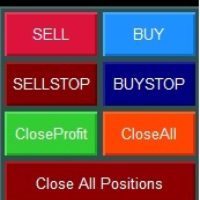
Верхний ряд - Рыночные ордера

![Кнопки SELL и BUY]

SELL (красная кнопка)

  • Действие: Открытие позиции на продажу по текущей цене Bid
  • Объем: Рассчитывается автоматически согласно выбранному режиму
  • StopLoss: Устанавливается автоматически согласно настройкам риска
  • Трейлинг: Активируется автоматически при достижении заданной прибыли

BUY (синяя кнопка)

  • Действие: Открытие позиции на покупку по текущей цене Ask
  • Объем: Рассчитывается автоматически согласно выбранному режиму
  • StopLoss: Устанавливается автоматически согласно настройкам риска
  • Трейлинг: Активируется автоматически при достижении заданной прибыли

Второй ряд - Отложенные ордера

![Кнопки SELL STOP и BUY STOP]

SELL STOP (темно-красная кнопка)

  • Действие: Размещение ордера SELL STOP ниже текущей цены
  • Расстояние: Определяется параметром "Дистанция отложенных ордеров"
  • Трейлинг: Ордер автоматически поднимается вслед за ростом цены
  • Применение: Вход в короткую позицию при пробитии поддержки

BUY STOP (темно-синяя кнопка)

  • Действие: Размещение ордера BUY STOP выше текущей цены
  • Расстояние: Определяется параметром "Дистанция отложенных ордеров"
  • Трейлинг: Ордер автоматически опускается вслед за падением цены
  • Применение: Вход в длинную позицию при пробитии сопротивления

Третий ряд - Управление позициями текущего инструмента

![Кнопки Close Profit и Close All]

Close Profit (зеленая кнопка)

  • Действие: Закрытие всех прибыльных позиций текущего инструмента
  • Условие: Закрываются только позиции с положительным результатом
  • Применение: Быстрая фиксация прибыли при достижении целей

Close All (оранжевая кнопка)

  • Действие: Закрытие всех позиций текущего инструмента
  • Условие: Закрываются все позиции независимо от результата
  • Применение: Полный выход из инструмента

Четвертый ряд - Глобальное управление

![Кнопка Close All Positions]

Close All Positions (темно-красная широкая кнопка)

  • Действие: Закрытие всех позиций на всех инструментах
  • Масштаб: Работает глобально для всего счета
  • Применение: Экстренное закрытие всех позиций
  • Внимание: Используйте осторожно - закрывает позиции по всем символам!

Режимы расчета лота

1. Фиксированное значение

  • Описание: Всегда используется заданный размер лота
  • Плюсы: Простота, предсказуемость
  • Минусы: Не учитывает изменения баланса
  • Применение: Для опытных трейдеров с четкой стратегией

2. Процент от баланса

  • Описание: Размер лота рассчитывается от общего баланса счета
  • Плюсы: Безопасность, медленный рост рисков
  • Минусы: Консервативный подход
  • Применение: Для долгосрочной торговли и сохранения капитала

3. Процент от свободной маржи

  • Описание: Размер лота рассчитывается от доступной маржи
  • Плюсы: Максимальное использование капитала
  • Минусы: Более высокие риски
  • Применение: Для агрессивных стратегий и опытных трейдеров

Система трейлинга

Трейлинг позиций

Принцип работы:

  1. Позиция должна достичь заданной минимальной прибыли
  2. StopLoss переносится в безубыток с заданным отступом
  3. При дальнейшем движении в прибыль SL подтягивается с заданным шагом

Пример настроек:

  • Минимальная прибыль: 100 пунктов
  • Уровень безубытка: 20 пунктов
  • Шаг трейлинга: 10 пунктов

Результат: При достижении +100 пунктов SL установится на +20 пунктов от входа

Трейлинг отложенных ордеров

SELL STOP ордера:

  • Трейлятся только ВВЕРХ при росте цены
  • Дистанция от цены остается постоянной
  • Позволяет входить в рынок при пробитии динамических уровней

BUY STOP ордера:

  • Трейлятся только ВНИЗ при падении цены
  • Дистанция от цены остается постоянной
  • Позволяет входить в рынок при пробитии динамических уровней

Практические рекомендации

Настройка для скальпинга

  • Режим лота: Процент от маржи (10-20%)
  • StopLoss: 1-2% от баланса
  • Трейлинг: Активация 20-50 пунктов, безубыток 5-10 пунктов

Настройка для дей-трейдинга

  • Режим лота: Процент от баланса (2-5%)
  • StopLoss: 2-3% от баланса
  • Трейлинг: Активация 50-100 пунктов, безубыток 15-25 пунктов

Настройка для свинг-трейдинга

  • Режим лота: Фиксированный или процент от баланса (1-3%)
  • StopLoss: 3-5% от баланса
  • Трейлинг: Активация 100-200 пунктов, безубыток 30-50 пунктов

Общие рекомендации

  1. Начинайте с консервативных настроек и постепенно адаптируйте под свой стиль
  2. Тестируйте настройки на демо-счете перед применением на реальном счете
  3. Регулярно анализируйте результаты и корректируйте параметры
  4. Помните: панель - это инструмент, успех зависит от вашей торговой стратегии

Поддержка

Если у вас возникли вопросы по использованию Smart Trading Panel MT5, обратитесь к разработчику через личные сообщения на MQL5.com или комментарии к продукту.

Успешной торговли!


Önerilen ürünler
izi hedge is a tool that helps you manage risk, manage hedge orders and rebalance losing orders. How it works   It will place an order opposite to the order you placed with that currency pair.   If the order you place is correct, the reverse order will be automatically deleted   If the market unfortunately goes against your order and touches the hedge order, it will begin to calculate the hedging volume to limit the risk of the market going in reverse.
FREE
️ Limited Free Access ! ️ Ares Quantum EA is currently available for free as part of an early‑tester release. This phase is designed to gather real user feedback, performance reports, and honest reviews from traders who try the EA on their own accounts. After the first 100 downloads, the EA will switch to a lifetime price of $229.99, increasing automatically by $50 every 5 copies sold until reaching the final retail value of $1,029.99. Anyone who downloads now keeps permanent access to the cur
TradeInfo MT5
Manuraj Dhanda
4.38 (16)
TradeInfo is a utility indicator which displays the most important information of the current account and position. Displayed information: Information about the current account (Balance, Equity, Free Margin). Current spread, current drawdown (DD), planned profit, expected losses, etc. Number of open position(s), volume (LOT), profit. Today’s and yesterday’s range. Remaining time to the next candle. Last day profit information. MagicNumber filter. Comment filter. Indicator parameters: ShowPro
FREE
SI Ruler A clean, one-click price ruler that shows points and exact dollar cost between any two levels on your chart. Every trader needs to quickly measure the distance between two price levels and know what it costs in real money. Most platforms make this harder than it should be. SI Ruler puts a single icon in the corner of your chart — click it, click your entry level, and drag to your stop or target. The label tells you instantly how many points that distance is and exactly what it costs in
FREE
POC, Value Area ve naked POC takibi ile seans bazlı Volume Profile — piyasanın müzayede haritası grafiğinizde. • Herhangi bir çapa TF'sine göre seanslar (varsayılan gün): indikatör her seans için POC (point of control), VAH/VAL (Value Area sınırları) ve seans high/low değerlerini hesaplar ve seviye olarak çizer. • Naked POC: geçmiş seansların test edilmemiş POC'leri, fiyat sonunda onlara dokunana kadar sağa doğru uzar — piyasanın hatırladığı mıknatıslar. • Grafiğin sağ kenarında canlı profil his
FREE
QuantMatrix Probability AI Free QuantMatrix Probability AI Free is a technical indicator for MetaTrader 5 that combines several measurements of current market conditions into three numerical estimates. The indicator uses exponential moving averages, Relative Strength Index (RSI), Average True Range (ATR) and the current price position in its calculation. These measurements are combined into a normalized market score. The resulting information is displayed on the chart as: BUY percentage SELL p
FREE
no Trade operation, Robot Set auto SL to every manually Trade from a Phone Automatic Phone TradeManager Need just Set on 1 Symbol Auto BE Trigger is added that immediately sets a stop-loss for every () But does NOT calculate position size based on risk, allows the fixed  SL to   adjusted dynamically drag on Chart or Menu. It protects capital around the clock, reduces emotional mistakes, and ensures consistent risk management.
FREE
Title:   Smart Position Manager PRO - Advanced Risk & Position Manager Description: Smart Position Manager PRO is an all-in-one visual trade management and risk calculation tool designed for serious traders who prioritize iron discipline and strict risk management. Whether you are executing precise SMC or ICT setups on personal capital or managing large funded accounts on strict prop firms, this tool ensures you focus on counting percentages rather than emotional money swings. With a highly int
FREE
Correlation Matrix Pro - Çoklu Döviz Hedge Tarayıcı Döviz çiftleri arasındaki ilişkileri gerçek zamanlı olarak anlayın! 6 döviz çifti arasındaki istatistiksel ilişkileri aynı anda görselleştirmenize yardımcı olan güçlü bir analiz aracıdır. Portföy yönetimi, risk çeşitlendirmesi ve hedge stratejileri için mükemmeldir. TEMEL ÖZELLİKLER - Logaritmik getiriler kullanan gerçek zamanlı Pearson korelasyonu - Aynı anda 6 döviz çiftini izleme - Otomatik zaman dilimi algılama - Ayarlanabilir geriye bakış
FREE
如果产品有任何问题或者您需要在此产品上添加功能,请联系我 Contact/message me if you encounter any issue using the product or need extra feature to add on the base version. You can get the free Close Button MT4 version at LINK . Close Button provides you an intuitive, effective, and handy way to close your orders and/or positions based on their type and their profit status. The tool provides seven close options: Close All: close all pending orders and positions. Close Profit: close all positions which are in profit. Close L
FREE
ADAPTIVE CLOSER Manage many open positions as one book, from the chart Type: Utility (position manager) Symbols: Any Account: Hedging and Netting Opens trades: Only when you press a button 1. The problem this addresses One position is easy to manage. Six are not. Once several tickets are open — entered by hand, by different Expert Advisors, from a phone — the thing you actually care about is the combined result, and MetaTrader gives you no way to act on it. You end up closing tickets one at a t
FREE
Prop Firm Protector Basic
Janitha Sandaruwan Amaradasa Wickramasingha Arachchilage
5 (1)
Prop Firm Protector Lite - Essential Risk Management Tool A risk management utility designed to help traders monitor their trading activity according to predefined rules and limits. This tool runs in the background on any chart and monitors all trades regardless of their source, including manual trades, signal subscriptions, or other Expert Advisors. --- Core Features Symbol and Lot Monitoring: The symbol monitoring module allows you to define which currency pairs are permitted for trading.
FREE
Exp Assistant 5
Vladislav Andruschenko
4.77 (126)
Otomatik Ayarlama, zararı durdurma, kar alma, takip eden durdurma, başabaş seviyeleri, zararı   sanal olarak   durdurma ve kar almayı etkinleştirme. Exp Assistant,   pozisyonlarınızın bakımını organize etmenize yardımcı olacaktır. Uzman Danışman olarak adlandırılan bu program,   Gerçek veya Sanal'ı   otomatik olarak ayarlamak için tasarlanmıştır.       İşlem yaparken pozisyonlarınız için   Zararı Durdur ve Kar Al   seviyeleri. Expert Advisor'ın tüm işlemlerini grafik üzerinde yer alan kontrol pa
FREE
Market Hours Pro
Musa Terrance Khosa
Market Hours Pro shows Tokyo, London, and New York trading sessions directly on your MT5 chart, including scheduled overlap periods. It’s designed to give you a clear view of global market timing so you can plan trades, spot high-activity periods, and align strategies with standard Forex hours. How It Works Displays scheduled session times visually on your chart. Highlights session overlaps for London/New York and Tokyo/London. Automatically adjusts times for your timezone or broker time. Shows
FREE
çalışma mantığı Stop Out yardımcı programı, Stop Out seviyesine kaç puan kaldığını gösteren basit ama çok kullanışlı bir göstergedir / Avantajı, birçok tüccarın kâr peşinde alım satım yaparken riski kasıtlı olarak fazla tahmin etmesi, mevcut marjı maksimumda kullanması ve bu durumda komisyoncunun pozisyonlarınızı zorla nerede kapatabileceğini bilmek çok önemlidir. Sadece göstergeyi grafiğe yerleştirin ve Al veya Sat'taki açık pozisyona bağlı olarak, bu işlem için fiyatın sınır işaretini graf
FREE
(Special New Year promotion - free price!) The indicator displays the actual 'Scale in points per bar' (identical to the manual setting in the Terminal, see screenshot) in the upper right corner of the chart. The displayed value changes INSTANTLY whenever the chart scale is changed! (This is very convenient when planning screenshots). In Settings: Change language (Russian/English), font size of the displayed text, text label offset coefficient from the graph corner, equally in X and Y directi
FREE
Manual position management. Missing SL. Price moves against you. No protection. Trade Manager Lite automates Stop Loss, Take Profit, Trailing Stop, and Break-Even for your open positions. Attach to one chart. Configure your default SL/TP distance. Let it manage your positions automatically. What's Included (FREE Version) Auto SL/TP: Applies missing Stop Loss and Take Profit to positions based on your configured distance in points Trailing Stop: Adjusts SL dynamically as price moves in your favor
FREE
Trade assistant pro v8
Ahmed Mohammed Bakr Bakr
2 (1)
FREE FREE FREE Trade Assistant MT5 – Professional Trading & Risk Management Panel Trade Assistant MT5 is an advanced trading panel designed to help traders execute orders faster, safer, and more professionally . It simplifies manual trading by combining smart order management , precise risk control , and one-click execution , making it ideal for both beginners and advanced traders. This tool does not trade automatically . Instead, it empowers you with full control while applying professional-gra
FREE
VFI Quantum
Nikita Berdnikov
5 (1)
Introducing VFI (Volume Flow Indicator) – a trading indicator that analyzes the relationship between volume and price movement to identify key trading opportunities. The indicator displays the strength and direction of volume flow, providing clear signals about potential entry and exit points. Signals are formed based on zero line crossovers, crossovers between the VFI line and its exponential moving average (EMA), and when the indicator exits overbought and oversold zones. Attention! This stra
FREE
QuickClose EA: Manage Trades Quickly and Efficiently QuickClose EA is a tool designed to help traders manage orders on the current chart easily and quickly. It provides full control over your trading status with clear feedback. Key Features of QuickClose EA: User-Friendly Control Panel: Clearly displays essential information such as the current symbol name, total profit/loss for Buy and Sell positions, and open lot sizes, giving you an immediate overview of your trading status. Precise Lot Size
FREE
MT5 Trade Manager is a MetaTrader 5 trade management panel designed to provide order execution, position monitoring, and risk control tools within a single interface. It operates as an on-chart dashboard with multiple pages for different trading functions. The tool is designed to support manual trading by centralizing trade operations and account monitoring in one place without requiring external applications. Interface Structure The dashboard is organized into six main sections: Dashboard Provi
FREE
MT5 için NAS100 Auto SL ve TP Maker ile tanışın: MetaTrader 5'te Nasdaq 100 piyasasında gezinen yatırımcılar için vazgeçilmez bir yardımcı olan NAS100 Auto SL ve TP Maker ile StopLoss ve TakeProfit ayarlarını bir daha asla kaçırmayın. Bu araç, StopLoss ve TakeProfit seviyelerinin yönetimini otomatikleştirmek için sorunsuz bir çözüm arayanlar için tasarlanmıştır. Temel Özellikler: Zahmetsiz Otomasyon: StopLoss ve/veya TakeProfit olmadan Nasdaq 100 işlemlerini otomatik olarak izler. Kullanıcı ta
FREE
Matrix Arrow Indicator Çoklu Zaman Çerçevesi Paneli MT5 , Matrix Arrow Indicator MT5 için ücretsiz bir eklenti ve harika bir varlıktır. 5 kullanıcı tarafından özelleştirilmiş zaman çerçevesi ve toplamda 16 değiştirilebilir sembol/araç için mevcut Matrix Arrow Indicator MT5 sinyalini gösterir. Kullanıcı, Matrix Arrow Indicator MT5 'ün içerdiği 10 standart göstergeden herhangi birini etkinleştirme/devre dışı bırakma seçeneğine sahiptir. 10 standart gösterge özelliğinin tümü, Matrix Arrow Indicato
FREE
Bu küçük araç, grafik üzerinde basit bir çizgi sürükleyerek risk yönetiminizi tanımlamanıza yardımcı olur. Hesap yüzdesi veya sabit para tutarı üzerinden hesaplanan gerçek lot büyüklüğünü doğrudan satırda gösterir. Tek yapmanız gereken klavyenizdeki "t" tuşuna basarak hattı aktif hale getirmek ve hattı stoploss noktanıza sürüklemek. Bu kadar. Ayarlarda çizgi ve metnin rengini ve genişliğini, ayrıca metinden satıra kadar olan boşluğu ve sağı tanımlayabilir ve riski hesap yüzdesi veya sabit para
FREE
Bu ürünle, artık üçüncü taraf bir hesap makinesinde işlem hacimlerini hesaplamanıza ve rakamları manuel olarak grafiğe aktarmanıza gerek kalmaz. Risk Ödül Aracı, işlemleri doğrudan grafik üzerinde hesaplar. Bu panel, işlemleri işaretlemek ve girmek için kullanılır. Giriş, StopLoss ve TakeProfit çizgilerini işlemi gördüğünüz konuma sürükleyin ve panel hemen hacmi, nakit olarak ve bakiyenin yüzdesi olarak riski, beklenen karı ve RR oranını gösterecektir. Giriş düğmesine tıklayın ve araç, giriş çi
FREE
Account Statistics – MetaTrader 5 için Trading İstatistikleri Dashboard’u Account Statistics, MetaTrader 5 için bir analiz ve raporlama aracıdır. İşlem hesabınızın en önemli metriklerini doğrudan grafik üzerinde gösterir ve performansınızı farklı zaman dilimleri boyunca yapılandırılmış şekilde değerlendirmenizi sağlar. Bu ürün, sonuçlarını sistematik olarak analiz etmek ve anlaşılır şekilde belgelemek isteyen traderlara yöneliktir. Fonksiyonlar Entegre dashboard, en önemli işlem metriklerini g
FREE
Strong movement levels
Nikolay Mitrofanov
5 (2)
Looks for strong price movements and draws levels upon their completion. You determine the strength of the movement yourself by specifying in the settings the number of points and the number of candles of the same color in a row in one direction. There are 2 types of building in the settings: extrenum - high / low close - close price You can also adjust the number of displayed levels and the number of candles for calculations. By default, the settings indicate 5 levels for 360 candles. That
FREE
Bundle Risk Manager Pro EA "Risk Manager Pro EA is an all-in-one trading utility that combines advanced risk management tools, ensuring full control over your trading account while protecting your capital and complying with trading regulations. By bundling Limit Positions , Concurrent Risk Capital , and the newly added Limit Profit , this EA is the ultimate solution for disciplined trading and achieving evaluation goals. Key Features: 1. Limit Positions : Enforces a maximum number of open posi
FREE
Bu ürünün alıcıları ayrıca şunları da satın alıyor
Trade Assistant MT5
Evgeniy Kravchenko
4.41 (216)
It helps to calculate the risk per trade, the easy installation of a new order, order management with partial closing functions, trailing stop of 7 types and other useful functions. Additional materials and instructions Installation instructions - Application instructions - Trial version of the application for a demo account Line function -   shows on the chart the Opening line, Stop Loss, Take Profit. With this function it is easy to set a new order and see its additional characteristics bef
Trade Manager EA’ye hoş geldiniz! Ticaretin daha sezgisel, hassas ve verimli hale gelmesi için tasarlanmış nihai risk yönetim aracı ile tanışın. Bu sadece bir emir verme aracı değil; ticaret planlaması, pozisyon yönetimi ve risk kontrolü için kapsamlı bir çözüm. İster yeni başlayan bir yatırımcı olun, ister deneyimli bir trader ya da hızlı emir gerektiren bir scalper, Trade Manager EA ihtiyaçlarınıza uyum sağlar ve forex, endeksler, emtialar ve kripto paralar dahil tüm piyasalarda esneklik sunar
================================================================================ POC BREAKOUT - V20.72. Full Professional Grade Toolkit ================================================================================ POC Breakout is a full MetaTrader 5 trading dashboard for discretionary traders who want breakout signals, Point of Control (POC) context, volume profiles, order flow, market structure, news, alerts, and advanced trade planning in one professional workspace. Attached directly to you
TradePanel MT5
Alfiya Fazylova
4.88 (167)
Trade Panel, çok işlevli bir ticaret asistanıdır. Uygulama, manuel ticaret için 50'den fazla ticaret fonksiyonu içerir ve çoğu ticaret görevini otomatikleştirmeyi mümkün kılar. Uygulama talimatları + video talimatları: https://www.mql5.com/en/blogs/post/756482 Demo hesabı için uygulamanın deneme sürümü: https://www.mql5.com/en/blogs/post/750865 Uygulamayı nasıl kurulur: https://www.mql5.com/en/blogs/post/756239 Uygulamayı görsel modda nasıl test edilir: https://www.mql5.com/en/blogs/post/770277
Local Trade Copier EA MT5
Juvenille Emperor Limited
4.94 (148)
Local Trade Copier EA MT5   ile olağanüstü hızlı işlem kopyalama deneyimi yaşayın. Kolay 1 dakikalık kurulumuyla bu işlem kopyalayıcısı, aynı Windows bilgisayarda veya Windows VPS'te birden fazla MetaTrader terminali arasında işlemleri kopyalamanıza olanak tanır ve 0.5 saniyenin altındaki şimşek hızında kopyalama hızları sunar. Başlangıç seviyesinde veya profesyonel bir tüccar olsanız da,   Local Trade Copier EA MT5 , spesifik ihtiyaçlarınıza göre özelleştirmek için geniş bir seçenek yelpazesi s
Beta Sürümü Telegram to MT5 Signal Trader resmi alfa sürümüne neredeyse hazır. Bazı özellikler hâlâ geliştirilmekte olup küçük hatalarla karşılaşabilirsiniz. Sorun yaşarsanız lütfen bildirin, geri bildiriminiz yazılımın herkes için gelişmesine yardımcı olur. Telegram to MT5 Signal Trader , Telegram kanallarından veya gruplarından gelen işlem sinyallerini otomatik olarak MetaTrader 5 hesabınıza kopyalayan güçlü bir araçtır. Herkese açık ve özel kanalları destekler ve birden fazla sinyal sağlayıc
Telegram to MT5 Multi-Channel Copier , Telegram kanallarınızdaki alım-satım sinyallerini doğrudan MetaTrader 5'e otomatik kopyalar. Bot yok, tarayıcı uzantısı yok, elle kopyalama yok. Sinyal Telegram'a düşer ve EA birkaç saniye içinde terminalinizde işlemi açar. Ürün iki bileşenden oluşur: Telegram kanallarınızı dinleyen bir Windows uygulaması ve sinyalleri MT5 terminalinizde yürüten bu Expert Advisor. MT4 sürümü de mevcuttur   buradan . Kurulum kılavuzu ve uygulama indirme:   https://www.mql5.c
25% discount on the release of the tool: only for the next 3 buyers Send a message to receive a demo version. AstroTrade Trading Assistant AstroTrade is a comprehensive multi-functional trading utility developed for the MetaTrader 5 platform. It integrates essential tools for trade execution, risk management, and technical monitoring into a single unified interface. The application is designed to assist traders in managing their daily operations through a visual and structured environment. Vi
Telegram To MT5 — Sinyal Kopyalayıcı Telegram kanallarınızdaki işlem çağrılarını gerçek MT5 emirlerine dönüştürün — otomatik olarak, istediğiniz kadar hesapta ve risk ile kurallar tamamen sizin kontrolünüzde. Telegram To MT5, Telegram'da zaten takip ettiğiniz VIP / sinyal kanallarını MetaTrader 5 terminalinize bağlar. Ücretsiz bir eşlik eden masaüstü uygulaması mesajları okur (botlara izin vermeyen kanallardan bile), ve bu Expert Advisor bunları hesabınızda yürütür — kendi risk ayarlarınızı, sem
Premium Trade Manager - İçine Koç Yerleştirilmiş İşlem Paneli Premium Trade Manager , grafiğinizin içine bir trading koçu yerleştirir; altında tam bir yürütme motoru çalışır. İşlemi her zamanki gibi kurun, ardından yapay zeka trading koçunuz Max, o kurulumu tam olarak okusun ve canlı hesabınıza göre taahhüt etmeden önce size net bir değerlendirme sunsun: stop disiplinli bir yaklaşıma uyuyor mu, risk büyüklüğü makul mü, yüksek etkili bir haber dakikalar sonra mı geliyor, prop firm limitinize yakl
Exp COPYLOT CLIENT for MT5
Vladislav Andruschenko
3.97 (35)
MetaTrader 5 için profesyonel işlem kopyalayıcı MetaTrader için hızlı, profesyonel ve güvenilir bir işlem kopyalayıcı . COPYLOT , MT4 ve MT5 terminalleri arasında Forex işlemlerini kopyalamanıza olanak tanır ve Hedge ile Netting hesaplarını destekler. COPYLOT MT5 sürümü şunları destekler: - MT5 Hedge → MT5 Hedge - MT5 Hedge → MT5 Netting - MT5 Netting → MT5 Hedge - MT5 Netting → MT5 Netting - MT4 → MT5 Hedge - MT4 → MT5 Netting MT4 sürümü Tam açıklama + DEMO + PDF Nasıl satın alınır Nasıl kurul
HINN MAGIC ENTRY – the ultimate tool for entry and position management! SIMPLE. FASTEST. INTUITIVE. MAX AUTOMATED. Place orders by selecting a level directly on the chart! full description   ::  demo-version  :: 60-sec-video-description Key features: - Market, limit, and pending orders - Automatic lot size calculation - Automatic spread and commission accounting - Unlimited partitial take-profits  - Breakeven and trailing stop-loss and take-profit  functions - Invalidation leves - Intuitive, a
Trade Dashboard simplifies how you open, manage, and control your trades, with built-in lot size calculation. It allows you to execute trades, manage risk, and control positions directly on the chart, with tools such as partial close, breakeven, and trailing stop. Designed to reduce manual work and help you stay focused on your trading decisions. A demo version is available for testing. Detailed explanations of features are provided within the MQL5 platform. Installation instructions are include
Anchor: The EA Manager Your EAs cannot see each other, but Anchor can. Anchor gives you one place to coordinate your EAs, manage risk, and decide when trading is allowed. It works alongside the trading bots you already use without any changes to them. The Problem One EA opens a trade. Then another starts trading. The next thing you know, you wake up to multiple grids built across your account. Each EA may be doing exactly what it was designed to do, but together they can place far more risk on y
Trade copier MT5
Alfiya Fazylova
4.59 (54)
Trade Copier, ticaret hesapları arasındaki işlemleri kopyalamak ve senkronize etmek için tasarlanmış profesyonel bir yardımcı programdır. Kopyalama, tedarikçinin hesabından/terminalinden alıcının aynı bilgisayarda veya vps'de kurulu olan hesabına/terminaline gerçekleşir. KAMPANYA - Eğer zaten "Trade copier MT5" aldıysanız, "Trade copier MT4"ü ücretsiz olarak alabilirsiniz (MT4 > MT5 ve MT4 < MT5 kopyalamalar için). Koşullar hakkında daha fazla bilgi almak için lütfen bizimle özel mesaj yoluyla i
Ultimate Extractor - Professional Trading Analytics for MT5 *****this is the local HTML version of Ultimate Extractor. !!!!!it is not compatible with Cloud!!!! For the online version please reach out to me directly****** Ultimate EA manager also now available when you use cloud pro and above for free!! Ultimate Extractor transforms your MetaTrader 5 trading history into actionable insights with comprehensive analytics, interactive charts, and real-time performance tracking. What It Does Automa
Signal TradingView to MT5 Pro Automator TradingView ve MetaTrader 5 arasında anında profesyonel uygulama TradingView alarmları ile MT5'teki gerçek uygulama arasındaki en güçlü iletişim köprüsüyle ticaret stratejinizi otomatikleştirin. Hız, esneklik ve kusursuz risk yönetimi talep eden yatırımcılar için tasarlanan bu Uzman Danışman (Expert Advisor), herhangi bir alarm mesajını hassas bir piyasa (market) veya limit emrine dönüştürür. GÜÇLÜ YÖNLER VE AVANTAJLAR Evrensel Ayrıştırma Motoru (Tescilli)
Satın aldıktan sonra bana mesaj göndererek tam kullanım kılavuzu paketini + AI özelliklerini test etmek için 3 günlük OpenAI API denemesini + bir başka bonus hediyeyi alabilirsiniz Mevcut fiyat, Ağustos Yeniden Lansman Güncellemesi için sınırlı süreli indirimli fiyattır — fiyat artmadan önce sürümünüzü şimdi güvence altına alın. Sonraki fiyat: $340 Bu, piyasada şimdiye kadar denediğiniz veya gördüğünüz tüm trading panellerinden tamamen farklıdır. Şu anda perakende piyasasında bulunan en yenilik
Hızlı. Doğru. Yenilikçi. Teknoloji Odaklı. Devrim niteliğindeki X2 Copy MT5 ile anlık işlem kopyalamayı keşfedin. Sadece 10 saniyelik basit bir kurulumla, tek bir bilgisayar veya Windows VPS üzerindeki MetaTrader terminalleri arasında işlemleri benzeri görülmemiş bir hızla senkronize eden güçlü bir araca sahip olacaksınız. İster birden fazla hesap yönetiyor, ister sinyalleri takip ediyor, isterseniz stratejinizi ölçeklendiriyor olun, X2 Copy MT5 eşsiz hassasiyet ve kontrolle iş akışınıza uyum sa
Timeless Charts
Samuel Manoel De Souza
5 (8)
Timeless Charts, profesyonel yatırımcılar için hepsi bir arada bir trading aracıdır. Saniye Grafikleri ve Renko gibi özel grafik türlerini, Footprints , Clusters , Hacim Profilleri , VWAP çalışmaları ve gelişmiş piyasa analizi sağlayan sabitlenmiş analiz araçlarıyla gelişmiş emir akışı analiziyle birleştirir. İşlem ve pozisyon yönetimi, entegre işlem yönetim paneli aracılığıyla doğrudan grafik üzerinden gerçekleştirilirken, Market Replay ve Sanal Hesaplar trading becerileri ve stratejileri üzeri
News Filter EA: Advanced Algo Trading Assistant News Filter EA is an advanced algo trading assistant designed to enhance your trading experience. By using the News Filter EA , you can integrate a Forex economic news filter into your existing expert advisor, even if you do not have access to its source code. In addition to the news filter, you can also specify trading days and hours for your expert. The News Filter EA also includes risk management  and equity protection features. MT4 Version Ma
Farmed Hedge Yield Farming | All Markets (Manual - Hybrid - Semi/Automated EA) VERIFIED TRADING RESULTS - Farmed Hedge Yield Axi Copy:  https://www.mql5.com/en/signals/2356376 - Farmed Hedge Yield Exn Copy:   https://www.mql5.com/en/signals/2356404 - Farmed Hedge Yield V Copy:  https://www.mql5.com/en/signals/2357156 * Before purchasing, please feel free to send me a message if you have any questions about the product or setup. ** After purchase,  Contact me via private message to receive t
The product will copy all telegram signal to MT5 ( which you are member) , also it can work as remote copier.  Easy to set up, copy order instant, can work with almost signal formats, image signal,  s upport to translate other language to English Work with all type of channel or group, even channel have "Restrict Saving Content", work with  multi channel, multi MT5 Work as remote copier: with signal have ticket number, it will copy exactly via ticket number. Support to backtest signal. How to s
YuClusters
Yury Kulikov
4.93 (43)
Attention: You can view the program operation in the free version  YuClusters DEMO .  YuClusters is a professional market analysis system. The trader has unique opportunities to analyze the flow of orders, trade volumes, price movements using various charts, profiles, indicators, and graphical objects. YuClusters operates on data based on Time&Sales or ticks information, depending on what is available in the quotes of a financial instrument. YuClusters allows you to build graphs by combining da
Power Candles Strateji Tarayıcısı - Kendi Kendini Optimize Eden Çoklu Sembol Kurulum Bulucu Power Candles Strateji Tarayıcısı , Power Candles göstergesini çalıştıran aynı kendinden optimize edici motoru, Piyasa İzleyicinizdeki her sembol üzerinde yan yana çalıştırır. Tek bir panel, şu anda istatistiksel olarak hangi sembollerin işlem yapılabilir olduğunu, her birinde hangi stratejinin kazandığını, en uygun Stop Loss / Take Profit çiftini gösterir ve yeni bir sinyal geldiği anda size bildirim gön
MT5 to Telegram Signal Provider , hesabınızı bir sinyal sağlayıcı haline getirerek belirtilen sinyalleri Telegram'ın sohbetine, kanalına veya grubuna göndermeyi sağlayan kullanımı kolay, tamamen özelleştirilebilir bir araçtır. Rakip ürünlerin çoğunun aksine, DLL içe aktarması yapmaz. [ Demo ] [ Kılavuz ] [ MT4 Versiyonu ] [ Discord Versiyonu ] [ Telegram Kanalı ]  New: [ Telegram To MT5 ] Kurulum Adım adım bir kullanıcı kılavuzu mevcuttur. Telegram API'si hakkında bilgi gerekmemektedir; ihtiyac
That backtest looks great. But will it still be making money tomorrow, next week, next month? EA Overfitter re-runs your EA on 100 price histories it has never seen. One score tells you if the edge is real. Launch price of $99 for the next 24 hours only then price will increase to $149 A backtest tells you what an EA did on one price history — the one that happened to occur. What you cannot tell from it is how much of that result was the strategy and how much was the particular path. EA Over
Quant AI Agents are independent trading Expert Advisors. Instead of trading using a fixed strategy like other conventional EAs, Quant AI Agents   is a   multi-agent AI trading framework   that turns natural-language strategy prompts into live.  WANT THE SAME RESULTS AS MY LIVE SIGNAL?   Use the exact same brokers I do:   IC MARKETS , IC TRADING   .  Unlike the centralized stock market, Forex has no single, unified price feed.  Every broker sources liquidity from different providers, creating un
Trade Copier Ultimate
Janitha Sandaruwan Amaradasa Wickramasingha Arachchilage
5 (5)
Trade Copier Ultimate - Telegram to MT5 Signal Copier Trade Copier Ultimate automatically copies Telegram trading signals into MetaTrader 5. The EA can read signal messages, detect the symbol, order type, entry price, Stop Loss, Take Profit levels and selected update commands, then execute or manage the trade in MT5 using your lot and risk settings. It is more than a basic Telegram to MT5 copier. TCU also supports Bot API and user-account Bridge workflows, Discord signal routing, local MT5 to MT
Çalışan Demo İndir Copy Cat More (Taklitçi Kedi) — İşlem Kopyalayıcı (Trade Copier) MT5 , yerel bir işlem kopyalayıcı ve bugünün ticaret zorlukları için tasarlanmış eksiksiz bir risk yönetimi ve yürütme çerçevesidir. Prop firm challenge'larından kişisel portföy yönetimine kadar, sağlam yürütme, sermaye koruması, esnek yapılandırma ve gelişmiş işlem yönetimi karışımıyla her duruma uyum sağlar. Kopyalayıcı hem Master (Master, gönderen) hem de Slave (Slave, alıcı) modlarında çalışır; piyasa ve be
Filtrele:
AlexZ1976
24
AlexZ1976 2025.09.30 16:10 
 

Kullanıcı değerlendirmeye herhangi bir yorum bırakmadı

Değerlendirmeye yanıt