

Larry Williams Market Secrets (Part 8): Combining Volatility, Structure and Time Filters
 2 949
2 949
 0
0

Introduction
Most short-term trading systems fail for one simple reason. They treat every market condition, every day, and every hour as if they were equal. Entries are triggered without context. Stops are placed without structure. Exits are chosen without logic. The result is a mechanical strategy that reacts to price but never truly understands it.
Larry Williams approached the market from a different angle. He did not start with indicators or rigid rules. He began with behavior. How price expands. How volatility precedes trends. How emotional extremes create opportunity, how time itself influences market movement. His work is not about a single system. It is about building trading logic that is grounded in what markets actually do.
In this article, we bring together several of Larry Williams’ core ideas into a single, testable trading model. We combine short-term market structure with volatility-based entries. We add time-based filters that reflect real market bias. We introduce flexible stop placement and adaptive profit taking. Moreover, we wrap everything into a fully configurable Expert Advisor that can be studied, tested, modified, and extended.
This is not another rigid strategy template. It is a framework. A way to think about entries, exits, risk, and timing as connected components rather than isolated rules. Every central decision point is exposed as a user option. Every concept is implemented as logic that can be validated through testing, not opinion.
Our goal is simple. To show how professional trading ideas can be translated into clean, structured MQL5 logic. Moreover, to provide a foundation that can evolve as deeper filters, better exits, and new research ideas are layered on top.
Strategy Overview
This trading model is built around a simple idea. Trends begin with volatility. Volatility gives entries. Filters improve trade quality. Selectivity improves survival.
Instead of reacting to random price movement, the EA waits for an apparent change in market structure. A bullish setup is formed when three consecutive bars create a short-term swing low. A bearish setup is formed when three consecutive bars create a short-term swing high. These swing points represent areas where price has failed to move further in one direction and has begun to rotate. They provide the structural context for the next possible expansion.
Once a valid swing signal appears on a new bar open, the EA does not enter immediately. Instead, it projects a breakout entry level using one of two volatility models. The first model measures the range of the previously completed bar and uses it as the working range. The second model uses Larry Williams’ swing-based volatility technique, which compares two historical swing distances and selects the dominant one as the working range. The chosen entry model is controlled by user input.
From this working range, the EA calculates projected buy and sell levels. These levels act as price thresholds. A trade is opened only if the price crosses above the buy level or below the sell level. If the price does not reach either level during the current trading period, the setup is discarded. No late entries are allowed. Every trade must be triggered by both structure and volatility expansion.
Stop-loss placement follows the same logic of flexibility and structural awareness. The EA supports two stop placement modes. In the first mode, the stop loss is calculated as a percentage of the working range and placed relative to the entry price. In the second mode, the stop loss is placed at the swing extreme. For a bullish trade, this is the low of the middle swing bar. For a bearish trade, this is the high of the middle swing bar. The selected stop model is controlled by user input.
Profit-taking can also be configured as a component. The EA supports three exit modes. The first closes the trade on the first profitable open. The second closes the trade after a user-specified number of bars has elapsed. The third sets a take-profit level based on the risk-to-reward ratio, using the distance between the entry and the stop loss. These exit models allow the same strategy logic to be tested under very different trade management styles.
Time-based filtering is applied as an optional layer. Trades can be restricted by the Trade Day of the Week or by the time of day. This allows the user to study how market behavior changes across time segments and to isolate periods that yield higher-quality signals. These filters can be turned on or off independently and are applied before any trade is executed.
Risk management is integrated directly into the entry logic. The EA supports both manual and automatic position sizing based on a fixed percentage of the account balance. In automatic mode, position size is calculated from the stop loss distance, ensuring consistent risk exposure across trades.
Only one position is allowed at any given time. This rule simplifies trade management and ensures that each setup is evaluated independently. The EA can be configured to trade long-only, short-only, or both.
What makes this model different from typical breakout systems is the order of logic. Entries are not triggered by volatility alone. They are triggered by structure first and volatility second. Filters are not bolted on as afterthoughts. They are treated as core components that shape trade quality. Exits are not fixed. They are adaptable and testable.
The key design goal of this EA is not to deliver a single optimized strategy. It is to provide a structured, flexible framework for testing how volatility, structure, and time interact. Every central decision point is user-configurable. Every concept is presented as a logical construct that can be modified and studied. This makes the EA not just a trading tool but a research platform for building and validating professional short-term trading ideas.
Building the Expert Advisor Step by Step
Before we begin writing any code, we need to be clear about what background knowledge is required to follow this section correctly.
First, we assume basic familiarity with the MQL5 programming language. Concepts such as variables, functions, conditional statements, loops, enumerations, structures, and the use of standard libraries should already be understood. If these concepts are not yet comfortable, the official MQL5 reference is a good starting point before continuing.
Second, we assume prior experience using the MetaTrader 5 platform. This includes basic interface navigation, opening charts, attaching Expert Advisors, and running backtests in the Strategy Tester.
Third, we assume working knowledge of MetaEditor. We should be able to create new source files, write code, compile, and inspect errors when they appear.
This section is designed as a hands-on build. Programming is learned best by doing, not by passively reading. To support this, the completed source file, lwVolatilityStructureTimeFilterExpert.mq5, is attached to this article. We recommend downloading it and keeping it open in a side tab for reference as we build the same logic step by step.
Creating the Foundation of the Expert Advisor
We begin by opening MetaEditor and creating a new empty Expert Advisor source file. The name can be anything, but for clarity and consistency, we will use the same name as the attached file. We then paste the following boilerplate code into the new file.
//+------------------------------------------------------------------+
//|                        lwVolatilityStructureTimeFilterExpert.mq5 |
//|          Copyright 2026, MetaQuotes Ltd. Developer is Chacha Ian |
//|                          https://www.mql5.com/en/users/chachaian |
//+------------------------------------------------------------------+

#property copyright "Copyright 2026, MetaQuotes Ltd. Developer is Chacha Ian"
#property link      "https://www.mql5.com/en/users/chachaian"
#property version   "1.00"

//+------------------------------------------------------------------+
//| Standard Libraries                                               |
//+------------------------------------------------------------------+
#include <Trade\Trade.mqh>

//+------------------------------------------------------------------+
//| Custom Enumerations                                              |
//+------------------------------------------------------------------+
enum ENUM_TRADE_DIRECTION
{
   ONLY_LONG,
   ONLY_SHORT,
   TRADE_BOTH
};

enum ENUM_VOLATILITY_ENTRY_MODE
{
   VOL_SIMPLE_PREVIOUS_RANGE,
   VOL_SWING_BASED
};

enum ENUM_STOP_LOSS_MODE
{
   SL_BY_RANGE_PERCENT,
   SL_AT_SWING_EXTREME
};

enum ENUM_TAKE_PROFIT_MODE
{
   TP_FIRST_PROFITABLE_OPEN,
   TP_AFTER_N_CANDLES,
   TP_BY_RISK_REWARD
};

enum ENUM_TDW_MODE
{
   TDW_ALL_DAYS,
   TDW_SELECTED_DAYS
};

enum ENUM_LOT_SIZE_INPUT_MODE
{
   MODE_MANUAL,
   MODE_AUTO
};

//+------------------------------------------------------------------+
//| User input variables                                             |
//+------------------------------------------------------------------+
input group "Information"
input ulong magicNumber         = 254700680002;
input ENUM_TIMEFRAMES timeframe = PERIOD_CURRENT;

input group "Volatility Breakout Parameters"
input ENUM_VOLATILITY_ENTRY_MODE volatilityEntryMode = VOL_SIMPLE_PREVIOUS_RANGE;
input double inpBuyRangeMultiplier                   = 0.50;
input double inpSellRangeMultiplier                  = 0.50;
input double inpStopRangeMultiplier                  = 0.50;

input group "TDW filter"
input ENUM_TDW_MODE tradeDayMode = TDW_SELECTED_DAYS;
input bool tradeSunday           = false;
input bool tradeMonday           = true;
input bool tradeTuesday          = false;
input bool tradeWednesday        = false;
input bool tradeThursday         = false;
input bool tradeFriday           = false;
input bool tradeSaturday         = false;

input group "Time of Day filter"
input bool useTimeFilter         = false;
input double startTime           = 9.30;
input double endTime             = 16.00;

input group "Trade & Risk Management"
input ENUM_TRADE_DIRECTION direction       = ONLY_LONG;
input ENUM_STOP_LOSS_MODE stopLossMode     = SL_BY_RANGE_PERCENT;
input ENUM_TAKE_PROFIT_MODE takeProfitMode = TP_BY_RISK_REWARD;
input double riskRewardRatio               = 3.0;
input int exitAfterCandles                 = 3;
input ENUM_LOT_SIZE_INPUT_MODE lotSizeMode = MODE_AUTO;
input double riskPerTradePercent           = 1.0;
input double positionSize                  = 0.1;

//+------------------------------------------------------------------+
//| Global Variables                                                 |
//+------------------------------------------------------------------+
//--- Create a CTrade object to handle trading operations
CTrade Trade;

//--- Bid and Ask
double   askPrice;
double   bidPrice;
datetime currentTime;

//+------------------------------------------------------------------+
//| Expert initialization function                                   |
//+------------------------------------------------------------------+
int OnInit(){

   //---  Assign a unique magic number to identify trades opened by this EA
   Trade.SetExpertMagicNumber(magicNumber);

   return(INIT_SUCCEEDED);
}

//+------------------------------------------------------------------+
//| Expert deinitialization function                                 |
//+------------------------------------------------------------------+
void OnDeinit(const int reason){

   //--- Notify why the program stopped running
   Print("Program terminated! Reason code: ", reason);

}

//+------------------------------------------------------------------+
//| Expert tick function                                             |
//+------------------------------------------------------------------+
void OnTick(){

   //--- Retrieve current market prices for trade execution
   askPrice      = SymbolInfoDouble (_Symbol, SYMBOL_ASK);
   bidPrice      = SymbolInfoDouble (_Symbol, SYMBOL_BID);
   currentTime   = TimeCurrent();

}

//--- UTILITY FUNCTIONS

//+------------------------------------------------------------------+
This foundation defines the Expert Advisor’s identity, includes the standard trading library, declares custom enumerations for all configurable modes, and exposes user-input parameters that control volatility logic, filters, risk management, and execution behavior.
At this point, nothing is trading yet. We have only defined what the EA can do, not what it will do. The following steps gradually give this skeleton real decision-making ability.
Detecting the Opening of a New Bar
Our strategy logic operates on the opening of a new bar within the selected timeframe. This is essential because swing points, volatility ranges, and projected entry levels should be recalculated only after a full bar has completed.
To support this behavior, we define the following function.
//+------------------------------------------------------------------+
//| Function to check if there's a new bar on a given chart timeframe|
//+------------------------------------------------------------------+
bool IsNewBar(string symbol, ENUM_TIMEFRAMES tf, datetime &lastTm){

   datetime currentTm = iTime(symbol, tf, 0);
   if(currentTm != lastTm){
      lastTm       = currentTm;
      return true;
   }
   return false;
}
This function retrieves the open time of the most recent bar and compares it with a stored value. When the time changes, a new bar has formed. The stored value is updated by reference so that the next call can detect the next bar change. To support this logic, we declare a global variable.
//--- To help track new bar open
datetime lastBarOpenTime;
This variable holds the last-known bar-open time and is initialized to 0 during expert initialization.
//+------------------------------------------------------------------+
//| Expert initialization function                                   |
//+------------------------------------------------------------------+
int OnInit(){

   ...

   //--- Initialize global variables
   lastBarOpenTime       = 0;

   return(INIT_SUCCEEDED);
}
From this point onward, any logic that should run only once per bar can be safely wrapped inside this condition.
Creating a Container for Volatility Levels
One of the most important actions during a new bar opening is calculating projected entry, stop-loss, and take-profit levels. To keep these values organized and reusable across the EA, we define a structure for them.
//--- Holds all price levels derived from Larry Williams' volatility breakout calculations
struct MqlLwVolatilityLevels
{
   double range;
   double buyEntryPrice;
   double sellEntryPrice;
   double bullishStopLoss;
   double bearishStopLoss;
   double bullishTakeProfit;
   double bearishTakeProfit;
   double bullishStopDistance;
   double bearishStopDistance;
};
Each field represents a specific component of Larry Williams’ volatility logic.
- The range field holds the working volatility range used for projections.
- The buyEntryPrice and sellEntryPrice fields hold breakout levels.
- The stop loss fields store projected protective levels.
- The take profit fields store projected targets when the risk-reward mode is active.
- The stop distance fields store the risk distance used for dynamic position sizing.
We then create a single instance of this structure just below its definition.
MqlLwVolatilityLevels lwVolatilityLevels;
This instance acts as shared memory across all functions. It allows us to compute levels once per bar and reuse them consistently across entry, risk, and exit logic.
We initialize all fields to zero during expert initialization.
//+------------------------------------------------------------------+
//| Expert initialization function                                   |
//+------------------------------------------------------------------+
int OnInit(){

   ...

   //--- Reset Larry Williams' volatility levels
   ZeroMemory(lwVolatilityLevels);

   return(INIT_SUCCEEDED);
}
This ensures no stale values remain from previous runs.
Detecting Larry Williams Short-Term Swing Points
Our strategy logic begins with structure. A bullish signal is only valid when a short-term swing low forms. A bearish signal is only valid when a short-term swing high forms.
To detect a short-term swing high, we define:
//+------------------------------------------------------------------+
//| Detects a Larry Williams short-term high on the last three bars  |
//| Bar index 2 must be a swing high with lower highs on both sides  |
//| Bar 2 must NOT be an outside bar                                 |
//| Bar 1 must NOT be an inside bar                                  |
//+------------------------------------------------------------------+
bool IsLarryWilliamsShortTermHigh(string symbol, ENUM_TIMEFRAMES tf){

   //--- Price data for the three bars
   double high1 = iHigh(symbol, tf, 1);
   double low1  = iLow (symbol, tf, 1);

   double high2 = iHigh(symbol, tf, 2);
   double low2  = iLow (symbol, tf, 2);

   double high3 = iHigh(symbol, tf, 3);
   double low3  = iLow (symbol, tf, 3);

   //--- Condition 1: Bar 2 must be a swing high
   bool isSwingHigh =
      (high2 > high1) &&
      (high2 > high3);

   if(!isSwingHigh){
      return false;
   }

   //--- Condition 2: Bar 2 must NOT be an outside bar relative to bar 3
   bool isOutsideBar =
      (high2 > high3) &&
      (low2  < low3);

   if(isOutsideBar){
      return false;
   }

   //--- Condition 3: Bar 1 must NOT be an inside bar relative to bar 2
   bool isInsideBar =
      (high1 < high2) &&
      (low1  > low2);

   if(isInsideBar){
      return false;
   }

   return true;
}
This function retrieves the highs and lows of the last three completed bars. It then checks three structural conditions. First, bar index two must be a swing high. Its high must be higher than both adjacent bars. Second, bar index two must not be an outside bar relative to bar index three. This avoids unstable or overly wide bars. Third, bar index one must not be an inside bar relative to bar index two. This avoids compressed continuation patterns that do not represent a clean swing. Only when all three conditions are satisfied do we return true.
The short-term swing low logic mirrors this structure.
//+------------------------------------------------------------------+
//| Detects a Larry Williams short-term low on the last three bars   |
//| Bar index 2 must be a swing low with higher lows on both sides   |
//| Bar 2 must NOT be an outside bar                                 |
//| Bar 1 must NOT be an inside bar                                  |
//+------------------------------------------------------------------+
bool IsLarryWilliamsShortTermLow(string symbol, ENUM_TIMEFRAMES tf){

   //--- Price data for the three bars
   double high1 = iHigh(symbol, tf, 1);
   double low1  = iLow (symbol, tf, 1);

   double high2 = iHigh(symbol, tf, 2);
   double low2  = iLow (symbol, tf, 2);

   double high3 = iHigh(symbol, tf, 3);
   double low3  = iLow (symbol, tf, 3);

   //--- Condition 1: Bar 2 must be a swing low
   bool isSwingLow =
      (low2 < low1) &&
      (low2 < low3);

   if(!isSwingLow){
      return false;
   }

   //--- Condition 2: Bar 2 must NOT be an outside bar relative to bar 3
   bool isOutsideBar =
      (high2 > high3) &&
      (low2  < low3);

   if(isOutsideBar){
      return false;
   }

   //--- Condition 3: Bar 1 must NOT be an inside bar relative to bar 2
   bool isInsideBar =
      (high1 < high2) &&
      (low1  > low2);

   if(isInsideBar){
      return false;
   }

   return true;
}
Here, bar index two must be a swing low. Its low must be lower than both adjacent bars. The same outside and inside bar exclusions apply. These two functions define when a valid market structure signal exists. All future entry logic depends on these conditions being met first.
Measuring Volatility Using Two Larry Williams Models
Once a structural signal exists, we need to measure volatility to project entry levels. We support two volatility models. The first model is swing-based volatility.
//+------------------------------------------------------------------+
//| Calculates Larry Williams swing-based volatility range           |
//+------------------------------------------------------------------+
double CalculateLwSwingVolatilityRange(const string symbol, ENUM_TIMEFRAMES tf){

   //--- Retrieve required highs and lows
   double high_3_days_ago = iHigh(symbol, tf, 4);
   double low_yesterday   = iLow (symbol, tf, 1);

   double high_1_day_ago  = iHigh(symbol, tf, 2);
   double low_3_days_ago  = iLow (symbol, tf, 4);

   //--- Validate data
   if(high_3_days_ago == 0.0 || low_yesterday == 0.0 ||
      high_1_day_ago  == 0.0 || low_3_days_ago == 0.0)
   {
      return 0.0;
   }

   //--- Calculate swing distances using absolute values
   double swingRangeA = MathAbs(high_3_days_ago - low_yesterday);
   double swingRangeB = MathAbs(high_1_day_ago  - low_3_days_ago);

   //--- Select the dominant swing
   double usableRange = MathMax(swingRangeA, swingRangeB);

   //--- Normalize for symbol precision
   return NormalizeDouble(usableRange, (int)SymbolInfoInteger(symbol, SYMBOL_DIGITS));
}
This function measures two historical swing distances. The first distance is from the high three days ago to yesterday’s low. The second distance is from the high one day ago to the low three days ago. We take the absolute value of both distances and select the larger one. This ensures we always use the dominant recent expansion, regardless of direction. The selected range becomes our working volatility yardstick. The second model is simple previous range volatility.
//+------------------------------------------------------------------+
//| Returns the price range (high - low) of a bar at the given index |
//+------------------------------------------------------------------+
double GetBarRange(const string symbol, ENUM_TIMEFRAMES tf, int index){

   double high = iHigh(symbol, tf, index);
   double low  = iLow (symbol, tf, index);

   if(high == 0.0 || low == 0.0){
      return 0.0;
   }

   return NormalizeDouble(high - low, Digits());
}
This function returns the difference between the high and low of a selected bar. In our case, we use bar index one to measure yesterday’s range. These two functions support two distinct volatility philosophies. One captures recent swing expansion. The other captures raw daily movement.
Projecting Entry Levels
Once a working range exists, we project entry prices. For bullish breakouts:
//+--------------------------------------------------------------------------------+
//| Calculates the bullish breakout entry price using today's open and swing range |
//+--------------------------------------------------------------------------------+
double CalculateBuyEntryPrice(double todayOpen, double range, double buyMultiplier){

   return todayOpen + (range * buyMultiplier);
}
We add a fraction of the range to today’s open. This creates a breakout threshold that the price must cross to confirm upward momentum.
For bearish breakouts:
//+--------------------------------------------------------------------------------+
//| Calculates the bearish breakout entry price using today's open and swing range |
//+--------------------------------------------------------------------------------+
double CalculateSellEntryPrice(double todayOpen, double range, double sellMultiplier){

   return todayOpen - (range * sellMultiplier);
}
We subtract a fraction of the range from today’s open. These two functions translate volatility into actionable breakout levels.
Projecting Stop Loss and Take Profit Levels
The stop loss can be placed using two models.
The range-based model:
//+--------------------------------------------------------------------------------------------------+
//| Calculates the stop-loss price for a bullish position based on entry price and yesterday's range |
//+--------------------------------------------------------------------------------------------------+
double CalculateBullishStopLoss(double entryPrice, double range, double stopMultiplier){

   return entryPrice - (range * stopMultiplier);
}

//+--------------------------------------------------------------------------------------------------+
//| Calculates the stop-loss price for a bearish position based on entry price and yesterday's range |
//+--------------------------------------------------------------------------------------------------+
double CalculateBearishStopLoss(double entryPrice, double range, double stopMultiplier){

   return entryPrice + (range * stopMultiplier);
}
These functions place the stop loss a fraction of the working range away from the entry price.The swing extreme model uses the low or high of bar index two as the protective stop.
Take profit levels are only projected when the risk-reward mode is active.
//+--------------------------------------------------------------------------+
//| Calculates take-profit level for a bullish trade using risk-reward logic |
//+--------------------------------------------------------------------------+
double CalculateBullishTakeProfit(double entryPrice, double stopLossPrice, double rewardValue){

   double stopDistance   = entryPrice - stopLossPrice;
   double rewardDistance = stopDistance * rewardValue;
   return NormalizeDouble(entryPrice + rewardDistance, Digits());
}

//+--------------------------------------------------------------------------+
//| Calculates take-profit level for a bearish trade using risk-reward logic |
//+--------------------------------------------------------------------------+
double CalculateBearishTakeProfit(double entryPrice, double stopLossPrice, double rewardValue){

   double stopDistance   = stopLossPrice - entryPrice;
   double rewardDistance = stopDistance * rewardValue;
   return NormalizeDouble(entryPrice - rewardDistance, Digits());
}
These functions multiply the stop distance by the configured reward factor and project the target accordingly.
Centralizing Volatility Calculations
All volatility logic is unified into a single function.
//+--------------------------------------------------------------------------------------------------------------+
//| Calculates and updates all volatility-based entry, stop, and take-profit levels based on the selected models |
//+--------------------------------------------------------------------------------------------------------------+
void UpdateVolatilityEntryLevels(){

   if(volatilityEntryMode == VOL_SWING_BASED){
      lwVolatilityLevels.range              = CalculateLwSwingVolatilityRange(_Symbol, timeframe);
      lwVolatilityLevels.buyEntryPrice      = CalculateBuyEntryPrice (askPrice, lwVolatilityLevels.range, inpBuyRangeMultiplier );
      lwVolatilityLevels.sellEntryPrice     = CalculateSellEntryPrice(bidPrice, lwVolatilityLevels.range, inpSellRangeMultiplier);
      if(stopLossMode == SL_BY_RANGE_PERCENT){
         lwVolatilityLevels.bullishStopLoss = CalculateBullishStopLoss(lwVolatilityLevels.buyEntryPrice, lwVolatilityLevels.range,  inpStopRangeMultiplier);
         lwVolatilityLevels.bearishStopLoss = CalculateBearishStopLoss(lwVolatilityLevels.sellEntryPrice, lwVolatilityLevels.range, inpStopRangeMultiplier);
      }
      if(stopLossMode == SL_AT_SWING_EXTREME){
         lwVolatilityLevels.bullishStopLoss = iLow(_Symbol,  timeframe, 2);
         lwVolatilityLevels.bearishStopLoss = iHigh(_Symbol, timeframe, 2);
      }
      lwVolatilityLevels.bullishTakeProfit   = CalculateBullishTakeProfit(lwVolatilityLevels.buyEntryPrice, lwVolatilityLevels.bullishStopLoss,  riskRewardRatio);
      lwVolatilityLevels.bearishTakeProfit   = CalculateBearishTakeProfit(lwVolatilityLevels.sellEntryPrice, lwVolatilityLevels.bearishStopLoss, riskRewardRatio);
      lwVolatilityLevels.bullishStopDistance = lwVolatilityLevels.buyEntryPrice - lwVolatilityLevels.bullishStopLoss;
      lwVolatilityLevels.bearishStopDistance = lwVolatilityLevels.bearishStopLoss - lwVolatilityLevels.sellEntryPrice;
   }

   if(volatilityEntryMode == VOL_SIMPLE_PREVIOUS_RANGE){
      lwVolatilityLevels.range              = GetBarRange(_Symbol, timeframe, 1);
      lwVolatilityLevels.buyEntryPrice      = CalculateBuyEntryPrice (askPrice, lwVolatilityLevels.range, inpBuyRangeMultiplier );
      lwVolatilityLevels.sellEntryPrice     = CalculateSellEntryPrice(bidPrice, lwVolatilityLevels.range, inpSellRangeMultiplier);
      if(stopLossMode == SL_BY_RANGE_PERCENT){
         lwVolatilityLevels.bullishStopLoss = CalculateBullishStopLoss(lwVolatilityLevels.buyEntryPrice, lwVolatilityLevels.range,  inpStopRangeMultiplier);
         lwVolatilityLevels.bearishStopLoss = CalculateBearishStopLoss(lwVolatilityLevels.sellEntryPrice, lwVolatilityLevels.range, inpStopRangeMultiplier);
      }
      if(stopLossMode == SL_AT_SWING_EXTREME){
         lwVolatilityLevels.bullishStopLoss = iLow(_Symbol,  timeframe, 2);
         lwVolatilityLevels.bearishStopLoss = iHigh(_Symbol, timeframe, 2);
      }
      lwVolatilityLevels.bullishTakeProfit   = CalculateBullishTakeProfit(lwVolatilityLevels.buyEntryPrice, lwVolatilityLevels.bullishStopLoss,  riskRewardRatio);
      lwVolatilityLevels.bearishTakeProfit   = CalculateBearishTakeProfit(lwVolatilityLevels.sellEntryPrice, lwVolatilityLevels.bearishStopLoss, riskRewardRatio);
      lwVolatilityLevels.bullishStopDistance = lwVolatilityLevels.buyEntryPrice - lwVolatilityLevels.bullishStopLoss;
      lwVolatilityLevels.bearishStopDistance = lwVolatilityLevels.bearishStopLoss - lwVolatilityLevels.sellEntryPrice;
   }
}
This function checks which volatility entry model is selected. It calculates the working range, entry levels, stop-loss levels, take-profit levels, and stop distances. All values are stored inside the shared structure.
This function is called once per new bar inside the OnTick function.
//+------------------------------------------------------------------+
//| Expert tick function                                             |
//+------------------------------------------------------------------+
void OnTick(){

   ...

   //--- Run this block only when a new bar is detected on the selected timeframe
   if(IsNewBar(_Symbol, timeframe, lastBarOpenTime)){

      //--- Recalculate volatility entry levels on new bar based on the selected entry and stop models
      UpdateVolatilityEntryLevels();
   }
}
Tracking Intraday Breakouts Using One Minute Data
We do not rely on bar closes to confirm breakouts. We track real-time price movement using one-minute data. To support this, we define two helper functions.
//+------------------------------------------------------------------+
//| To detect a crossover at a given price level                     |
//+------------------------------------------------------------------+
bool IsCrossOver(const double price, const double &closePriceMinsData[]){
   if(closePriceMinsData[1] <= price && closePriceMinsData[0] > price){
      return true;
   }
   return false;
}

//+------------------------------------------------------------------+
//| To detect a crossunder at a given price level                    |
//+------------------------------------------------------------------+
bool IsCrossUnder(const double price, const double &closePriceMinsData[]){
   if(closePriceMinsData[1] >= price && closePriceMinsData[0] < price){
      return true;
   }
   return false;
}
These functions compare the last two one-minute closes to determine whether the price crossed above or below a projected level. To support this logic, we define a global array.
//--- To store minutes data
double closePriceMinutesData [];
We treat it as a time series and update it on every tick using CopyClose.
Filtering by Trade Day and Time of Day
To implement the Trade Day of the Week filter, we define:
//+------------------------------------------------------------------------------------+
//| Returns the day of the week (0 = Sunday, 6 = Saturday) for the given datetime value|
//+------------------------------------------------------------------------------------+
int TimeDayOfWeek(datetime time){
   MqlDateTime timeStruct = {};
   if(!TimeToStruct(time, timeStruct)){
      Print("TimeDayOfWeek: TimeToStruct failed");
      return -1;
   }
   return timeStruct.day_of_week;
}

//+-----------------------------------------------------------------------------------------------------+
//| Determines whether trading is permitted for the given datetime based on the selected trade-day mode |
//+-----------------------------------------------------------------------------------------------------+
bool IsTradingDayAllowed(datetime time)
{
   // Baseline mode: no filtering
   if(tradeDayMode == TDW_ALL_DAYS){
      return true;
   }

   int day = TimeDayOfWeek(time);

   switch(day)
   {
      case 0: return tradeSunday;
      case 1: return tradeMonday;
      case 2: return tradeTuesday;
      case 3: return tradeWednesday;
      case 4: return tradeThursday;
      case 5: return tradeFriday;
      case 6: return tradeSaturday;
   }

   return false;
}
The first function extracts the weekday from a datetime value. The second checks whether trading is permitted based on the selected mode and user preferences.
To implement the time of day filter, we define:
//+------------------------------------------------------------------+
//| To parse time                                                    |
//+------------------------------------------------------------------+
bool ParseTime(double hhmm, int &hours, int &minutes){

    // Validate input range (0.00 to 23.59)
    if(hhmm < 0.0 || hhmm >= 24.00){
      return false;
    }

    hours = (int)hhmm;
    double fractional = hhmm - hours;

    // Handle floating-point precision by rounding
    minutes = (int)MathRound(fractional * 100);

    // Validate minutes (0-59)
    if(minutes < 0 || minutes > 59){
      return false;
    }

    // Handle cases like 12.60 becoming 13:00
    if(minutes >= 60){
        hours += minutes / 60;
        minutes %= 60;
    }

    // Final validation (hours might have incremented)
    if(hours < 0 || hours > 23){
      return false;
    }

    return true;
}

//+------------------------------------------------------------------+
//| Returns true if current time is within allowed trading hours     |
//+------------------------------------------------------------------+
bool IsTimeWithinTradingHours(){

   datetime currentTm = currentTime;
   MqlDateTime currentTimeStruct;
   if(!TimeToStruct(currentTm, currentTimeStruct)){
      Print("Error while converting datetime to MqlDateTime struct: ", GetLastError());
      return false;
   }

   int startHour;
   int startMins;
   ParseTime(startTime, startHour, startMins);
   int endHour;
   int endMins;
   ParseTime(endTime, endHour, endMins);

   MqlDateTime startTimeStruct = currentTimeStruct;
   startTimeStruct.hour        = startHour;
   startTimeStruct.min         = startMins;
   startTimeStruct.sec         = 0;
   MqlDateTime endTimeStruct   = currentTimeStruct;
   endTimeStruct.hour          = endHour;
   endTimeStruct.min           = endMins;
   endTimeStruct.sec           = 0;

   datetime startTm          = StructToTime(startTimeStruct);
   datetime endTm            = StructToTime(endTimeStruct);

   if(currentTm >= startTm && currentTm <= endTm){
      return true;
   }

   return false;
}
These functions convert input time values to structured datetime values and determine whether the current time falls within the allowed window.
Enforcing a Single Open Position
To ensure only one trade exists at any time, we define:
//+------------------------------------------------------------------+
//| To verify whether this EA currently has an active buy position.  |                                 |
//+------------------------------------------------------------------+
bool IsThereAnActiveBuyPosition(ulong magic){

   for(int i = PositionsTotal() - 1; i >= 0; i--){
      ulong ticket = PositionGetTicket(i);
      if(ticket == 0){
         Print("Error while fetching position ticket ", _LastError);
         continue;
      }else{
         if(PositionGetInteger(POSITION_MAGIC) == magic && PositionGetInteger(POSITION_TYPE) == POSITION_TYPE_BUY){
            return true;
         }
      }
   }

   return false;
}

//+------------------------------------------------------------------+
//| To verify whether this EA currently has an active sell position. |                                 |
//+------------------------------------------------------------------+
bool IsThereAnActiveSellPosition(ulong magic){

   for(int i = PositionsTotal() - 1; i >= 0; i--){
      ulong ticket = PositionGetTicket(i);
      if(ticket == 0){
         Print("Error while fetching position ticket ", _LastError);
         continue;
      }else{
         if(PositionGetInteger(POSITION_MAGIC) == magic && PositionGetInteger(POSITION_TYPE) == POSITION_TYPE_SELL){
            return true;
         }
      }
   }

   return false;
}
These functions scan all open positions and return true if a position with the EA’s magic number already exists.
We need a way to close trades that lack a hard take-profit level. We want to close these positions once the profit-taking criteria are achieved. For that reason, let us define the following custom function:
//+------------------------------------------------------------------+
//| To close all position with a specified magic number              |
//+------------------------------------------------------------------+
void ClosePositionsByMagic(ulong magic) {

    for (int i = PositionsTotal() - 1; i >= 0; i--) {
        ulong ticket = PositionGetTicket(i);
        if (PositionSelectByTicket(ticket)) {
            if (PositionGetInteger(POSITION_MAGIC) == magic) {
                ulong positionType = PositionGetInteger(POSITION_TYPE);
                double volume = PositionGetDouble(POSITION_VOLUME);
                if (positionType == POSITION_TYPE_BUY) {
                    Trade.PositionClose(ticket);
                } else if (positionType == POSITION_TYPE_SELL) {
                    Trade.PositionClose(ticket);
                }
            }
        }
    }
}
This function iterates through all currently open positions on the trading account and closes only those opened by this EA. It relies on a magic number to identify and isolate positions belonging to this specific Expert Advisor instance.
Opening Trades and Calculating Position Size
Dynamic position sizing is implemented using:
//+----------------------------------------------------------------------------------+
//| Calculates position size based on a fixed percentage risk of the account balance |
//+----------------------------------------------------------------------------------+
double CalculatePositionSizeByRisk(double stopDistance){
   double amountAtRisk = (riskPerTradePercent / 100.0) * AccountInfoDouble(ACCOUNT_BALANCE);
   double contractSize = SymbolInfoDouble(_Symbol, SYMBOL_TRADE_CONTRACT_SIZE);
   double volume       = amountAtRisk / (contractSize * stopDistance);
   return NormalizeDouble(volume, 2);
}
This function calculates volume based on a fixed percentage of the account balance and the current stop distance.
Trade execution is handled by:
//+------------------------------------------------------------------+
//| Function to open a market buy position                           |
//+------------------------------------------------------------------+
bool OpenBuy(double stopLoss, double takeProfit, double lotSize){

   if(lotSizeMode == MODE_AUTO){
      lotSize = CalculatePositionSizeByRisk(lwVolatilityLevels.bullishStopDistance);
   }

   if(takeProfitMode == TP_BY_RISK_REWARD){
      if(!Trade.Buy(lotSize, _Symbol, askPrice, lwVolatilityLevels.bullishStopLoss, lwVolatilityLevels.bullishTakeProfit)){
         Print("Error while executing a market buy order: ", GetLastError());
         Print(Trade.ResultRetcode());
         Print(Trade.ResultComment());
         return false;
      }
      return true;
   }

   if(!Trade.Buy(lotSize, _Symbol, askPrice, lwVolatilityLevels.bullishStopLoss)){
      Print("Error while executing a market buy order: ", GetLastError());
      Print(Trade.ResultRetcode());
      Print(Trade.ResultComment());
      return false;
   }

   return true;
}

//+------------------------------------------------------------------+
//| Function to open a market sell position                          |
//+------------------------------------------------------------------+
bool OpenSel(double stopLoss, double takeProfit, double lotSize){

   if(lotSizeMode == MODE_AUTO){
      lotSize = CalculatePositionSizeByRisk(lwVolatilityLevels.bearishStopDistance);
   }

   if(takeProfitMode == TP_BY_RISK_REWARD){
      if(!Trade.Sell(lotSize, _Symbol, bidPrice, lwVolatilityLevels.bearishStopLoss, lwVolatilityLevels.bearishTakeProfit)){
         Print("Error while executing a market buy order: ", GetLastError());
         Print(Trade.ResultRetcode());
         Print(Trade.ResultComment());
         return false;
      }
      return true;
   }

   if(!Trade.Sell(lotSize, _Symbol, bidPrice, lwVolatilityLevels.bearishStopLoss)){
      Print("Error while executing a market buy order: ", GetLastError());
      Print(Trade.ResultRetcode());
      Print(Trade.ResultComment());
      return false;
   }

   return true;
}
These functions support both fixed and dynamic lot sizing and apply stop-loss and take-profit logic based on the selected profit mode.
Managing Entry Signals
All entry logic is unified into:
//+---------------------------------------------------------------------------------------------------------+
//| Evaluates swing-based entry signals, applies filters, and executes trades when conditions are satisfied |
//+---------------------------------------------------------------------------------------------------------+
void EvaluateAndExecuteEntrySignals(){

   bool timeAllowed = true;

   if(useTimeFilter){
      timeAllowed = IsTimeWithinTradingHours();
   }

   //--- Handle bullish entry signals
   if(IsLarryWilliamsShortTermLow(_Symbol, timeframe)){
      if(IsCrossOver(lwVolatilityLevels.buyEntryPrice,   closePriceMinutesData)){
         if(timeAllowed){
            if(tradeDayMode == TDW_SELECTED_DAYS){
               if(IsTradingDayAllowed(currentTime)){
                  if(!IsThereAnActiveBuyPosition(magicNumber) && !IsThereAnActiveSellPosition(magicNumber)){
                     if(direction == TRADE_BOTH || direction == ONLY_LONG){
                        OpenBuy(lwVolatilityLevels.bullishStopLoss, lwVolatilityLevels.bullishTakeProfit, positionSize);
                        if(takeProfitMode  == TP_AFTER_N_CANDLES){
                           barsSinceEntry = 1;
                        }
                     }
                  }
               }
            }else{
               if(!IsThereAnActiveBuyPosition(magicNumber) && !IsThereAnActiveSellPosition(magicNumber)){
                  if(direction == TRADE_BOTH || direction == ONLY_LONG){
                     OpenBuy(lwVolatilityLevels.bullishStopLoss, lwVolatilityLevels.bullishTakeProfit, positionSize);
                     if(takeProfitMode  == TP_AFTER_N_CANDLES){
                        barsSinceEntry = 1;
                     }
                  }
               }
            }
         }
      }
   }

   //--- Handle bearish entry signals
   if(IsLarryWilliamsShortTermHigh(_Symbol, timeframe)){
      if(IsCrossUnder(lwVolatilityLevels.sellEntryPrice, closePriceMinutesData)){
         if(timeAllowed){
            if(tradeDayMode == TDW_SELECTED_DAYS){
               if(IsTradingDayAllowed(currentTime)){
                  if(!IsThereAnActiveBuyPosition(magicNumber) && !IsThereAnActiveSellPosition(magicNumber)){
                     if(direction == TRADE_BOTH || direction == ONLY_SHORT){
                        OpenSel(lwVolatilityLevels.bearishStopLoss, lwVolatilityLevels.bearishTakeProfit, positionSize);
                        if(takeProfitMode  == TP_AFTER_N_CANDLES){
                           barsSinceEntry = 1;
                        }
                     }
                  }
               }
            }else{
               if(!IsThereAnActiveBuyPosition(magicNumber) && !IsThereAnActiveSellPosition(magicNumber)){
                  if(direction == TRADE_BOTH || direction == ONLY_SHORT){
                     OpenSel(lwVolatilityLevels.bearishStopLoss, lwVolatilityLevels.bearishTakeProfit, positionSize);
                     if(takeProfitMode  == TP_AFTER_N_CANDLES){
                        barsSinceEntry = 1;
                     }
                  }
               }
            }
         }
      }
   }
}
This function checks for structural swing signals, evaluates volatility breakouts, applies time and day-based filters, enforces trade-direction rules, and opens positions when all conditions are met. It also initializes the bar counter when the take profit mode requires timed exits.
Managing Exit Logic
Positions opened without a hard take profit are managed using:
//+-------------------------------------------------------------------------------------------+
//| Manages exit logic for the currently open position based on the selected take-profit mode |
//+-------------------------------------------------------------------------------------------+
void ManageOpenPositionExits(){

   if(takeProfitMode == TP_FIRST_PROFITABLE_OPEN){
      for(int i = PositionsTotal() - 1; i >= 0; i--){
         ulong ticket = PositionGetTicket(i);
         if(ticket == 0){
            Print("Error while fetching position ticket ", GetLastError());
            continue;
         }else{
            if(PositionGetDouble(POSITION_PROFIT) > 0 ){
               ClosePositionsByMagic(magicNumber);
            }
         }
      }
   }

   if(takeProfitMode == TP_AFTER_N_CANDLES){
      if(barsSinceEntry > exitAfterCandles){
         ClosePositionsByMagic(magicNumber);
         barsSinceEntry = 0;
      }
   }
}
This function closes positions either on the first profitable moment or after a specified number of bars.
To support timed exits, we define (in the global scope):
//--- Tracks the number of completed bars elapsed since the current trade was opened
int barsSinceEntry;
This variable tracks the number of completed bars elapsed since the current position was opened.
Bringing Everything Together
Finally, we complete the OnTick function.
//+------------------------------------------------------------------+
//| Expert tick function                                             |
//+------------------------------------------------------------------+
void OnTick(){

   //--- Retrieve current market prices for trade execution
   askPrice      = SymbolInfoDouble (_Symbol, SYMBOL_ASK);
   bidPrice      = SymbolInfoDouble (_Symbol, SYMBOL_BID);
   currentTime   = TimeCurrent();

   //--- Get some minutes data
   if(CopyClose(_Symbol, PERIOD_M1, 0, 5, closePriceMinutesData) == -1){
      Print("Error while copying minutes datas ", GetLastError());
      return;
   }

   //--- Run this block only when a new bar is detected on the selected timeframe
   if(IsNewBar(_Symbol, timeframe, lastBarOpenTime)){

      //--- Recalculate volatility entry levels on new bar based on the selected entry and stop models
      UpdateVolatilityEntryLevels();

      //--- Increment the number of completed bars since the position was opened
      if(barsSinceEntry > 0){
         barsSinceEntry = barsSinceEntry + 1;
      }

      //--- Handle exit conditions for the currently active position based on the configured take-profit mode
      if(takeProfitMode == TP_FIRST_PROFITABLE_OPEN){
         ManageOpenPositionExits();
      }

   }

   //--- Check for valid entry signals and place trades if all rules are met
   EvaluateAndExecuteEntrySignals();

   //--- Handle exit conditions for the currently active position based on the configured take-profit mode
   if(takeProfitMode == TP_AFTER_N_CANDLES){
      ManageOpenPositionExits();
   }
}
It retrieves live prices, updates one-minute data, recalculates volatility levels on new bars, evaluates entry signals, increments bar counters, and applies exit logic. At this point, all components of the EA work together as a single logical system.
The completed source code is attached in the file named lwVolatilityStructureTimeFilterExpert.mq5. Instead of pasting the complete code here, we reference it as the final output of this build.
This marks the end of EA development. Every function exists for an apparent reason. Each logical block supports a specific part of Larry Williams' methodology. Structure defines signals. Volatility defines entries. Filters refine execution. Risk management protects capital. Exit logic enforces discipline.
Before we move to testing, we need to ensure the chart environment clearly presents price action and trade activity. A clean and consistent chart layout makes it much easier to visually inspect entries, exits, and overall behavior during strategy testing. Since this Expert Advisor is intended for research and analysis, improving chart readability is a small but important step.
To achieve this, we define a custom utility function that configures the chart appearance when the Expert Advisor is defined. This function applies a set of visual preferences so that candles, background, and price movements are easy to distinguish during testing and replay. Below is the function definition, which should be placed in the section reserved for custom MQL5 functions.
//+------------------------------------------------------------------+
//| This function configures the chart's appearance.                 |
//+------------------------------------------------------------------+
bool ConfigureChartAppearance()
{
   if(!ChartSetInteger(0, CHART_COLOR_BACKGROUND, clrWhite)){
      Print("Error while setting chart background, ", GetLastError());
      return false;
   }

   if(!ChartSetInteger(0, CHART_SHOW_GRID, false)){
      Print("Error while setting chart grid, ", GetLastError());
      return false;
   }

   if(!ChartSetInteger(0, CHART_MODE, CHART_CANDLES)){
      Print("Error while setting chart mode, ", GetLastError());
      return false;
   }

   if(!ChartSetInteger(0, CHART_COLOR_FOREGROUND, clrBlack)){
      Print("Error while setting chart foreground, ", GetLastError());
      return false;
   }

   if(!ChartSetInteger(0, CHART_COLOR_CANDLE_BULL, clrSeaGreen)){
      Print("Error while setting bullish candles color, ", GetLastError());
      return false;
   }

   if(!ChartSetInteger(0, CHART_COLOR_CANDLE_BEAR, clrBlack)){
      Print("Error while setting bearish candles color, ", GetLastError());
      return false;
   }

   if(!ChartSetInteger(0, CHART_COLOR_CHART_UP, clrSeaGreen)){
      Print("Error while setting bearish candles color, ", GetLastError());
      return false;
   }

   if(!ChartSetInteger(0, CHART_COLOR_CHART_DOWN, clrBlack)){
      Print("Error while setting bearish candles color, ", GetLastError());
      return false;
   }

   return true;
}
The function works by calling a series of ChartSetInteger commands. Each command modifies a specific visual property of the currently active chart.
First, the chart background color is set to white. A light background improves contrast and makes candle colors stand out clearly. Next, the chart grid is disabled. Removing the grid reduces visual noise and keeps the focus on price action rather than auxiliary lines. The chart mode is then set to candlestick view. Candlesticks provide more information than line charts and are better suited for analyzing volatility, structure, and intraday behavior.
After that, the foreground color is set to black. This ensures that chart text and price scales remain clearly visible against the white background. The function then defines distinct colors for bullish and bearish candles. Bullish candles are colored sea green to highlight upward price movement, while bearish candles are colored black to maintain a neutral and readable contrast. The same color logic is applied to the chart bar outlines for upward and downward movement. This keeps candle bodies and outlines visually consistent and easy to interpret.
Each ChartSetInteger call is checked for success. If any configuration step fails, an error message is logged, and the function returns false immediately. This allows the Expert Advisor to detect configuration problems early and avoid running under unintended chart conditions. If all chart settings are successfully applied, the function returns true, indicating that the chart is ready for testing and analysis.
Once the function is defined, it is called from within the expert initialization function. This ensures that the chart appearance is configured once, right when the Expert Advisor starts running.
//+------------------------------------------------------------------+
//| Expert initialization function                                   |
//+------------------------------------------------------------------+
int OnInit(){

   ...

   //--- To configure the chart's appearance
   if(!ConfigureChartAppearance()){
      Print("Error while configuring chart appearance", GetLastError());
      return INIT_FAILED;
   }

   return(INIT_SUCCEEDED);
}
Inside the OnInit function, we call the chart configuration routine and verify its result. If the configuration fails, the Expert Advisor stops initialization and reports the issue. If it succeeds, initialization continues normally.
This approach ensures that every test starts with a clean, readable chart layout, making it easier to evaluate trade behavior, review historical performance, and visually confirm that the strategy's logic behaves as intended during testing.
Backtesting the Strategy on Gold
With the core logic now complete, the next step is to validate the model's behavior under real market conditions. To keep the test grounded and easy to replicate, a single market and a fixed time window were selected. The instrument used was Gold XAUUSD on the Daily timeframe. The testing period spans from the first of January 2025 to the thirtieth of December 2025, which represents a full year of market data at the time of writing.
Only long trades were enabled for this run by setting the trading direction to ONLY_LONG. This allows us to focus on the bullish side of the volatility breakout logic without introducing short trade dynamics at this stage. Position sizing was configured in automatic mode, with a fixed risk of two percent of the account balance per trade. The stop loss was set as a percentage of the working range, keeping risk aligned with market volatility rather than a fixed distance.
To make the results fully reproducible, two supporting files have been attached to this article. The first file, configurations.ini, contains the environment settings used by the Strategy Tester. The second file, parameters.set, stores the complete set of input parameters applied during this test. Together, these files allow the same conditions to be restored with minimal effort.
The backtest began with an initial account balance of $10,000. By the end of the testing period, the system achieved a total net profit of $3,710.55.
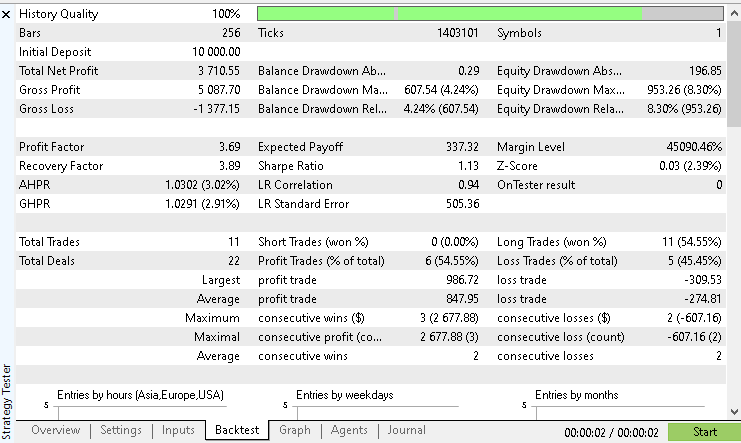
This corresponds to a return slightly above thirty-five percent for the year. The recorded win rate was 54.55%, which is not exceptionally high. However, it remains consistent with the nature of volatility breakout systems that rely on asymmetrical reward-to-risk rather than frequent winners.
One of the most encouraging aspects of this run is the shape of the equity curve. The attached screenshot shows a smooth progression of account growth without sharp drawdowns or sudden collapses.
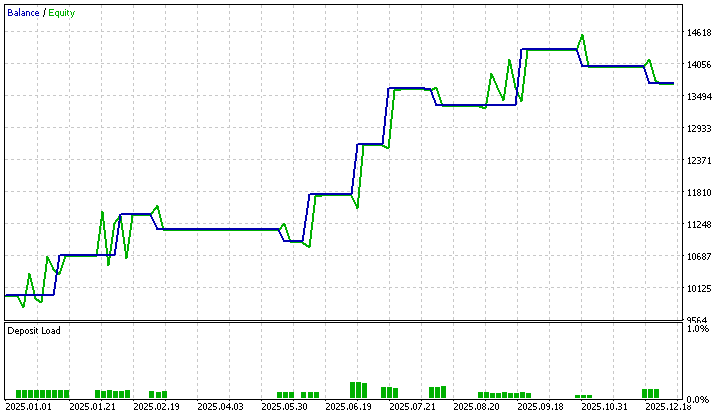
This suggests that the combination of volatility-based entries, structure confirmation, and disciplined risk sizing is working stably. The system does not depend on a high strike rate to remain profitable, and the equity behavior reflects a controlled exposure profile rather than aggressive compounding.
These results should not be treated as a final verdict on the strategy. They represent a single configuration, a single market, and a single time window. The EA was intentionally designed with flexible input parameters to support further experimentation. Different volatility multipliers, stop-loss models, take-profit modes, time filters, and day filters can be explored to evaluate how sensitive performance is to each component.
At this stage, the most valuable next step is independent testing. Running the same model across different instruments, timeframes, and market regimes can reveal whether the observed behavior is structural or market-specific. Minor configuration changes may also uncover performance improvements or stability tradeoffs. Any findings, observations, or variations that yield interesting results are worth sharing in the article's comment section so that the broader research effort can move beyond a single test case.
Conclusion
This article has taken a practical step beyond theory and into implementation. We started from Larry Williams' core idea that volatility creates opportunity, structure gives direction, and time-based filters improve selectivity. Instead of treating these concepts as isolated techniques, we combined them into a single, testable trading model. We documented the entire process of turning that model into a working Expert Advisor.
What has been achieved is not just an EA that places trades. We have built a flexible research framework. The system can project volatility-based entry levels using two different models. It can anchor risk either to the market structure or to a volatility-derived distance. It can exit trades using time-based logic, profit-based logic, or a defined risk-to-reward ratio. It can filter trades by day of the week and by time of day. Each of these elements is exposed via input parameters, allowing ideas to be tested without changing the code.
The backtest on Gold has shown that even a simple configuration of this framework can produce stable growth with controlled drawdowns. A modest win rate was enough to generate meaningful returns because risk was aligned with market behavior rather than fixed distances. More importantly, the equity curve did not rely on a small number of extreme winners. It reflected consistent participation in volatility expansions filtered by structure and time.
At its core, this article has provided a foundation for further research. The EA is not presented as a finished system. It is presented as a laboratory. It invites replication, modification, and extension. The same framework can be applied to other markets, other timeframes, and other parameter regimes to explore where the underlying logic holds and where it fails.
The real value of this work is not in a single backtest result. It is in the method. We now have a structured way to study how volatility, structure, and time interact in real markets. That is the kind of tool that supports long-term learning rather than short-term optimization.
The following table lists all supplementary files attached to this article, along with a brief description of the purpose each file serves. These files are provided to help readers reproduce the results discussed and follow the implementation accurately.| File Name | Description |
|---|---|
| lwVolatilityStructureTimeFilterExpert.mq5 | The main Expert Advisor source file that implements the complete trading logic, including Larry Williams volatility breakout models, swing structure detection, time and TDW filters, and trade and risk management rules. |
| configurations.ini | Strategy Tester environment configuration used for the backtest. |
| parameters.set | A MetaTrader 5 strategy tester settings file containing a fixed set of input parameters used to reproduce the backtests and results discussed in this article. |
Warning: All rights to these materials are reserved by MetaQuotes Ltd. Copying or reprinting of these materials in whole or in part is prohibited.
This article was written by a user of the site and reflects their personal views. MetaQuotes Ltd is not responsible for the accuracy of the information presented, nor for any consequences resulting from the use of the solutions, strategies or recommendations described.

 MQL5 Trading Tools (Part 14): Pixel-Perfect Scrollable Text Canvas with Antialiasing and Rounded Scrollbar
 Creating Custom Indicators in MQL5 (Part 6): Evolving RSI Calculations with Smoothing, Hue Shifts, and Multi-Timeframe Support
 Price Action Analysis Toolkit Development (Part 57): Developing a Market State Classification Module in MQL5
 Introduction to MQL5 (Part 37): Mastering API and WebRequest Function in MQL5 (XI)

- Free trading apps
- Over 8,000 signals for copying
- Economic news for exploring financial markets
You agree to website policy and terms of use