

Low-Frequency Quantitative Strategies in Metatrader 5: (Part 1) Setting Up An OLAP-Friendly Data Store
 3 239
3 239
 0
0

Introduction
We just finished a series of articles introducing the basic concepts of statistical arbitrage for the average retail trader armed with only a consumer notebook, a regular internet connection, and limited capital. For it to be possible, we keep our focus on the low-frequency mean-reversion strategies, assuming that high-frequency trading (HFT) remains a capital-intensive domain, usually restricted to institutional players. We expect to have succeeded in showing that retail traders can succeed in low-frequency quantitative trading, provided that they have enough data, since the computational power required is already broadly available. Enough data means the data required to find niche opportunities. Enough computational power means hardware and software capable of processing the data in the required time.
In the last article of that series, we suggested the use of a specialized database for data analysis, an open-source and free database to be used in tandem with SQLite in our pipeline. The main idea behind this suggestion is that as our dataset evolves and grows, an Online Transaction Processing (OLTP) system like SQLite is not the best tool for the data analysis job, as it could have been when it was only demonstrating the application of the introductory concepts. In other words, as we are progressing towards a real trading system, we need a dedicated data analysis tool, being the first, and arguably the most relevant one, a specialized OLAP database.
Now, in this new series that you can think of as a new chapter of the same story, it is time to start implementing this OLAP-friendly data analysis system. However, if you followed that series, running the tools and experimenting with the provided scripts and statistical methods, you may have a lot of data already stored in your SQLite database, and some of this data may be the results of previous data analysis, like the outputs of cointegration tests and scoring system. You may want to preserve the part of this data that needs to be migrated or converted to the new system. But even if you think this data is irrelevant, at some point in the future, you may be faced with the need to import data from other database systems (Postgres, MySQL, etc.) including SQLite. So, our first task in this new chapter is to show how fast and straightforward this migration can be.
After we have any legacy or complementary data ported to our new system, the next step is to get new data directly into the new system, keeping it up-to-date and pruned, without gaps or duplications. For this, we will be using an industry-level file format standard (Parquet) and an industry-level filesystem partitioning scheme (Hive), ensuring your data remains portable between local systems and most cloud providers, performant, and easy to query.
Once we have this OLAP-friendly setup established, we can start running our data analysis to evaluate trade ideas, look for niche patterns, and backtest well-known trading setups to qualify them (or not) for the development of full-featured Expert Advisors. That is, our data analysis should save us time, allowing us to filter new ideas in seconds, instead of hours or even days of high-performance MQL5 Expert Advisor development for backtesting. By being able to merge data from several sources (brokers or commercial data providers), we can explore unusual combinations, including non-financial data, like freight fees and macroeconomic aggregated datasets.
One thing to note: Although high-frequency trading (HFT) is usually associated with trading in the order of milliseconds or even microseconds, for our purposes here, any frequency below a few seconds is out of scope. In this series of articles, we are interested in developing niche strategies both for any timeframe, but never below a few seconds. We do not want to compete when our chances are near zero. Instead, we want to explore using our small size to our advantage. Speed is relevant, for sure, but the order routing speed, or the execution speed, is not the only speed that matters. We can also get a trading edge by increasing the speed of our opportunity discovery. If we find an edge, we can explore it in a blue ocean without the need to fight for milliseconds.
Keep in mind that the principles we will discuss here (partitioning, filesystem layout, zero-copy data reading, and the use of database native functions) apply to any OLAP system. For convenience, we’ll be using the same free and open-source system we described in that article, which is DuckDB. If you are not familiar with it, you are kindly invited to check that article to better understand the reasons behind this choice.
Convert SQLite database to Parquet files
As we presented the results of our research for developing a statistical arbitrage framework for the average retail trader, we’ve set up a barebones database schema using the Metatrader 5 embedded SQLite. This schema evolved organically as we improved our knowledge and new requirements arose. In its latest version (statarb-0.5), it looked like this:
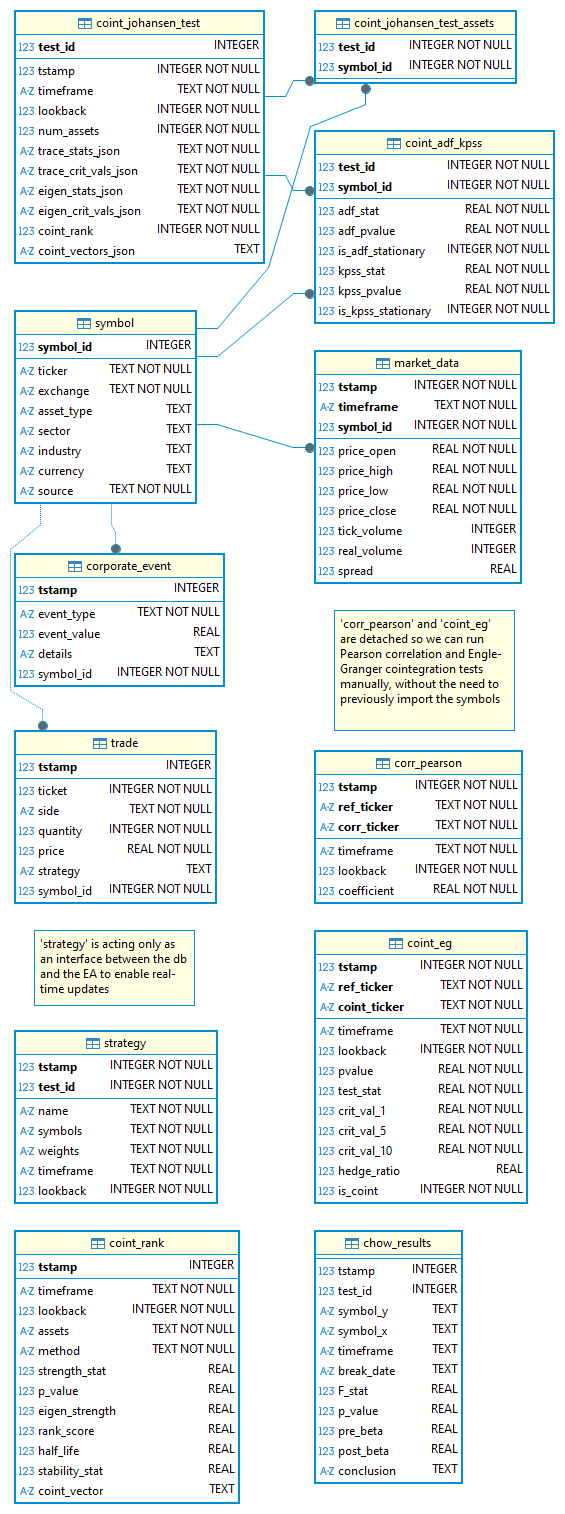
Fig. 1. Entity-Relationship Diagram for the statarb-0.5 SQLite database
The schema was effectively implemented, and we used that database in our experiments and backtests. In it, we stored not only market data but the results of many statistical tests and experiments with our scoring system. Depending on how you played with the concepts, this data is potentially valuable, and it is also potentially large. Even if you consider that data as disposable, useful only for learning purposes, we should consider that at some point in your operations, you may be faced with the need to reuse the data already stored in an OLTP system. You may have paid data already stored in a database like Postgres or MySQL, for example. If this is the case, to run scalable data analysis for quantitative strategies, you’ll need to convert that data to a format more suitable for being ingested by an OLAP system. Fortunately, this need is nothing more than the usual business in the quantitative trading space, and it is easy to perform with DuckDB.
Supposing you already have DuckDB installed in your system, by using its CLI, you can run this simple command in the DuckDB shell:
INSTALL sqlite;
LOAD sqlite;
ATTACH '<path/to/your/sqlite.db>' AS sqlite_db (TYPE SQLITE);
USE sqlite_db;
EXPORT DATABASE '<folder_name>' (FORMAT PARQUET);
The <folder_name> is your choice for where in your local filesystem you want the converted data to be stored. This command will generate several Parquet files in the chosen folder, one file for each database table, including system tables, along with two additional files: schema.sql and load.sql.
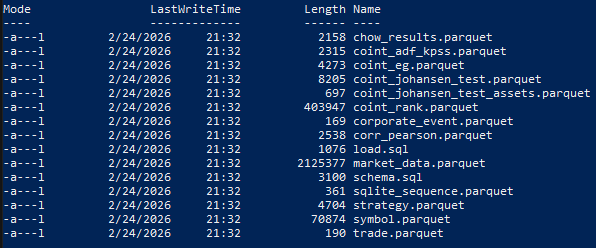
Fig. 2. PowerShell output showing all SQLite tables converted to Parquet files
“The schema.sql file contains the schema statements that are found in the database. It contains any CREATE SCHEMA, CREATE TABLE, CREATE VIEW and CREATE SEQUENCE commands that are necessary to re-construct the database.
The load.sql file contains a set of COPY statements that can be used to read the data from the CSV files again. The file contains a single COPY statement for every table found in the schema.” (DuckDB docs)
You may also want to convert only specific tables, which would probably be what you will be doing in the majority of cases, since some tables are related to trading, not to data analysis. For example, the tables ‘trade’ and ‘strategy’ are used to store trading metadata and to provide real-time strategy updates to the Expert Advisor, respectively.
This is how you can convert a single table from the command line. Instead of exporting a database, you COPY the desired table to ‘output.parquet’.
duckdb -c "INSTALL sqlite; LOAD sqlite;
           ATTACH 'my_database.db' AS sqlite_db (TYPE SQLITE);
           COPY sqlite_db.my_table TO 'output.parquet' (FORMAT PARQUET);"
Once you have your tables converted to Parquet files in the output folder, you can query them like a normal database table with our good old SQL. For example, the coint_rank table, where we’ve been storing results from our scoring system, can be accessed like this:
SELECT timeframe,lookback,assets,rank_score FROM 'parquet.database/coint_rank.parquet' LIMIT 10;
The command-line output is similar to that of SQLite.
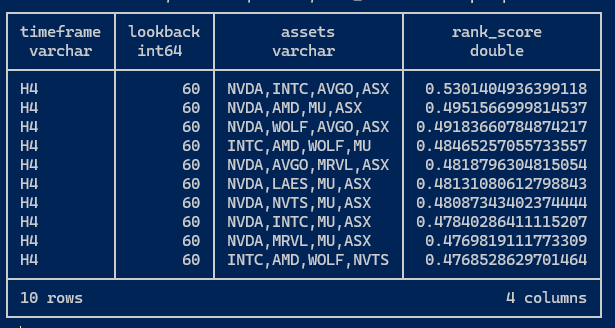
Fig. 3. Sample DuckDB output after querying a table from a Parquet database
From now on, you can run regular database operations over these Parquet files, like querying many files at once using the “glob” pattern, creating views, and performing joins. The DuckDB website contains comprehensive documentation about how to read and write Parquet files.
In this series, we’ll be using Python most of the time to query these Parquet files. This is backed by the Python Relational API, which has a wealth of specialized lazy-evaluated analytics functions that allow us to scan the Parquet file very fast, because it only reads the file metadata, “until a method that triggers execution is called”.
Is this different from reading CSV files on SQLite?
Although we keep the same goal we’ve set in the previous series, which is to avoid math or technical explanations, instead keeping our focus on the trading strategy, it is relevant to understand the difference between Parquet files storage and CSV files storage.
Metadata
CSV is a plain-text, human-readable format, while Parquet is a binary format with plenty of metadata embedded in each file. You can easily check the embedded metadata by running this query in the DuckDB shell.
.mode line

select * from parquet_metadata('parquet.database/coint_rank.parquet');
Replace with your own folder and Parquet filename. (The first line is only to allow you to see all metadata, one item per line, without truncating the output.) After running this query, you should see a vertical list similar to this:
file_name = parquet.database/coint_rank.parquet
row_group_id = 0
row_group_num_rows = 7505
row_group_num_columns = 12
row_group_bytes = 533723
column_id = 0
file_offset = 0
num_values = 7505
path_in_schema = tstamp
type = INT64
stats_min = 1760920476215768
stats_max = 1765924659832034
stats_null_count = 0
stats_distinct_count = NULL
stats_min_value = 1760920476215768
stats_max_value = 1765924659832034
compression = SNAPPY
encodings = PLAIN
index_page_offset = NULL
dictionary_page_offset = NULL
data_page_offset = 4
total_compressed_size = 30166
total_uncompressed_size = 60069
key_value_metadata = {}
bloom_filter_offset = NULL
bloom_filter_length = NULL
min_is_exact = true
max_is_exact = true
row_group_compressed_bytes = 1
geo_bbox = NULL
geo_types = NULL
Remember that the coint_rank SQLite table we converted to Parquet has the following schema:

Fig. 4. Screen capture of the coint_rank table from statarb-0.5.db diagram
To better understand the difference between querying Parquet files with DuckDB and CSV files, suppose that we want to run some aggregation or sorting in the p_value column. For the CSV, the system would need to read the tstamp, timeframe, lookback, and assets columns for each row only to reach the p_value field. In the Parquet file, due to its columnar storage model, the system can first read the column metadata. It will read column_id = 0 for the tstamp. Since each column is stored separately and we are only asking for the p_value, the system can go directly to the next column until it finds the p_value column_id. So it avoids reading a lot of data that it doesn’t need to answer the query.
Depending on the query, since we have statistics in the embedded metadata, some queries don’t ever need to read the file, because the system will know which files are worth reading by just reading the metadata. Let’s say we ran a query asking for data from the year 2024. The tstamp column metadata (above) contains a section called stats_min and stats_max with the following values:
stats_min = 1760920476215768 (Monday, October 20, 2025, at 12:34:36.215 AM)
stats_max = 1765924659832034 (Tuesday, December 16, 2025, at 10:37:39.832 PM)
The tstamp column's minimum value starts far in the future. The system doesn't even need to open this file because the metadata is informing it that the data isn't there. A CSV file doesn't know what's inside it until it reads the whole thing.
Compression
As a bonus, you have an optimized storage system for free.
Total Uncompressed Size = 60,069
Total Compressed Size = 30,166
Parquet managed to cut the file size in half.
The key difference lies in how the system finds information. A CSV is like a book where we have to read every single page to find one specific word. Parquet is like a book with a perfect index and a summary for every chapter. A compressed book, we may say.
Zero-copy Parquet reader
Besides reading metadata first to avoid unnecessary whole-file reading and compression, there is another feature that dramatically improves performance: a zero-copy reader. You’ll find this expression a lot when researching DuckDB and the Parquet file format. Although implementing it requires sophisticated low-level programming skills, it can be easily understood from the end-user perspective.
To read a CSV file, a system like SQLite (and other RDBMS for this matter) needs to read the data from the disk into a buffer, parse the CSV text, and create new copies of the data in its own internal memory format. The query can only run on that second copy. It is like importing: read, translate, copy, and finally execute the query.
DuckDB can operate on data with minimal copying by memory-mapping Parquet pages, mapping the file directly into its memory. No secondary copy is created.
Store market data for analysis
As you know, Metatrader 5 has a very efficient local storage/cache mechanism and doesn’t hit the server if the data was previously requested. However, we want to have our market data always available as Parquet files. This practice will ensure the portability of our historic data (we may want to work on another machine, or have our data in an external drive). Besides that, you may have a market data paid service subscription whose content will probably have to be merged with the Metatrader 5 historic data. For these reasons, from now on we will adopt this workflow by requesting from Metatrader 5 and storing the Parquet files locally.
Denormalization
Converting a table or an entire database to Parquet can help a lot with performance, ease of use, and simplifying our queries, but our schema does not scale. Currently, our price history is split in two tables: ‘market_data’ and ‘symbol’. For SQLite, it was normalized to ensure data integrity and reduce storage, but OLAP schemas need to reduce the costly joins between tables to prioritize speed. Because of this requirement, they are usually denormalized. Since price history is our main data analysis component, we will start by denormalizing it.
Partitioning
However, denormalization is not enough for us to have a scalable storage/database system suitable for large datasets. Soon, we’ll start requesting more price data from history, potentially from several sources. It is pretty reasonable to think that in a few weeks we’ll have, let’s say, tick data for fifty symbols and for ten timeframes or more. This is a good amount of data. But for quantitative strategies, we’ll not be out of the norm if we need to analyze tick data for five hundred or five thousand symbols in twenty timeframes or more. So we need a storage schema that can scale. Partitioning is the first technique we’ll be using to store our denormalized history data.
We are not planning to write over this data. It is a read-only storage. Because of that, we’ll be storing our data in Parquet files, not in a DuckDB single-file database. We can source data from several sources, keep them separate and well-organized, and merge at will when requested. It is a perfect scenario for Parquet files instead of a single file in DuckDB. (A DuckDB single-file database will be useful for other scenarios soon, when there will be a need to perform some writes.)
But how are we going to name these files? This is an important question disguised as a trivial chore. Because we need to make the file naming coherent, consistent, and easy to use for queries. Should the filenames include the symbol name (ticker), timeframe, and history range? Should they include the source as a reference? Is there any other relevant information I’m missing here?
Fortunately, this is an already solved question. Of course, there is no rule written in stone, but a lot of rules of thumb, best practices derived from practical needs. We’ll be taking advantage of this accumulated experience.
Filesystem folder as virtual columns
We will be using our filesystem folders (directories) as virtual columns. The most relevant rule of thumb for this kind of organization is that the folder structure should reflect, as closely as possible, the structure of our most expected queries. So, this structure may vary a lot according to our needs. You may use the structure we are showing here as a starting point and develop your own as you get familiar with the system and new needs arise. This kind of data organization is called Hive Partitioning. It is very performant, intuitive, flexible, and well-documented on the DuckDB docs:
“Hive partitioning is a partitioning strategy that is used to split a table into multiple files based on partition keys. The files are organized into folders. Within each folder, the partition key has a value that is determined by the name of the folder.”
Hive partitioning is a well-known way of organizing large datasets (and we are expecting ours to grow large soon) that DuckDB and other systems, including Apache Spark and AWS Athena, can understand as virtual columns. We are looking at compatibility here.
Currently, we have six partition keys:
- source = the data provider or broker server name
- klass = the asset class (named klass for class is a reserved Python identifier)
- ticker = the symbol name
- tf = the timeframe
- year
- month
Which will result in a structure like this:
market_data\source=MetaQuotes-Demo\klass=Forex\ticker=AUDCAD\tf=H1\year=2026\month=2\data_0.parquet
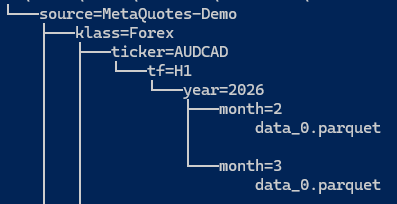
Fig. 5. Capture of the tree structure for a sample Hive partitioned market data folder
When we ask DuckDB to read market_data/**/*.parquet, it automatically adds columns for all our keys to our result set based on the folder path. Also, when we run a query like this:
SELECT * FROM market_data WHERE ticker='AUDCAD' AND year=2025 The system only opens files in the respective folders. It doesn’t even think about 2024 data. This makes queries much faster. Some sources on the internet and AI assistants say 10x to 100x faster as our history grows.
You may already have noted that this kind of organization also makes our newborn data store easy to maintain. If we want to delete or update a block of data (year or month, let’s say), we can do this by simply deleting a folder.
Ensure the column names in the Parquet file are lowercase and contain no spaces (open, high, low, close, tick_volume). DuckDB is case-sensitive by default in many configurations. Also, always store timestamps in UTC. Metatrader 5 broker time varies, and daylight saving shifts may make your timestamps suddenly misaligned if you mix offset-aware and offset-naive timestamps. See the final recommendation about timezones at the end of this article.
In the article footer, you will find a Python script that requests price data from your Metatrader 5 terminal, adds virtual columns based on the keys described above, and exports the data to a compressed Parquet file into the nested folder hierarchy. It will download by symbol or by symbol ‘path’ (group of symbols in a named class in Metatrader 5). Also, it will download only the missing data required for our analysis, filling the gaps, and will pause between requests to make well-paced requests to your broker server.
Once you have the data, querying it is as simple as querying any relational database using SQL. For example, to find bullish candles in all EURUSD timeframes available locally:
SELECT * FROM read_parquet('data/**/*.parquet', hive_partitioning = 1)
WHERE ticker = 'EURUSD'
  AND year = 2026
  AND close > open; -- Find bullish candles
However, despite the simplicity and easy querying, you are getting all the benefits of an industry-level OLAP system, along with specialized statistical native functions, like the Pearson Correlation coefficient and others we’ve been using. Please refer to DuckDB docs for more.
Explore data for possible strategies
For now, our goal here is to make it clear what kind of queries we are interested in performing in our OLAP system, not to evaluate the trading strategy's viability.
Arguably, the best way to analyze data when looking for trading opportunities is to start with a hypothesis. When we found something worth investigating, we backtest it, eventually with promising results. Like in our statistical arbitrage through cointegrated stocks series, in which our hypothesis is that we could find a sustainable cointegration relationship between some high-liquidity stocks from the semiconductor industry and Nvidia stocks, we will start our exploratory data analysis with a hypothesis too.
To make things simple and to avoid letting the focus drift to the results, keeping the focus on the process instead, we will start with a very well-known hypothesis: the Golden Cross momentum strategy can give very different returns in Forex and Indexes. To test this hypothesis, we will run it on all Forex and Indexes symbols available in our broker server (in this case, the MetaQuotes-Demo server) with a lookback period of 1250 days and check the 30-Day forward returns to see how they compare.
What is the Golden Cross momentum strategy?
If you have ever researched trading strategies, you probably already know what a Golden Cross strategy is. Anyway, since there are variations in the parameters used in its two indicators, let’s make it clear what the values we are using here for this example.
A Golden Cross is nothing more than a fancy name for a simple moving average crossover applied to a long-term horizon. It identifies a technical analysis pattern that occurs when a short-term moving average crosses above a long-term moving average. Its meaning is very intuitive, indicating a potential reversion from bearish to bullish momentum. One may say that the Golden Cross indicates the price may have reached a trough and that from that point onwards, we may expect the start of a new long-term bull market. Usually, we’ll see a 50-day and a 200-day simple moving average (SMA) being used for the short-term and long-term, respectively.
In the examples below, the red line represents the short-term, or fast, SMA, and the blue line represents the long-term, or slow, SMA.

Fig. 6. USDJPY on the Daily timeframe with a successful golden cross on Dec 03, 2012
Note that the Golden Cross, like any indicator, may produce false signals. This is common when the market goes sideways.

Fig. 7. AUDUSD on the Daily timeframe with a failed golden cross on Jan 26, 2023
The Golden Cross has its roots in the stock market - as it happens with many trading strategies and indicators popular among retail traders - but it is also used for cryptos and Forex. In this case, it is common to see it being applied using shorter SMAs, like 20/50-day, and as many variants of these values as traders can conceive and experiment with.
The Golden Cross testing script
Testing the Golden Cross in a couple of symbols is relatively easy, but testing it in all Forex and Indexes symbols at once is the exact reason why we want a scalable data store and an OLAP system: we want to run it in seconds on any reasonable consumer laptop. In the footer of this article, you will find a simple Python script that can help with this task. You should take it as a starting point for your own experimentations and for development.
This is its main function, the method that runs the Golden Cross analysis over a list of symbols, with the chosen lookback period. You can also choose a name for the portfolio - to be used in the optional plots - and you can also choose if you want or not the results to be exported to a CSV file. This CSV file is intended to be used by the Expert Advisor in the future, when we’ll be screening for backtests.
   def golden_cross(self, symbols, lookback=2500, portfolio_name="Portfolio", plot=True, export_csv=True):

        # 1. Ensure we have data
        self._ensure_data(symbols, "D1", lookback)

        # 2. Query the Hive-partitioned Parquet files
        parquet_path = f"{self.base_path}/**/*.parquet"
It starts by ensuring we have enough price data already stored in our Parquet data store. If not, it will fill the gaps in the store by requesting it from MT5.
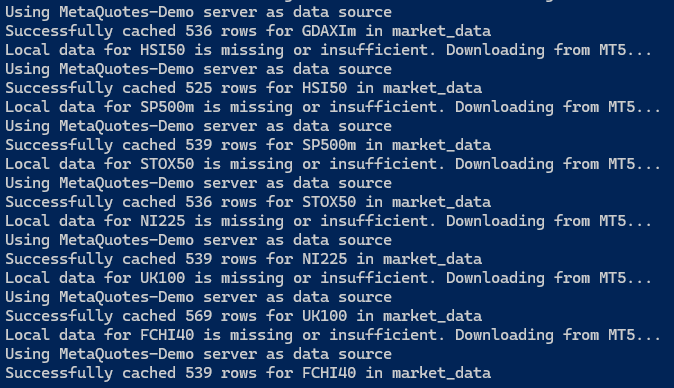
Fig. 8. Screen capture of the strategy analyzer Python script output requesting missing data
This is the core of the script, the SQL query to calculate the Golden Cross over the filesystem partitions we create above, and test them for the 30-Day forward returns.
        query = f"""

        WITH base_ma AS (
            SELECT
                time, ticker as symbol, close,
                AVG(close) OVER (PARTITION BY ticker ORDER BY time ROWS BETWEEN 49 PRECEDING AND CURRENT ROW) as ma50,
                AVG(close) OVER (PARTITION BY ticker ORDER BY time ROWS BETWEEN 199 PRECEDING AND CURRENT ROW) as ma200
            FROM read_parquet('{parquet_path}', hive_partitioning=1)
            WHERE ticker IN ({str(symbols)[1:-1]})
        ),

        lagged_data AS (
            SELECT
                *,
                LAG(ma50) OVER (PARTITION BY symbol ORDER BY time) as prev_ma50,
                LAG(ma200) OVER (PARTITION BY symbol ORDER BY time) as prev_ma200,
                LEAD(close, 30) OVER (PARTITION BY symbol ORDER BY time) as future_price
            FROM base_ma
        ),

        signals AS (
            SELECT
                *,
                ((future_price - close) / close) * 100 as pct_return_30d
            FROM lagged_data
            WHERE prev_ma50 < prev_ma200 AND ma50 > ma200
        )
        SELECT * FROM signals;
        """
Note this line at the bottom of the query:
WHERE prev_ma50 < prev_ma200 AND ma50 > ma200
As it is easy to see, it contains the definition of the Golden Cross, the SMAs crossover. The simple system we are building to run on your consumer laptop can scan millions of rows of historical data to find every time this happened and calculate the win rate for the (then) next 30 days. We are turning a subjective chart pattern visualization into an objective statistical measurement that, in a few seconds, confirms or denies the strategy's profitability for the chosen symbols with the chosen lookback and timeframe. You can backtest an entire group of stocks, indexes, currencies, in any mix you think is worth it, and you will do it much faster than traditional Python loops. It is only after you find something promising that you will dedicate efforts to develop an EA to backtest in the MT5 environment, optimize, and, eventually, run the strategy in a demo account for final verification. You may save days or even weeks of hard work by leveraging and mastering this kind of previous analysis if you are taking your quantitative trading endeavour seriously.
By the end, the script will aggregate the results by symbol.
        results = self.con.execute(query).df()

        if results.empty:
            print("No Golden Cross signals found in the dataset.")
            return

        # 3. CSV Export Logic (Aggregated by Symbol)
        if export_csv:
            summary = results.groupby('symbol').agg(
                frequency=('symbol', 'count'),
                avg_return_30d=('pct_return_30d', 'mean')
            ).sort_values(by='avg_return_30d', ascending=False)

            filename = f"golden_cross_summary.csv"
            summary.to_csv(filename)
            print(f"\nSummary exported to {filename}")
            print(summary) # Display table in console for quick check
The output for the Metatrader 5 available Indexes at the time of writing.

Fig. 9. Screen capture of the strategy analyzer Python script output with a summary by symbol
The same data above will be saved to the CSV file.
Golden Cross on Forex vs. Indexes
As stated above, our purpose in making this simple verification of how much the results differ when the Golden Cross signal is applied to Forex and Indexes is to make a case for how the OLAP-friendly data store we are building can help with the verification of the viability of well-known trading strategies, as well as researching for new trading opportunities as well.
In the daily timeframe, for the last 1250 days of trading, or nearly five years, this was the 30-day forward returns in Forex and Indexes.
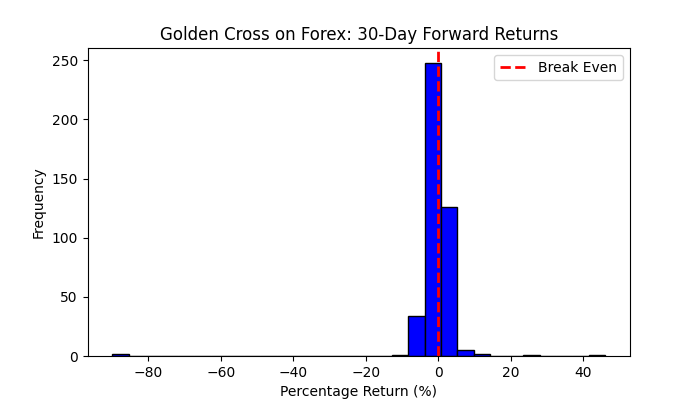
Fig. 10. Plot of the Golden Cross 30-Day forward returns in the D1 timeframe and 1250 days of lookback period on Forex
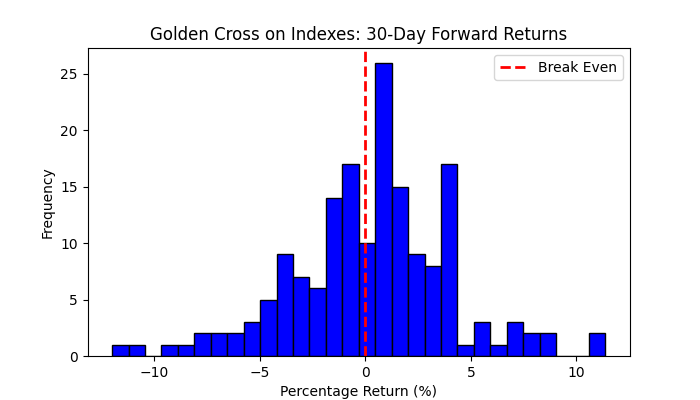
Fig. 11. Plot of the Golden Cross 30-Day forward returns in the D1 timeframe and 1250 days of lookback period on indexes
In Forex, our results were break-even for any practical purposes (and we didn’t include the transaction costs yet). On the other hand, for the indexes, we can verify some gains, mainly with the top eight Indexes presented in Figure 9 above. Anyway, there are very few signals in the daily timeframe.
What can the data say about our hypothesis?
Although popular, the Golden Cross seems to work better for Indexes. Let’s remember it was developed in the stock market context. It performs poorly in Forex. At least, for the daily timeframe and 1250 days of lookback period.
In this last statement lies all the relevant understanding of the subject of this article: it is a requirement that we would be able to run our data analysis very fast and easily because we will need to run it against many different parameters, recombining them in unexpected ways to find niche opportunities, potentially facing the need to run these analyzes while monitoring live trading.
This is the whole point about the OLAP-friendly data store we are building here.
A final recommendation about time zones
Remember that we are dealing with a time series. Datetime consistency is paramount. We are constantly joining tables on the timestamp. If we have misaligned quotes, we will have our analysis compromised and, worse, fail silently, if no guard measures are present in our code. One of the most common mistakes is to store data in local datetime and/or mix it with data in UTC time. The presence of eventual daylight saving time in data provider servers is another source of trouble. The best way to avoid these troubles is to maintain everything in UTC in the data store, respect this consistency in Python queries, and always initialize our DuckDB system in UTC-aware mode.
In DuckDB, the way to ensure consistency is to treat the database as timezone-agnostic by storing everything in UTC and only handling the timezone conversion at the last step of our analysis or for visualization, if we want. We can force the entire DuckDB session to use UTC by adding this line immediately after initializing our DuckDB connection:
con = duckdb.connect()
con.execute("SET TimeZone='UTC';")
By doing this, any function like now() or today() inside our SQL will return UTC instead of our computer's local time.
If we ever need to compare our data against a different source (like a different broker), we should use the AT TIME ZONE syntax. This ensures both sides of the comparison are on UTC.
SELECT
    time AT TIME ZONE 'UTC' as utc_time,
    close
FROM read_parquet('...')
Finally, be careful when passing a Python datetime object into a query.
Don’t do this:
con.execute("SELECT * FROM df WHERE time > ?", [datetime.now()]) Always ensure the Python object is aware before sending it to DuckDB.
con.execute("SELECT * FROM df WHERE time > ?", [datetime.now(timezone.utc)])
Our sample script attached below already adds the timezone setting to the `__init__` method:
class StrategyAnalyser:

    def __init__(self, base_path="market_data"):
        self.base_path = base_path
        self.con = duckdb.connect(database=':memory:')

        # FORCE UTC AT THE START
        self.con.execute("SET TimeZone='UTC';")
        self.downloader = DataDownloader(base_path)
Conclusion
We suggested a minimal, but scalable and future-proof setup for an OLAP-friendly data store based on a collection of Parquet files arranged in an easy-to-query and maintain Hive-partitioned filesystem. We showed a simple method for converting previously stored data in other RDBMS like SQLite, Postgres, or MySQL to this new system.
For our future developments throughout this series of articles, we suggested building a locally stored market data set of historical prices to ease the merge of several data sources and improve the data store performance.
Finally, we presented an example analysis comparing the well-known Golden Cross momentum strategy when applied to two different asset classes, Forex and Indexes, for all symbols available in our current broker server (MetaQuotes-Demo), making it clear that the goal of this analysis is to be an illustration of the kind of analysis we expect our OLAP-friendly data store and accompanying system (DuckDB) to be able to run with just a consumer notebook, a collection of Parquet files, and a couple of lines of SQL code.
| Filename | Description |
|---|---|
| data_downloader.py | Python script to keep the local data store up-to-date with the required data |
| strategy_analyser.py | Python script to run the Golden Cross sample analysis over a list of symbols |
Warning: All rights to these materials are reserved by MetaQuotes Ltd. Copying or reprinting of these materials in whole or in part is prohibited.
This article was written by a user of the site and reflects their personal views. MetaQuotes Ltd is not responsible for the accuracy of the information presented, nor for any consequences resulting from the use of the solutions, strategies or recommendations described.

 Larry Williams Market Secrets (Part 14): Detecting Hidden Smash Day Reversals with a Custom Indicator
 Unified Validation Pipeline Against Backtest Overfitting
 Using the MQL5 Economic Calendar for News Filtering (Part 2): Stop Management Positions During News Releases
 Graph Theory: Traversal Depth-First Search (DFS) Applied in Trading

- Free trading apps
- Over 8,000 signals for copying
- Economic news for exploring financial markets
You agree to website policy and terms of use