

Building AI-Powered Trading Systems in MQL5 (Part 8): UI Polish with Animations, Timing Metrics, and Response Management Tools
 4 091
4 091
 5
5

Introduction
In our previous article (Part 7), we further modularized the AI-powered trading system in MetaQuotes Language 5 (MQL5), enhancing code organization for maintainability and introducing automated trading capabilities based on AI-generated signals with customizable lot sizes and magic numbers. In Part 8, we develop a polished User Interface (UI) with Animations, Timing Metrics, and Response Management Tools. This model enhances user interaction by displaying loading animations during API requests, providing response timing feedback for performance, and offering regenerate and export buttons for managing AI outputs. We will cover the following topics:
By the end, you’ll have a functional MQL5 program for polished AI-driven trading interactions, ready for customization—let’s dive in!
Understanding the Enhanced User Interface Features
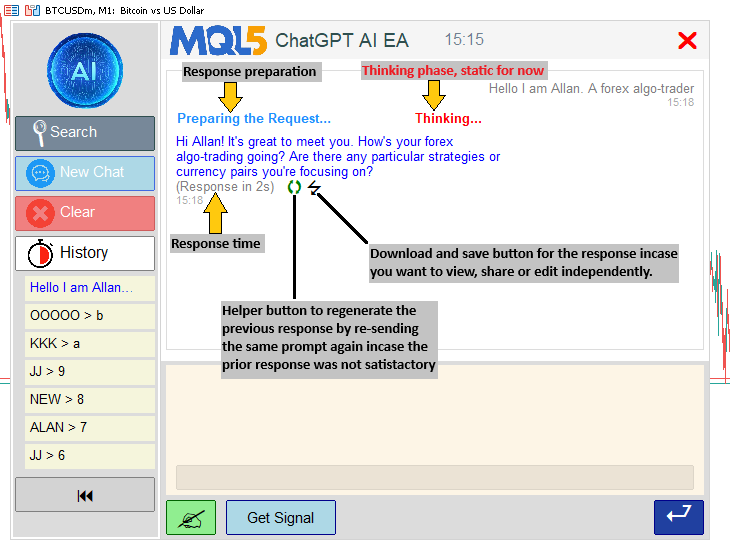
The enhanced user interface features focus on improving interaction within the AI-powered trading system, incorporating loading animations to provide visual feedback during API requests for preparation and thinking phases, while displaying response timing metrics in seconds to inform users of processing efficiency. We introduce response management tools, such as regenerate buttons to re-submit the last prompt for a new AI output and export buttons to save responses to text files, enabling easy review or sharing.
We aim to build these features modularly, extending existing UI components with animation loops for dot-cycling effects, timestamp calculations using tick counts, and event handlers for button clicks to trigger regenerations or file exports. We will extend the management of sidebar states with dynamic resizing and object repositioning. Our plan includes conditional rendering based on user actions, ensuring seamless updates to displays and scroll positions without disrupting the core AI functionality. In brief, here is a visual representation of our objectives.
Implementation in MQL5
To implement the upgrades, we will first define the new object constants that we want to create. We will start with the UI Components file since that is where our tools are housed. Here is the logic we use to achieve that.
string REGEN_ICON_FONT = "Webdings";
string EXPORT_ICON_FONT = "Wingdings 3";
#define REGEN_ICON CharToString('q')  // Circular arrow (spin/regenerate)
#define EXPORT_ICON CharToString('7') // Proxy for save/export
#define ICON_SIZE 16
#define ICON_SPACING 5
color REGEN_COLOR = clrGreen;
color EXPORT_COLOR = clrBlack;
In the global scope of the UI file, we define the "REGEN_ICON_FONT" as Webdings and "EXPORT_ICON_FONT" as Wingdings 3 to specify font families for rendering special characters as icons. We use preprocessor directives to set "REGEN_ICON" to the character 'q' converted via CharToString for a circular arrow representing regeneration, and "EXPORT_ICON" to '7' as a proxy for a save or export symbol. You can choose any of your liking from the table below and switch respectively.
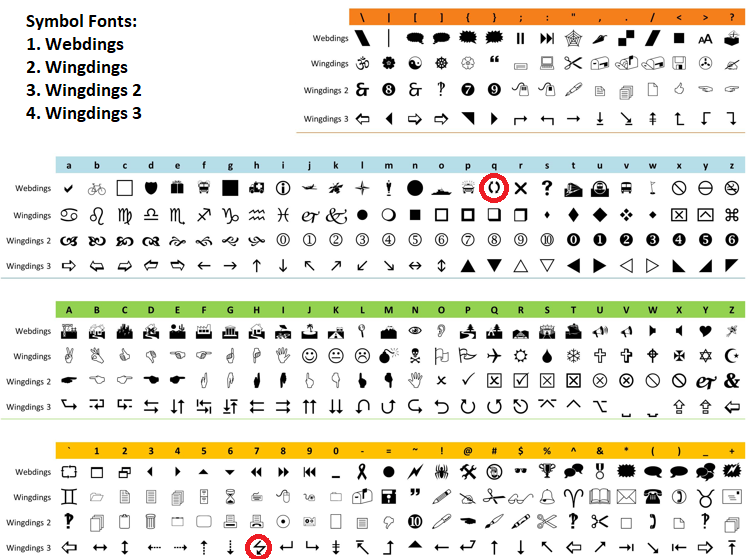
We have marked the ones we want to use. Then, we establish "ICON_SIZE" as 16 for consistent icon dimensions, "ICON_SPACING" as 5 for gaps between them, "REGEN_COLOR" as green for the regenerate icon, and "EXPORT_COLOR" as black for the export icon. Feel free to customize them to your visual appeal. The next step is to incorporate the objects into the line height calculation.
void ComputeLinesAndHeight(const string &font, const int fontSize, const int timestampFontSize,
                           const int adjustedLineHeight, const int adjustedTimestampHeight,
                           const int messageMargin, const int maxTextWidth,
                           const string &msgRoles[], const string &msgContents[], const string &msgTimestamps[],
                           const int numMessages, int &totalHeight_out, int &totalLines_out,
                           string &allLines_out[], string &lineRoles_out[], int &lineHeights_out[]) {
   ArrayResize(allLines_out, 0);
   ArrayResize(lineRoles_out, 0);
   ArrayResize(lineHeights_out, 0);
   totalLines_out = 0;
   totalHeight_out = 0;
   for (int m = 0; m < numMessages; m++) {
      string wrappedLines[];
      WrapText(msgContents[m], font, fontSize, maxTextWidth, wrappedLines);
      int numLines = ArraySize(wrappedLines);
      int currSize = ArraySize(allLines_out);
      ArrayResize(allLines_out, currSize + numLines + 1);
      ArrayResize(lineRoles_out, currSize + numLines + 1);
      ArrayResize(lineHeights_out, currSize + numLines + 1);
      for (int l = 0; l < numLines; l++) {
         allLines_out[currSize + l] = wrappedLines[l];
         lineRoles_out[currSize + l] = msgRoles[m];
         lineHeights_out[currSize + l] = adjustedLineHeight;
         totalHeight_out += adjustedLineHeight;
      }
      allLines_out[currSize + numLines] = msgTimestamps[m];
      lineRoles_out[currSize + numLines] = msgRoles[m] + "_timestamp";
      lineHeights_out[currSize + numLines] = adjustedTimestampHeight;
      totalHeight_out += adjustedTimestampHeight;
      totalLines_out += numLines + 1;
      if (m < numMessages - 1) {
         totalHeight_out += messageMargin;
      } else if (m == numMessages - 1 && numMessages > 0) {
         if (totalHeight_out > 0) totalHeight_out -= messageMargin; // Adjust if last
      }
   }
   // Add buffer below loading messages (Preparing/Thinking) to ensure space for timestamp
   if (numMessages > 0 && StringFind(msgRoles[numMessages - 1], "AI") >= 0 &&
       (StringFind(msgContents[numMessages - 1], "Preparing the Request") >= 0 ||
        StringFind(msgContents[numMessages - 1], "Thinking...") >= 0)) {
      totalHeight_out += 30;  // Extra space below thinking timestamp during wait
   }
   // Add padding if last message is AI and contains time note
   if (numMessages > 0 && StringFind(msgRoles[numMessages - 1], "AI") >= 0 && StringFind(msgContents[numMessages - 1], "(Response in ") >= 0) {
      totalHeight_out += 30; // Dedicated space for time note line + icons
   }
}
In the "ComputeLinesAndHeight" function, for each message, we append its timestamp as an additional line with a "_timestamp" suffixed role and adjusted timestamp height, incrementing the total height and line count, then add a message margin if not the last message, or subtract it if it is to avoid extra space at the end. We add an extra buffer height of 30 if the last message is from AI and contains "Preparing the Request" or "Thinking..." to ensure space below during loading, and another 30 if it includes "(Response in " for padding under time notes with icons. We have highlighted the specific changes for clarity. Now, we will need to update the function to render the response display, so we also include the new helper icons.
void UpdateResponseDisplay() {
   if (showing_small_history_popup || showing_big_history_popup || showing_search_popup) return;
   int total = ObjectsTotal(0, 0, -1);
   for (int j = total - 1; j >= 0; j--) {
      string name = ObjectName(0, j, 0, -1);
      if (StringFind(name, "ChatGPT_ResponseLine_") == 0 ||
          StringFind(name, "ChatGPT_MessageBg_") == 0 ||
          StringFind(name, "ChatGPT_MessageText_") == 0 ||
          StringFind(name, "ChatGPT_Timestamp_") == 0 ||
          StringFind(name, "ChatGPT_RegenIcon") == 0 ||
          StringFind(name, "ChatGPT_ExportIcon") == 0) {
         ObjectDelete(0, name);
      }
   }
   string displayText = conversationHistory;
   int textX = g_mainContentX + g_sidePadding + g_textPadding;
   int textY = g_mainY + g_headerHeight + g_padding + g_textPadding;
   int fullMaxWidth = g_mainWidth - 2 * g_sidePadding - 2 * g_textPadding;
   if (displayText == "") {
      string objName = "ChatGPT_ResponseLine_0";
      createLabel(objName, textX, textY, "Type your prompt here and click Send to chat with the AI.", clrGray, 10, "Arial", CORNER_LEFT_UPPER, ANCHOR_LEFT_UPPER);
      g_total_height = 0;
      g_visible_height = g_displayHeight - 2 * g_textPadding;
      if (scroll_visible) {
         DeleteScrollbar();
         scroll_visible = false;
      }
      ChartRedraw();
      return;
   }
   string parts[];
   int numParts = StringSplit(displayText, '\n', parts);
   string msgRoles[];
   string msgContents[];
   string msgTimestamps[];
   string currentRole = "";
   string currentContent = "";
   string currentTimestamp = "";
   for (int p = 0; p < numParts; p++) {
      string line = parts[p];
      string trimmed = line;
      StringTrimLeft(trimmed);
      StringTrimRight(trimmed);
      if (StringLen(trimmed) == 0) {
         if (currentRole != "") currentContent += "\n";
         continue;
      }
      if (StringFind(trimmed, "You: ") == 0) {
         if (currentRole != "") {
            int size = ArraySize(msgRoles);
            ArrayResize(msgRoles, size + 1);
            ArrayResize(msgContents, size + 1);
            ArrayResize(msgTimestamps, size + 1);
            msgRoles[size] = currentRole;
            msgContents[size] = currentContent;
            msgTimestamps[size] = currentTimestamp;
         }
         currentRole = "User";
         currentContent = StringSubstr(line, StringFind(line, "You: ") + 5);
         currentTimestamp = "";
         continue;
      } else if (StringFind(trimmed, "AI: ") == 0) {
         if (currentRole != "") {
            int size = ArraySize(msgRoles);
            ArrayResize(msgRoles, size + 1);
            ArrayResize(msgContents, size + 1);
            ArrayResize(msgTimestamps, size + 1);
            msgRoles[size] = currentRole;
            msgContents[size] = currentContent;
            msgTimestamps[size] = currentTimestamp;
         }
         currentRole = "AI";
         currentContent = StringSubstr(line, StringFind(line, "AI: ") + 4);
         currentTimestamp = "";
         continue;
      } else if (IsTimestamp(trimmed)) {
         currentTimestamp = trimmed;
         int size = ArraySize(msgRoles);
         ArrayResize(msgRoles, size + 1);
         ArrayResize(msgContents, size + 1);
         ArrayResize(msgTimestamps, size + 1);
         msgRoles[size] = currentRole;
         msgContents[size] = currentContent;
         msgTimestamps[size] = currentTimestamp;
         currentRole = "";
         currentContent = "";
         currentTimestamp = "";
      } else {
         if (currentRole != "") {
            currentContent += "\n" + line;
         }
      }
   }
   if (currentRole != "") {
      int size = ArraySize(msgRoles);
      ArrayResize(msgRoles, size + 1);
      ArrayResize(msgContents, size + 1);
      ArrayResize(msgTimestamps, size + 1);
      msgRoles[size] = currentRole;
      msgContents[size] = currentContent;
      msgTimestamps[size] = currentTimestamp;
   }
   int numMessages = ArraySize(msgRoles);
   if (numMessages == 0) {
      string objName = "ChatGPT_ResponseLine_0";
      createLabel(objName, textX, textY, "Type your prompt here and click Send to chat with the AI.", clrGray, 10, "Arial", CORNER_LEFT_UPPER, ANCHOR_LEFT_UPPER);
      g_total_height = 0;
      g_visible_height = g_displayHeight - 2 * g_textPadding;
      if (scroll_visible) {
         DeleteScrollbar();
         scroll_visible = false;
      }
      ChartRedraw();
      return;
   }
   string font = "Arial";
   int fontSize = 10;
   int timestampFontSize = 8;
   int lineHeight = TextGetHeight("A", font, fontSize);
   int timestampHeight = TextGetHeight("A", font, timestampFontSize);
   int adjustedLineHeight = lineHeight + g_lineSpacing;
   int adjustedTimestampHeight = timestampHeight + g_lineSpacing;
   int messageMargin = 25;  // Increased for extra space
   int visibleHeight = g_displayHeight - 2 * g_textPadding;
   g_visible_height = visibleHeight;
   string tentativeAllLines[];
   string tentativeLineRoles[];
   int tentativeLineHeights[];
   int tentativeTotalHeight, tentativeTotalLines;
   ComputeLinesAndHeight(font, fontSize, timestampFontSize, adjustedLineHeight, adjustedTimestampHeight,
                         messageMargin, fullMaxWidth, msgRoles, msgContents, msgTimestamps, numMessages,
                         tentativeTotalHeight, tentativeTotalLines, tentativeAllLines, tentativeLineRoles, tentativeLineHeights);
   bool need_scroll = tentativeTotalHeight > visibleHeight;
   bool should_show_scrollbar = false;
   int reserved_width = 0;
   if (ScrollbarMode != SCROLL_WHEEL_ONLY) {
      should_show_scrollbar = need_scroll && (ScrollbarMode == SCROLL_DYNAMIC_ALWAYS || (ScrollbarMode == SCROLL_DYNAMIC_HOVER && mouse_in_display));
      if (should_show_scrollbar) {
         reserved_width = 16;
      }
   }
   string allLines[];
   string lineRoles[];
   int lineHeights[];
   int totalHeight, totalLines;
   if (reserved_width > 0) {
      ComputeLinesAndHeight(font, fontSize, timestampFontSize, adjustedLineHeight, adjustedTimestampHeight,
                            messageMargin, fullMaxWidth - reserved_width, msgRoles, msgContents, msgTimestamps, numMessages,
                            totalHeight, totalLines, allLines, lineRoles, lineHeights);
   } else {
      totalHeight = tentativeTotalHeight;
      totalLines = tentativeTotalLines;
      ArrayCopy(allLines, tentativeAllLines);
      ArrayCopy(lineRoles, tentativeLineRoles);
      ArrayCopy(lineHeights, tentativeLineHeights);
   }
   g_total_height = totalHeight;
   bool prev_scroll_visible = scroll_visible;
   scroll_visible = should_show_scrollbar;
   if (scroll_visible != prev_scroll_visible) {
      if (scroll_visible) {
         CreateScrollbar();
      } else {
         DeleteScrollbar();
      }
   }
   int max_scroll = MathMax(0, totalHeight - visibleHeight);
   if (scroll_pos > max_scroll) scroll_pos = max_scroll;
   if (scroll_pos < 0) scroll_pos = 0;
   if (totalHeight > visibleHeight && scroll_pos == prev_scroll_pos && prev_scroll_pos == -1) {
      scroll_pos = max_scroll;
   }
   if (scroll_visible) {
      slider_height = CalculateSliderHeight();
      ObjectSetInteger(0, SCROLL_SLIDER, OBJPROP_YSIZE, slider_height);
      UpdateSliderPosition();
      UpdateButtonColors();
   }
   int currentY = textY - scroll_pos;
   int endY = textY + visibleHeight;
   int startLineIndex = 0;
   int currentHeight = 0;
   for (int line = 0; line < totalLines; line++) {
      if (currentHeight >= scroll_pos) {
         startLineIndex = line;
         currentY = textY + (currentHeight - scroll_pos);
         break;
      }
      currentHeight += lineHeights[line];
      if (line < totalLines - 1 && StringFind(lineRoles[line], "_timestamp") >= 0 && StringFind(lineRoles[line + 1], "_timestamp") < 0) {
         currentHeight += messageMargin;
      }
   }
   int numVisibleLines = 0;
   int visibleHeightUsed = 0;
   for (int line = startLineIndex; line < totalLines; line++) {
      int lineHeight = lineHeights[line];
      if (visibleHeightUsed + lineHeight > visibleHeight) break;
      visibleHeightUsed += lineHeight;
      numVisibleLines++;
      if (line < totalLines - 1 && StringFind(lineRoles[line], "_timestamp") >= 0 && StringFind(lineRoles[line + 1], "_timestamp") < 0) {
         if (visibleHeightUsed + messageMargin > visibleHeight) break;
         visibleHeightUsed += messageMargin;
      }
   }
   int leftX = g_mainContentX + g_sidePadding + g_textPadding;
   int rightX = g_mainContentX + g_mainWidth - g_sidePadding - g_textPadding - reserved_width;
   color userColor = clrGray;
   color aiColor = clrBlue;
   color timestampColor = clrDarkGray;
   for (int li = 0; li < numVisibleLines; li++) {
      int lineIndex = startLineIndex + li;
      if (lineIndex >= totalLines) break;
      string line = allLines[lineIndex];
      string role = lineRoles[lineIndex];
      bool isTimestamp = StringFind(role, "_timestamp") >= 0;
      int currFontSize = isTimestamp ? timestampFontSize : fontSize;
      color textCol = isTimestamp ? timestampColor : (StringFind(role, "User") >= 0 ? userColor : aiColor);
      string currFont = font;
      if (StringFind(line, "Preparing the Request") >= 0) {
         textCol = clrDodgerBlue;
         currFont = "Arial Bold";
      }
      if (StringFind(line, "Thinking...") >= 0) {
         textCol = clrRed;
         currFont = "Arial Bold";
      }
      if (StringFind(line, "(Response in ") == 0) {
         textCol = clrGray;
      }
      string display_line = line;
      if (line == " ") {
         display_line = " ";
         textCol = clrWhite;
      }
      int textX_pos = (StringFind(role, "User") >= 0) ? rightX : leftX;
      ENUM_ANCHOR_POINT textAnchor = (StringFind(role, "User") >= 0) ? ANCHOR_RIGHT_UPPER : ANCHOR_LEFT_UPPER;
      string lineName = "ChatGPT_MessageText_" + IntegerToString(lineIndex);
      if (currentY >= textY && currentY < endY) {
         createLabel(lineName, textX_pos, currentY, display_line, textCol, currFontSize, currFont, CORNER_LEFT_UPPER, textAnchor);
      }
      // Add icons if this is the time note line and it's the last AI's second-last line
      if (StringFind(line, "(Response in ") == 0 && StringFind(role, "AI") >= 0 && lineIndex == totalLines - 2) {
         // Calculate time note width for positioning
         TextSetFont(currFont, currFontSize);
         uint tw, th;
         TextGetSize(line, tw, th);
         int iconX = leftX + (int)tw + 50;  // X offset for space
         int iconY = currentY - 3;  // To raise up on Y axis

         // Regenerate icon
         string regenName = "ChatGPT_RegenIcon";
         createLabel(regenName, iconX, iconY, REGEN_ICON, REGEN_COLOR, ICON_SIZE, REGEN_ICON_FONT, CORNER_LEFT_UPPER, ANCHOR_LEFT_UPPER);
         ObjectSetInteger(0, regenName, OBJPROP_SELECTABLE, true);
         ObjectSetInteger(0, regenName, OBJPROP_ZORDER, 10);

         // Export icon
         iconX += ICON_SIZE + ICON_SPACING;
         string exportName = "ChatGPT_ExportIcon";
         createLabel(exportName, iconX, iconY, EXPORT_ICON, EXPORT_COLOR, ICON_SIZE, EXPORT_ICON_FONT, CORNER_LEFT_UPPER, ANCHOR_LEFT_UPPER);
         ObjectSetInteger(0, exportName, OBJPROP_SELECTABLE, true);
         ObjectSetInteger(0, exportName, OBJPROP_ZORDER, 10);
      }
      currentY += lineHeights[lineIndex];
      if (lineIndex < totalLines - 1 && StringFind(lineRoles[lineIndex], "_timestamp") >= 0 && StringFind(lineRoles[lineIndex + 1], "_timestamp") < 0) {
         currentY += messageMargin;
      }
   }
   ChartRedraw();
}
We begin by checking if any popup like small history, big history, or search is showing, returning early if so to avoid updating the main response display, just like before. We then loop through all objects on the chart to delete those related to previous response lines, message backgrounds, texts, timestamps, and now including our new regenerate icons, and export icons using the ObjectDelete function to clear the area. The rest of the code is just identical and where we have changes we have highlighted and added comments for clarity. We will however explian from the part where we have major overhaul of the added icons.
First, we compute "numVisibleLines" by accumulating visible heights, making sure not to exceed "visibleHeight" and including margins after timestamps. We set left and right x positions, and choose colors for the user, AI, and timestamps. Then, we loop through visible lines: get each line and role, determine if a timestamp is present to set size, color, and font, and adjust the display line if there is space. We set the position and anchor based on the role. If the line is within y bounds, we create a label with "createLabel." For the time note in the last AI message (lineIndex totalLines-2), we measure width with TextGetSize, then calculate "iconX" and "iconY." We create the regenerate icon label "ChatGPT_RegenIcon" using "REGEN_ICON," color, size, and font, and export icon "ChatGPT_ExportIcon" spaced similarly, setting selectable and zorder. We increment "currentY" by line height, adding a margin after timestamps, unless it is the last. Finally, we call ChartRedraw to refresh the display.
Now we have a complete, updated UI components file. All that remains is to call the respective functions in the main file to apply changes. In the main file, we start by defining the animation constants at the top, globally, for easier management.
// Loading indicator constants
string PrepBase = "AI: Preparing the Request";  // Preparing Text
string LoadingPlaceholder = "AI: Thinking...";  // Thinking text
string SpinnerDots[] = {"", ".", "..", "..."};  // Cycling dots for animation
int PreAnimationCycles = 6;  // Number of cycles (~1s total)
ulong StartTimeMs = 0;  // For timing API call
Here, we define the "PrepBase" string as "AI: Preparing the Request" to serve as the base text for the initial loading message during API request preparation. You can change it to your desired initial preparation text. We set "LoadingPlaceholder" to "AI: Thinking..." as the text displayed while waiting for the AI response, which you can also alter. Then, we create the "SpinnerDots" string array with empty string, single dot, double dots, and triple dots for cycling animation effects appended to loading messages. We establish "PreAnimationCycles" as 6 to control the number of animation loops, approximating 1 second total duration based on sleep intervals.
We initialize "StartTimeMs" as an unsigned long to 0, used to capture the starting tick count for measuring API response timing. Then, when submitting the message, we add these variables to simulate the loading state. Here is the updated function.
void SubmitMessage(string prompt) {
   if (StringLen(prompt) == 0) return;
   string timestamp = TimeToString(TimeCurrent(), TIME_MINUTES);
   string response = "";
   bool send_to_api = true;
   if (StringFind(prompt, "set title ") == 0) {
      string new_title = StringSubstr(prompt, 10);
      current_title = new_title;
      response = "Title set to " + new_title;
      send_to_api = false;
      UpdateCurrentHistory();
      UpdateSidebarDynamic();
   }
   // Save old height before adding prompt
   UpdateResponseDisplay();
   int old_total = g_total_height;
   conversationHistory += "You: " + prompt + "\n" + timestamp + "\n";
   // Get height after prompt
   UpdateResponseDisplay();
   int after_prompt = g_total_height;
   int prompt_height = after_prompt - old_total;
   if (send_to_api) {
      conversationHistory += PrepBase + "\n" + timestamp + "\n\n";
      // Get height after loading
      UpdateResponseDisplay();
      int after_loading = g_total_height;
      int loading_height = after_loading - after_prompt;
      int new_content_height = prompt_height + loading_height;
      // Dynamic scroll: if fits, prompt at top (higher); else, loading at bottom
      if (new_content_height <= g_visible_height) {
         scroll_pos = MathMax(0, old_total);
      } else {
         scroll_pos = MathMax(0, after_loading - g_visible_height);
      }
      if (scroll_visible) {
         UpdateSliderPosition();
         UpdateButtonColors();
      }
      ChartRedraw();
      for (int i = 0; i < PreAnimationCycles; i++) {
         // Sub-cycle for strict increasing: reset dots every 3 steps
         int subCycle = i % 3;
         string dots = "";
         for (int d = 0; d <= subCycle; d++) {
            dots += ".";
         }
         int prepPos = StringFind(conversationHistory, PrepBase, 0);
         if (prepPos >= 0) {
            int endPos = StringFind(conversationHistory, "\n\n", prepPos) + 2;
            if (endPos < 2) endPos = StringLen(conversationHistory);
            string before = StringSubstr(conversationHistory, 0, prepPos);
            string after = StringSubstr(conversationHistory, endPos);
            conversationHistory = before + PrepBase + dots + "\n" + timestamp + "\n\n" + after;
         }
         UpdateResponseDisplay();
         // Re-apply dynamic scroll after animation update (height same as loading)
         scroll_pos = (new_content_height <= g_visible_height) ? MathMax(0, old_total) : MathMax(0, g_total_height - g_visible_height);
         if (scroll_visible) {
            UpdateSliderPosition();
            UpdateButtonColors();
         }
         ChartRedraw();
         Sleep(200);
      }
      int prepPos = StringFind(conversationHistory, PrepBase, 0);
      if (prepPos >= 0) {
         int endPos = StringFind(conversationHistory, "\n\n", prepPos) + 2;
         if (endPos < 2) endPos = StringLen(conversationHistory);
         string before = StringSubstr(conversationHistory, 0, prepPos);
         string after = StringSubstr(conversationHistory, endPos);
         conversationHistory = before + LoadingPlaceholder + "\n" + timestamp + "\n\n" + after;
      } else {
         conversationHistory += LoadingPlaceholder + "\n" + timestamp + "\n\n";
      }
      UpdateResponseDisplay();
      // Re-apply dynamic scroll after placeholder
      scroll_pos = (new_content_height <= g_visible_height) ? MathMax(0, old_total) : MathMax(0, g_total_height - g_visible_height);
      if (scroll_visible) {
         UpdateSliderPosition();
         UpdateButtonColors();
      }
      ChartRedraw();
      StartTimeMs = GetTickCount();
      Print("Chat ID: " + IntegerToString(current_chat_id) + ", Title: " + current_title);
      FileWrite(logFileHandle, "Chat ID: " + IntegerToString(current_chat_id) + ", Title: " + current_title);
      Print("User: " + prompt);
      FileWrite(logFileHandle, "User: " + prompt);
      response = GetChatGPTResponse(prompt);
      Print("AI: " + response);
      FileWrite(logFileHandle, "AI: " + response);
      ulong elapsedMs = GetTickCount() - StartTimeMs;
      int elapsedSec = (int)(elapsedMs / 1000);
      string timeNote = "\n(Response in " + IntegerToString(elapsedSec) + "s)";
      int placeholderPos = StringFind(conversationHistory, LoadingPlaceholder, 0);
      if (placeholderPos >= 0) {
         int endPos = StringFind(conversationHistory, "\n\n", placeholderPos) + 2;
         if (endPos < 2) endPos = StringLen(conversationHistory);
         string before = StringSubstr(conversationHistory, 0, placeholderPos);
         string after = StringSubstr(conversationHistory, endPos);
         conversationHistory = before + "AI: " + response + timeNote + "\n" + timestamp + "\n\n" + after;
      } else {
         conversationHistory += "AI: " + response + timeNote + "\n" + timestamp + "\n\n";
      }
      if (StringFind(current_title, "Chat ") == 0) {
         current_title = StringSubstr(prompt, 0, 30);
         if (StringLen(prompt) > 30) current_title += "...";
         UpdateCurrentHistory();
         UpdateSidebarDynamic();
      }
   } else {
      conversationHistory += "AI: " + response + "\n" + timestamp + "\n\n";
   }
   UpdateCurrentHistory();
   UpdateResponseDisplay();
   // For final response: always scroll to bottom (response may be long)
   scroll_pos = MathMax(0, g_total_height - g_visible_height);
   if (scroll_visible) {
      UpdateSliderPosition();
      UpdateButtonColors();
   }
   ChartRedraw();
}
We begin the "SubmitMessage" function by checking if the input "prompt" has length, returning early if empty, and getting the current timestamp with TimeToString using TimeCurrent and "TIME_MINUTES". We initialize an empty "response" and set "send_to_api" to true, then check if "prompt" starts with "set title " using StringFind, extracting the new title with StringSubstr, updating "current_title", setting "response" to confirmation, setting "send_to_api" to false, and calling "UpdateCurrentHistory" and "UpdateSidebarDynamic". We call "UpdateResponseDisplay" to get the old "g_total_height", append the user prompt and timestamp to "conversationHistory", and call "UpdateResponseDisplay" again to get the height after the prompt, calculating "prompt_height" as the difference.
If "send_to_api" is true, we append "PrepBase" with timestamp to "conversationHistory", call "UpdateResponseDisplay" to get height after loading, compute "loading_height", and "new_content_height" as the sum of prompt and loading heights; we set "scroll_pos" dynamically with MathMax to either old total if new content fits "g_visible_height" or to bottom after loading otherwise, then if "scroll_visible" call "UpdateSliderPosition" and "UpdateButtonColors", and ChartRedraw. We loop from 0 to "PreAnimationCycles"-1, computing "subCycle" as i mod 3, building "dots" by appending dots up to subCycle+1, finding "prepPos" in "conversationHistory" with "StringFind", extracting before and after with "StringSubstr", updating history with "PrepBase" plus dots and timestamp, calling "UpdateResponseDisplay", reapplying dynamic "scroll_pos", updating slider and buttons if visible, redrawing with "ChartRedraw", and sleeping 200ms with "Sleep".
We find "prepPos" again, replace with "LoadingPlaceholder" and timestamp similarly if found, else append it, call "UpdateResponseDisplay", reapply dynamic "scroll_pos", update slider/buttons if visible, and "ChartRedraw". We set "StartTimeMs" to GetTickCount, print and write to the log file the chat ID and title with "Print" and FileWrite, print and write the user prompt, get "response" from "GetChatGPTResponse", print and write the AI response. We calculate "elapsedMs" as "GetTickCount" minus "StartTimeMs", "elapsedSec" as integer seconds, create "timeNote" with response time string, find "placeholderPos" for "LoadingPlaceholder", replace with "AI: " plus response, timeNote, timestamp if found, else append, using the StringFind and StringSubstr functions. The rest remains as it was. We have highlighted the most important overhauls for clarity. It is important to note that we can't have live simulations because the web request blocks interactions. Now we need to have helper functions for the icons that we added when they are clicked.
// Extract last AI response from history
string GetLastAIResponse() {
   int ai_pos = StringFind(conversationHistory, "AI: ", -1); // Search backward
   if (ai_pos < 0) return "";
   int end_pos = StringFind(conversationHistory, "\n\n", ai_pos);
   if (end_pos < 0) end_pos = StringLen(conversationHistory);
   string response = StringSubstr(conversationHistory, ai_pos + 4, end_pos - ai_pos - 4);
   StringTrimLeft(response);
   StringTrimRight(response);
   return response;
}

// Extract last user prompt from history
string GetLastUserPrompt() {
   int you_pos = StringFind(conversationHistory, "You: ", -1); // Search backward
   if (you_pos < 0) return "";
   int ts_start = StringFind(conversationHistory, "\n", you_pos + 5) + 1;
   string prompt = StringSubstr(conversationHistory, you_pos + 5, ts_start - you_pos - 6);
   StringTrimLeft(prompt);
   StringTrimRight(prompt);
   return prompt;
}

// Remove last AI block from history (AI: ... \n timestamp \n\n)
void RemoveLastAIResponse() {
   int last_nn = StringFind(conversationHistory, "\n\n", -1);
   if (last_nn >= 0) {
      int ai_pos = StringFind(conversationHistory, "AI: ", last_nn - 100); // Rough backward search
      if (ai_pos >= 0 && ai_pos < last_nn) {
         conversationHistory = StringSubstr(conversationHistory, 0, ai_pos);
      }
   }
   UpdateCurrentHistory();
}
Here, we define the "GetLastAIResponse" function to extract the most recent AI message from "conversationHistory", using StringFind with -1 to search backward for "AI: ", locating the end with "\n\n" or the string length if not found, sub-strings the content starting after "AI: ", trims whitespace with StringTrimLeft and StringTrimRight, and returns it, or empty if not found. We create the "GetLastUserPrompt" function to retrieve the latest user input, searching backward for "You: " with "StringFind", finding the next "\n" position after the prompt text, sub-strings from after "You: " up to before the timestamp, trims, and returns the prompt or empty if absent.
We implement the "RemoveLastAIResponse" function to delete the last AI block from "conversationHistory", finding the last "\n\n" with "StringFind", then searching backward within 100 characters before it for "AI: ", truncating the history to before "ai_pos" with StringSubstr if located and positioned correctly, and calling "UpdateCurrentHistory" to save changes. These are now the functions that we will call when we click on the icons, but we need to listen to their click. Here is the logic we use to achieve that.
void OnChartEvent(const int id, const long &lparam, const double &dparam, const string &sparam) {

//--- rest of the logic

else if (sparam == "ChatGPT_EditIcon") {
   string response = GetLastAIResponse();
   if (response != "") {
      currentPrompt = response;
      DeletePlaceholder();
      UpdatePromptDisplay();
      p_scroll_pos = MathMax(0, p_total_height - p_visible_height);
      if (p_scroll_visible) {
         UpdatePromptSliderPosition();
         UpdatePromptButtonColors();
      }
      ChartRedraw();
   }
}
else if (sparam == "ChatGPT_RegenIcon") {
   string prompt = GetLastUserPrompt();
   if (prompt != "") {
      RemoveLastAIResponse();
      SubmitMessage(prompt);  // Regenerates
   }
}
else if (sparam == "ChatGPT_ExportIcon") {
   string response = GetLastAIResponse();
   if (response != "") {
      int handle = FileOpen("LastAIResponse.txt", FILE_WRITE | FILE_TXT);
      if (handle != INVALID_HANDLE) {
         FileWrite(handle, response);
         FileClose(handle);
         Print("Exported to LastAIResponse.txt");
      }
   }
}

//--- rest of the logic

}
Here, we add handling for the edit icon click in the OnChartEvent event handler. When "sparam" equals "ChatGPT_EditIcon", we retrieve the last AI response using "GetLastAIResponse". If it is not empty, we assign it to "currentPrompt", call "DeletePlaceholder", and update the prompt display with "UpdatePromptDisplay". We also set "p_scroll_pos" to the bottom using MathMax of 0 and "p_total_height" minus "p_visible_height". If "p_scroll_visible", we call "UpdatePromptSliderPosition" and "UpdatePromptButtonColors" before redrawing.
For the regenerate icon, when "sparam" is "ChatGPT_RegenIcon", we get the last user prompt with "GetLastUserPrompt", and if not empty, remove the last AI response via "RemoveLastAIResponse" and resubmit the prompt with "SubmitMessage" to generate a new response. When "sparam" matches "ChatGPT_ExportIcon", we fetch the last AI response, and if present, open "LastAIResponse.txt" for writing text mode with FileOpen, check if "handle" is not INVALID_HANDLE, write the response using FileWrite, close the file with FileClose, and print a success message. Here is an example of the download action.

The final UI looks as follows.
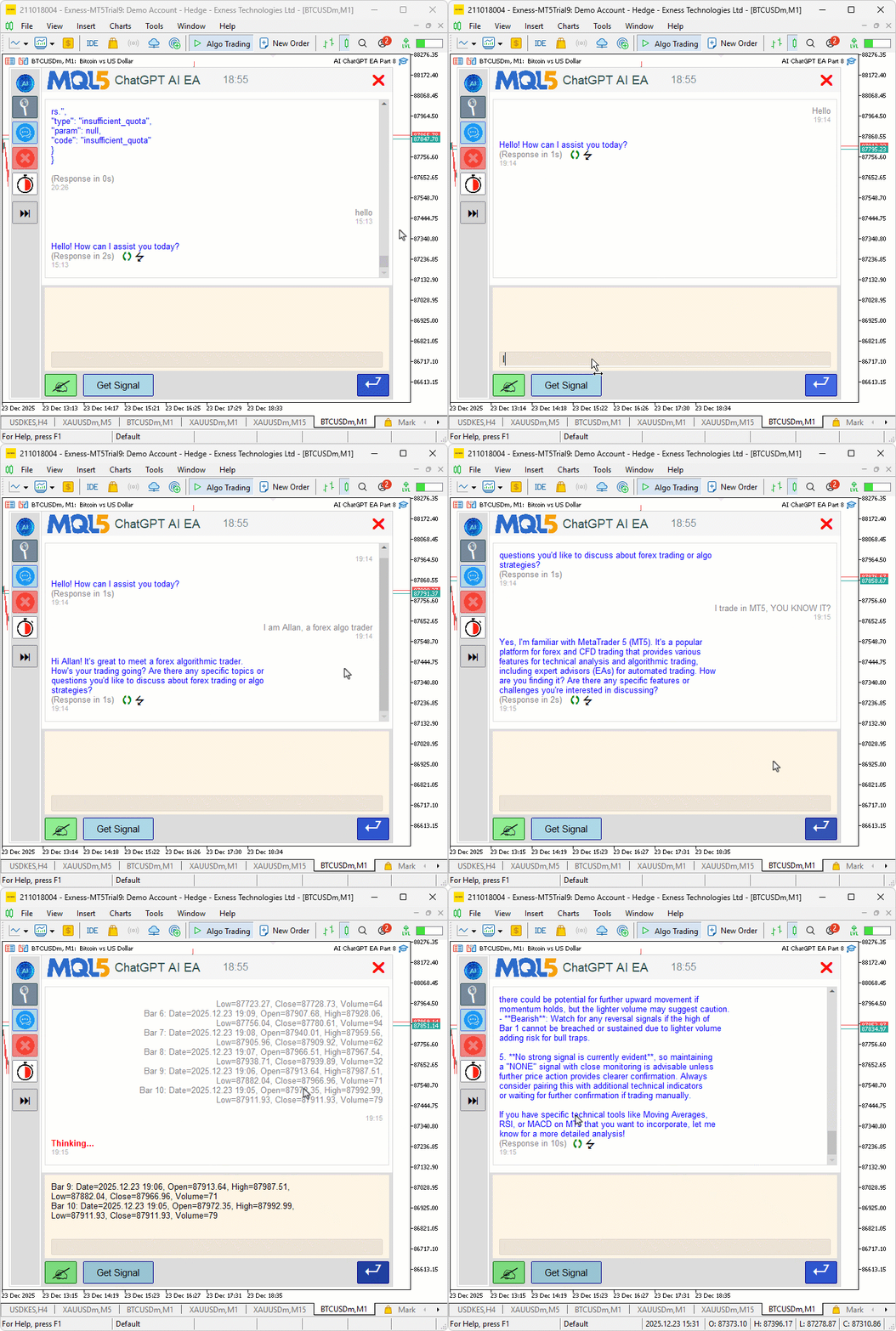
From the visualization, we can see that we are able to upgrade the program by adding or adjusting the new UI elements, hence achieving our objectives. The thing that remains is backtesting the program, and that is handled in the next section.
Backtesting
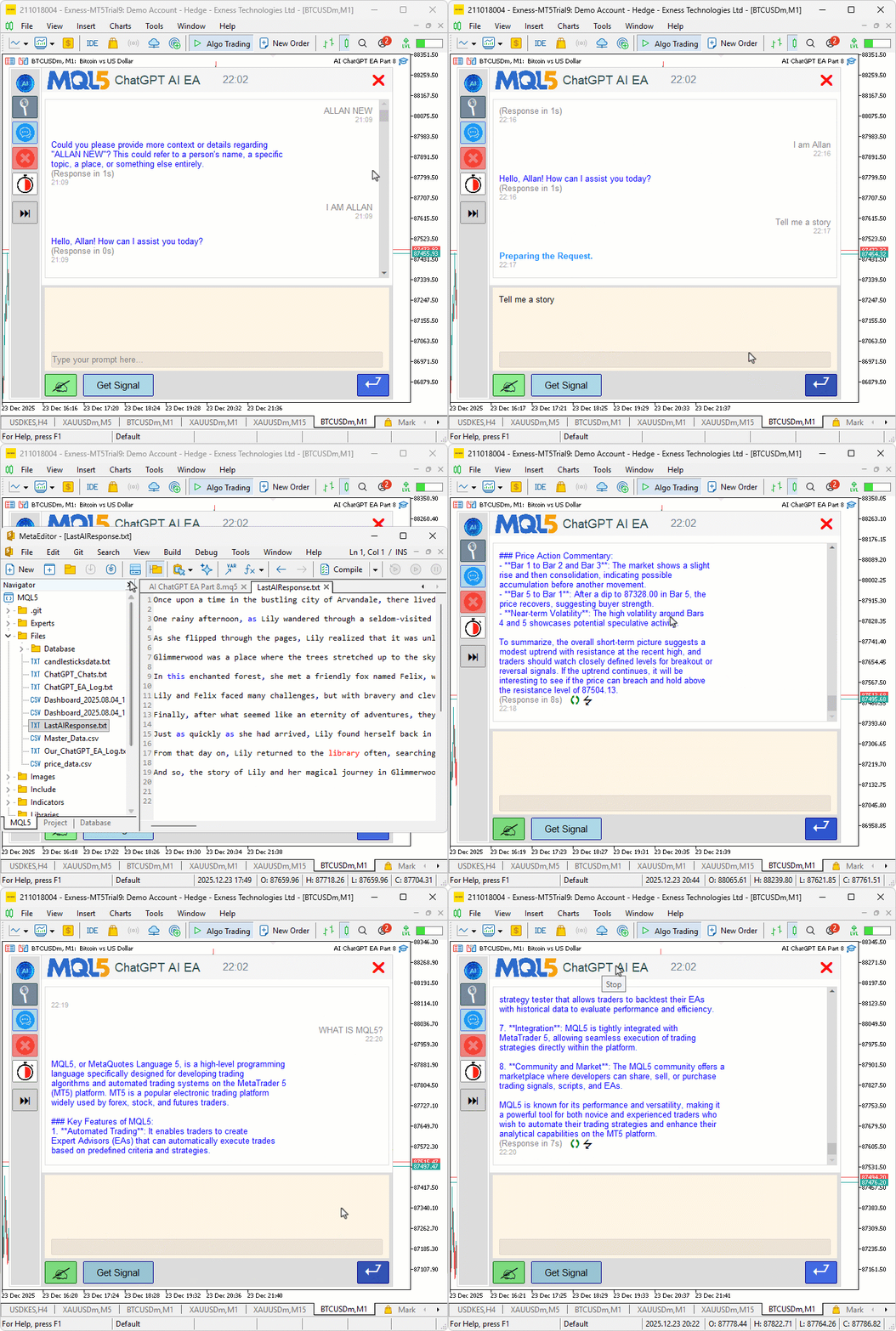
We did the testing, and below is the compiled visualization in a single Graphics Interchange Format (GIF) bitmap image format.
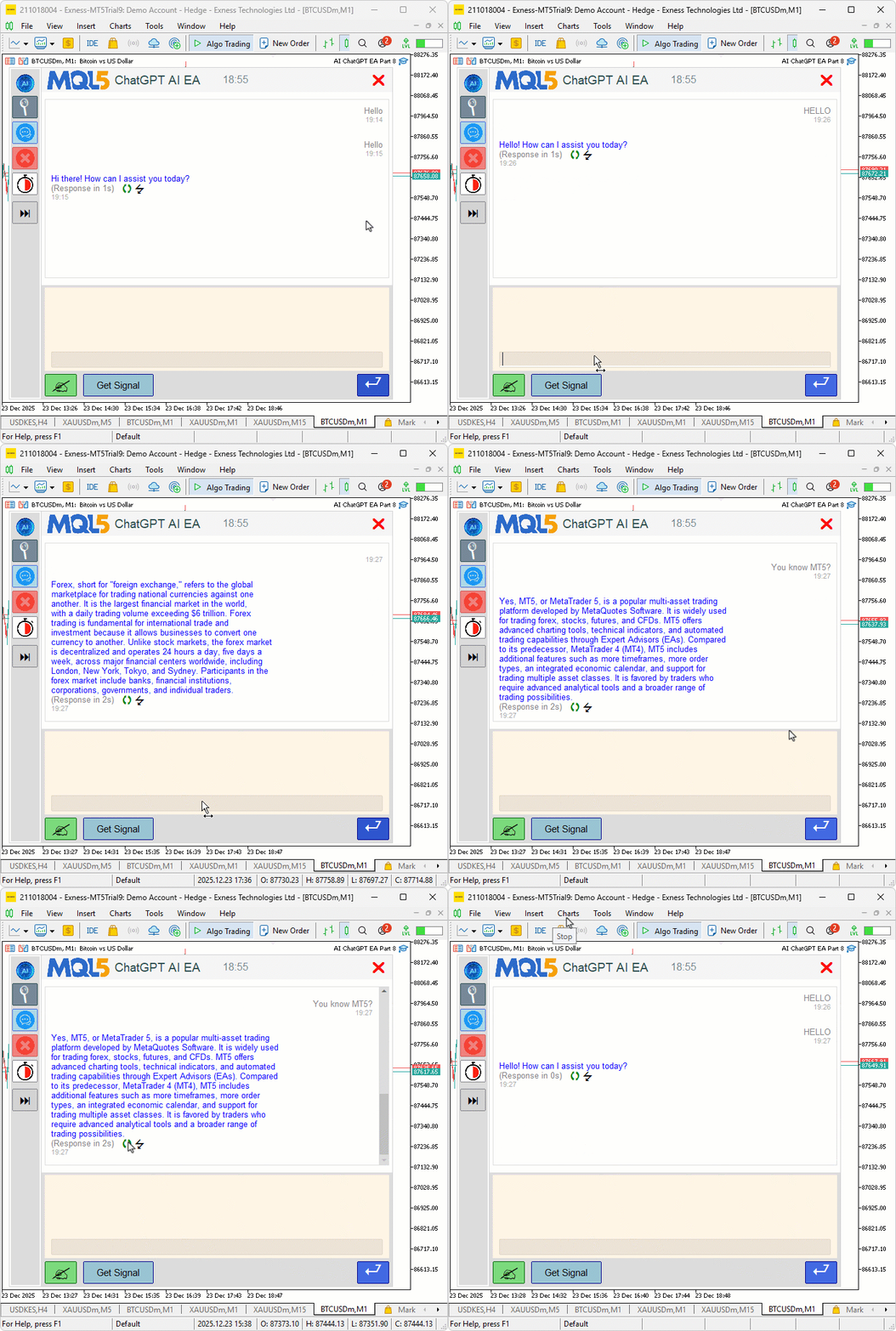
From the visualization, we can see that the UI components are good, but when we click the icons, they get the first message instead of the last message, which is not our intention. So we will need to reverse the order of identification so we can be okay. The issue is that we assumed the loop and forgot that we need complex analysis to handle multi-line responses and prompts.
// Extract last user prompt from history
string GetLastUserPrompt() {
   string blocks[];
   int num_blocks = SplitOnString(conversationHistory, "\n\n", blocks);
   if (num_blocks == 0) return "";
   // Find the last You block (reverse)
   for (int i = num_blocks - 1; i >= 0; i--) {
      string block = blocks[i];
      if (StringFind(block, "You: ") == 0) {
         // Extract content after "You: " up to timestamp
         int ts_pos = StringFind(block, "\n", 5); // After "You: "
         if (ts_pos > 0) {
            string prompt = StringSubstr(block, 5, ts_pos - 5);
            StringTrimLeft(prompt);
            StringTrimRight(prompt);
            Print("DEBUG: Full history before extract prompt: " + conversationHistory);
            Print("DEBUG: Last You block: " + block);
            Print("DEBUG: Extracted last prompt: " + prompt);
            return prompt;
         }
      }
   }
   return "";
}

string GetLastAIResponse() {
   // Split entire history into lines
   string lines[];
   int num_lines = StringSplit(conversationHistory, '\n', lines);
   if (num_lines == 0) {
      Print("DEBUG: No lines in history.");
      return "";
   }
   Print("DEBUG: Total lines in history: " + IntegerToString(num_lines));
   for (int j = 0; j < num_lines; j++) {
      Print("DEBUG: History Line " + IntegerToString(j) + ": " + lines[j]);
   }
   // Find start of last AI response (reverse search for "AI: ")
   int ai_start = -1;
   for (int i = num_lines - 1; i >= 0; i--) {
      string trimmed = lines[i];
      StringTrimLeft(trimmed);
      StringTrimRight(trimmed);
      if (StringFind(trimmed, "AI: ") == 0) {
         ai_start = i;
         break;
      }
   }
   if (ai_start == -1) {
      Print("DEBUG: No AI: line found in history. Full history: " + conversationHistory);
      return "";
   }
   Print("DEBUG: Last AI starts at line " + IntegerToString(ai_start));
   string response_build = "";
   // Extract from AI: line
   string first_line = lines[ai_start];
   int prefix_pos = StringFind(first_line, "AI: ");
   if (prefix_pos >= 0) {
      first_line = StringSubstr(first_line, prefix_pos + 4);
      StringTrimLeft(first_line);
      StringTrimRight(first_line);
      if (StringLen(first_line) > 0 && StringFind(first_line, "(Response in ") != 0 && StringFind(first_line, "(Regenerated in ") != 0 && !IsTimestamp(first_line)) {
         response_build = first_line;
      }
   }
   // Collect subsequent lines until next message start (You: or AI: ) or end
   for (int j = ai_start + 1; j < num_lines; j++) {
      string orig_line = lines[j];
      string trimmed = orig_line;
      StringTrimLeft(trimmed);
      StringTrimRight(trimmed);
      // Stop if new message starts
      if (StringFind(trimmed, "You: ") == 0 || StringFind(trimmed, "AI: ") == 0) {
         break;
      }
      // Skip notes and timestamps
      if (StringFind(trimmed, "(Response in ") == 0 || StringFind(trimmed, "(Regenerated in ") == 0 || IsTimestamp(trimmed)) {
         continue;
      }
      // Add original line (preserve empties as \n)
      if (response_build != "") response_build += "\n";
      response_build += orig_line;
   }
   Print("DEBUG: Extracted last response: '" + response_build + "'");
   return response_build;
}
We have added comments to the respective lines for clarity, and debug just to be sure of what we are getting. You can comment them out if you don't need them, but for us, we will keep them for later use and comment them out for polishing. Also, we added an extra new line in the submit function so it can handle all responses with empties and new lines as below.
void SubmitMessage(string prompt) {

//---

   conversationHistory += "You: " + prompt + "\n" + timestamp + "\n\n";  // Add extra \n for separation

//---

}
Upon compilation, we get the following final satisfying outcome.
Conclusion
In conclusion, we’ve polished the user interface of our AI-powered trading system in MQL5 with loading animations for request preparation and thinking phases, timing metrics to display response durations in seconds, and management tools like regenerate buttons for re-querying prompts and export options for saving outputs to files. These features, combined with hover effects, scaled images, and dynamic sidebars, create a more responsive and visually appealing experience, while maintaining modular code for easy extensibility. In upcoming parts, we will explore sentiment analysis integrations or multi-timeframe signal confirmation for even smarter trading decisions. Stay tuned.
Attachments
| S/N | Name | Type | Description |
|---|---|---|---|
| 1 | AI_JSON_FILE.mqh | JSON Class Library | Class for handling JSON serialization and deserialization |
| 2 | AI_CREATE_OBJECTS_FNS.mqh | Object Functions Library | Functions for creating visualization objects like labels and buttons |
| 3 | AI_UI_COMPONENTS.mqh | User Interface Components Library | File containing the User Interface components and their organization |
| 4 | AI_BMP_FILES_ZIP | Bitmap Files Zip | File containing the Bitmap images |
| 5 | AI_ChatGPT_EA_Part_8.mq5 | Main Expert Advisor File | Main Expert Advisor for handling AI integration |
Warning: All rights to these materials are reserved by MetaQuotes Ltd. Copying or reprinting of these materials in whole or in part is prohibited.
This article was written by a user of the site and reflects their personal views. MetaQuotes Ltd is not responsible for the accuracy of the information presented, nor for any consequences resulting from the use of the solutions, strategies or recommendations described.

 Introduction to MQL5 (Part 33): Mastering API and WebRequest Function in MQL5 (VII)
 Larry Williams Market Secrets (Part 3): Proving Non-Random Market Behavior with MQL5
 Building Volatility models in MQL5 (Part I): The Initial Implementation
 Market Simulation (Part 08): Sockets (II)

- Free trading apps
- Over 8,000 signals for copying
- Economic news for exploring financial markets
You agree to website policy and terms of use
Loved this article.
What do you reckon is the monthly API costs?
I was looking at a way where we can use the DeepSeek based AI which runs on the system and can be used into this program.
Thank you for a creative way of bringing this on to MT5.
Loved this article.
What do you reckon is the monthly API costs?
I was looking at a way where we can use the DeepSeek based AI which runs on the system and can be used into this program.
Thank you for a creative way of bringing this on to MT5.
Thank you for the kind feedback and welcome. That would depend on the chart it is running on and the mode selected. If auto mode is selected then it will be communicating on every bar increasing the tokens needed. Better still, you can define the session which it will be running automatically to avoid unnecessary runs or define new or extend rules for it to follow than the ones we used. It can be used on any AI, just configure the API keys.
Thanks.
Loved this article.
What do you reckon is the monthly API costs?
I was looking at a way where we can use the DeepSeek based AI which runs on the system and can be used into this program.
Thank you for a creative way of bringing this on to MT5.
Thank you for the kind feedback and welcome. That would depend on the chart it is running on and the mode selected. If auto mode is selected then it will be communicating on every bar increasing the tokens needed. Better still, you can define the session which it will be running automatically to avoid unnecessary runs or define new or extend rules for it to follow than the ones we used. It can be used on any AI, just configure the API keys.
Thanks.
This is seriously awesome! Even chatGPT did not tell me this is possible and it gave a sure shot answer this is impossible!
Hi, I'm equally delighted with the articles. In the tests I've run, I can say that within the capacity of the context window with the Gpt4.o model, the cost per request is $0.01. However, testing with the Gpt4.1 model, the cost is $0.05.
I used ChatGPT 4.0 model in the past and it was pretty spot on!