

Die View Komponente für Tabellen im MQL5 MVC Paradigma: Grafisches Basiselement
 260
260
 0
0

Inhalt
Einführung
In der modernen Programmierung ist das MVC-Paradigma (Model-View-Controller) einer der beliebtesten Ansätze zur Entwicklung komplexer Anwendungen. Es ermöglicht die Aufteilung der Anwendungslogik in drei unabhängige Komponenten: Model (Datenmodell), View (Anzeige) und Controller. Dieser Ansatz vereinfacht die Entwicklung, das Testen und die Wartung des Codes und macht ihn besser strukturiert und lesbar.
Im Rahmen dieser Artikelserie betrachten wir den Prozess der Tabellenerstellung im MVC-Paradigma in MQL5. In den ersten beiden Artikeln haben wir Datenmodelle (Model) und die Basisarchitektur von Tabellen implementiert. Nun ist es an der Zeit, sich der Komponente View zuzuwenden, die für die Datenvisualisierung und zum Teil auch für die Nutzerinteraktion zuständig ist.
In diesem Artikel werden wir ein Basisobjekt zum Zeichnen auf der Leinwand implementieren, das die Grundlage für die Erstellung aller visuellen Komponenten von Tabellen und anderen Steuerelementen bildet. Das Objekt wird umfassen:
- Farbmanagement in verschiedenen Zuständen (Standardzustand, Fokus, Tap, Lock);
- Unterstützung für Transparenz und dynamische Größenänderung;
- Begrenzung des Objektsauf die Containergrenzen;
- Verwaltung der Sichtbarkeit und Blockierung von Objekten;
- Aufteilung der Grafiken in zwei Ebenen: Hintergrund und Vordergrund.
Die Integration mit der bereits erstellten Komponente Modell wird hier nicht berücksichtigt. Darüber hinaus mit dem Controller-Komponente, die noch nicht erstellt worden ist, aber wir werden die Klassen in der Entwicklung unter Berücksichtigung der künftigen Integration zu entwerfen. Dies erleichtert die Verknüpfung von visuellen Elementen mit Daten und Steuerungslogik und gewährleistet eine vollständige Interaktion im Rahmen des MVC-Paradigmas. Als Ergebnis erhalten wir ein flexibles Werkzeug zur Erstellung von Tabellen und anderen grafischen Elementen, die wir in unseren Projekten verwenden können.
Da die Implementierung der Architektur der View-Komponente in MQL5 recht zeitaufwändig ist und viele Hilfsklassen und Vererbungen beinhaltet, wollen wir uns auf eine kurze Zusammenfassung einigen. Definieren wir eine Klasse, geben eine kurze Beschreibung der Klasse und betrachten anschließend kurz ihre Implementierung. Heute haben wir fünf solcher Klassen:
- eine Basisklasse für alle grafischen Objekte,
- eine Klasse für Farbmanagement,
- eine Klasse zur Verwaltung der Farben der verschiedenen Zustände eines grafischen Elements,
- rechteckige Bereichskontrollklasse,
- eine Basisklasse zum Zeichnen von grafischen Elementen auf der Leinwand.
Letztlich sind alle diese Klassen notwendig, damit die Basisklasse grafische Elemente zeichnen kann. Alle anderen Klassen, die bei der Implementierung verschiedener Steuerelemente, insbesondere des Table Controls, erstellt werden, erben von ihr.
Die ersten vier Klassen dieser Liste sind Hilfsklassen für die bequeme Implementierung der Funktionalität der Basisklasse zum Zeichnen von Grafikelementen (5), von der wir weiter erben werden, um alle Steuerelemente und ihre Komponenten zu erstellen.
Hilfsklassen
Falls noch nicht vorhanden, erstellen wir im Terminalverzeichnis \MQL5\Scripts\ einen neuen Ordner Tables\, und in diesem Ordner – den Ordner Controls. Sie speichert die Dateien, die im Rahmen der Artikel zur Erstellung der View-Komponente für Tabellen zu erstellen sind.
Erstellen wir in diesem neuen Ordner eine neue Include-Datei Base.mqh. Heute werden wir die Codes der Basisobjektklasse implementieren, um darin Steuerelemente zu erstellen. Vorläufige Implementierung von Makro-Substitutionen, Enumerationen und Funktionen:
//+------------------------------------------------------------------+
//|                                                         Base.mqh |
//|                                  Copyright 2025, MetaQuotes Ltd. |
//|                                             https://www.mql5.com |
//+------------------------------------------------------------------+
#property copyright "Copyright 2025, MetaQuotes Ltd."
#property link      "https://www.mql5.com"

//+------------------------------------------------------------------+
//| Include libraries                                                |
//+------------------------------------------------------------------+
#include <Canvas\Canvas.mqh>              // CCanvas class
#include <Arrays\List.mqh>                // CList class

//+------------------------------------------------------------------+
//| Macro substitutions                                              |
//+------------------------------------------------------------------+
#define  clrNULL              0x00FFFFFF  // Transparent color for CCanvas
#define  MARKER_START_DATA    -1          // Data start marker in a file

//+------------------------------------------------------------------+
//| Enumerations                                                     |
//+------------------------------------------------------------------+
enum ENUM_ELEMENT_TYPE                    // Enumeration of graphical element types
  {
   ELEMENT_TYPE_BASE = 0x10000,           // Basic object of graphical elements
   ELEMENT_TYPE_COLOR,                    // Color object
   ELEMENT_TYPE_COLORS_ELEMENT,           // Color object of the graphical object element
   ELEMENT_TYPE_RECTANGLE_AREA,           // Rectangular area of the element
   ELEMENT_TYPE_CANVAS_BASE,              // Basic canvas object for graphical elements
  };

enum ENUM_COLOR_STATE                     // Enumeration of element state colors
  {
   COLOR_STATE_DEFAULT,                   // Normal state color
   COLOR_STATE_FOCUSED,                   // Color when hovering over an element
   COLOR_STATE_PRESSED,                   // Color when clicking on an element
   COLOR_STATE_BLOCKED,                   // Blocked element color
  };
//+------------------------------------------------------------------+
//| Functions                                                        |
//+------------------------------------------------------------------+
//+------------------------------------------------------------------+
//|  Return the element type as a string                             |
//+------------------------------------------------------------------+
string ElementDescription(const ENUM_ELEMENT_TYPE type)
  {
   string array[];
   int total=StringSplit(EnumToString(type),StringGetCharacter("_",0),array);
   string result="";
   for(int i=2;i<total;i++)
     {
      array[i]+=" ";
      array[i].Lower();
      array[i].SetChar(0,ushort(array[i].GetChar(0)-0x20));
      result+=array[i];
     }
   result.TrimLeft();
   result.TrimRight();
   return result;
  }
//+------------------------------------------------------------------+
//| Classes                                                          |
//+------------------------------------------------------------------+
In früheren Artikeln haben wir die Funktion implementiert, die den Objekttyp als String zurückgibt. Die Funktion, die den Kontrolltyp als Stringbeschreibung zurückgibt, ist absolut identisch mit der zuvor implementierten Funktion. Die Enumerationszeichenfolge wird einfach mit dem Trennzeichen „_“ in Teilzeichenfolgen unterteilt, und die daraus resultierenden Teilzeichenfolgen werden zur Erstellung der endgültigen Zeichenfolge verwendet.
Solange sich diese beiden identischen Funktionen in verschiedenen Dateien befinden, sollten wir sie beibehalten. Wenn wir dann alle Dateien zu einem einzigen Projekt zusammenfassen, werden wir beide Funktionen in eine einzige umwandeln, die den Namen nicht aus der Aufzählung, sondern aus der übergebenen Zeichenkette zurückgibt. In diesem Fall gibt derselbe Algorithmus den Namen des Objekts, Elements usw. auf dieselbe Weise zurück. Es ist wichtig, dass die Konstanten aller Enumerationen die gleiche Struktur des Konstantennamens enthalten: OBJECT_TYPE_XXX_YYY, ELEMENT_TYPE_XXX_YYY, ANYOTHER_TYPE_XXX_YYY_ZZZ ... In diesem Fall wird das, was in XXX_YYYY (XXX_YYY_ZZZ usw.) geschrieben ist, zurückgegeben, und das, was hier gelb markiert ist, wird abgeschnitten.
In allen Objekten der grafischen Elemente und in den Hilfsklassen enthält jedes von ihnen die gleichen Variablen und Methoden des Zugriffs auf sie – den Bezeichner und den Objektnamen. Anhand dieser Eigenschaften können die Elemente in den Listen durchsucht und sortiert werden. Es ist sinnvoll, diese Variablen und ihre Zugriffsmethoden in einer separaten Klasse unterzubringen, von der alle anderen Elemente erben werden.
Dies ist die Basisklasse der Grafikelementobjekte:
//+------------------------------------------------------------------+
//| Base class of graphical elements                                 |
//+------------------------------------------------------------------+
class CBaseObj : public CObject
  {
protected:
   int               m_id;                                     // ID
   ushort            m_name[];                                 // Name

public:
//--- Set (1) name and (2) ID
   void              SetName(const string name)                { ::StringToShortArray(name,this.m_name);    }
   void              SetID(const int id)                       { this.m_id=id;                              }
//--- Return (1) name and (2) ID
   string            Name(void)                          const { return ::ShortArrayToString(this.m_name);  }
   int               ID(void)                            const { return this.m_id;                          }

//--- Virtual (1) comparison and object type (2) methods
   virtual int       Compare(const CObject *node,const int mode=0) const;
   virtual int       Type(void)                          const { return(ELEMENT_TYPE_BASE); }

//--- Constructors/destructor
                     CBaseObj (void) : m_id(-1) {}
                    ~CBaseObj (void) {}
  };
//+------------------------------------------------------------------+
//| CBaseObj::Compare two objects                                    |
//+------------------------------------------------------------------+
int CBaseObj::Compare(const CObject *node,const int mode=0) const
  {
   const CBaseObj *obj=node;
   switch(mode)
     {
      case 0   :  return(this.Name()>obj.Name() ? 1 : this.Name()<obj.Name() ? -1 : 0);
      default  :  return(this.ID()>obj.ID()     ? 1 : this.ID()<obj.ID()     ? -1 : 0);
     }
  }
Kurzbeschreibung:
Eine Basisklasse für alle grafischen Objekte:
- enthält allgemeine Eigenschaften wie Bezeichner (m_id) und Name (m_name),
- bietet grundlegende Methoden zum Vergleichen von Objekten (Compare) und zum Abrufen des Objekttyps (Type),
- wird sie als übergeordnete Klasse für alle anderen Klassen verwendet, um die Einheitlichkeit der Hierarchie zu gewährleisten.
Die Klasse bietet einen minimalen Satz von Eigenschaften, die jedem der Objekte der grafischen Elemente eigen sind. Das Erben von dieser Klasse erspart es uns, diese Variablen in jeder neuen Klasse zu deklarieren und Zugriffsmethoden für diese Variablen zu implementieren – diese Variablen und Methoden werden in den geerbten Klassen verfügbar sein. Dementsprechend wird die Compare-Methode für jedes der vom Basisobjekt geerbten Objekte eine Funktion zum Suchen und Sortieren nach diesen beiden Eigenschaften bereitstellen.
Farbmanagement-Klassen
Bei der Erstellung der Controller-Komponente muss ein visuelles Design für die Interaktion des Nutzers mit grafischen Elementen erstellt werden. Eine Möglichkeit, die Aktivität eines Objekts zu zeigen, besteht darin, seine Farbe zu ändern, wenn der Mauszeiger über den Bereich des grafischen Elements bewegt wird, seine Reaktion auf Mausklicks oder die Software-Sperre.
Jedes Objekt besteht aus drei Elementen, die bei verschiedenen Nutzerinteraktionen ihre Farbe ändern können: die Farbe des Hintergrunds, des Rahmens und des Texts. Jedes dieser drei Elemente kann einen eigenen Satz von Farben für verschiedene Zustände enthalten. Um die Farbe eines Elements sowie die Farben aller Elemente, die ihre Farbe ändern, bequem zu steuern, implementieren wir zwei Hilfsklassen.
Farbe Klasse
//+------------------------------------------------------------------+
//| Color class                                                      |
//+------------------------------------------------------------------+
class CColor : public CBaseObj
  {
protected:
   color             m_color;                                  // Color

public:
//--- Set color
   bool              SetColor(const color clr)
                       {
                        if(this.m_color==clr)
                           return false;
                        this.m_color=clr;
                        return true;
                       }
//--- Return color
   color             Get(void)                           const { return this.m_color;              }

//--- (1) Return and (2) display the object description in the journal
   virtual string    Description(void);
   void              Print(void);

//--- Virtual methods of (1) comparing, (2) saving to file, (3) loading from file, (4) object type
   virtual int       Compare(const CObject *node,const int mode=0) const;
   virtual bool      Save(const int file_handle);
   virtual bool      Load(const int file_handle);
   virtual int       Type(void)                          const { return(ELEMENT_TYPE_COLOR);       }

//--- Constructors/destructor
                     CColor(void) : m_color(clrNULL)                          { this.SetName("");  }
                     CColor(const color clr) : m_color(clr)                   { this.SetName("");  }
                     CColor(const color clr,const string name) : m_color(clr) { this.SetName(name);}
                    ~CColor(void) {}
  };
//+------------------------------------------------------------------+
//| CColor::Return the object description                            |
//+------------------------------------------------------------------+
string CColor::Description(void)
  {
   string color_name=(this.Get()!=clrNULL ? ::ColorToString(this.Get(),true) : "clrNULL (0x00FFFFFF)");
   return(this.Name()+(this.Name()!="" ? " " : "")+"Color: "+color_name);
  }
//+------------------------------------------------------------------+
//| CColor::Display object description in the journal                |
//+------------------------------------------------------------------+
void CColor::Print(void)
  {
   ::Print(this.Description());
  }
//+------------------------------------------------------------------+
//| CColor::Save to file                                             |
//+------------------------------------------------------------------+
bool CColor::Save(const int file_handle)
  {
//--- Check the handle
   if(file_handle==INVALID_HANDLE)
      return false;
//--- Save data start marker - 0xFFFFFFFFFFFFFFFF
   if(::FileWriteLong(file_handle,-1)!=sizeof(long))
      return false;
//--- Save the object type
   if(::FileWriteInteger(file_handle,this.Type(),INT_VALUE)!=INT_VALUE)
      return false;

//--- Save the color
   if(::FileWriteInteger(file_handle,this.m_color,INT_VALUE)!=INT_VALUE)
      return false;
//--- Save the ID
   if(::FileWriteInteger(file_handle,this.m_id,INT_VALUE)!=INT_VALUE)
      return false;
//--- Save the name
   if(::FileWriteArray(file_handle,this.m_name)!=sizeof(this.m_name))
      return false;

//--- All is successful
   return true;
  }
//+------------------------------------------------------------------+
//| CColor::Load from file                                           |
//+------------------------------------------------------------------+
bool CColor::Load(const int file_handle)
  {
//--- Check the handle
   if(file_handle==INVALID_HANDLE)
      return false;
//--- Load and check the data start marker - 0xFFFFFFFFFFFFFFFF
   if(::FileReadLong(file_handle)!=-1)
      return false;
//--- Load the object type
   if(::FileReadInteger(file_handle,INT_VALUE)!=this.Type())
      return false;

//--- Load the color
   this.m_color=(color)::FileReadInteger(file_handle,INT_VALUE);
//--- Load the ID
   this.m_id=::FileReadInteger(file_handle,INT_VALUE);
//--- Load the name
   if(::FileReadArray(file_handle,this.m_name)!=sizeof(this.m_name))
      return false;

//--- All is successful
   return true;
  }
Kurze Beschreibung der Klasse:
Farbmanagement-Klasse:
- speichert die Farbe als einen Wert vom Typ color (m_color),
- bietet Methoden zum Setzen und Abrufen einer Farbe (SetColor, Get),
- implementiert Methoden zum Speichern und Laden von Farben in/aus einer Datei (Speichern, Laden),
- kann zur Darstellung jeder Farbe in grafischen Elementen verwendet werden.
Die Farbklasse des grafischen Objektelements
//+------------------------------------------------------------------+
//| Color class of a graphical object element                        |
//+------------------------------------------------------------------+
class CColorElement : public CBaseObj
  {
protected:
   CColor            m_current;                                // Current color. It could be one of the following
   CColor            m_default;                                // Normal state color
   CColor            m_focused;                                // Color on hover
   CColor            m_pressed;                                // Color on click
   CColor            m_blocked;                                // Blocked element color

//--- Convert RGB to color
   color             RGBToColor(const double r,const double g,const double b) const;
//--- Write RGB component values to variables
   void              ColorToRGB(const color clr,double &r,double &g,double &b);
//--- Return (1) Red, (2) Green, (3) Blue color components
   double            GetR(const color clr)                     { return clr&0xFF;                           }
   double            GetG(const color clr)                     { return(clr>>8)&0xFF;                       }
   double            GetB(const color clr)                     { return(clr>>16)&0xFF;                      }

public:
//--- Return a new color
   color             NewColor(color base_color, int shift_red, int shift_green, int shift_blue);

//--- Initialize colors for different states
   bool              InitDefault(const color clr)              { return this.m_default.SetColor(clr);       }
   bool              InitFocused(const color clr)              { return this.m_focused.SetColor(clr);       }
   bool              InitPressed(const color clr)              { return this.m_pressed.SetColor(clr);       }
   bool              InitBlocked(const color clr)              { return this.m_blocked.SetColor(clr);       }

//--- Set colors for all states
   void              InitColors(const color clr_default, const color clr_focused, const color clr_pressed, const color clr_blocked);
   void              InitColors(const color clr);

//--- Return colors of different states
   color             GetCurrent(void)                    const { return this.m_current.Get();               }
   color             GetDefault(void)                    const { return this.m_default.Get();               }
   color             GetFocused(void)                    const { return this.m_focused.Get();               }
   color             GetPressed(void)                    const { return this.m_pressed.Get();               }
   color             GetBlocked(void)                    const { return this.m_blocked.Get();               }

//--- Set one of the colors from the list as the current one
   bool              SetCurrentAs(const ENUM_COLOR_STATE color_state);

//--- (1) Return and (2) display the object description in the journal
   virtual string    Description(void);
   void              Print(void);

//--- Virtual methods of (1) comparing, (2) saving to file, (3) loading from file, (4) object type
   virtual int       Compare(const CObject *node,const int mode=0) const;
   virtual bool      Save(const int file_handle);
   virtual bool      Load(const int file_handle);
   virtual int       Type(void)                          const { return(ELEMENT_TYPE_COLORS_ELEMENT);       }

//--- Constructors/destructor
                     CColorElement(void);
                     CColorElement(const color clr);
                     CColorElement(const color clr_default,const color clr_focused,const color clr_pressed,const color clr_blocked);
                    ~CColorElement(void) {}
  };
//+-----------------------------------------------------------------------------+
//| CColorControl::Constructor with setting the transparent colors of the object|
//+-----------------------------------------------------------------------------+
CColorElement::CColorElement(void)
  {
   this.InitColors(clrNULL,clrNULL,clrNULL,clrNULL);
   this.m_default.SetName("Default"); this.m_default.SetID(1);
   this.m_focused.SetName("Focused"); this.m_focused.SetID(2);
   this.m_pressed.SetName("Pressed"); this.m_pressed.SetID(3);
   this.m_blocked.SetName("Blocked"); this.m_blocked.SetID(4);
   this.SetCurrentAs(COLOR_STATE_DEFAULT);
   this.m_current.SetName("Current");
   this.m_current.SetID(0);
  }
//+------------------------------------------------------------------+
//| CColorControl::Constructor specifying the object colors          |
//+------------------------------------------------------------------+
CColorElement::CColorElement(const color clr_default,const color clr_focused,const color clr_pressed,const color clr_blocked)
  {
   this.InitColors(clr_default,clr_focused,clr_pressed,clr_blocked);
   this.m_default.SetName("Default"); this.m_default.SetID(1);
   this.m_focused.SetName("Focused"); this.m_focused.SetID(2);
   this.m_pressed.SetName("Pressed"); this.m_pressed.SetID(3);
   this.m_blocked.SetName("Blocked"); this.m_blocked.SetID(4);
   this.SetCurrentAs(COLOR_STATE_DEFAULT);
   this.m_current.SetName("Current");
   this.m_current.SetID(0);
  }
//+------------------------------------------------------------------+
//| CColorControl::Constructor specifying the object colors          |
//+------------------------------------------------------------------+
CColorElement::CColorElement(const color clr)
  {
   this.InitColors(clr);
   this.m_default.SetName("Default"); this.m_default.SetID(1);
   this.m_focused.SetName("Focused"); this.m_focused.SetID(2);
   this.m_pressed.SetName("Pressed"); this.m_pressed.SetID(3);
   this.m_blocked.SetName("Blocked"); this.m_blocked.SetID(4);
   this.SetCurrentAs(COLOR_STATE_DEFAULT);
   this.m_current.SetName("Current");
   this.m_current.SetID(0);
  }
//+------------------------------------------------------------------+
//| CColorControl::Set colors for all states                         |
//+------------------------------------------------------------------+
void CColorElement::InitColors(const color clr_default,const color clr_focused,const color clr_pressed,const color clr_blocked)
  {
   this.InitDefault(clr_default);
   this.InitFocused(clr_focused);
   this.InitPressed(clr_pressed);
   this.InitBlocked(clr_blocked);
  }
//+----------------------------------------------------------------------+
//| CColorControl::Set the colors for all states based on the current one|
//+----------------------------------------------------------------------+
void CColorElement::InitColors(const color clr)
  {
   this.InitDefault(clr);
   this.InitFocused(this.NewColor(clr,-3,-3,-3));
   this.InitPressed(this.NewColor(clr,-6,-6,-6));
   this.InitBlocked(clrSilver);
  }
//+---------------------------------------------------------------------+
//|CColorControl::Set one of the colors from the list as the current one|
//+---------------------------------------------------------------------+
bool CColorElement::SetCurrentAs(const ENUM_COLOR_STATE color_state)
  {
   switch(color_state)
     {
      case COLOR_STATE_DEFAULT   :  return this.m_current.SetColor(this.m_default.Get());
      case COLOR_STATE_FOCUSED   :  return this.m_current.SetColor(this.m_focused.Get());
      case COLOR_STATE_PRESSED   :  return this.m_current.SetColor(this.m_pressed.Get());
      case COLOR_STATE_BLOCKED   :  return this.m_current.SetColor(this.m_blocked.Get());
      default                    :  return false;
     }
  }
//+------------------------------------------------------------------+
//| CColorControl::Convert RGB to color                              |
//+------------------------------------------------------------------+
color CColorElement::RGBToColor(const double r,const double g,const double b) const
  {
   int int_r=(int)::round(r);
   int int_g=(int)::round(g);
   int int_b=(int)::round(b);
   int clr=0;
   clr=int_b;
   clr<<=8;
   clr|=int_g;
   clr<<=8;
   clr|=int_r;

   return (color)clr;
  }
//+------------------------------------------------------------------+
//| CColorControl::Get RGB component values                          |
//+------------------------------------------------------------------+
void CColorElement::ColorToRGB(const color clr,double &r,double &g,double &b)
  {
   r=this.GetR(clr);
   g=this.GetG(clr);
   b=this.GetB(clr);
  }
//+------------------------------------------------------------------+
//| CColorControl::Return color with a new color component           |
//+------------------------------------------------------------------+
color CColorElement::NewColor(color base_color, int shift_red, int shift_green, int shift_blue)
  {
   double clrR=0, clrG=0, clrB=0;
   this.ColorToRGB(base_color,clrR,clrG,clrB);
   double clrRx=(clrR+shift_red  < 0 ? 0 : clrR+shift_red  > 255 ? 255 : clrR+shift_red);
   double clrGx=(clrG+shift_green< 0 ? 0 : clrG+shift_green> 255 ? 255 : clrG+shift_green);
   double clrBx=(clrB+shift_blue < 0 ? 0 : clrB+shift_blue > 255 ? 255 : clrB+shift_blue);
   return this.RGBToColor(clrRx,clrGx,clrBx);
  }
//+------------------------------------------------------------------+
//| CColorElement::Return the object description                     |
//+------------------------------------------------------------------+
string CColorElement::Description(void)
  {
   string res=::StringFormat("%s Colors. %s",this.Name(),this.m_current.Description());
   res+="\n  1: "+this.m_default.Description();
   res+="\n  2: "+this.m_focused.Description();
   res+="\n  3: "+this.m_pressed.Description();
   res+="\n  4: "+this.m_blocked.Description();
   return res;
  }
//+------------------------------------------------------------------+
//| CColorElement::Display object description in the journal         |
//+------------------------------------------------------------------+
void CColorElement::Print(void)
  {
   ::Print(this.Description());
  }
//+------------------------------------------------------------------+
//| CColorElement::Save to file                                      |
//+------------------------------------------------------------------+
bool CColorElement::Save(const int file_handle)
  {
//--- Check the handle
   if(file_handle==INVALID_HANDLE)
      return false;
//--- Save data start marker - 0xFFFFFFFFFFFFFFFF
   if(::FileWriteLong(file_handle,-1)!=sizeof(long))
      return false;
//--- Save the object type
   if(::FileWriteInteger(file_handle,this.Type(),INT_VALUE)!=INT_VALUE)
      return false;

//--- Save the ID
   if(::FileWriteInteger(file_handle,this.m_id,INT_VALUE)!=INT_VALUE)
      return false;
//--- Save the name of the element colors
   if(::FileWriteArray(file_handle,this.m_name)!=sizeof(this.m_name))
      return false;
//--- Save the current color
   if(!this.m_current.Save(file_handle))
      return false;
//--- Save the color of the normal state
   if(!this.m_default.Save(file_handle))
      return false;
//--- Save the color when hovering the cursor
   if(!this.m_focused.Save(file_handle))
      return false;
//--- Save the color when clicking
   if(!this.m_pressed.Save(file_handle))
      return false;
//--- Save the color of the blocked element
   if(!this.m_blocked.Save(file_handle))
      return false;

//--- All is successful
   return true;
  }
//+------------------------------------------------------------------+
//| CColorElement::Load from file                                    |
//+------------------------------------------------------------------+
bool CColorElement::Load(const int file_handle)
  {
//--- Check the handle
   if(file_handle==INVALID_HANDLE)
      return false;
//--- Load and check the data start marker - 0xFFFFFFFFFFFFFFFF
   if(::FileReadLong(file_handle)!=-1)
      return false;
//--- Load the object type
   if(::FileReadInteger(file_handle,INT_VALUE)!=this.Type())
      return false;

//--- Load the ID
   this.m_id=::FileReadInteger(file_handle,INT_VALUE);
//--- Load the name of the element colors
   if(::FileReadArray(file_handle,this.m_name)!=sizeof(this.m_name))
      return false;
//--- Load the current color
   if(!this.m_current.Load(file_handle))
      return false;
//--- Load the normal state color
   if(!this.m_default.Load(file_handle))
      return false;
//--- Load the color on hover
   if(!this.m_focused.Load(file_handle))
      return false;
//--- Load the color on click
   if(!this.m_pressed.Load(file_handle))
      return false;
//--- Load the color of the blocked element
   if(!this.m_blocked.Load(file_handle))
      return false;

//--- All is successful
   return true;
  }
Kurze Beschreibung der Klasse:
Eine Klasse zur Verwaltung der Farben der verschiedenen Zustände eines grafischen Elements:
- speichert Farben für vier Zustände: normal (m_default), Fokus (m_focused), gedrückt (m_pressed) und blockiert (m_blocked),
- unterstützt die aktuelle Farbe (m_current), die auf einen der Zustände gesetzt werden kann,
- bietet Methoden zur Initialisierung der Farben aller Zustände (InitColors) und zum Umschalten der aktuellen Farbe (SetCurrentAs),
- enthält eine Methode, um eine neue Farbe aus der Grundfarbe zu erhalten, wobei die Offsets der Farbkomponenten (NewColor) angegeben werden,
- implementiert Methoden zum Speichern und Laden aller Farben in/aus einer Datei (Speichern, Laden),
- ist nützlich für die Erstellung interaktiver Elemente wie Schaltflächen, Tabellenzeilen oder Zellen.
Steuerklasse Rechteckige Fläche
Im Terminal wird eine interessante CRect-Struktur in der Datei Rect.mqh im Ordner \MQL5\Include\Controls\ dargestellt. Sie bietet eine Reihe von Methoden zur Steuerung eines rechteckigen Fensters, das einen bestimmten Umriss auf einem grafischen Element einrahmen kann. Mit diesen Umrissen können wir mehrere Bereiche eines einzelnen Elements virtuell markieren und deren Koordinaten und Grenzen verfolgen. So können wir die Koordinaten des Mauszeigers auf den hervorgehobenen Bereichen verfolgen und die Mausinteraktion mit dem Bereich des Grafikelements organisieren.
Das einfachste Beispiel sind die Ränder des gesamten grafischen Elements. Ein weiteres Beispiel für einen definierten Bereich ist der Bereich für die Statusleiste, die Bildlaufleisten oder den Tabellenkopf.
Mit Hilfe der vorgestellten Struktur können wir ein spezielles Objekt erstellen, das es ermöglicht, einen rechteckigen Bereich auf einem grafischen Element festzulegen. Und eine Liste solcher Objekte ermöglicht es Ihnen, mehrere Überwachungsbereiche auf einem einzigen grafischen Element zu speichern, wobei jeder Bereich für seine eigenen Zwecke bestimmt ist und der Zugriff über den Namen oder die Kennung des Bereichs erfolgt.
Um solche Strukturen in Objektlisten zu speichern, müssen wir ein von CObject geerbtes Objekt erstellen. Darin wird diese Struktur erklärt:
//+------------------------------------------------------------------+
//| Rectangular region class                                         |
//+------------------------------------------------------------------+
class CBound : public CBaseObj
  {
protected:
   CRect             m_bound;                                  // Rectangular area structure

public:
//--- Change the bounding rectangular (1) width, (2) height and (3) size
   void              ResizeW(const int size)                   { this.m_bound.Width(size);                        }
   void              ResizeH(const int size)                   { this.m_bound.Height(size);                       }
   void              Resize(const int w,const int h)           { this.m_bound.Width(w); this.m_bound.Height(h);   }

//--- Set (1) X, (2) Y and (3) both coordinates of the bounding rectangle
   void              SetX(const int x)                         { this.m_bound.left=x;                             }
   void              SetY(const int y)                         { this.m_bound.top=y;                              }
   void              SetXY(const int x,const int y)            { this.m_bound.LeftTop(x,y);                       }

//--- (1) Set and (2) shift the bounding rectangle by the specified coordinates/offset size
   void              Move(const int x,const int y)             { this.m_bound.Move(x,y);                          }
   void              Shift(const int dx,const int dy)          { this.m_bound.Shift(dx,dy);                       }

//--- Returns the object coordinates, dimensions, and boundaries
   int               X(void)                             const { return this.m_bound.left;                        }
   int               Y(void)                             const { return this.m_bound.top;                         }
   int               Width(void)                         const { return this.m_bound.Width();                     }
   int               Height(void)                        const { return this.m_bound.Height();                    }
   int               Right(void)                         const { return this.m_bound.right-1;                     }
   int               Bottom(void)                        const { return this.m_bound.bottom-1;                    }

//--- (1) Return and (2) display the object description in the journal
   virtual string    Description(void);
   void              Print(void);

//--- Virtual methods of (1) comparing, (2) saving to file, (3) loading from file, (4) object type
   virtual int       Compare(const CObject *node,const int mode=0) const;
   virtual bool      Save(const int file_handle);
   virtual bool      Load(const int file_handle);
   virtual int       Type(void)                          const { return(ELEMENT_TYPE_RECTANGLE_AREA);             }

//--- Constructors/destructor
                     CBound(void) { ::ZeroMemory(this.m_bound); }
                     CBound(const int x,const int y,const int w,const int h) { this.SetXY(x,y); this.Resize(w,h); }
                    ~CBound(void) { ::ZeroMemory(this.m_bound); }
  };
//+------------------------------------------------------------------+
//| CBound::Return the object description                            |
//+------------------------------------------------------------------+
string CBound::Description(void)
  {
   string nm=this.Name();
   string name=(nm!="" ? ::StringFormat(" \"%s\"",nm) : nm);
   return ::StringFormat("%s%s: x %d, y %d, w %d, h %d",
                         ElementDescription((ENUM_ELEMENT_TYPE)this.Type()),name,
                         this.X(),this.Y(),this.Width(),this.Height());
  }
//+------------------------------------------------------------------+
//| CBound::Display the object description in the journal            |
//+------------------------------------------------------------------+
void CBound::Print(void)
  {
   ::Print(this.Description());
  }
//+------------------------------------------------------------------+
//| CBound::Save to file                                             |
//+------------------------------------------------------------------+
bool CBound::Save(const int file_handle)
  {
//--- Check the handle
   if(file_handle==INVALID_HANDLE)
      return false;
//--- Save data start marker - 0xFFFFFFFFFFFFFFFF
   if(::FileWriteLong(file_handle,-1)!=sizeof(long))
      return false;
//--- Save the object type
   if(::FileWriteInteger(file_handle,this.Type(),INT_VALUE)!=INT_VALUE)
      return false;

//--- Save the ID
   if(::FileWriteInteger(file_handle,this.m_id,INT_VALUE)!=INT_VALUE)
      return false;
//--- Save the name
   if(::FileWriteArray(file_handle,this.m_name)!=sizeof(this.m_name))
      return false;
   //--- Save the area structure
   if(::FileWriteStruct(file_handle,this.m_bound)!=sizeof(this.m_bound))
      return(false);

//--- All is successful
   return true;
  }
//+------------------------------------------------------------------+
//| CBound::Load from file                                           |
//+------------------------------------------------------------------+
bool CBound::Load(const int file_handle)
  {
//--- Check the handle
   if(file_handle==INVALID_HANDLE)
      return false;
//--- Load and check the data start marker - 0xFFFFFFFFFFFFFFFF
   if(::FileReadLong(file_handle)!=-1)
      return false;
//--- Load the object type
   if(::FileReadInteger(file_handle,INT_VALUE)!=this.Type())
      return false;

//--- Load the ID
   this.m_id=::FileReadInteger(file_handle,INT_VALUE);
//--- Load the name
   if(::FileReadArray(file_handle,this.m_name)!=sizeof(this.m_name))
      return false;
   //--- Load the region structure
   if(::FileReadStruct(file_handle,this.m_bound)!=sizeof(this.m_bound))
      return(false);

//--- All is successful
   return true;
  }
Kurze Beschreibung der Klasse:
Steuerklasse für rechteckige Flächen:
- speichert die Grenzen eines Bereichs als CRect-Struktur (m_bound),
- bietet Methoden zur Größenänderung (Resize, ResizeW, ResizeH), zum Setzen von Koordinaten (SetX, SetY, SetXY) und zum Verschieben des Bereichs (Move, Shift),
- ermöglicht das Abrufen von Koordinaten und Abmessungen des Bereichs (X, Y, Breite, Höhe, Rechts, Unten),
- implementiert Methoden zum Speichern und Laden des Bereichs in/aus einer Datei (Speichern, Laden),
- wird verwendet, um die Grenzen von Grafikelementen oder rechteckige Bereiche in ihnen zu definieren.
Mit Hilfe der oben beschriebenen Hilfsklassen können wir mit der Erstellung einer Basisklasse für alle grafischen Elemente beginnen.
Zeichnen der Basisklasse
Die Klasse wird recht umfangreich sein, daher sollten Sie, bevor wir mit der Erstellung beginnen, zum besseren Verständnis die Kurzbeschreibung lesen:
Eine Basisklasse für die Bearbeitung von grafischen Elementen auf der Leinwand:
- enthält zwei Leinwände: für den Hintergrund (m_background) und für den Vordergrund (m_foreground),
- speichert Elementgrenzen (m_bound) sowie Informationen über den Container (m_container),
- unterstützt das Farbmanagement über CColorElement-Objekte für Hintergrund, Vordergrund und Rand,
- implementiert Methoden zur Verwaltung der Sichtbarkeit (Hide, Show), des Blockierens (Block, Unblock) und des Trimmens entlang der Containergrenzen (ObjectTrim),
- unterstützt dynamische Größen- und Koordinatenänderungen (ObjectResize, ObjectSetX, ObjectSetY),
- bietet Methoden zum Zeichnen (Draw), Aktualisieren (Update) und Löschen (Clear) eines grafischen Elements,
- implementiert Methoden zum Speichern und Laden eines Objekts in/aus einer Datei (Save, Load),
- ist die Grundlage für die Erstellung komplexer grafischer Elemente wie Tabellenzellen, Zeilen und Überschriften.
Die Basisklasse der grafischen Elemente Canvas
//+------------------------------------------------------------------+ //| Base class of graphical elements canvas | //+------------------------------------------------------------------+ class CCanvasBase : public CBaseObj { protected: CCanvas m_background; // Background canvas CCanvas m_foreground; // Foreground canvas CBound m_bound; // Object boundaries CCanvasBase *m_container; // Parent container object CColorElement m_color_background; // Background color control object CColorElement m_color_foreground; // Foreground color control object CColorElement m_color_border; // Border color control object long m_chart_id; // Chart ID int m_wnd; // Chart subwindow index int m_wnd_y; // Cursor Y coordinate offset in the subwindow int m_obj_x; // Graphical object X coordinate int m_obj_y; // Graphical object Y coordinate uchar m_alpha; // Transparency uint m_border_width; // Frame width string m_program_name; // Program name bool m_hidden; // Hidden object flag bool m_blocked; // Blocked element flag bool m_focused; // Element flag in focus private: //--- Return the offset of the initial drawing coordinates on the canvas relative to the canvas and the object coordinates int CanvasOffsetX(void) const { return(this.ObjectX()-this.X()); } int CanvasOffsetY(void) const { return(this.ObjectY()-this.Y()); } //--- Return the adjusted coordinate of a point on the canvas, taking into account the offset of the canvas relative to the object int AdjX(const int x) const { return(x-this.CanvasOffsetX()); } int AdjY(const int y) const { return(y-this.CanvasOffsetY()); } protected: //--- Returns the adjusted chart ID long CorrectChartID(const long chart_id) const { return(chart_id!=0 ? chart_id : ::ChartID()); } //--- Get the boundaries of the parent container object int ContainerLimitLeft(void) const { return(this.m_container==NULL ? this.X() : this.m_container.LimitLeft()); } int ContainerLimitRight(void) const { return(this.m_container==NULL ? this.Right() : this.m_container.LimitRight()); } int ContainerLimitTop(void) const { return(this.m_container==NULL ? this.Y() : this.m_container.LimitTop()); } int ContainerLimitBottom(void) const { return(this.m_container==NULL ? this.Bottom() : this.m_container.LimitBottom()); } //--- Return the graphical object coordinates, boundaries and dimensions int ObjectX(void) const { return this.m_obj_x; } int ObjectY(void) const { return this.m_obj_y; } int ObjectWidth(void) const { return this.m_background.Width(); } int ObjectHeight(void) const { return this.m_background.Height(); } int ObjectRight(void) const { return this.ObjectX()+this.ObjectWidth()-1; } int ObjectBottom(void) const { return this.ObjectY()+this.ObjectHeight()-1; } //--- Change the bounding rectangular (1) width, (2) height and (3) size void BoundResizeW(const int size) { this.m_bound.ResizeW(size); } void BoundResizeH(const int size) { this.m_bound.ResizeH(size); } void BoundResize(const int w,const int h) { this.m_bound.Resize(w,h); } //--- Set (1) X, (2) Y and (3) both coordinates of the bounding rectangle void BoundSetX(const int x) { this.m_bound.SetX(x); } void BoundSetY(const int y) { this.m_bound.SetY(y); } void BoundSetXY(const int x,const int y) { this.m_bound.SetXY(x,y); } //--- (1) Set and (2) shift the bounding rectangle by the specified coordinates/offset size void BoundMove(const int x,const int y) { this.m_bound.Move(x,y); } void BoundShift(const int dx,const int dy) { this.m_bound.Shift(dx,dy); } //--- Change the graphical object (1) width, (2) height and (3) size bool ObjectResizeW(const int size); bool ObjectResizeH(const int size); bool ObjectResize(const int w,const int h); //--- Set the graphical object (1) X, (2) Y and (3) both coordinates bool ObjectSetX(const int x); bool ObjectSetY(const int y); bool ObjectSetXY(const int x,const int y) { return(this.ObjectSetX(x) && this.ObjectSetY(y)); } //--- (1) Set and (2) relocate the graphical object by the specified coordinates/offset size bool ObjectMove(const int x,const int y) { return this.ObjectSetXY(x,y); } bool ObjectShift(const int dx,const int dy) { return this.ObjectSetXY(this.ObjectX()+dx,this.ObjectY()+dy); } //--- Limit the graphical object by the container dimensions virtual void ObjectTrim(void); public: //--- Return the pointer to the canvas (1) background and (2) foreground CCanvas *GetBackground(void) { return &this.m_background; } CCanvas *GetForeground(void) { return &this.m_foreground; } //--- Return the pointer to the color management object for the (1) background, (2) foreground and (3) border CColorElement *GetBackColorControl(void) { return &this.m_color_background; } CColorElement *GetForeColorControl(void) { return &this.m_color_foreground; } CColorElement *GetBorderColorControl(void) { return &this.m_color_border; } //--- Return the (1) background, (2) foreground and (3) border color color BackColor(void) const { return this.m_color_background.GetCurrent(); } color ForeColor(void) const { return this.m_color_foreground.GetCurrent(); } color BorderColor(void) const { return this.m_color_border.GetCurrent(); } //--- Set background colors for all states void InitBackColors(const color clr_default, const color clr_focused, const color clr_pressed, const color clr_blocked) { this.m_color_background.InitColors(clr_default,clr_focused,clr_pressed,clr_blocked); } void InitBackColors(const color clr) { this.m_color_background.InitColors(clr); } //--- Set foreground colors for all states void InitForeColors(const color clr_default, const color clr_focused, const color clr_pressed, const color clr_blocked) { this.m_color_foreground.InitColors(clr_default,clr_focused,clr_pressed,clr_blocked); } void InitForeColors(const color clr) { this.m_color_foreground.InitColors(clr); } //--- Set border colors for all states void InitBorderColors(const color clr_default, const color clr_focused, const color clr_pressed, const color clr_blocked) { this.m_color_border.InitColors(clr_default,clr_focused,clr_pressed,clr_blocked); } void InitBorderColors(const color clr) { this.m_color_border.InitColors(clr); } //--- Initialize the color of (1) background, (2) foreground and (3) frame with initial values void InitBackColorDefault(const color clr) { this.m_color_background.InitDefault(clr); } void InitForeColorDefault(const color clr) { this.m_color_foreground.InitDefault(clr); } void InitBorderColorDefault(const color clr) { this.m_color_border.InitDefault(clr); } //--- Initialize the color of (1) background, (2) foreground and (3) frame on hover with initial values void InitBackColorFocused(const color clr) { this.m_color_background.InitFocused(clr); } void InitForeColorFocused(const color clr) { this.m_color_foreground.InitFocused(clr); } void InitBorderColorFocused(const color clr) { this.m_color_border.InitFocused(clr); } //--- Initialize the color of (1) background, (2) foreground and (3) frame on click with initial values void InitBackColorPressed(const color clr) { this.m_color_background.InitPressed(clr); } void InitForeColorPressed(const color clr) { this.m_color_foreground.InitPressed(clr); } void InitBorderColorPressed(const color clr) { this.m_color_border.InitPressed(clr); } //--- Initialize the color of (1) background, (2) foreground and (3) frame of a blocked object with initial values void InitBackColorBlocked(const color clr) { this.m_color_background.InitBlocked(clr); } void InitForeColorBlocked(const color clr) { this.m_color_foreground.InitBlocked(clr); } void InitBorderColorBlocked(const color clr) { this.m_color_border.InitBlocked(clr); } //--- Set the current background color to different states bool BackColorToDefault(void) { return this.m_color_background.SetCurrentAs(COLOR_STATE_DEFAULT); } bool BackColorToFocused(void) { return this.m_color_background.SetCurrentAs(COLOR_STATE_FOCUSED); } bool BackColorToPressed(void) { return this.m_color_background.SetCurrentAs(COLOR_STATE_PRESSED); } bool BackColorToBlocked(void) { return this.m_color_background.SetCurrentAs(COLOR_STATE_BLOCKED); } //--- Set the current foreground color to different states bool ForeColorToDefault(void) { return this.m_color_foreground.SetCurrentAs(COLOR_STATE_DEFAULT); } bool ForeColorToFocused(void) { return this.m_color_foreground.SetCurrentAs(COLOR_STATE_FOCUSED); } bool ForeColorToPressed(void) { return this.m_color_foreground.SetCurrentAs(COLOR_STATE_PRESSED); } bool ForeColorToBlocked(void) { return this.m_color_foreground.SetCurrentAs(COLOR_STATE_BLOCKED); } //--- Set the current frame color to different states bool BorderColorToDefault(void) { return this.m_color_border.SetCurrentAs(COLOR_STATE_DEFAULT); } bool BorderColorToFocused(void) { return this.m_color_border.SetCurrentAs(COLOR_STATE_FOCUSED); } bool BorderColorToPressed(void) { return this.m_color_border.SetCurrentAs(COLOR_STATE_PRESSED); } bool BorderColorToBlocked(void) { return this.m_color_border.SetCurrentAs(COLOR_STATE_BLOCKED); } //--- Set the current colors of the element to different states bool ColorsToDefault(void); bool ColorsToFocused(void); bool ColorsToPressed(void); bool ColorsToBlocked(void); //--- Set the pointer to the parent container object void SetContainerObj(CCanvasBase *obj); //--- Create OBJ_BITMAP_LABEL bool Create(const long chart_id,const int wnd,const string name,const int x,const int y,const int w,const int h); //--- Return (1) the object's belonging to the program, the flag (2) of a hidden element, (3) a blocked element and (4) the graphical object name bool IsBelongsToThis(void) const { return(::ObjectGetString(this.m_chart_id,this.NameBG(),OBJPROP_TEXT)==this.m_program_name); } bool IsHidden(void) const { return this.m_hidden; } bool IsBlocked(void) const { return this.m_blocked; } bool IsFocused(void) const { return this.m_focused; } string NameBG(void) const { return this.m_background.ChartObjectName(); } string NameFG(void) const { return this.m_foreground.ChartObjectName(); } //--- (1) Return and (2) set transparency uchar Alpha(void) const { return this.m_alpha; } void SetAlpha(const uchar value) { this.m_alpha=value; } //--- (1) Return and (2) set the frame width uint BorderWidth(void) const { return this.m_border_width; } void SetBorderWidth(const uint width) { this.m_border_width=width; } //--- Returns the object coordinates, dimensions, and boundaries int X(void) const { return this.m_bound.X(); } int Y(void) const { return this.m_bound.Y(); } int Width(void) const { return this.m_bound.Width(); } int Height(void) const { return this.m_bound.Height(); } int Right(void) const { return this.m_bound.Right(); } int Bottom(void) const { return this.m_bound.Bottom(); } //--- Set the new (1) X, (2) Y, (3) XY coordinate for the object bool MoveX(const int x); bool MoveY(const int y); bool Move(const int x,const int y); //--- Shift the object by (1) X, (2) Y, (3) XY xis by the specified offset bool ShiftX(const int dx); bool ShiftY(const int dy); bool Shift(const int dx,const int dy); //--- Return the object boundaries considering the frame int LimitLeft(void) const { return this.X()+(int)this.m_border_width; } int LimitRight(void) const { return this.Right()-(int)this.m_border_width; } int LimitTop(void) const { return this.Y()+(int)this.m_border_width; } int LimitBottom(void) const { return this.Bottom()-(int)this.m_border_width; } //--- (1) Hide and (2) display the object on all chart periods, //--- (3) bring the object to the front, (4) block, (5) unblock the element, //--- (6) fill the object with the specified color with the set transparency virtual void Hide(const bool chart_redraw); virtual void Show(const bool chart_redraw); virtual void BringToTop(const bool chart_redraw); virtual void Block(const bool chart_redraw); virtual void Unblock(const bool chart_redraw); void Fill(const color clr,const bool chart_redraw); //--- (1) Fill the object with a transparent color, (2) update the object to reflect the changes, //--- (3) draw the appearance and (4) destroy the object virtual void Clear(const bool chart_redraw); virtual void Update(const bool chart_redraw); virtual void Draw(const bool chart_redraw); virtual void Destroy(void); //--- (1) Return and (2) display the object description in the journal virtual string Description(void); void Print(void); //--- Virtual methods of (1) comparing, (2) saving to file, (3) loading from file, (4) object type virtual int Compare(const CObject *node,const int mode=0) const; virtual bool Save(const int file_handle); virtual bool Load(const int file_handle); virtual int Type(void) const { return(ELEMENT_TYPE_CANVAS_BASE); } //--- Constructors/destructor CCanvasBase(void) : m_program_name(::MQLInfoString(MQL_PROGRAM_NAME)), m_chart_id(::ChartID()), m_wnd(0), m_alpha(0), m_hidden(false), m_blocked(false), m_focused(false), m_border_width(0), m_wnd_y(0) { } CCanvasBase(const long chart_id,const int wnd,const string name,const int x,const int y,const int w,const int h); ~CCanvasBase(void); };
Eine Klasse ist eine Liste von Eigenschaften eines grafischen Elements, eine Liste von Objekten der oben genannten Klassen und eine Liste von Methoden für den Zugriff auf Variablen und Methoden von Hilfsklassen.
Als Ergebnis erhalten wir ein recht flexibles Objekt, mit dem wir die Eigenschaften und das Aussehen eines grafischen Elements steuern können. Es handelt sich um ein Objekt, das allen seinen Nachkommen grundlegende Funktionen bietet, die im Objekt selbst implementiert und in geerbten Klassen erweiterbar sind.
Betrachten wir die Methoden der Klasse.
Parametrischer Konstrukteur
//+------------------------------------------------------------------+
//| CCanvasBase::Constructor                                         |
//+------------------------------------------------------------------+
CCanvasBase::CCanvasBase(const long chart_id,const int wnd,const string name,const int x,const int y,const int w,const int h) :
   m_program_name(::MQLInfoString(MQL_PROGRAM_NAME)), m_wnd(wnd<0 ? 0 : wnd), m_alpha(0), m_hidden(false), m_blocked(false), m_focused(false), m_border_width(0)
  {
//--- Get the adjusted chart ID and the distance in pixels along the vertical Y axis
//--- between the upper frame of the indicator subwindow and the upper frame of the chart main window
   this.m_chart_id=this.CorrectChartID(chart_id);
   this.m_wnd_y=(int)::ChartGetInteger(this.m_chart_id,CHART_WINDOW_YDISTANCE,this.m_wnd);
//--- If the graphical resource and graphical object are created
   if(this.Create(this.m_chart_id,this.m_wnd,name,x,y,w,h))
     {
      //--- Clear the background and foreground canvases and set the initial coordinate values,
      //--- names of graphic objects and properties of text drawn in the foreground
      this.Clear(false);
      this.m_obj_x=x;
      this.m_obj_y=y;
      this.m_color_background.SetName("Background");
      this.m_color_foreground.SetName("Foreground");
      this.m_color_border.SetName("Border");
      this.m_foreground.FontSet("Calibri",12);
      this.m_bound.SetName("Perimeter");
     }
  }
Dem Konstruktor werden die Anfangseigenschaften des zu erstellenden Objekts übergeben, Grafikressourcen und Objekte zum Zeichnen des Hintergrunds und des Vordergrunds werden erstellt, Koordinatenwerte und Namen von Grafikobjekten werden festgelegt, Schriftparameter für die Darstellung von Texten im Vordergrund werden gesetzt.
Im Destruktor der Klasse wird das Objekt zerstört:
//+------------------------------------------------------------------+
//| CCanvasBase::Destructor                                          |
//+------------------------------------------------------------------+
CCanvasBase::~CCanvasBase(void)
  {
   this.Destroy();
  }
Eine Methode, die grafische Objekte für den Hintergrund und den Vordergrund erstellt
//+------------------------------------------------------------------+
//| CCanvasBase::Create background and foreground graphical objects  |
//+------------------------------------------------------------------+
bool CCanvasBase::Create(const long chart_id,const int wnd,const string name,const int x,const int y,const int w,const int h)
  {
//--- Get the adjusted chart ID
   long id=this.CorrectChartID(chart_id);
//--- Create a graphical object name for the background and create a canvas
   string obj_name=name+"_BG";
   if(!this.m_background.CreateBitmapLabel(id,(wnd<0 ? 0 : wnd),obj_name,x,y,(w>0 ? w : 1),(h>0 ? h : 1),COLOR_FORMAT_ARGB_NORMALIZE))
     {
      ::PrintFormat("%s: The CreateBitmapLabel() method of the CCanvas class returned an error creating a \"%s\" graphic object",__FUNCTION__,obj_name);
      return false;
     }
//--- Create a graphical object name for the foreground and create a canvas
   obj_name=name+"_FG";
   if(!this.m_foreground.CreateBitmapLabel(id,(wnd<0 ? 0 : wnd),obj_name,x,y,(w>0 ? w : 1),(h>0 ? h : 1),COLOR_FORMAT_ARGB_NORMALIZE))
     {
      ::PrintFormat("%s: The CreateBitmapLabel() method of the CCanvas class returned an error creating a \"%s\" graphic object",__FUNCTION__,obj_name);
      return false;
     }
//--- If created successfully, enter the program name into the OBJPROP_TEXT property of the graphical object
   ::ObjectSetString(id,this.NameBG(),OBJPROP_TEXT,this.m_program_name);
   ::ObjectSetString(id,this.NameFG(),OBJPROP_TEXT,this.m_program_name);

//--- Set the dimensions of the rectangular area and return 'true'
   this.m_bound.SetXY(x,y);
   this.m_bound.Resize(w,h);
   return true;
  }
Mit den Methoden zur Erstellung von Grafikobjekten OBJ_BITMAP_LABEL der Klasse CCanvas werden Objekte zum Zeichnen des Hintergrunds und des Vordergrunds erstellt und die Koordinaten und Abmessungen des gesamten Objekts festgelegt. Es ist erwähnenswert, dass der Programmname in die Eigenschaften der erstellten OBJPROP_TEXT Grafikobjekte eingefügt wird. Auf diese Weise lässt sich feststellen, welche Grafikobjekte zu einem bestimmten Programm gehören, ohne dass dessen Name in den Namen der Grafikobjekte angegeben wird.
Eine Methode, die den Zeiger auf das übergeordnete Containerobjekt setzt
//+------------------------------------------------------------------+
//| CCanvasBase::Set the pointer                                     |
//| to the parent container object                                   |
//+------------------------------------------------------------------+
void CCanvasBase::SetContainerObj(CCanvasBase *obj)
  {
//--- Set the passed pointer to the object
   this.m_container=obj;
//--- If the pointer is empty, leave
   if(this.m_container==NULL)
      return;
//--- If an invalid pointer is passed, zero it in the object and leave
   if(::CheckPointer(this.m_container)==POINTER_INVALID)
     {
      this.m_container=NULL;
      return;
     }
//--- Clip the object along the boundaries of the container assigned to it
   this.ObjectTrim();
  }
Jedes grafische Element kann Teil seines übergeordneten Elements sein. So können beispielsweise Schaltflächen, Dropdown-Listen und andere Steuerelemente auf dem Bedienfeld angeordnet werden. Damit die untergeordneten Objekte entlang der Grenzen ihres übergeordneten Elements beschnitten werden können, muss ihnen ein Zeiger auf dieses übergeordnete Element übergeben werden.
Jedes übergeordnete Element hat Methoden, die seine Koordinaten und Begrenzungen zurückgeben. Entlang dieser Grenzen werden die untergeordneten Elemente beschnitten, wenn sie aus irgendeinem Grund die Grenzen des Containers überschreiten. Dieser Grund kann z.B. das Blättern durch den Inhalt einer großen Tabelle sein.
Eine Methode, die ein grafisches Objekt entlang der Containerkontur beschneidet
//+-----------------------------------------------------------------------+
//| CCanvasBase::Crop a graphical object to the outline of its container  |
//+-----------------------------------------------------------------------+
void CCanvasBase::ObjectTrim()
  {
//--- Get the container boundaries
   int container_left   = this.ContainerLimitLeft();
   int container_right  = this.ContainerLimitRight();
   int container_top    = this.ContainerLimitTop();
   int container_bottom = this.ContainerLimitBottom();

//--- Get the current object boundaries
   int object_left   = this.X();
   int object_right  = this.Right();
   int object_top    = this.Y();
   int object_bottom = this.Bottom();

//--- Check if the object is completely outside the container and hide it if it is
   if(object_right <= container_left || object_left >= container_right ||
      object_bottom <= container_top || object_top >= container_bottom)
     {
      this.Hide(true);
      this.ObjectResize(this.Width(),this.Height());
      return;
     }

//--- Check whether the object extends horizontally and vertically beyond the container boundaries
   bool modified_horizontal=false;     // Horizontal change flag
   bool modified_vertical  =false;     // Vertical change flag

//--- Horizontal cropping
   int new_left = object_left;
   int new_width = this.Width();
//--- If the object extends beyond the container left border
   if(object_left<=container_left)
     {
      int crop_left=container_left-object_left;
      new_left=container_left;
      new_width-=crop_left;
      modified_horizontal=true;
     }
//--- If the object extends beyond the container right border
   if(object_right>=container_right)
     {
      int crop_right=object_right-container_right;
      new_width-=crop_right;
      modified_horizontal=true;
     }
//--- If there were changes horizontally
   if(modified_horizontal)
     {
      this.ObjectSetX(new_left);
      this.ObjectResizeW(new_width);
     }

//--- Vertical cropping
   int new_top=object_top;
   int new_height=this.Height();
//--- If the object extends beyond the top edge of the container
   if(object_top<=container_top)
     {
      int crop_top=container_top-object_top;
      new_top=container_top;
      new_height-=crop_top;
      modified_vertical=true;
     }
//--- If the object extends beyond the bottom border of the container
   if(object_bottom>=container_bottom)
     {
      int crop_bottom=object_bottom-container_bottom;
      new_height-=crop_bottom;
      modified_vertical=true;
     }
//--- If there were vertical changes
   if(modified_vertical)
     {
      this.ObjectSetY(new_top);
      this.ObjectResizeH(new_height);
     }

//--- After calculations, the object may be hidden, but is now in the container area - display it
   this.Show(false);

//--- If the object has been changed, redraw it
   if(modified_horizontal || modified_vertical)
     {
      this.Update(false);
      this.Draw(false);
     }
  }
Dies ist eine virtuelle Methode, d.h. sie kann in abgeleiteten Klassen neu definiert werden. Die Logik der Methode wird in den Kommentaren zum Code ausführlich erläutert. Bei jedem grafischen Element und einigen seiner Transformationen (Verschieben, Größenänderung usw.) wird immer geprüft, ob es über seinen Container hinausgeht. Wenn ein Objekt keinen Container hat, wird es nicht getrimmt.
Eine Methode, die die X-Koordinate eines grafischen Objekts festlegt
//+------------------------------------------------------------------+
//| CCanvasBase::Set the X coordinate of the graphical object        |
//+------------------------------------------------------------------+
bool CCanvasBase::ObjectSetX(const int x)
  {
//--- If an existing coordinate is passed, return 'true'
   if(this.ObjectX()==x)
      return true;
//--- If failed to set a new coordinate in the background and foreground graphical objects, return 'false'
   if(!::ObjectSetInteger(this.m_chart_id,this.NameBG(),OBJPROP_XDISTANCE,x) || !::ObjectSetInteger(this.m_chart_id,this.NameFG(),OBJPROP_XDISTANCE,x))
      return false;
//--- Set the new coordinate to the variable and return 'true'
   this.m_obj_x=x;
   return true;
  }
Nur wenn die Koordinaten erfolgreich auf zwei grafische Objekte – die Hintergrundleinwand und die Vordergrundleinwand – gesetzt werden, gibt die Methode true zurück .
Eine Methode, die die Y-Koordinate eines grafischen Objekts festlegt
//+------------------------------------------------------------------+
//| CCanvasBase::Set the Y coordinate of the graphical object        |
//+------------------------------------------------------------------+
bool CCanvasBase::ObjectSetY(const int y)
  {
//--- If an existing coordinate is passed, return 'true'
   if(this.ObjectY()==y)
      return true;
//--- If failed to set a new coordinate in the background and foreground graphical objects, return 'false'
   if(!::ObjectSetInteger(this.m_chart_id,this.NameBG(),OBJPROP_YDISTANCE,y) || !::ObjectSetInteger(this.m_chart_id,this.NameFG(),OBJPROP_YDISTANCE,y))
      return false;
//--- Set the new coordinate to the variable and return 'true'
   this.m_obj_y=y;
   return true;
  }
Die Methode ist identisch mit der oben beschriebenen.
Eine Methode, die die Breite eines grafischen Objekts ändert
//+------------------------------------------------------------------+
//| CCanvasBase::Change the graphical object width                   |
//+------------------------------------------------------------------+
bool CCanvasBase::ObjectResizeW(const int size)
  {
//--- If an existing width is passed, return 'true'
   if(this.ObjectWidth()==size)
      return true;
//--- If the passed size is greater than 0, return the result of changing the background and foreground widths, otherwise - 'false'
   return(size>0 ? (this.m_background.Resize(size,this.ObjectHeight()) && this.m_foreground.Resize(size,this.ObjectHeight())) : false);
  }
Nur die Breite mit einem Wert größer als Null wird zur Bearbeitung akzeptiert. Die Methode gibt nur dann true zurück, wenn die Breite der Hintergrund- und Vordergrundleinwand erfolgreich geändert wurde.
Eine Methode, die die Höhe eines grafischen Objekts ändert
//+------------------------------------------------------------------+
//| CCanvasBase::Change the graphical object height                  |
//+------------------------------------------------------------------+
bool CCanvasBase::ObjectResizeH(const int size)
  {
//--- If an existing height is passed, return 'true'
   if(this.ObjectHeight()==size)
      return true;
//--- If the passed size is greater than 0, return the result of changing the background and foreground heights, otherwise - 'false'
   return(size>0 ? (this.m_background.Resize(this.ObjectWidth(),size) && this.m_foreground.Resize(this.ObjectWidth(),size)) : false);
  }
Die Methode ist identisch mit der oben beschriebenen.
Eine Methode zur Größenänderung eines grafischen Objekts
//+------------------------------------------------------------------+
//| CCanvasBase::Change the graphical object size                    |
//+------------------------------------------------------------------+
bool CCanvasBase::ObjectResize(const int w,const int h)
  {
   if(!this.ObjectResizeW(w))
      return false;
   return this.ObjectResizeH(h);
  }
Hier werden die Methoden zur Änderung der Breite und Höhe abwechselnd aufgerufen. Sie gibt nur dann true zurück, wenn sowohl Breite als auch Höhe erfolgreich geändert wurden.
Eine Methode, die neue X- und Y-Koordinaten für ein Objekt festlegt
//+------------------------------------------------------------------+
//| CCanvasBase::Set new X and Y object coordinates                  |
//+------------------------------------------------------------------+
bool CCanvasBase::Move(const int x,const int y)
  {
   if(!this.ObjectMove(x,y))
      return false;
   this.BoundMove(x,y);
   this.ObjectTrim();
   return true;
  }
Zunächst werden die grafischen Objekte des Hintergrunds und des Vordergrunds zu den angegebenen Koordinaten verschoben. Wenn die neuen Koordinaten für die grafischen Objekte erfolgreich gesetzt wurden, werden die gleichen Koordinaten auch für das Objekt selbst gesetzt. Danach wird geprüft, ob das Objekt die Grenzen des Containers nicht überschritten hat, und es wird true zurückgegeben.
Eine Methode, die eine neue X-Koordinate für ein Objekt festlegt
//+------------------------------------------------------------------+
//| CCanvasBase::Set the object new X coordinate                     |
//+------------------------------------------------------------------+
bool CCanvasBase::MoveX(const int x)
  {
   return this.Move(x,this.ObjectY());
  }
Eine Hilfsmethode, die nur die horizontale Koordinate festlegt. Die vertikale Koordinate bleibt aktuell.
Eine Methode, die eine neue Y-Koordinate für ein Objekt festlegt
//+------------------------------------------------------------------+
//| CCanvasBase::Set the object new Y coordinate                     |
//+------------------------------------------------------------------+
bool CCanvasBase::MoveY(const int y)
  {
   return this.Move(this.ObjectX(),y);
  }
Eine Hilfsmethode, die nur die vertikale Koordinate festlegt. Die horizontale Koordinate bleibt aktuell.
Eine Methode, die ein Objekt entlang der X- und Y-Achse um einen bestimmten Offset verschiebt
//+--------------------------------------------------------------------------------+
//| CCanvasBase::Offset the object along the X and Y axes by the specified offset  |
//+--------------------------------------------------------------------------------+
bool CCanvasBase::Shift(const int dx,const int dy)
  {
   if(!this.ObjectShift(dx,dy))
      return false;
   this.BoundShift(dx,dy);
   this.ObjectTrim();
   return true;
  }
Im Gegensatz zur Methode Move, die die Bildschirmkoordinaten für ein Objekt festlegt, gibt die Methode Shift einen lokalen Versatz um die Anzahl der Pixel relativ zu den Bildschirmkoordinaten des Objekts an. Zunächst werden die grafischen Objekte des Hintergrunds und des Vordergrunds verschoben. Und dann werden die gleichen Offsets auf das Objekt selbst gesetzt. Anschließend wird geprüft, ob das Objekt die Grenzen des Containers überschreitet, und true zurückgegeben.
Eine Methode, die ein Objekt entlang der X-Achse um einen bestimmten Offset verschiebt
//+-------------------------------------------------------------------------------+
//| CCanvasBase::Offset the object along the X axis by the specified offset       |
//+-------------------------------------------------------------------------------+
bool CCanvasBase::ShiftX(const int dx)
  {
   return this.Shift(dx,0);
  }
Eine Hilfsmethode, die das Objekt nur in horizontaler Richtung bewegt. Die vertikale Koordinate bleibt aktuell.
Eine Methode, die ein Objekt entlang der Y-Achse um einen bestimmten Offset verschiebt
//+-------------------------------------------------------------------------------+
//| CCanvasBase::Offset the object along the Y axis by the specified offset       |
//+-------------------------------------------------------------------------------+
bool CCanvasBase::ShiftY(const int dy)
  {
   return this.Shift(0,dy);
  }
Eine Hilfsmethode, die das Objekt nur vertikal bewegt. Die horizontale Koordinate bleibt aktuell.
Eine Methode, die ein Objekt in allen Chart-Perioden ausblendet
//+------------------------------------------------------------------+
//| CCanvasBase::Hide the object on all chart periods                |
//+------------------------------------------------------------------+
void CCanvasBase::Hide(const bool chart_redraw)
  {
//--- If the object is already hidden, leave
   if(this.m_hidden)
      return;
//--- If the visibility change for background and foreground is successfully set
//--- in the chart command queue - set the hidden object flag
   if(::ObjectSetInteger(this.m_chart_id,this.NameBG(),OBJPROP_TIMEFRAMES,OBJ_NO_PERIODS) &&
      ::ObjectSetInteger(this.m_chart_id,this.NameFG(),OBJPROP_TIMEFRAMES,OBJ_NO_PERIODS)
      ) this.m_hidden=true;
//--- If specified, redraw the chart
   if(chart_redraw)
      ::ChartRedraw(this.m_chart_id);
  }
Um ein grafisches Objekt im Chart auszublenden, setzen wir den Wert OBJ_NO_PERIODS für dessen Eigenschaft OBJPROP_TIMEFRAMES. Wenn die Eigenschaft für das Hintergrundobjekt und das Vordergrundobjekt (in der Warteschlange für Chart-Ereignisse) erfolgreich gesetzt wurde, setzen wir das Flag für das ausgeblendete Objekt und zeichnen das Chart neu, falls angegeben.
Eine Methode, die ein Objekt in allen Chart-Perioden anzeigt
//+------------------------------------------------------------------+
//| CCanvasBase::Display an object on all chart periods              |
//+------------------------------------------------------------------+
void CCanvasBase::Show(const bool chart_redraw)
  {
//--- If the object is already visible, leave
   if(!this.m_hidden)
      return;
//--- If the visibility change for background and foreground is successfully set
//--- in the chart command queue - reset the hidden object flag
   if(::ObjectSetInteger(this.m_chart_id,this.NameBG(),OBJPROP_TIMEFRAMES,OBJ_ALL_PERIODS) &&
      ::ObjectSetInteger(this.m_chart_id,this.NameFG(),OBJPROP_TIMEFRAMES,OBJ_ALL_PERIODS)
      ) this.m_hidden=false;
//--- If specified, redraw the chart
   if(chart_redraw)
      ::ChartRedraw(this.m_chart_id);
  }
Um ein grafisches Objekt im Chart anzuzeigen, setzen wir den Wert OBJ_ALL_PERIODS für dessen Eigenschaft OBJPROP_TIMEFRAMES. Wenn die Eigenschaft für das Hintergrundobjekt und das Vordergrundobjekt (in der Warteschlange für Chart-Ereignisse) erfolgreich gesetzt wurde, wird das Flag für das ausgeblendete Objekt entfernt und das Chart, falls angegeben, neu gezeichnet.
Eine Methode, die ein Objekt in den Vordergrund stellt
//+------------------------------------------------------------------+
//| CCanvasBase::Bring an object to the foreground                   |
//+------------------------------------------------------------------+
void CCanvasBase::BringToTop(const bool chart_redraw)
  {
   this.Hide(false);
   this.Show(chart_redraw);
  }
Um ein grafisches Objekt im Chart vor allen anderen zu platzieren, muss es nacheinander ausgeblendet und sofort wieder eingeblendet werden, was mit dieser Methode geschieht.
Methoden für das Farbmanagement eines Objekts in seinen verschiedenen Zuständen
//+------------------------------------------------------------------+
//| CCanvasBase::Set the current element colors                      |
//| to default state                                                 |
//+------------------------------------------------------------------+
bool CCanvasBase::ColorsToDefault(void)
  {
   bool res=true;
   res &=this.BackColorToDefault();
   res &=this.ForeColorToDefault();
   res &=this.BorderColorToDefault();
   return res;
  }
//+------------------------------------------------------------------+
//| CCanvasBase::Set the current element colors                      |
//| to on-hover state                                                |
//+------------------------------------------------------------------+
bool CCanvasBase::ColorsToFocused(void)
  {
   bool res=true;
   res &=this.BackColorToFocused();
   res &=this.ForeColorToFocused();
   res &=this.BorderColorToFocused();
   return res;
  }
//+------------------------------------------------------------------+
//| CCanvasBase::Set the current element colors                      |
//| to on-click state                                                |
//+------------------------------------------------------------------+
bool CCanvasBase::ColorsToPressed(void)
  {
   bool res=true;
   res &=this.BackColorToPressed();
   res &=this.ForeColorToPressed();
   res &=this.BorderColorToPressed();
   return res;
  }
//+------------------------------------------------------------------+
//| CCanvasBase::Set the current element colors                      |
//| to blocked state                                                 |
//+------------------------------------------------------------------+
bool CCanvasBase::ColorsToBlocked(void)
  {
   bool res=true;
   res &=this.BackColorToBlocked();
   res &=this.ForeColorToBlocked();
   res &=this.BorderColorToBlocked();
   return res;
  }
Das grafische Element besteht aus drei Teilen, deren Farben separat festgelegt werden:
- Hintergrundfarbe,
- Textfarbe,
- Randfarbe.
Diese drei Elemente können ihre Farbe je nach Zustand des Elements ändern. Solche Zustände können sein:
- einen normalen Zustand des Grafikelements,
- wenn der Mauszeiger über dem Element schwebt (Fokus),
- beim Klicken auf das Element (Klick),
- Element blockiert ist.
Die Farbe jedes einzelnen Elements (Hintergrund, Text, Rahmen) kann separat eingestellt und angepasst werden. Aber normalerweise ändern diese drei Komponenten ihre Farben synchron, je nach Zustand des Elements bei der Interaktion mit dem Nutzer.
Mit den oben beschriebenen Methoden können wir die Farben eines Objekts für seine verschiedenen Zustände für drei Elemente gleichzeitig festlegen.
Eine Methode, die das Element blockiert
//+------------------------------------------------------------------+
//| CCanvasBase::Block the element                                   |
//+------------------------------------------------------------------+
void CCanvasBase::Block(const bool chart_redraw)
  {
//--- If the element has already been blocked, leave
   if(this.m_blocked)
      return;
//--- Set the current colors as the colors of the blocked element,
//--- redraw the object and set the block flag
   this.ColorsToBlocked();
   this.Draw(chart_redraw);
   this.m_blocked=true;
  }
Wenn ein Element gesperrt wird, werden die Farben des gesperrten Zustands für es festgelegt, das Objekt wird neu gezeichnet, um neue Farben anzuzeigen, und das Sperrkennzeichen wird gesetzt.
Eine Methode, die die Blockierung des Elements aufhebt
//+------------------------------------------------------------------+
//| CCanvasBase::Unblock the element                                 |
//+------------------------------------------------------------------+
void CCanvasBase::Unblock(const bool chart_redraw)
  {
//--- If the element has already been unblocked, leave
   if(!this.m_blocked)
      return;
//--- Set the current colors as the colors of the element in its normal state,
//--- redraw the object and reset the block flag
   this.ColorsToDefault();
   this.Draw(chart_redraw);
   this.m_blocked=false;
  }
Wenn ein Element entsperrt wird, werden die Farben des Normalzustands für es gesetzt, das Objekt wird neu gezeichnet, um die neuen Farben anzuzeigen, und das Sperrkennzeichen wird entfernt.
Eine Methode, die ein Objekt mit der angegebenen Farbe füllt
//+------------------------------------------------------------------+
//| CCanvasBase::Fill an object with the specified color             |
//| with transparency set to                                         |
//+------------------------------------------------------------------+
void CCanvasBase::Fill(const color clr,const bool chart_redraw)
  {
   this.m_background.Erase(::ColorToARGB(clr,this.m_alpha));
   this.m_background.Update(chart_redraw);
  }
Manchmal ist es notwendig, den gesamten Hintergrund eines Objekts vollständig mit einer Farbe auszufüllen. Diese Methode füllt den Objekthintergrund mit einer Farbe aus, ohne den Vordergrund zu beeinflussen. Zum Ausfüllen wird die Transparenz verwendet, die auf die Klassenvariable m_alpha voreingestellt ist. Außerdem wird der Hintergrund aktualisiert, um die Änderungen mit dem Flag für das Neuzeichnen des Charts zu fixieren.
Wenn das Flag gesetzt ist, werden die Änderungen sofort nach der Aktualisierung der Leinwand angezeigt. Wird das Chart-Aktualisierungsflag zurückgesetzt, wird das Erscheinungsbild des Objekts entweder mit einem neuen Tick oder mit dem nächsten Aufruf des Chart-Aktualisierungsbefehls aktualisiert. Dies ist notwendig, wenn mehrere Objekte gleichzeitig neu gestrichen werden. Das Redraw-Flag sollte nur für das letzte neu zu zeichnende Objekt gesetzt werden.
Diese Logik gilt im Allgemeinen für alle Fälle, in denen grafische Objekte geändert werden – entweder handelt es sich um ein einzelnes Element, das sofort nach der Änderung aktualisiert wird, oder es handelt sich um eine Stapelverarbeitung mehrerer Elemente, bei der die Grafik erst nach der Änderung des letzten grafischen Elements neu gezeichnet werden muss.
Eine Methode, die ein Objekt mit einer transparenten Farbe füllt
//+------------------------------------------------------------------+
//| CCanvasBase::Fill an object with transparent color               |
//+------------------------------------------------------------------+
void CCanvasBase::Clear(const bool chart_redraw)
  {
   this.m_background.Erase(clrNULL);
   this.m_foreground.Erase(clrNULL);
   this.Update(chart_redraw);
  }
Die Hintergrund-Leinwand und die Vordergrund-Leinwand werden mit einer transparenten Farbe gefüllt, und beide Objekte werden aktualisiert, indem das Flag zum erneuten Zeichnen der Grafik gesetzt wird.
Eine Methode, die ein Objekt aktualisiert, um Änderungen anzuzeigen
//+------------------------------------------------------------------+
//| CCanvasBase::Update the object to display the changes            |
//+------------------------------------------------------------------+
void CCanvasBase::Update(const bool chart_redraw)
  {
   this.m_background.Update(false);
   this.m_foreground.Update(chart_redraw);
  }
Die Hintergrund-Leinwand wird aktualisiert, ohne dass der Graph neu gezeichnet wird, und bei der Aktualisierung der Vordergrund-Leinwand wird der angegebene Wert des Graph-Redraw-Flags verwendet. Dadurch können beide CCanvas-Objekte gleichzeitig aktualisiert werden, während das Neuzeichnen des Charts für mehrere Objekte durch Angabe des Redraw-Flags für die Methode gesteuert wird.
Eine Methode, die das Aussehen zeichnet
//+------------------------------------------------------------------+
//| CCanvasBase::Draw the appearance                                 |
//+------------------------------------------------------------------+
void CCanvasBase::Draw(const bool chart_redraw)
  {
   return;
  }
Dies ist eine virtuelle Methode. Seine Implementierung muss in geerbten Klassen erfolgen. Diese Methode tut hier nichts, da für das Basisobjekt kein Rendering auf dem Graphen stattfinden muss – es ist lediglich ein Basisobjekt, auf dem Basissteuerungen implementiert werden.
Eine Methode, die das Objekt vernichtet
//+------------------------------------------------------------------+
//| CCanvasBase::Destroy the object                                  |
//+------------------------------------------------------------------+
void CCanvasBase::Destroy(void)
  {
   this.m_background.Destroy();
   this.m_foreground.Destroy();
  }
Beide Leinwände werden mit den Methoden Destroy der CCanvas-Klasse zerstört.
Eine Methode, die die Beschreibung eines Objekts zurückgibt
//+------------------------------------------------------------------+
//| CCanvasBase::Return the object description                       |
//+------------------------------------------------------------------+
string CCanvasBase::Description(void)
  {
   string nm=this.Name();
   string name=(nm!="" ? ::StringFormat(" \"%s\"",nm) : nm);
   string area=::StringFormat("x %d, y %d, w %d, h %d",this.X(),this.Y(),this.Width(),this.Height());
   return ::StringFormat("%s%s (%s, %s): ID %d, %s",ElementDescription((ENUM_ELEMENT_TYPE)this.Type()),name,this.NameBG(),this.NameFG(),this.ID(),area);
  }
Sie gibt die Objektbeschreibung mit der Beschreibung, dem Bezeichner, den Namen der grafischen Objekte des Hintergrunds und des Vordergrunds zurück und gibt die Koordinaten und Abmessungen des Objekts im folgenden Format an:
Canvas Base "Rectangle 1" (TestScr1_BG, TestScr1_FG): ID 1, x 100, y 40, w 100, h 100
Canvas Base "Rectangle 2" (TestScr2_BG, TestScr2_FG): ID 2, x 110, y 50, w 80, h 80
Eine Methode, die eine Objektbeschreibung in das Protokoll ausgibt
//+------------------------------------------------------------------+
//| CCanvasBase::Display the object description in the journal       |
//+------------------------------------------------------------------+
void CCanvasBase::Print(void)
  {
   ::Print(this.Description());
  }
Gibt die Objektbeschreibung, die von der Methode Description zurückgegeben wird, im Protokoll aus.
Die Methoden zum Speichern eines grafischen Elements in einer Datei und zum Hochladen aus einer Datei sind noch nicht implementiert – es wurde lediglich ein Rohling für sie erstellt:
//+------------------------------------------------------------------+
//| CCanvasBase::Save to file                                        |
//+------------------------------------------------------------------+
bool CCanvasBase::Save(const int file_handle)
  {
//--- Method temporarily disabled
   return false;

//--- Check the handle
   if(file_handle==INVALID_HANDLE)
      return false;
//--- Save data start marker - 0xFFFFFFFFFFFFFFFF
   if(::FileWriteLong(file_handle,-1)!=sizeof(long))
      return false;
//--- Save the object type
   if(::FileWriteInteger(file_handle,this.Type(),INT_VALUE)!=INT_VALUE)
      return false;

/*
//--- Store the properties

*/
//--- All is successful
   return true;
  }
//+------------------------------------------------------------------+
//| Load from file                                                   |
//+------------------------------------------------------------------+
bool CCanvasBase::Load(const int file_handle)
  {
//--- Method temporarily disabled
   return false;

//--- Check the handle
   if(file_handle==INVALID_HANDLE)
      return false;
//--- Load and check the data start marker - 0xFFFFFFFFFFFFFFFF
   if(::FileReadLong(file_handle)!=-1)
      return false;
//--- Load the object type
   if(::FileReadInteger(file_handle,INT_VALUE)!=this.Type())
      return false;

/*
//--- Load properties

*/
//--- All is successful
   return true;
  }
Da es sich um die erste Version des Basisobjekts handelt, die wahrscheinlich noch weiterentwickelt wird, sind die Methoden für die Arbeit mit Dateien noch nicht implementiert worden. Wenn wir diese Klasse verfeinern, neue Eigenschaften hinzufügen und die vorhandenen optimieren, müssen wir gleichzeitig Änderungen an den Methoden für die Arbeit mit Dateien vornehmen. Um unnötige Arbeit zu vermeiden, sollten wir mit der Implementierung der Methoden Speichern und Laden warten, bis die Arbeit am Basisobjekt der grafischen Elemente vollständig abgeschlossen ist.
Wir sind jetzt bereit für Tests.
Testen des Ergebnisses
Um zu testen, wie die Klasse läuft, erstellen wir zwei übereinander liegende Objekte. Das erste Objekt wird ein Container für das zweite sein. Und das zweite Objekt wird programmatisch innerhalb des übergeordneten Elements in alle möglichen Richtungen verschoben. Auf diese Weise lernen wir die korrekte Funktionsweise der Methoden zum Verschieben, zur Größenänderung von Elementen und zum Anpassen des untergeordneten Elements an die Größe des Containers kennen. Bevor wir die Arbeit abschließen, setzen wir das Flag des gesperrten Elements auf das zweite Objekt, um zu prüfen, wie es funktioniert.
Aber es gibt trotzdem ein „aber“. Die Methode Draw tut nichts im Basisobjekt, und wir werden die Klassenoperation einfach nicht sehen, da die entwickelten Objekte völlig transparent sein werden.
Füllen wir einfach das erste Objekt mit Farbe und zeichnen wir einen Rahmen. Da sie sich nicht bewegt und ihre Größe nicht ändert, müssen wir sie auch nicht neu zeichnen. Es reicht aus, wenn wir nach der Erstellung des Objekts einmal etwas darauf zeichnen. Gleichzeitig muss das Aussehen des zweiten Objekts ständig aktualisiert werden, da die Methode ObjectTrim() die Methode zum Neuzeichnen des Objekts aufruft. Aber in dieser Klasse tut diese Methode nichts. Ändern wir also vorübergehend die Draw-Methode, damit etwas auf das Objekt gezeichnet wird:
//+------------------------------------------------------------------+
//| CCanvasBase::Draw the appearance                                 |
//+------------------------------------------------------------------+
void CCanvasBase::Draw(const bool chart_redraw)
  {
   //return;
   Fill(BackColor(),false);
   m_background.Rectangle(this.AdjX(0),this.AdjY(0),AdjX(this.Width()-1),AdjY(this.Height()-1),ColorToARGB(this.BorderColor()));

   m_foreground.Erase(clrNULL);
   m_foreground.TextOut(AdjX(6),AdjY(6),StringFormat("%dx%d (%dx%d)",this.Width(),this.Height(),this.ObjectWidth(),this.ObjectHeight()),ColorToARGB(this.ForeColor()));
   m_foreground.TextOut(AdjX(6),AdjY(16),StringFormat("%dx%d (%dx%d)",this.X(),this.Y(),this.ObjectX(),this.ObjectY()),ColorToARGB(this.ForeColor()));

   Update(chart_redraw);
  }
Füllen wir hier für die Hintergrundleinwand den Hintergrund mit der eingestellten Hintergrundfarbe und zeichnen den Rahmen mit der eingestellten Rahmenfarbe.
Leeren wir die Leinwand im Vordergrund, und zeigen wir zwei Texte in der eingestellten Textfarbe untereinander an:
- mit der Breite/Höhe des Objekts und in Klammern mit der Breite/Höhe der grafischen Objekte des Hintergrunds und des Vordergrunds;
- mit den X/Y-Koordinaten des Objekts und in Klammern mit den X/Y-Koordinaten der grafischen Objekte des Hintergrunds und des Vordergrunds.
Nach dem Testen entfernen wir diesen Code aus der Methode.
Erstellen wir im Ordner \MQL5\Scripts\Tables\ die Testskriptdatei TestControls.mq5:
//+------------------------------------------------------------------+
//|                                                 TestControls.mq5 |
//|                                  Copyright 2025, MetaQuotes Ltd. |
//|                                             https://www.mql5.com |
//+------------------------------------------------------------------+
#property copyright "Copyright 2025, MetaQuotes Ltd."
#property link      "https://www.mql5.com"
#property version   "1.00"

//+------------------------------------------------------------------+
//| Include libraries                                                |
//+------------------------------------------------------------------+
#include "Controls\Base.mqh"

CCanvasBase *obj1=NULL;       // Pointer to the first graphical element
CCanvasBase *obj2=NULL;       // Pointer to the second graphical element

//+------------------------------------------------------------------+
//| Script program start function                                    |
//+------------------------------------------------------------------+
void OnStart()
  {
//--- Create the first graphical element
   obj1=new CCanvasBase(0,0,"TestScr1",100,40,160,160);
   obj1.SetAlpha(250);        // Transparency
   obj1.SetBorderWidth(6);    // Frame width
//--- Fill the background with color and draw a frame with an indent of one pixel from the set frame width
   obj1.Fill(clrDodgerBlue,false);
   uint wd=obj1.BorderWidth();
   obj1.GetBackground().Rectangle(wd-2,wd-2,obj1.Width()-wd+1,obj1.Height()-wd+1,ColorToARGB(clrWheat));
   obj1.Update(false);
//--- set the name and ID of the element and display its description in the journal
   obj1.SetName("Rectangle 1");
   obj1.SetID(1);
   obj1.Print();

//--- Create a second element inside the first one, set its transparency
//--- and specify the first element as a container for the second one
   int shift=10;
   int x=obj1.X()+shift;
   int y=obj1.Y()+shift;
   int w=obj1.Width()-shift*2;
   int h=obj1.Height()-shift*2;
   obj2=new CCanvasBase(0,0,"TestScr2",x,y,w,h);
   obj2.SetAlpha(250);
   obj2.SetContainerObj(obj1);

//--- Initialize the background color, specify the color for the blocked element
//--- and set the default background color of the element as the current color
   obj2.InitBackColors(clrLime);
   obj2.InitBackColorBlocked(clrLightGray);
   obj2.BackColorToDefault();

//--- Initialize the foreground color, specify the color for the blocked element
//--- and set the default text color of the element as the current foreground color
   obj2.InitForeColors(clrBlack);
   obj2.InitForeColorBlocked(clrDimGray);
   obj2.ForeColorToDefault();

//--- Initialize the frame color, specify the color for the blocked element
//--- and set the default frame color of the element as the current color
   obj2.InitBorderColors(clrBlue);
   obj2.InitBorderColorBlocked(clrSilver);
   obj2.BorderColorToDefault();
//--- Set the element name and ID,
//--- display its description in the journal and draw the element
   obj2.SetName("Rectangle 2");
   obj2.SetID(2);
   obj2.Print();
   obj2.Draw(true);

//--- Check if the element is clipped by its container boundaries
   int ms=1;         // Offset delay in milliseconds
   int total=obj1.Width()-shift; // Number of offset loop iterations

//--- Wait a second and move the inner object beyond the left edge of the container
   Sleep(1000);
   ShiftHorisontal(-1,total,ms);
//--- Wait a second and return the internal object to its original location
   Sleep(1000);
   ShiftHorisontal(1,total,ms);

//--- Wait a second and move the inner object beyond the right edge of the container
   Sleep(1000);
   ShiftHorisontal(1,total,ms);
//--- Wait a second and return the internal object to its original location
   Sleep(1000);
   ShiftHorisontal(-1,total,ms);


//--- Wait a second and move the inner object beyond the top edge of the container
   Sleep(1000);
   ShiftVertical(-1,total,ms);
//--- Wait a second and return the internal object to its original location
   Sleep(1000);
   ShiftVertical(1,total,ms);

//--- Wait a second and move the inner object beyond the bottom edge of the container
   Sleep(1000);
   ShiftVertical(1,total,ms);
//--- Wait a second and return the internal object to its original location
   Sleep(1000);
   ShiftVertical(-1,total,ms);

//--- Wait a second and set the blocked element flag for the inside object
   Sleep(1000);
   obj2.Block(true);

//--- Clean up in three seconds before finishing work
   Sleep(3000);
   delete obj1;
   delete obj2;
  }
//+------------------------------------------------------------------+
//| Shift the object horizontally                                    |
//+------------------------------------------------------------------+
void ShiftHorisontal(const int dx, const int total, const int delay)
  {
   for(int i=0;i<total;i++)
     {
      if(obj2.ShiftX(dx))
         ChartRedraw();
      Sleep(delay);
     }
  }
//+------------------------------------------------------------------+
//| Shift the object vertically                                      |
//+------------------------------------------------------------------+
void ShiftVertical(const int dy, const int total, const int delay)
  {
   for(int i=0;i<total;i++)
     {
      if(obj2.ShiftY(dy))
         ChartRedraw();
      Sleep(delay);
     }
  }
//+------------------------------------------------------------------+
Der Skriptcode ist ausführlich kommentiert. Die gesamte Logik ist anhand der Kommentare leicht zu verstehen.
Kompilieren wir das Skript und führen wir es im Chart aus:
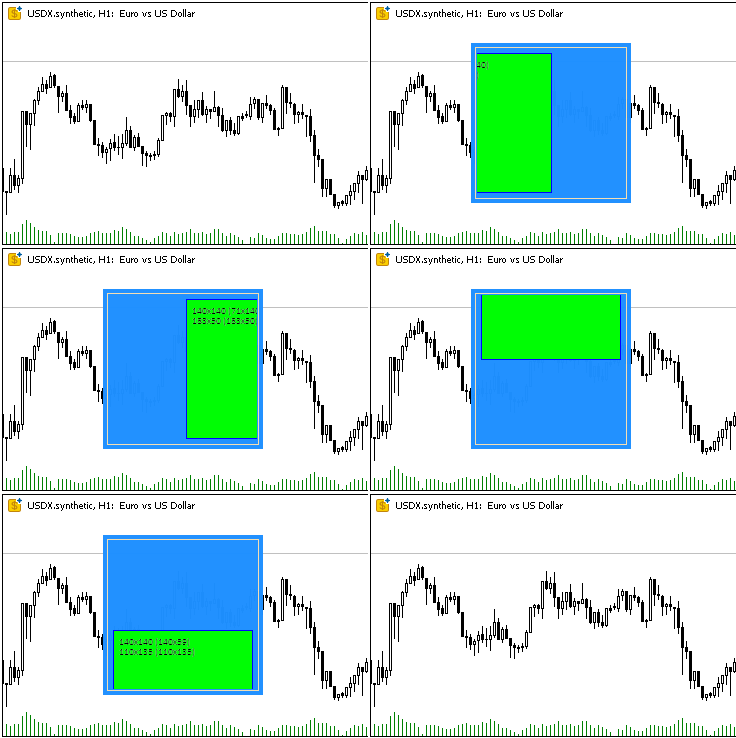
Das untergeordnete Objekt wird korrekt entlang der Ränder des Containerbereichs beschnitten (nicht entlang der Kanten des Objekts, sondern mit einem Versatz um die Breite des Randes), das Blockieren des Objekts bewirkt, dass es in den Farben des blockierten Elements neu gezeichnet wird.
Etwas „Ruckeln“ beim Verschieben eines im Container verschachtelten Objekts sind auf Fehler bei der Aufnahme eines GIF-Bildes zurückzuführen, nicht auf Verzögerungen bei der Ausführung von Klassenmethoden.
Nach der Ausführung des Skripts werden zwei Zeilen mit der Beschreibung der beiden erstellten Objekte in das Protokoll geschrieben:
Canvas Base "Rectangle 1" (TestScr1_BG, TestScr1_FG): ID 1, x 100, y 40, w 160, h 160
Canvas Base "Rectangle 2" (TestScr2_BG, TestScr2_FG): ID 2, x 110, y 50, w 140, h 140
Schlussfolgerung
Heute haben wir die Grundlage für die Erstellung beliebiger grafischer Elemente geschaffen, bei denen jede Klasse eine klar definierte Aufgabe erfüllt, was die Architektur modular und leicht erweiterbar macht.
Implementierte Klassen bilden eine solide Grundlage für die Erstellung komplexer grafischer Elemente und deren Integration in Modell- und Controller-Komponenten im MVC-Paradigma.
Im nächsten Artikel werden wir mit der Erstellung aller notwendigen Elemente für die Erstellung und Verwaltung von Tabellen beginnen. Da in der MQL-Sprache das Ereignismodell mit Hilfe von Chart-Ereignissen in die erstellten Objekte integriert ist, wird die Ereignisbehandlung in allen nachfolgenden Steuerelementen organisiert, um die Verbindung zwischen der View-Komponente und der Controller-Komponente zu implementieren.
Die Programme dieses Artikels:
| # | Name | Typ | Beschreibung |
|---|---|---|---|
| 1 | Base.mqh | Klassenbibliothek | Klassen zur Erstellung eines Basisobjekts von Steuerelementen |
| 2 | TestControls.mq5 | Test-Skript | Skript zum Testen von Manipulationen mit der Basisobjektklasse |
| 3 | MQL5.zip | Archive | Ein Archiv mit den oben genannten Dateien zum Entpacken in das MQL5-Verzeichnis des Client-Terminals |
Klassen innerhalb der Base.mqh-Bibliothek:
| # | Name | Beschreibung |
|---|---|---|
| 1 | CBaseObj | Eine Basisklasse für alle grafischen Objekte |
| 2 | CColor | Farbmanagement-Klasse |
| 3 | CColorElement | Eine Klasse zur Verwaltung der Farben der verschiedenen Zustände eines grafischen Elements |
| 4 | CBound | Kontrollklasse des Rechtecks |
| 5 | CCanvasBase | Eine Basisklasse für die Bearbeitung von grafischen Elementen auf der Leinwand |
Übersetzt aus dem Russischen von MetaQuotes Ltd.
Originalartikel: https://www.mql5.com/ru/articles/17960
Warnung: Alle Rechte sind von MetaQuotes Ltd. vorbehalten. Kopieren oder Vervielfältigen untersagt.
Dieser Artikel wurde von einem Nutzer der Website verfasst und gibt dessen persönliche Meinung wieder. MetaQuotes Ltd übernimmt keine Verantwortung für die Richtigkeit der dargestellten Informationen oder für Folgen, die sich aus der Anwendung der beschriebenen Lösungen, Strategien oder Empfehlungen ergeben.

 Entwicklung eines Expertenberaters für mehrere Währungen (Teil 24): Hinzufügen einer neuen Strategie (II)
 Vom Neuling zum Experten: Automatisierung der Handelsdisziplin mit einem MQL5 Risk Enforcement EA
 Die View- und Controller-Komponenten für Tabellen im MQL5 MVC-Paradigma: Einfache Steuerung
 Tabellen- und Kopfzeilen-Klassen auf der Grundlage eines Tabellenmodells in MQL5: Anwendung des MVC-Konzepts

- Freie Handelsapplikationen
- Über 8.000 Signale zum Kopieren
- Wirtschaftsnachrichten für die Lage an den Finanzmärkte
Sie stimmen der Website-Richtlinie und den Nutzungsbedingungen zu.