

MQL5 MVCパラダイムのテーブルのビューコンポーネント:基本グラフィック要素
 217
217
 0
0

内容
はじめに
現代のプログラミングにおいて、MVC (Model-View-Controller)パラダイムは複雑なアプリケーションを開発する際の代表的なアプローチのひとつです。これにより、アプリケーションのロジックをモデル(データモデル)、ビュー(表示)、コントローラー(制御)の3つの独立したコンポーネントに分割できます。この手法により、コードの開発、テスト、保守が容易になり、構造化され読みやすいコードを書くことが可能になります。
本連載では、MQL5におけるMVCパラダイムでのテーブル作成プロセスを取り上げています。前回までの2記事では、データモデルとテーブルの基本アーキテクチャを実装しました。今回は、データの可視化および一部ユーザーインタラクションを担当するビューコンポーネントに進みます。
本記事では、キャンバス上に描画するための基本オブジェクトを実装します。このオブジェクトは、テーブルやその他のコントロールにおける、すべてのビジュアルコンポーネントの基礎となります。このオブジェクトには以下の機能を含みます。
- 様々な状態(通常状態、フォーカス、押下、ロック)でのカラー管理
- 透過性および動的リサイズへの対応
- コンテナ境界に沿ったオブジェクトトリミング機能
- 可視性およびオブジェクトブロックの管理
- 背景レイヤーと前景レイヤーの2層による描画管理
ここでは、すでに作成されたモデルコンポーネントとの統合については扱いません。また、まだ作成されていないコントローラーコンポーネントについても触れませんが、開発中のクラスは将来的な統合を考慮して設計します。これにより、ビジュアル要素とデータや制御ロジックを容易に結び付けることができ、MVCパラダイムの枠組みの中で完全なインタラクションを実現できます。 その結果、テーブルやその他のグラフィック要素を作成するための柔軟なツールを得ることができます。
MQL5でのビューコンポーネントのアーキテクチャ実装は、補助クラスや継承関係が多く含まれるため非常に時間がかかります。そのため、ここでは比較的簡潔にまとめます。クラスを定義し、簡単な説明をおこない、その実装についても簡潔に確認します。本記事では5つのクラスを扱います。
- すべてのグラフィックオブジェクトの基底クラス
- カラー管理クラス
- グラフィック要素の各種状態のカラー管理クラス
- 矩形領域制御クラス
- キャンバス上にグラフィック要素を描画するための基底クラス
最終的に、これらのクラスはすべて、グラフィック要素を描画する基底クラスの実装に必要です。今後作成されるさまざまなコントロール、特にテーブルコントロールは、この基底クラスから継承して作成されます。
リストの最初の4つのクラスは、5つ目の描画基底クラスの機能を便利に実装するための補助クラスです。これらのクラスを基に、今後のコントロールやそのコンポーネントを作成していきます。
補助クラス
ターミナルディレクトリの\MQL5\Scripts\に新しいフォルダTables\を作成し、そのフォルダ内にControlsフォルダを作成します(すでにない場合)。このフォルダは、テーブル用のビューコンポーネントを作成する記事の枠組み内で作成されるファイルを格納するためのものです。
この新しいフォルダ内に、Base.mqhという新しいインクルードファイルを作成します。本日は、このファイル内にコントロール作成のための基底オブジェクトクラスのコードを実装します。まずは、マクロ置換、列挙型、関数を暫定的に実装します。
//+------------------------------------------------------------------+
//|                                                         Base.mqh |
//|                                  Copyright 2025, MetaQuotes Ltd. |
//|                                             https://www.mql5.com |
//+------------------------------------------------------------------+
#property copyright "Copyright 2025, MetaQuotes Ltd."
#property link      "https://www.mql5.com"

//+------------------------------------------------------------------+
//| Include libraries                                                |
//+------------------------------------------------------------------+
#include <Canvas\Canvas.mqh>              // CCanvas class
#include <Arrays\List.mqh>                // CList class

//+------------------------------------------------------------------+
//| Macro substitutions                                              |
//+------------------------------------------------------------------+
#define  clrNULL              0x00FFFFFF  // Transparent color for CCanvas
#define  MARKER_START_DATA    -1          // Data start marker in a file

//+------------------------------------------------------------------+
//| Enumerations                                                     |
//+------------------------------------------------------------------+
enum ENUM_ELEMENT_TYPE                    // Enumeration of graphical element types
  {
   ELEMENT_TYPE_BASE = 0x10000,           // Basic object of graphical elements
   ELEMENT_TYPE_COLOR,                    // Color object
   ELEMENT_TYPE_COLORS_ELEMENT,           // Color object of the graphical object element
   ELEMENT_TYPE_RECTANGLE_AREA,           // Rectangular area of the element
   ELEMENT_TYPE_CANVAS_BASE,              // Basic canvas object for graphical elements
  };

enum ENUM_COLOR_STATE                     // Enumeration of element state colors
  {
   COLOR_STATE_DEFAULT,                   // Normal state color
   COLOR_STATE_FOCUSED,                   // Color when hovering over an element
   COLOR_STATE_PRESSED,                   // Color when clicking on an element
   COLOR_STATE_BLOCKED,                   // Blocked element color
  };
//+------------------------------------------------------------------+
//| Functions                                                        |
//+------------------------------------------------------------------+
//+------------------------------------------------------------------+
//|  Return the element type as a string                             |
//+------------------------------------------------------------------+
string ElementDescription(const ENUM_ELEMENT_TYPE type)
  {
   string array[];
   int total=StringSplit(EnumToString(type),StringGetCharacter("_",0),array);
   string result="";
   for(int i=2;i<total;i++)
     {
      array[i]+=" ";
      array[i].Lower();
      array[i].SetChar(0,ushort(array[i].GetChar(0)-0x20));
      result+=array[i];
     }
   result.TrimLeft();
   result.TrimRight();
   return result;
  }
//+------------------------------------------------------------------+
//| Classes                                                          |
//+------------------------------------------------------------------+
前回の記事では、オブジェクトタイプを文字列として返す関数を実装しました。コントロールタイプを文字列として返す関数も、前回実装したものとまったく同じです。列挙型の文字列は単に「_」で区切られた部分文字列に分割され、得られた部分文字列を使って最終的な文字列が作成されます。
これら2つの同一の関数が異なるファイルにある間は、そのままにしておきましょう。次に、すべてのファイルを1つのプロジェクトに統合する際に、両方の関数を1つにまとめます。この場合、名前は列挙型から取得するのではなく、渡された文字列から取得するようにします。こうすることで、同じアルゴリズムでオブジェクト名や要素名などを同じ方法で取得できるようになります。重要なのは、すべての列挙型の定数が「OBJECT_TYPE_XXX_YYY」、「ELEMENT_TYPE_XXX_YYY」、「ANYOTHER_TYPE_XXX_YYY_ZZZ」のように同じ構造の名前を持っていることです。この場合、XXX_YYY(XXX_YYY_ZZZなど)として書かれている部分が返され、黄色で示された部分は切り取られます。
グラフィック要素のすべてのオブジェクトや補助クラスには、共通の変数とそれにアクセスするメソッドが含まれています。具体的には、識別子とオブジェクト名です。これらのプロパティを使って、リスト内の項目を検索したりソートしたりできます。したがって、これらの変数とアクセスメソッドは、すべての他の要素が継承できる別のクラスにまとめるのが合理的です。
以下は、グラフィック要素オブジェクトの基底クラスです。
//+------------------------------------------------------------------+
//| Base class of graphical elements                                 |
//+------------------------------------------------------------------+
class CBaseObj : public CObject
  {
protected:
   int               m_id;                                     // ID
   ushort            m_name[];                                 // Name

public:
//--- Set (1) name and (2) ID
   void              SetName(const string name)                { ::StringToShortArray(name,this.m_name);    }
   void              SetID(const int id)                       { this.m_id=id;                              }
//--- Return (1) name and (2) ID
   string            Name(void)                          const { return ::ShortArrayToString(this.m_name);  }
   int               ID(void)                            const { return this.m_id;                          }

//--- Virtual (1) comparison and object type (2) methods
   virtual int       Compare(const CObject *node,const int mode=0) const;
   virtual int       Type(void)                          const { return(ELEMENT_TYPE_BASE); }

//--- Constructors/destructor
                     CBaseObj (void) : m_id(-1) {}
                    ~CBaseObj (void) {}
  };
//+------------------------------------------------------------------+
//| CBaseObj::Compare two objects                                    |
//+------------------------------------------------------------------+
int CBaseObj::Compare(const CObject *node,const int mode=0) const
  {
   const CBaseObj *obj=node;
   switch(mode)
     {
      case 0   :  return(this.Name()>obj.Name() ? 1 : this.Name()<obj.Name() ? -1 : 0);
      default  :  return(this.ID()>obj.ID()     ? 1 : this.ID()<obj.ID()     ? -1 : 0);
     }
  }
簡単な説明
すべてのグラフィックオブジェクトの基底クラス
- 識別子(m_id)や名前(m_name)など共通のプロパティを含みます。
- オブジェクトの比較(Compare)やオブジェクトタイプの取得(Type)の基本的なメソッドを提供します。
- 他のすべてのクラスの親クラスとして使用され、階層構造の統一性を保証します。
このクラスは、グラフィック要素の各オブジェクトに固有の最小限のプロパティを提供します。このクラスを継承することで、新しいクラスごとにこれらの変数を宣言したり、それらにアクセスするメソッドを実装したりする必要がなくなります。これらの変数とメソッドは、継承クラスでも利用可能です。したがって、Compareメソッドは、基底クラスから継承した各オブジェクトに対して、これら2つのプロパティによる検索およびソート機能を提供します。
カラー管理クラス
コントローラーコンポーネントを作成する際には、ユーザーがグラフィック要素とどのようにやり取りするかを視覚的にデザインする必要があります。オブジェクトのアクティブ状態を示す方法のひとつは、グラフィック要素の領域にカーソルを合わせたとき、マウスクリック時、またはソフトウェアによるロック時に、その色を変更することです。
各オブジェクトでは、ユーザー操作に応じて背景色、枠線色、テキスト色の3つの視覚要素の色を変更できます。これら3つの要素それぞれが、異なる状態に応じた独自の色セットを持つことができます。1つの要素の色を便利に制御すること、また色が変化するすべての要素の色を制御するために、2つの補助クラスを実装します。
カラークラス
//+------------------------------------------------------------------+
//| Color class                                                      |
//+------------------------------------------------------------------+
class CColor : public CBaseObj
  {
protected:
   color             m_color;                                  // Color

public:
//--- Set color
   bool              SetColor(const color clr)
                       {
                        if(this.m_color==clr)
                           return false;
                        this.m_color=clr;
                        return true;
                       }
//--- Return color
   color             Get(void)                           const { return this.m_color;              }

//--- (1) Return and (2) display the object description in the journal
   virtual string    Description(void);
   void              Print(void);

//--- Virtual methods of (1) comparing, (2) saving to file, (3) loading from file, (4) object type
   virtual int       Compare(const CObject *node,const int mode=0) const;
   virtual bool      Save(const int file_handle);
   virtual bool      Load(const int file_handle);
   virtual int       Type(void)                          const { return(ELEMENT_TYPE_COLOR);       }

//--- Constructors/destructor
                     CColor(void) : m_color(clrNULL)                          { this.SetName("");  }
                     CColor(const color clr) : m_color(clr)                   { this.SetName("");  }
                     CColor(const color clr,const string name) : m_color(clr) { this.SetName(name);}
                    ~CColor(void) {}
  };
//+------------------------------------------------------------------+
//| CColor::Return the object description                            |
//+------------------------------------------------------------------+
string CColor::Description(void)
  {
   string color_name=(this.Get()!=clrNULL ? ::ColorToString(this.Get(),true) : "clrNULL (0x00FFFFFF)");
   return(this.Name()+(this.Name()!="" ? " " : "")+"Color: "+color_name);
  }
//+------------------------------------------------------------------+
//| CColor::Display object description in the journal                |
//+------------------------------------------------------------------+
void CColor::Print(void)
  {
   ::Print(this.Description());
  }
//+------------------------------------------------------------------+
//| CColor::Save to file                                             |
//+------------------------------------------------------------------+
bool CColor::Save(const int file_handle)
  {
//--- Check the handle
   if(file_handle==INVALID_HANDLE)
      return false;
//--- Save data start marker - 0xFFFFFFFFFFFFFFFF
   if(::FileWriteLong(file_handle,-1)!=sizeof(long))
      return false;
//--- Save the object type
   if(::FileWriteInteger(file_handle,this.Type(),INT_VALUE)!=INT_VALUE)
      return false;

//--- Save the color
   if(::FileWriteInteger(file_handle,this.m_color,INT_VALUE)!=INT_VALUE)
      return false;
//--- Save the ID
   if(::FileWriteInteger(file_handle,this.m_id,INT_VALUE)!=INT_VALUE)
      return false;
//--- Save the name
   if(::FileWriteArray(file_handle,this.m_name)!=sizeof(this.m_name))
      return false;

//--- All is successful
   return true;
  }
//+------------------------------------------------------------------+
//| CColor::Load from file                                           |
//+------------------------------------------------------------------+
bool CColor::Load(const int file_handle)
  {
//--- Check the handle
   if(file_handle==INVALID_HANDLE)
      return false;
//--- Load and check the data start marker - 0xFFFFFFFFFFFFFFFF
   if(::FileReadLong(file_handle)!=-1)
      return false;
//--- Load the object type
   if(::FileReadInteger(file_handle,INT_VALUE)!=this.Type())
      return false;

//--- Load the color
   this.m_color=(color)::FileReadInteger(file_handle,INT_VALUE);
//--- Load the ID
   this.m_id=::FileReadInteger(file_handle,INT_VALUE);
//--- Load the name
   if(::FileReadArray(file_handle,this.m_name)!=sizeof(this.m_name))
      return false;

//--- All is successful
   return true;
  }
クラスの簡単な説明
カラー管理クラス
- 単一の色をcolor型の値(m_color)として保持します。
- 色の設定および取得のメソッド(SetColor、Get)を提供します。
- 色をファイルに保存したり、ファイルから読み込んだりするメソッドを実装します(Save、Load)。
- グラフィック要素内の任意の色を表現するために使用できます。
以下は、グラフィックオブジェクト要素のカラークラスです。
//+------------------------------------------------------------------+
//| Color class of a graphical object element                        |
//+------------------------------------------------------------------+
class CColorElement : public CBaseObj
  {
protected:
   CColor            m_current;                                // Current color. It could be one of the following
   CColor            m_default;                                // Normal state color
   CColor            m_focused;                                // Color on hover
   CColor            m_pressed;                                // Color on click
   CColor            m_blocked;                                // Blocked element color

//--- Convert RGB to color
   color             RGBToColor(const double r,const double g,const double b) const;
//--- Write RGB component values to variables
   void              ColorToRGB(const color clr,double &r,double &g,double &b);
//--- Return (1) Red, (2) Green, (3) Blue color components
   double            GetR(const color clr)                     { return clr&0xFF;                           }
   double            GetG(const color clr)                     { return(clr>>8)&0xFF;                       }
   double            GetB(const color clr)                     { return(clr>>16)&0xFF;                      }

public:
//--- Return a new color
   color             NewColor(color base_color, int shift_red, int shift_green, int shift_blue);

//--- Initialize colors for different states
   bool              InitDefault(const color clr)              { return this.m_default.SetColor(clr);       }
   bool              InitFocused(const color clr)              { return this.m_focused.SetColor(clr);       }
   bool              InitPressed(const color clr)              { return this.m_pressed.SetColor(clr);       }
   bool              InitBlocked(const color clr)              { return this.m_blocked.SetColor(clr);       }

//--- Set colors for all states
   void              InitColors(const color clr_default, const color clr_focused, const color clr_pressed, const color clr_blocked);
   void              InitColors(const color clr);

//--- Return colors of different states
   color             GetCurrent(void)                    const { return this.m_current.Get();               }
   color             GetDefault(void)                    const { return this.m_default.Get();               }
   color             GetFocused(void)                    const { return this.m_focused.Get();               }
   color             GetPressed(void)                    const { return this.m_pressed.Get();               }
   color             GetBlocked(void)                    const { return this.m_blocked.Get();               }

//--- Set one of the colors from the list as the current one
   bool              SetCurrentAs(const ENUM_COLOR_STATE color_state);

//--- (1) Return and (2) display the object description in the journal
   virtual string    Description(void);
   void              Print(void);

//--- Virtual methods of (1) comparing, (2) saving to file, (3) loading from file, (4) object type
   virtual int       Compare(const CObject *node,const int mode=0) const;
   virtual bool      Save(const int file_handle);
   virtual bool      Load(const int file_handle);
   virtual int       Type(void)                          const { return(ELEMENT_TYPE_COLORS_ELEMENT);       }

//--- Constructors/destructor
                     CColorElement(void);
                     CColorElement(const color clr);
                     CColorElement(const color clr_default,const color clr_focused,const color clr_pressed,const color clr_blocked);
                    ~CColorElement(void) {}
  };
//+-----------------------------------------------------------------------------+
//| CColorControl::Constructor with setting the transparent colors of the object|
//+-----------------------------------------------------------------------------+
CColorElement::CColorElement(void)
  {
   this.InitColors(clrNULL,clrNULL,clrNULL,clrNULL);
   this.m_default.SetName("Default"); this.m_default.SetID(1);
   this.m_focused.SetName("Focused"); this.m_focused.SetID(2);
   this.m_pressed.SetName("Pressed"); this.m_pressed.SetID(3);
   this.m_blocked.SetName("Blocked"); this.m_blocked.SetID(4);
   this.SetCurrentAs(COLOR_STATE_DEFAULT);
   this.m_current.SetName("Current");
   this.m_current.SetID(0);
  }
//+------------------------------------------------------------------+
//| CColorControl::Constructor specifying the object colors          |
//+------------------------------------------------------------------+
CColorElement::CColorElement(const color clr_default,const color clr_focused,const color clr_pressed,const color clr_blocked)
  {
   this.InitColors(clr_default,clr_focused,clr_pressed,clr_blocked);
   this.m_default.SetName("Default"); this.m_default.SetID(1);
   this.m_focused.SetName("Focused"); this.m_focused.SetID(2);
   this.m_pressed.SetName("Pressed"); this.m_pressed.SetID(3);
   this.m_blocked.SetName("Blocked"); this.m_blocked.SetID(4);
   this.SetCurrentAs(COLOR_STATE_DEFAULT);
   this.m_current.SetName("Current");
   this.m_current.SetID(0);
  }
//+------------------------------------------------------------------+
//| CColorControl::Constructor specifying the object colors          |
//+------------------------------------------------------------------+
CColorElement::CColorElement(const color clr)
  {
   this.InitColors(clr);
   this.m_default.SetName("Default"); this.m_default.SetID(1);
   this.m_focused.SetName("Focused"); this.m_focused.SetID(2);
   this.m_pressed.SetName("Pressed"); this.m_pressed.SetID(3);
   this.m_blocked.SetName("Blocked"); this.m_blocked.SetID(4);
   this.SetCurrentAs(COLOR_STATE_DEFAULT);
   this.m_current.SetName("Current");
   this.m_current.SetID(0);
  }
//+------------------------------------------------------------------+
//| CColorControl::Set colors for all states                         |
//+------------------------------------------------------------------+
void CColorElement::InitColors(const color clr_default,const color clr_focused,const color clr_pressed,const color clr_blocked)
  {
   this.InitDefault(clr_default);
   this.InitFocused(clr_focused);
   this.InitPressed(clr_pressed);
   this.InitBlocked(clr_blocked);
  }
//+----------------------------------------------------------------------+
//| CColorControl::Set the colors for all states based on the current one|
//+----------------------------------------------------------------------+
void CColorElement::InitColors(const color clr)
  {
   this.InitDefault(clr);
   this.InitFocused(this.NewColor(clr,-3,-3,-3));
   this.InitPressed(this.NewColor(clr,-6,-6,-6));
   this.InitBlocked(clrSilver);
  }
//+---------------------------------------------------------------------+
//|CColorControl::Set one of the colors from the list as the current one|
//+---------------------------------------------------------------------+
bool CColorElement::SetCurrentAs(const ENUM_COLOR_STATE color_state)
  {
   switch(color_state)
     {
      case COLOR_STATE_DEFAULT   :  return this.m_current.SetColor(this.m_default.Get());
      case COLOR_STATE_FOCUSED   :  return this.m_current.SetColor(this.m_focused.Get());
      case COLOR_STATE_PRESSED   :  return this.m_current.SetColor(this.m_pressed.Get());
      case COLOR_STATE_BLOCKED   :  return this.m_current.SetColor(this.m_blocked.Get());
      default                    :  return false;
     }
  }
//+------------------------------------------------------------------+
//| CColorControl::Convert RGB to color                              |
//+------------------------------------------------------------------+
color CColorElement::RGBToColor(const double r,const double g,const double b) const
  {
   int int_r=(int)::round(r);
   int int_g=(int)::round(g);
   int int_b=(int)::round(b);
   int clr=0;
   clr=int_b;
   clr<<=8;
   clr|=int_g;
   clr<<=8;
   clr|=int_r;

   return (color)clr;
  }
//+------------------------------------------------------------------+
//| CColorControl::Get RGB component values                          |
//+------------------------------------------------------------------+
void CColorElement::ColorToRGB(const color clr,double &r,double &g,double &b)
  {
   r=this.GetR(clr);
   g=this.GetG(clr);
   b=this.GetB(clr);
  }
//+------------------------------------------------------------------+
//| CColorControl::Return color with a new color component           |
//+------------------------------------------------------------------+
color CColorElement::NewColor(color base_color, int shift_red, int shift_green, int shift_blue)
  {
   double clrR=0, clrG=0, clrB=0;
   this.ColorToRGB(base_color,clrR,clrG,clrB);
   double clrRx=(clrR+shift_red  < 0 ? 0 : clrR+shift_red  > 255 ? 255 : clrR+shift_red);
   double clrGx=(clrG+shift_green< 0 ? 0 : clrG+shift_green> 255 ? 255 : clrG+shift_green);
   double clrBx=(clrB+shift_blue < 0 ? 0 : clrB+shift_blue > 255 ? 255 : clrB+shift_blue);
   return this.RGBToColor(clrRx,clrGx,clrBx);
  }
//+------------------------------------------------------------------+
//| CColorElement::Return the object description                     |
//+------------------------------------------------------------------+
string CColorElement::Description(void)
  {
   string res=::StringFormat("%s Colors. %s",this.Name(),this.m_current.Description());
   res+="\n  1: "+this.m_default.Description();
   res+="\n  2: "+this.m_focused.Description();
   res+="\n  3: "+this.m_pressed.Description();
   res+="\n  4: "+this.m_blocked.Description();
   return res;
  }
//+------------------------------------------------------------------+
//| CColorElement::Display object description in the journal         |
//+------------------------------------------------------------------+
void CColorElement::Print(void)
  {
   ::Print(this.Description());
  }
//+------------------------------------------------------------------+
//| CColorElement::Save to file                                      |
//+------------------------------------------------------------------+
bool CColorElement::Save(const int file_handle)
  {
//--- Check the handle
   if(file_handle==INVALID_HANDLE)
      return false;
//--- Save data start marker - 0xFFFFFFFFFFFFFFFF
   if(::FileWriteLong(file_handle,-1)!=sizeof(long))
      return false;
//--- Save the object type
   if(::FileWriteInteger(file_handle,this.Type(),INT_VALUE)!=INT_VALUE)
      return false;

//--- Save the ID
   if(::FileWriteInteger(file_handle,this.m_id,INT_VALUE)!=INT_VALUE)
      return false;
//--- Save the name of the element colors
   if(::FileWriteArray(file_handle,this.m_name)!=sizeof(this.m_name))
      return false;
//--- Save the current color
   if(!this.m_current.Save(file_handle))
      return false;
//--- Save the color of the normal state
   if(!this.m_default.Save(file_handle))
      return false;
//--- Save the color when hovering the cursor
   if(!this.m_focused.Save(file_handle))
      return false;
//--- Save the color when clicking
   if(!this.m_pressed.Save(file_handle))
      return false;
//--- Save the color of the blocked element
   if(!this.m_blocked.Save(file_handle))
      return false;

//--- All is successful
   return true;
  }
//+------------------------------------------------------------------+
//| CColorElement::Load from file                                    |
//+------------------------------------------------------------------+
bool CColorElement::Load(const int file_handle)
  {
//--- Check the handle
   if(file_handle==INVALID_HANDLE)
      return false;
//--- Load and check the data start marker - 0xFFFFFFFFFFFFFFFF
   if(::FileReadLong(file_handle)!=-1)
      return false;
//--- Load the object type
   if(::FileReadInteger(file_handle,INT_VALUE)!=this.Type())
      return false;

//--- Load the ID
   this.m_id=::FileReadInteger(file_handle,INT_VALUE);
//--- Load the name of the element colors
   if(::FileReadArray(file_handle,this.m_name)!=sizeof(this.m_name))
      return false;
//--- Load the current color
   if(!this.m_current.Load(file_handle))
      return false;
//--- Load the normal state color
   if(!this.m_default.Load(file_handle))
      return false;
//--- Load the color on hover
   if(!this.m_focused.Load(file_handle))
      return false;
//--- Load the color on click
   if(!this.m_pressed.Load(file_handle))
      return false;
//--- Load the color of the blocked element
   if(!this.m_blocked.Load(file_handle))
      return false;

//--- All is successful
   return true;
  }
クラスの簡単な説明
グラフィック要素の各状態の色を管理するクラス
- 通常(m_default)、フォーカス(m_focused)、押下(m_pressed)、ブロック(m_blocked)の4つの状態の色を保持します。
- 現在の色(m_current)をサポートしており、4つの状態のいずれかに設定可能です。
- すべての状態の色を初期化するメソッド(InitColors)や、現在の色を切り替えるメソッド(SetCurrentAs)を提供します。
- 基本色から新しい色を取得するメソッドを含み、色成分のオフセットを指定できます(NewColor)。
- すべての色をファイルに保存したり、ファイルから読み込んだりするメソッドを実装しています(Save、Load)。
- ボタンやテーブルの行やセルなどのインタラクティブ要素を作成する際に有用です。
矩形領域制御クラス
ターミナルには、\MQL5\Include\Controls\フォルダ内のRect.mqhファイルに、興味深いCRect構造体が用意されています。この構造体は、グラフィック要素上に指定した枠を設定できる矩形ウィンドウを制御するためのメソッドを提供します。この枠を使用することで、単一の要素の複数の領域を仮想的に強調表示し、それらの座標や境界を追跡することができます。これにより、強調表示された領域上でのマウスカーソルの座標を追跡し、グラフィック要素の領域とのマウス操作を整理することが可能になります。
最も簡単な例は、グラフィック要素全体の境界です。別の例として、ステータスバー、スクロールバー、またはテーブルヘッダ用の領域を定義することもできます。
この構造体を使用して、グラフィック要素上に矩形領域を設定できる専用オブジェクトを作成できます。そして、このようなオブジェクトのリストを作成すれば、単一のグラフィック要素上で複数の監視領域を保持でき、それぞれの領域は固有の目的を持ち、領域の名前や識別子でアクセスできます。
このような構造体をオブジェクトリストに格納するためには、CObjectから継承したオブジェクトを作成し、その中にこの構造体を宣言する必要があります。
//+------------------------------------------------------------------+
//| Rectangular region class                                         |
//+------------------------------------------------------------------+
class CBound : public CBaseObj
  {
protected:
   CRect             m_bound;                                  // Rectangular area structure

public:
//--- Change the bounding rectangular (1) width, (2) height and (3) size
   void              ResizeW(const int size)                   { this.m_bound.Width(size);                        }
   void              ResizeH(const int size)                   { this.m_bound.Height(size);                       }
   void              Resize(const int w,const int h)           { this.m_bound.Width(w); this.m_bound.Height(h);   }

//--- Set (1) X, (2) Y and (3) both coordinates of the bounding rectangle
   void              SetX(const int x)                         { this.m_bound.left=x;                             }
   void              SetY(const int y)                         { this.m_bound.top=y;                              }
   void              SetXY(const int x,const int y)            { this.m_bound.LeftTop(x,y);                       }

//--- (1) Set and (2) shift the bounding rectangle by the specified coordinates/offset size
   void              Move(const int x,const int y)             { this.m_bound.Move(x,y);                          }
   void              Shift(const int dx,const int dy)          { this.m_bound.Shift(dx,dy);                       }

//--- Returns the object coordinates, dimensions, and boundaries
   int               X(void)                             const { return this.m_bound.left;                        }
   int               Y(void)                             const { return this.m_bound.top;                         }
   int               Width(void)                         const { return this.m_bound.Width();                     }
   int               Height(void)                        const { return this.m_bound.Height();                    }
   int               Right(void)                         const { return this.m_bound.right-1;                     }
   int               Bottom(void)                        const { return this.m_bound.bottom-1;                    }

//--- (1) Return and (2) display the object description in the journal
   virtual string    Description(void);
   void              Print(void);

//--- Virtual methods of (1) comparing, (2) saving to file, (3) loading from file, (4) object type
   virtual int       Compare(const CObject *node,const int mode=0) const;
   virtual bool      Save(const int file_handle);
   virtual bool      Load(const int file_handle);
   virtual int       Type(void)                          const { return(ELEMENT_TYPE_RECTANGLE_AREA);             }

//--- Constructors/destructor
                     CBound(void) { ::ZeroMemory(this.m_bound); }
                     CBound(const int x,const int y,const int w,const int h) { this.SetXY(x,y); this.Resize(w,h); }
                    ~CBound(void) { ::ZeroMemory(this.m_bound); }
  };
//+------------------------------------------------------------------+
//| CBound::Return the object description                            |
//+------------------------------------------------------------------+
string CBound::Description(void)
  {
   string nm=this.Name();
   string name=(nm!="" ? ::StringFormat(" \"%s\"",nm) : nm);
   return ::StringFormat("%s%s: x %d, y %d, w %d, h %d",
                         ElementDescription((ENUM_ELEMENT_TYPE)this.Type()),name,
                         this.X(),this.Y(),this.Width(),this.Height());
  }
//+------------------------------------------------------------------+
//| CBound::Display the object description in the journal            |
//+------------------------------------------------------------------+
void CBound::Print(void)
  {
   ::Print(this.Description());
  }
//+------------------------------------------------------------------+
//| CBound::Save to file                                             |
//+------------------------------------------------------------------+
bool CBound::Save(const int file_handle)
  {
//--- Check the handle
   if(file_handle==INVALID_HANDLE)
      return false;
//--- Save data start marker - 0xFFFFFFFFFFFFFFFF
   if(::FileWriteLong(file_handle,-1)!=sizeof(long))
      return false;
//--- Save the object type
   if(::FileWriteInteger(file_handle,this.Type(),INT_VALUE)!=INT_VALUE)
      return false;

//--- Save the ID
   if(::FileWriteInteger(file_handle,this.m_id,INT_VALUE)!=INT_VALUE)
      return false;
//--- Save the name
   if(::FileWriteArray(file_handle,this.m_name)!=sizeof(this.m_name))
      return false;
   //--- Save the area structure
   if(::FileWriteStruct(file_handle,this.m_bound)!=sizeof(this.m_bound))
      return(false);

//--- All is successful
   return true;
  }
//+------------------------------------------------------------------+
//| CBound::Load from file                                           |
//+------------------------------------------------------------------+
bool CBound::Load(const int file_handle)
  {
//--- Check the handle
   if(file_handle==INVALID_HANDLE)
      return false;
//--- Load and check the data start marker - 0xFFFFFFFFFFFFFFFF
   if(::FileReadLong(file_handle)!=-1)
      return false;
//--- Load the object type
   if(::FileReadInteger(file_handle,INT_VALUE)!=this.Type())
      return false;

//--- Load the ID
   this.m_id=::FileReadInteger(file_handle,INT_VALUE);
//--- Load the name
   if(::FileReadArray(file_handle,this.m_name)!=sizeof(this.m_name))
      return false;
   //--- Load the region structure
   if(::FileReadStruct(file_handle,this.m_bound)!=sizeof(this.m_bound))
      return(false);

//--- All is successful
   return true;
  }
クラスの簡単な説明
矩形領域制御クラス
- 領域の境界をCRect構造体(m_bound)として保持します。
- サイズ変更のメソッド(Resize、ResizeW、ResizeH)、座標設定のメソッド(SetX、SetY、SetXY)、および領域の移動メソッド(Move、Shift)を提供します。
- 領域の座標や寸法(X、Y、Width、Height、Right、Bottom)を取得可能です。
- 領域をファイルに保存したり、ファイルから読み込んだりするメソッドを実装しています(Save、Load)。
- グラフィック要素やその内部の矩形領域の境界を定義する際に使用されます。
上記の補助クラスを使用することで、すべてのグラフィック要素の基底クラスを作成し始めることができます。
描画基底クラス
このクラスはかなり大規模になるため、作成を始める前に、その簡単な説明を読んで理解しておくと良いです。
キャンバス上のグラフィック要素を操作するための基底クラス
- 背景用(m_background)と前景用(m_foreground)の2つのキャンバスを保持します。
- 要素の境界(m_bound)や、コンテナ情報(m_container)を保持します。
- 背景、前景、枠線の色管理をCColorElementオブジェクトを介してサポートします。
- 表示管理(Hide、Show)、ブロック管理(Block、Unblock)、およびコンテナ境界に沿ったトリミング(ObjectTrim)のメソッドを実装しています。
- 動的なサイズ変更や座標変更(ObjectResize、ObjectSetX、ObjectSetY)をサポートします。
- グラフィック要素の描画(Draw)、更新(Update)、消去(Clear)のメソッドを提供します。
- オブジェクトをファイルに保存したり、ファイルから読み込んだりするメソッドを実装しています(Save、Load)。
- テーブルのセル、行、ヘッダなど、複雑なグラフィック要素を作成するための基盤となります。
以下は、グラフィック要素キャンバスの基底クラスです。
//+------------------------------------------------------------------+ //| Base class of graphical elements canvas | //+------------------------------------------------------------------+ class CCanvasBase : public CBaseObj { protected: CCanvas m_background; // Background canvas CCanvas m_foreground; // Foreground canvas CBound m_bound; // Object boundaries CCanvasBase *m_container; // Parent container object CColorElement m_color_background; // Background color control object CColorElement m_color_foreground; // Foreground color control object CColorElement m_color_border; // Border color control object long m_chart_id; // Chart ID int m_wnd; // Chart subwindow index int m_wnd_y; // Cursor Y coordinate offset in the subwindow int m_obj_x; // Graphical object X coordinate int m_obj_y; // Graphical object Y coordinate uchar m_alpha; // Transparency uint m_border_width; // Frame width string m_program_name; // Program name bool m_hidden; // Hidden object flag bool m_blocked; // Blocked element flag bool m_focused; // Element flag in focus private: //--- Return the offset of the initial drawing coordinates on the canvas relative to the canvas and the object coordinates int CanvasOffsetX(void) const { return(this.ObjectX()-this.X()); } int CanvasOffsetY(void) const { return(this.ObjectY()-this.Y()); } //--- Return the adjusted coordinate of a point on the canvas, taking into account the offset of the canvas relative to the object int AdjX(const int x) const { return(x-this.CanvasOffsetX()); } int AdjY(const int y) const { return(y-this.CanvasOffsetY()); } protected: //--- Returns the adjusted chart ID long CorrectChartID(const long chart_id) const { return(chart_id!=0 ? chart_id : ::ChartID()); } //--- Get the boundaries of the parent container object int ContainerLimitLeft(void) const { return(this.m_container==NULL ? this.X() : this.m_container.LimitLeft()); } int ContainerLimitRight(void) const { return(this.m_container==NULL ? this.Right() : this.m_container.LimitRight()); } int ContainerLimitTop(void) const { return(this.m_container==NULL ? this.Y() : this.m_container.LimitTop()); } int ContainerLimitBottom(void) const { return(this.m_container==NULL ? this.Bottom() : this.m_container.LimitBottom()); } //--- Return the graphical object coordinates, boundaries and dimensions int ObjectX(void) const { return this.m_obj_x; } int ObjectY(void) const { return this.m_obj_y; } int ObjectWidth(void) const { return this.m_background.Width(); } int ObjectHeight(void) const { return this.m_background.Height(); } int ObjectRight(void) const { return this.ObjectX()+this.ObjectWidth()-1; } int ObjectBottom(void) const { return this.ObjectY()+this.ObjectHeight()-1; } //--- Change the bounding rectangular (1) width, (2) height and (3) size void BoundResizeW(const int size) { this.m_bound.ResizeW(size); } void BoundResizeH(const int size) { this.m_bound.ResizeH(size); } void BoundResize(const int w,const int h) { this.m_bound.Resize(w,h); } //--- Set (1) X, (2) Y and (3) both coordinates of the bounding rectangle void BoundSetX(const int x) { this.m_bound.SetX(x); } void BoundSetY(const int y) { this.m_bound.SetY(y); } void BoundSetXY(const int x,const int y) { this.m_bound.SetXY(x,y); } //--- (1) Set and (2) shift the bounding rectangle by the specified coordinates/offset size void BoundMove(const int x,const int y) { this.m_bound.Move(x,y); } void BoundShift(const int dx,const int dy) { this.m_bound.Shift(dx,dy); } //--- Change the graphical object (1) width, (2) height and (3) size bool ObjectResizeW(const int size); bool ObjectResizeH(const int size); bool ObjectResize(const int w,const int h); //--- Set the graphical object (1) X, (2) Y and (3) both coordinates bool ObjectSetX(const int x); bool ObjectSetY(const int y); bool ObjectSetXY(const int x,const int y) { return(this.ObjectSetX(x) && this.ObjectSetY(y)); } //--- (1) Set and (2) relocate the graphical object by the specified coordinates/offset size bool ObjectMove(const int x,const int y) { return this.ObjectSetXY(x,y); } bool ObjectShift(const int dx,const int dy) { return this.ObjectSetXY(this.ObjectX()+dx,this.ObjectY()+dy); } //--- Limit the graphical object by the container dimensions virtual void ObjectTrim(void); public: //--- Return the pointer to the canvas (1) background and (2) foreground CCanvas *GetBackground(void) { return &this.m_background; } CCanvas *GetForeground(void) { return &this.m_foreground; } //--- Return the pointer to the color management object for the (1) background, (2) foreground and (3) border CColorElement *GetBackColorControl(void) { return &this.m_color_background; } CColorElement *GetForeColorControl(void) { return &this.m_color_foreground; } CColorElement *GetBorderColorControl(void) { return &this.m_color_border; } //--- Return the (1) background, (2) foreground and (3) border color color BackColor(void) const { return this.m_color_background.GetCurrent(); } color ForeColor(void) const { return this.m_color_foreground.GetCurrent(); } color BorderColor(void) const { return this.m_color_border.GetCurrent(); } //--- Set background colors for all states void InitBackColors(const color clr_default, const color clr_focused, const color clr_pressed, const color clr_blocked) { this.m_color_background.InitColors(clr_default,clr_focused,clr_pressed,clr_blocked); } void InitBackColors(const color clr) { this.m_color_background.InitColors(clr); } //--- Set foreground colors for all states void InitForeColors(const color clr_default, const color clr_focused, const color clr_pressed, const color clr_blocked) { this.m_color_foreground.InitColors(clr_default,clr_focused,clr_pressed,clr_blocked); } void InitForeColors(const color clr) { this.m_color_foreground.InitColors(clr); } //--- Set border colors for all states void InitBorderColors(const color clr_default, const color clr_focused, const color clr_pressed, const color clr_blocked) { this.m_color_border.InitColors(clr_default,clr_focused,clr_pressed,clr_blocked); } void InitBorderColors(const color clr) { this.m_color_border.InitColors(clr); } //--- Initialize the color of (1) background, (2) foreground and (3) frame with initial values void InitBackColorDefault(const color clr) { this.m_color_background.InitDefault(clr); } void InitForeColorDefault(const color clr) { this.m_color_foreground.InitDefault(clr); } void InitBorderColorDefault(const color clr) { this.m_color_border.InitDefault(clr); } //--- Initialize the color of (1) background, (2) foreground and (3) frame on hover with initial values void InitBackColorFocused(const color clr) { this.m_color_background.InitFocused(clr); } void InitForeColorFocused(const color clr) { this.m_color_foreground.InitFocused(clr); } void InitBorderColorFocused(const color clr) { this.m_color_border.InitFocused(clr); } //--- Initialize the color of (1) background, (2) foreground and (3) frame on click with initial values void InitBackColorPressed(const color clr) { this.m_color_background.InitPressed(clr); } void InitForeColorPressed(const color clr) { this.m_color_foreground.InitPressed(clr); } void InitBorderColorPressed(const color clr) { this.m_color_border.InitPressed(clr); } //--- Initialize the color of (1) background, (2) foreground and (3) frame of a blocked object with initial values void InitBackColorBlocked(const color clr) { this.m_color_background.InitBlocked(clr); } void InitForeColorBlocked(const color clr) { this.m_color_foreground.InitBlocked(clr); } void InitBorderColorBlocked(const color clr) { this.m_color_border.InitBlocked(clr); } //--- Set the current background color to different states bool BackColorToDefault(void) { return this.m_color_background.SetCurrentAs(COLOR_STATE_DEFAULT); } bool BackColorToFocused(void) { return this.m_color_background.SetCurrentAs(COLOR_STATE_FOCUSED); } bool BackColorToPressed(void) { return this.m_color_background.SetCurrentAs(COLOR_STATE_PRESSED); } bool BackColorToBlocked(void) { return this.m_color_background.SetCurrentAs(COLOR_STATE_BLOCKED); } //--- Set the current foreground color to different states bool ForeColorToDefault(void) { return this.m_color_foreground.SetCurrentAs(COLOR_STATE_DEFAULT); } bool ForeColorToFocused(void) { return this.m_color_foreground.SetCurrentAs(COLOR_STATE_FOCUSED); } bool ForeColorToPressed(void) { return this.m_color_foreground.SetCurrentAs(COLOR_STATE_PRESSED); } bool ForeColorToBlocked(void) { return this.m_color_foreground.SetCurrentAs(COLOR_STATE_BLOCKED); } //--- Set the current frame color to different states bool BorderColorToDefault(void) { return this.m_color_border.SetCurrentAs(COLOR_STATE_DEFAULT); } bool BorderColorToFocused(void) { return this.m_color_border.SetCurrentAs(COLOR_STATE_FOCUSED); } bool BorderColorToPressed(void) { return this.m_color_border.SetCurrentAs(COLOR_STATE_PRESSED); } bool BorderColorToBlocked(void) { return this.m_color_border.SetCurrentAs(COLOR_STATE_BLOCKED); } //--- Set the current colors of the element to different states bool ColorsToDefault(void); bool ColorsToFocused(void); bool ColorsToPressed(void); bool ColorsToBlocked(void); //--- Set the pointer to the parent container object void SetContainerObj(CCanvasBase *obj); //--- Create OBJ_BITMAP_LABEL bool Create(const long chart_id,const int wnd,const string name,const int x,const int y,const int w,const int h); //--- Return (1) the object's belonging to the program, the flag (2) of a hidden element, (3) a blocked element and (4) the graphical object name bool IsBelongsToThis(void) const { return(::ObjectGetString(this.m_chart_id,this.NameBG(),OBJPROP_TEXT)==this.m_program_name); } bool IsHidden(void) const { return this.m_hidden; } bool IsBlocked(void) const { return this.m_blocked; } bool IsFocused(void) const { return this.m_focused; } string NameBG(void) const { return this.m_background.ChartObjectName(); } string NameFG(void) const { return this.m_foreground.ChartObjectName(); } //--- (1) Return and (2) set transparency uchar Alpha(void) const { return this.m_alpha; } void SetAlpha(const uchar value) { this.m_alpha=value; } //--- (1) Return and (2) set the frame width uint BorderWidth(void) const { return this.m_border_width; } void SetBorderWidth(const uint width) { this.m_border_width=width; } //--- Returns the object coordinates, dimensions, and boundaries int X(void) const { return this.m_bound.X(); } int Y(void) const { return this.m_bound.Y(); } int Width(void) const { return this.m_bound.Width(); } int Height(void) const { return this.m_bound.Height(); } int Right(void) const { return this.m_bound.Right(); } int Bottom(void) const { return this.m_bound.Bottom(); } //--- Set the new (1) X, (2) Y, (3) XY coordinate for the object bool MoveX(const int x); bool MoveY(const int y); bool Move(const int x,const int y); //--- Shift the object by (1) X, (2) Y, (3) XY xis by the specified offset bool ShiftX(const int dx); bool ShiftY(const int dy); bool Shift(const int dx,const int dy); //--- Return the object boundaries considering the frame int LimitLeft(void) const { return this.X()+(int)this.m_border_width; } int LimitRight(void) const { return this.Right()-(int)this.m_border_width; } int LimitTop(void) const { return this.Y()+(int)this.m_border_width; } int LimitBottom(void) const { return this.Bottom()-(int)this.m_border_width; } //--- (1) Hide and (2) display the object on all chart periods, //--- (3) bring the object to the front, (4) block, (5) unblock the element, //--- (6) fill the object with the specified color with the set transparency virtual void Hide(const bool chart_redraw); virtual void Show(const bool chart_redraw); virtual void BringToTop(const bool chart_redraw); virtual void Block(const bool chart_redraw); virtual void Unblock(const bool chart_redraw); void Fill(const color clr,const bool chart_redraw); //--- (1) Fill the object with a transparent color, (2) update the object to reflect the changes, //--- (3) draw the appearance and (4) destroy the object virtual void Clear(const bool chart_redraw); virtual void Update(const bool chart_redraw); virtual void Draw(const bool chart_redraw); virtual void Destroy(void); //--- (1) Return and (2) display the object description in the journal virtual string Description(void); void Print(void); //--- Virtual methods of (1) comparing, (2) saving to file, (3) loading from file, (4) object type virtual int Compare(const CObject *node,const int mode=0) const; virtual bool Save(const int file_handle); virtual bool Load(const int file_handle); virtual int Type(void) const { return(ELEMENT_TYPE_CANVAS_BASE); } //--- Constructors/destructor CCanvasBase(void) : m_program_name(::MQLInfoString(MQL_PROGRAM_NAME)), m_chart_id(::ChartID()), m_wnd(0), m_alpha(0), m_hidden(false), m_blocked(false), m_focused(false), m_border_width(0), m_wnd_y(0) { } CCanvasBase(const long chart_id,const int wnd,const string name,const int x,const int y,const int w,const int h); ~CCanvasBase(void); };
クラスとは、グラフィック要素のプロパティのリスト、上記で説明したクラスのオブジェクトのリスト、そして補助クラスの変数やメソッドにアクセスするためのメソッドのリストです。
結果として、グラフィック要素のプロパティや表示を自在に制御できる、非常に柔軟なオブジェクトを得ることができます。このオブジェクトは、基底オブジェクトで実装された基本機能をすべての子孫クラスに提供し、継承クラスで拡張することも可能です。
それでは、クラスの各メソッドを見ていきましょう。
パラメトリックコンストラクタ
//+------------------------------------------------------------------+
//| CCanvasBase::Constructor                                         |
//+------------------------------------------------------------------+
CCanvasBase::CCanvasBase(const long chart_id,const int wnd,const string name,const int x,const int y,const int w,const int h) :
   m_program_name(::MQLInfoString(MQL_PROGRAM_NAME)), m_wnd(wnd<0 ? 0 : wnd), m_alpha(0), m_hidden(false), m_blocked(false), m_focused(false), m_border_width(0)
  {
//--- Get the adjusted chart ID and the distance in pixels along the vertical Y axis
//--- between the upper frame of the indicator subwindow and the upper frame of the chart main window
   this.m_chart_id=this.CorrectChartID(chart_id);
   this.m_wnd_y=(int)::ChartGetInteger(this.m_chart_id,CHART_WINDOW_YDISTANCE,this.m_wnd);
//--- If the graphical resource and graphical object are created
   if(this.Create(this.m_chart_id,this.m_wnd,name,x,y,w,h))
     {
      //--- Clear the background and foreground canvases and set the initial coordinate values,
      //--- names of graphic objects and properties of text drawn in the foreground
      this.Clear(false);
      this.m_obj_x=x;
      this.m_obj_y=y;
      this.m_color_background.SetName("Background");
      this.m_color_foreground.SetName("Foreground");
      this.m_color_border.SetName("Border");
      this.m_foreground.FontSet("Calibri",12);
      this.m_bound.SetName("Perimeter");
     }
  }
作成されるオブジェクトの初期プロパティはコンストラクタに渡され、背景および前景を描画するためのグラフィックリソースやオブジェクトが作成されます。さらに、グラフィックオブジェクトの座標値や名前が設定され、前景にテキストを表示するためのフォントパラメータも設定されます。
クラスのデストラクタでは、オブジェクトが破棄されます。
//+------------------------------------------------------------------+
//| CCanvasBase::Destructor                                          |
//+------------------------------------------------------------------+
CCanvasBase::~CCanvasBase(void)
  {
   this.Destroy();
  }
以下は、背景と前景のグラフィックオブジェクトを作成するメソッドです。
//+------------------------------------------------------------------+
//| CCanvasBase::Create background and foreground graphical objects  |
//+------------------------------------------------------------------+
bool CCanvasBase::Create(const long chart_id,const int wnd,const string name,const int x,const int y,const int w,const int h)
  {
//--- Get the adjusted chart ID
   long id=this.CorrectChartID(chart_id);
//--- Create a graphical object name for the background and create a canvas
   string obj_name=name+"_BG";
   if(!this.m_background.CreateBitmapLabel(id,(wnd<0 ? 0 : wnd),obj_name,x,y,(w>0 ? w : 1),(h>0 ? h : 1),COLOR_FORMAT_ARGB_NORMALIZE))
     {
      ::PrintFormat("%s: The CreateBitmapLabel() method of the CCanvas class returned an error creating a \"%s\" graphic object",__FUNCTION__,obj_name);
      return false;
     }
//--- Create a graphical object name for the foreground and create a canvas
   obj_name=name+"_FG";
   if(!this.m_foreground.CreateBitmapLabel(id,(wnd<0 ? 0 : wnd),obj_name,x,y,(w>0 ? w : 1),(h>0 ? h : 1),COLOR_FORMAT_ARGB_NORMALIZE))
     {
      ::PrintFormat("%s: The CreateBitmapLabel() method of the CCanvas class returned an error creating a \"%s\" graphic object",__FUNCTION__,obj_name);
      return false;
     }
//--- If created successfully, enter the program name into the OBJPROP_TEXT property of the graphical object
   ::ObjectSetString(id,this.NameBG(),OBJPROP_TEXT,this.m_program_name);
   ::ObjectSetString(id,this.NameFG(),OBJPROP_TEXT,this.m_program_name);

//--- Set the dimensions of the rectangular area and return 'true'
   this.m_bound.SetXY(x,y);
   this.m_bound.Resize(w,h);
   return true;
  }
CCanvasクラスのOBJ_BITMAP_LABELグラフィックオブジェクト作成メソッドを使用して、背景および前景を描画するためのオブジェクトが作成され、オブジェクト全体の座標と寸法が設定されます。ここで注目すべき点は、作成されたOBJPROP_TEXTグラフィックオブジェクトのプロパティにプログラム名が挿入されることです。これにより、グラフィックオブジェクトの名前にプログラム名を明示的に記載しなくても、どのグラフィックオブジェクトが特定のプログラムに属しているかを識別できます。
以下は、親コンテナオブジェクトへのポインタを設定するメソッドです。
//+------------------------------------------------------------------+
//| CCanvasBase::Set the pointer                                     |
//| to the parent container object                                   |
//+------------------------------------------------------------------+
void CCanvasBase::SetContainerObj(CCanvasBase *obj)
  {
//--- Set the passed pointer to the object
   this.m_container=obj;
//--- If the pointer is empty, leave
   if(this.m_container==NULL)
      return;
//--- If an invalid pointer is passed, zero it in the object and leave
   if(::CheckPointer(this.m_container)==POINTER_INVALID)
     {
      this.m_container=NULL;
      return;
     }
//--- Clip the object along the boundaries of the container assigned to it
   this.ObjectTrim();
  }
各グラフィック要素は、親要素の一部として存在することができます。たとえば、ボタン、ドロップダウンリスト、その他のコントロールは、パネル上に配置されることがあります。子オブジェクトが親の境界に沿ってトリミングされるようにするためには、この親要素へのポインタを子オブジェクトに渡す必要があります。
親要素には、自身の座標や境界を返すメソッドが備わっています。子要素は、何らかの理由でコンテナの境界を超えた場合に、この境界に沿ってトリミングされます。その理由としては、大きなテーブルの内容をスクロールする場合などが考えられます。
以下は、グラフィックオブジェクトをコンテナの輪郭に沿ってトリミングするメソッドです。
//+-----------------------------------------------------------------------+
//| CCanvasBase::Crop a graphical object to the outline of its container  |
//+-----------------------------------------------------------------------+
void CCanvasBase::ObjectTrim()
  {
//--- Get the container boundaries
   int container_left   = this.ContainerLimitLeft();
   int container_right  = this.ContainerLimitRight();
   int container_top    = this.ContainerLimitTop();
   int container_bottom = this.ContainerLimitBottom();

//--- Get the current object boundaries
   int object_left   = this.X();
   int object_right  = this.Right();
   int object_top    = this.Y();
   int object_bottom = this.Bottom();

//--- Check if the object is completely outside the container and hide it if it is
   if(object_right <= container_left || object_left >= container_right ||
      object_bottom <= container_top || object_top >= container_bottom)
     {
      this.Hide(true);
      this.ObjectResize(this.Width(),this.Height());
      return;
     }

//--- Check whether the object extends horizontally and vertically beyond the container boundaries
   bool modified_horizontal=false;     // Horizontal change flag
   bool modified_vertical  =false;     // Vertical change flag

//--- Horizontal cropping
   int new_left = object_left;
   int new_width = this.Width();
//--- If the object extends beyond the container left border
   if(object_left<=container_left)
     {
      int crop_left=container_left-object_left;
      new_left=container_left;
      new_width-=crop_left;
      modified_horizontal=true;
     }
//--- If the object extends beyond the container right border
   if(object_right>=container_right)
     {
      int crop_right=object_right-container_right;
      new_width-=crop_right;
      modified_horizontal=true;
     }
//--- If there were changes horizontally
   if(modified_horizontal)
     {
      this.ObjectSetX(new_left);
      this.ObjectResizeW(new_width);
     }

//--- Vertical cropping
   int new_top=object_top;
   int new_height=this.Height();
//--- If the object extends beyond the top edge of the container
   if(object_top<=container_top)
     {
      int crop_top=container_top-object_top;
      new_top=container_top;
      new_height-=crop_top;
      modified_vertical=true;
     }
//--- If the object extends beyond the bottom border of the container
   if(object_bottom>=container_bottom)
     {
      int crop_bottom=object_bottom-container_bottom;
      new_height-=crop_bottom;
      modified_vertical=true;
     }
//--- If there were vertical changes
   if(modified_vertical)
     {
      this.ObjectSetY(new_top);
      this.ObjectResizeH(new_height);
     }

//--- After calculations, the object may be hidden, but is now in the container area - display it
   this.Show(false);

//--- If the object has been changed, redraw it
   if(modified_horizontal || modified_vertical)
     {
      this.Update(false);
      this.Draw(false);
     }
  }
これは仮想メソッドであり、継承クラスで再定義することができます。メソッドの処理の詳細なロジックは、コード内のコメントで説明されています。移動やサイズ変更などの変換をおこなう際に、常にグラフィック要素がコンテナの範囲を超えていないかがチェックされます。オブジェクトがコンテナを持たない場合は、トリミングはおこなわれません。
以下は、グラフィックオブジェクトのX座標を設定するメソッドです。
//+------------------------------------------------------------------+
//| CCanvasBase::Set the X coordinate of the graphical object        |
//+------------------------------------------------------------------+
bool CCanvasBase::ObjectSetX(const int x)
  {
//--- If an existing coordinate is passed, return 'true'
   if(this.ObjectX()==x)
      return true;
//--- If failed to set a new coordinate in the background and foreground graphical objects, return 'false'
   if(!::ObjectSetInteger(this.m_chart_id,this.NameBG(),OBJPROP_XDISTANCE,x) || !::ObjectSetInteger(this.m_chart_id,this.NameFG(),OBJPROP_XDISTANCE,x))
      return false;
//--- Set the new coordinate to the variable and return 'true'
   this.m_obj_x=x;
   return true;
  }
このメソッドは、背景キャンバスと前景キャンバスという2つのグラフィックオブジェクトの座標が正常に設定された場合にのみ、trueを返します。
以下は、グラフィックオブジェクトのY座標を設定するメソッドです。
//+------------------------------------------------------------------+
//| CCanvasBase::Set the Y coordinate of the graphical object        |
//+------------------------------------------------------------------+
bool CCanvasBase::ObjectSetY(const int y)
  {
//--- If an existing coordinate is passed, return 'true'
   if(this.ObjectY()==y)
      return true;
//--- If failed to set a new coordinate in the background and foreground graphical objects, return 'false'
   if(!::ObjectSetInteger(this.m_chart_id,this.NameBG(),OBJPROP_YDISTANCE,y) || !::ObjectSetInteger(this.m_chart_id,this.NameFG(),OBJPROP_YDISTANCE,y))
      return false;
//--- Set the new coordinate to the variable and return 'true'
   this.m_obj_y=y;
   return true;
  }
このメソッドは上で説明したものと同じです。
以下は、グラフィックオブジェクトの幅を変更するメソッドです。
//+------------------------------------------------------------------+
//| CCanvasBase::Change the graphical object width                   |
//+------------------------------------------------------------------+
bool CCanvasBase::ObjectResizeW(const int size)
  {
//--- If an existing width is passed, return 'true'
   if(this.ObjectWidth()==size)
      return true;
//--- If the passed size is greater than 0, return the result of changing the background and foreground widths, otherwise - 'false'
   return(size>0 ? (this.m_background.Resize(size,this.ObjectHeight()) && this.m_foreground.Resize(size,this.ObjectHeight())) : false);
  }
処理対象として受け入れられるのは、ゼロより大きい値の幅のみです。背景キャンバスと前景キャンバスの幅が正常に変更された場合にのみ、メソッドはtrueを返します。
以下は、グラフィックオブジェクトの高さを変更するメソッドです。
//+------------------------------------------------------------------+
//| CCanvasBase::Change the graphical object height                  |
//+------------------------------------------------------------------+
bool CCanvasBase::ObjectResizeH(const int size)
  {
//--- If an existing height is passed, return 'true'
   if(this.ObjectHeight()==size)
      return true;
//--- If the passed size is greater than 0, return the result of changing the background and foreground heights, otherwise - 'false'
   return(size>0 ? (this.m_background.Resize(this.ObjectWidth(),size) && this.m_foreground.Resize(this.ObjectWidth(),size)) : false);
  }
このメソッドは上で説明したものと同じです。
以下は、グラフィックオブジェクトのサイズを変更するメソッドです。
//+------------------------------------------------------------------+
//| CCanvasBase::Change the graphical object size                    |
//+------------------------------------------------------------------+
bool CCanvasBase::ObjectResize(const int w,const int h)
  {
   if(!this.ObjectResizeW(w))
      return false;
   return this.ObjectResizeH(h);
  }
ここでは、幅と高さを変更するメソッドが交互に呼び出されます。幅と高さの両方が正常に変更された場合にのみtrueを返します。
以下は、オブジェクトの新しいX座標とY座標を設定するメソッドです。
//+------------------------------------------------------------------+
//| CCanvasBase::Set new X and Y object coordinates                  |
//+------------------------------------------------------------------+
bool CCanvasBase::Move(const int x,const int y)
  {
   if(!this.ObjectMove(x,y))
      return false;
   this.BoundMove(x,y);
   this.ObjectTrim();
   return true;
  }
まず、背景および前景のグラフィックオブジェクトが指定された座標に移動されます。グラフィックオブジェクトの新しい座標が正常に設定された場合、同じ座標がオブジェクト自身にも設定されます。その後、オブジェクトがコンテナの境界を超えていないかを確認し、問題なければtrueを返します。
以下は、オブジェクトの新しいX座標を設定するメソッドです。
//+------------------------------------------------------------------+
//| CCanvasBase::Set the object new X coordinate                     |
//+------------------------------------------------------------------+
bool CCanvasBase::MoveX(const int x)
  {
   return this.Move(x,this.ObjectY());
  }
水平座標のみを設定する補助メソッドです。垂直座標は現在の値のまま保持されます。
以下は、オブジェクトの新しいY座標を設定するメソッドです。
//+------------------------------------------------------------------+
//| CCanvasBase::Set the object new Y coordinate                     |
//+------------------------------------------------------------------+
bool CCanvasBase::MoveY(const int y)
  {
   return this.Move(this.ObjectX(),y);
  }
垂直座標のみを設定する補助メソッドです。水平座標は現在の値のまま保持されます。
以下は、オブジェクトをX軸とY軸に沿って指定されたオフセットだけ移動するメソッドです。
//+--------------------------------------------------------------------------------+
//| CCanvasBase::Offset the object along the X and Y axes by the specified offset  |
//+--------------------------------------------------------------------------------+
bool CCanvasBase::Shift(const int dx,const int dy)
  {
   if(!this.ObjectShift(dx,dy))
      return false;
   this.BoundShift(dx,dy);
   this.ObjectTrim();
   return true;
  }
Moveメソッドがオブジェクトの画面座標を設定するのに対して、Shiftメソッドはオブジェクトの画面座標に対してピクセル単位のローカルオフセットを指定します。まず、背景および前景のグラフィックオブジェクトがシフトされます。その後、同じオフセットがオブジェクト自身にも設定されます。次に、オブジェクトがコンテナの境界を超えていないかを確認し、問題なければtrueを返します。
以下は、オブジェクトをX軸に沿って指定されたオフセットだけ移動するメソッドです。
//+-------------------------------------------------------------------------------+
//| CCanvasBase::Offset the object along the X axis by the specified offset       |
//+-------------------------------------------------------------------------------+
bool CCanvasBase::ShiftX(const int dx)
  {
   return this.Shift(dx,0);
  }
水平方向のみオブジェクトを移動させる補助メソッドです。垂直座標は現在の値のまま保持されます。
以下は、オブジェクトをY軸に沿って指定されたオフセットだけ移動するメソッドです。
//+-------------------------------------------------------------------------------+
//| CCanvasBase::Offset the object along the Y axis by the specified offset       |
//+-------------------------------------------------------------------------------+
bool CCanvasBase::ShiftY(const int dy)
  {
   return this.Shift(0,dy);
  }
垂直方向のみオブジェクトを移動させる補助メソッドです。水平座標は現在の値のまま保持されます。
以下は、すべてのチャート期間でオブジェクトを非表示にするメソッドです。
//+------------------------------------------------------------------+
//| CCanvasBase::Hide the object on all chart periods                |
//+------------------------------------------------------------------+
void CCanvasBase::Hide(const bool chart_redraw)
  {
//--- If the object is already hidden, leave
   if(this.m_hidden)
      return;
//--- If the visibility change for background and foreground is successfully set
//--- in the chart command queue - set the hidden object flag
   if(::ObjectSetInteger(this.m_chart_id,this.NameBG(),OBJPROP_TIMEFRAMES,OBJ_NO_PERIODS) &&
      ::ObjectSetInteger(this.m_chart_id,this.NameFG(),OBJPROP_TIMEFRAMES,OBJ_NO_PERIODS)
      ) this.m_hidden=true;
//--- If specified, redraw the chart
   if(chart_redraw)
      ::ChartRedraw(this.m_chart_id);
  }
グラフィックオブジェクトをチャート上で非表示にするには、そのOBJPROP_TIMEFRAMESプロパティにOBJ_NO_PERIODSの値を設定します。背景オブジェクトおよび前景オブジェクト(チャートイベント用にキューに登録済み)に対してプロパティが正常に設定された場合、非表示オブジェクトのフラグを立て、指定されていればチャートを再描画します。
以下は、すべてのチャート期間でオブジェクトを表示するメソッドです。
//+------------------------------------------------------------------+
//| CCanvasBase::Display an object on all chart periods              |
//+------------------------------------------------------------------+
void CCanvasBase::Show(const bool chart_redraw)
  {
//--- If the object is already visible, leave
   if(!this.m_hidden)
      return;
//--- If the visibility change for background and foreground is successfully set
//--- in the chart command queue - reset the hidden object flag
   if(::ObjectSetInteger(this.m_chart_id,this.NameBG(),OBJPROP_TIMEFRAMES,OBJ_ALL_PERIODS) &&
      ::ObjectSetInteger(this.m_chart_id,this.NameFG(),OBJPROP_TIMEFRAMES,OBJ_ALL_PERIODS)
      ) this.m_hidden=false;
//--- If specified, redraw the chart
   if(chart_redraw)
      ::ChartRedraw(this.m_chart_id);
  }
グラフィックオブジェクトをチャート上で表示するには、そのOBJPROP_TIMEFRAMESプロパティにOBJ_ALL_PERIODSの値を設定します。背景オブジェクトおよび前景オブジェクト(チャートイベント用にキューに登録済み)に対してプロパティが正常に設定された場合、非表示オブジェクトのフラグを削除し、指定されていればチャートを再描画します。
以下は、オブジェクトを前景に配置するメソッドです。
//+------------------------------------------------------------------+
//| CCanvasBase::Bring an object to the foreground                   |
//+------------------------------------------------------------------+
void CCanvasBase::BringToTop(const bool chart_redraw)
  {
   this.Hide(false);
   this.Show(chart_redraw);
  }
グラフィックオブジェクトをチャート上の他のオブジェクトより前面に配置するには、オブジェクトを順番に非表示にしてからすぐに表示する必要があります。このメソッドは、その処理を実行します。
以下は、オブジェクトの各状態におけるカラー管理メソッドです。
//+------------------------------------------------------------------+
//| CCanvasBase::Set the current element colors                      |
//| to default state                                                 |
//+------------------------------------------------------------------+
bool CCanvasBase::ColorsToDefault(void)
  {
   bool res=true;
   res &=this.BackColorToDefault();
   res &=this.ForeColorToDefault();
   res &=this.BorderColorToDefault();
   return res;
  }
//+------------------------------------------------------------------+
//| CCanvasBase::Set the current element colors                      |
//| to on-hover state                                                |
//+------------------------------------------------------------------+
bool CCanvasBase::ColorsToFocused(void)
  {
   bool res=true;
   res &=this.BackColorToFocused();
   res &=this.ForeColorToFocused();
   res &=this.BorderColorToFocused();
   return res;
  }
//+------------------------------------------------------------------+
//| CCanvasBase::Set the current element colors                      |
//| to on-click state                                                |
//+------------------------------------------------------------------+
bool CCanvasBase::ColorsToPressed(void)
  {
   bool res=true;
   res &=this.BackColorToPressed();
   res &=this.ForeColorToPressed();
   res &=this.BorderColorToPressed();
   return res;
  }
//+------------------------------------------------------------------+
//| CCanvasBase::Set the current element colors                      |
//| to blocked state                                                 |
//+------------------------------------------------------------------+
bool CCanvasBase::ColorsToBlocked(void)
  {
   bool res=true;
   res &=this.BackColorToBlocked();
   res &=this.ForeColorToBlocked();
   res &=this.BorderColorToBlocked();
   return res;
  }
グラフィック要素は3つの部分を持っており、それぞれの色は個別に設定できます。
- 背景色
- テキスト色
- 枠線色
これら3つの要素は、要素の状態に応じて色を変化させることができます。状態の例は以下の通りです。
- グラフィック要素の通常状態
- 要素にカーソルが重なったとき(フォーカス)
- 要素をクリックしたとき(クリック)
- 要素がブロックされているとき
各要素(背景、テキスト、枠線)の色は個別に設定および調整することが可能です。しかし通常は、これら3つの要素はユーザーとの操作に応じて、要素の状態に従い同期して色が変化します。
前述のメソッドを使用すると、3つの要素それぞれに対して、オブジェクトのさまざまな状態の色を同時に設定することができます。
以下は、要素をブロックするメソッドです。
//+------------------------------------------------------------------+
//| CCanvasBase::Block the element                                   |
//+------------------------------------------------------------------+
void CCanvasBase::Block(const bool chart_redraw)
  {
//--- If the element has already been blocked, leave
   if(this.m_blocked)
      return;
//--- Set the current colors as the colors of the blocked element,
//--- redraw the object and set the block flag
   this.ColorsToBlocked();
   this.Draw(chart_redraw);
   this.m_blocked=true;
  }
要素がロックされると、ロック状態用の色が設定され、オブジェクトが再描画されて新しい色が表示され、ロックフラグが立てられます。
以下は、要素のブロックを解除するメソッドです。
//+------------------------------------------------------------------+
//| CCanvasBase::Unblock the element                                 |
//+------------------------------------------------------------------+
void CCanvasBase::Unblock(const bool chart_redraw)
  {
//--- If the element has already been unblocked, leave
   if(!this.m_blocked)
      return;
//--- Set the current colors as the colors of the element in its normal state,
//--- redraw the object and reset the block flag
   this.ColorsToDefault();
   this.Draw(chart_redraw);
   this.m_blocked=false;
  }
要素のロックが解除されると、通常状態用の色が設定され、オブジェクトが再描画されて新しい色が表示され、ロックフラグが解除されます。
以下は、指定された色でオブジェクトを塗りつぶすメソッドです。
//+------------------------------------------------------------------+
//| CCanvasBase::Fill an object with the specified color             |
//| with transparency set to                                         |
//+------------------------------------------------------------------+
void CCanvasBase::Fill(const color clr,const bool chart_redraw)
  {
   this.m_background.Erase(::ColorToARGB(clr,this.m_alpha));
   this.m_background.Update(chart_redraw);
  }
場合によっては、オブジェクトの背景全体を特定の色で完全に塗りつぶす必要があります。このメソッドは、前景に影響を与えずにオブジェクトの背景を色で塗りつぶします。塗りつぶしには透明度が使用され、これはクラス変数m_alphaで事前に設定されます。その後、キャンバスが更新され、チャート再描画フラグに従って変更が反映されます。
フラグが立っている場合、キャンバス更新後に変更が即座に表示されます。フラグがリセットされている場合、オブジェクトの表示は新しいティック時、または次回のチャート更新コマンド呼び出し時に更新されます。これは、複数のオブジェクトを同時に再描画する場合に必要です。再描画フラグは、最後に再描画されるオブジェクトのみで立てるべきです。
このロジックは、グラフィックオブジェクトを変更するすべてのケースに一般的に適用されます。単一要素を変更した場合は即座に更新され、複数の要素を一括処理する場合は、最後のグラフィック要素を変更した後にのみグラフの再描画が必要です。
以下は、オブジェクトを透明色で塗りつぶすメソッドです。
//+------------------------------------------------------------------+
//| CCanvasBase::Fill an object with transparent color               |
//+------------------------------------------------------------------+
void CCanvasBase::Clear(const bool chart_redraw)
  {
   this.m_background.Erase(clrNULL);
   this.m_foreground.Erase(clrNULL);
   this.Update(chart_redraw);
  }
背景キャンバスおよび前景キャンバスは透明色で塗りつぶされ、両方のオブジェクトがグラフ再描画フラグを指定して更新されます。
以下は、オブジェクトを更新して変更を反映させるメソッドです。
//+------------------------------------------------------------------+
//| CCanvasBase::Update the object to display the changes            |
//+------------------------------------------------------------------+
void CCanvasBase::Update(const bool chart_redraw)
  {
   this.m_background.Update(false);
   this.m_foreground.Update(chart_redraw);
  }
背景キャンバスはグラフを再描画せずに更新され、前景キャンバスを更新する際には指定されたグラフ再描画フラグが使用されます。これにより、両方のCCanvasオブジェクトを同時に更新しつつ、複数のオブジェクトに対するグラフ再描画を、メソッドの再描画フラグ指定によって制御することが可能です。
以下は、オブジェクトの外観を描画するメソッドです。
//+------------------------------------------------------------------+
//| CCanvasBase::Draw the appearance                                 |
//+------------------------------------------------------------------+
void CCanvasBase::Draw(const bool chart_redraw)
  {
   return;
  }
これは仮想メソッドです。実装は継承クラスでおこなう必要があります。このメソッドは基底オブジェクトでは何もおこないません。基底オブジェクトは単に、ここからコントロールが実装されるための基盤となるオブジェクトだからです。
以下は、オブジェクトを破壊するメソッドです。
//+------------------------------------------------------------------+
//| CCanvasBase::Destroy the object                                  |
//+------------------------------------------------------------------+
void CCanvasBase::Destroy(void)
  {
   this.m_background.Destroy();
   this.m_foreground.Destroy();
  }
両方のキャンバスは、CCanvasクラスのDestroyメソッドを使用して破棄されます。
以下は、オブジェクトの説明を返すメソッドです。
//+------------------------------------------------------------------+
//| CCanvasBase::Return the object description                       |
//+------------------------------------------------------------------+
string CCanvasBase::Description(void)
  {
   string nm=this.Name();
   string name=(nm!="" ? ::StringFormat(" \"%s\"",nm) : nm);
   string area=::StringFormat("x %d, y %d, w %d, h %d",this.X(),this.Y(),this.Width(),this.Height());
   return ::StringFormat("%s%s (%s, %s): ID %d, %s",ElementDescription((ENUM_ELEMENT_TYPE)this.Type()),name,this.NameBG(),this.NameFG(),this.ID(),area);
  }
オブジェクトの説明、識別子、背景および前景のグラフィックオブジェクトの名前、さらにオブジェクトの座標と寸法を次の形式で返します。
Canvas Base "Rectangle 1" (TestScr1_BG, TestScr1_FG): ID 1, x 100, y 40, w 100, h 100
Canvas Base "Rectangle 2" (TestScr2_BG, TestScr2_FG): ID 2, x 110, y 50, w 80, h 80
以下は、オブジェクトの説明をログに出力するメソッドです。
//+------------------------------------------------------------------+
//| CCanvasBase::Display the object description in the journal       |
//+------------------------------------------------------------------+
void CCanvasBase::Print(void)
  {
   ::Print(this.Description());
  }
Descriptionメソッドによって返されるオブジェクトの説明を、ログに出力します。
グラフィック要素をファイルに保存したり、ファイルから読み込んだりするメソッドはまだ実装されていません。現在は、空の枠だけが用意されています。
//+------------------------------------------------------------------+
//| CCanvasBase::Save to file                                        |
//+------------------------------------------------------------------+
bool CCanvasBase::Save(const int file_handle)
  {
//--- Method temporarily disabled
   return false;

//--- Check the handle
   if(file_handle==INVALID_HANDLE)
      return false;
//--- Save data start marker - 0xFFFFFFFFFFFFFFFF
   if(::FileWriteLong(file_handle,-1)!=sizeof(long))
      return false;
//--- Save the object type
   if(::FileWriteInteger(file_handle,this.Type(),INT_VALUE)!=INT_VALUE)
      return false;

/*
//--- Store the properties

*/
//--- All is successful
   return true;
  }
//+------------------------------------------------------------------+
//| Load from file                                                   |
//+------------------------------------------------------------------+
bool CCanvasBase::Load(const int file_handle)
  {
//--- Method temporarily disabled
   return false;

//--- Check the handle
   if(file_handle==INVALID_HANDLE)
      return false;
//--- Load and check the data start marker - 0xFFFFFFFFFFFFFFFF
   if(::FileReadLong(file_handle)!=-1)
      return false;
//--- Load the object type
   if(::FileReadInteger(file_handle,INT_VALUE)!=this.Type())
      return false;

/*
//--- Load properties

*/
//--- All is successful
   return true;
  }
これは基底オブジェクトの最初のバージョンであり、今後さらに発展させる可能性が高いため、ファイル操作のメソッドはまだ実装されていません。このクラスを改良して新しいプロパティを追加したり、既存のプロパティを最適化したりする際には、同時にファイル操作メソッドも修正する必要があります。不要な作業を避けるため、グラフィック要素の基底オブジェクトの作業が完全に終了するまでは、SaveおよびLoadメソッドの実装は後回しにしておきます。
テストの準備が整いました。
動作確認
クラスの動作をテストするために、2つのオブジェクトを重ねて作成します。最初のオブジェクトは、2番目のオブジェクトのコンテナとして機能します。そして、2番目のオブジェクトは、親要素内でプログラム的にあらゆる方向に移動させます。これにより、要素の移動やサイズ変更、子要素のコンテナ境界へのトリミングメソッドが正しく動作するかを確認できます。作業完了前に、2番目のオブジェクトにブロック要素フラグを設定して、その挙動も確認しておきます。
ただし1つ注意点があります。基底オブジェクトではDrawメソッドは何もおこなわないため、作成したクラスの動作はそのままではまったく見えません。作成したオブジェクトは完全に透明のままだからです。
そこで、次のようにします。まず、最初のオブジェクトに色を塗り、枠線を描画します。このオブジェクトは移動やサイズ変更をおこなわないため、再描画も必要ありません。作成後に、その上に一度何かを描くだけで十分です。一方、2番目のオブジェクトは、ObjectTrim()メソッドがオブジェクトの再描画メソッドを呼ぶ限り、常に外観が更新される必要があります。しかし、現状のクラスではこのメソッドは何もおこないません。そのため、暫定的にDrawメソッドを修正して、オブジェクト上に何かが描画されるようにします。
//+------------------------------------------------------------------+
//| CCanvasBase::Draw the appearance                                 |
//+------------------------------------------------------------------+
void CCanvasBase::Draw(const bool chart_redraw)
  {
   //return;
   Fill(BackColor(),false);
   m_background.Rectangle(this.AdjX(0),this.AdjY(0),AdjX(this.Width()-1),AdjY(this.Height()-1),ColorToARGB(this.BorderColor()));

   m_foreground.Erase(clrNULL);
   m_foreground.TextOut(AdjX(6),AdjY(6),StringFormat("%dx%d (%dx%d)",this.Width(),this.Height(),this.ObjectWidth(),this.ObjectHeight()),ColorToARGB(this.ForeColor()));
   m_foreground.TextOut(AdjX(6),AdjY(16),StringFormat("%dx%d (%dx%d)",this.X(),this.Y(),this.ObjectX(),this.ObjectY()),ColorToARGB(this.ForeColor()));

   Update(chart_redraw);
  }
ここでは、背景キャンバスに対して、設定された背景色で背景を塗りつぶし、設定された枠線色で枠線を描画します。
前景キャンバスに対しては、まずクリアし、設定されたテキスト色で2つのテキストを上下に表示します。
- オブジェクトの幅/高さと、括弧内に背景および前景のグラフィックオブジェクトの幅/高さ
- オブジェクトのX/Y座標と、括弧内に背景および前景のグラフィックオブジェクトのX/Y座標
テスト終了後は、このコードをメソッドから削除します。
\MQL5\Scripts\Tables\フォルダ内に、テスト用スクリプトファイルTestControls.mq5を作成します。
//+------------------------------------------------------------------+
//|                                                 TestControls.mq5 |
//|                                  Copyright 2025, MetaQuotes Ltd. |
//|                                             https://www.mql5.com |
//+------------------------------------------------------------------+
#property copyright "Copyright 2025, MetaQuotes Ltd."
#property link      "https://www.mql5.com"
#property version   "1.00"

//+------------------------------------------------------------------+
//| Include libraries                                                |
//+------------------------------------------------------------------+
#include "Controls\Base.mqh"

CCanvasBase *obj1=NULL;       // Pointer to the first graphical element
CCanvasBase *obj2=NULL;       // Pointer to the second graphical element

//+------------------------------------------------------------------+
//| Script program start function                                    |
//+------------------------------------------------------------------+
void OnStart()
  {
//--- Create the first graphical element
   obj1=new CCanvasBase(0,0,"TestScr1",100,40,160,160);
   obj1.SetAlpha(250);        // Transparency
   obj1.SetBorderWidth(6);    // Frame width
//--- Fill the background with color and draw a frame with an indent of one pixel from the set frame width
   obj1.Fill(clrDodgerBlue,false);
   uint wd=obj1.BorderWidth();
   obj1.GetBackground().Rectangle(wd-2,wd-2,obj1.Width()-wd+1,obj1.Height()-wd+1,ColorToARGB(clrWheat));
   obj1.Update(false);
//--- set the name and ID of the element and display its description in the journal
   obj1.SetName("Rectangle 1");
   obj1.SetID(1);
   obj1.Print();

//--- Create a second element inside the first one, set its transparency
//--- and specify the first element as a container for the second one
   int shift=10;
   int x=obj1.X()+shift;
   int y=obj1.Y()+shift;
   int w=obj1.Width()-shift*2;
   int h=obj1.Height()-shift*2;
   obj2=new CCanvasBase(0,0,"TestScr2",x,y,w,h);
   obj2.SetAlpha(250);
   obj2.SetContainerObj(obj1);

//--- Initialize the background color, specify the color for the blocked element
//--- and set the default background color of the element as the current color
   obj2.InitBackColors(clrLime);
   obj2.InitBackColorBlocked(clrLightGray);
   obj2.BackColorToDefault();

//--- Initialize the foreground color, specify the color for the blocked element
//--- and set the default text color of the element as the current foreground color
   obj2.InitForeColors(clrBlack);
   obj2.InitForeColorBlocked(clrDimGray);
   obj2.ForeColorToDefault();

//--- Initialize the frame color, specify the color for the blocked element
//--- and set the default frame color of the element as the current color
   obj2.InitBorderColors(clrBlue);
   obj2.InitBorderColorBlocked(clrSilver);
   obj2.BorderColorToDefault();
//--- Set the element name and ID,
//--- display its description in the journal and draw the element
   obj2.SetName("Rectangle 2");
   obj2.SetID(2);
   obj2.Print();
   obj2.Draw(true);

//--- Check if the element is clipped by its container boundaries
   int ms=1;         // Offset delay in milliseconds
   int total=obj1.Width()-shift; // Number of offset loop iterations

//--- Wait a second and move the inner object beyond the left edge of the container
   Sleep(1000);
   ShiftHorisontal(-1,total,ms);
//--- Wait a second and return the internal object to its original location
   Sleep(1000);
   ShiftHorisontal(1,total,ms);

//--- Wait a second and move the inner object beyond the right edge of the container
   Sleep(1000);
   ShiftHorisontal(1,total,ms);
//--- Wait a second and return the internal object to its original location
   Sleep(1000);
   ShiftHorisontal(-1,total,ms);


//--- Wait a second and move the inner object beyond the top edge of the container
   Sleep(1000);
   ShiftVertical(-1,total,ms);
//--- Wait a second and return the internal object to its original location
   Sleep(1000);
   ShiftVertical(1,total,ms);

//--- Wait a second and move the inner object beyond the bottom edge of the container
   Sleep(1000);
   ShiftVertical(1,total,ms);
//--- Wait a second and return the internal object to its original location
   Sleep(1000);
   ShiftVertical(-1,total,ms);

//--- Wait a second and set the blocked element flag for the inside object
   Sleep(1000);
   obj2.Block(true);

//--- Clean up in three seconds before finishing work
   Sleep(3000);
   delete obj1;
   delete obj2;
  }
//+------------------------------------------------------------------+
//| Shift the object horizontally                                    |
//+------------------------------------------------------------------+
void ShiftHorisontal(const int dx, const int total, const int delay)
  {
   for(int i=0;i<total;i++)
     {
      if(obj2.ShiftX(dx))
         ChartRedraw();
      Sleep(delay);
     }
  }
//+------------------------------------------------------------------+
//| Shift the object vertically                                      |
//+------------------------------------------------------------------+
void ShiftVertical(const int dy, const int total, const int delay)
  {
   for(int i=0;i<total;i++)
     {
      if(obj2.ShiftY(dy))
         ChartRedraw();
      Sleep(delay);
     }
  }
//+------------------------------------------------------------------+
スクリプトのコードには詳細なコメントが付けられており、コメントを見るだけでロジックの理解は容易です。
スクリプトをコンパイルして、チャート上で実行します。
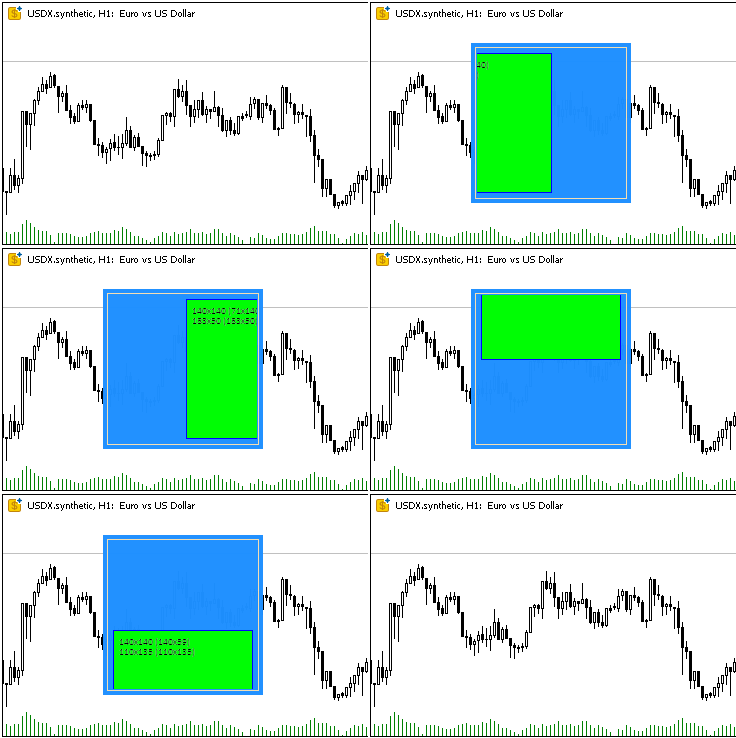
子オブジェクトは、コンテナ領域の境界に沿って正しくトリミングされます(オブジェクトの端ではなく、枠線の幅分のオフセットが考慮されます)。オブジェクトをブロックすると、ブロック状態用の色で再描画されます。
コンテナ内にネストされたオブジェクトを移動させた際の小さな「ぴくつき」は、クラスメソッドの動作遅延によるものではなく、GIF画像の記録時の不具合によるものです。
スクリプト実行後、作成された2つのオブジェクトを説明する2行のログが出力されます。
Canvas Base "Rectangle 1" (TestScr1_BG, TestScr1_FG): ID 1, x 100, y 40, w 160, h 160
Canvas Base "Rectangle 2" (TestScr2_BG, TestScr2_FG): ID 2, x 110, y 50, w 140, h 140
結論
本日は、各クラスが明確な役割を持つ任意のグラフィック要素を作成するための基盤を構築しました。これにより、アーキテクチャはモジュール化され、拡張が容易になります。
今回実装したクラスは、複雑なグラフィック要素を作成し、MVCパラダイムにおけるModelおよびControllerコンポーネントに統合するための確固たる基盤を提供します。
次回の記事では、テーブルの構築と管理に必要なすべての要素の作成を開始します。MQL言語では、イベントモデルがチャートイベントを通じて作成されたオブジェクトに統合されているため、ビューコンポーネントとコントローラーコンポーネントの接続を実現するために、以降のすべてのコントロールでイベント処理が組織されます。
以下は本稿で使用されているプログラムです。
| # | 名前 | 種類 | 詳細 |
|---|---|---|---|
| 1 | Base.mqh | クラスライブラリ | コントロールの基底オブジェクトを作成するクラス |
| 2 | TestControls.mq5 | テストスクリプト | 基底オブジェクトクラスの操作をテストするスクリプト |
| 3 | MQL5.zip | アーカイブ | クライアントターミナルのMQL5ディレクトリに解凍するための上記のファイルのアーカイブ |
Base.mqhライブラリ内のクラス:
| # | 名前 | 説明 |
|---|---|---|
| 1 | CBaseObj | すべてのグラフィックオブジェクトの基底クラス |
| 2 | CColor | カラー管理クラス |
| 3 | CColorElement | グラフィック要素の各状態の色を管理するクラス |
| 4 | CBound | 矩形領域制御クラス |
| 5 | CCanvasBase | キャンバス上にグラフィック要素を描画するための基底クラス |
MetaQuotes Ltdによってロシア語から翻訳されました。
元の記事: https://www.mql5.com/ru/articles/17960
警告: これらの資料についてのすべての権利はMetaQuotes Ltd.が保有しています。これらの資料の全部または一部の複製や再プリントは禁じられています。
この記事はサイトのユーザーによって執筆されたものであり、著者の個人的な見解を反映しています。MetaQuotes Ltdは、提示された情報の正確性や、記載されているソリューション、戦略、または推奨事項の使用によって生じたいかなる結果についても責任を負いません。

 初心者からエキスパートへ:MQL5での可視化による地理的市場認識の強化
 初心者からエキスパートへ:時間フィルタ付き取引
 多通貨エキスパートアドバイザーの開発(第24回):新しい戦略の追加(II)
 MQL5入門(第26回):サポートおよびレジスタンスゾーンを使ったEAの構築

- 無料取引アプリ
- 8千を超えるシグナルをコピー
- 金融ニュースで金融マーケットを探索