

The View and Controller components for tables in the MQL5 MVC paradigm: Resizable elements
 2 982
2 982
 2
2

Contents
Introduction
In modern user interfaces, a feature to resize elements with the mouse is a familiar and expected one. The user can "grab" the border of a window, panel, or other visual block and drag it, resizing the element in real time. Such interactivity requires a well-thought-out architecture to ensure responsiveness and correct handling of all events.
One of the popular architectural approaches for building complex interfaces is MVC (Model-View-Controller). In this paradigm:
- Model is responsible for data and logic,
- View is responsible for displaying data and visual interaction with the user,
- Controller is responsible for handling user events and communication between the Model and the View.
Within the context of resizing elements with the mouse, the main work takes place precisely at the level of the View component. It implements a visual representation of the element, tracks mouse movements, determines whether the cursor is on the boundary, and displays appropriate tooltips (for example, changing the cursor shape). The component is also responsible for rendering the resized element during the resizing process when being dragged.
The Controller component can participate in processing mouse events by passing commands to the View component and, if necessary, updating the Model component (for example, if the element dimensions should be saved or if they affect other data).
Implementing mouse-based resizing is a typical example of how the View component operates in the MVC architecture, where visual interaction and user feedback are implemented as interactively and visually as possible.
Visual tables (TableView, DataGrid, Spreadsheet, etc.) are one of the key elements of modern interfaces used for displaying and editing tabular data. The user expects that the table will not only display the data, but also provide him with convenient tools to customize the appearance for his tasks.
A feature to resize a table and its individual parts (column widths, line heights, and sizes of the entire table area) using the mouse is the de facto standard for the TableView control in professional applications. Availability of such functionality allows to:
- Adapt the interface to the volume and structure of the data. The user can expand a column with long values or narrow down uninformative columns.
- Improve the readability and perception of information. Flexible size adjustment helps to avoid horizontal scrolling and redundant empty areas.
- Create a sense of a "live" interface, familiar from office and analytical programs.
- Implement complex data scenarios where the sizes of cells, rows, and columns can change dynamically.
Without resizing support, the TableView element becomes static and inconvenient for real work with data. Therefore, implementation of the mechanism for resizing elements with the mouse is an integral part of creating a modern, convenient and professional component of the table.
Today we will add all the elements with a feature to resize them by dragging the edges and corners of the element with the mouse. At the same time, graphical tooltips will appear in the cursor area — arrows pointing in the direction of possible resizing. When you hover the cursor over the dragging area and click (capture the area), the resizing mode will be enabled. When you release the mouse, the mode will turn off. All flags (activation of the movement mode and the direction of resizing) will be fixed in the class of shared resources and are readable in each graphical element.
We will add new properties to all the elements, allowing them to be resized.
To implement this functionality, refining the already created classes and adding a new one to create tooltips will only be required. Tooltips are a type of graphical elements that, after a short delay, automatically appear when the mouse cursor is hovered over a certain area of a graphical element. They contain a description text, a graphical image, or both. Based on this class, we can create other tooltips. For example, images of arrows appearing near the cursor and indicating the direction of resizing.
Today we will make just such types of tooltips, namely, double horizontal, vertical and diagonal arrows indicating the direction of movement of edges and corners of the graphical element. Text tooltips can be implemented after the TableView control is created for the visual design of its cells, columns, and headers.
Continue writing codes in the library files located at \MQL5\Indicators\Tables\Controls\. The previous version of all files is available in the previous article. Files Base.mqh and Control.mqh will be refined.
Refining Base Classes
Open the Base.mqh file and enter the forward declaration of the tooltip class:
//+------------------------------------------------------------------+
//|                                                         Base.mqh |
//|                                  Copyright 2025, MetaQuotes Ltd. |
//|                                             https://www.mql5.com |
//+------------------------------------------------------------------+
#property copyright "Copyright 2025, MetaQuotes Ltd."
#property link      "https://www.mql5.com"

//+------------------------------------------------------------------+
//| Include libraries                                                |
//+------------------------------------------------------------------+
#include <Canvas\Canvas.mqh>              // CCanvas class
#include <Arrays\List.mqh>                // CList class

//--- Forward declaration of control element classes
class    CCounter;                        // Delay counter class
class    CAutoRepeat;                     // Event auto-repeat class
class    CImagePainter;                   // Image drawing class
class    CVisualHint;                     // Hint class
class    CLabel;                          // Text label class
class    CButton;                         // Simple button class
class    CButtonTriggered;                // Two-position button class
class    CButtonArrowUp;                  // Up arrow button class
class    CButtonArrowDown;                // Down arrow button class
class    CButtonArrowLeft;                // Left arrow button class
class    CButtonArrowRight;               // Right arrow button class
class    CCheckBox;                       // CheckBox control class
class    CRadioButton;                    // RadioButton control class
class    CScrollBarThumbH;                // Horizontal scrollbar slider class
class    CScrollBarThumbV;                // Vertical scrollbar slider class
class    CScrollBarH;                     // Horizontal scrollbar class
class    CScrollBarV;                     // Vertical scrollbar class
class    CPanel;                          // Panel control class
class    CGroupBox;                       // GroupBox control class
class    CContainer;                      // Container control class

//+------------------------------------------------------------------+
//| Macro substitutions                                              |
//+------------------------------------------------------------------+
Each element should have a certain area along its edges, and when you hover the mouse cursor over it, the resizing of the object should be activated. Enter the thickness of this zone in the macro substitution block:
//+------------------------------------------------------------------+
//| Macro substitutions                                              |
//+------------------------------------------------------------------+
#define  clrNULL              0x00FFFFFF  // Transparent color for CCanvas
#define  MARKER_START_DATA    -1          // Data start marker in a file
#define  DEF_FONTNAME         "Calibri"   // Default font
#define  DEF_FONTSIZE         10          // Default font size
#define  DEF_EDGE_THICKNESS   3           // Zone width to capture the border/corner

//+------------------------------------------------------------------+
//| Enumerations                                                     |
//+------------------------------------------------------------------+
Add a new type of “hint object" to the enumeration of graphical element types:
//+------------------------------------------------------------------+
//| Enumerations                                                     |
//+------------------------------------------------------------------+
enum ENUM_ELEMENT_TYPE                    // Enumeration of graphical element types
  {
   ELEMENT_TYPE_BASE = 0x10000,           // Basic object of graphical elements
   ELEMENT_TYPE_COLOR,                    // Color object
   ELEMENT_TYPE_COLORS_ELEMENT,           // Color object of the graphical object element
   ELEMENT_TYPE_RECTANGLE_AREA,           // Rectangular area of the element
   ELEMENT_TYPE_IMAGE_PAINTER,            // Object for drawing images
   ELEMENT_TYPE_COUNTER,                  // Counter object
   ELEMENT_TYPE_AUTOREPEAT_CONTROL,       // Event auto-repeat object
   ELEMENT_TYPE_CANVAS_BASE,              // Basic canvas object for graphical elements
   ELEMENT_TYPE_ELEMENT_BASE,             // Basic object of graphical elements
   ELEMENT_TYPE_HINT,                     // Tooltip
   ELEMENT_TYPE_LABEL,                    // Text label
   ELEMENT_TYPE_BUTTON,                   // Simple button
   ELEMENT_TYPE_BUTTON_TRIGGERED,         // Two-position button
   ELEMENT_TYPE_BUTTON_ARROW_UP,          // Up arrow button
   ELEMENT_TYPE_BUTTON_ARROW_DOWN,        // Down arrow button
   ELEMENT_TYPE_BUTTON_ARROW_LEFT,        // Left arrow button
   ELEMENT_TYPE_BUTTON_ARROW_RIGHT,       // Right arrow button
   ELEMENT_TYPE_CHECKBOX,                 // CheckBox control
   ELEMENT_TYPE_RADIOBUTTON,              // RadioButton control
   ELEMENT_TYPE_SCROLLBAR_THUMB_H,        // Horizontal scroll bar slider
   ELEMENT_TYPE_SCROLLBAR_THUMB_V,        // Vertical scroll bar slider
   ELEMENT_TYPE_SCROLLBAR_H,              // ScrollBarHorisontal control
   ELEMENT_TYPE_SCROLLBAR_V,              // ScrollBarVertical control
   ELEMENT_TYPE_PANEL,                    // Panel control
   ELEMENT_TYPE_GROUPBOX,                 // GroupBox control
   ELEMENT_TYPE_CONTAINER,                // Container control
  };
#define  ACTIVE_ELEMENT_MIN   ELEMENT_TYPE_LABEL         // Minimum value of the list of active elements
#define  ACTIVE_ELEMENT_MAX   ELEMENT_TYPE_SCROLLBAR_V   // Maximum value of the list of active elements
Interaction of the cursor with an element in the context of resizing uses certain concepts, such as the cursor location on one of the boundaries of the element or on its corners, as well as the action being performed at a given time.
Add new enumerations to describe such actions and values:
enum ENUM_CURSOR_REGION                   // Enumerate the cursor location on the element borders
  {
   CURSOR_REGION_NONE,                    // None
   CURSOR_REGION_TOP,                     // On the top border
   CURSOR_REGION_BOTTOM,                  // On the bottom border
   CURSOR_REGION_LEFT,                    // On the left border
   CURSOR_REGION_RIGHT,                   // On the right border
   CURSOR_REGION_LEFT_TOP,                // In the upper left corner
   CURSOR_REGION_LEFT_BOTTOM,             // In the lower left corner
   CURSOR_REGION_RIGHT_TOP,               // In the upper right corner
   CURSOR_REGION_RIGHT_BOTTOM,            // In the lower right corner
  };

enum ENUM_RESIZE_ZONE_ACTION              // List interactions with the element dragging zone
  {
   RESIZE_ZONE_ACTION_NONE,               // None
   RESIZE_ZONE_ACTION_HOVER,              // Hovering the cursor over the zone
   RESIZE_ZONE_ACTION_BEGIN,              // Start dragging
   RESIZE_ZONE_ACTION_DRAG,               // Dragging
   RESIZE_ZONE_ACTION_END                 // Finish dragging
  };

//+------------------------------------------------------------------+
//| Functions                                                        |
//+------------------------------------------------------------------+
The interaction of the cursor with the element boundaries is divided into five milestones:
- No interaction. Element events are handled in the usual way.
- The cursor is hovered over the resizing area. Arrow-tooltips should be shown next to the cursor pointing in the direction of possible resizing. Here you can also set a global flag that prohibits other elements from reacting to mouse interaction events. This item has not been implemented at the moment.
- The user has just clicked the mouse button, thereby having captured the graphical element interaction area. The public flag of the active resizing mode is set by dragging the captured edge or corner, arrow tooltips are displayed, and the value of the movement direction is indicated in the shared resource manager. A handler for resizing a graphical element is called.
- The user moves the cursor with the captured element’s edge or corner. The direction of dragging the face is set in the general resource manager. Depending on this value a handler for resizing a graphical element is called, arrow tooltips that follow the cursor continue to be displayed.
- As soon as the user releases the mouse button while resizing mode is active, all the flags set in the shared resources manager are reset and the arrow tooltips get hidden. The element now has a new size, which was changed after moving the cursor in handlers for resizing the graphical element.
This logic will be implemented today. We will not implement the above mentioned flag, which prohibits other elements from reacting to mouse interaction events, since this refers more to service functions for simplifying manipulations with the resizing functionality by using the edge dragging method.
For example, if, say, a scrollbar is in contact with the lower edge of an element, then when the cursor hovers over this edge, the scrollbar can also react to interaction with the cursor. And instead of dragging the edge, we activate scrolling of the container contents, as the scrollbar will take over control. At the same time, where have we seen the elements that have no area to capture? Probably only somewhere in the unfinished controls (like here at the moment). Implementation of such service functionality will complicate the already complicated code of graphical element classes.
Add a new value of the name to the function that returns a short name of the element by type:
//+------------------------------------------------------------------+
//|  Return the short name of the element by type                    |
//+------------------------------------------------------------------+
string ElementShortName(const ENUM_ELEMENT_TYPE type)
  {
   switch(type)
     {
      case ELEMENT_TYPE_ELEMENT_BASE      :  return "BASE";    // Basic object of graphical elements
      case ELEMENT_TYPE_HINT              :  return "HNT";     // Tooltip
      case ELEMENT_TYPE_LABEL             :  return "LBL";     // Text label
      case ELEMENT_TYPE_BUTTON            :  return "SBTN";    // Simple button
      case ELEMENT_TYPE_BUTTON_TRIGGERED  :  return "TBTN";    // Toggle button
      case ELEMENT_TYPE_BUTTON_ARROW_UP   :  return "BTARU";   // Up arrow button
      case ELEMENT_TYPE_BUTTON_ARROW_DOWN :  return "BTARD";   // Down arrow button
      case ELEMENT_TYPE_BUTTON_ARROW_LEFT :  return "BTARL";   // Left arrow button
      case ELEMENT_TYPE_BUTTON_ARROW_RIGHT:  return "BTARR";   // Right arrow button
      case ELEMENT_TYPE_CHECKBOX          :  return "CHKB";    // CheckBox control
      case ELEMENT_TYPE_RADIOBUTTON       :  return "RBTN";    // RadioButton control
      case ELEMENT_TYPE_SCROLLBAR_THUMB_H :  return "THMBH";   // Horizontal scroll bar slider
      case ELEMENT_TYPE_SCROLLBAR_THUMB_V :  return "THMBV";   // Vertical scroll bar slider
      case ELEMENT_TYPE_SCROLLBAR_H       :  return "SCBH";    // ScrollBarHorisontal control
      case ELEMENT_TYPE_SCROLLBAR_V       :  return "SCBV";    // ScrollBarVertical control
      case ELEMENT_TYPE_PANEL             :  return "PNL";     // Panel control
      case ELEMENT_TYPE_GROUPBOX          :  return "GRBX";    // GroupBox control
      case ELEMENT_TYPE_CONTAINER         :  return "CNTR";    // Container control
      default                             :  return "Unknown"; // Unknown
     }
  }
In the shared resource manager class, add a feature to retrieve and return mouse cursor coordinates, the resizing mode flag, and the element edge:
//+------------------------------------------------------------------+
//| Singleton class for common flags and events of graphical elements|
//+------------------------------------------------------------------+
class CCommonManager
  {
private:
   static CCommonManager *m_instance;                          // Class instance
   string            m_element_name;                           // Active element name
   int               m_cursor_x;                               // X cursor coordinate
   int               m_cursor_y;                               // Y cursor coordinate
   bool              m_resize_mode;                            // Resize mode
   ENUM_CURSOR_REGION m_resize_region;                         // The edge of the element where the size is changed

//--- Constructor/destructor
                     CCommonManager(void) : m_element_name("") {}
                    ~CCommonManager() {}
public:
//--- Method for getting a Singleton instance
   static CCommonManager *GetInstance(void)
                       {
                        if(m_instance==NULL)
                           m_instance=new CCommonManager();
                        return m_instance;
                       }
//--- Method for destroying a Singleton instance
   static void       DestroyInstance(void)
                       {
                        if(m_instance!=NULL)
                          {
                           delete m_instance;
                           m_instance=NULL;
                          }
                       }
//--- (1) Set and (2) return the name of the active current element
   void              SetElementName(const string name)            { this.m_element_name=name;   }
   string            ElementName(void)                      const { return this.m_element_name; }

//--- (1) Set and (2) return the X cursor coordinate
   void              SetCursorX(const int x)                      { this.m_cursor_x=x;          }
   int               CursorX(void)                          const { return this.m_cursor_x;     }

//--- (1) Set and (2) return the Y cursor coordinate
   void              SetCursorY(const int y)                      { this.m_cursor_y=y;          }
   int               CursorY(void)                          const { return this.m_cursor_y;     }

//--- (1) Set and return (2) the resizing mode
   void              SetResizeMode(const bool flag)               { this.m_resize_mode=flag;    }
   bool              ResizeMode(void)                       const { return this.m_resize_mode;  }

//--- (1) Set and (2) return the element edge
   void              SetResizeRegion(const ENUM_CURSOR_REGION edge){ this.m_resize_region=edge; }
   ENUM_CURSOR_REGION ResizeRegion(void)                    const { return this.m_resize_region;}

  };
//--- Initialize a static instance variable of a class
CCommonManager* CCommonManager::m_instance=NULL;
In the event handler, cursor coordinates will be written to class variables, and they will be available anywhere in the program, which simplifies access to coordinates and their use in controls. Similarly, by writing to variables the resizing mode flag and the edge of the element that the cursor interacts with, we enable all elements to "see" this mode and handle it accordingly.
Make refinements to the base class of the graphical elements canvas. Declare a flag indicating that the element size can be changed interactively:
//+------------------------------------------------------------------+
//| Base class of graphical elements canvas                          |
//+------------------------------------------------------------------+
class CCanvasBase : public CBaseObj
  {
private:
   bool              m_chart_mouse_wheel_flag;                 // Flag for sending mouse wheel scroll messages
   bool              m_chart_mouse_move_flag;                  // Flag for sending mouse cursor movement messages
   bool              m_chart_object_create_flag;               // Flag for sending messages about the graphical object creation event
   bool              m_chart_mouse_scroll_flag;                // Flag for scrolling the chart with the left button and mouse wheel
   bool              m_chart_context_menu_flag;                // Flag of access to the context menu using the right click
   bool              m_chart_crosshair_tool_flag;              // Flag of access to the Crosshair tool using the middle click
   bool              m_flags_state;                            // State of the flags for scrolling the chart with the wheel, the context menu, and the crosshair

//--- Set chart restrictions (wheel scrolling, context menu, and crosshair)
   void              SetFlags(const bool flag);

protected:
   CCanvas           m_background;                             // Background canvas
   CCanvas           m_foreground;                             // Foreground canvas
   CBound            m_bound;                                  // Object boundaries
   CCanvasBase      *m_container;                              // Parent container object
   CColorElement     m_color_background;                       // Background color control object
   CColorElement     m_color_foreground;                       // Foreground color control object
   CColorElement     m_color_border;                           // Border color control object

   CColorElement     m_color_background_act;                   // Activated element background color control object
   CColorElement     m_color_foreground_act;                   // Activated element foreground color control object
   CColorElement     m_color_border_act;                       // Activated element frame color control object

   CAutoRepeat       m_autorepeat;                             // Event auto-repeat control object

   ENUM_ELEMENT_STATE m_state;                                 // Control state (e.g. buttons (on/off))
   long              m_chart_id;                               // Chart ID
   int               m_wnd;                                    // Chart subwindow index
   int               m_wnd_y;                                  // Cursor Y coordinate offset in the subwindow
   int               m_obj_x;                                  // Graphical object X coordinate
   int               m_obj_y;                                  // Graphical object Y coordinate
   uchar             m_alpha_bg;                               // Background transparency
   uchar             m_alpha_fg;                               // Foreground transparency
   uint              m_border_width_lt;                        // Left frame width
   uint              m_border_width_rt;                        // Right frame width
   uint              m_border_width_up;                        // Top frame width
   uint              m_border_width_dn;                        // Bottom frame width
   string            m_program_name;                           // Program name
   bool              m_hidden;                                 // Hidden object flag
   bool              m_blocked;                                // Blocked element flag
   bool              m_movable;                                // Moved element flag
   bool              m_resizable;                              // Resizing flag
   bool              m_focused;                                // Element flag in focus
   bool              m_main;                                   // Main object flag
   bool              m_autorepeat_flag;                        // Event sending auto-repeat flag
   bool              m_scroll_flag;                            // Flag for scrolling content using scrollbars
   bool              m_trim_flag;                              // Flag for clipping the element to the container borders
   int               m_cursor_delta_x;                         // Distance from the cursor to the left edge of the element
   int               m_cursor_delta_y;                         // Distance from the cursor to the top edge of the element
   int               m_z_order;                                // Graphical object Z-order
Add methods that allow you to set and receive the resizing mode flag and the interaction zone from the shared resource manager:
//--- (1) Set, return (2) the name and (3) the active element flag
   void              SetActiveElementName(const string name)   { CCommonManager::GetInstance().SetElementName(name);                               }
   string            ActiveElementName(void)             const { return CCommonManager::GetInstance().ElementName();                               }
   bool              IsCurrentActiveElement(void)        const { return this.ActiveElementName()==this.NameFG();                                   }

//--- (1) Set and (2) return the resize mode flag
   void              SetResizeMode(const bool flag)            { CCommonManager::GetInstance().SetResizeMode(flag);                                }
   bool              ResizeMode(void)                    const { return CCommonManager::GetInstance().ResizeMode();                                }

//--- (1) Set and (2) return the element edge, above which the size is changed
   void              SetResizeRegion(const ENUM_CURSOR_REGION edge){ CCommonManager::GetInstance().SetResizeRegion(edge);                          }
   ENUM_CURSOR_REGION ResizeRegion(void)                 const { return CCommonManager::GetInstance().ResizeRegion();                              }

//--- Return the offset of the initial drawing coordinates on the canvas relative to the canvas and the object coordinates
Now each graphical element will be able to set and receive data about the resizing mode common to all elements.
When changing the element size by dragging over the left or top edge, or over the corners bordering on these edges, you must also shift the coordinates along with resizing the element. Testing the sequential application of separate methods for shifting coordinates and resizing an element suggests that within the interval between calls of two methods, it is possible to update the chart by the terminal with redrawing. This leads to the fact that while dragging the edges of the element to resize, we see artifacts on the chart in the form of flashes of the previous, unchanged size of the element.
To avoid such unpleasant visual effects, it is necessary to reduce the delay between resizing and shifting the coordinate. To do this, implement (declare) a separate method where both the size and the coordinate of the element will be changed immediately:
//--- Set the graphical object (1) X, (2) Y and (3) both coordinates
   bool              ObjectSetX(const int x);
   bool              ObjectSetY(const int y);
   bool              ObjectSetXY(const int x,const int y)      { return(this.ObjectSetX(x) && this.ObjectSetY(y));                                 }

//--- Set both the coordinates and dimensions of a graphical object
   virtual bool      ObjectSetXYWidthResize(const int x,const int y,const int w,const int h);
We need a method that will return the cursor location within the boundaries of the graphical element. Declare such a method:
//--- (1) Set and (2) relocate the graphical object by the specified coordinates/offset size
   bool              ObjectMove(const int x,const int y)       { return this.ObjectSetXY(x,y);                                                     }
   bool              ObjectShift(const int dx,const int dy)    { return this.ObjectSetXY(this.ObjectX()+dx,this.ObjectY()+dy);                     }

//--- Returns the flag indicating whether the cursor is inside the object
   bool              Contains(const int x,const int y);
//--- Return the cursor location on the object borders
   ENUM_CURSOR_REGION CheckResizeZone(const int x,const int y);
Declare virtual handlers to handle cursor interaction events at the boundaries of an element to resize it:
//--- Cursor hovering (Focus), (2) button click (Press),
//--- (3) cursor moving (Move), (4) leaving focus (Release), (5) graphical object creation (Create),
//--- (6) wheel scrolling (Wheel) and (7) resizing (Resize) event handlers. Redefined in descendants.
   virtual void      OnFocusEvent(const int id, const long lparam, const double dparam, const string sparam);
   virtual void      OnPressEvent(const int id, const long lparam, const double dparam, const string sparam);
   virtual void      OnMoveEvent(const int id, const long lparam, const double dparam, const string sparam);
   virtual void      OnReleaseEvent(const int id, const long lparam, const double dparam, const string sparam);
   virtual void      OnCreateEvent(const int id, const long lparam, const double dparam, const string sparam);
   virtual void      OnWheelEvent(const int id, const long lparam, const double dparam, const string sparam)         { return;         }  // handler is disabled here
   virtual void      OnResizeZoneEvent(const int id, const long lparam, const double dparam, const string sparam)    { return;         }  // handler is disabled here

//--- Handlers for resizing the element by sides and corners
   virtual bool      OnResizeZoneLeft(const int x, const int y)                                                      { return false;   }  // handler is disabled here
   virtual bool      OnResizeZoneRight(const int x, const int y)                                                     { return false;   }  // handler is disabled here
   virtual bool      OnResizeZoneTop(const int x, const int y)                                                       { return false;   }  // handler is disabled here
   virtual bool      OnResizeZoneBottom(const int x, const int y)                                                    { return false;   }  // handler is disabled here
   virtual bool      OnResizeZoneLeftTop(const int x, const int y)                                                   { return false;   }  // handler is disabled here
   virtual bool      OnResizeZoneRightTop(const int x, const int y)                                                  { return false;   }  // handler is disabled here
   virtual bool      OnResizeZoneLeftBottom(const int x, const int y)                                                { return false;   }  // handler is disabled here
   virtual bool      OnResizeZoneRightBottom(const int x, const int y)                                               { return false;   }  // handler is disabled here
We will implement these handlers in inherited classes.
Add methods that return some object flags that were not previously done:
//--- Return (1) the object's belonging to the program, the flag (2) of a hidden element, (3) a blocked element,
//--- (4) moved, (5) resized, (6) main element, (7) in focus, (8, 9) graphical object name (background, text)
   bool              IsBelongsToThis(const string name)  const { return(::ObjectGetString(this.m_chart_id,name,OBJPROP_TEXT)==this.m_program_name);}
   bool              IsHidden(void)                      const { return this.m_hidden;                                                             }
   bool              IsBlocked(void)                     const { return this.m_blocked;                                                            }
   bool              IsMovable(void)                     const { return this.m_movable;                                                            }
   bool              IsResizable(void)                   const { return this.m_resizable;                                                          }
   bool              IsMain(void)                        const { return this.m_main;                                                               }
   bool              IsFocused(void)                     const { return this.m_focused;                                                            }
   bool              IsAutorepeat(void)                  const { return this.m_autorepeat_flag;                                                    }
   bool              IsScrollable(void)                  const { return this.m_scroll_flag;                                                        }
   bool              IsTrimmed(void)                     const { return this.m_trim_flag;                                                          }
   string            NameBG(void)                        const { return this.m_background.ChartObjectName();                                       }
   string            NameFG(void)                        const { return this.m_foreground.ChartObjectName();                                       }
and methods for setting these flags:
//--- Set (1) movability, (2) main object flag for the object and (3) resizability
   void              SetMovable(const bool flag)               { this.m_movable=flag;                                                              }
   void              SetAsMain(void)                           { this.m_main=true;                                                                 }
   virtual void      SetResizable(const bool flag)             { this.m_resizable=flag;                                                            }
   void              SetAutorepeat(const bool flag)            { this.m_autorepeat_flag=flag;                                                      }
   void              SetScrollable(const bool flag)            { this.m_scroll_flag=flag;                                                          }
   void              SetTrimmered(const bool flag)             { this.m_trim_flag=flag;                                                            }
Declare a method that simultaneously resizes the element and shifts it to new coordinates:
//--- Set the new (1) X, (2) Y, (3) XY coordinate for the object
   virtual bool      MoveX(const int x);
   virtual bool      MoveY(const int y);
   virtual bool      Move(const int x,const int y);

//--- Set both the element coordinates and dimensions
   virtual bool      MoveXYWidthResize(const int x,const int y,const int w,const int h);
In constructors of the class, in the initialization list, set the default value for the resizing flag of the element:
//--- Constructors/destructor
                     CCanvasBase(void) :
                        m_program_name(::MQLInfoString(MQL_PROGRAM_NAME)), m_chart_id(::ChartID()), m_wnd(0), m_alpha_bg(0), m_alpha_fg(255),
                        m_hidden(false), m_blocked(false), m_focused(false), m_movable(false), m_resizable(false), m_main(false), m_autorepeat_flag(false), m_trim_flag(true), m_scroll_flag(false),
                        m_border_width_lt(0), m_border_width_rt(0), m_border_width_up(0), m_border_width_dn(0), m_z_order(0),
                        m_state(0), m_wnd_y(0), m_cursor_delta_x(0), m_cursor_delta_y(0) { this.Init(); }
                     CCanvasBase(const string object_name,const long chart_id,const int wnd,const int x,const int y,const int w,const int h);
                    ~CCanvasBase(void);
  };
//+------------------------------------------------------------------+
//| CCanvasBase::Constructor                                         |
//+------------------------------------------------------------------+
CCanvasBase::CCanvasBase(const string object_name,const long chart_id,const int wnd,const int x,const int y,const int w,const int h) :
   m_program_name(::MQLInfoString(MQL_PROGRAM_NAME)), m_wnd(wnd<0 ? 0 : wnd), m_alpha_bg(0), m_alpha_fg(255),
   m_hidden(false), m_blocked(false), m_focused(false), m_movable(false), m_resizable(false), m_main(false), m_autorepeat_flag(false), m_trim_flag(true), m_scroll_flag(false),
   m_border_width_lt(0), m_border_width_rt(0), m_border_width_up(0), m_border_width_dn(0), m_z_order(0),
   m_state(0), m_cursor_delta_x(0), m_cursor_delta_y(0)
  {
//--- Get the adjusted chart ID and the distance in pixels along the vertical Y axis
//--- between the upper frame of the indicator subwindow and the upper frame of the chart main window
   this.m_chart_id=this.CorrectChartID(chart_id);

//--- If the graphical resource and graphical object are created
   if(this.Create(this.m_chart_id,this.m_wnd,object_name,x,y,w,h))
     {
      //--- Clear the background and foreground canvases and set the initial coordinate values,
      //--- names of graphic objects and properties of text drawn in the foreground
      this.Clear(false);
      this.m_obj_x=x;
      this.m_obj_y=y;
      this.m_color_background.SetName("Background");
      this.m_color_foreground.SetName("Foreground");
      this.m_color_border.SetName("Border");
      this.m_foreground.FontSet(DEF_FONTNAME,-DEF_FONTSIZE*10,FW_MEDIUM);
      this.m_bound.SetName("Perimeter");

      //--- Remember permissions for the mouse and chart tools
      this.Init();
     }
  }
Outside of the class body, write the declared methods.
A Method That Returns Cursor's Location on Object Boundaries:
//+--------------------------------------------------------------------+
//|CCanvasBase::Return the cursor location on the object borders       |
//+--------------------------------------------------------------------+
ENUM_CURSOR_REGION CCanvasBase::CheckResizeZone(const int x,const int y)
  {
//--- Coordinates of the element borders
   int top=this.Y();
   int bottom=this.Bottom();
   int left=this.X();
   int right=this.Right();

//--- If outside the object, return CURSOR_REGION_NONE
   if(x<left || x>right || y<top || y>bottom)
      return CURSOR_REGION_NONE;

//--- Left edge and corners
   if(x>=left && x<=left+DEF_EDGE_THICKNESS)
     {
      //--- Upper left corner
      if(y>=top && y<=top+DEF_EDGE_THICKNESS)
         return CURSOR_REGION_LEFT_TOP;
      //--- Bottom left corner
      if(y>=bottom-DEF_EDGE_THICKNESS && y<=bottom)
         return CURSOR_REGION_LEFT_BOTTOM;
      //--- Left edge
      return CURSOR_REGION_LEFT;
     }

//--- Right edge and corners
   if(x>=right-DEF_EDGE_THICKNESS && x<=right)
     {
      //--- Upper right corner
      if(y>=top && y<=top+DEF_EDGE_THICKNESS)
         return CURSOR_REGION_RIGHT_TOP;
      //--- Bottom right corner
      if(y>=bottom-DEF_EDGE_THICKNESS && y<=bottom)
         return CURSOR_REGION_RIGHT_BOTTOM;
      //--- Right side
      return CURSOR_REGION_RIGHT;
     }

//--- Upper edge
   if(y>=top && y<=top+DEF_EDGE_THICKNESS)
      return CURSOR_REGION_TOP;

//--- Bottom edge
   if(y>=bottom-DEF_EDGE_THICKNESS && y<=bottom)
      return CURSOR_REGION_BOTTOM;

//--- The cursor is not on the edges of the element
   return CURSOR_REGION_NONE;
  }
The method checks whether the cursor is within a narrow bar of DEF_EDGE_THICKNESS thickness around the perimeter of element boundaries and returns the face or angle where the cursor falls.
A Method That Simultaneously Sets the Coordinates And Dimensions of a Graphical Object:
//+------------------------------------------------------------------+
//| CCanvasBase::Set coordinates                                     |
//| and size of the graphical object simultaneously                  |
//+------------------------------------------------------------------+
bool CCanvasBase::ObjectSetXYWidthResize(const int x,const int y,const int w,const int h)
  {
//--- If new coordinates are set, return the resize result
   if(this.ObjectSetXY(x,y))
      return this.ObjectResize(w,h);
//--- Failed to set new coordinates - return 'false'
   return false;
  }
If coordinates of the object are successfully set, the result of resizing the graphical object is returned. The methods working inside this method address the properties of the graphical object directly, which results in a lower lag than when using methods that resize an element and move it to new coordinates, since they additionally perform other operations with its properties.
A Method That Simultaneously Sets theCoordinates And Dimensions of an Element:
//+------------------------------------------------------------------+
//| CCanvasBase::Set both the element coordinates and dimensions     |
//+------------------------------------------------------------------+
bool CCanvasBase::MoveXYWidthResize(const int x,const int y,const int w,const int h)
  {
   if(!this.ObjectSetXYWidthResize(x,y,w,h))
      return false;
   this.BoundMove(x,y);
   this.BoundResize(w,h);
   if(!this.ObjectTrim())
     {
      this.Update(false);
      this.Draw(false);
     }
   return true;
  }
First, a method is called that simultaneously sets the coordinates and dimensions of the graphical object. And then properties of the graphical element are set. Next, the element is cropped to the size of its container.
Refine the event handler so that it can handle resizing an element for which permission for resizing by the mouse cursor is set. When handling the creation of new graphical objects, such an event should be handled only by container elements. Here, we will write the cursor coordinates to the resource manager:
//+------------------------------------------------------------------+
//| CCanvasBase::Event handler                                       |
//+------------------------------------------------------------------+
void CCanvasBase::OnChartEvent(const int id,const long& lparam,const double& dparam,const string& sparam)
  {
//--- Chart change event
   if(id==CHARTEVENT_CHART_CHANGE)
     {
      //--- adjust the distance between the upper frame of the indicator subwindow and the upper frame of the chart main window
      this.m_wnd_y=(int)::ChartGetInteger(this.m_chart_id,CHART_WINDOW_YDISTANCE,this.m_wnd);
     }

//--- Graphical object creation event
   if(id==CHARTEVENT_OBJECT_CREATE)
     {
      //--- If this is not a container element, leave
      if(this.Type()<ELEMENT_TYPE_PANEL)
         return;
      //--- Call the handler for creating the graphical object
      this.OnCreateEvent(id,lparam,dparam,sparam);
     }

//--- If the element is blocked or hidden, leave
   if(this.IsBlocked() || this.IsHidden())
      return;

   //--- Mouse cursor coordinates
   int x=(int)lparam;
   int y=(int)dparam-this.m_wnd_y;  // Adjust Y by the height of the indicator window

//--- Cursor move event
   if(id==CHARTEVENT_MOUSE_MOVE)
     {
      //--- Send the cursor coordinates to the resource manager
      CCommonManager::GetInstance().SetCursorX(x);
      CCommonManager::GetInstance().SetCursorY(y);

      //--- Do not handle inactive elements, except for the main one
      if(!this.IsMain() && (this.Type()<ACTIVE_ELEMENT_MIN || this.Type()>ACTIVE_ELEMENT_MAX))
         return;

      //--- Hold down the mouse button
      if(sparam=="1")
        {
         //--- Cursor within the object
         if(this.Contains(x, y))
           {
            //--- If this is the main object, disable the chart tools
            if(this.IsMain())
               this.SetFlags(false);

            //--- If the mouse button was clicked on the chart, there is nothing to handle, leave
            if(this.ActiveElementName()=="Chart")
               return;

            //--- Fix the name of the active element over which the cursor was when the mouse button was clicked
            this.SetActiveElementName(this.ActiveElementName());

            //--- If this is the current active element, handle its movement
            if(this.IsCurrentActiveElement())
              {
               this.OnMoveEvent(id,lparam,dparam,sparam);

               //--- If the element has auto-repeat events active, indicate that the button is clicked
               if(this.m_autorepeat_flag)
                  this.m_autorepeat.OnButtonPress();

               //--- For resizable elements
               if(this.m_resizable)
                 {
                  //--- If the resize mode is not activated,
                  //--- call the resize start handler
                  if(!this.ResizeMode())
                     this.OnResizeZoneEvent(RESIZE_ZONE_ACTION_BEGIN,x,y,this.NameFG());
                  //--- otherwise, when the resizing mode is active
                  //--- call the edge dragging handler for resizing
                  else
                     this.OnResizeZoneEvent(RESIZE_ZONE_ACTION_DRAG,x,y,this.NameFG());
                 }
              }
           }
         //--- Cursor outside the object
         else
           {
            //--- If this is the active main object, or the mouse button is clicked on the chart, and this is not the resizing mode, enable graphical tools
            if(this.IsMain() && (this.ActiveElementName()==this.NameFG() || this.ActiveElementName()=="Chart"))
               if(!this.ResizeMode())
                  this.SetFlags(true);

            //--- If this is the current active element
            if(this.IsCurrentActiveElement())
              {
               //--- If the element is not movable
               if(!this.IsMovable())
                 {
                  //--- call the mouse hover handler
                  this.OnFocusEvent(id,lparam,dparam,sparam);
                  //--- If the element has auto-repeat events active, indicate that the button is released
                  if(this.m_autorepeat_flag)
                     this.m_autorepeat.OnButtonRelease();
                 }
               //--- If the element is movable, call the move handler
               else
                  this.OnMoveEvent(id,lparam,dparam,sparam);

               //--- For resizable elements
               //--- call the edge dragging handler for resizing
               if(this.m_resizable)
                  this.OnResizeZoneEvent(RESIZE_ZONE_ACTION_DRAG,x,y,this.NameFG());
              }
           }
        }

      //--- Mouse button not pressed
      else
        {
         //--- Cursor within the object
         if(this.Contains(x, y))
           {
            //--- If this is the main element, disable the chart tools
            if(this.IsMain())
               this.SetFlags(false);

            //--- Call the cursor hover handler and
            //--- set the element as the current active one
            this.OnFocusEvent(id,lparam,dparam,sparam);
            this.SetActiveElementName(this.NameFG());

            //--- For resizable elements
            //--- call the handler for hovering the cursor over the resizing area
            if(this.m_resizable)
               this.OnResizeZoneEvent(RESIZE_ZONE_ACTION_HOVER,x,y,this.NameFG());
           }

         //--- Cursor outside the object
         else
           {
            //--- If this is the main object
            if(this.IsMain())
              {
               //--- Enable chart tools and
               //--- set the chart as the currently active element
               this.SetFlags(true);
               this.SetActiveElementName("Chart");
              }
            //--- Call the handler for removing the cursor from focus
            this.OnReleaseEvent(id,lparam,dparam,sparam);

            //--- For resizable elements
            //--- call the handler for the non-resizing mode
            if(this.m_resizable)
               this.OnResizeZoneEvent(RESIZE_ZONE_ACTION_NONE,x,y,this.NameFG());
           }
        }
     }

//--- Event of clicking the mouse button on an object (releasing the button)
   if(id==CHARTEVENT_OBJECT_CLICK)
     {
      //--- If the click (releasing the mouse button) was performed on this object
      if(sparam==this.NameFG())
        {
         //--- Call the mouse click handler and release the current active object
         this.OnPressEvent(id, lparam, dparam, sparam);
         this.SetActiveElementName("");

         //--- If the element has auto-repeat events active, indicate that the button is released
         if(this.m_autorepeat_flag)
            this.m_autorepeat.OnButtonRelease();

         //--- For resizable elements
         if(this.m_resizable)
           {
            //--- Disable the resizing mode, reset the interaction area,
            //--- call the handler for completing the resizing by dragging the edges
            this.SetResizeMode(false);
            this.SetResizeRegion(CURSOR_REGION_NONE);
            this.OnResizeZoneEvent(RESIZE_ZONE_ACTION_END,x,y,this.NameFG());
           }
        }
     }

//--- Mouse wheel scroll event
   if(id==CHARTEVENT_MOUSE_WHEEL)
     {
      if(this.IsCurrentActiveElement())
         this.OnWheelEvent(id,lparam,dparam,sparam);
     }

//--- If a custom chart event has arrived
   if(id>CHARTEVENT_CUSTOM)
     {
      //--- do not handle its own events
      if(sparam==this.NameFG())
         return;

      //--- bring the custom event in line with the standard ones
      ENUM_CHART_EVENT chart_event=ENUM_CHART_EVENT(id-CHARTEVENT_CUSTOM);
      //--- In case of the mouse click on the object, call the user event handler
      if(chart_event==CHARTEVENT_OBJECT_CLICK)
        {
         this.MousePressHandler(chart_event, lparam, dparam, sparam);
        }
      //--- If the mouse cursor is moving, call the user event handler
      if(chart_event==CHARTEVENT_MOUSE_MOVE)
        {
         this.MouseMoveHandler(chart_event, lparam, dparam, sparam);
        }
      //--- In case of scrolling the mouse wheel, call the user event handler
      if(chart_event==CHARTEVENT_MOUSE_WHEEL)
        {
         this.MouseWheelHandler(chart_event, lparam, dparam, sparam);
        }
      //--- If the graphical element changes, call the user event handler
      if(chart_event==CHARTEVENT_OBJECT_CHANGE)
        {
         this.ObjectChangeHandler(chart_event, lparam, dparam, sparam);
        }
     }
  }
The handler calls the corresponding virtual resizing event handlers in various situations, and everything will be handled in them. We'll write these handlers later in controls classes.
We have finished refining base classes. Now open the Controls.mqh graphical element class file and make the necessary changes to it.
Since the controls can be resized manually, it is necessary to set limits on the minimum dimensions.
The tooltip class will provide a feature to create different types of tooltips. To specify types of tooltips, write a special enumeration:
//+------------------------------------------------------------------+
//|                                                     Controls.mqh |
//|                                  Copyright 2025, MetaQuotes Ltd. |
//|                                             https://www.mql5.com |
//+------------------------------------------------------------------+
#property copyright "Copyright 2025, MetaQuotes Ltd."
#property link      "https://www.mql5.com"

//+------------------------------------------------------------------+
//| Include libraries                                                |
//+------------------------------------------------------------------+
#include "Base.mqh"

//+------------------------------------------------------------------+
//| Macro substitutions                                              |
//+------------------------------------------------------------------+
#define  DEF_LABEL_W                50          // Text label default width
#define  DEF_LABEL_H                16          // Text label default height
#define  DEF_BUTTON_W               60          // Default button width
#define  DEF_BUTTON_H               16          // Default button height
#define  DEF_PANEL_W                80          // Default panel width
#define  DEF_PANEL_H                80          // Default panel height
#define  DEF_PANEL_MIN_W            60          // Minimum panel width
#define  DEF_PANEL_MIN_H            60          // Minimum panel height
#define  DEF_SCROLLBAR_TH           13          // Default scrollbar width
#define  DEF_THUMB_MIN_SIZE         8           // Minimum width of the scrollbar slider
#define  DEF_AUTOREPEAT_DELAY       500         // Delay before launching auto-repeat
#define  DEF_AUTOREPEAT_INTERVAL    100         // Auto-repeat frequency

//+------------------------------------------------------------------+
//| Enumerations                                                     |
//+------------------------------------------------------------------+
enum ENUM_ELEMENT_SORT_BY                       // Compared properties
  {
   ELEMENT_SORT_BY_ID   =  BASE_SORT_BY_ID,     // Comparison by element ID
   ELEMENT_SORT_BY_NAME =  BASE_SORT_BY_NAME,   // Comparison by element name
   ELEMENT_SORT_BY_X    =  BASE_SORT_BY_X,      // Comparison by element X coordinate
   ELEMENT_SORT_BY_Y    =  BASE_SORT_BY_Y,      // Comparison by element Y coordinate
   ELEMENT_SORT_BY_WIDTH=  BASE_SORT_BY_WIDTH,  // Comparison by element width
   ELEMENT_SORT_BY_HEIGHT= BASE_SORT_BY_HEIGHT, // Comparison by element height
   ELEMENT_SORT_BY_ZORDER= BASE_SORT_BY_ZORDER, // Comparison by element Z-order
   ELEMENT_SORT_BY_TEXT,                        // Comparison by element text
   ELEMENT_SORT_BY_COLOR_BG,                    // Comparison by element background color
   ELEMENT_SORT_BY_ALPHA_BG,                    // Comparison by element background transparency
   ELEMENT_SORT_BY_COLOR_FG,                    // Comparison by element foreground color
   ELEMENT_SORT_BY_ALPHA_FG,                    // Comparison by element foreground transparency color
   ELEMENT_SORT_BY_STATE,                       // Comparison by element state
   ELEMENT_SORT_BY_GROUP,                       // Comparison by element group
  };

enum ENUM_HINT_TYPE                             // Hint types
  {
   HINT_TYPE_TOOLTIP,                           // Tooltip
   HINT_TYPE_ARROW_HORZ,                        // Double horizontal arrow
   HINT_TYPE_ARROW_VERT,                        // Double vertical arrow
   HINT_TYPE_ARROW_NWSE,                        // Double arrow top-left --- bottom-right (NorthWest-SouthEast)
   HINT_TYPE_ARROW_NESW,                        // Double arrow bottom-left --- top-right (NorthEast-SouthWest)
  };
Tooltip Class
The tooltip objects class will draw various arrows to indicate the direction of dragging the element boundaries to resize them. There is a special CImagePainter class for drawing various images.
Add (declare) methods for drawing tooltip arrows to it:
//--- Clear the area
   bool              Clear(const int x,const int y,const int w,const int h,const bool update=true);
//--- Draw a filled (1) up, (2) down, (3) left and (4) right arrow
   bool              ArrowUp(const int x,const int y,const int w,const int h,const color clr,const uchar alpha,const bool update=true);
   bool              ArrowDown(const int x,const int y,const int w,const int h,const color clr,const uchar alpha,const bool update=true);
   bool              ArrowLeft(const int x,const int y,const int w,const int h,const color clr,const uchar alpha,const bool update=true);
   bool              ArrowRight(const int x,const int y,const int w,const int h,const color clr,const uchar alpha,const bool update=true);

//--- Draw (1) horizontal 17х7 and (2) vertical 7х17 double arrow
   bool              ArrowHorz(const int x,const int y,const int w,const int h,const color clr,const uchar alpha,const bool update=true);
   bool              ArrowVert(const int x,const int y,const int w,const int h,const color clr,const uchar alpha,const bool update=true);

//--- Draw a diagonal (1) top-left --- bottom-right and (2) bottom-left --- up-right 17x17 double arrow
   bool              ArrowNWSE(const int x,const int y,const int w,const int h,const color clr,const uchar alpha,const bool update=true);
   bool              ArrowNESW(const int x,const int y,const int w,const int h,const color clr,const uchar alpha,const bool update=true);

//--- Draw (1) checked and (2) unchecked CheckBox
   bool              CheckedBox(const int x,const int y,const int w,const int h,const color clr,const uchar alpha,const bool update=true);
   bool              UncheckedBox(const int x,const int y,const int w,const int h,const color clr,const uchar alpha,const bool update=true);
Outside of the class body, write the implementation of the declared new methods:
//+------------------------------------------------------------------+
//| CImagePainter::Draw a horizontal 17x7 double arrow               |
//+------------------------------------------------------------------+
bool CImagePainter::ArrowHorz(const int x,const int y,const int w,const int h,const color clr,const uchar alpha,const bool update=true)
  {
//--- If the image area is not valid, return 'false'
   if(!this.CheckBound())
      return false;

//--- Shape coordinates
   int arrx[15]={0, 3, 4, 4, 12, 12, 13, 16, 13, 12, 12, 4, 4, 3, 0};
   int arry[15]={3, 0, 0, 2,  2,  0,  0,  3,  6,  6,  4, 4, 6, 6, 3};

//--- Draw the white background
   this.m_canvas.Polyline(arrx,arry,::ColorToARGB(clrWhite,alpha));

//--- Draw the line of arrows
   this.m_canvas.Line(1,3, 15,3,::ColorToARGB(clr,alpha));
//--- Draw the left triangle
   this.m_canvas.Line(1,3, 1,3,::ColorToARGB(clr,alpha));
   this.m_canvas.Line(2,2, 2,4,::ColorToARGB(clr,alpha));
   this.m_canvas.Line(3,1, 3,5,::ColorToARGB(clr,alpha));
//--- Draw the right triangle
   this.m_canvas.Line(13,1, 13,5,::ColorToARGB(clr,alpha));
   this.m_canvas.Line(14,2, 14,4,::ColorToARGB(clr,alpha));
   this.m_canvas.Line(15,3, 15,3,::ColorToARGB(clr,alpha));

   if(update)
      this.m_canvas.Update(false);
   return true;
  }
//+------------------------------------------------------------------+
//| CImagePainter::Draw a vertical 7x17 double arrow                 |
//+------------------------------------------------------------------+
bool CImagePainter::ArrowVert(const int x,const int y,const int w,const int h,const color clr,const uchar alpha,const bool update=true)
  {
//--- If the image area is not valid, return 'false'
   if(!this.CheckBound())
      return false;

//--- Shape coordinates
   int arrx[15]={3, 6, 6, 4,  4,  6,  6,  3,  0,  0,  2, 2, 0, 0, 3};
   int arry[15]={0, 3, 4, 4, 12, 12, 13, 16, 13, 12, 12, 4, 4, 3, 0};

//--- Draw the white background
   this.m_canvas.Polyline(arrx,arry,::ColorToARGB(clrWhite,alpha));

//--- Draw the line of arrows
   this.m_canvas.Line(3,1, 3,15,::ColorToARGB(clr,alpha));
//--- Draw the top triangle
   this.m_canvas.Line(3,1, 3,1,::ColorToARGB(clr,alpha));
   this.m_canvas.Line(2,2, 4,2,::ColorToARGB(clr,alpha));
   this.m_canvas.Line(1,3, 5,3,::ColorToARGB(clr,alpha));
//--- Draw the bottom triangle
   this.m_canvas.Line(1,13, 5,13,::ColorToARGB(clr,alpha));
   this.m_canvas.Line(2,14, 4,14,::ColorToARGB(clr,alpha));
   this.m_canvas.Line(3,15, 3,15,::ColorToARGB(clr,alpha));

   if(update)
      this.m_canvas.Update(false);
   return true;
  }
//+-------------------------------------------------------------------+
//| CImagePainter::Draws a diagonal line from top-left to bottom-right|
//| 13х13 double arrow (NorthWest-SouthEast)                          |
//+-------------------------------------------------------------------+
bool CImagePainter::ArrowNWSE(const int x,const int y,const int w,const int h,const color clr,const uchar alpha,const bool update=true)
  {
//--- If the image area is not valid, return 'false'
   if(!this.CheckBound())
      return false;

//--- Shape coordinates
   int arrx[19]={0, 4, 5, 4, 4, 9, 10, 11, 12, 12,  8,  7,  8, 8, 3, 2, 1, 0, 0};
   int arry[19]={0, 0, 1, 2, 3, 8,  8,  7,  8, 12, 12, 11, 10, 9, 4, 4, 5, 4, 0};

//--- Draw the white background
   this.m_canvas.Polyline(arrx,arry,::ColorToARGB(clrWhite,alpha));

//--- Draw the line of arrows
   this.m_canvas.Line(3,3, 9,9,::ColorToARGB(clr,alpha));
//--- Draw the top-left triangle
   this.m_canvas.Line(1,1, 4,1,::ColorToARGB(clr,alpha));
   this.m_canvas.Line(1,2, 3,2,::ColorToARGB(clr,alpha));
   this.m_canvas.Line(1,3, 3,3,::ColorToARGB(clr,alpha));
   this.m_canvas.Line(1,4, 1,4,::ColorToARGB(clr,alpha));
//--- Draw the bottom-right triangle
   this.m_canvas.Line(11,8, 11, 8,::ColorToARGB(clr,alpha));
   this.m_canvas.Line(9, 9, 11, 9,::ColorToARGB(clr,alpha));
   this.m_canvas.Line(9,10, 11,10,::ColorToARGB(clr,alpha));
   this.m_canvas.Line(8,11, 11,11,::ColorToARGB(clr,alpha));

   if(update)
      this.m_canvas.Update(false);
   return true;
  }
//+------------------------------------------------------------------+
//| CImagePainter::Draw a diagonal line from bottom-left to top-right|
//| 13х13 double arrow (NorthEast-SouthWest)                         |
//+------------------------------------------------------------------+
bool CImagePainter::ArrowNESW(const int x,const int y,const int w,const int h,const color clr,const uchar alpha,const bool update=true)
  {
//--- If the image area is not valid, return 'false'
   if(!this.CheckBound())
      return false;

//--- Shape coordinates
   int arrx[19]={ 0, 0, 1, 2, 3, 8, 8, 7, 8, 12, 12, 11, 10, 9, 4,  4,  5,  4,  0};
   int arry[19]={12, 8, 7, 8, 8, 3, 2, 1, 0,  0,  4,  5,  4, 4, 9, 10, 11, 12, 12};

//--- Draw the white background
   this.m_canvas.Polyline(arrx,arry,::ColorToARGB(clrWhite,alpha));

//--- Draw the line of arrows
   this.m_canvas.Line(3,9, 9,3,::ColorToARGB(clr,alpha));
//--- Draw the bottom-left triangle
   this.m_canvas.Line(1, 8, 1,8, ::ColorToARGB(clr,alpha));
   this.m_canvas.Line(1, 9, 3,9, ::ColorToARGB(clr,alpha));
   this.m_canvas.Line(1,10, 3,10,::ColorToARGB(clr,alpha));
   this.m_canvas.Line(1,11, 4,11,::ColorToARGB(clr,alpha));
//--- Draw the top-right triangle
   this.m_canvas.Line(8, 1, 11,1,::ColorToARGB(clr,alpha));
   this.m_canvas.Line(9, 2, 11,2,::ColorToARGB(clr,alpha));
   this.m_canvas.Line(9, 3, 11,3,::ColorToARGB(clr,alpha));
   this.m_canvas.Line(11,4, 11,4,::ColorToARGB(clr,alpha));

   if(update)
      this.m_canvas.Update(false);
   return true;
  }
At the specified coordinates, a white underlay is drawn first, and then a bidirectional arrow is drawn on top of it.
Now, implement a class of tooltip objects:
//+------------------------------------------------------------------+
//| Hint class                                                       |
//+------------------------------------------------------------------+
class CVisualHint : public CButton
  {
protected:
   ENUM_HINT_TYPE    m_hint_type;                              // Hint type

//--- Draw (1) a tooltip, (2) a horizontal, (3) a vertical arrow,
//--- arrows (4) top-left --- bottom-right, (5) bottom-left --- top-right
   void              DrawTooltip(void);
   void              DrawArrHorz(void);
   void              DrawArrVert(void);
   void              DrawArrNWSE(void);
   void              DrawArrNESW(void);

//--- Initialize colors for the hint type (1) Tooltip, (2) arrows
   void              InitColorsTooltip(void);
   void              InitColorsArrowed(void);

public:
//--- (1) Set and (2) return the hint type
   void              SetHintType(const ENUM_HINT_TYPE type);
   ENUM_HINT_TYPE    HintType(void)                      const { return this.m_hint_type;             }

//--- Draw the appearance
   virtual void      Draw(const bool chart_redraw);

//--- Virtual methods of (1) comparing, (2) saving to file, (3) loading from file, (4) object type
   virtual int       Compare(const CObject *node,const int mode=0) const;
   virtual bool      Save(const int file_handle)               { return CButton::Save(file_handle);   }
   virtual bool      Load(const int file_handle)               { return CButton::Load(file_handle);   }
   virtual int       Type(void)                          const { return(ELEMENT_TYPE_HINT);           }

//--- Initialize (1) the class object and (2) default object colors
   void              Init(const string text);
   virtual void      InitColors(void);

//--- Constructors/destructor
                     CVisualHint(void);
                     CVisualHint(const string object_name, const long chart_id, const int wnd, const int x, const int y, const int w, const int h);
                    ~CVisualHint (void) {}


  };
Consider the methods declared in the class.
Class Constructors:
//+------------------------------------------------------------------+
//| CVisualHint::Default constructor.                                |
//| Builds an element in the main window of the current chart        |
//| at 0,0 coordinates with default dimensions                       |
//+------------------------------------------------------------------+
CVisualHint::CVisualHint(void) : CButton("HintObject","",::ChartID(),0,0,0,DEF_BUTTON_W,DEF_BUTTON_H)
  {
//--- Initialization
   this.Init("");
  }
//+------------------------------------------------------------------+
//| CVisualHint::Parametric constructor.                             |
//| Builds an element in the specified window of the specified chart |
//| with the specified text, coordinates and dimensions              |
//+------------------------------------------------------------------+
CVisualHint::CVisualHint(const string object_name,const long chart_id,const int wnd,const int x,const int y,const int w,const int h) :
   CButton(object_name,"",chart_id,wnd,x,y,w,h)
  {
//--- Initialization
   this.Init("");
  }
The parameters passed to the constructor are set in the object of the parent class, and the object initialization method is called.
Class Object Initialization Method:
//+------------------------------------------------------------------+
//| CVisualHint::Initialization                                      |
//+------------------------------------------------------------------+
void CVisualHint::Init(const string text)
  {
//--- Initialize the default colors
   this.InitColors();
//--- Set the offset and dimensions of the image area
   this.SetImageBound(0,0,this.Width(),this.Height());

//--- The object is not clipped to the container boundaries
   this.m_trim_flag=false;

//--- Initialize the auto-repeat counters
   this.m_autorepeat_flag=true;

//--- Initialize the properties of the event auto-repeat control object
   this.m_autorepeat.SetChartID(this.m_chart_id);
   this.m_autorepeat.SetID(0);
   this.m_autorepeat.SetName("VisualHintAutorepeatControl");
   this.m_autorepeat.SetDelay(DEF_AUTOREPEAT_DELAY);
   this.m_autorepeat.SetInterval(DEF_AUTOREPEAT_INTERVAL);
   this.m_autorepeat.SetEvent(CHARTEVENT_OBJECT_CLICK,0,0,this.NameFG());
  }
Here, a flag is set for the object that prohibits cropping it along the container boundaries. All the tooltips are stored in the list of tooltips of each of the UI elements. The objects themselves are initially hidden and should be displayed only against events of cursor interaction with element boundaries. If the container size crop flag is set, arrow tooltips will always be hidden, since their location is always outside the element.
Regarding the tooltip type, it will always be cropped along the boundaries of its container, which is wrong, since the tooltip can be either completely within the element or go beyond it, either partially or completely. For it, it is also necessary to reset the crop flag along the container boundaries.
The Color Initialization Method For the Tooltip Type Hints:
//+------------------------------------------------------------------+
//| CVisualHint::Initialize colors for the Tooltip hint type         |
//+------------------------------------------------------------------+
void CVisualHint::InitColorsTooltip(void)
  {
//--- The background and foreground are opaque
   this.SetAlpha(255);

//--- Initialize the background colors for the normal and activated states and make it the current background color
   this.InitBackColors(clrWhiteSmoke,clrWhiteSmoke,clrWhiteSmoke,clrWhiteSmoke);
   this.InitBackColorsAct(clrWhiteSmoke,clrWhiteSmoke,clrWhiteSmoke,clrWhiteSmoke);
   this.BackColorToDefault();

//--- Initialize the foreground colors for the normal and activated states and make it the current text color
   this.InitForeColors(clrBlack,clrBlack,clrBlack,clrSilver);
   this.InitForeColorsAct(clrBlack,clrBlack,clrBlack,clrSilver);
   this.ForeColorToDefault();

//--- Initialize the border colors for the normal and activated states and make it the current border color
   this.InitBorderColors(clrLightGray,clrLightGray,clrLightGray,clrLightGray);
   this.InitBorderColorsAct(clrLightGray,clrLightGray,clrLightGray,clrLightGray);
   this.BorderColorToDefault();

//--- Initialize the border color and foreground color for the disabled element
   this.InitBorderColorBlocked(clrNULL);
   this.InitForeColorBlocked(clrNULL);
  }
The Color Initialization Method For the Arrowed Type Hints:
//+------------------------------------------------------------------+
//| CVisualHint::Initialize colors for the Arrowed tooltip type      |
//+------------------------------------------------------------------+
void CVisualHint::InitColorsArrowed(void)
  {
//--- Background is transparent, foreground is opaque
   this.SetAlphaBG(0);
   this.SetAlphaFG(255);

//--- Initialize the background colors for the normal and activated states and make it the current background color
   this.InitBackColors(clrNULL,clrNULL,clrNULL,clrNULL);
   this.InitBackColorsAct(clrNULL,clrNULL,clrNULL,clrNULL);
   this.BackColorToDefault();

//--- Initialize the foreground colors for the normal and activated states and make it the current text color
   this.InitForeColors(clrBlack,clrBlack,clrBlack,clrSilver);
   this.InitForeColorsAct(clrBlack,clrBlack,clrBlack,clrSilver);
   this.ForeColorToDefault();

//--- Initialize the border colors for the normal and activated states and make it the current border color
   this.InitBorderColors(clrNULL,clrNULL,clrNULL,clrNULL);
   this.InitBorderColorsAct(clrNULL,clrNULL,clrNULL,clrNULL);
   this.BorderColorToDefault();

//--- Initialize the border color and foreground color for the disabled element
   this.InitBorderColorBlocked(clrNULL);
   this.InitForeColorBlocked(clrNULL);
  }
Each type of tooltips has its own background, foreground, and border colors. The default colors can be redefined at any time, and then the tooltips will use the newly set colors.
Default Object Color Initialization Method:
//+------------------------------------------------------------------+
//| CVisualHint::Initialize the object default colors                |
//+------------------------------------------------------------------+
void CVisualHint::InitColors(void)
  {
   if(this.m_hint_type==HINT_TYPE_TOOLTIP)
      this.InitColorsTooltip();
   else
      this.InitColorsArrowed();
  }
For each of the tooltip types, the corresponding default color initialization method is called.
A Method That Sets the Tooltip Type:
//+------------------------------------------------------------------+
//| CVisualHint::Set the hint type                                   |
//+------------------------------------------------------------------+
void CVisualHint::SetHintType(const ENUM_HINT_TYPE type)
  {
//--- If the passed type matches the set one, leave
   if(this.m_hint_type==type)
      return;
//--- Set a new hint type
   this.m_hint_type=type;
//--- Depending on the hint type, set the object dimensions
   switch(this.m_hint_type)
     {
      case HINT_TYPE_ARROW_HORZ  :  this.Resize(17,7);   break;
      case HINT_TYPE_ARROW_VERT  :  this.Resize(7,17);   break;
      case HINT_TYPE_ARROW_NESW  :
      case HINT_TYPE_ARROW_NWSE  :  this.Resize(13,13);  break;
      default                    :  break;
     }
//--- Set the offset and dimensions of the image area,
//--- initialize colors based on the hint type
   this.SetImageBound(0,0,this.Width(),this.Height());
   this.InitColors();
  }
One object can have five types of tooltips: tooltip and four bidirectional arrows. The method sets the specified type, resizes the object, and initializes object's colors according to the set hint type.
A Method That Draws the Appearance:
//+------------------------------------------------------------------+
//| CVisualHint::Draw the appearance                                 |
//+------------------------------------------------------------------+
void CVisualHint::Draw(const bool chart_redraw)
  {
//--- Depending on the type of hint, call the corresponding drawing method
   switch(this.m_hint_type)
     {
      case HINT_TYPE_ARROW_HORZ  :  this.DrawArrHorz(); break;
      case HINT_TYPE_ARROW_VERT  :  this.DrawArrVert(); break;
      case HINT_TYPE_ARROW_NESW  :  this.DrawArrNESW(); break;
      case HINT_TYPE_ARROW_NWSE  :  this.DrawArrNWSE(); break;
      default                    :  this.DrawTooltip(); break;
     }

//--- If specified, update the chart
   if(chart_redraw)
      ::ChartRedraw(this.m_chart_id);
  }
Depending on the set tooltip type, the corresponding drawing method is called.
Methods for Drawing Different Types of Tooltips:
//+------------------------------------------------------------------+
//| CVisualHint::Draw the tooltip                                    |
//+------------------------------------------------------------------+
void CVisualHint::DrawTooltip(void)
  {
//--- Fill the object with the background color, draw the frame and update the background canvas
   this.Fill(this.BackColor(),false);
   this.m_background.Rectangle(this.AdjX(0),this.AdjY(0),this.AdjX(this.Width()-1),this.AdjY(this.Height()-1),::ColorToARGB(this.BorderColor(),this.AlphaBG()));
   this.m_background.Update(false);
  }
//+------------------------------------------------------------------+
//| CVisualHint::Draw the horizontal arrow                           |
//+------------------------------------------------------------------+
void CVisualHint::DrawArrHorz(void)
  {
//--- Clear the drawing area
   this.m_painter.Clear(this.AdjX(this.m_painter.X()),this.AdjY(this.m_painter.Y()),this.m_painter.Width(),this.m_painter.Height(),false);
//--- Draw the double horizontal arrow
   this.m_painter.ArrowHorz(this.AdjX(this.m_painter.X()),this.AdjY(this.m_painter.Y()),this.m_painter.Width(),this.m_painter.Height(),this.ForeColor(),this.AlphaFG(),true);
  }
//+------------------------------------------------------------------+
//| CVisualHint::Draw the vertical arrow                             |
//+------------------------------------------------------------------+
void CVisualHint::DrawArrVert(void)
  {
//--- Clear the drawing area
   this.m_painter.Clear(this.AdjX(this.m_painter.X()),this.AdjY(this.m_painter.Y()),this.m_painter.Width(),this.m_painter.Height(),false);
//--- Draw the double vertical arrow
   this.m_painter.ArrowVert(this.AdjX(this.m_painter.X()),this.AdjY(this.m_painter.Y()),this.m_painter.Width(),this.m_painter.Height(),this.ForeColor(),this.AlphaFG(),true);
  }
//+------------------------------------------------------------------+
//| CVisualHint::Draw arrows from top-left --- bottom-right          |
//+------------------------------------------------------------------+
void CVisualHint::DrawArrNWSE(void)
  {
//--- Clear the drawing area
   this.m_painter.Clear(this.AdjX(this.m_painter.X()),this.AdjY(this.m_painter.Y()),this.m_painter.Width(),this.m_painter.Height(),false);
//--- Draw a double diagonal arrow from top-left to bottom-right
   this.m_painter.ArrowNWSE(this.AdjX(this.m_painter.X()),this.AdjY(this.m_painter.Y()),this.m_painter.Width(),this.m_painter.Height(),this.ForeColor(),this.AlphaFG(),true);
  }
//+------------------------------------------------------------------+
//| CVisualHint::Draws arrows bottom-left --- top-right              |
//+------------------------------------------------------------------+
void CVisualHint::DrawArrNESW(void)
  {
//--- Clear the drawing area
   this.m_painter.Clear(this.AdjX(this.m_painter.X()),this.AdjY(this.m_painter.Y()),this.m_painter.Width(),this.m_painter.Height(),false);
//--- Draw a double diagonal arrow from bottom-left to top-right
   this.m_painter.ArrowNESW(this.AdjX(this.m_painter.X()),this.AdjY(this.m_painter.Y()),this.m_painter.Width(),this.m_painter.Height(),this.ForeColor(),this.AlphaFG(),true);
  }
Only methods that draw arrow tooltips are fully implemented. To have a hint with the Tooltip type, you should refine the drawing method and implement a method that displays the specified text on the background canvas.
Refining Controls
In the CListObj object list class, in the element creation method, add a tooltip object:
//+------------------------------------------------------------------+
//| List element creation method                                     |
//+------------------------------------------------------------------+
CObject *CListObj::CreateElement(void)
  {
//--- Create a new object depending on the object type in m_element_type
   switch(this.m_element_type)
     {
      case ELEMENT_TYPE_BASE              :  return new CBaseObj();           // Basic object of graphical elements
      case ELEMENT_TYPE_COLOR             :  return new CColor();             // Color object
      case ELEMENT_TYPE_COLORS_ELEMENT    :  return new CColorElement();      // Color object of the graphical object element
      case ELEMENT_TYPE_RECTANGLE_AREA    :  return new CBound();             // Rectangular area of the element
      case ELEMENT_TYPE_IMAGE_PAINTER     :  return new CImagePainter();      // Object for drawing images
      case ELEMENT_TYPE_CANVAS_BASE       :  return new CCanvasBase();        // Basic object of graphical elements
      case ELEMENT_TYPE_ELEMENT_BASE      :  return new CElementBase();       // Basic object of graphical elements
      case ELEMENT_TYPE_HINT              :  return new CVisualHint();        // Hint
      case ELEMENT_TYPE_LABEL             :  return new CLabel();             // Text label
      case ELEMENT_TYPE_BUTTON            :  return new CButton();            // Simple button
      case ELEMENT_TYPE_BUTTON_TRIGGERED  :  return new CButtonTriggered();   // Toggle button
      case ELEMENT_TYPE_BUTTON_ARROW_UP   :  return new CButtonArrowUp();     // Up arrow button
      case ELEMENT_TYPE_BUTTON_ARROW_DOWN :  return new CButtonArrowDown();   // Down arrow button
      case ELEMENT_TYPE_BUTTON_ARROW_LEFT :  return new CButtonArrowLeft();   // Left arrow button
      case ELEMENT_TYPE_BUTTON_ARROW_RIGHT:  return new CButtonArrowRight();  // Right arrow button
      case ELEMENT_TYPE_CHECKBOX          :  return new CCheckBox();          // CheckBox control
      case ELEMENT_TYPE_RADIOBUTTON       :  return new CRadioButton();       // RadioButton control
      case ELEMENT_TYPE_PANEL             :  return new CPanel();             // Panel control
      case ELEMENT_TYPE_GROUPBOX          :  return new CGroupBox();          // GroupBox control
      case ELEMENT_TYPE_CONTAINER         :  return new CContainer();         // GroupBox control
      default                             :  return NULL;
     }
  }
Add (declare) new variables and methods to the base class of the graphical element:
//+------------------------------------------------------------------+
//| Graphical element base class                                     |
//+------------------------------------------------------------------+
class CElementBase : public CCanvasBase
  {
protected:
   CImagePainter     m_painter;                                // Drawing class
   CListObj          m_list_hints;                             // List of hints
   int               m_group;                                  // Group of elements
   bool              m_visible_in_container;                   // Visibility flag in the container

//--- Add the specified hint object to the list
   bool              AddHintToList(CVisualHint *obj);
//--- Create and add a new hint object to the list
   CVisualHint      *CreateAndAddNewHint(const ENUM_HINT_TYPE type, const string user_name, const int w, const int h);
//--- Add an existing hint object to the list
   CVisualHint      *AddHint(CVisualHint *obj, const int dx, const int dy);
//--- (1) Add to the list and (2) remove tooltip objects with arrows from the list
   bool              AddHintsArrowed(void);
   bool              DeleteHintsArrowed(void);
//--- Displays the resize cursor
   bool              ShowCursorHint(const ENUM_CURSOR_REGION edge,int x,int y);

//--- Handler for dragging element edges and corners
   virtual void      ResizeActionDragHandler(const int x, const int y);

//--- Handlers for resizing the element by sides and corners
   virtual bool      ResizeZoneLeftHandler(const int x, const int y);
   virtual bool      ResizeZoneRightHandler(const int x, const int y);
   virtual bool      ResizeZoneTopHandler(const int x, const int y);
   virtual bool      ResizeZoneBottomHandler(const int x, const int y);
   virtual bool      ResizeZoneLeftTopHandler(const int x, const int y);
   virtual bool      ResizeZoneRightTopHandler(const int x, const int y);
   virtual bool      ResizeZoneLeftBottomHandler(const int x, const int y);
   virtual bool      ResizeZoneRightBottomHandler(const int x, const int y);

//--- Return the pointer to a hint by (1) index, (2) ID and (3) name
   CVisualHint      *GetHintAt(const int index);
   CVisualHint      *GetHint(const int id);
   CVisualHint      *GetHint(const string name);

//--- Create a new hint
   CVisualHint      *CreateNewHint(const ENUM_HINT_TYPE type, const string object_name, const string user_name, const int id, const int x, const int y, const int w, const int h);
//--- (1) Show the specified tooltip with arrows and (2) hide all tooltips
   void              ShowHintArrowed(const ENUM_HINT_TYPE type,const int x,const int y);
   void              HideHintsAll(const bool chart_redraw);

public:
//--- Return the pointer to (1) the drawing class and (2) the list of hints
   CImagePainter    *Painter(void)                             { return &this.m_painter;           }
   CListObj         *GetListHints(void)                        { return &this.m_list_hints;        }

//--- Create and add (1) a new and (2) previously created hint object (tooltip only) to the list
   CVisualHint      *InsertNewTooltip(const ENUM_HINT_TYPE type, const string user_name, const int w, const int h);
   CVisualHint      *InsertTooltip(CVisualHint *obj, const int dx, const int dy);

//--- (1) Set the coordinates and (2) change the image area size
   void              SetImageXY(const int x,const int y)       { this.m_painter.SetXY(x,y);        }
   void              SetImageSize(const int w,const int h)     { this.m_painter.SetSize(w,h);      }
//--- Set the area coordinates and image area dimensions
   void              SetImageBound(const int x,const int y,const int w,const int h)
                       {
                        this.SetImageXY(x,y);
                        this.SetImageSize(w,h);
                       }
//--- Return the (1) X, (2) Y coordinate, (3) width, (4) height, (5) right, (6) bottom image area border
   int               ImageX(void)                        const { return this.m_painter.X();        }
   int               ImageY(void)                        const { return this.m_painter.Y();        }
   int               ImageWidth(void)                    const { return this.m_painter.Width();    }
   int               ImageHeight(void)                   const { return this.m_painter.Height();   }
   int               ImageRight(void)                    const { return this.m_painter.Right();    }
   int               ImageBottom(void)                   const { return this.m_painter.Bottom();   }

//--- (1) Set and (2) return the group of elements
   virtual void      SetGroup(const int group)                 { this.m_group=group;               }
   int               Group(void)                         const { return this.m_group;              }

//--- Set the resizing flag
   virtual void      SetResizable(const bool flag);

//--- (1) Set and (2) return the flag of visibility in the container
   virtual void      SetVisibleInContainer(const bool flag)    { this.m_visible_in_container=flag; }
   bool              IsVisibleInContainer(void)          const { return this.m_visible_in_container;}

//--- Return the object description
   virtual string    Description(void);

//--- Resize handler (Resize)
   virtual void      OnResizeZoneEvent(const int id, const long lparam, const double dparam, const string sparam);

//--- Virtual methods of (1) comparing, (2) saving to file, (3) loading from file, (4) object type
   virtual int       Compare(const CObject *node,const int mode=0) const;
   virtual bool      Save(const int file_handle);
   virtual bool      Load(const int file_handle);
   virtual int       Type(void)                          const { return(ELEMENT_TYPE_ELEMENT_BASE);}

//--- Constructors/destructor
                     CElementBase(void) { this.m_painter.CanvasAssign(this.GetForeground()); this.m_visible_in_container=true; }
                     CElementBase(const string object_name, const string text, const long chart_id, const int wnd, const int x, const int y, const int w, const int h);
                    ~CElementBase(void) {}
  };
All the tooltip objects being added to the element will be located in the list m_list_hints. The m_visible_in_container flag sets the visibility of the element in the container. When the flag is set, the visibility of the element is controlled by the Show() and Hide() methods of the container. When the flag is reset, the programmer controls the element visibility.
For example, if container scrollbars are hidden (the container contents fit completely within the visible area), and if the container is hidden, then when the container's Show() method is called, the scrollbars will also be displayed if this flag is set for them. It shouldn't be like this. Therefore, for scrollbars, the m_visible_in_container flag is reset, and scrollbars are displayed according to the internal logic of the container — only if the container contents do not fit into the visible area and need to be scrolled.
In class constructors set the flag for element visibility in the container:
//--- Constructors/destructor
                     CElementBase(void) { this.m_painter.CanvasAssign(this.GetForeground()); this.m_visible_in_container=true; }
                     CElementBase(const string object_name, const string text, const long chart_id, const int wnd, const int x, const int y, const int w, const int h);
                    ~CElementBase(void) {}
  };
//+----------------------------------------------------------------------------------+
//| CElementBase::Parametric constructor. Builds an element in the specified         |
//| window of the specified chart with the specified text, coordinates and dimensions|
//+----------------------------------------------------------------------------------+
CElementBase::CElementBase(const string object_name,const string text,const long chart_id,const int wnd,const int x,const int y,const int w,const int h) :
   CCanvasBase(object_name,chart_id,wnd,x,y,w,h),m_group(-1)
  {
//--- Assign the foreground canvas to the drawing object and
//--- reset the coordinates and dimensions, which makes it inactive,
//--- set the visibility flag of the element in the container
   this.m_painter.CanvasAssign(this.GetForeground());
   this.m_painter.SetXY(0,0);
   this.m_painter.SetSize(0,0);
   this.m_visible_in_container=true;
  }
A Method That Sets the Resizability Flag:
//+------------------------------------------------------------------+
//| CElementBase::Set the resizing flag                              |
//+------------------------------------------------------------------+
void CElementBase::SetResizable(const bool flag)
  {
//--- Set the flag to the parent object
   CCanvasBase::SetResizable(flag);
//--- If the flag is passed as 'true', create four hints with arrows for the cursor,
   if(flag)
      this.AddHintsArrowed();
//--- otherwise, remove the arrow hints for the cursor
   else
      this.DeleteHintsArrowed();
  }
Set the specified flag value to the object. If the flag is passed as true, create four arrow tooltips for the element. If the flag is passed as false , delete earlier created arrow tooltips.
Methods That Return Pointers to Hints:
//+------------------------------------------------------------------+
//| CElementBase::Return the pointer to a hint by index              |
//+------------------------------------------------------------------+
CVisualHint *CElementBase::GetHintAt(const int index)
  {
   return this.m_list_hints.GetNodeAtIndex(index);
  }
//+------------------------------------------------------------------+
//| CElementBase::Return the pointer to a hint by ID                 |
//+------------------------------------------------------------------+
CVisualHint *CElementBase::GetHint(const int id)
  {
   int total=this.m_list_hints.Total();
   for(int i=0;i<total;i++)
     {
      CVisualHint *obj=this.GetHintAt(i);
      if(obj!=NULL && obj.ID()==id)
         return obj;
     }
   return NULL;
  }
//+------------------------------------------------------------------+
//|CElementBase:: Return the pointer to a hint by name               |
//+------------------------------------------------------------------+
CVisualHint *CElementBase::GetHint(const string name)
  {
   int total=this.m_list_hints.Total();
   for(int i=0;i<total;i++)
     {
      CVisualHint *obj=this.GetHintAt(i);
      if(obj!=NULL && obj.Name()==name)
         return obj;
     }
   return NULL;
  }
A tooltip object with the specified property value is searched in the list and, if successful, a pointer to the found object is returned.
A Method That Adds a Specified Tooltip Object to the List:
//+------------------------------------------------------------------+
//| CElementBase::Add the specified hint object to the list          |
//+------------------------------------------------------------------+
bool CElementBase::AddHintToList(CVisualHint *obj)
  {
//--- If an empty pointer is passed, report this and return 'false'
   if(obj==NULL)
     {
      ::PrintFormat("%s: Error. Empty element passed",__FUNCTION__);
      return false;
     }
//--- Set the sorting flag for the list by ID
   this.m_list_hints.Sort(ELEMENT_SORT_BY_ID);
//--- If such an element is not in the list, return the result of adding it to the list
   if(this.m_list_hints.Search(obj)==NULL)
      return(this.m_list_hints.Add(obj)>-1);
//--- An element with this ID is already in the list - return 'false'
   return false;
  }
A pointer to the object to be placed in the list is passed to the method. Tooltip objects are tracked by their ID when added. This means that each such object must have its own unique identifier.
A Method That Creates a New Tooltip Object:
//+------------------------------------------------------------------+
//| CElementBase::Create a new hint                                  |
//+------------------------------------------------------------------+
CVisualHint *CElementBase::CreateNewHint(const ENUM_HINT_TYPE type,const string object_name,const string user_name,const int id, const int x,const int y,const int w,const int h)
  {
//--- Create a new hint object
   CVisualHint *obj=new CVisualHint(object_name,this.m_chart_id,this.m_wnd,x,y,w,h);
   if(obj==NULL)
     {
      ::PrintFormat("%s: Error: Failed to create Hint object",__FUNCTION__);
      return NULL;
     }
//--- Set the hint ID, name, and type
   obj.SetID(id);
   obj.SetName(user_name);
   obj.SetHintType(type);

//--- Return the pointer to a created object
   return obj;
  }
The method creates a new object and sets the user's name, ID, and tooltip type. It returns a pointer to the created object.
A Method That Implements and Adds a New Hint Object to the List:
//+------------------------------------------------------------------+
//| CElementBase::Create and add a new hint object to the list       |
//+------------------------------------------------------------------+
CVisualHint *CElementBase::CreateAndAddNewHint(const ENUM_HINT_TYPE type,const string user_name,const int w,const int h)
  {
//--- Create a graphical object name
   int obj_total=this.m_list_hints.Total();
   string obj_name=this.NameFG()+"_HNT"+(string)obj_total;

//--- Calculate the coordinates of the object below and to the right of the lower right corner of the element
   int x=this.Right()+1;
   int y=this.Bottom()+1;

//--- Create a new hint object
   CVisualHint *obj=this.CreateNewHint(type,obj_name,user_name,obj_total,x,y,w,h);

//--- If a new object is not created, return NULL
   if(obj==NULL)
      return NULL;

//--- Set the image bounds, container, and z-order
   obj.SetImageBound(0,0,this.Width(),this.Height());
   obj.SetContainerObj(&this);
   obj.ObjectSetZOrder(this.ObjectZOrder()+1);

//--- If the created element is not added to the list, report this, remove the created element and return NULL
   if(!this.AddHintToList(obj))
     {
      ::PrintFormat("%s: Error. Failed to add Hint object with ID %d to list",__FUNCTION__,obj.ID());
      delete obj;
      return NULL;
     }

//--- Return a pointer to the created and attached object
   return obj;
  }
The main method for creating tooltips and placing them in the list of element hints.
A Method That Adds an Exhisting Tooltip Object to the List:
//+------------------------------------------------------------------+
//| CElementBase::Add the existing hint object to the list           |
//+------------------------------------------------------------------+
CVisualHint *CElementBase::AddHint(CVisualHint *obj,const int dx,const int dy)
  {
//--- If the passed object is not of the hint type, return NULL
   if(obj.Type()!=ELEMENT_TYPE_HINT)
     {
      ::PrintFormat("%s: Error. Only an object with the Hint type can be used here. The element type \"%s\" was passed",__FUNCTION__,ElementDescription((ENUM_ELEMENT_TYPE)obj.Type()));
      return NULL;
     }
//--- Save the object ID and set a new one
   int id=obj.ID();
   obj.SetID(this.m_list_hints.Total());

//--- Add an object to the list; if adding fails, report it, set the initial ID, and return NULL
   if(!this.AddHintToList(obj))
     {
      ::PrintFormat("%s: Error. Failed to add Hint object to list",__FUNCTION__);
      obj.SetID(id);
      return NULL;
     }
//--- Set new coordinates, container, and z-order of the object
   int x=this.X()+dx;
   int y=this.Y()+dy;
   obj.Move(x,y);
   obj.SetContainerObj(&this);
   obj.ObjectSetZOrder(this.ObjectZOrder()+1);

//--- Return the pointer to the attached object
   return obj;
  }
This method allows you to add a previously created tooltip object to the list of element hints.
A Method That Adds Arrow Hint Objects To the Llist:
//+------------------------------------------------------------------+
//| CElementBase::Add hint objects with arrows to the list           |
//+------------------------------------------------------------------+
bool CElementBase::AddHintsArrowed(void)
  {
//--- Arrays of names and hint types
   string array[4]={"HintHORZ","HintVERT","HintNWSE","HintNESW"};
   ENUM_HINT_TYPE type[4]={HINT_TYPE_ARROW_HORZ,HINT_TYPE_ARROW_VERT,HINT_TYPE_ARROW_NWSE,HINT_TYPE_ARROW_NESW};

//--- In the loop, create four hints with arrows
   bool res=true;
   for(int i=0;i<(int)array.Size();i++)
      res &=(this.CreateAndAddNewHint(type[i],array[i],0,0)!=NULL);

//--- If there were errors during creation, return 'false'
   if(!res)
      return false;

//--- In the loop through the array of names of hint objects
   for(int i=0;i<(int)array.Size();i++)
     {
      //--- get the next object by name,
      CVisualHint *obj=this.GetHint(array[i]);
      if(obj==NULL)
         continue;
      //--- hide the object and draw the appearance (arrows according to the object type)
      obj.Hide(false);
      obj.Draw(false);
     }
//--- All is successful
   return true;
  }
The method sequentially creates and adds all four types of arrow tooltips to the list of element tooltips.
A Method That Removes All Arrow Tooltip Objects From the List:
//+------------------------------------------------------------------+
//| CElementBase::Remove tooltip objects with arrows from the list   |
//+------------------------------------------------------------------+
bool CElementBase::DeleteHintsArrowed(void)
  {
//--- In the loop through the list of hint objects
   bool res=true;
   for(int i=this.m_list_hints.Total()-1;i>=0;i--)
     {
      //--- get the next object and, if it is not a tooltip, delete it
      CVisualHint *obj=this.m_list_hints.GetNodeAtIndex(i);
      if(obj!=NULL && obj.HintType()!=HINT_TYPE_TOOLTIP)
         res &=this.m_list_hints.DeleteCurrent();
     }
//--- Return the result of removing the hints with arrows
   return res;
  }
In the loop, we search through the list of tooltips for objects with a non-Tooltip hint type and delete each one from the list.
A Method That Implements and Adds a New Tooltip Object with Tooltip Type to the List:
//+------------------------------------------------------------------+
//| CElementBase::Create and add a new hint object to the list       |
//+------------------------------------------------------------------+
CVisualHint *CElementBase::InsertNewTooltip(const ENUM_HINT_TYPE type,const string user_name,const int w,const int h)
  {
//--- If the hint type is not a tooltip, report this and return NULL
   if(type!=HINT_TYPE_TOOLTIP)
     {
      ::PrintFormat("%s: Error. Only a tooltip can be added to an element",__FUNCTION__);
      return NULL;
     }
//--- Create and add a new hint object to the list;
//--- Return a pointer to the created and attached object
   return this.CreateAndAddNewHint(type,user_name,w,h);
  }
A Method That Adds an Earlier Created Hint Object to the List:
//+------------------------------------------------------------------+
//| CElementBase::Add a previously created hint object to the list   |
//+------------------------------------------------------------------+
CVisualHint *CElementBase::InsertTooltip(CVisualHint *obj,const int dx,const int dy)
  {
//--- If empty or invalid pointer to the object is passed, return NULL
   if(::CheckPointer(obj)==POINTER_INVALID)
     {
      ::PrintFormat("%s: Error. Empty element passed",__FUNCTION__);
      return NULL;
     }
//--- If the hint type is not a tooltip, report this and return NULL
   if(obj.HintType()!=HINT_TYPE_TOOLTIP)
     {
      ::PrintFormat("%s: Error. Only a tooltip can be added to an element",__FUNCTION__);
      return NULL;
     }
//--- Add the specified hint object to the list;
//--- Return a pointer to the created and attached object
   return this.AddHint(obj,dx,dy);
  }
These methods allow adding either a new or an existing Tooltip to the list of element hints. It is useful if the element dynamically displays areas where tooltips should appear when hovering over them.
A Method That Displays the Indicated Tooltip In the Specified Coordinates:
//+------------------------------------------------------------------+
//| CElementBase::Display the specified hint                         |
//| at the specified coordinates                                     |
//+------------------------------------------------------------------+
void CElementBase::ShowHintArrowed(const ENUM_HINT_TYPE type,const int x,const int y)
  {
   CVisualHint *hint=NULL; // Pointer to the object being searched for
//--- In a loop through the list of hint objects
   for(int i=0;i<this.m_list_hints.Total();i++)
     {
      //--- get the pointer to the next object
      CVisualHint *obj=this.GetHintAt(i);
      if(obj==NULL)
         continue;
      //--- If this is the required hint type, save the pointer,
      if(obj.HintType()==type)
         hint=obj;
      //--- otherwise - hide the object
      else
         obj.Hide(false);
     }
//--- If the desired object is found and it is hidden
   if(hint!=NULL && hint.IsHidden())
     {
      //--- place the object at the specified coordinates,
      //--- draw the appearance and bring the object to the front, making it visible
      hint.Move(x,y);
      hint.Draw(false);
      hint.BringToTop(true);
     }
  }
The method searches for a tooltip with the indicated type and displays it in the coordinates indicated in method’s formal parameters. It displays the first counter tooltip of the specified type. All other tooltips are hidden. The method is designed to display arrow tooltips, of which there should be four objects in the list. First of all, all the tooltips are hidden in the loop, and only then the desired one is displayed.
A Method That Hides All Tooltips:
//+------------------------------------------------------------------+
//| CElementBase::Hide all hints                                     |
//+------------------------------------------------------------------+
void CElementBase::HideHintsAll(const bool chart_redraw)
  {
//--- In the loop through the list of hint objects
   for(int i=0;i<this.m_list_hints.Total();i++)
     {
      //--- get the next object and hide it
      CVisualHint *obj=this.GetHintAt(i);
      if(obj!=NULL)
         obj.Hide(false);
     }
//--- If specified, redraw the chart
   if(chart_redraw)
      ::ChartRedraw(this.m_chart_id);
  }
In a loop through the list of tooltip objects, each regular object from the list is hidden.
A Method That Displays a Tooltip Next To the Cursor:
//+------------------------------------------------------------------+
//| CElementBase::Displays the resize cursor                         |
//+------------------------------------------------------------------+
bool CElementBase::ShowCursorHint(const ENUM_CURSOR_REGION edge,int x,int y)
  {
   CVisualHint *hint=NULL;          // Pointer to the hint
   int hint_shift_x=0;              // Hint offset by X
   int hint_shift_y=0;              // Hint offset by Y

//--- Depending on the location of the cursor on the element borders
//--- specify the tooltip offsets relative to the cursor coordinates,
//--- display the required hint on the chart and get the pointer to this object
   switch(edge)
     {
      //--- Cursor on the right or left border - horizontal double arrow
      case CURSOR_REGION_RIGHT         :
      case CURSOR_REGION_LEFT          :
         hint_shift_x=1;
         hint_shift_y=18;
         this.ShowHintArrowed(HINT_TYPE_ARROW_HORZ,x+hint_shift_x,y+hint_shift_y);
         hint=this.GetHint("HintHORZ");
        break;

      //--- Cursor at the top or bottom border - vertical double arrow
      case CURSOR_REGION_TOP           :
      case CURSOR_REGION_BOTTOM        :
         hint_shift_x=12;
         hint_shift_y=4;
         this.ShowHintArrowed(HINT_TYPE_ARROW_VERT,x+hint_shift_x,y+hint_shift_y);
         hint=this.GetHint("HintVERT");
        break;

      //--- Cursor in the upper left or lower right corner - a diagonal double arrow from top left to bottom right
      case CURSOR_REGION_LEFT_TOP      :
      case CURSOR_REGION_RIGHT_BOTTOM  :
         hint_shift_x=10;
         hint_shift_y=2;
         this.ShowHintArrowed(HINT_TYPE_ARROW_NWSE,x+hint_shift_x,y+hint_shift_y);
         hint=this.GetHint("HintNWSE");
        break;

      //--- Cursor in the lower left or upper right corner - a diagonal double arrow from bottom left to top right
      case CURSOR_REGION_LEFT_BOTTOM   :
      case CURSOR_REGION_RIGHT_TOP     :
         hint_shift_x=5;
         hint_shift_y=12;
         this.ShowHintArrowed(HINT_TYPE_ARROW_NESW,x+hint_shift_x,y+hint_shift_y);
         hint=this.GetHint("HintNESW");
        break;

      //--- By default, do nothing
      default: break;
     }

//--- Return the result of adjusting the position of the tooltip relative to the cursor
   return(hint!=NULL ? hint.Move(x+hint_shift_x,y+hint_shift_y) : false);
  }
Depending on the edge of the element or its angle, the corresponding tooltip is displayed next to the cursor.
A Handler For Resizing:
//+------------------------------------------------------------------+
//| CElementBase::Resize handler                                     |
//+------------------------------------------------------------------+
void CElementBase::OnResizeZoneEvent(const int id,const long lparam,const double dparam,const string sparam)
  {
   int x=(int)lparam;               // Cursor X coordinate
   int y=(int)dparam;               // Cursor Y coordinate
   int shift_x=0;                   // Offset by X
   int shift_y=0;                   // Offset by Y

//--- Get the cursor position relative to the element borders and the interaction mode
   ENUM_CURSOR_REGION edge=(this.ResizeRegion()==CURSOR_REGION_NONE ? this.CheckResizeZone(x,y) : this.ResizeRegion());
   ENUM_RESIZE_ZONE_ACTION action=(ENUM_RESIZE_ZONE_ACTION)id;

//--- If the cursor is outside the resizing boundaries or has just hovered over the interaction zone
   if(action==RESIZE_ZONE_ACTION_NONE || (action==RESIZE_ZONE_ACTION_HOVER && edge==CURSOR_REGION_NONE))
     {
      //--- disable the resizing mode and the interaction region,
      //--- hide all hints
      this.SetResizeMode(false);
      this.SetResizeRegion(CURSOR_REGION_NONE);
      this.HideHintsAll(true);
     }

//--- The cursor is on one of the resizing boundaries
   if(action==RESIZE_ZONE_ACTION_HOVER)
     {
      //--- Display a hint with the arrow for the interaction region
      if(this.ShowCursorHint(edge,x,y))
         ::ChartRedraw(this.m_chart_id);
     }

//--- Start resizing
   if(action==RESIZE_ZONE_ACTION_BEGIN)
     {
      //--- enable the resizing mode and the interaction region,
      //--- display the corresponding cursor hint
      this.SetResizeMode(true);
      this.SetResizeRegion(edge);
      this.ShowCursorHint(edge,x,y);
     }

//--- Drag the border of an object to resize the element
   if(action==RESIZE_ZONE_ACTION_DRAG)
     {
      //--- Call the handler for dragging the object borders to resize,
      //--- display the corresponding cursor hint
      this.ResizeActionDragHandler(x,y);
      this.ShowCursorHint(edge,x,y);
     }
  }
As an event identifier (id), the cursor action in the interaction zone is passed to the handler (pointed at the zone, moves with the button held down, the button is released). Next, we get the element boundary where the event occurs and handle it. The entire logic is described in the comments to the code and should not arise any questions, hopefully. All situations are handled by special handlers, discussed below.
A Handler For Dragging the Edges and Corners of an Element:
//+------------------------------------------------------------------+
//| CElementBase::Handler for dragging element edges and corners     |
//+------------------------------------------------------------------+
void CElementBase::ResizeActionDragHandler(const int x, const int y)
  {
//--- Resize beyond the right border
   if(this.ResizeRegion()==CURSOR_REGION_RIGHT)
      this.ResizeZoneRightHandler(x,y);
//--- Resize beyond the bottom border
   if(this.ResizeRegion()==CURSOR_REGION_BOTTOM)
      this.ResizeZoneBottomHandler(x,y);
//--- Resize beyond the left border
   if(this.ResizeRegion()==CURSOR_REGION_LEFT)
      this.ResizeZoneLeftHandler(x,y);
//--- Resize beyond the upper border
   if(this.ResizeRegion()==CURSOR_REGION_TOP)
      this.ResizeZoneTopHandler(x,y);
//--- Resize by the lower right corner
   if(this.ResizeRegion()==CURSOR_REGION_RIGHT_BOTTOM)
      this.ResizeZoneRightBottomHandler(x,y);
//--- Resize by the upper right corner
   if(this.ResizeRegion()==CURSOR_REGION_RIGHT_TOP)
      this.ResizeZoneRightTopHandler(x,y);
//--- Resize by the lower left corner
   if(this.ResizeRegion()==CURSOR_REGION_LEFT_BOTTOM)
      this.ResizeZoneLeftBottomHandler(x,y);
//--- Resize by the upper left corner
   if(this.ResizeRegion()==CURSOR_REGION_LEFT_TOP)
      this.ResizeZoneLeftTopHandler(x,y);
  }
Depending on the element edge, or on its angle, with which interaction takes place, specialized handlers of these events are called:
//+------------------------------------------------------------------+
//| CElementBase::Bottom edge resize handler                         |
//+------------------------------------------------------------------+
bool CElementBase::ResizeZoneBottomHandler(const int x,const int y)
  {
//--- Calculate and set the new element height
   int height=::fmax(y-this.Y(),DEF_PANEL_MIN_H);
   if(!this.ResizeH(height))
      return false;
//--- Get the pointer to the hint
   CVisualHint *hint=this.GetHint("HintVERT");
   if(hint==NULL)
      return false;
//--- Shift the hint by the specified values relative to the cursor
   int shift_x=12;
   int shift_y=4;
   return hint.Move(x+shift_x,y+shift_y);
  }
//+------------------------------------------------------------------+
//| CElementBase::Resize beyond the left border                      |
//+------------------------------------------------------------------+
bool CElementBase::ResizeZoneLeftHandler(const int x,const int y)
  {
//--- Calculate the new X coordinate and element width
   int new_x=::fmin(x,this.Right()-DEF_PANEL_MIN_W+1);
   int width=this.Right()-new_x+1;
//--- Set the new X coordinate and element width
   if(!this.MoveXYWidthResize(new_x,this.Y(),width,this.Height()))
      return false;
//--- Get the pointer to the hint
   CVisualHint *hint=this.GetHint("HintHORZ");
   if(hint==NULL)
      return false;
//--- Shift the hint by the specified values relative to the cursor
   int shift_x=1;
   int shift_y=18;
   return hint.Move(x+shift_x,y+shift_y);
  }
//+------------------------------------------------------------------+
//| CElementBase::Resize beyond the upper border                     |
//+------------------------------------------------------------------+
bool CElementBase::ResizeZoneTopHandler(const int x,const int y)
  {
//--- Calculate the new Y coordinate and element height
   int new_y=::fmin(y,this.Bottom()-DEF_PANEL_MIN_H+1);
   int height=this.Bottom()-new_y+1;
//--- Set the new Y coordinate and element height
   if(!this.MoveXYWidthResize(this.X(),new_y,this.Width(),height))
      return false;
//--- Get the pointer to the hint
   CVisualHint *hint=this.GetHint("HintVERT");
   if(hint==NULL)
      return false;
//--- Shift the hint by the specified values relative to the cursor
   int shift_x=12;
   int shift_y=4;
   return hint.Move(x+shift_x,y+shift_y);
  }
//+------------------------------------------------------------------+
//| CElementBase::Resize by the lower right corner                   |
//+------------------------------------------------------------------+
bool CElementBase::ResizeZoneRightBottomHandler(const int x,const int y)
  {
//--- Calculate and set the new element width and height
   int width =::fmax(x-this.X()+1, DEF_PANEL_MIN_W);
   int height=::fmax(y-this.Y()+1, DEF_PANEL_MIN_H);
   if(!this.Resize(width,height))
      return false;
//--- Get the pointer to the hint
   CVisualHint *hint=this.GetHint("HintNWSE");
   if(hint==NULL)
      return false;
//--- Shift the hint by the specified values relative to the cursor
   int shift_x=10;
   int shift_y=2;
   return hint.Move(x+shift_x,y+shift_y);
  }
//+------------------------------------------------------------------+
//| CElementBase::Resize by the upper right corner                   |
//+------------------------------------------------------------------+
bool CElementBase::ResizeZoneRightTopHandler(const int x,const int y)
  {
//--- Calculate and set the new X coordinate, element width and height
   int new_y=::fmin(y, this.Bottom()-DEF_PANEL_MIN_H+1);
   int width =::fmax(x-this.X()+1, DEF_PANEL_MIN_W);
   int height=this.Bottom()-new_y+1;
   if(!this.MoveXYWidthResize(this.X(),new_y,width,height))
      return false;
//--- Get the pointer to the hint
   CVisualHint *hint=this.GetHint("HintNESW");
   if(hint==NULL)
      return false;
//--- Shift the hint by the specified values relative to the cursor
   int shift_x=5;
   int shift_y=12;
   return hint.Move(x+shift_x,y+shift_y);
  }
//+------------------------------------------------------------------+
//| CElementBase::Resize by the lower left corner                    |
//+------------------------------------------------------------------+
bool CElementBase::ResizeZoneLeftBottomHandler(const int x,const int y)
  {
//--- Calculate and set the new Y coordinate, element width and height
   int new_x=::fmin(x, this.Right()-DEF_PANEL_MIN_W+1);
   int width =this.Right()-new_x+1;
   int height=::fmax(y-this.Y()+1, DEF_PANEL_MIN_H);
   if(!this.MoveXYWidthResize(new_x,this.Y(),width,height))
      return false;
//--- Get the pointer to the hint
   CVisualHint *hint=this.GetHint("HintNESW");
   if(hint==NULL)
      return false;
//--- Shift the hint by the specified values relative to the cursor
   int shift_x=5;
   int shift_y=12;
   return hint.Move(x+shift_x,y+shift_y);
  }
//+------------------------------------------------------------------+
//| CElementBase::Resize by the upper left corner                    |
//+------------------------------------------------------------------+
bool CElementBase::ResizeZoneLeftTopHandler(const int x,const int y)
  {
//--- Calculate and set the new X and Y coordinates, element width and height
   int new_x=::fmin(x,this.Right()-DEF_PANEL_MIN_W+1);
   int new_y=::fmin(y,this.Bottom()-DEF_PANEL_MIN_H+1);
   int width =this.Right() -new_x+1;
   int height=this.Bottom()-new_y+1;
   if(!this.MoveXYWidthResize(new_x, new_y,width,height))
      return false;
//--- Get the pointer to the hint
   CVisualHint *hint=this.GetHint("HintNWSE");
   if(hint==NULL)
      return false;
//--- Shift the hint by the specified values relative to the cursor
   int shift_x=10;
   int shift_y=2;
   return hint.Move(x+shift_x,y+shift_y);
  }
The handlers calculate a new size of the element and, if necessary, its new coordinates. Its new dimensions (and coordinates) are set, and a tooltip with arrows near the cursor is displayed.
In the methods of working with files, add saving and loading a list of tooltips, and a visibility flag in the container:
//+------------------------------------------------------------------+
//| CElementBase::Save to file                                       |
//+------------------------------------------------------------------+
bool CElementBase::Save(const int file_handle)
  {
//--- Save the parent object data
   if(!CCanvasBase::Save(file_handle))
      return false;

//--- Save the list of hints
   if(!this.m_list_hints.Save(file_handle))
      return false;
//--- Save the image object
   if(!this.m_painter.Save(file_handle))
      return false;
//--- Save the group
   if(::FileWriteInteger(file_handle,this.m_group,INT_VALUE)!=INT_VALUE)
      return false;
//--- Save the visibility flag in the container
   if(::FileWriteInteger(file_handle,this.m_visible_in_container,INT_VALUE)!=INT_VALUE)
      return false;

//--- All is successful
   return true;
  }
//+------------------------------------------------------------------+
//| CElementBase::Load from file                                     |
//+------------------------------------------------------------------+
bool CElementBase::Load(const int file_handle)
  {
//--- Load parent object data
   if(!CCanvasBase::Load(file_handle))
      return false;

//--- Load the list of hints
   if(!this.m_list_hints.Load(file_handle))
      return false;
//--- Load the image object
   if(!this.m_painter.Load(file_handle))
      return false;
//--- Load the group
   this.m_group=::FileReadInteger(file_handle,INT_VALUE);
//--- Load the visibility flag in the container
   this.m_visible_in_container=::FileReadInteger(file_handle,INT_VALUE);

//--- All is successful
   return true;
  }
Containers (Panel, Group of Elements, Container) must have their own resizing methods.
Just implement these virtual methods in the CPanel class and add a method that simultaneously changes the size and coordinates of the element:
//+------------------------------------------------------------------+
//| Panel class                                                      |
//+------------------------------------------------------------------+
class CPanel : public CLabel
  {
private:
   CElementBase      m_temp_elm;                // Temporary object for element searching
   CBound            m_temp_bound;              // Temporary object for area searching
protected:
   CListObj          m_list_elm;                // List of attached elements
   CListObj          m_list_bounds;             // List of areas
//--- Add a new element to the list
   bool              AddNewElement(CElementBase *element);

public:
//--- Return the pointer to the list of (1) attached elements and (2) areas
   CListObj         *GetListAttachedElements(void)             { return &this.m_list_elm;                         }
   CListObj         *GetListBounds(void)                       { return &this.m_list_bounds;                      }

//--- Return the attached element by (1) index in the list, (2) ID and (3) specified object name
   CElementBase     *GetAttachedElementAt(const uint index)    { return this.m_list_elm.GetNodeAtIndex(index);    }
   CElementBase     *GetAttachedElementByID(const int id);
   CElementBase     *GetAttachedElementByName(const string name);

//--- Return the area by (1) index in the list, (2) ID and (3) specified area name
   CBound           *GetBoundAt(const uint index)              { return this.m_list_bounds.GetNodeAtIndex(index); }
   CBound           *GetBoundByID(const int id);
   CBound           *GetBoundByName(const string name);

//--- Create and add (1) a new and (2) a previously created element to the list
   virtual CElementBase *InsertNewElement(const ENUM_ELEMENT_TYPE type,const string text,const string user_name,const int dx,const int dy,const int w,const int h);
   virtual CElementBase *InsertElement(CElementBase *element,const int dx,const int dy);

//--- Create and add a new area to the list
   CBound           *InsertNewBound(const string name,const int dx,const int dy,const int w,const int h);

//--- Resize the object
   virtual bool      ResizeW(const int w);
   virtual bool      ResizeH(const int h);
   virtual bool      Resize(const int w,const int h);
//--- Draw the appearance
   virtual void      Draw(const bool chart_redraw);

//--- Virtual methods of (1) comparing, (2) saving to file, (3) loading from file, (4) object type
   virtual int       Compare(const CObject *node,const int mode=0) const;
   virtual bool      Save(const int file_handle);
   virtual bool      Load(const int file_handle);
   virtual int       Type(void)                          const { return(ELEMENT_TYPE_PANEL);                      }

//--- Initialize (1) the class object and (2) default object colors
   void              Init(void);
   virtual void      InitColors(void);

//--- Set new XY object coordinates
   virtual bool      Move(const int x,const int y);
//--- Shift the object by XY axes by the specified offset
   virtual bool      Shift(const int dx,const int dy);
//--- Set both the element coordinates and dimensions
   virtual bool      MoveXYWidthResize(const int x,const int y,const int w,const int h);

//--- (1) Hide and (2) display the object on all chart periods,
//--- (3) bring the object to the front, (4) block, (5) unblock the element,
   virtual void      Hide(const bool chart_redraw);
   virtual void      Show(const bool chart_redraw);
   virtual void      BringToTop(const bool chart_redraw);
   virtual void      Block(const bool chart_redraw);
   virtual void      Unblock(const bool chart_redraw);

//--- Display the object description in the journal
   virtual void      Print(void);

//--- Print a list of (1) attached objects and (2) areas
   void              PrintAttached(const uint tab=3);
   void              PrintBounds(void);

//--- Event handler
   virtual void      OnChartEvent(const int id,const long& lparam,const double& dparam,const string& sparam);

//--- Timer event handler
   virtual void      TimerEventHandler(void);

//--- Constructors/destructor
                     CPanel(void);


                     CPanel(const string object_name, const string text, const long chart_id, const int wnd, const int x, const int y, const int w, const int h);
                    ~CPanel (void) { this.m_list_elm.Clear(); this.m_list_bounds.Clear(); }
  };
Outside of the class body, write the implementation of panel resizing methods:
//+------------------------------------------------------------------+
//| CPanel::Change the object width                                  |
//+------------------------------------------------------------------+
bool CPanel::ResizeW(const int w)
  {
   if(!this.ObjectResizeW(w))
      return false;
   this.BoundResizeW(w);
   this.SetImageSize(w,this.Height());
   if(!this.ObjectTrim())
     {
      this.Update(false);
      this.Draw(false);
     }
   return true;
  }
//+------------------------------------------------------------------+
//| CPanel::Change the object height                                 |
//+------------------------------------------------------------------+
bool CPanel::ResizeH(const int h)
  {
   if(!this.ObjectResizeH(h))
      return false;
   this.BoundResizeH(h);
   this.SetImageSize(this.Width(),h);
   if(!this.ObjectTrim())
     {
      this.Update(false);
      this.Draw(false);
     }
   return true;
  }
//+------------------------------------------------------------------+
//| CPanel::Change the object size                                   |
//+------------------------------------------------------------------+
bool CPanel::Resize(const int w,const int h)
  {
   if(!this.ObjectResize(w,h))
      return false;
   this.BoundResize(w,h);
   this.SetImageSize(w,h);
   if(!this.ObjectTrim())
     {
      this.Update(false);
      this.Draw(false);
     }
   return true;
  }
First, dimensions of the graphic object are changed, then new dimensions of the element and the drawing area are set. Next, the element is cropped along boundaries of its container.
Scrollbars should be skipped in the method that draws the appearance, since other methods are responsible for their rendering:
//+------------------------------------------------------------------+
//| CPanel::Draw the appearance                                      |
//+------------------------------------------------------------------+
void CPanel::Draw(const bool chart_redraw)
  {
//--- Fill the object with background color
   this.Fill(this.BackColor(),false);

//--- Clear the drawing area
   this.m_painter.Clear(this.AdjX(this.m_painter.X()),this.AdjY(this.m_painter.Y()),this.m_painter.Width(),this.m_painter.Height(),false);
//--- Set the color for the dark and light lines and draw the panel frame
   color clr_dark =(this.BackColor()==clrNULL ? this.BackColor() : this.GetBackColorControl().NewColor(this.BackColor(),-20,-20,-20));
   color clr_light=(this.BackColor()==clrNULL ? this.BackColor() : this.GetBackColorControl().NewColor(this.BackColor(),  6,  6,  6));
   this.m_painter.FrameGroupElements(this.AdjX(this.m_painter.X()),this.AdjY(this.m_painter.Y()),
                                     this.m_painter.Width(),this.m_painter.Height(),this.Text(),
                                     this.ForeColor(),clr_dark,clr_light,this.AlphaFG(),true);

//--- Update the background canvas without redrawing the chart
   this.m_background.Update(false);

//--- Draw the list elements
   for(int i=0;i<this.m_list_elm.Total();i++)
     {
      CElementBase *elm=this.GetAttachedElementAt(i);
      if(elm!=NULL && elm.Type()!=ELEMENT_TYPE_SCROLLBAR_H && elm.Type()!=ELEMENT_TYPE_SCROLLBAR_V)
         elm.Draw(false);
     }
//--- If specified, update the chart
   if(chart_redraw)
      ::ChartRedraw(this.m_chart_id);
  }
A Method That Sets Panel’s Coordinates And Dimensions Simultaneously:
//+------------------------------------------------------------------+
//| CPanel::Set both the element coordinates and dimensions          |
//+------------------------------------------------------------------+
bool CPanel::MoveXYWidthResize(const int x,const int y,const int w,const int h)
  {
   //--- Calculate the element movement distance
   int delta_x=x-this.X();
   int delta_y=y-this.Y();

   //--- Move the element to the specified coordinates with a resize
   if(!CCanvasBase::MoveXYWidthResize(x,y,w,h))
      return false;
   this.BoundMove(x,y);
   this.BoundResize(w,h);
   this.SetImageBound(0,0,this.Width(),this.Height());
   if(!this.ObjectTrim())
     {
      this.Update(false);
      this.Draw(false);
     }

//--- Move all bound elements by the calculated distance
   bool res=true;
   int total=this.m_list_elm.Total();
   for(int i=0;i<total;i++)
     {
      //--- Move the bound element taking into account the offset of the parent element
      CElementBase *elm=this.GetAttachedElementAt(i);
      if(elm!=NULL)
         res &=elm.Move(elm.X()+delta_x,elm.Y()+delta_y);
     }
//--- Return the result of moving all bound elements
   return res;
  }
First, the graphic object is shifted with a change in its size. Then new coordinates and dimensions of the panel are set, a new size of the image area is set, and the element is cropped along the bounds of its container. Then all the anchored elements are shifted by the offset distance of the panel.
In a method that displays an object on all chart periods, it is necessary to exclude the display of scrollbars and objects having a special visibility flag. Their visibility is controlled by methods of the container object class:
//+------------------------------------------------------------------+
//| CPanel::Display the object on all chart periods                  |
//+------------------------------------------------------------------+
void CPanel::Show(const bool chart_redraw)
  {
//--- If the object is already visible, or it should not be displayed in the container, leave
   if(!this.m_hidden || !this.m_visible_in_container)
      return;

//--- Display the panel
   CCanvasBase::Show(false);
//--- Display attached objects
   for(int i=0;i<this.m_list_elm.Total();i++)
     {
      CElementBase *elm=this.GetAttachedElementAt(i);
      if(elm!=NULL)
        {
         if(elm.Type()==ELEMENT_TYPE_SCROLLBAR_H || elm.Type()==ELEMENT_TYPE_SCROLLBAR_V)
            continue;
         elm.Show(false);
        }
     }
//--- If specified, redraw the chart
   if(chart_redraw)
      ::ChartRedraw(this.m_chart_id);
  }
Similarly, in the method that places an object in the foreground, scrollbars must be skipped:
//+------------------------------------------------------------------+
//| CPanel::Bring an object to the foreground                        |
//+------------------------------------------------------------------+
void CPanel::BringToTop(const bool chart_redraw)
  {
//--- Bring the panel to the foreground
   CCanvasBase::BringToTop(false);
//--- Bring attached objects to the foreground
   for(int i=0;i<this.m_list_elm.Total();i++)
     {
      CElementBase *elm=this.GetAttachedElementAt(i);
      if(elm!=NULL)
        {
         if(elm.Type()==ELEMENT_TYPE_SCROLLBAR_H || elm.Type()==ELEMENT_TYPE_SCROLLBAR_V)
            continue;
         elm.BringToTop(false);
        }
     }
//--- If specified, redraw the chart
   if(chart_redraw)
      ::ChartRedraw(this.m_chart_id);
  }
Scrollbars themselves must have a set flag that prohibits them from being cropped along the container boundaries. If this is not done, their visibility will be controlled by the ObjectTrim() method, which hides all objects that go beyond the boundaries of the container’s visible area. And it is in this area that scrollbars are located.
In the Init methods of both scrollbar objects, set the following flag:
//+------------------------------------------------------------------+
//| CScrollBarThumbH::Initialization                                 |
//+------------------------------------------------------------------+
void CScrollBarThumbH::Init(const string text)
  {
//--- Initialize a parent class
   CButton::Init("");
//--- Set the chart relocation and update flags
   this.SetMovable(true);
   this.SetChartRedrawFlag(false);
//--- The element is not clipped by the container borders
   this.m_trim_flag=false;

//+------------------------------------------------------------------+
//| CScrollBarThumbV::Initialization                                 |
//+------------------------------------------------------------------+
void CScrollBarThumbV::Init(const string text)
  {
//--- Initialize a parent class
   CButton::Init("");
//--- Set the chart relocation and update flags
   this.SetMovable(true);
   this.SetChartRedrawFlag(false);
//--- The element is not clipped by the container borders
   this.m_trim_flag=false;
  }
Add two methods to the horizontal scrollbar class — for setting the thumb position and for setting the visibility flag in the container:
//+------------------------------------------------------------------+
//| Horizontal scrollbar class                                       |
//+------------------------------------------------------------------+
class CScrollBarH : public CPanel
  {
protected:
   CButtonArrowLeft *m_butt_left;                              // Left arrow button
   CButtonArrowRight*m_butt_right;                             // Right arrow button
   CScrollBarThumbH *m_thumb;                                  // Scrollbar slider

public:
//--- Return the pointer to the (1) left, (2) right button and (3) slider
   CButtonArrowLeft *GetButtonLeft(void)                       { return this.m_butt_left;                                              }
   CButtonArrowRight*GetButtonRight(void)                      { return this.m_butt_right;                                             }
   CScrollBarThumbH *GetThumb(void)                            { return this.m_thumb;                                                  }

//--- (1) Sets and (2) return the chart update flag
   void              SetChartRedrawFlag(const bool flag)       { if(this.m_thumb!=NULL) this.m_thumb.SetChartRedrawFlag(flag);         }
   bool              ChartRedrawFlag(void)               const { return(this.m_thumb!=NULL ? this.m_thumb.ChartRedrawFlag() : false);  }

//--- Return (1) the track length (2) start and (3) the slider position
   int               TrackLength(void)    const;
   int               TrackBegin(void)     const;
   int               ThumbPosition(void)  const;

//--- Set the slider position
   bool              SetThumbPosition(const int pos)     const { return(this.m_thumb!=NULL ? this.m_thumb.MoveX(pos) : false);         }
//--- Change the slider size
   bool              SetThumbSize(const uint size)       const { return(this.m_thumb!=NULL ? this.m_thumb.ResizeW(size) : false);      }

//--- Change the object width
   virtual bool      ResizeW(const int size);

//--- Set the flag of visibility in the container
   virtual void      SetVisibleInContainer(const bool flag);

//--- Draw the appearance
   virtual void      Draw(const bool chart_redraw);

//--- Object type
   virtual int       Type(void)                          const { return(ELEMENT_TYPE_SCROLLBAR_H);                                     }

//--- Initialize (1) the class object and (2) default object colors
   void              Init(void);
   virtual void      InitColors(void);

//--- Wheel scroll handler (Wheel)
   virtual void      OnWheelEvent(const int id, const long lparam, const double dparam, const string sparam);

//--- Constructors/destructor
                     CScrollBarH(void);
                     CScrollBarH(const string object_name, const string text, const long chart_id, const int wnd, const int x, const int y, const int w, const int h);
                    ~CScrollBarH(void) {}
  };
Outside of the class body, implement the method for setting the visibility flag in the container:
//+------------------------------------------------------------------+
//| CScrollBarH::Set the flag of visibility in the container         |
//+------------------------------------------------------------------+
void CScrollBarH::SetVisibleInContainer(const bool flag)
  {
   this.m_visible_in_container=flag;
   if(this.m_butt_left!=NULL)
      this.m_butt_left.SetVisibleInContainer(flag);
   if(this.m_butt_right!=NULL)
      this.m_butt_right.SetVisibleInContainer(flag);
   if(this.m_thumb!=NULL)
      this.m_thumb.SetVisibleInContainer(flag);
  }
Here, a flag passed to the method is set for each component of the scrollbar.
In the initialization method, set flags for each component of the scrollbar:
//+------------------------------------------------------------------+
//| CScrollBarH::Initialization                                      |
//+------------------------------------------------------------------+
void CScrollBarH::Init(void)
  {
//--- Initialize a parent class
   CPanel::Init();
//--- background - opaque
   this.SetAlphaBG(255);
//--- Frame width and text
   this.SetBorderWidth(0);
   this.SetText("");
//--- The element is not clipped by the container borders
   this.m_trim_flag=false;

//--- Create scroll buttons
   int w=this.Height();
   int h=this.Height();
   this.m_butt_left = this.InsertNewElement(ELEMENT_TYPE_BUTTON_ARROW_LEFT, "","ButtL",0,0,w,h);
   this.m_butt_right= this.InsertNewElement(ELEMENT_TYPE_BUTTON_ARROW_RIGHT,"","ButtR",this.Width()-w,0,w,h);
   if(this.m_butt_left==NULL || this.m_butt_right==NULL)
     {
      ::PrintFormat("%s: Init failed",__FUNCTION__);
      return;
     }
//--- Customize the colors and appearance of the left arrow button
   this.m_butt_left.SetImageBound(1,1,w-2,h-4);
   this.m_butt_left.InitBackColors(this.m_butt_left.BackColorFocused());
   this.m_butt_left.ColorsToDefault();
   this.m_butt_left.InitBorderColors(this.BorderColor(),this.m_butt_left.BackColorFocused(),this.m_butt_left.BackColorPressed(),this.m_butt_left.BackColorBlocked());
   this.m_butt_left.ColorsToDefault();
   this.m_butt_left.SetTrimmered(false);
   this.m_butt_left.SetVisibleInContainer(false);

//--- Customize the colors and appearance of the right arrow button
   this.m_butt_right.SetImageBound(1,1,w-2,h-4);
   this.m_butt_right.InitBackColors(this.m_butt_right.BackColorFocused());
   this.m_butt_right.ColorsToDefault();
   this.m_butt_right.InitBorderColors(this.BorderColor(),this.m_butt_right.BackColorFocused(),this.m_butt_right.BackColorPressed(),this.m_butt_right.BackColorBlocked());
   this.m_butt_right.ColorsToDefault();
   this.m_butt_right.SetTrimmered(false);
   this.m_butt_right.SetVisibleInContainer(false);

//--- Create a slider
   int tsz=this.Width()-w*2;
   this.m_thumb=this.InsertNewElement(ELEMENT_TYPE_SCROLLBAR_THUMB_H,"","ThumbH",w,1,tsz-w*4,h-2);
   if(this.m_thumb==NULL)
     {
      ::PrintFormat("%s: Init failed",__FUNCTION__);
      return;
     }
//--- Set the slider colors and set its movability flag
   this.m_thumb.InitBackColors(this.m_thumb.BackColorFocused());
   this.m_thumb.ColorsToDefault();
   this.m_thumb.InitBorderColors(this.m_thumb.BackColor(),this.m_thumb.BackColorFocused(),this.m_thumb.BackColorPressed(),this.m_thumb.BackColorBlocked());
   this.m_thumb.ColorsToDefault();
   this.m_thumb.SetMovable(true);
   this.m_thumb.SetTrimmered(false);
   this.m_thumb.SetVisibleInContainer(false);
//--- Prohibit independent chart redrawing
   this.m_thumb.SetChartRedrawFlag(false);
//--- Initially not displayed in the container
   this.m_visible_in_container=false;
  }
We will make exactly the same improvements in the vertical scrollbar class:
//+------------------------------------------------------------------+
//| Vertical scrollbar class                                         |
//+------------------------------------------------------------------+
class CScrollBarV : public CPanel
  {
protected:
   CButtonArrowUp   *m_butt_up;                                // Up arrow button
   CButtonArrowDown *m_butt_down;                              // Down arrow button
   CScrollBarThumbV *m_thumb;                                  // Scrollbar slider

public:
//--- Return the pointer to the (1) left, (2) right button and (3) slider
   CButtonArrowUp   *GetButtonUp(void)                         { return this.m_butt_up;      }
   CButtonArrowDown *GetButtonDown(void)                       { return this.m_butt_down;    }
   CScrollBarThumbV *GetThumb(void)                            { return this.m_thumb;        }

//--- (1) Sets and (2) return the chart update flag
   void              SetChartRedrawFlag(const bool flag)       { if(this.m_thumb!=NULL) this.m_thumb.SetChartRedrawFlag(flag);         }
   bool              ChartRedrawFlag(void)               const { return(this.m_thumb!=NULL ? this.m_thumb.ChartRedrawFlag() : false);  }

//--- Return (1) the track length (2) start and (3) the slider position
   int               TrackLength(void)    const;
   int               TrackBegin(void)     const;
   int               ThumbPosition(void)  const;

//--- Set the slider position
   bool              SetThumbPosition(const int pos)     const { return(this.m_thumb!=NULL ? this.m_thumb.MoveY(pos) : false);         }
//--- Change the slider size
   bool              SetThumbSize(const uint size)       const { return(this.m_thumb!=NULL ? this.m_thumb.ResizeH(size) : false);      }

//--- Change the object height
   virtual bool      ResizeH(const int size);

//--- Set the flag of visibility in the container
   virtual void      SetVisibleInContainer(const bool flag);

//--- Draw the appearance
   virtual void      Draw(const bool chart_redraw);

//--- Object type
   virtual int       Type(void)                          const { return(ELEMENT_TYPE_SCROLLBAR_V);                                     }

//--- Initialize (1) the class object and (2) default object colors
   void              Init(void);
   virtual void      InitColors(void);

//--- Wheel scroll handler (Wheel)
   virtual void      OnWheelEvent(const int id, const long lparam, const double dparam, const string sparam);

//--- Constructors/destructor
                     CScrollBarV(void);
                     CScrollBarV(const string object_name, const string text, const long chart_id, const int wnd, const int x, const int y, const int w, const int h);
                    ~CScrollBarV(void) {}
  };

//+------------------------------------------------------------------+
//| CScrollBarV::Initialization                                      |
//+------------------------------------------------------------------+
void CScrollBarV::Init(void)
  {
//--- Initialize a parent class
   CPanel::Init();
//--- background - opaque
   this.SetAlphaBG(255);
//--- Frame width and text
   this.SetBorderWidth(0);
   this.SetText("");
//--- The element is not clipped by the container borders
   this.m_trim_flag=false;

//--- Create scroll buttons
   int w=this.Width();
   int h=this.Width();
   this.m_butt_up = this.InsertNewElement(ELEMENT_TYPE_BUTTON_ARROW_UP, "","ButtU",0,0,w,h);
   this.m_butt_down= this.InsertNewElement(ELEMENT_TYPE_BUTTON_ARROW_DOWN,"","ButtD",0,this.Height()-w,w,h);
   if(this.m_butt_up==NULL || this.m_butt_down==NULL)
     {
      ::PrintFormat("%s: Init failed",__FUNCTION__);
      return;
     }
//--- Customize the colors and appearance of the up arrow button
   this.m_butt_up.SetImageBound(1,0,w-4,h-2);
   this.m_butt_up.InitBackColors(this.m_butt_up.BackColorFocused());
   this.m_butt_up.ColorsToDefault();
   this.m_butt_up.InitBorderColors(this.BorderColor(),this.m_butt_up.BackColorFocused(),this.m_butt_up.BackColorPressed(),this.m_butt_up.BackColorBlocked());
   this.m_butt_up.ColorsToDefault();
   this.m_butt_up.SetTrimmered(false);
   this.m_butt_up.SetVisibleInContainer(false);

//--- Customize the colors and appearance of the down arrow button
   this.m_butt_down.SetImageBound(1,0,w-4,h-2);
   this.m_butt_down.InitBackColors(this.m_butt_down.BackColorFocused());
   this.m_butt_down.ColorsToDefault();
   this.m_butt_down.InitBorderColors(this.BorderColor(),this.m_butt_down.BackColorFocused(),this.m_butt_down.BackColorPressed(),this.m_butt_down.BackColorBlocked());
   this.m_butt_down.SetTrimmered(false);
   this.m_butt_down.SetVisibleInContainer(false);

//--- Create a slider
   int tsz=this.Height()-w*2;
   this.m_thumb=this.InsertNewElement(ELEMENT_TYPE_SCROLLBAR_THUMB_V,"","ThumbV",1,w,w-2,tsz/2);
   if(this.m_thumb==NULL)
     {
      ::PrintFormat("%s: Init failed",__FUNCTION__);
      return;
     }
//--- Set the slider colors and set its movability flag
   this.m_thumb.InitBackColors(this.m_thumb.BackColorFocused());
   this.m_thumb.ColorsToDefault();
   this.m_thumb.InitBorderColors(this.m_thumb.BackColor(),this.m_thumb.BackColorFocused(),this.m_thumb.BackColorPressed(),this.m_thumb.BackColorBlocked());
   this.m_thumb.ColorsToDefault();
   this.m_thumb.SetMovable(true);
   this.m_thumb.SetTrimmered(false);
   this.m_thumb.SetVisibleInContainer(false);
//--- prohibit independent chart redrawing
   this.m_thumb.SetChartRedrawFlag(false);
//--- Initially not displayed in the container
   this.m_visible_in_container=false;
  }

//+------------------------------------------------------------------+
//| CScrollBarV::Set the flag of visibility in the container         |
//+------------------------------------------------------------------+
void CScrollBarV::SetVisibleInContainer(const bool flag)
  {
   this.m_visible_in_container=flag;
   if(this.m_butt_up!=NULL)
      this.m_butt_up.SetVisibleInContainer(flag);
   if(this.m_butt_down!=NULL)
      this.m_butt_down.SetVisibleInContainer(flag);
   if(this.m_thumb!=NULL)
      this.m_thumb.SetVisibleInContainer(flag);
  }
In the class of the CContainer container object, declare new variables and methods:
//+------------------------------------------------------------------+
//| Container class                                                  |
//+------------------------------------------------------------------+
class CContainer : public CPanel
  {
private:
   bool              m_visible_scrollbar_h;                    // Visibility flag for the horizontal scrollbar
   bool              m_visible_scrollbar_v;                    // Vertical scrollbar visibility flag
   int               m_init_border_size_top;                   // Initial border size from the top
   int               m_init_border_size_bottom;                // Initial border size from the bottom
   int               m_init_border_size_left;                  // Initial border size from the left
   int               m_init_border_size_right;                 // Initial border size from the right

//--- Return the type of the element that sent the event
   ENUM_ELEMENT_TYPE GetEventElementType(const string name);

protected:
   CScrollBarH      *m_scrollbar_h;                            // Pointer to the horizontal scrollbar
   CScrollBarV      *m_scrollbar_v;                            // Pointer to the vertical scrollbar

//--- Handler for dragging element edges and corners
   virtual void      ResizeActionDragHandler(const int x, const int y);

//--- Check the dimensions of the element to display scrollbars
   void              CheckElementSizes(CElementBase *element);
//--- Calculate and return the size (1) of the slider, (2) the full size, (3) the working size of the horizontal scrollbar track
   int               ThumbSizeHorz(void);
   int               TrackLengthHorz(void)               const { return(this.m_scrollbar_h!=NULL ? this.m_scrollbar_h.TrackLength() : 0);       }
   int               TrackEffectiveLengthHorz(void)            { return(this.TrackLengthHorz()-this.ThumbSizeHorz());                           }
//--- Calculate and return the size (1) of the slider, (2) the full size, (3) the working size of the vertical scrollbar track
   int               ThumbSizeVert(void);
   int               TrackLengthVert(void)               const { return(this.m_scrollbar_v!=NULL ? this.m_scrollbar_v.TrackLength() : 0);       }
   int               TrackEffectiveLengthVert(void)            { return(this.TrackLengthVert()-this.ThumbSizeVert());                           }
//--- The size of the visible content area (1) horizontally and (2) vertically
   int               ContentVisibleHorz(void)            const { return int(this.Width()-this.BorderWidthLeft()-this.BorderWidthRight());       }
   int               ContentVisibleVert(void)            const { return int(this.Height()-this.BorderWidthTop()-this.BorderWidthBottom());      }

//--- Full content size (1) horizontally and (2) vertically
   int               ContentSizeHorz(void);
   int               ContentSizeVert(void);

//--- Content position (1) horizontally and (2) vertically
   int               ContentPositionHorz(void);
   int               ContentPositionVert(void);
//--- Calculate and return the amount of content offset (1) horizontally and (2) vertically depending on the slider position
   int               CalculateContentOffsetHorz(const uint thumb_position);
   int               CalculateContentOffsetVert(const uint thumb_position);
//--- Calculate and return the slider offset (1) horizontally and (2) vertically depending on the content position
   int               CalculateThumbOffsetHorz(const uint content_position);
   int               CalculateThumbOffsetVert(const uint content_position);

//--- Shift the content (1) horizontally and (2) vertically by the specified value
   bool              ContentShiftHorz(const int value);
   bool              ContentShiftVert(const int value);

public:
//--- Return pointers to scrollbars, buttons, and scrollbar sliders
   CScrollBarH      *GetScrollBarH(void)                       { return this.m_scrollbar_h;                                                     }
   CScrollBarV      *GetScrollBarV(void)                       { return this.m_scrollbar_v;                                                     }
   CButtonArrowUp   *GetScrollBarButtonUp(void)                { return(this.m_scrollbar_v!=NULL ? this.m_scrollbar_v.GetButtonUp()   : NULL);  }
   CButtonArrowDown *GetScrollBarButtonDown(void)              { return(this.m_scrollbar_v!=NULL ? this.m_scrollbar_v.GetButtonDown() : NULL);  }
   CButtonArrowLeft *GetScrollBarButtonLeft(void)              { return(this.m_scrollbar_h!=NULL ? this.m_scrollbar_h.GetButtonLeft() : NULL);  }
   CButtonArrowRight*GetScrollBarButtonRight(void)             { return(this.m_scrollbar_h!=NULL ? this.m_scrollbar_h.GetButtonRight(): NULL);  }
   CScrollBarThumbH *GetScrollBarThumbH(void)                  { return(this.m_scrollbar_h!=NULL ? this.m_scrollbar_h.GetThumb()      : NULL);  }
   CScrollBarThumbV *GetScrollBarThumbV(void)                  { return(this.m_scrollbar_v!=NULL ? this.m_scrollbar_v.GetThumb()      : NULL);  }

//--- Set the content scrolling flag
   void              SetScrolling(const bool flag)             { this.m_scroll_flag=flag;                                                       }

//--- Return the visibility flag of the (1) horizontal and (2) vertical scrollbar
   bool              ScrollBarHorzIsVisible(void)        const { return this.m_visible_scrollbar_h;                                             }
   bool              ScrollBarVertIsVisible(void)        const { return this.m_visible_scrollbar_v;                                             }

//--- Return the attached element (the container contents)
   CElementBase     *GetAttachedElement(void)                  { return this.GetAttachedElementAt(2);                                           }

//--- Create and add (1) a new and (2) a previously created element to the list
   virtual CElementBase *InsertNewElement(const ENUM_ELEMENT_TYPE type,const string text,const string user_name,const int dx,const int dy,const int w,const int h);
   virtual CElementBase *InsertElement(CElementBase *element,const int dx,const int dy);

//--- (1) Display the object on all chart periods and (2) brings the object to the foreground
   virtual void      Show(const bool chart_redraw);
   virtual void      BringToTop(const bool chart_redraw);

//--- Draw the appearance
   virtual void      Draw(const bool chart_redraw);

//--- Object type
   virtual int       Type(void)                          const { return(ELEMENT_TYPE_CONTAINER);                                                }

//--- Handlers for custom events of the element when hovering, clicking, and scrolling the wheel in the object area
   virtual void      MouseMoveHandler(const int id, const long lparam, const double dparam, const string sparam);
   virtual void      MousePressHandler(const int id, const long lparam, const double dparam, const string sparam);
   virtual void      MouseWheelHandler(const int id, const long lparam, const double dparam, const string sparam);

//--- Initialize a class object
   void              Init(void);

//--- Constructors/destructor
                     CContainer(void);
                     CContainer(const string object_name, const string text, const long chart_id, const int wnd, const int x, const int y, const int w, const int h);
                    ~CContainer (void) {}
  };
In the initialization method, keep original dimensions of the border:
//+------------------------------------------------------------------+
//| CContainer::Initialization                                       |
//+------------------------------------------------------------------+
void CContainer::Init(void)
  {
//--- Initialize the parent object
   CPanel::Init();
//--- Border width
   this.SetBorderWidth(0);
//--- Save the set border width on each side
   this.m_init_border_size_top   = (int)this.BorderWidthTop();
   this.m_init_border_size_bottom= (int)this.BorderWidthBottom();
   this.m_init_border_size_left  = (int)this.BorderWidthLeft();
   this.m_init_border_size_right = (int)this.BorderWidthRight();

//--- Create a horizontal scrollbar
   this.m_scrollbar_h=dynamic_cast<CScrollBarH *>(CPanel::InsertNewElement(ELEMENT_TYPE_SCROLLBAR_H,"","ScrollBarH",0,this.Height()-DEF_SCROLLBAR_TH-1,this.Width()-1,DEF_SCROLLBAR_TH));
   if(m_scrollbar_h!=NULL)
     {
      //--- Hide the element and disable independent redrawing of the chart
      this.m_scrollbar_h.Hide(false);
      this.m_scrollbar_h.SetChartRedrawFlag(false);
     }
//--- Create a vertical scrollbar
   this.m_scrollbar_v=dynamic_cast<CScrollBarV *>(CPanel::InsertNewElement(ELEMENT_TYPE_SCROLLBAR_V,"","ScrollBarV",this.Width()-DEF_SCROLLBAR_TH-1,0,DEF_SCROLLBAR_TH,this.Height()-1));
   if(m_scrollbar_v!=NULL)
     {
      //--- Hide the element and disable independent redrawing of the chart
      this.m_scrollbar_v.Hide(false);
      this.m_scrollbar_v.SetChartRedrawFlag(false);
     }
//--- Allow content scrolling
   this.m_scroll_flag=true;
  }
A Method That Displays the Container:
//+------------------------------------------------------------------+
//| CContainer::Display the object on all chart periods              |
//+------------------------------------------------------------------+
void CContainer::Show(const bool chart_redraw)
  {
//--- If the object is already visible, or it should not be displayed in the container, leave
   if(!this.m_hidden || !this.m_visible_in_container)
      return;

//--- Display the panel
   CCanvasBase::Show(false);
//--- Display attached objects
   for(int i=0;i<this.m_list_elm.Total();i++)
     {
      CElementBase *elm=this.GetAttachedElementAt(i);
      if(elm!=NULL)
        {
         if(elm.Type()==ELEMENT_TYPE_SCROLLBAR_H && !this.m_visible_scrollbar_h)
            continue;
         if(elm.Type()==ELEMENT_TYPE_SCROLLBAR_V && !this.m_visible_scrollbar_v)
            continue;
         elm.Show(false);
        }
     }
//--- If specified, redraw the chart
   if(chart_redraw)
      ::ChartRedraw(this.m_chart_id);
  }
First, the base panel is displayed, and then the container contents are displayed in a loop through the list of attached objects, except for scrollbars, if the display flag is not set for them.
A Method That Puts the Container in the Foreground:
//+------------------------------------------------------------------+
//| CContainer::Bring an object to the foreground                    |
//+------------------------------------------------------------------+
void CContainer::BringToTop(const bool chart_redraw)
  {
//--- Bring the panel to the foreground
   CCanvasBase::BringToTop(false);
//--- Bring attached objects to the foreground
   for(int i=0;i<this.m_list_elm.Total();i++)
     {
      CElementBase *elm=this.GetAttachedElementAt(i);
      if(elm!=NULL)
        {
         if(elm.Type()==ELEMENT_TYPE_SCROLLBAR_H && !this.m_visible_scrollbar_h)
           {
            elm.Hide(false);
            continue;
           }
         if(elm.Type()==ELEMENT_TYPE_SCROLLBAR_V && !this.m_visible_scrollbar_v)
           {
            elm.Hide(false);
            continue;
           }
         elm.BringToTop(false);
        }
     }
//--- If specified, redraw the chart
   if(chart_redraw)
      ::ChartRedraw(this.m_chart_id);
  }
Everything is similar to the previous method.
Refine The Method That Checks Element Size to Display Scrollbars:
//+------------------------------------------------------------------+
//| CContainer::Checks the dimensions of the element                 |
//| to display scrollbars                                            |
//+------------------------------------------------------------------+
void CContainer::CheckElementSizes(CElementBase *element)
  {
//--- If an empty element is passed, scrolling is prohibited or scrollbars are not created, leave
   if(element==NULL || !this.m_scroll_flag || this.m_scrollbar_h==NULL || this.m_scrollbar_v==NULL)
      return;

//--- Get the element type and, if it is a scrollbar, leave
   ENUM_ELEMENT_TYPE type=(ENUM_ELEMENT_TYPE)element.Type();
   if(type==ELEMENT_TYPE_SCROLLBAR_H || type==ELEMENT_TYPE_SCROLLBAR_V)
      return;

//--- Initialize the scrollbar display flags
   this.m_visible_scrollbar_h=false;
   this.m_visible_scrollbar_v=false;

//--- If the width of the element is greater than the width of the container visible area,
//--- set the flag for displaying the horizontal scrollbar
//--- and display flag in the container
   if(element.Width()>this.ContentVisibleHorz())
     {
      this.m_visible_scrollbar_h=true;
      this.m_scrollbar_h.SetVisibleInContainer(true);
     }
//--- If the height of the element is greater than the height of the container visible area,
//--- set the flag for displaying the vertical scrollbar
//--- and display flag in the container
   if(element.Height()>this.ContentVisibleVert())
     {
      this.m_visible_scrollbar_v=true;
      this.m_scrollbar_v.SetVisibleInContainer(true);
     }

//--- If both scrollbars should be displayed
   if(this.m_visible_scrollbar_h && this.m_visible_scrollbar_v)
     {
      //--- Adjust the size of both scrollbars to the scrollbar width and
      //--- set the slider sizes to the new track sizes
      if(this.m_scrollbar_v.ResizeH(this.Height()-DEF_SCROLLBAR_TH))
         this.m_scrollbar_v.SetThumbSize(this.ThumbSizeVert());
      if(this.m_scrollbar_h.ResizeW(this.Width() -DEF_SCROLLBAR_TH))
         this.m_scrollbar_h.SetThumbSize(this.ThumbSizeHorz());
     }

//--- If the horizontal scrollbar should be displayed
   if(this.m_visible_scrollbar_h)
     {
      //--- Reduce the size of the visible container window at the bottom by the scrollbar width + 1 pixel
      this.SetBorderWidthBottom(this.m_scrollbar_h.Height()+1);
      //--- Adjust the size of the slider to the new size of the scroll bar and
      //--- move the scrollbar to the foreground, making it visible
      this.m_scrollbar_h.SetThumbSize(this.ThumbSizeHorz());

      int end_track=this.X()+this.m_scrollbar_h.TrackBegin()+this.m_scrollbar_h.TrackLength();
      int thumb_right=this.m_scrollbar_h.GetThumb().Right();
      if(thumb_right>=end_track)
        {
         int pos=end_track-this.ThumbSizeHorz();
         this.m_scrollbar_h.SetThumbPosition(pos);
        }
      this.m_scrollbar_h.SetVisibleInContainer(true);
      this.m_scrollbar_h.MoveY(this.Bottom()-DEF_SCROLLBAR_TH);
      this.m_scrollbar_h.BringToTop(false);
     }
   else
     {
      //--- Restore the size of the visible container window below,
      //--- hide the horizontal scrollbar, disable its display in the container
      //--- and set the height of the vertical scrollbar to the height of the container
      this.SetBorderWidthBottom(this.m_init_border_size_bottom);
      this.m_scrollbar_h.Hide(false);
      this.m_scrollbar_h.SetVisibleInContainer(false);
      if(this.m_scrollbar_v.ResizeH(this.Height()-1))
         this.m_scrollbar_v.SetThumbSize(this.ThumbSizeVert());
     }

//--- If the vertical scrollbar should be displayed
   if(this.m_visible_scrollbar_v)
     {
      //--- Reduce the size of the visible container window to the right by the scrollbar width + 1 pixel
      this.SetBorderWidthRight(this.m_scrollbar_v.Width()+1);
      //--- Adjust the size of the slider to the new size of the scroll bar and
      //--- move the scrollbar to the foreground, making it visible
      this.m_scrollbar_v.SetThumbSize(this.ThumbSizeVert());

      int end_track=this.Y()+this.m_scrollbar_v.TrackBegin()+this.m_scrollbar_v.TrackLength();
      int thumb_bottom=this.m_scrollbar_v.GetThumb().Bottom();
      if(thumb_bottom>=end_track)
        {
         int pos=end_track-this.ThumbSizeVert();
         this.m_scrollbar_v.SetThumbPosition(pos);
        }
      this.m_scrollbar_v.SetVisibleInContainer(true);
      this.m_scrollbar_v.MoveX(this.Right()-DEF_SCROLLBAR_TH);
      this.m_scrollbar_v.BringToTop(false);
     }
   else
     {
      //--- Restore the size of the visible container window at the right,
      //--- hide the vertical scrollbar, disable its display in the container
      //--- and set the width of the horizontal scrollbar to the width of the container
      this.SetBorderWidthRight(this.m_init_border_size_right);
      this.m_scrollbar_v.Hide(false);
      this.m_scrollbar_v.SetVisibleInContainer(false);
      if(this.m_scrollbar_h.ResizeW(this.Width()-1))
         this.m_scrollbar_h.SetThumbSize(this.ThumbSizeHorz());
     }
//--- If any of the scrollbars is visible, trim the anchored element to the new dimensions of the visible area
   if(this.m_visible_scrollbar_h || this.m_visible_scrollbar_v)
     {
      element.ObjectTrim();
     }
  }
The logic of the method is described in detail in the comments in the code and no questions should occur, I believe. In any case, you can always ask questions in the discussion to the article.
A Handler For Dragging the Edges and Corners of an Element:
//+------------------------------------------------------------------+
//| CContainer::Handler for dragging element edges and corners       |
//+------------------------------------------------------------------+
void CContainer::ResizeActionDragHandler(const int x, const int y)
  {
//--- Check the validity of the scrollbars
   if(this.m_scrollbar_h==NULL || this.m_scrollbar_v==NULL)
      return;

//--- Depending on the region of interaction with the cursor
   switch(this.ResizeRegion())
     {
      //--- Resize beyond the right border
      case CURSOR_REGION_RIGHT :
         //--- If the new width is successfully set
         if(this.ResizeZoneRightHandler(x,y))
           {
            //--- check the size of the container contents for displaying scrollbars,
            //--- shift the content to the new position of the horizontal scrollbar slider
            this.CheckElementSizes(this.GetAttachedElement());
            this.ContentShiftHorz(this.m_scrollbar_h.ThumbPosition());
           }
        break;

      //--- Resize beyond the bottom border
      case CURSOR_REGION_BOTTOM :
         //--- If the new height is successfully set
         if(this.ResizeZoneBottomHandler(x,y))
           {
            //--- check the size of the container contents for displaying scrollbars,
            //--- shift the content to the new position of the vertical scrollbar slider
            this.CheckElementSizes(this.GetAttachedElement());
            this.ContentShiftVert(this.m_scrollbar_v.ThumbPosition());
           }
        break;

      //--- Resize beyond the left border
      case CURSOR_REGION_LEFT :
         //--- If the new X coordinate and width are successfully set
         if(this.ResizeZoneLeftHandler(x,y))
           {
            //--- check the size of the container contents for displaying scrollbars,
            //--- shift the content to the new position of the horizontal scrollbar slider
            this.CheckElementSizes(this.GetAttachedElement());
            this.ContentShiftHorz(this.m_scrollbar_h.ThumbPosition());
           }
        break;

      //--- Resize beyond the upper border
      case CURSOR_REGION_TOP :
         //--- If the new X coordinate and height are successfully set
         if(this.ResizeZoneTopHandler(x,y))
           {
            //--- check the size of the container contents for displaying scrollbars,
            //--- shift the content to the new position of the vertical scrollbar slider
            this.CheckElementSizes(this.GetAttachedElement());
            this.ContentShiftVert(this.m_scrollbar_v.ThumbPosition());
           }
        break;

      //--- Resize by the lower right corner
      case CURSOR_REGION_RIGHT_BOTTOM :
         //--- If the new width and height are successfully set
         if(this.ResizeZoneRightBottomHandler(x,y))
           {
            //--- check the size of the container contents for displaying scrollbars,
            //--- shift the content to the new positions of the scrollbar sliders
            this.CheckElementSizes(this.GetAttachedElement());
            this.ContentShiftHorz(this.m_scrollbar_h.ThumbPosition());
            this.ContentShiftVert(this.m_scrollbar_v.ThumbPosition());
           }
        break;

      //--- Resize by the upper right corner
      case CURSOR_REGION_RIGHT_TOP :
         //--- If the new Y coordinate, width, and height are successfully set
         if(this.ResizeZoneRightTopHandler(x,y))
           {
            //--- check the size of the container contents for displaying scrollbars,
            //--- shift the content to the new positions of the scrollbar sliders
            this.CheckElementSizes(this.GetAttachedElement());
            this.ContentShiftHorz(this.m_scrollbar_h.ThumbPosition());
            this.ContentShiftVert(this.m_scrollbar_v.ThumbPosition());
           }
        break;

      //--- Resize by the lower left corner
      case CURSOR_REGION_LEFT_BOTTOM :
         //--- If the new X coordinate, width, and height are successfully set
         if(this.ResizeZoneLeftBottomHandler(x,y))
           {
            //--- check the size of the container contents for displaying scrollbars,
            //--- shift the content to the new positions of the scrollbar sliders
            this.CheckElementSizes(this.GetAttachedElement());
            this.ContentShiftHorz(this.m_scrollbar_h.ThumbPosition());
            this.ContentShiftVert(this.m_scrollbar_v.ThumbPosition());
           }
        break;

      //--- Resize by the upper left corner
      case CURSOR_REGION_LEFT_TOP :
         //--- If the new X and Y coordinate, width, and height are successfully set
         if(this.ResizeZoneLeftTopHandler(x,y)) {}
           {
            //--- check the size of the container contents for displaying scrollbars,
            //--- shift the content to the new positions of the scrollbar sliders
            this.CheckElementSizes(this.GetAttachedElement());
            this.ContentShiftHorz(this.m_scrollbar_h.ThumbPosition());
            this.ContentShiftVert(this.m_scrollbar_v.ThumbPosition());
           }
        break;

      //--- By default - leave
      default: return;
     }
   ::ChartRedraw(this.m_chart_id);
  }
Here, depending on which edge or angle the dimensions (and coordinates) of the element are resized, the corresponding resizing handlers are called by dragging the edge or corner. After successful operation of the handler, the new position of the container contents is adjusted according to the position of scrollbar thumbs.
These are all the improvements that are necessary to resize elements using the mouse cursor. We have not considered some minor corrections and changes to the code here, as they only bring improvements in the perception of the code, methods, and some visual components when elements interact with the mouse cursor. You can view all the changes in the codes attached to the article.
Testing the Result
For testing, in the terminal directory \MQL5\Indicators\ in the Tables\ subfolder, create a new indicator named iTestResize.mq5:
//+------------------------------------------------------------------+
//|                                                  iTestResize.mq5 |
//|                                  Copyright 2025, MetaQuotes Ltd. |
//|                                             https://www.mql5.com |
//+------------------------------------------------------------------+
#property copyright "Copyright 2025, MetaQuotes Ltd."
#property link      "https://www.mql5.com"
#property version   "1.00"
#property indicator_separate_window
#property indicator_buffers 0
#property indicator_plots   0

//+------------------------------------------------------------------+
//| Include libraries                                                |
//+------------------------------------------------------------------+
#include "Controls\Controls.mqh"    // Controls library

CContainer       *container=NULL;   // Pointer to the Container graphical element

//+------------------------------------------------------------------+
//| Custom indicator initialization function                         |
//+------------------------------------------------------------------+
int OnInit()
  {
//--- Search for the chart subwindow
   int wnd=ChartWindowFind();

//--- Create "Container" graphical element
   container=new CContainer("Container","",0,wnd,100,40,300,200);
   if(container==NULL)
      return INIT_FAILED;

//--- Set the container parameters
   container.SetID(1);                    // ID
   container.SetAsMain();                 // The chart should have one main element
   container.SetBorderWidth(1);           // Border width (one pixel margin on each side of the container)
   container.SetResizable(true);          // Ability to resize by dragging edges and corners
   container.SetName("Main container");   // Name

//--- Attach the GroupBox element to the container
   CGroupBox *groupbox=container.InsertNewElement(ELEMENT_TYPE_GROUPBOX,"","Attached Groupbox",4,4,container.Width()*2+20,container.Height()*3+10);
   if(groupbox==NULL)
      return INIT_FAILED;
   groupbox.SetGroup(1);         // Group index

//--- In a loop, create and attach 30 rows of "Text label" elements to the GroupBox element
   for(int i=0;i<30;i++)
     {
      string text=StringFormat("This is test line number %d to demonstrate how scrollbars work when scrolling the contents of the container.",(i+1));
      int len=groupbox.GetForeground().TextWidth(text);
      CLabel *lbl=groupbox.InsertNewElement(ELEMENT_TYPE_LABEL,text,"TextString"+string(i+1),8,8+(20*i),len,20);
      if(lbl==NULL)
         return INIT_FAILED;
     }
//--- Draw all created elements on the chart and display their description in the journal
   container.Draw(true);
   container.Print();

//--- Successful
   return(INIT_SUCCEEDED);
  }
//+------------------------------------------------------------------+
//| Custom deindicator initialization function                       |
//+------------------------------------------------------------------+
void OnDeinit(const int reason)
  {
//--- Remove the Container element and destroy the library's shared resource manager
   delete container;
   CCommonManager::DestroyInstance();
  }
//+------------------------------------------------------------------+
//| Custom indicator iteration function                              |
//+------------------------------------------------------------------+
int OnCalculate(const int rates_total,
                const int prev_calculated,
                const datetime &time[],
                const double &open[],
                const double &high[],
                const double &low[],
                const double &close[],
                const long &tick_volume[],
                const long &volume[],
                const int &spread[])
  {
//---

//--- return value of prev_calculated for the next call
   return(rates_total);
  }
//+------------------------------------------------------------------+
//| ChartEvent function                                              |
//+------------------------------------------------------------------+
void OnChartEvent(const int id,
                  const long &lparam,
                  const double &dparam,
                  const string &sparam)
  {
//--- Call the OnChartEvent handler of the Container element
   container.OnChartEvent(id,lparam,dparam,sparam);
  }
//+------------------------------------------------------------------+
//| Timer                                                            |
//+------------------------------------------------------------------+
void OnTimer(void)
  {
//--- Call the OnTimer handler of the Container element
   container.OnTimer();
  }
The indicator practically does not differ from the test indicator from the previous article.
Compile the indicator and run it on the chart:
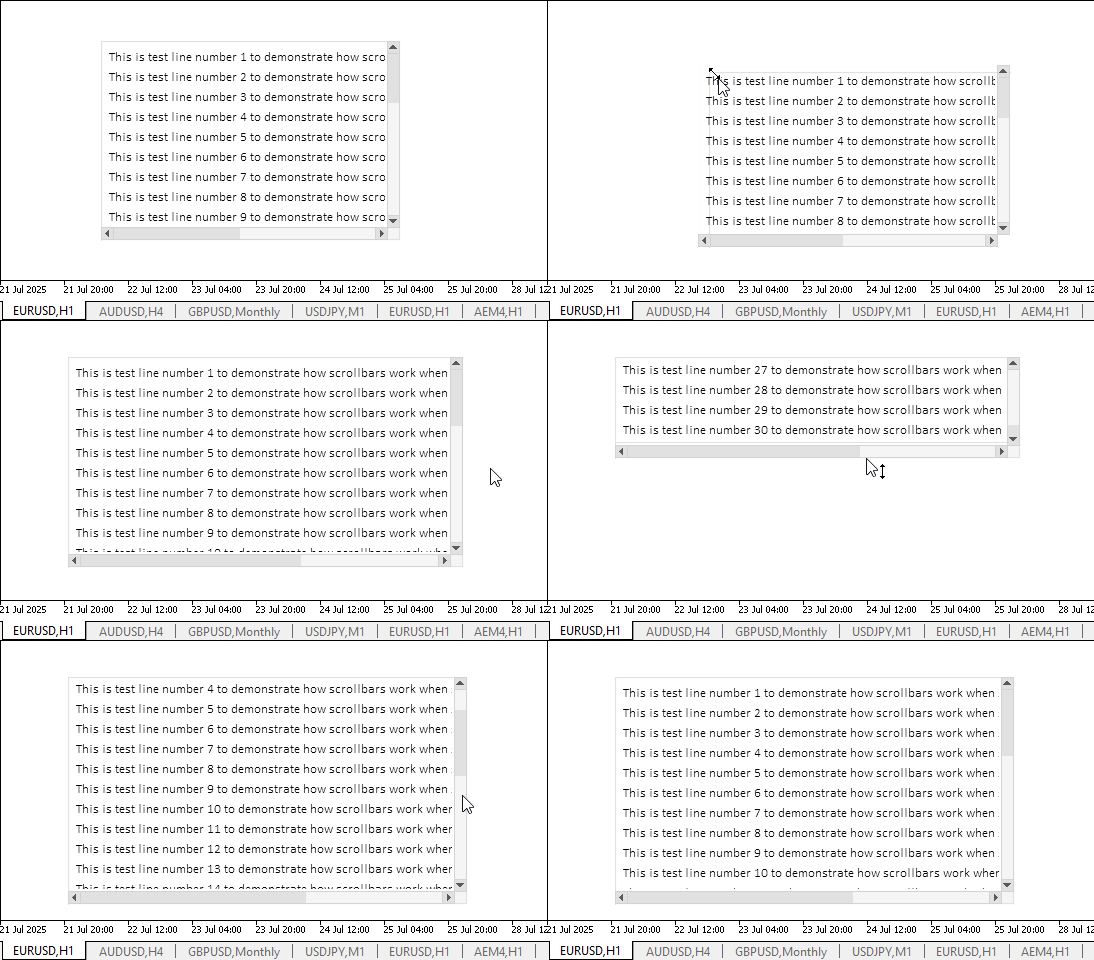
Obviously, the stated functionality operates correctly. It is difficult to capture edges of an element where they contact scroll bars. However, resizable elements usually do not consist of a single control. As an example, a graphical element "Form". It has sufficient indentations from all the controls, thanks to which you can effortlessly find the capture point for dragging the element boundary with the mouse.
There are still some shortcomings that we will gradually get rid of as we continue to work on creating the TableView graphical element.
Conclusion
Today we are one step closer to completing work on the TableView control, which will allow us to create and display tabular data in our programs. Implementation of the View component is quite voluminous and complex, but the result should close most of the requirements for tabular representation of data and working with them.
In the next article, we will start creating interactive tabular data headers that allow you to manage columns of the table and its rows.
Programs used in the article:
| # | Name | Type | Description |
|---|---|---|---|
| 1 | Base.mqh | Class Library | Classes for creating a base object of controls |
| 2 | Controls.mqh | Class Library | Control classes |
| 3 | iTestResize.mq5 | Test indicator | Indicator for testing manipulations with classes of controls |
| 4 | MQL5.zip | Archive | An archive of the files above for unpacking into the MQL5 directory of the client terminal |
All created files are attached to the article for self-study. The archive file can be unzipped to the terminal folder, and all files will be located in the desired folder: \MQL5\Indicators\Tables\.
Translated from Russian by MetaQuotes Ltd.
Original article: https://www.mql5.com/ru/articles/18941
Warning: All rights to these materials are reserved by MetaQuotes Ltd. Copying or reprinting of these materials in whole or in part is prohibited.
This article was written by a user of the site and reflects their personal views. MetaQuotes Ltd is not responsible for the accuracy of the information presented, nor for any consequences resulting from the use of the solutions, strategies or recommendations described.



 Codex Pipelines, from Python to MQL5, for Indicator Selection: A Multi-Quarter Analysis of the XLF ETF with Machine Learning
 From Novice to Expert: Trading the RSI with Market Structure Awareness
 Building AI-Powered Trading Systems in MQL5 (Part 7): Further Modularization and Automated Trading
 Introduction to MQL5 (Part 31): Mastering API and WebRequest Function in MQL5 (V)

- Free trading apps
- Over 8,000 signals for copying
- Economic news for exploring financial markets
You agree to website policy and terms of use