

Criação de sistemas de negociação com inteligência artificial em MQL5 (Parte 1): Implementação do processamento de JSON para APIs de IA
 20
 2

Introdução
Nesta série, exploramos a integração da inteligência artificial (IA) em sistemas de negociação desenvolvidos em MetaQuotes Language 5 (MQL5). Na primeira parte, desenvolvemos um módulo confiável de parsing de JSON para a troca de dados com APIs de IA, como a do ChatGPT. Nosso objetivo é estabelecer uma base sólida para o processamento de estruturas JSON, permitindo uma interação fluida com serviços de IA em futuras aplicações de negociação. Abordaremos os seguintes tópicos:
- Entendendo o JSON e seu papel na integração com IA
- Implementação em MQL5
- Testes do módulo de parsing de JSON
- Conclusão
Ao final deste artigo, você terá uma base sólida para trabalhar com dados JSON e desenvolver sistemas de negociação baseados em IA. Vamos começar a implementação.
Entendendo o JSON e seu papel na integração com IA
JSON (JavaScript Object Notation) é um formato leve de intercâmbio de dados baseado em texto, amplamente utilizado para estruturar e transferir informações entre sistemas, especialmente em APIs web, devido à sua simplicidade, legibilidade e compatibilidade com diferentes linguagens de programação. Em sistemas de negociação baseados em inteligência artificial, o JSON é o formato padrão para a troca de dados com APIs de IA, como a do ChatGPT, da OpenAI. Isso permite que aplicações MQL5 enviem prompts relacionados à negociação e recebam respostas estruturadas que auxiliam na tomada de decisões. Neste artigo, desenvolvemos um módulo de parsing de JSON para processar essas interações com APIs, estabelecendo a base para incorporar análises geradas por IA em estratégias de negociação automatizadas.
O que é JSON e por que ele é importante
O JSON representa dados por meio de pares "chave-valor", arrays e objetos aninhados. Por isso, é adequado para codificar informações complexas, como dados de mercado, sinais de negociação e respostas de IA, em um formato legível para humanos e processável por máquinas. Por exemplo, um objeto JSON pode ter a seguinte estrutura:
{
  "model": "gpt-3.5-turbo",
  "messages": [
    {"role": "user", "content": "Analyze EURUSD trend"},
    {"role": "assistant", "content": "EURUSD shows a bullish trend"}
  ],
  "max_tokens": 500
}
Essa estrutura contém strings, números, arrays e objetos aninhados. Um EA em MQL5 precisa fazer o parsing dessa estrutura para extrair as informações necessárias, como a resposta da IA a uma solicitação de negociação. O JSON desempenha um papel fundamental na integração com IA, pois as APIs retornam suas respostas nesse formato. Para tomar decisões de negociação de forma dinâmica, o programa precisa serializar os dados de entrada, ou seja, convertê-los para JSON, e desserializar as respostas, transformando-as em dados utilizáveis. Se esses termos ainda não forem familiares, explicaremos a seguir o que são a serialização e a desserialização de dados.
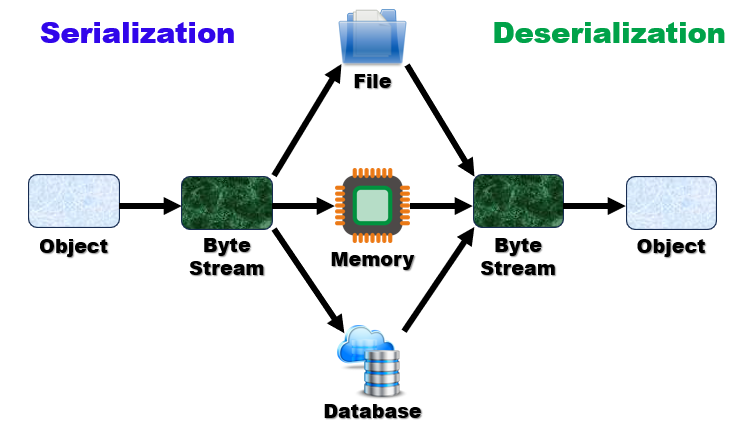
Plano de implementação
O plano de implementação prevê a criação de uma classe para processamento de JSON com os seguintes recursos:
- Representação de dados. Uma classe para armazenar valores JSON, com campos para tipo, chave e valor (como string, número ou booleano), além de um array de elementos filhos para lidar com estruturas aninhadas.
- Lógica de parsing. Métodos para desserializar strings JSON em objetos, analisando cada caractere para identificar objetos, arrays, tipos primitivos, espaços em branco e sequências de escape.
- Lógica de serialização. Métodos para converter os dados internos novamente em strings JSON, garantindo a formatação correta das requisições de API, incluindo o escape de caracteres especiais.
- Tratamento de erros. Validações robustas para identificar JSON inválido, incompatibilidades de tipos e acessos fora dos limites de arrays, evitando falhas durante a troca de dados com APIs.
- Preparação da interface do usuário. Estrutura inicial para uma futura integração com uma interface que permitirá inserir prompts e exibir respostas da IA com base nos dados extraídos do JSON.
Testaremos esse módulo fazendo o parsing de respostas típicas de APIs de IA, como a da OpenAI. Também verificaremos sua capacidade de serializar corretamente prompts de negociação, conforme ilustrado abaixo.
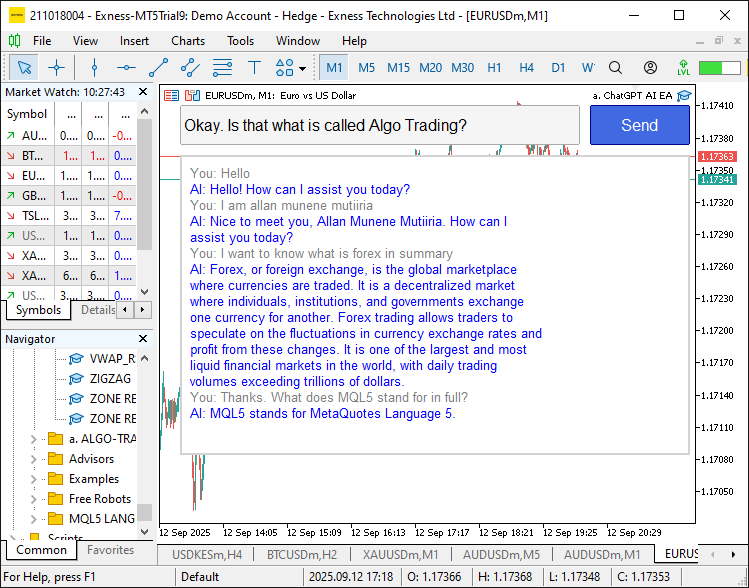
Ao dominar o parsing de JSON neste artigo, permitiremos que futuras aplicações baseadas em IA processem estruturas de dados complexas. Isso abrirá caminho para estratégias de negociação que combinem análise de Price Action, padrões gráficos e análises geradas por IA. Vamos à implementação.
Implementação em MQL5
Para integrar a IA, começaremos desenvolvendo uma classe abrangente de parsing de JSON, que será utilizada tanto nos primeiros prompts quanto em aplicações futuras. Veja a seguir como implementá-la.
//+------------------------------------------------------------------+
//|                                            a. JSON Code File.mq5 |
//|                           Copyright 2025, Allan Munene Mutiiria. |
//|                                   https://t.me/Forex_Algo_Trader |
//+------------------------------------------------------------------+
#property copyright "Copyright 2025, Allan Munene Mutiiria."
#property link "https://t.me/Forex_Algo_Trader"
#property version "1.00"
//+------------------------------------------------------------------+
//| Expert initialization function                                   |
//+------------------------------------------------------------------+
int OnInit(){return(INIT_SUCCEEDED);}
//+------------------------------------------------------------------+
//| Expert deinitialization function                                 |
//+------------------------------------------------------------------+
void OnDeinit(const int reason){}
//+------------------------------------------------------------------+
//| Expert tick function                                             |
//+------------------------------------------------------------------+
void OnTick(){}
//+------------------------------------------------------------------+
//| JSON (JavaScript Object Notation)                                |
//+------------------------------------------------------------------+
#define DEBUG_PRINT false
//+------------------------------------------------------------------+
//| Enumeration of JSON value types                                  |
//+------------------------------------------------------------------+
enum JsonValueType {JsonUndefined,JsonNull,JsonBoolean,JsonInteger,JsonDouble,JsonString,JsonArray,JsonObject};
//+------------------------------------------------------------------+
//| Class representing a JSON value                                  |
//+------------------------------------------------------------------+
class JsonValue{
   public:
      // CONSTRUCTOR
      virtual void Reset(){
         m_parent=NULL;                                         //--- Set parent pointer to NULL
         m_key="";                                              //--- Clear the key string
         m_type=JsonUndefined;                                  //--- Set type to undefined
         m_booleanValue=false;                                  //--- Set boolean value to false
         m_integerValue=0;                                      //--- Set integer value to zero
         m_doubleValue=0;                                       //--- Set double value to zero
         m_stringValue="";                                      //--- Clear the string value
         ArrayResize(m_children,0);                             //--- Resize children array to zero
      }
      virtual bool CopyFrom(const JsonValue &source){
         m_key=source.m_key;                                    //--- Copy the key from source
         CopyDataFrom(source);                                  //--- Copy data from source
         return true;                                           //--- Return success
      }
      virtual void CopyDataFrom(const JsonValue &source){
         m_type=source.m_type;                                  //--- Copy the type from source
         m_booleanValue=source.m_booleanValue;                  //--- Copy the boolean value from source
         m_integerValue=source.m_integerValue;                  //--- Copy the integer value from source
         m_doubleValue=source.m_doubleValue;                    //--- Copy the double value from source
         m_stringValue=source.m_stringValue;                    //--- Copy the string value from source
         CopyChildrenFrom(source);                              //--- Copy children from source
      }
      virtual void CopyChildrenFrom(const JsonValue &source){
         int numChildren=ArrayResize(m_children,ArraySize(source.m_children)); //--- Resize children array to match source size
         for(int index=0; index<numChildren; index++){          //--- Loop through each child
            m_children[index]=source.m_children[index];         //--- Copy child from source
            m_children[index].m_parent=GetPointer(this);        //--- Set parent of child to current object
         }
      }
   public:
      JsonValue m_children[];                                   //--- Array to hold child JSON values
      string m_key;                                             //--- Key for this JSON value
      string m_temporaryKey;                                    //--- Temporary key used during parsing
      JsonValue *m_parent;                                      //--- Pointer to parent JSON value
      JsonValueType m_type;                                     //--- Type of this JSON value
      bool m_booleanValue;                                      //--- Boolean value storage
      long m_integerValue;                                      //--- Integer value storage
      double m_doubleValue;                                     //--- Double value storage
      string m_stringValue;                                     //--- String value storage
      static int encodingCodePage;                              //--- Static code page for encoding
   public:
      JsonValue(){
         Reset();                                               //--- Call reset to initialize
      }
      JsonValue(JsonValue *parent,JsonValueType type){
         Reset();                                               //--- Call reset to initialize
         m_type=type;                                           //--- Set the type
         m_parent=parent;                                       //--- Set the parent
      }
      JsonValue(JsonValueType type,string value){
         Reset();                                               //--- Call reset to initialize
         SetFromString(type,value);                             //--- Set value from string based on type
      }
      JsonValue(const int integerValue){
         Reset();                                               //--- Call reset to initialize
         m_type=JsonInteger;                                    //--- Set type to integer
         m_integerValue=integerValue;                           //--- Set integer value
         m_doubleValue=(double)m_integerValue;                  //--- Convert to double
         m_stringValue=IntegerToString(m_integerValue);         //--- Convert to string
         m_booleanValue=m_integerValue!=0;                      //--- Set boolean based on integer
      }
      JsonValue(const long longValue){
         Reset();                                               //--- Call reset to initialize
         m_type=JsonInteger;                                    //--- Set type to integer
         m_integerValue=longValue;                              //--- Set integer value
         m_doubleValue=(double)m_integerValue;                  //--- Convert to double
         m_stringValue=IntegerToString(m_integerValue);         //--- Convert to string
         m_booleanValue=m_integerValue!=0;                      //--- Set boolean based on integer
      }
      JsonValue(const double doubleValue){
         Reset();                                               //--- Call reset to initialize
         m_type=JsonDouble;                                     //--- Set type to double
         m_doubleValue=doubleValue;                             //--- Set double value
         m_integerValue=(long)m_doubleValue;                    //--- Convert to integer
         m_stringValue=DoubleToString(m_doubleValue);           //--- Convert to string
         m_booleanValue=m_integerValue!=0;                      //--- Set boolean based on integer
      }
      JsonValue(const bool booleanValue){
         Reset();                                               //--- Call reset to initialize
         m_type=JsonBoolean;                                    //--- Set type to boolean
         m_booleanValue=booleanValue;                           //--- Set boolean value
         m_integerValue=m_booleanValue;                         //--- Convert to integer
         m_doubleValue=m_booleanValue;                          //--- Convert to double
         m_stringValue=IntegerToString(m_integerValue);         //--- Convert to string
      }
      JsonValue(const JsonValue &other){
         Reset();                                               //--- Call reset to initialize
         CopyFrom(other);                                       //--- Copy from other object
      }
      // DECONSTRUCTOR
      ~JsonValue(){
         Reset();                                               //--- Call reset to clean up
      }
}
Começamos o desenvolvimento do módulo de parsing de JSON pela classe básica JsonValue, responsável pelo processamento de dados JSON na integração com APIs de IA. Primeiro, definimos a macro DEBUG_PRINT como false para controlar a saída de depuração e reduzir ao mínimo os registros de log em produção. Em seguida, criamos a enumeração JsonValueType, com os valores JsonUndefined, JsonNull, JsonBoolean, JsonInteger, JsonDouble, JsonString, JsonArray e JsonObject, para classificar os tipos de dados JSON. Com isso, a classe poderá lidar com as diferentes estruturas retornadas pelas APIs.
Na sequência, implementamos a classe JsonValue com os seguintes membros públicos: o array m_children, que armazena elementos JSON aninhados; as strings m_key e m_temporaryKey, utilizadas para armazenar chaves durante o parsing; o ponteiro m_parent, que estabelece as relações hierárquicas; a variável m_type, do tipo JsonValueType; as variáveis m_booleanValue, m_integerValue, m_doubleValue e m_stringValue, que armazenam os respectivos valores; e a variável estática encodingCodePage, responsável pela página de código utilizada na codificação de caracteres. Para inicializar objetos JsonValue, disponibilizamos diversos construtores: um construtor padrão, que chama Reset; um construtor que recebe o objeto pai e o tipo; outro que recebe o tipo e um valor de string; além de construtores para valores integer, long, double e boolean, e um construtor de cópia. Essa variedade oferece flexibilidade na criação de elementos JSON.
O método Reset restaura os seguintes membros aos valores padrão: ponteiro nulo para o objeto pai, strings vazias, tipo indefinido, valores numéricos definidos como zero, valores booleanos definidos como false e array de elementos filhos vazio. Os métodos CopyFrom, CopyDataFrom e CopyChildrenFrom realizam a cópia profunda de estruturas JSON, incluindo os elementos filhos e a reassociação correta dos ponteiros para os respectivos objetos pai. Essa implementação básica estabelece a estrutura necessária para o parsing e o processamento de dados JSON, essenciais para a integração posterior com APIs de IA. Em seguida, podemos implementar algumas funções virtuais da classe, também declaradas na seção public. Essas funções oferecem flexibilidade e suporte ao polimorfismo.
public:
   virtual bool IsNumericValue(){
      return (m_type==JsonDouble || m_type==JsonInteger);    //--- Check if type is double or integer
   }
   virtual JsonValue *FindChildByKey(string key){
      for(int index=ArraySize(m_children)-1; index>=0; --index){ //--- Loop backwards through children
         if(m_children[index].m_key==key){                   //--- Check if key matches
            return GetPointer(m_children[index]);            //--- Return pointer to matching child
         }
      }
      return NULL;                                           //--- Return NULL if no match
   }
   virtual JsonValue *HasChildWithKey(string key,JsonValueType type=JsonUndefined);
   virtual JsonValue *operator[](string key);
   virtual JsonValue *operator[](int index);
   void operator=(const JsonValue &value){
      CopyFrom(value);                                       //--- Copy from value
   }
   void operator=(const int integerValue){
      m_type=JsonInteger;                                    //--- Set type to integer
      m_integerValue=integerValue;                           //--- Set integer value
      m_doubleValue=(double)m_integerValue;                  //--- Convert to double
      m_booleanValue=m_integerValue!=0;                      //--- Set boolean based on integer
   }
   void operator=(const long longValue){
      m_type=JsonInteger;                                    //--- Set type to integer
      m_integerValue=longValue;                              //--- Set integer value
      m_doubleValue=(double)m_integerValue;                  //--- Convert to double
      m_booleanValue=m_integerValue!=0;                      //--- Set boolean based on integer
   }
   void operator=(const double doubleValue){
      m_type=JsonDouble;                                     //--- Set type to double
      m_doubleValue=doubleValue;                             //--- Set double value
      m_integerValue=(long)m_doubleValue;                    //--- Convert to integer
      m_booleanValue=m_integerValue!=0;                      //--- Set boolean based on integer
   }
   void operator=(const bool booleanValue){
      m_type=JsonBoolean;                                    //--- Set type to boolean
      m_booleanValue=booleanValue;                           //--- Set boolean value
      m_integerValue=(long)m_booleanValue;                   //--- Convert to integer
      m_doubleValue=(double)m_booleanValue;                  //--- Convert to double
   }
   void operator=(string stringValue){
      m_type=(stringValue!=NULL)?JsonString:JsonNull;        //--- Set type to string or null
      m_stringValue=stringValue;                             //--- Set string value
      m_integerValue=StringToInteger(m_stringValue);         //--- Convert to integer
      m_doubleValue=StringToDouble(m_stringValue);           //--- Convert to double
      m_booleanValue=stringValue!=NULL;                      //--- Set boolean based on string presence
   }

   bool operator==(const int integerValue){return m_integerValue==integerValue;}  //--- Compare integer value
   bool operator==(const long longValue){return m_integerValue==longValue;}       //--- Compare long value
   bool operator==(const double doubleValue){return m_doubleValue==doubleValue;}  //--- Compare double value
   bool operator==(const bool booleanValue){return m_booleanValue==booleanValue;} //--- Compare boolean value
   bool operator==(string stringValue){return m_stringValue==stringValue;}        //--- Compare string value

   bool operator!=(const int integerValue){return m_integerValue!=integerValue;}  //--- Check inequality for integer
   bool operator!=(const long longValue){return m_integerValue!=longValue;}       //--- Check inequality for long
   bool operator!=(const double doubleValue){return m_doubleValue!=doubleValue;}  //--- Check inequality for double
   bool operator!=(const bool booleanValue){return m_booleanValue!=booleanValue;} //--- Check inequality for boolean
   bool operator!=(string stringValue){return m_stringValue!=stringValue;}        //--- Check inequality for string

   long ToInteger() const{return m_integerValue;}            //--- Return integer value
   double ToDouble() const{return m_doubleValue;}            //--- Return double value
   bool ToBoolean() const{return m_booleanValue;}            //--- Return boolean value
   string ToString(){return m_stringValue;}                  //--- Return string value

   virtual void SetFromString(JsonValueType type,string stringValue){
      m_type=type;                                           //--- Set the type
      switch(m_type){                                        //--- Handle based on type
      case JsonBoolean:
         m_booleanValue=(StringToInteger(stringValue)!=0);   //--- Convert string to boolean
         m_integerValue=(long)m_booleanValue;                //--- Set integer from boolean
         m_doubleValue=(double)m_booleanValue;               //--- Set double from boolean
         m_stringValue=stringValue;                          //--- Set string value
         break;                                              //--- Exit case
      case JsonInteger:
         m_integerValue=StringToInteger(stringValue);        //--- Convert string to integer
         m_doubleValue=(double)m_integerValue;               //--- Set double from integer
         m_stringValue=stringValue;                          //--- Set string value
         m_booleanValue=m_integerValue!=0;                   //--- Set boolean from integer
         break;                                              //--- Exit case
      case JsonDouble:
         m_doubleValue=StringToDouble(stringValue);          //--- Convert string to double
         m_integerValue=(long)m_doubleValue;                 //--- Set integer from double
         m_stringValue=stringValue;                          //--- Set string value
         m_booleanValue=m_integerValue!=0;                   //--- Set boolean from integer
         break;                                              //--- Exit case
      case JsonString:
         m_stringValue=UnescapeString(stringValue);          //--- Unescape the string
         m_type=(m_stringValue!=NULL)?JsonString:JsonNull;   //--- Set type based on string presence
         m_integerValue=StringToInteger(m_stringValue);      //--- Convert to integer
         m_doubleValue=StringToDouble(m_stringValue);        //--- Convert to double
         m_booleanValue=m_stringValue!=NULL;                 //--- Set boolean based on string
         break;                                              //--- Exit case
      }
   }
   virtual string GetSubstringFromArray(char &jsonCharacterArray[],int startPosition,int substringLength){
      #ifdef __MQL4__
            if(substringLength<=0) return "";                //--- Return empty if length invalid in MQL4
      #endif
      char temporaryArray[];                                 //--- Declare temporary array
      ArrayCopy(temporaryArray,jsonCharacterArray,0,startPosition,substringLength); //--- Copy substring to temporary array
      return CharArrayToString(temporaryArray, 0, WHOLE_ARRAY, JsonValue::encodingCodePage); //--- Convert to string using code page
   }
   virtual void SetValue(const JsonValue &value){
      if(m_type==JsonUndefined) {m_type=JsonObject;}         //--- Set type to object if undefined
      CopyDataFrom(value);                                   //--- Copy data from value
   }
   virtual void SetArrayValues(const JsonValue &list[]);
   virtual JsonValue *AddChild(const JsonValue &item){
      if(m_type==JsonUndefined){m_type=JsonArray;}           //--- Set type to array if undefined
      return AddChildInternal(item);                         //--- Call internal add child
   }
   virtual JsonValue *AddChild(const int integerValue){
      JsonValue item(integerValue);                          //--- Create item from integer
      return AddChild(item);                                 //--- Add the item
   }
   virtual JsonValue *AddChild(const long longValue){
      JsonValue item(longValue);                             //--- Create item from long
      return AddChild(item);                                 //--- Add the item
   }
   virtual JsonValue *AddChild(const double doubleValue){
      JsonValue item(doubleValue);                           //--- Create item from double
      return AddChild(item);                                 //--- Add the item
   }
   virtual JsonValue *AddChild(const bool booleanValue){
      JsonValue item(booleanValue);                          //--- Create item from boolean
      return AddChild(item);                                 //--- Add the item
   }
   virtual JsonValue *AddChild(string stringValue){
      JsonValue item(JsonString,stringValue);                //--- Create item from string
      return AddChild(item);                                 //--- Add the item
   }
   virtual JsonValue *AddChildInternal(const JsonValue &item){
      int currentSize=ArraySize(m_children);                 //--- Get current children size
      ArrayResize(m_children,currentSize+1);                 //--- Resize array to add one more
      m_children[currentSize]=item;                          //--- Add the item
      m_children[currentSize].m_parent=GetPointer(this);     //--- Set parent to current object
      return GetPointer(m_children[currentSize]);            //--- Return pointer to added child
   }
   virtual JsonValue *CreateNewChild(){
      if(m_type==JsonUndefined) {m_type=JsonArray;}          //--- Set type to array if undefined
      return CreateNewChildInternal();                       //--- Call internal create new child
   }
   virtual JsonValue *CreateNewChildInternal(){
      int currentSize=ArraySize(m_children);                 //--- Get current children size
      ArrayResize(m_children,currentSize+1);                 //--- Resize array to add one more
      return GetPointer(m_children[currentSize]);            //--- Return pointer to new child
   }

   virtual string EscapeString(string value);
   virtual string UnescapeString(string value);
Na seção public, implementamos o método IsNumericValue, que verifica se um valor JSON é numérico, retornando true quando m_type é igual a JsonDouble ou JsonInteger. Isso permite tratar os dados numéricos de acordo com seus respectivos tipos. Em seguida, desenvolvemos o método FindChildByKey, que percorre o array m_children em ordem inversa para localizar um elemento filho cuja chave corresponda à chave procurada. O método retorna um ponteiro para o elemento encontrado ou NULL caso não haja correspondência, facilitando o acesso a objetos JSON aninhados.
Na sequência, definimos as sobrecargas do operador de atribuição operator= para JsonValue e os tipos int, long, double, bool e string. Esses operadores atualizam m_type e os campos correspondentes m_integerValue, m_doubleValue, m_stringValue e m_booleanValue, mantendo a consistência da representação interna dos valores. Também implementamos os operadores de comparação operator== e operator!= para os tipos int, long, double, bool e string, permitindo comparar diretamente os valores com os respectivos campos internos.
Além disso, implementamos os métodos de conversão ToInteger, ToDouble, ToBoolean e ToString, que permitem obter os valores nos formatos correspondentes. O método SetFromString define um valor JSON com base no JsonValueType especificado. Ele processa os tipos bool, integer, double e string, convertendo a string de entrada e atualizando os campos associados. No caso de valores do tipo string, as sequências de escape são decodificadas por meio de UnescapeString. Já o método GetSubstringFromArray extrai uma substring de um array de caracteres, copiando o trecho especificado e convertendo-o em string com CharArrayToString e a página de código definida em encodingCodePage.
Por fim, implementamos os métodos de gerenciamento dos elementos filhos. As sobrecargas de AddChild para JsonValue, int, long, double, bool e string adicionam um novo elemento filho ao array m_children, definindo o objeto pai e o tipo quando necessário. Os métodos CreateNewChild e CreateNewChildInternal criam um elemento filho vazio, enquanto SetValue copia os dados de outro objeto JsonValue. Esses métodos permitem criar, modificar e acessar estruturas JSON. Para concluir a implementação da classe, adicionamos os métodos de serialização, desserialização e codificação dos caracteres presentes nas respostas e nos prompts.
public: virtual void SerializeToString(string &jsonString,bool includeKey=false,bool includeComma=false); virtual string SerializeToString(){ string jsonString; //--- Declare json string SerializeToString(jsonString); //--- Call serialize with default params return jsonString; //--- Return the serialized string } virtual bool DeserializeFromArray(char &jsonCharacterArray[],int arrayLength,int ¤tIndex); virtual bool ExtractStringFromArray(char &jsonCharacterArray[],int arrayLength,int ¤tIndex); virtual bool DeserializeFromString(string jsonString,int encoding=CP_ACP){ int currentIndex=0; //--- Initialize current index Reset(); //--- Reset the object JsonValue::encodingCodePage=encoding; //--- Set encoding code page char characterArray[]; //--- Declare character array int arrayLength=StringToCharArray(jsonString,characterArray,0,WHOLE_ARRAY,JsonValue::encodingCodePage); //--- Convert string to char array return DeserializeFromArray(characterArray,arrayLength,currentIndex); //--- Call deserialize from array } virtual bool DeserializeFromArray(char &jsonCharacterArray[],int encoding=CP_ACP){ int currentIndex=0; //--- Initialize current index Reset(); //--- Reset the object JsonValue::encodingCodePage=encoding; //--- Set encoding code page return DeserializeFromArray(jsonCharacterArray,ArraySize(jsonCharacterArray),currentIndex); //--- Call deserialize with size }
Implementamos aqui o método SerializeToString, que recebe uma string por referência e os parâmetros includeKey e includeComma. O método converte a estrutura JSON em uma string, adicionando uma vírgula quando includeComma é true e incluindo a chave quando includeKey é true. O processamento varia conforme o tipo de dado: para JsonNull, adiciona a string "null"; para JsonBoolean, adiciona "true" ou "false", de acordo com m_booleanValue; para JsonInteger e JsonDouble, converte os valores em strings; para JsonString, aplica EscapeString a m_stringValue e coloca o resultado entre aspas, ou adiciona "null" se a string estiver vazia; para JsonArray, coloca os elementos filhos entre colchetes, utilizando chamadas recursivas a SerializeToString sem incluir as chaves e inserindo vírgulas antes de cada elemento, exceto o primeiro; para JsonObject, coloca os elementos filhos e suas respectivas chaves entre os delimitadores { e }. Os elementos de estruturas aninhadas também são serializados recursivamente. Uma sobrecarga auxiliar de SerializeToString cria uma string, chama a versão parametrizada do método e retorna o resultado.
Em seguida, implementamos o método DeserializeFromString, que recebe uma string JSON e uma codificação de caracteres, definida por padrão como CP_ACP. O método reinicializa o objeto, define encodingCodePage, converte a string em um array de caracteres por meio de StringToCharArray e passa o controle para DeserializeFromArray. A sobrecarga de DeserializeFromArray que recebe a codificação inicializa o índice, reinicializa o objeto, define encodingCodePage e chama a versão principal de DeserializeFromArray. Esta, por sua vez, realiza o parsing do array de caracteres, reconhecendo espaços em branco, arrays (delimitados por "[" e "]"), objetos (delimitados por "{" e "}"), valores booleanos ("true" e "false"), o valor nulo ("null"), números (distinguindo inteiros de valores double por meio da análise caractere a caractere) e strings com sequências de escape. Durante o parsing, o método cria elementos filhos conforme necessário e gerencia as relações hierárquicas utilizando m_parent e m_temporaryKey.
Por fim, ExtractStringFromArray realiza o parsing de strings contidas no array até encontrar as aspas de fechamento, interpretando sequências de escape, como "\n" e "\t", além de escapes Unicode no formato "\uXXXX". Isso permite extrair corretamente strings que contenham caracteres Unicode, incluindo emojis. Veja abaixo um exemplo.
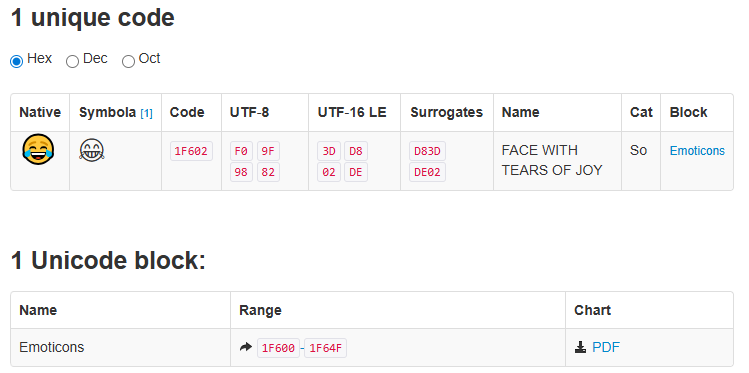
Agora podemos definir esses métodos para que executem corretamente suas respectivas funções.
int JsonValue::encodingCodePage=CP_ACP;                      //--- Initialize static code page
//+------------------------------------------------------------------+
//| Checks if child with specific key and optional type exists       |
//+------------------------------------------------------------------+
JsonValue *JsonValue::HasChildWithKey(string key,JsonValueType type){
   for(int index=0; index<ArraySize(m_children); index++) if(m_children[index].m_key==key){ //--- Loop through children
      if(type==JsonUndefined || type==m_children[index].m_type){ //--- Check type condition
         return GetPointer(m_children[index]);               //--- Return matching child
      }
      break;                                                 //--- Exit loop
   }
   return NULL;                                              //--- Return NULL if no match
}
//+------------------------------------------------------------------+
//| Accessor for object key, creates if not exists                   |
//+------------------------------------------------------------------+
JsonValue *JsonValue::operator[](string key){
   if(m_type==JsonUndefined){m_type=JsonObject;}             //--- Set type to object if undefined
   JsonValue *value=FindChildByKey(key);                     //--- Find child by key
   if(value){return value;}                                  //--- Return if found
   JsonValue newValue(GetPointer(this),JsonUndefined);       //--- Create new undefined value
   newValue.m_key=key;                                       //--- Set key for new value
   value=AddChild(newValue);                                 //--- Add new value as child
   return value;                                             //--- Return the new value
}
//+------------------------------------------------------------------+
//| Accessor for array index, expands if necessary                   |
//+------------------------------------------------------------------+
JsonValue *JsonValue::operator[](int index){
   if(m_type==JsonUndefined) m_type=JsonArray;               //--- Set type to array if undefined
   while(index>=ArraySize(m_children)){                      //--- Loop to expand array if needed
      JsonValue newElement(GetPointer(this),JsonUndefined);  //--- Create new undefined element
      if(CheckPointer(AddChild(newElement))==POINTER_INVALID){return NULL;} //--- Add and check pointer
   }
   return GetPointer(m_children[index]);                     //--- Return pointer to element at index
}
//+------------------------------------------------------------------+
//| Sets array values from list                                      |
//+------------------------------------------------------------------+
void JsonValue::SetArrayValues(const JsonValue &list[]){
   if(m_type==JsonUndefined){m_type=JsonArray;}              //--- Set type to array if undefined
   int numChildren=ArrayResize(m_children,ArraySize(list));  //--- Resize children to list size
   for(int index=0; index<numChildren; ++index){             //--- Loop through list
      m_children[index]=list[index];                         //--- Copy from list
      m_children[index].m_parent=GetPointer(this);           //--- Set parent to current
   }
}
Para definir os métodos fora do corpo da classe, utilizamos o operador de resolução de escopo. Embora também seja possível defini-los dentro da classe, a definição externa favorece a modularidade do código. O membro estático encodingCodePage é inicializado com CP_ACP (Active Code Page), estabelecendo a codificação de caracteres padrão para as conversões de strings. Isso garante a compatibilidade com os dados JSON recebidos de APIs de IA. Em seguida, implementamos o método HasChildWithKey, que percorre o array m_children em ordem direta para localizar um elemento filho com a chave correspondente e, opcionalmente, com o JsonValueType especificado. Por padrão, utiliza JsonUndefined, indicando que o tipo deve ser ignorado durante a busca. O método retorna um ponteiro para o elemento filho encontrado ou NULL caso não haja correspondência. A possibilidade de encerrar a busca assim que o elemento é encontrado, combinada com a verificação do tipo, torna a pesquisa mais eficiente em comparação com FindChildByKey.
Em seguida, desenvolvemos a sobrecarga do operador operator[] para acessar elementos de objetos JSON. Se m_type estiver indefinido, atribuímos a ele o valor JsonObject. Depois, utilizamos FindChildByKey para localizar o elemento filho com a chave especificada. Se o elemento não existir, criamos um novo JsonValue com essa chave e o adicionamos a m_children por meio de AddChild. O operador retorna um ponteiro para o elemento filho existente ou recém-criado, facilitando o acesso às propriedades do objeto. Da mesma forma, a sobrecarga de operator[] para arrays define m_type como JsonArray quando o tipo ainda não estiver definido. Se o índice ultrapassar o tamanho de m_children, o array é expandido com elementos de tipo indefinido por meio de AddChild. Em seguida, o operador retorna um ponteiro para o elemento no índice especificado, permitindo o acesso seguro aos elementos do array.
Por fim, implementamos SetArrayValues. Se m_type estiver indefinido, atribuímos a ele o valor JsonArray. Em seguida, ajustamos o tamanho de m_children ao da lista de entrada, copiamos cada JsonValue da lista para m_children e definimos o objeto atual como pai de cada elemento filho. Isso permite atribuir vários valores a um array de uma só vez. Os demais métodos seguem uma estrutura semelhante. Vamos começar pelos métodos de serialização e desserialização de strings.
//+------------------------------------------------------------------+ //| Serializes the JSON value to string | //+------------------------------------------------------------------+ void JsonValue::SerializeToString(string &jsonString,bool includeKey,bool includeComma){ if(m_type==JsonUndefined){return;} //--- Return if undefined if(includeComma){jsonString+=",";} //--- Add comma if needed if(includeKey){jsonString+=StringFormat("\"%s\":", m_key);} //--- Add key if needed int numChildren=ArraySize(m_children); //--- Get number of children switch(m_type){ //--- Handle based on type case JsonNull: jsonString+="null"; //--- Append null break; //--- Exit case case JsonBoolean: jsonString+=(m_booleanValue?"true":"false"); //--- Append true or false break; //--- Exit case case JsonInteger: jsonString+=IntegerToString(m_integerValue); //--- Append integer as string break; //--- Exit case case JsonDouble: jsonString+=DoubleToString(m_doubleValue); //--- Append double as string break; //--- Exit case case JsonString: { string value=EscapeString(m_stringValue); //--- Escape the string if(StringLen(value)>0){jsonString+=StringFormat("\"%s\"",value);} //--- Append escaped string if not empty else{jsonString+="null";} //--- Append null if empty } break; //--- Exit case case JsonArray: jsonString+="["; //--- Start array for(int index=0; index<numChildren; index++){m_children[index].SerializeToString(jsonString,false,index>0);} //--- Serialize each child jsonString+="]"; //--- End array break; //--- Exit case case JsonObject: jsonString+="{"; //--- Start object for(int index=0; index<numChildren; index++){m_children[index].SerializeToString(jsonString,true,index>0);} //--- Serialize each child with key jsonString+="}"; //--- End object break; //--- Exit case } } //+------------------------------------------------------------------+ //| Deserializes from character array | //+------------------------------------------------------------------+ bool JsonValue::DeserializeFromArray(char &jsonCharacterArray[],int arrayLength,int ¤tIndex){ string validNumericCharacters="0123456789+-.eE"; //--- Define valid number characters int startPosition=currentIndex; //--- Set start position for(; currentIndex<arrayLength; currentIndex++){ //--- Loop through array char currentCharacter=jsonCharacterArray[currentIndex]; //--- Get current character if(currentCharacter==0){break;} //--- Break if null character switch(currentCharacter){ //--- Handle based on character case '\t': case '\r': case '\n': case ' ': //--- Skip whitespace startPosition=currentIndex+1; //--- Update start position break; //--- Exit case case '[': //--- Start of array { startPosition=currentIndex+1; //--- Update start position if(m_type!=JsonUndefined){ //--- Check if type is undefined if(DEBUG_PRINT){Print(m_key+" "+string(__LINE__));} //--- Print debug if error return false; //--- Return false on error } m_type=JsonArray; //--- Set type to array currentIndex++; //--- Increment index JsonValue childValue(GetPointer(this),JsonUndefined); //--- Create child value while(childValue.DeserializeFromArray(jsonCharacterArray,arrayLength,currentIndex)){ //--- Deserialize children if(childValue.m_type!=JsonUndefined){AddChild(childValue);} //--- Add if not undefined if(childValue.m_type==JsonInteger || childValue.m_type==JsonDouble || childValue.m_type==JsonArray){currentIndex++;} //--- Increment if certain types childValue.Reset(); //--- Reset child childValue.m_parent=GetPointer(this); //--- Set parent if(jsonCharacterArray[currentIndex]==']'){break;} //--- Break if end of array currentIndex++; //--- Increment index if(currentIndex>=arrayLength){ //--- Check bounds if(DEBUG_PRINT){Print(m_key+" "+string(__LINE__));} //--- Print debug return false; //--- Return false } } return (jsonCharacterArray[currentIndex]==']' || jsonCharacterArray[currentIndex]==0); //--- Return true if properly ended } break; //--- Exit case case ']': //--- End of array if(!m_parent){return false;} //--- Return false if no parent return (m_parent.m_type==JsonArray); //--- Check parent is array case ':': //--- Key-value separator { if(m_temporaryKey==""){ //--- Check temporary key if(DEBUG_PRINT){Print(m_key+" "+string(__LINE__));} //--- Print debug return false; //--- Return false } JsonValue childValue(GetPointer(this),JsonUndefined); //--- Create child JsonValue *addedChild=AddChild(childValue); //--- Add child addedChild.m_key=m_temporaryKey; //--- Set key m_temporaryKey=""; //--- Clear temporary key currentIndex++; //--- Increment index if(!addedChild.DeserializeFromArray(jsonCharacterArray,arrayLength,currentIndex)){ //--- Deserialize child if(DEBUG_PRINT){Print(m_key+" "+string(__LINE__));} //--- Print debug return false; //--- Return false } break; //--- Exit case } case ',': //--- Value separator startPosition=currentIndex+1; //--- Update start if(!m_parent && m_type!=JsonObject){ //--- Check conditions if(DEBUG_PRINT){Print(m_key+" "+string(__LINE__));} //--- Print debug return false; //--- Return false } else if(m_parent){ //--- If has parent if(m_parent.m_type!=JsonArray && m_parent.m_type!=JsonObject){ //--- Check parent type if(DEBUG_PRINT){Print(m_key+" "+string(__LINE__));} //--- Print debug return false; //--- Return false } if(m_parent.m_type==JsonArray && m_type==JsonUndefined){return true;} //--- Return true for undefined in array } break; //--- Exit case case '{': //--- Start of object startPosition=currentIndex+1; //--- Update start if(m_type!=JsonUndefined){ //--- Check type if(DEBUG_PRINT){Print(m_key+" "+string(__LINE__));} //--- Print debug return false; //--- Return false } m_type=JsonObject; //--- Set type to object currentIndex++; //--- Increment index if(!DeserializeFromArray(jsonCharacterArray,arrayLength,currentIndex)){ //--- Recurse deserialize if(DEBUG_PRINT){Print(m_key+" "+string(__LINE__));} //--- Print debug return false; //--- Return false } return (jsonCharacterArray[currentIndex]=='}' || jsonCharacterArray[currentIndex]==0); //--- Check end break; //--- Exit case case '}': //--- End of object return (m_type==JsonObject); //--- Check type is object case 't': case 'T': //--- Start of true case 'f': case 'F': //--- Start of false if(m_type!=JsonUndefined){ //--- Check type if(DEBUG_PRINT){Print(m_key+" "+string(__LINE__));} //--- Print debug return false; //--- Return false } m_type=JsonBoolean; //--- Set type to boolean if(currentIndex+3<arrayLength){ //--- Check for true if(StringCompare(GetSubstringFromArray(jsonCharacterArray, currentIndex, 4), "true", false)==0){ //--- Compare substring m_booleanValue=true; //--- Set to true currentIndex+=3; //--- Advance index return true; //--- Return true } } if(currentIndex+4<arrayLength){ //--- Check for false if(StringCompare(GetSubstringFromArray(jsonCharacterArray, currentIndex, 5), "false", false)==0){ //--- Compare substring m_booleanValue=false; //--- Set to false currentIndex+=4; //--- Advance index return true; //--- Return true } } if(DEBUG_PRINT){Print(m_key+" "+string(__LINE__));} //--- Print debug return false; //--- Return false break; //--- Exit case case 'n': case 'N': //--- Start of null if(m_type!=JsonUndefined){ //--- Check type if(DEBUG_PRINT){Print(m_key+" "+string(__LINE__));} //--- Print debug return false; //--- Return false } m_type=JsonNull; //--- Set type to null if(currentIndex+3<arrayLength){ //--- Check bounds if(StringCompare(GetSubstringFromArray(jsonCharacterArray,currentIndex,4),"null",false)==0){ //--- Compare substring currentIndex+=3; //--- Advance index return true; //--- Return true } } if(DEBUG_PRINT){Print(m_key+" "+string(__LINE__));} //--- Print debug return false; //--- Return false break; //--- Exit case case '0': case '1': case '2': case '3': case '4': case '5': case '6': case '7': case '8': case '9': case '-': case '+': case '.': //--- Start of number { if(m_type!=JsonUndefined){ //--- Check type if(DEBUG_PRINT){Print(m_key+" "+string(__LINE__));} //--- Print debug return false; //--- Return false } bool isDouble=false; //--- Initialize double flag int startOfNumber=currentIndex; //--- Set start of number while(jsonCharacterArray[currentIndex]!=0 && currentIndex<arrayLength){ //--- Loop to parse number currentIndex++; //--- Increment index if(StringFind(validNumericCharacters,GetSubstringFromArray(jsonCharacterArray,currentIndex,1))<0){break;} //--- Break if invalid char if(!isDouble){isDouble=(jsonCharacterArray[currentIndex]=='.' || jsonCharacterArray[currentIndex]=='e' || jsonCharacterArray[currentIndex]=='E');} //--- Set double flag } m_stringValue=GetSubstringFromArray(jsonCharacterArray,startOfNumber,currentIndex-startOfNumber); //--- Get number string if(isDouble){ //--- If double m_type=JsonDouble; //--- Set type to double m_doubleValue=StringToDouble(m_stringValue); //--- Convert to double m_integerValue=(long)m_doubleValue; //--- Convert to integer m_booleanValue=m_integerValue!=0; //--- Set boolean } else{ //--- Else integer m_type=JsonInteger; //--- Set type to integer m_integerValue=StringToInteger(m_stringValue); //--- Convert to integer m_doubleValue=(double)m_integerValue; //--- Convert to double m_booleanValue=m_integerValue!=0; //--- Set boolean } currentIndex--; //--- Decrement index return true; //--- Return true break; //--- Exit case } case '\"': //--- Start of string or key if(m_type==JsonObject){ //--- If object type currentIndex++; //--- Increment index int startOfString=currentIndex; //--- Set start of string if(!ExtractStringFromArray(jsonCharacterArray,arrayLength,currentIndex)){ //--- Extract string if(DEBUG_PRINT){Print(m_key+" "+string(__LINE__));} //--- Print debug return false; //--- Return false } m_temporaryKey=GetSubstringFromArray(jsonCharacterArray,startOfString,currentIndex-startOfString); //--- Set temporary key } else{ //--- Else value string if(m_type!=JsonUndefined){ //--- Check type if(DEBUG_PRINT){Print(m_key+" "+string(__LINE__));} //--- Print debug return false; //--- Return false } m_type=JsonString; //--- Set type to string currentIndex++; //--- Increment index int startOfString=currentIndex; //--- Set start of string if(!ExtractStringFromArray(jsonCharacterArray,arrayLength,currentIndex)){ //--- Extract string if(DEBUG_PRINT){Print(m_key+" "+string(__LINE__));} //--- Print debug return false; //--- Return false } SetFromString(JsonString,GetSubstringFromArray(jsonCharacterArray,startOfString,currentIndex-startOfString)); //--- Set from extracted string return true; //--- Return true } break; //--- Exit case } } return true; //--- Return true at end }
Continuamos a implementação do módulo de parsing de JSON, concentrando-nos nos métodos essenciais de serialização e desserialização.
Primeiro, definimos o método SerializeToString, que converte uma estrutura JSON em string. Ele ignora valores de tipo indefinido, adiciona uma vírgula quando includeComma == true e inclui a chave quando includeKey == true, utilizando StringFormat. Em seguida, processa cada tipo definido em m_type: para JsonNull, adiciona null; para JsonBoolean, adiciona true ou false, conforme m_booleanValue; para JsonInteger, utiliza IntegerToString para converter m_integerValue; para JsonDouble, utiliza DoubleToString para converter m_doubleValue; para JsonString, aplica EscapeString a m_stringValue e coloca o resultado entre aspas, ou adiciona a string "null" caso m_stringValue esteja vazia; para JsonArray, delimita os elementos filhos com colchetes, utilizando chamadas recursivas a SerializeToString sem incluir as chaves e inserindo vírgulas antes de cada elemento, exceto o primeiro; para JsonObject, delimita os elementos filhos, com suas respectivas chaves, por chaves de abertura e fechamento. Uma sobrecarga auxiliar de SerializeToString cria uma string, chama a versão do método com os parâmetros padrão e retorna o resultado.
Em seguida, implementamos o método DeserializeFromArray, que realiza o parsing de um array de caracteres para construir uma estrutura JSON. O método utiliza uma string contendo os caracteres permitidos na representação de números ("0123456789+-.eE") e percorre os elementos do array sequencialmente. Durante o parsing, ignora os espaços em branco; processa arrays delimitados por "[" e "]", definindo m_type = JsonArray e desserializando recursivamente os elementos filhos até encontrar o colchete de fechamento, cuja validade é verificada; identifica o separador entre chave e valor (":"), definindo a chave do novo elemento filho com o valor de m_temporaryKey; processa os separadores entre valores (","); e interpreta objetos delimitados por chaves de abertura e fechamento, definindo m_type = JsonObject e desserializando recursivamente os elementos filhos até encontrar o delimitador de fechamento, cuja validade também é verificada. O método ainda processa valores booleanos ("true" e "false"), atualizando m_booleanValue; o valor nulo ("null"), definindo m_type = JsonNull; números, identificando a presença de notação decimal ou exponencial para atribuir m_type = JsonDouble ou m_type = JsonInteger; e strings entre aspas, utilizando ExtractStringFromArray para interpretar as sequências de escape.
O método DeserializeFromArray mantém corretamente as relações entre os elementos pai e filho e trata estruturas inválidas por meio de mensagens de depuração com DEBUG_PRINT. Isso permite realizar o parsing das respostas de forma confiável. Por fim, podemos definir os métodos de tratamento das sequências de escape.
//+------------------------------------------------------------------+ //| Extracts string from array handling escapes | //+------------------------------------------------------------------+ bool JsonValue::ExtractStringFromArray(char &jsonCharacterArray[],int arrayLength,int ¤tIndex){ for(; jsonCharacterArray[currentIndex]!=0 && currentIndex<arrayLength; currentIndex++){ //--- Loop through string char currentCharacter=jsonCharacterArray[currentIndex]; //--- Get current char if(currentCharacter=='\"') break; //--- Break on closing quote if(currentCharacter=='\\' && currentIndex+1<arrayLength){ //--- Handle escape currentIndex++; //--- Increment for escaped char currentCharacter=jsonCharacterArray[currentIndex]; //--- Get escaped char switch(currentCharacter){ //--- Handle escaped type case '/': case '\\': case '\"': case 'b': case 'f': case 'r': case 'n': case 't': break; //--- Allowed escapes case 'u': //--- Unicode escape { currentIndex++; //--- Increment for(int hexDigitIndex=0; hexDigitIndex<4 && currentIndex<arrayLength && jsonCharacterArray[currentIndex]!=0; hexDigitIndex++,currentIndex++){ //--- Loop hex digits if(!((jsonCharacterArray[currentIndex]>='0' && jsonCharacterArray[currentIndex]<='9') || (jsonCharacterArray[currentIndex]>='A' && jsonCharacterArray[currentIndex]<='F') || (jsonCharacterArray[currentIndex]>='a' && jsonCharacterArray[currentIndex]<='f'))){ //--- Check hex if(DEBUG_PRINT){Print(m_key+" "+CharToString(jsonCharacterArray[currentIndex])+" "+string(__LINE__));} //--- Print debug return false; //--- Return false on invalid hex } } currentIndex--; //--- Decrement after loop break; //--- Exit case } default: break; //--- Handle other (commented return false) } } } return true; //--- Return true } //+------------------------------------------------------------------+ //| Escapes special characters in string | //+------------------------------------------------------------------+ string JsonValue::EscapeString(string stringValue){ ushort inputCharacters[], escapedCharacters[]; //--- Declare arrays int inputLength=StringToShortArray(stringValue, inputCharacters); //--- Convert string to short array if(ArrayResize(escapedCharacters, 2*inputLength)!=2*inputLength){return NULL;} //--- Resize escaped array, return NULL on fail int escapedIndex=0; //--- Initialize escaped index for(int inputIndex=0; inputIndex<inputLength; inputIndex++){ //--- Loop through input switch(inputCharacters[inputIndex]){ //--- Handle special chars case '\\': escapedCharacters[escapedIndex]='\\'; //--- Add escape escapedIndex++; //--- Increment escapedCharacters[escapedIndex]='\\'; //--- Add backslash escapedIndex++; //--- Increment break; //--- Exit case case '"': escapedCharacters[escapedIndex]='\\'; //--- Add escape escapedIndex++; //--- Increment escapedCharacters[escapedIndex]='"'; //--- Add quote escapedIndex++; //--- Increment break; //--- Exit case case '/': escapedCharacters[escapedIndex]='\\'; //--- Add escape escapedIndex++; //--- Increment escapedCharacters[escapedIndex]='/'; //--- Add slash escapedIndex++; //--- Increment break; //--- Exit case case 8: escapedCharacters[escapedIndex]='\\'; //--- Add escape escapedIndex++; //--- Increment escapedCharacters[escapedIndex]='b'; //--- Add backspace escapedIndex++; //--- Increment break; //--- Exit case case 12: escapedCharacters[escapedIndex]='\\'; //--- Add escape escapedIndex++; //--- Increment escapedCharacters[escapedIndex]='f'; //--- Add form feed escapedIndex++; //--- Increment break; //--- Exit case case '\n': escapedCharacters[escapedIndex]='\\'; //--- Add escape escapedIndex++; //--- Increment escapedCharacters[escapedIndex]='n'; //--- Add newline escapedIndex++; //--- Increment break; //--- Exit case case '\r': escapedCharacters[escapedIndex]='\\'; //--- Add escape escapedIndex++; //--- Increment escapedCharacters[escapedIndex]='r'; //--- Add carriage return escapedIndex++; //--- Increment break; //--- Exit case case '\t': escapedCharacters[escapedIndex]='\\'; //--- Add escape escapedIndex++; //--- Increment escapedCharacters[escapedIndex]='t'; //--- Add tab escapedIndex++; //--- Increment break; //--- Exit case default: escapedCharacters[escapedIndex]=inputCharacters[inputIndex]; //--- Copy normal char escapedIndex++; //--- Increment break; //--- Exit case } } stringValue=ShortArrayToString(escapedCharacters,0,escapedIndex); //--- Convert back to string return stringValue; //--- Return escaped string } //+------------------------------------------------------------------+ //| Unescapes special characters in string | //+------------------------------------------------------------------+ string JsonValue::UnescapeString(string stringValue){ ushort inputCharacters[], unescapedCharacters[]; //--- Declare arrays int inputLength=StringToShortArray(stringValue, inputCharacters); //--- Convert to short array if(ArrayResize(unescapedCharacters, inputLength)!=inputLength){return NULL;} //--- Resize, return NULL on fail int outputIndex=0,inputIndex=0; //--- Initialize indices while(inputIndex<inputLength){ //--- Loop through input ushort currentCharacter=inputCharacters[inputIndex]; //--- Get current char if(currentCharacter=='\\' && inputIndex<inputLength-1){ //--- Handle escape switch(inputCharacters[inputIndex+1]){ //--- Handle escaped type case '\\': currentCharacter='\\'; //--- Set to backslash inputIndex++; //--- Increment break; //--- Exit case case '"': currentCharacter='"'; //--- Set to quote inputIndex++; //--- Increment break; //--- Exit case case '/': currentCharacter='/'; //--- Set to slash inputIndex++; //--- Increment break; //--- Exit case case 'b': currentCharacter=8; //--- Set to backspace inputIndex++; //--- Increment break; //--- Exit case case 'f': currentCharacter=12; //--- Set to form feed inputIndex++; //--- Increment break; //--- Exit case case 'n': currentCharacter='\n'; //--- Set to newline inputIndex++; //--- Increment break; //--- Exit case case 'r': currentCharacter='\r'; //--- Set to carriage return inputIndex++; //--- Increment break; //--- Exit case case 't': currentCharacter='\t'; //--- Set to tab inputIndex++; //--- Increment break; //--- Exit case } } unescapedCharacters[outputIndex]=currentCharacter; //--- Copy to output outputIndex++; //--- Increment output inputIndex++; //--- Increment input } stringValue=ShortArrayToString(unescapedCharacters,0,outputIndex); //--- Convert back to string return stringValue; //--- Return unescaped string }
Concluímos a implementação com os métodos de processamento de strings. Primeiro, implementamos ExtractStringFromArray, que extrai uma string de um array de caracteres até encontrar as aspas de fechamento ou chegar ao fim do array. O método interpreta as sequências de escape \\, \", \/, \b, \f, \n, \r e \t, além de sequências Unicode no formato \uXXXX, verificando a validade dos quatro dígitos hexadecimais. Se encontrar uma sequência hexadecimal inválida ou tentar acessar uma posição fora dos limites do array, o método retorna false. A macro DEBUG_PRINT permite registrar informações de depuração nesses casos. Isso garante a extração precisa de strings durante o parsing de JSON.
Em seguida, desenvolvemos o método EscapeString, que converte uma string para um formato compatível com JSON. Primeiro, utilizamos StringToShortArray para converter a string em um array do tipo ushort. O array de saída é dimensionado com o dobro do comprimento da string de entrada, reservando espaço para as sequências de escape. O método percorre cada caractere, identificando a barra invertida, as aspas, a barra normal (/), o caractere de retrocesso (backspace, 8), o caractere de avanço de página (form feed, 12), a quebra de linha, o retorno de carro e a tabulação. Esses caracteres são representados por sequências de escape com uma barra invertida inicial, como \n para a quebra de linha. Os demais caracteres são copiados diretamente, e a string resultante é retornada por meio de ShortArrayToString.
Por fim, implementamos o método UnescapeString, que realiza a operação inversa, convertendo as sequências de escape nos caracteres correspondentes. A string de entrada é convertida em um array do tipo ushort, e o array de saída é dimensionado com o mesmo comprimento da string original. Em seguida, o método percorre os elementos sequencialmente. Ao encontrar uma barra invertida, interpreta o caractere seguinte: por exemplo, \n é convertido em uma quebra de linha, enquanto \t é convertido em uma tabulação. O caractere decodificado é então copiado para o array de saída. Os caracteres não escapados são copiados diretamente. Por meio de ShortArrayToString, o método retorna a string resultante, com as sequências de escape decodificadas, ou NULL se ocorrer uma falha no redimensionamento do array. Esses métodos permitem que a classe JsonValue processe corretamente os caracteres especiais presentes em strings JSON, o que é essencial para formatar as requisições de API e realizar o parsing confiável das respostas da IA. Abaixo, apresentamos um exemplo de uso de caracteres especiais que serão interpretados corretamente.
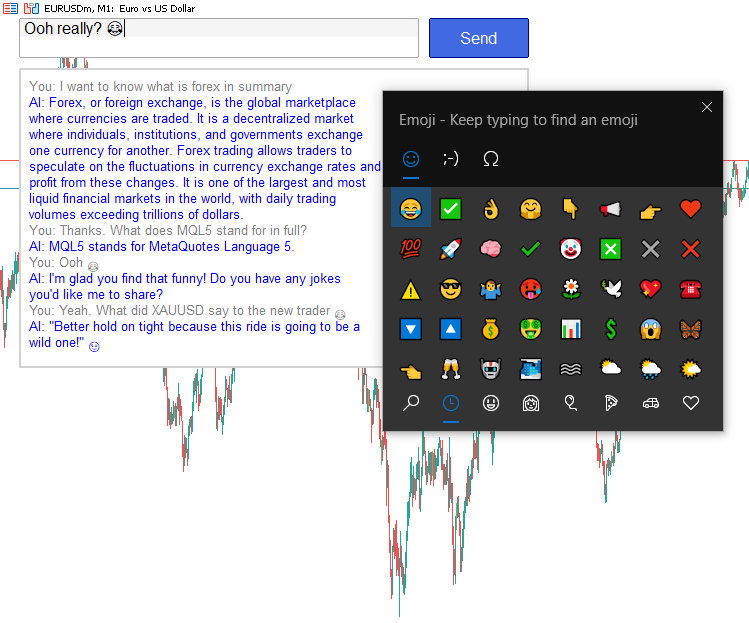
Com a implementação da classe concluída, já podemos utilizar a lógica de parsing de JSON. Antes disso, porém, vamos testar o módulo para verificar se todas as funcionalidades estão operando corretamente. Essa etapa será abordada na próxima seção.
Testes do módulo de parsing de JSON
Para verificar a confiabilidade do módulo de parsing de JSON, realizamos uma série de testes com a classe JsonValue em MQL5. Avaliamos sua capacidade de processar diferentes estruturas JSON, essenciais para a integração com APIs de IA. A seguir, apresentamos a abordagem, incluindo os casos de teste, os resultados esperados e os procedimentos utilizados para verificar o funcionamento do módulo no ambiente de negociação. Definimos uma função que será chamada pelo manipulador de eventos OnInit para exibir o conteúdo. O primeiro trecho de código é apresentado abaixo. Utilizaremos o mesmo arquivo e começaremos exibindo "Hello world", como em um exemplo básico de programação.
//+------------------------------------------------------------------+
//| Test Functions                                                   |
//+------------------------------------------------------------------+
void TestBasicSerialization(){
   Print("\n--- Testing Basic Serialization ---");

   JsonValue root;
   root["string"] = "hello world";
   root["number"] = 42;
   root["double"] = 3.14159;
   root["boolean"] = true;
   root["empty"] = "";

   string json = root.SerializeToString();
   Print("Serialized JSON: ", json);

   JsonValue parsed;
   if(parsed.DeserializeFromString(json)){
      Print("Deserialization successful");
      Print("String: ", parsed["string"].ToString());
      Print("Number: ", (int)parsed["number"].ToInteger());
      Print("Double: ", parsed["double"].ToDouble());
      Print("Boolean: ", parsed["boolean"].ToBoolean());
      Print("Empty: ", parsed["empty"].ToString());
   } else {
      Print("Deserialization failed!");
   }
}

//+------------------------------------------------------------------+
//| Expert initialization function                                   |
//+------------------------------------------------------------------+
int OnInit(){
   TestBasicSerialization();
return(INIT_SUCCEEDED);
}
Criamos a função TestBasicSerialization e um objeto JsonValue chamado root. Por meio de operator[], atribuímos os seguintes valores às respectivas chaves: "string" recebe "hello world"; "number" recebe 42; "double" recebe 3.14159; "boolean" recebe true; e "empty" recebe uma string vazia. Esses valores abrangem os principais tipos JSON: JsonString, JsonInteger, JsonDouble e JsonBoolean. Em seguida, chamamos SerializeToString para root, gerando uma string JSON. O resultado é armazenado na variável json e exibido no terminal do MetaTrader 5 por meio de Print, para verificar a serialização.
Na sequência, criamos um objeto JsonValue chamado parsed e chamamos DeserializeFromString, passando a string json para reconstruir a estrutura JSON. Se o método retornar true, exibimos a mensagem "Deserialization successful". Em seguida, utilizamos operator[] para acessar os valores associados às chaves "string", "number", "double", "boolean" e "empty", extraindo-os e exibindo-os com os métodos ToString, ToInteger (com conversão explícita para int), ToDouble e ToBoolean, conforme o tipo de cada valor. Se a desserialização falhar, exibimos a mensagem "Deserialization failed!". Por fim, chamamos TestBasicSerialization dentro de OnInit para executar o teste durante a inicialização do programa e retornamos INIT_SUCCEEDED para indicar que a inicialização foi concluída com sucesso. Obtemos o seguinte resultado.
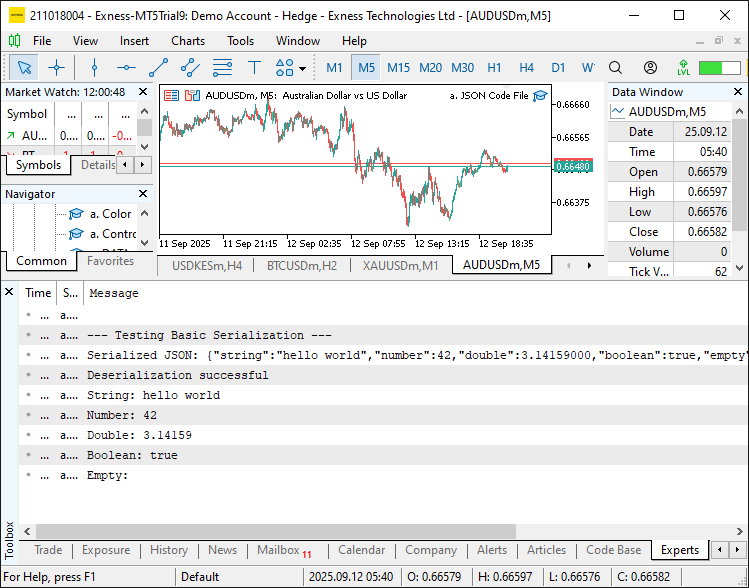
A imagem mostra que a serialização básica foi concluída com sucesso. Agora, vamos testar a desserialização básica.
void TestBasicDeserialization(){
   Print("\n--- Testing Basic Deserialization ---");

   string testJson = "{\"name\":\"John\",\"age\":30,\"isStudent\":false,\"salary\":1500.75}";

   JsonValue parsed;
   if(parsed.DeserializeFromString(testJson)){
      Print("Parsed successfully:");
      Print("Name: ", parsed["name"].ToString());
      Print("Age: ", (int)parsed["age"].ToInteger());
      Print("Is Student: ", parsed["isStudent"].ToBoolean());
      Print("Salary: ", parsed["salary"].ToDouble());
   } else {
      Print("Failed to parse JSON");
   }
}
Após a execução, obtemos o seguinte resultado.
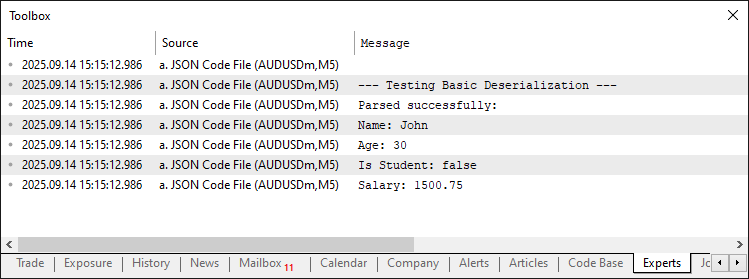
Esse teste também foi concluído com sucesso. Vamos aumentar a complexidade dos testes.
void TestComplexObject(){
   Print("\n--- Testing Complex Object ---");

   JsonValue root;
   root["person"]["name"] = "Alice";
   root["person"]["age"] = 25;
   root["person"]["isActive"] = true;
   root["person"]["score"] = 95.5;
   root["person"]["address"]["street"] = "123 Main St";
   root["person"]["address"]["city"] = "New York";
   root["person"]["address"]["zipcode"] = "10001";

   root["person"]["hobbies"].AddChild("reading");
   root["person"]["hobbies"].AddChild("gaming");
   root["person"]["hobbies"].AddChild("coding");

   root["person"]["preferences"]["theme"] = "dark";
   root["person"]["preferences"]["notifications"] = true;

   string json = root.SerializeToString();
   Print("Complex JSON: ", json);

   JsonValue parsed;
   if(parsed.DeserializeFromString(json)){
      Print("Round-trip successful");
      Print("Name: ", parsed["person"]["name"].ToString());
      Print("Age: ", (int)parsed["person"]["age"].ToInteger());
      Print("City: ", parsed["person"]["address"]["city"].ToString());
      Print("Zipcode: ", parsed["person"]["address"]["zipcode"].ToString());
      Print("Theme: ", parsed["person"]["preferences"]["theme"].ToString());
      Print("Hobby count: ", ArraySize(parsed["person"]["hobbies"].m_children));
   }
}

void TestArrayHandling(){
   Print("\n--- Testing Array Handling ---");

   JsonValue root;

   // Array of numbers
   for(int i = 0; i < 5; i++){
      root["numbers"].AddChild(i * 10);
   }

   // Array of mixed types
   root["mixed"].AddChild("string");
   root["mixed"].AddChild(123);
   root["mixed"].AddChild(45.67);
   root["mixed"].AddChild(true);

   // Array of objects
   JsonValue item;
   item["id"] = 1;
   item["name"] = "Item 1";
   item["price"] = 19.99;
   root["items"].AddChild(item);

   item["id"] = 2;
   item["name"] = "Item 2";
   item["price"] = 29.99;
   root["items"].AddChild(item);

   // Nested arrays
   JsonValue nestedArray;
   nestedArray.AddChild("nested1");
   nestedArray.AddChild("nested2");
   root["nested"].AddChild(nestedArray);

   string json = root.SerializeToString();
   Print("Array JSON: ", json);

   JsonValue parsed;
   if(parsed.DeserializeFromString(json)){
      Print("Numbers array length: ", ArraySize(parsed["numbers"].m_children));
      Print("Mixed array length: ", ArraySize(parsed["mixed"].m_children));
      Print("Items array length: ", ArraySize(parsed["items"].m_children));
      Print("First item name: ", parsed["items"][0]["name"].ToString());
      Print("Second item price: ", parsed["items"][1]["price"].ToDouble());
   }
}

void TestErrorHandling(){
   Print("\n--- Testing Error Handling ---");

   JsonValue parsed;

   // Test invalid JSON
   string invalidJson = "{\"name\": \"test\", \"age\": }";
   if(!parsed.DeserializeFromString(invalidJson)){
      Print("✓ Correctly rejected invalid JSON");
   }

   // Test malformed JSON
   string malformedJson = "{\"name\": \"test\" \"age\": 30}"; // Missing comma
   if(!parsed.DeserializeFromString(malformedJson)){
      Print("✓ Correctly rejected malformed JSON");
   }

   // Test empty string
   if(!parsed.DeserializeFromString("")){
      Print("✓ Correctly handled empty string");
   }

   // Test incomplete object
   string incompleteJson = "{\"name\": \"test\"";
   if(!parsed.DeserializeFromString(incompleteJson)){
      Print("✓ Correctly rejected incomplete JSON");
   }
}
Após a execução, obtemos o seguinte resultado.
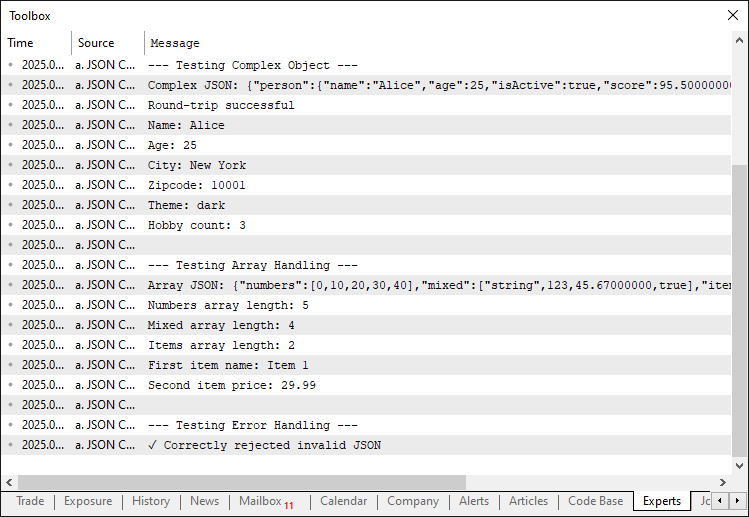
Agora, vamos avaliar o desempenho, o processamento de estruturas aninhadas e o tratamento de diferentes tipos de dados.
void TestPerformance(){
   Print("\n--- Testing Performance ---");

   int startTime = GetTickCount();
   int iterations = 100;
   int successCount = 0;

   for(int i = 0; i < iterations; i++){
      JsonValue root;
      root["test_id"] = i;
      root["name"] = "Test Item " + IntegerToString(i);
      root["value"] = i * 1.5;
      root["active"] = (i % 2 == 0);

      // Add array
      for(int j = 0; j < 5; j++){
         root["tags"].AddChild("tag" + IntegerToString(j));
      }

      string json = root.SerializeToString();

      JsonValue parsed;
      if(parsed.DeserializeFromString(json)){
         successCount++;
      }
   }

   int endTime = GetTickCount();
   Print("Performance: ", iterations, " iterations in ", endTime - startTime, "ms");
   Print("Success rate: ", successCount, "/", iterations, " (", DoubleToString(successCount*100.0/iterations, 1), "%)");
}

void TestNestedStructures(){
   Print("\n--- Testing Nested Structures ---");

   JsonValue root;

   // Deep nesting
   root["level1"]["level2"]["level3"]["level4"]["value"] = "deep_nested";
   root["level1"]["level2"]["level3"]["level4"]["number"] = 999;

   // Array of objects with nesting
   JsonValue user;
   user["name"] = "John";
   user["profile"]["age"] = 30;
   user["profile"]["settings"]["theme"] = "dark";
   user["profile"]["settings"]["notifications"] = true;
   root["users"].AddChild(user);

   user["name"] = "Jane";
   user["profile"]["age"] = 25;
   user["profile"]["settings"]["theme"] = "light";
   user["profile"]["settings"]["notifications"] = false;
   root["users"].AddChild(user);

   string json = root.SerializeToString();
   Print("Nested JSON: ", json);

   JsonValue parsed;
   if(parsed.DeserializeFromString(json)){
      Print("✓ Nested structures parsed successfully");
      Print("Deep value: ", parsed["level1"]["level2"]["level3"]["level4"]["value"].ToString());
      Print("User count: ", ArraySize(parsed["users"].m_children));
      Print("First user theme: ", parsed["users"][0]["profile"]["settings"]["theme"].ToString());
      Print("Second user age: ", (int)parsed["users"][1]["profile"]["age"].ToInteger());
   }
}

void TestDataTypes(){
   Print("\n--- Testing Data Types ---");

   JsonValue root;

   // All supported data types
   root["string_type"] = "hello world";
   root["int_type"] = 42;
   root["long_type"] = 1234567890123;
   root["double_type"] = 3.14159265358979;
   root["bool_true"] = true;
   root["bool_false"] = false;
   root["empty_string"] = "";

   // Scientific notation
   root["scientific_positive"] = 1.23e+10;
   root["scientific_negative"] = 1.23e-10;

   string json = root.SerializeToString();
   Print("Data Types JSON: ", json);

   JsonValue parsed;
   if(parsed.DeserializeFromString(json)){
      Print("✓ All data types parsed successfully");
      Print("String: ", parsed["string_type"].ToString());
      Print("Integer: ", (int)parsed["int_type"].ToInteger());
      Print("Long: ", parsed["long_type"].ToInteger());
      Print("Double: ", parsed["double_type"].ToDouble());
      Print("Bool True: ", parsed["bool_true"].ToBoolean());
      Print("Bool False: ", parsed["bool_false"].ToBoolean());
      Print("Scientific Positive: ", parsed["scientific_positive"].ToDouble());
      Print("Scientific Negative: ", parsed["scientific_negative"].ToDouble());
   }
}
Obtemos o seguinte resultado.
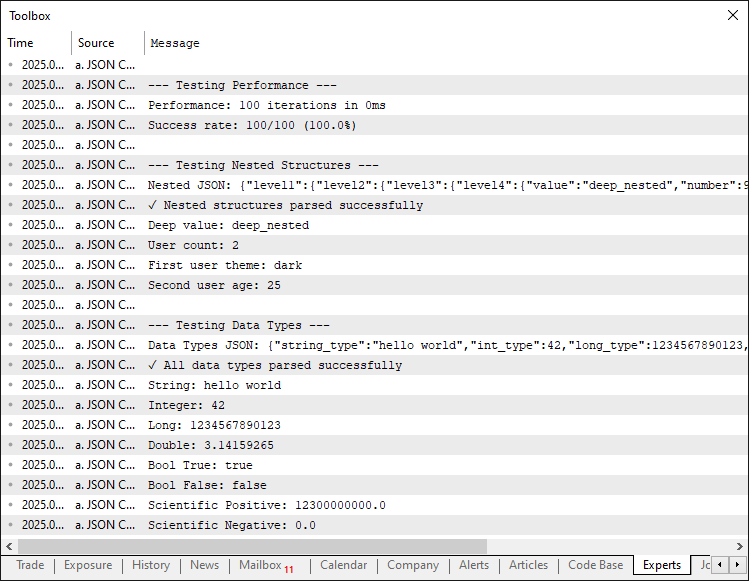
Esse teste também foi concluído com sucesso. Vamos verificar agora o processamento de caracteres escapados.
void TestEscapeCharacters(){
   Print("\n--- Testing Escape Characters ---");

   JsonValue root;

   // Various escape sequences - using only MQL5 supported escapes
   root["backslash"] = "\\\\"; // Double backslash for single backslash
   root["quote"] = "\\\"";     // Escaped quote
   root["newline"] = "\\n";    // Escaped newline
   root["tab"] = "\\t";        // Escaped tab
   root["carriage_return"] = "\\r"; // Escaped carriage return

   // For form feed and backspace, we need to use their actual ASCII codes
   // since MQL5 doesn't support \f and \b escape sequences
   root["form_feed"] = "\\u000C"; // Unicode escape for form feed
   root["backspace"] = "\\u0008"; // Unicode escape for backspace

   root["mixed_escapes"] = "Line1\\nLine2\\tTabbed\\\"Quoted\\\"\\\\Backslash";

   string json = root.SerializeToString();
   Print("Escape Chars JSON: ", json);

   JsonValue parsed;
   if(parsed.DeserializeFromString(json)){
      Print("✓ Escape characters parsed successfully");
      Print("Backslash: '", parsed["backslash"].ToString(), "'");
      Print("Quote: '", parsed["quote"].ToString(), "'");
      Print("Newline: '", parsed["newline"].ToString(), "'");
      Print("Tab: '", parsed["tab"].ToString(), "'");
      Print("Carriage Return: '", parsed["carriage_return"].ToString(), "'");
      Print("Form Feed: '", parsed["form_feed"].ToString(), "'");
      Print("Backspace: '", parsed["backspace"].ToString(), "'");
      Print("Mixed: '", parsed["mixed_escapes"].ToString(), "'");
   } else {
      Print("✗ Escape characters parsing failed");
   }
}
O resultado é apresentado abaixo.
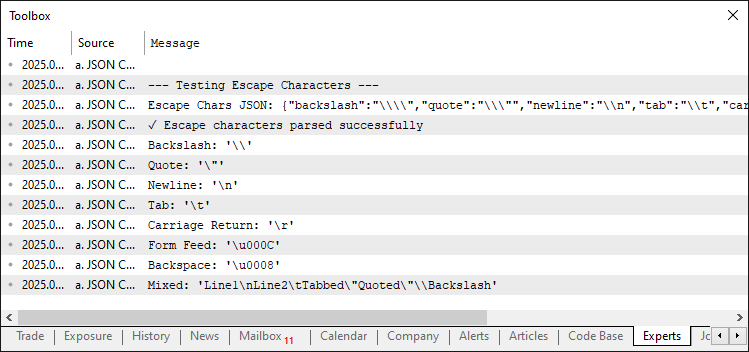
Esse teste também foi concluído com sucesso. Como confirmamos que a implementação do módulo JSON funciona corretamente, podemos utilizá-la como base para criar integrações com IA em futuras aplicações.
Conclusão
Neste artigo, desenvolvemos um módulo de parsing de JSON em MQL5, utilizando a classe JsonValue para serializar e desserializar dados JSON, operações essenciais para a comunicação com APIs. Os métodos SerializeToString, DeserializeFromArray e EscapeString, juntamente com os testes realizados por meio de TestBasicSerialization, permitem processar diferentes estruturas JSON de forma confiável e estabelecem uma base sólida para o desenvolvimento de futuros sistemas de negociação baseados em IA. Nas próximas partes, abordaremos como integrar a IA e interagir com ela em aplicações de negociação. Acompanhe os próximos artigos.
Traduzido do Inglês pela MetaQuotes Ltd.
Artigo original: https://www.mql5.com/en/articles/19562
Aviso: Todos os direitos sobre esses materiais pertencem à MetaQuotes Ltd. É proibida a reimpressão total ou parcial.
Esse artigo foi escrito por um usuário do site e reflete seu ponto de vista pessoal. A MetaQuotes Ltd. não se responsabiliza pela precisão das informações apresentadas nem pelas possíveis consequências decorrentes do uso das soluções, estratégias ou recomendações descritas.



Confira o novo artigo: Criação de sistemas de negociação baseados em IA no MQL5 (Parte 1): Implementação do processamento de JSON para APIs de IA.
Autor: Allan Munene Mutiiria
Parece ótimo. Por onde começo?
O arquivo para download é o a._JSON_Code_File.mq5 e o EA?
Renomeei o A_JSON_Code_File.mq5 (parecia mais familiar) e, em seguida, compilei. Sem erros
No entanto, não encontrei nenhuma referência a ele como EXPERT na minha plataforma — ou seja, não consegui carregá-lo nem executá-lo.
Só preciso “brincar” um pouco, tentar entender o que acontece e por quê.
Muito obrigado por compartilhar o que parece ser uma oportunidade fantástica de utilizar IA
Parece fantástico. Por onde começar?
O arquivo para download é o a._JSON_Code_File.mq5 e o EA?
Renomeei o A_JSON_Code_File.mq5 (parecia mais familiar) e, em seguida, compilei. Sem erros
No entanto, não encontrei nenhuma referência a ele como EXPERT na minha plataforma — ou seja, não consegui carregá-lo nem executá-lo.
Só preciso “brincar” um pouco, tentar entender o que acontece e por quê.
Muito obrigado por compartilhar o que parece ser uma oportunidade fantástica de utilizar IA