Trading Chaos Expert

5

This software has no equals in the world and represents a universal trade "console" covering trading signals, automated market entry, setting of Stop Loss and Take Profit, as well as Trailing Profit for multiple trades at the same time in a single open window. Intuitive control of the Expert Advisor in "three clicks" ensures a comprehensive use of all its functions on different computers, including tablets PCs.

Interacting with additional signal indicators that mark the chart to give a real market picture, the Expert Advisor allows you to make the right choice and to be on the winning side in most cases. A built-in money management algorithm, as well as automatic calculation of the lot size, trading virtual orders, and a number of other "know-how" features will save the trader from the account collapse. It is not a "black box". It is, rather, a well thought out trader's assistant which is not easy to do without, having tried it in action at least once.

Attention! Expert Advisors in the form of panels cannot be tested in the Strategy Tester! To be able to check it on your demo account, you should download a free demo version of this Expert Advisor - Trading Chaos Expert Demo.

The EA represents a panel with a built-in functionality of a trading robot which automates market entries based on trading signals visually estimated by the trader in full accordance with Bill Williams strategies "Trading Chaos: Second Edition" and "New Trading Dimensions". The Expert Advisor identifies directed price momentum that can be used to trade in a fully automated mode on a specific symbol and time frame in a separate window, as well as on multiple instruments simultaneously.

It concurrently analyzes all trading symbols displayed in the MetaTrader 5 "Market Watch" window. Parameters of open positions and pending orders are stored in RAM. After restarting MetaTrader 5 and reconnecting, the Expert Advisor completely restores its logic and trading orders and continues managing open positions.

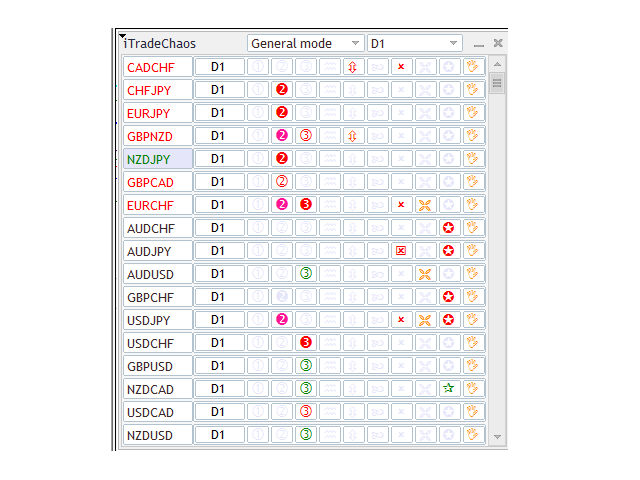
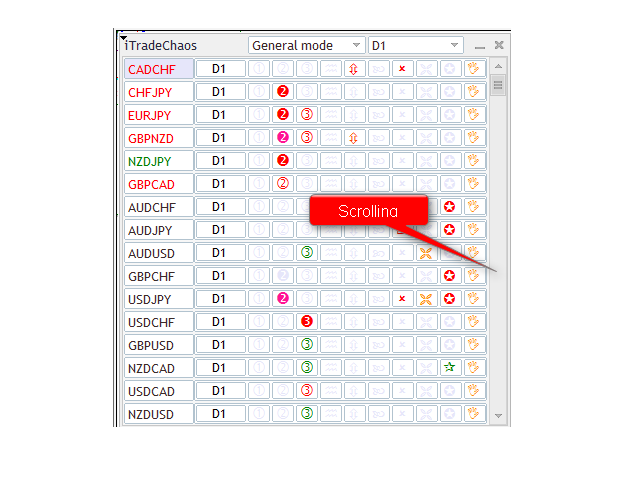
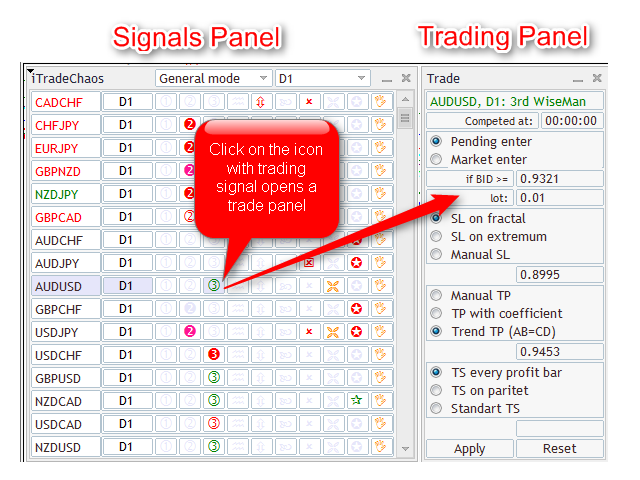
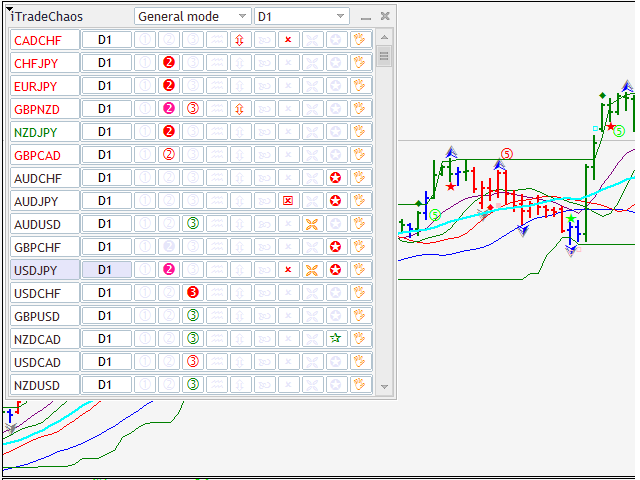
It consists of two interconnected panels. The "signal panel" is displayed directly on the chart. The main functions of the signal panel are:

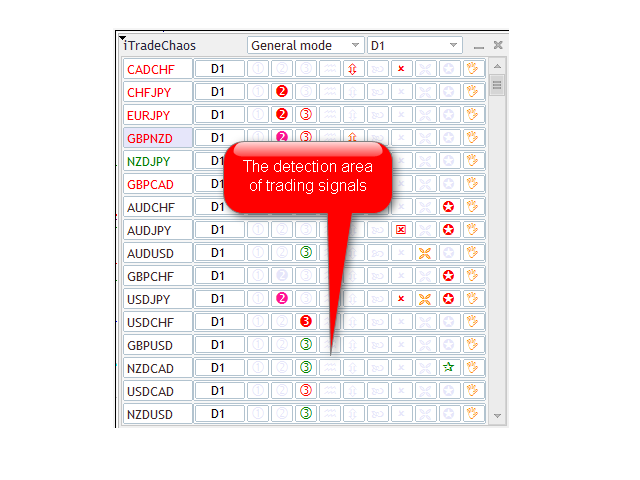
  • Analysis of indicator data and bar (candle) patterns on a selected time frame and trading signal display in the signal table.
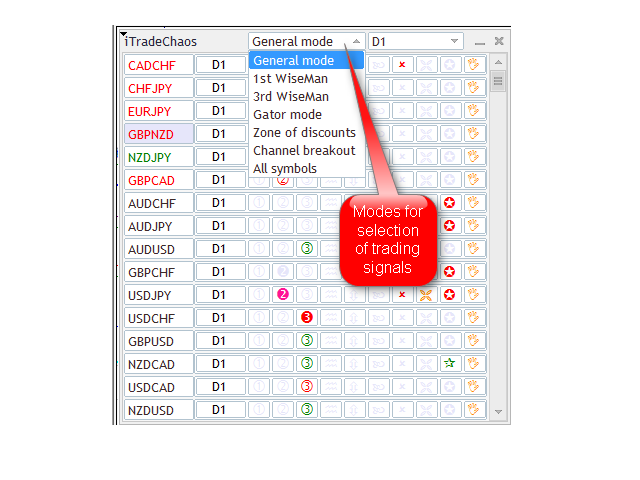
  • Selection of the trading signal display mode and grouping of signals by type.
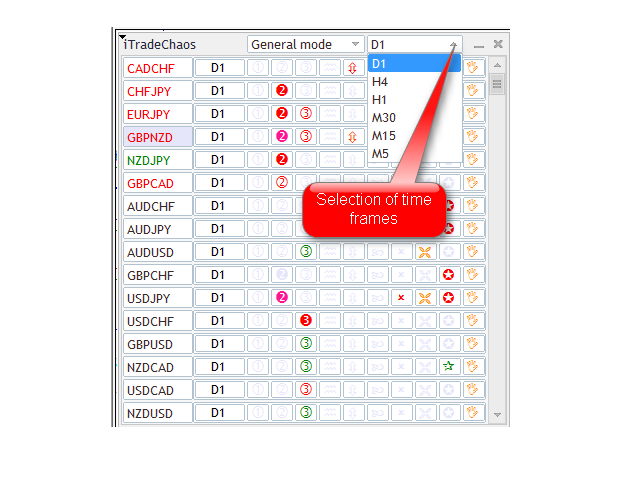
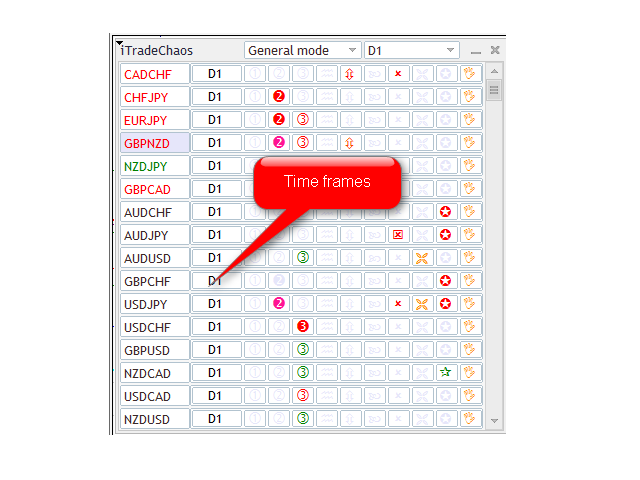
  • Selection of the time frame for the purpose of getting trading signals and trading.
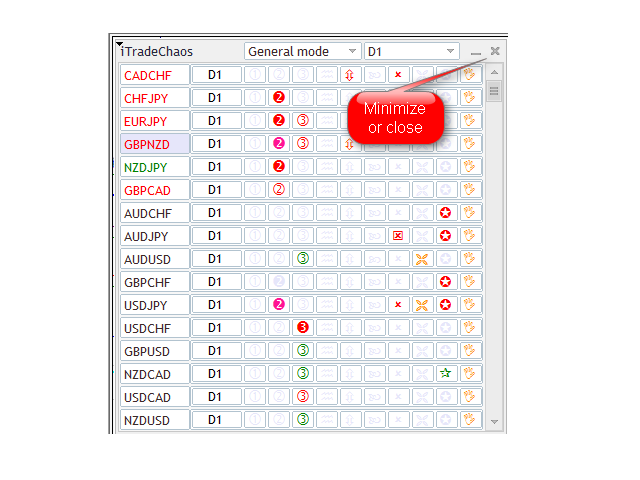
  • Opening (closing) of the "Trading panel".
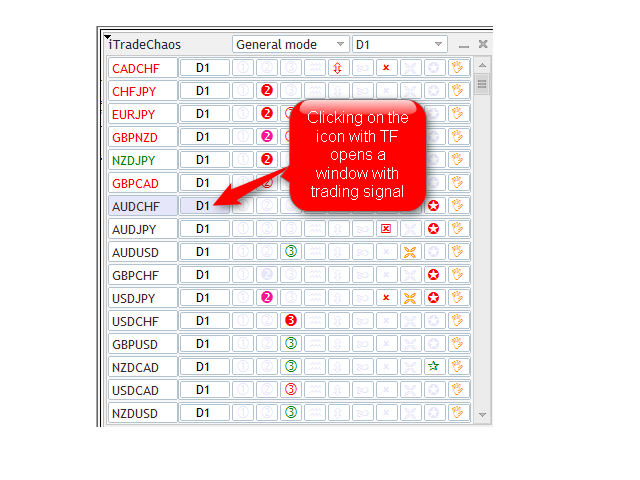
  • Opening a chart for the required symbol and time frame in a single window.

The Expert Advisor can recognize the following major trading signals by strategies and mark them in the signal panel as follows:

  1. "First Wise Man" signal, bullish (bearish) divergent bar (BDB) with angulation, including SQUAT bars. This is the first-ever formalization and implementation of the concept of angulation in MT5. The search for reversal bars is based on robust algorithms. You will always get a signal on the forming SQUAT bar with signs of reversal, as such bars can reverse the market in 85% of cases. However not every SQUAT bar is reversal. It has a measurement function. A particularly strong reversal signal appears in the AO indicator divergence zone, which you will also be able to see in the panel.
  2. "Second Wise Man" signal. “Blue Light Special” signal is an improved "Second Wise Man".
  3. "Third Wise Man" signal is a formation and breakout of the 'important' fractal. The Expert Advisor identifies important fractals lying outside the Alligator's jaws using three distinct reliable algorithms. A fractal breakout is considered to be the start of a directed impulse wave.
  4. 'Waves' is an Awesome Oscillator histogram divergence signal.
  5. 'Infinity' is represented by "Saucer" buy and sell signals. This signal indicates the transition of a currency pair in a directed motion after a period of correction presumably into the third wave or a wave C.
  6. 'Cross' is a signal of Awesome Oscillator histogram crossing the zero line. "Blue Light Special” is an improved signal of such crossing.
  7. Trend start signals (TSS) are marked in the signal table using yellow and gold crosses. The trend start signal appears upon opening of the Alligator's jaws, i.e. when the distance between the red and blue indicator lines increases after intertwining. The upper histogram of Gator Oscillator grows after a period of occurrence or a color change from red to green. This signal intensifies other trading signals in the strategy, both toward the main trend, and in the opposite direction.
  8. 'Star' is a breakout of a 20-period Donchian channel. The Expert Advisor uses the MultiRange_PCH indicator with the period of 20. This indicator is available free of charge. Download it, copy to the clipboard, then go to the MT5 terminal, click "File" - "Open Data Directory" - "MQL5" - "Indicators" and save the file to this folder. After restarting MT5, it will appear in the list of available indicators in the "Navigator" window. Add it to the chart. You will be able to see the breakout of the 20-period channel, which indicates a possible flat range breakout and the start of the directed movement - trend.
  9. By clicking on the 'Hand', a trader can manually place a pending virtual Stop order, set virtual Stop Loss and Take Profit, or open a position at market prices at any time without any signal. The Expert Advisor will then start trailing the profit. If the position is already open, you can click on the 'Hand' to modify Stop Loss, Take Profit, as well as the Trailing Stop method.
  10. Highlighting of the time frame is a special signal that determines the presence of directed impulse in the market, i.e. a formation of a special graphic zone whereby you should receive any trading signals for the given strategy to enter the market in the direction of the price movement on a particular time frame. Signal is set up as follows. The price breaks above the 20-period channel. The Awesome Oscillator crosses the zero line in the breakout direction. Fractal is formed outside the Alligator's jaws. After the fractal formation, the Time Frame button is highlighted in the relevant color. A click on the Time Frame button opens the trading panel that allows you to automate the market entry based on the first performed signal in the direction of the impulse. A trader only needs to click "Apply". "Saucer"-based market entries are especially good under such circumstances, i.e. presumable transition of the price into the third wave or a wave C. After pressing the "Apply" button, the time frame icon is outlined, indicating that the EA is ready to enter the market using trading signals.

Different colors of pointers marking signals allow you to see whether a signal has already been or is just being formed. Light tones of the icons suggest the future signal on active period. Dark tones indicate that there is a formed signal on closing. Filled icons mean that the breakout of the signal level is taking place. After entering the position, the name of the currency pair in the signal table changes its color. If the pair is sold, the name is displayed in red, if it is bought, it is shown in green.

The preliminary signal reflection function gives time to the trader to visually examine the signal for being in full accordance with the strategy, check how the signal fits into the market picture on a senior period, calculate the targets based on wavelengths and to place a pending virtual Stop order for entry, as well as a Stop Loss well in advance by means of the Expert Advisor, by clicking on the "Apply" button. If the preliminary signal does not come off on a closed period, the Expert Advisor will independently stop the signal monitoring and not enter the market.


Cancellation of Signal Monitoring

This function saves the trader from entering the market based on old, canceled or outdated trading signals.

Fractal signals located outside the Alligator's jaws will be canceled after a double closing of the price below (above) the red line of the Alligator. Channel breakout signals are canceled after the AO histogram crosses the zero line in the direction opposite to that of the breakout. "Saucer" signals are canceled after the change in the AO histogram color and the absence of a signal level breakout for a position entry. "Blue Light Special" signals get canceled after the AO histogram changes its color to the opposite upon closing without signal level breakout. Signals of "Divergent bars" and divergence signals are canceled if the bar following the formation does not break the signal level. This is justified by the fact that if the signal is strong, the market will surely detect it and will not wait for the breakout of the signal level over a few more periods.


Signal Panel Modes

Signal panel has nine main modes that are used to group trading signals. A user can sort "First Wise Man", "Second Wise Man" and "Blue Light Special" signals, as well as fractal signals, breakout signals of 20-period channels and TSS (opening of Alligator's jaws). The mode that shows all trading signals for all trading instruments from the "Market Watch" is called "All Symbols".

The "General mode" is selected by default. When attaching the Expert Advisor to the chart, this mode begins the analysis of trading signals for market entry points. In addition, it displays trading instruments with open positions at the very top of the signal table for easier management. After entering a position in this mode, apart from signals for the market entry, you will also be able to see auxiliary signals, including the ones that are opposite to the market movement. For example, you bought a currency pair at the breakout of the fractal level and the next day the Expert Advisor shows a bearish divergence signal, warning you about the possible market reversal against your position.

There is an additional hidden mode which is called the "Candidate". It allows you to single out currency pairs that have potential but lack the trading signal at this point across the entire list of currency pairs. To do this, you need to double-click on the name of the relevant trading instrument. The icon is then outlined in purple and the currency pair is moved on top of the symbol list in the signal panel, below the currency pairs with an open position. To remove the purple frame, you need to double click on it again.

The "Current Chart" mode is intended for trading a specific currency pair on the selected time frame in a separate window. In this mode, the Expert Advisor automatically adjusts to the relevant time frame and detects trading signals on it. To switch between the time frames, we use the MetaTrader 5 program interface instead of the icon in the signal panel.


Time Frames

By default, the Expert Advisor can work on the following time frames:

D1, H4, H1, M30, M15, M5, W1, MN1

The first one on the list is the daily time frame. Upon attaching the Expert Advisor to the chart, the trader by default gets signals over that range as it is considered to be the main and less risky time frame. In addition, using AutoFormat indicator functions, the trader can expand the wave on the daily time frame into the waves on smaller time frames to be able to accurately calculate wave markings, provided that the chart has at least 140 bars. And in the Current Chart mode, you can attach the Expert Advisor to such chart in a separate window. The Expert Advisor has the function that allows it to adapt to signal search on any time frame. For example, if you switch to a 10-minute time frame and decide to continue trading on it and check the available signals, you will need to select the Current Chart mode in the signal panel.

The trader can specify any other required parameters in the Expert Advisor settings, specifying TF in the relevant field of the settings.


Trading Panel Features

An additional "Trading panel" opens (closes) after clicking on the trading signal or time frame icon for the selected instrument.

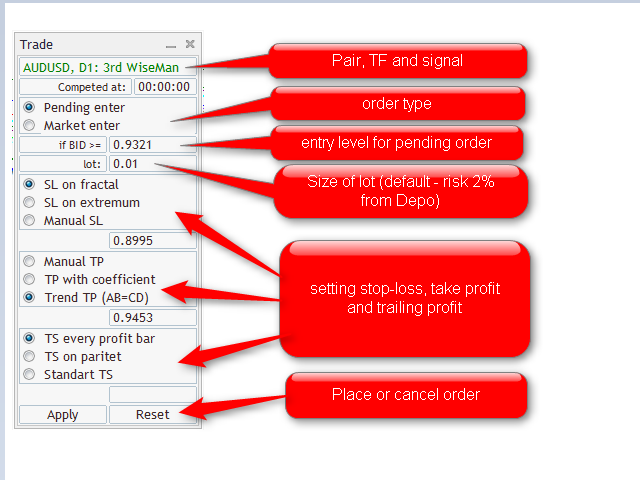
Trading panel offers three position entry options:

  • Pending - entering at the breakout of the specified level by Bid price (by default, we use the signal bar High/Low +/- DefaultLuft = spread). Tracking of the level breakout starts after the signal is formed.
  • Market – market entry at the current price. It works for any signal, including unconfirmed ones.
  • Autoactivation - autoactivation of signals in the direction defined by the trader or automatically in the direction of the price momentum.

Lot size - calculated automatically as 2% of the trading account balance for daily, weekly and monthly periods and 0.2% of the account balance for periods lower than daily. The trader can set other necessary parameters in the settings.

Three Stop Loss setting options:

  • By the last opposite fractal (-/+ DefaultLuft points);
  • By the last extremum of 3 bars (-/+ DefaultLuft points);
  • At the specified level.

Three Take Profit setting options:

  • Manual;
  • Using a coefficient applied to the Stop Loss. For example, if the distance from the position entry to the Stop Loss is 100 and the coefficient of 2 is applied, the Expert Advisor will set a target for the Take Profit of 200 points.
  • AB=CD. This parameter is automatically used for entries based on fractal breakouts. It means that over the interval from the entry point the Take Profit will be equal to the length of the preceding wave.

Three Trailing Stop setting options:

  • By Low/High of each profitable bar (-/+ DefaultLuft spread points);
  • A one-time shift of the Stop Loss to breakeven below the closed bar (-/+ DefaultLuft spread points);
  • Profit protection below (above) the bar closed in the Alligator's jaws (-/+ DefaultLuft spread points);

Although the panel has several Stop Loss and Trailing Stop setting options, the Expert Advisor automatically selects the most suitable option for a particular transaction and begins to operate after clicking the "Apply" button. In order to cancel the operation of the Expert Advisor, you just need to click on "Reset". After clicking the "Apply" button, the lines indicating entry points, as well as the corresponding Stop Loss and Take Profit levels are displayed in the chart. You can move the Stop Loss and Take Profit levels to more appropriate ones for a given trade dragging them with the mouse.

There is also a possibility to manage these levels after entering the position. In that case, the Expert Advisor considers the moving of the level as switching to manual mode, whereby the Stop Loss triggers by hitting the level, rather than closing, thus protecting profits at the required level set by the trader.


Autoactivation of Signals in the Trading Panel

There is a possibility to enable automatic activation of signals in a certain direction (buy or sell) for every single chart. To do this, click the button for switching TF. A standard trading panel will appear, with "AutoActivation" displayed in the header instead of the signal name. Trading direction is selected by clicking on “AutoActivation”. It changes its color with every click: green is for buy signals, red is for sell ones, black is for disabled activation. After you have selected the direction, you should set the parameters, as they will be used when opening a position based on one of the activated signals. The following parameters should be left unchanged:

  • entry price (it will be calculated automatically as the set price will be outdated anyway);
  • Stop Loss level (unless "Manual SL" is selected).

All other parameters must be specified, as they will be used in activating the newly appeared signals. In addition to position parameters, you can also set the autoactivation function expiration time:

If you set the time which is less than the current time, it will be deemed the time of the following day (for example, if it is 14:20 now and the expiration time is set to 13:00, the autoactivation function will be disabled tomorrow at 13:00). The time specified is server time (which you can see in the chart and in the "Market Watch"). After clicking Apply, the relevant TF button is outlined in green or red and automatic activation begins. Upon appearing of a signal in the specified direction, it is immediately activated with the settings specified when enabling autoactivation. This is equivalent to cases where the signal with such settings is activated by the trader.

Simultaneous activation is possible for any number of signals in the same direction. Opposite signals are ignored (including, when activated manually). As soon as the expiration time value is reached, the autoactivation function is disabled. If there are signals activated by this function, they are not disabled and continue to wait to be triggered or canceled following the standard rules.

If any of the signals is triggered for a given symbol and TF in the direction which coincides with the direction of the autoactivation function, the function will be disabled immediately upon opening the position. And all co-directed activated signals for this symbol and TF will be disabled at the same time. In other words, if the buy wait is on and a buy position opens based on any of the signals, the autoactivation function stops its operation and any other buy signals (if any) are canceled. The position in this case remains active.


Autoactivation in Directed Price Momentum

This function is intended for a quick automation of position entry during price momentum in the direction of the price movement. The panel identifies momentum, highlights the time frame using the color of the price movement and automatically selects the direction of autoactivation in the trading panel. The trader only needs to click "Apply". The Expert Advisor will enter the marker based on the first performed signal in the momentum direction, setting the Stop Loss at the level of the opposite fractal and trailing profit using your selected option. The signal monitoring will stop when the histogram crosses the zero line, which suggests that momentum has been or is being lost.


Innovative Features of the Expert Advisor

The Expert Advisor has a number of additional innovative features.

  1. As mentioned earlier, pending orders and Stop Losses are virtual. This saves you from the troubles of a wrong market entry upon widening spread initiated by the broker. For example, the Expert Advisor will enter in the buy direction only if the Bid price is greater than the signal level by the spread value. The Stop Loss will not be affected by the mistake and only trigger after the price closes below (above) the set level plus (minus) the spread for a given symbol.
  2. "Non-random case" feature. The Expert Advisor continues tracking the signal with the wrong entry level over the set spread value.
  3. The possibility to move Stop Loss and Take Profit levels using the mouse. To be able to set the new Stop Loss level, all you need is to click on the rectangle displayed on the line and drag the line to the required place using the mouse. The Trailing Stop is in this case disabled automatically. The Expert Advisor takes these actions as a change to the manual trade management and disables the Trailing Stop. Stop trade is triggered by the contact instead of the closing, as set by default.
  4. The panel features a signal block. The trader can set the required methods of notification of the new trading signals.
  5. The Expert Advisor has an adjustable money management block. 2% of the deposit balance is set by default. Furthermore, the Expert Advisor will reject opening new positions if the free margin on the account will be less than 100%. The trader does not need to independently select the necessary position lots, taking into consideration the price risk of one point of the price movement in the deposit currency for a specific instrument.


Getting the МetaТrader 5 Platform Ready for Work

When connected for the first time, the Expert Advisor automatically loads the entire quotes history available on the server. It can take a few minutes if a lot of trading instruments are displayed in the "Market Watch". To speed up loading, you need to press Ctrl+O key combination and specify a reasonable value of "Max. bars in the window" in the "Charts" tab. Note that each applied instrument and time frame use RAM. Every indicator attached to the chart will use even more RAM.

When switching between charts, МetaТrader 5 does not release memory resources. This is done to be able to quickly return to recently used data. This can slow down the operation of the terminal when working with a great number of instruments, time frames and indicators. If you use D1 or a higher time frame, you will not need more than 5000 bars. Set the specified value in the settings and restart the terminal. In the "Expert Advisors" tab, you should enable the "Allow Auto Trading" option. In addition, it is recommended to set up an email in MetaTrader 5 to be able to get real-time trading signals to your email from the Expert Advisor working on a dedicated server. If you sign up for MQL5.community, you will be able to get free updates of software products right in the МetaТrader 5 terminal.


Preparing the Chart for EA

Before working with the Expert Advisor, you need to properly prepare the chart. Create a template under the name 'default'. Include and save to it the required indicators, as follows:

as well as the indicators provided in the МetaТrader 5 platform by default:

  • Gator Oscillator
  • Market Facilitation Index (MFI)

The graphical indicators are plotted in strict accordance with B. Williams recommendations. Trading signal markings are synchronized with signal panel readings. The indicators are not included in the Trading Chaos Expert package and should be purchased extra. To cut expenses, you can use indicators built-in МetaТrader 5, such as Alligator, Fractals and Awesome Oscillator, that do not have a function for marking trading signals. You should bear in mind that the trading signal quality in this case will be considerably lower. Furthermore, you should not save the panel to the template. It is more advisable to use hot keys for calling the Expert Advisor on the chart. For example, you can set CTRL+1.


How It Works

After successfully loading the history for all the specified instruments and time frames, you will see a table of signals on D1. The current symbol displayed in the chart and the chart time frame are highlighted in a darker color. A click on a TF name (next to any symbol) takes you to the corresponding chart in the current window. If you click on the icon of any of the signals, an additional trading panel will open for you to trade and manage positions. Specify the necessary parameters and click "Apply" - all the parameters will be saved and restored if the Expert Advisor, terminal or computer is restarted. The relevant signal will in this case be outlined. Entry and Stop Loss levels will be marked with lines.

After saving the parameters of a given signal by clicking on the "Apply" button, you can proceed to enabling the next one. If you click on "Reset", all settings will be reset to default values, whereby trading based on the given signal is disabled. To enable trading, you should again set the parameters and click "Apply". The signal will become outlined and monitored by the Expert Advisor. All other signals that you intend to use to enter the market are set in a similar way. Once this is done, you can hide the window by clicking on the cross or any inactive signal, in which case the signals continue to be monitored by the Expert Advisor that tracks all activated entries and responds to market changes.


Trading Using the Expert Advisor

The Expert Advisor identifies a trading signal in line with the strategy and displays it in the table. To view the signal, you should click on the icon of the time frame on which the signal is displayed. The chart will switch to the required time frame with the set of indicators you saved for the corresponding template. If you additionally bought a complete set of indicators for the strategy and saved them to the template, the modified indicators will show this signal in the chart.

There are preliminary signals on an uncompleted candlestick and formed signals confirmed by closing of the period. Preliminary signal function is provided to prepare the trader for a signal. If the trader likes a preliminary signal, he can immediately activate the Expert Advisor to trade on this signal. To do this, you need to click on the signal icon and then click "Apply" in the trading panel. The icon will get outlined. If the border is red, it means that sell signals are accepted, if the border is green - buy signals.

From that moment on, the Expert Advisor will track this signal. If the signal is formed, the Expert Advisor will set the virtual pending order, as well as the Stop Loss based on this signal. After setting pending orders, the chart will show dashed lines indicating entry levels, Stop Loss and Take Profit. The Expert Advisor will enter the market at the signal level breakout. After entering the market, the name of the instrument in the table will be highlighted with the relevant color: green indicates a buy position, whereas red suggests a sell position.

If the signal is canceled, the Expert Advisor will stop tracking the signal and will not enter the market. The frame of the signal icon will in this case disappear. The trader may cancel the market entry by clicking "Reset". Thus, the trader has the possibility to get all major signals in a single window and automate signal-based trading. Besides, it allows you to avoid the danger of entering the market using a canceled signal.

While trading, the trader can add positions based on trading signals in the direction of an open position or reverse based on the opposite signals, as well as use automated trading for multiple instruments at the same time, without opening additional chart windows. This offers significant risk hedging opportunities in trading.


Recommendations

To work with my software tools, it is advisable to have a high-performance computer for the market analysis. Trading operations will require a high-performance (at least 1 GB of RAM) dedicated VPS server with a good communication channel.


Warning

This is a complex software product which does not, however, need any additional settings. It is completely ready for use. To ensure efficient use of the Expert Advisor and positive trading results, you need to have a good knowledge and complete understanding of the trading strategies developed by Bill and Justin Williams - "Trading Chaos" and "New Trading Dimensions".


Possible Problems

No lags or any cases of abnormal behavior were detected over the course of panel use. However, after removing the Expert Advisor from the chart, its signals remain on the chart due to video memory properties. Old signals and symbols can be cleared using two methods:

  1. Load the 'Default' template that only enables indicators.
  2. Right-click on the chart, select "Object list", then "Full list", press CTRL+A (to select all objects) and click on the "Delete" button.

In case something is not clear in the operation of the Expert Advisor, you can check the "Experts" or "Journal" tabs of the Toolbox. Every day, the entire history of operation of the Expert Advisor is saved in files of Logs folder located at C:\Program Files\MetaTrader 5\MQL5\Logs

I will be happy to answer any questions you may have and will help you to install any purchased products on your computers remotely using TeamViewer, at no charge. But before asking questions or turning to me for help, I urge you to carefully read the product description, test the panel in a demo mode on a demo account, rather than in the Strategy Tester, and familiarize yourself with additional information provided on my website. The website offers a function for translation of the text into different languages.

Good luck!
Reviews 13
Paulina Andrea Madariaga Figueroa
4192
 

Esto es justamente lo que estaba buscando. Herramienta invaluable, cada dolar lo vale, y no afecta el funcionamiento de la plataforma metatrader 5, mi plataforma sigue igualmente de rapida.

hallovelo
149
hallovelo 2021.06.04 09:36 
 

Everything works fine on windows. There are some problems (as with most others EA/Indicator) with official download of MT5 for Mac using OS10.15 Catalina, but with Parallels, everything works also on Mac fine. PlayOnMac is currently not compatible with Catalina, and neither is Wine.

Olga Snizhko
1012
Olga Snizhko 2020.10.15 11:52 
 

Good...

A huge minus of this EA is that it is not possible to run it in a tester with visualization on at least one pair in order to set up and test a certain strategy for yourself.

Recommended products
Magic EA MT5
Kyra Nickaline Watson-gordon
Magic EA is an Expert Advisor based on Scalping, Elliot Waves and with filters such as RSI, Stochastic and 3 other strategies managed and decided with the robot smartly. Large number of inputs and settings are tested and optimized and embedded in the program thus inputs are limited and very simple. Using EA doesn't need any professional information or Forex Trading Knowledge. EA can trade on all symbols and all time frames, using special and unique strategies developed by the author. The EA w
Gold EA: Proven Power for 1-Minute Gold Trading Transform your trading with our Gold EA, meticulously crafted for 1-minute charts and delivering over 2000% growth in 5 years from just $100-$1000 . No Martingale, No AI Gimmicks : Pure, time-tested strategies with robust money management, stop loss, and take profit for reliable performance across multiple charts. Flexible Trading Modes : Choose Fixed Balance for safe profits, Mark IV for bold growth, or %Balance for high rewards—combine Mark IV an
| Fully-automated Smart Money Concept (ICT) inspired trading solution with multi-strategy capabilities | Built by a grid trader >> for grid traders.  This is MT5 version, click  here  for  Blue CARA MT4  (settings and logics are same in both versions)     Real monitoring signal  -->  Cara Gold Intro Blue CARA EA   ('CARA') - short for  C omprehensive  A lgorithmic   R esponsive   A dvisor is a next-gen  multi-currency    multi-timeframe  EA base on the widely known (and perhaps the most popul
Santa Scalping is a fully automated Expert Advisor with no use of martingale. Night scalping strategy. The SMA indicator filter are used for entries. This EA can be run from very small accounts. As small as 50 EUR. General Recommendations The minimum deposit is 50 USD,  default settings reccomend for eurusd m5 gmt +2 . Please use max spread 10 if you will not have orders change it to -1. Use a broker with good execution and with a spread of 2-5 points. A very fast VPS is required, preferably wi
Nova WDX Trader is a refined implementation of the classic ADX Wilder trend strength algorithm — engineered into a disciplined, automated trading strategy that respects momentum, structure, and timing. It builds on the original logic introduced by Welles Wilder, enhancing it with modern execution and risk control. Rather than reacting to short-term volatility, Nova WDX Trader waits for confirmed directional strength based on Wilder’s ADX formula, ensuring every trade has context and conviction.
SolarTrade Suite Financial Robot: LaunchPad Market Expert - designed to open trades! This is a trading robot that uses special innovative and advanced algorithms to calculate its values, Your Assistant in the World of Financial Markets. Use our set of indicators from the SolarTrade Suite series to better choose the moment to launch this robot. Check out our other products from the SolarTrade Suite series at the bottom of the description. Do you want to confidently navigate the world of inves
The Bitcoin Reaper
Profalgo Limited
3.7 (33)
LAUNCH PROMO: Only a very limited number of copies will be available at current price! Final Price: 999$ NEW (from 349$) --> GET 1 EA FOR FREE (for 2 trade account numbers). Ultimate Combo Deal   ->   click here JOIN PUBLIC GROUP:   Click here LIVE SIGNAL LIVE SIGNAL V2.0 UPDATE 2.0 INFO Welcome to the BITCOIN REAPER!   After the Tremendous success of the Gold Reaper, I decided it is time to apply the same winning principles to the Bitcoin Market, and boy, does it look promising!   I have been
Gyroscopes mt5
Nadiya Mirosh
5 (2)
Gyroscope        professional forex expert   (for EURUSD, GBPUSD, USDJPY, AUDUSD, USDCHF, EURGBP, EURJPY, NZDUSD, USDCAD, EURCHF, AUDJPY, CADJPY pairs)   alyzing the market using the Elliot Wave Index. Elliott wave theory is the interpretation of processes in financial markets through a system of visual models (waves) on price charts. The author of the theory, Ralph Elliott, identified eight variants of alternating waves (of which five are in the trend and three are against the trend). The mov
FusionPro EA
Bram Van De Vooren
FusionPro v1.1 Beta - Multi-Strategy News-Aware EA ️ CONSERVATIVE Multi-Pair Trading System with Advanced Risk Protection LIMITED BETA RELEASE - $299 (Price increases +$100 after every 10 sales - Secure your copy now!) ️ SAFETY-FIRST TRADING APPROACH Conservative Risk Management - Maximum 0.1%-2.0% risk per pair, never risky martingale News Event Protection - Automatically blocks trades during high-impact volatile events Smart Position Limits - Maximum open trades cap prevents o
Exclusive EA for FOREX HEDGE account The EA (FuzzyLogicTrendEA) is based on fuzzy logic strategies based on the analysis of a set of 5 indicators and filters. Each indicator and filter has a weight in the calculation and, when the fuzzy logic result reaches the value defined in the EA parameter, a negotiation is opened seeking a pre-defined gain. As additional functions it is possible to define maximum spread, stop loss and so on . Recommended Symbol: EURUSD, AUDUSD, GBPUSD, NZDUSD, USDCAD, AU
US500 Scalper
Sergey Batudayev
The S&P 500 Scalper Advisor is an innovative tool designed for traders who want to successfully trade the S&P 500 Index. The index is one of the most widely used and prestigious indicators of the American stock market, comprising the 500 largest companies in the United States. Peculiarities: Automated trading solutions:   The advisor is based on advanced algorithms and technical analysis to automatically adapt the strategy to changing market conditions. Versatile approach:   The advisor combine
GoldRobotics
Patiwat Phinitsuwan
GoldRobotics EA: Automated Gold Trading with Precision and Speed GoldRobotics is a sophisticated Expert Advisor designed for automated trading on the XAUUSD (Gold) market. This EA employs a unique strategy based on precise candle pattern recognition and volume analysis, enabling swift entries and exits for optimal performance in volatile market conditions. It prioritizes quick reactions to market fluctuations, making it ideal for scalping strategies without relying on news events. ️ Unlik
Hamster Scalping mt5
Ramil Minniakhmetov
4.71 (234)
Hamster Scalping is a fully automated Expert Advisor. Night scalping strategy. The RSI indicator and an ATR-based filter are used for entries. The advisor needs a hedging account type Be careful i not sell EA or sets at telegram it scam. All settings free here at   blog .  IMPORTANT! Contact me immediately after the purchase to get instructions and a bonus! Real operation monitoring as well as my other products can be found here: https://www.mql5.com/en/users/mechanic/seller General Recommendati
CrossRoad Scalping Pro Infinite Breakeven will have a promotional launch price until December 8, 2025. This Expert Advisor adapts to any asset. It is universal. The Multi-Asset Scalper EA is a professional automated trading system developed for the MetaTrader 5 platform, designed for scalping operations on multiple assets simultaneously. Version 8.2 incorporates multi-timeframe technology with triple confirmation and integrated risk management. Technical Architecture 1. Intelligent Signal Sy
ThanosAlgotrade
Irina Manikeeva
1 (1)
ThanosAlgotrade is an automatic trading advisor for obtaining stable profits over a long period of time. Does not require manual intervention. Designed to work in the MT5 terminal on "hedge" type accounts , the Adviser needs to be installed on the EURUSD currency pair chart on the M1 time frame and enable auto trading. Monitoring of the adviser's work can be viewed here
Majd Qatuni exp
Majd Ahmad Mahmoud Qatuni
MAJD QATUNI Trend Reversal EA v1.27 A fully automated Expert Advisor tested specifically on Gold (XAUUSD) , designed to capture potential market reversals after strong momentum periods. It uses a consecutive candlestick pattern , enhanced by multi-indicator filters and advanced risk management for precise entries and profit protection. Current price is for demo use only. Key Features: Momentum-Based Reversal Strategy: Detects N consecutive bullish/bearish candles, then waits for a correction
ChronomaX
Jesper Christensen
5 (5)
Transform your EURUSD trading with ChronomaX, an advanced Expert Advisor that combines traditional grid trading strategies with cutting-edge artificial intelligence neural network technologies. Join my open group for questions related to any of my products:  https://www.mql5.com/en/messages/014beab2560cdc01 User guide/ EA manuel:   click here. To use/test the EA: 1: Load to EURUSD (timeframe is irrelevant) 2: Make sure the input called "EURUSD Ticker" has the name of EURUSD as your broker write
Bober Real MT5
Arnold Bobrinskii
4.76 (17)
Bober Real MT5 is a fully automatic Forex trading Expert Advisor. This robot was made in 2014 year and did a lot of profitbale trades during this period. So far over 7000% growth on my personal account. There was many updates but 2019 update is the best one. The robot can run on any instrument, but the results are better with EURGBP, GBPUSD, on the M5 timeframe. Robot doesn't show good results in tester or live account if you run incorrect sets. Set files for Live accounts availible only for cu
Magic Grid MT5
Aliaksandr Charkes
4.14 (7)
Magic Grid MT5 is a non-indicator Expert Advisor using a grid strategy (on a hedging account). The strategy is based on automatic reopening of grid pending orders, after closing their market positions (by Take-Profit, Stop-Loss or manually). Pending orders are placed with a specified step from the initial prices, which can be entered manually or generated automatically (once at the beginning of the trade).   The robot can trade on any timeframe, on any currency pair, on several currency pairs,
Sonic R Pro Enhanced EA - Version 2025 $249 Only for the First 5 Buyers! Live Signal Check the live performance of Sonic R Pro Enhanced: Live Sonic R Trading Strategy Sonic R Pro Enhanced is an upgraded version of the traditional Sonic R strategy, automating trades based on the Dragon Band (EMA 34 and EMA 89) and incorporating advanced algorithms to maximize performance. Timeframes: M15, M30 Supported Pairs: XAUUSD, BTCUSD, AUDJPY, USDJPY Trading Style: Swing Trading - Pullback & Counter-
The Fractal Trend Master is one of the most powerful and sophisticated Expert Advisors on the market, designed to protect traders' capital while maximizing profit opportunities. Based on Bill Williams' renowned methodology, this EA uses three essential technical analysis tools: the Alligator indicator , fractals , and the Gator Oscillator , creating a robust and precise framework for identifying and following market trends. This EA was designed with a focus on advanced risk management and capita
New Product Description for MadoCryptoXPro --- MadoCryptoXPro — The Smartest Crypto Warrior ️ Battle-tested on BTC & ETH. Built for real-time chaos. --- MadoCryptoXPro isn’t just another technical bot. It’s a battlefield machine designed to handle the madness of BTCUSD and ETHUSD with surgical precision. Whether the market is flat, trending, or just plain psycho — it stays focused, adapts fast, and protects your capital like a vault guard on Red Bull. --- Core Features: Smart
Happy Nation MT5
Andrijana Radojevic
LAUNCH PROMO – LIMITED TIME OFFER% Price: $99 IMPORTANT! After purchase, send me a private message to receive the installation manual and detailed setup instructions. SETFILES  - DOWNLOAD HERE! HAPPY NATION EA   is a next-generation automated system built for all AUD pairs, combining a smart, controlled grid structure with advanced market-adaptive filters. It delivers   ultra-low drawdown (1–5%) , fast trade cycles (≈90% closed within 24h), and strict exposure control through pair-specific
Iron Trader MT5
Volodymyr Hrybachov
Universal Advisor. Works as a scalper and dynamic order grid. Applies levels of stop orders, stop loss, take profit and trailing stop that are invisible to the broker. Level values can be given in pips or percent of average price volatility (ATR). It can work at a specified time, has protection against slipping and expansion of the spread. The graph displays information about the quality of execution of orders, profits and current open positions (the number of orders, the number of lots and prof
Classic Market Surfer EA - A Timeless, Proven Strategy for Gold Trading For years, this powerful trading strategy has been hidden from the public-reserved for a select few. Now, for the first time, the Classic Market Surfer EA is available to traders like you.   Built on pure, time-tested trading principles, this EA doesn't rely on trendy gimmicks like AI or machine learning. Instead, it harnesses a classic, robust strategy that has consistently delivered results over the years. This is not a "g
Fundamental Robot MT5
Kyra Nickaline Watson-gordon
Fundamental Robot is an Expert Advisor based on Fundamental Signals Indicator. The Fundamental Signals Indicator has a powerful calculation engine that can predict market movement over 30000 points. The indicator is named fundamental because it can predict trends with large movements, no complicated inputs and low risk.  The EA works with low margin levels and thus has low risk. Using EA : The EA is very simple and without complicated input parameters. These are main parameters must be set
Scalping bot for the gold/dollar pair (XAU/USD) — a powerful and versatile solution for traders, designed to deliver maximum efficiency in a dynamic market. This bot is specifically engineered for scalping: it analyzes price changes and places trades even before significant market movements begin. This allows it to secure advantageous positions early and capitalize on even the smallest market fluctuations. Key Features: Flexibility: Adapts to any market conditions and suits your trading strategy
ID Trade_Bot BS - an effective tool for automated trading using RSI Trade_Bot BS is an efficient solution for automated trading based on RSI, allowing flexible parameter customization and risk management. Thanks to the ability to choose a trading mode, dynamic Stop-Loss and Take-Profit levels, and trading mode adjustment (buying, selling, or both), it is suitable for various trading strategies. Key Features: Uses the RSI indicator to determine market conditions. Automatically opens an
Exclusive Black Pro Max MT5 — Automated Trading System Exclusive Black Pro Max MT5 is an Expert Advisor for MetaTrader 5, built on advanced market analysis algorithms and risk management strategies. The EA operates in a fully automated mode and requires minimal trader intervention. Attention! Contact me immediately after purchase to receive setup instructions! IMPORTANT: All examples, screenshots, and tests are provided for demonstration purposes only. If a specific currency pair shows good resu
Automatic Advisor for the   Bitcoin   instrument.   Timeframe H1. Terminal MT5 I created this Advisor specifically for a prop company. All the efforts of five years went into creating a safe product. The Advisor consists of 8 small Advisors and is a ready-made Portfolio. Attention: The Advisor uses two large trading strategies (!): Trend Trading; Trading by Seasonal Patterns (time cycles) The Advisor   DOES NOT use   toxic strategies: Strategy Availability                                      
Buyers of this product also purchase
Easy Strategy Builder 5
Gheis Mohammadi
5 (4)
The  Easy Strategy Builder (ESB)  is a " Do It Yourself " solution that allows you to create a wide range of the automated trading strategies without any line of codes. This is the world’s easiest method to automate your strategies that can be used in STP, ECN and FIFO brokers. No drag and drop is needed. Just by set conditions of your trading strategy and change settings on desired values and let it work in your account. ESB has hundreds of modules to define unlimited possibilities of strategi
YuClusters
Yury Kulikov
4.93 (42)
Attention: You can view the program operation in the free version  YuClusters DEMO .  YuClusters is a professional market analysis system. The trader has unique opportunities to analyze the flow of orders, trade volumes, price movements using various charts, profiles, indicators, and graphical objects. YuClusters operates on data based on Time&Sales or ticks information, depending on what is available in the quotes of a financial instrument. YuClusters allows you to build graphs by combining da
Mentfx Mmanage mt5
Anton Jere Calmes
4.25 (8)
The added video will showcase all functionality, effectiveness, and uses of the trade manager. Drag and Drop Trade Manager. Draw your entry and have the tool calculate the rest. Advanced targeting and close portions of a trade directly available in tool (manage trades while you sleep). Market order or limit order on either side with factored spread. Just draw the entry, the tool does the rest. Hotkey setup to make it simple. Draw where you want to enter, and the stop loss, the tool calculates al
HINN Lazy Trader
ALGOFLOW OÜ
5 (2)
Lazy Trader is your personal risk management assistant that independently finds the best market entries, manages positions, and helps you extract maximum profit from every trading idea! It monitors charts from M1 to W1 , finds optimal entry points based on your parameters, and manages trades without your involvement: - Got an idea on the daily chart? No need to wait for lower timeframes to form a signal — Lazy Trader will check everything and open all necessary positions while you live your lif
I present to your attention a powerful utility for predicting the future movement of an asset based on W.D. Ganna’s law of vibration. This utility analyzes the selected market model and provides codes for future possible market movement patterns. If you enter the selected code into the appropriate box, you will receive a forecast of the potential market movement. The utility has the ability to display several potential forecast models. The forecast is not yet tied to time and price and gives th
GRat Crypto
Ivan Titov
4.5 (2)
Trade on crypto exchanges in MT5! GRat_Crypto is a tool for manual and automated trading , including ANY available EA, ANY  cryptocurrency  on most popular crypto exchanges in the familiar MT5 environment 24/7. Features 1. ALL instruments of the 9 most popular crypto exchanges are available: Binance, BingX, Bybit, Coinbase, CoinEx, Kraken,   KuCoin, MEXC and OKX . 2. The ability to place ANY type of order available in MT5, both market and pending, to modify orders and positions, to delete order
FTMO Protector 8
Vyacheslav Izvarin
PROTECT YOUR FTMO Account in a simplest way Must-Have Account Protector for any Prop-trading Account and Challenge MT4 / MT5 Expert Advisor that protects your Forex Prop Trading account from an unexpected drawdown! FTMO Protector  is a Tool that lets you manage trades and control your profit and loss across multiple Robots and currency pairs using a simple parameters and settings. Use as many EAs and Instruments you need, the Protector will: 1.   Calculate your midnight (01:00 System time) Balan
Unlimited Trade Copier Pro MT5 is a tool to copy trade remotely to multiple MT4, MT5 and cTrader accounts at different computers/locations over internet. This is an ideal solution for you if you are a signal provider and want to copy your trades to other receivers globally on your own rules. One provider can copy trades to multiple receivers and one receiver can get trade from multiple providers as well. The provider can even set the subscription expiry for each receiver, so that receiver will n
Autogrids
Guilherme Emiliao Ferreira
5 (3)
Autogrids Autogrids EA is a cutting-edge trading automation tool designed to give Forex traders an unparalleled edge in the market. Built on a powerful quantitative strategy, it analyzes the frequency distribution of daily price movements, leveraging historical data to create a highly optimized operational grid. ️ Key Features Dual Strategy Mode: Quantitative or Manual Grid: Choose between the Quantitative Mode, which automatically generates grids based on the statistical distribution of d
GT Trade Manager
Alexander Martin Koenig
This Utility is designed for price action strategies, trading flags and retests, such as Guerrilla Trading and similar strategies It allows to: place pending orders for retests (on the Retest line or x PIPs away from the retest line) place orders for flag formations calculate lotsizes based on account size, currency pair and risk percentage split trades and place multiple trades if lot size exceeds max lot size given by broker manage trades with a trailing SL/TP behind the most recent highs/lows
FiboPlusWaves MT5
Sergey Malysh
5 (1)
FiboPlusWave Series products Ready-made trading system based on Elliott waves and Fibonacci retracement levels . It is simple and affordable. Display of the marking of Elliott waves (main or alternative option) on the chart. Construction of horizontal levels, support and resistance lines, a channel. Superposition of Fibonacci levels on waves 1, 3, 5, A Alert system (on-screen, E-Mail, Push notifications).    Features: without delving into the Elliott wave theory, you can immediately open one of
News Trader Pro is a unique robot that allows you to trade the news by your predefined strategy. It loads every piece of news from several popular Forex websites. You can choose any news and preset the strategy to trade it, and then News Trader Pro will trade that news by selected strategy automatically when the news comes. News release gives opportunity to have pips since the price usually has big move at that time. Now, with this tool, trading news becomes easier, more flexible and more exciti
If you wish to draw Support and Resistance lines, view: daily market opening, classical pivot levels, Fibonacci pivot levels, trend lines, Fibonacci levels, the remaining time to candle closing, and current spread. If you seek to place your orders with the exact lot that meets your desired stop loss risk. If you wish to do all this and more with just one click, then this is the perfect tool to use. This tool will allow you to feel more relaxed when deciding to open orders, as well as predicting
The new version of  MirrorSoftware 2021  has been completely rewriten and optimized.  This version requires to be loaded only on a single chart because  it can detect all actions on every symbol and not only the actions of symbol where it is loaded. Even the  graphics and the configuration mode  have been completely redesigned. The MirrorSoftware is composed of two components (all components are required to work):  MirrorController  (free indicator): This component must be loaded into the MASTER
Virtual Grid MT5
Volodymyr Hrybachov
Utility for semi-automated trading. It uses invisible for broker dynamic setting levels for stop orders, stop loss, take profit and trailing stop. Suitable for working with any brokers, including American brokers with the requirement of FIFO. MT4 version of the adviser  link Transactions can be opened using buttons or lines. In order for the adviser to open a position along the line: draw a line on the chart and rename it. When crossing its price, the adviser will execute the appropriate comman
GRID for MT5
Volodymyr Hrybachov
GRID for MT5 is a convenient tool for those who trade a grid of orders, designed for quick and comfortable trading in the FOREX financial markets. GRID for MT5 has a customizable panel with all the necessary parameters. Suitable for both experienced traders and beginners. It works with any brokers, including American brokers, requiring FIFO to close primarily previously opened transactions. The grid of orders can be either fixed - orders are opened with a fixed step, or have dynamic levels of op
1. Record the price data for each Tick transaction. Data file contents: "Tick time", "ASK price", "BID price", "SPREAD SPREAD", "Tick quoted quantity". 2. Meanwhile, generate a quotation data file with a 1-minute period. Content of 1min data file: "ASK time", "ASK OPEN price", "ASK HIGH price", "ASK LOW price", "ASK CLOSE price", "BID time", "BID OPEN price", "BID HIGH price", "BID LOW price", "BID CLOSE price", "Tick quoted quantity". 3. Save all quotation data in one file every day, which is c
Mt5BridgeBinary
Leandro Sanchez Marino
I automated its commercial strategies for use of binary in MT5 and with our Mt5BridgeBinary I sent the orders to its Binary account and I list: begin to operate this way of easy! The expert advisers are easy to form, to optimize and to realize hardiness tests; also in the test we can project its long-term profitability, that's why we have created Mt5BridgeBinary to connect its best strategies to Binary. Characteristics: - It can use so many strategies as I wished. (Expert Advisor). - He does
Xrade EA
Yao Maxime Kayi
Xrade EA is an expert advisor as technical indicator. For short period trade it's the best for next previsions of the trend of the market. +--------------------------------------------------------------------------------------- Very Important Our robot(data anylizer) does'nt take a trade procedure. If using only our robot you must take positions by yoursels +--------------------------------------------------------------------------------------- The technical indiator provide for a given sma
Grid MT5
Volodymyr Hrybachov
5 (1)
The utility for semi-automatic trading, order management, can also be used to restore unprofitable positions on the account. It has the function of reducing the drawdown on the account by overlapping unprofitable orders. It can work with manual orders, orders opened from the panel or orders opened by another Expert Advisor. It has a minimum of parameters, is easy to configure, works with any number of orders. For testing, use the visual mode in the strategy tester. MT4 version https://www.mql5
News: IDEA 2.0 is out with lot of features, like telegram bot notifications and Limits order! Check the changelog at bottom of page (*). Hi all, here you can find my Expert Advisor, called IDEA  (Intelligent Detection & managEr Algorithm) . In short, with this software you can: Have   a clear view of market status , with an indication of current trend. Simply add symbols you want to monitor to your market watch, and IDEA will notify you if some of them are in trend; Have an   automatic lots ca
Oracle
Denis Sotnikov
5 (2)
Эксперт - торговый помощник, созданный по одноимённой торговой стратегии Оракул в сотрудничестве с ее автором Нео. Определяет на графиках в автоматическом режиме разворотные импульсные модели и строит по ним Вилки Нео - авторский инструмент, позволяющий определять циклы движения цены и указывающий на ожидаемую цель TakeProfit . Поиск ведется на всех заданных периодах графиков одновременно с фильтрацией совпадений. Осуществляется фильтрация неверных Вилок с указанием кода ошибки. Утилита имеет
SystemLiveMxPips
Harold Alonso Hernandez
Automatice sus estrategias comerciales con nuestra sencilla herramienta de creación de estrategias "similar a un rompecabezas".   Cree fácilmente estrategias que operen por usted en modo de piloto automático.   También puede cargar estrategias creadas por otras personas, como la clásica   Estrategia Martingala,   para usarla como muestra para su propia estrategia. Características clave Cree su estrategia a través de funciones simples de arrastrar y soltar, sin necesidad de conocimientos de pro
Binance Full Trader
Arash Rezaeian
2 (1)
Binance Full Trader is developed for connection to your Binance account and get data, draw price charts and trade easily with any strategy by an indicator. A user-friendly interface has developed for it and has tried to give access to the necessary information such as open orders and wallet balances. ·        There are two sample indicators (one for trade signal and another for price) that you can download it from these links: https://drive.google.com/file/d/1w2CGuu3rArWKMhS9LkepT9zhVkGR1AO7/vie
PROMOTION!! $499 until 1 Mar. After that, EA will be $1,050 Developed and tested for over 3 years, this is one of the safest EAs on the planet for trading the New York Open. Trading could never be easier.  Trade On NASDAQ US30 (Dow Jones Industrial Average) S&P 500  What Does The EA do? The EA will open a Buy Stop Order and a Sell Stop Order(With SL and TP) on either side of the market just a few seconds before the NY Open.  As soon as 1 of the 2 trades is triggered, the EA automatically delete
Market book saver
Aliaksandr Hryshyn
Saving data from the order book. Data replay utility: https://www.mql5.com/en/market/product/71640 Library for use in the strategy tester: https://www.mql5.com/en/market/product/81409 Perhaps, then a library will appear for using the saved data in the strategy tester, depending on the interest in this development. Now there are developments of this kind using shared memory, when only one copy of the data is in RAM. This not only solves the memory issue, but gives faster initialization on each
Mt5 bot for Binance Future (Expert) The system is running on Binance Future market. You can easily integrate it into your own code to automate operations. Manual operation panel is available. Hedge mod compatible. All operations can be done manually from the screen. It is the most effective way to control many cryptocurrencies at the same time. The screen is template type with binance screen. You can download the template file from the link. https://drive.google.com/file/d/1WHqGhym0QIK31
All in one Keylevel
Trinh Minh Tung
5 (1)
Instead of sticking to the Charts,let's use ALL IN ONE KEYLEVEL Announcement: We are pleased to announce the latest version 14.02 of the One In One Keylevel product. This is a reliable product that has been upgraded with many new features and improvements to make your work easier and more efficient. Currently, we have a special promotion for this new version. The current discounted price is $500, and there are only 32 units left. After that, the price will increase to $1000, and will continue to
GerFX EA Protection Filter MT5
Exler Consulting GmbH
5 (1)
The EA Protection Filter ( MT4 version here ) provides a news filter as well as a stock market crash filter, which can be used in combination with other EAs. Therefore, it serves as an additional protective layer for other EAs that do provide such filters.  During backtest analysis of my own night scalpers, which already use a stock market crash filter, I noticed that the historic drawdown,  especially during stock market crash phases like 2007-2008, was reduced significantly by using such a fil
Hedge Ninja
Robert Mathias Bernt Larsson
3 (2)
Make sure to join our Discord community over at www.Robertsfx.com , you can also buy the EA at robertsfx.com WIN NO MATTER IN WHICH DIRECTION THE PRICE MOVES This robot wins no matter in which direction the price moves by following changing direction depending on in which direction price moves. This is the most free way of trading to this date. So you win no matter which direction it moves (when price moves to either of the red lines as seen on the screenshot, it wins with the profit target you
More from author
Recognizer 1 2 3 Patterns
Gennadiy Stanilevych
4.67 (36)
The indicator is intended for recognition and marking 1-2-3 buy and sell patterns on a chart. The indicator will help a trade to determine the starting and signal fractals, and to specify the possible entry points on all timeframes in МetaTrader 5. Fibonacci lines are drawn on the chart to indicate supposed targets of moving on the basis of the wave theory. The 1-2-3 formations appear to be especially important as divergences (convergences) are formed on price tops and bottoms. The indicator has
FREE
The main purpose of the indicator is to determine and mark trade signals on the histogram of the Accelerator Oscillator, which were described by Bill Williams in his book "New Trading Dimensions". The list of signals: The buy signal when the indicator histogram is below the zero line. The sell signal when the indicator histogram is below the zero line. The sell signal when the indicator histogram is above the zero line. The buy signal when the indicator histogram is above the zero line.  The buy
FREE
Fifth dimension
Gennadiy Stanilevych
5 (2)
The indicator looks for the "Fifth dimension" trade signals and marks them on the chart. A detailed description of the chart patterns that generate the trade signals can be found in Chapter 8 "The Balance Line Trades" in the book Williams' "New Trading Dimensions". Signal levels with indication of the position entry or stop loss placement price are indicated directly on the chart. This feature creates additional convenience for the trader when placing pending orders. A solid horizontal line is d
FREE
Trading Chaos Chart
Gennadiy Stanilevych
5 (1)
The main purpose of the indicator is to detect and mark on a chart the following trade signals described in "Trading Chaos (2-nd edition)": Bullish and bearish divergence bars with angulation (including squat). Bars in the red and in the green zones according to the color of the Awesome Oscillator histogram. Squat bars on the chart independent of the color of the Awesome Oscillator histogram. Levels of "important" fractals relative to the "Teeth line" of the Alligator indicator. Drawing angulati
Purpose and functions of the indicator The indicator determines and marks the moments of trend change on the chart based on the theory of fractal levels breakout on any of the analyzed timeframes. If a breakout based on all rules is valid, a horizontal line with corresponding color will appear on the chart. If there is an uptrend, the line will be blue. In the descending trend, the line will be red. The blue line is a strong support level, the trader should look for buying opportunities above th
FREE
Stairway
Gennadiy Stanilevych
4.75 (4)
The multi-timeframe indicator of the levels of the Pivot Points. Every closed daily period has its own so-called reference point - Pivot Point, which sets the levels for smaller intraday timeframes for the following day. The Pivot Points indicators existing in the codes have no method of showing the dynamics of the pivot point changes on the historical data of the price chart. Pivot Point calculation formula. Pivot=(High + Low + Close) /3 High — the maximum of the previous day; Low — the minimum
FREE
Auto Format
Gennadiy Stanilevych
This is an utility for automatic scaling of a chart and making at least 140 bars visible in it. This is necessary for a correct wave analysis according to the Bill Williams' strategy "Trading Chaos". The utility can be used on any timeframe available in МetaТrader 5. It draws a vertical line through the first bar the calculation starts from. This line allows you to see the probable starting point of the wave sequence along with a sufficient number of bars displayed in the chart. It also makes th
Modified Awesome Oscillator
Gennadiy Stanilevych
5 (2)
The main purpose of the indicator is to detect and mark trade signals on the histogram of the Awesome Oscillator according to the strategies "Trading Chaos, second edition" and "New Trading Dimensions". The indicator detects and marks the following trade signals: "Two peaks" - Divergence. The signal "Second wise-man" - third consequent bar of the Awesome Oscillator after its color is changed. The histogram crosses the zero line. The signal "Saucer". The indicator includes a signal block that inf
Alligator modified
Gennadiy Stanilevych
5 (4)
The MT5 platform indicator has standard settings and requires no modifications when connected to the chart. Modifying the indicator involves adding two functions: Marking the area when the indicator lines are in the correct sequence (green line above or below red and blue lines, and red above or below blue). This creates a confirmed cross marked by the closing price to avoid false signals during the Alligator lines' entanglement periods. Drawing horizontal rays from market structure break levels
The standard Bollinger Bands indicator has been improved by integrating additional indications from the Standard Deviation indicator (StdDev), which gives an additional filter for confirming trading signals. In addition, the color of the indicator's lines shows the beginning of a trend, its development and exhaustion. This indicator has a signal block that notifies the trader of the beginning of the trend on any time frame to which it is attached. Settings Type of messages - select the type of
FREE
Spread and Swap monitor
Gennadiy Stanilevych
5 (1)
The indicator is intended for determining the spread and swap size, the distance for setting stop orders and stop losses from the current price allowed and the risk per 1 point in the deposit currency. The indicator informs a trader about possible additional expenses and profits connected with transferring a position to the next trade session of the financial instrument. It also informs about the spread size and the distance of pending orders, stop loss and trailing from the current price. In ad
Lifebuoy
Gennadiy Stanilevych
The script analyzes all trading instruments listed in the Market Watch of the MT5 platform to assess their suitability for trading on the timeframes specified in the settings. Based on the analysis, the script displays a table, where trading instruments deemed suitable and recommended for trading are marked in green, based on their compliance with the risk-to-reward ratio coefficient, including the spread (default 1:3). Instruments not recommended for trading are marked in red.
FREE
Slider profy
Gennadiy Stanilevych
The idea of ​​enhancing the free Slider utility appeared after the release of a lite version of the EA trade panel Trading Chaos Expert Lite , which operates in the Current Chart mode without the possibility to maintain trades of several symbols in a single window. The purpose of Slider profy Ease search for trading signals by automatic display of charts of currency pairs from the "Market Watch" one by one at a specified interval of time in seconds. Automation of one-click placing of pending ord
FREE
Iranger
Gennadiy Stanilevych
Description The indicator based on Average True Range (ATR) is designed to accurately determine the possible range of price fluctuations on a selected timeframe. This tool is ideal for both beginner traders and experienced professionals looking to effectively plan their trades. Key Features: Displays possible price fluctuation levels on the chart, simplifying visual analysis. Utilizes the power of the ATR algorithm to calculate precise volatility values. Adapts to any timeframe, providing releva
FREE
Slider
Gennadiy Stanilevych
This is a utility created to ease charts watching on tablet PCs. The indicator allows you automatically alternately display "slide show" of all currency charts from "MarketWatch". The user can set the display time interval (in seconds) between charts in indicator settings. In addition, there is an option of selecting the angle of Start/Stop button which starts and stops the display of charts. This function is very useful if a trader noticed a trading signal and would like to study it in more det
FREE
Short term extremum
Gennadiy Stanilevych
5 (1)
The indicator determines and marks the short-term lows and highs of the market on the chart according to Larry Williams` book "Long-term secrets to short-term trading". "Any time there is a daily low with higher lows on both sides of it, that low will be a short-term low. We know this because a study of market action will show that prices descended in the low day, then failed to make a new low, and thus turned up, marking that ultimate low as a short-term point. A short-term market high is just
Stop close only
Gennadiy Stanilevych
The script in the form of an expert is created for the possibility of automatic installation of pending orders of the Stop Close Only type, which are not in MT5 by default. This type of order implies entering a long position in case the price closes above a given price level and opening a short position if the price closes below the price set by the trader. At the same time, level breakouts are not taken into account. The expert indicates the levels on the chart with lines, overcoming which will
Filter:
Paulina Andrea Madariaga Figueroa
4192
 

Esto es justamente lo que estaba buscando. Herramienta invaluable, cada dolar lo vale, y no afecta el funcionamiento de la plataforma metatrader 5, mi plataforma sigue igualmente de rapida.

hallovelo
149
hallovelo 2021.06.04 09:36 
 

Everything works fine on windows. There are some problems (as with most others EA/Indicator) with official download of MT5 for Mac using OS10.15 Catalina, but with Parallels, everything works also on Mac fine. PlayOnMac is currently not compatible with Catalina, and neither is Wine.

Olga Snizhko
1012
Olga Snizhko 2020.10.15 11:52 
 

Good...

A huge minus of this EA is that it is not possible to run it in a tester with visualization on at least one pair in order to set up and test a certain strategy for yourself.

Lance Douglass
95
Lance Douglass 2019.05.22 08:53 
 

Я редко пишу отзывы, но этот продукт и весь набор программного обеспечения Станилевича принадлежат к уникальному классу. Этот советник является абсолютным шедевром. Я никогда не видел ни одного торгового программного обеспечения, столь хорошо спроектированного и выполненного.

Мое путешествие: я начал свой опыт работы с программным обеспечением г-на Геннадия Станилевича постепенно, сначала купив несколько индикаторов. Сначала я купил График Торгового Хаоса, затем индикаторы Аллигатор Модифицированный и Фрактальный уровень прорыва. На этом этапе я был убежден, что показатели г-на Станилевича были первоклассными, поэтому я сделал следующий шаг и приобрел Trading Chaos Expert Lite. Я опробовал версию Trading Chaos Expert Lite, а также добавил Spread and Swap Monitor и Modified Awesome Oscillator. Мне было ясно, что программное обеспечение Станилевича имеет высочайшее качество, поэтому я сделал последний шаг к полноценному эксперту по торговому хаосу и индикатору автоформатирования. Теперь на моем торговом терминале установлена ​​премия. Лучшие индикаторы и советник работают вместе как одна продуманная система.

Советник: эксперт Trading Chaos Expert поражает своей мощью, но его работа настолько проста. Это похоже на ведение торгового бизнеса с двумя отделами, отделом сканирования возможностей и отделом управления торговлей, где все сотрудники работают для вас 24 часа в сутки. Отдел сканирования возможностей сканирует все выбранные инструменты во все выбранные периоды времени, а затем предупреждает вас, когда есть стоящие возможности для рассмотрения. Вы принимаете исполнительные решения, какие возможности принять, затем ваш отдел управления торговлей управляет заказом от размера риска / лота и правильного размещения до управления убытками и прибылью. Оповещение и обратная связь настраиваются.

Техническая поддержка была очень быстрой и полезной, и Геннадий, и Алекс помогали установить мой терминал. Геннадий также оперативно предоставит учебные материалы и предложение кэшбэка.

В целом, это программное обеспечение стоит каждого доллара. Он делает всю работу за вас. Вы просто принимаете исполнительные решения. Просто убедитесь, что вы нашли время, чтобы тщательно изучить метод торговли Билла Вильямса / Profitunity Chaos, и у вас будет успех с этим программным обеспечением.

ОБНОВЛЕНИЕ: Три года спустя я более чем впечатлен этим советником. Я получал стабильную прибыль в большинстве месяцев за последние 3 года.

Я рекомендую этот советник, но настоятельно рекомендую вам изучить и понять книги и методологию Билла Вильямса, чтобы получить максимальную отдачу от этого программного обеспечения.

Nindsya_80
103
Nindsya_80 2016.11.17 14:50 
 

Вещь!!! Показывает все сигналы учения Б. Вильямса. Делает это за доли секунды. Нам лишь остается отсеять лишние. Я ее начал боле менее понимать буквально через сутки. Геннадий (автор), любезно помог с ее настройкой и установкой. Сам зашел через тим вивер и все сделал. Сам бы я там в этих настройках немного бы заблудился. Во время наблюдения за настройкой сразу видишь что, зачем и куда. Думаю цена занижена сильно по сравнению с функциональностью более дорогих конкурентов Геннадия. Так же Геннадий отвечал любезно на все вопросы с моей стороны. Можно сказать эталонный сервис. То есть человек не тупо вдул вам дорогую прогу и забыл про вас, а после продажи интересуется как дела?, как торговля идет?, разобрался ли я с программой?, есть ли вопросы, пожелания, дополнения?. В общем я доволен и прогой, и собственно виртуальным знакомством с Геннадием. Трейдинг Хаос Эксперт - это один единственный инструмент, который нужен, повторяю, нужен каждому трейдеру, кто решил все таки зарабатывать, а не оставаться "при своих". Стоимость программы быстро окупается.

Marsel Kolesnikov
368
Marsel Kolesnikov 2015.12.20 21:26 
 

После прочтения трилогии Б.Вильямса, торговал с применением стандартных индикаторов в MT. Много времени уходило на анализ и фильтрование потенциальных сделок. Поняв, что пора этот процесс автоматизировать, обратился к MQL Market. Дополнительный мониторинг просторов всемирной паутины подтвердил мой выбор. Я нашел то, что искал - Уникальный(!) комплекс продуктов для торговли по стратегии «Торговый Хаос». В процессе предварительного ознакомления с принципами работы, крепла уверенность в необходимости его приобретения. С данными продуктами, подход к торговле меняется кардинально. Все упрощается в разы. Потрясающе! Моментальный доступ как общей картине рынка, так и к отдельным его фрагментам, со всей необходимой информацией. Особенно порадовала возможность получения сигналов торговой панели на e-mail. Можно настроить любой сигнал, и не отвлекаться до извещения на электронку).

Учитывая сколько времени было потрачено на торговлю с экспертом, за последние 3 недели, с момента его покупки, прирост депозита на 12% - это невероятно.

Геннадий, огромное Вам спасибо за создание, и развитие этого продукта! Также спасибо за помощь в настройке эксперта, и оперативные ответы на вопросы в процессе освоения.

Joao Henriques
2584
Joao Henriques 2014.12.17 21:19 
 

Following the advices and support from the Developer, this software is simply astonishing! Very well done and crafted. The Developer, for sure, masters the guidance and principles of BW´s. Congratulations, Mr Gennadiy!

Sergey Portianyk
820
Sergey Portianyk 2014.11.26 14:22 
 

Это именно та система по которой человек совмещает несколько систем для набора позиции и получения большей прибыли. Для меня эта система стала просто открытием в новое видение рынка + совмещение с подсчетом волн Эллиота это действительно гралль, просто в некоторых руках это выглядит как простое программное обеспечение.

По мне Геннадий и его программисты проделали огромную работу что бы совместить все сигналы и новые технологии в одной панели.

До этого я как и все новички прыгал от стратегии к стратегии искал минутный гралль и 100500% в день, но главное это чёткость сигналов и контроль позиций. Отличная функция автоактивация помогает заглядывать в панель только вечером, что бы проверить как успехи и перевести в ручную на БУ сделки и работать дальше. Также стоит учитывать рекомендуемый ТФ, это Д1 Н4. А подсчет волн облегчает работу в выборе сигналов. Если у кого то не получается успешно торговать по этой стратегии это не означает, что стратегия не работает, просто кто то не умеет чётко оценивать ситуацию и видеть рынок. Эта панель это не КНОПКА БАБЛО, она только помогает, а думать должен каждый своей головой.

Геннадий желаю процветания Вашим продуктам и частого обновления. с Уважением Sergey!!!

Ivan Shvyrov
283
Ivan Shvyrov 2014.06.25 07:10 
 

Торгую по Вильямсу 6 месяцев. Зачастую до приобретения полного комплекса уходило до часа времени на анализ ежедневно. После освоения полного комплекса время сократилось до 15 мин в день. Очень удобно, все предельно понятно. Геннадий гениальный человек!!! Для работы на данном программном продукте перешел с МТ4 на МТ5. За 4 недели торговли увеличил сумму депозита на 28.5%... Большое спасибо создателю, всегда оперативно отвечает на вопросы, помог с установкой и началом работы. Успехов в развитии!!!

leon132
51
leon132 2014.06.20 17:12 
 

1,5 недели назад я приобрёл этот продукт. Геннадий Витальевич лично мне его установил - очень было приятно. Сегодня у меня на депозите прирост 20%. Я такой результат вижу впервые "вживую" на торговом счёте!!! Огромное Вас спасибо. Искренне надеюсь, что и дальше так же будет :)

lbolchanine
124
lbolchanine 2014.06.09 10:34 
 

User didn't leave any comment to the rating

Evgeniy Ozhiganov
3821
Evgeniy Ozhiganov 2013.12.20 17:14 
 

Спасибо Геннадию за разработку этой уникальной торговой панели. Благодаря ей я освоил стратегию Торгового Хаоса за два месяца, на что ушли бы годы.

Два года после приобретения успешно занимался ручной торговлей с помощью панели. Но ей не хватало полного автоматизма, но знания и умения полученные за два года и сама торговая система вдохновили меня на создание собственной автоматической торговой системы на которой я успешно торгую по сегодняшний день.

ВЫВОД: Отличный тренажер для освоения торговых систем Билла Вильямса, а так же удобный инструмент для ручной торговли по нескольким валютным парам и тайм фреймам одновременно.

teneishvili
171
teneishvili 2013.06.20 16:49 
 

Лучшая работа, которую видел. Считаю, что поддержка такого профессионала стоит гораздо дороже самого советника. Прекрасная альтернатива обучению в школе Билла. Очень доволен!

P.S. Кстати, автор дал мне "наводку" на сделку, которая полностью компенсировала все мои затраты.

Reply to review