

From Basic to Intermediate: Events (II)
 1 596
1 596
 0
0

Introduction
In the previous article "From Basic to Intermediate: Events (I)", we began discussing event-driven programming. Yes, this approach is familiar to many programmers under exactly that name: event-driven programming. Many consider it complex and difficult. This is because they do not understand its mechanisms and concepts.
However, event-driven programming frees us from various problems and tasks related to the graphical user interface (GUI). Since MetaTrader 5 is a GUI platform, using event-driven programming significantly simplifies the development of event-driven applications.
In the previous article, we took the first steps to get a feel for how things will proceed. We saw how to work around certain points to track the events that occurred using a fairly simple indicator. However, for those who want to test how well they understand and can apply certain programming concepts in practice, there is a small task to solve.
Since the proposed task was not very complex, I believe that those who spent a little more time and effort on it would have been able to devise a method to solve it, as it indeed appears to be solvable relatively simply.
Next, I will show two ways to solve the same task and discuss the pros and cons of each approach to the problem. So, it's time to focus on today's material. And, as usual, we will start a new topic to better organize everything.
A possible first solution
To properly begin the explanation, let's start with what the indicator code looked like, as was shown in the previous article:
01. //+------------------------------------------------------------------+
02. #property copyright "Daniel Jose"
03. //+------------------------------------------------------------------+
04. uint gl_Counter;
05. //+------------------------------------------------------------------+
06. int OnInit()
07. {
08.    gl_Counter = 0;
09.
10.    Print(__FUNCTION__);
11.
12.    return INIT_SUCCEEDED;
13. };
14. //+------------------------------------------------------------------+
15. int OnCalculate(const int rates_total, const int prev_calculated, const int begin, const double &price[])
16. {
17.    if (!gl_Counter)
18.    {
19.       uint arr[];
20.
21.       if (FileLoad(_Symbol, arr) > 0)
22.          gl_Counter = arr[0];
23.    }
24.
25.    Print(__FUNCTION__, " :: ", ++gl_Counter);
26.
27.    return rates_total;
28. };
29. //+------------------------------------------------------------------+
30. void OnDeinit(const int reason)
31. {
32.    uint arr[1];
33.
34.    arr[0] = gl_Counter;
35.    FileSave(_Symbol, arr);
36.
37.    Print(__FUNCTION__);
38. };
39. //+------------------------------------------------------------------+
Code 01
The proposed task was to create a way for the variable declared in line 04 of this code to preserve its current counter value only when the timeframe changes. In any other case, the value of this variable should be zero. Thus, the counter would reset.
Despite this task being relatively simple, it can show how ready the reader is for more complex ones. However, if you got stuck trying to solve the problem, don't worry. The important thing is that you looked for a way to solve it. That is what truly matters. Solving the task would have been a "bonus" on your part, but it wouldn't prove you already know how to program. You would have just found one solution. If that's the case, please accept my warmest congratulations.
Alright, let's think a little. Every time we change the chart's timeframe, MetaTrader 5 triggers a Deinit. This, in turn, generates a call directed at a specific chart. We will continue to explore this mechanism in the future. For now, you just need to understand how much MetaTrader 5 will work for you and how we can and should work with it. When this event arrives at a chart window, it is sent to ALL APPLICATIONS PRESENT ON THAT CHART. TO ALL OF THEM . Each application must catch this Deinit event and handle it in the best way possible.
Okay, so who receives this event? Well, this event will be intercepted solely and exclusively by the OnDeinit, and that's where things get interesting. If we look at line 30 of code 01, we see that this procedure receives a value. This value is filled by MetaTrader 5 to inform the reason for the application's removal from the chart. "But wait a second, what does "removal from the chart" mean? At first glance, it doesn't make much sense, as we are only asking to change the chart period, not remove the indicator". In a way, you are right, dear readers.
However, for various reasons, mostly related to the implementation of the MetaTrader 5 platform itself, it is much simpler to remove all elements from the chart, request its redraw, and only then place the removed elements back on the chart. Of course, because of this, scripts are not repositioned, as they cannot handle events. However, indicators and expert advisors capable of working with events are automatically reattached to the chart. This is the same as when the platform starts. If there is an indicator or expert advisor on an open chart, it will be automatically placed on the chart by MetaTrader 5. Immediately after placing all these elements on the chart, MetaTrader 5 issues a new event for that chart. The event in question is Init, which, in turn, will be intercepted by the OnInit function. This function can be seen in line 06 of code 01. That is all the work MetaTrader 5 will do for us. From there, we decide how our application will react to such events.
This is very important, so please make sure you understand this well. This is the foundation of event-driven programming in MQL5 for creating applications running on MetaTrader 5. Since our application is only aware of the counter value present in gl_Counter during runtime, we cannot know what it was before the Init event occurred. And this happens because during the process of removing the chart from the platform and subsequently recreating it, MetaTrader 5 clears the entire memory area used by our application on the chart. The only thing that (depending on the situation) can be maintained is static variables. But static variables in applications designed to work as indicators create some issues. They can be used, but with certain precautions. We will discuss this in the future. For now, let's forget a bit about static variables in codes intended to work as indicators. In the case of Expert Advisors, the situation is different, as different mechanisms are at play there, which need to be understood to be used properly. So, let's first focus on the question of indicators—precisely because they are simpler.
Indeed, at this stage, we cannot work with static variables, and the value of gl_Counter is only valid as long as the indicator is on the chart. Furthermore, when we ask MetaTrader 5 to change the chart period, an event will be triggered that will be captured by the procedure in line 30, whose reason parameter value indicates the cause of the Deinit event. Now it's up to us to consult the documentation and check which value reports the type of event we need to preserve gl_Counter for. This is how we find the solution.
Alright then, consulting the documentation, we see that the constant REASON_CHARTCHANGE meets our criterion, which is precisely a change in the timeframe. However, if the symbol is also changed, the same constant will be reported. But let's first focus on the chart period issue. So, by adding a small test in the OnDeinit procedure, we get our new code:
                   .
                   .
                   .
29. //+------------------------------------------------------------------+
30. void OnDeinit(const int reason)
31. {
32.    uint arr[1];
33.
34.    arr[0] = (reason == REASON_CHARTCHANGE ? gl_Counter : 0);
35.    FileSave(_Symbol, arr);
36.
37.    Print(__FUNCTION__);
38. };
39. //+------------------------------------------------------------------+
Code 02
Since the rest of the code remains identical to what can be seen in Code 01, we will focus only on what has changed. The change is very straightforward: I only needed to modify line 34 to check if the constant is the one we want to use. If yes, the counter value is preserved. Otherwise, the value is reset to zero, which will cause the counter to restart when the indicator is used again on the same symbol where the counting was taking place.
Now we will look at the advantages and disadvantages of implementing the solution this way. And yes, these are not all the advantages and disadvantages related to the implementation. Therefore, understanding concepts and practicing is part of the learning process.
For brevity, we will present only one advantage and one disadvantage. The rest is up to you, and knowledge will emerge as you gain practice and study each specific use case for a particular form of implementation.
The advantage is that the process is relatively "clean" and easily controllable across several parameters. For example, you might want to know how many times a specific event was triggered within a given time frame.
On the other hand, using files to store values forces us to analyze them, which can become problematic in many cases. For instance, if the same symbol with the same indicator is open in the same MetaTrader 5 session, constantly changing the timeframe can lead to mismatched values. In programming, this type of problem is known as a race condition and is quite complex; in fact, entire doctoral dissertations and books have been written on the topic. Believe me, as a beginner, you really don't want to encounter a race condition in your code.
Well, my dear reader, this would be the first solution, precisely because it requires no significant changes to the code: just a quick search in the documentation and borrowing elements already shown in previous articles.
Now, we will look at a slightly different solution that delegates some of the work of tracking the counter value to MetaTrader 5. But, as you understand, we will do this in a new topic.
A possible second solution
The second solution is far more interesting, both from a practical standpoint and because the responsibility for maintaining the counter value remains in the hands of MetaTrader 5. However, before you wonder why we didn't consider this solution earlier, we will do the opposite. First, we will discuss the advantages and disadvantages of using the second proposed solution, and then we will look at how it is implemented. As with the previous solution, we will list one advantage and one disadvantage to keep the explanation from becoming too lengthy.
The advantage of the second solution is that it relieves us of some responsibility for storing the variable's value somewhere, most likely using a file. On the other hand, it should be noted that delegating the responsibility for maintaining the variable's value slightly complicates the task depending on what we are trying to achieve. This is because this responsibility lies with MetaTrader 5, not with us.
"But how is that possible? How can the same thing be considered both an advantage and a disadvantage?" To understand why I list it as both, we need to examine what this solution consists of, for which the advantage and the disadvantage are practically the same, yet it gives the impression of being something incredible. This is a rarely used feature of MetaTrader 5. In the past, I have used it for other purposes, and the MetaTrader 5 developers certainly did not anticipate that someone would use it exactly for this.
You can see this in the article "Developing a Trading Expert Advisor from Scratch (Part 17): Accessing Data on the Web (III)". At the time, I imagined that MetaTrader 5's resources were much more widely studied by a large number of programmers. However, I eventually noticed that many people with very superficial knowledge emerged, trying to force MQL5 to do things it wasn't designed for. That's why I took a pause, reflected, and decided to create these articles that you are now using to learn MQL5 in an enjoyable way. I wanted to encourage this knowledge-thirsty audience, but we have very few references aimed at beginners.
I hope these articles serve as a good starting point for you. Any questions and suggestions for improving this content are welcome.
Alright, let's go back to our point of discussion. The idea is to use terminal's global variables. This is a very interesting resource accessible through functions and procedures defined in the MQL5 library. It is simple, practical, and very useful in a wide variety of situations. Let's now see what the indicator code looks like for utilizing this resource. Here it is:
01. //+------------------------------------------------------------------+
02. #property copyright "Daniel Jose"
03. //+------------------------------------------------------------------+
04. union u_01
05. {
06.     double  d_value;
07.     uint    u_Counter;
08. }gl_Union;
09. //+------------------------------------------------------------------+
10. int OnInit()
11. {
12.     ZeroMemory(gl_Union);
13.
14.     if (!GlobalVariableGet(_Symbol, gl_Union.d_value))
15.         if (!GlobalVariableTemp(_Symbol))
16.             return INIT_FAILED;
17.
18.     GlobalVariableSet(_Symbol, gl_Union.d_value);
19.
20.     Print(__FUNCTION__);
21.
22.     return INIT_SUCCEEDED;
23. };
24. //+------------------------------------------------------------------+
25. int OnCalculate(const int rates_total, const int prev_calculated, const int begin, const double &price[])
26. {
27.     Print(__FUNCTION__, " :: ", ++gl_Union.u_Counter);
28.
29.     return rates_total;
30. };
31. //+------------------------------------------------------------------+
32. void OnDeinit(const int reason)
33. {
34.     switch(reason)
35.     {
36.         case REASON_CHARTCHANGE:
37.             GlobalVariableSet(_Symbol, gl_Union.d_value);
38.             break;
39.         default:
40.             GlobalVariableDel(_Symbol);
41.     }
42.
43.     Print(__FUNCTION__);
44. };
45. //+------------------------------------------------------------------+
Code 03
When we run code 03, we see something similar to the animation shown below:
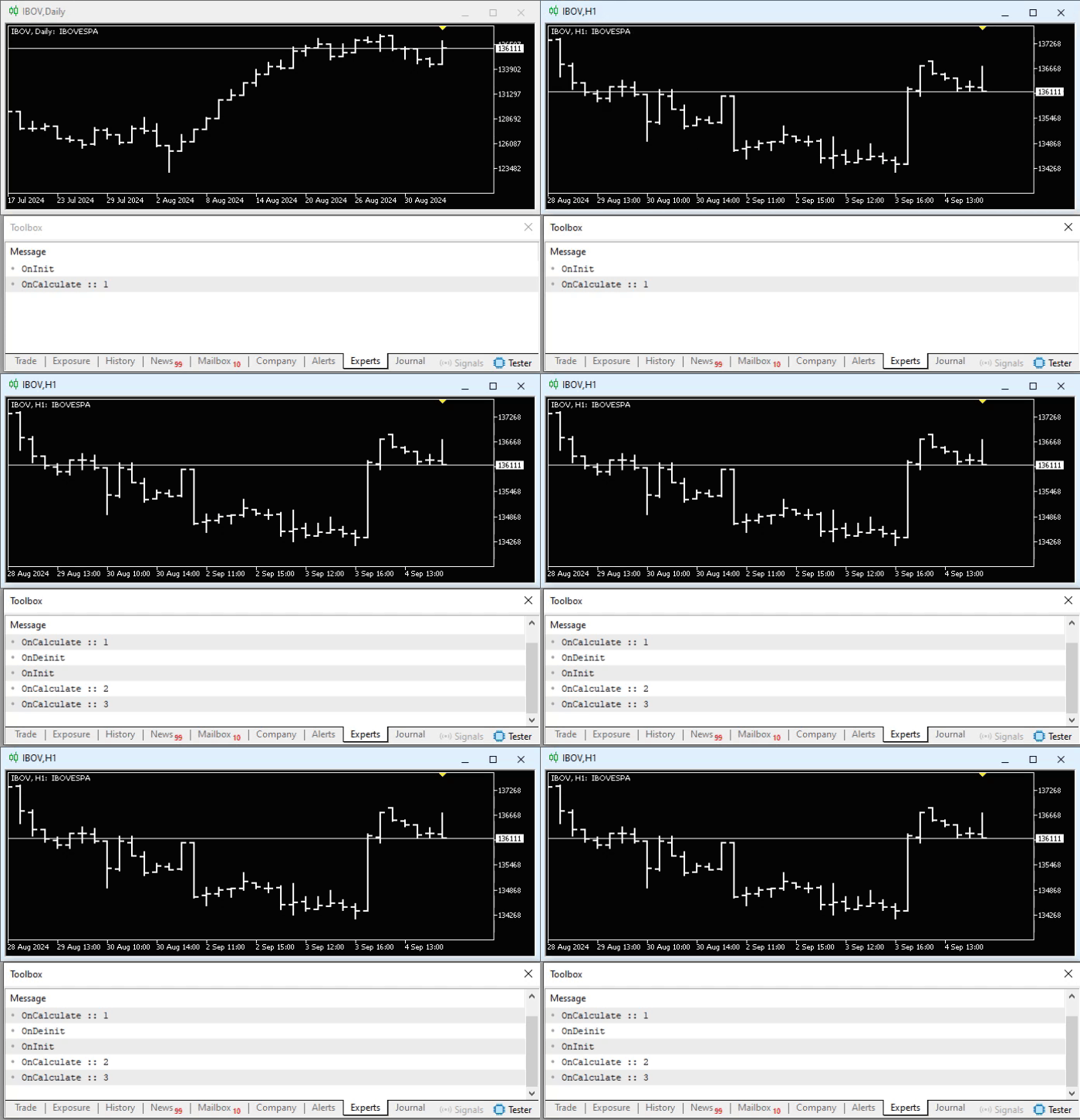
Animation 01
Please note that at some point we changed the chart's timeframe and, in doing so, generated the same sequence of events that we discussed in the previous topic. This can be inferred from the information printed to the terminal. But that's not all that's happening here. Notice that, unlike the previous code 02, we are not using a file for temporary information storage (in this case, the counter value), but instead we are asking MetaTrader 5 to store this information in a very specific way.
To verify this, we can check whether it exists and, if so, which global variables of the terminal are present in MetaTrader 5, even before explaining code 03. To do this, simply use the hotkey F3 or follow the path shown in the image below:
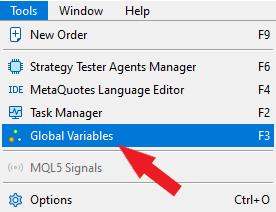
Figure 01
If code 03 indicator is running, then in the opened window we will see such a variable:
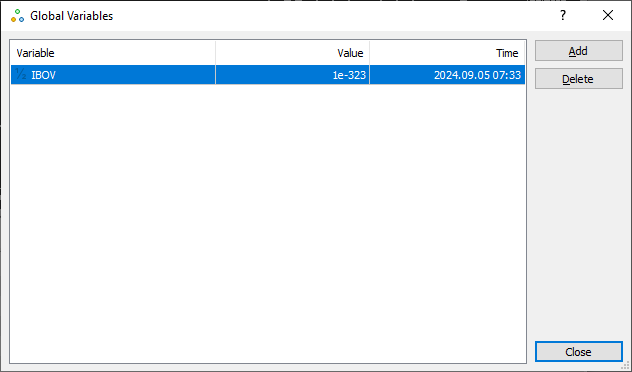
Figure 02
If the indicator from code 03 is not running, it's quite possible that the same window shown in figure 02 contains no information, since overall, as far as I know, few people use global terminal variables for any reason. But if a resource exists and is available, why not use it creatively?
Thanks to the information we saw in the images and the animation, we have enough elements to understand how code 03 works. In a sense, I don't see the need to explain how it works, as it's just a simple modification of code 02. However, I won't do that, because global terminal variables are a type of resource whose usage is very specific. Taking this opportunity, I will explain how one can figure out ways to use them in other situations.
Let's start with the fact that if you truly want to use a global terminal variable, you must know that they can only hold values of type double. That is, we cannot put text or integer values into such a variable. This is, in general. However, since MQL5 allows creating unions, which, as we have already seen, can be very useful in daily work, we create a union on line 04 to put a non-floating-point value into a global terminal variable.
Thus, we open up several possibilities for using these variables, since in this case we will be able to include small pieces of text in them, provided the text can be incorporated into a double type. If you don't quite understand what I'm talking about, I recommend you look at the previous articles to learn more about this topic.
To avoid unnecessary access to global terminal variables, we declare the union as a global variable. This is evident from line 08. Please note: what we are doing is not mandatory. We could implement this code so that we don't have a global variable, but that would force us to move this global variable, declared in our code, outside our code, turning it into a global terminal variable. In a certain sense, this could reduce overall performance. However, in some very specific scenarios, it might be interesting and necessary to use this type of implementation. Each case is unique. Therefore, one shouldn't generalize or think that we must always do things one way and not another. That won't always be the case.
For practical purposes, we use line 12 to clear the memory area where our counter will reside. We can do this in other ways too, so think of other methods and use them to see the result. Immediately after that, on line 14, we try to read the variable that can be seen in image 02. If such a variable doesn't exist, then on line 15 we attempt to create it. Note that the variable name will be the symbol name on which the indicator is used. If the attempt fails, the indicator will return a MetaTrader 5 error value, triggering a new event—in this case, the Deinit event because initialization failed. This will cause the procedure on line 32 to execute, and the indicator will disappear from the chart.
It's amusing how everything works and can be implemented very simply if one understands what to do and how everything is generated. However, I want you to understand that this function on line 15 will attempt to create a temporary global terminal variable, and it's important that this is done BEFORE the call on line 18. Otherwise, the variable will not be temporary. But even then, the variable would still be global by other criteria, just not the one we want to use.
When we create a temporary global terminal variable, it will exist only as long as the MetaTrader 5 platform is open. If it closes for any reason, all global terminal variables created by the function on line 15 will be deleted. This situation is very interesting if we want to store values while MetaTrader 5 is open (regardless of what is running), and this information is forgotten when the platform closes. However, this only happens if the global terminal variable was created by the GlobalVariableTemp function.
We can also create the same variable but without the condition of its deletion, by using the function on line 18. In this case, MetaTrader 5 will delete it after a certain period of time. Refer to the documentation to learn more about this, as there are cases where, on one hand, we need information to be present for a long time, but on the other hand, we don't want to store it in a file. In such a situation, global terminal variables can be quite interesting.
Alright, regarding the OnCalculate function, we have nothing more to add. However, let's say a couple more words about the OnDeinit procedure. Pay attention to the following: on line 34, we check which situation caused the Deinit event. If it's a change of the chart timeframe, as expected, we will use line 37 to store the current value of our counter. In any other situation, we will delete the created global terminal variable using line 40. But why do this if the created variable is temporary? The reason is purely educational. You can experiment with code 03 and create your own types of situations. Nothing is fairer than showing how we can create and delete a global terminal variable directly through code. That's why line 40 exists.
The idea is to show that we can achieve the same result in different ways. The choice of means depends on the type of scenario or situation we are facing.
Concluding thoughts
Well, we've come to the end of another article. It complements the previous one, so you should consider them together. Studying what was shown in the previous article and applying the knowledge gained from other articles in this series will allow you to understand more deeply what was explained and demonstrated in this article. Although I didn't go into great detail about how each line of code works, that wasn't my goal. I want you to learn "how to fish". I provide you with the knowledge and materials so you can practice and learn in the best way to achieve your goals. You must practice and study every detail shown.
Therefore, in the next article, we will look at how one can develop a real indicator to apply everything we've shown so far. However, to properly understand the essence of the next article, it's necessary to understand how events are generated and how much MetaTrader 5 can help us; otherwise, many doors will remain closed to you.
In the appendix, you will have access to the codes discussed in this article. Good luck, and see you in the next article!
Translated from Portuguese by MetaQuotes Ltd.
Original article: https://www.mql5.com/pt/articles/15733
Warning: All rights to these materials are reserved by MetaQuotes Ltd. Copying or reprinting of these materials in whole or in part is prohibited.
This article was written by a user of the site and reflects their personal views. MetaQuotes Ltd is not responsible for the accuracy of the information presented, nor for any consequences resulting from the use of the solutions, strategies or recommendations described.

 Exploring Machine Learning in Unidirectional Trend Trading Using Gold as a Case Study
 Integrating External Applications with MQL5 Community OAuth
 Using Deep Reinforcement Learning to Enhance Ilan Expert Advisor
 Custom Indicator Workshop (Part 1): Building the Supertrend Indicator in MQL5

- Free trading apps
- Over 8,000 signals for copying
- Economic news for exploring financial markets
You agree to website policy and terms of use