Auto Symbol Switcher

Auto Symbol Switcher for MT5 – Watchlist Rotation for Multi-Asset Charts

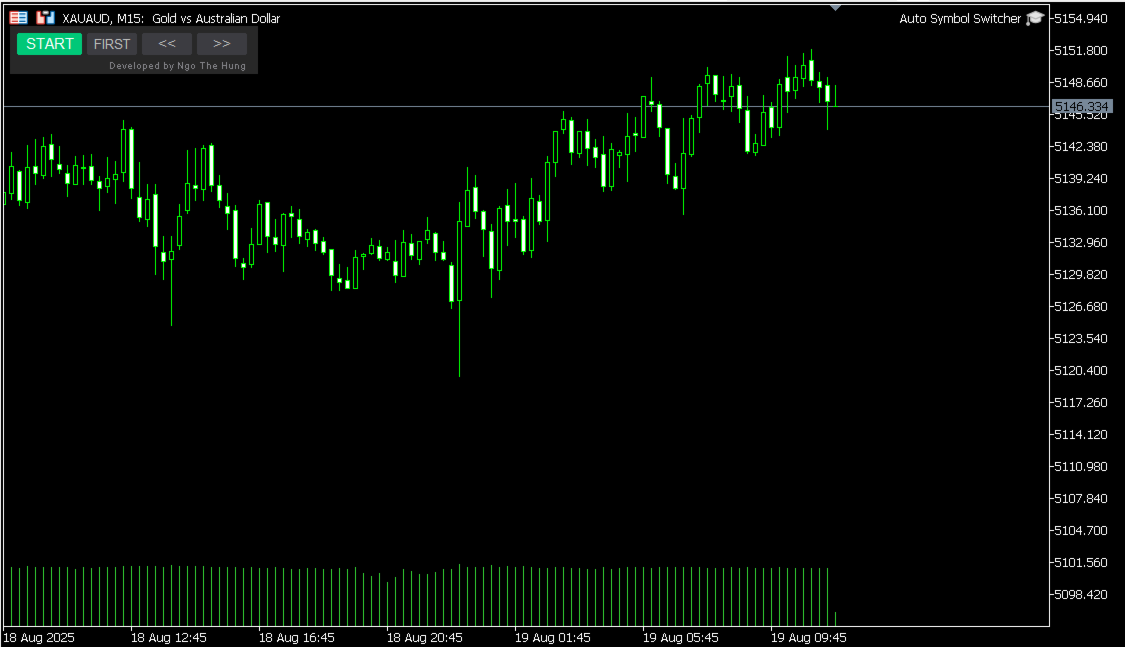
Auto Symbol Switcher for MetaTrader 5 is a utility panel that automatically cycles the active chart through a list of symbols. It is designed for traders who follow many markets and want the chart to move through a watchlist without clicking symbols one by one. The tool is navigation-only: it does not open, modify or close any trades and it does not change your account in any way.

You can use the panel for Forex, indices, commodities, stocks and Contracts for Difference (CFDs), depending on what your broker provides in MetaTrader 5. The goal of the utility is to make chart navigation easier and more consistent when you monitor many instruments.

Public channel: CLICK HERE

A detailed user guide with screenshots and additional examples is available in the following article on MQL5: Auto Symbol Switcher – Full User Guide

If you also trade on MetaTrader 4, there is a separate MT4 version of this utility available in the Market: Auto Symbol Switcher for MT4

How the Panel Works

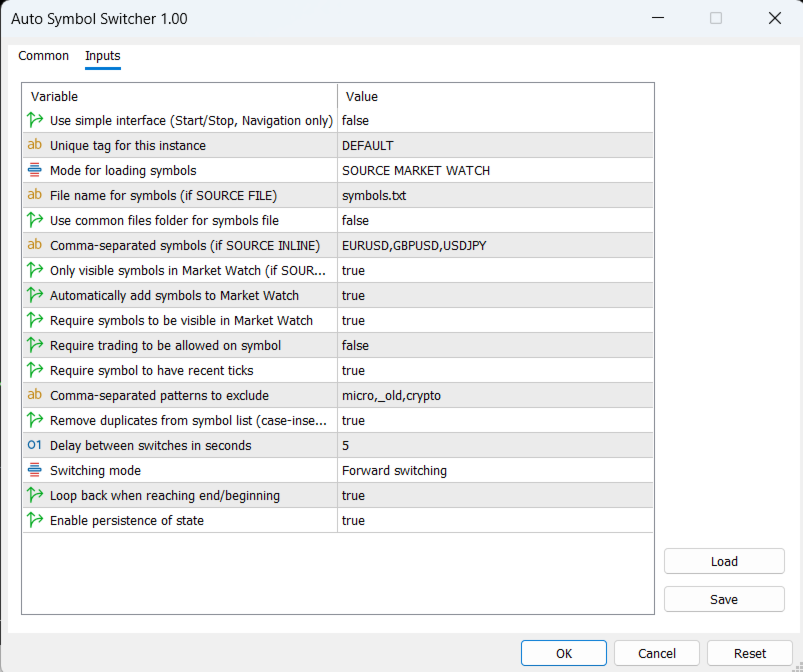
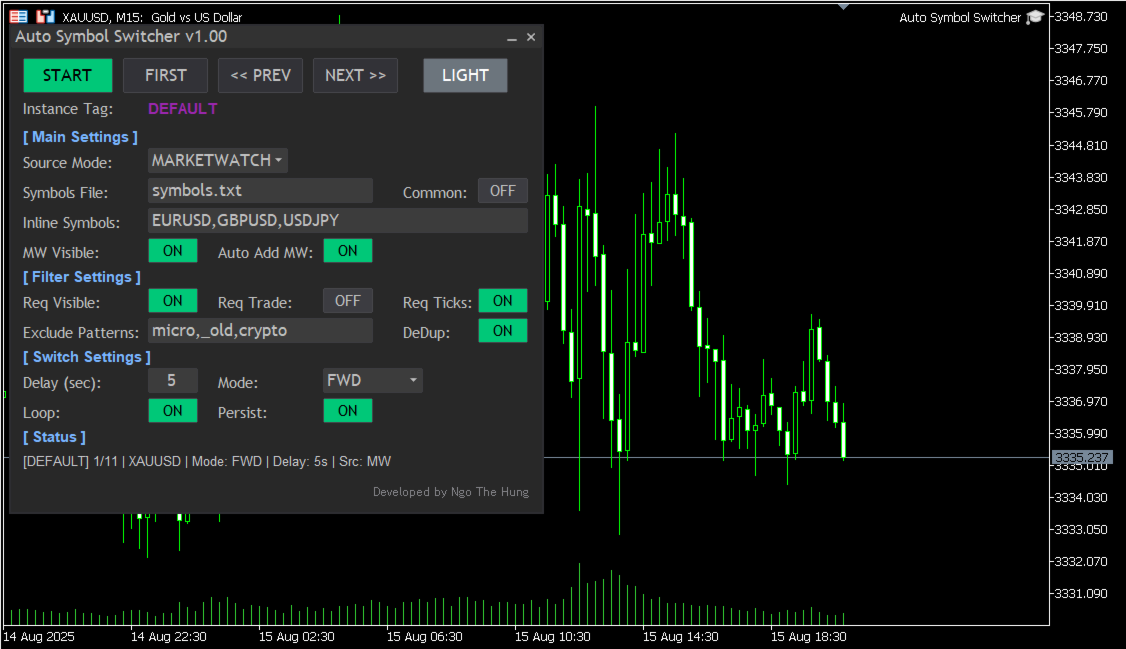
Attach Auto Symbol Switcher to any chart in MT5 and choose how you want to build your watchlist. You can use the symbols that are already visible in the Market Watch window, type a simple comma-separated list in the settings, or load symbols from an external text file. The panel then moves the chart from one symbol to the next after a delay that you define. You can switch direction or pause the rotation at any time.

The utility offers two interface styles. A simple compact bar provides four main buttons for manual control (Start or Stop the rotation, jump to the First symbol in the list, or move to the Previous or Next symbol). The full panel adds on-screen switches, more controls and an optional light or dark colour theme so the interface remains readable during long sessions. You can choose the interface style that fits your workspace and screen size.

Key Features

  • Automatic watchlist rotation: The chart cycles through your symbol list with a user-defined delay between changes.
  • Flexible symbol sources: Build the list from the Market Watch window, from a simple inline list in the inputs, or from an external text file as described in the user guide.
  • Practical filters: Limit rotation to symbols that are visible, that have recent ticks or that are allowed for trading by the broker, and exclude symbols whose names contain unwanted patterns such as “micro”, “old” or “crypto”.
  • Optional Market Watch auto-add: If a symbol is not currently visible in Market Watch, the panel can add it automatically before switching to it.
  • Rotation styles: Choose between forward, backward or ping-pong rotation and define whether the sequence should loop at the ends or stop.
  • Per-chart persistence: Each panel instance can remember its last position and main options so multi-chart workflows remain organised after a terminal restart.
  • Light and dark appearance: Switch between light and dark colour modes to maintain good contrast on different chart backgrounds.

Who It Is For

  • Day traders and scalpers who scan many symbols on the same timeframe.
  • Portfolio watchers who rotate through lists of stocks, indices, futures or CFDs.
  • Analysts who prefer a regular, automated review of a predefined watchlist.

Using Auto Symbol Switcher in MT5

In a typical workflow, you attach the panel to one chart per watchlist. For example, you can use one chart for major currency pairs, one chart for indices and one chart for metals and energies. Each chart can have its own rotation style, delay and filters. You can pause the rotation when you want to study a symbol in more detail and resume it later with a single click.

Filters help you keep your lists focused. You can ask the panel to skip symbols that are not visible in Market Watch or that are not allowed for trading on the current account. The exclude-pattern option lets you remove groups of instruments from the rotation by simple name fragments instead of editing the watchlist manually.

Getting Started

  1. Download and install Auto Symbol Switcher for MT5 from the Market.
  2. Open a chart in MetaTrader 5 and attach the utility to that chart.
  3. Choose the symbol source (Market Watch, inline list or external file) and set the preferred rotation style and delay.
  4. Adjust basic filters and appearance options so the panel matches your workspace.
  5. Start the rotation and, if needed, use the buttons on the panel to pause, jump to the first symbol or move backward and forward manually.

Compatibility and Requirements

The utility is intended for the MetaTrader 5 platform and can be used on hedging or netting accounts. It works with any symbols that are available on your MT5 account, including Forex pairs, indices, metals, energies, stocks, futures and CFDs, subject to your broker’s data feed and permissions. Because the tool is navigation-only, it does not depend on your trading style or risk settings.

Support and Documentation

All buyers receive free updates and technical support for Auto Symbol Switcher for MT5. Suggestions that improve stability, clarity or usability are considered for future versions whenever possible.
Prodotti consigliati
HotKey Trade
Juan Pablo Sanchez Correa
HotKey Trade ti permette di operare in modo rapido ed efficiente usando la tastiera, senza bisogno di usare il mouse. Ideale per scalper e trader che cercano velocità nelle loro entrate e uscite. Visualizzazione in tempo reale del P&L (Profitto/Perdita) Caratteristiche principali: Controllo da tastiera: Tasto C → Apre posizione di ACQUISTO (BUY) Tasto V → Apre la posizione di VENDITA (SELL) Tasto X → Chiude TUTTE le posizioni aperte Tasto P → Mostra/Nascondi il pannello informazioni Pannell
EW Close All – Un clic. Tutto chiuso. EW Close All è un Expert Advisor leggero e multilingua che ti permette di chiudere tutte le posizioni aperte e cancellare tutti gli ordini pendenti all’istante — con un solo clic. Chiude tutte le posizioni aperte   Cancella tutti gli ordini pendenti   Funziona su qualsiasi simbolo e timeframe   Interfaccia multilingua   Pulito, veloce e affidabile Perfetto per uscite rapide, controllo del rischio o pulizia a fine giornata. Mantieni il controll
FREE
Superate con successo tutte le sfide della prop firm con il nostro Expert Advisor per il dimensionamento delle posizioni, progettato per l'inserimento degli ordini senza soluzione di continuità e per il calcolo automatizzato delle dimensioni dei lotti. Ci ringrazierete più tardi! Aggiornate a Mercurial Position Sizing PRO  per le ultime funzioni complete! L'EA non è un robot di trading e non funziona nel tester di strategia!       Caratteristiche principali: Allocazione del rischio di livello
FREE
Set an order in advanced. Literally, set and forget. ========================================== INPUTS: EA magic number (should be unique):   Set the magic number to be used when opening and closing trades. If you have other EAs on the account, make sure they use different magic numbers. DASHBOARD INPUTS: Lot Size: Set the lot size to use for the order. Default is the minimum lot size for the chart symbol. Order Type:   Choose between buy or sell. SL Points (0 = no SL): Set the stoploss to use a
Simple Stats is utility for trades history management. (works as Expert Advisor) Allowing you to:   see trading performance for each symbol separately , and so it     helps you to find the M0ST and the W0RST profitable type of trades  based on past results. filters: see only manual trades see only EA trades see only EA trades from one specific Magic Number select time period for history SS will  distinguish reports with filename - each history report is named with account number an
Account Info AS
Alexandr Saprykin
Account Info AS è un potente script informativo per MetaTrader 5 che visualizza informazioni complete sul tuo conto di trading direttamente sul grafico. Lo script fornisce tutti i dati necessari per l'analisi del conto, la gestione del rischio e il processo decisionale di trading. Caratteristiche principali Informazioni finanziarie complete Tipo di conto (Demo/Reale/Concorso) Saldo, Capitale e Margine Margine libero in contanti e percentuale Livello di margine Profitto/perdita attuale Ges
FREE
这款专为MetaTrader 5设计的EA(Expert Advisor),能够在加载后自动关闭所有图表,并立即从当前图表中自行移除。它适合那些希望快速清理所有图表,并避免手动关闭每个图表的用户。 功能特点: 一次性清理: 加载后立即关闭所有打开的图表。 自动移除: 执行完毕后,EA自动从当前图表中移除,无需手动操作。 快速高效: 适用于快速清理交易环境,特别适合在需要快速重置或结束交易日的情境。 使用说明: 只需将此EA添加到任何一个图表上,它将自动执行关闭所有图表的操作并自行移除。使用前,请确保已保存所有重要的图表数据和设置。 风险提示: 请谨慎使用此EA,以防不小心关闭重要图表。 适用于MetaTrader 5平台。 技术支持: 如有任何技术问题或需求,请联系我以获得帮助。
FREE
Super simple, convenient, useful tool. Allows displaying the end time of a candle (standard) and expanding the symbol's spread in real time. The countdown tool is smooth, not jerky or slow like some other tools Useful tool for professional traders specializing in short-term and long-term trading. Contact author or user guide: https://www.mql5.com/en/channels/metool_trading
FREE
T Manager for Price action Traders
Haidar, Lionel Haj Ali
4.5 (10)
T Manager, the ultimate trade management solution designed by traders for traders. If you are searching for a simple and efficient trade panel, trade manager, or trade assistant, you are at the right place.   The market contains a diverse number of those tools , but this one is designed by traders for traders . I designed this tool, and I am using it daily. Take my advice and stop buying tools blended with un-useful features that you will never use,   T Manager provides you with the essential y
Auto close
Raudel Umaran Elias
4.33 (9)
Simple program to automatically close positions by profit or loss. User can select "Total Profit" to close all positions at the same time, once the total profit or loss is reached. User can select "Single Profit" to close one by one positions, once single profit or loss is reached. Notes: 1. The assistant will not open any position. 2. The assistant only provide market orders, so due maket volatility positions can suffer slippage. 
FREE
Keyboard Trading MT5 è un'utilità MT5 con tasti di scelta rapida Il grafico su cui è caricato l'EA deve essere il grafico attivo (cliccato con il mouse) per poter operare con i tasti di scelta rapida. Se vengono aperte molte posizioni, lo stoploss spostato è quello del primo scambio, ma il resto deve essere regolato con il mouse.   Ingressi da scegliere:   1. Aggiungi le note 1 e 2 da visualizzare in alto a sinistra 1. Dimensione del lotto (minimo 0,01) 2. StopLoss e TakeProfit in pun
This is an EA (Expert Advisor) designed to support manual and automatic order closing. Main Features: Automatically adjust Stop Loss (SL) and Take Profit (TP) for all buy and sell orders based on the specified points. Automatically close buy or sell orders when the specified profit level is reached. Automatically close all buy and sell orders when their total profit reaches the desired level. Can be closed manually: Buy orders, Sell orders, Close all with buttons Display the average price of buy
FREE
One click to close all (OCCA) provides you posibility to close all open position with one click. Here is no any settings, just run the script and all your open positions will be closed and it will happen very fast ! Works with all types of accounts, with all currency pairs and any broker. The number of open positions is not limited. The script will be useful for trading strategies, in which you need to manage a large number of positions.
Basic Trade Buttons
Kriengsak Peitaisong
Basic Trade Buttons is a tool to help you to quickly open and close trades, place take profit and stop loss points by clicking on the button of each job that you preferred. Once you attached this tool to mt5 chart, the program will calculate a trade volume(Lots size) automatically to prepare to send to the trade server when you click on 'Buy' or 'Sell' button. Click on 'TP', 'SL' or 'Close' button to place take profit, stop loss based on the predefined levels or to close all open positions respe
The Dfx Position Risk Calculation Tool is an MT5 indicator developed by DefenderFX Ltd. designed to assist traders in assessing risk and reward for their trades. The tool automatically calculates the risk-to-reward ratio based on user-defined parameters, such as lot size and take profit (TP) level. It provides visual lines on the chart for entry (Blue Color), stop loss (SL) – Red Color, and TP levels (Green Color), which traders can adjust by dragging. Key Features: Input Parameters : Traders ca
English: Binarias_Script.mq5 is a technical script designed for binary options traders who wish to evaluate the market from a multi-timeframe, multi-indicator perspective (M15, M5, M1). This tool does not trade , but rather provides a structured signal assessment for manual decision-making. ️ Highlighted Features: CALL/PUT signal analysis with confidence percentages. Validations include: EMA21, MACD, RSI, ADX, ATR, CCI, Donchian Channel, volume, and structure. On-screen output with clear si
Virtual Trailing SL TP MT5
Konstantin Kulikov
5 (1)
The utility places virtual (hidden from your broker) trailing stop, breakeven, stop loss and take profit.‌ It is necessary to allow automated trading in the terminal settings. In testing mode, the utility opens Buy or Sell positions on the first ticks, which allows you to visually observe the given logic, changing the utility parameters. In real mode, the utility does not open positions. Discuss the complexities of Forex trading here:  chat "Age of Expert Advisors" . Parameters magic   - magic n
Ratio Spread
Manh Viet Tien Vu
This tool helps you calculate the ratio of slippage and current spread compared to the average price movement over the timeframe of a specific symbol. It can indicate whether you should trade on that timeframe or not. If the ratio is too high, it will be very challenging to make a profit. Typically, this ratio should be less than 15%.. Simply add it to the chart of the timeframe for the symbol you wish to estimate.
FREE
Advanced Trailing Stop & Break-Even Expert Advisor with Partial Profit Taking Overview Unlock the full potential of your trading strategy with this Expert Advisor that automates trade management to maximize profits and minimize losses. Designed for both novice and experienced traders, this EA offers precise control over your trades with customizable trailing stops, break-even protection, and partial profit taking — all working seamlessly to protect your capital and lock in gains. Key Features Dy
All In One (AIO) A2 Trade Panel EA  made for you that like SCALPING, HEDGING, or LONG TIME TRADING. TRIAL VERSION, FOR DEMO ACCOUNT ONLY Features : TRADING INFORMATION Profit / Loss information (Customizable information - See on Attached Pictures) Margin Level information Equity information Total Lots Information Time information (Customizable information - See on Attached Pictures) Daily Profit / Loss Information TRADE MANAGER Close Buy / Sell Trade Close Buy / Sell Profitable Trade Close Parti
FREE
This is the demo Version of Money and Trade Manager, which can be found here: https://www.mql5.com/en/market/product/58163# The Demo is limited to EUR/USD , but otherwise fully functional. Features: easy positioning of stoploss and takeprofit with horizontal Assistance-lines automatic Volume calculation fixed risk, set by the trader Closing of all trades of one type, with the click of one button (long or short, for this symbol) Creation of pending orders with one click Direct feedback throug
FREE
This EA helps to Close all Positions opened. It saves you the time of closing multiple positions manually. Parameters: Buy:  Close Buy Positions Only Sell:  Close Sell Positions Only Buy & Sell: Close Buy & Sell Positions Pending: Close Pending Orders More Advanced MT5 version available at:  https://www.mql5.com/en/market/product/93301?source=Unknown%3Ahttps%3A%2F%2Fwww.mql5.com%2Fen%2Fmarket%2Fmy More Advanced MT4 version available at:   https://www.mql5.com/en/market/product/93468?source=Unk
Move TP & SL (MT5) è uno script di utilità per il trading che consente di spostare rapidamente Take Profit (TP) e Stop Loss (SL) per posizioni attive e ordini pendenti con un solo clic. Lo script supporta due modalità di funzionamento: Modalità Pips (Pips Mode): TP e SL vengono impostati in base a una distanza fissa in pips dal prezzo di apertura dell’ordine. Modalità Prezzo (Price Mode): TP e SL vengono impostati direttamente su un livello di prezzo specificato. È possibile scegliere quali ordi
FREE
Automated Report Generator for the Spanish Treasury This utility allows you to generate automated reports for the Spanish treasury with several advantages: A detailed report is generated in an HTML file in the MetaTrader 5 base directory. This report includes all operations individually. For accounts nominated in another currency, the report will automatically generate a profit column in euros using the same broker data. Profits in other currencies will be accounted for as indicated by the Spa
TrailingTrader MT5 – Trailing Stop-Loss and Take-Profit Script  Upon activation of the TrailingTrader script , open positions of specified trading instruments in the quote window will automatically implement an intelligent trailing stop strategy. This helps traders lock in profits and manage risks without the need for manual monitoring and adjustments. Core Configuration Parameters Symbol : Specify the trading instruments for which trailing stops should be applied. Use English commas (,) to sepa
One Click Trader  is a tool designed for MetaTrader 4 platform, which enables you to take your trading to the next level. It enables you to open, manage and close your trades in simple an efficient way by just one click of your mouse button. "-"   ,  "+"  change OCT window size  Up arrow minimizes the OCT panel Down arrow maximizes the OCT panel Right arrow displays the next panel with additional features Left arrow hides the panel with additional features Red  SELL  button enables you to open s
BuyMarket
Pietro Caporale
Simple script for Buy by Market Execution on all financial instruments. Inputs Volume - default: 0.10 Deviation - default: 10 points Stoploss - default: 50 points Takeprofit - default: 50 points Comment - default: Order by Market Confirm - default: false Inputs Details Type Order Buy Order is preset. Deviation Maximum deviation from quoted price in points. Stoploss & Takeprofit In points value, be careful that this value will be added to minimum stop allowed by the broker. For example if you s
FREE
EA Manage Emotion
Hua Nguyen Nguyen Tran
EA Emotion   is not a traditional Expert Advisor that places trades automatically – instead, it’s a psychological checkpoint that helps you manage   trading discipline and emotional control . Designed especially for discretionary traders, prop firm challengers, and anyone serious about improving consistency,   EA Emotion   asks a series of custom questions   right after you open a trade , such as: Did you follow your trading plan? Are you in the right mental state? Is this trade part of your set
Utility progettata per cambiare lo strumento di trading per i grafici attuali, tutti o selezionati, il cambio di timeframe e per il movimento simultaneo nella cronologia (automaticamente o al clic) di tutti i grafici. L'elenco dei simboli viene letto dalla "Panoramica del mercato". È possibile modificare il colore, le dimensioni e la posizione dei pulsanti. La sincronizzazione dei grafici avviene al momento della prima barra visibile nel grafico attivo quando si fa clic sul pulsante di sincroniz
Trade Mirror Follower
Nguyen Thanh Cong
5 (1)
Advanced Trade Mirror   is a powerful Forex tool designed for traders who need instant, seamless trade replication across multiple terminals on the same machine. With lightning-fast execution, it ensures zero lag in copying trades, maintaining precision and efficiency in high-speed trading environments. Get the Trade Mirror Master here:  https://www.mql5.com/en/market/product/133891 Specification: Master ID: Identity value of master terminal, please use a unique value to prevent duplicated mas
FREE
Gli utenti di questo prodotto hanno anche acquistato
Trade Assistant MT5
Evgeniy Kravchenko
4.41 (208)
It helps to calculate the risk per trade, the easy installation of a new order, order management with partial closing functions, trailing stop of 7 types and other useful functions. Additional materials and instructions Installation instructions - Application instructions - Trial version of the application for a demo account Line function -   shows on the chart the Opening line, Stop Loss, Take Profit. With this function it is easy to set a new order and see its additional characteristics bef
Forex Trade Manager MT5
InvestSoft
4.97 (598)
Benvenuto a Trade Manager EA, lo strumento definitivo per la gestione del rischio , progettato per rendere il trading più intuitivo, preciso ed efficiente. Non è solo uno strumento per l'esecuzione degli ordini, ma una soluzione completa per la pianificazione delle operazioni, la gestione delle posizioni e il controllo del rischio. Che tu sia un principiante, un trader avanzato o uno scalper che necessita di esecuzioni rapide, Trade Manager EA si adatta alle tue esigenze, offrendo flessibilità s
TradePanel MT5
Alfiya Fazylova
4.86 (148)
Trade Panel è un assistente commerciale multifunzionale. L'applicazione contiene più di 50 funzioni di trading per il trading manuale e consente di automatizzare la maggior parte delle operazioni di trading. Attenzione, l'applicazione non funziona nel tester di strategia. Prima dell'acquisto, puoi testare la versione demo su un conto demo. Versione demo qui . Istruzioni complete qui . Commercio. Ti consente di eseguire operazioni di trading con un clic: Apri ordini e posizioni pendenti con calco

Local Trade Copier EA MT5
Juvenille Emperor Limited
4.96 (124)
Sperimenta una copia di trading eccezionalmente veloce con il   Local Trade Copier EA MT5 . Con la sua facile configurazione in 1 minuto, questo copiatore di trading ti consente di copiare i trades tra diversi terminali di MetaTrader sullo stesso computer Windows o su Windows VPS con velocità di copia ultra veloci inferiori a 0.5 secondi. Che tu sia un trader principiante o professionista,   Local Trade Copier EA MT5   offre una vasta gamma di opzioni per personalizzarlo alle tue esigenze speci
Trade Dashboard MT5
Fatemeh Ameri
4.96 (111)
Tired of complex order placement and manual calculations? Trade Dashboard is your solution. With its user-friendly interface, placing orders becomes effortless, by a single click, you can open trades, set stop loss and take profit levels, manage trade lot size, and calculate risk to reward ratios, allowing you to only focus on your strategy. Say goodbye to manual calculations and streamline your trading experience with Trade Dashboard. Download  Demo Version  right now. You can find  Details of
Versione Beta Telegram to MT5 Signal Trader è quasi pronto per il rilascio ufficiale in versione alpha. Alcune funzionalità sono ancora in fase di sviluppo e potresti riscontrare piccoli bug. Se riscontri problemi, ti preghiamo di segnalarli, il tuo feedback aiuta a migliorare il software per tutti. Il prezzo aumenterà dopo 20 vendite. Copie rimanenti a $90:   2/20 . Telegram to MT5 Signal Trader è uno strumento potente che copia automaticamente segnali di trading da canali o gruppi Telegram a
Trade copier MT5
Alfiya Fazylova
4.61 (36)
Trade Copier è un'utilità professionale progettata per copiare e sincronizzare le transazioni tra conti di trading. La copiatura avviene dal conto/terminale del fornitore al conto/terminale del destinatario, che sono installati sullo stesso computer o vps. Prima di acquistare, puoi testare la versione demo su un account demo. Versione demo qui . Istruzioni complete qui . Funzionalità e vantaggi principali: Supporta la copia degli ordini: MT5> MT5, MT4> MT5, MT5> MT4, inclusi i conti di compensaz
The product will copy all telegram signal to MT5 ( which you are member) , also it can work as remote copier.  Easy to set up, copy order instant, can work with almost signal formats, image signal,  s upport to translate other language to English Work with all type of channel or group, even channel have "Restrict Saving Content", work with  multi channel, multi MT5 Work as remote copier: with signal have ticket number, it will copy exactly via ticket number. Support to backtest signal. How to s
Exp COPYLOT CLIENT for MT5
Vladislav Andruschenko
3.82 (34)
Trade copyr per MT5 è un trade copyr per la piattaforma МetaТrader 5   . Copia le negoziazioni forex   tra       eventuali conti   MT5   -   MT5, MT4   -   MT5 per la versione COPYLOT MT5 (o MT4   -   MT4 MT5   -   MT4 per la versione COPYLOT MT4) Fotocopiatrice affidabile! Versione MT4 Descrizione completa   +DEMO +PDF Come comprare Come installare     Come ottenere i file di registro     Come testare e ottimizzare     Tutti i prodotti di Expforex Puoi anche copiare le operazioni nel termina
Copy Cat More Trade Copier MT5 (Gatto Copiatore MT5) è un copiatore di trade locale e un framework completo di gestione del rischio ed esecuzione progettato per le sfide di trading odierne. Dalle sfide delle prop firm alla gestione di portafogli personali, si adatta a ogni situazione con una combinazione di esecuzione robusta, protezione del capitale, configurazione flessibile e gestione avanzata dei trade. Il copiatore funziona sia in modalità Master (mittente) che Slave (ricevente), con sincro
Ultimate Extractor
Clifton Creath
5 (9)
Ultimate Extractor - Professional Trading Analytics for MT5 *****this is the local HTML version of Ultimate Extractor. Check out Ultimate Extractor Cloud on mql5 for the Cloud version****** Ultimate Extractor transforms your MetaTrader 5 trading history into actionable insights with comprehensive analytics, interactive charts, and real-time performance tracking. What It Does Automatically analyzes your MT5 trading history across all Expert Advisors and generates detailed HTML reports with inte
HINN MagicEntry Extra
ALGOFLOW OÜ
4.67 (12)
HINN MAGIC ENTRY – the ultimate tool for entry and position management! Place orders by selecting a level directly on the chart! full description   ::  demo-version Key features: - Market, limit, and pending orders - Automatic lot size calculation - Automatic spread and commission accounting - Unlimited partitial take-profits  - Breakeven and trailing stop-loss and take-profit  functions - Invalidation leves - Intuitive, adaptive, and customizable interface - Works with any assets and account t
Farmed Hedge Yield Farming - Professional Pair Trading Dashboard (Manual - Hybrid - Semi/Automated EA) VERSION 3 - WILD HARVEST UPDATE Trading Approach: - Manual Trading: Primary focus - Auto Pilot: Optional supplementary feature - Full Automation: Not the main purpose Recommended Timeframe: H1-H4 DEMO VERSION Download the free demo to test functionality. Use Strategy Tester with Visual Mode to see how it works. VERIFIED TRADING RESULTS - Farmed Hedge Yield Axi Copy: https://www.mql5.com/en/si
Trade Manager DaneTrades
Levi Dane Benjamin
4.36 (28)
Trade Manager per aiutarti a entrare e uscire rapidamente dalle operazioni calcolando automaticamente il tuo rischio. Incluse funzionalità che ti aiutano a prevenire l'eccessivo trading, il vendetta trading e il trading emotivo. Le operazioni possono essere gestite automaticamente e i parametri di performance del conto possono essere visualizzati in un grafico. Queste caratteristiche rendono questo pannello ideale per tutti i trader manuali e aiuta a migliorare la piattaforma MetaTrader 5. Suppo
Trade Manager DashPlus
Henry Lyubomir Wallace
5 (13)
DashPlus è uno strumento avanzato di gestione delle operazioni progettato per migliorare l'efficienza e l'efficacia del trading sulla piattaforma MetaTrader 5. Offre una suite completa di funzionalità, tra cui calcolo del rischio, gestione degli ordini, sistemi di griglia avanzati, strumenti basati su grafici e analisi delle prestazioni. Caratteristiche Principali 1. Griglia di Recupero Implementa un sistema di griglia flessibile e di media per gestire le operazioni in condizioni di mercato avve
MT5 to Telegram Signal Provider è un'utilità facile da usare e completamente personalizzabile che consente l'invio di segnali specificati a una chat, canale o gruppo Telegram, rendendo il tuo account un fornitore di segnali. A differenza della maggior parte dei prodotti concorrenti, non utilizza importazioni DLL. [ Dimostrativo ] [ Manuale ] [ Versione MT4 ] [ Versione Discord ] [ Canale Telegram ]  New: [ Telegram To MT5 ] Configurazione Una guida utente passo-passo è disponibile. Nessuna cono
Seconds Chart MT5
Boris Sedov
4.59 (17)
Seconds Chart — uno strumento unico per creare grafici in secondi su MetaTrader 5 . Con Seconds Chart , puoi generare grafici con timeframe definiti in secondi, ottenendo una flessibilità e una precisione d'analisi ideali, non disponibili nei grafici standard in minuti o ore. Ad esempio, il timeframe S15 indica un grafico con candele di 15 secondi. Puoi utilizzare qualsiasi indicatore e Expert Advisor con supporto per simboli personalizzati. Lavorare con loro è comodo quanto operare sui grafici
YuClusters
Yury Kulikov
4.93 (43)
Attention: You can view the program operation in the free version  YuClusters DEMO .  YuClusters is a professional market analysis system. The trader has unique opportunities to analyze the flow of orders, trade volumes, price movements using various charts, profiles, indicators, and graphical objects. YuClusters operates on data based on Time&Sales or ticks information, depending on what is available in the quotes of a financial instrument. YuClusters allows you to build graphs by combining da
Telegram to MT5 Coppy
Sergey Batudayev
5 (7)
Da Telegram a MT5:   la soluzione definitiva per la copia del segnale Semplifica il tuo trading con Telegram su MT5, il moderno strumento che copia i segnali di trading direttamente dai canali e dalle chat di Telegram sulla tua piattaforma MetaTrader 5, senza bisogno di DLL. Questa potente soluzione garantisce un'esecuzione precisa dei segnali, ampie opzioni di personalizzazione, fa risparmiare tempo e aumenta la tua efficienza. [ Instructions and DEMO ] Caratteristiche principali Integrazione d
Smart Stop Manager MT5
Daniel Stein
4.33 (3)
Smart Stop Manager – Esecuzione automatica dello stop-loss con precisione professionale Panoramica Smart Stop Manager è il livello di esecuzione della linea Smart Stop, progettato per i trader che richiedono una gestione dello stop-loss strutturata, affidabile e completamente automatizzata su più posizioni aperte. Monitora continuamente tutte le operazioni attive, calcola il livello di stop ottimale utilizzando la logica di struttura di mercato Smart Stop e aggiorna gli stop automaticamente se
GRat Crypto
Ivan Titov
4.5 (2)
Trade on crypto exchanges in MT5! GRat_Crypto is a tool for manual and automated trading , including ANY available EA, ANY  cryptocurrency  on most popular crypto exchanges in the familiar MT5 environment 24/7. Features 1. ALL instruments of the 9 most popular crypto exchanges are available: Binance, BingX, Bybit, Coinbase, CoinEx, Kraken,   KuCoin, MEXC and OKX . 2. The ability to place ANY type of order available in MT5, both market and pending, to modify orders and positions, to delete order
Telegram To MT5 Receiver
Levi Dane Benjamin
4.53 (15)
Copia i segnali da qualsiasi canale di cui sei membro (compresi quelli privati e ristretti) direttamente sul tuo MT5.  Questo strumento è stato progettato con l'utente in mente offrendo molte funzionalità necessarie per gestire e monitorare gli scambi. Questo prodotto è presentato in un'interfaccia grafica facile da usare e visivamente accattivante. Personalizza le tue impostazioni e inizia ad utilizzare il prodotto in pochi minuti! Guida per l'utente + Demo  | Versione MT4 | Versione Discord
Professional Footprint Chart EA - Complete Order Flow Trading Suite DEMO USERS - PLEASE SELECT EVERY TICK WHEN TESTING  See What Market Makers See! The most comprehensive order flow analysis tool for MetaTrader 5. Get institutional-grade volume analysis, real-time DOM, Time & Sales, and intelligent trade signals - all in one powerful EA. 6 Professional Panels - Complete order flow analysis suite Real-Time Tick Data - Live bid/ask volume at every price level Automatic Imbalance Detection - Spot
Risk Manager for MT5
Sergey Batudayev
4.35 (17)
Expert Advisor Risk Manager per MT5 è un programma molto importante e secondo me necessario per ogni trader. Con questo Expert Advisor sarai in grado di controllare il rischio nel tuo conto di trading. Il controllo del rischio e del profitto può essere effettuato sia in termini monetari che in termini percentuali. Affinché l'Expert Advisor funzioni, è sufficiente allegarlo al grafico della coppia di valute e impostare i valori di rischio accettabili nella valuta del deposito o in % del saldo
Entry In The Zone and SMC Multi Timeframe is a real-time market analysis tool developed based on Smart Money Concepts (SMC). It is designed to analyze market structure, price direction, reversal points, and key zones across multiple timeframes in a systematic way. The system displays Points of Interest (POI) and real-time No Repaint signals, with instant alerts when price reaches key zones or when signals occur within those zones. It functions as both an Indicator and a Signal System (2-in-1), c
Smart Stop Scanner – Analisi multi-asset degli stop-loss basata sulla reale struttura di mercato Panoramica Smart Stop Scanner offre un monitoraggio professionale dei livelli di stop-loss su più mercati. Il sistema identifica automaticamente le zone di stop più rilevanti basandosi sulla reale struttura di mercato, sulle rotture significative e sulla logica del price action, presentando tutte le informazioni in un pannello chiaro, coerente e ottimizzato per schermi ad alta risoluzione (DPI-awar
Grid Manual MT5
Alfiya Fazylova
4.9 (20)
Grid Manual è un pannello di trading per lavorare con una griglia di ordini. L'utilità è universale, ha impostazioni flessibili e un'interfaccia intuitiva. Funziona con una griglia di ordini non solo nella direzione delle perdite, ma anche nella direzione dell'aumento dei profitti. Il trader non ha bisogno di creare e mantenere una griglia di ordini, lo farà l'utilità. È sufficiente aprire un ordine e il manuale di Grid creerà automaticamente una griglia di ordini per esso e lo accompagnerà fino
Trade Assistant 38 in 1
Makarii Gubaydullin
4.91 (23)
Strumento multifunzionale: Calcolatore di Lotto, Ordini Grid, Rapporto R/R, Gestore di Trade, Zone di Domanda e Offerta, Price Action e molto altro Versione Demo   |   Manuale Utente L'Assistente di Trading   non funziona nel tester di strategie : puoi scaricare la   Versione Demo QUI  per testare l' utilità . Contattami   per qualsiasi domanda  / idee di miglioramento / in caso di bug riscontrato Se hai bisogno di una versione MT4, è disponibile qui Semplifica, accelera e automatizza il tuo  
VirtualTradePad One Click Trading Panel
Vladislav Andruschenko
4.59 (73)
Pannello di trading per il trading in 1 clic.   Lavorare con posizioni e ordini!   Trading dal grafico o dalla tastiera. Con il nostro pannello di trading, puoi eseguire operazioni con un solo clic direttamente dal grafico ed eseguire operazioni di trading 30 volte più velocemente rispetto al controllo MetaTrader standard. I calcoli automatici di parametri e funzioni rendono il trading più veloce e conveniente per i trader. Suggerimenti grafici, etichette informative e informazioni complete sugl
Take a Break MT5
Eric Emmrich
4.83 (23)
The most advanced news filter on MQL market - free demo available Take a Break has transformed from a basic news filter into a comprehensive account protection solution. It seamlessly pauses any other Expert Advisors during news events or based on your custom filters, all while safeguarding your EA settings - restoring them automatically when trading resumes for complete peace of mind. Typical use cases: A single news filter for all your EAs. Stop trading during news/high volatility (+ close all
Altri dall’autore
MT5 Send To Telegram
The Hung Ngo
5 (1)
MT5 Send To Telegram – Trade Notifications to Telegram MT5 Send To Telegram EA is a professional-grade notification and monitoring utility for MetaTrader 5. It delivers clean, real-time trade activity from your MT5 account to Telegram , so you can stay informed from anywhere (mobile / desktop). Safe by design: this EA is read-only and does not open, close, or modify trades . It only monitors your account and sends notifications. Receive alerts for entries, exits, pending orders, SL/TP changes, s
Phoenix Trend MT4 – ATR Grid/DCA with Trend Filter & Basket TP Phoenix Trend MT4 is a trend-following grid/DCA EA using a higher-timeframe MA filter, ATR-based dynamic grid steps, and basket-level take-profit. This product does not contain profit promises. Grid/DCA trading can experience prolonged drawdowns and may lead to margin call or full account loss in extreme conditions. Need MT5? See the Market version here: Phoenix Trend MT5 . Main features Higher-timeframe trend filter (Fast MA vs Slow
Multi Anchor VWAP Pro MT4 – Pure Anchored VWAP | Adaptive σ-Bands | Smart Alerts Precision VWAP anchoring, purpose-built for MetaTrader 4. One-click anchors, dynamic σ-bands or %-bands and instant multi-channel alerts—ideal for scalpers, intraday and swing traders who need institutional-grade fair-value mapping. Public channel:   CLICK HERE Full User Guide  –  Need MT5? Click here WHY PROFESSIONAL TRADERS CHOOSE MULTI ANCHOR VWAP PRO VWAP is the institutional benchmark for fair value. This MT4
CDV Candle Engine Pro is a MetaTrader 5 indicator designed to visualize Cumulative Delta Volume (CDV) directly on the price chart. It helps traders read market pressure more clearly by showing the balance between buying and selling activity in a clean, customizable layout. If you trade on MetaTrader 4, the MT4 edition is available here:  CDV Candle Engine Pro MT4 Public channel:   CLICK HERE Main Features CDV candle visualization on the main chart for easy reading in real time. Optional subwind
Prop Guardian Risk Manager MT5 – Daily and Overall Drawdown Protection for Prop Firm Traders Prop Guardian Risk Manager is a professional risk-control utility for MetaTrader 5, created for traders who operate under prop firm rules. It does not open trades and does not implement any trading strategy. Instead, it runs in the background, monitors your account risk and can automatically block trading or close positions when your own limits are reached. Use it as a safety layer on top of your manual
Take Control of Risk with Smart Trailing Stop Manager for MetaTrader 5 Looking for MetaTrader 4 version? I t is available separately in the Market:   Smart Trailing Stop Manager MT4 Full User Guide    –  Public channel:   CLICK HERE Tired of missed profits or manual stop loss adjustments? Smart Trailing Stop Manager is a powerful utility for MetaTrader 5 designed to automate your trailing stop, breakeven, partial close, and SL management. Whether you're a discretionary trader, signal follower, o
Raymond Cloudy Day
The Hung Ngo
5 (3)
Raymond Cloudy Day Indicator for MT5 – Pivot-Based Reversal and Trend Levels Raymond Cloudy Day Indicator is a pivot-based level indicator for MetaTrader 5 (MT5). It was developed by Ngo The Hung based on Raymond’s original idea and is designed to give a structured view of potential reversal zones, trend extensions and support/resistance levels directly on the chart. The default settings are optimised for XAUUSD on the H1 timeframe, but the indicator can be tested and adjusted for other symbols
FREE
Virtual SL TP Trailing Pro – Client-Side Stop Loss / Take Profit and Trade Management Looking for MetaTrader 4 version?  I t is available separately in the Market:   Virtual SL TP Trailing Pro MT 4 Public channel:   CLICK HERE Virtual SL TP Trailing Pro is a trade management utility for MetaTrader that keeps Stop Loss (SL) and Take Profit (TP) levels on the client side instead of sending them to the trading server. It is designed to help you manage exits in a structured way using a clear on-cha
Virtual SL TP Trailing Pro for MT4 – Client-Side Stop Loss / Take Profit and Trade Management Looking for MetaTrader 5 version?  I t is available separately in the Market:   Virtual SL TP Trailing Pro MT5 Public channel:   CLICK HERE Virtual SL TP Trailing Pro for MT4 is a trade management utility that keeps Stop Loss (SL) and Take Profit (TP) levels on the client side instead of sending them to the trading server. It is designed to help you manage exits in a structured way using a clear on-cha
VWAP Ultimate Pro MT4 – Anchored VWAP | Session VWAP | Dynamic Bands & Smart Alerts Bring Institutional-Grade VWAP Precision to the Classic MetaTrader 4 Platform WHY TRADERS CHOOSE VWAP ULTIMATE PRO MT4? VWAP (Volume-Weighted Average Price) is a popular benchmark used by professional traders to gauge fair value and session bias. VWAP Ultimate Pro MT4 delivers that same core power to retail traders, optimised for MT4’s architecture while preserving a full professional workflow. This Indicator
VWAP Ultimate Pro MT5 – Anchored VWAP | Session VWAP | Dynamic Bands & Smart Alerts Elevate Your Trading Edge with the Ultimate Institutional-Grade VWAP Indicator WHY PROFESSIONAL TRADERS CHOOSE VWAP ULTIMATE PRO? VWAP (Volume-Weighted Average Price) is widely used by institutions and professional traders to estimate fair market value and intraday bias. VWAP Ultimate Pro MT5 brings this power to retail traders with an all-in-one indicator, combining multi-mode VWAP, interactive anchored VWAP,
Multi Anchor VWAP Pro MT5 – Pure Anchored VWAP | Adaptive σ-Bands | Smart Alerts Precision VWAP anchoring, no clutter. One-click anchors, dynamic σ-bands or %-bands, and instant multi-channel alerts—built for scalpers, intraday and swing traders who demand institutional-grade fair-value mapping. Public channel:   CLICK HERE Full User Guide  –  Need MT4? Click here WHY PROFESSIONAL TRADERS CHOOSE MULTI ANCHOR VWAP PRO VWAP is the institutional benchmark for fair value. Multi Anchor VWAP Pro stri
Alert Relay Helper (EA) – MT5  & MT4 Encrypted bridge that forwards indicator alerts to external messengers *   in real-time. Plug-and-play   utility – simply attach it to   one   chart. Zero trading functions   – does   not   open, modify or close orders. End-to-end AES-256 encryption   – only custom indicators that support the same key can broadcast messages (e.g.  VWAP Ultimate Pro   v1.20+). Multi-platform   – MT5 build 4150+, MT4 build 1380+. Before you turn it on : Open Tools > Options >
FREE
Alert Relay Helper (EA) – MT5 &  MT4 Encrypted bridge that forwards indicator alerts to external messengers * in real-time. Plug-and-play utility – simply attach it to one chart. Zero trading functions – does not open, modify or close orders. End-to-end AES-256 encryption – only custom indicators that support the same key can broadcast messages (e.g.  VWAP Ultimate Pro v1.20+). Multi-platform – MT5 build 4150+, MT4 build 1380+. Before you turn it on : Open Tools > Options > Expert Advisors and
FREE
Raw Tick Recorder EA for MetaTrader 4 For full setup instructions and demo version that works on chart (not just Strategy Tester), visit:   Full User Guide –  Raw Tick Recorde r Public channel:   CLICK HERE Raw Tick Recorder EA   is a non-trading Expert Advisor that records every incoming market tick with high-precision timestamps. It saves bid/ask data to disk in multiple formats for further analysis, model training, or broker verification. Ideal for traders, analysts, quants, and developers w
Automate Risk Management with Smart Trailing Stop Manager for MetaTrader 4 Looking for MetaTrader 5 version? I t is available separately in the Market:   Smart Trailing Stop Manager MT5 Full User Guide    –  Public channel:   CLICK HERE Struggling with manually adjusting stops and securing profits? Smart Trailing Stop Manager MT4 is an intelligent utility for MetaTrader 4 that automates trailing stops, break-even management, partial closes, and auto SL. Optimized specifically for MT4 users, it e
Break Even Helper for MT4 – Simple SL to Entry Utility Break Even Helper for MetaTrader 4 is a compact and effective tool that helps traders protect their open trades by automatically moving the Stop Loss (SL) to the entry price when a trade reaches a user-defined profit level (in points). Designed for risk-conscious traders, this utility simplifies SL management without relying on complex trailing systems or custom strategies. Looking for MetaTrader 5 version? I t is available separately in the
Auto Symbol Switcher for MT4 – Watchlist Rotation for Market Watch Symbols Auto Symbol Switcher for MetaTrader 4 is a chart navigation utility that automatically rotates the active chart through a list of symbols. It is designed for discretionary traders, scalpers and analysts who want an organised way to scan markets without manually switching symbols in the Market Watch window. The tool is navigation-only: it does not open, modify or close any orders and it does not change your account in any
Prop Guardian Risk Manager MT4 – Daily and Overall Drawdown Protection for Prop Firm Traders Prop Guardian Risk Manager is a professional risk-control utility for MetaTrader 4, created for traders who work under prop firm rules. It does not open trades and does not implement any trading strategy. Instead, it runs in the background, monitors your account risk and can automatically block trading or close positions when your own limits are reached. Use it as a safety layer on top of your manual tra
Raymond Cloudy Day Indicator for MT4 – Pivot-Based Reversal and Trend Levels Raymond Cloudy Day Indicator is a pivot-based level indicator for MetaTrader 4 (MT4). It was developed by Ngo The Hung based on Raymond’s original idea and is designed to give a structured view of potential reversal zones, trend extensions and support/resistance levels directly on the chart. The default settings are optimised for XAUUSD on the H1 timeframe, but the indicator can be tested and adjusted for other symbols
MT4 Send To Telegram – Trade Notifications to Telegram MT4 Send To Telegram EA is a professional-grade notification and monitoring utility for MetaTrader 4. It delivers clean, real-time trade activity from your MT4 account to Telegram , so you can stay informed from anywhere (mobile / desktop). Safe by design: this EA is read-only and does not open, close, or modify trades . It only monitors your account and sends notifications. Receive alerts for entries, exits, pending orders, SL/TP changes, s
Important: This product is a Library for developers . It is suitable only for users who can write/modify MQL4 code and integrate a compiled library into their own EA/Script. It is not a “drag & run” notifier. Telegram SDK helps you send Telegram messages and photos from MetaTrader 4 in a simple and reliable way. Use it when you want Telegram notifications inside your own automation tools. If you need the MetaTrader 5 version, it is available separately in the Market:   Telegram SDK M T5 . Main f
CDV Candle Engine Pro is a MetaTrader 4 indicator designed to visualize Cumulative Delta Volume (CDV) on the chart in a clean and customizable style. It helps traders observe buying vs selling pressure more clearly and add an extra layer of confirmation to their existing trading approach. If you trade on MetaTrader 5, you can get the MT5 edition here:  CDV Candle Engine Pro MT5 Public channel:   CLICK HERE Main Features CDV candle visualization with clear up/down coloring and smooth chart-frien
GoldenTrend Master MT5: Il Consulente Esperto Definitivo per il Seguimento delle Tendenze nel Mercato Forex Panoramica: Presentiamo GoldenTrend Master MT5, uno strumento di trading indispensabile per gli investitori che cercano precisione e affidabilità nel dinamico mercato del forex. Dotato di un robusto algoritmo di follow-trend, questo Consulente Esperto (EA) garantisce di catturare le migliori opportunità di profitto minimizzando i rischi. Segnali di conto reale:   https://www.mql5.com/en/s
Trading Automatico AI MT5: Il Tuo Partner Intelligente per il Successo nel Forex Panoramica: Benvenuto nel futuro del trading Forex con Trading Automatico AI MT5, il tuo alleato definitivo nel trading. Questo Expert Advisor (EA) è un capolavoro di intelligenza artificiale, progettato per semplificare la tua esperienza di trading. Integrato senza problemi nel tuo grafico, funziona con notevole semplicità ed efficacia su coppie XAU, EUR e GBP, compatibile con qualsiasi broker. Caratteristiche Pri
Description of Scalping MT5 EA Scalping MT5 EA is a powerful, simple, and user-friendly trading tool designed for traders seeking an effective scalping strategy. This fully automated EA saves you time and maximizes profit opportunities from short-term price movements. Key Features Fully Automated : Scalping MT5 EA handles every stage of trading, from market analysis to order placement and risk management. Easy Setup : With simple input parameters, you can customize the EA to suit your trading st
Bullish AI Trader EA (MT5) – AI-Assisted Auto Trading for XAUUSD Bullish AI Trader is an automated Expert Advisor for MetaTrader 5 designed to trade XAUUSD (Gold) with a rules-based, AI-assisted signal engine and built-in risk control. Important: Although the name is “Bullish”, the EA is NOT buy-only . It can open BUY or SELL trades — both directions follow the same logic, depending on market conditions and the detected signal. Key Features AI-Assisted Signal Engine: Uses a multi-factor model (p
Dynamic Volatility Breakout EA – Precision Trading for MetaTrader 5 Unleash the power of breakout trading with the Dynamic Volatility Breakout EA , a sophisticated Expert Advisor (EA) for MetaTrader 5 (MT5). Developed by Shi Xiong, this fully automated EA captures high-probability breakout opportunities driven by market volatility, making it ideal for traders seeking consistent performance with minimal effort. Optimized for XAUUSD on the H1 timeframe, it offers robust risk management and seamles
Raw Tick Recorder EA for MetaTrader 5 For full setup instructions and demo version that works on chart (not just Strategy Tester), visit:   Full User Guide –  Raw Tick Recorde r Public channel:   CLICK HERE Raw Tick Recorder EA is a lightweight utility that captures every tick from your broker's price feed in real time. It records bid/ask data with millisecond accuracy and exports to multiple formats, including .csv, .bin, and .bi5 . This EA does not send, modify, or manage orders. It only list
Break Even Helper – Simple SL Manager for MT5 Break Even Helper is a lightweight and efficient MetaTrader 5 utility that helps traders manage risk by automatically moving the Stop Loss (SL) to break-even when a trade reaches a certain profit level. Looking for MetaTrader 4 version? I t is available separately in the Market:   Break Even Helper MT4 This tool is ideal for traders who want a simple break-even function without the complexity of full trailing stop systems . It supports all account ty
Filtro:
Nessuna recensione
Rispondi alla recensione