Trade Manager DaneTrades

4.36

Trade Manager per aiutarti a entrare e uscire rapidamente dalle operazioni calcolando automaticamente il tuo rischio. Incluse funzionalità che ti aiutano a prevenire l'eccessivo trading, il vendetta trading e il trading emotivo. Le operazioni possono essere gestite automaticamente e i parametri di performance del conto possono essere visualizzati in un grafico. Queste caratteristiche rendono questo pannello ideale per tutti i trader manuali e aiuta a migliorare la piattaforma MetaTrader 5. Supporto multilingue.

Versione MT4 | Guida per l'utente + demo

Il Trade Manager non funziona nel tester della strategia. Per una demo, vai alla Guida per l'utente

Gestione del rischio

  • Adeguamento automatico del rischio in base a % o $
  • Opzione per utilizzare dimensioni dei lotti fisse o calcolo automatico delle dimensioni dei lotti in base al volume e ai pip
  • Impostazioni di stop loss di pareggio utilizzando RR, Pip o Prezzo
  • Impostazioni del trailing stop loss
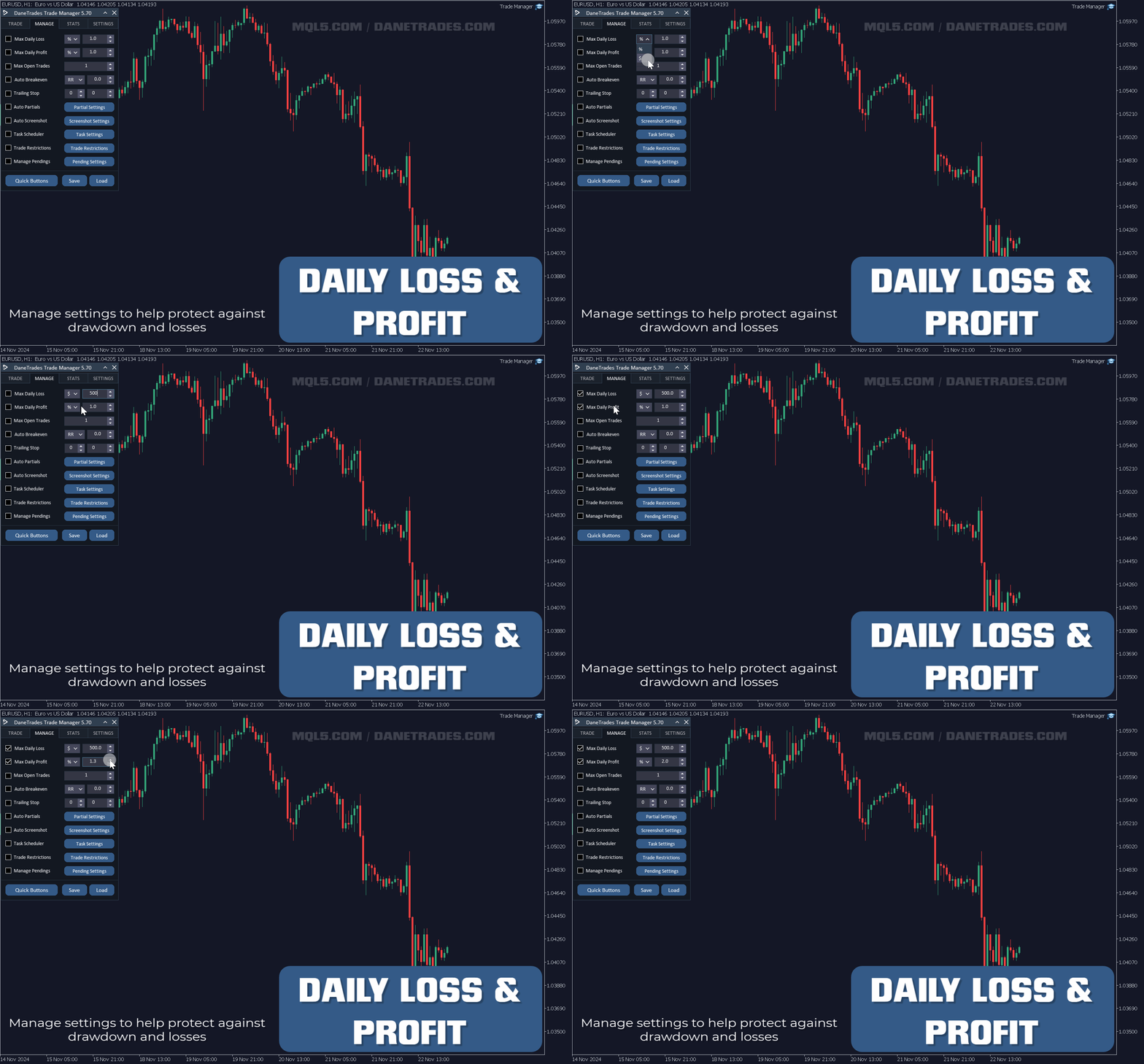
  • Perdita giornaliera massima in% per chiudere automaticamente tutte le operazioni quando viene raggiunto l'obiettivo. Protegge il conto da eccessivi prelievi e ti impedisce di fare trading eccessivo
  • Perdita giornaliera massima in $ per chiudere automaticamente tutte le operazioni quando viene raggiunto l'obiettivo. Protegge il conto da eccessivi prelievi e ti impedisce di fare trading eccessivo
  • Pareggia tutte le operazioni con un solo pulsante
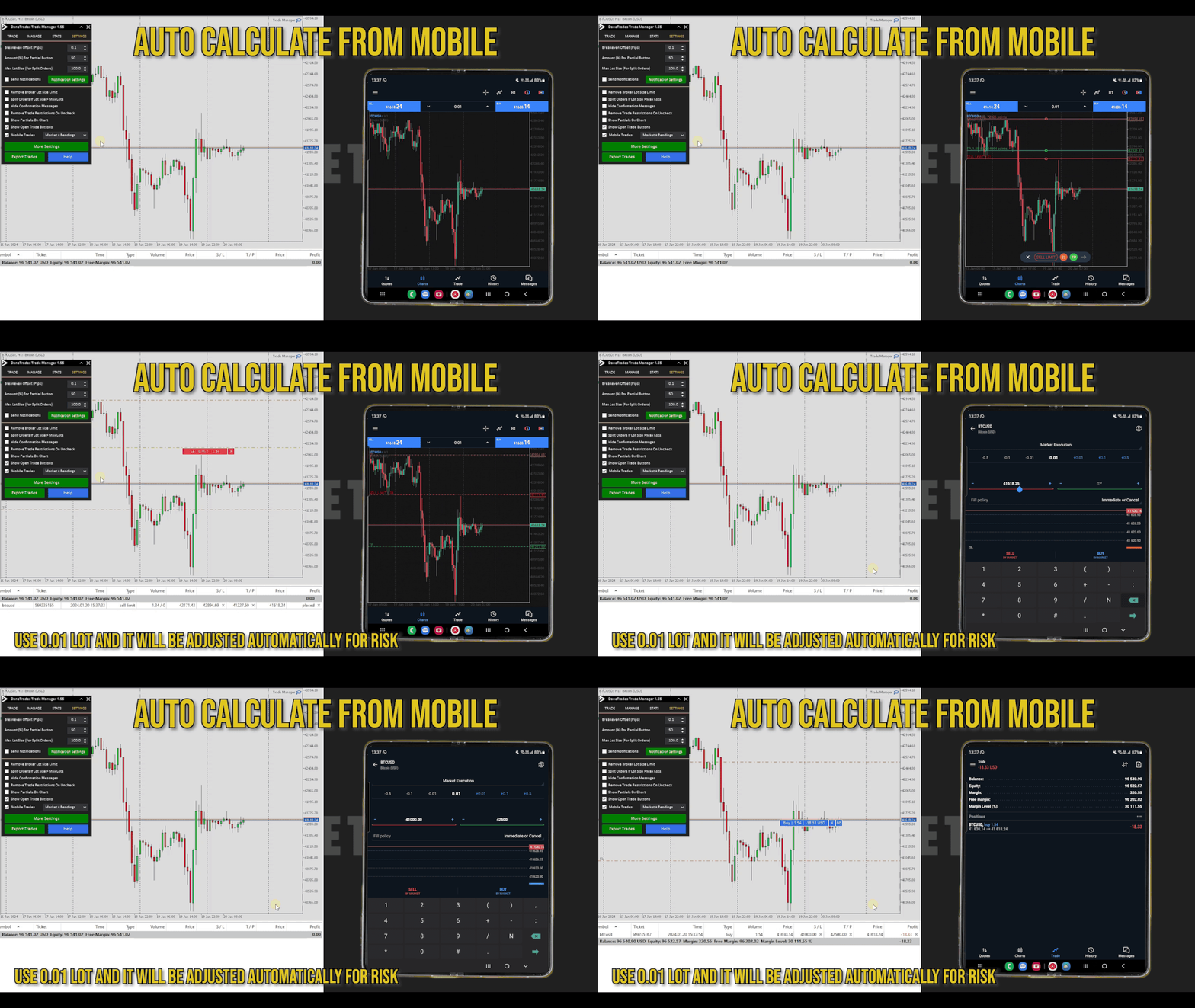
  • Calcola automaticamente il rischio per le transazioni inviate da cellulare/telefono
  • OCO disponibile nelle impostazioni

Gestione degli scambi e delle posizioni

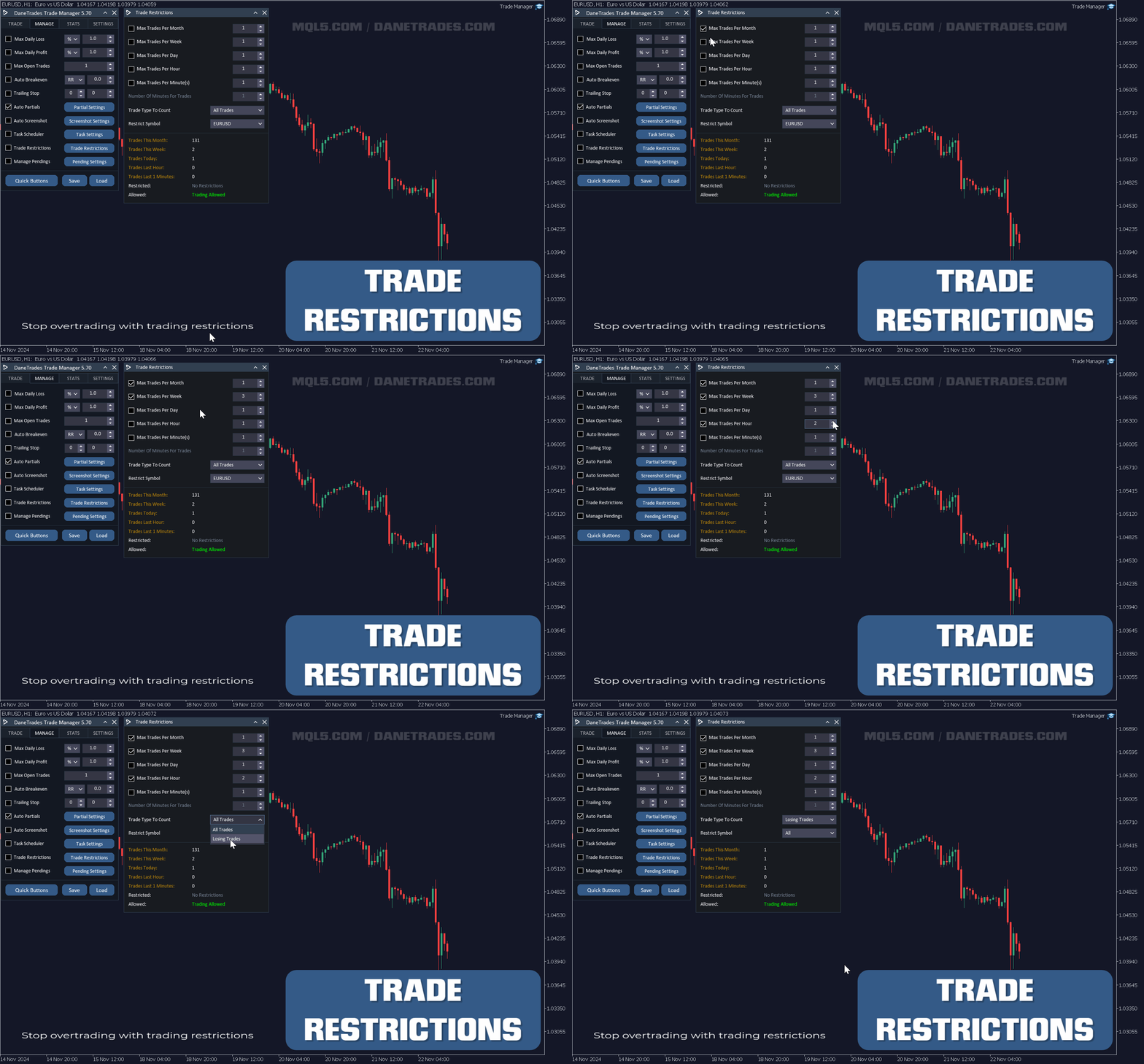
  • Smetti di fare trading eccessivo e di vendetta impostando il numero massimo di scambi per mese, settimana, giorno, ora o minuti.
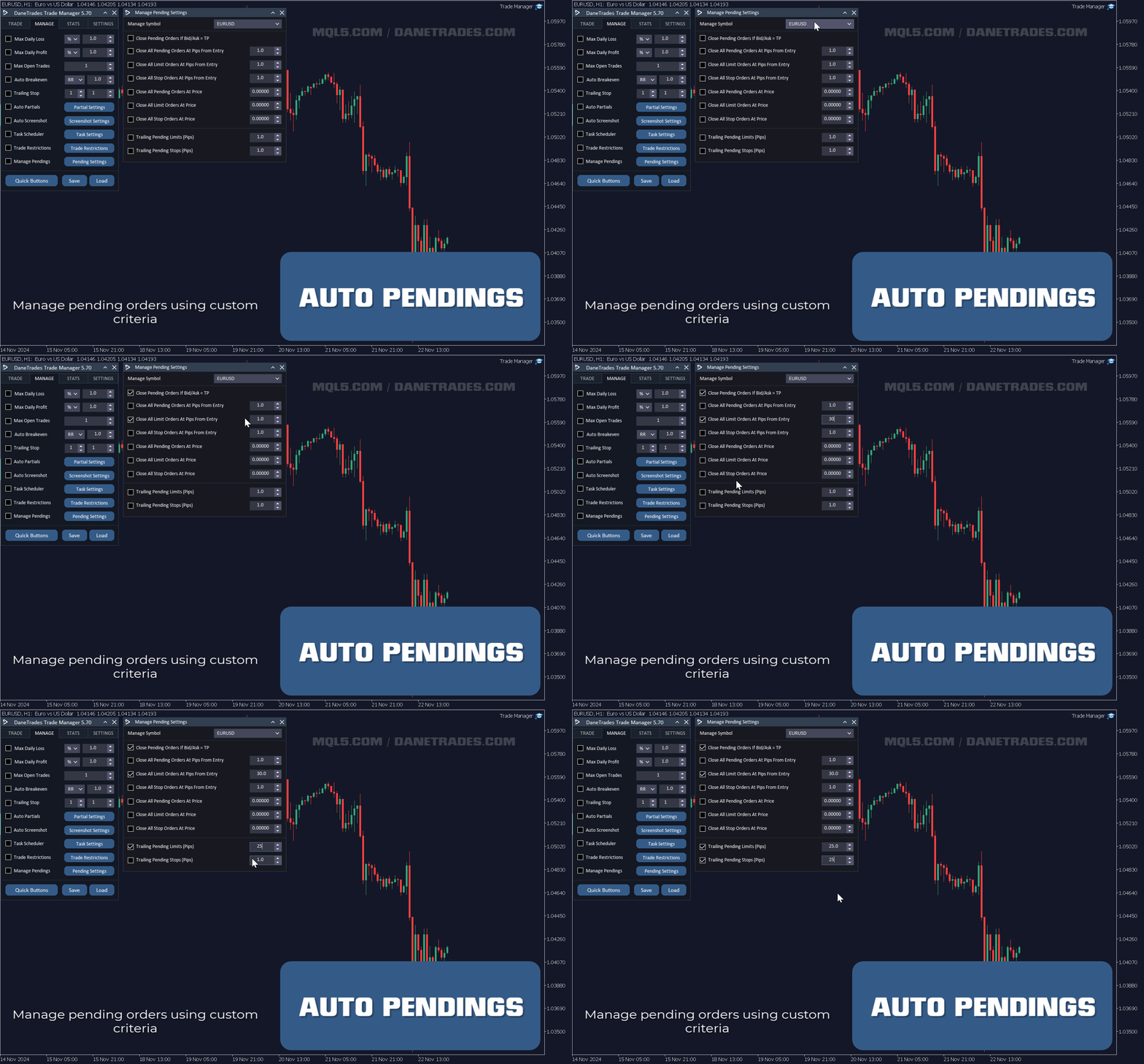
  • Gestione avanzata degli ordini pendenti. Modifica le regole su quando chiudere gli ordini in sospeso
  • Ordini pendenti finali
  • Supporto sia per gli ordini di mercato che per gli ordini pendenti
  • Obiettivo massimo di profitto giornaliero in $ per proteggere le posizioni e smettere di fare trading eccessivo
  • Obiettivo massimo di profitto giornaliero in% per proteggere le posizioni
  • Massimizza le negoziazioni aperte per limitare il rischio e l'esposizione.
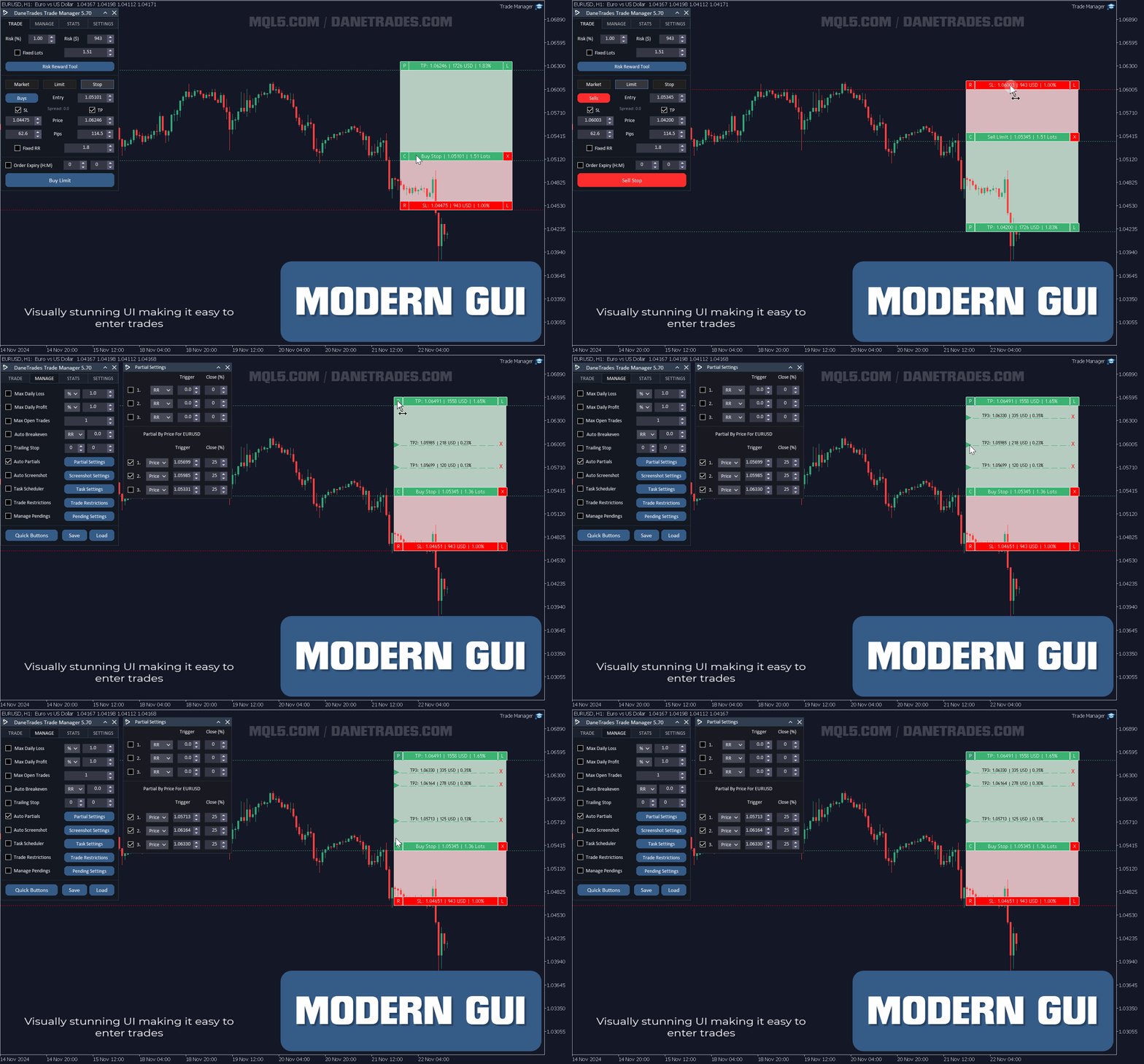
  • Prendi automaticamente i parziali utilizzando RR, Pips o Prezzo
  • Accedi utilizzando obiettivi RR fissi come 1:2, 1:3, 1:4 ecc. e osserva il profitto calcolato della posizione
  • Chiudi tutti gli ordini pendenti con un solo pulsante

Funzionalità del pannello grafico

  • Utilizza uno strumento visivo di ricompensa del rischio per inserire operazioni. Visualizza le operazioni e inseriscile utilizzando le linee.
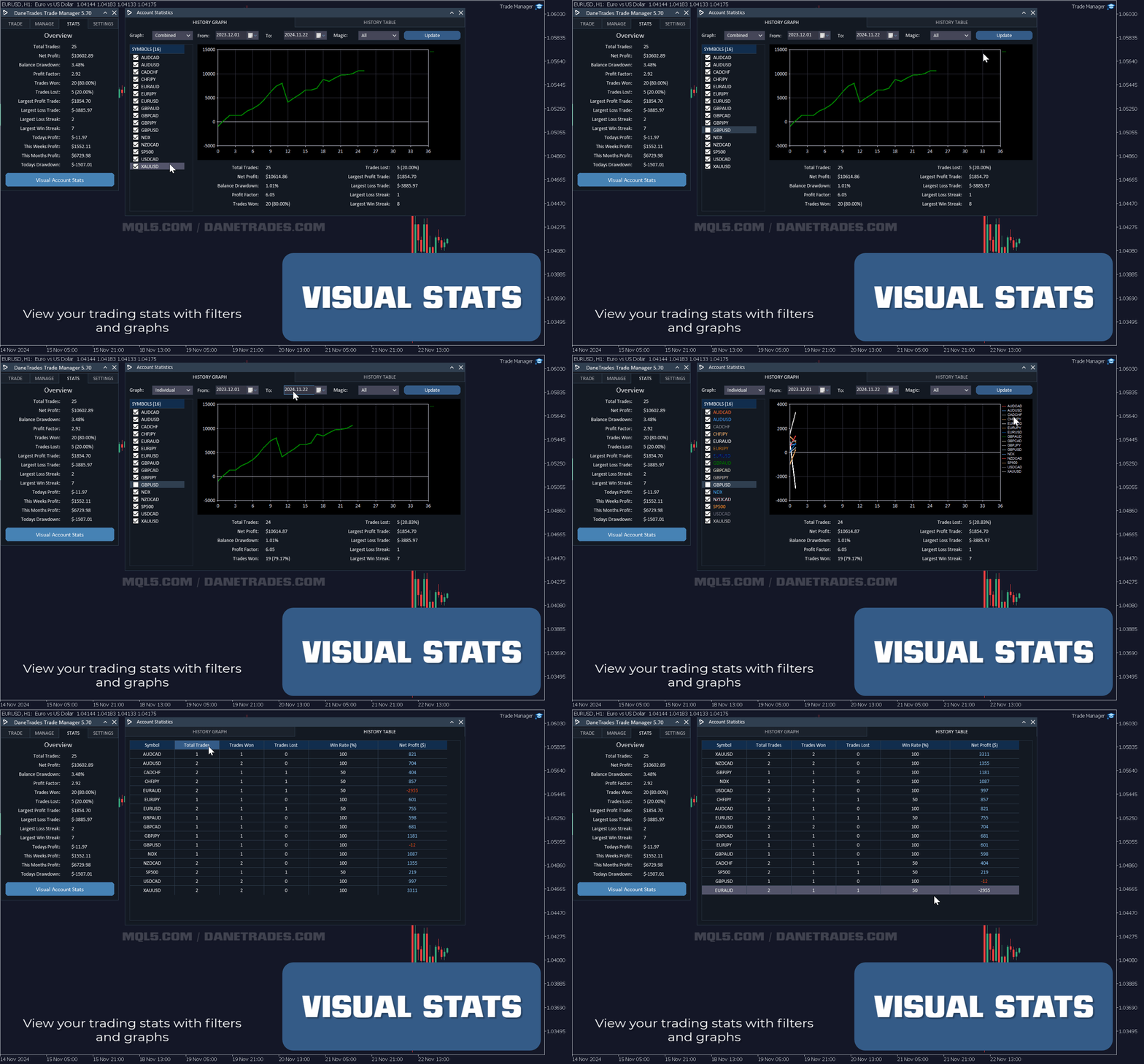
  • Controlla le prestazioni del conto e le statistiche come il tasso di vincita, il tasso di perdita, le transazioni totali, ecc.
  • Visualizza le prestazioni di trading e ottieni un grafico delle statistiche con filtri come simbolo e intervallo di date.
  • Salva fino a 3 modelli di file di impostazione per le impostazioni gestite.
  • Carica i file delle impostazioni per utilizzare rapidamente le tue impostazioni preferite.
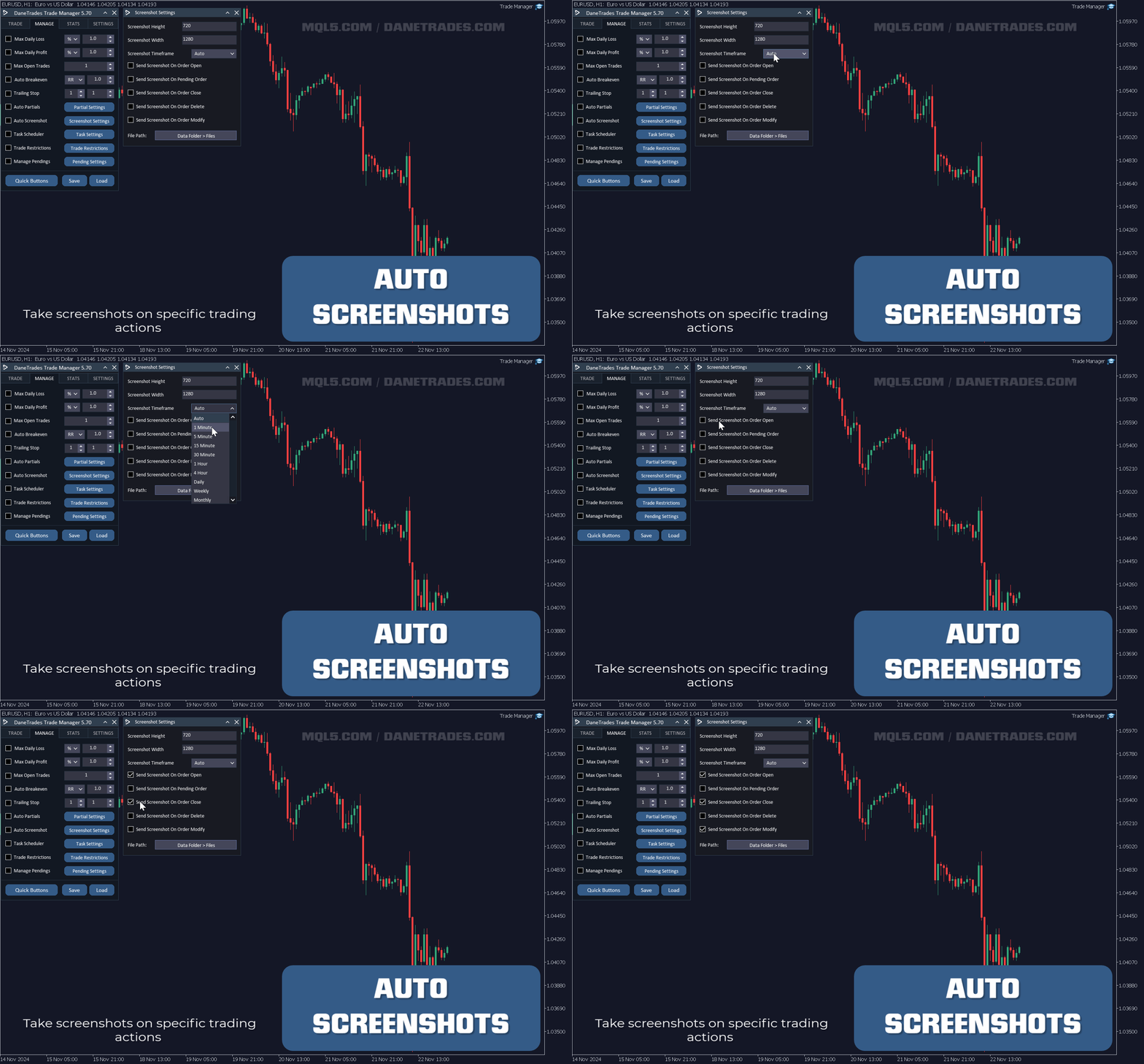
  • Screenshot automatici. Personalizza l'intervallo di tempo e le dimensioni dello screenshot.
  • Schermate automatiche su ordini in sospeso, elimina, apri, chiudi, scade, premi TP o SL.
  • Esporta tutte le operazioni in un foglio di calcolo con un solo pulsante.
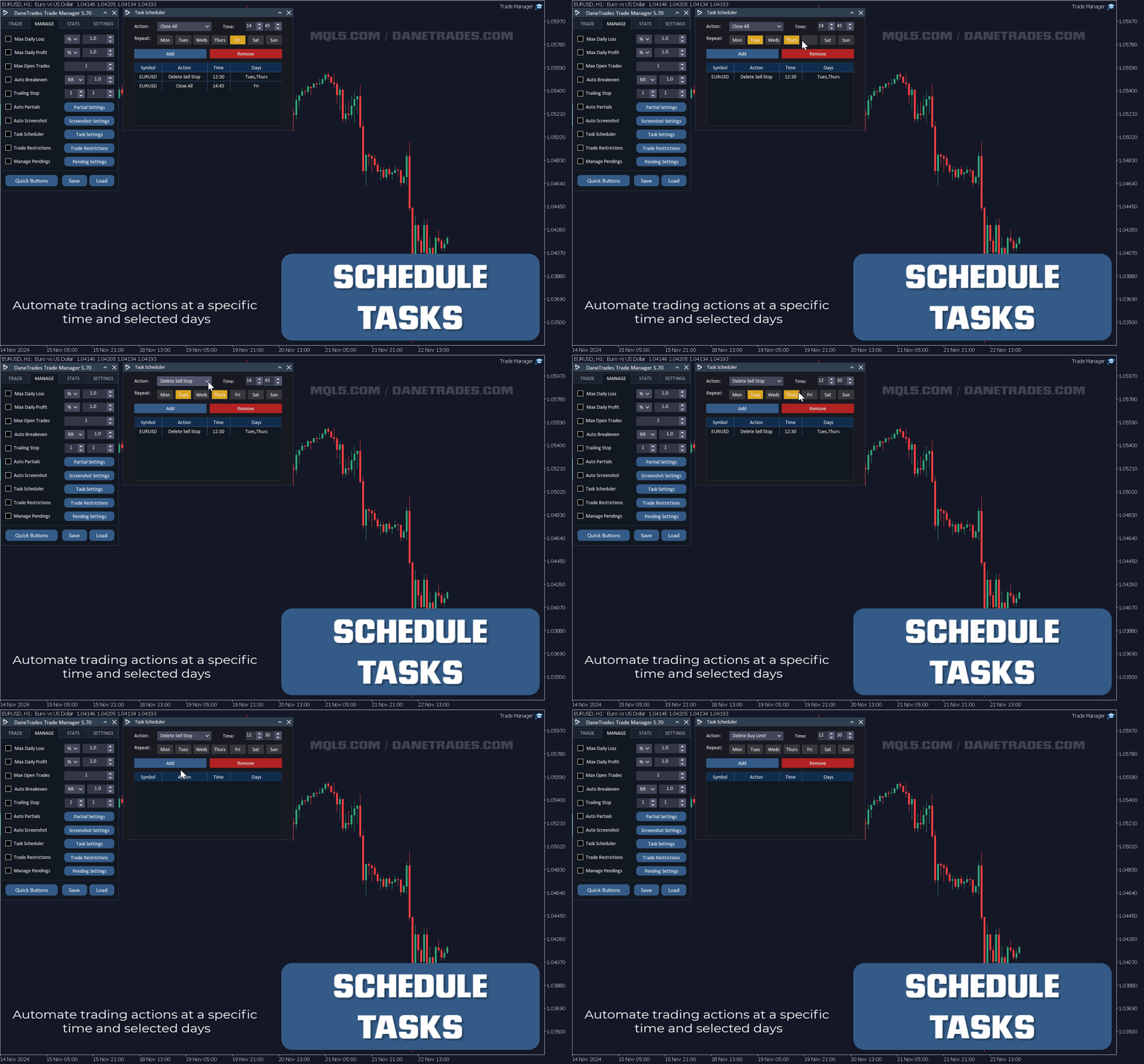
  • L'Utilità di pianificazione ti consente di eseguire azioni in giorni e orari specifici.
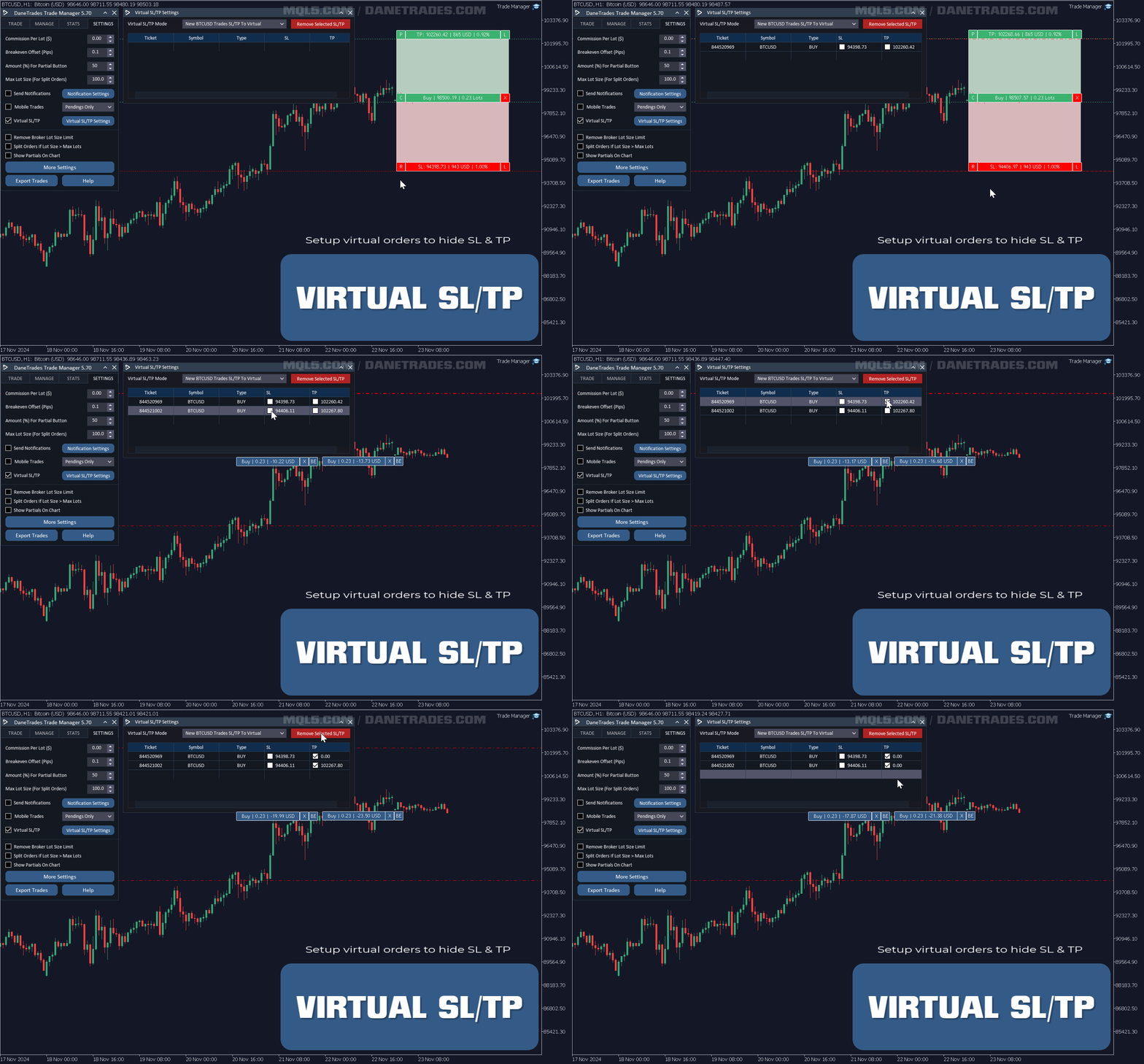
  • Gestore virtuale di Stop Loss e Take Profit
  • Modifica in blocco i livelli di Stop Loss e Take Profit per lo stesso simbolo

Invia notifiche

  • Scegli tra avvisi, notifiche push ed e-mail
  • Notifica se l'ordine raggiunge SL o TP
  • Avvisa se l'ordine va in pareggio
  • Avvisa se viene preso un parziale
  • Notifica se viene raggiunta la perdita giornaliera massima
  • Avvisa se viene raggiunto il profitto giornaliero massimo
  • Avvisa se il trading viene limitato
  • Avvisa se il trading viene consentito

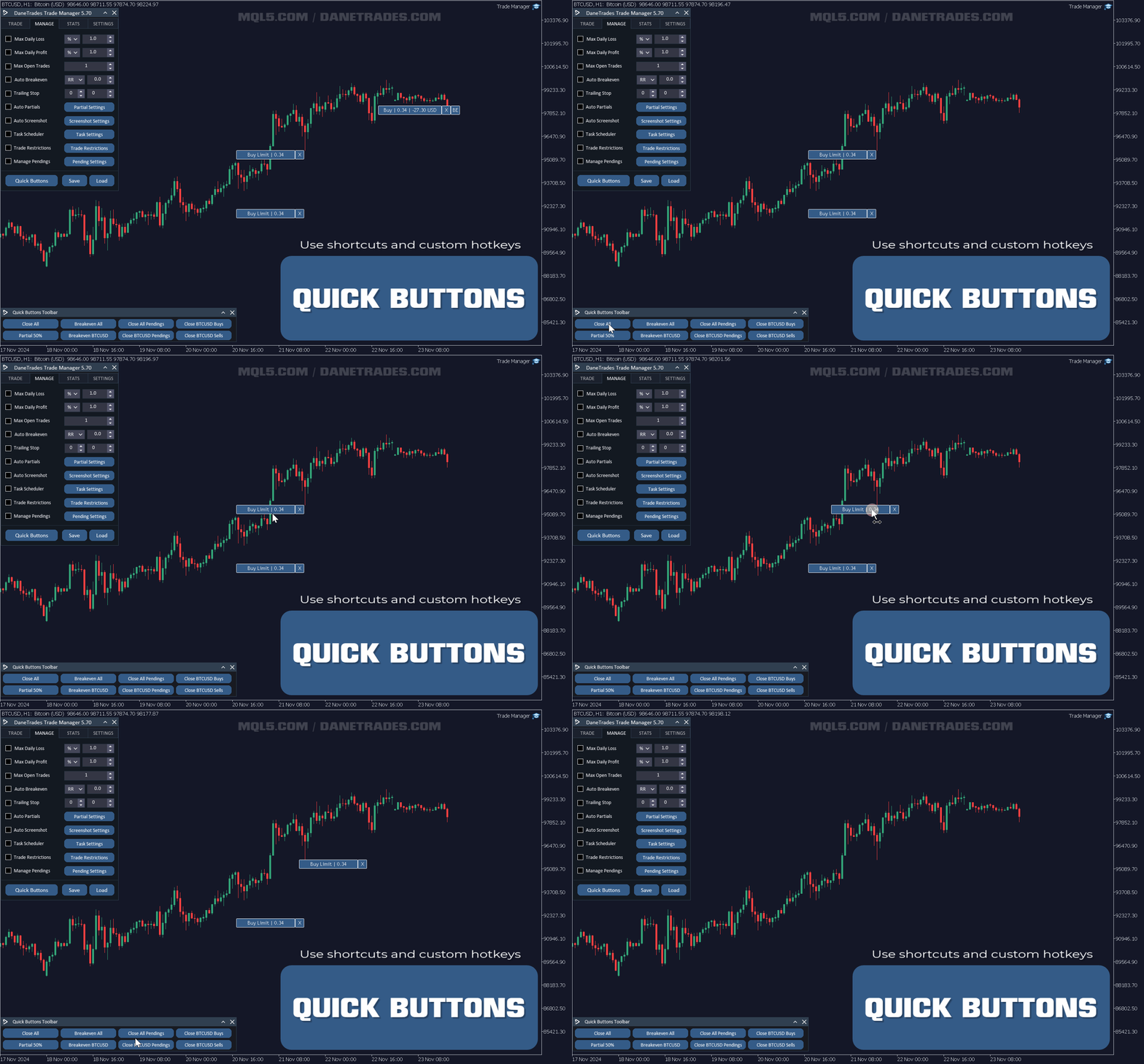
Trading di tasti di scelta rapida e scorciatoie

  • Tasti di scelta rapida e scorciatoie completamente personalizzabili per le funzioni principali del pannello

Per favore mandami un messaggio se hai qualche problema, sono sempre felice di aiutarti.


#Tags: Prop Firm, Pannello commerciale, Responsabile commerciale, Gestione degli ordini, Trailing Stop, Break Even, Chiusura parziale, Trading manuale, Assistente commerciale, Assistente commerciale, Gestione del rischio, Overtrading, Gestione della posizione, Perdita massima, Statistica storica, tp virtuale, sl virtuale, Stop Loss nascosto, Take Profit nascosto, sl in blocco, tp in blocco, operazioni mobili
Recensioni 35
Silver Rondo
43
Silver Rondo 2025.11.09 13:20 
 

Best trade manager out there!

zsuga01
19
zsuga01 2024.11.28 21:15 
 

Amazing

m.eo
15
m.eo 2024.10.16 17:09 
 

Great tool, better than trade assistant imho. Dane is very responsive & is all ears to any suggestions on improving the tool which is fantastic. I will be using Danes Trade Manager for the foreseeable future. Cheers Dane

Prodotti consigliati
This tool will perform Trailing stop loss and Break even management for orders. Helps you limit or reduce the time spend watching orders on the screen, especially when you need to go to sleep. Just add this EA to 1 chart, you can manage all pairs. You can filter orders by comment, magic number, symbol and order ticket number. When Breakeven it can add shift/offset pips (to cover the commission...). You can try in strategy tester before purchase. The EA will add Buy and Sell alternately, so you
SmartTrail PRO MT5 — All-in-One Trade Management Panel Your all-in-one trade management companion for MetaTrader 5. SmartTrail PRO takes the stress out of position management. Whether you trade manually or use Expert Advisors, it protects your capital with intelligent, volatility-adaptive stop management — across all symbols, all account types, automatically. Why SmartTrail PRO? Most traders lose not because of bad entries, but because of poor exits. SmartTrail PRO solves this by providing a com
Symbol Manager for MT5
Taras Slobodyanik
5 (3)
Symbol Manager or Grid Manager, designed to group orders into one position (by Symbol or by Magic Number). This utility will be useful to multi-currency traders (many EAs), who can have multiple orders on several pairs. You will be able to see the total number of lots, the total profit, and set virtual stop loss and virtual take profit. To set a real TP (or SL), you must first set the virtual value, and then enter the command in this cell: "set". If you want to set real TP/SL for all orders at
Nebula Trading Manager
Sina Mohammadamin Shahriari Moghadam
This expert advisor named   TradeManager   provides a manual trading management panel in MetaTrader 5 that allows precise control over open positions. It is designed for traders who want dynamic management of Stop Loss (SL), Take Profit (TP), Break Even (BE), and Partial Close functionality. Key Features: Dynamic Trade Management : Manually set or drag-and-drop SL, TP, and BE levels. Supports partial closing at different profit levels (1:1, 1:1.5, 1:2). Automated Drawing : Automatically draw
SwiftEdge Scalper EA Professionale di Scalping con Controllo Manuale Completo Lo scalping richiede decisioni in una frazione di secondo, gestione precisa del rischio ed esecuzione perfetta degli ordini. Gestire calcoli di breakeven, trailing stop e multiple posizioni mentre si osserva l'azione del prezzo è travolgente senza gli strumenti giusti. SwiftEdge Scalper è il tuo assistente di trading professionale progettato per scalper attivi e day trader. Esegui trade con un clic o scorciatoia da tas
Support & Setup | MetaTrader Trade Journal Support & Resources Everything you need to get your MetaTrader Trade Journal running perfectly. Official Support Page Documentation and free resources Visit Page Direct Contact Message Jack Ryland on Telegram Message Now Step 1 — Configure MetaTrader WebRequests To allow the EA to sync your data, you must authorize these URLs. In your MT4/MT5 terminal, go to Tools → Options → Expert Advisors and check "Allow WebRequest for listed URL" . Add these four
FREE
SL TP Panel
Mikhail Ostashov
SL TP Panel — Visual Trading Panel for MT5 A convenient trading panel that lets you place pending orders by simply dragging lines on the chart. Stop Loss, Take Profit, order type, and lot size — everything is controlled with your mouse in seconds. Who is this for This panel is designed for manual traders who value speed of execution. Instead of opening the order window, filling in fields, and calculating levels — just drag a line to the desired price and click one button. Key Features Visua
TP SL Bot MT5
Ruslan Brezovskiy
5 (1)
TP SL Bot - un'utilità che imposta automaticamente Stop Loss e Take Profit per gli ordini appena aperti in vari modi secondo le tue indicazioni. È inoltre disponibile una funzione per calcolare il volume con cui aprire un trade per ottenere l'importo desiderato con la dimensione specificata di Stop Loss/Take Profit.   Ci sono diversi modi per calcolare la dimensione e impostare i parametri: 1. Impostazione basata sull'importo specificato dall'utente come percentuale del saldo corrente del conto.
Trade Assistant 38 in 1
Makarii Gubaydullin
4.91 (23)
Strumento multifunzionale: Calcolatore di Lotto, Ordini Grid, Rapporto R/R, Gestore di Trade, Zone di Domanda e Offerta, Price Action e molto altro Versione Demo   |   Manuale Utente L'Assistente di Trading   non funziona nel tester di strategie : puoi scaricare la   Versione Demo QUI  per testare l' utilità . Contattami   per qualsiasi domanda  / idee di miglioramento / in caso di bug riscontrato Se hai bisogno di una versione MT4, è disponibile qui Semplifica, accelera e automatizza il tuo  
GGP Trade Copier MT5
Mohammadmahmood Pirayeh
GGP Trade Copier  EA is an automatic trading bot that can help traders automatically replicate the trading strategies and operations from one trading terminal to others by experiencing exceptionally fast trade copying system. Its easy-to-use setup allows you to copy trades between multiple MetaTrader terminals on the same Windows computer or Windows VPS with lightning-fast copying speeds of under 0.5 seconds. The software supports multiple trading varieties, including Forex, commodities, stocks
SLTPSetter
Raphael Djangmah Osro Agbo
SLTPSetter - StopLoss Take Profit Setter HOW DOES IT WORK? Risk and account management is a very critical aspect of trading. Before entering a position, you must be fully aware how much you will be willing to loss both in percentage and value. This is where SLTPSetter gets you covered.  All you need to do is attach the indicator on the chart and PRESS BUY OR SELL automatically, all parameters needed for placing the trades will be provided at the top left corner of the screen. Feel free to adjust
Expert TP SL v04
Mikhail Ostashov
Expert TP SL v04 - Professional Trading Assistant with AI Motivation System Advanced manual trading tool with automatic risk management, overtrading protection, and intelligent psychological support for disciplined trading. PRODUCT OVERVIEW Expert TP SL v04 is a comprehensive trading assistant designed for manual traders who want to maintain emotional discipline while automating risk calculations. This isn't just another order placement tool - it's a complete trading psychology system that pr
StealthTrade Commander   is an advanced visual trading panel and risk-management utility designed for manual traders, scalpers, and Prop-Firm challengers. This tool helps you execute trades visually directly from the chart, hide your Stop Loss and Take Profit levels from the broker, and strictly control your daily drawdown—a crucial feature for passing and keeping Prop-Firm funded accounts.  KEY FEATURES:  Risk Guardian (Prop-Firm Protector) Max Daily Loss Limit:   Automatically closes all trade
FREE
Click Trading
Jawad Tauheed
5 (2)
One Click Trading – Auto TP SL Developer TraderLinkz Version 1.00 Category Utility What it does Adds missing TP and SL to your manual trades and pending orders Sets them once per ticket Lets you move TP and SL afterward Works on hedging and netting accounts Scans on every tick and reacts on trade events Why you want it You place faster entries You get consistent risk and exit targets You reduce fat finger errors You keep full manual control Quick start Attach the EA to any chart Keep TP and SL e
FREE
Trade assistant pro v8
Ahmed Mohammed Bakr Bakr
FREE FREE FREE Trade Assistant MT5 – Professional Trading & Risk Management Panel Trade Assistant MT5 is an advanced trading panel designed to help traders execute orders faster, safer, and more professionally . It simplifies manual trading by combining smart order management , precise risk control , and one-click execution , making it ideal for both beginners and advanced traders. This tool does not trade automatically . Instead, it empowers you with full control while applying professional-gra
FREE
King ElChart Manual Trade Panel
Mohammed Maher Al-sayed Mohammed Ahmed Saleh
King Chart – Manual Trading Panel for MetaTrader 5 Overview King Chart is a simple yet powerful manual trading panel built for traders who want speed, precision, and clarity. It enables quick order execution, clear lot control, and real-time account monitoring — all directly on your MT5 chart. Main Features Multi-Lot Trade Execution 3 Buy and 3 Sell buttons for instant execution Each button is tied to a custom lot size field Designed for flexible scaling in or out of trades Position Management
Breakevan Utility
Jose Luis Thenier Villa
BreakEvan Utility  Is a simple tool in a panel with this utilities: This utility will draw a Golden Line in the chart applied showing the breakeven price, considering all the positions opened for that specific symbol. Also the information panel shows: Balance Breakeven Price for that chart Force Breakeven (for that symbol) as ON/OFF Force Breakeven Global (takes into account all trades opened) as ON/OFF Total Lots opened for Symbol Total Lots opened Global And two buttons: Force Breakeven: Whe
BlueEdge Trading Manager (MT5) BlueEdge Trading Manager is a clean, fast manual trade manager panel for MetaTrader 5. It helps you open trades quickly (BUY/SELL), manage up to 5 take-profits , and automatically handle partial closes while drawing clear SL/TP lines directly on the chart. This product is NOT a trading strategy and does not generate entry signals. It is a trade execution + position management tool for scalpers and manual traders. Main Features One-click BUY / SELL from a compact pa
This EA is there to take your trade closing stress away. Quickly close as many trades as you have opened at the click of a button, INCLUDING PENDING ORDERS. This works on the MT5 platform whether it be currencies, Indices, stocks or Deriv synthetic indices. I have saved it under utilities as it is a utility, however, to install this, you have to save the file in you "EA" folder. That is; Go to "File", then "Open Data Folder", "MQL5" and then "Experts". Paste this file there. Restart MT5 and you'
Local Copy Trader Utility - Professional Copy Trading System Overview Local Copy Trader Utility is the complete solution for mirroring trades between MetaTrader 5 accounts. With both Master and Slave functionality in one powerful Expert Advisor, it delivers reliable, lightning-fast trade copying with zero external dependencies. Perfect for managing multiple accounts, following trading signals, or transferring trades between brokers, this system ensures your positions stay perfectly synchronized
Quick Close Panel
Boaz Nyagaka Moses
5 (1)
'Quick Close Panel' is an easy to use interface for managing orders. It has a button for closing all winning trades on the current chart, a button for closing all losing trades and another button for closing   all running trades (Losing and Winning)   on the current chart. It is very responsive and quick to execute operations due to the effective time complexity of the algorithm used in the  program.  Vist this link to download demo:  https://www.mql5.com/en/market/product/62901?source=Site+Mark
Equity monitor
Vasiliy Pritchin
Equity monitor This is a simple means change informer. I wrote it for myself, maybe someone will need it... 1. Displays the change in funds for the day. Every day, when the terminal is first launched, it remembers the current funds and monitors changes throughout the day. 2. The first day of the month, well remembers the money and, within months, to monitor changes. 3. Well, it displays the profit of the open position. To work, you need to create 4 global variables: gvarEqityDay , gvarEq
FREE
Risk Management Buttons
Kriengsak Peitaisong
This is a common, simple and easy to use but effective tool to manage trading risks for all traders. It also help trader places stop loss and take profit levels at the same time the order is filled. How to set the expert advisor's parameters to support your trading style? Lots size. Fixed lots size - For traders who prefered to trade with fixed lots size, they can input the lots size in 'User lots' menu in the expert advisor's properties. The input value should be from the 'Minimum Volume' to th
MultiTimeframe Info Feed (MIF) Indicator Description: MultiTimeframe Info Feed (MIF) is a smart MQL5 indicator that displays a dynamic, real-time info panel directly on your chart, offering powerful insight into current market conditions. Key features include: Real-time display of Open, High, Low, Close, and live Tick price Tick Rate (ticks per second) for assessing market activity Auto-calculated Entry Price on new candle formation Signal direction detection (BUY / SELL) Price action pattern re
FREE
Trading Utility for Forex Currency Pairs Only not for Gold  Functions Auto Lot Calculation based on Risk Auto stoploss  Auto TakeProfit Breakeven Auto Close Half % Close in percentage with respect to the PIPs Pending Orders BuyLimit Sell Limit with distances BuyStop Sell Stop    with distances Trading Informations Risk in percentage For Multiple trades Combine Takeprofit and Combine Stoplosses
Total Trade Manager SL BE TP
Izzet Deniz Erpolat
3 (2)
Total trade manager allows you to manage your trade to maximise your profits and minimise your losses. This is an essential for traders that are looking for consistency within their trading.  The features: Partial Stop Loss: This feature allows you to close a partial percentage of your trade once it goes into negative. So if your stop loss is 20 pips, you could close 75% of your trade at 10 pips and let the remainder of the position to continue running. Auto Stop Loss: This means that once you p
Automatic Trade Calculation Panel   One-Klick-Trading Automatic calculation of Lot sice Atuomatic calulation of Stop-Loss and TakeProfit Up to 3 partial closings Trailingstop (Stop-Loss moves automatically)   The lot size is calculated by the previously determined risk (e.g. 1.0% of the account size) and the distance of the Stop Loss from the entry point. The distance from the Stop Loss to the entry point results from the ATR indicator multiplied by a freely selectable factor. The Stop Loss and
Overview Mirror Signals Service EA (Text only)   is a powerful monitoring Expert Advisor that automatically sends   real-time Telegram notifications   for all important trade events on your MetaTrader 5 account. It is engineered specifically for   signal providers ,   trade-copier operators ,   auditors ,   educators , and   professional trading services   that require immediate, detailed, and reliable reporting. Everything from   entries, exits, SL/TP changes, comment changes, trailing sto
ARC Automatic Position Size Calculator
Vitor Martins De Sousa
2.5 (2)
MANAGING YOUR FOREX TRADING LIKE A PROFESSIONAL WITH   POSITION SIZE   CALCULATOR Position Size Calculator – an MT5 indicator, is a user-friendly tool that allows you to determine your required forex trading size for each trade based on how much you want to risk and available capital in your forex trading account. Load the calculator onto your chart and simply draglines to show your stop loss and take profit level. The calculator will automatically calculate the trade size instantly. This indica
Trader SWORD
Tiofelo Da Olga Gilbert Teles
Trader [SWORD] is a panel EA designed to help the trader [scalper]. From the dashboard, the trader can: set the order volume, stop loss and take profit values [in points]; open a market order with its respective stop loss and take profit values. close all [win only, loss only or win and loss] positions opened through the EA.  On the panel we have:   the buttons to open new market orders [buy and sell];   the buttons to set the order volume [increasing and decreasing de volume order]; the buttons
Gli utenti di questo prodotto hanno anche acquistato
Trade Assistant MT5
Evgeniy Kravchenko
4.42 (208)
It helps to calculate the risk per trade, the easy installation of a new order, order management with partial closing functions, trailing stop of 7 types and other useful functions. Additional materials and instructions Installation instructions - Application instructions - Trial version of the application for a demo account Line function -   shows on the chart the Opening line, Stop Loss, Take Profit. With this function it is easy to set a new order and see its additional characteristics bef
Forex Trade Manager MT5
InvestSoft
4.96 (621)
Benvenuto a Trade Manager EA, lo strumento definitivo per la gestione del rischio , progettato per rendere il trading più intuitivo, preciso ed efficiente. Non è solo uno strumento per l'esecuzione degli ordini, ma una soluzione completa per la pianificazione delle operazioni, la gestione delle posizioni e il controllo del rischio. Che tu sia un principiante, un trader avanzato o uno scalper che necessita di esecuzioni rapide, Trade Manager EA si adatta alle tue esigenze, offrendo flessibilità s
TradePanel MT5
Alfiya Fazylova
4.86 (148)
Trade Panel è un assistente commerciale multifunzionale. L'applicazione contiene più di 50 funzioni di trading per il trading manuale e consente di automatizzare la maggior parte delle operazioni di trading. Attenzione, l'applicazione non funziona nel tester di strategia. Prima dell'acquisto, puoi testare la versione demo su un conto demo. Versione demo qui . Istruzioni complete qui . Commercio. Ti consente di eseguire operazioni di trading con un clic: Apri ordini e posizioni pendenti con calco
Versione Beta Telegram to MT5 Signal Trader è quasi pronto per il rilascio ufficiale in versione alpha. Alcune funzionalità sono ancora in fase di sviluppo e potresti riscontrare piccoli bug. Se riscontri problemi, ti preghiamo di segnalarli, il tuo feedback aiuta a migliorare il software per tutti. Telegram to MT5 Signal Trader è uno strumento potente che copia automaticamente segnali di trading da canali o gruppi Telegram al tuo account MetaTrader 5 . Supporta canali pubblici e privati e cons
Ultimate Extractor
Clifton Creath
5 (9)
Ultimate Extractor - Professional Trading Analytics for MT5 *****this is the local HTML version of Ultimate Extractor. Check out Ultimate Extractor Cloud on mql5 for the Cloud version****** Ultimate Extractor transforms your MetaTrader 5 trading history into actionable insights with comprehensive analytics, interactive charts, and real-time performance tracking. What It Does Automatically analyzes your MT5 trading history across all Expert Advisors and generates detailed HTML reports with inte
FarmedHedge Pair Trading Dashboard
Tanapisit Tepawarapruek
5 (1)
Farmed Hedge Yield Farming - Professional Pair Trading Dashboard (Manual - Hybrid - Semi/Automated EA) VERSION 3 - WILD HARVEST UPDATE Trading Approach: - Manual Trading: Primary focus - Auto Pilot: Optional supplementary feature - Full Automation: Not the main purpose Recommended Timeframe: H1-H4 DEMO VERSION Download the free demo to test functionality. Use Strategy Tester with Visual Mode to see how it works. VERSION 3 - NEW FEATURES Summary Dashboard (SRA Panel) - Quick pair selection w
The product will copy all telegram signal to MT5 ( which you are member) , also it can work as remote copier.  Easy to set up, copy order instant, can work with almost signal formats, image signal,  s upport to translate other language to English Work with all type of channel or group, even channel have "Restrict Saving Content", work with  multi channel, multi MT5 Work as remote copier: with signal have ticket number, it will copy exactly via ticket number. Support to backtest signal. How to s
Custom Alerts AIO: Monitora tutti i mercati — senza alcuna configurazione Panoramica Custom Alerts AIO è una soluzione di monitoraggio dei mercati pronta all’uso che non richiede alcuna configurazione. Tutti gli indicatori necessari — FX Power, FX Volume, FX Dynamic, FX Levels, IX Power — sono integrati internamente. Non vengono mostrati grafici, rendendolo ideale per generare alert in tempo reale in modo discreto ed efficiente. Supporta tutte le classi di asset offerte dal tuo broker: Forex,
Pulsar Terminal MT5
Astralys LLC
5 (2)
Pulsar Terminal è un prodotto di Pulsar Technologies, un marchio di Astralys LLC . Pulsar Terminal è un componente aggiuntivo per MetaTrader 5. È un' interfaccia visiva combinata con strumenti di esecuzione in un' applicazione companion collegata al tuo account MetaTrader 5 tramite un Expert Advisor . Utilizziamo un'applicazione companion per massimizzare le capacità dello strumento e fornire un'interfaccia visiva e un flusso di lavoro più avanzati rispetto ai pannelli standard di MT5. Pulsar T
Trade Manager DashPlus
Henry Lyubomir Wallace
5 (13)
DashPlus è uno strumento avanzato di gestione delle operazioni progettato per migliorare l'efficienza e l'efficacia del trading sulla piattaforma MetaTrader 5. Offre una suite completa di funzionalità, tra cui calcolo del rischio, gestione degli ordini, sistemi di griglia avanzati, strumenti basati su grafici e analisi delle prestazioni. Caratteristiche Principali 1. Griglia di Recupero Implementa un sistema di griglia flessibile e di media per gestire le operazioni in condizioni di mercato avve
Telegram To MT5 Receiver
Levi Dane Benjamin
4.53 (15)
Copia i segnali da qualsiasi canale di cui sei membro (compresi quelli privati e ristretti) direttamente sul tuo MT5.  Questo strumento è stato progettato con l'utente in mente offrendo molte funzionalità necessarie per gestire e monitorare gli scambi. Questo prodotto è presentato in un'interfaccia grafica facile da usare e visivamente accattivante. Personalizza le tue impostazioni e inizia ad utilizzare il prodotto in pochi minuti! Guida per l'utente + Demo  | Versione MT4 | Versione Discord
YuClusters
Yury Kulikov
4.93 (43)
Attention: You can view the program operation in the free version  YuClusters DEMO .  YuClusters is a professional market analysis system. The trader has unique opportunities to analyze the flow of orders, trade volumes, price movements using various charts, profiles, indicators, and graphical objects. YuClusters operates on data based on Time&Sales or ticks information, depending on what is available in the quotes of a financial instrument. YuClusters allows you to build graphs by combining da
ManHedger MT5
Peter Mueller
4.8 (5)
THIS EA IS A SEMI-AUTO EA, IT NEEDS USER INPUT. Manual & Test Version Please TEST this product before BUYING  and watch my video about it. The price of the ManHedger will increase to 250$ after 20 copies sold. Contact me for user support or bug reports or if you want the MT4 version! MT4 Version  I do not guarantee any profits or financial success using this EA. With this Expert Advisor, you can: Implement your own Zone Recovery strategy to capitalize on trending markets. Create Grid trading s
Effortlessly calculate lot sizes and manage trades to save time and avoid costly errors The Trade Pad Pro EA is a tool for the Metatrader Platform that aims to help traders manage their trades more efficiently and effectively. It has a user-friendly visual interface that allows users to easily place and manage an unlimited number of trades, helping to avoid human errors and enhance their trading activity. One of the key features of the Trade Pad Pro EA is its focus on risk and position manageme
Active Lines
Yury Kulikov
5 (2)
Attention: Demo version for review and testing can be downloaded here . It does not allow trading and can only be run on one chart. Active Lines - a powerful professional tool for operations with lines on charts. Active Lines provides a wide range of actions for events when the price crosses lines. For example: notify, open/modify/close a position, place/remove pending orders. With Active Lines you can assign several tasks to one line, for each of which you can set individual trigger conditions
PortfolioLab Pro
Antonello Belgrano
PortfolioLab Pro – Monitoraggio Avanzato Multi-EA e Analisi del Rischio per MT5 PortfolioLab Pro è il centro di controllo real-time definitivo per i trader che gestiscono molteplici Expert Advisors (EA) su MetaTrader 5. Smetti di volare alla cieca con i semplici grafici di equity. PortfolioLab Pro rivela i rischi nascosti, scopre le coperture naturali e quantifica la vera robustezza del portafoglio — prima che un drawdown cancelli mesi di progressi. Caratteristiche Chiave che lo Rendono Unico:
Dhokiyas Market Screener
Dhokiyas Money Map Investment Consultants - FZCO
Dhokiya's Market Screener Guida Utente Pannello di analisi multi simbolo per MetaTrader 5 con trading con un clic e panoramica tecnica completa Canale Ufficiale per Aggiornamenti Unisciti : Dhokiyas Supporto Messaggio diretto : Contact 1. Funzione del Prodotto Dhokiya's Market Screener è uno strumento di analisi tecnica multi simbolo per MetaTrader 5. Analizza più strumenti e mostra una possibile direzione operativa con un punteggio basato su molteplici conferme tecniche. È progettato per
Tick Charts
Vasily Kravtsov
4 (1)
**** New version - 1.66 **** Bug fixes, small improvements. A Tick Chart app. It lets you create real-time tick charts, based on number of ticks per candle. You can choose the amount of ticks per candle, and the amount of ticks to load. Supports showing trade history and trade levels.   When you add this EA to an instrument it automatically generates a custom symbol with the _Tick added to the name. The tick chart should open automatically. Make sure the timeframe of the tick chart is set to M
Il Local Trade Copier EA è una soluzione per i singoli trader o account manager che devono eseguire segnali commerciali da fonti esterne o che devono gestire più account contemporaneamente, senza la necessità di un account MAM o PAMM. Copia da un massimo di 8 account master su account slave illimitati [ Guida all'installazione | Guida all'aggiornamento | Risoluzione dei problemi | Domande frequenti | Tutti i prodotti ] 100% self-hosted Facile da installare e utilizzare Nessun programma di insta
Footprint Chart Pro — Professional Order Flow EA for MetaTrader 5 Version 6.34 | Professional tool for real traders | Institutional-Grade Visualization DEMO USERS - PLEASE SELECT EVERY TICK / REAL TICK WHEN TESTING AND YOU HAVE DOWNLOADED HISTORICAL DATA. IF YOU SEE A WAITING SCREEN AND IT IS NOT DOWNLOADING, IT MEANS YOU HAVE LOW HISTORICAL DATA. TRY 1 MIN AND 5 MIN FIRST ON 1 DAY DATA. ONE DAY DATA SHOULD BE THE NEWEST AND MOST CURRENT DATE. PLEASE WAIT UNTIL THE MARKET HAS ROLLED OVER PERIOD
Binance Trade Manager
Andrey Khatimlianskii
5 (3)
Binance Trade Manager — is an utility that allows you to transmit trade orders from your MetaTrader 5 to the Binance exchange. It will suite you if you want to use your favorite MetaTrader 5, getting all the benefits of trading cryptocurrencies directly on the exchange (low commission, high liquidity, absolute transparency, etc.) Binance Trade Manager can work in two modes: copying trades from a demo-account , which your MetaTrader 5 is connected to (cryptocurrencies must be available on this ac
EasyInsight AIO MT5
Alain Verleyen
4.92 (12)
EASY Insight AIO – La soluzione all-in-one per un trading intelligente e senza sforzo Panoramica Immagina di poter analizzare l’intero mercato — Forex, Oro, Cripto, Indici e persino Azioni — in pochi secondi, senza dover controllare manualmente i grafici, installare indicatori o affrontare configurazioni complicate. EASY Insight AIO è il tuo strumento definitivo di esportazione per il trading alimentato dall’IA, pronto all’uso. Offre una panoramica completa del mercato in un unico file CSV pul
Comprehensive on chart trade panel with the unique ability to be controllable from mobile as well. Plus has a library of downloadable configuration, e.g. exit rules, extra panel buttons, pending order setup and more. Please see our product video. Works with all symbols not just currency pairs. Features On chart panel plus controllable from free app for Windows, iPhone and Android Built-in script engine with library of downloadable configuration, e.g. add 'Close All Trades in Profit' button, exit
Dynamic Fibonacci Grid
Tsvetan Tsvetanov
5 (1)
Presentazione dell’ultima versione del Dynamic Fibonacci Grid Dashboard per MT5. Ora dotato di molte nuove funzionalità, questo nuovo dashboard trasforma la tua esperienza di trading e ti permette di osservare il mercato e l’azione dei prezzi da una prospettiva completamente nuova. Scopri nuove possibilità grazie all’analisi simultanea di più timeframe e simboli. Interfaccia user-friendly per il trading manuale e la gestione delle posizioni, con capacità ampliata di applicare strategie automati
Patrex pro
Chioma Obunadike
5 (1)
Patrex Pro: Maximize Your Trading Potential Patrex Pro is an advanced trading bot designed to help traders optimize their trading strategies and maximize their potential returns. With its cutting-edge technology and user-friendly interface, Patrex Pro is the ultimate tool for traders seeking to elevate their trading game. Get MT4 Version Key Features: 1. Position Hedging: Patrex Pro allows users to hedge their positions based on their individual risk tolerance and market analysis. 2. Advanced R
Hotkeys for Streamdeck
Manuel Michiels
5 (1)
MT5-StreamDeck offers the possibility to use a certain number of pre-programmed Hot-keys with a clearly defined role. So by the push of a button you can open a trade with a pre-defined lot size, stoploss and take profit. Close all your trades, close the ones in profit, or in loss, set Break-even or set a trailing stop. All this with a Hot key button. See the feature list for all the actions that can take place at the push of a button. Ideal for Quick Scalping or day trading with set risk managem
EA Auditor
Stephen J Martret
EA AUDITOR - VERIFY EA'S BEFORE YOU BUY The Only Independent EA & Signal Verification Tool for MetaTrader 5 MAKE SMARTER EA PURCHASES. EVERY TIME. The MQL5 market is home to some genuinely outstanding Expert Advisors built by talented developers — strategies that can transform your trading. But it can also include EAs with history readers coded in to produce fake backtest results, curve-fitted strategies, manipulated signals, and EAs falsely marketed as "AI-powered" or "machine learning" when th
Telegram Broadcast MT5
Volodymyr Hrybachov
3.67 (3)
The TELEGRAM BROADCAST utility helps you instantly publish your trade to the Telegram channel. If you have long wanted to create your own Telegram channel with FOREX signals, then this is what you need. TELEGRAM BROADCAST can send messages: Opening and closing deals; Placing and deleting pending orders; Modification of stop loss and take provision (last order); Stop loss and take prov triggered; Activation and deletion of a pending order: Sending trading reports; Sending a message for deposits
HINN Lazy Trader
ALGOFLOW OÜ
5 (2)
Lazy Trader is your personal risk management assistant that independently finds the best market entries, manages positions, and helps you extract maximum profit from every trading idea! It monitors charts from M1 to W1 , finds optimal entry points based on your parameters, and manages trades without your involvement: - Got an idea on the daily chart? No need to wait for lower timeframes to form a signal — Lazy Trader will check everything and open all necessary positions while you live your lif
EchoTrade Telegram to MT5 Copier
Perpetual Chinemerem Vincent
5 (1)
EchoTrade Telegram to MT5 Copier Seamless, Instant, and Reliable Signal Copying - Direct from Telegram to MetaTrader 5! The product does not run in the strategy tester but you can get free trial version here  for testing before purchase. Tired of manually executing trades from Telegram signals? EchoTrade automates the process, instantly copying trades from any Telegram channel or group directly into your MT5 account—accurately, efficiently, and without delay. Key Features: Universal Compatibi
Altri dall’autore
Telegram To MT5 Receiver
Levi Dane Benjamin
4.53 (15)
Copia i segnali da qualsiasi canale di cui sei membro (compresi quelli privati e ristretti) direttamente sul tuo MT5.  Questo strumento è stato progettato con l'utente in mente offrendo molte funzionalità necessarie per gestire e monitorare gli scambi. Questo prodotto è presentato in un'interfaccia grafica facile da usare e visivamente accattivante. Personalizza le tue impostazioni e inizia ad utilizzare il prodotto in pochi minuti! Guida per l'utente + Demo  | Versione MT4 | Versione Discord
Trade Manager MT4 DaneTrades
Levi Dane Benjamin
4.09 (11)
Trade Manager per aiutarti a entrare e uscire rapidamente dalle operazioni calcolando automaticamente il tuo rischio. Incluse funzionalità che ti aiutano a prevenire l'eccessivo trading, il vendetta trading e il trading emotivo. Le operazioni possono essere gestite automaticamente e i parametri di performance del conto possono essere visualizzati in un grafico. Queste caratteristiche rendono questo pannello ideale per tutti i trader manuali e aiuta a migliorare la piattaforma MetaTrader 4. Suppo
MT5 To Telegram Copier
Levi Dane Benjamin
3 (2)
Invia segnali completamente personalizzabili da MT5 a Telegram e diventa un fornitore di segnali! Questo prodotto è presentato in un'interfaccia grafica facile da usare e visivamente attraente. Personalizza le tue impostazioni e inizia a utilizzare il prodotto in pochi minuti! Guida dell'utente + Demo  | Versione MT4  | Versione Discord Se desideri provare una demo, consulta la Guida dell'utente. Il mittente di MT5 a Telegram NON funziona nel tester di strategia. Funzionalità di MT5 a Telegram
MT5 To Notion
Levi Dane Benjamin
5 (3)
Questo programma ti permetterà di esportare tutti i tuoi scambi dal tuo account MetaTrader direttamente in Notion usando un'interfaccia utente molto amichevole.  Versione MT4  |  Guida dell'utente + Demo Per iniziare, utilizza la Guida dell'utente e scarica il Modello Notion. Se desideri una demo, consulta la Guida dell'utente. Non funziona nel tester di strategia! Funzionalità principali Esporta tutti gli scambi dal tuo account di trading nel tuo Notion Esporta gli scambi in corso e gli ordini
Telegram To MT4 Receiver
Levi Dane Benjamin
3.67 (6)
Copia i segnali da qualsiasi canale di cui sei membro (inclusi quelli privati e restrittivi) direttamente sul tuo MT4.  Questo strumento è stato progettato con l'utente in mente offrendo molte funzionalità necessarie per gestire e monitorare le negoziazioni. Questo prodotto è presentato in un'interfaccia grafica facile da usare e visivamente attraente. Personalizza le tue impostazioni e inizia a utilizzare il prodotto in pochi minuti! Guida dell'utente + Demo  | Versione MT5 | Versione Discord
MT5 To Discord Sender
Levi Dane Benjamin
3.33 (3)
Invia segnali completamente personalizzabili da MT5 a Discord e diventa un fornitore di segnali! Questo prodotto è presentato in un'interfaccia grafica facile da usare e visivamente attraente. Personalizza le tue impostazioni e inizia a utilizzare il prodotto in pochi minuti! Guida dell'utente + Demo  | Versione MT4 |  Versione Telegram Se vuoi provare una demo, consulta la guida dell'utente. L'invio da MT5 a Discord NON funziona nel tester di strategia. Caratteristiche da MT5 a Discord Perso
Indicator Alert
Levi Dane Benjamin
This powerful tool ensures you never miss important trading signals by providing instant Alerts whenever specific indicators generate signals. With its sleek and user-friendly interface, you can effortlessly stay on top of market opportunities. Once an alert is received, you have the flexibility to decide your next move, putting you in full control of your trading decisions. Does not work in the Strategy Tester! Indicator Alert Features Automatically get alerted when a chosen indicator produce
FREE
Copy trades locally between MetaTrader terminals with a simple interface and professional risk controls. Use it to mirror trades across accounts, brokers, and platforms in any MT4/MT5 combination. Designed for reliability : supports trade updates such as breakeven, trailing stop, partial closes, and more. User Guide + Demo | MT4 Version Important notes Local Trade Copier MT5 does not work in the Strategy Tester. For a demo, please use the User Guide + Demo link above. To copy to MT4, you will n
MT4 To Notion
Levi Dane Benjamin
5 (2)
Questo programma ti permetterà di esportare tutte le tue operazioni dal tuo account MetaTrader direttamente in Notion utilizzando un'interfaccia utente molto amichevole.  Versione MT5  |  Guida per l'utente + Demo Per iniziare, utilizza la Guida per l'utente e scarica il Modello di Notion. Se desideri una demo, consulta la Guida per l'utente. Non funziona nel tester di strategia! Principali Caratteristiche Esporta tutte le operazioni dal tuo conto di trading nel tuo Notion Esporta le operazioni
MT4 To Telegram Sender
Levi Dane Benjamin
3.5 (4)
Invia segnali completamente personalizzabili da MT4 a Telegram e diventa un fornitore di segnali! Questo prodotto è presentato in un'interfaccia grafica facile da usare e visivamente accattivante. Personalizza le tue impostazioni e inizia a utilizzare il prodotto in pochi minuti! Guida utente + Demo  | Versione MT5  | Versione Discord Se desideri provare una demo, consulta la Guida utente. L'invio da MT4 a Telegram NON funziona nel tester di strategia. Caratteristiche di MT4 a   Telegram Pers
MT4 To Discord Sender
Levi Dane Benjamin
3.67 (3)
Invia segnali completamente personalizzabili da MT4 a Discord e diventa un Fornitore di Segnali! Questo prodotto è presentato in un'interfaccia grafica facile da usare e visivamente attraente. Personalizza le tue impostazioni e inizia a utilizzare il prodotto in pochi minuti! Guida Utente + Demo  | Versione MT5  | Versione Telegram Se desideri provare una demo, consulta la Guida Utente. Il trasmettitore da MT4 a Discord NON funziona nel tester di strategia. Caratteristiche da MT4 a Discord Pe
Copy trades locally between MetaTrader terminals with a simple interface and strong risk controls. Mirror trades across accounts, brokers, and platforms in any MT4/MT5 combination. Designed for reliability : supports trade updates such as breakeven, trailing stop, partial closes, and more. User Guide + Demo | MT5 Version Important notes Local Trade Copier MT4 does not work in the Strategy Tester. For a demo, please use the User Guide + Demo link above. To copy to MT5, you will need to purchase
Revert Edge
Levi Dane Benjamin
2.56 (9)
Revert Edge è un algoritmo attentamente elaborato basato su oltre 7 anni di esperienza di trading live. Il suo obiettivo principale è la crescita lenta e costante dell'account con un'enfasi sulle prestazioni a lungo termine e non sui guadagni rapidi, insostenibili e a breve termine. L'EA è sviluppato per negoziare più valute come AUDCAD, AUDNZD, AUDUSD, EURUSD, EURAUD e altro ancora! Utilizza una strategia di mean reversion e sfrutta i livelli di prezzo che sono sensibili a un qualche tipo di re
Trend Alpha
Levi Dane Benjamin
5 (1)
Trend Alpha is an automated Expert Advisor from the DaneTrades EA portfolio. It is built around a rules-based trend-following breakout approach using price action, with additional price-action filters designed to help qualify setups. The EA is multi-currency and commonly used on trend-driven instruments such as JPY pairs, NAS100, SP500, XAUUSD, and BTCUSD. It is designed for minimal configuration and a straightforward setup process. Trend Alpha can be used alongside other systems that trade dif
Trend Apex
Levi Dane Benjamin
Trend Apex is an automated, trend-following Expert Advisor from the DaneTrades portfolio. It is designed for traders who want a clear rules-based approach, structured risk controls, and minimal day-to-day interaction. The system focuses on trend conditions using MACD with additional price-action filters to help qualify entries and manage exits. Instruments it is commonly used on include major JPY pairs, NAS100, SP500, US30, and XAUUSD. Important notes Trading involves risk and results vary by br
Filtro:
Emeto Nonso
23
Emeto Nonso 2026.02.08 19:30 
 

great product but no quick minimize shortcut key

Silver Rondo
43
Silver Rondo 2025.11.09 13:20 
 

Best trade manager out there!

neuktdg
87
neuktdg 2025.05.19 16:57 
 

Same like the last commets... Its imposible to use... It doesn't flow, you have to keep entering parameters, it doesn't charge properly... impossible to operate like this. I've requested a refund, and I hope they take responsibility until they fix the product's malfunction.

"Unfortunately you have to contact the service desk (to refund payment). Mql5 doesn't give us sellers any control or authorisation which is very annoying

15:33

I am releasing quite a big update which should resolve some compatibility bugs. However this won't be ready for at least a week"

Admitting the problems privately, "incompatibilitie... BIG UPDATE needed", but no one taking responsibility for users' money. Very nice.

Levi Dane Benjamin
17624
Risposta dello sviluppatore Levi Dane Benjamin 2025.05.19 18:05
Thanks for your feedback. There is no malfunction that you speak of and the tool works fine as testified by many people. If you are having issues please send me a video or screenshot of the issue. I would appreciate this rather than a negative review giving others the wrong impression
Jasvir Singh
267
Jasvir Singh 2025.05.04 13:24 
 

I bought Trade manager on 4/09/2025 and realized that it's slowing down my MT5. Then I tested on 32 different pairs. I use a few indicators on my chart. I think it is conflicting with my indicators. I reached out to the developer, explained my situation and requested a refund. Instead take a look at my issue. The developer sent me a screenshot of General Provisions and Conditions of Use service Market and I was told to read line 14. Here is line 14. " Products purchased through the Market service can not returned" * If you use Indicators like me, this product may not work properly.

Simon Peter Ward
651
Simon Peter Ward 2025.03.24 18:32 
 

Don't bother with this unless you have a fast VPS or Windows machine, i bought it and was excited to use it, but when i loaded it up, it was too heavy to run so i cant use it at all.. waste of money, Author says no refunds!!

junior garcia
23
junior garcia 2024.12.20 13:22 
 

L'utente non ha lasciato alcun commento sulla valutazione.

Levi Dane Benjamin
17624
Risposta dello sviluppatore Levi Dane Benjamin 2024.12.20 13:29
Hi, are you having an issue? If so please dm me. Otherwise thanks for the positive review
zsuga01
19
zsuga01 2024.11.28 21:15 
 

Amazing

Levi Dane Benjamin
17624
Risposta dello sviluppatore Levi Dane Benjamin 2024.11.28 21:54
Thank you for the support
AK Land
23
AK Land 2024.10.21 06:57 
 

Overall, I find Dane Trade Manager to be a very useful tool that offers significant assistance to traders. However, I have a few suggestions for improvements. The main issue I encountered is that order execution is not immediate—it can take up to 10 seconds, during which MetaTrader freezes, and you're unable to perform any actions until the order is processed. Another problem is with the screenshot feature. I couldn't find an option to choose where screenshots are saved, making it difficult to benefit from this functionality. Lastly, there's an issue with locking the risk-to-reward ratio. Even if I save the settings, I have to lock the ratio each time I open a new financial instrument, which becomes repetitive and inconvenient.

m.eo
15
m.eo 2024.10.16 17:09 
 

Great tool, better than trade assistant imho. Dane is very responsive & is all ears to any suggestions on improving the tool which is fantastic. I will be using Danes Trade Manager for the foreseeable future. Cheers Dane

INZU PK
43
INZU PK 2024.08.06 19:21 
 

Nice tool that every trader must have, especially day traders and scalpers. could you please post a video about how to install it on multiple MT5s from different brokers in the same laptop,

Levi Dane Benjamin
17624
Risposta dello sviluppatore Levi Dane Benjamin 2024.08.06 20:28
Hi, we really appreciate your review. You can install it on all 3. In your other terminals, make sure your logged into your MT5 account
Go to tools > MQL5 Market > browse to the tool > install
Mmdwh Ahmd Slyman Ahmd Mhmd
407
Mmdwh Ahmd Slyman Ahmd Mhmd 2024.06.15 21:41 
 

L'utente non ha lasciato alcun commento sulla valutazione.

Anton Hassan
42
Anton Hassan 2024.06.04 14:10 
 

I have used the Trade Manager for 3 months (on subscription basis). Now, I cannot trade without it, so I purchased it.

oela
19
oela 2024.05.24 18:26 
 

L'utente non ha lasciato alcun commento sulla valutazione.

Levi Dane Benjamin
17624
Risposta dello sviluppatore Levi Dane Benjamin 2024.05.25 09:37
Hi, what do you mean you cannot use it on your live account? There are no account restrictions Did you download/install the paid version?
Blakouu
59
Blakouu 2024.04.18 20:07 
 

Many lag, Not ajusting the risk with the rr tools, many bugs, close trade on different account even the trade manager is not on my chart, many to improve

Levi Dane Benjamin
17624
Risposta dello sviluppatore Levi Dane Benjamin 2024.04.19 14:19
Hi, I've not seen the errors you've described and I have not heard from you before about any issues. Can you message me and show me the issues you experience please. I am happy to resolve if there are issues
Steunis
159
Steunis 2024.04.16 04:37 
 

Excellent product, works well. For years I have been using and still use a different Trade Manager FX Synergy which is great for managing multiple accounts all under one banner but it only works currently with MT4. Trade manager from Dane works very well so far and he responds quickly. Give it a go, I am pleased I did.

Bigcheese2014
29
Bigcheese2014 2024.03.20 21:53 
 

The interface sometimes gets laggy. After resizing strange boxes appear outside and around the interface. Save buttons don't work. Doesn't relaunch with the set settings even though have saved it in a slot and checked that it should. Instead i use the metatrader save template feature. Also the risk tool should stick to the actual trade lines not move around so you could see what is your rr after changing the tp for example. Overall not impressed. But at least risk calculation works which is why we need this tool. So will keep using it for now to see how it goes.

Levi Dane Benjamin
17624
Risposta dello sviluppatore Levi Dane Benjamin 2024.03.20 21:58
Hi, Thanks for the feedback. When resizing its better to load the EA from scratch with the settings you want instead of changing the parameters while its running. This can cause unwanted behaviour. Loading from a chart template can also cause unwanted behaviour. The RR tools is not meant for your trades you are in. It is purely for entering new trades this is why it follows price. If you follow what I have said your issues should disappear
Artfuldodger
19
Artfuldodger 2024.02.11 10:45 
 

This is a really great tool for making a challenging platform much easier to use. Dane is amazingly responsive on Discord and constantly updating based on feedback.

Levi Dane Benjamin
17624
Risposta dello sviluppatore Levi Dane Benjamin 2024.02.11 14:31
Thank you I'm glad you like the product
tamaui
29
tamaui 2024.02.09 18:28 
 

L'utente non ha lasciato alcun commento sulla valutazione.

Levi Dane Benjamin
17624
Risposta dello sviluppatore Levi Dane Benjamin 2024.02.09 18:30
Thank you for the feedback. I'm glad you're happy!
alexvan247
37
alexvan247 2024.01.08 11:19 
 

Great tool and support. Asked a question on a Sunday and had a very quick response and was able to help on an unrelated matter for MT5. Thank you

Orlando Zapata
68
Orlando Zapata 2023.12.22 23:36 
 

I wanted to share how this trade manager has been a game-changer, especially when it comes to keeping my trading risks in check. First off, the customization options are a lifesaver. I can set how much I'm willing to risk on each trade, making sure I stay within my comfort zone. This alone has helped me stick to a smart, disciplined strategy. The real-time risk analysis is like having a safety net. It shows me the potential risks before I make a move, so I can adjust and make smarter decisions. It's like having a second pair of eyes on my trades! The automation feature is gold for risk management. It takes care of executing my trades according to my risk limits, so I'm not relying on my emotions in the heat of the moment. And the best part? The tool's performance stats help me learn from my past trades, so I can keep getting better at managing risks over time. If you want to keep your trading safe and simple this is the way to go. It's made a big difference for me! ⭐️⭐️⭐️⭐️⭐️

12
Rispondi alla recensione