Auto Symbol Switcher

Auto Symbol Switcher for MT5 – Watchlist Rotation for Multi-Asset Charts

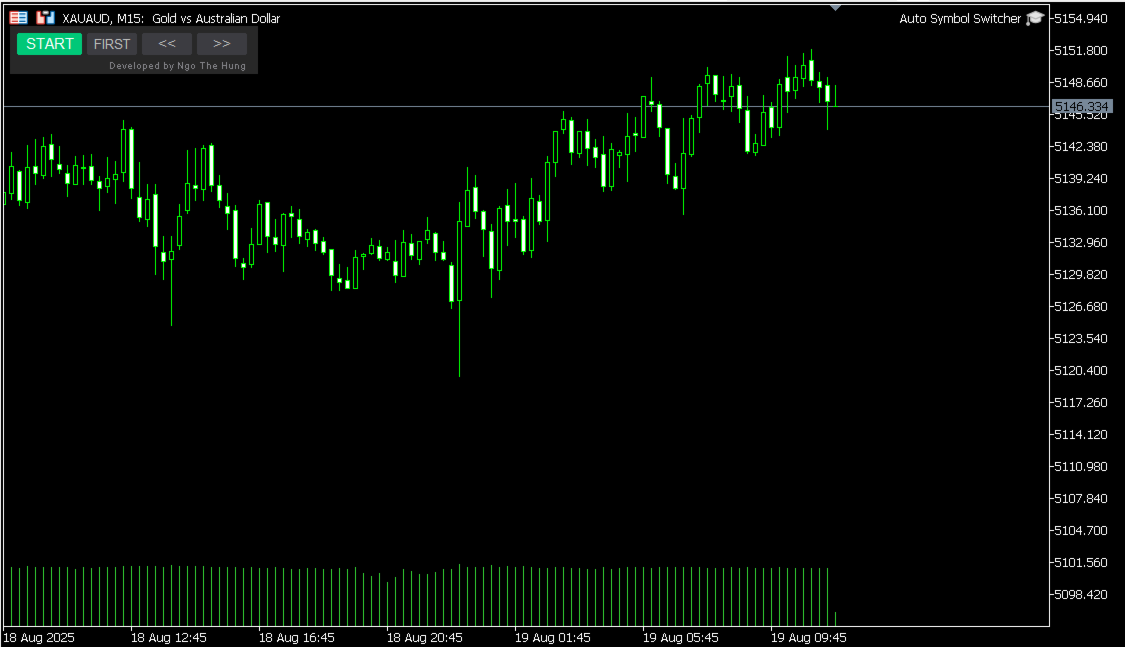
Auto Symbol Switcher for MetaTrader 5 is a utility panel that automatically cycles the active chart through a list of symbols. It is designed for traders who follow many markets and want the chart to move through a watchlist without clicking symbols one by one. The tool is navigation-only: it does not open, modify or close any trades and it does not change your account in any way.

You can use the panel for Forex, indices, commodities, stocks and Contracts for Difference (CFDs), depending on what your broker provides in MetaTrader 5. The goal of the utility is to make chart navigation easier and more consistent when you monitor many instruments.

Public channel: CLICK HERE

A detailed user guide with screenshots and additional examples is available in the following article on MQL5: Auto Symbol Switcher – Full User Guide

If you also trade on MetaTrader 4, there is a separate MT4 version of this utility available in the Market: Auto Symbol Switcher for MT4

How the Panel Works

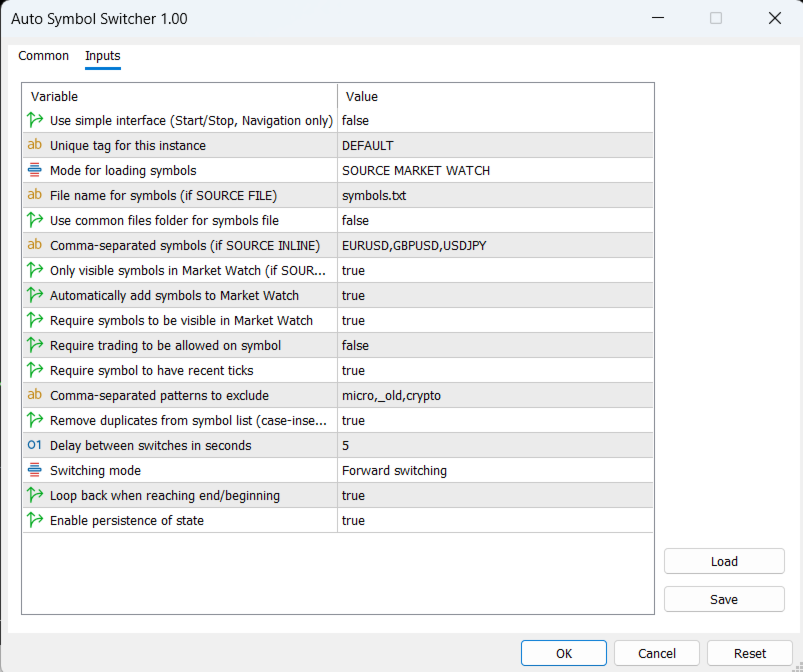
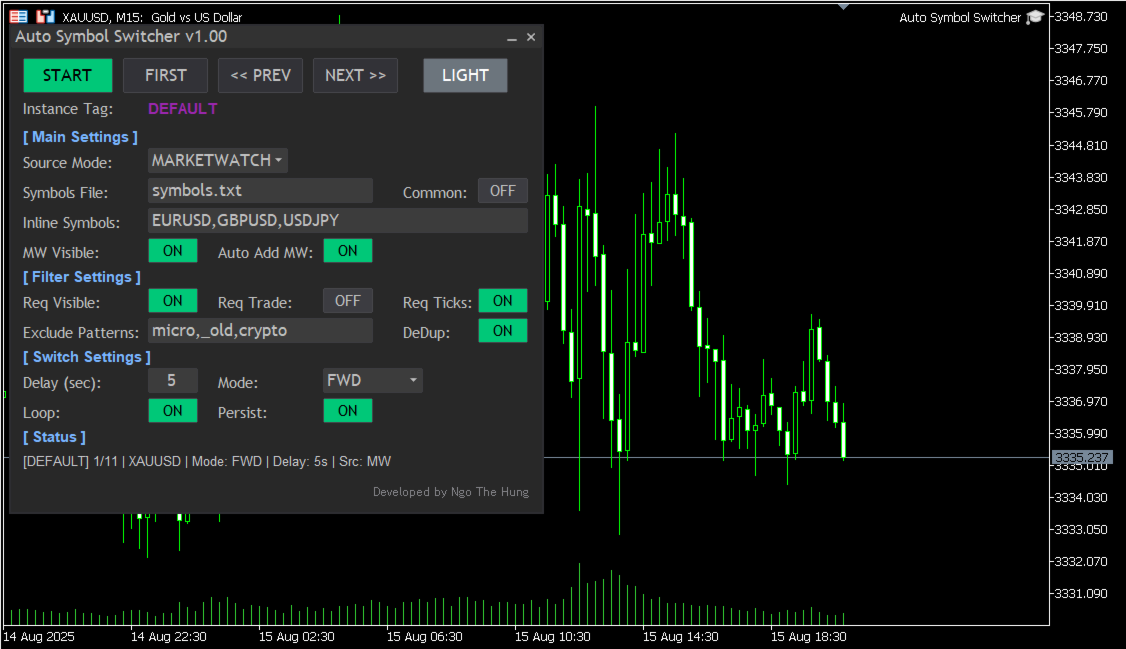
Attach Auto Symbol Switcher to any chart in MT5 and choose how you want to build your watchlist. You can use the symbols that are already visible in the Market Watch window, type a simple comma-separated list in the settings, or load symbols from an external text file. The panel then moves the chart from one symbol to the next after a delay that you define. You can switch direction or pause the rotation at any time.

The utility offers two interface styles. A simple compact bar provides four main buttons for manual control (Start or Stop the rotation, jump to the First symbol in the list, or move to the Previous or Next symbol). The full panel adds on-screen switches, more controls and an optional light or dark colour theme so the interface remains readable during long sessions. You can choose the interface style that fits your workspace and screen size.

Key Features

  • Automatic watchlist rotation: The chart cycles through your symbol list with a user-defined delay between changes.
  • Flexible symbol sources: Build the list from the Market Watch window, from a simple inline list in the inputs, or from an external text file as described in the user guide.
  • Practical filters: Limit rotation to symbols that are visible, that have recent ticks or that are allowed for trading by the broker, and exclude symbols whose names contain unwanted patterns such as “micro”, “old” or “crypto”.
  • Optional Market Watch auto-add: If a symbol is not currently visible in Market Watch, the panel can add it automatically before switching to it.
  • Rotation styles: Choose between forward, backward or ping-pong rotation and define whether the sequence should loop at the ends or stop.
  • Per-chart persistence: Each panel instance can remember its last position and main options so multi-chart workflows remain organised after a terminal restart.
  • Light and dark appearance: Switch between light and dark colour modes to maintain good contrast on different chart backgrounds.

Who It Is For

  • Day traders and scalpers who scan many symbols on the same timeframe.
  • Portfolio watchers who rotate through lists of stocks, indices, futures or CFDs.
  • Analysts who prefer a regular, automated review of a predefined watchlist.

Using Auto Symbol Switcher in MT5

In a typical workflow, you attach the panel to one chart per watchlist. For example, you can use one chart for major currency pairs, one chart for indices and one chart for metals and energies. Each chart can have its own rotation style, delay and filters. You can pause the rotation when you want to study a symbol in more detail and resume it later with a single click.

Filters help you keep your lists focused. You can ask the panel to skip symbols that are not visible in Market Watch or that are not allowed for trading on the current account. The exclude-pattern option lets you remove groups of instruments from the rotation by simple name fragments instead of editing the watchlist manually.

Getting Started

  1. Download and install Auto Symbol Switcher for MT5 from the Market.
  2. Open a chart in MetaTrader 5 and attach the utility to that chart.
  3. Choose the symbol source (Market Watch, inline list or external file) and set the preferred rotation style and delay.
  4. Adjust basic filters and appearance options so the panel matches your workspace.
  5. Start the rotation and, if needed, use the buttons on the panel to pause, jump to the first symbol or move backward and forward manually.

Compatibility and Requirements

The utility is intended for the MetaTrader 5 platform and can be used on hedging or netting accounts. It works with any symbols that are available on your MT5 account, including Forex pairs, indices, metals, energies, stocks, futures and CFDs, subject to your broker’s data feed and permissions. Because the tool is navigation-only, it does not depend on your trading style or risk settings.

Support and Documentation

All buyers receive free updates and technical support for Auto Symbol Switcher for MT5. Suggestions that improve stability, clarity or usability are considered for future versions whenever possible.
Produtos recomendados
EW Close All – Um clique. Tudo fechado. EW Close All é um Expert Advisor leve e multilíngue que permite fechar todas as posições abertas e cancelar todas as ordens pendentes instantaneamente — com apenas um clique. Fecha todas as posições abertas   Cancela todas as ordens pendentes   Funciona em qualquer símbolo e timeframe   Interface multilíngue   Limpo, rápido e confiável Perfeito para saídas rápidas, controle de risco ou limpeza no final do dia. Mantenha total controle — feche
FREE
Position Stress Monitor Position Stress Monitor is a utility for MetaTrader 5 designed to visualize position structure and risk conditions directly on the chart through a compact panel. The tool does not attempt to predict the market or generate entry signals. Instead, it focuses on a different problem that many traders encounter in practice: understanding how a group of positions behaves as a whole. In real trading, especially when managing multiple entries or holding both buy and sell positio

Navegue com sucesso por todos os desafios da prop firm com nosso Expert Advisor de dimensionamento de posição, projetado para entradas de ordens perfeitas e cálculos automatizados de tamanho de lote. Você nos agradecerá mais tarde! Faça upgrade para o Mercurial Position Sizing PRO  para obter os recursos completos mais recentes! O EA não é um robô de negociação e não funcionará no testador de estratégias!       Principais características: Alocação de risco de nível institucional: Assuma o contr
FREE
Set an order in advanced. Literally, set and forget. ========================================== INPUTS: EA magic number (should be unique):   Set the magic number to be used when opening and closing trades. If you have other EAs on the account, make sure they use different magic numbers. DASHBOARD INPUTS: Lot Size: Set the lot size to use for the order. Default is the minimum lot size for the chart symbol. Order Type:   Choose between buy or sell. SL Points (0 = no SL): Set the stoploss to use a
Simple Stats is utility for trades history management. (works as Expert Advisor) Allowing you to:   see trading performance for each symbol separately , and so it     helps you to find the M0ST and the W0RST profitable type of trades  based on past results. filters: see only manual trades see only EA trades see only EA trades from one specific Magic Number select time period for history SS will  distinguish reports with filename - each history report is named with account number an
O Account Info AS é um poderoso script de informações para MetaTrader 5 que exibe informações completas sobre sua conta de negociação diretamente no gráfico. O script fornece todos os dados necessários para análise da conta, gerenciamento de risco e tomada de decisões de negociação. Principais Funcionalidades Informações Financeiras Completas Tipo de Conta (Demo/Real/Concurso) Saldo, Patrimônio Líquido e Margem Margem Livre em Dinheiro e Percentual Nível de Margem Lucro/Prejuízo Atual Ges
FREE
这款专为MetaTrader 5设计的EA(Expert Advisor),能够在加载后自动关闭所有图表,并立即从当前图表中自行移除。它适合那些希望快速清理所有图表,并避免手动关闭每个图表的用户。 功能特点: 一次性清理: 加载后立即关闭所有打开的图表。 自动移除: 执行完毕后,EA自动从当前图表中移除,无需手动操作。 快速高效: 适用于快速清理交易环境,特别适合在需要快速重置或结束交易日的情境。 使用说明: 只需将此EA添加到任何一个图表上,它将自动执行关闭所有图表的操作并自行移除。使用前,请确保已保存所有重要的图表数据和设置。 风险提示: 请谨慎使用此EA,以防不小心关闭重要图表。 适用于MetaTrader 5平台。 技术支持: 如有任何技术问题或需求,请联系我以获得帮助。
FREE
Super simple, convenient, useful tool. Allows displaying the end time of a candle (standard) and expanding the symbol's spread in real time. The countdown tool is smooth, not jerky or slow like some other tools Useful tool for professional traders specializing in short-term and long-term trading. Contact author or user guide: https://www.mql5.com/en/channels/metool_trading
FREE
T Manager for Price action Traders
Haidar Lionel Haj Ali
4.5 (10)
T Manager, the ultimate trade management solution designed by traders for traders. If you are searching for a simple and efficient trade panel, trade manager, or trade assistant, you are at the right place.   The market contains a diverse number of those tools , but this one is designed by traders for traders . I designed this tool, and I am using it daily. Take my advice and stop buying tools blended with un-useful features that you will never use,   T Manager provides you with the essential y
RRPP Script
Mikhail Ostashov
RRPP Script A script for placing a pending order prepared by the Risk Ratio Trade Panel indicator. Reads the entry price, Take Profit, Stop Loss and lot size directly from the indicator lines on the chart. Requirements The Risk Ratio Trade Panel indicator must be attached to the chart and the panel must be open before running the script. How it works Attach the Risk Ratio Trade Panel indicator to the chart, open the panel and set the Entry, TP and SL lines to the desired levels. Then run RRPP Sc
FREE
Auto close
Raudel Umaran Elias
4.33 (9)
Simple program to automatically close positions by profit or loss. User can select "Total Profit" to close all positions at the same time, once the total profit or loss is reached. User can select "Single Profit" to close one by one positions, once single profit or loss is reached. Notes: 1. The assistant will not open any position. 2. The assistant only provide market orders, so due maket volatility positions can suffer slippage. 
FREE
One click to close all (OCCA) provides you posibility to close all open position with one click. Here is no any settings, just run the script and all your open positions will be closed and it will happen very fast ! Works with all types of accounts, with all currency pairs and any broker. The number of open positions is not limited. The script will be useful for trading strategies, in which you need to manage a large number of positions.
Basic Trade Buttons
Kriengsak Peitaisong
Basic Trade Buttons is a tool to help you to quickly open and close trades, place take profit and stop loss points by clicking on the button of each job that you preferred. Once you attached this tool to mt5 chart, the program will calculate a trade volume(Lots size) automatically to prepare to send to the trade server when you click on 'Buy' or 'Sell' button. Click on 'TP', 'SL' or 'Close' button to place take profit, stop loss based on the predefined levels or to close all open positions respe
The Dfx Position Risk Calculation Tool is an MT5 indicator developed by DefenderFX Ltd. designed to assist traders in assessing risk and reward for their trades. The tool automatically calculates the risk-to-reward ratio based on user-defined parameters, such as lot size and take profit (TP) level. It provides visual lines on the chart for entry (Blue Color), stop loss (SL) – Red Color, and TP levels (Green Color), which traders can adjust by dragging. Key Features: Input Parameters : Traders ca
Ratio Spread
Manh Viet Tien Vu
This tool helps you calculate the ratio of slippage and current spread compared to the average price movement over the timeframe of a specific symbol. It can indicate whether you should trade on that timeframe or not. If the ratio is too high, it will be very challenging to make a profit. Typically, this ratio should be less than 15%.. Simply add it to the chart of the timeframe for the symbol you wish to estimate.
FREE
Advanced Trailing Stop & Break-Even Expert Advisor with Partial Profit Taking Overview Unlock the full potential of your trading strategy with this Expert Advisor that automates trade management to maximize profits and minimize losses. Designed for both novice and experienced traders, this EA offers precise control over your trades with customizable trailing stops, break-even protection, and partial profit taking — all working seamlessly to protect your capital and lock in gains. Key Features Dy
All In One (AIO) A2 Trade Panel EA  made for you that like SCALPING, HEDGING, or LONG TIME TRADING. TRIAL VERSION, FOR DEMO ACCOUNT ONLY Features : TRADING INFORMATION Profit / Loss information (Customizable information - See on Attached Pictures) Margin Level information Equity information Total Lots Information Time information (Customizable information - See on Attached Pictures) Daily Profit / Loss Information TRADE MANAGER Close Buy / Sell Trade Close Buy / Sell Profitable Trade Close Parti
FREE
Telegram to mt5 signal copier
Chukwuemeka Kingsley Anyanwu
5 (1)
Copies Signal from any Telegram channel and instantly executes the trade on MT5 without admin rights! Do you receive trading signals on Telegram and wish they could execute instantly on Meta Trader 5? READ THIS FOR SETUP GUIDE Telegram to MT5 Signal Copier is a powerful bridge between your Telegram signal channels and MetaTrader 5. It listens to messages from a specific Telegram channel and automatically extracts trading signals — including symbol, action, entry price, stop loss, and take prof
This is the demo Version of Money and Trade Manager, which can be found here: https://www.mql5.com/en/market/product/58163# The Demo is limited to EUR/USD , but otherwise fully functional. Features: easy positioning of stoploss and takeprofit with horizontal Assistance-lines automatic Volume calculation fixed risk, set by the trader Closing of all trades of one type, with the click of one button (long or short, for this symbol) Creation of pending orders with one click Direct feedback throug
FREE
Guardian Yield Keeper is a utility Expert Advisor for traders who want real-time exit management and profit protection for open positions on the current symbol. This EA does not open new trades and does not generate entry signals. Its job is simple: monitor existing positions and close them when your profit or risk conditions are met . It is especially suitable for traders using DCA, Grid, Martingale, or basket trading systems and looking for a dedicated management layer that is more flexible th
Virtual sl tp Manager
Calvin Andile Mahlangu
Virtual SL/TP Manager manages stop loss and take profit levels as virtual chart objects instead of relying on broker-side SL and TP orders. It draws horizontal lines with Labels showing the projected profit or loss at each virtual exit level. This approach is useful for traders who want hidden exits, flexible post-entry trade management, and visual control over stop loss and take profit levels directly on the chart. The EA does not need to place broker stop loss or take profit orders. Instead
FREE
This EA helps to Close all Positions opened. It saves you the time of closing multiple positions manually. Parameters: Buy:  Close Buy Positions Only Sell:  Close Sell Positions Only Buy & Sell: Close Buy & Sell Positions Pending: Close Pending Orders More Advanced MT5 version available at:  https://www.mql5.com/en/market/product/93301?source=Unknown%3Ahttps%3A%2F%2Fwww.mql5.com%2Fen%2Fmarket%2Fmy More Advanced MT4 version available at:   https://www.mql5.com/en/market/product/93468?source=Unk
Move TP & SL (MT5) é um script utilitário de trading que permite mover rapidamente o Take Profit (TP) e o Stop Loss (SL) de posições ativas e ordens pendentes com apenas um clique. O script oferece dois modos de funcionamento: Modo Pips (Pips Mode) : define o TP e o SL com base em uma distância fixa em pips a partir do preço de abertura da ordem. Modo Preço (Price Mode) : define o TP e o SL diretamente em um nível de preço específico. Você pode escolher quais ordens serão modificadas: todas as o
FREE
Automated Report Generator for the Spanish Treasury This utility allows you to generate automated reports for the Spanish treasury with several advantages: A detailed report is generated in an HTML file in the MetaTrader 5 base directory. This report includes all operations individually. For accounts nominated in another currency, the report will automatically generate a profit column in euros using the same broker data. Profits in other currencies will be accounted for as indicated by the Spa
TrailingTrader MT5 – Trailing Stop-Loss and Take-Profit Script  Upon activation of the TrailingTrader script , open positions of specified trading instruments in the quote window will automatically implement an intelligent trailing stop strategy. This helps traders lock in profits and manage risks without the need for manual monitoring and adjustments. Core Configuration Parameters Symbol : Specify the trading instruments for which trailing stops should be applied. Use English commas (,) to sepa
Utilitário projetado para alterar o instrumento de negociação para gráficos atuais, todos ou selecionados, mudança de período de tempo e para movimento simultâneo no histórico (automaticamente ou com um clique) todos os gráficos. A lista de símbolos é lida na "Visão geral do mercado". Você pode alterar a cor, o tamanho e a posição dos botões. A sincronização de gráficos ocorre no momento da primeira barra visível no gráfico ativo, quando você clica no botão de sincronização ou quando move o mous
One Click Trader  is a tool designed for MetaTrader 4 platform, which enables you to take your trading to the next level. It enables you to open, manage and close your trades in simple an efficient way by just one click of your mouse button. "-"   ,  "+"  change OCT window size  Up arrow minimizes the OCT panel Down arrow maximizes the OCT panel Right arrow displays the next panel with additional features Left arrow hides the panel with additional features Red  SELL  button enables you to open s
BuyMarket
Pietro Caporale
Simple script for Buy by Market Execution on all financial instruments. Inputs Volume - default: 0.10 Deviation - default: 10 points Stoploss - default: 50 points Takeprofit - default: 50 points Comment - default: Order by Market Confirm - default: false Inputs Details Type Order Buy Order is preset. Deviation Maximum deviation from quoted price in points. Stoploss & Takeprofit In points value, be careful that this value will be added to minimum stop allowed by the broker. For example if you s
FREE
EA Manage Emotion
Hua Nguyen Nguyen Tran
EA Emotion   is not a traditional Expert Advisor that places trades automatically – instead, it’s a psychological checkpoint that helps you manage   trading discipline and emotional control . Designed especially for discretionary traders, prop firm challengers, and anyone serious about improving consistency,   EA Emotion   asks a series of custom questions   right after you open a trade , such as: Did you follow your trading plan? Are you in the right mental state? Is this trade part of your set
Auto Stop Loss MT5
Nabil Oukhouma
5 (1)
O Gerenciador de Risco "Configure e Esqueça" para Trading Multiativos ️ Nunca deixe uma operação desprotegida. Auto Stop Loss (MT5 Manager) é a ferramenta de background definitiva para traders que priorizam a segurança. Diferente de painéis comuns, esta ferramenta trabalha incansavelmente nos bastidores para proteger instantaneamente cada trade que você abre. Seja operando manualmente ou via outro Robô (EA), este gerenciador garante que cada posição tenha Stop Loss, Take Profit e Trailing Stop
Os compradores deste produto também adquirem
Trade Assistant MT5
Evgeniy Kravchenko
4.42 (208)
Ajuda a calcular o risco por comércio, a fácil instalação de uma nova encomenda, gestão de encomendas com funções de fecho parcial, trailing stop de 7 tipos e outras funções úteis. Materiais e instruções adicionais Instruções de instalação   -   Instruções para a aplicação   -   Versão de teste da aplicação para uma conta de demonstração Função de linha Mostra no gráfico a linha de Abertura, Stop Loss, Take Profit. Com esta função é fácil definir uma nova ordem e ver as suas características ad
Bem-vindo ao Trade Manager EA—uma ferramenta de gestão de risco criada para tornar o trading mais intuitivo, preciso e eficiente. Não é apenas uma ferramenta para executar ordens, mas uma solução abrangente para planejamento de operações, gerenciamento de posições e controle de risco. Seja você um iniciante, trader avançado ou scalper que precisa de execução rápida, o Trade Manager EA adapta-se às suas necessidades, oferecendo flexibilidade em todos os mercados, desde forex e índices até commodi
Local Trade Copier EA MT5
Juvenille Emperor Limited
4.96 (135)
Experimente uma cópia de negociação excepcionalmente rápida com o Local Trade Copier EA MT5 . Com sua fácil configuração de 1 minuto, este copiador de negociações permite que você copie negociações entre vários terminais MetaTrader no mesmo computador Windows ou em um Windows VPS com velocidades de cópia ultra rápidas de menos de 0.5 segundos. Seja você um trader iniciante ou profissional, o   Local Trade Copier EA MT5   oferece uma ampla gama de opções para personalizá-lo de acordo com suas ne
TradePanel MT5
Alfiya Fazylova
4.87 (151)
Trade Panel é um assistente de negociação multifuncional. O aplicativo contém mais de 50 funções de negociação para trading manual e permite automatizar a maioria das tarefas de negociação. Atenção! Os descontos são por tempo limitado, toda terça-feira o preço aumentará em 5$. (até 100$). Antes da compra, você pode testar a versão de demonstração em uma conta demo. Baixe a versão experimental do aplicativo para uma conta de demonstração: https://www.mql5.com/pt/blogs/post/762547 . Instruções com
Farmed Hedge Yield Farming | All Markets (Manual - Hybrid - Semi/Automated EA) MULTI-ASSET SUPPORT Trade any asset available on your broker - Forex: Major, Minor, Exotic pairs - Crypto: BTC, ETH, XRP, SOL, BNB - Stocks: Apple, Tesla, Amazon, Google, etc. - Commodities: Gold, Silver, Oil, Gas - Indices: US30, NAS100, SPX500, DAX40 - Any CFD your broker offers VERIFIED TRADING RESULTS - Farmed Hedge Yield Axi Copy:  https://www.mql5.com/en/signals/2356376 - Farmed Hedge Yield Exn Copy:   https:/
Versão Beta O Telegram to MT5 Signal Trader está quase no lançamento oficial da versão alfa. Alguns recursos ainda estão em desenvolvimento e você pode encontrar pequenos erros. Se tiver problemas, por favor reporte, seu feedback ajuda a melhorar o software para todos. Telegram to MT5 Signal Trader é uma ferramenta poderosa que copia automaticamente sinais de trading de canais ou grupos do Telegram diretamente para sua conta MetaTrader 5 . Suporta canais públicos e privados do Telegram, e você
Exp COPYLOT CLIENT for MT5
Vladislav Andruschenko
3.82 (34)
Copiador profissional de operações para MetaTrader 5 Um copiador de operações rápido, profissional e confiável para MetaTrader . COPYLOT permite copiar operações de Forex entre terminais MT4 e MT5 com suporte para contas Hedge e Netting . A versão MT5 do COPYLOT oferece suporte a: - MT5 Hedge → MT5 Hedge - MT5 Hedge → MT5 Netting - MT5 Netting → MT5 Hedge - MT5 Netting → MT5 Netting - MT4 → MT5 Hedge - MT4 → MT5 Netting Versão MT4 Descrição completa + DEMO + PDF Como comprar Como instalar Como
HINN Lazy Trader
ALGOFLOW OÜ
5 (2)
Limited time offer: 20% off for a few days only!  - Annual subscription $360 instead of $450  - Lifetime plan $550 instead of $690 The core idea: using the user interface, you configure the parameters the chart must meet before entering a position (or positions), choose which entry models to use, and set the rules for when trading and planning should end. Lazy Trader  handles the rest: it  takes over all the routine chart watching and execution! full description  :: 3 key videos [1] ->  [2]   -
Footprint Chart Pro — Professional OrderFlow EA for MetaTrader 5 Version 6.34 | Professional tool for real traders | Institutional-Grade Visualization DEMO USERS - PLEASE SELECT EVERY TICK / REAL TICK WHEN TESTING AND YOU HAVE DOWNLOADED HISTORICAL DATA. IF YOU SEE A WAITING SCREEN AND IT IS NOT DOWNLOADING, IT MEANS YOU HAVE LOW HISTORICAL DATA. TRY 1 MIN AND 5 MIN FIRST ON 1 DAY DATA. ONE DAY DATA SHOULD BE THE NEWEST AND MOST CURRENT DATE. PLEASE WAIT UNTIL THE MARKET HAS ROLLED OVER PERIOD.
Trade Dashboard MT5
Fatemeh Ameri
4.94 (121)
Tired of complex order placement and manual calculations? Trade Dashboard is your solution. With its user-friendly interface, placing orders becomes effortless, by a single click, you can open trades, set stop loss and take profit levels, manage trade lot size, and calculate risk to reward ratios, allowing you to only focus on your strategy. Say goodbye to manual calculations and streamline your trading experience with Trade Dashboard. Download  Demo Version  right now. You can find  Details of
Copy Cat More Trade Copier MT5 (Gato Copiador MT5) é um copiador de negociações local e uma estrutura completa de gestão de riscos e execução projetada para os desafios comerciais de hoje. Desde desafios de prop firms até gestão de portfólio pessoal, ele se adapta a cada situação com uma combinação de execução robusta, proteção de capital, configuração flexível e manuseio avançado de negociações. O copiador funciona tanto no modo Master (remetente) quanto Slave (receptor), com sincronização em t
Trade copier MT5
Alfiya Fazylova
4.59 (41)
Trade Copier é um utilitário profissional projetado para copiar e sincronizar negociações entre contas de negociação. A cópia ocorre da conta / terminal do fornecedor para a conta / terminal do destinatário, instalada no mesmo computador ou vps. PROMOÇÃO - Se você já adquiriu o "Trade copier MT5", pode receber o "Trade copier MT4" gratuitamente (para cópia MT4 > MT5 e MT4 < MT5). Para obter informações mais detalhadas sobre os termos, por favor, entre em contato conosco através de mensagens priv
The product will copy all telegram signal to MT5 ( which you are member) , also it can work as remote copier.  Easy to set up, copy order instant, can work with almost signal formats, image signal,  s upport to translate other language to English Work with all type of channel or group, even channel have "Restrict Saving Content", work with  multi channel, multi MT5 Work as remote copier: with signal have ticket number, it will copy exactly via ticket number. Support to backtest signal. How to s
MT5 to Telegram Signal Provider é uma utilidade fácil de usar e totalmente personalizável que permite o envio de sinais especificados para o chat, canal ou grupo do Telegram, tornando sua conta um fornecedor de sinais . Ao contrário da maioria dos produtos concorrentes, ele não usa importações de DLL. [ Demonstração ] [ Manual ] [ Versão MT4 ] [ Versão Discord ] [ Canal do Telegram ]  New: [ Telegram To MT5 ] Configuração Um guia do usuário passo a passo está disponível. Não é necessário conhec
Helios Pulse
Jonathan Mboya Kinaro
Helios Pulse v1.03 — Painel de probabilidades em tempo real para trading manual Helios Pulse transforma a forma como você lê o mercado. Em vez de alternar entre múltiplas janelas de indicadores e decifrar sinais contraditórios, você recebe uma única resposta clara: uma porcentagem de probabilidade ao vivo que mostra o viés direcional atual do mercado, atualizada continuamente a cada tick. Isso não é mais um painel de setas de sinal. Helios Pulse é um motor de probabilidades que mede o grau de co
Timeless Charts
Samuel Manoel De Souza
5 (4)
Timeless Charts é uma solução avançada de gráficos desenvolvida para traders profissionais que buscam controle total sobre a construção e visualização de gráficos, além das limitações do sistema de gráficos nativo do MetaTrader 5. Diferente dos gráficos offline tradicionais ou indicadores personalizados simplistas, esta solução constrói barras totalmente personalizadas com precisão real de carimbo de tempo , até milissegundos, proporcionando uma experiência de trading poderosa e precisa. ️ 50%
Anchor Trade Manager
Kalinskie Gilliam
5 (2)
Anchor: The EA Manager A coordination system for traders running multiple EAs. Anchor ensures only one EA can trade at a time, preventing conflicting positions and keeping your portfolio safer. Attach Anchor to any chart. Configure your EAs and their magic numbers. Anchor handles the rest. Built for portfolios. Built for discipline. Built for prop firms. The Problem Running multiple EAs on the same account creates risk. Two gold EAs can open opposite positions on the same candle. Three EA
Trader Evolution
Siarhei Vashchylka
5 (7)
" Trader Evolution " - A utility designed for traders who use wave and technical analysis in their work. One tab of the utility is capable of money management and opening orders, and the other can help in making Elliott wave and technical analysis. Manual (Be sure to read before purchasing) | Version for MT4 Advantages 1. Trading in a few clicks. Immediate and pending orders are available in the panel 2. Money management. The program automatically selects the appropriate lot size 3. Simplifies
EA Auditor
Stephen J Martret
5 (1)
EA AUDITOR — EA and Signal Verification Tool for MetaTrader 5 EA Auditor is an independent analysis tool for traders evaluating Expert Advisors and trading signals on MetaTrader 5. It audits backtest reports, reviews posted developer signals, and cross-verifies the two against each other to help traders assess strategies before committing capital. The MQL5 market offers a wide range of Expert Advisors from many developers, with varying approaches, quality, and transparency. EA Auditor provides a
Ultimate Extractor
Clifton Creath
5 (9)
Ultimate Extractor - Professional Trading Analytics for MT5 *****this is the local HTML version of Ultimate Extractor. !!!!!it is not compatible with Cloud!!!! For the online version please reach out to me directly****** Ultimate Extractor transforms your MetaTrader 5 trading history into actionable insights with comprehensive analytics, interactive charts, and real-time performance tracking. What It Does Automatically analyzes your MT5 trading history across all Expert Advisors and generates
HINN MagicEntry Extra
ALGOFLOW OÜ
4.71 (14)
HINN MAGIC ENTRY – the ultimate tool for entry and position management! Place orders by selecting a level directly on the chart! full description   ::  demo-version  :: 60-sec-video-description Key features: - Market, limit, and pending orders - Automatic lot size calculation - Automatic spread and commission accounting - Unlimited partitial take-profits  - Breakeven and trailing stop-loss and take-profit  functions - Invalidation leves - Intuitive, adaptive, and customizable interface - Works
Seconds Chart MT5
Boris Sedov
4.59 (17)
Seconds Chart - uma ferramenta exclusiva para criar gráficos de segundos no MetaTrader 5 . Com o Seconds Chart , você pode criar gráficos com períodos definidos em segundos, proporcionando flexibilidade e precisão ideais para análise, indisponíveis em gráficos padrão de minutos ou horas. Por exemplo, o período S15 indica um gráfico com velas de 15 segundos. Você pode usar qualquer indicador ou Expert Advisor com suporte a símbolos personalizados. Trabalhar com eles é tão conveniente quanto negoc
Analise toda a sua watchlist em busca de barras extremas - em tempo real. Power Bar Scanner monitora todos os seus simbolos ao mesmo tempo e alerta no momento em que uma barra de preco extrema aparece. Sem mais trocar entre graficos. Veja todas as oportunidades em um unico painel. Funciona em qualquer timeframe. Forex, Indices, Ouro, Crypto - tudo em uma unica visualizacao. Como funciona O scanner verifica cada simbolo no seu Market Watch em busca de barras onde o corpo da vela excede N x ATR .
Trade Manager DashPlus
Henry Lyubomir Wallace
5 (13)
DashPlus é uma ferramenta avançada de gerenciamento de operações projetada para melhorar a eficiência e a eficácia das suas transações na plataforma MetaTrader 5. Ela oferece um conjunto completo de funcionalidades, incluindo cálculo de risco, gestão de ordens, sistemas de grade avançados, ferramentas baseadas em gráficos e análise de desempenho. Principais Funcionalidades 1. Grade de Recuperação Implementa um sistema de grade flexível e de média para gerenciar operações em condições adversas de
Trade Manager DaneTrades
Levi Dane Benjamin
4.28 (29)
Trade Manager para ajudá-lo a entrar e sair rapidamente de negociações enquanto calcula automaticamente seu risco. Incluindo recursos para ajudar a evitar negociações excessivas, negociações de vingança e negociações emocionais. As negociações podem ser gerenciadas automaticamente e as métricas de desempenho da conta podem ser visualizadas em um gráfico. Esses recursos tornam este painel ideal para todos os traders manuais e ajudam a aprimorar a plataforma MetaTrader 5. Suporte multilíngue. Vers
Equity Protect Pro: Seu Especialista em Proteção de Contas Abrangente para Negociação Tranquila Se você está procurando recursos como proteção de conta, proteção de patrimônio, proteção de portfólio, proteção de múltiplas estratégias, proteção de lucro, coleta de lucro, segurança de negociação, programas de controle de risco, controle automático de risco, liquidação automática, liquidação condicional, liquidação programada, liquidação dinâmica, trailing stop loss, fechamento com um clique, liqu
Ultimate Trailing Stop EA MT5
BLAKE STEVEN RODGER
4.13 (8)
This EA Utility allows you to manage (with advanced filtering) unlimited open orders (manual or EA) with 16 trailing stop methods: fixed, percent, ATR Exit, Chandelier Exit, Moving Average, Candle High Low Exit, Bollinger Bands, Parabolic, Envelope, Fractal, Ichimoku Kijun-Sen, Alligator, Exit After X Minutes or Bars, RSI and Stochastic. The trailing stop can be either real or virtual, and you can exit fully or with a partial close percent on touch or bar close.  Moreover, you can add (override
Smart Stop Scanner – Sistema multiactivo de análise de stops baseado em estrutura de mercado Visão geral O Smart Stop Scanner oferece aos traders um monitoramento profissional de níveis de stop-loss em múltiplos mercados. O sistema identifica automaticamente as zonas de stop mais relevantes com base na estrutura real do mercado, rupturas significativas e lógica de price action — tudo apresentado em um painel unificado, claro e totalmente compatível com telas de alta resolução (DPI-aware). Func
EasyTrade MT5
Alain Verleyen
5 (3)
Easy Trade – Gestão de Operações Inteligente, Simples e Poderosa Easy Trade é a solução completa de gestão de operações para usuários do MetaTrader que desejam manter o risco sob controle e uma execução ultra suave. Desenvolvido do zero com base no feedback de traders reais, o Easy Trade facilita a execução, o monitoramento e a gestão de operações em vários símbolos – sem complicar o seu fluxo de trabalho. Seja você um scalper manual ou esteja gerenciando uma pequena carteira de setups, o Easy
Custom Alerts: Monitore vários mercados e não perca nenhuma oportunidade importante Visão geral Custom Alerts é uma solução dinâmica para traders que desejam monitorar configurações potenciais em vários instrumentos a partir de um único local. Integrando dados de nossas ferramentas principais — como FX Power, FX Volume, FX Dynamic, FX Levels e IX Power — o Custom Alerts notifica automaticamente sobre movimentos importantes do mercado, sem a necessidade de alternar entre diversos gráficos ou pe
Mais do autor
Virtual SL TP Trailing Pro – Client-Side Stop Loss / Take Profit and Trade Management Looking for MetaTrader 4 version?  I t is available separately in the Market:   Virtual SL TP Trailing Pro MT 4 Public channel:   CLICK HERE Virtual SL TP Trailing Pro is a trade management utility for MetaTrader that keeps Stop Loss (SL) and Take Profit (TP) levels on the client side instead of sending them to the trading server. It is designed to help you manage exits in a structured way using a clear on-cha
Prop Guardian Risk Manager MT5 – Daily and Overall Drawdown Protection for Prop Firm Traders Prop Guardian Risk Manager is a professional risk-control utility for MetaTrader 5, created for traders who operate under prop firm rules. It does not open trades and does not implement any trading strategy. Instead, it runs in the background, monitors your account risk and can automatically block trading or close exposure when your own limits are reached. Use it as a safety layer on top of your manual t
Virtual SL TP Trailing Pro for MT4 – Client-Side Stop Loss / Take Profit and Trade Management Looking for MetaTrader 5 version?  I t is available separately in the Market:   Virtual SL TP Trailing Pro MT5 Public channel:   CLICK HERE Virtual SL TP Trailing Pro for MT4 is a trade management utility that keeps Stop Loss (SL) and Take Profit (TP) levels on the client side instead of sending them to the trading server. It is designed to help you manage exits in a structured way using a clear on-cha
Automate Risk Management with Smart Trailing Stop Manager for MetaTrader 4 Looking for MetaTrader 5 version? I t is available separately in the Market:   Smart Trailing Stop Manager MT5 Full User Guide    –  Public channel:   CLICK HERE Struggling with manually adjusting stops and securing profits? Smart Trailing Stop Manager MT4 is an intelligent utility for MetaTrader 4 that automates trailing stops, break-even management, partial closes, and auto SL. Optimized specifically for MT4 users, it e
MT5 Send To Telegram
The Hung Ngo
5 (3)
MT5 Send To Telegram – Real-Time Trade Alerts & Monitoring for Telegram MT5 Send To Telegram EA is a read-only monitoring and notification utility for MetaTrader 5. It sends clean, real-time trading activity from your MT5 account to Telegram , so you can stay informed from anywhere on mobile or desktop. Safe by design: this EA does not open, close, modify, or manage trades . It only monitors your account, sends alerts, and replies to supported read-only Telegram requests. Receive alerts for new
Bullish AI Trader EA (MT5) – AI-Assisted Auto Trading for XAUUSD Bullish AI Trader is an automated Expert Advisor for MetaTrader 5 designed to trade XAUUSD (Gold) with a rules-based, AI-assisted signal engine and built-in risk control. Important: Although the name is “Bullish”, the EA is NOT buy-only . It can open BUY or SELL trades — both directions follow the same logic, depending on market conditions and the detected signal. Key Features AI-Assisted Signal Engine: Uses a multi-factor model (p
Multi Anchor VWAP Pro MT4 – Pure Anchored VWAP | Adaptive σ-Bands | Smart Alerts Precision VWAP anchoring, purpose-built for MetaTrader 4. One-click anchors, dynamic σ-bands or %-bands and instant multi-channel alerts—ideal for scalpers, intraday and swing traders who need institutional-grade fair-value mapping. Public channel:   CLICK HERE Full User Guide  –  Need MT5? Click here WHY PROFESSIONAL TRADERS CHOOSE MULTI ANCHOR VWAP PRO VWAP is the institutional benchmark for fair value. This MT4
Raymond Cloudy Day Indicator for MT5 – Pivot-Based Reversal and Trend Levels Raymond Cloudy Day Indicator is a pivot-based level indicator for MetaTrader 5 (MT5). It was developed by Ngo The Hung based on Raymond’s original idea and is designed to give a structured view of potential reversal zones, trend extensions and support/resistance levels directly on the chart. The default settings are optimised for XAUUSD on the H1 timeframe, but the indicator can be tested and adjusted for other symbols
FREE
CDV Candle Engine Pro is a MetaTrader 5 indicator designed to visualize Cumulative Delta Volume (CDV) directly on the price chart. It helps traders read market pressure more clearly by showing the balance between buying and selling activity in a clean, customizable layout. If you trade on MetaTrader 4, the MT4 edition is available here:  CDV Candle Engine Pro MT4 Public channel:   CLICK HERE Main Features CDV candle visualization on the main chart for easy reading in real time. Optional subwind
VWAP Ultimate Pro MT5 – Anchored VWAP | Session VWAP | Dynamic Bands & Smart Alerts Elevate Your Trading Edge with the Ultimate Institutional-Grade VWAP Indicator WHY PROFESSIONAL TRADERS CHOOSE VWAP ULTIMATE PRO? VWAP (Volume-Weighted Average Price) is widely used by institutions and professional traders to estimate fair market value and intraday bias. VWAP Ultimate Pro MT5 brings this power to retail traders with an all-in-one indicator, combining multi-mode VWAP, interactive anchored VWAP,
Multi Anchor VWAP Pro MT5 – Pure Anchored VWAP | Adaptive σ-Bands | Smart Alerts Precision VWAP anchoring, no clutter. One-click anchors, dynamic σ-bands or %-bands, and instant multi-channel alerts—built for scalpers, intraday and swing traders who demand institutional-grade fair-value mapping. Public channel:   CLICK HERE Full User Guide  –  Need MT4? Click here WHY PROFESSIONAL TRADERS CHOOSE MULTI ANCHOR VWAP PRO VWAP is the institutional benchmark for fair value. Multi Anchor VWAP Pro stri
Phoenix Trend MT4 – ATR Grid/DCA with Trend Filter & Basket TP Phoenix Trend MT4 is a trend-following grid/DCA EA using a higher-timeframe MA filter, ATR-based dynamic grid steps, and basket-level take-profit. This product does not contain profit promises. Grid/DCA trading can experience prolonged drawdowns and may lead to margin call or full account loss in extreme conditions. Need MT5? See the Market version here: Phoenix Trend MT5 . Main features Higher-timeframe trend filter (Fast MA vs Slow
Break Even Helper for MT4 – Simple SL to Entry Utility Break Even Helper for MetaTrader 4 is a compact and effective tool that helps traders protect their open trades by automatically moving the Stop Loss (SL) to the entry price when a trade reaches a user-defined profit level (in points). Designed for risk-conscious traders, this utility simplifies SL management without relying on complex trailing systems or custom strategies. Looking for MetaTrader 5 version? I t is available separately in the
Local Account Monitor MT4 is a read-only local monitoring utility for traders who run multiple MetaTrader terminals on the same PC or the same Windows VPS . It combines Agent mode and Dashboard mode so you can monitor local accounts from one place, spot stale terminals quickly, review account health states, and inspect risk details without switching between many terminals. Public channel:   CLICK HERE What it is for Monitoring multiple local MT4 terminals from one dashboard Quickly identifying
FREE
Alert Relay Helper (EA) – MT5 &  MT4 Encrypted bridge that forwards indicator alerts to external messengers * in real-time. Plug-and-play utility – simply attach it to one chart. Zero trading functions – does not open, modify or close orders. End-to-end AES-256 encryption – only custom indicators that support the same key can broadcast messages (e.g.  VWAP Ultimate Pro v1.20+). Multi-platform – MT5 build 4150+, MT4 build 1380+. Before you turn it on : Open Tools > Options > Expert Advisors and
FREE
Alert Relay Helper (EA) – MT5  & MT4 Encrypted bridge that forwards indicator alerts to external messengers *   in real-time. Plug-and-play   utility – simply attach it to   one   chart. Zero trading functions   – does   not   open, modify or close orders. End-to-end AES-256 encryption   – only custom indicators that support the same key can broadcast messages (e.g.  VWAP Ultimate Pro   v1.20+). Multi-platform   – MT5 build 4150+, MT4 build 1380+. Before you turn it on : Open Tools > Options >
FREE
Local Account Monitor MT5 is a read-only local monitoring utility for traders who run multiple MetaTrader terminals on the same PC or the same Windows VPS . It combines Agent mode and Dashboard mode so you can monitor local accounts from one place, spot stale terminals quickly, review account health states, and inspect risk details without switching between many terminals. Public channel:   CLICK HERE What it is for Monitoring multiple local MT5 terminals from one dashboard Quickly identifying
FREE
Raw Tick Recorder EA for MetaTrader 4 For full setup instructions and demo version that works on chart (not just Strategy Tester), visit:   Full User Guide –  Raw Tick Recorde r Public channel:   CLICK HERE Raw Tick Recorder EA   is a non-trading Expert Advisor that records every incoming market tick with high-precision timestamps. It saves bid/ask data to disk in multiple formats for further analysis, model training, or broker verification. Ideal for traders, analysts, quants, and developers w
VWAP Ultimate Pro MT4 – Anchored VWAP | Session VWAP | Dynamic Bands & Smart Alerts Bring Institutional-Grade VWAP Precision to the Classic MetaTrader 4 Platform WHY TRADERS CHOOSE VWAP ULTIMATE PRO MT4? VWAP (Volume-Weighted Average Price) is a popular benchmark used by professional traders to gauge fair value and session bias. VWAP Ultimate Pro MT4 delivers that same core power to retail traders, optimised for MT4’s architecture while preserving a full professional workflow. This Indicator
Auto Symbol Switcher for MT4 – Watchlist Rotation for Market Watch Symbols Auto Symbol Switcher for MetaTrader 4 is a chart navigation utility that automatically rotates the active chart through a list of symbols. It is designed for discretionary traders, scalpers and analysts who want an organised way to scan markets without manually switching symbols in the Market Watch window. The tool is navigation-only: it does not open, modify or close any orders and it does not change your account in any
Prop Guardian Risk Manager MT4 – Daily and Overall Drawdown Protection for Prop Firm Traders Prop Guardian Risk Manager is a professional risk-control utility for MetaTrader 4, created for traders who work under prop firm rules. It does not open trades and does not implement any trading strategy. Instead, it runs in the background, monitors your account risk and can automatically block trading or close exposure when your own limits are reached. Use it as a safety layer on top of your manual trad
Raymond Cloudy Day Indicator for MT4 – Pivot-Based Reversal and Trend Levels Raymond Cloudy Day Indicator is a pivot-based level indicator for MetaTrader 4 (MT4). It was developed by Ngo The Hung based on Raymond’s original idea and is designed to give a structured view of potential reversal zones, trend extensions and support/resistance levels directly on the chart. The default settings are optimised for XAUUSD on the H1 timeframe, but the indicator can be tested and adjusted for other symbols
MT4 Send To Telegram – Real-Time Trade Alerts & Monitoring for Telegram MT4 Send To Telegram EA is a read-only monitoring and notification utility for MetaTrader 4. It sends clean, real-time trading activity from your MT4 account to Telegram , so you can stay informed from anywhere on mobile or desktop. Safe by design: this EA does not open, close, modify, or manage trades . It only monitors your account, sends alerts, and replies to supported read-only Telegram requests. Receive alerts for new
SyncGuard Local Trade Copier MT4 is a fast, professional local trade copier for MetaTrader 4 , built for traders who want serious copy-trading capability, practical control, and stable day-to-day operation on the same Windows PC or Windows VPS . It is designed for the workflows that matter most in real trading: MT4 to MT4 copying , MT4 to MT5 / MT5 to MT4 when used together with the MT5 version, one transmitter to one or multiple receivers , investor-password source following, account mirroring,
Important: This product is a Library for developers . It is suitable only for users who can write/modify MQL4 code and integrate a compiled library into their own EA/Script. It is not a “drag & run” notifier. Telegram SDK helps you send Telegram messages and photos from MetaTrader 4 in a simple and reliable way. Use it when you want Telegram notifications inside your own automation tools. If you need the MetaTrader 5 version, it is available separately in the Market:   Telegram SDK M T5 . Main f
CDV Candle Engine Pro is a MetaTrader 4 indicator designed to visualize Cumulative Delta Volume (CDV) on the chart in a clean and customizable style. It helps traders observe buying vs selling pressure more clearly and add an extra layer of confirmation to their existing trading approach. If you trade on MetaTrader 5, you can get the MT5 edition here:  CDV Candle Engine Pro MT5 Public channel:   CLICK HERE Main Features CDV candle visualization with clear up/down coloring and smooth chart-frien
GoldenTrend Master MT5: O Consultor Especialista Definitivo para Seguir Tendências no Mercado Forex Visão Geral: Apresentamos o GoldenTrend Master MT5, uma ferramenta de negociação indispensável para investidores que buscam precisão e confiabilidade no dinâmico mercado de Forex. Com seu algoritmo robusto de acompanhamento de tendências, este Consultor Especialista (EA) garante que você capture as melhores oportunidades de lucro enquanto minimiza os riscos. Sinais de conta real:   https://www.mq
Negociação Automatizada de IA MT5: Seu Parceiro Inteligente para o Sucesso no Forex Visão geral: Bem-vindo ao futuro da negociação Forex com a Negociação Automatizada de IA MT5, seu aliado definitivo em negociações. Este Consultor Especialista (EA) é uma obra-prima da inteligência artificial, projetado para simplificar sua experiência de negociação. Integrando-se perfeitamente ao seu gráfico, opera com incrível simplicidade e eficácia em pares de XAU, EUR e GBP, compatível com qualquer corretor.
Description of Scalping MT5 EA Scalping MT5 EA is a powerful, simple, and user-friendly trading tool designed for traders seeking an effective scalping strategy. This fully automated EA saves you time and maximizes profit opportunities from short-term price movements. Key Features Fully Automated : Scalping MT5 EA handles every stage of trading, from market analysis to order placement and risk management. Easy Setup : With simple input parameters, you can customize the EA to suit your trading st
Raw Tick Recorder EA for MetaTrader 5 For full setup instructions and demo version that works on chart (not just Strategy Tester), visit:   Full User Guide –  Raw Tick Recorde r Public channel:   CLICK HERE Raw Tick Recorder EA is a lightweight utility that captures every tick from your broker's price feed in real time. It records bid/ask data with millisecond accuracy and exports to multiple formats, including .csv, .bin, and .bi5 . This EA does not send, modify, or manage orders. It only list
Filtro:
Sem comentários
Responder ao comentário