Trade Dashboard MT5

4.96

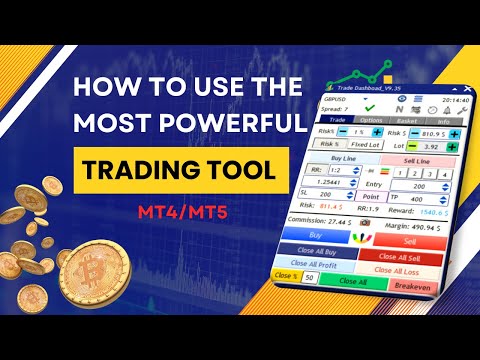
Tired of complex order placement and manual calculations? Trade Dashboard is your solution. With its user-friendly interface, placing orders becomes effortless, by a single click, you can open trades, set stop loss and take profit levels, manage trade lot size, and calculate risk to reward ratios, allowing you to only focus on your strategy. Say goodbye to manual calculations and streamline your trading experience with Trade Dashboard.

Download Demo Version right now.

You can find Details of Dashboard Functions and features here.

Watch Instructional Videos here.

Join Telegram Channel for tips, updates, and useful trading information,

Please Message Me after purchase for support. You can leave your ideas in the comment section of the product, if you need more features to be added, I am open to any suggestion and I want you to get the best experience from working with my products.

Purchase includes all future updates.

You can run the softwere on 10 different VPS/Computers with each purchase, 

Here is the MT4 version.

Risk Management: Set your risk as a percentage of your balance or equity with Trade Dashboard. Or set your risk as a total amount of money, Visually define your stop loss on the chart, and let the tool accurately calculate the appropriate lot size for each currency pair. The tool also can automatically set your take profit level based on your desired risk-to-reward ratio. It even covers commission and spread fees in lot size calculations. Additionally, Your stop loss and take profit can turn to a virtual levels to keep it hidden from your broker. Take control of your risk and protect your capital with Trade Dashboard's advanced risk management capabilities.

Trade Lines: The beauty of this tool is perfect and simple visualization, you can visually set stop loss and take profit and entry levels, you can visually set risk free options, you can visually set trail start line, you can visually set expiration time for orders and again you can visually modify all of that. You can pin(lock) your stop loss to a certain price, so that when price moves, your lot size will be adjust based on new stop loss size while your stop loss price remain at its price.

Partial Close: Elevate your trading precision with our innovative Partial Close feature. Easily set multiple levels of partial stop loss or take profits visually, allowing for precise trade management. Adjust closure volumes based on initial or current lot sizes, and define distances with precision using points, RR ratio, or TP percentage.

Breakeven: Enjoy the added flexibility of setting a risk-free (breakeven) start line, ensuring your position becomes automatically risk-free after reaching a certain level of profit. The tool can set your lock profit amount in a way to compensate commission fee.

Trailig Stop Loss: With 8 types of trailing stop loss options, Trade Dashboard dynamically adjusts your stop loss as the price moves, maximizing your profit potential. Take full control of your trades and optimize your profitability with Trade Dashboard's powerful functionality. You have the option to set Regular, RRBased, Candle HH/LL, Profit, Moving Average, PSAR, ATR and Fractal based trailing stop types.

Grid: Placing Grid of orders with specified amount of distance and lot size multiplier.

Basket Management: Whether you have multiple buy or sell trades or follow a grid strategy, Trade Dashboard provides valuable insights. Visualize the breakeven price of your buy and sell orders directly on the chart. Take control of your trade baskets by setting a unified stop loss or take profit for your buy or sell positions. Additionally, define a universal stop loss and take profit for the entire basket. With the ability to close all trades at a specific equity level, Trade Dashboard proves useful for traders working with FTMO or similar firms. Simplify your trading process and gain a competitive edge with Trade Dashboard's comprehensive functionality.

Take Control of Manual trades: Trade Dashboard can identify your manual trades or trades that are taken by other EAs, You can take manual trades by your phone and let the tool set SL and TP automatically, or set partial close, risk free or trail stop functions for those trades.

Alert Tab: Do you have any support or resistance line for which you need to get notified if price touches that? This tab will alert you when price cross the lines you set on the chart.

Trade Task Schedular: Do you need to set a specified time for opening or closing a trade for example before news? Or do you want to close all positions or take an screenshot at a specified time or regularly every friday at a certain time? You can set any task to perform at a predefined time using the trade task schedular tool.

Session Indicator: Effortlessly track forex market sessions, customize time zones, and enhance your market timing. Identify optimal entry points and periods of inactivity with precision, empowering you to make informed trading decisions. It can also shows the start and end of the each session for the current day, directly on the chart.

Economic Calendar: I am sure you want to be aware of the economic news before you make trading decision, with economic calendar feature you can check the news of the current week categorized by impact and currency, the tool can put a line on the chart where the news is about to come. You can set the tool to close trades, give alert on the chart or your phone or take screenshot before or after a news. Every trader needs this feature.

Auto SL/TP: This feature is a practical one, especailly if you are a scalper, it can set your stop loss automatically based on ATR or Candle higher high or lower low prices, it can set TP automatically as well. Of course it adjust the lot size based on the auto stop loss value.


Over Trading: This feature is designed to stop you from over trading, it can restrict taking trades when you exceed a number of trades in a month, week, day, hour, minute or when you exceed an amout of loss or profit. 

Notification: When significant events, such as hitting stop-loss or take-profit, opening or closing trades, occur, you may find it essential to receive notifications or capture screenshots for reference. That is what notification settings do.

Hotkeys: Easily customize your trading experience by setting hotkeys directly on the chart for various actions. Activate or deactivate hotkeys for individual or multiple actions, and enhance flexibility by combining hotkeys with the shift key for seamless control.

Save/load settings: With Trade Dashboard, there's no need to navigate through lengthy lists in the EA input settings. Set up everything directly on the chart and save your configurations effortlessly. Additionally, you can save a default setting that automatically loads every time you run the EA, eliminating the need for manual adjustments each time.

Support 15 languages: English, German, French, Spanish, Portuguese, Italian, Russian, Chinese, Japanese, Korean, Turkish, Persian, Arabic, Vietnamese, Indonesian.

Differet Theme Colors: 9 different themes colors, Light Blue, Dark Blue, Navy Blue, All Dark, Semi Dark, Cyan, Black & White, Green, Brown.

Explore a wealth of functionalities with Trade Dashboard, including the ability to take hedge trades, execute reverse trades, utilize the close-by function, implement OCO (One-Cancels-the-Other), and virtual pending orders.

Take charge of your trading with the Trade Dashboard. Stay informed about risks, maintain control over trades and accounts. Its intuitive interface ensures quick adaptation. Our support team is available for assistance. Equip yourself with powerful tools for a competitive edge in the market.

Note: Trade Dashboard support all type of assets, including forex currencies, indices, metals, commodities, cryptocurrencies, and more.

Author: "My name is Ameri, With 8 years of finance studies and experience as both a trader and developer, I strive to simplify the lives for fellow traders. I personally use and constantly update my own product for trading, ensuring ongoing support. I look forward to connecting with you and being a part of your trading journey."

#Tags: Trade management, Risk management, Order Management, Trade Panel, Lot Size Calculator,LotSize Calculator, Visualization tools, Simplified trading, Precise position sizing, Risk-to-reward ratio,Risk Reward Tool, Alert Notifications,  Screenshot, Universal stop loss, Universal take profit, Trailing stop options, Risk-free options,Breakeven, Grid strategy, Equity protection, Scalp, Scalping, Scalper, Hotkeys, Close All, Hedge, Close By, Fast Trading, Trade basket management, Trading Panel, Trade Manager, Trading Assistant, Trade Assistant, Break Even, Partial Close, Virtual Stop Loss, Virtual Take Profit, Invisible Stop Loss, Invisible Take Profit, virtual pending order, News Panel, News Filter, Economic Calendar, Market Session, Task Schedular, Trade Timer, Auto stop loss, Auto Take Profit, Trade Notification, OverTrading

Recensioni 125
K T
88
K T 2026.01.18 11:38 
 

The "basket" option is very useful for accounts that have trades with multiple magic numbers. I run this tool in 3 charts(same terminal) to auto manage different magic numbers with different settings

Roger Gerndt
30
Roger Gerndt 2026.01.15 16:57 
 

It s a great and perfect Tool for position sizing. Incredible good Work !!! Handclap.

Oyeleye OluJireh
33
Oyeleye OluJireh 2026.01.07 08:19 
 

Awesome product! Great for a serious trader limiting emotional involvement!

Prodotti consigliati
Introducing the "Auto Timed Close Operations", a useful utility for MetaTrader 5 traders! This utility has been developed to help traders of all levels automatically close their open positions at the exact moment they desire. With the "Auto Timed Close Operations", you gain the required control over your trades and can avoid unwanted surprises at the end of the day or at any other predefined time. We know how important it is to protect your profits and limit your losses, and that's exactly what
Danko DTC Panel
Ricardo Almeida Branco
Do not buy before seeing the Danko Trend Color product, as this panel is a way to view a summary of this indicator on various timeframes. The Danko DTC Panel utility allows you to look at the trend in up to 5 timeframes. When clicking on the timeframe texts, a new window will open with the indicator plotted on the screen so you can see the complete chart. The width of the panel, with the amount of candles you want to see, is customizable, see the images below. Ao clicar nos textos dos timeframe
Sync In Many Ways MT5
Sa No Tsuyoshi Kokorozashi
Description This is a Utility tool for MT5 which will make our chart analysis task quite more efficient and save large amount of time. As for chart analysis, some are watching out several symbol simultaneously with single timeframe and others are trading only one single pair with   multi timeframe analysis. For both, a common troublesome issue is “scroll chart to look back” or “draw chart objects” in multi charts at the same time.  Especially for those who are trading with multi timeframe soluti
MT5 for Telegram Signals
Sergey Batudayev
5 (10)
The utility is designed to send signals from MT4 to Telegram. It has several unique features, allowing not only the sending of trade signals but also the following functionalities: Send messages directly from the terminal to Telegram Send emojis along with custom text Send text and images from Telegram All of these features enable users to manage a signal channel while focusing on trading and finding quality signals. Customizable Signal Messages You can fully customize the signal message: Specif
This EA help trader to manage his pending orders, when you place many Pending Orders this utility monitor them and when of them get filed (executed) the EA cancel and delete all rest of pending orders, to avoid  opening of all of pending orders at the same time , and lose your risk management. this utility is very useful for trader when he /she is not available on the desk.
Pending Orders Grid Complete System opens any combination of Buy Stop, Sell Stop, Buy Limit and Sell Limit pending orders and closes all existing pending orders. You will be able to Drag-and-Drop the Script on the chart and it will pick up the start price for the first position in the grid from the "Drop" point. Usually it should be in the area of Support/Resistance lines. Input Parameters Before placing all pending orders, the input window is opened allowing you to modify all input parameters:
Position Size Tool
Filipp Pavlov
5 (1)
Position Size Tool is an on-chart trading tool that lets you manage trades entirely with your mouse and hotkeys — switch between preset risk percentages, place orders with instant position sizing, see live SL/TP distances and risk/reward, and close positions partially with a click. Download Demo version  Demo is limited to EURUSD pair on demo account on 1 hour timeframe. Key Features: Market/pending orders by mouse & hotkeys with auto risk-based sizing. Change risk % with A/S hotkeys. Change aut
Session High Low Tracker MT5
AL MOOSAWI ABDULLAH JAFFER BAQER
Session High Low Tracker - Essential Multi-Session Price Analysis Tool Powerful Market Session Analysis for Serious Traders Price: $30 Product Overview Session High Low Tracker is an advanced MetaTrader utility that automatically identifies and displays the high and low price points across Asian, London, and New York trading sessions. This professional-grade tool helps traders recognize key market levels, identify potential breakouts, and develop precise session-based trading strategies. Key Fea
Operational Management MT5
Leonardo Gabriel Caceres
Operative Management Pro – Advanced Trading Utility Operative Management Pro is a smart visual tool for traders who want to analyze and simulate their trades before placing them on the market. This panel displays in real-time the most important parameters of the current symbol: Current price and minimum lot size Required margin Spread cost in USD and pips Take Profit and Stop Loss value in USD Automatic risk and reward calculation With just a click on the chart, you can simulate BUY or SELL t
"Telegram Notification EA for MetaTrader 5 with ThreadID Mode" Description: Introducing our advanced Expert Advisor (EA) tailor-made for MetaTrader 5, delivering seamless notifications for trade openings and closures, along with comprehensive profit and drawdown tracking. Stay ahead of the market curve with timely updates, empowering you to make informed decisions and optimize your trading strategy effortlessly. Key Features: Instant Trade Notifications: Receive real-time updates directly from y
This is an utility for MetaTrader 5 designed to send notifications to a Telegram bot regarding trading activity on the terminal. The EA monitors changes in positions and orders, then sends structured messages to specified Telegram chats through the Telegram Bot API. It can optionally include chart screenshots when positions are opened. The EA uses the WebRequest function to communicate with the Telegram API. No additional servers or external services are required. Main Features Position Activity
Salve commercianti! Sono il tuo assistente commerciale. Permettetemi di dirvi la mia competenza: 1. Sono bravo nella gestione delle tue posizioni, indipendentemente da quale estremità hai posto un ordine, posso aiutarti per la prima volta ad aggiungere una linea di stop loss ragionevole e lo stop loss mobile. 2. Posso aiutarti a evitare l’ascesa e la caduta e a sradicare le debolezze umane dalle radici dei principi. 3. Ti invierò un messaggio di notifica al tuo client MT5 mobile al miglior punt
ICT PD Arrays Trader
Aesen Noah Remolacio Perez
Attention All ICT Students! This indispensable tool is a must-have addition to your trading arsenal... Introducing the ICT PD Arrays Trader: Empower your trading with this innovative utility designed to enhance and simplify your ICT trading strategy and maximize your potential profits.  How does it work? It's simple yet highly effective. Begin by placing a rectangle on your trading chart and assigning it a name like 'ict' or any preferred identifier. This allows the system to accurately ident
LotMaster AI
Oleksandr Kashyrnyi
LotMaster AI – Calcolo Intelligente del Lotto & Gestione del Rischio! Calcolo automatico della dimensione del lotto e protezione del capitale per un trading sicuro e stabile! Cos'è LotMaster AI? Questo Expert Advisor calcola automaticamente la dimensione della posizione in base al saldo del conto e alla percentuale di rischio selezionata. Dimentica le congetture su quanti lotti aprire – LotMaster AI lo fa per te , tenendo conto del Stop Loss e delle condizioni di mercato . Funzionali
Un grafico. Controllo totale. Smetti di perdere tempo a gestire oggetti, colori e impostazioni su ogni grafico separatamente. Con       Chart Sync Manager   , puoi       sincronizza, copia e controlla tutti i tuoi grafici MetaTrader       all'istante, utilizzando un solo pannello e poche scorciatoie. Disegna una volta, aggiorna ovunque. Apri e chiudi i grafici con un solo clic. Mantieni pulito il tuo spazio di lavoro con       gestione degli oggetti basata sui simboli   . E non perdere mai detta
Volume Flow Binance
Thalles Nascimento De Carvalho
Volume Flow Binance! Hai mai immaginato di poter accedere ai times and trades della tua criptovaluta preferita, con dettagli sul flusso dei volumi e sull'analisi dei movimenti di prezzo, anche se il tuo broker non offre un accesso completo alla cronologia delle transazioni? Con Volume Flow Binance , ora è realtà! Questo script in MQL5 è stato progettato per i trader di criptovalute che cercano una visione dettagliata della dinamica del mercato in tempo reale. Caratteristiche princ
FREE
Order Trailing
Makarii Gubaydullin
Trailing degli ordini: ottieni il miglior prezzo di esecuzione mentre il mercato si muove Il trailing degli ordini in sospeso ti permetterà di mantenere la distanza dal prezzo di ingresso alla distanza specificata. L'ordine si sposterà se il prezzo di mercato si allontana da esso. Utilità multifunzione : 66+ funzioni, incluso questo strumento | Contattami se hai domande | Versione MT4 Per attivare il Trailing degli Ordini, è necessario impostare i 4 parametri principali (nel pannello): 1. Simbo
TradingX Hotkeys
Johannes Stephanus Lombard
Inputs Available Lotsizes Partial Close % You can change lotsizes as you require On an open chart click once to select chart to be able to use hotkeys on specific chart. All Pairs can be used with this expert We created this expert to be able to still trade C300 with a 0.06 Lotsize If you enter a 0.6 lot and close 0.90% you can trade with 0.06 Lot Keys to be used: B -Buy S -Sell C -Close Profitable D -Breakeven (Note if stoploss is set it won't break even) P -Partial close X -Close all
Strategy Manager is a  Multi-Time-Frame & Multi-Currency  Dashboard for  Metatrader 4 and 5. Thanks to a free, external graphical user interface, build your own strategy by combining any indicators and loading them into the dashboard to see the result ! In addition, you can precisely  set-up your Auto-trading & Notifications and use indicators for Stop-Loss, partial profit or limit. Filter your automatic trading & notifications with forex calendar and more. Open and Manage your orders directly w
Notification
Jinsong Zhang
This script notifies a user about different events by playing sounds, sending emails and text messages to a mobile device. The following events are supported: New deals (in/in out/out). Expiration of Pending orders. The terminal disconnected. The terminal or the script closed. Please set a notification type for each event separately. If you need notifications via Email, please make sure that the settings on the Email tab are correct. If you need to receive notifications on a mobile device, pleas
Order Block Real
Arnold Byarufu
1 (1)
Detailed Explanation of the Order Block Indicator What is an Order Block? An Order Block refers to a specific price zone where institutional traders (e.g., banks, hedge funds) have placed a large number of buy or sell orders. These zones are critical because they often mark areas of significant market reversals, continuations, or breakouts. In simpler terms, it's a region on the chart where the "big players" have left their footprints. Traders use these zones to predict price behavior—whether th
Tenha a boleta do ProfitChart no seu Metatrader! ........................ Agora é possível ter a boleta do profit no seu Metatrader. Envie ordens de compra e venda, acompanhe o mercado e simule estratégias em momentos de mobilidade, diretamente do seu Metatrader5. Gestão de riscos e otimização de lucros são dois princípios básicos de qualquer operação bem-sucedida. Nesse sentido, utilize as ferramentas de  STOPMOVEL, TRAILING STOP, STOPGAIN E ORDENS PARCIAIS DE SAÍDA.       Funcionalidades do
Aurex AI
Hizbullah Mangal
5 (3)
Aurex AI Institutional Gold Trading with Intelligent AI Filtering Aurex AI is a professional automated trading system developed exclusively for XAUUSD (Gold) on MetaTrader 5 . It is built for disciplined traders who prioritize capital protection , controlled market exposure , and long-term consistency . This is not a grid-based or high-frequency Expert Advisor. Aurex AI executes a maximum of one trade per day and maintains only one open position at a time , entering the market strictly when all
LineaResultadoyEjecucion
Juan Luis De Frutos Blanco
Result and Execution line, which shows the net global position, the expected profit at a given price level, and its percentage of the account balance. Additionally, with the line unselected, it executes position and/or order closing actions. You can move the line from one price to another by selecting it, to obtain information on the closing result of positions at different price levels. If you wish to close trades and/or orders, select this option in the EA parameters and then deselect the li
FREE
Complete Pending Orders Grid System opens any combinations of Buy Stop, Sell Stop, Buy Limit and Sell Limit pending orders and closes all existing pending orders. You just need to drop this script on the chart of a desired currency pair. Before placing all pending orders, the input window is opened allowing you to modify all input parameters: DeleteAllPendings – if 'true', then all pending orders (for current currency) are deleted. BuyStop – if 'true', Buy Stop order is opened. SellStop – if 'tr
AKCAP Hotkey Tool
AK Capital Markets Limited
5 (3)
Special offer for the next 10 copies Are you tired of manually navigating through menus and inputting data every time you want to execute a trade or open an order on Meta Trader? Our hotkey tool is here to make your life easier and boost your trading efficiency. Our tool is natively coded for lightning-fast performance and comes loaded with all the features you could possibly want. From pending orders and OCO orders to trailing and multiple buckets, it has everything a scalper could need. And
Discover the MSG Method: Master the Major Session Gap for Consistent Forex Profits Unlock the power of the MSG Method – our proprietary Major Session Gap strategy designed to capture high-probability trades during key market session transitions. Developed by the T1 FX Team, this innovative approach leverages algorithmic precision to identify and exploit price gaps between major trading sessions (London, New York, and Tokyo). Why Choose the MSG Method? High-Probability Setups : Focuses on session
HINN MagicEntry Extra
ALGOFLOW OÜ
4.67 (12)
HINN MAGIC ENTRY – the ultimate tool for entry and position management! Place orders by selecting a level directly on the chart! full description Key features: - Market, limit, and pending orders - Automatic lot size calculation - Automatic spread and commission accounting - Unlimited partitial take-profits  - Breakeven and trailing stop-loss and take-profit  functions - Invalidation leves - Intuitive, adaptive, and customizable interface - Works with any assets and account types Really feels
Epic Flow
Saba Ansar Ul Haq
Join WhatsApp Group for Free Signals & More Discussion https://chat.whatsapp.com/IWc1CaxviFw8Bu94JGRIQv For Live Signals Please Visit https://www.mql5.com/en/signals/2352564?source=Site+Profile+Seller 1. Manual-Assisted Trading via On-Chart Dashboard Fully graphical dashboard panel rendered directly on the chart. Customizable panel size and colors via input parameters. All trading actions are controlled by buttons and edit fields , not automatic indicators. 2. Ultra-Fast Interval-Based Order
FREE
Position Limit Monitor: Efficient Control of Your Trading Operations Have you ever worried about having too many open trades simultaneously? Would you like precise control over the maximum number of positions in your account? Position Limit Monitor is the solution you need. Main Features: • Real-time monitoring: Constantly supervises the number of open positions in your account. • Customizable limit: Easily set the maximum number of positions you want to keep open. • Automatic closure: When the
Gli utenti di questo prodotto hanno anche acquistato
Trade Assistant MT5
Evgeniy Kravchenko
4.41 (205)
It helps to calculate the risk per trade, the easy installation of a new order, order management with partial closing functions, trailing stop of 7 types and other useful functions. Additional materials and instructions Installation instructions - Application instructions - Trial version of the application for a demo account Line function -   shows on the chart the Opening line, Stop Loss, Take Profit. With this function it is easy to set a new order and see its additional characteristics bef
Forex Trade Manager MT5
InvestSoft
4.97 (585)
Benvenuto a Trade Manager EA, lo strumento definitivo per la gestione del rischio , progettato per rendere il trading più intuitivo, preciso ed efficiente. Non è solo uno strumento per l'esecuzione degli ordini, ma una soluzione completa per la pianificazione delle operazioni, la gestione delle posizioni e il controllo del rischio. Che tu sia un principiante, un trader avanzato o uno scalper che necessita di esecuzioni rapide, Trade Manager EA si adatta alle tue esigenze, offrendo flessibilità s
TradePanel MT5
Alfiya Fazylova
4.86 (148)
Trade Panel è un assistente commerciale multifunzionale. L'applicazione contiene più di 50 funzioni di trading per il trading manuale e consente di automatizzare la maggior parte delle operazioni di trading. Attenzione, l'applicazione non funziona nel tester di strategia. Prima dell'acquisto, puoi testare la versione demo su un conto demo. Versione demo qui . Istruzioni complete qui . Commercio. Ti consente di eseguire operazioni di trading con un clic: Apri ordini e posizioni pendenti con calco
Versione Beta Telegram to MT5 Signal Trader è quasi pronto per il rilascio ufficiale in versione alpha. Alcune funzionalità sono ancora in fase di sviluppo e potresti riscontrare piccoli bug. Se riscontri problemi, ti preghiamo di segnalarli, il tuo feedback aiuta a migliorare il software per tutti. Il prezzo aumenterà dopo 20 vendite. Copie rimanenti a $90:   2/20 . Telegram to MT5 Signal Trader è uno strumento potente che copia automaticamente segnali di trading da canali o gruppi Telegram a
Ultimate Extractor
Clifton Creath
5 (9)
Ultimate Extractor - Professional Trading Analytics for MT5 *****this is the local HTML version of Ultimate Extractor. Check out Ultimate Extractor Cloud on mql5 for the Cloud version****** Ultimate Extractor transforms your MetaTrader 5 trading history into actionable insights with comprehensive analytics, interactive charts, and real-time performance tracking. What It Does Automatically analyzes your MT5 trading history across all Expert Advisors and generates detailed HTML reports with inte
Trade Manager DaneTrades
Levi Dane Benjamin
4.33 (27)
Trade Manager per aiutarti a entrare e uscire rapidamente dalle operazioni calcolando automaticamente il tuo rischio. Incluse funzionalità che ti aiutano a prevenire l'eccessivo trading, il vendetta trading e il trading emotivo. Le operazioni possono essere gestite automaticamente e i parametri di performance del conto possono essere visualizzati in un grafico. Queste caratteristiche rendono questo pannello ideale per tutti i trader manuali e aiuta a migliorare la piattaforma MetaTrader 5. Suppo
Copy Cat More Trade Copier MT5 (Gatto Copiatore MT5) è un copiatore di trade locale e un framework completo di gestione del rischio ed esecuzione progettato per le sfide di trading odierne. Dalle sfide delle prop firm alla gestione di portafogli personali, si adatta a ogni situazione con una combinazione di esecuzione robusta, protezione del capitale, configurazione flessibile e gestione avanzata dei trade. Il copiatore funziona sia in modalità Master (mittente) che Slave (ricevente), con sincro
Smart Stop Scanner – Analisi multi-asset degli stop-loss basata sulla reale struttura di mercato Panoramica Smart Stop Scanner offre un monitoraggio professionale dei livelli di stop-loss su più mercati. Il sistema identifica automaticamente le zone di stop più rilevanti basandosi sulla reale struttura di mercato, sulle rotture significative e sulla logica del price action, presentando tutte le informazioni in un pannello chiaro, coerente e ottimizzato per schermi ad alta risoluzione (DPI-awar
Smart Stop Manager – Esecuzione automatica dello stop-loss con precisione professionale Panoramica Smart Stop Manager è il livello di esecuzione della linea Smart Stop, progettato per i trader che richiedono una gestione dello stop-loss strutturata, affidabile e completamente automatizzata su più posizioni aperte. Monitora continuamente tutte le operazioni attive, calcola il livello di stop ottimale utilizzando la logica di struttura di mercato Smart Stop e aggiorna gli stop automaticamente se
Exp COPYLOT CLIENT for MT5
Vladislav Andruschenko
3.82 (34)
Trade copyr per MT5 è un trade copyr per la piattaforma МetaТrader 5   . Copia le negoziazioni forex   tra       eventuali conti   MT5   -   MT5, MT4   -   MT5 per la versione COPYLOT MT5 (o MT4   -   MT4 MT5   -   MT4 per la versione COPYLOT MT4) Fotocopiatrice affidabile! Versione MT4 Descrizione completa   +DEMO +PDF Come comprare Come installare     Come ottenere i file di registro     Come testare e ottimizzare     Tutti i prodotti di Expforex Puoi anche copiare le operazioni nel termina
The product will copy all telegram signal to MT5 ( which you are member) , also it can work as remote copier.  Easy to set up, copy order instant, can work with almost signal formats, image signal,  s upport to translate other language to English Work with all type of channel or group, even channel have "Restrict Saving Content", work with  multi channel, multi MT5 Work as remote copier: with signal have ticket number, it will copy exactly via ticket number. Support to backtest signal. How to s
YuClusters
Yury Kulikov
4.93 (43)
Attention: You can view the program operation in the free version  YuClusters DEMO .  YuClusters is a professional market analysis system. The trader has unique opportunities to analyze the flow of orders, trade volumes, price movements using various charts, profiles, indicators, and graphical objects. YuClusters operates on data based on Time&Sales or ticks information, depending on what is available in the quotes of a financial instrument. YuClusters allows you to build graphs by combining da
Telegram To MT5 Receiver
Levi Dane Benjamin
4.53 (15)
Copia i segnali da qualsiasi canale di cui sei membro (compresi quelli privati e ristretti) direttamente sul tuo MT5.  Questo strumento è stato progettato con l'utente in mente offrendo molte funzionalità necessarie per gestire e monitorare gli scambi. Questo prodotto è presentato in un'interfaccia grafica facile da usare e visivamente accattivante. Personalizza le tue impostazioni e inizia ad utilizzare il prodotto in pochi minuti! Guida per l'utente + Demo  | Versione MT4 | Versione Discord
The News Filter MT5
Leolouiski Gan
4.74 (19)
Questo prodotto filtra tutti gli esperti consulenti e i grafici manuali durante il periodo delle notizie, così non dovrai preoccuparti di improvvisi picchi di prezzo che potrebbero distruggere le tue impostazioni di trading manuali o le negoziazioni effettuate da altri esperti consulenti. Questo prodotto viene fornito anche con un sistema completo di gestione degli ordini che può gestire le tue posizioni aperte e gli ordini in sospeso prima della pubblicazione di qualsiasi notizia. Una volta che
Auto Trade Copier for MT5
Vu Trung Kien
4.41 (27)
Auto Trade Copier is designed to copy trades to multiple MT4, MT5 and cTrader accounts/terminals with 100% accuracy. The provider and receiver accounts must be on the same PC/VPS. With this tool, you can copy trades to receiver accounts on the same PC/VPS. All trading actions will be copied from provider to receiver perfectly. This version can be used on MT5 accounts only. For MT4 accounts, you must use Auto Trade Copier (for MT4). Reference: - For MT4 receiver, please download Trade Receiver Fr
MT5 to Telegram Signal Provider è un'utilità facile da usare e completamente personalizzabile che consente l'invio di segnali specificati a una chat, canale o gruppo Telegram, rendendo il tuo account un fornitore di segnali. A differenza della maggior parte dei prodotti concorrenti, non utilizza importazioni DLL. [ Dimostrativo ] [ Manuale ] [ Versione MT4 ] [ Versione Discord ] [ Canale Telegram ]  New: [ Telegram To MT5 ] Configurazione Una guida utente passo-passo è disponibile. Nessuna cono
Everything for chart Technical Analysis indicator MT5 in one tool Draw your supply demand zone with rectangle and support resistance with trendline and get alerts to mobile phone or email alert -  Risk reward indicator mt5 Video tutorials, manuals, DEMO download   here .   Find contacts on my   profile . 1.   Extended rectangles and trendlines Object will be extended to the right edge of the chart when price will draw new candles on chart. This is rectangle extender or trendline extender. 2. Pri
EasyInsight AIO MT5
Alain Verleyen
4.91 (11)
EASY Insight AIO – La soluzione all-in-one per un trading intelligente e senza sforzo Panoramica Immagina di poter analizzare l’intero mercato — Forex, Oro, Cripto, Indici e persino Azioni — in pochi secondi, senza dover controllare manualmente i grafici, installare indicatori o affrontare configurazioni complicate. EASY Insight AIO è il tuo strumento definitivo di esportazione per il trading alimentato dall’IA, pronto all’uso. Offre una panoramica completa del mercato in un unico file CSV pul
Telegram to MT5 Coppy
Sergey Batudayev
5 (7)
Da Telegram a MT5:   la soluzione definitiva per la copia del segnale Semplifica il tuo trading con Telegram su MT5, il moderno strumento che copia i segnali di trading direttamente dai canali e dalle chat di Telegram sulla tua piattaforma MetaTrader 5, senza bisogno di DLL. Questa potente soluzione garantisce un'esecuzione precisa dei segnali, ampie opzioni di personalizzazione, fa risparmiare tempo e aumenta la tua efficienza. [ Instructions and DEMO ] Caratteristiche principali Integrazione d
HINN Lazy Trader
ALGOFLOW OÜ
5 (2)
Lazy Trader is your personal risk management assistant that independently finds the best market entries, manages positions, and helps you extract maximum profit from every trading idea! It monitors charts from M1 to W1 , finds optimal entry points based on your parameters, and manages trades without your involvement: - Got an idea on the daily chart? No need to wait for lower timeframes to form a signal — Lazy Trader will check everything and open all necessary positions while you live your lif
VirtualTradePad One Click Trading Panel
Vladislav Andruschenko
4.58 (72)
Pannello di trading per il trading in 1 clic.   Lavorare con posizioni e ordini!   Trading dal grafico o dalla tastiera. Con il nostro pannello di trading, puoi eseguire operazioni con un solo clic direttamente dal grafico ed eseguire operazioni di trading 30 volte più velocemente rispetto al controllo MetaTrader standard. I calcoli automatici di parametri e funzioni rendono il trading più veloce e conveniente per i trader. Suggerimenti grafici, etichette informative e informazioni complete sugl
News Filter EA: Advanced Algo Trading Assistant News Filter EA is an advanced algo trading assistant designed to enhance your trading experience. By using the News Filter EA , you can integrate a Forex economic news filter into your existing expert advisor, even if you do not have access to its source code. In addition to the news filter, you can also specify trading days and hours for your expert. The News Filter EA also includes risk management  and equity protection features. MT4 Version KEY
Risk Manager for MT5
Sergey Batudayev
4.35 (17)
Expert Advisor Risk Manager per MT5 è un programma molto importante e secondo me necessario per ogni trader. Con questo Expert Advisor sarai in grado di controllare il rischio nel tuo conto di trading. Il controllo del rischio e del profitto può essere effettuato sia in termini monetari che in termini percentuali. Affinché l'Expert Advisor funzioni, è sufficiente allegarlo al grafico della coppia di valute e impostare i valori di rischio accettabili nella valuta del deposito o in % del saldo
Mt5 To InterativeBrokers Copier allows you to copy deals from MT5 account to Interactive Brokers. With this, you can run your EA strategy on a MT5 Demo/Real Account, then copy all the deals to Interactive Brokers account real time. Features: 1. Copy or Invert-Copy deals Realtime from MT5 to IB Account. 2. Synchronizing positions of both accounts periodicaly, in case any missing copying. 3. You can choose only Buy position or Sell position. Symbols Setup: General Format:  {MT Symbol} -> {IB S
Trade Manager DashPlus
Henry Lyubomir Wallace
5 (12)
DashPlus è uno strumento avanzato di gestione delle operazioni progettato per migliorare l'efficienza e l'efficacia del trading sulla piattaforma MetaTrader 5. Offre una suite completa di funzionalità, tra cui calcolo del rischio, gestione degli ordini, sistemi di griglia avanzati, strumenti basati su grafici e analisi delle prestazioni. Caratteristiche Principali 1. Griglia di Recupero Implementa un sistema di griglia flessibile e di media per gestire le operazioni in condizioni di mercato avve
DrawDown Limiter
Haidar, Lionel Haj Ali
5 (20)
Drawdown Limiter EA You are in the right place if you were searching for Drawdown control, Drawdown limiter, Balance protection, Equity Protection or Daily Drawdown Limit related to Prop Firm, FTMO, or Funded account trading, or if you want to protect your trading account. Have you suffered from controlling your drawdown when trading funded accounts? This EA is meant for you. Prop firms usually set a rule called “Trader Daily Drawdown”, and if it is not respected, you are disqualified.  I am an
Take a Break MT5
Eric Emmrich
4.83 (23)
The most advanced news filter on MQL market - free demo available Take a Break has transformed from a basic news filter into a comprehensive account protection solution. It seamlessly pauses any other Expert Advisors during news events or based on your custom filters, all while safeguarding your EA settings - restoring them automatically when trading resumes for complete peace of mind. Typical use cases: A single news filter for all your EAs. Stop trading during news/high volatility (+ close all
Custom Alerts MT5
Daniel Stein
5 (8)
Custom Alerts: Monitora più mercati e non perdere mai un setup importante Panoramica Custom Alerts è una soluzione dinamica per i trader che desiderano monitorare più strumenti da un unico punto centrale. Integrando i dati dei nostri strumenti principali — come FX Power, FX Volume, FX Dynamic, FX Levels e IX Power — Custom Alerts ti avvisa automaticamente degli sviluppi cruciali del mercato, senza dover passare continuamente da un grafico all'altro o rischiare di perdere opportunità importanti
Crypto Charting
Rajesh Kumar Nait
5 (5)
Crypto Charting for MT5 – Integrazione grafici criptovalute in MetaTrader 5 Panoramica Crypto Charting for MT5 offre dati OHLC in tempo reale tramite WebSocket. Supporta più exchange e aggiorna automaticamente i dati in MT5. Funzionalità Dati in tempo reale via WebSocket Aggiornamento automatico dei dati storici Sincronizzazione pianificata dopo interruzioni Compatibile con tutti i timeframe MT5 Dati OHLCV completi Supporto per il tester di strategia Riconnessione automatica Exchange supportati
Comprehensive on chart trade panel with the unique ability to be controllable from mobile as well. Plus has a library of downloadable configuration, e.g. exit rules, extra panel buttons, pending order setup and more. Please see our product video. Works with all symbols not just currency pairs. Features On chart panel plus controllable from free app for Windows, iPhone and Android Built-in script engine with library of downloadable configuration, e.g. add 'Close All Trades in Profit' button, exit
Altri dall’autore
Trade Dashboard MT4
Fatemeh Ameri
4.96 (53)
Tired of complex order placement and manual calculations? Trade Dashboard is your solution. With its user-friendly interface, placing orders becomes effortless, by a single click, you can open trades, set stop loss and take profit levels, manage trade lot size, and calculate risk to reward ratios, allowing you to only focus on your strategy. Say goodbye to manual calculations and streamline your trading experience with Trade Dashboard. Download  Demo Version  right now. You can find  Details of
Pro MA Angle
Fatemeh Ameri
5 (1)
This indicator is a professional Trend identifier, it measures the angle or slope of moving averages with different methods. As this indicator calculate angles you can identify the strength of trend by magnitude of angle. It also shows if angle is increasing or decreasing which gives you the opportunity to make more information about current trend. You can combine this indicator with your strategy as a filter or you can use it alone to make your trading system. This is not a repainting indicator
FREE
Pro Close Panel
Fatemeh Ameri
3.75 (4)
This is a very simple yet useful tool to close positions with different conditions and methods. You can use panel buttons to close positions or set multiple rules to close all positions. Panel has two main tab, Active Order and Pending Orders: Active Tab: You can set profit or loss target to close all positions. You can set equity target to close all positions, You can set a special time to close all positions. Moreover, by panel buttons you can close only buy/sell positions or only negative/pos
FREE
Filtro:
K T
88
K T 2026.01.18 11:38 
 

The "basket" option is very useful for accounts that have trades with multiple magic numbers. I run this tool in 3 charts(same terminal) to auto manage different magic numbers with different settings

Roger Gerndt
30
Roger Gerndt 2026.01.15 16:57 
 

It s a great and perfect Tool for position sizing. Incredible good Work !!! Handclap.

Oyeleye OluJireh
33
Oyeleye OluJireh 2026.01.07 08:19 
 

Awesome product! Great for a serious trader limiting emotional involvement!

Steve Sullivan
59
Steve Sullivan 2026.01.05 15:27 
 

Brilliantly useful! The developer has thought of everything, this utility is so useful! Very quick to respond to questions too.

timj
153
timj 2026.01.02 16:27 
 

Yep great product. Makes trade execution much easier. Definitely recommend this!!

Sipsm
428
Sipsm 2025.12.15 21:43 
 

A very good trade management tool. The developer provides clear directions, excellent guidance, and very responsive support. I’m extremely happy with the features and look forward to future updates

小窗口
47
小窗口 2025.12.15 08:07 
 

Great tool, all I need in one

famaTV
31
famaTV 2025.12.14 18:25 
 

This is a great and valuable tool for MT5 traders, which enables us to effectively manage our trades in a quick and reliable way. It has very helpful features like risk management, market sessions, positions and orders management, an economic calendar, a task scheduler, automated SL and TP based on candles or ATR and much more. Managing other EAs trades is so outstanding. There is still more room for improvements, yet Trade Dashboard has been evolving, and the developer is so supportive and listens to and implements ideas and QoL features in a timely manner. I highly recommend this add-on. With proper use of available features, the cost is very justifiable. Very well done to the seller, and all the very best to the users :)

4xonly
147
4xonly 2025.12.10 09:25 
 

I bought the MT4 version a few years ago, coming from a poor experience with another one, much more expensive. In time I have been bothering Ameri with quite a few requests and suggestions and he's always been prompt and supportive, managing to fix bugs and implementing new features with no fuss! In time it's become an extremely powerful weapon compared to the original version. Now I've moved on to MT5 and it was a no brainer for me to buy it again. Needless to say, in MT5 it still works like a charm. No hesitation to recommend it once again: worth a thousandfold its small price! 10 stars would be a more suitable score!

Vxnity FX
21
Vxnity FX 2025.12.08 03:37 
 

I’ve been using Trade Dashboard MT5 for a while now, and it has transformed my trading experience! The interface is user-friendly, with features that streamline trading, like closing parts of trades and setting alerts for market news. What I love most is that it seems to be designed by someone who understands trading. The developer, Fatemeh Ameri, is responsive and updates the dashboard consistently. The pricing is reasonable, making it accessible for traders of all sizes. If you trade manually and want to manage your trades with less stress, this tool is definitely worth the investment. It’s the best trade management tool I've ever used!

cassianodalmoro
68
cassianodalmoro 2025.12.04 21:52 
 

Very good indicator: Useful, Easy to use He is always looking to improve the indicator.

3865633
375
3865633 2025.11.27 19:21 
 

Congratulations to the Seller for such an amazing creation. Modest price. Very nice person offering support every time I have asked. Making some amazing developments to the tool every time. Have been using for couple of years. Sorry for late review. Thank you!

Allegri Massimiliano
23
Allegri Massimiliano 2025.11.22 06:23 
 

Good dashboard

Fatemeh Ameri
14612
Risposta dello sviluppatore Fatemeh Ameri 2025.11.22 06:51
Hi. Thanks for your purchase. You should have to only send me message. I already did. Plz answer so I examine your issue.
alam0001
26
alam0001 2025.11.06 06:25 
 

great tools and good support from developer

Segio Bugay
191
Segio Bugay 2025.10.31 00:32 
 

Great tool, all I need in one

Robert Torres Jr
1893
Robert Torres Jr 2025.10.16 20:55 
 

Fatemeh Ameri, author of Trade Dashboard MT5 is an awesome person. He is committed to great support and his product is incredible. He is always listening to his customers and providing more and more value. Honestly, I feel so confident with my trades with all of the features. If you don't understand some of the features read the manual and his upgrades on his message area. Also you can reach out to him. And he will even create custom indicators and EA's with his amazing Dashboard technology. And his price is very reasonable for those of us with smaller capital. I love him!

Forexcz74
190
Forexcz74 2025.10.13 08:08 
 

I am so happy to have discovered this gem. It is exactly what I was looking for. It has so many options and I have to read the manual, but it is clear and intuitive. I really like the trade reports and alerts that appear directly on the chart when I select it. There is so much to do and for the money it is free. I definitely recommend it to everyone.

Elben
37
Elben 2025.10.11 22:36 
 

Thanks Ameri. I am satisfied with your product. It is a big help for us a trader. Hope to continue helping by developing and improving products for the trading.

Zoltán Németh
23
Zoltán Németh 2025.10.08 20:35 
 

I bought this utility more than a year ago but I have not used it since that. After some days I found it a must have software. It contains all the things I need to trade. I use it on my linux workstation under wine without any problem. I would recommend it to everybody.

Алексей
24
Алексей 2025.09.30 07:59 
 

Очень удобная штука для выставления ордеров и расчета размера позиции. В моем случае МТ5 на на macOS, замечательно все.

Rispondi alla recensione