Auto Symbol Switcher

Auto Symbol Switcher for MT5 – Watchlist Rotation for Multi-Asset Charts

Auto Symbol Switcher for MetaTrader 5 is a utility panel that automatically cycles the active chart through a list of symbols. It is designed for traders who follow many markets and want the chart to move through a watchlist without clicking symbols one by one. The tool is navigation-only: it does not open, modify or close any trades and it does not change your account in any way.

You can use the panel for Forex, indices, commodities, stocks and Contracts for Difference (CFDs), depending on what your broker provides in MetaTrader 5. The goal of the utility is to make chart navigation easier and more consistent when you monitor many instruments.

Public channel: CLICK HERE

A detailed user guide with screenshots and additional examples is available in the following article on MQL5: Auto Symbol Switcher – Full User Guide

If you also trade on MetaTrader 4, there is a separate MT4 version of this utility available in the Market: Auto Symbol Switcher for MT4

How the Panel Works

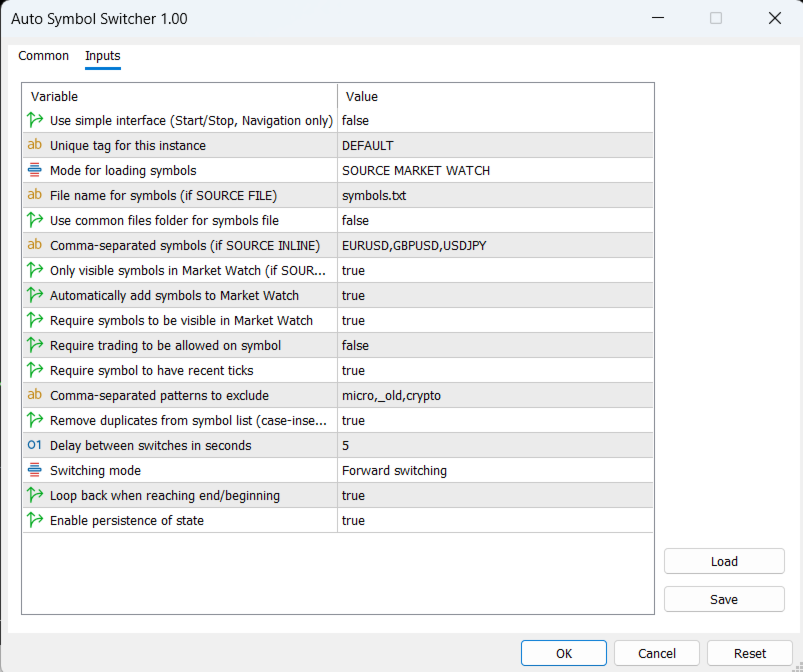
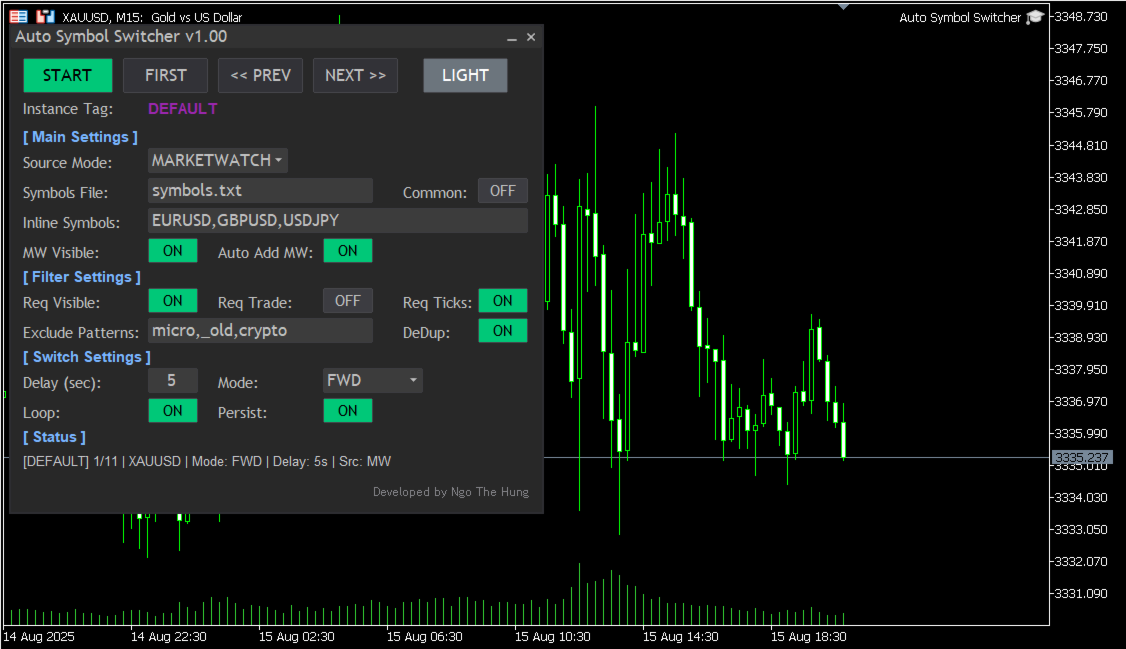
Attach Auto Symbol Switcher to any chart in MT5 and choose how you want to build your watchlist. You can use the symbols that are already visible in the Market Watch window, type a simple comma-separated list in the settings, or load symbols from an external text file. The panel then moves the chart from one symbol to the next after a delay that you define. You can switch direction or pause the rotation at any time.

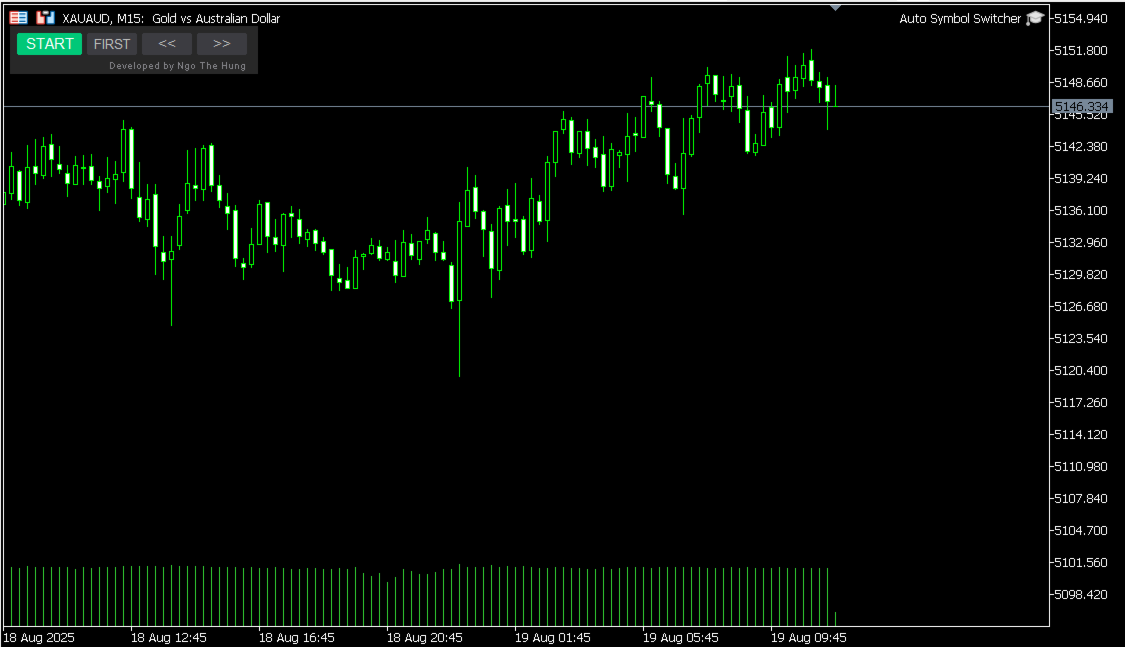
The utility offers two interface styles. A simple compact bar provides four main buttons for manual control (Start or Stop the rotation, jump to the First symbol in the list, or move to the Previous or Next symbol). The full panel adds on-screen switches, more controls and an optional light or dark colour theme so the interface remains readable during long sessions. You can choose the interface style that fits your workspace and screen size.

Key Features

  • Automatic watchlist rotation: The chart cycles through your symbol list with a user-defined delay between changes.
  • Flexible symbol sources: Build the list from the Market Watch window, from a simple inline list in the inputs, or from an external text file as described in the user guide.
  • Practical filters: Limit rotation to symbols that are visible, that have recent ticks or that are allowed for trading by the broker, and exclude symbols whose names contain unwanted patterns such as “micro”, “old” or “crypto”.
  • Optional Market Watch auto-add: If a symbol is not currently visible in Market Watch, the panel can add it automatically before switching to it.
  • Rotation styles: Choose between forward, backward or ping-pong rotation and define whether the sequence should loop at the ends or stop.
  • Per-chart persistence: Each panel instance can remember its last position and main options so multi-chart workflows remain organised after a terminal restart.
  • Light and dark appearance: Switch between light and dark colour modes to maintain good contrast on different chart backgrounds.

Who It Is For

  • Day traders and scalpers who scan many symbols on the same timeframe.
  • Portfolio watchers who rotate through lists of stocks, indices, futures or CFDs.
  • Analysts who prefer a regular, automated review of a predefined watchlist.

Using Auto Symbol Switcher in MT5

In a typical workflow, you attach the panel to one chart per watchlist. For example, you can use one chart for major currency pairs, one chart for indices and one chart for metals and energies. Each chart can have its own rotation style, delay and filters. You can pause the rotation when you want to study a symbol in more detail and resume it later with a single click.

Filters help you keep your lists focused. You can ask the panel to skip symbols that are not visible in Market Watch or that are not allowed for trading on the current account. The exclude-pattern option lets you remove groups of instruments from the rotation by simple name fragments instead of editing the watchlist manually.

Getting Started

  1. Download and install Auto Symbol Switcher for MT5 from the Market.
  2. Open a chart in MetaTrader 5 and attach the utility to that chart.
  3. Choose the symbol source (Market Watch, inline list or external file) and set the preferred rotation style and delay.
  4. Adjust basic filters and appearance options so the panel matches your workspace.
  5. Start the rotation and, if needed, use the buttons on the panel to pause, jump to the first symbol or move backward and forward manually.

Compatibility and Requirements

The utility is intended for the MetaTrader 5 platform and can be used on hedging or netting accounts. It works with any symbols that are available on your MT5 account, including Forex pairs, indices, metals, energies, stocks, futures and CFDs, subject to your broker’s data feed and permissions. Because the tool is navigation-only, it does not depend on your trading style or risk settings.

Support and Documentation

All buyers receive free updates and technical support for Auto Symbol Switcher for MT5. Suggestions that improve stability, clarity or usability are considered for future versions whenever possible.
Рекомендуем также
EW Close All – Один клик. Всё закрыто. EW Close All — это лёгкий, многоязычный эксперт-советник, который позволяет мгновенно закрыть все сделки и отменить все отложенные ордера — всего одним нажатием кнопки. Закрывает все открытые позиции   Отменяет все отложенные ордера   Работает на любом символе и любом таймфрейме   Многоязычный интерфейс   Чистый, быстрый и надёжный Идеально подходит для быстрого выхода из рынка, контроля рисков или очистки перед окончанием торгового дня. Оста
FREE
Position Stress Monitor Position Stress Monitor is a utility for MetaTrader 5 designed to visualize position structure and risk conditions directly on the chart through a compact panel. The tool does not attempt to predict the market or generate entry signals. Instead, it focuses on a different problem that many traders encounter in practice: understanding how a group of positions behaves as a whole. In real trading, especially when managing multiple entries or holding both buy and sell positio
Set an order in advanced. Literally, set and forget. ========================================== INPUTS: EA magic number (should be unique):   Set the magic number to be used when opening and closing trades. If you have other EAs on the account, make sure they use different magic numbers. DASHBOARD INPUTS: Lot Size: Set the lot size to use for the order. Default is the minimum lot size for the chart symbol. Order Type:   Choose between buy or sell. SL Points (0 = no SL): Set the stoploss to use a
Simple Stats is utility for trades history management. (works as Expert Advisor) Allowing you to:   see trading performance for each symbol separately , and so it     helps you to find the M0ST and the W0RST profitable type of trades  based on past results. filters: see only manual trades see only EA trades see only EA trades from one specific Magic Number select time period for history SS will  distinguish reports with filename - each history report is named with account number an
Account Info AS - это мощный информационный скрипт для MetaTrader 5, который отображает полную информацию о вашем торговом счете прямо на графике. Скрипт предоставляет все необходимые данные для анализа состояния счета, управления рисками и принятия торговых решений. Основные возможности  Полная финансовая информация Тип счета (Демо/Реальный/Конкурсный) Баланс, эквити и маржа Свободная маржа в деньгах и процентах Уровень маржи (Margin Level) Текущий профит/лосс  Риск-менеджмент Уровни Margin Cal
FREE
这款专为MetaTrader 5设计的EA(Expert Advisor),能够在加载后自动关闭所有图表,并立即从当前图表中自行移除。它适合那些希望快速清理所有图表,并避免手动关闭每个图表的用户。 功能特点: 一次性清理: 加载后立即关闭所有打开的图表。 自动移除: 执行完毕后,EA自动从当前图表中移除,无需手动操作。 快速高效: 适用于快速清理交易环境,特别适合在需要快速重置或结束交易日的情境。 使用说明: 只需将此EA添加到任何一个图表上,它将自动执行关闭所有图表的操作并自行移除。使用前,请确保已保存所有重要的图表数据和设置。 风险提示: 请谨慎使用此EA,以防不小心关闭重要图表。 适用于MetaTrader 5平台。 技术支持: 如有任何技术问题或需求,请联系我以获得帮助。
FREE
Super simple, convenient, useful tool. Allows displaying the end time of a candle (standard) and expanding the symbol's spread in real time. The countdown tool is smooth, not jerky or slow like some other tools Useful tool for professional traders specializing in short-term and long-term trading. Contact author or user guide: https://www.mql5.com/en/channels/metool_trading
FREE
T Manager, the ultimate trade management solution designed by traders for traders. If you are searching for a simple and efficient trade panel, trade manager, or trade assistant, you are at the right place.   The market contains a diverse number of those tools , but this one is designed by traders for traders . I designed this tool, and I am using it daily. Take my advice and stop buying tools blended with un-useful features that you will never use,   T Manager provides you with the essential y
RRPP Script
Mikhail Ostashov
RRPP Script A script for placing a pending order prepared by the Risk Ratio Trade Panel indicator. Reads the entry price, Take Profit, Stop Loss and lot size directly from the indicator lines on the chart. Requirements The Risk Ratio Trade Panel indicator must be attached to the chart and the panel must be open before running the script. How it works Attach the Risk Ratio Trade Panel indicator to the chart, open the panel and set the Entry, TP and SL lines to the desired levels. Then run RRPP Sc
FREE
Auto close
Raudel Umaran Elias
4.33 (9)
Simple program to automatically close positions by profit or loss. User can select "Total Profit" to close all positions at the same time, once the total profit or loss is reached. User can select "Single Profit" to close one by one positions, once single profit or loss is reached. Notes: 1. The assistant will not open any position. 2. The assistant only provide market orders, so due maket volatility positions can suffer slippage. 
FREE
Chart Manager EA is an MT5 utility that syncs the timeframe and chart type across every open chart simultaneously — with a single click. Stop changing charts one by one. Select your timeframe, select your chart type, hit Apply. Every chart updates instantly. What It Does The CM button sits permanently in the corner of your chart. Click it to open the compact Forge panel: Use the < > arrows on the Timeframe row to cycle through all 21 timeframes Use the < > arrows on the Chart Type row to switch
One click to close all (OCCA) предоставляет вам возможность закрыть все открытые позиции одним кликом. Здесь нет никаких настроек, просто запустите скрипт и все ваши позиции будут закрыты и это произойдет очень быстро ! Работает со всеми типами счетов, со всеми валютными парами и с любыми брокерами. Количество открытых позиций не ограничено. Скрипт бдет полезен для торговых стратегий, где необходимо управлять большим количеством позиций.
Basic Trade Buttons is a tool to help you to quickly open and close trades, place take profit and stop loss points by clicking on the button of each job that you preferred. Once you attached this tool to mt5 chart, the program will calculate a trade volume(Lots size) automatically to prepare to send to the trade server when you click on 'Buy' or 'Sell' button. Click on 'TP', 'SL' or 'Close' button to place take profit, stop loss based on the predefined levels or to close all open positions respe
The Dfx Position Risk Calculation Tool is an MT5 indicator developed by DefenderFX Ltd. designed to assist traders in assessing risk and reward for their trades. The tool automatically calculates the risk-to-reward ratio based on user-defined parameters, such as lot size and take profit (TP) level. It provides visual lines on the chart for entry (Blue Color), stop loss (SL) – Red Color, and TP levels (Green Color), which traders can adjust by dragging. Key Features: Input Parameters : Traders ca
Telegram to mt5 signal copier
Chukwuemeka Kingsley Anyanwu
5 (1)
Copies Signal from any Telegram channel and instantly executes the trade on MT5 without admin rights! Do you receive trading signals on Telegram and wish they could execute instantly on Meta Trader 5? READ THIS FOR SETUP GUIDE Telegram to MT5 Signal Copier is a powerful bridge between your Telegram signal channels and MetaTrader 5. It listens to messages from a specific Telegram channel and automatically extracts trading signals — including symbol, action, entry price, stop loss, and take prof
Ratio Spread
Manh Viet Tien Vu
This tool helps you calculate the ratio of slippage and current spread compared to the average price movement over the timeframe of a specific symbol. It can indicate whether you should trade on that timeframe or not. If the ratio is too high, it will be very challenging to make a profit. Typically, this ratio should be less than 15%.. Simply add it to the chart of the timeframe for the symbol you wish to estimate.
FREE
Advanced Trailing Stop & Break-Even Expert Advisor with Partial Profit Taking Overview Unlock the full potential of your trading strategy with this Expert Advisor that automates trade management to maximize profits and minimize losses. Designed for both novice and experienced traders, this EA offers precise control over your trades with customizable trailing stops, break-even protection, and partial profit taking — all working seamlessly to protect your capital and lock in gains. Key Features Dy
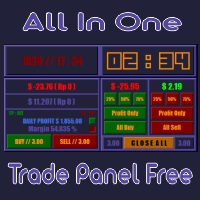
All In One (AIO) A2 Trade Panel EA  made for you that like SCALPING, HEDGING, or LONG TIME TRADING. TRIAL VERSION, FOR DEMO ACCOUNT ONLY Features : TRADING INFORMATION Profit / Loss information (Customizable information - See on Attached Pictures) Margin Level information Equity information Total Lots Information Time information (Customizable information - See on Attached Pictures) Daily Profit / Loss Information TRADE MANAGER Close Buy / Sell Trade Close Buy / Sell Profitable Trade Close Parti
FREE
This is the demo Version of Money and Trade Manager, which can be found here: https://www.mql5.com/en/market/product/58163# The Demo is limited to EUR/USD , but otherwise fully functional. Features: easy positioning of stoploss and takeprofit with horizontal Assistance-lines automatic Volume calculation fixed risk, set by the trader Closing of all trades of one type, with the click of one button (long or short, for this symbol) Creation of pending orders with one click Direct feedback throug
FREE
Guardian Yield Keeper is a utility Expert Advisor for traders who want real-time exit management and profit protection for open positions on the current symbol. This EA does not open new trades and does not generate entry signals. Its job is simple: monitor existing positions and close them when your profit or risk conditions are met . It is especially suitable for traders using DCA, Grid, Martingale, or basket trading systems and looking for a dedicated management layer that is more flexible th
Virtual sl tp Manager
Calvin Andile Mahlangu
5 (1)
Virtual SL/TP Manager manages stop loss and take profit levels as virtual chart objects instead of relying on broker-side SL and TP orders. It draws horizontal lines with Labels showing the projected profit or loss at each virtual exit level. This approach is useful for traders who want hidden exits, flexible post-entry trade management, and visual control over stop loss and take profit levels directly on the chart. The EA does not need to place broker stop loss or take profit orders. Instead
FREE
This EA helps to Close all Positions opened. It saves you the time of closing multiple positions manually. Parameters: Buy:  Close Buy Positions Only Sell:  Close Sell Positions Only Buy & Sell: Close Buy & Sell Positions Pending: Close Pending Orders More Advanced MT5 version available at:  https://www.mql5.com/en/market/product/93301?source=Unknown%3Ahttps%3A%2F%2Fwww.mql5.com%2Fen%2Fmarket%2Fmy More Advanced MT4 version available at:   https://www.mql5.com/en/market/product/93468?source=Unk
Move TP & SL (MT5) — это вспомогательный торговый скрипт, который позволяет быстро перемещать уровни Take Profit (TP) и Stop Loss (SL) для открытых позиций и отложенных ордеров одним кликом. Скрипт поддерживает два режима работы: Pips Mode : установка TP и SL на фиксированное количество пунктов (пипсов) от цены открытия ордера. Price Mode : установка TP и SL непосредственно на заданный ценовой уровень. Вы можете выбрать, какие ордера будут изменены: все ордера, только открытые позиции или только
FREE
Automated Report Generator for the Spanish Treasury This utility allows you to generate automated reports for the Spanish treasury with several advantages: A detailed report is generated in an HTML file in the MetaTrader 5 base directory. This report includes all operations individually. For accounts nominated in another currency, the report will automatically generate a profit column in euros using the same broker data. Profits in other currencies will be accounted for as indicated by the Spa
TrailingTrader MT5 – Trailing Stop-Loss and Take-Profit Script  Upon activation of the TrailingTrader script , open positions of specified trading instruments in the quote window will automatically implement an intelligent trailing stop strategy. This helps traders lock in profits and manage risks without the need for manual monitoring and adjustments. Core Configuration Parameters Symbol : Specify the trading instruments for which trailing stops should be applied. Use English commas (,) to sepa
Утилита предназначена для   смены символа   текущего, всех или выбранных чартов, смены таймфрейма , а также для   синхронного перемещения по истории   всех чартов (автоматически или по кнопке). Список символов считывается из "Обзора рынка" или задаётся вручную. Цвет, размер и положение кнопок настраиваются. Синхронизация чартов происходит по времени первого видимого бара при нажатии на кнопку "SYNC" или при перемещении мышью/клавиатурой в автоматическом режиме. В утилите использованы функции раб
One Click Trader  is a tool designed for MetaTrader 4 platform, which enables you to take your trading to the next level. It enables you to open, manage and close your trades in simple an efficient way by just one click of your mouse button. "-"   ,  "+"  change OCT window size  Up arrow minimizes the OCT panel Down arrow maximizes the OCT panel Right arrow displays the next panel with additional features Left arrow hides the panel with additional features Red  SELL  button enables you to open s
Bneu Performance Mastery System — AI Trading Coach and Behavior Analysis Premium on-chart performance analysis utility with 4 dashboard tabs. AI Coach analyzes your closed trade history and provides personalized coaching with actionable advice in real-time. 5 behavior detectors catch overtrading, revenge trading, and tilt. Pattern analysis finds your best and worst days, sessions, and pairs. Achievement system rewards discipline and consistency milestones. Telegram reports deliver daily and we
Stop calculating lot size manually. Stop over-risking, revenge trading, breaching prop-firm rules. Stop one bad trade from destroying your account. Risk Reducer is a manual MetaTrader 5 trade panel with automatic position sizing and fixed-risk order preparation directly from the chart. Choose your risk, click BUY or SELL, place Stop Loss on the chart, and Risk Reducer calculates the lot size automatically. If RR is enabled, Take Profit is derived from your Stop Loss distance and selected risk/re
FREE
BuyMarket
Pietro Caporale
Простой скрипт для открытия ордеров Buy по рынку на любом финансовом инструменте. Входные параметры Volume - по умолчанию: 0.10 Deviation - по умолчанию: 10 пунктов Stoploss - по умолчанию: 50 пунктов Takeprofit - по умолчанию: 50 пунктов Comment - по умолчанию: Order by Market Confirm - по умолчанию: false Описание входных параметров Тип ордера Доступны только ордера Buy. Deviation Максимальное отклонение от запрошенной цены (в пунктах). Stoploss и Takeprofit Стоп-лосс и тейк-профит в пунктах
FREE
С этим продуктом покупают
Trade Assistant MT5
Evgeniy Kravchenko
4.42 (211)
Помогает рассчитать риск на сделку, простая установка нового ордера с помощью линий, управление ордерами с функциями частичного закрытия, 7 типов трейлинг-стопа и другие полезные функции. Дополнительные материалы и инструкции Инструкция по установке - Инструкция к приложению - Пробная версия приложения для демо счета Функция Линии   - отображает на графике линию открытия, стоп-лосс, тейк-профит. С помощью этой функции легко установить новый ордер и увидеть его дополнительные характеристики пе
Добро пожаловать в Trade Manager EA — лучший инструмент для управления рисками, предназначенный для упрощения, точности и эффективности торговли. Это не просто инструмент для размещения ордеров; это комплексное решение для удобного планирования торгов, управления позициями и усиленного контроля над рисками. Независимо от того, начинающий вы трейдер, опытный специалист или скальпер, нуждающийся в быстром исполнении, Trade Manager EA адаптируется к вашим потребностям и работает с любыми активами:
Quant AI Agents is NOT AN Expert Advisor. Quant AI Agents   is a   multi-agent AI trading framework   that turns natural-language strategy prompts into live.  WANT THE SAME RESULTS AS MY LIVE SIGNAL?   Use the exact same brokers I do:   IC MARKETS , IC TRADING   .  Unlike the centralized stock market, Forex has no single, unified price feed.  Every broker sources liquidity from different providers, creating unique data streams. Other brokers can only achieve trading performance equivalent to 60
Local Trade Copier EA MT5
Juvenille Emperor Limited
4.96 (138)
Опыт экстремально быстрого копирования сделок с помощью Local Trade Copier EA MT5 . Благодаря простой установке в течение 1 минуты этот копировщик сделок позволяет вам копировать сделки между несколькими терминалами MetaTrader на одном компьютере с Windows или на Windows VPS с крайне быстрыми скоростями копирования менее 0.5 секунды. Независимо от того, новичок вы или профессиональный трейдер, Local Trade Copier EA MT5 предлагает широкий спектр опций, чтобы настроить его под ваши конкретные по
TradePanel MT5
Alfiya Fazylova
4.87 (155)
Trade Panel — это многофункциональный торговый помощник. Приложение содержит более 50 торговых функций для ручной торговли и позволяет автоматизировать большинство торговых операций. Перед покупкой вы можете протестировать демоверсию на демо-счете. Скачать пробную версию приложения для демонстрационного аккаунта: https://www.mql5.com/ru/blogs/post/750864 . Полная инструкция здесь . Торговля. Позволяет совершать торговые операции в один клик: Открыть отложенные ордера и позиции с автоматическим р
Бета-версия Telegram to MT5 Signal Trader почти готов к официальному альфа-релизу. Некоторые функции все еще находятся в разработке, и вы можете столкнуться с небольшими ошибками. Если вы заметите проблемы, пожалуйста, сообщите о них, ваша обратная связь помогает улучшать программное обеспечение для всех. Telegram to MT5 Signal Trader — мощный инструмент, который автоматически копирует торговые сигналы из каналов и групп Telegram прямо в ваш счёт MetaTrader 5 . Поддерживаются как публичные, так
Farmed Hedge Yield Farming | All Markets (Manual - Hybrid - Semi/Automated EA) MULTI-ASSET SUPPORT Trade any asset available on your broker - Forex: Major, Minor, Exotic pairs - Crypto: BTC, ETH, XRP, SOL, BNB - Stocks: Apple, Tesla, Amazon, Google, etc. - Commodities: Gold, Silver, Oil, Gas - Indices: US30, NAS100, SPX500, DAX40 - Any CFD your broker offers VERIFIED TRADING RESULTS - Farmed Hedge Yield Axi Copy:  https://www.mql5.com/en/signals/2356376 - Farmed Hedge Yield Exn Copy:   https:/
Power Candles Strategy Scanner — самооптимизирующийся инструмент для поиска настроек по нескольким инструментам Power Candles Strategy Scanner использует тот же самооптимизирующийся движок, что и индикатор Power Candles — для всех символов в вашем Market Watch, одновременно. На одной панели отображается информация о том, какие символы в данный момент являются статистически торгуемыми, какая стратегия выигрывает на каждом из них, оптимальная пара Stop Loss / Take Profit, а также отправляется увед
YuClusters
Yury Kulikov
4.93 (43)
Внимание: Ознакомиться с работой программы можно с помощью бесплатной версии  YuClusters DEMO . YuClusters это профессиональная система анализа рынка. Для трейдера открываются уникальные возможности анализа потока ордеров, объемов торговли, движения цены используя различные графики, профили, индикаторы, графические объекты. YuClusters оперирует данными на основе ленты сделок или тиковой информации, в зависимости от того, что доступно в котировках финансового инструмента.  YuClusters позволяет с
Premium Trade Manager - Быстрое и дисциплинированное управление сделками в MetaTrader 5 Premium Trade Manager - это быстрая панель на графике для MetaTrader 5, которая берёт на себя всю механическую работу по каждой сделке. Вы принимаете решение о направлении, символе и моменте входа - панель рассчитывает объём позиции исходя из вашего риска, выставляет ордер со стопом и целью, масштабирует выход частичными закрытиями, перемещает стоп и следит за экономическим календарём вместо вас. Встроенная н
Exp COPYLOT CLIENT for MT5
Vladislav Andruschenko
3.91 (33)
Профессиональный копировщик сделок для MetaTrader 5 Быстрый, профессиональный и надежный копировщик сделок для MetaTrader . COPYLOT позволяет копировать сделки Forex между терминалами MT4 и MT5 с поддержкой счетов Hedge и Netting . Версия COPYLOT для MT5 поддерживает: - MT5 Hedge → MT5 Hedge - MT5 Hedge → MT5 Netting - MT5 Netting → MT5 Hedge - MT5 Netting → MT5 Netting - MT4 → MT5 Hedge - MT4 → MT5 Netting Версия MT4 Полное описание + DEMO + PDF Как купить Как установить Как получить файлы жур
Trade Dashboard MT5
Fatemeh Ameri
4.94 (125)
Trade Dashboard simplifies how you open, manage, and control your trades, with built-in lot size calculation. It allows you to execute trades, manage risk, and control positions directly on the chart, with tools such as partial close, breakeven, and trailing stop. Designed to reduce manual work and help you stay focused on your trading decisions. A demo version is available for testing. Detailed explanations of features are provided within the MQL5 platform. Installation instructions are include
Trade copier MT5
Alfiya Fazylova
4.53 (43)
Trade Copier — это профессиональная утилита, предназначенная для копирования и синхронизации сделок между торговыми счетами. Копирование происходит от счета/терминала поставщика к счету/терминалу получателя, которые установлены на одном компьютере или vps. АКЦИЯ - Если вы уже приобрели "Trade copier MT5", вы можете получить "Trade copier MT4" бесплатно (для копирования MT4 > MT5 и MT4 < MT5). Для получения более подробной информации об условиях, пожалуйста, свяжитесь с нами через личные сообщени
Прежде чем покупать EA, проверьте, действительно ли он держится, или ему просто повезло в бэктесте. Большинство роботов продаются с красивым бэктестом. Растущая кривая доходности. Хороший profit factor. Почти никаких сомнений. И всё же многие такие EA разваливаются, как только рынок перестаёт двигаться так, как в этом историческом участке. Почему? Потому что бэктест доказывает только одно: что эта стратегия сработала на одном конкретном ценовом пути. Он не доказывает, что система выдержит другие
MT5 to Telegram Signal Provider — это простой в использовании полностью настраиваемый инструмент, который позволяет отправлять определённые сигналы в чат, канал или группу Telegram, превращая вашу учётную запись в провайдера сигналов . В отличие от большинства конкурирующих продуктов, он не использует импорт DLL. [ Демо ]   [ Руководство ] [ Версия MT4 ] [ Версия для Discord ] [ Канал в Telegram ]  New: [ Telegram To MT5 ] Настройка Доступно пошаговое руководство пользователя . Никаких знаний A
Ultimate Extractor - Professional Trading Analytics for MT5 *****this is the local HTML version of Ultimate Extractor. !!!!!it is not compatible with Cloud!!!! For the online version please reach out to me directly****** Ultimate Extractor transforms your MetaTrader 5 trading history into actionable insights with comprehensive analytics, interactive charts, and real-time performance tracking. What It Does Automatically analyzes your MT5 trading history across all Expert Advisors and generates
Copy Cat More Trade Copier MT5 (Копи-Кот MT5) — это локальный торговый копировщик и полная система управления рисками и исполнения, разработанная для современных торговых задач. От испытаний проп-фирм до управления личным портфелем, он адаптируется к любой ситуации с сочетанием надежного исполнения, защиты капитала, гибкой настройки и продвинутой обработки сделок. Копировщик работает как в режиме Мастер (отправитель), так и в режиме Слейв (получатель), с синхронизацией в реальном времени рыночны
Торговая панель для MetaTrader 5 — профессиональная торговля в один клик с графика и клавиатуры Мощная торговая панель для активного ручного трейдинга, которая позволяет открывать, сопровождать и закрывать сделки значительно быстрее и удобнее, чем стандартными средствами MetaTrader. Панель создана для тех, кто хочет получить полный контроль над позициями, ордерами, прибылью и торговыми сценариями в одном рабочем пространстве. Это не просто вспомогательная утилита. Это полноценный торговый интер
Custom Alerts AIO: Универсальный сканер рынка — Без настройки Обзор Custom Alerts AIO — это самый быстрый и простой способ отслеживать рыночные сигналы в реальном времени на множестве инструментов без дополнительной настройки и без необходимости покупать другие продукты. В состав входят все необходимые индикаторы от Stein Investments, что делает этот инструмент идеальным решением «всё в одном» для трейдеров, ценящих простоту и эффективность. Просто установите на график и сразу получайте сигнал
Poc Breakout Signal: The Ultimate Institutional Order Flow & Price Action System Elevate your trading with Poc Breakout, a comprehensive technical analysis tool designed to bridge the gap between retail trading and institutional market understanding. This all-in-one system combines powerful Buy/Sell signals, advanced Volume Profile analysis, real-time Order Flow (Depth of Market), and critical macroeconomic data to give you a clear, unambiguous edge in the markets. Poc Breakout Signal decodes c
Timeless Charts
Samuel Manoel De Souza
5 (5)
Timeless Charts is an all-in-one trading utility for professional traders. It combines custom chart types such as Seconds Charts and Renko with advanced order flow analysis using Footprints , Clusters , Volume Profiles , VWAP studies, and anchored analysis tools for deeper market insight. Trading and position management are handled directly from the chart through an integrated trade management panel , while Market Replay and Virtual Accounts provide environments for practicing trading skills and
The News Filter MT5
Leolouiski Gan
4.77 (22)
Этот продукт фильтрует всех экспертных советников и ручные графики во время новостей, так что вам не нужно беспокоиться о внезапных скачках цены, которые могут разрушить ваши ручные торговые настройки или сделки, введенные другими экспертными советниками. Этот продукт также поставляется с полной системой управления ордерами, которая может обрабатывать ваши открытые позиции и ордера на ожидание перед выпуском новостей. После покупки   The News Filter   вам больше не придется полагаться на встроен
HINN MAGIC ENTRY - лучший инструмент для входа и менеджмента позиций! Выставляет ордера через выбор уровня на графике! полное описание    ::    demo-версия    ::   60-sec-video-description Основные функции: - Рыночные, лимитные и отложенные ордера -  Автоматический подсчет лоттажа  -  Автоматический учет спреда и комиссий -  Неограниченное количество промежуточных тейков для позиций - Перевод в безубыток и трейл стоп-лосса и тейк-профита - Уровни инвалидаций - Интуитивно понятный,  адаптивный,
Seconds Chart MT5
Boris Sedov
4.59 (17)
Seconds Chart - уникальный инструмент для создания секундных графиков в MetaTrader 5 . С помощью Seconds Chart вы можете построить график с таймфреймом, заданным в секундах, получая идеальную гибкость и точность анализа, недоступную на стандартных минутных или часовых графиках. Например, таймфрейм S15 обозначает график со свечами продолжительностью 15 секунд. Вы можете использовать любые индикаторы и советники с поддержкой пользовательских символов. Работать с ними так же удобно, как и на станда
Footprint Chart Pro — Professional OrderFlow EA for MetaTrader 5 Version 6.34 | Professional tool for real traders | Institutional-Grade Visualization DEMO USERS - PLEASE SELECT EVERY TICK / REAL TICK WHEN TESTING AND YOU HAVE DOWNLOADED HISTORICAL DATA. IF YOU SEE A WAITING SCREEN AND IT IS NOT DOWNLOADING, IT MEANS YOU HAVE LOW HISTORICAL DATA. TRY 1 MIN AND 5 MIN FIRST ON 1 DAY DATA. ONE DAY DATA SHOULD BE THE NEWEST AND MOST CURRENT DATE. PLEASE WAIT UNTIL THE MARKET HAS ROLLED OVER PERIOD.
Telegram to MT5 Multi-Channel Copier автоматически копирует торговые сигналы из ваших каналов Telegram напрямую в MetaTrader 5. Никаких ботов, никаких расширений браузера, никакого ручного копирования. Вы получаете сигнал в Telegram, и советник открывает сделку на вашем терминале за несколько секунд. Продукт включает два компонента: Windows-приложение, которое слушает ваши каналы Telegram, и этот эксперт (EA), который исполняет сигналы на вашем терминале MT5. Также доступна версия для MT4. Руков
AlgoRadar
Stephen J Martret
5 (4)
AlgoRadar is an on-chart analytics dashboard for MT5 that aggregates Expert Advisor performance across multiple accounts, brokers, and platforms, including both MT4 and MT5 data, into a single live view on your MT5 chart. All analysis runs from the chart interface, with no external applications or manual report processing required. EA Analysis and Ranking For traders running multiple Expert Advisors, AlgoRadar provides a consolidated view of each EA's performance across accounts. Active EAs a
Anchor Trade Manager
Kalinskie Gilliam
5 (2)
Anchor: The EA Manager Run your full EA portfolio without conflicts, without stacked risk, and without watching every chart yourself. Anchor coordinates up to 64 Expert Advisors on a single account so only one trades at a time. Attach Anchor to any chart. Type your EA names and magic numbers in one line. Anchor handles the rest. Built for portfolios. Built for discipline. Built for prop firms. The Problem Running multiple EAs on the same account creates risk. Two gold EAs can open opposite posit
Advanced Dashboard Ultra
Mirel Daniel Gheonu
5 (2)
Stats Dashboard & Journal ULTRA для MT5 Полный командный центр трейдинга: Аналитика, Автоматизация и Анализ Новостей. Stats Dashboard ULTRA — это высшая эволюция инструмента аналитики Pro. Он превращает MetaTrader 5 в профессиональную торговую станцию, сочетая анализ эффективности институционального уровня с автоматической защитой от новостей и продвинутыми психологическими метриками. Разработано для ручных трейдеров и управляющих портфелями EA, которым нужен полный контроль. НОВОЕ В ВЕРСИИ ULTR
Trade Manager DaneTrades
Levi Dane Benjamin
4.28 (29)
Trade Manager, который поможет вам быстро входить и выходить из сделок, автоматически рассчитывая риск. Включает функции, которые помогут предотвратить чрезмерную торговлю, торговлю из мести и эмоциональную торговлю. Сделками можно управлять автоматически, а показатели эффективности счета можно визуализировать в виде графика. Эти функции делают эту панель идеальной для всех трейдеров, занимающихся ручной торговлей, и помогают улучшить платформу MetaTrader 5. Многоязычная поддержка. Версия для МТ
Другие продукты этого автора
Prop Guardian Risk Manager MT5 – Daily and Overall Drawdown Protection for Prop Firm Traders Prop Guardian Risk Manager is a professional risk-control utility for MetaTrader 5, created for traders who operate under prop firm rules. It does not open trades and does not implement any trading strategy. Instead, it runs in the background, monitors your account risk and can automatically block trading or close exposure when your own limits are reached. Use it as a safety layer on top of your manual t
MT5 Send To Telegram – Real-Time Trade Alerts & Monitoring for Telegram MT5 Send To Telegram EA is a read-only monitoring and notification utility for MetaTrader 5. It sends clean, real-time trading activity from your MT5 account to Telegram , so you can stay informed from anywhere on mobile or desktop. Safe by design: this EA does not open, close, modify, or manage trades . It only monitors your account, sends alerts, and replies to supported read-only Telegram requests. Receive alerts for new
Multi Anchor VWAP Pro MT5 – Pure Anchored VWAP | Adaptive σ-Bands | Smart Alerts Precision VWAP anchoring, no clutter. One-click anchors, dynamic σ-bands or %-bands, and instant multi-channel alerts—built for scalpers, intraday and swing traders who demand institutional-grade fair-value mapping. Public channel:   CLICK HERE Full User Guide  –  Need MT4? Click here WHY PROFESSIONAL TRADERS CHOOSE MULTI ANCHOR VWAP PRO VWAP is the institutional benchmark for fair value. Multi Anchor VWAP Pro stri
Bullish AI Trader EA (MT5) – AI-Assisted Auto Trading for XAUUSD Bullish AI Trader is an automated Expert Advisor for MetaTrader 5 designed to trade XAUUSD (Gold) with a rules-based, AI-assisted signal engine and built-in risk control. Important: Although the name is “Bullish”, the EA is NOT buy-only . It can open BUY or SELL trades — both directions follow the same logic, depending on market conditions and the detected signal. Key Features AI-Assisted Signal Engine: Uses a multi-factor model (p
Virtual SL TP Trailing Pro – Client-Side Stop Loss / Take Profit and Trade Management Looking for MetaTrader 4 version?  I t is available separately in the Market:   Virtual SL TP Trailing Pro MT 4 Public channel:   CLICK HERE Virtual SL TP Trailing Pro is a trade management utility for MetaTrader that keeps Stop Loss (SL) and Take Profit (TP) levels on the client side instead of sending them to the trading server. It is designed to help you manage exits in a structured way using a clear on-cha
Raymond Cloudy Day Indicator for MT5 – Pivot-Based Reversal and Trend Levels Raymond Cloudy Day Indicator is a pivot-based level indicator for MetaTrader 5 (MT5). It was developed by Ngo The Hung based on Raymond’s original idea and is designed to give a structured view of potential reversal zones, trend extensions and support/resistance levels directly on the chart. The default settings are optimised for XAUUSD on the H1 timeframe, but the indicator can be tested and adjusted for other symbols
FREE
Virtual SL TP Trailing Pro for MT4 – Client-Side Stop Loss / Take Profit and Trade Management Looking for MetaTrader 5 version?  I t is available separately in the Market:   Virtual SL TP Trailing Pro MT5 Public channel:   CLICK HERE Virtual SL TP Trailing Pro for MT4 is a trade management utility that keeps Stop Loss (SL) and Take Profit (TP) levels on the client side instead of sending them to the trading server. It is designed to help you manage exits in a structured way using a clear on-cha
VWAP Ultimate Pro MT5 – Anchored VWAP | Session VWAP | Dynamic Bands & Smart Alerts Elevate Your Trading Edge with the Ultimate Institutional-Grade VWAP Indicator WHY PROFESSIONAL TRADERS CHOOSE VWAP ULTIMATE PRO? VWAP (Volume-Weighted Average Price) is widely used by institutions and professional traders to estimate fair market value and intraday bias. VWAP Ultimate Pro MT5 brings this power to retail traders with an all-in-one indicator, combining multi-mode VWAP, interactive anchored VWAP,
Multi Anchor VWAP Pro MT4 – Pure Anchored VWAP | Adaptive σ-Bands | Smart Alerts Precision VWAP anchoring, purpose-built for MetaTrader 4. One-click anchors, dynamic σ-bands or %-bands and instant multi-channel alerts—ideal for scalpers, intraday and swing traders who need institutional-grade fair-value mapping. Public channel:   CLICK HERE Full User Guide  –  Need MT5? Click here WHY PROFESSIONAL TRADERS CHOOSE MULTI ANCHOR VWAP PRO VWAP is the institutional benchmark for fair value. This MT4
Automate Risk Management with Smart Trailing Stop Manager for MetaTrader 4 Looking for MetaTrader 5 version? I t is available separately in the Market:   Smart Trailing Stop Manager MT5 Full User Guide    –  Public channel:   CLICK HERE Struggling with manually adjusting stops and securing profits? Smart Trailing Stop Manager MT4 is an intelligent utility for MetaTrader 4 that automates trailing stops, break-even management, partial closes, and auto SL. Optimized specifically for MT4 users, it e
Phoenix Trend MT4 – ATR Grid/DCA with Trend Filter & Basket TP Phoenix Trend MT4 is a trend-following grid/DCA EA using a higher-timeframe MA filter, ATR-based dynamic grid steps, and basket-level take-profit. This product does not contain profit promises. Grid/DCA trading can experience prolonged drawdowns and may lead to margin call or full account loss in extreme conditions. Need MT5? See the Market version here: Phoenix Trend MT5 . Main features Higher-timeframe trend filter (Fast MA vs Slow
Break Even Helper for MT4 – Simple SL to Entry Utility Break Even Helper for MetaTrader 4 is a compact and effective tool that helps traders protect their open trades by automatically moving the Stop Loss (SL) to the entry price when a trade reaches a user-defined profit level (in points). Designed for risk-conscious traders, this utility simplifies SL management without relying on complex trailing systems or custom strategies. Looking for MetaTrader 5 version? I t is available separately in the
Local Account Monitor MT5 is a read-only local monitoring utility for traders who run multiple MetaTrader terminals on the same PC or the same Windows VPS . It combines Agent mode and Dashboard mode so you can monitor local accounts from one place, spot stale terminals quickly, review account health states, and inspect risk details without switching between many terminals. Public channel:   CLICK HERE What it is for Monitoring multiple local MT5 terminals from one dashboard Quickly identifying
FREE
Local Account Monitor MT4 is a read-only local monitoring utility for traders who run multiple MetaTrader terminals on the same PC or the same Windows VPS . It combines Agent mode and Dashboard mode so you can monitor local accounts from one place, spot stale terminals quickly, review account health states, and inspect risk details without switching between many terminals. Public channel:   CLICK HERE What it is for Monitoring multiple local MT4 terminals from one dashboard Quickly identifying
FREE
Alert Relay Helper (EA) – MT5 &  MT4 Encrypted bridge that forwards indicator alerts to external messengers * in real-time. Plug-and-play utility – simply attach it to one chart. Zero trading functions – does not open, modify or close orders. End-to-end AES-256 encryption – only custom indicators that support the same key can broadcast messages (e.g.  VWAP Ultimate Pro v1.20+). Multi-platform – MT5 build 4150+, MT4 build 1380+. Before you turn it on : Open Tools > Options > Expert Advisors and
FREE
Alert Relay Helper (EA) – MT5  & MT4 Encrypted bridge that forwards indicator alerts to external messengers *   in real-time. Plug-and-play   utility – simply attach it to   one   chart. Zero trading functions   – does   not   open, modify or close orders. End-to-end AES-256 encryption   – only custom indicators that support the same key can broadcast messages (e.g.  VWAP Ultimate Pro   v1.20+). Multi-platform   – MT5 build 4150+, MT4 build 1380+. Before you turn it on : Open Tools > Options >
FREE
Raw Tick Recorder EA for MetaTrader 4 For full setup instructions and demo version that works on chart (not just Strategy Tester), visit:   Full User Guide –  Raw Tick Recorde r Public channel:   CLICK HERE Raw Tick Recorder EA   is a non-trading Expert Advisor that records every incoming market tick with high-precision timestamps. It saves bid/ask data to disk in multiple formats for further analysis, model training, or broker verification. Ideal for traders, analysts, quants, and developers w
VWAP Ultimate Pro MT4 – Anchored VWAP | Session VWAP | Dynamic Bands & Smart Alerts Bring Institutional-Grade VWAP Precision to the Classic MetaTrader 4 Platform WHY TRADERS CHOOSE VWAP ULTIMATE PRO MT4? VWAP (Volume-Weighted Average Price) is a popular benchmark used by professional traders to gauge fair value and session bias. VWAP Ultimate Pro MT4 delivers that same core power to retail traders, optimised for MT4’s architecture while preserving a full professional workflow. This Indicator
Auto Symbol Switcher for MT4 – Watchlist Rotation for Market Watch Symbols Auto Symbol Switcher for MetaTrader 4 is a chart navigation utility that automatically rotates the active chart through a list of symbols. It is designed for discretionary traders, scalpers and analysts who want an organised way to scan markets without manually switching symbols in the Market Watch window. The tool is navigation-only: it does not open, modify or close any orders and it does not change your account in any
Prop Guardian Risk Manager MT4 – Daily and Overall Drawdown Protection for Prop Firm Traders Prop Guardian Risk Manager is a professional risk-control utility for MetaTrader 4, created for traders who work under prop firm rules. It does not open trades and does not implement any trading strategy. Instead, it runs in the background, monitors your account risk and can automatically block trading or close exposure when your own limits are reached. Use it as a safety layer on top of your manual trad
Raymond Cloudy Day Indicator for MT4 – Pivot-Based Reversal and Trend Levels Raymond Cloudy Day Indicator is a pivot-based level indicator for MetaTrader 4 (MT4). It was developed by Ngo The Hung based on Raymond’s original idea and is designed to give a structured view of potential reversal zones, trend extensions and support/resistance levels directly on the chart. The default settings are optimised for XAUUSD on the H1 timeframe, but the indicator can be tested and adjusted for other symbols
MT4 Send To Telegram – Real-Time Trade Alerts & Monitoring for Telegram MT4 Send To Telegram EA is a read-only monitoring and notification utility for MetaTrader 4. It sends clean, real-time trading activity from your MT4 account to Telegram , so you can stay informed from anywhere on mobile or desktop. Safe by design: this EA does not open, close, modify, or manage trades . It only monitors your account, sends alerts, and replies to supported read-only Telegram requests. Receive alerts for new
SyncGuard Local Trade Copier MT4 is a fast, professional local trade copier for MetaTrader 4 , built for traders who want serious copy-trading capability, practical control, and stable day-to-day operation on the same Windows PC or Windows VPS . It is designed for the workflows that matter most in real trading: MT4 to MT4 copying , MT4 to MT5 / MT5 to MT4 when used together with the MT5 version, one transmitter to one or multiple receivers , investor-password source following, account mirroring,
Important: This product is a Library for developers . It is suitable only for users who can write/modify MQL4 code and integrate a compiled library into their own EA/Script. It is not a “drag & run” notifier. Telegram SDK helps you send Telegram messages and photos from MetaTrader 4 in a simple and reliable way. Use it when you want Telegram notifications inside your own automation tools. If you need the MetaTrader 5 version, it is available separately in the Market:   Telegram SDK M T5 . Main f
CDV Candle Engine Pro is a MetaTrader 4 indicator designed to visualize Cumulative Delta Volume (CDV) on the chart in a clean and customizable style. It helps traders observe buying vs selling pressure more clearly and add an extra layer of confirmation to their existing trading approach. If you trade on MetaTrader 5, you can get the MT5 edition here:  CDV Candle Engine Pro MT5 Public channel:   CLICK HERE Main Features CDV candle visualization with clear up/down coloring and smooth chart-frien
GoldenTrend Master MT5: Высший по следованию за трендом эксперт-советник для торговли на Форекс Обзор: Представляем вашему вниманию GoldenTrend Master MT5 — незаменимый инструмент торговли для инвесторов, которые ищут точность и надежность на динамичном рынке Форекс. Благодаря надежному алгоритму следования за трендом, этот эксперт-советник (EA) гарантирует, что вы сможете захватить лучшие возможности для получения прибыли, минимизируя риски. Реальные сигналы счета:  https://www.mql5.com/en/sig
Автоматизированный ИИ для торговли MT5: Ваш интеллектуальный партнер для успеха в торговле на Форекс Обзор: Добро пожаловать в будущее торговли на Форекс с помощью Автоматизированного ИИ для торговли MT5, вашего верного союзника в торговле. Этот Советник (EA) является шедевром искусственного интеллекта, созданным для упрощения вашего торгового опыта. Он легко интегрируется в ваш график и работает с замечательной простотой и эффективностью на парах XAU, EUR и GBP, совместим с любым брокером. Осно
Description of Scalping MT5 EA Scalping MT5 EA is a powerful, simple, and user-friendly trading tool designed for traders seeking an effective scalping strategy. This fully automated EA saves you time and maximizes profit opportunities from short-term price movements. Key Features Fully Automated : Scalping MT5 EA handles every stage of trading, from market analysis to order placement and risk management. Easy Setup : With simple input parameters, you can customize the EA to suit your trading st
Raw Tick Recorder EA for MetaTrader 5 For full setup instructions and demo version that works on chart (not just Strategy Tester), visit:   Full User Guide –  Raw Tick Recorde r Public channel:   CLICK HERE Raw Tick Recorder EA is a lightweight utility that captures every tick from your broker's price feed in real time. It records bid/ask data with millisecond accuracy and exports to multiple formats, including .csv, .bin, and .bi5 . This EA does not send, modify, or manage orders. It only list
Take Control of Risk with Smart Trailing Stop Manager for MetaTrader 5 Looking for MetaTrader 4 version? I t is available separately in the Market:   Smart Trailing Stop Manager MT4 Full User Guide    –  Public channel:   CLICK HERE Tired of missed profits or manual stop loss adjustments? Smart Trailing Stop Manager is a powerful utility for MetaTrader 5 designed to automate your trailing stop, breakeven, partial close, and SL management. Whether you're a discretionary trader, signal follower, o
Фильтр:
Нет отзывов
Ответ на отзыв